

I see vibe coding as one of the most accessible ways to create small pieces of software with AI tools like ChatGPT, Cursor, Replit, and Gemini. Instead of writing code line by line, I describe what I want in plain language, receive working code in return, paste it into an environment like Google Colab, run it, and test the result.
Collins Dictionary named “vibe coding” word of the year in 2025, defining it as “the use of artificial intelligence prompted by natural language to write computer code.”
In this guide, I’ll explain how I approach vibe coding, where I think it works well, where it breaks down, and which SEO examples can inspire practical projects of your own.
Vibe coding variations
I use “vibe coding” as a broad term, but it helps to separate it from nearby approaches:
| Type | Description | Tools |
| AI-assisted coding | AI helps write, refactor, explain, or debug code. I usually associate this with developers or engineers who already understand the systems they are building. | GitHub Copilot, Cursor, Claude, Google AI Studio |
| Vibe coding | AI handles most of the work after I provide the idea or prompt. | ChatGPT, Replit, Gemini, Google AI Studio |
| No-code platforms | Platforms handle what I ask for through visual interfaces, drag-and-drop workflows, or background automation. Many now use AI, but they existed before AI became mainstream. | Notion, Zapier, Wix |
For this guide, I’m focusing only on vibe coding.
The barrier to entry is low. In most cases, I only need a ChatGPT account, free or paid, and access to a Google account. Depending on the project, I may also need API access or subscriptions to SEO tools such as Semrush or Screaming Frog.

I also like to set expectations early: by the end of this kind of workflow, I’m usually aiming to run a small program in the cloud. If I want to build a SaaS product or software I plan to sell, I treat AI-assisted coding as the more realistic path because it usually requires more technical knowledge, more testing, and more budget.
Vibe coding use cases
I find vibe coding most useful when I’m working with clear buckets of data and need a helpful outcome, not a perfect one. That might mean finding related internal links, adding pre-selected tags to articles, comparing groups of URLs, or building something playful where the output does not need to be exact.
For example, I built an app that creates a daily drawing for my daughter. I type a short phrase about something she told me, such as “I had carrot cake at daycare.” The app uses examples of drawing styles I like and a few pictures of her, then generates a drawing as the final output.
When I ask for precise changes, the tool often gets worse. I once asked it to remove a mustache, and instead it recolored the image. That is exactly the kind of limitation I expect with this approach.
If my daughter were a client reviewing every detail, I would need someone with Photoshop or similar skills to make exact edits. For this use case, though, the result is good enough, and that is where vibe coding shines.


I would be cautious about building commercial applications solely through vibe coding. Some companies may even need vibe coding cleaners to clean up AI-generated work. But for demos, MVPs, internal tools, and quick experiments, I see vibe coding as a useful shortcut.
How I create SEO tools with vibe coding
When I create an SEO tool with vibe coding, I usually follow three steps:
- I write a prompt describing the code I need.
- I paste the code into a tool such as Google Colab.
- I run the code and check whether the results match what I expected.
Here’s a real prompt example from a tool I built to map related links at scale. After crawling a website with Screaming Frog and extracting vector embeddings through the crawler’s OpenAI integration, I vibe coded a tool to compare topical distance between the vectors for each URL.
This is exactly what I wrote in ChatGPT:
I need a Google Colab code that will use OpenAI to:

Check the vector embeddings existing in column C. Use cosine similarity to match with two suggestions from each locale (locale identified in Column A).
The goal is to find which pages from each locale are the most similar to each other, so we can add hreflang between these pages.
I’ll upload a CSV with these columns and expect a CSV in return with the answers.
After ChatGPT generated the code, I pasted it into Google Colab, which is a free Jupyter Notebook environment for running Python in a browser. I then used “Run all” to test whether the program produced the output I wanted.

That is the clean version of the process. In practice, AI can make the workflow look perfect while still producing code that does not behave the way I need.
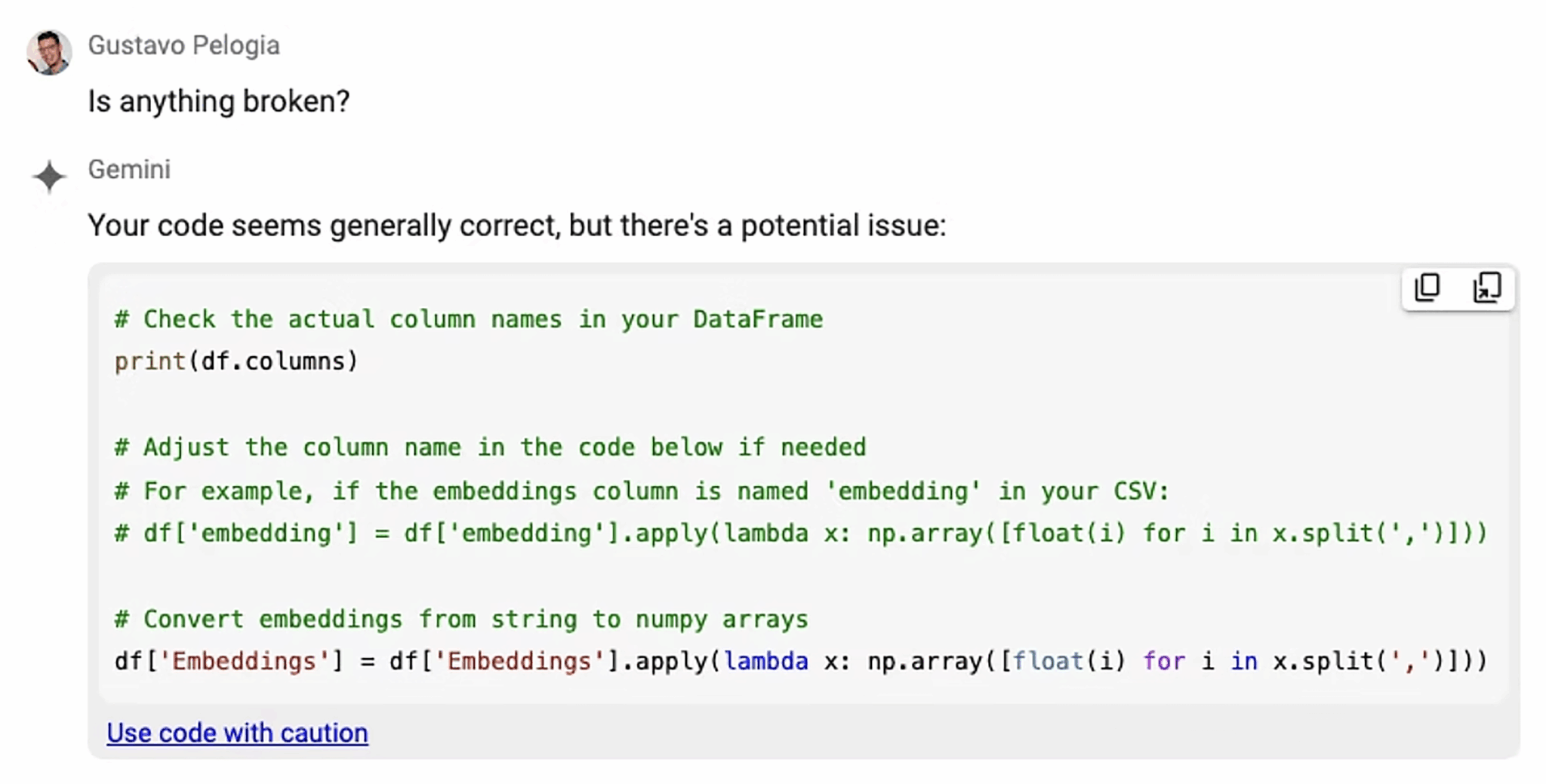
I expect issues along the way, and most of them are simple to troubleshoot if I keep the prompt and testing process clear.
First, I always state the platform I’m using. If I want code for Google Colab, I say that directly in the prompt.
Sometimes I still get code that depends on packages that are not installed. When that happens, I paste the error back into ChatGPT and ask it to fix the code or suggest an alternative. I do not need to fully understand the missing package to move forward. I can also ask Gemini inside Google Colab to identify the problem and update the code directly.

I also check outputs carefully because AI can sound confident while inventing data. One time, I forgot to specify that the source data would come from a CSV file, so the tool created fake URLs, traffic, and graphs. “It looks good” is not the same as “it is correct.”
If I connect to an API, especially a paid API from a provider such as Semrush, OpenAI, Google Cloud, or another platform, I need to request my own API key and keep usage costs in mind.


If I want an even lower execution barrier than Google Colab, I can use Replit.

With Replit, I can prompt what I want, and the platform can generate the code, design the interface, and let me test everything in one place. That reduces copy-and-paste work and gives me a shareable URL quickly. I still need to review poor outputs and keep iterating until the app behaves properly.
The tradeoff is cost. Google Colab is free unless I use paid API keys, while Replit charges a monthly subscription and usage-based API fees. The more the app runs, the more expensive it can become.
SEO vibe-coded tools that inspire me
Google Colab is the easiest place for me to start, but SEOs are taking vibe coding much further. I’ve seen people create Chrome extensions, Google Sheets automations, and even browser games.
I’m sharing these examples because they show what is possible when useful SEO ideas meet practical AI tooling. If I see a tool and wish it had a different feature, that is often a sign that I could try building a version for myself.

GBP Reviews Sentiment Analyzer by Celeste Gonzalez
After vibe coding SEO tools in Google Colab, Celeste Gonzalez, Director of SEO Testing at RicketyRoo Inc, pushed the idea further by creating a Chrome extension. “I realized that I don’t need to build something big, just something useful,” she explained.
Her extension, the GBP Reviews Sentiment Analyzer, summarizes sentiment analysis from reviews over the last 30 days and shows review velocity. It also exports the information to CSV and works on Google Maps and Google Business Profile pages.

Instead of relying only on ChatGPT, Celeste used Claude to create stronger prompts and Cursor to turn those prompts into code.
AI tools used: Claude (Sunner 4.5 model) and Cursor
APIs used: Google Business Profile API (free)
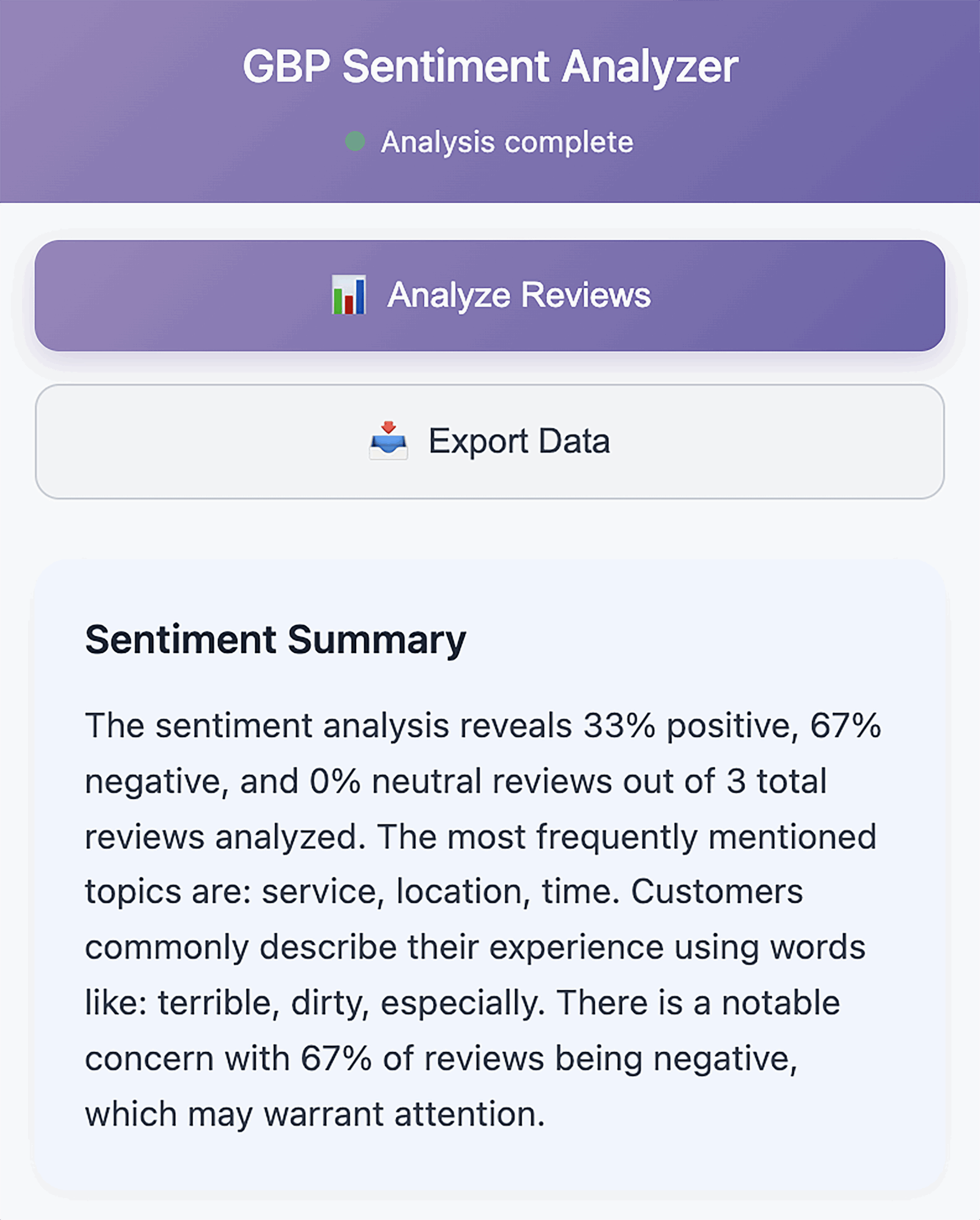
Platform hosting: Chrome Extension
Knowledge Panel Tracker by Gus Pelogia
I became obsessed with the Knowledge Graph in 2022, when I learned how to create and manage my own knowledge panel. Later, I discovered that Google’s Knowledge Graph Search API lets me check the confidence score for any entity.
That led me to build a vibe-coded tracker that checks entity scores daily, or at any frequency I choose, and returns the results in a Google Sheet. I can track multiple entities at once and add new ones whenever I need to.

The Knowledge Panel Tracker runs entirely in Google Sheets, and the Knowledge Graph Search API is free to use. This guide explains how to create and run it in your own Google account, or you can see the spreadsheet here and update the API key under Extensions > App Scripts.
AI models used: ChatGPT 5.1

APIs used: Google Knowledge Graph API (free)
Platform hosting: Google Sheets
Inbox Hero Game by Vince Nero
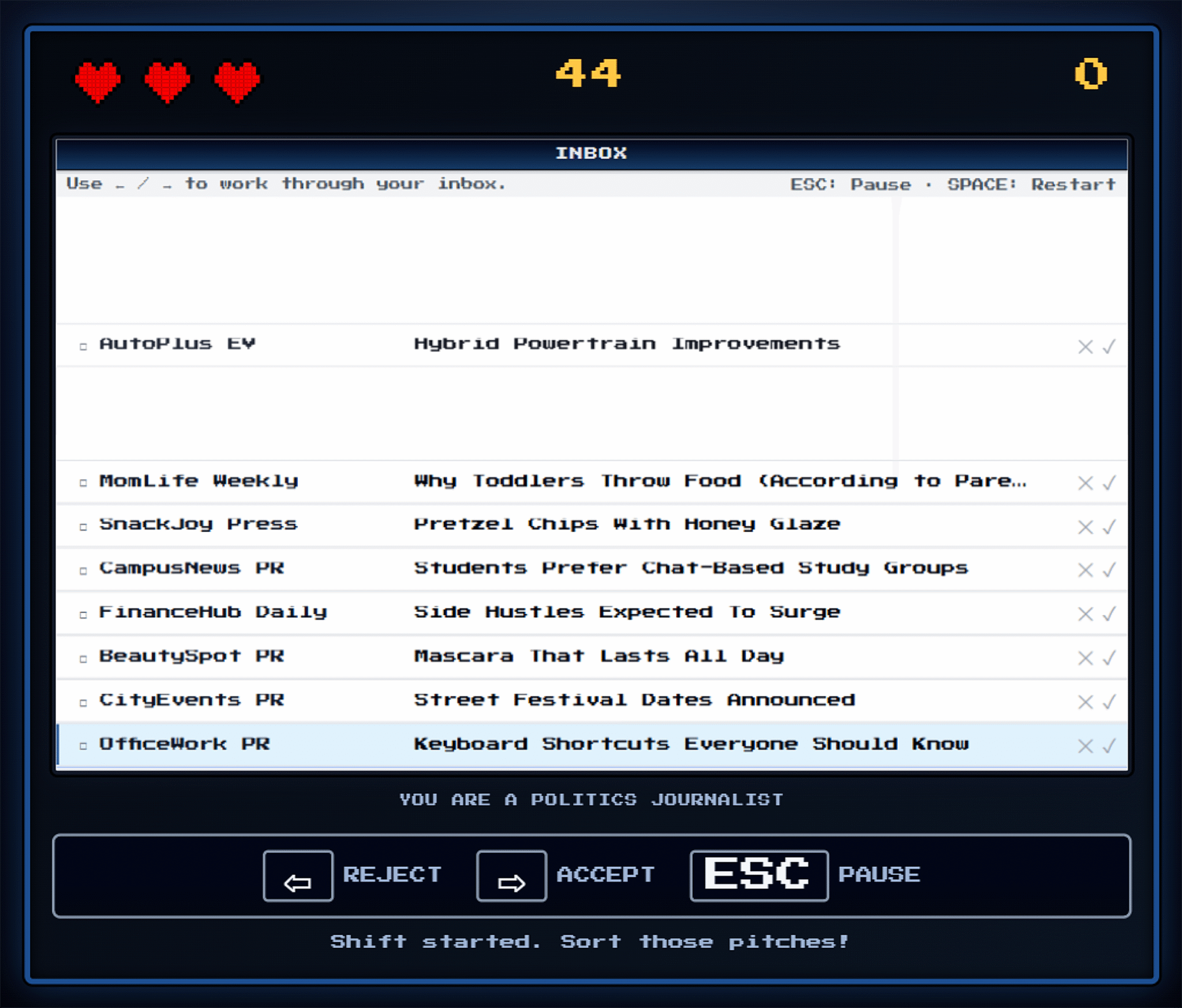
I also like the idea of vibe coding a link building asset. That is what Vince Nero from BuzzStream did with the Inbox Hero Game. The game asks players to use the keyboard to accept or reject a pitch within seconds, and it ends if they accept too many bad pitches.

Inbox Hero Game is more complex than running a small script in Google Colab, and it took Vince about 20 hours to build from scratch. “I learned you have to build things in pieces. Design the guy first, then the backgrounds, then one aspect of the game mechanics, etc.,” he said.
The game was built with HTML, CSS, and JavaScript. “I uploaded the files to GitHub to make it work. ChatGPT walked me through everything,” Vince explained.
He also found that longer prompt threads became less useful over time, “to the point where [he’d] have to restart in a new chat.”
That became one of the hardest parts of the project. Vince would add a feature, such as a score, and ChatGPT would “guarantee” it had found the error, update the file, and still return the same problem.
In the end, Inbox Hero Game shows that it is possible to create a simple game without coding knowledge. It also shows where a developer becomes valuable when the goal shifts from “working prototype” to polished product.
AI models used: ChatGPT
APIs used: None
Platform hosting: Webpage
How I think about vibe coding with intent
I do not expect vibe coding to replace developers, and I do not think it should. What I do see is a practical way for SEOs to prototype ideas, automate repetitive tasks, and explore creative experiments without a heavy technical lift.
The key is realism. I use vibe coding where precision is not mission-critical, I validate outputs carefully, and I stay alert for the moment when a project grows beyond “good enough” and needs stronger technical support.
When I approach vibe coding thoughtfully, it becomes less about shipping perfect software and more about expanding what I can test. For internal tools, proofs of concept, and SEO side projects, the best results come from pairing curiosity with restraint.
Inspired by this post on Search Engine Land.

Leave a Reply