Tag: Google Business Profile

  • Google Review Glitch: Missing Reviews Under Investigation

    Google Review Glitch: Missing Reviews Under Investigation

    I’m tracking a growing Google Business Profile issue after several days of complaints from businesses that say reviews have disappeared from their local listings. Google has now confirmed that it is investigating the reports, and in some cases, review submissions on affected profiles appear to be paused.

    What Google said. Google told us that when its systems detect suspicious review activity, it may take several actions, including removing reviews and temporarily pausing reviews on a profile to prevent further abuse. Google also said it is investigating the issue and will restore any reviews that were incorrectly removed.

    What I’m seeing. As I documented on the Search Engine Roundtable, there are dozens of complaints in the Google Business Profile Forums from business owners and local SEOs who say their reviews have mysteriously vanished. In some cases, businesses are also unable to receive new reviews on their local listings.

    From what I can tell, Google’s review spam detection systems may be identifying certain patterns and aggressively removing or blocking reviews on suspected Google Business Profiles. What remains unclear is whether this is tied to spammers abusing some profiles, a recent algorithmic adjustment, or Google’s systems becoming overly sensitive.

    More details. Amy Toman, a volunteer Google Product Expert for Google Business Profiles, shared on LinkedIn that businesses or clients affected by this issue can post in the forum if they want to, but Google is already aware of the problem and working on it. She also noted that no timeline for a resolution has been provided yet.

    She said she is seeing a new pattern where, after fake or spam reviews are reported, some Google listings receive a review block and all reviews are hidden. In at least one case, she said the rating was reduced to 0.

    Why I care. If I noticed a sudden drop in reviews or stopped receiving new reviews this week, I would consider this issue a likely explanation. For local businesses, reviews can directly affect trust, visibility, and customer decisions, so even a temporary review disruption can be frustrating.

    Google is investigating, and I’m watching to see whether missing reviews are restored and whether affected Google Business Profiles can begin receiving new reviews again.


    Inspired by this post on Search Engine Land.


    crushpress.ai community screenshot
  • How I Use Vibe Coding to Build Practical SEO Tools

    How I Use Vibe Coding to Build Practical SEO Tools

    Vibe coding for SEO

    I see vibe coding as one of the most accessible ways to create small pieces of software with AI tools like ChatGPT, Cursor, Replit, and Gemini. Instead of writing code line by line, I describe what I want in plain language, receive working code in return, paste it into an environment like Google Colab, run it, and test the result.

    Collins Dictionary named “vibe coding” word of the year in 2025, defining it as “the use of artificial intelligence prompted by natural language to write computer code.”

    In this guide, I’ll explain how I approach vibe coding, where I think it works well, where it breaks down, and which SEO examples can inspire practical projects of your own.

    Vibe coding variations

    I use “vibe coding” as a broad term, but it helps to separate it from nearby approaches:

    TypeDescriptionTools
    AI-assisted codingAI helps write, refactor, explain, or debug code. I usually associate this with developers or engineers who already understand the systems they are building.GitHub Copilot, Cursor, Claude, Google AI Studio
    Vibe codingAI handles most of the work after I provide the idea or prompt.ChatGPT, Replit, Gemini, Google AI Studio
    No-code platformsPlatforms handle what I ask for through visual interfaces, drag-and-drop workflows, or background automation. Many now use AI, but they existed before AI became mainstream.Notion, Zapier, Wix

    For this guide, I’m focusing only on vibe coding.

    The barrier to entry is low. In most cases, I only need a ChatGPT account, free or paid, and access to a Google account. Depending on the project, I may also need API access or subscriptions to SEO tools such as Semrush or Screaming Frog.

    ```json
{
  "alt": "The CapmatchOne logo with a gradient circle and bold text.",
  "caption": "Discover innovation with the CapmatchOne logo, featuring sleek typography and a modern gradient circle.",
  "description": "The CapmatchOne logo features bold, modern typography coupled with a gradient circle, symbolizing connection and innovation. The sleek design conveys a sense of progress and creativity. This image can be used for branding or promotional purposes, appealing to audiences interested in innovative solutions and forward-thinking designs."
}
```

    I also like to set expectations early: by the end of this kind of workflow, I’m usually aiming to run a small program in the cloud. If I want to build a SaaS product or software I plan to sell, I treat AI-assisted coding as the more realistic path because it usually requires more technical knowledge, more testing, and more budget.

    Vibe coding use cases

    I find vibe coding most useful when I’m working with clear buckets of data and need a helpful outcome, not a perfect one. That might mean finding related internal links, adding pre-selected tags to articles, comparing groups of URLs, or building something playful where the output does not need to be exact.

    For example, I built an app that creates a daily drawing for my daughter. I type a short phrase about something she told me, such as “I had carrot cake at daycare.” The app uses examples of drawing styles I like and a few pictures of her, then generates a drawing as the final output.

    When I ask for precise changes, the tool often gets worse. I once asked it to remove a mustache, and instead it recolored the image. That is exactly the kind of limitation I expect with this approach.

    If my daughter were a client reviewing every detail, I would need someone with Photoshop or similar skills to make exact edits. For this use case, though, the result is good enough, and that is where vibe coding shines.

    ```json
{
  "alt": "Two cartoon characters eating spaghetti at a table with forks.",
  "caption": "Two cheerful cartoon characters enjoy a classic spaghetti meal, each showcasing a different artistic style.",
  "description": "This split image features two cartoon characters sitting at a table, each enjoying a plate of spaghetti with a fork. The character on the left is depicted in a clean, outlined style with minimal shading, while the character on the right is drawn with more detail and shading, giving a sense of depth and realism. Their expressions are joyful, as they savor the spaghetti. The image highlights two contrasting artistic techniques in cartoon illustration, making it a visually intriguing piece ideal for discussions about art styles and graphic design."
}
```
    Daily drawing example created with AI

    I would be cautious about building commercial applications solely through vibe coding. Some companies may even need vibe coding cleaners to clean up AI-generated work. But for demos, MVPs, internal tools, and quick experiments, I see vibe coding as a useful shortcut.

    How I create SEO tools with vibe coding

    When I create an SEO tool with vibe coding, I usually follow three steps:

    1. I write a prompt describing the code I need.
    2. I paste the code into a tool such as Google Colab.
    3. I run the code and check whether the results match what I expected.

    Here’s a real prompt example from a tool I built to map related links at scale. After crawling a website with Screaming Frog and extracting vector embeddings through the crawler’s OpenAI integration, I vibe coded a tool to compare topical distance between the vectors for each URL.

    This is exactly what I wrote in ChatGPT:

    I need a Google Colab code that will use OpenAI to:

    ```json
{
  "alt": "Google Colab code snippet for HREFLANG matcher using Python and CSV.",
  "caption": "Dive into HREFLANG matching with this Google Colab Python script, designed to automate CSV uploads and find similar pairs. A tool for seamless data processing.",
  "description": "This image displays a Google Colab code snippet for a HREFLANG matcher written in Python. It starts by uploading a CSV file, identifies columns for locale and embeddings, and calculates the top two most similar pairs for each locale. Import statements include essential libraries such as ast, json, math, numpy, pandas, and itertools. The script concludes with an Auto-download feature for outputting results in a CSV format. Keywords: Google Colab, Python, CSV, HREFLANG, data processing."
}
```

    Check the vector embeddings existing in column C. Use cosine similarity to match with two suggestions from each locale (locale identified in Column A).

    The goal is to find which pages from each locale are the most similar to each other, so we can add hreflang between these pages.

    I’ll upload a CSV with these columns and expect a CSV in return with the answers.

    After ChatGPT generated the code, I pasted it into Google Colab, which is a free Jupyter Notebook environment for running Python in a browser. I then used “Run all” to test whether the program produced the output I wanted.

    Google Colab code example

    That is the clean version of the process. In practice, AI can make the workflow look perfect while still producing code that does not behave the way I need.

    ```json
{
  "alt": "Screenshot of a code review discussion and code snippet for converting embeddings in Python.",
  "caption": "Engaging in a code troubleshooting session, this screenshot captures a conversation about refining a Python script to handle dataframe column names efficiently.",
  "description": "This image shows a screenshot from a discussion about debugging a Python code involving DataFrame column names. A code snippet suggests checking actual column names using 'print(df.columns)' and converting embeddings from strings to numpy arrays. This is a useful reference for data scientists looking to troubleshoot and optimize their data processing scripts, particularly when dealing with CSV file imports and DataFrame manipulations."
}
```

    I expect issues along the way, and most of them are simple to troubleshoot if I keep the prompt and testing process clear.

    First, I always state the platform I’m using. If I want code for Google Colab, I say that directly in the prompt.

    Sometimes I still get code that depends on packages that are not installed. When that happens, I paste the error back into ChatGPT and ask it to fix the code or suggest an alternative. I do not need to fully understand the missing package to move forward. I can also ask Gemini inside Google Colab to identify the problem and update the code directly.

    Gemini fixing code in Google Colab

    I also check outputs carefully because AI can sound confident while inventing data. One time, I forgot to specify that the source data would come from a CSV file, so the tool created fake URLs, traffic, and graphs. “It looks good” is not the same as “it is correct.”

    If I connect to an API, especially a paid API from a provider such as Semrush, OpenAI, Google Cloud, or another platform, I need to request my own API key and keep usage costs in mind.

    Semrush subscription dashboard showing API units, masked API key, expiration date, and copy button for SEO API access.
    A Semrush subscription screen highlights 2 million Standard API units and a masked API key, underscoring the setup step needed for SEO automation and vibe-coded tools.
    Semrush API example

    If I want an even lower execution barrier than Google Colab, I can use Replit.

    Replit coding interface

    With Replit, I can prompt what I want, and the platform can generate the code, design the interface, and let me test everything in one place. That reduces copy-and-paste work and gives me a shareable URL quickly. I still need to review poor outputs and keep iterating until the app behaves properly.

    The tradeoff is cost. Google Colab is free unless I use paid API keys, while Replit charges a monthly subscription and usage-based API fees. The more the app runs, the more expensive it can become.

    SEO vibe-coded tools that inspire me

    Google Colab is the easiest place for me to start, but SEOs are taking vibe coding much further. I’ve seen people create Chrome extensions, Google Sheets automations, and even browser games.

    I’m sharing these examples because they show what is possible when useful SEO ideas meet practical AI tooling. If I see a tool and wish it had a different feature, that is often a sign that I could try building a version for myself.

    Replit workspace screenshot showing a KidLaughs AI prompt for a child-friendly daily joke app beside the publishing dashboard.
    A Replit vibe-coding session turns a simple prompt for toddler-friendly daily jokes into a published web app, illustrating how AI tools can quickly prototype playful ideas.

    GBP Reviews Sentiment Analyzer by Celeste Gonzalez

    After vibe coding SEO tools in Google Colab, Celeste Gonzalez, Director of SEO Testing at RicketyRoo Inc, pushed the idea further by creating a Chrome extension. “I realized that I don’t need to build something big, just something useful,” she explained.

    Her extension, the GBP Reviews Sentiment Analyzer, summarizes sentiment analysis from reviews over the last 30 days and shows review velocity. It also exports the information to CSV and works on Google Maps and Google Business Profile pages.

    GBP Reviews Sentiment Analyzer Chrome extension

    Instead of relying only on ChatGPT, Celeste used Claude to create stronger prompts and Cursor to turn those prompts into code.

    AI tools used: Claude (Sunner 4.5 model) and Cursor

    APIs used: Google Business Profile API (free)

    GBP Sentiment Analyzer interface showing analysis complete, review sentiment summary, and export option for Google Business Profile reviews.
    A vibe-coded GBP Sentiment Analyzer turns review data into a quick snapshot, showing negative sentiment trends, key topics, and an export option for SEO workflows.

    Platform hosting: Chrome Extension

    Knowledge Panel Tracker by Gus Pelogia

    I became obsessed with the Knowledge Graph in 2022, when I learned how to create and manage my own knowledge panel. Later, I discovered that Google’s Knowledge Graph Search API lets me check the confidence score for any entity.

    That led me to build a vibe-coded tracker that checks entity scores daily, or at any frequency I choose, and returns the results in a Google Sheet. I can track multiple entities at once and add new ones whenever I need to.

    Knowledge Panel Tracker spreadsheet example

    The Knowledge Panel Tracker runs entirely in Google Sheets, and the Knowledge Graph Search API is free to use. This guide explains how to create and run it in your own Google account, or you can see the spreadsheet here and update the API key under Extensions > App Scripts.

    AI models used: ChatGPT 5.1

    Google Sheets-style Knowledge Panel Tracker listing entity queries, URLs, names, types, descriptions, and confidence scores for SEO research.
    A spreadsheet-based Knowledge Panel Tracker turns entity searches into structured SEO data, comparing names, entity types, descriptions, and confidence scores at a glance.

    APIs used: Google Knowledge Graph API (free)

    Platform hosting: Google Sheets

    Inbox Hero Game by Vince Nero

    I also like the idea of vibe coding a link building asset. That is what Vince Nero from BuzzStream did with the Inbox Hero Game. The game asks players to use the keyboard to accept or reject a pitch within seconds, and it ends if they accept too many bad pitches.

    Inbox Hero Game interface

    Inbox Hero Game is more complex than running a small script in Google Colab, and it took Vince about 20 hours to build from scratch. “I learned you have to build things in pieces. Design the guy first, then the backgrounds, then one aspect of the game mechanics, etc.,” he said.

    The game was built with HTML, CSS, and JavaScript. “I uploaded the files to GitHub to make it work. ChatGPT walked me through everything,” Vince explained.

    Pixel-art Inbox Hero game screen showing a journalist sorting email pitches with hearts, timer, score, and accept or reject controls.
    A retro arcade-style Inbox Hero screen turns PR pitch triage into a fast keyboard game, challenging players to accept or reject emails before time runs out.

    He also found that longer prompt threads became less useful over time, “to the point where [he’d] have to restart in a new chat.”

    That became one of the hardest parts of the project. Vince would add a feature, such as a score, and ChatGPT would “guarantee” it had found the error, update the file, and still return the same problem.

    In the end, Inbox Hero Game shows that it is possible to create a simple game without coding knowledge. It also shows where a developer becomes valuable when the goal shifts from “working prototype” to polished product.

    AI models used: ChatGPT

    APIs used: None

    Platform hosting: Webpage

    How I think about vibe coding with intent

    I do not expect vibe coding to replace developers, and I do not think it should. What I do see is a practical way for SEOs to prototype ideas, automate repetitive tasks, and explore creative experiments without a heavy technical lift.

    The key is realism. I use vibe coding where precision is not mission-critical, I validate outputs carefully, and I stay alert for the moment when a project grows beyond “good enough” and needs stronger technical support.

    When I approach vibe coding thoughtfully, it becomes less about shipping perfect software and more about expanding what I can test. For internal tools, proofs of concept, and SEO side projects, the best results come from pairing curiosity with restraint.


    Inspired by this post on Search Engine Land.


    crushpress.ai community screenshot
  • Google Ask Maps SEO: Earn Visibility Through Trust

    Google Ask Maps SEO: Earn Visibility Through Trust

    I see Google Ask Maps changing local visibility in a meaningful way. Instead of showing people a long list of nearby businesses and leaving them to sort through everything, Ask Maps narrows the options, interprets the searcher’s intent, and explains why certain businesses look like a strong fit.

    That changes how I think about local SEO. Visibility is no longer only about ranking somewhere near the top of a long results list. It is increasingly about whether Google understands a business well enough to recommend it with confidence.

    I would not treat Ask Maps as a separate optimization channel or a brand-new tactic to chase. I would focus on making the business easier for Google to understand, easier to match to real customer situations, and easier to trust. The foundations of local SEO still matter, but the way those signals work together matters even more.

    Visibility in Ask Maps starts with filtering

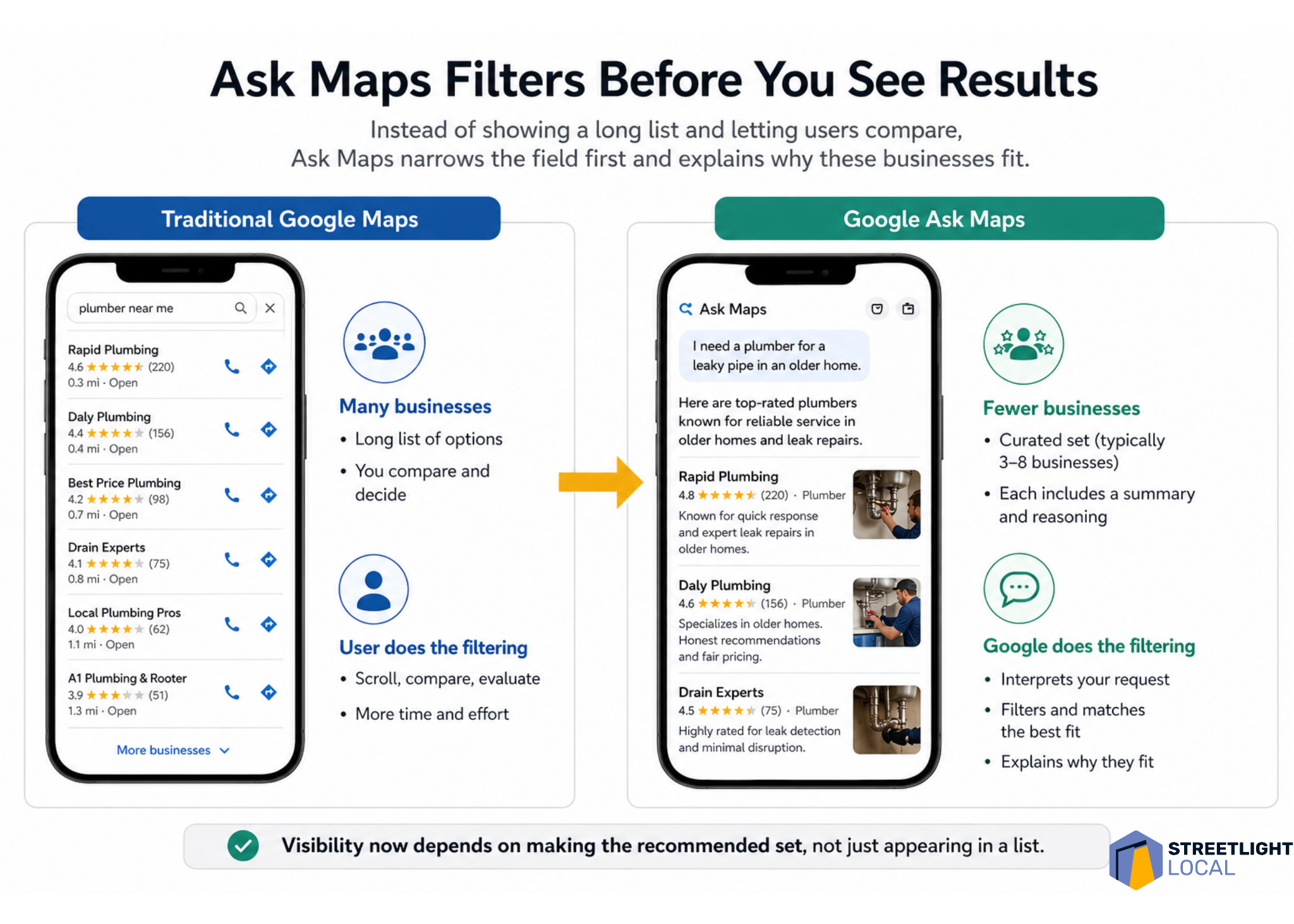
    One of the first things I notice about Ask Maps is how small the result set can be. In testing, it often showed around three to eight businesses, depending on the query. That feels very different from traditional Google Maps, where people can scroll through dozens of options and compare them on their own.

    With Ask Maps, much of that comparison happens earlier. Google filters the market first, interprets what the person is really asking for, and then presents a smaller group of businesses with an explanation of why each one fits.

    That means I have to think beyond the question of whether a business ranks. I also have to ask whether Google has enough confidence to include that business in a short recommendation set and explain why it belongs there.

    ```json
{
  "alt": "Flowchart illustrating Ask Maps process from eligibility to recommendation for businesses.",
  "caption": "Discover how Ask Maps efficiently determines business recommendations, ensuring clarity and trust in every listing.",
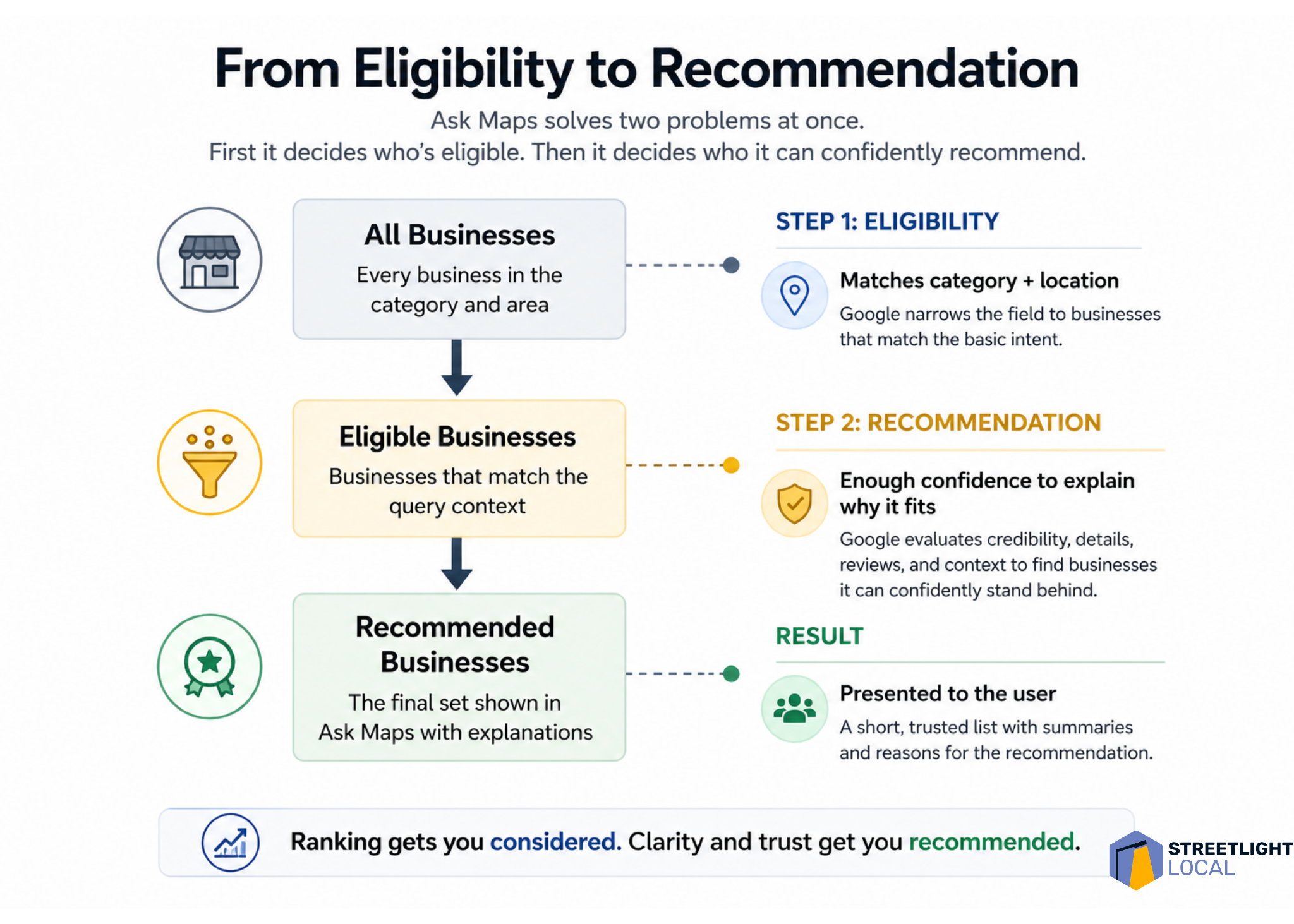
  "description": "This infographic explains the Ask Maps process from selecting eligible businesses to making confident recommendations. It shows three stages: all businesses, eligible businesses, and recommended businesses, detailing how Google evaluates category, location, credibility, and reviews. This visual provides a step-by-step guide to how trust and clarity improve business rankings and recommendations, branded by Streetlight Local."
}
```

    I think of this as a two-step problem. First, Google decides which businesses are eligible for the query. Then, it decides which eligible businesses it can confidently recommend.

    Ask Maps needs enough detail to explain the business

    Ask Maps does more than list businesses. It interprets and describes them. Even for simple searches, I often see businesses framed around qualities such as responsiveness, experience, specialization, professionalism, or the kinds of situations they seem best suited for.

    That creates a different optimization challenge. It is not enough for Google to know that a business exists or that it offers a basic service. Google needs enough information to answer a more practical question: when should this business be recommended?

    To support that, I want Google to understand the types of jobs the business handles, the situations it commonly deals with, the concerns customers usually have, and how the business approaches those situations.

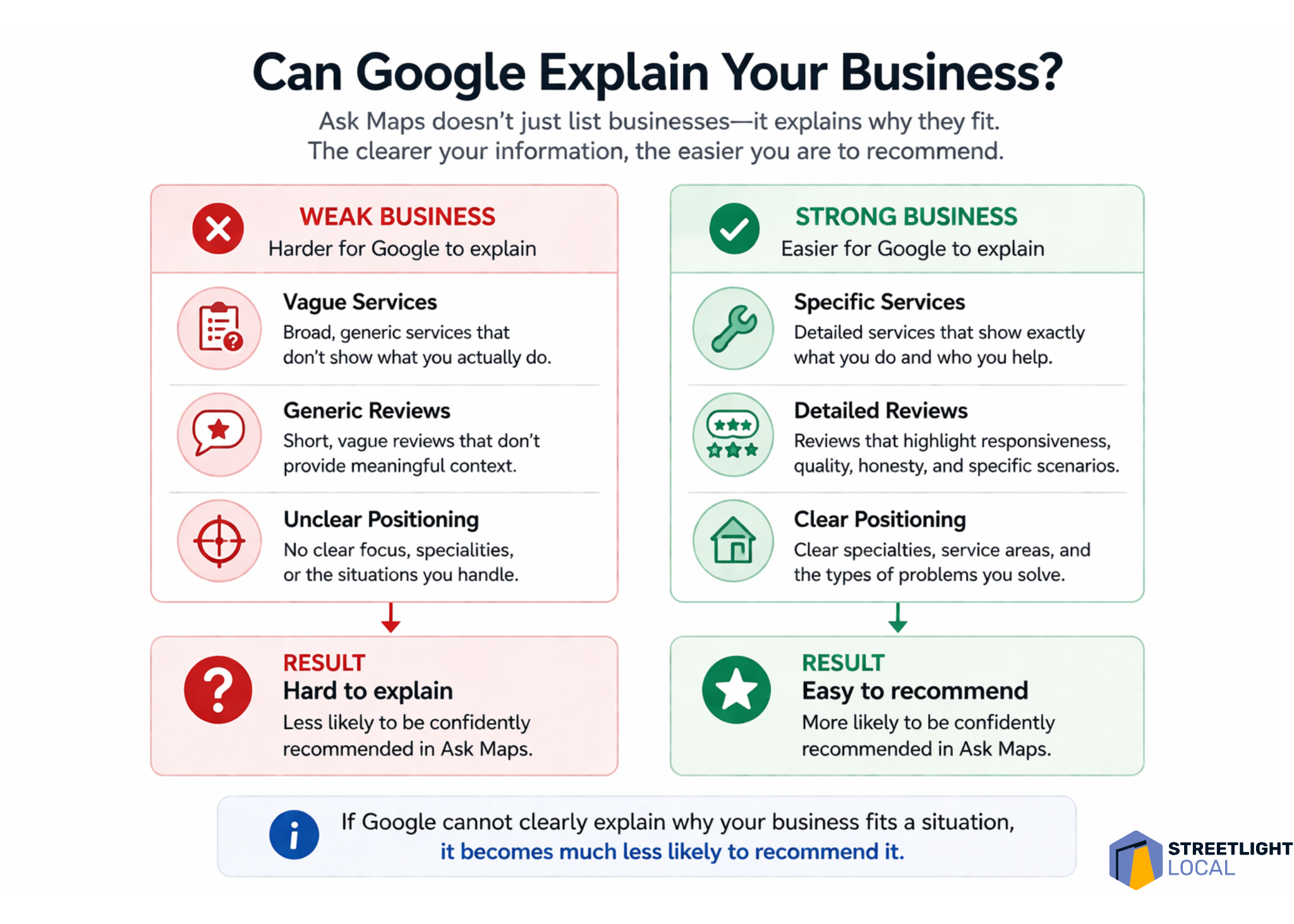
    If that information is vague, scattered, or inconsistent, Ask Maps has less to work with. When Google cannot clearly explain why a business fits a specific situation, I would expect that business to be less likely to appear as a recommendation.

    ```json
{
  "alt": "Comparison between Traditional Google Maps and Google Ask Maps with highlighted features and filtering process.",
  "caption": "Discover the efficiency of Google Ask Maps, a tool that pre-filters search results, providing users with top-rated options and reasons for selection.",
  "description": "This image illustrates the difference between Traditional Google Maps and Google Ask Maps interfaces. Traditional Maps display a long list of business options, requiring user filtering. In contrast, Ask Maps pre-filters results to show a curated list of top businesses with rationales. The image features two smartphones displaying both app interfaces and icons highlighting user experience differences. It emphasizes Ask Maps' efficiency in offering tailored recommendations, saving users time and effort."
}
```

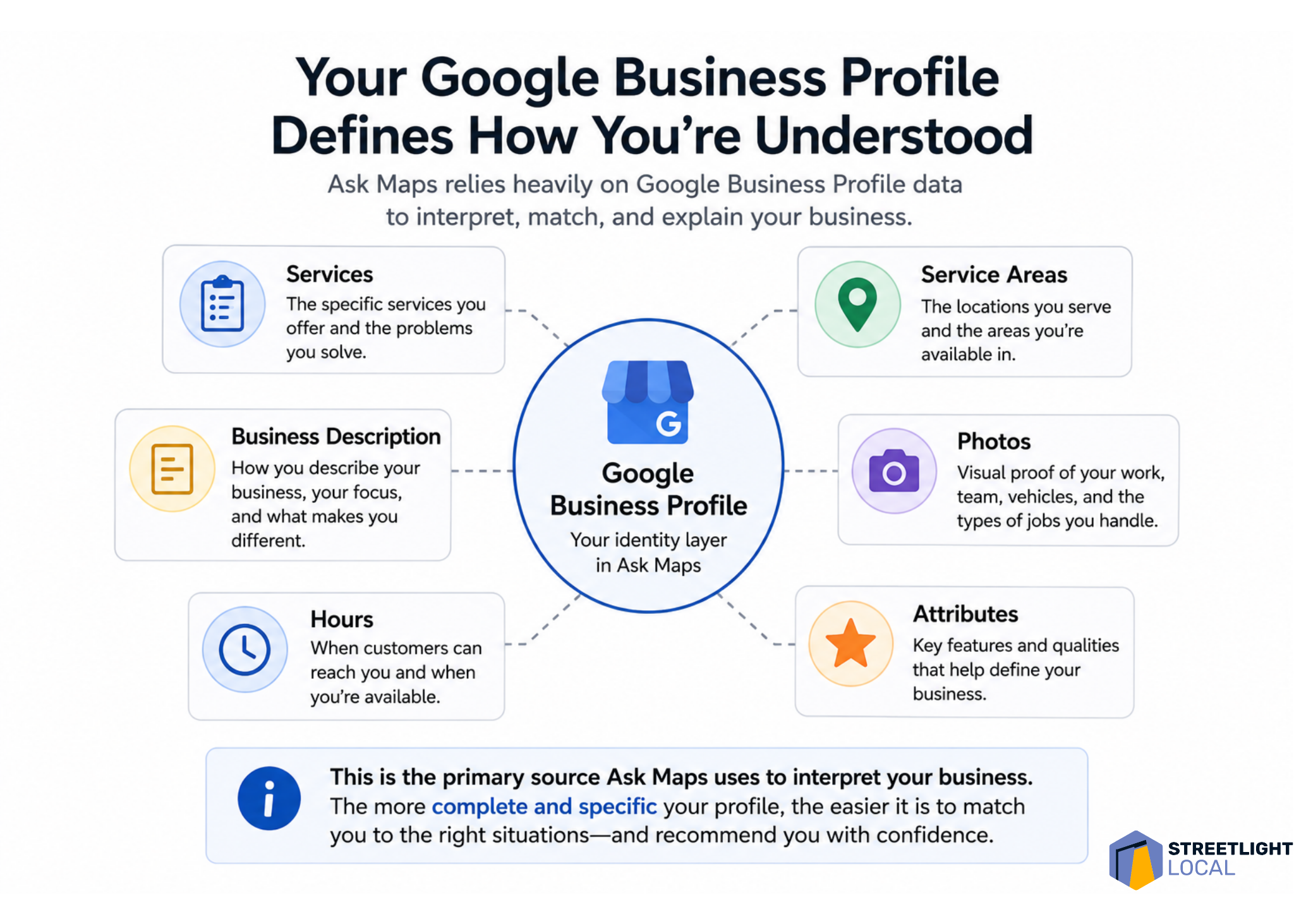
    Google Business Profile becomes the identity layer

    For me, the Google Business Profile sits at the foundation of this whole process. In earlier-stage queries, Ask Maps appears to rely heavily on profile data, including business descriptions, services, reviews, ratings, hours, and operational details.

    Many businesses still treat their profile like a basic listing to fill out and keep current. That is necessary, but I do not think it is enough for an environment where Google is trying to describe and recommend businesses. The profile needs to communicate a clear, specific identity.

    A generic profile might say that a business offers plumbing, HVAC, electrical work, or another broad service. A stronger profile clarifies the kinds of problems it handles, the situations it is built for, and the details that make it useful to specific customers.

    For example, I would use the profile to reinforce details such as emergency availability, response times, specific repair or installation types, experience with older homes, complex systems, or common customer problems the business solves.

    That level of specificity gives Google more direct evidence. Instead of forcing the system to infer what the business is known for, I want the profile to make that identity clear.

    ```json
{
  "alt": "The CapmatchOne logo with a gradient circle and bold text.",
  "caption": "Discover innovation with the CapmatchOne logo, featuring sleek typography and a modern gradient circle.",
  "description": "The CapmatchOne logo features bold, modern typography coupled with a gradient circle, symbolizing connection and innovation. The sleek design conveys a sense of progress and creativity. This image can be used for branding or promotional purposes, appealing to audiences interested in innovative solutions and forward-thinking designs."
}
```

    Reviews shape positioning, not just credibility

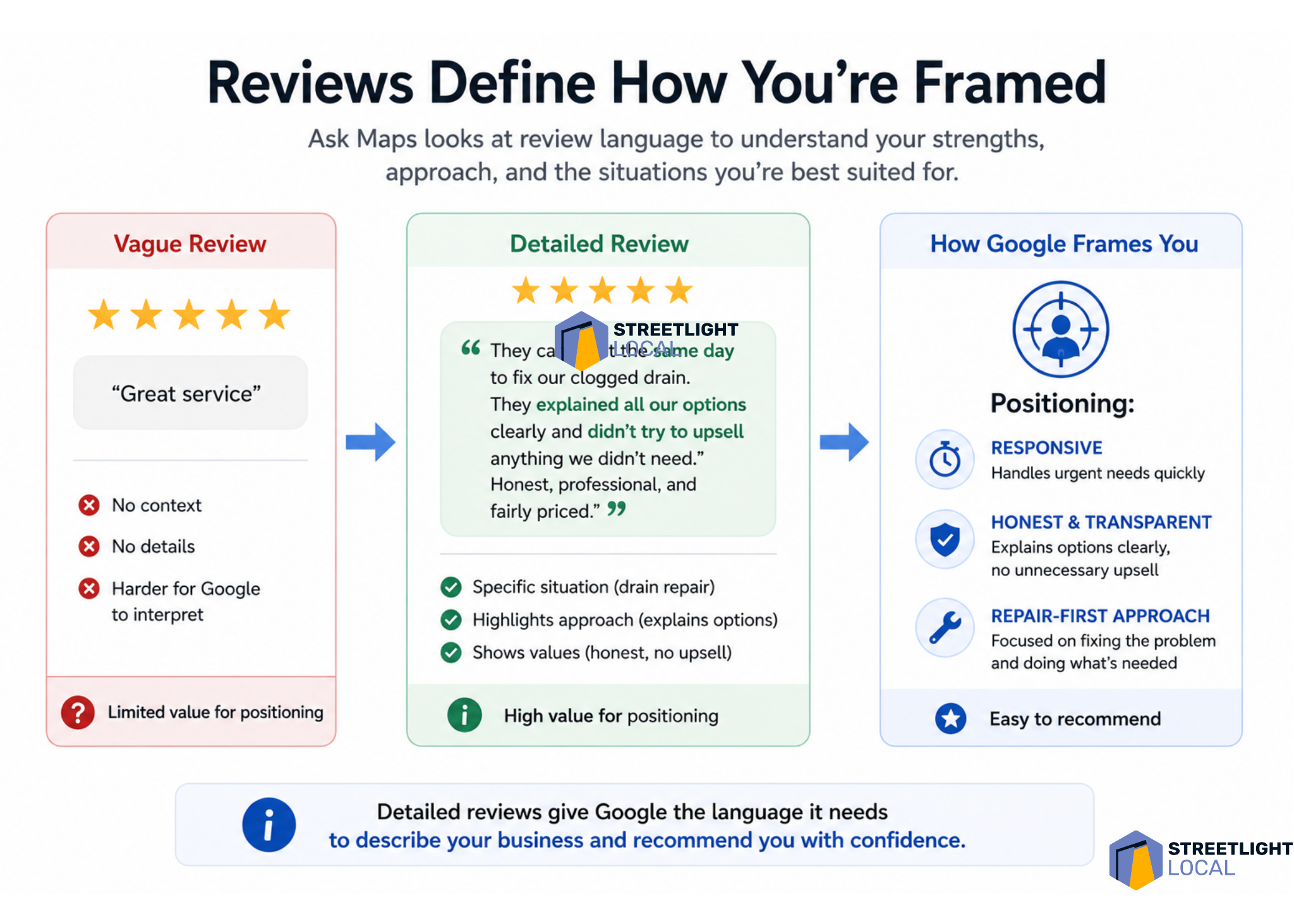
    Reviews have always mattered in local search, but I see them playing a more structured role in Ask Maps. Review language can show up in the way Google describes a business, especially around themes like responsiveness, honesty, communication, professionalism, and quality of work.

    That tells me reviews are doing more than supporting credibility. They are helping define how the business is positioned.

    I would still pay attention to rating, volume, and recency. But I would also look closely at what customers actually say. The language inside reviews can give Google useful context about what the business does, how it works, and what customers value about the experience.

    A vague review such as “great service” signals satisfaction, but it does not explain much. A detailed review that mentions a same-day response, a drain backup, clear communication about options, and a repair-focused solution gives Google several stronger signals about the business.

    Over time, those patterns accumulate. In that sense, I view reviews as one of the main ways Google learns what a local business is known for.

    ```json
{
  "alt": "Infographic contrasting weak versus strong business descriptions for Google explanations.",
  "caption": "Optimize your business presence on Google by crafting clear, specific descriptions and reviews. Strong positioning makes your business easier to recommend.",
  "description": "This infographic compares weak and strong business profiles for Google explanations. Weak businesses show vague services, generic reviews, and unclear positioning, leading to a 'hard to explain' result. In contrast, strong businesses provide specific services, detailed reviews, and clear positioning, resulting in an 'easy to recommend' status. Keywords include business clarity, Google explanation, and online presence optimization."
}
```

    Website content matters more when decisions get harder

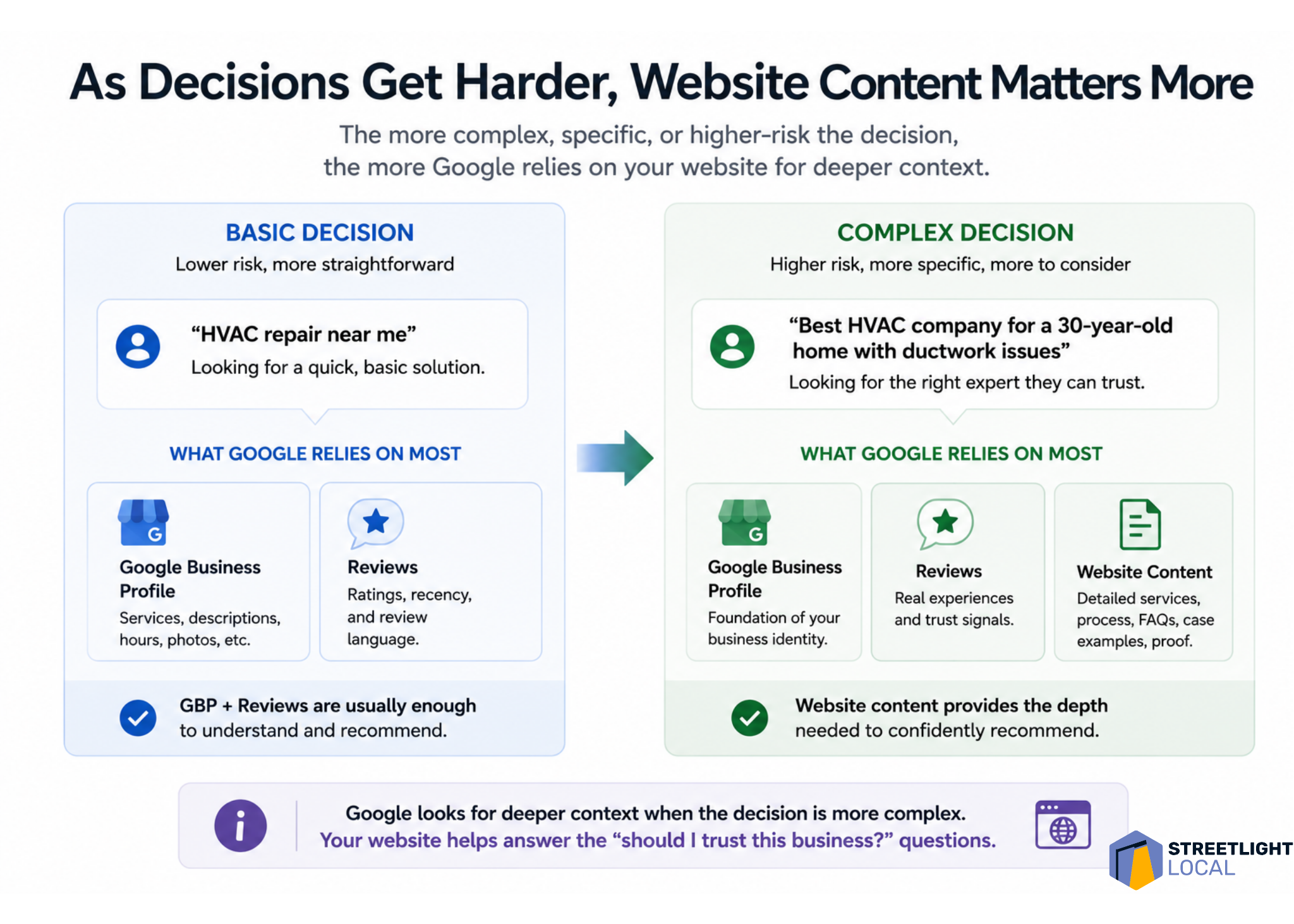
    I also see website content becoming more important as queries become more complex. For basic service searches, the Google Business Profile and reviews may carry a lot of the weight. But when the search involves higher cost, uncertainty, or trust, Google appears to look for deeper supporting evidence.

    That is where the website can help. Many service pages explain what a business offers and why it is qualified. That still matters, but it does not always match how people search when they are trying to make a difficult decision.

    In more situational searches, people are not just looking for a service. They are trying to understand a problem, compare options, reduce risk, and decide what to do next.

    That is why I would build content around the customer’s situation, not just around the service name. Stronger pages explain what leads to the problem, how to recognize it, what options are available, how to think through the decision, and what outcomes to expect.

    For example, a furnace repair page can go beyond a basic list of services. It can cover common symptoms, when repair makes sense, when replacement might be worth considering, and how a homeowner can evaluate the decision. That kind of content lines up more closely with the prompts Ask Maps is trying to interpret.

    ```json
{
  "alt": "Diagram illustrating the elements of a Google Business Profile, such as services, areas served, photos, and business description.",
  "caption": "Explore how your Google Business Profile shapes public understanding, highlighting services, service areas, and more for improved visibility.",
  "description": "This image presents a detailed diagram of a Google Business Profile, emphasizing how it defines business perception. Central to the diagram is the profile, surrounded by elements like Services, Service Areas, Business Description, Photos, and Attributes. Each component is essential for building a comprehensive profile that helps businesses stand out on Google Maps. The image underscores the importance of specificity and completeness in business profiles for improved match and recommendation accuracy."
}
```

    I also see a strong fit for jobs-to-be-done pages. Instead of organizing every page around a service category, I would create pages around the situation the customer is trying to solve and the decision they are working through.

    Trust signals matter more as risk increases

    As searches move from simple service needs into decision-making, trust becomes more important. When people mention cost, honesty, uncertainty, or fear of making the wrong choice, Ask Maps tends to highlight qualities such as transparency, fairness, careful workmanship, and clear communication.

    That makes sense to me because it reflects how people actually think in those moments. When someone faces an expensive repair or an unexpected issue, they are not only asking who can do the work. They are asking who they can trust to handle it correctly.

    I would support that trust with evidence across the business’s online presence. Reviews can show that customers felt respected and informed. Website content can explain the process. Examples of completed work can show experience. Clear “what to expect” sections can reduce uncertainty.

    The higher the perceived risk, the more supporting evidence matters. I want Google to see a consistent pattern that the business explains options clearly, avoids unnecessary pressure, handles similar situations, and leaves customers confident in the outcome.

    Infographic showing how detailed Google reviews help Ask Maps frame a local business as responsive, honest and repair-focused.
    Detailed customer reviews do more than boost ratings. They give Google Ask Maps the context it needs to understand, position and confidently recommend a local business.

    External signals should reinforce the same story

    For more complex or trust-heavy queries, Ask Maps may look beyond the Google Business Profile, reviews, and website. Third-party platforms, directories, and other public sources can help reinforce how Google understands a business.

    I do not take that to mean every external mention is equally important. I take it to mean consistency matters. If a business is described one way on its website, another way in reviews, and differently across directories or social platforms, the overall picture becomes harder to interpret.

    When those signals align, they strengthen each other. Business descriptions, services, customer experiences, types of work handled, and overall positioning should tell the same story wherever they appear.

    From a practical standpoint, I would not try to appear on every possible platform. I would make sure the important sources are accurate, credible, and consistent.

    I would optimize for evidence, not just keywords

    Infographic comparing basic and complex HVAC local searches, showing Google relies more on website content as decisions get harder.
    As local search decisions become more specific and higher risk, Google needs deeper signals from business profiles, reviews, and website content to recommend the right provider.

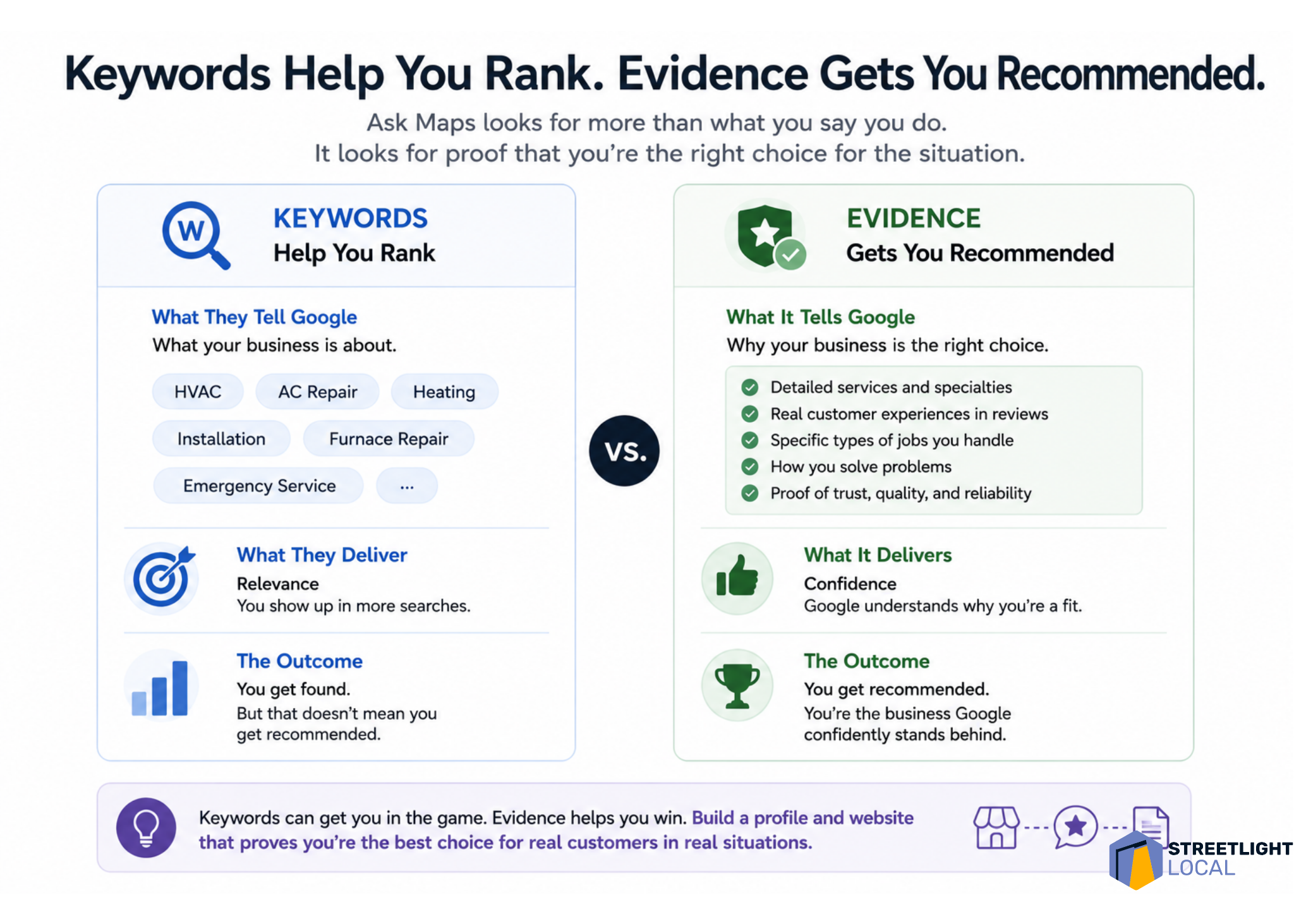
    Taken together, these patterns push me to think differently about optimization. Traditional local SEO often starts with keywords and rankings. Those still matter, but they do not fully explain what Ask Maps is doing.

    I find it more useful to think in terms of evidence. For a business to be recommended, Google needs enough information to understand what it does, what types of jobs it handles, what situations it fits, how customers experience it, and whether it can be trusted in higher-stakes decisions.

    Each source contributes something different. The Google Business Profile establishes the baseline identity. Reviews add real-world context. Website content provides depth and explanation. External sources help confirm the same picture.

    Individually, none of those elements tells the whole story. Together, they create a clearer and more consistent understanding of the business. That is where the shift from ranking to recommendation becomes most obvious: keywords can support relevance, but evidence supports recommendation.

    My practical framework for Ask Maps visibility

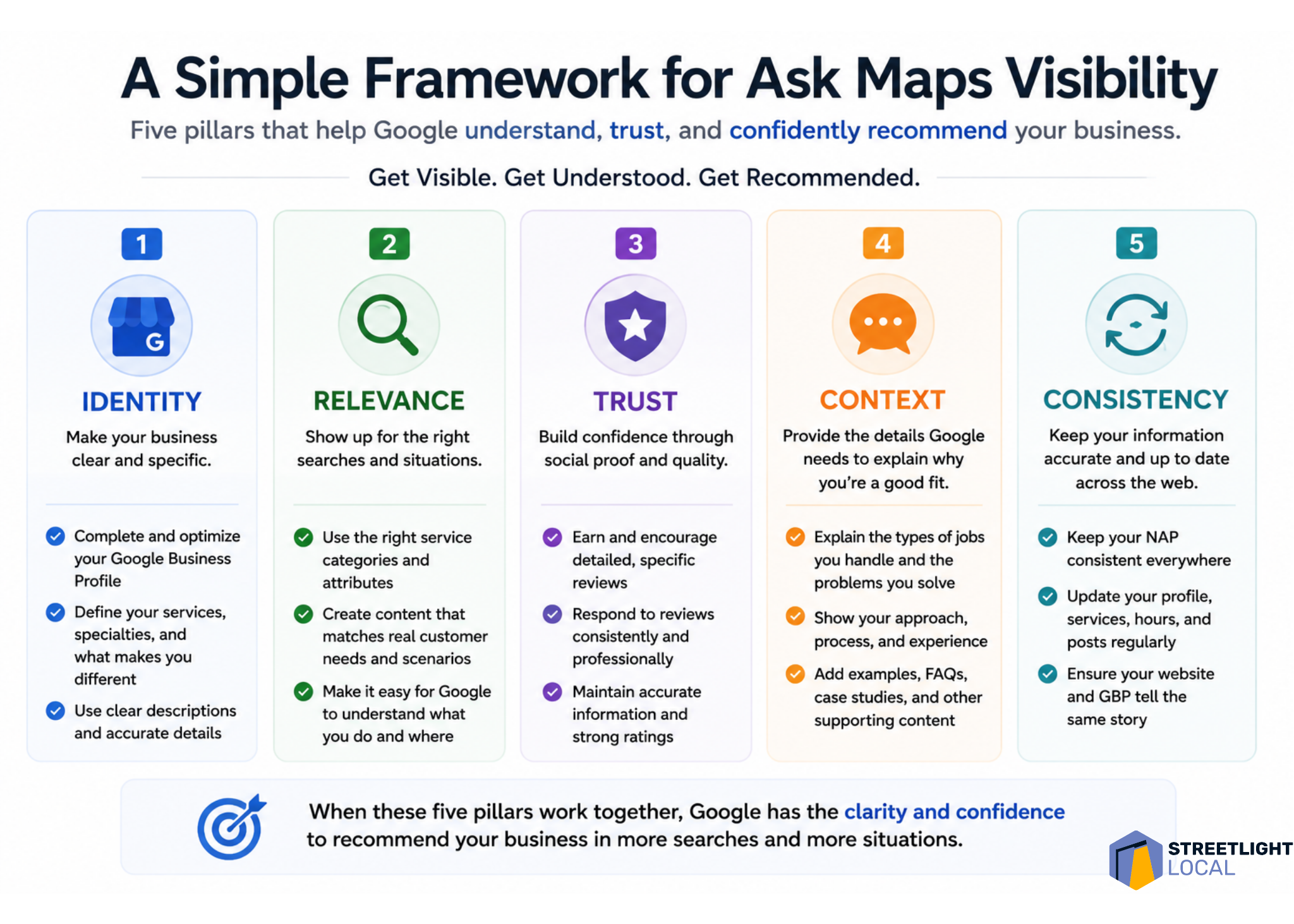
    When I evaluate a business for Ask Maps visibility, I would look at five areas: identity, relevance, trust, context, and consistency.

    Infographic comparing keywords and evidence for Google Ask Maps visibility, showing keywords help local SEO rankings while evidence earns recommendations.
    Google Ask Maps rewards more than keyword relevance. This visual shows why reviews, service details, trust signals, and real proof help local businesses get recommended.

    Identity asks whether Google can clearly understand what the business does and where it operates. Relevance asks whether the business can be matched to specific services and situations. Trust asks whether there is enough proof that customers feel confident choosing it.

    Context asks whether the content reflects the decisions customers are actually trying to make. Consistency asks whether different sources reinforce the same understanding of the business.

    I do not see this as a checklist to complete once. I see it as a practical way to evaluate how clearly and consistently a business is represented across the sources Ask Maps appears to use.

    What I would avoid

    With any new search feature, it is easy to overcorrect. I would avoid treating Ask Maps as an isolated channel that needs thin content, unnatural profile language, generic service-page duplication, or review language that feels forced.

    Those tactics may create more content, but they do not necessarily create more useful evidence. The better approach is to align more closely with how customers actually search, evaluate options, and make decisions.

    Infographic outlining five pillars for Google Ask Maps visibility: identity, relevance, trust, context, and consistency for local SEO recommendations.
    A practical local SEO framework shows how businesses can earn visibility in Google Ask Maps by clarifying identity, proving relevance, building trust, adding context, and staying consistent online.

    When the business presence reflects real customer needs clearly and consistently, it naturally creates the kinds of signals Ask Maps seems to rely on.

    What I still do not know about Ask Maps

    I would treat all of this as directional, not definitive. Ask Maps is still being tested and refined, and the system is not fully documented.

    The result structure can vary by query and test environment. The feature’s usability is also still changing. In many cases, users may still need to click into a Google Business Profile to call, book, or engage, rather than acting directly from the Ask Maps response.

    Measurement is another open issue. Right now, I do not see a clean way to isolate Ask Maps visibility or performance inside standard reporting tools. That makes it difficult to attribute calls, traffic, or conversions directly to this experience.

    I also would not assume the same signal weighting applies to every query. Google Business Profile data, reviews, website content, and external sources may all matter, but their relative importance likely changes based on the search intent and the complexity of the decision.

    The real shift is from ranking to recommendation

    I see Ask Maps as a version of local search where retrieval, evaluation, and decision support are moving closer together. Instead of making users search, compare, research, and decide across several steps, Google is trying to guide more of that process inside one experience.

    That changes the meaning of visibility. In Ask Maps, it is not enough for a business to simply appear. The business needs to be understood well enough for Google to explain why it fits the situation and trusted enough to be recommended.

    For businesses and SEOs, I would not respond by chasing a narrow trick. I would build a clearer, more complete, and more consistent representation of the business across the sources that shape Google’s understanding.

    The businesses most likely to benefit are the ones that are easiest to interpret, easiest to trust, and easiest to match to real-world customer needs.


    Inspired by this post on Search Engine Land.


    crushpress.ai community screenshot
  • Master AI Visibility: Boost Travel Brand Recommendations

    Master AI Visibility: Boost Travel Brand Recommendations

    AI Overviews and Google AI Mode are increasingly shaping the discussions within the SEO community. In this evolving landscape, search is transitioning from a mere information retrieval tool to a powerful recommendation engine.

    As a travel brand, this shifts the dynamics of online discovery. It’s no longer just about making your website understandable to search engines; it’s about ensuring AI systems recognize when to recommend your business.

    How AI is Revolutionizing Travel Planning

    Interacting with large language models (LLMs) has become a routine for many of us. We use them to structure conversations by project, creating folders for our upcoming trips and building on previous chats to refine our preferences and travel profiles.

    This is a major shift from the conventional searching methods. Traditionally, we would start our travel plans with Google searches for terms like:

    • “Hotels in Porto”
    • “Things to do in Rome”
    • “Best restaurants in Barcelona”

    Today, the process is much more conversational. Instead of a series of disjointed searches, I might open a new folder labeled “Summer 2026” in ChatGPT and begin with a broad question, gradually sculpting it into a complete itinerary.

    • “Where should I stay in Porto for a quiet weekend within walking distance of the historic center?”
    • “Which area of Rome is best for families with young children?”

    These discussions naturally expand to include restaurant recommendations, tourist attractions, accommodation options, transportation tips, and more detailed daily plans.

    When I ask my AI assistant these questions, I’m not looking for a list of websites. What I truly want is an insightful recommendation.

    Impact of AI Overviews on Travel Search

    AI Overviews gather data from multiple points to deliver highly curated recommendations instead of just a list of links. For this reason, trust, consistency, and context have become vital factors for online visibility.

    A traveler might decide to book my hotel based on an AI-generated suggestion without even visiting the website. Instead, their next steps could include a branded search or a visit to a review platform where they might finalize their booking through an OTA.

    To win over AI model recommendations, I need to precisely define my brand. It’s crucial for AI to be certain of who I am, what I offer, whom I serve, and the contexts in which my brand is relevant.

    Selecting a primary category and maintaining a clear brand position are imperative. Investing in digital PR and securing mentions beyond my own website can help too. Being featured in travel articles on relevant topics can significantly boost visibility.

    Moreover, ensuring that my business information is consistent, accurate, and easy to find across my website, Google Business Profile, TripAdvisor, OTA listings, and social media is essential.

    Understanding the Role of Zero Click Visibility

    The methods for evaluating search performance are evolving. While traditional SEO metrics will remain relevant, it’s important for travel marketers like myself to broaden how visibility is measured.

    One critical error is viewing fewer clicks as a decrease in visibility.

    A traveler might learn about my property through an AI response and then decide to search for it later or visit a review profile on a platform like TripAdvisor.

    That’s why seeing growth in branded searches is a promising sign of AI visibility. Monitoring AI mentions, citations, and assisted conversions is also worthwhile.

    Assisted conversions highlight the channels and touchpoints that lead to bookings, even if they aren’t the final source of conversion. I can track these in Google Analytics 4 by navigating to Advertising > Attribution > Conversion Paths and Attribution Reports.

    Leveraging TripAdvisor and OTA Listings

    Platforms like TripAdvisor have grown beyond being review sites, and OTAs offer more than just booking services.

    When someone requests AI recommendations, the system doesn’t rely on a single data point but synthesizes information from multiple avenues.

    My website forms a part of this ecosystem.

    AI builds confidence in its guidance by cross-referencing data across different platforms. What others say about my brand through reviews, travel guides, media references, OTA listings, or local mentions is increasingly significant. It’s large-scale reputation management.

    This additional context helps AI identify when my property is relevant to specific traveler needs, like:

    ```json
{
  "alt": "The CapmatchOne logo with a gradient circle and bold text.",
  "caption": "Discover innovation with the CapmatchOne logo, featuring sleek typography and a modern gradient circle.",
  "description": "The CapmatchOne logo features bold, modern typography coupled with a gradient circle, symbolizing connection and innovation. The sleek design conveys a sense of progress and creativity. This image can be used for branding or promotional purposes, appealing to audiences interested in innovative solutions and forward-thinking designs."
}
```
    • Family-friendly environments.
    • Ideal for business travelers.
    • Located in walk-friendly areas.
    • Renowned for exquisite dining.
    • Suitable for luxury or budget travel.

    Distinguishing My Travel Brand

    For example, if I manage a family-friendly hotel, it’s important to highlight features like family suites, kids’ activities, and family-oriented reviews. Alternatively, a romantic destination should emphasize aspects like cozy atmospheres, spa facilities, and exclusive packages.

    Similarly, a hotel catering to business travelers should spotlight meeting rooms, workspaces, high-speed internet, and its proximity to business hubs. On the other hand, a restaurant known for its culinary excellence should consistently be mentioned in reviews, receive media attention, and third-party accolades focusing on its food quality, head chef, or dining experience.

    While some businesses naturally fit various categories, having a clear primary positioning helps generative search engines easily identify when my brand is appropriate for a recommendation.

    This principle holds for travel destinations too. AI-driven engines depend on signals from reviews, travel guides, local listings, and related content when suggesting where tourists should stay, visit, or explore.

    Strengthening Entity Signals Across Platforms

    As AI systems place more focus on entities instead of individual web pages, I must create a robust and consistent digital presence.

    1. Clarifying Attributes with Structured Data

    Structured data aids search engines and AI in interpreting key business details. For travel entities like mine, this includes lodging types, amenities, locations, and more.

    Emphasize the attributes that truly set my property apart. This can span from family-friendly amenities to wellness-centered experiences, renowned dining options, pet-friendliness, or proximity to major landmarks.

    The clearer and more structured my information is, the better the chances AI-powered experiences will spotlight my business in relevant recommendations.

    2. Resolving Entity Ambiguities

    It’s crucial to review third-party portrayals of my brand. Inconsistencies can diminish the trust AI systems have in my brand information, as AI pulls data from various sources.

    Think of a hotel with differing phone numbers, outdated details, varying categories, or conflicting amenity information across platforms—these inconsistencies confuse AI systems.

    Ensuring my business data is consistent across my website, Google Business Profile, TripAdvisor listings, and OTA profiles will reduce ambiguity and strengthen AI’s confidence.

    3. Prioritizing Operational Information

    Start by evaluating existing customer reviews.

    • What did they enjoy most during their visit?
    • What made their stay memorable?
    • What areas need improvement?

    Such feedback provides insight into what genuinely differentiates my brand. Details about amenities, accessibility features, business hours, parking, and pet policies help AI address specific travel-related queries with confidence.

    Google Business Profile is another vital source for operational data. The categories, attributes, amenities, and working hours mentioned on the profile enhance AI’s ability to answer travel queries accurately and helpfully.

    To provide further context, I can also use Google Business Profile to publish posts that link back to my site’s content. Consistently posting on Google Business Profile can boost engagement, increase profile visits, and encourage customer interaction, ensuring my listing remains updated with fresh content about my offerings.

    Cultivating AI-Trusted Signals

    Generative search levels the playing field more than traditional search. AI favors recommending businesses, not just their websites. Visibility isn’t solely determined by what transpires on my site; it encompasses the comprehensive digital footprint that my brand projects.

    For travel brands, this means I must think broader than just rankings and clicks. Reviews, OTA listings, travel guides, media mentions, and business profiles all contribute to how AI recognizes and recommends my brand.

    It’s time to get creative, try new approaches, and collaborate with complementary businesses. Most crucially, it’s time to build the trust signals that AI systems rely on.


    Inspired by this post on Search Engine Land.


    crushpress.ai community screenshot
  • Google Ask Maps: A Shift Towards Personalized Recommendations

    Google Ask Maps: A Shift Towards Personalized Recommendations

    I’ve noticed a fascinating shift in Google’s Ask Maps function—it’s transitioning from simple listings to offering more personalized recommendations. This change is not just about showcasing local businesses anymore; it’s about truly understanding user needs and suggesting the best options.

    The other day, I dug into some local service queries—think plumbers, electricians, HVAC services—and was amazed to find how Ask Maps narrows down options by user intent. It’s evaluating businesses based on factors like responsiveness and specialization, which feels fresh and user-focused.

    ```json
{
  "alt": "The CapmatchOne logo with a gradient circle and bold text.",
  "caption": "Discover innovation with the CapmatchOne logo, featuring sleek typography and a modern gradient circle.",
  "description": "The CapmatchOne logo features bold, modern typography coupled with a gradient circle, symbolizing connection and innovation. The sleek design conveys a sense of progress and creativity. This image can be used for branding or promotional purposes, appealing to audiences interested in innovative solutions and forward-thinking designs."
}
```

    What’s even more exciting is how Ask Maps frames these businesses. It’s not just a list; there’s guidance involved, which is a leap beyond traditional local retrieval methods. So, I decided to explore this by testing across five levels of local intent, ranging from simple searches to detailed conversational prompts.

    ```json
{
  "alt": "Comparison of Ask Maps recommendations and Google Business Profile actions for AC repair services.",
  "caption": "Explore how Ask Maps provides curated AC repair recommendations while actionable decisions await in the Google Business Profile.",
  "description": "This image illustrates the difference between Ask Maps recommendations and actions available on a Google Business Profile for AC repair services. The left side shows a smartphone displaying Ask Maps results with curated AI-generated summary, while the right side highlights actionable features like directions and call buttons in the full business profile. The presentation emphasizes interactive elements and user engagement, branded by Streetlight Local."
}
```

    As the complexity of queries increased, I saw a clear pattern: Ask Maps shifted from merely listing businesses to interpreting which ones truly fit the ask—and why. This is huge.

    ```json
{
  "alt": "Diagram showing how Ask Maps enhances local business queries beyond basic listings.",
  "caption": "Discover how Ask Maps transforms simple searches into detailed summaries using Google Business Profiles and reviews.",
  "description": "This image illustrates how Ask Maps enhances basic local business queries into insightful recommendations. Starting from a sample query for electricians in Sudbury, MA, the process shows transitioning from basic listings to recommendations, detailed business profiles, and review-based summaries. Highlighting these steps, the image explains how Ask Maps uses Google Business Profiles and review language to provide more comprehensive results. The image is branded with StreetLight Local's logo."
}
```

    This exploration pulled insights from specific locality tests, so while it’s directional, it’s not exhaustive across all markets or queries.

    ```json
{
  "alt": "Infographic showing how Ask Maps transforms queries into decision guides using smartphones.",
  "caption": "Discover how Ask Maps evolves a simple query into a guided decision-making tool, enhancing user experience with structured insights.",
  "description": "This infographic illustrates the process of Ask Maps transforming advisory queries into comprehensive decision guides. It shows four smartphones, each representing a step: Query, Guidance/Explanation, Decision Framework, and Recommended Businesses. The flow begins with a query about an outdated electric system, progresses by providing evaluation criteria, then narrows down options with decision frameworks, and finally lists local business recommendations. Aimed at guiding user choices, the system emphasizes explanation, evaluation, and categorization. Streetlight Local is credited below."
}
```

    The five-level intent model I developed was based on what I’ve learned about how people search for local services. I structured these not by traditional keyword categories but from simple inquiries to complex, conversational decision-making.

    ```json
{
  "alt": "Graphic illustrating four sources of information for Ask Maps: Google Business Profile, Business Websites, Reviews, Selective External Sources.",
  "caption": "Discover how Ask Maps gathers its information from diverse sources such as Google Business Profiles, professional reviews, business websites, and other external directories.",
  "description": "This infographic shows how Ask Maps compiles data, highlighting four primary sources: Google Business Profile, Reviews, Business Websites, and Selective External Sources like directories and educational content. This comprehensive method ensures a well-rounded information database. Arrows point from each source to a central map icon, illustrating the flow of data into Ask Maps. This visual is part of Streetlight Local's insights on information sourcing."
}
```

    At the basic level, requests start simple, like “I’m looking for an HVAC company nearby.”

    ```json
{
  "alt": "Infographic showing how Ask Maps mixes sources based on query type, including basic, specific service, situational, and advisory queries.",
  "caption": "Discover how Ask Maps tailors its source mix for different query types, from basic needs to advisory consultations. Get the most from your local search.",
  "description": "This infographic illustrates how Ask Maps customizes the mix of sources it uses according to four query types: Basic, Specific Service, Situational/Trust, and Advisory. Each category lists different needs—like finding an HVAC company or advice on a new furnace—and the respective sources such as GBP, reviews, websites, and educational content. Ideal for understanding local search strategies."
}
```

    Then, I experimented with queries involving more service specifics, like “I need an electrician to upgrade my panel in an older home.” This was fascinating as it introduced nuances into what I look for in search results.

    ```json
{
  "alt": "Infographic outlining strategies for businesses to enhance their online profiles, reviews, websites, and digital footprint.",
  "caption": "Discover key strategies to refine your business's digital presence, focusing on profiles, reviews, website content, and a broader digital footprint.",
  "description": "This infographic titled 'What Businesses Should Tighten Up Now' provides a comprehensive guide for businesses to improve their Google Business Profile, manage reviews, enhance website functionality, and expand their broader digital footprint. It includes actionable tips such as maintaining consistent business info across platforms and reinforcing brand perception. Keywords: business strategy, digital marketing, online presence, Google Business Profile, reviews, website optimization."
}
```

    The most interesting insights emerged from situational queries and those involving trust or decision-making, revealing how Ask Maps balances offering a realistic number of options with the depth of interpretation. The shifts were consistent: as we went from simple prompts to narratives, Ask Maps fine-tuned business selection and added layers of explanation.

    From this testing, I realized the intricate way Ask Maps processes information—using Google Business Profiles, reviews, and even external sources. While reviews dominated initial impressions, Ask Maps dives deeper on complex queries, pulling from business websites and informative content to guide users through decisions.

    Overall, the direction Ask Maps is heading could redefine our local search approach. If it continues evolving, it might influence how visibility is determined—not just by listing presence but by the ability to comprehensively understand and meet the user’s needs.


    Inspired by this post on Search Engine Land.


    crushpress.ai community screenshot
  • Optimize Your Google Business Profile: 5 Steps to Boost Local SEO

    Optimize Your Google Business Profile: 5 Steps to Boost Local SEO

    When I look at our Google Business Profile, I know it’s a vital source of inbound leads, despite ads and AI overviews pushing it down search results.

    Let me guide you through a five-step audit process that reveals where competitors might have the edge and how we can close that gap.

    1. Evaluate Google review velocity and recency

    I’ve discovered that the freshest reviews often matter more than sheer numbers. Google’s algorithm favors recent activity over just totals.

    ```json
{
  "alt": "Four charts comparing business ratings, reviews, and review timelines with competitors.",
  "caption": "Explore how your business stands in ratings and reviews compared to top competitors. Assess where you outshine or where there's room to grow.",
  "description": "This image contains four charts that compare various metrics of a business with competitors. The first chart shows the rating comparison, displaying that 'Your Business' has a rating of 4.90, higher than both the top 5 average (4.82) and the competitors' average (4.87). The second chart compares the number of reviews, where 'Your Business' has significantly fewer reviews (80) compared to the top 5 average (1259.80) and competitors' average (939.20). The third chart displays the monthly reviews, with 'Your Business' receiving 1.00 monthly review, while the top 5 average is 26.40, and competitors average 20.70. The final chart indicates the days since the last review, where 'Your Business' is at 21.00 days, whereas the average for the top 5 is 3.40 days, and the competitors' average is 3.50 days."
}
```

    How can we gauge our review performance? By analyzing competitors’ recent review activities.

    Here’s what I do: run geo-grid ranking scans using tools like Places Scout or Whitespark to analyze competitors’ review patterns.

    We shouldn’t just aim for more reviews but strive for consistency akin to top listings.

    ```json
{
  "alt": "Table showing business rankings with columns for rank, ratings, and reviews.",
  "caption": "Discover the top-rated businesses with their rankings, latest reviews, and monthly engagement metrics.",
  "description": "This image displays a table of business rankings, including columns for Business Name, Rank, Street Address, Rating, Reviews, Monthly Reviews, and Days Since Last Review. It provides a snapshot of business performance, highlighting key metrics such as customer ratings and the frequency of recent reviews. The table is sorted by rank and includes data such as high ratings of 4.9 to 5.0 and a range of reviews, showcasing business popularity and customer engagement."
}
```

    Automating this with Places Scout API data helps me keep track and maintain competitiveness.

    2. Add keywords to your business name

    Keywords in a business name are powerful for local visibility. I’ve found it significantly boosts ranking, sometimes solely based on the name.

    ```json
{
  "alt": "Search results for AC repair services in Dallas featuring three businesses with ratings.",
  "caption": "Explore top-rated AC repair services in Dallas. From prompt service to expert repairs, find the perfect solution for your needs with these highly recommended professionals.",
  "description": "This image shows Google search results for 'ac repair dallas' highlighting three businesses: Dallas Air Conditioning Repair, Lex - Air Conditioning, Heating, Plumbing, Electrical, and Alpha Heating & Cooling Llc. Each listing features customer reviews, ratings, contact details, and operating hours. This provides a quick overview of trusted HVAC services available in Dallas."
}
```

    For instance, consider filing a DBA to include relevant keywords legally in your business name.

    3. Optimize categories (primary vs. secondary)

    The primary category can heavily influence ranking. That’s why I analyze top-ranking competitors to identify their category strategies.

    ```json
{
  "alt": "The CapmatchOne logo with a gradient circle and bold text.",
  "caption": "Discover innovation with the CapmatchOne logo, featuring sleek typography and a modern gradient circle.",
  "description": "The CapmatchOne logo features bold, modern typography coupled with a gradient circle, symbolizing connection and innovation. The sleek design conveys a sense of progress and creativity. This image can be used for branding or promotional purposes, appealing to audiences interested in innovative solutions and forward-thinking designs."
}
```

    Maximizing secondary categories and meticulously checking relevant services listed can set our profile apart.

    4. Improve your GBP landing page

    I recommend linking to a dedicated, keyword-focused landing page rather than just the homepage for each location.

    ```json
{
  "alt": "Business category selection screen showing various litigation services for a personal injury attorney.",
  "caption": "Explore a variety of litigation services available for personal injury attorneys, from auto accidents to wrongful death cases.",
  "description": "This image displays an interface for selecting a business category specific to personal injury attorneys. Options include various litigation services such as assault & battery, auto and bicycle accidents, medical malpractice, wrongful death, and more. This highly detailed interface facilitates attorneys in defining their specialized services for better customer discovery. Keywords: business category, personal injury attorney, litigation services, customer discovery."
}
```

    This alignment with your GBP details can enhance local trust signals and boost your presence in searches.

    Sometimes, a page swap can address issues related to Google’s diversity update, revitalizing organic rankings.

    5. Understand proximity and city borders

    ```json
{
  "alt": "Comparison of two maps showing red map pins and then green map pins, indicating changes over time in an area near Bridgeport, Connecticut.",
  "caption": "An insightful comparison of map data over time reveals a transition from red to green pins, showcasing changes in the Bridgeport, Connecticut area.",
  "description": "This image presents side-by-side maps of Bridgeport, Connecticut, showing data at two points in time. The left map dated 2/26/2026 features numerous red pins, while the right map dated 3/2/2026 shows a shift to green pins. This transition illustrates changes in the area over time, providing clear visual evidence for analysis. Such map comparisons can be valuable for understanding developments in regional data. Keywords: map comparison, Bridgeport, Connecticut, data change, visualization."
}
```

    While you can’t move physical locations, knowing your “ranking radius” helps us strategize keyword targeting effectively.

    Local Falcon’s Share of Local Voice helps to identify the maximum potential and inform decision-making on new locations or keywords.

    Prioritize where you can win now

    ```json
{
  "alt": "Map visualization and contractor ratings for parking lot striping in Orlando area.",
  "caption": "Explore the map of Orlando's best-rated parking lot striping contractors, featuring user ratings and service quality scores.",
  "description": "This image displays a Google Maps search result for 'parking lot striping' in the Orlando area, capturing a 7x7 grid with a 24.0km radius. The search highlights contractor ratings and scores such as ARP, ATRP, and SoLV, represented with color-coded circles. Each circle on the map indicates a different service quality score, with green for excellent and red for lower ratings. Key areas in Orlando and surrounding regions are marked, offering a visual breakdown of service distribution and quality across the area. Ideal for understanding local contractor performance and search trends."
}
```

    These steps are only the beginning. By staying proactive in our GBP strategy, we’re securing a steady stream of leads from the map pack.

    Building on this foundation and planning future locations ensures we’re consistently at the forefront of local search visibility.


    Inspired by this post on Search Engine Land.


    crushpress.ai community screenshot
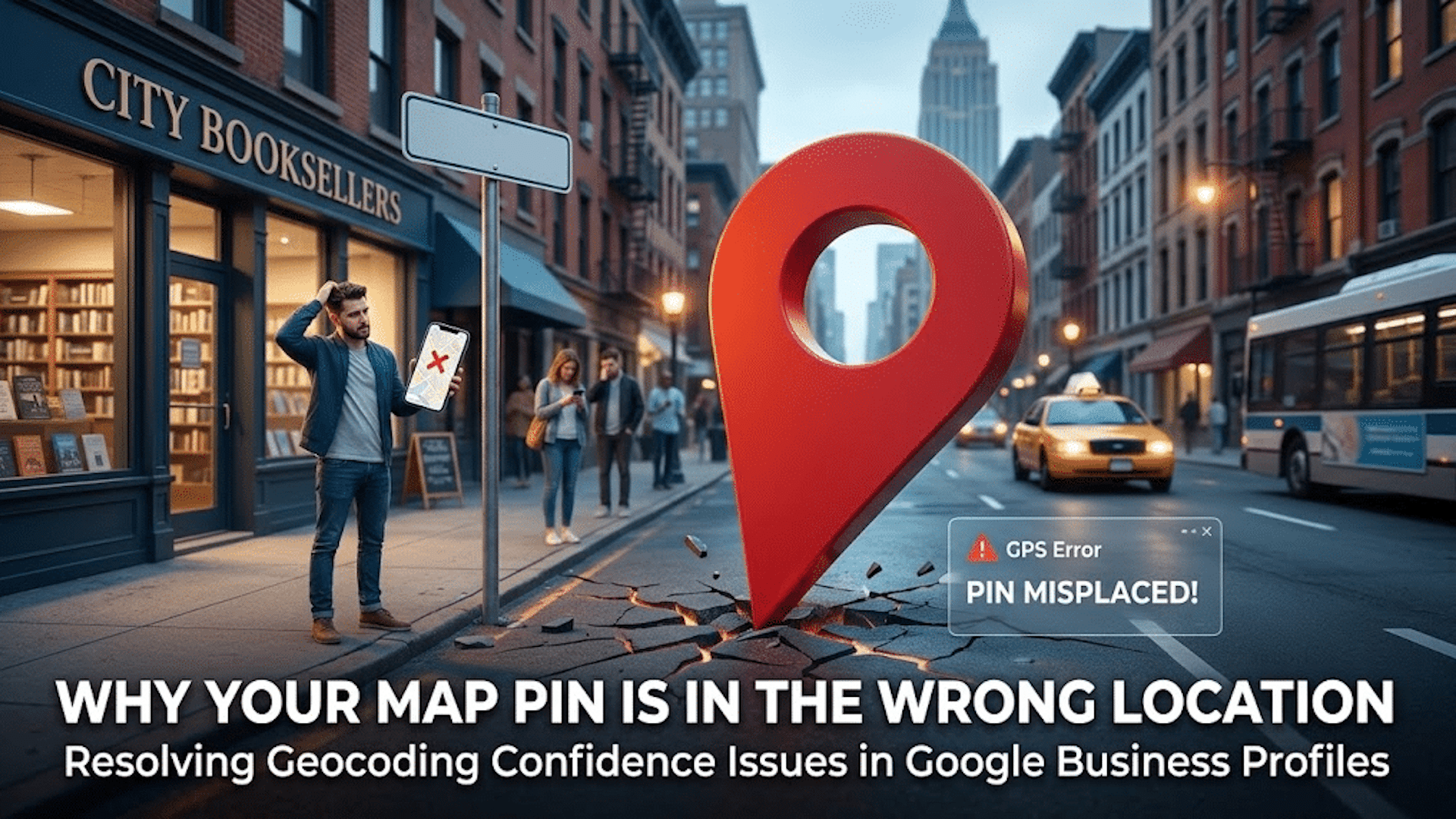
  • Boost Local SEO: Fix Your Google Map Pin for Better Rankings

    Boost Local SEO: Fix Your Google Map Pin for Better Rankings

    Your local business rankings might be suffering, and surprisingly, it could all be due to your map pin. Google’s placement of your business on their map significantly impacts your visibility, and addressing hidden addresses and setup issues is crucial.

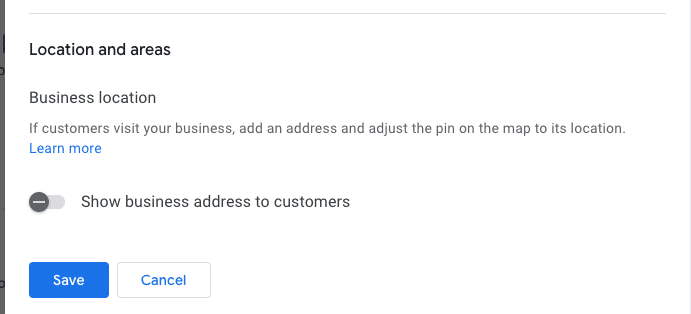
    I’ve often found myself engrossed in the ongoing debate within the local SEO community about the ‘hide address’ toggle for service area businesses (SABs). Many business owners consider this option a mere privacy setting, but it’s much more—a decision that affects how Google’s algorithm perceives your physical relevance.

    ```json
{
  "alt": "Settings interface for business location visibility with toggle option and save button.",
  "caption": "Easily manage the visibility of your business address with a simple toggle switch. Options to save or cancel changes make location management straightforward.",
  "description": "The image displays a digital settings interface focused on business location visibility. It features a toggle switch labeled 'Show business address to customers,' which is turned off. Below the toggle are 'Save' and 'Cancel' buttons for submitting changes. This screenshot is relevant for understanding business location management settings in online profiles or platforms. Keywords: business location, settings interface, visibility toggle, save button."
}
```

    Here are some questions to consider:

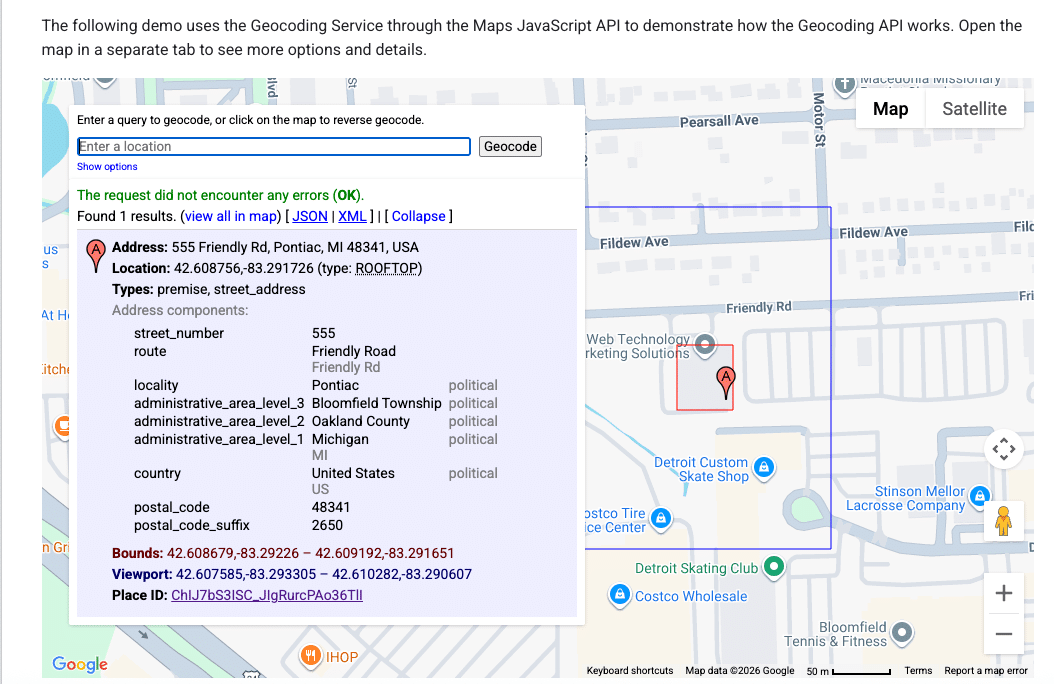
    ```json
{
  "alt": "Geocoding service demo using Maps JavaScript API with address details and location on map.",
  "caption": "Explore the Maps JavaScript API with this geocoding demo, showcasing address details for 555 Friendly Rd, Pontiac, MI.",
  "description": "This image displays a geocoding service demo using the Maps JavaScript API. It highlights the detailed address of 555 Friendly Rd, Pontiac, MI 48341, USA. The interface shows the address components, coordinates (42.608756, -83.291726), and a map section indicating the location. The demo explains how to use geocoding for retrieving precise address information and viewing it on a map with options for different data formats like JSON and XML."
}
```
    • Does your defined service area affect your ranking?
    • Does hiding your street address impact your visibility in the local pack?
    • Is Google erasing that data, or does your map pin become an invisible anchor?
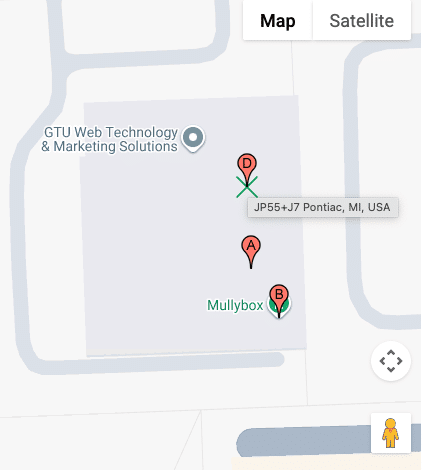
    ```json
{
  "alt": "Map showing GTU Web Technology & Marketing Solutions and Mullybox with pinpoints in Pontiac, MI.",
  "caption": "Discover the location of GTU Web Technology & Marketing Solutions and Mullybox in Pontiac, MI, with this detailed map view.",
  "description": "This image displays a map highlighting GTU Web Technology & Marketing Solutions and Mullybox in Pontiac, MI. The map features pinpoints indicating specific locations labeled A, B, and D. The area is shown in a standard map view with street outlines and an overlay for easy navigation. This visual guide can help users find exact locations and understand the surrounding layout in Pontiac. Keywords: map, GTU Web Technology & Marketing Solutions, Mullybox, Pontiac, MI, location."
}
```

    These are foundational questions in understanding how proximity works when you choose to ‘hide’ on the map.

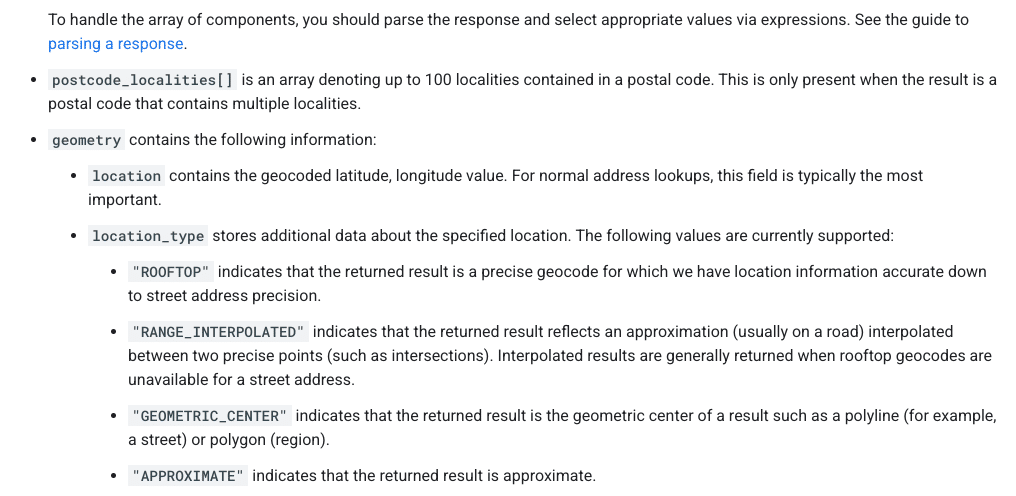
    ```json
{
  "alt": "Guide on parsing response components with types like ROOFTOP and APPROXIMATE.",
  "caption": "Understanding Geocode Location Types: Dive into the specifics of parsing response components from postal code localities to precise geocodes.",
  "description": "This image provides detailed guidance on parsing response components in geolocation data. It highlights how to interpret arrays like postcode_localities, and explains geometry details that include location types such as ROOFTOP, RANGE_INTERPOLATED, GEOMETRIC_CENTER, and APPROXIMATE. This is crucial for understanding accuracy and the precision of geocoding results, aiding in effective data handling and utilization."
}
```

    How Google Determines Your Map Pin

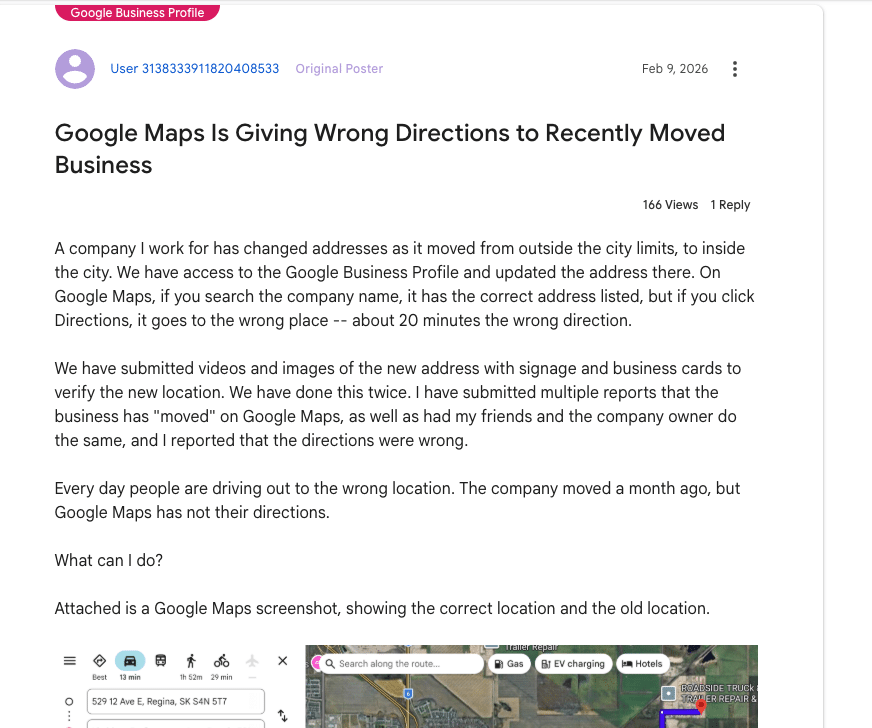
    ```json
{
  "alt": "Forum post discussing Google Maps giving wrong directions after business address change.",
  "caption": "Frustration mounts as a business struggles with incorrect Google Maps directions following an address change, causing customers to get lost.",
  "description": "The image shows a forum post about issues with Google Maps providing incorrect directions to a business after its address change. Despite updating Google Business Profile, the directions lead 20 minutes off. Attached is a Google Maps screenshot indicating both old and new locations. The post has had 166 views and 1 reply, highlighting the frequent errors with directions and the efforts taken to rectify the situation."
}
```

    It’s essential to know that your address and map pin are not the same. Entering an address into your Google Business Profile doesn’t just place a pin; it’s processed through Google’s geocoding engine, comparing it against their database.

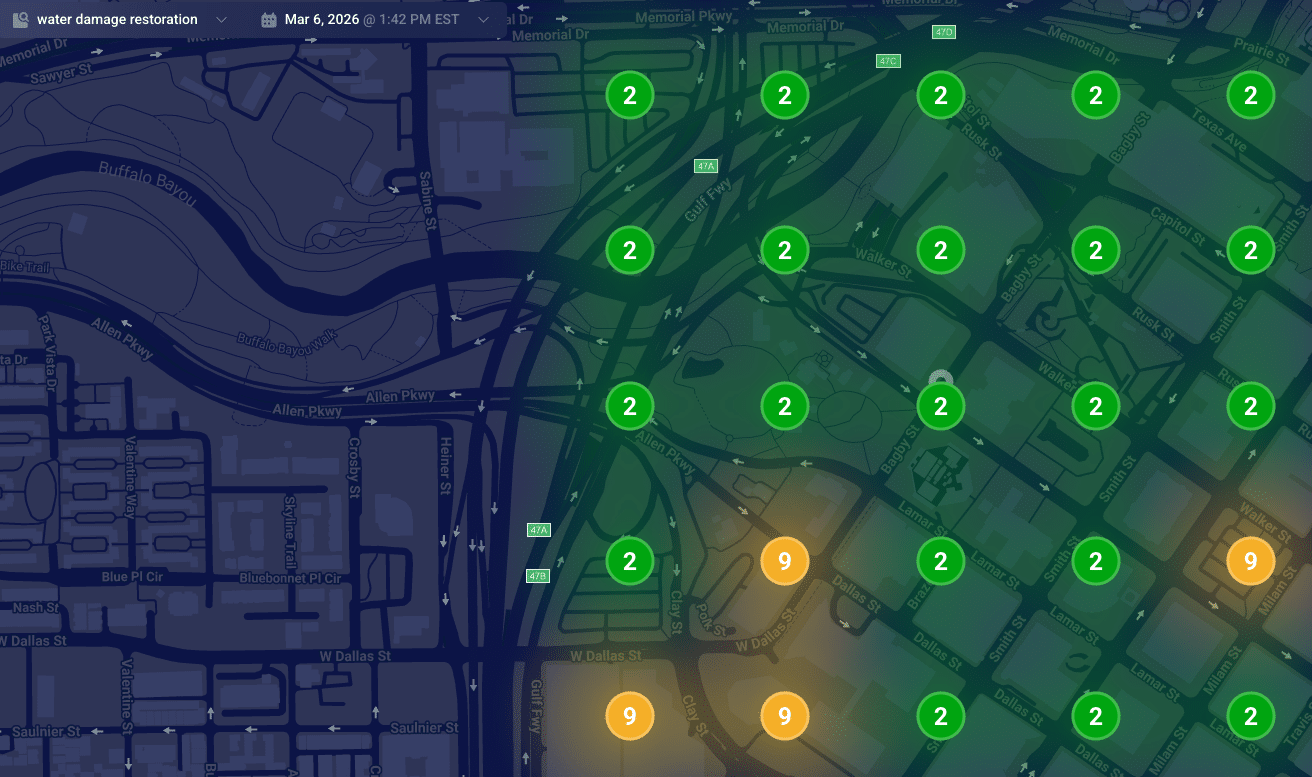
    ```json
{
  "alt": "Heat map visualization of water damage restoration needs in an urban area, showing numbered zones with color coding.",
  "caption": "Explore this dynamic heat map illustrating water damage restoration priorities across a city with distinct color-coded zones.",
  "description": "This image represents a heat map of water damage restoration needs in an urban area on March 6, 2026, at 1:42 PM EST. The map features a darkened city street layout with numbered circular zones indicating priority levels. Green circles with the number '2' indicate low priority areas, while orange circles marked with '9' highlight higher urgency zones. This visualization aids in strategic planning for restoration services."
}
```

    Understanding Google’s data models is key to understanding why your pin might be misplaced:

    ```json
{
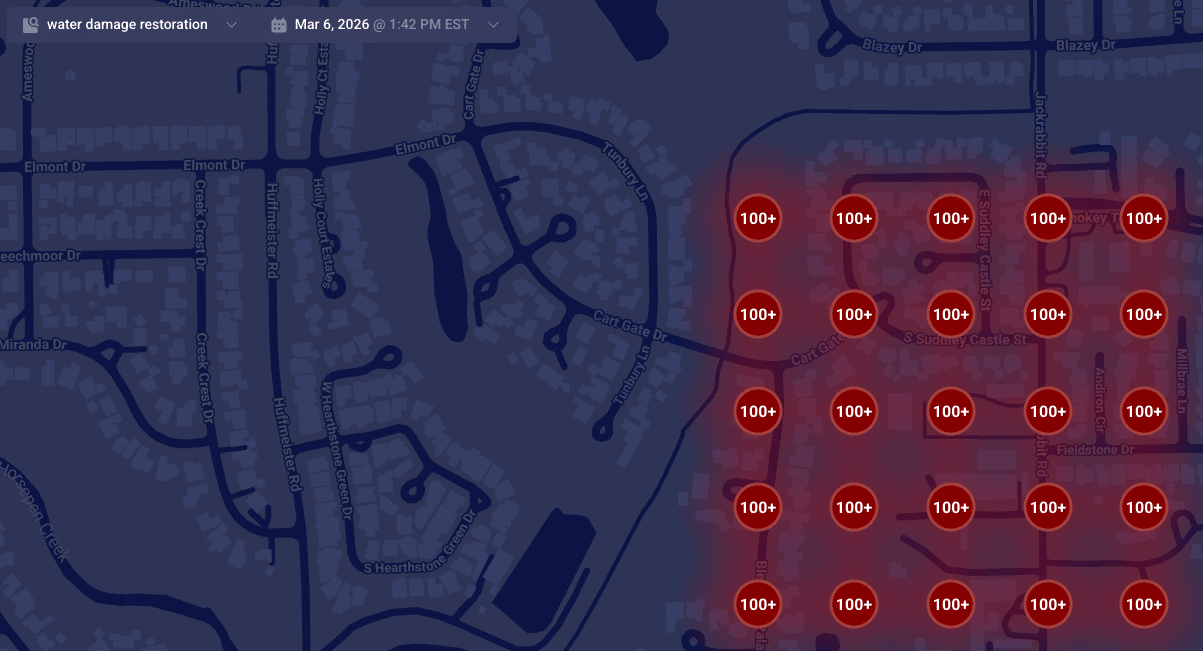
  "alt": "Map highlighting areas with over 100 instances of water damage restoration services.",
  "caption": "A map visualization displaying clusters of water damage restoration needs, with over 100 cases highlighted in red.",
  "description": "This map illustrates a dense concentration of water damage restoration demands in a residential area. Red circles marked with '100+' indicate regions with over 100 service instances. The map is set against a dark background, featuring roads and street names for context. This visualization aids in identifying service hotspots, essential for targeting restoration efforts efficiently."
}
```
    ```json
{
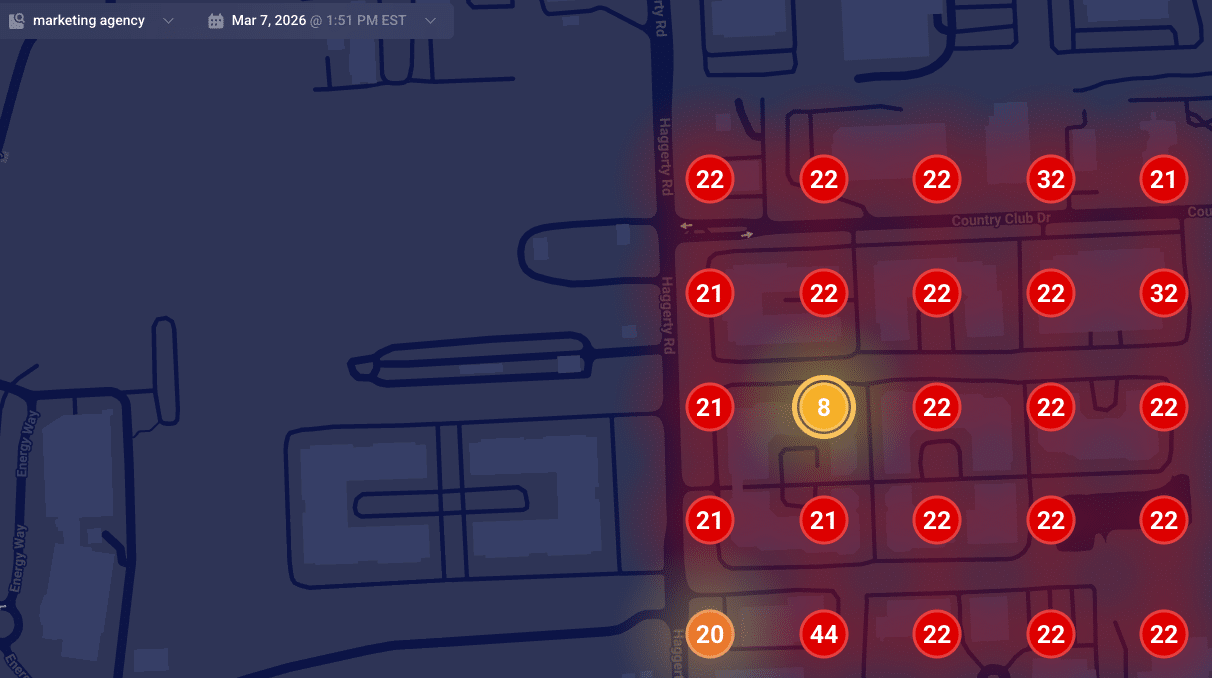
  "alt": "Heatmap showing numerical data points on a dark map layout.",
  "caption": "A vibrant heatmap reveals numerical trends across a dark-themed map, spotlighting key data points for insightful analysis.",
  "description": "This image showcases a heatmap overlaid on a map, displaying various data points marked with numbers. The numbers, like 8, 22, and 44, are highlighted within colored circles ranging from yellow to red, indicating varying data intensities. Designed for data visualization, it suggests a real-time analysis function, useful for trend analysis or strategic planning. The heatmap context is set against a dark map background, enhancing the visibility of the highlighted data points."
}
```

    When Google finds a reliable match, they place your pin accurately at your building’s rooftop. Understanding how these data models work can help explain why SABs sometimes rank differently in local searches.

    ```json
{
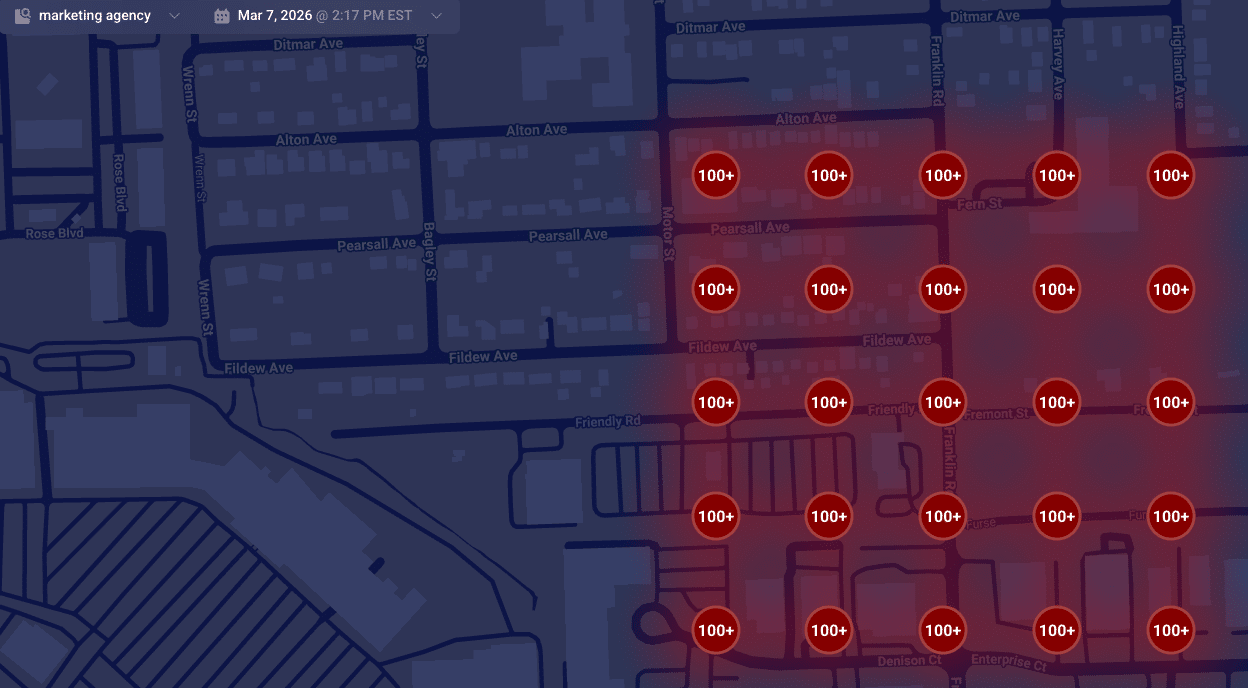
  "alt": "Map displaying high-density markers with '100+' in a red shaded area across various streets.",
  "caption": "This heat map reveals a high concentration area, with red-marked zones indicating significant density across streets like Pearsall Ave and Fildew Ave.",
  "description": "The map illustrates a geographic area with a high concentration of points marked '100+', shaded in red to indicate density. Streets such as Pearsall Ave, Fildew Ave, and Motor St are visible, providing a visual representation of congestion or population density. The interface is dated March 7, 2026, at 2:17 PM EST, possibly generated by a marketing agency tool, useful for spatial analysis or resource planning."
}
```

    Is Your Map Pin Placement Accidental?

    Don’t be mistaken, it’s not a bug but a failure in converting text to precise map coordinates. When this fails, your business may end up with a map pin that’s misplaced, affecting your local ranking authority.

    When unable to secure a high-confidence match from your building, Google defaults to using the city’s center as your pin’s fallback location, often causing your business to rank from a less relevant area.

    Suite Number Issues

    I’ve warned clients countless times about the pitfalls of including suite numbers in Address line 1. These numbers aren’t street-level data; embedding them can lead to geocoding conflicts, making your map pin default to a broader location like a city center.

    Properly Anchoring Your Map Pin

    For accurate map pin placement, ensure your address in Google’s system is geocoding-friendly. Keep unnecessary details out of the first address line and verify how Google reads your address using their developer tools.

    When addressing geocoding problems, prepare for possible re-verification requests. Stay consistent in your corrections until Google verifies your business’s precise location.


    Inspired by this post on Search Engine Land.


    crushpress.ai community screenshot
  • Mastering Local Business Contact Pages for Maximum Conversions

    Mastering Local Business Contact Pages for Maximum Conversions

    The perfect local business contact page built for Google and conversions

    When I first heard the term “contact page,” my mind immediately envisioned a simple space filled with contact info and a form. However, it turns out that this is a major oversight from a local SEO standpoint. Let me guide you on crafting a contact page that not only elevates your Google prominence but also converts more leads.

    Google pays special attention to your contact page

    Joel Headley, the former head of Google Business Profile Support, once shared with me that Google actively crawls and interprets your contact page to extract details about your business. This revelation illuminated the common inadequacy of contact pages that simply display a business’s name, address, and phone number (NAP), coupled with a basic contact form.

    ```json
{
  "alt": "AB Plumbing contact page with map, contact form, and company details.",
  "caption": "Get in touch with A.B. Plumbing via their contact page, featuring a map, easy-to-use form, and all the info you need for reliable service.",
  "description": "The A.B. Plumbing contact webpage displays a map pinpointing their location in San Francisco, CA. It includes a contact form for inquiries, fields for name, phone number, email, and comments. The page provides options for SMS updates and includes a CAPTCHA for submission security. Contact details such as email and phone number are prominently shown, making it convenient for customers to connect for plumbing services."
}
```

    Google is essentially requesting, “Provide me with your business data,” while you might be responding, “No data for you.” Instead, I encourage you to treat your contact page with the same importance as a multi-location landing page. Here’s what your contact page needs to transform visitors into paying clients:

    • Business identity.
    • Contact information.
    • Trust factors and social proof.
    • Location-specific content.
    • Amenities.
    • Call to action.

    1. Business identity

    Your contact page should be a reflection of your brand, just like every other page on your site. Here’s what to include:

    ```json
{
  "alt": "The CapmatchOne logo with a gradient circle and bold text.",
  "caption": "Discover innovation with the CapmatchOne logo, featuring sleek typography and a modern gradient circle.",
  "description": "The CapmatchOne logo features bold, modern typography coupled with a gradient circle, symbolizing connection and innovation. The sleek design conveys a sense of progress and creativity. This image can be used for branding or promotional purposes, appealing to audiences interested in innovative solutions and forward-thinking designs."
}
```
    • Your business logo, matching all marketing materials and signage.
    • Your slogan, with potential keywords for SEO enhancement.
    • A concise introduction detailing your business’s function, location, and unique value proposition (UVP).

    Dig deeper: The local SEO gatekeeper: How Google defines your entity

    2. Complete contact information

    Surprisingly, many businesses overlook adding complete contact details on their contact page. Here’s what’s essential:

    ```json
{
  "alt": "Website section detailing garden maintenance services including estimates, initial visit, on-site work, and maintenance details.",
  "caption": "Transform your garden with our expert maintenance services! From initial visits to meticulous upkeep, we ensure your outdoor space thrives year-round.",
  "description": "This image is a webpage section titled 'Refresh and Maintain Your Garden' that outlines the garden maintenance services offered. It includes details on obtaining estimates, the initial visit procedure, on-site services, and ongoing maintenance. The content emphasizes the thoroughness of the team in handling weeding, pruning, and seasonal tasks to maintain a healthy garden. This section of the website aims to attract customers seeking reliable and professional garden care."
}
```
    • Full business name.
    • A contact form and a corresponding email address.
    • Complete address.
    • Phone and text numbers.
    • Social media links.
    • Operational hours, including special or holiday variations.
    • Shopping options like in-store pickup, curbside pickup, delivery, or appointment-only.
    • Embedded Google Map to your business (not just your address).
    • A link to your Google Maps listing.
    • Accepted payment methods.
    • Parking information.

    Providing detailed business info not only facilitates customer contact and visits but also signals search engines that your business is credible.

    Bonus tips for your contact form:

    ```json
{
  "alt": "Website page showing a woman embracing a child, with information about donations to women's community shelters.",
  "caption": "Pillow Talk supports women in need with over $223,357 donated, enabling thousands of safe nights for those escaping domestic violence.",
  "description": "The image showcases a woman cuddling a child, symbolizing the care and support provided by community shelters. The webpage details a donation of $223,357 by Pillow Talk, which has enabled 4,467 nights of accommodation and meals for women and children escaping domestic violence. The text highlights the critical need for emergency accommodation and the retailer's contribution towards this cause."
}
```
    • Include a strong call to action, potentially the same throughout your page.
    • Implement form conversion tracking.
    • Combat spam with reCAPTCHA, plugins, double opt-ins, and obfuscated email formatting.
    • Ensure your contact section mirrors your Google Business Profile for legitimacy.

    Dig deeper: Local SEO sprints: A 90-day plan for service businesses in 2026

    3. Trust factors and social proof

    Your contact page isn’t just about providing contact avenues; it should convince visitors of their decision’s wisdom before they reach out.

    ```json
{
  "alt": "Webpage displaying awards for parks with images and text about 2020 Silver, 2020 Grand, and 2023 Grand Awards.",
  "caption": "Celebrating Excellence: Downtown and Central Parks earn top accolades for design and sustainability, recognized nationally and regionally.",
  "description": "This webpage showcases awards for outstanding park projects, featuring the 2020 Silver Award and 2020 Grand Award for Downtown Park, and the 2023 Grand Award for Central Park. Each award highlights exemplary landscape design and sustainable development practices acknowledged by the National and Washington Association of Landscape Professionals. Accompanying text describes the projects’ contributions to community growth and environmental stewardship, with images illustrating the parks' modern aesthetics."
}
```

    Clear expectations

    Clearly communicate what a customer can expect post-contact to solidify their choice to connect with you:

    • Expected response times.
    • Upcoming steps and confirmations from your team.
    • Additional useful information about your team, location, or differentiators.

    Experience and credentials

    Boost trust and conversion rates by displaying involvement in:

    ```json
{
  "alt": "Three positive customer reviews for Buehler AC, each rated five stars.",
  "caption": "Customers rave about Buehler AC's exceptional service, praising the team for professionalism and efficiency in these glowing five-star reviews.",
  "description": "This image features three customer testimonials for Buehler AC, each adorned with a five-star rating. The reviews express high satisfaction and commend the professionalism and efficiency of the team members, highlighting their attention to detail, knowledge, and timeliness. Each testimonial is quoted with the reviewer's name and a Google icon. Keywords: customer reviews, Buehler AC, five-star ratings, professionalism, efficiency."
}
```
    • Industry associations, locally and nationally.
    • Chamber of commerce groups.
    • Professional organizations.
    • Meetup and neighborhood associations.
    • Better Business Bureau ratings.

    Tip: Link association names to your business listing on their sites.

    Awards and accomplishments

    Include any awards and press mentions, with links to the relevant articles or sites. If there are many, consider a dedicated media section.

    ```json
{
  "alt": "Cafe Milo Family webpage featuring staff profiles and images for Abbie, Izzy, Arie, and Aleisha.",
  "caption": "Meet the Cafe Milo Family – driven by passion and personality, from culinary experts to eager students, each with their unique tastes and favorite pastimes.",
  "description": "The Cafe Milo Family webpage showcases staff profiles alongside personal photos and descriptions. Featured are: Abbie, involved in menu development; Izzy, a fan of strawberry mango smoothies; Arie, a veterinary student; and Aleisha, a sophomore at Iowa State. Each profile includes favorite drinks, foods, and activities, reflecting the friendly and community-focused spirit of the cafe. Keywords: Cafe Milo, staff profiles, community, beverages, menu development."
}
```

    Reviews and testimonials

    Embed external reviews and include testimonials to enhance trust. Enhance authenticity by showing reviewer photos, names, cities, and profiles.

    Your review section is also an excellent place to request additional Google reviews, especially from repeat customers, using a link and call to action.

    ```json
{
  "alt": "Business information settings for identity attributes, including options for various ownership identities.",
  "caption": "Explore diverse business ownership attributes to personalize your Google Business Profile, ensuring inclusive visibility and customer connection.",
  "description": "This image shows a section of Google Business information settings, allowing business owners to select various identity attributes, such as Asian-owned, Black-owned, disability-owned, indigenous-owned, Latino-owned, LGBTQ+ owned, veteran-owned, and women-owned. Options for 'Yes' or 'No' are available for each attribute, with selections made for indigenous and LGBTQ+ ownership. This interface helps businesses reflect diverse ownership for better consumer engagement and visibility."
}
```

    Dig deeper: 7 local SEO wins you get from keyword-rich Google reviews

    4. Location-specific content

    Tailor content to highlight local relevance, and clearly convey your business’s offerings, locations, and reasons to choose you. Suggestions include:

    ```json
{
  "alt": "Map and contact information for Anytime Fitness Kingston with options to book a tour or enquire online.",
  "caption": "Discover Anytime Fitness Kingston with our easy navigation map and contact options. Ready to start your fitness journey? Book a tour or enquire now!",
  "description": "This image features a map of Kingston, Tasmania, highlighting the location of Anytime Fitness Kingston at Channel Court Shopping Centre. The image includes a bold header stating, 'We're ready when you are,' alongside options to 'Book a Tour' or 'Enquire Now.' The contact information for Anytime Fitness Kingston is displayed prominently in purple, including the address and phone number. Social media icons and links for additional interactions like sending feedback or taking a virtual tour are also present, enhancing user engagement and accessibility."
}
```
    • Team member bios and images.
    • Details on customer demographics and expertise areas.
    • Mentions of prominent neighborhoods.
    • Customer satisfaction or price-match guarantees.
    • Upcoming events, volunteer efforts, or partnerships.

    Dig deeper: Top SEO tips for location-specific websites

    5. Amenities

    Review your Google Business Profile’s attributes and list those on your contact page, along with other unique attributes. This specificity aids traditional and AI searches in understanding if you meet distinct needs.

    ```json
{
  "alt": "Infographic outlining key sections of a perfect contact page, including business identity, contact information, trust factors, location-specific content, and call to action.",
  "caption": "Craft the perfect contact page with must-have sections like business identity, contact info, trust factors, and engaging call-to-action tips for enhanced customer interaction.",
  "description": "This infographic details the essential sections for a perfect contact page. It includes Business Identity with logo and slogan, Contact Information with address and map, Trust Factors with reviews, Location-Specific Content with team details, and a Call to Action for engaging visitors. Designed to optimize customer interaction and enhance credibility, this guide helps businesses craft an effective online presence."
}
```

    6. A clear CTA button

    With a well-structured contact page, a compelling call to action (CTA) is essential. Use vibrant, eye-catching CTAs throughout the page to encourage engagements.

    Treat your contact page like a local SEO asset

    Your contact page should be seen as a local SEO asset. By investing effort similar to creating a multi-location landing page, you elevate your engagement and conversion rates, surpassing most competitors. Keep this list handy to ensure all necessary sections are covered.


    Inspired by this post on Search Engine Land.


    crushpress.ai community screenshot
  • Why Your Local Search Rankings Hold but Calls Vanish

    Why Your Local Search Rankings Hold but Calls Vanish

    I’ve noticed something puzzling in my local business performance lately. Despite high rankings, the number of calls and website visits from Google Business Profiles seems to be dropping at an alarming rate.

    This disconnect is becoming increasingly common in local search. Rankings are stable, but visibility and customer engagement are not keeping pace.

    The alligator of local SEO, if you will, has made its presence known.

    The visibility crisis behind stable rankings

    I’ve observed that across various U.S. industries, the familiar local 3-packs are often getting replaced or supplemented by AI-run local packs. These new formats differ significantly from the traditional map results many of us are used to optimizing.

    According to Sterling Sky’s analysis of Google Business Profiles, a startling pattern emerges. Clicks-to-call are taking a nosedive, particularly for law firms managed by Jepto.

    When AI-powered packs take over, the landscape changes notably in four key areas:

    • Shrinking real estate: AI packs frequently display only two businesses instead of the usual three.
    • Missing call buttons: The summaries generated by AI often omit the instant click-to-call functionality, complicating the customer’s journey.
    • Different businesses appear: Companies featured in AI packs do not necessarily align with those in the traditional 3-pack.
    • Accelerated monetization of local search: The presence of paid ads increasingly results in the loss of direct call and website buttons in traditional 3-packs, thereby reducing opportunities for organic conversion.

    There’s an additional challenge compounding this issue:

    ```json
{
  "alt": "Line graph showing the percentage of keywords with local pack ads from Nov 2024 to Jan 2026, peaking at 21.99% in Jan 2026.",
  "caption": "Tracking the Rise: The graph illustrates the increasing trend of keywords displaying local pack ads, peaking dramatically by early 2026.",
  "description": "This line graph presents data on the percentage of keywords featuring local pack ads from November 2024 to January 2026. Starting at 0.96% in November 2024, the graph shows fluctuations and a significant rise, culminating at 21.99% in January 2026. Key points include a peak of 6.48% in July 2025 and another sharp increase starting November 2025. This visual aids in understanding trends in local ad visibility over time, highlighting shifts in digital advertising strategies."
}
```
    • Measurement blind spots: Most rank trackers have yet to account for AI local packs. A business may hold a top spot in a traditional 3-pack that users rarely encounter.

    In 2026, AI local packs surfaced only 32% as many unique businesses as traditional map packs, according to Sterling Sky. Astonishingly, in 88% of the 322 markets examined, the total number of visible businesses plummeted.

    Meanwhile, paid ads are steadily claiming the space that once belonged to organic results, marking a clear transition toward a pay-to-play environment in local search.

    What Google Business Profile data shows

    This trend is echoed in the U.S., where Google is proactively testing new local formats, as indicated by data from GMBapi.com. Increased impressions from traditional 3-packs are being nudged out by:

    • AI-powered local packs.
    • Paid placements inside traditional map packs: Sponsored listings now appear adjacent to or within the map pack, relegating organic results and removing essential call and website buttons. This interrupts organic customer interactions.
    • Expanded Google Ads units: Even Local Services Ads are consuming space that once granted organic visibility.

    Impression trends continue to vary due to seasonal factors, market disparities, and occasional API glitches. Nevertheless, a clearer picture emerges by focusing on GBP actions rather than mere impressions.

    Mentions within AI-generated results still count as impressions, even if they no longer convert into calls, clicks, or visits.

    ```json
{
  "alt": "Line graph showing GMBapi.com's US customer impressions from 2025-01 to 2026-01, split by desktop and mobile impressions.",
  "caption": "Explore the trends in GMBapi.com's US customer impressions over 2025, with distinct patterns across desktop and mobile platforms.",
  "description": "This line graph illustrates GMBapi.com's US customer impressions from January 2025 to January 2026. Four lines represent different impression sources: Desktop Search (blue), Mobile Search (orange), Desktop Maps (green), and Mobile Maps (red). The graph shows fluctuation patterns, with Mobile Search impressions notably higher and more volatile. A legend on the top right aids in distinguishing data sources. Keywords: customer impressions, GMBapi.com, desktop, mobile, trends, data visualization."
}
```

    External factors, such as known Google API issues in June, also contribute to these fluctuations. Additionally, the spike in Google Ads investment by significant advertisers towards year-end heavily affects Mobile Maps impressions.

    Currently, there’s no method to differentiate these impressions by Google Ads, organic results, or AI Mode.

    Despite these challenges, user behavior is undeniably shifting. Interaction rates are dwindling, with fewer direct actions taken from local listings.

    Year-on-year data from the U.S. indicates that while impression losses remain moderate and somewhat seasonal, GBP actions are disproportionately affected.

    In contrast, data from the Dutch market, where SERP experiments are limited, shows far more stable action trends.

    The evidence is clear. AI-driven SERP alterations, increasing Google Ads, and the removal of call and website buttons from the Map Pack are eroding organic real estate. Despite appearances, businesses have fewer opportunities to convert visibility into actual user actions.

    Local SEO is becoming an eligibility problem

    Traditionally, local optimization focused on key ranking factors like proximity, relevance, prominence, reviews, citations, and engagement.

    ```json
{
  "alt": "Line graph showing impressions for GMBapi.com NL customers from 2025 to 2026, divided into desktop and mobile, search, and maps categories.",
  "caption": "Explore the trends in desktop and mobile impressions for search and maps from GMBapi.com NL customers from 2025 to 2026. Notice the fluctuations that offer insights into digital engagement.",
  "description": "This line graph illustrates the number of impressions for GMBapi.com NL customers from January 2025 to January 2026. It categorizes data into Desktop Search, Mobile Search, Desktop Maps, and Mobile Maps impressions. The horizontal axis represents months, while the vertical axis indicates the number of impressions, with values in millions. Key trends include a decline in Mobile Maps impressions and fluctuations in Mobile Search impressions, suggesting varying digital user engagement levels across platforms over the year."
}
```

    There’s now an additional layer to consider: eligibility.

    Some businesses find themselves absent in AI-powered local results not due to a lack of authority, but because Google’s systems deem them inadequate for the specific query context. Research from Yext and experiences shared by experts like Claudia Tomina emphasize the importance of aligning three core signals:

    • Business name
    • Primary category
    • Real-world services and positioning

    Misalignment in these areas can prevent businesses from appearing in certain result types, regardless of how well their Google Business Profile is optimized.

    How to future-proof local visibility

    Navigating today’s zero-click reality involves moving beyond reliance solely on a well-optimized Google Business Profile. Here’s a new playbook for local SEO.

    The eligibility gatekeeper

    Inclusion in local packs is now influenced more by perceived relevance and classification than by links or review quantity.

    ```json
{
  "alt": "Line graph showing website clicks, call clicks, and direction requests from GMBapi.com's US customers from 2025-01 to 2026-01.",
  "caption": "A dynamic line graph illustrating trends in website clicks, call clicks, and direction requests by GMBapi.com's US customers over a year.",
  "description": "This line graph depicts trends in three types of business actions—website clicks, call clicks, and direction requests—by GMBapi.com's US customers from January 2025 to January 2026. The blue line represents website clicks, which peaked around mid-2025 before declining. The orange line shows call clicks with a steady decrease throughout the year. The green line indicates direction requests with fluctuations over time. This graph helps in understanding customer interaction patterns and trends in digital engagement."
}
```

    Hyper-local entity authority

    AI systems rely on platforms like Reddit, social media, forums, and local directories to evaluate if a business is legitimate and active. Inconsistencies across these platforms can erode visibility without any obvious signs.

    Visual trust signals

    High-quality and frequently updated photos, along with video, are critical. Google’s AI evaluates visual content to gauge services, intent, and categorization.

    Embrace the pay-to-play reality

    The hard truth is that Google Ads, particularly Local Services Ads, is now essential to retaining prominent call buttons that organic listings are steadily losing. Adopting a hybrid strategy that merges local SEO with paid search is no longer optional but necessary.

    What this means for local search now

    Local SEO has evolved beyond a simple directory exercise. Google Business Profiles remain central to local discoverability but now exist within a broader ecosystem informed by AI validation, constant SERP changes, and Google’s pursuit of local search monetization.

    ```json
{
  "alt": "Line graph showing GMBapi.com's NL customers' business actions including website clicks, call clicks, and direction requests from 2025 to 2026.",
  "caption": "Tracking the trends: A closer look at GMBapi.com's NL customers' business actions, showcasing fluctuations in clicks and requests over the span of a year.",
  "description": "This line graph illustrates business actions by GMBapi.com's NL customers over 2025 to early 2026, detailing website clicks, call clicks, and direction requests. The data shows higher engagement with website clicks and direction requests, while call clicks remain consistently lower. This visual provides insights into customer behavior and engagement trends over time."
}
```

    Visibility no longer depends solely on where your GBP ranks against local rivals. Search engines, including AI-infused SERP features and advanced models like ChatGPT and Gemini, are increasingly focused on understanding a business’s genuine purpose, not merely its listing position.

    Success lies in being widely verified, consistently active, and contextually relevant within the AI-visible ecosystem.

    Our findings reveal that there is little correlation between businesses ranking well in traditional Map Packs and those prioritized in Google’s AI-generated local answers. This discrepancy offers a real opportunity for businesses willing to adapt.

    In essence, this entails blending local input with central management.

    Authentic engagement across multiple channels, locally tailored content, and actual community signals are necessary alongside brand governance, data consistency, and operational scale. Businesses deeply ingrained in their community, discussed, recommended, and referenced, both online and offline, find themselves halfway there.

    For agencies and brands with multiple locations, the challenge is balancing control with local nuances and ensuring trusted signals extend beyond Google, encompassing Apple Maps, Tripadvisor, Yelp, Reddit, and other pertinent review ecosystems. Producing locally relevant content and citations at scale without losing authenticity is the real test.

    Even if rankings appear stable, true performance is occurring elsewhere.

    The full data. Local SEO in 2026: Why Your Rankings are Steady but Your Calls are Vanishing


    Inspired by this post on Search Engine Land.


    crushpress.ai community screenshot