Google Ads Glitch Halts Performance Max Edits: What to Do

```json
{
  "alt": "Google Ads logo over a blue textured background",
  "caption": "The Google Ads logo stands out against a textured blue backdrop, representing the power and reach of digital advertising.",
  "description": "This image features the Google Ads logo prominently displayed over a textured blue background. The logo, consisting of colorful interlocking shapes, embodies Google's expansive and dynamic advertising platform. The subtle background adds depth, highlighting the logo's simplicity and elegance. Keywords: Google Ads, logo, digital advertising, branding."
}
```

A recent bug in Google Ads is causing frustration among advertisers, as it has started blocking any attempts to edit Performance Max (PMax) asset groups. I’ve personally encountered error messages when trying to update asset groups, making it impossible to save any changes directly in the platform.

Why This Matters to Us. As an advertiser, the freshness and adaptability of our assets are crucial for campaign success. Without the ability to update asset groups, there’s a risk of my campaigns running with outdated content, potentially harming their performance and efficiency.

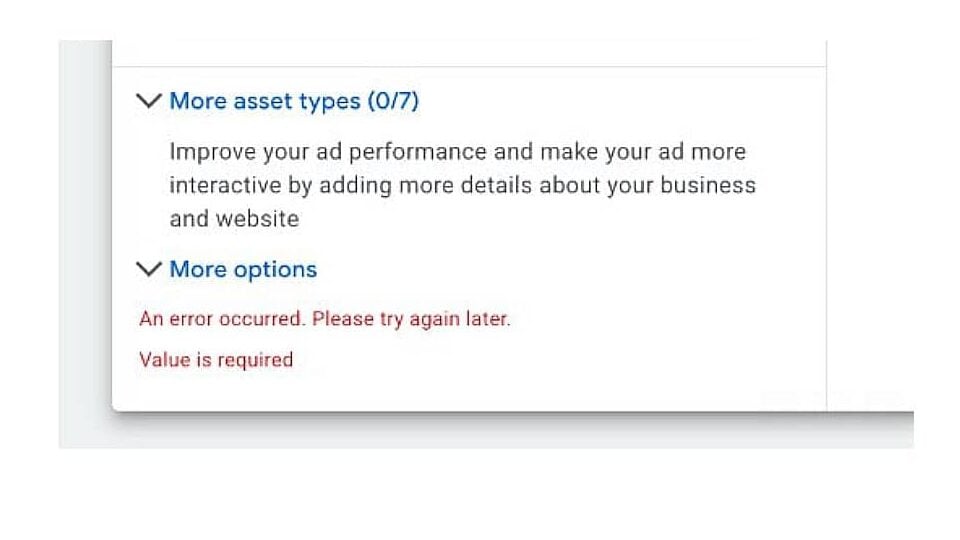
What I’m Experiencing. Like others, I’ve faced an error message stating, “An error occurred. Please try again later. Value is required,” each time I’ve tried editing any asset group details. This error shows up in the Google Ads UI, stopping me from saving any changes even if all required fields appear to be filled.

Google’s Response. Google acknowledges this issue and is looking into it. However, they haven’t provided a timeline for a fix or any further guidance through their official channels yet.

Temporary Workaround. For now, I’ve found that using the Google Ads Editor allows me to make necessary changes and upload them directly. While this method works, it introduces additional steps that disrupt my usual workflow of managing PMAX via the web interface.
```json
{
  "alt": "Error message screen with text: 'An error occurred. Please try again later. Value is required.'",
  "caption": "A technical glitch interrupts workflow with a message indicating a required value error. Will you troubleshoot now or later?",
  "description": "This image shows a screen with an error message, suggesting issues with input fields. The text advises, 'An error occurred. Please try again later. Value is required.' This is common in digital forms and ad management interfaces, indicating necessary information is missing. Keywords: error message, technical issue, form completion, troubleshooting."
}
```

Next Steps for Advertisers. If you’re running Performance Max campaigns like I am, it’s essential to revisit recent changes to ensure they’ve been saved correctly. In the meantime, directing any necessary updates through Ads Editor may be a wise choice until Google resolves the issue.

Looking Ahead. Until Google addresses this glitch, a new level of uncertainty might accompany managing Performance Max campaigns. It’s important for us to double-check our versions and explore alternative workflows.

First to Report. PPC professional Chelsea Harding initially flagged this issue and shared her experience about the error message on LinkedIn.


Inspired by this post on Search Engine Land.


crushpress.ai community screenshot

FAQs

What is causing the issue with Performance Max asset group edits?

A bug in Google Ads is blocking edits to Performance Max asset groups. Advertisers may see the error message ‘An error occurred. Please try again later. Value is required’ while editing asset group details, preventing saves in the UI.

How does this impact advertisers?

It prevents saving changes to asset groups via the UI, risking campaigns running with outdated content and potentially harming performance.

What has Google said about the issue?

Google acknowledges the issue and is investigating. They have not provided a timeline for a fix or further guidance yet.

What is the temporary workaround?

Using Google Ads Editor allows making changes and uploading them directly; this workaround works but adds steps and disrupts the usual workflow.

What should advertisers do next?

Revisit recent changes to ensure they’ve been saved correctly. In the meantime, use Ads Editor for updates until Google resolves the issue.

Comments

Leave a Reply

Your email address will not be published. Required fields are marked *