
When I first delved into Performance Max, I shared the sentiment that it felt like a black box. But as I’ve explored its functionalities over time, it’s become an essential part of my marketing toolkit. Google’s quarterly updates have continued to enhance its visibility and usability.
While the additional reporting is helpful, I focus on leveraging the aspects I can control for meaningful impact. Although not everything is adjustable in Performance Max, there are several key levers that I utilize for optimizing my campaigns. Here’s how I get more out of Performance Max by controlling the controllable aspects.
Control what you can: Search terms and placements
One of the best updates to come to Performance Max is the ability to add campaign-level negative keywords. No more cumbersome processes with Google; now, I can directly update these within my campaigns.
Thanks to the search terms report, I can directly select a keyword and add it to my campaign’s negative keyword list, much like other campaign types, maximizing efficiency and minimizing wasted spend.
Another optimization opportunity lies within the placements report. Google’s recent change moved the Performance Max placements report from general reporting to the campaign’s ‘Where ads have shown’ section, simplifying analysis. Here, I review impressions and decide on negative placements at the account level if needed.
Though impression-level reporting can be limiting, I use these insights to decide if certain ads, like those appearing in kids’ programming, should be excluded due to high impressions from unintended sources like mobile apps.

Use budget signals to improve efficiency
Another area I monitor closely is the ad schedule found in the ‘When and where ads showed’ section. Even without an initial schedule, Google provides hour-by-hour data, which helps me refine ad timing to match budgets more efficiently.
When working with a limited budget, I optimize ad schedules to avoid non-converting hours, thus maximizing my ROI. I adjust ad timings in ‘Campaigns > Audiences, keywords, and content > Ad schedule’ to align with peak performance times.
Dig deeper: Top Performance Max optimization tips for 2026
Refine targeting with the right constraints
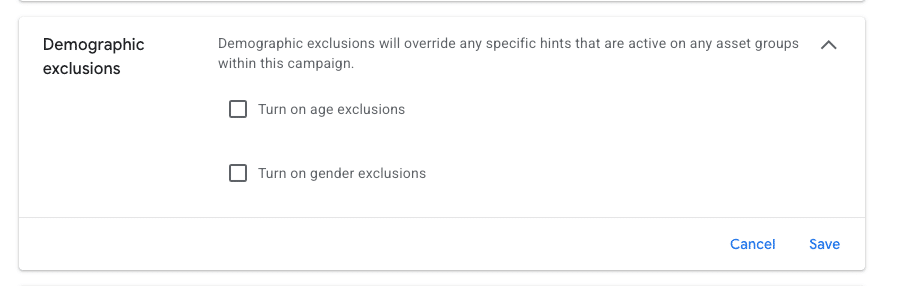
Campaign settings now include demographic exclusions, which I find particularly valuable for excluding non-converting audiences based on demographics.
This feature is quite useful when specific demographics are unlikely to engage with my offerings. To make these adjustments, I navigate to ‘Campaign-level settings > Other settings > Demographic exclusions’, enabling me to refine my target audience further.
Although PMax originally lacked device-level insights, the new device targeting features help me review and adjust devices for better performance. It’s crucial to periodically evaluate which devices are contributing positively to the campaign goals.
Based on performance insights, I decide which devices to include or exclude under ‘Other settings’. This approach enhances my strategy by ensuring my ads appear on devices that align best with my objectives.
Improve inputs: Creative and AI assets
Creative assets are critical to the success of Performance Max campaigns, especially across display, YouTube, and Discover networks. To bridge the gap in quality creative, I’m incorporating AI assets more often.
AI-generated assets are becoming increasingly sophisticated, helping me more effectively target these networks. As AI technology evolves, it’s unlocking new possibilities for creating compelling visuals and video content.
Google’s AI assets, derived from shopping feed products, are impressively close to replacing traditional creative methods. However, producing glitch-free AI-generated videos remains a future goal I’m keenly observing.

Dig deeper: How to reduce low-quality leads from Performance Max campaigns
Understand the limits of control in Performance Max
I appreciate the channel controls report for the insights it offers on ad placements, even though actionable adjustments are limited at times, which can be frustrating.
Looking forward, I expect Performance Max to offer more control similar to Demand Gen campaigns. Until then, I adjust my creative and bidding strategies to influence where my ads appear, using feed-only campaigns to focus solely on shopping.
Performance Max continues to transform from an opaque platform to an integral tool for marketers. With each update, it offers more actionable levers like negative keywords, placements, and smart scheduling to optimize efficacy.
Using these tools strategically, I ensure my campaigns are as precise and efficient as possible, moving beyond the ‘set-it-and-forget-it’ mindset.
Inspired by this post on Search Engine Land.

Leave a Reply