
Enhance Product Images with Google’s New Merchant Center Tools

```json
{
  "alt": "Hand holding smartphone displaying Google Shopping logo with large Google G logo in the background.",
  "caption": "Exploring the future of online retail with Google Shopping, perfectly blending technology and commerce at our fingertips.",
  "description": "A hand holds a smartphone showing the Google Shopping logo, a colorful shopping tag with 'G,' indicating the app's purpose. In the background, a large, partially visible, multicolored Google 'G' logo is prominently displayed. This image represents Google's integration of shopping experiences through digital platforms, emphasizing accessibility and convenience in modern online commerce. Keywords: Google Shopping, online retail, smartphone, digital commerce."
}
```

I recently discovered that Google has supercharged its Merchant Center with some noteworthy additions. If you’re like me, always on the lookout for ways to make your product listings pop, this update is exciting!

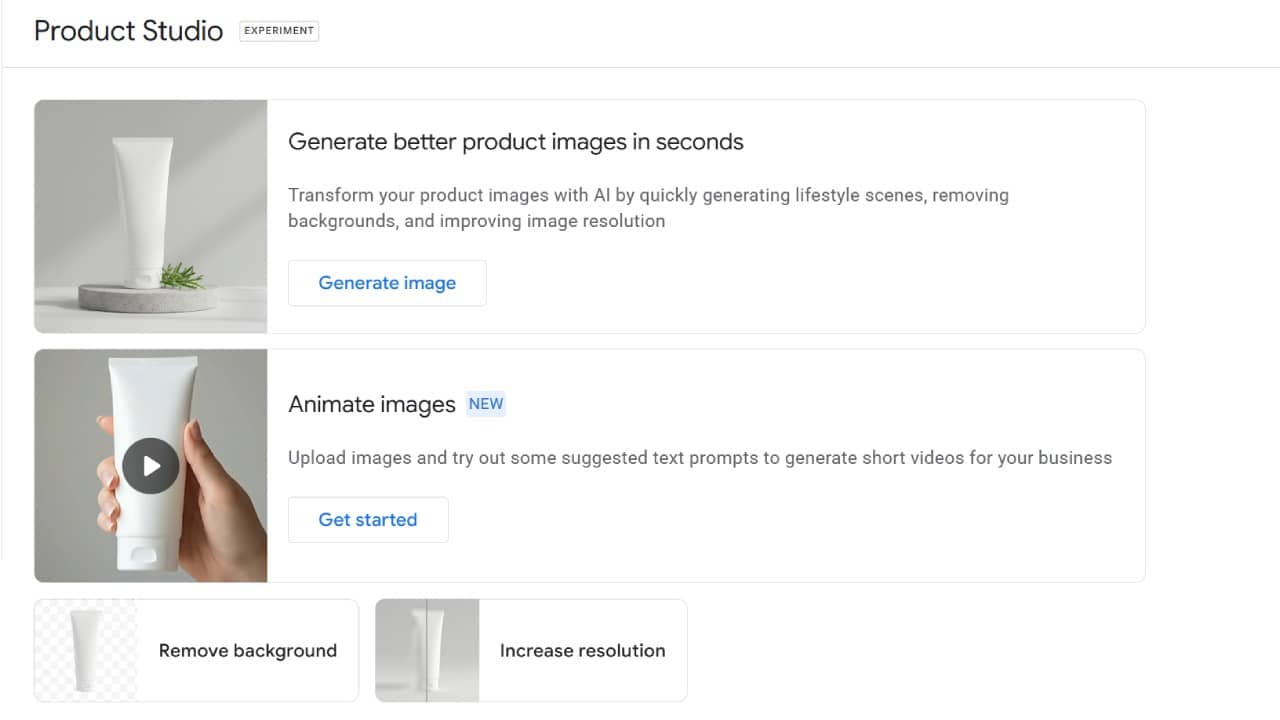
Google’s Product Studio is now equipped with three creative features that add flair to your product images. Previously, it was all about generating images, but now there’s so much more on offer.

What’s New: Imagine transforming your static product pictures into engaging short videos with just a few text prompts. Product Studio now makes it easy to do just that, perfect for creating eye-catching ads for social platforms.

Another cool feature is the one-click background removal. This tool is fantastic for making your product images look clean and professional, allowing products to stand out more vividly in Shopping visuals.

The third addition is really handy—enhancing image resolution. It lets us upscale older, lower-quality images to meet today’s high visual standards, ensuring our listings look their best.

```json
{
  "alt": "Product Studio interface with options for generating images and animations.",
  "caption": "Discover the power of Product Studio! Easily generate and animate product images to enhance your brand's online presence.",
  "description": "This image showcases the Product Studio interface, offering features like generating better product images using AI, animating images, and improving image quality by removing backgrounds and increasing resolution. Buttons like 'Generate image' and 'Get started' invite users to engage with these functionalities, enhancing e-commerce visuals with ease and efficiency."
}
```
New Product Studio Features

Why We Care: High-quality images are crucial for boosting Shopping performance. However, creating and updating these assets has always required time and effort. These new features speed up the process and keep us from relying heavily on design teams.

The Big Picture: Google’s integration of AI-powered tools within Merchant Center is a game-changer. By making it easier to animate and enhance images, Google lowers the barriers to testing creative content—essential for maximizing campaigns.

What to Watch: For those of us with limited creative resources, these tools could be a massive time-saver. As Google pushes for more video-focused and visually enhanced ad formats, staying ahead with these updates will be vital.

First Seen: I came across this exciting update thanks to a post by Senior PPC Specialist, Vojtěch Audy.


Inspired by this post on Search Engine Land.


crushpress.ai community screenshot

FAQs

What new Google Merchant Center tools are covered in this post?

The post covers three Product Studio additions: turning static product images into short videos with text prompts, one-click background removal, and image resolution enhancement. These updates are aimed at improving product visuals for Shopping and ad campaigns.

How can Product Studio help create more engaging product ads?

Product Studio can transform static product pictures into short videos using text prompts. The post notes that this can help create eye-catching ads for social platforms.

Why is one-click background removal useful for Shopping visuals?

The background removal tool helps make product images look cleaner and more professional. According to the post, this allows products to stand out more vividly in Shopping visuals.

What does the image resolution enhancement feature do?

The resolution enhancement feature can upscale older or lower-quality images. The post frames this as a way to help listings meet higher modern visual standards.

Why do these Google Product Studio updates matter for advertisers?

The post says high-quality images are crucial for boosting Shopping performance, but creating and updating assets takes time. These tools can speed up creative work and reduce reliance on design teams.

Who may benefit most from the new Merchant Center image tools?

The post highlights advertisers and teams with limited creative resources. For them, animation, background removal, and image upscaling could save time as Google pushes more visual and video-focused ad formats.

Comments

Leave a Reply

Your email address will not be published. Required fields are marked *