Tag: SEO

  • Why AI Is Revolutionizing Acquisition with a Bottom-Up Approach

    Why AI Is Revolutionizing Acquisition with a Bottom-Up Approach

    AI has reshaped how we think about acquisition strategy. It’s no longer about starting at the top of the funnel with broad awareness campaigns. Instead, we begin at the bottom, focusing on building understanding, credibility, and reach in the right sequence.

    For the past 30 years, the industry followed a top-down model: raising awareness, gaining visibility, and then guiding potential customers through the purchase funnel. This approach made sense during the broadcast era and was somewhat effective in the search era, but today, in AI-driven environments, it’s outdated.

    ```json
{
  "alt": "The CapmatchOne logo with a gradient circle and bold text.",
  "caption": "Discover innovation with the CapmatchOne logo, featuring sleek typography and a modern gradient circle.",
  "description": "The CapmatchOne logo features bold, modern typography coupled with a gradient circle, symbolizing connection and innovation. The sleek design conveys a sense of progress and creativity. This image can be used for branding or promotional purposes, appealing to audiences interested in innovative solutions and forward-thinking designs."
}
```

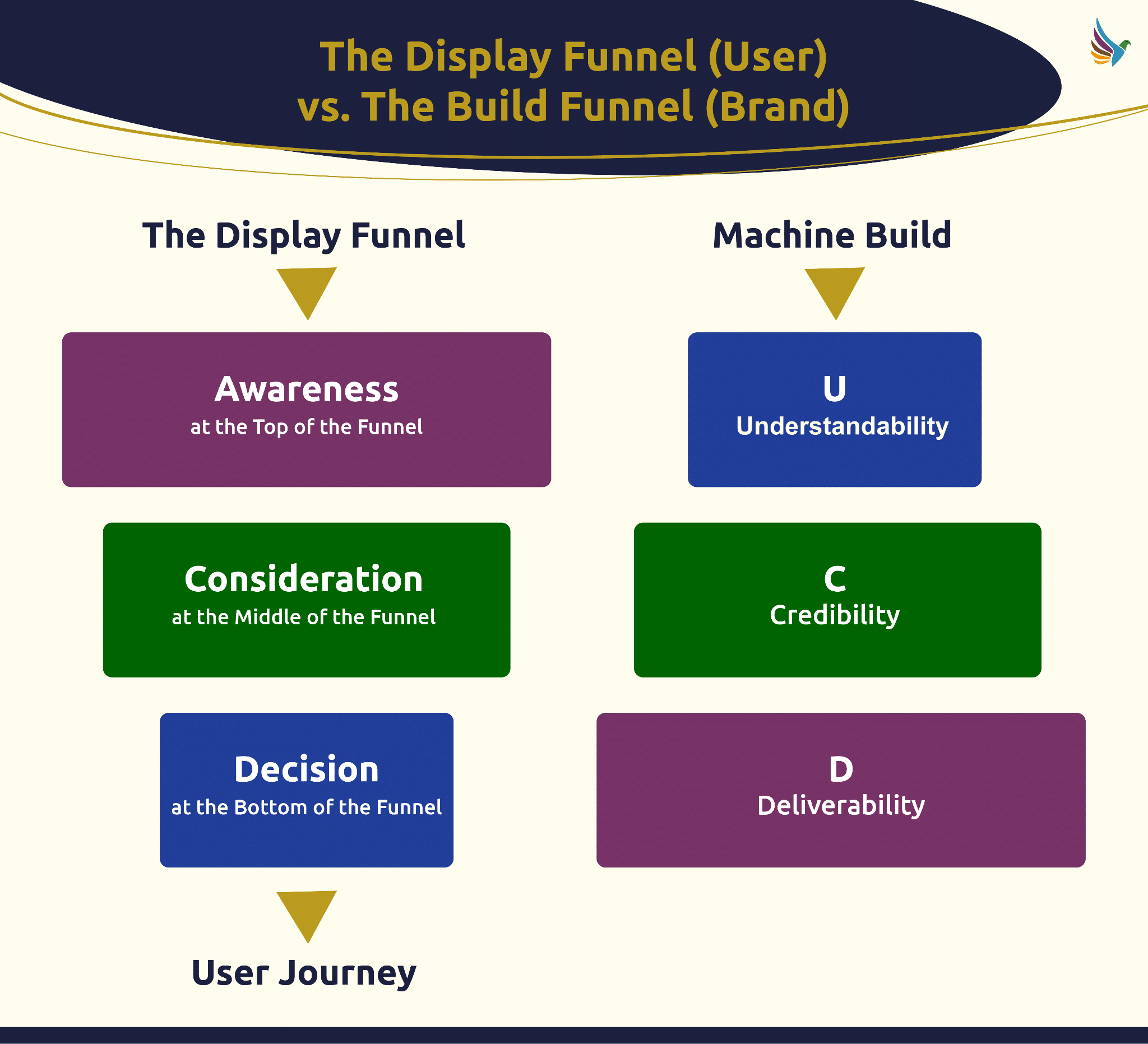
    Today’s search engines and AI-powered assistants build brand recommendations from the ground up. They need to grasp who we are before they can evaluate our credibility. Only after establishing credibility can they recommend us. If we prioritize top-down strategies, we’re essentially wasting budget on awareness without a strong foundational understanding for AI to work with.
    ```json
{
  "alt": "Diagram comparing user display funnel with brand build funnel, showing stages like awareness, consideration, decision versus understandability, credibility, deliverability.",
  "caption": "Exploring the user journey with the display funnel and contrasting it with the brand-focused build funnel.",
  "description": "This image presents a comparative diagram of 'The Display Funnel' for users, highlighting stages such as Awareness, Consideration, and Decision, and 'The Build Funnel' for brands, featuring Understandability, Credibility, and Deliverability. The layout emphasizes the user journey and machine build paths, showing how these funnels align and differ. Keywords: user journey, display funnel, build funnel, awareness, credibility."
}
```

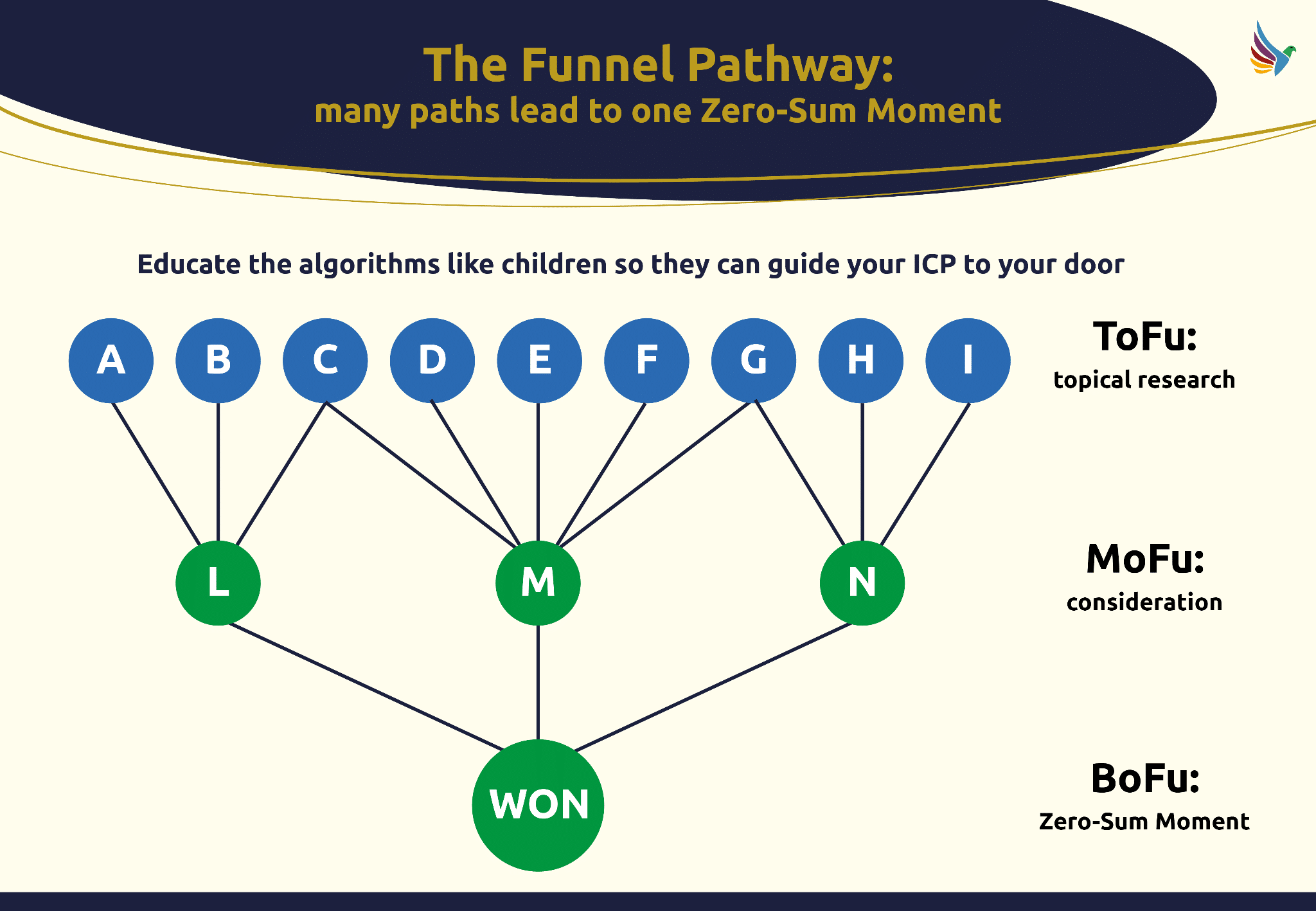
    AI systems hold the key to successful brand recommendations — if they don’t understand our brand, or find us less credible compared to our competitors, they’ll likely recommend someone else. This AI-led shift is what I call the ultimate zero-sum game: the unseen recommendation to prospects we might not even know about.
    ```json
{
  "alt": "Flowchart titled 'The Funnel Pathway' illustrating customer journey from research to purchase.",
  "caption": "Discover the Funnel Pathway: guiding your ideal customer profile (ICP) through strategic stages, leading to a winning outcome.",
  "description": "This flowchart, titled 'The Funnel Pathway: many paths lead to one Zero-Sum Moment,' visually represents a customer's journey from ToFu (Top of Funnel) with topical research, through MoFu (Middle of Funnel) for consideration, to BoFu (Bottom of Funnel) for a Zero-Sum Moment. Nodes A to I represent initial touchpoints, L to N for interim stages, culminating in a 'WON' outcome."
}
```

    The acquisition funnel hasn’t altered for users. They still journey from awareness to consideration to decision. Essentially, Elias St. Elmo Lewis’s model from 1898 still applies. All marketing models have been based on this, although channels have evolved. The mantra remains: reach first, relationship second, commitment third.
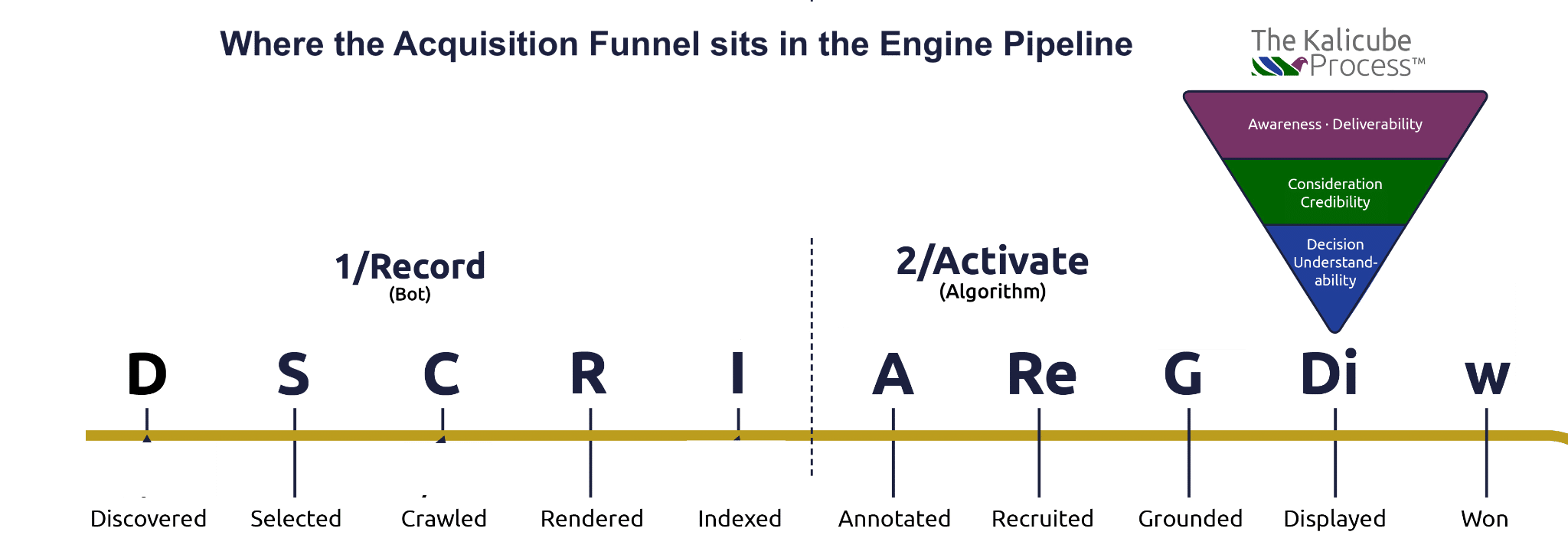
    ```json
{
  "alt": "Infographic showing acquisition funnel stages in search engine pipeline with a funnel diagram.",
  "caption": "Explore how the acquisition funnel integrates into the search engine pipeline through a detailed infographic, showcasing each critical stage.",
  "description": "This infographic details the stages of the acquisition funnel as it fits into the search engine pipeline. The funnel is divided into stages for awareness, consideration, and decision-making, corresponding to different phases like discovery, crawling, and indexing. The Kalicube Process logo appears at the top. Each step of the pipeline is marked with initial letters and descriptions, providing a clear pathway from discovery to winning potential customers. Keywords: acquisition funnel, search engine pipeline, Kalicube Process."
}
```

    In my experience, the digital landscape changed with Google’s Knowledge Graph in 2012. It allowed machines to form independent opinions about brands, highlighting the need for brand understanding and reputation over mere awareness. Since then, my focus has centered on these aspects because AI-driven engines and agents rely on it to direct users towards credible destinations.
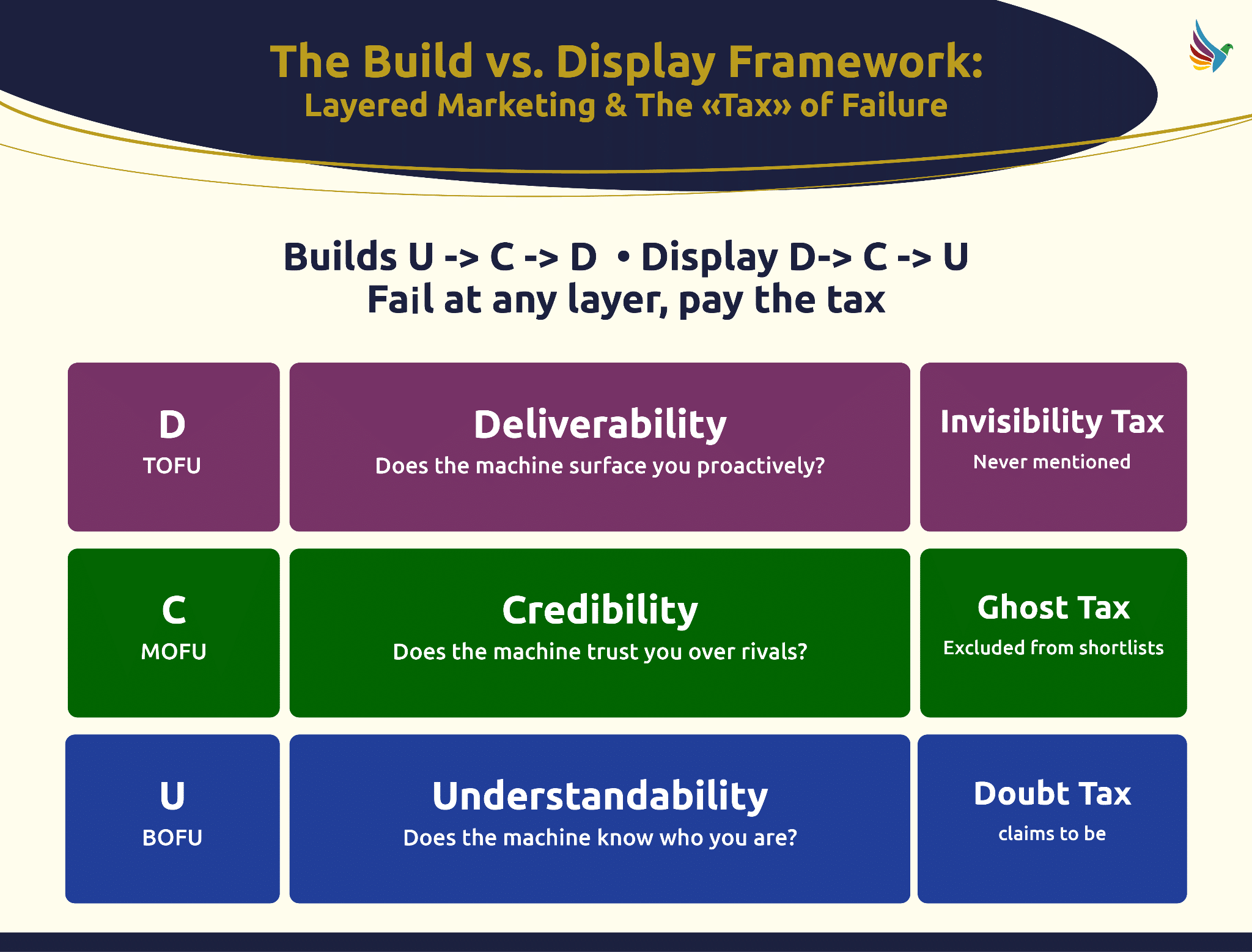
    ```json
{
  "alt": "Build vs. Display Framework diagram explaining layers of marketing and failure tax.",
  "caption": "Explore the Build vs. Display Framework, which outlines the layered marketing approach and associated taxes of failure at each stage.",
  "description": "This image presents the Build vs. Display Framework, focusing on layered marketing and the 'tax' of failure. It illustrates three stages: Deliverability (D), Credibility (C), and Understandability (U), each paired with potential failures: Invisibility, Ghost, and Doubt taxes. The process builds U to C to D and displays D to C to U, highlighting consequences of faltering at any level. Ideal resource for understanding strategic marketing layers."
}
```

    This marks a structural shift in marketing since 1898. While the user still travels from awareness to decision, in AI engines and agents, it’s our understanding and credibility that position us at the top of their funnel, achieved by training AI to guide users to us.
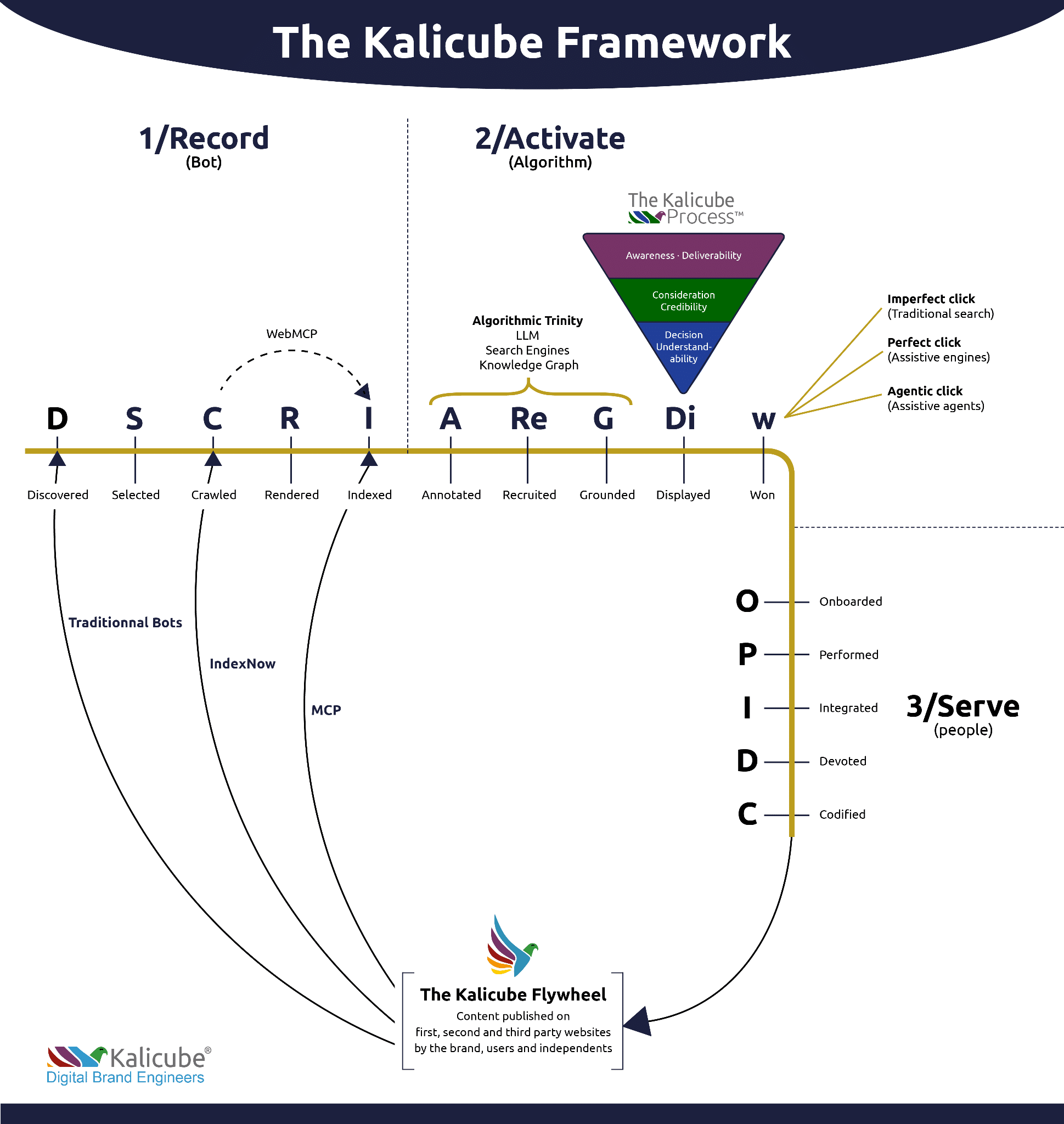
    ```json
{
  "alt": "The Kalicube Framework diagram illustrating SEO processes in three phases: record, activate, and serve.",
  "caption": "Explore the Kalicube Framework, a strategic guide for digital branding that outlines the process from data recording to audience engagement.",
  "description": "The Kalicube Framework visualizes the journey of digital content through three phases: Record, Activate, and Serve. Starting with discovery and indexing by bots, it progresses to algorithm activation with annotation and display. The process concludes with serving content through onboarding and performance. Key components include traditional bots, IndexNow, and the Kalicube Flywheel. Keywords: Kalicube Framework, SEO, digital branding, content indexing, algorithmic activation."
}
```

    The coexistence of top-down and bottom-up strategies is real. We can still build awareness through controlled channels—paid media, broadcasts, and direct outreach. However, in the realm of organic engines, we must start from the bottom of the funnel, building a foundation for AI to guide users efficiently.

    Every algorithm, AI engine, and agent operates based on entity and brand signals. Social media reach, too, hinges on brand recognition and engagement. Therefore, investing in a solid brand understanding orients us favorably within the AI framework, where roadmaps to our brand are increasingly machine-built.

    This content reflects my approach to developing robust brand presences that resonate with both AI systems and human audiences.


    Inspired by this post on Search Engine Land.


    crushpress.ai community screenshot
  • Master YouTube Analytics with Data Studio for Clear Insights

    Master YouTube Analytics with Data Studio for Clear Insights

    Have you ever wondered about the performance of your YouTube videos? With the time and resources invested in creating content, it’s crucial to track its success.

    While YouTube Studio offers robust analytics, accessing the data can be tricky, especially for sharing with others. Here’s where Google Data Studio (previously Looker Studio) comes in handy, offering an easier way to analyze and share YouTube data.

    ```json
{
  "alt": "The CapmatchOne logo with a gradient circle and bold text.",
  "caption": "Discover innovation with the CapmatchOne logo, featuring sleek typography and a modern gradient circle.",
  "description": "The CapmatchOne logo features bold, modern typography coupled with a gradient circle, symbolizing connection and innovation. The sleek design conveys a sense of progress and creativity. This image can be used for branding or promotional purposes, appealing to audiences interested in innovative solutions and forward-thinking designs."
}
```

    With Data Studio, I can seamlessly integrate YouTube data, schedule updates for stakeholders, customize dashboards, and monitor performance without needing direct access to the backend.

    ```json
{
  "alt": "Screenshots illustrating YouTube Channel Report and permission settings.",
  "caption": "Dive into YouTube's analytics with ease! These screenshots highlight the process of adding data reports and managing channel permissions effectively.",
  "description": "This image showcases two separate screenshots related to YouTube channel management. The left section displays permissions settings, showing options to manage user access and roles for a specific channel. The right section demonstrates adding data to YouTube Channel Report, including options for configuring YouTube Analytics. The image is useful for understanding how to navigate YouTube's analytics interface and manage channel permissions efficiently."
}
```

    Let me guide you on integrating YouTube analytics into a Data Studio report.

    ```json
{
  "alt": "Google Data Studio interface showing YouTube Analytics report template.",
  "caption": "Explore data insights with Google Data Studio, showcasing a YouTube Analytics report template for channel performance tracking.",
  "description": "The image displays the Google Data Studio interface, highlighting a YouTube Analytics report template in the Template Gallery section. The interface includes options to create a report, chat with data, and learn about Data Studio. The YouTube Analytics template showcases metrics like views, video shares, and average view duration, offering users a comprehensive tool for data visualization and performance analysis. Ideal for those looking to interpret YouTube channel data efficiently."
}
```

    Using a template or starting from scratch

    ```json
{
  "alt": "YouTube channel report showing views, hours watched, video shares, and average view duration.",
  "caption": "Explore your YouTube analytics with this sample channel report, highlighting views, engagement, and watch time dynamics.",
  "description": "This image depicts a YouTube Sample Channel Report featuring key analytics data, including 409.8K views, 15.4K hours watched, 1.8K video shares, and an average view duration of 2:15. Visual graphs illustrate trends over time from January 16 to February 12. The interface allows users to select specific data and video titles, providing comprehensive insights into channel performance and audience engagement."
}
```

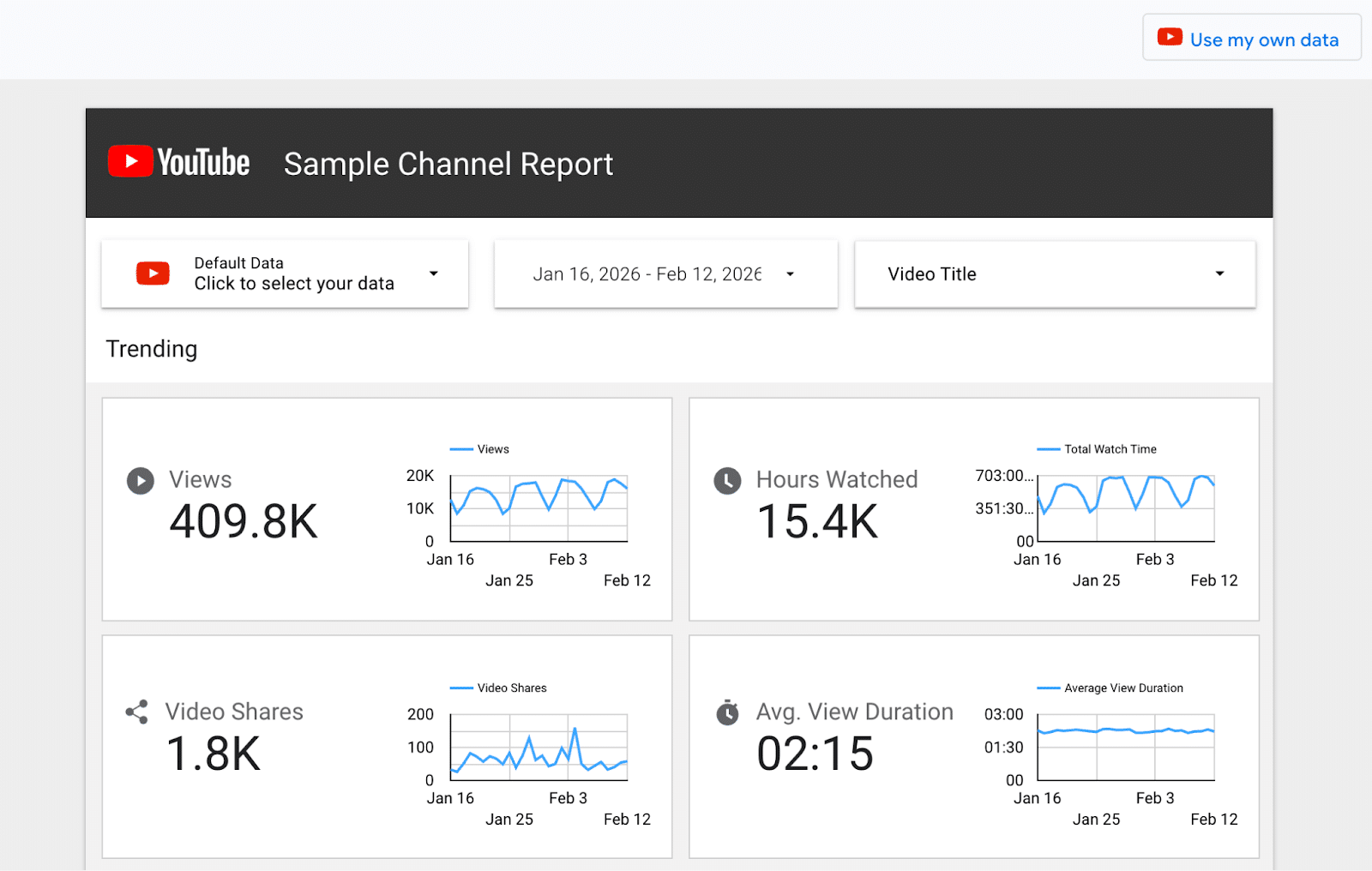
    Setting up a report in Data Studio offers two paths. Google’s YouTube Analytics template is a quick start, presenting a clean report with foundational metrics. But be prepared to fix some common issues, which I’ll help you navigate. Alternatively, if you’re up for a challenge, creating a report from scratch can deepen your understanding of Data Studio.

    ```json
{
  "alt": "Screenshot of Sample YouTube Channel Report in Data Studio requiring authorization.",
  "caption": "Unlock the insights of your YouTube channel with a comprehensive report in Data Studio, but first, ensure you've granted the necessary permissions!",
  "description": "This image shows a Data Studio interface with a 'Sample YouTube Channel Report' that requires user authorization. The interface includes options to add data to the report through YouTube Analytics. A prominent 'AUTHORIZE' button is displayed, illustrating the need for permission to access analytics data. Keywords: YouTube, Data Studio, analytics, report, authorization."
}
```

    This guide covers both options.

    ```json
{
  "alt": "YouTube Sample Channel Report interface displaying a dropdown menu with channel options.",
  "caption": "Exploring YouTube's Sample Channel Report, featuring a dropdown menu to select different channels.",
  "description": "The image showcases a YouTube interface titled 'Sample Channel Report'. Below the title, a dropdown menu is visible with channel options such as 'Default', 'My Channel', and a name. The interface appears to be part of a report generation or channel management tool, enabling users to choose between various YouTube channels for analytics or reporting purposes."
}
```

    If you’re not the YouTube account owner

    ```json
{
  "alt": "YouTube channel analytics showing trending video titles and views.",
  "caption": "Delve into your YouTube channel analytics to explore trending videos and view counts for effective content planning.",
  "description": "The image displays a YouTube channel analytics dashboard. It shows 'My Channel' with a date range of Jan 16, 2026, to Feb 12, 2026. A section titled 'Trending' lists video titles like 'How to Use LLMs in Scream,' along with their respective view counts. The interactive elements such as search and sorting options indicate a detailed overview of video performance. Keywords: YouTube, channel analytics, trending videos, video performance, views."
}
```

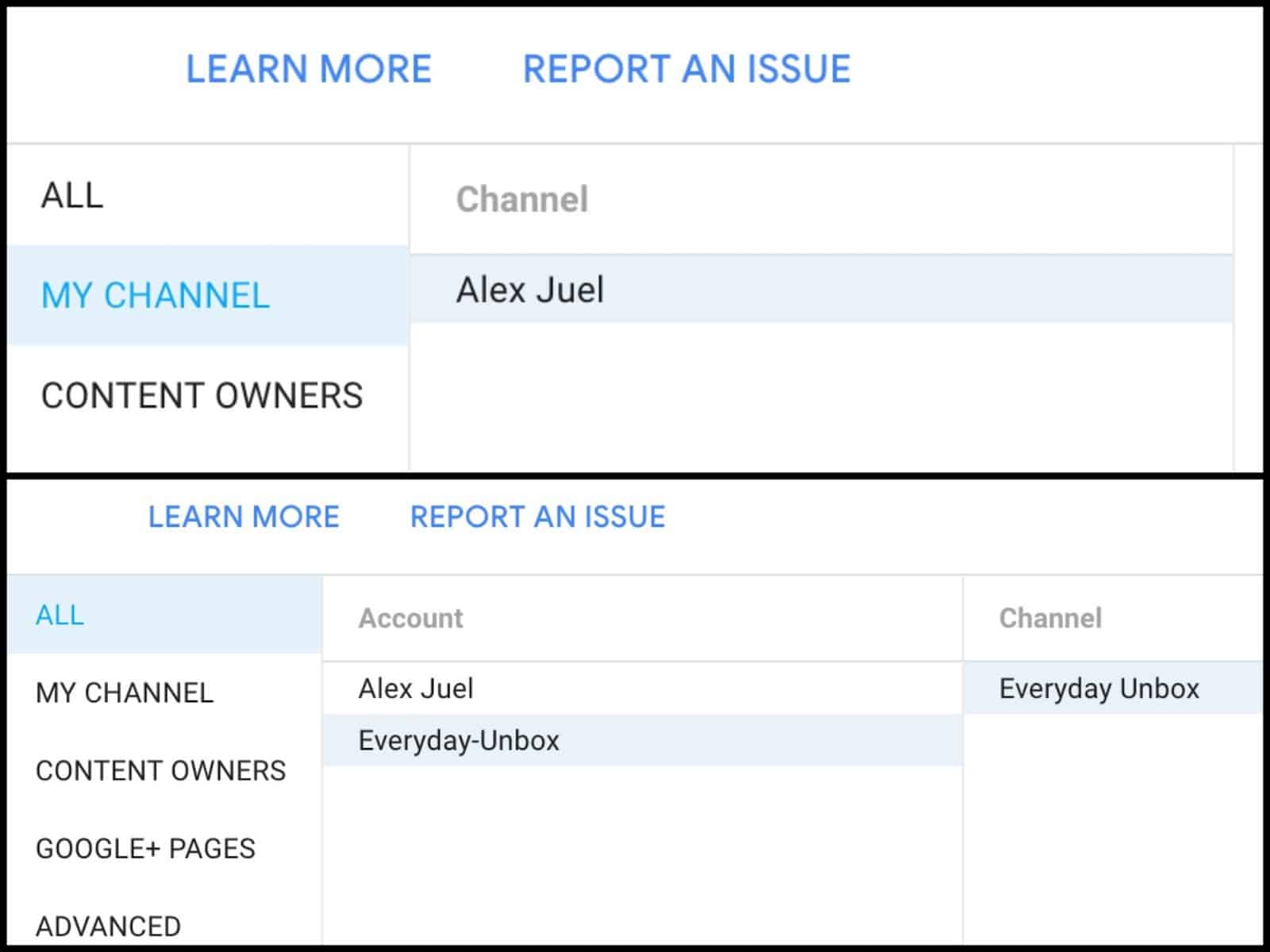
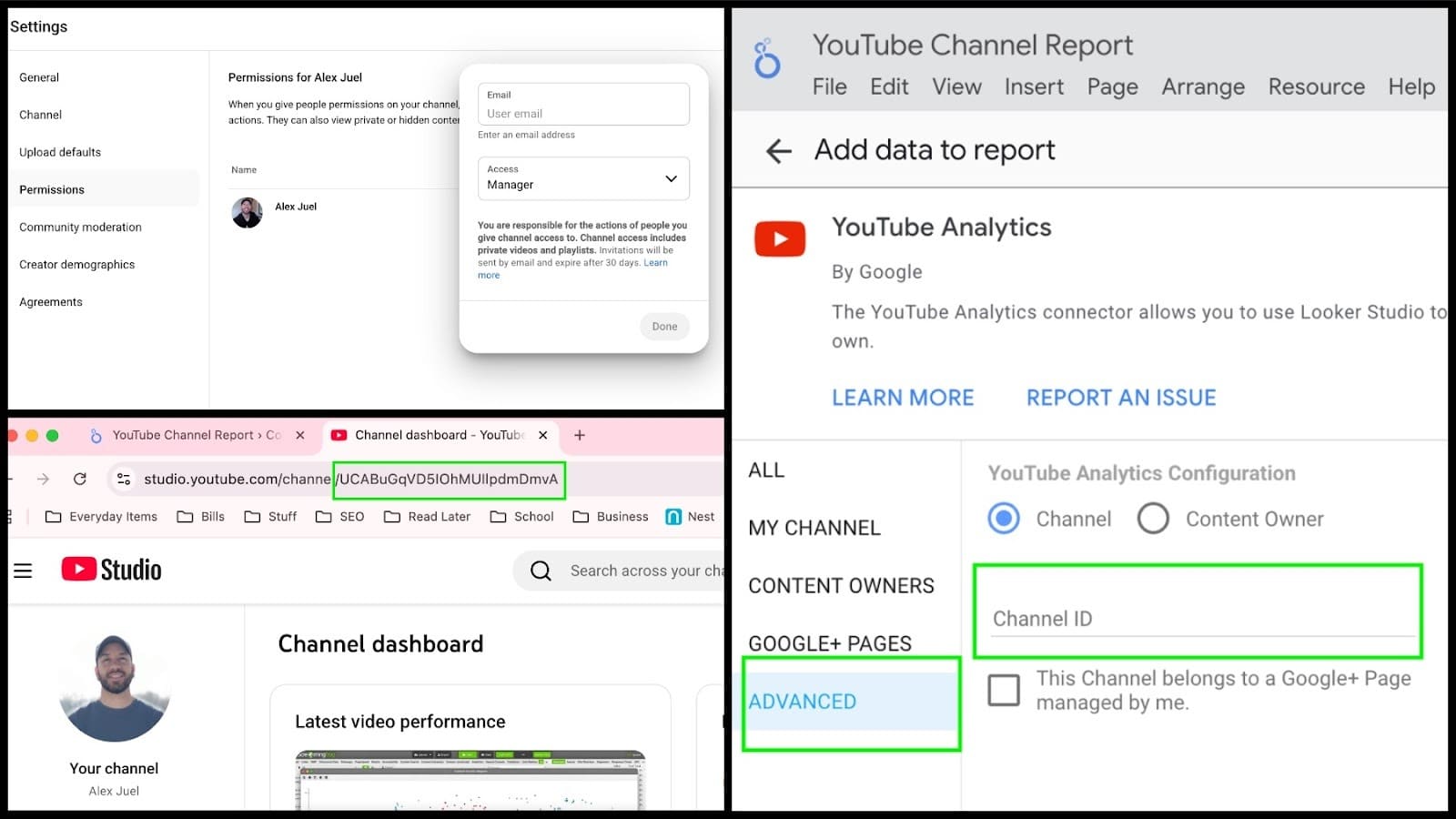
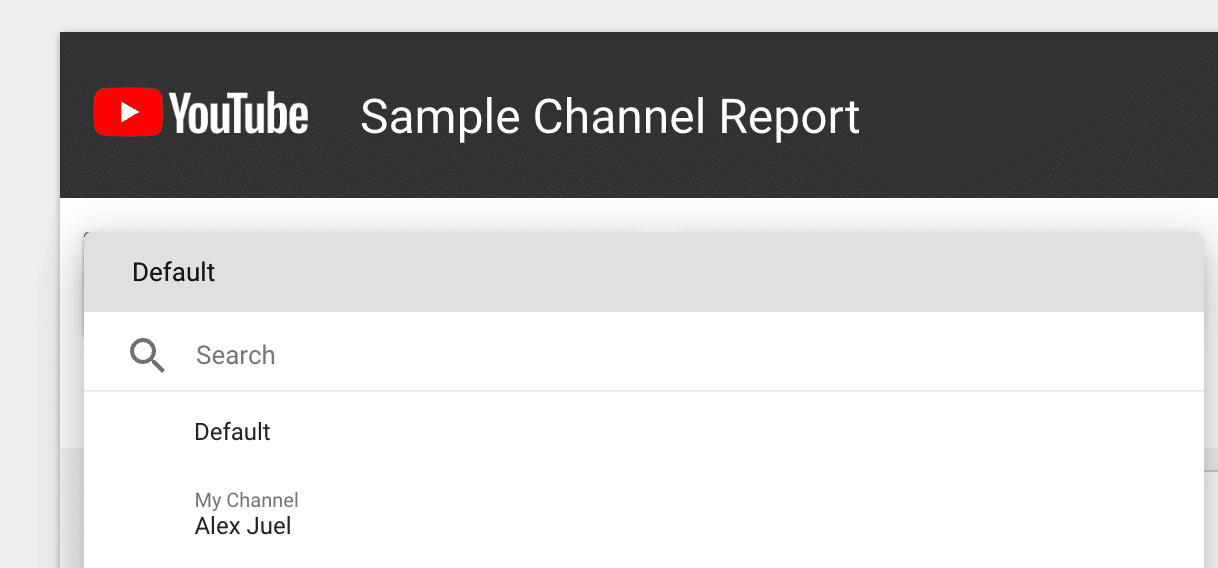
    For those creating a report without owning the YouTube account, you may find the account isn’t showing as a source in Data Studio. Don’t worry; there’s a workaround. First, access YouTube Studio settings, navigate to Permissions, and grant Manager permissions to the email associated with your Data Studio. Then, obtain the Channel ID from the YouTube URL, add a YouTube connector in Data Studio, and paste the Channel ID under Advanced settings to access the account.

    ```json
{
  "alt": "Close-up of online interface with 'Edit and share' button highlighted by red arrow.",
  "caption": "Navigate your online platform with ease by using the highlighted 'Edit and share' button.",
  "description": "This image shows a portion of a digital interface, focusing on a blue 'Edit and share' button at the top right, highlighted by a red arrow. The environment suggests a web-based platform, with a section of a dropdown menu visible. The image is useful for illustrating tech tutorials and guides, emphasizing user interaction features. Keywords: online interface, button, edit, share, navigation."
}
```

    Using the Data Studio YouTube Analytics template

    ```json
{
  "alt": "Screenshot of Looker Studio account setup prompt with fields for country and company information.",
  "caption": "Kickstart your Looker Studio experience by setting up your basic account details, from country selection to company input.",
  "description": "This image depicts a Looker Studio account setup screen. Users are prompted to select their country and enter company information in the available fields. The right side of the screen lists features like data connection and visualization creation. A checkbox for agreeing to terms is visible, alongside 'Cancel' and 'Continue' buttons. This setup interface guides users through the initial steps of integrating their data sources with Looker Studio."
}
```

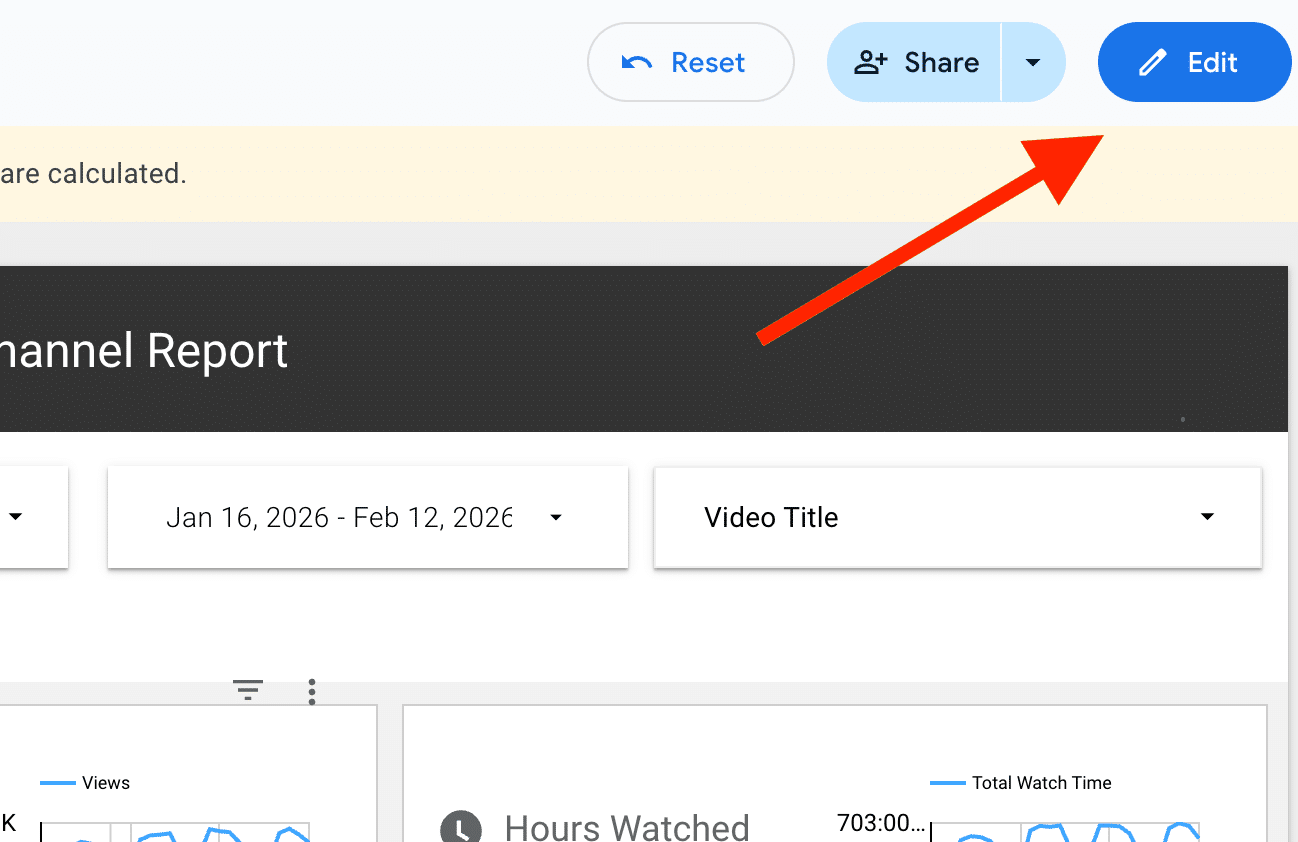
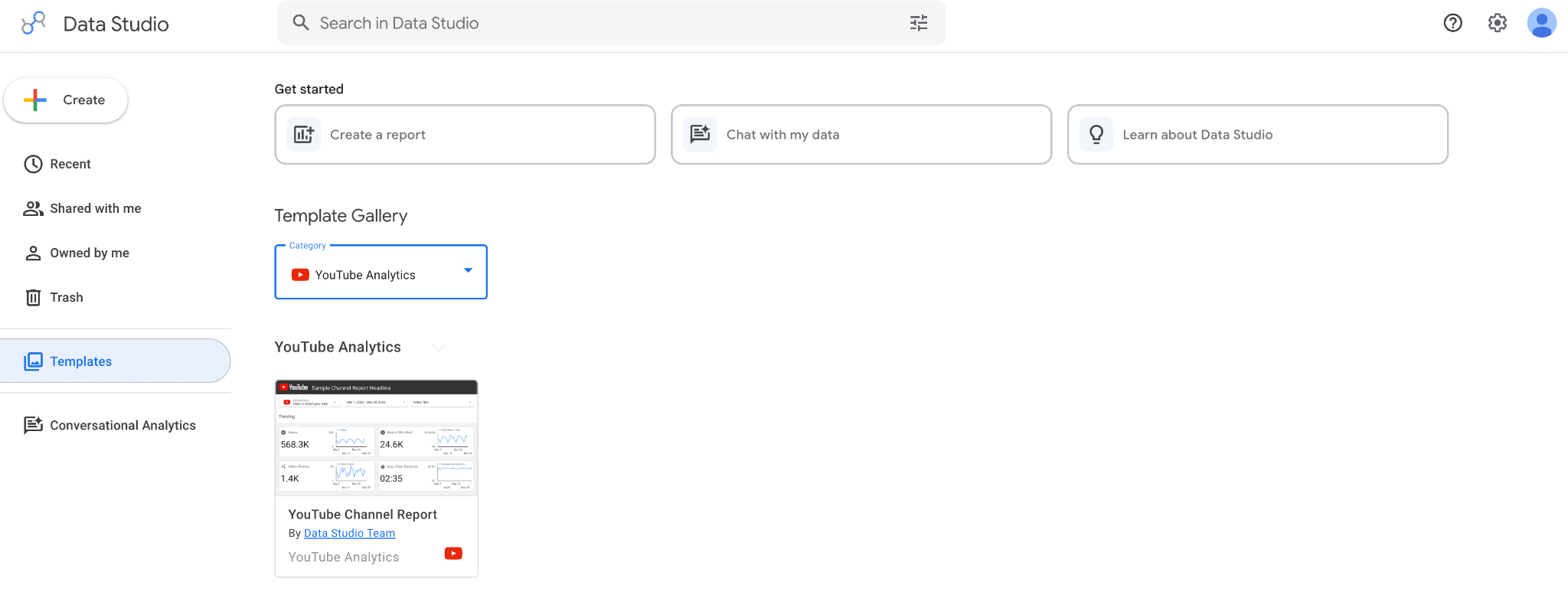
    Getting started is simple. On the Data Studio home page, click on Templates followed by Template Gallery. Select YouTube Analytics from the dropdown menu. This template comes preloaded with sample data, which you can replace with your own by clicking “Use my own data.”

    ```json
{
  "alt": "Screenshot of an analytics dashboard with a red arrow pointing to the edit button at the top right.",
  "caption": "Navigating your analytics dashboard made easy—click the 'Edit' button to customize your report view quickly!",
  "description": "This image is a screenshot of an analytics dashboard showing a user interface for managing reports. It features selectable date ranges and video titles. A prominent red arrow points to an 'Edit' button in the upper right corner, indicating where users can click to modify their report settings. The dashboard includes graphics such as charts depicting views and total watch time, making it a comprehensive tool for data analysis."
}
```

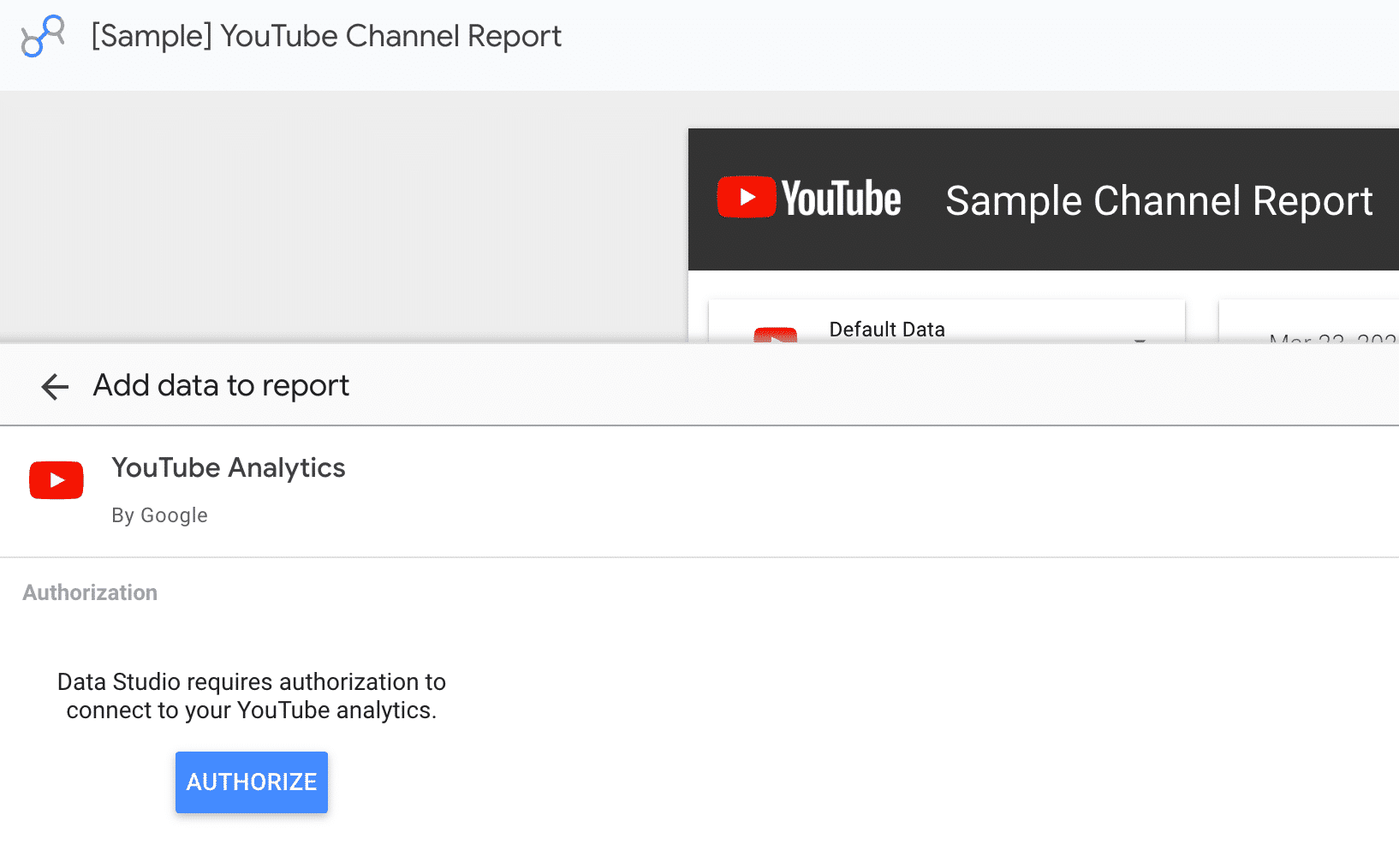
    During setup, you’ll need to authorize your data by choosing the connected Google Account. Your YouTube channels will then be selectable from a dropdown menu. Note: the dropdown controls settings, not the charts. To update the charts, use the Edit and Share button, which allows you to adjust data sources and metrics.

    ```json
{
  "alt": "YouTube Channel Report setup screen in Google Looker Studio showing data connection options.",
  "caption": "Setting up your YouTube Channel Report in Looker Studio? Easily connect your YouTube Analytics for insightful data visualization.",
  "description": "The image shows a Google Looker Studio interface for setting up a YouTube Channel Report. The screen displays options to add data, specifically focusing on connecting to YouTube Analytics through Google Connectors. The top shows navigation menus, while the highlighted section demonstrates the process of searching and selecting the YouTube data source. This setup allows users to analyze and visualize YouTube data within their reports."
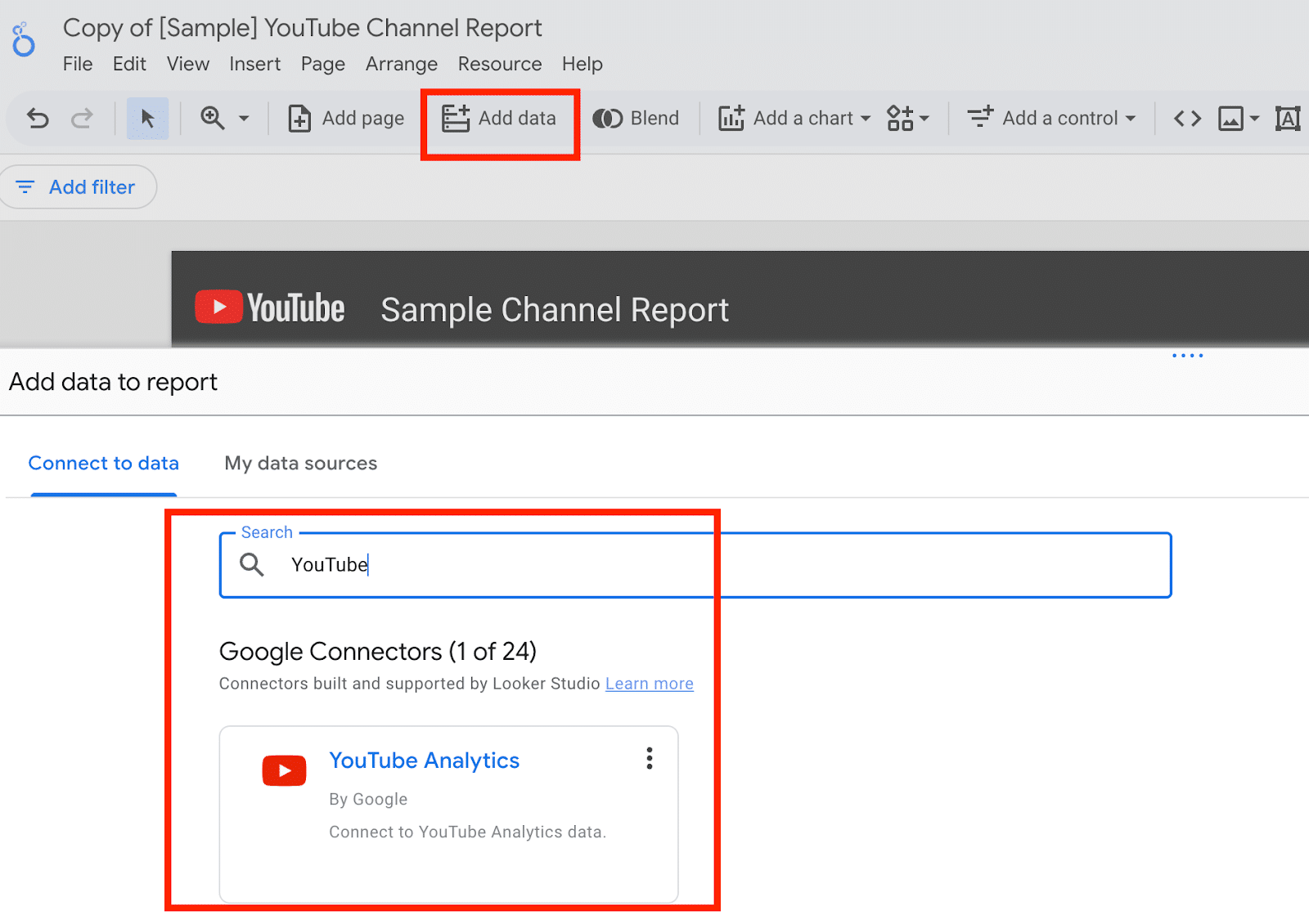
}
```

    Copying a template into an existing report

    ```json
{
  "alt": "Two screenshots displaying navigation options and account details in a website interface.",
  "caption": "Explore account management options with streamlined navigation for easy channel access.",
  "description": "The image shows two screenshots of a website interface focusing on navigation and account management. The top part highlights options like 'Learn More' and 'Report an Issue' alongside account and channel sections. The bottom section includes an advanced navigation menu with selections for various accounts and channels. Keywords: navigation, account management, interface design."
}
```

    While Data Studio doesn’t directly support importing templates into existing reports, copying a page is an option. After setting up a report with the template, you can transfer it by selecting everything, copying, and then pasting into an existing report’s new page. Although the initial imported charts might show errors, you can reassign the correct data sources using the Properties sidebar.

    ```json
{
  "alt": "Menu options in a [Sample] YouTube Channel Report interface, highlighting 'Current page settings'.",
  "caption": "Navigating through a [Sample] YouTube Channel Report, the 'Page' menu option is highlighted, focusing on 'Current page settings'.",
  "description": "This image shows a dropdown menu within a [Sample] YouTube Channel Report interface. The 'Page' menu is opened, highlighting 'Current page settings' in red, indicating it as a selected option. Options like 'New page', 'Duplicate page', and others are visible. The interface appears to be part of a reporting tool for YouTube channels, used for managing and customizing report pages."
}
```

    Customizing your report

    ```json
{
  "alt": "Analytics dashboard displaying likes, subscriptions, dislikes, and comments data.",
  "caption": "A snapshot of engagement metrics, showcasing likes with a timer, steady subscriptions, notable dislikes, and modest comments activity.",
  "description": "This image shows an analytics dashboard detailing user engagement metrics. The dashboard includes data on likes with a time of 01:45, subscriptions at 328, and dislikes at 39%. Comments are numbered at 13. Bar charts accompany each metric, providing visual representation of trends. The layout is organized with each section highlighted by red borders. Ideal for social media managers or content creators analyzing audience interactions."
}
```

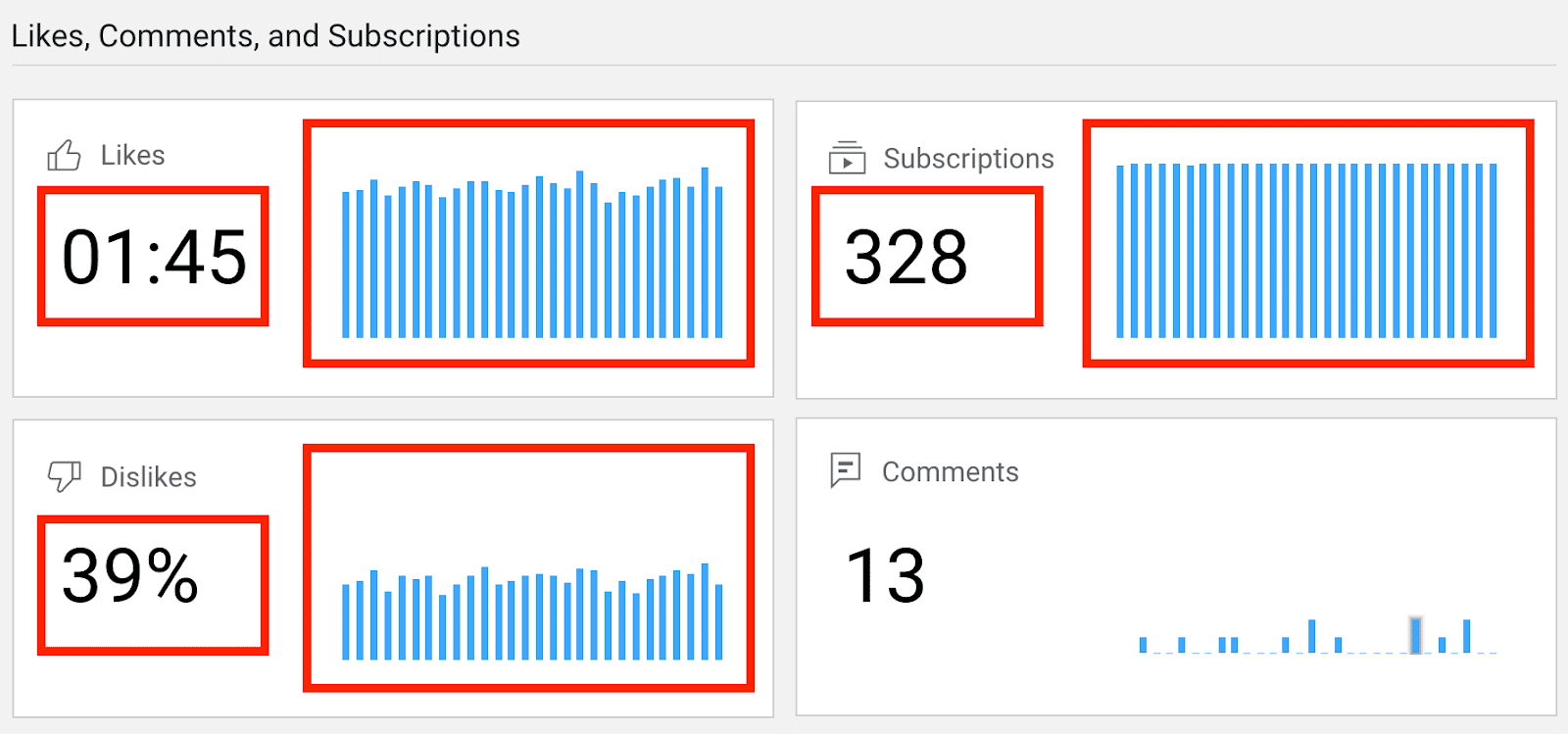
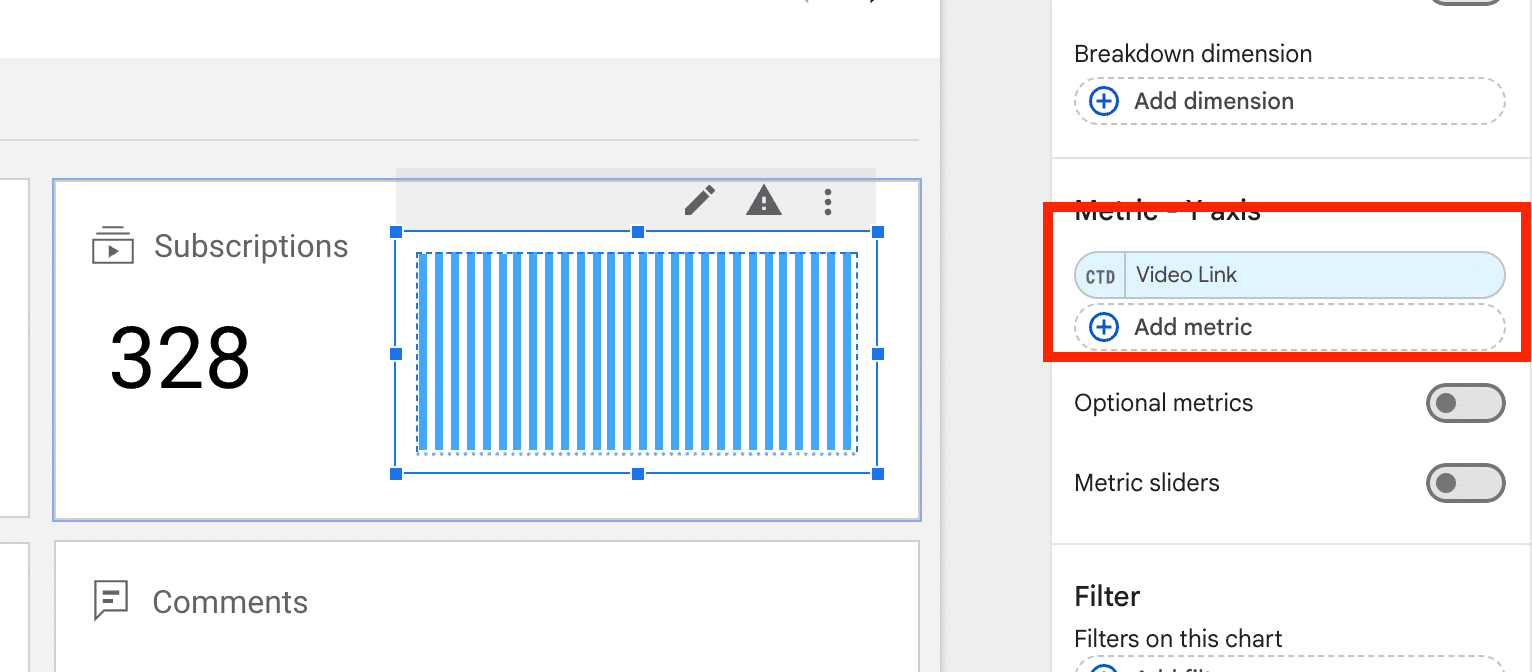
    The YouTube template offers a solid starting point, but Data Studio allows for extensive customization. While some metrics like revenue and specific audience insights aren’t available, there’s plenty to explore. Adding new charts involves expanding the canvas and leveraging a variety of metrics and dimensions to tailor reports to specific needs.

    ```json
{
  "alt": "Dashboard showing 328 subscriptions and options for video link metrics.",
  "caption": "Explore your content impact with a detailed dashboard view, displaying 328 subscriptions and customizable video link metrics.",
  "description": "This dashboard interface displays key metrics including a subscription count of 328. A section for adding video link metrics is highlighted, enabling detailed analysis and customization. The interface includes options for breakdown dimensions, optional metrics, and metric sliders, providing comprehensive data handling capabilities for enhanced content management and performance evaluation."
}
```

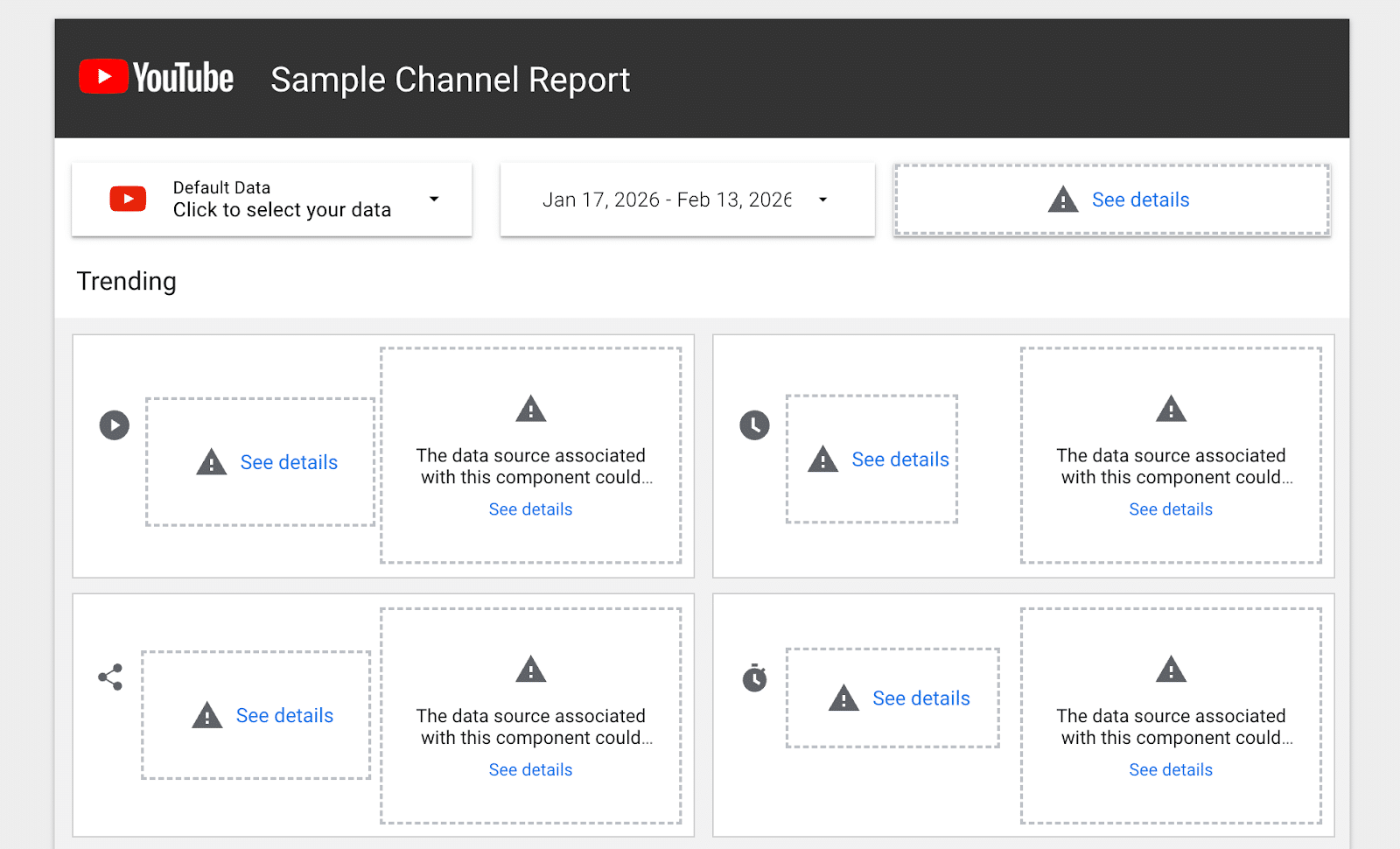
    By following these steps, we’ve crafted a report that’s both functional and informative, ready for sharing performance insights. Automating report exports as PDFs ensures easy distribution, facilitating informed decisions for all stakeholders.

    ```json
{
  "alt": "YouTube Sample Channel Report interface showing data source issues in the trending section.",
  "caption": "Explore the YouTube Sample Channel Report interface, highlighting data source issues requiring attention.",
  "description": "This image shows the YouTube Sample Channel Report interface with sample data selections. The interface highlights issues with data sources in the trending section, indicated by warning icons and 'See details' prompts. This visualization is useful for identifying and resolving data-related problems in channel analytics. Keywords: YouTube, Sample Channel Report, data source issues, analytics interface."
}
```

    Inspired by this post on Search Engine Land.


    crushpress.ai community screenshot
  • Adapt with AI: Your Essential GEO Playbook for Brand Success

    Adapt with AI: Your Essential GEO Playbook for Brand Success

    I recently came across a fascinating discussion at the Adobe Summit, where Alexis Zamkow and Sandhya Ranganathan Iyer from IBM highlighted the urgent need for brands to modify their approach to SEO. As AI revolutionizes the way brands are discovered, IBM has developed a 12-part GEO playbook that every brand should consider to remain visible in AI-generated decisions.

    The evolution of search is something I’m experiencing firsthand. AI tools now answer questions, compare products, and recommend brands without users even needing to visit a website. This means that if my brand isn’t included in this AI-generated narrative, I’m potentially out of the picture when decisions are made.

    To stay relevant, merely updating tactics won’t suffice. A holistic system, namely a GEO (Generative Engine Optimization) playbook, is key. During their presentation, aptly named ‘Adapt or Disappear: How Brands Win with AI-Powered Search,’ Zamkow and Iyer emphasized this shift.

    Embracing the AI Shift: Marketing to Machines

    I’ve realized that AI agents now mediate the interaction between me and my customers. They simplify complex markets and often represent my brand to potential customers.

    • As Zamkow aptly put it, “These machines are disintermediating the brand experience.”

    In this new landscape, consumers heavily rely on AI for research and decision-making, businesses are quick to adopt AI solutions, and many searches conclude without any clicks.

    Zamkow estimates that in the next couple of years, AI agents could account for 75% of search visibility, highlighting the importance of being included in the AI-generated answers themselves.

    The GEO Playbook: 12 Essential Components

    To navigate this shift, the speakers unveiled a 12-part playbook focusing on content, technology, and operations. It starts with creating a strategic content foundation which ensures that my messaging is clear and consistent across all platforms, building trust for both users and machines.

    Ensuring my content meets retrieval-grade passage standards is crucial. Since AI extracts answers rather than ranking webpages, content clarity is key. I need to present information in concise, easy-to-understand sections.

    Technical foundations can’t be ignored. It’s essential that my content is machine-readable with clean HTML, structured data, and pages that load content directly to maximize AI extraction.

    I started by optimizing my on-site search to align with GenAI, making sure it can easily find relevant answers — a foundation for external AI search visibility.

    Equally important is the AI search citation qualification model. Not just being mentioned, but cited by AI, boosts trust and credibility through consistent messaging and recognized expertise.

    Through extraction optimization, I ensure my content is structured and rich in context to be easily pulled by AI tools.

    Understanding that 85% of mentions come from external domains, I focus on a third-party strategy involving content mentioned across platforms like Reddit and social media, recognizing that PR and social teams are critical for search success.

    Tracking new KPIs, such as AI mention frequency and citation locations, becomes essential, shifting my focus from mere traffic to AI recommendations.

    I implement SOPs to maintain consistency in how my content is written, structured, and published, preventing confusion for AI systems.

    With searches becoming conversational, I adopt prompting best practices, crafting content that aligns with users describing their queries in a more natural way.

    Managing change across the entire organization involves training, goal alignment, and breaking down silos, emphasizing that this evolution is more than a marketing update; it’s transformational.

    Continuous governance and versioning are critical. AI and competitor content change rapidly, making it vital to monitor, update, and maintain ownership of content changes.

    From SEO Tactics to Comprehensive GEO Systems

    We’re moving beyond traditional SEO, transitioning from keywords to prompts, links to citations, and from traffic-based metrics to validating our presence in AI answers. Importantly, it’s about building a system to continuously supply AI with accurate information.

    A Leadership Issue

    This transformation is rapidly becoming a leadership concern. As shared by Zamkow, this is no longer solely a matter for the SEO team; it’s a priority for CEOs, who need to recognize the importance of brand visibility in AI-based recommendations.

    Adapt or Disappear

    The AI-driven world is reshaping brand discovery. It’s trusted by consumers, utilized by businesses, and expanding quickly. Brands prepared with a comprehensive GEO playbook are poised to maintain visibility, while others risk being invisible in the digital landscape.


    Inspired by this post on Search Engine Land.

    crushpress.ai community screenshot
  • Rand Fishkin: Unraveling the Origins and Impact of Zero-Click Searches

    Rand Fishkin: Unraveling the Origins and Impact of Zero-Click Searches

    I first got into SEO not because I had a crystal ball, but because I had no other choice. Back in the early 2000s, I was part of a small web business with my mom in Seattle. We once hired another company for SEO work, but when we couldn’t afford to continue, I found myself diving into search marketing.

    Fast forward more than 20 years, and here I am, one of the loudest voices in SEO, and admittedly, one of Google’s fiercest critics. In a recent interview, I took a deep dive into how search has evolved, what’s gone astray, and what the future might hold.

    Early SEO was a wild ride. The digital landscape today may seem convoluted, but nothing beats the chaos of the early days. It was a time ruled by forums like WebmasterWorld and Search Engine Watch, where people shared tactics rather openly. Risky as it was, buying links was common and effective—myself included. However, a public reprimand from Google’s Matt Cutts was a turning point for me, steering my focus towards ‘white hat’ practices aligned with Google’s guidelines.

    Over time, I’ve begun to question if following those guidelines perhaps went too far, given Google’s own evolving practices. Yet, what continues to stand out from the early industry days are not just the tactics but the relationships I’ve built.

    Many attribute AI as the seismic shift in search, but I beg to differ. It all started around 2011 when ‘zero-click search’ emerged—Google began answering queries directly on the results page. Initial features were simple, like weather boxes, but the concept expanded significantly with time.

    Indeed, by around 2016–2017, nearly half of all searches ended without a click, growing to more than two-thirds today. This trend didn’t just appear out of nowhere with AI; it’s been brewing for over a decade.

    I reckon publishers had a missed chance to take action long ago. At that time, media conglomerates could have united to challenge Google’s growing dominance, perhaps by demanding compensation or limiting usage of their content. Instead, they let Google expand its reach unhindered.

    The publishing industry missed a window, but adaptation is key now. It’s time to pivot towards creating subscription businesses and monetizing attention rather than just traffic, as demonstrated by companies like The New York Times.

    As for Google, I don’t believe its search services have worsened for users, though it’s become increasingly tough for publishers and creators. As Google grew and went public, priorities shifted, succumbing to growth and revenue pressures, thus becoming aligned with investor expectations.

    When it comes to AI, I see a common misconception. People often mistake AI’s outputs as solid and consistent, akin to search results, but that’s rarely the case. Answers can vary widely. I recommend not relying on a single response; instead, ask multiple times and look for consistencies.

    Reflecting on the early days of SEO, I don’t yearn for any specific tactic, but I do miss the opportunities for smaller creators and independent sites. Back then, traffic wasn’t just for the giants—it was more democratically distributed.

    As I look forward, I imagine the media and search landscape might mirror the past: A few powerful platforms dictating the flow of information while individuals continue to create content within their domains. And yet, I’m hopeful the web will continue to evolve.


    Inspired by this post on Search Engine Land.

    crushpress.ai community screenshot
  • Unlocking Google SEO: Master ‘Read More’ Links Best Practices

    Unlocking Google SEO: Master ‘Read More’ Links Best Practices

    I recently discovered that back in December, Google introduced read more links for certain search result snippets on Google Search. Now, Google has shared some best practices to help us utilize these ‘Read More’ links effectively.

    Digging into the Best Practices: To find these new insights, you can check out the documentation posted here. It outlines three essential tips:

    • Ensure the content is instantly visible to human visitors, not tucked away behind tabs or expandable sections.
    • Avoid using JavaScript that governs the user’s scroll position as the page loads. Let your users control their browsing experience.
    • If you’re calling history API functions or modifying window.location.hash on page load, don’t strip away the hash fragment. This could lead to issues with deep linking.
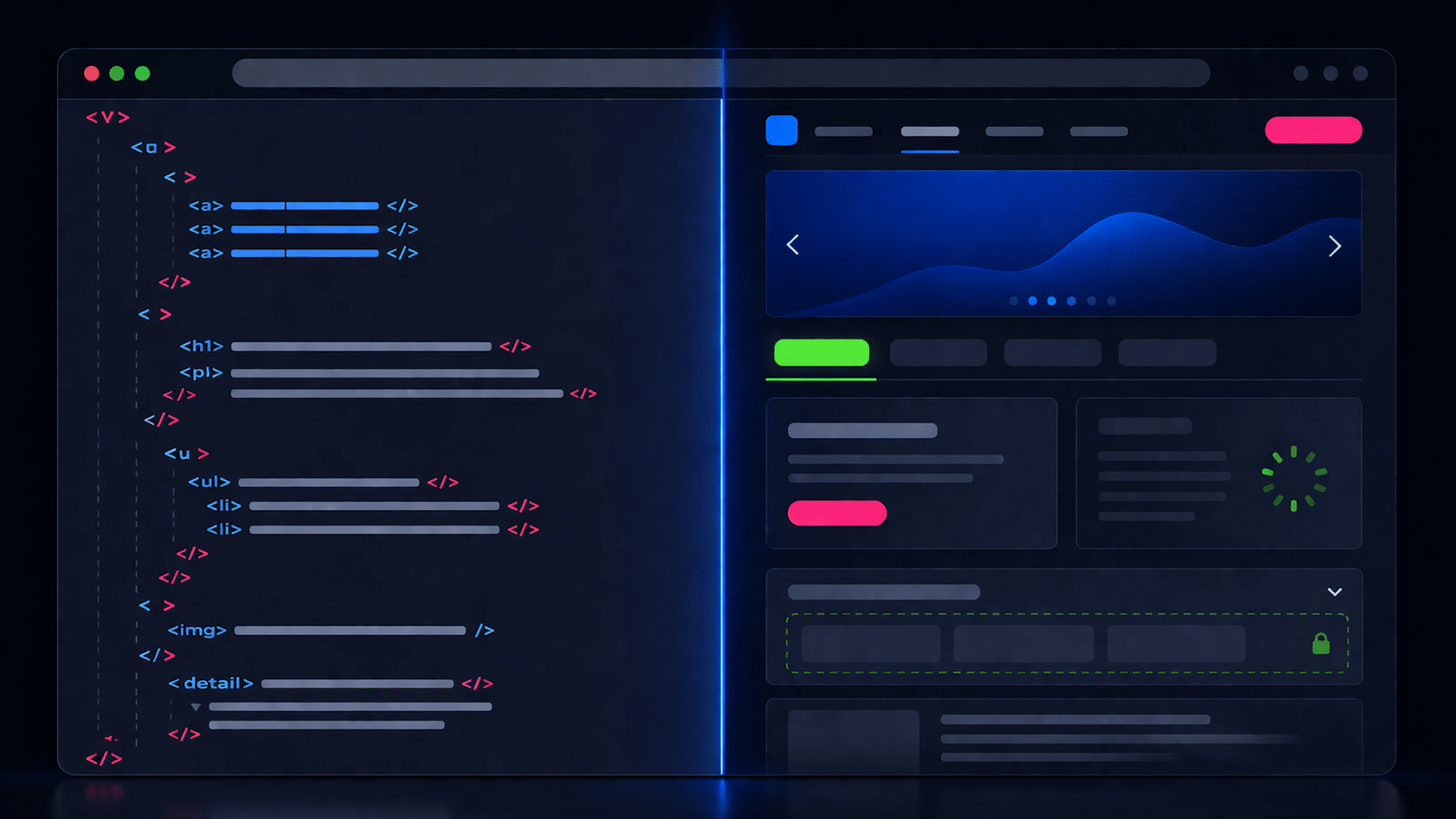
    ```json
{
  "alt": "Abstract representation of a digital list with play, chart, and document icons, each with a 'Read more' button.",
  "caption": "Discover more with this sleek digital list featuring interactive icons and engaging 'Read more' options.",
  "description": "This image displays an abstract digital list interface, featuring play, chart, and document icons. Each entry has corresponding lines symbolizing text, with highlighted 'Read more' buttons in green, inviting users to explore further. The design is clean and modern, making it easy to navigate and visually appealing for digital content presentation. Ideal for illustrating UI concepts in web and app design."
}
```

    Visualizing the Concept: Google provided an image illustrating these links. Here’s a glimpse of how they appear:

    Let me show you an example of these snippets in action:

    ```json
{
  "alt": "Google search results highlighting 'Read more' links in snippets from Search Engine Land.",
  "caption": "Explore new 'Read more' features in Google Search snippets for enhanced accessibility and deeper insights, as displayed in search results from Search Engine Land.",
  "description": "The image depicts a Google search results page focusing on the query 'site:Searchengineland.com google Read more links.' The top results from Search Engine Land show snippets featuring 'Read more' links, illustrated with red arrows, highlighting Google’s integration of these links for extended user engagement. This underscores recent updates to enhance search snippet interactivity. Keywords include Google, search results, 'Read more' links, Search Engine Land."
}
```

    Why It Matters to Us: The introduction of read more links adds an alluring touch to search result snippets. The potential for increased website clicks can be significant. Therefore, reviewing these best practices becomes essential for attracting even more visitors to our site.

    Ultimately, driving more traffic is always a win, so optimizing your site with these tips could prove beneficial.


    Inspired by this post on Search Engine Land.

    crushpress.ai community screenshot
  • Mastering AI: Elevate Your Funnel with Bottom-Funnel Content

    Mastering AI: Elevate Your Funnel with Bottom-Funnel Content

    Traffic from Google searches is declining, and I know it firsthand because I’ve invested years in organic strategies. Seeing this shift in real-time is unsettling but also enlightening.

    I’ve observed this change particularly in my SaaS clients. The educational, top-of-funnel (TOFU) content that once consistently drew traffic is losing steam. This isn’t due to declining quality; users simply don’t need to click anymore. AI Overviews are handling their queries.

    This led me to a crucial choice: defend the old strategy or adapt to the new landscape. I decided to adapt.

    Surprisingly, while informational content is getting fewer clicks, bottom-of-funnel (BOFU) content is not only steady but often driving more qualified leads.

    This shift signifies a new understanding of value creation through search.

    The pivot: Making BOFU the priority

    My new approach focuses 60% to 80% of my efforts on bottom- and mid-funnel content. The rest fills in gaps with TOFU topics, supporting content clusters and timely industry discussions.

    When I proposed this change to clients, I put it plainly:

    • “You can choose between traffic and leads. If leads are your goal, here’s our path, though it may mean less traffic.”

    I was transparent that traffic might dip, but conversions would likely increase. Clients saw the appeal of a qualified pipeline over mere traffic.

    Comprehensive comparison guides and listicles aimed at high-intent queries are highly effective BOFU content.

    Take, for example, a guide on the best time-tracking software for construction. I created a reusable review methodology for the client, addressing pros and cons transparently, including their product. This honesty builds trust with evaluating readers.

    The guide was factual, precise, and targeted at decision-makers in the purchasing phase, not casual browsers.

    In weeks, it became our most referenced article in LLM responses. Now a cornerstone piece, it often appears in conversion pathways, driving qualified leads.

    That single piece outperformed a dozen previous informational posts in pipeline impact because it directly answers a buyer’s question.

    Dig deeper: How to align your SEO strategy with the stages of buyer intent

    TOFU isn’t dead; it just has a new role

    Many SEOs see this as a binary choice. But I haven’t abandoned TOFU content; I’ve simply repositioned it.

    TOFU now builds topical authority, supporting the ranking of BOFU pages. It’s the structure beneath the main act. Guides and educational content should:

    • Support content clusters.
    • Establish expertise in Google’s eyes.
    • Pass link equity to BOFU pages.

    We’ve revised top-performing TOFU pieces to connect directly to clients’ products, supported by screenshots and expert insights.

    Calls to action were redesigned for context and strategically placed throughout the content, not just at the end.

    ```json
{
  "alt": "The CapmatchOne logo with a gradient circle and bold text.",
  "caption": "Discover innovation with the CapmatchOne logo, featuring sleek typography and a modern gradient circle.",
  "description": "The CapmatchOne logo features bold, modern typography coupled with a gradient circle, symbolizing connection and innovation. The sleek design conveys a sense of progress and creativity. This image can be used for branding or promotional purposes, appealing to audiences interested in innovative solutions and forward-thinking designs."
}
```

    These changes significantly increased visitor engagement with demo request pages, without altering the informational purpose.

    The key is still producing valuable TOFU content but ensuring it has a unique perspective—something fresh and insightful.

    Specificity in a sea of AI-generated content sets us apart.

    Why this strategy excels in AI-driven search

    Visitors from AI platforms arrive informed and ready to weigh options. This aligns with how AI Overviews serve search results.

    AI Overviews are more frequent for informational than commercial queries. E-commerce searches trigger them less, safeguarding BOFU content for now, though commercial coverage is growing.

    This change in behavior modifies what content performs well. As informational value diminishes with upfront answers, decision-stage content gains importance, aiding users in comparison and validation.

    That’s why BOFU content thrives; it matches users’ decision-making phase, not just their search.

    The time tracking software comparison piece is a prime example. It often appears in discussions on construction time tracking tools. While it might not always convert instantly, its impact is evident in branded searches and lead generation.

    The attribution challenge to embrace

    Here’s the dilemma: BOFU content’s true value often isn’t reflected in traditional analytics.

    When someone discovers your solution via an AI response, then proceeds via direct or branded search to convert, it often appears as direct traffic in GA4, masking SEO’s role.

    Therefore, I’ve guided clients to emphasize broader performance metrics, including:

    • Trends in brand search volume.
    • Citation frequency in LLM platforms.
    • Increases in direct traffic post-publication.
    • Conversions even with stable traffic levels.

    The ROI of BOFU and LLM-focused content exceeds dashboard insights. Relying solely on immediate click metrics misses SEO’s true value creation.

    Your playbook for transitioning to BOFU

    Here’s a practical guide to capitalizing on this shift:

    • Audit for BOFU gaps: Identify purchase-stage queries lacking coverage. These high-intent gaps offer quick opportunities.
    • Create comparison content: Use a consistent review framework, openly address pros and cons for credibility and citations.
    • Enhance leading TOFU articles: Incorporate product links, contextual CTAs, and expert testimony for dual-purpose content.
    • Set up LLM tracking in GA4: Use regex segments to track AI referrer traffic and gain insights often overlooked.
    • Refocus client metrics dialogue: Shift focus from traffic to lead quality and conversion rates, reflecting modern SEO’s impact.

    AI Overviews have reshaped informational content economics.

    This disruption opens strategic doors. BOFU content traditionally converts better, and AI highlights the need to focus on content that drives revenue rather than mere site visits.

    The opportunity for strategic realignment is here, but it won’t last indefinitely.


    Inspired by this post on Search Engine Land.

    crushpress.ai community screenshot
  • The Importance of No-JavaScript Fallbacks for SEO in 2026

    The Importance of No-JavaScript Fallbacks for SEO in 2026

    Rendering isn’t always immediate or complete. Discover where no-JavaScript fallbacks still safeguard critical content and indexing in 2026.

    I’ve noticed that Google has the capability to render JavaScript, but it doesn’t always do so instantly or flawlessly. Since Google’s 2024 comments on rendering all HTML pages, developers have questioned the necessity of no-JavaScript fallbacks. Now, in 2026, the answer is clearer yet nuanced.

    ```json
{
  "alt": "The CapmatchOne logo with a gradient circle and bold text.",
  "caption": "Discover innovation with the CapmatchOne logo, featuring sleek typography and a modern gradient circle.",
  "description": "The CapmatchOne logo features bold, modern typography coupled with a gradient circle, symbolizing connection and innovation. The sleek design conveys a sense of progress and creativity. This image can be used for branding or promotional purposes, appealing to audiences interested in innovative solutions and forward-thinking designs."
}
```

    Google’s position on JavaScript rendering has been a hot topic since July 2024. During an episode of Search Off the Record, Martin Splitt and Zoe Clifford from Google’s rendering team discussed rendering costs and prioritization.

    ```json
{
  "alt": "Guide explaining JavaScript usage and Googlebot URL crawling process.",
  "caption": "Discover how Googlebot handles JavaScript on your site, managing URLs and leveraging HTTP status codes for efficient crawling.",
  "description": "This image provides a detailed guide on how Googlebot interacts with JavaScript-heavy websites. It explains the importance of the app shell model, how Googlebot manages URLs with a 200 HTTP status code, and the role of server-side or pre-rendering. The content emphasizes the need for efficient rendering to optimize crawling and indexing by Google, highlighting essential elements like robots meta tags and headers."
}
```

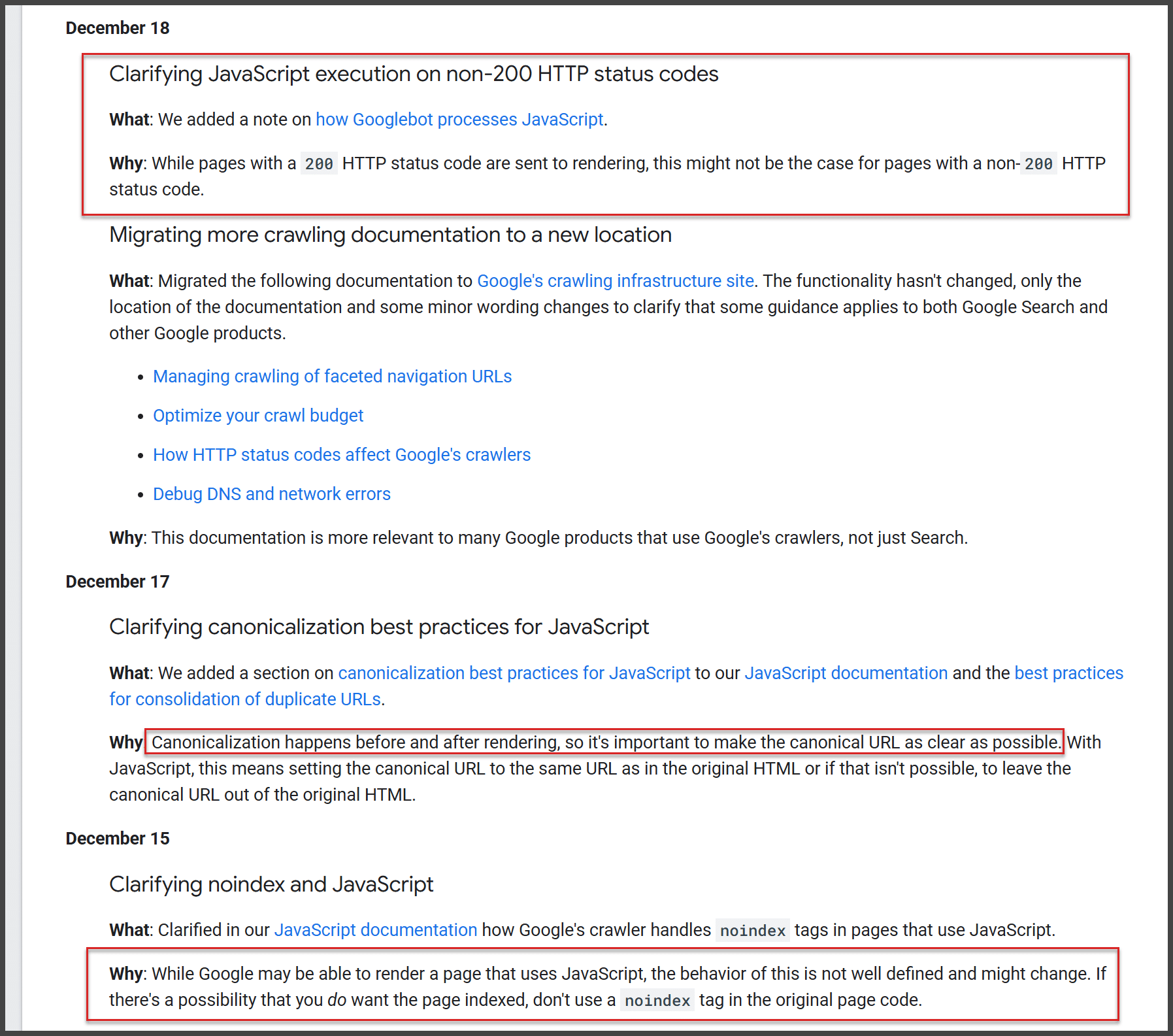
    Developers, especially those working on JavaScript-heavy applications, began to question the need for fallbacks. On the other hand, many SEOs remained skeptical, wary of removing fallbacks without understanding Google’s consistency and limits in rendering processes.

    ```json
{
  "alt": "Document detailing updates on JavaScript, HTTP status codes, and SEO from Google's guidelines.",
  "caption": "Explore key updates from Google on JavaScript execution and SEO best practices, ensuring efficient website indexing and crawling.",
  "description": "This image captures a document from Google detailing updates related to JavaScript execution with non-200 HTTP status codes, migrating crawling documentation, and clarifying canonicalization and noindex best practices in JavaScript. The content stresses the importance of setting canonical URLs correctly, avoiding noindex tags where indexing is desired, and explaining the handling of HTTP status codes for enhanced SEO and crawler efficiency. These updates are aimed at improving the performance of web pages in search indexing and rendering."
}
```

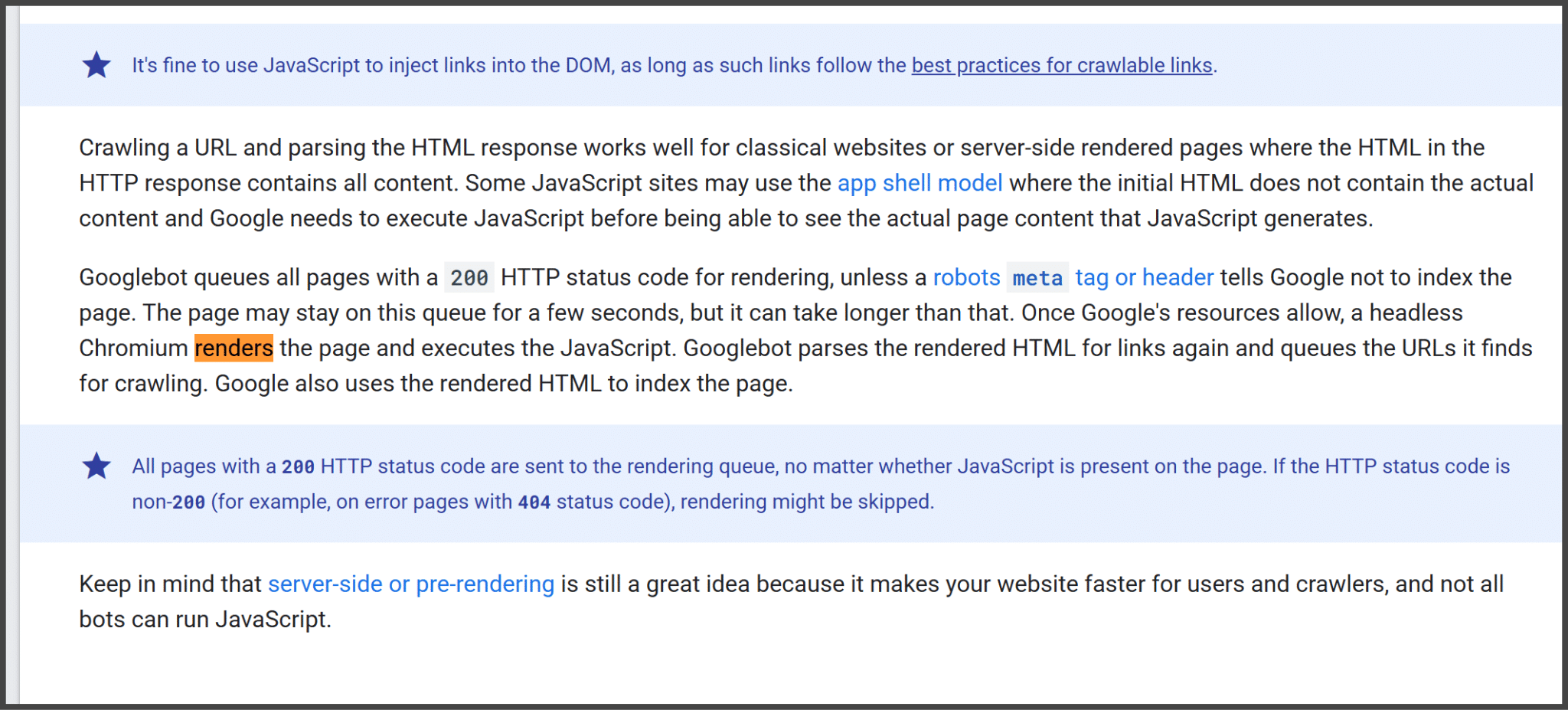
    While developers debated, Google’s documentation clarified how JavaScript rendering functions. Pages are queued for rendering, and once resources become available, a headless browser processes the JavaScript. This means that not all interactions within JavaScript elements are parsed immediately.

    ```json
{
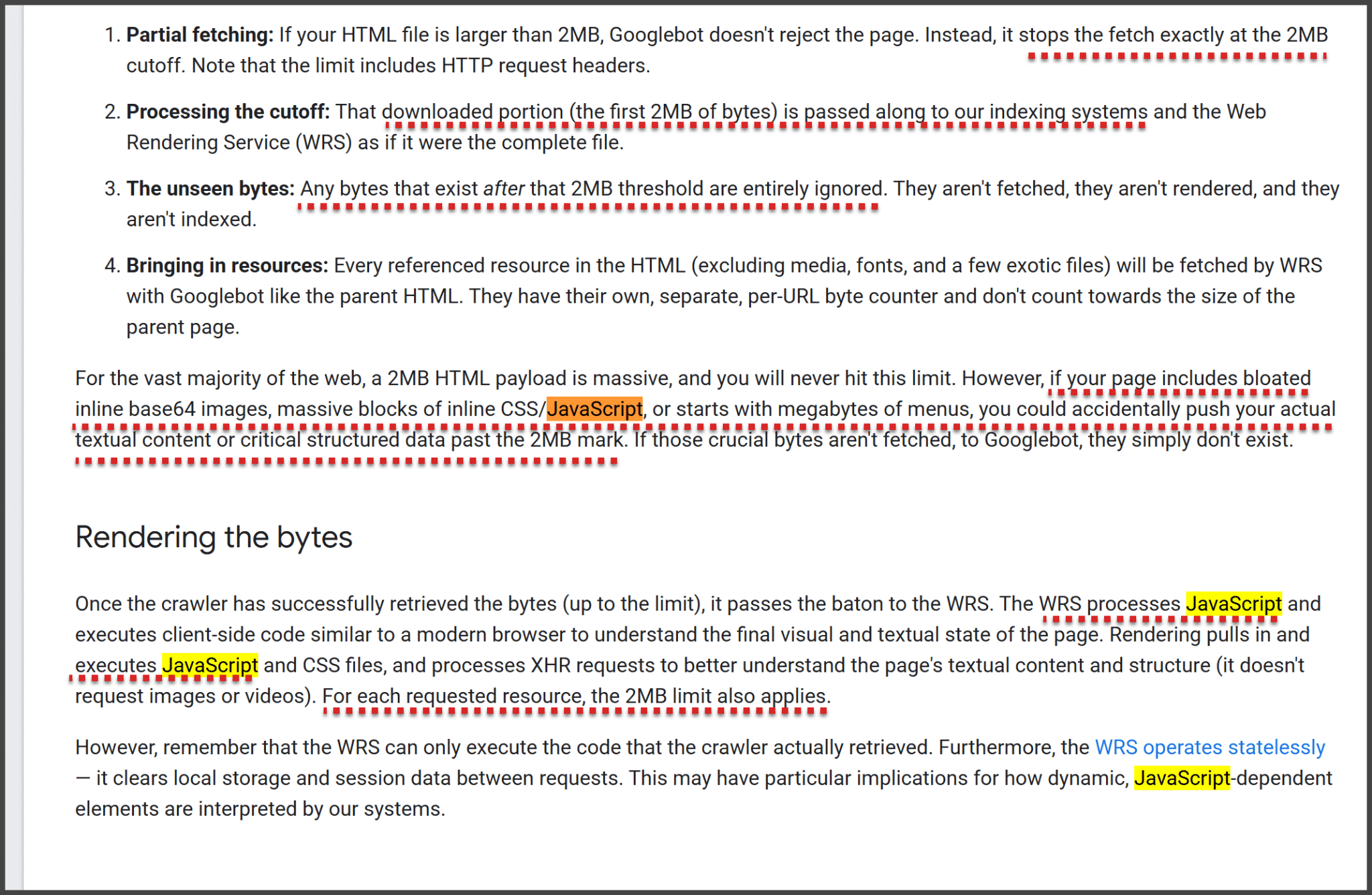
  "alt": "Screenshot of text explaining Google's 2MB limit on HTML page fetching and processing.",
  "caption": "Discover how Google handles large HTML files with a 2MB fetching limit, affecting data processing and JavaScript rendering.",
  "description": "This image contains a detailed explanation of Google's approach to handling HTML files larger than 2MB. It outlines four key points: partial fetching, processing the cutoff, ignoring unseen bytes, and bringing in resources, specifically addressing the impact of JavaScript and CSS. Additionally, it discusses how the Web Rendering Service (WRS) processes and renders these resources and its implications for web page indexing. Important keywords include 2MB limit, Googlebot, HTML, JavaScript, and WRS."
}
```

    Google’s guidelines on rendering emphasize the importance of pre-rendering strategies like server-side rendering to ensure critical content is indexed properly. Although Google claims it renders all pages, there are practical limits, such as a 2MB HTML and resource cap.

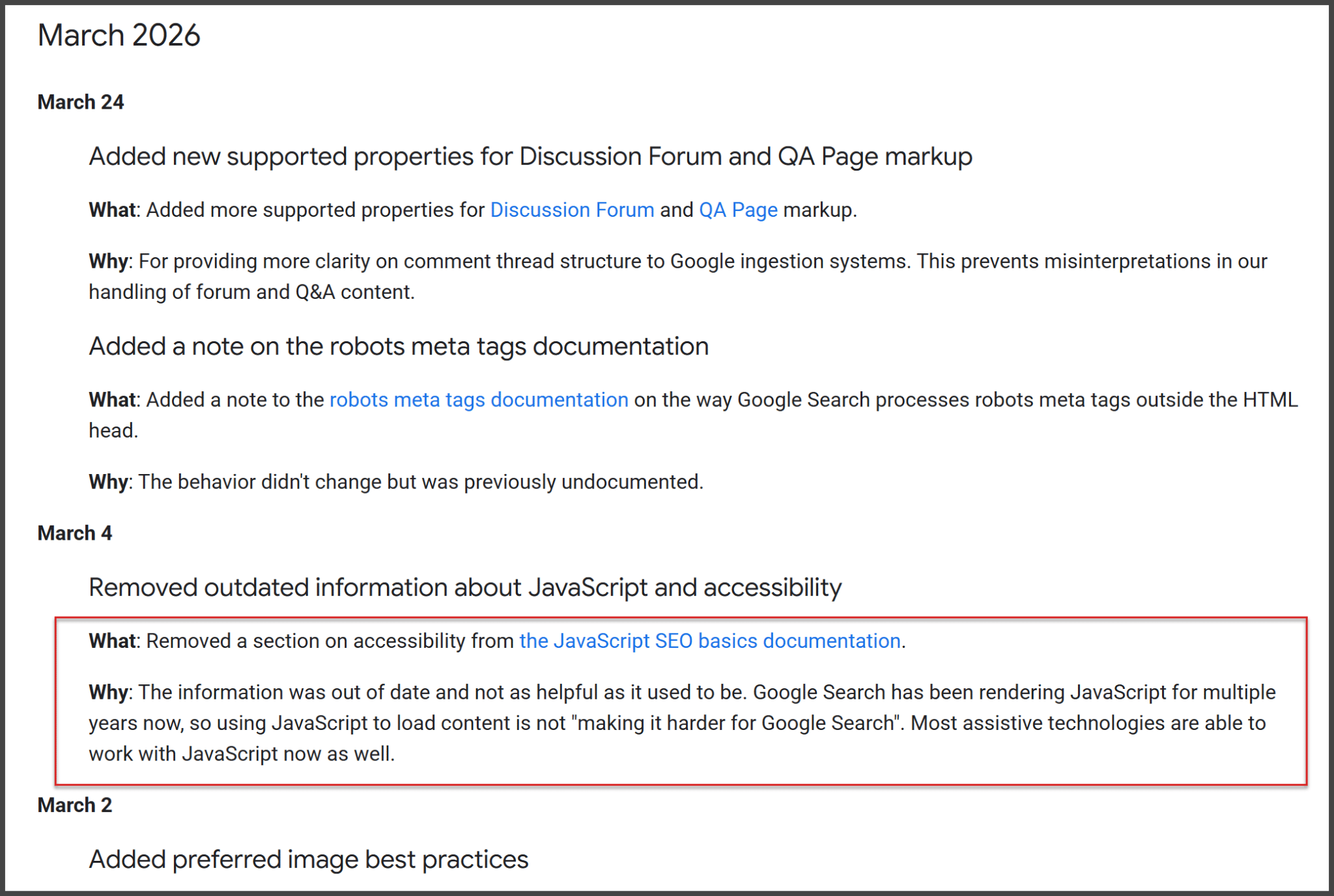
    Google's update log for March 2026 listing changes in documentation for SEO, JavaScript, and more.
    Discover Google's March 2026 updates, enhancing clarity in forum markup, meta tag processing, and modernizing accessibility content for SEO.

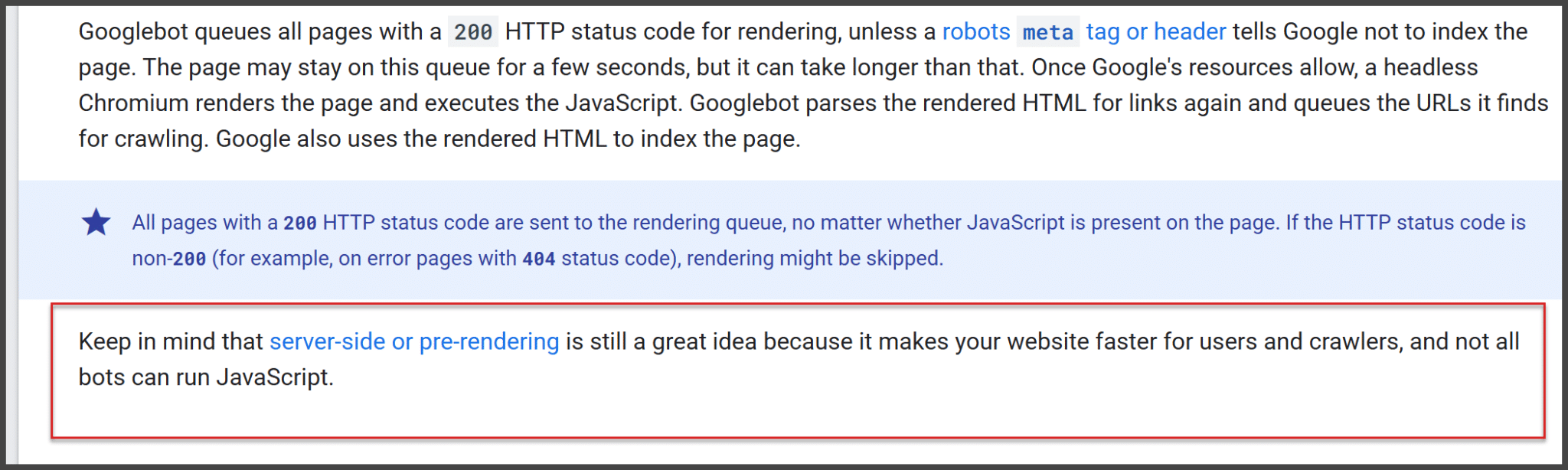
    Although Google’s JavaScript capabilities have improved, the broader web hasn’t uniformly adapted, with many systems still dependent on HTML-first delivery. As AI crawlers and other non-Google bots often don’t execute JavaScript, the need for no-JavaScript fallbacks remains critical.

    ```json
{
  "alt": "Text about Googlebot rendering with HTTP status codes and pre-rendering tips.",
  "caption": "Understanding Googlebot's behavior: Learn how HTTP status codes impact webpage rendering and why server-side pre-rendering is beneficial for website performance.",
  "description": "This image provides insights into how Googlebot processes webpages using HTTP status codes. Pages with a 200 status go through rendering, utilizing a headless browser if JavaScript is present. It highlights the importance of server-side or pre-rendering to enhance site speed since not all bots can handle JavaScript. The text emphasizes the roles of meta tags, headers, and error codes like 404 in this process."
}
```

    Despite Google’s advancements, fallbacks for critical architecture, content, and links are still vital. Google’s documentation and recent updates reinforce this by highlighting the ongoing importance of server-side rendering and resilient HTML.

    ```json
{
  "alt": "Graph showing percentage of pages with valid rel=canonical links from Jan 2020 to Mar 2026.",
  "caption": "Explore the trends in valid rel=canonical pages over time, showing a noticeable jump in compliance around November 2024.",
  "description": "This image features a time series graph depicting the percentage of web pages with valid canonical links, as detected by Lighthouse. The data spans from January 2020 to March 2026. A sharp increase is observed around November 2024, indicating higher compliance rates with rel=canonical standards. Desktop and mobile results are displayed, sourced from httparchive.org. Key insights can be drawn from the fluctuations noted in the graph."
}
```

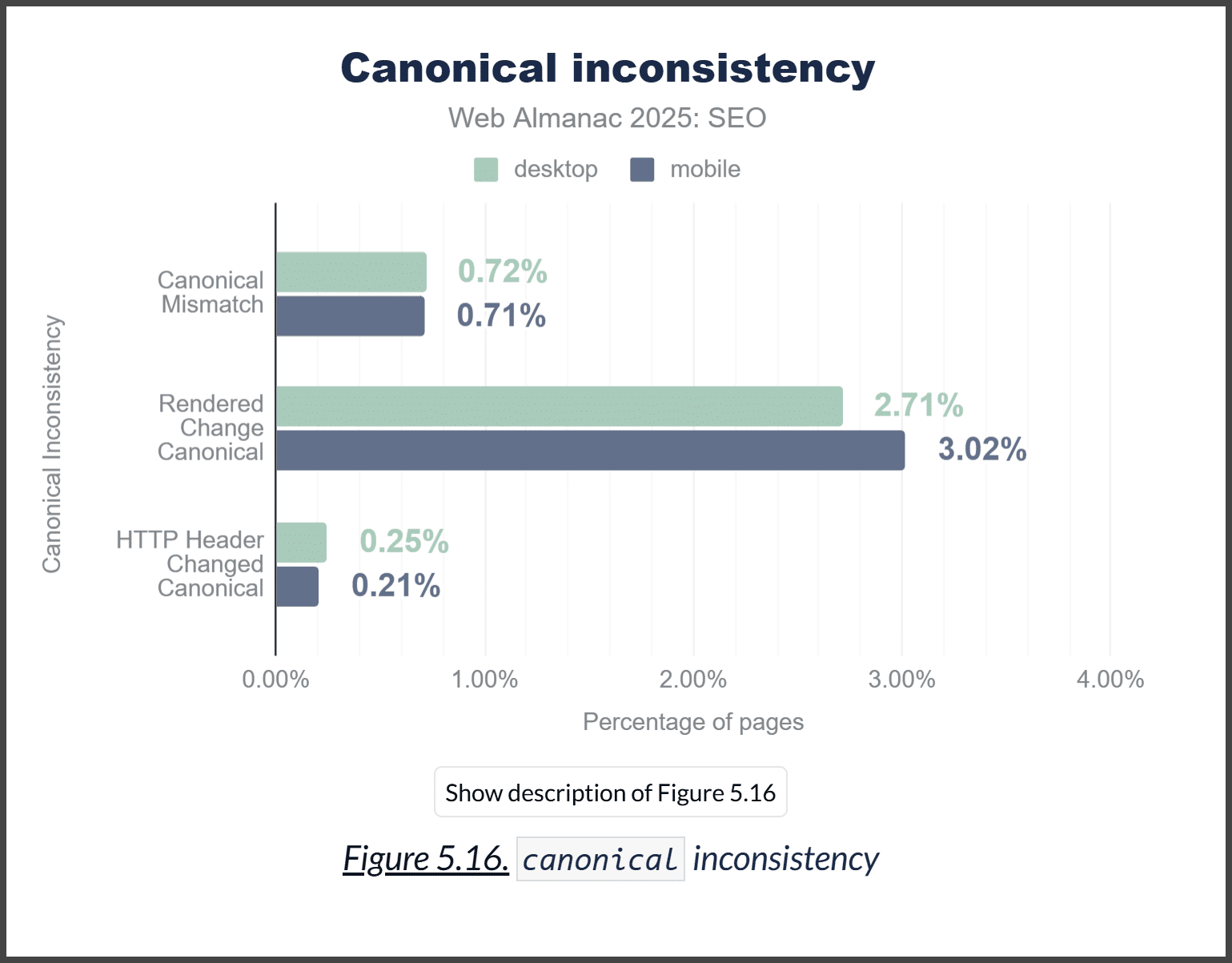
    From personal experience, it’s clear that while blanket no-JavaScript fallbacks might not be universally necessary, critical content should not solely depend on JavaScript. In 2026, no-JavaScript fallbacks for essential content are more than just a good idea; they are often essential for maintaining SEO integrity.

    ```json
{
  "alt": "Bar graph showing canonical inconsistency in desktop and mobile SEO from Web Almanac 2025.",
  "caption": "Exploring canonical inconsistencies in SEO for 2025, this graph illustrates the variances between desktop and mobile metrics.",
  "description": "This bar graph titled 'Canonical inconsistency' from Web Almanac 2025 compares SEO performance discrepancies between desktop and mobile platforms. It highlights three categories: Canonical Mismatch, Rendered Change Canonical, and HTTP Header Changed Canonical, each showing different percentage values for desktop and mobile. Desktop shows a higher percentage in Rendered Change Canonical at 2.71%, while mobile records 3.02%. The visual emphasizes critical areas for SEOs in addressing canonical issues across device types. Useful for digital marketers, SEOs, and analysts."
}
```

    Inspired by this post on Search Engine Land.

    crushpress.ai community screenshot
  • Master SEO Without Using Restricted Keywords

    Master SEO Without Using Restricted Keywords

    When I’m faced with the challenge of optimizing for keywords that I can’t explicitly use, I gear up with a strategic mindset. Legal constraints, brand guidelines, or public perceptions might put certain terms off-limits, but there are effective ways to capture demand without using them directly.

    Here’s my approach to overcoming this hurdle, aligning with search behaviors, and enhancing visibility despite limitations.

    When Certain Keywords Are Off-Limits

    In the world of SEO, it’s not uncommon to hear, “We want to rank for (insert competitive term),” followed by, “Avoid using (that exact term) in content.”

    My journey began over 10 years ago, tasked with ranking for “custom koozies.” This sparked endless debates on the correct nomenclature for these drink holders. At home, we referred to them as “coolie cups,” but data revealed that most people simply called them “koozies.” However, “Koozie®” being a trademark meant we had to cleverly position ourselves at the top without relying on that term as our primary focus.

    Years later, at a marketing agency focusing on senior living, I encountered new terminology like assisted and independent living. Despite a bias against the term “nursing home” due to negative connotations, our research showed it was still widely used, presenting similar challenges to what I had faced before.

    Dig deeper: Branded search and SEO: What you need to know

    Strategies for Ranking Without Using Specific Keywords

    Even if I can’t use a keyword, by sending the correct signals through related terms and creative strategies, I can still rank effectively. Here’s how:

    1. Pull the Data and Confirm Direction

    Sometimes, showcasing data alone can shift perspectives. Sharing insights like “skilled nursing near me” having 4,400 monthly searches compared to “nursing home near me” with 27,100 searches can be eye-opening. Understanding the local search volume is crucial in determining the best strategy.

    2. Surround the Terms

    Creating contextual relevance is essential. For example, around the term “Koozies,” I include words like “beer,” “drink,” and occasions such as “bachelorette party.” These help build search engine context.

    ```json
{
  "alt": "The CapmatchOne logo with a gradient circle and bold text.",
  "caption": "Discover innovation with the CapmatchOne logo, featuring sleek typography and a modern gradient circle.",
  "description": "The CapmatchOne logo features bold, modern typography coupled with a gradient circle, symbolizing connection and innovation. The sleek design conveys a sense of progress and creativity. This image can be used for branding or promotional purposes, appealing to audiences interested in innovative solutions and forward-thinking designs."
}
```

    3. Use Synonyms and Break Down Phrases

    Utilizing synonyms or splitting phrases works well. Instead of “Koozies,” I might say “cozies” or “coolies,” and for “nursing homes,” highlighting “nursing” and “home” separately enriches content.

    4. Employ Indirect Usage

    Referring indirectly can be impactful, such as using headers like “More than a nursing home” or integrating the terms into questions or statements naturally within the content.

    5. Incorporate Unnameable Products

    Incorporating trademarked items alongside other products allowed me to use the term “Can Coolers & Koozies” even when the latter couldn’t be the focal point.

    6. Craft Creative Anchor Text

    Using the primary term in both off-site and internal links can guide search engines effectively. Controlling anchor text is key.

    7. Optimize Non-Visible Elements

    Leveraging alt text and strategically placing terms in title tags ensures that search engines get the right signals without visible usage, balancing between being search-friendly and on-brand.

    8. Add Definitions

    Adding definitions helps clarify common terms related to your offerings, boosting SEO and enhancing your site’s authority.

    Dig deeper: The shift to semantic SEO: What vectors mean for your strategy

    Your Strategy for Off-Limits Keywords

    Always consult with legal advisors regarding trademarked terms. By gathering data, crafting strategic approaches, and adjusting tactics as necessary, you can achieve SEO success even with restrictions.


    Inspired by this post on Search Engine Land.

    crushpress.ai community screenshot
  • Explore Google’s AI-Powered Chrome: Seamless and Efficient

    Explore Google’s AI-Powered Chrome: Seamless and Efficient

    I’ve recently discovered that Google’s latest update to Chrome now offers an ingenious AI Mode, designed to make my browsing experience more streamlined and efficient. With this new enhancement, I can dive deeper into searches with fewer tabs, making my workflow smoother than ever before.

    What’s new? Let me walk you through the three exciting features in Chrome’s AI Mode. First up is the ability to search side-by-side. Now, when I click on a link in AI Mode on my desktop, the related webpage opens right next to it. This setup allows me to easily compare details, visit relevant sites, and ask follow-up questions without losing the context of my search. Here’s how it looks:

    Another fantastic addition is the ability to search across my tabs. Whether on desktop or mobile, I can now tap the new “plus” menu on the New Tab page or within AI Mode to incorporate recent tabs into my search. This feature helps AI Mode provide more customized responses and suggest additional sites worth exploring.

    Lastly, there’s the multi-input and easy tool access feature. I can mix and match various tabs, images, or files such as PDFs, and bring that context directly into AI Mode. Plus, tools like Canvas and image creation are readily accessible wherever I see the new plus menu in Chrome.

    Understanding why this matters to us as users is crucial. These Chrome-specific features launched initially for U.S. English users unlock greater AI Mode capabilities. While currently limited to Chrome users, they clearly indicate Google’s forward-thinking direction in AI integration.


    Inspired by this post on Search Engine Land.

    crushpress.ai community screenshot
  • How to Earn More ChatGPT Citations: Insights from a New Study

    How to Earn More ChatGPT Citations: Insights from a New Study

    ChatGPT citations prioritize ranking and precision, not length. I recently came across an intriguing study conducted by AirOps that examined how ChatGPT assigns citations. It revealed that pages with precise, narrow answers are favored over lengthy, broad content.

    After reviewing 16,851 queries, AirOps found that pages with well-matched headings and focused content rank higher in citations. Impressively, the top retrieval result was cited 58% of the time, indicating a strong preference for relevance over mere volume.

    Why this matters to us. These findings are crucial if we’re aiming to earn more ChatGPT citations. To succeed, we need to prioritize winning retrieval spots, mirroring queries in our headings, and providing highly precise answers.

    Key insights. The study emphasized retrieval ranking as a pivotal factor. Top-ranking pages were cited 58.4% of the time, compared to only 14.2% for pages positioned tenth. This highlights the significant impact of retrieval rank on citation frequency.

    Another crucial point I noted was the importance of heading relevance. Pages where the heading strongly matched the query were cited 41% of the time, significantly outperforming less matched options.

    It also showed that narrowly focused pages outperform comprehensive guides, challenging the typical “ultimate guide” approach many of us might consider effective.

    Factors driving citations. From what I gathered in the study, being well-ranked, using query-matching headings, and maintaining content focus are key to earning citations from ChatGPT.

    Additional structural insights: While structure like JSON-LD markup offered a slight boost in citations, it wasn’t as critical as I initially thought. Pages with this markup had a citation rate of 38.5% versus 32.0% for those without. Interestingly, articles with 4 to 10 subheadings performed notably well.

    Furthermore, content length had diminishing returns. Pages with 500 to 2,000 words performed best in citations, whereas those exceeding 5,000 words were cited less than even the briefest ones.

    Freshness matters, but only to an extent. Content published within 30 to 89 days had the best performance in terms of citations, while newer content underperformed slightly, suggesting the need for time to build retrieval signals.

    Older content, particularly those older than 2 years, struggled in citations, implying the potential benefits of refreshing existing content if it currently ranks well for target queries.

    Understanding the data. AirOps examined 50,553 responses derived from 16,851 unique queries, each run three times. The exhaustive dataset encompassed 353,799 pages across various sectors and query types.

    The detailed analysis is documented in the report titled The Fan-Out Effect: What Happens Between a Query and a Citation.


    Inspired by this post on Search Engine Land.

    crushpress.ai community screenshot