Recently, I read an eye-opening report stating that AI bot activity skyrocketed by 300% in 2025. As someone deeply interested in digital publishing, I couldn’t help but feel the strain it puts on media and publishing industries.
Why this matters to me. I’m increasingly aware of how AI bots are revolutionizing content discovery and consumption. They’ve shifted the dynamics by directing users from traditional search clicks to direct answers via chat interfaces. For publishers like us, this means fewer organic visits and a lack of attribution in AI-generated responses, which undermines revenue from ads and subscriptions.
The threat we face. In our publishing niche, we’re confronted with two significant AI bot threats:
– Training bots that are fed our content models.
– Fetcher bots that extract our real-time content to provide instant answers, posing a severe risk by capturing the value as soon as it’s created.
The impact I notice. It’s disheartening to see page views sink while operational costs escalate. Scraping bots consume our server and CDN resources without adding revenue, decreasing brand visibility.
– AI chatbot referrals result in about 96% less traffic compared to traditional search.
– Only about 1% of users click on sources cited in AI-generated answers.
Our solutions. As a proactive step, I see publishers like us leaning toward nuanced controls instead of outright banning AI bots. We adapt by:
– Monitoring and categorizing bot traffic efficiently.
– Selectively blocking malicious scrapers or slowing them down using techniques like tarpitting.
– Authorizing bots that are linked to licensing deals or partnerships.
In their words. As per Akamai’s insights:
– “These bots are more than just a security issue; they pose a profound business challenge that threatens the sustainability of quality journalism in a zero-click search and AI-generated content era.”
– “Publishing faces an existential crisis… Readers still appreciate genuine content, but they seek instant answers via AI-driven platforms like ChatGPT and Gemini rather than search results.”
What’s ahead? There’s talk about a “pay-per-crawl” model. Tools such as identity verification (Know Your Agent) and platforms like TollBit are aiming to authenticate bots and charge for real-time access.
– The aim is to convert scraping into a manageable and monetizable transaction.
About the data. The Akamai report scrutinized bot management data from July to December 2025, which included application-layer traffic across websites, apps, and APIs.
When I think about auditing an agency to find a genuine growth partner, I am often reminded of how many agencies sound the same at first glance. Yet, when we dig deeper, the real differences can be stark, particularly in their methods of optimization, measurement, and scaling.
As a seasoned performance marketing head at an agency, I frequently encounter agencies offering account audits during their sales pitch. Their goal is usually twofold: to deliver immediate value and to showcase their expertise.
But, in my experience, brand marketers seldom reverse roles to audit these agencies during the Request for Proposal (RFP) process. Over the years, I’ve noticed many brands settling for mediocrity simply because they aren’t equipped with the right questions to unearth the weaknesses in a potential partner’s strategy.
If I were a brand, eager to secure a true growth partner, these are the questions I’d make sure to ask.
1. What are your key services, and what percentage of your clients utilize each? I’ve seen many agencies claim they offer ‘full service,’ but true execution excellence is rare. I’d scrutinize where they truly focus their time and efforts. This not only includes channel proficiency but how their strengths align with our brand’s needs.
2. How are you approaching AI-driven account optimization and platform automation? Gone are the days when manual controls set us apart as high-performing marketers. Understanding how an agency balances AI automation without over-reliance is crucial.
3. What is your reporting process, and what KPIs do you focus on for the majority of your clients? A mere sample report won’t do. I need to comprehend their data philosophy, especially if it centers around revenue and ROAS metrics.
4. What’s the average industry tenure of the team on my account? A common query, yet crucial for understanding their ability to retain experienced professionals who leverage AI tools adeptly.
5. How is your team using AI on client accounts? Striking a balance in AI usage is essential. I prefer teams that use AI wisely for operational efficiency without sacrificing strategic insights and creativity.
6. When you take over an account, what are the first things you do to save budget without affecting growth? This is a litmus test of their technical proficiency, focusing on identifying and eliminating budget waste efficiently.
Ultimately, to distinguish a true growth partner from others, I focus on their service utilization rates, tactical AI applications, and budget efficiency approaches. These considerations help identify a partner ready to deliver genuine performance rather than just manage our budget.
I’ve recently discovered some exciting news from Google that’s perfect for those of us who rely on their ad tools and measurement resources. Google has just launched a developer hub that’s set to make our tech-driven advertising tasks a lot smoother.
The new Developer Hub centralizes everything into one easy-to-navigate destination, which promises to simplify our experience when building, automating, and scaling ad campaigns.
What’s Happening. Google is introducing the Advertising and Measurement Developers Hub. This centralized site is designed to give us seamless access to an array of tools and resources across their ad ecosystem. Say goodbye to hunting for documentation in multiple places!
The Hub organizes resources for products like the Google Ads API, Google Analytics, and publisher tools such as AdMob and Google Ad Manager into convenient categories including advertising, tagging, and measurement.
How It Works. It features a streamlined homepage where I can quickly access documentation, blog updates, and community channels. Plus, there are dedicated sections to explore products, connect with support, and engage with Google’s developer relations team.
Why We Care. For anyone deep into using Google’s tools, like me, this is a game-changer. The ease of access to advanced tools for automation, tracking, and optimizing campaigns can really boost efficiency. This new hub makes it nearly effortless to take advantage of Google’s robust ad tech ecosystem.
The Big Picture. As our advertising efforts increasingly lean on automation and APIs, Google is bolstering the infrastructure to support developers and technical users managing complex integrations.
Zoom In. New features I think are worth noting include a ‘meet the team’ section, a centralized support page with links to Discord and GitHub resources, and a media hub featuring content like Ads DevCast.
What to Watch. It’ll be interesting to see if this hub becomes the go-to entry point for developers across Google’s ad products, especially as more AI and measurement tools roll out.
Bottom Line. Google is betting big on developer support with this hub, anticipating that it will drive innovation and adoption within its ad tech ecosystem.
I recently stumbled upon an exciting development from Google that’s set to transform how we view local search ads. They’re experimenting with a swipeable location carousel, designed to make results more interactive and competitive, especially for advertisers with multiple locations.
The key change lies in how Google is planning to make local search ads more engaging. By grouping multiple business locations into a horizontal carousel, they allow users to swipe through different options right from the ad unit. Imagine being able to compare options without leaving the search results page. This feature could potentially change how advertisers capture nearby demand.
What’s Happening: This new format for Google Ads aims to consolidate business locations into a swipeable carousel. It promises a richer browsing experience for users, who can now view multiple locations directly within the ad.
How It Works: Instead of displaying each location separately, the carousel groups them together. Each location includes business details such as ratings and proximity, all easily accessible by swiping.
Zoom In: The move from static, stacked listings to a more dynamic experience is notable. It consolidates multiple location listings into one elegant, swipeable unit.
Why We Care: For advertisers, this could mean increased visibility in a single ad, while users enjoy a faster way to compare options nearby. It’s a win-win.
Between the Lines: While this could boost engagement with location-based ads, it might also heighten competition within the carousel as businesses compete for user attention.
What to Watch: I’m eager to see if this feature rolls out more widely and the impact it will have on click-through rates and overall local ad performance.
First Spotted: This intriguing update was first noticed by Anthony Higman, Founder of Adsquire, who shared his discovery on LinkedIn.
I recently learned that Google’s first core update of 2026 has finally wrapped up after a 12-day rollout. Now, it’s time to understand its impact and refine our content strategies accordingly.
Google confirmed the conclusion of this update at 06:12 PDT through their Search Status Dashboard. The changes began on March 27, affecting search rankings globally.
Google described this as “a regular update designed to better surface relevant and satisfying content for searchers from all types of sites.”
Initially, Google estimated that the update would take up to two weeks, starting on March 27 and concluding on April 8, lasting exactly 12 days and 4 hours.
This update was the first of the year following the March 2026 spam update and the February 2026 Discover update. Core updates generally result in noticeable changes in search results due to broad alterations to Google’s ranking systems.
If you’ve been affected by these changes, it’s important to remember Google’s standing advice: drops in rankings are not necessarily indicative of issues with your site.
Recovery is often tied to future updates rather than immediate fixes. Try to focus on creating helpful, reliable, and people-first content.
With the rollout complete, I can now evaluate its impact with greater confidence. It’s time to analyze changes in rankings and traffic, pinpoint key changes, and adjust our content to align with what this update favors.
Here’s a brief timeline of recent core updates for reference:
Most product feeds are traditionally geared towards paid media. But I’ve discovered aligning them with organic search behaviors significantly enhances visibility across Shopping and AI platforms.
When I ask most e-commerce brands who manages their product feed, the response is usually the same: the paid media team is in charge.
Often, a feed management tool is categorized under PPC. It might even be a relic created by the shopping team years ago, with titles that haven’t been updated since. SEO, unfortunately, rarely has its say in these strategies.
Whether you’re focused on AI-powered search or traditional clicks, excluding SEO from your product feed strategy means missing out on substantial opportunities.
AI Shopping Results Are Connected to Google Shopping Data
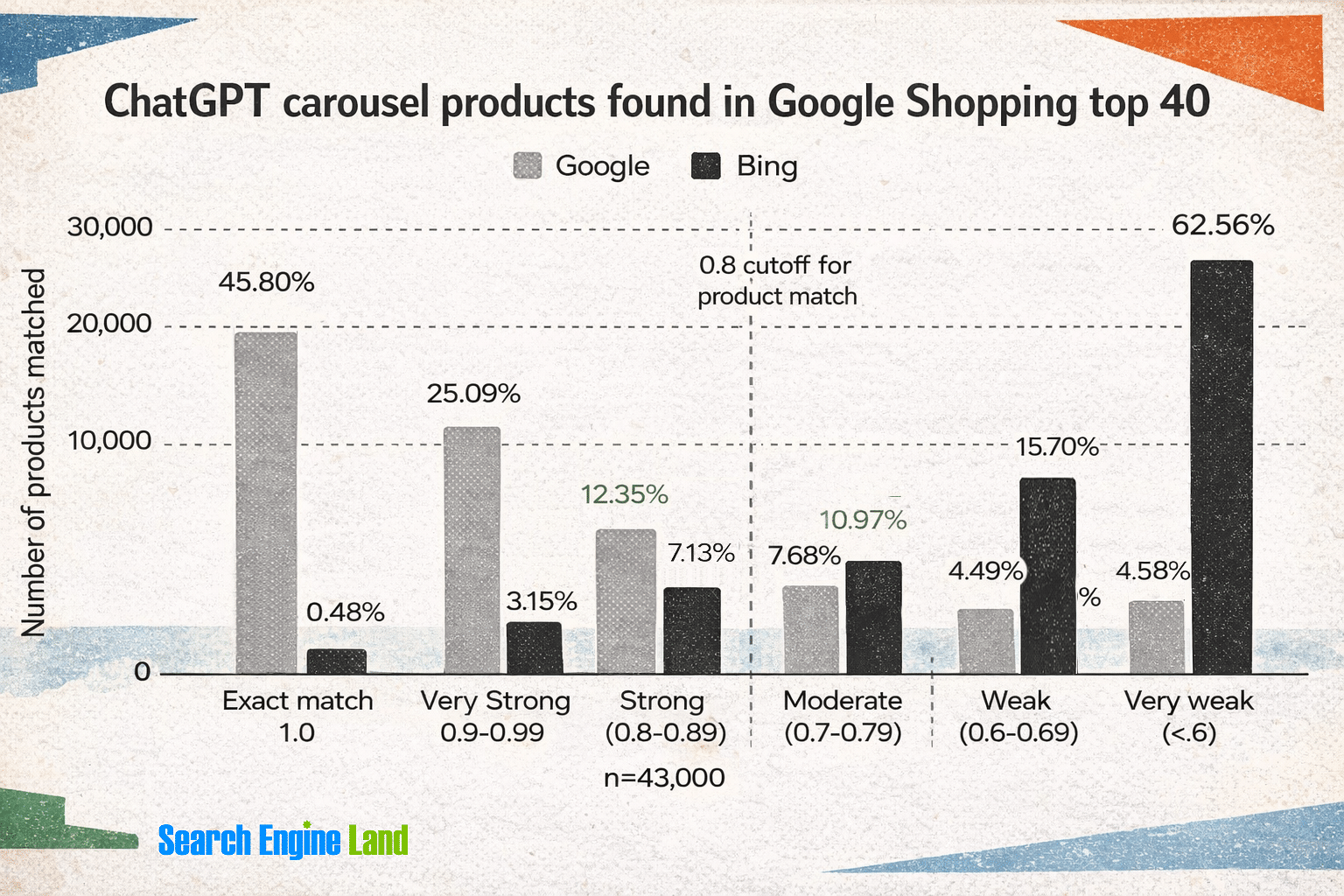
According to a recent Peec AI study, up to 83% of ChatGPT carousel products reflect Google’s organic Shopping results—and 60% of those are from Shopping positions 1-10.
Data shows how ChatGPT’s product carousel matches Google Shopping’s organic results, with Google dominating over Bing.
On Google’s side, their Shopping Graph includes over 50 billion product listings, directly feeding AI Overviews, AI Mode, and Gemini. AI Overviews now appear in about 14% of shopping inquiries, a leap from roughly 2% in late 2024. As I’ve seen, AI search results are still largely based on the traditional search engine result page (SERP).
SEO is vital for establishing brand authority. It opens up valuable opportunities to collaborate across channels for improved search visibility. It’s time for SEOs, commerce, and paid media teams to come together.
The Case for a Dedicated Organic Feed
Most brands run a single product feed aimed at Google paid shopping campaigns. The focus is often on optimizing titles for bid relevance and descriptions for Quality Score rather than for user search behaviors.
As user search habits evolve, aligning product data with search queries becomes increasingly important. A title with too many paid-friendly modifiers doesn’t necessarily match natural search queries.
When we tested this with a major ecommerce brand, our agency’s AI SEO team worked with the commerce team to create a dedicated product feed just for organic listings. Optimizing specifically for organic visibility made a world of difference.
After implementation, we saw the following results:
Organic listing CTR increased by 10% month over month and purchasing rates rose by 4%.
A product-level test revealed a 92% increase in revenue for free listings, with an 83% increase in visibility and a 14% rise in add-to-cart rates.
Organic optimizations alone generated 35,000 impressions with a 1.4% CTR—55% higher than paid CTR for the same period.
We recognized that our paid and organic strategies serve different needs, so they should be optimized independently. Organic feed titles should reflect how customers naturally search.
What to Prioritize in an Organic Feed Strategy
Not all feed attributes are equally important. Whether you’re setting up a dedicated organic feed or auditing an existing one, these elements are essential starting points.
Focus on Titles as the Key Lever
Google’s algorithm favors feed titles highly in matching products to queries. As Google documentation suggests, including significant attributes can lift performance. Consider what customers might conversationally say when searching for your product.
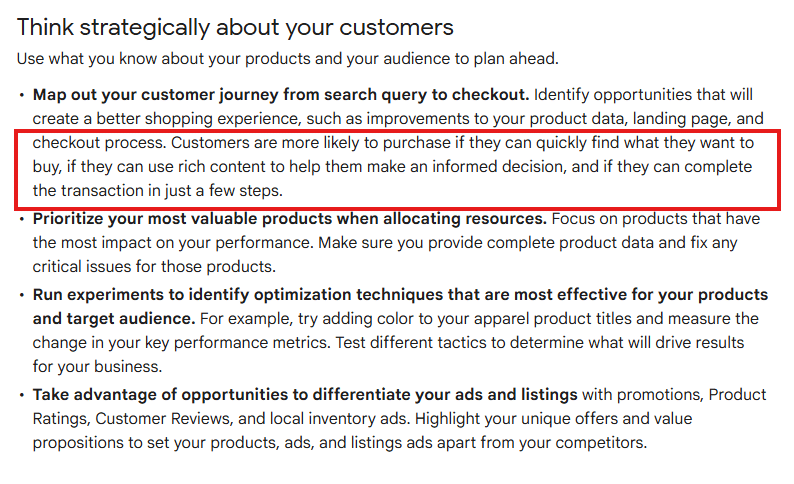
Google’s Merchant Center documentation emphasizes aligning your feed strategy with how customers shop, enhancing their search journey.
Don’t Neglect Global Trade Item Numbers (GTINs)
According to Google’s GTIN documentation, products with accurate GTINs gain significant visibility. Data shows well-matched products can attract up to 40% more clicks and are key in aggregating reviews.
Images Add Value
Images are often flagged in Merchant Center disapprovals. Products with both standard and lifestyle images engage more users. Google’s Product Studio can assist in editing, helping SEO and creative teams work together on feed assets.
Optimize Key Attributes: product_highlight and product_detail
product_highlight allows you to add concise benefit statements in Shopping views. Descriptions like “water-resistant for light rain commutes” are more beneficial than vague terms like “high-quality material.”
product_detail gives structured specs that influence Google’s filters in product grids.
The semantic optimization SEOs apply to product pages should guide feed attributes. Product and content teams’ insights are vital not just for PDPs but also for feeds.
Your Feed is Your Agentic Commerce Foundation
Investing in feed optimization for organic visibility will prepare your brand for the agentic commerce landscape.
Google’s Universal Commerce Protocol is essential for AI agents to complete transactions directly in AI Mode and Gemini. Feeds entering the Shopping Graph fuel AI responses to shopping requests.
Google added the native_commerce attribute for UCP-powered buy buttons across Google services. Several new conversational commerce attributes will soon be available, which means feed and on-page content must be in sync.
Building a Cross-Channel Strategy for AI Search
Product feed strategy is ideal for cross-team collaboration to test, execute, and measure brand visibility. A harmonized approach across all surfaces benefits both traditional and AI-driven search outcomes.
SEOs contribute keyword intelligence and semantic insights about AI system matching.
Commerce teams manage product data and retail relationships.
Paid teams have the infrastructure and expertise in feed health management.
These teams should collaborate to create a unified AI SEO strategy. Reviewing existing feeds and gathering all relevant stakeholders is essential to developing a comprehensive and effective product feed strategy.
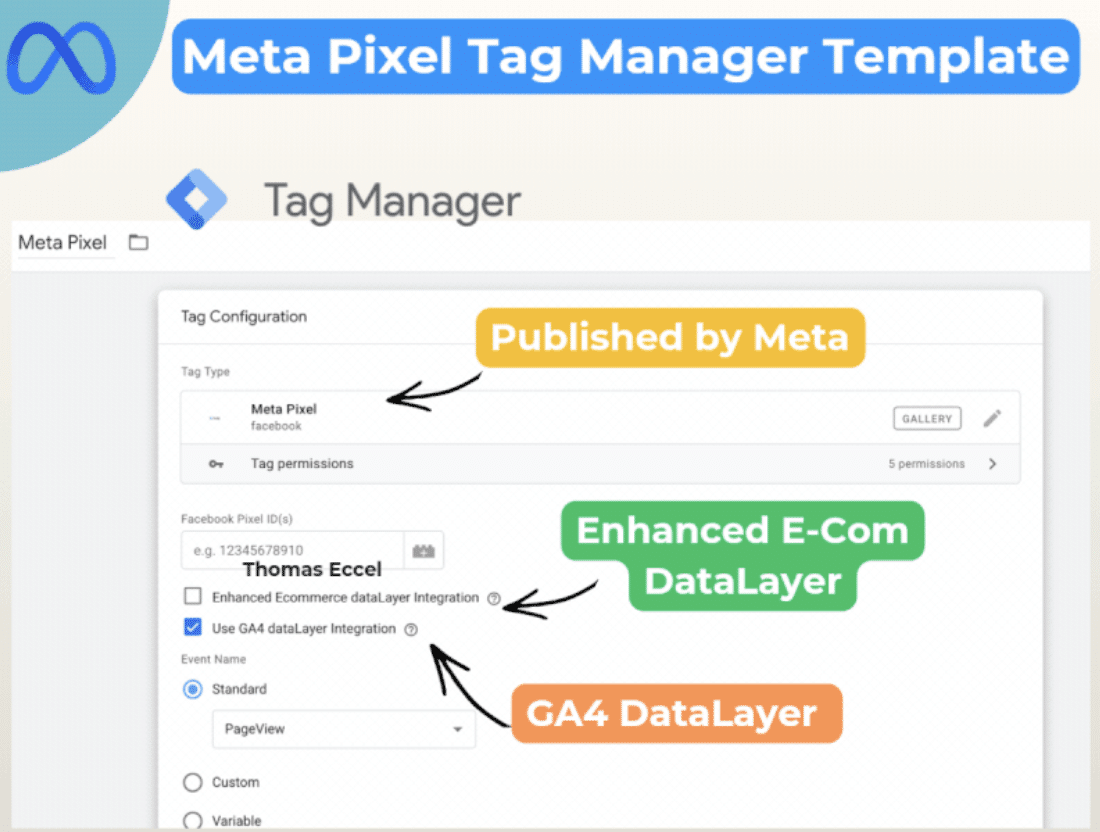
As someone who manages ad campaigns across various platforms, I’m thrilled to share that Meta has launched a new template for Google Tag Manager! This makes setting up the Pixel incredibly simple, ensuring smoother cross-platform tracking with more consistency for advertisers like us.
Meta Platforms is committed to reducing the technical challenges we face, especially when juggling campaigns on different platforms. This new update is a step towards minimizing those hurdles.
What’s happening. Meta has unveiled an official Pixel template within Google Tag Manager. This effectively replaces the need to rely on third-party or community-generated solutions.
How it works. This template takes advantage of our existing GA4 dataLayer, allowing us to utilize pre-configured events for Google Analytics 4 without needing to rebuild our tracking systems. It also makes mapping enhanced e-commerce events automatic, such as purchases and add-to-cart actions, which means we don’t have to worry about redundant tagging.
Why we care. The simplified setup reduces the time we spend implementing these systems while lowering the risk of tracking errors. This ensures our campaigns run smoothly across Google and Meta platforms.
What to watch. I’m curious to see if this user-friendly setup encourages more advertisers to adopt Meta Pixel tracking and whether it will lead to similar integrations in the future.
Bottom line. By removing one of the biggest pain points in ad tracking, Meta is making it quicker and simpler for us to gain reliable insights across various platforms.
First seen. This update was discovered by Paid Media expert Thomas Eccel, who highlighted it on LinkedIn.
I’m thrilled to share that Google has launched a groundbreaking onboarding guide for its Universal Commerce Protocol (UCP). This new system marks a significant shift towards integrating seamless checkout experiences directly within search. It’s a game-changer for advertisers and merchants alike.
Google is setting the stage for what they call ‘agentic commerce,’ where I can see purchases happening right in the AI-driven search moments. It’s all about making the buying process smoother and more intuitive for users like me.
What’s happening. Google has unveiled a detailed onboarding guide for the Universal Commerce Protocol (UCP) in Merchant Center. This guide shows merchants how to integrate with UCP, which allows checkout directly from product listings in AI Mode and Gemini. I find this incredibly useful in streamlining my customer journey.
The big picture. With AI search evolving into transaction facilitation, Google aims to keep users like me engaged by embedding shopping and checkout into conversational experiences. It’s all about keeping us within their ecosystem.
How it works. Before jumping in, merchants need to complete a technical integration and submit an interest form. After getting approval, they can access onboarding tools in Google Merchant Center. This includes a testing sandbox, identity linking, and checkout APIs — tools that I find essential for successful integration.
Why we care. Google’s move of aligning search closer to transactions means that I, as a user, might complete my purchases directly inside AI interactions rather than visiting separate websites. This could redefine how we measure, attribute, and optimize our advertising performance. Early adopters of the Universal Commerce Protocol could gain a competitive advantage as shopping becomes more integrated into AI tools like Gemini.
Zoom in. The protocol acts as an open standard, connecting product data, user identity, and payment flows. I’m excited about making seamless purchases without any redirection to external sites.
What to watch: The rollout is gradual and currently limited to the U.S. I should keep an eye out for a dedicated UCP integration tab appearing in Merchant Center accounts in the coming months.
Bottom line. If widely adopted, the Universal Commerce Protocol could transform online shopping, making search a complete, AI-powered checkout experience. I hope to see this fully integrated soon.
Embrace audience engineering to influence AI decisions, manage ad spend wisely, and connect with high-value customers through creativity and data.
I’m witnessing a significant transformation in the paid media landscape as platforms shift from manual targeting to AI-driven audience discovery. This change is redefining how we approach advertising, with automation tools consolidating campaigns, obscuring data, and favoring prediction algorithms over manual selection.
This transition requires me to innovate by mastering the art of audience engineering. By doing so, I ensure I’m equipped with strategies to thrive in this evolving landscape.
The End of Manual Targeting as I Knew It
Previously, I depended on detailed keyword lists and demographic filters to pinpoint my ideal audience. I directed platforms about where to focus and paid to access the desired market.
However, these options are now outdated:
Google has transitioned to Performance Max, which eliminates keyword-specific targeting in favor of more fluid groups and signals.
Meta’s Advantage+ automates demographic focus, turning my role into that of a signal provider instead of an audience selector.
Microsoft’s inclusion of this model confirms this is an industry-wide evolution.
While traditional targeting seems to have vanished, it has merely moved to the internal structures of the platforms where algorithms dictate the direction based on their indigenous data.
The Rise of Audience Engineering
My role shifts from targeting to engineering as it becomes more about guiding algorithms than manually selecting audiences.
From Targeting to Teaching
The distinction is crucial. Traditionally, targeting emphasized choosing audiences, but now it’s about educating AI with comprehensive conversion data, targeted creativity, and insightful first-party data.
Previously, I might have targeted CFOs with job filters, but now I feed the AI robust data (e.g., “deal closed” signals) to characterize valuable prospects and devise creative content tailored to their needs.
The New Competitive Discipline
Embracing this transformation gives me an edge. By finetuning conversion signals, honing creative content, and fortifying data systems, I ensure our performance remains robust.
The performance gap now relies on the quality of signals, making audience engineering pivotal for success.
The Three Levers that Now Drive Targeting
I focus on optimizing these three crucial AI inputs to ensure effective audience segmentation:
1. Conversion Signal Quality
By providing the algorithm with relevant business outcomes rather than superficial metrics, I encourage it to find results that truly matter.
Using tools like Offline Conversion Imports (OCI) and the Conversions API (CAPI), I ensure our data highlights genuine sales by leveraging value-based bidding techniques.
2. Creative as a Targeting Mechanism
With no demographic filters, my creative content now acts as the primary targeting tool, filtering users through its message.
If my creative targets niche pain points, the AI connects with users aligned with that perspective, even without traditional filters.
3. First-Party Data as Competitive Moat
Our customer lists and engagement signals become core learning elements for the algorithm, replacing third-party signals and offering a competitive edge.
Essentially, I’m arming the AI with a guide to discover the most profitable audiences.
How This Plays Out in Real Campaigns
The journey to AI-led targeting isn’t just theoretical. Within our agency, managing over $215 million in media spend annually, we have evaluated this approach across different platforms, witnessing its power firsthand.
Advantage+ Audiences in Practice
One long-standing client had a specific perception of their audience based on a vast history of accurate data. Initially, our campaigns ran with tightly controlled targeting to maintain efficiency.
Transitioning to Advantage+ allowed for data-driven optimization, revealing an unexpectedly lucrative older demographic, improving their click-through rates by 37% and conversion rates immensely.
Broader AI-optimized targeting cut costs and raised revenue — outperforming past manual methods.
By aligning goals with data and creative, we found valuable segments conventional targeting schemes previously overlooked.
Microsoft PMax Placement Transparency and Advanced Audience Signal Targeting
Another client benefited from a Microsoft PMax test, effectively targeting high-intent prospects using internal data across several Microsoft networks, seeing notable increases in performance metrics each month.
This trial highlighted the importance of combining strategic oversight with smart AI deployment, enhancing the algorithm’s reach while maintaining disciplined campaign direction.
The balance between scale and strategic input preserved efficiency and bolstered overall performance.
The Risks Nobody is Talking Enough About
While automated targeting offers significant advantages, it’s essential to understand its limitations. Here’s what I strive to avoid:
Garbage In, Garbage Out
Poorly defined conversion objectives, weak data quality, or junk data hinder performance and mislead the algorithm. Feeding it quality information and focused outcomes is crucial.
An overly broad goal without distinct signals results in quantity over quality, which doesn’t necessarily translate to business success.
The Self-Reinforcement Trap
If the seed data has biases, the AI will continuously optimize for those biases, possibly neglecting valuable audience segments.
These underrecognized biases present inherent risks in leveraging automated systems without mindfulness.
Automation Without Oversight
Platforms promote broad automation, but I recognize the need for continued oversight to realign campaigns with business goals.
Constant monitoring is essential to ensure objectives are met, avoiding a passive management style.
Creative Complacency
As automation advances, creative strategy becomes a crucial differentiator and shouldn’t be neglected.
Crafting compelling creative that addresses core customer issues is vital in distinctively standing out.
How to Put Audience Engineering into Practice
Here’s how I integrate audience engineering into everyday operations:
Restructure Creative: Focus on intent signals, addressing what beliefs inspire conversion.
Predefine Guardrails: Establish performance boundaries before unleashing the algorithm, allowing for better campaign control.
The Future Belongs to Audience Engineers
The era of manual targeting is closing, but precision remains crucial. Audience engineering acts as an invaluable skill, unlocking AI’s full potential to achieve maximum results in this dynamic landscape.