When I get a call from a client about a negative search result, my usual response might be to suppress it or claim there’s nothing I can do. However, these aren’t the only options. Google’s removal tools offer a middle ground worth exploring.
Google actually provides tools to remove or deindex content from search results, but they’re underused and often misunderstood. Let me break down what each tool does, when to utilize it, and what its limitations are—so I can handle client situations accurately and manage expectations effectively.
Before using any tool, I always clarify an important distinction with clients: the difference between removal and deindexing. Though they seem similar, they achieve different outcomes.
Removal at source: This means deleting the content from its original site. Once it’s gone, Google will automatically remove it from its index after re-crawling. This is the ideal situation but relies on the site owner taking action.
Deindexing: Google simply removes the URL from its search results, even if the page still exists. However, anyone with the direct link can still access it. Most of Google’s self-service tools offer this option.
The takeaway here is that deindexing addresses a search issue but not a content issue. If the content itself poses a problem, deindexing can minimize risk without completely solving the issue. This distinction is crucial when advising clients.
Google’s various removal tools serve different purposes. Let me walk you through them.
The URL removal tool: Located in Google Search Console, this tool allows me to temporarily hide a URL or directory from search results for up to six months. I find it useful for outdated pages I don’t want people to see, like old press releases.
The outdated content removal tool: This public tool lets you request Google to deindex pages that have been removed or changed but still show in search results. It’s a time-saver after the source has been changed, triggering a recrawl rather than an actual removal.
The Results About You tool: Launched recently, this tool helps me request the removal of personal information categories from Google Search, greatly expanded to include sensitive data like government-issued IDs and non-consensual explicit imagery.
Legal removal requests: For issues outside self-service categories, I can submit legal requests for removal based on different grounds like defamation or copyright violations.
The personal content removal form: Separate from the Results About You tool, this form manages the removal of non-consensual explicit images and other sensitive information found on third-party sites.
It’s important to understand the limitations of these tools. None of them can force third-party sites to delete content or remove content from other search engines. They don’t permanently fix content issues; that’s where suppression strategies come in handy.
When managing client expectations, it’s crucial for me to explain that Google isn’t a content moderator and its tools cover very specific cases. Suppression is often the best strategy when these tools are inapplicable.
For challenging cases, companies like Erase.com handle direct outreach and legal escalation, offering a bridge between self-help tools and litigation.
By understanding and effectively using these tools, I can better manage online reputations and set realistic expectations with my clients.
Hey there! Have you ever wondered how to make your content stand out in today’s digital world? I sure have. Let me share with you some amazing strategies I’ve discovered for optimizing content specifically for Gemini, Google’s innovative AI-driven platform. It’s all about enhancing visibility in AI Overviews and answer engines.
By focusing on Answer Engine Optimization (AEO), I’ve learned from top experts how to ensure my content gets the attention it deserves. Let’s dive into some actionable tactics that can really make a difference.
The great thing about mastering Gemini optimization is that it helps boost my content’s visibility across various digital landscapes, especially in areas like AI Overviews. These strategies have really opened new doors for me and my digital presence.
I recently learned that Google’s first core update of 2026 has finally wrapped up after a 12-day rollout. Now, it’s time to understand its impact and refine our content strategies accordingly.
Google confirmed the conclusion of this update at 06:12 PDT through their Search Status Dashboard. The changes began on March 27, affecting search rankings globally.
Google described this as “a regular update designed to better surface relevant and satisfying content for searchers from all types of sites.”
Initially, Google estimated that the update would take up to two weeks, starting on March 27 and concluding on April 8, lasting exactly 12 days and 4 hours.
This update was the first of the year following the March 2026 spam update and the February 2026 Discover update. Core updates generally result in noticeable changes in search results due to broad alterations to Google’s ranking systems.
If you’ve been affected by these changes, it’s important to remember Google’s standing advice: drops in rankings are not necessarily indicative of issues with your site.
Recovery is often tied to future updates rather than immediate fixes. Try to focus on creating helpful, reliable, and people-first content.
With the rollout complete, I can now evaluate its impact with greater confidence. It’s time to analyze changes in rankings and traffic, pinpoint key changes, and adjust our content to align with what this update favors.
Here’s a brief timeline of recent core updates for reference:
I recently explored the process of selecting an AI search optimization agency, and I wanted to share some insights for 2026. With the growing need for AI-driven solutions, it’s crucial to find an agency that aligns with your brand’s unique requirements.
Choosing the right agency can significantly enhance your brand’s AI visibility. To make an informed decision, I recommend focusing on key criteria and evaluation steps.
I’ve discovered that understanding the agency’s experience, evaluating their previous works, and considering their expertise in AI technologies are vital steps in this selection process.
AI is revolutionizing how we discover, search, and purchase—it’s all happening at lightning speed. If we can’t clearly articulate the problem our brand solves, AI won’t be able to either.
I’ve noticed that customer journeys are now condensed into a single decision-making instance. David Edelman describes this as a blending of behaviors that traditionally occurred separately.
As decisions become more instant, it’s essential that I clarify what my brand can solve for the customer. Yet, too often, I find myself increasing activity rather than honing the strategy behind it.
Edelman, in his March 2026 Think with Google essay, emphasizes the rapid blending of streaming, scrolling, searching, and shopping behaviors, propelled by generative AI.
This insight shows that the traditional linear journey from awareness to purchase is outdated. Now, users multitask across platforms, fluidly moving between entertainment and intent.
The realization hit home when I learned people are using AI search engines to pose complex, emotionally rich queries, expressing context and urgency rather than just keywords.
AI processes these queries, breaking them into multiple streams and quickly synthesis results—a task that once required numerous browser tabs and hours is now done in seconds.
From this, I understand two things:
The competition now revolves around how well brands serve as solutions to specific needs, not just as products.
The demand framework is simultaneous—creating, capturing, and converting demand can no longer occur in sequence.
As I think of Walt Kelly’s Pogo, I’m reminded of the risk of mistaking busyness for progress. His words cut deep: ‘Having lost sight of our objectives, we redoubled our efforts.’
I see brands scrambling to generate content tailored for this new speed of decision-making, yet without clear strategic goals, it’s just activity for activity’s sake.
While the compressed customer journey is an opportunity for brands with precise positioning, it’s a trap for those without clear direction. Inconsistent brand signals lead to confusion.
Edelman highlights this issue by suggesting that brands should be seen as ‘the sum of signals’ that reveal them as solutions. I realized the journey compression issue isn’t just technological; it’s about setting clear objectives.
A question I continually ask is: What specific situation does my brand best address? If I can’t answer that concisely, AI certainly won’t be able to.
Tracking my brand’s visibility in AI-powered searches has become an essential part of SEO. However, the available tools often come with hefty price tags, starting around $300 to $500 monthly. For those of us who need custom solutions, these costs can be prohibitive.
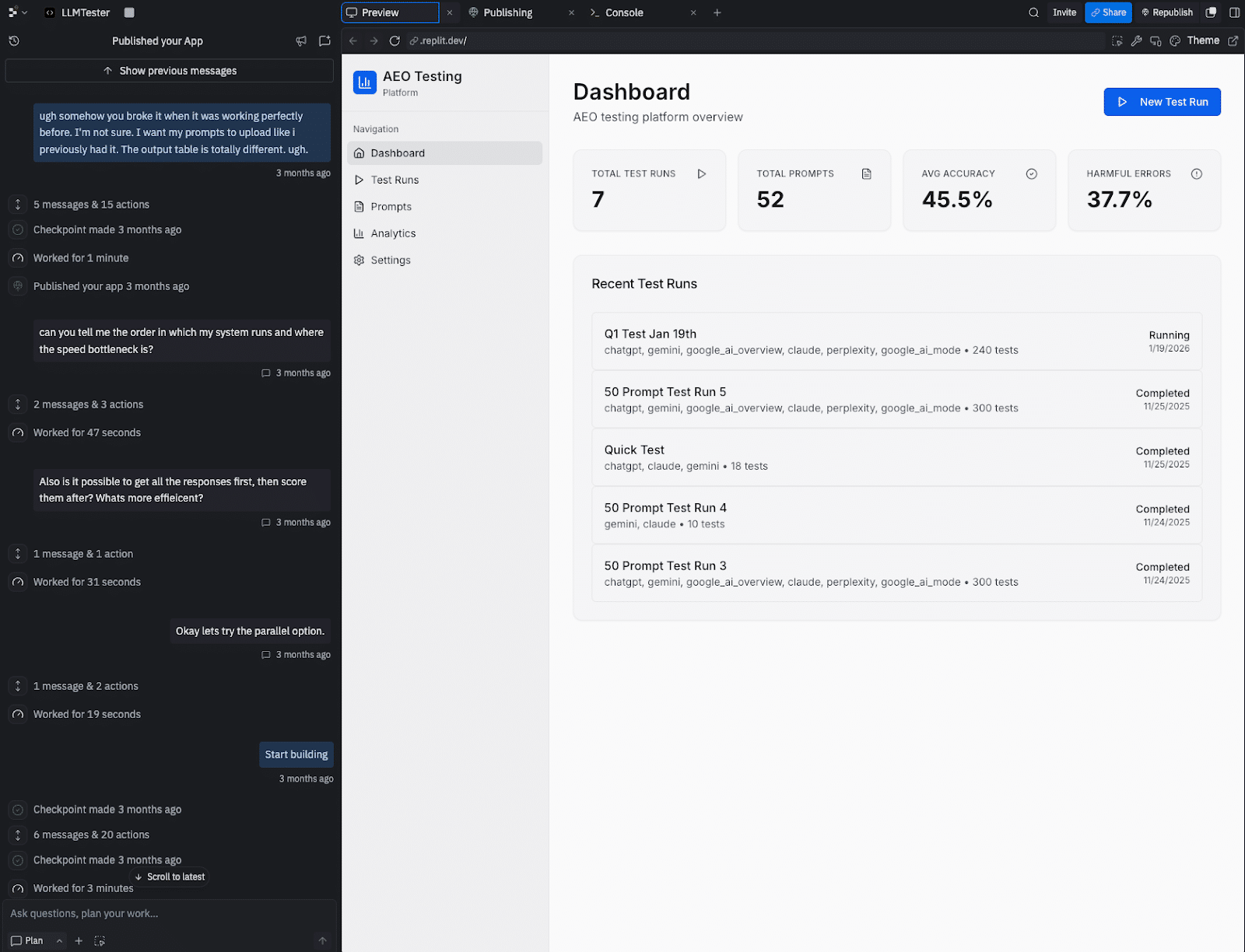
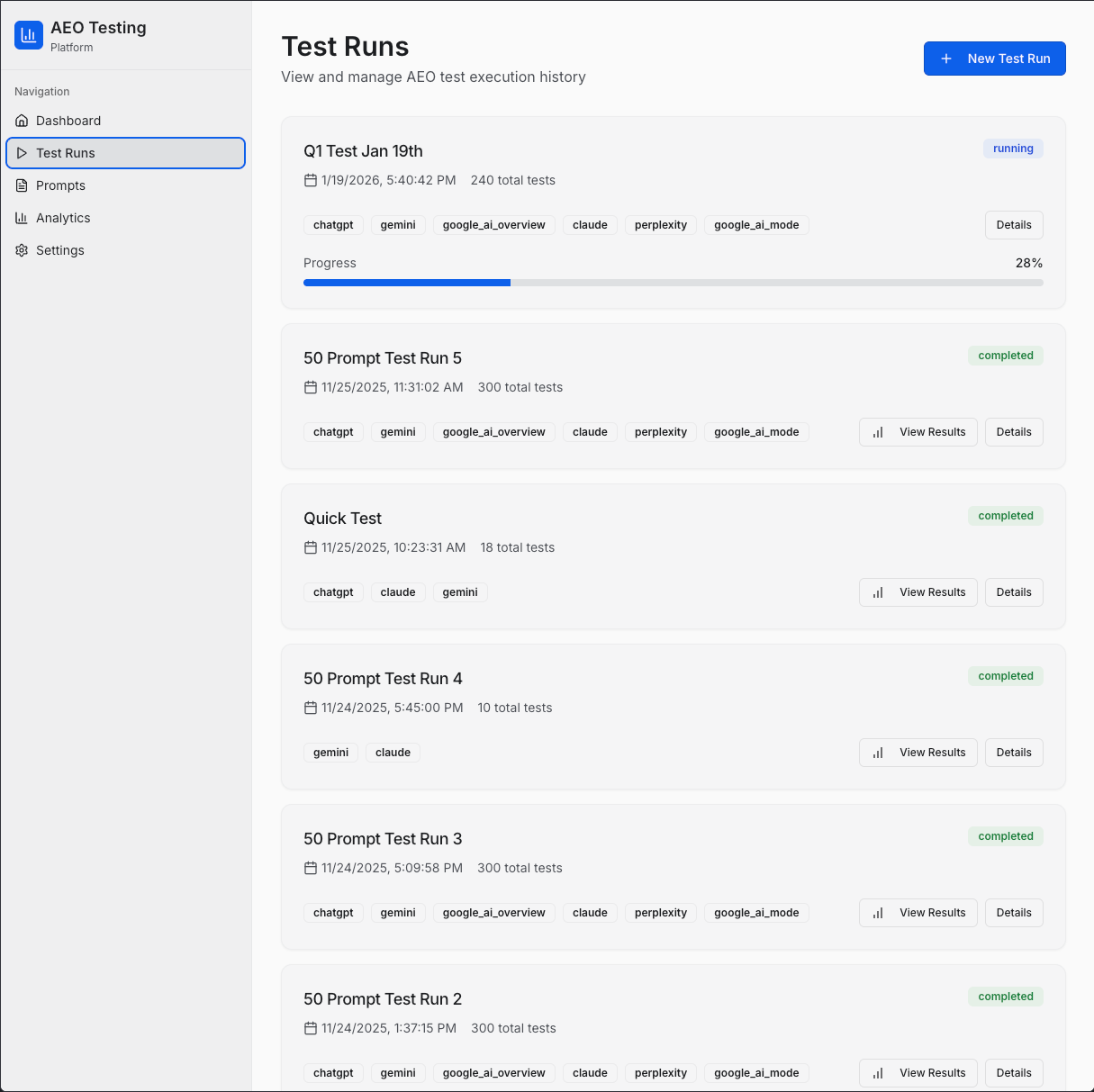
I encountered this challenge firsthand. I required a specific tool that wasn’t available within my budget. So, I took matters into my own hands and built one myself, despite not being a developer. With a weekend of effort and dialogue with an AI agent, I crafted an AI search visibility tracker tailored to my needs.
Sharing my experiences, I’ve compiled a guide that I wish I had at the start—a step-by-step playbook for creating a custom tool. This guide navigates through technology, processes, the hiccups I faced, and how to streamline your build.
My main goal was to automate an AI engine optimization (AEO) testing protocol. To achieve comprehensive AI-driven brand visibility, tracking across five critical AI surfaces was necessary:
ChatGPT (via API): Renowned for its conversational AI prowess.
Claude (via API): A significant competitor with a unique response style.
Gemini (via API): Google’s direct model aimed at developers.
Google AI Mode: Enhances Google’s AI search experience with advanced reasoning.
Google AI Overviews: Summaries at the top of search results, prevalent by late 2025.
On top of these, I implemented a custom 5-point rubric for scoring results based on criteria like brand name inclusion and citation quality. With no existing SaaS tools offering this particular mix, the solution was to build one.
This project leveraged vibe coding, translating natural language into functional applications with AI assistance. Amid developers increasingly adopting AI coding and the growing trend of AI-generated code, this approach offered a viable path for a non-developer like me to create an impactful internal tool.
Your tech stack: The three tools you’ll need
To replicate this project while keeping costs manageable, here are the necessary components:
Replit Agent: An online development environment costing around $20/month, enabling application building via description alone.
DataForSEO APIs: The core of this project, allowing data retrieval from various AI platforms, priced on a pay-as-you-go model.
Direct LLM APIs (optional): Establishing direct connections with OpenAI, Anthropic, and Google APIs to verify and correct any discrepancies.
The playbook: A step-by-step guide to building your tool
Building this tool involved clear communication and step-by-step progress. Here’s a structured approach to guide your process:
Step 1: Write a requirements document first
Start by outlining your needs clearly. This document acts as a blueprint covering problems, features, and necessary data. Initial conversations with your AI should revolve around this document to set a solid foundation.
Step 2: Ask the AI, ‘What am I missing?’
Once your needs are outlined, seek the AI’s help in uncovering overlooked areas. Questions like “What am I not accounting for?” can avert common pitfalls and ensure comprehensive planning.
Step 3: Build one feature at a time and test it
Avoid building everything simultaneously. Tackle one small task and test it thoroughly before moving to the next. This methodical approach aids in pinpointing and addressing issues efficiently.
Step 4: Point the agent to the documentation
When integrating APIs, guide the AI using specific documentation. Providing exact URLs ensures accurate implementation and saves time otherwise spent fixing errors.
Step 5: Save working versions
Before introducing significant changes, save copies of your project. In Replit, this is done through “forking.” It’s a precaution against potential new feature-induced disruptions.
Common problems and how to fix them
You’ll likely face technical hurdles. Here are frequent issues with solutions to help you navigate the process smoothly:
Problem
Solution
1. API authentication fails
Provide the exact authentication documentation URL to the agent.
2. Results disappear
Ensure persistent storage by requesting a database from the start.
3. API responses don’t show
Share raw JSON data with the agent to diagnose and fix parsing logic.
4. Model response cut short
Conduct parameter checks post-updates to maintain consistent results.
Evaluating the real costs
Building this tool has clear advantages over purchasing a SaaS solution, notably cost savings. Here’s a breakdown:
Expense
Custom Tool
SaaS
Subscription
$20/month
$500/month
API Usage
$60/month
Included
Total
$80/month
$500/month
Despite the initial time investment, the ability to adapt and tailor the tool outweighs the ongoing costs.
Is building your own tool right for you?
This decision largely depends on your specific needs:
Consider building if:
You require unique testing methods not supported by current tools.
Your agency needs a white-labeled solution.
You prefer cost-effective strategies and are willing to invest time.
Stick with SaaS if:
Your time is more valuable than subscription costs.
You need robust security and customer support.
You find standard features sufficient.
Ultimately, crafting a tool that aligns perfectly with your workflow can provide a distinct edge in the competitive SEO landscape. Welcome to the era of practitioner-developers; it’s time to innovate.
Have you ever wondered how to elevate your brand using a combined strategy that brings together SEO, social presence, public relations, and content creation? Well, I’m here to guide you on this transformative journey where we boost AI search visibility and ensure your brand becomes the go-to answer in your field.
Integrating these elements into a cohesive strategy isn’t just powerful—it’s essential in today’s digital landscape. Let me show you how to turn this into a reality for your brand.
After almost two decades in digital marketing, AI significantly impacted how I work. It’s been a game-changer by saving time, cutting down on repetitive tasks, and speeding up challenging ones.
However, AI doesn’t operate as a magic wand. It won’t do the entire job for you or transform everything overnight. In the hands-on world of SEO, armed with real clients and deadlines, AI serves as a handy tool to ease workloads but doesn’t eliminate the necessity of hard work.
Below are 20 ways I’ve integrated AI into my SEO strategies. Some are specific to SEO, while others benefit anyone in the industry. Each usage is practical, tested, and transparent about its constraints.
Content creation and copywriting
1. Writing first drafts
The best way to leverage AI in content is to see it as a rapid first-draft creator rather than expecting it to deliver polished, ready-to-publish pieces. Provide it with your brief, target keywords, audience, and angle to get a structured draft.
Focus on rewriting this draft in your voice by injecting your unique expertise. Enhance AI-generated content with personal stories, case studies, stats, and your professional insights.
AI helps avoid the daunting starting point of a blank page, saving valuable time.
2. Generating meta title and description variations
Provide your target keyword, page topic, and character limits to Claude or ChatGPT, and request 10 variations for your meta titles and descriptions. You might choose one or mix two for the best effect, reducing creation time from 20 minutes to just two!
Many tools will let you upload CSVs, add AI-generated suggestions, and download them for review. However, always ensure a human review for optimal results.
3. Refreshing underperforming content
If a page or blog post is underperforming, paste it into an AI tool to get feedback on missing elements, extensible parts, and outdated information. Although not always perfect, it offers a fresh perspective without needing to reread everything yourself.
Detailed prompts with context yield better results than simply pasting content cold.
4. Generating FAQ sections
Ask AI to generate the top 10 questions around your target keywords and check them against ‘People Also Ask’ and your research. By providing well-crafted answers, you get an FAQ section, potential featured snippets, and a content gap analysis in around 10 minutes.
5. Writing alt text at scale
Crafting alt text for numerous images can be a tedious task. Describe the image, its page context, and include the target keyword for AI to generate appropriate alt text descriptions. While not glamorous, it’s essential and much faster.
Running a site through Screaming Frog, exporting it, and using AI to write alt text can quicken the process if file names are descriptive. Human oversight remains a necessity, focusing on speed rather than full automation.
AI proves invaluable for those without a developer background by translating technical error messages, interpreting server logs, and identifying why a page isn’t being indexed. Paste in your output, ask for explanations and recommended fixes, verifying the insights before implementation.
7. Writing schema markup
Schema markup can be tedious. Provide AI with page content descriptions and schema type (like FAQ or Article), and let it generate the JSON-LD code. Always verify it with Google’s Rich Results Test to ensure correctness. The process now takes me only five minutes per page type!
8. Creating regex for Google Search Console
If you’re utilizing regex in GSC filters and aren’t an expert, AI can lend a hand. Describe what you need to filter and request the regex string. It usually gets it right and can even explain the logic for your understanding.
9. Analyzing crawl data with prompts
Export crawls from Screaming Frog or Sitebulb. If you’re uncertain what to prioritize, input the data into an AI tool and receive guidance on the highest-priority issues for site goals. It’s a great assistance when diagnosing plenty of issues under tight timings.
One underrated AI use in SEO work involves creating narratives around the data. You have the facts, but forming a coherent narrative explaining fluctuations and future expectations takes effort. Share your key metrics, contextual events, and have AI draft the narrative for you to refine and enhance.
This method helps blend information from multiple sources. I save hours monthly while compiling reports.
11. Summarizing long reports for clients
Not every client wishes to examine a 12-page report. Task AI with summarizing it into an executive five-bullet summary for better engagement. The comprehensive report remains optional for those who seek details.
Providing a simple, easy-to-understand executive summary bridges understanding gaps for clients not familiar with SEO intricacies.
12. Identifying anomalies in data
Input your keyword rankings or traffic data and let AI detect unusual trends or patterns that deviate from expectations, such as drops or unexplained gains.
While it won’t replace comprehensive analysis, it is beneficial for a preliminary review when overwhelmed by data.
List your top competitors and yourself, asking AI to identify potential content gaps based on competitors’ strategies and positioning.
Use AI-generated insights to guide targeted keyword research, starting the manual process with hypothesis-generating edge.
14. Understanding a new industry quickly
For unfamiliar industries, rely on AI to guide you with key terminology, major players, buying cycles, search habits, and common pain points. This approach saves you time on initial discovery calls.
15. Identifying search intent mismatches
Ask AI to categorize your target keywords by search intent, then check for disparities in your current page targeting approach. It’s straightforward yet tedious when dealing with numerous keywords.
AI eases the burden of crafting challenging emails, whether explaining dropped rankings or missed deadlines. Provide situation details, needed actions, and let AI draft a professional message to edit and send, saving emotional energy.
17. Writing SOPs and process documentation
To document processes, verbalize or note down rough steps and let AI turn them into structured SOPs. This approach helps overcome procrastination, offering a framework to refine further.
18. Preparing for client calls
Before client calls, recap recent report data, outstanding issues, and planned agenda with AI assistance for structuring and anticipating potential client queries. This primes you for a well-prepared meeting experience.
Productivity and admin
19. Processing your own thinking
I frequently turn to AI when grappling with strategic or creativity blocks. I discuss challenges aloud and AI helps clarify thoughts, aiding in quicker and easier decision-making processes.
Ask AI for honest feedback to bypass mere agreement, ensuring you receive pertinent, challenging insights.
20. Building prompts you actually reuse
The greatest productivity surge from AI arises by crafting a repository of tailored prompts for your workflow. Save successful prompts to establish a library, avoiding the need to reinvent each time. Consistent reuse of effective prompts compounds productivity gains over time.
Top tip: Many premium AI tools permit project creation with specified instructions, saving time spent repeatedly inputting detailed information for prompts.
These AI tips augment, but do not replace, the expertise and relationships crucial to excellent SEO practice. AI lacks nuanced understanding of business intricacies, account histories, and client relationships.
By lessening time spent on monotonous tasks, AI allows more room for expert work. Always employ AI as a tool, remain cautious of the hype, and ensure to personally review content before presenting to a client.
According to a recent, though unverified, report, Google Gemini’s AI is designed to tailor its responses based on the user’s tone, intent, and emotional context. This fascinating development suggests that the AI aligns its answers with the emotional backdrop of each query.
Why This Matters. If this information holds true, it means that the responses generated by AI might vary significantly, depending on how we phrase our queries, rather than just on the data available. This could change the way we engage with search engines.
New Findings. At the heart of this revelation is a system called upcast_info. As reported by Elie Berreby, head of SEO and AI search at Adorama, this system seems to provide the blueprint for how Gemini processes user queries, aiming to:
Reflect the user’s tone, energy, and purpose.
Acknowledge emotions before formulating a response.
Deliver answers from the user’s perspective.
Implications. Instead of maintaining a neutral stance, the AI’s responses could:
Emphasize negative perspectives (“Why is X bad?”).
Highlight positive aspects (“Why is X great?”).
Should the public sentiment toward a topic be negative, the AI might intensify that sentiment. As the report indicates:
AI mirrors prevalent emotional signals.
It doesn’t offer the balancing act usually provided by traditional search result links.
The Role of Query Framing. The emotional tone of a query can impact:
The choice of sources cited.
The style of summaries presented.
The overall tone and substance of the answers.
Google’s AI Overviews already demonstrate shifts in tone that align with the intent of queries, providing potential insight into the mechanics behind these changes.
Unsubstantiated Information. Google has yet to confirm this leak. As Berreby mentions: “I’ve decided to share just a portion of the leaked internal system data publicly. It’s not a security exploit or major breach, just a minor leak.”
In 1998, I found myself meticulously submitting websites to search engines. I remember the drill well: AltaVista, Yahoo Directory, Excite, Infoseek, Lycos, and others. Each had its own form and wait time, leaving us to wonder if our URLs would make the cut.
Back then, we submitted a whopping 18,000 pages, manually. While this was happening, Google was just emerging. Yet, they already had a vision that would render manual submissions almost obsolete.
Google’s PageRank meant that if a site had incoming links, it didn’t necessarily need to submit. While other search engines waited, Google proactively discovered content, streamlining what was once a tedious process.
For two decades, the rule was simple: you published, you waited, and the bots would come. But now, the landscape is shifting. Not because Google has lost its edge, but due to an expanded game where merely waiting won’t capture all available revenue streams.
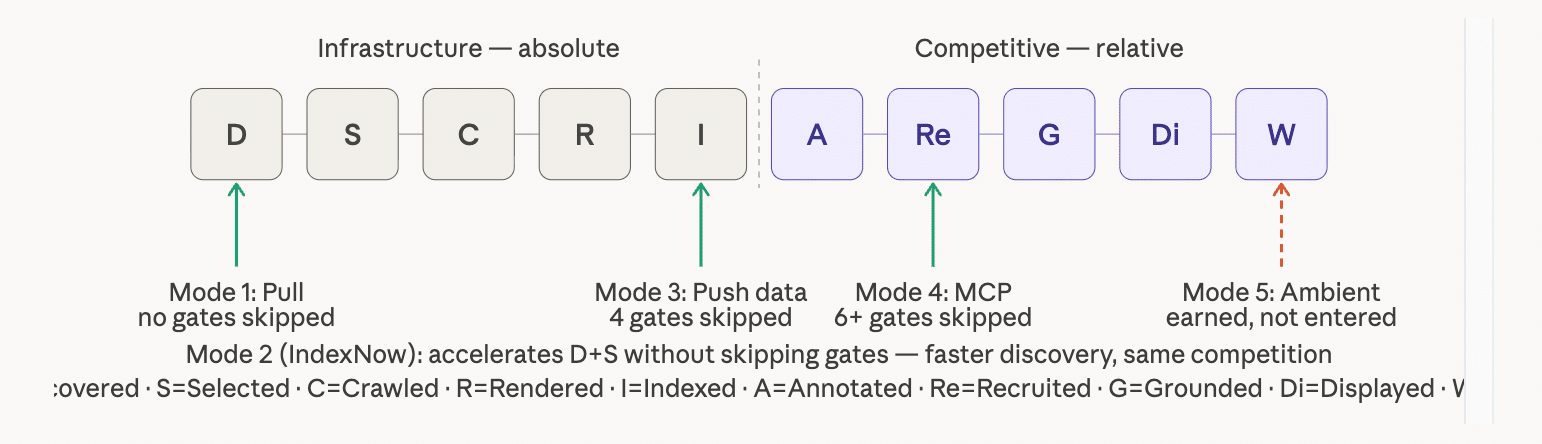
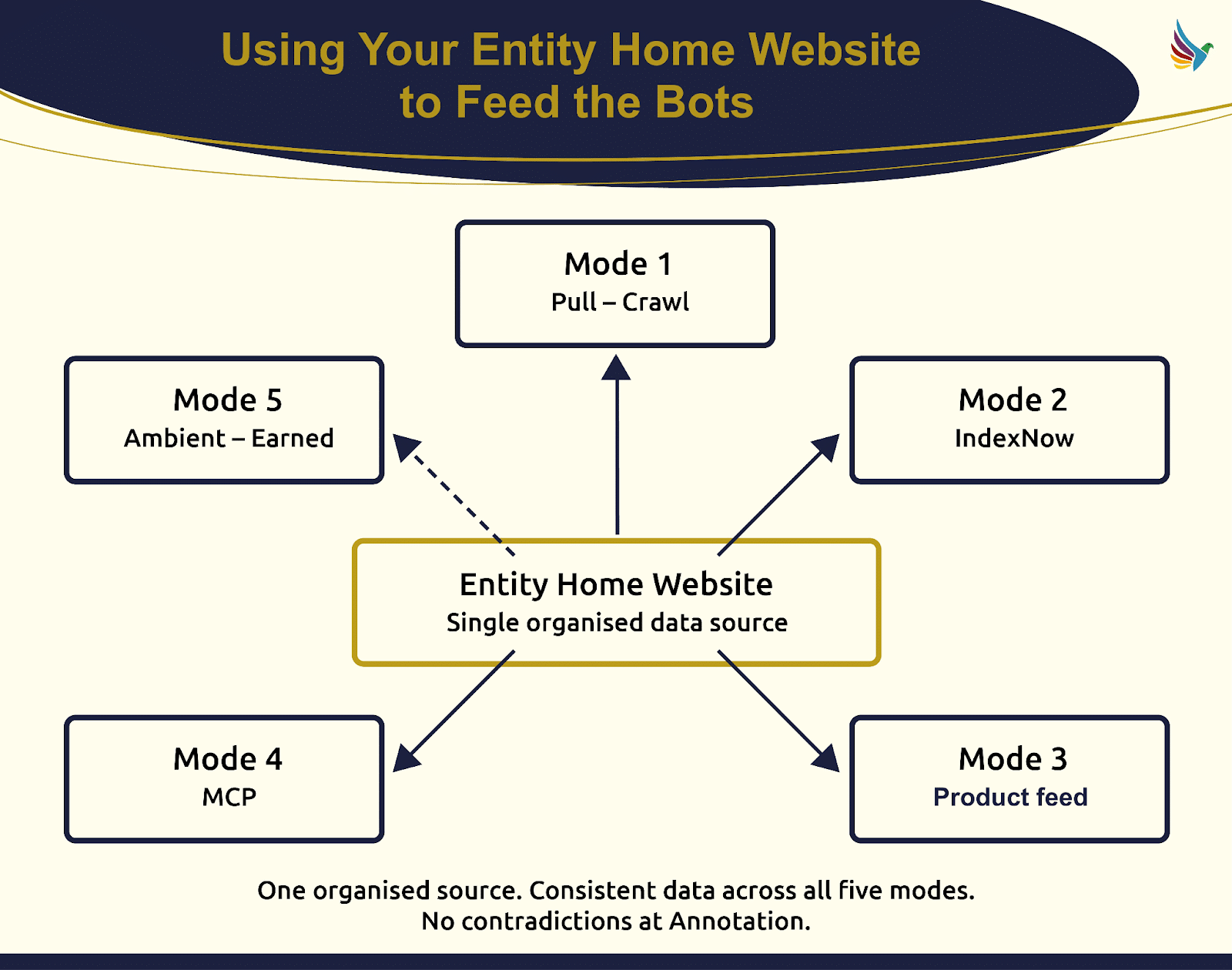
The pull model, which depends on search bots, is no longer the only method of content discovery. We now have five modes of entry into the AI engine pipeline, and the single entry mode of the past has evolved dramatically.
I’ve identified these modes to show how they each confer unique advantages at the crucial stages of indexing and annotation, which determine a content’s competitive edge.
First up, the traditional pull model remains, where bots fetch and decide everything. It offers no structural leverage, leaving content entirely dependent on the bot’s schedule.
Next, push discovery is a proactive approach, notifying systems of new or updated content. Tools like IndexNow by Bing expedite this process significantly, allowing content to be recommended much sooner.
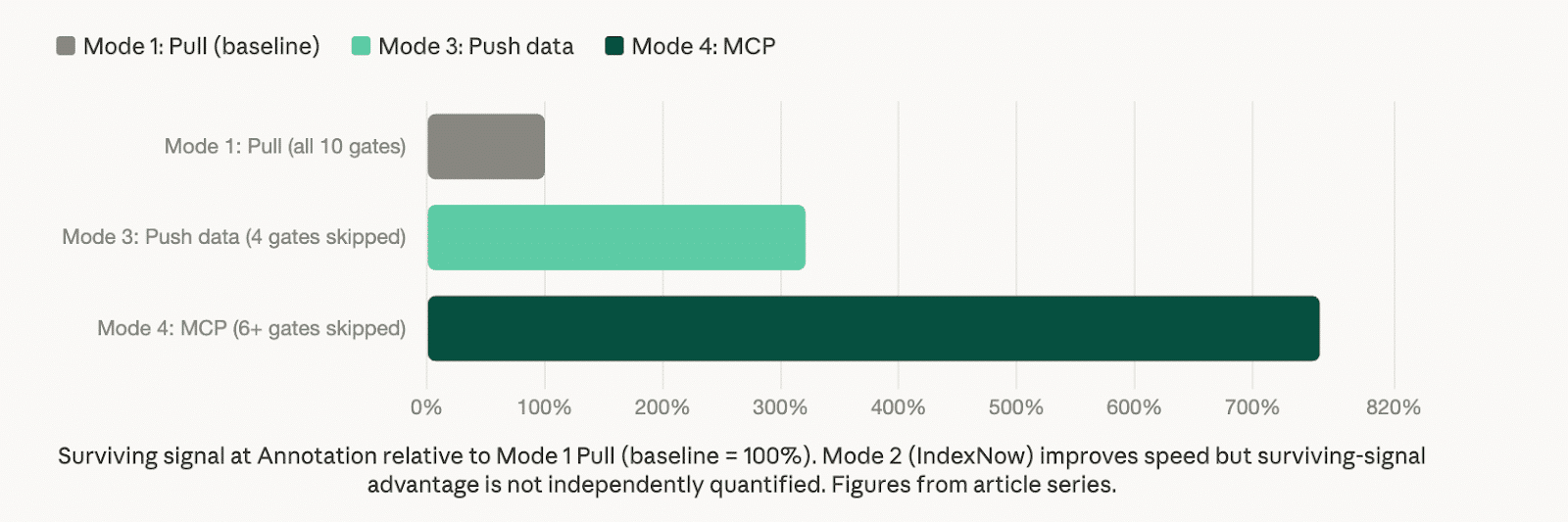
Push data skips the bot entirely, using structured data to directly feed AI systems. Here, seamless indexing from a machine-readable format offers a major competitive edge.
Push via MCP allows AI agents to access real-time data directly, transforming how content enters the competitive arena. Brands without MCP-ready data risk losing out to those with real-time access capabilities.
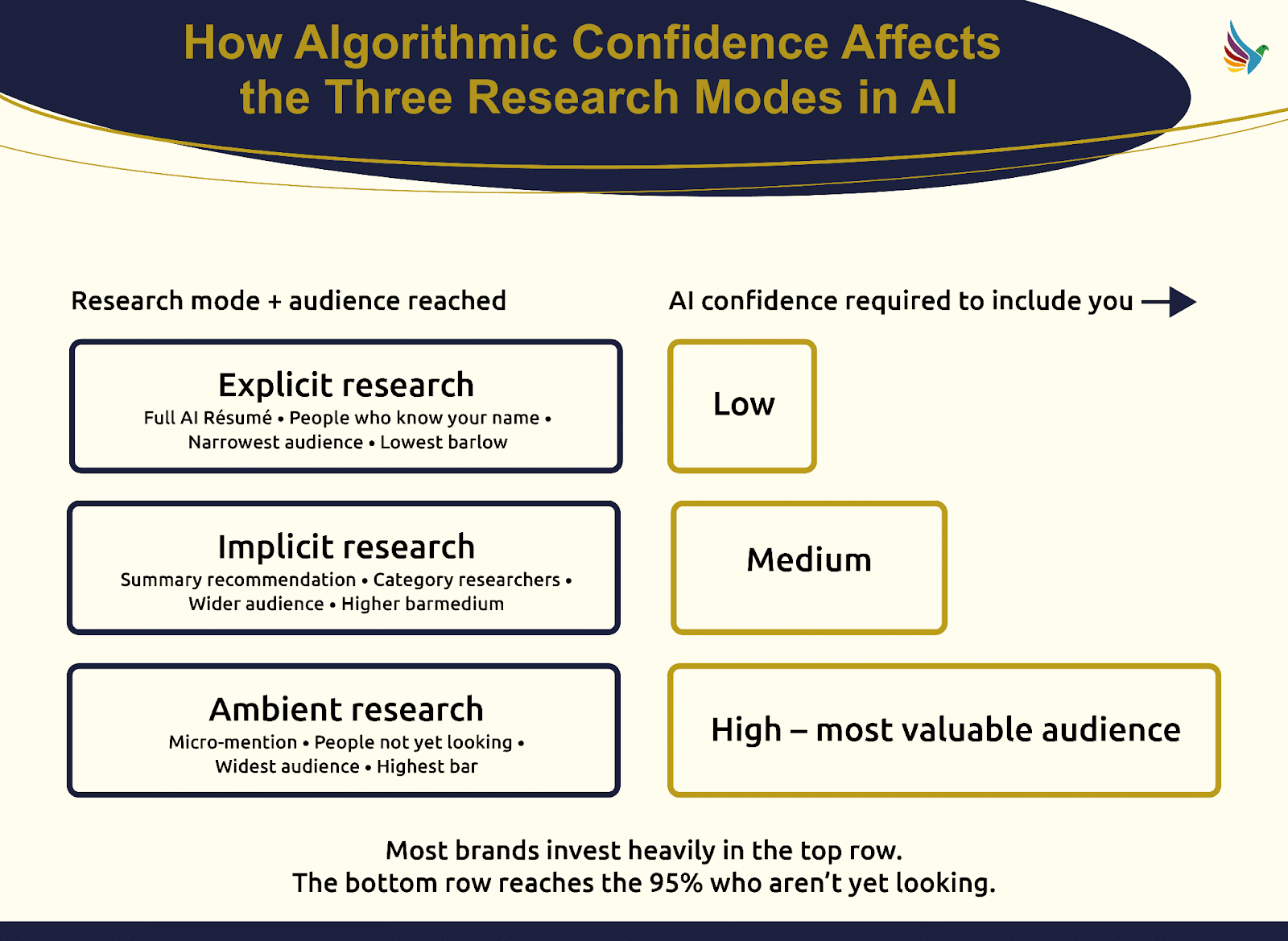
Finally, ambient entry is about AI recommending content without explicit user queries, often seen in tools many of us use daily.
All modes converge at the annotation phase, a critical step for successful content visibility in AI systems. As we shift focus on entity management and centralized data, brands can optimize for all entry modes, ensuring readiness for any future developments.