Tag: Performance Max

  • Unveiling Performance Max for B2B in 2026: A New Era

    Unveiling Performance Max for B2B in 2026: A New Era

    Why Performance Max looks different for B2B in 2026

    I’ve learned over the years that Google doesn’t prioritize B2B marketers when developing new products. The focus initially lies with DTC and B2C brands, as they account for the largest budgets and transaction volume.

    This pattern has repeated itself time and again in my advertising career. We saw this with responsive search ads and dynamic search ads. Performance Max follows this well-trodden path.

    Back in the day, I would have firmly advised B2B companies against using Performance Max. However, in 2026, the scenario has changed significantly.

    Not every B2B advertiser will benefit from Performance Max, nor should they. Here, I’ll explore who could benefit and who might be better off exploring other avenues. Testing new strategies is crucial if we’re to see meaningful changes in our results.

    PMax 101 for B2Bs

    If you’re reading this, I suspect you fall into one of three categories: Performance Max either isn’t working for you, you haven’t tried it, or you’re seeking improvements.

    Let’s clarify a key point: Performance Max is a goal-based campaign model. It allows advertisers access to Google’s entire ad inventory through a single campaign. This includes YouTube, Display, Search, Discover, Gmail, and Maps, and we’re beginning to see ads in AI Overviews too.

    If your industry already features ads in AI Overviews, you should seriously consider putting Performance Max on your radar.

    Dig deeper: Top Performance Max optimization tips for 2026

    Although encountering ads across Google’s network might seem daunting, especially if you’re working without a shopping feed, it’s no cause for concern. It’s a significant advantage, allowing us to reach individuals within the buying group who wouldn’t usually engage via traditional search.

    Nurturing prospects through complex, lengthy sales processes is one area where Performance Max particularly shines for B2B marketers. Given that B2B decisions often involve multiple stakeholders over extended periods, a sustained advertising presence can be transformative.

    What needs to be in place before testing Performance Max

    Several prerequisites are necessary before diving into Performance Max. Importantly, you’re targeting signals, not keywords, and this distinction is crucial.

    To set up successfully, you’ll need to connect your data source—such as Salesforce or your preferred CRM—and link it to meaningful online events, like qualified lead submissions or appointments booked.

    Set your bid strategy to maximize conversions or target CPA, as Performance Max focuses on optimizing around outcomes rather than mere traffic.

    Providing a customer list can further help the system identify and model similar characteristics, utilizing first-party data for better performance than website remarketing audiences alone.

    Dig deeper: Why B2B brands are shifting from keywords to Performance Max


    When PMax is not the right fit

    Performance Max isn’t a blanket solution. If your B2B strategy depends on a limited, highly controlled target list, this may not be your best option.

    Account-based marketing often yields better results with manual control when dealing with a few hundred named accounts.

    The suitability of your market is another factor. A large addressable market is ideal, as targeting niche groups like private equity firms may not be as effective, with too little data for Performance Max to scale efficiently.

    Additionally, if conversion actions are vague or poorly aligned with revenue, Performance Max may struggle to recognize what success looks like, leading to disappointing results.

    Finally, if your organization is resistant to automation or frequently intervenes with adjustments, you may find Performance Max frustrating and destabilizing.

    Dig deeper: How to optimize B2B PPC spend when budgets and confidence are low

    What Performance Max can and can’t do for B2B

    Performance Max isn’t a one-size-fits-all answer for B2B advertising, yet it’s now a viable option for many organizations when previously it wasn’t.

    With the right elements—like strong conversion signals, a large market, and a willingness to let automation take the reins—it can significantly support long and intricate buying cycles.

    It’s crucial to be honest about your data, your audience, and your organization’s readiness for automation. Without these, Performance Max can falter.

    When conditions are conducive, it complements existing strategies by both capturing and generating demand effectively.

    Success in B2B advertising isn’t about chasing the latest trend; it’s about thorough testing, relevant measurement, and discerning where and when a tool is appropriate.


    Inspired by this post on Search Engine Land.


    crushpress.ai community screenshot
  • Discover Google Ads’ Game-Changing Experiment Center

    Discover Google Ads’ Game-Changing Experiment Center

    I’m thrilled to share that Google Ads has launched a transformative new Experiment Center, providing us advertisers with a centralized platform to test strategies and analyze their impact before scaling them up.

    What’s new. With Google’s latest update, we now have access to a comprehensive help page introducing the Experiment Center. This innovative dashboard merges traditional Experiments and Lift Studies, allowing us to handle tests regarding bidding, targeting, and creatives. Simultaneously, we can measure brand, search, or conversion lift, all in one place.

    Why it matters. Previously, experimenting within Google Ads was a bit scattered. Different tests lived in separate areas, making it cumbersome to streamline our strategies. A unified hub simplifies this process drastically, reducing complexity and enabling us to confidently validate our strategies before increasing our budgets.

    How it works: The new layout is a breath of fresh air, enhancing setup and reporting efficiency. Now, key insights from our tests are displayed together, rather than being spread out across various tools. This consolidation allows us to quickly compare outcomes, grasp the impacts, and take action faster.

    Between the lines. Google is clearly investing heavily in experimentation, and the Experiment Center is the latest in a line of updates. With enhancements like expanded A/B testing in Shopping and Performance Max campaigns, alongside the new Campaign Mix Experiments beta, this platform equips us with the tools needed to adapt to an automated landscape, ensuring our strategies remain impactful and clear.

    Bottom line: If you haven’t already, it’s time to dive into the Experiment Center. Formalize your testing around bidding, targeting, and creative strategies, leveraging lift studies and experiments to validate your approaches before rolling them out on a larger scale.


    Inspired by this post on Search Engine Land.


    crushpress.ai community screenshot
  • Google Ads Glitch Halts Performance Max Edits: What to Do

    Google Ads Glitch Halts Performance Max Edits: What to Do

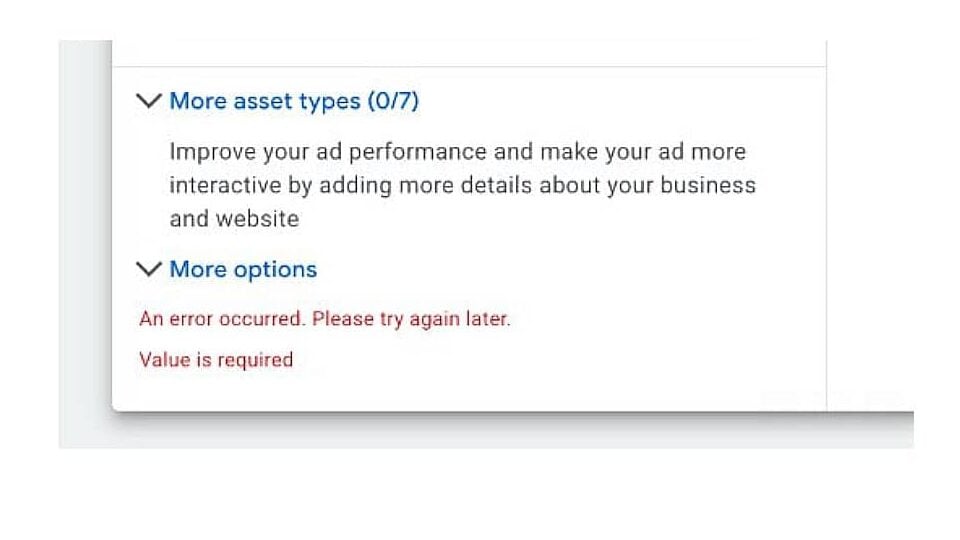
    A recent bug in Google Ads is causing frustration among advertisers, as it has started blocking any attempts to edit Performance Max (PMax) asset groups. I’ve personally encountered error messages when trying to update asset groups, making it impossible to save any changes directly in the platform.

    Why This Matters to Us. As an advertiser, the freshness and adaptability of our assets are crucial for campaign success. Without the ability to update asset groups, there’s a risk of my campaigns running with outdated content, potentially harming their performance and efficiency.

    What I’m Experiencing. Like others, I’ve faced an error message stating, “An error occurred. Please try again later. Value is required,” each time I’ve tried editing any asset group details. This error shows up in the Google Ads UI, stopping me from saving any changes even if all required fields appear to be filled.

    Google’s Response. Google acknowledges this issue and is looking into it. However, they haven’t provided a timeline for a fix or any further guidance through their official channels yet.

    Temporary Workaround. For now, I’ve found that using the Google Ads Editor allows me to make necessary changes and upload them directly. While this method works, it introduces additional steps that disrupt my usual workflow of managing PMAX via the web interface.

    ```json
{
  "alt": "Error message screen with text: 'An error occurred. Please try again later. Value is required.'",
  "caption": "A technical glitch interrupts workflow with a message indicating a required value error. Will you troubleshoot now or later?",
  "description": "This image shows a screen with an error message, suggesting issues with input fields. The text advises, 'An error occurred. Please try again later. Value is required.' This is common in digital forms and ad management interfaces, indicating necessary information is missing. Keywords: error message, technical issue, form completion, troubleshooting."
}
```

    Next Steps for Advertisers. If you’re running Performance Max campaigns like I am, it’s essential to revisit recent changes to ensure they’ve been saved correctly. In the meantime, directing any necessary updates through Ads Editor may be a wise choice until Google resolves the issue.

    Looking Ahead. Until Google addresses this glitch, a new level of uncertainty might accompany managing Performance Max campaigns. It’s important for us to double-check our versions and explore alternative workflows.

    First to Report. PPC professional Chelsea Harding initially flagged this issue and shared her experience about the error message on LinkedIn.


    Inspired by this post on Search Engine Land.

    crushpress.ai community screenshot
  • Maximize Ecommerce Success with Demand Gen & Performance Max

    Maximize Ecommerce Success with Demand Gen & Performance Max

    When Google introduced Demand Gen campaigns in 2023, I saw them as a promising way to boost engagement across platforms like YouTube, Discover, and Gmail.

    Initially, they felt experimental, straddling the line between awareness and performance, but they’ve come a long way since.

    Now, the creative flexibility and enhanced audience control make Demand Gen a go-to campaign type for my ecommerce clients.

    This strategy allows me to scale revenue in a controlled manner, maintaining brand consistency while testing creative approaches to drive conversions.

    I’ve found that Demand Gen delivers the best results when strategically paired with Performance Max and Search campaigns.

    Advertising with Demand Gen is ideal if you crave more control.

    One major drawback of Performance Max is its lack of transparency and manual control.

    If precise targeting, placement, or creative control is essential, Demand Gen stands out as the better option.

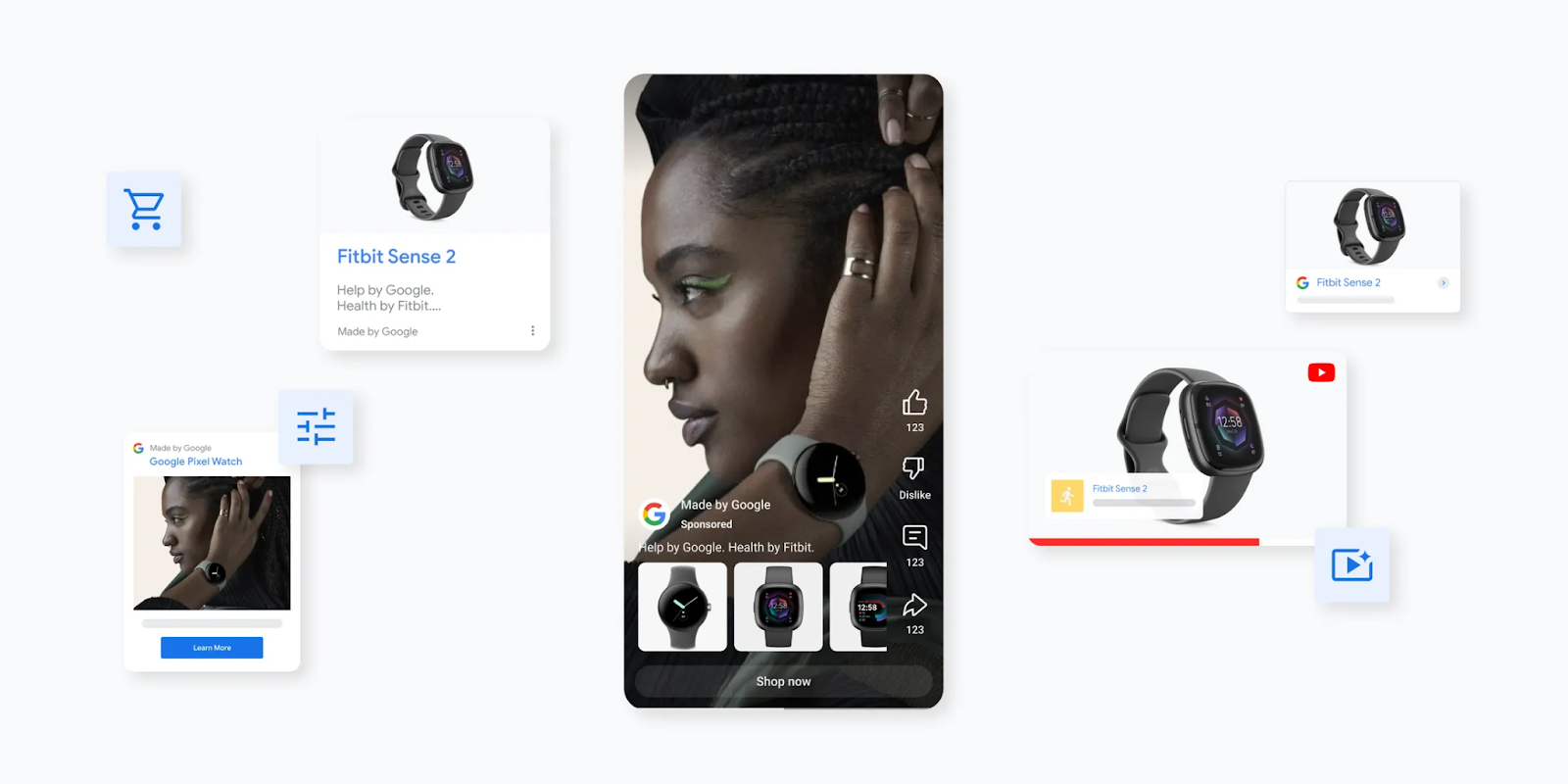
    Performance Max auto-generates ads from your uploads, relying on Google’s AI to mix and match for the best performance.

    This makes it crucial to provide top-notch creative assets.

    For example, a fitness brand might create separate asset groups for products like leggings, shorts, and vests.

    While this helps target relevant audiences, the control isn’t exhaustive.

    However, Demand Gen offers far superior flexibility.

    It allows me to upload, preview, and tweak ad combinations before launch, adapting each creative to its unique placement.

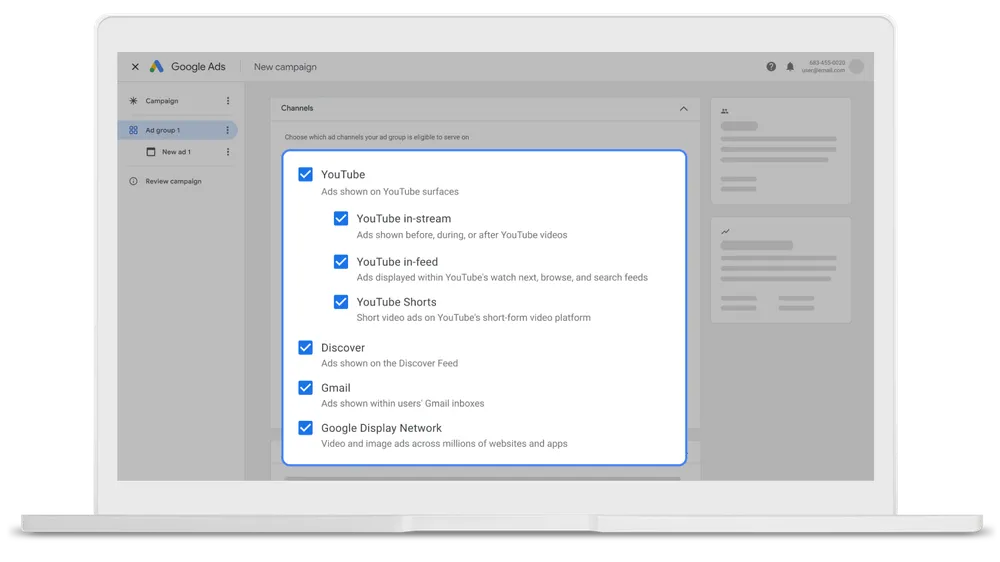
    For instance, I can customize YouTube ads for in-feed, in-stream, and Shorts placements.

    This control is perfect for ecommerce brands focusing on creative precision, message testing, and maintaining a strong visual identity.

    Dig deeper: The Google Ads Demand Gen playbook

    Using Demand Gen alongside Performance Max can be incredibly effective if you leverage their roles within the customer journey. They enhance each other rather than compete.

    Demand Gen builds awareness and sparks interest by reaching higher-funnel audiences before they actively start product searching.

    Conversely, Performance Max focuses on converting lower-funnel users who are primed to purchase.

    ```json
{
  "alt": "Collage featuring the Google Pixel Watch and Fitbit Sense 2 with various display cards and interactive elements.",
  "caption": "Discover seamless integration with Google Pixel Watch and Fitbit Sense 2. Explore features and styles that keep you connected and healthy, right at your fingertips.",
  "description": "The image showcases a collage of the Google Pixel Watch and Fitbit Sense 2, emphasizing their sleek design and advanced functionality. The central focus is a profile of a person interacting with the Google Pixel Watch, surrounded by smaller display cards of the Fitbit Sense 2. Interactive social media elements like likes and dislikes hint at user engagement. The arrangement suggests an interactive and user-friendly interface, highlighting features like health tracking and connectivity options. Keywords: Google Pixel Watch, Fitbit Sense 2, health tech, smartwatches."
}
```

    For example, a fitness retailer might utilize Demand Gen for lifestyle videos and discovery ads promoting their latest activewear.

    When a potential customer begins to research or exhibit purchase intent, Performance Max engages with tailored Shopping and Search ads to finalize the sale.

    I’ve set up feed-only Performance Max campaigns, providing only a product feed within the asset group.

    This restricts Performance Max activities to Shopping placements, focusing it sharply on direct conversions.

    Meanwhile, Demand Gen operates across platforms like YouTube, Gmail, Discover, and Shorts, covering the upper and mid-funnel with more visual, creative content focused on awareness.

    This configuration minimizes overlap between campaign types while ensuring user engagement throughout the funnel, from brand discovery to purchase.

    For larger accounts with flexible budgets, this dual structure drives holistic performance and clearer attribution.

    In contrast, smaller accounts seeking efficiency should prioritize mastering high-intent campaigns before layering in Demand Gen once the core conversions are stable.

    The diverse campaign types now offer advertisers more flexibility than ever, yet it requires understanding Google’s restructuring of video and discovery products.

    Dig deeper: Why Demand Gen is the most underrated campaign type in Google Ads

    Since July 2025, Google’s Video Action Campaigns (VACs) have been replaced by Demand Gen.

    It streamlines Google’s visual placements into one campaign type, including YouTube in-stream, Shorts, in-feed, Gmail, and Discover.

    This change is significant. VAC was successful for ecommerce, particularly for conversion-centric video. Its removal underscores Google’s encouragement to embrace Demand Gen.

    The advantage is that Demand Gen provides stronger creative control and diverse testing options across YouTube placements.

    If you previously ran VAC campaigns, they are now under Demand Gen. Ensure your top-performing assets and audiences have migrated correctly, then use the new controls to optimize performance.

    Audience control is a significant benefit of Demand Gen, and it’s a reason why I consistently use it for ecommerce.

    Demand Gen allows precise audience creation, letting me decide who sees the ads.

    I can select placements, merge audience types, and allocate the budget strategically.

    It’s the only Google Ads campaign type supporting lookalike audiences, valuable for brands focused on acquiring quality leads.

    ```json
{
  "alt": "Google Ads campaign settings screen showing various ad channel options.",
  "caption": "Maximize your reach by choosing from various Google Ads channels like YouTube, Discover, and Gmail to tailor your advertising strategy.",
  "description": "This image displays a Google Ads campaign setup screen on a laptop. The interface allows users to select ad channels including YouTube, Discover, Gmail, and the Google Display Network. Each option is highlighted with checkboxes that can be selected to target specific audiences and surfaces. This setup enhances the versatility and reach of digital marketing campaigns, providing advertisers with the tools to optimize ad delivery across multiple Google platforms."
}
```

    While Performance Max utilizes audience signals over fixed targeting, Demand Gen excels for control, testing, and segmentation strategies.

    In mid-2025, Google rolled out an open beta for advertisers to opt out of specific Demand Gen channels manually.

    This means I can now control ad display, excluding Discover or YouTube Shorts if they don’t align with my objectives or creative format.

    This small but significant update offers more control, a feature often lacking in many of Google’s automated campaign types.

    Dig deeper: Google Ads rolls out channel control for Demand Gen campaigns

    In early 2025, Google introduced product feed integration for Demand Gen campaigns. This change allows me to link the Google Merchant Center feed, incorporating live product data directly into visual ads.

    This development bridges performance and branding for ecommerce, enabling storytelling through creative visuals while displaying actual products.

    For instance, a fashion retailer can showcase a new collection in a video advert while featuring shoppable product cards below.

    This update positions Demand Gen as a hybrid between Shopping and Display, a much-anticipated capability among ecommerce advertisers.

    Demand Gen typically demands a larger budget than other campaign types.

    Google recommends starting at about £100 per day per campaign or 20 times your target CPA/tROAS, whichever is higher.

    Practically, the £100-per-day baseline is a viable starting point for effective data collection and optimization. Lower budgets restrict data flow and slow progress.

    Demand Gen complements your broader Google Ads strategy, rather than replacing Search or Performance Max.

    It’s a premium, visually led campaign type that boosts awareness leading to conversions, particularly effective when you have accurate measurement, a clean product feed, and clearly defined audiences.

    The table compares Demand Gen and Performance Max on key aspects that matter to advertisers.

    Dig deeper: Google pushes Demand Gen deeper into performance marketing

    Performance Max excels in scale but can be opaque.

    Demand Gen offers the control advertisers have demanded—genuine creative testing, audience precision, and placement visibility.

    For sustainable ecommerce growth, I recommend using both. Performance Max captures demand, while Demand Gen creates it.

    Together, they form a comprehensive framework for scalable and sustainable growth.


    Inspired by this post on Search Engine Land.

    crushpress.ai community screenshot
  • Streamline Your Google Ads: Account-Level Exclusions Unveiled

    Streamline Your Google Ads: Account-Level Exclusions Unveiled

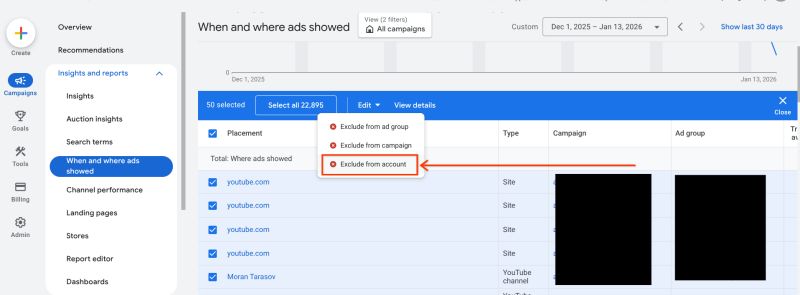
    Recently, I discovered an exciting update from Google Ads that could really simplify how I manage my campaigns. They’ve introduced account-level placement exclusions, making it possible to block unwanted inventory from a single, centralized location.

    What’s new? Now, I can apply one exclusion list at the account level. This efficiency extends across Performance Max, Demand Gen, YouTube, and Display campaigns. Before this, blocking had to be done at each ad group or campaign level separately.

    How does it work? Once I’ve excluded certain placements at the account level, Google Ads ensures that spending is prevented on those websites, apps, or YouTube placements across all eligible campaigns.

    Why is this important? Previously, placement control was a fragmented and tedious process prone to errors, especially for large accounts. With this update, brand safety is now more straightforward and efficient on a larger scale.

    The big picture. As Google shifts towards more automation-heavy formats like Performance Max, this change answers the demand from advertisers for stronger, more streamlined control measures without disrupting automation advantages.

    ```json
{
  "alt": "Google Ads interface showing ad exclusion options.",
  "caption": "Navigating Google Ads: Learn how to manage ad placements with options to exclude from group, campaign, or account.",
  "description": "The image displays a Google Ads interface focusing on the 'When and where ads showed' report. It highlights options for excluding ads from different levels, such as ad group, campaign, or account. The menu is shown in the context of a list featuring YouTube.com as a placement. The screenshot is a tool for advertisers to optimize ad visibility and manage where their ads appear. Keywords: Google Ads, ad management, exclude options, YouTube placement."
}
```

    Between the lines. This update allows me to:

    • Reduce exposure to low-quality or irrelevant inventory
    • Enforce brand-safety standards consistently
    • Save time managing exclusions across complex accounts

    What to watch. I need to review and carefully consolidate existing exclusion lists, as applying a single account-level block too broadly might unintentionally limit my reach.

    First seen. This savvy update was first highlighted by Google Ads Campaigns Specialist Aleksejus Podpruginas on LinkedIn.

    Bottom line. Google’s updates make controlling ad placements easier, tweaking the interface just enough to significantly enhance efficiency and maintain brand safety.


    Inspired by this post on Search Engine Land.


    crushpress.ai community screenshot
  • Microsoft Enhances PMax with New Goals and Insights

    Microsoft Enhances PMax with New Goals and Insights

    As an advertiser, I’ve recently noticed that Microsoft Advertising is kicking off 2026 with a fresh batch of updates tailored for search-centric marketers. These updates offer me better control, clearer insights, and more streamlined campaign management across their platform.

    Driving the news. In their latest product update, Microsoft has rolled out enhanced Performance Max features, broadened audience targeting options, improved Google import processes, and automated more creative aspects of search ads.

    The big picture. Performance Max remains at the heart of these changes. There’s a new customer acquisition goal available in open beta that lets me prioritize new customers or exclusively target them in PMax campaigns geared towards purchase goals. Additionally, I can allocate higher conversion values to new customers, which aids the system in optimizing for long-term growth over short-term revenue.

    ```json
{
  "alt": "Microsoft Advertising interface for setting a new performance max campaign budget.",
  "caption": "Exploring the Microsoft Advertising dashboard for setting a performance max campaign budget. Customize your bid strategy and optimize for new customer acquisition.",
  "description": "The image displays the Microsoft Advertising dashboard for setting a new performance max campaign budget. Users can select their bid strategy, optimize for new customer acquisition, and set budget preferences. The interface shows estimated monthly performance metrics, including conversions, impressions, and click-through rates. Designed for advertisers to effectively allocate resources and maximize ad performance. Keywords: Microsoft Advertising, campaign budget, bid strategy, performance max, digital marketing."
}
```
    Microsoft customer acquisition goals

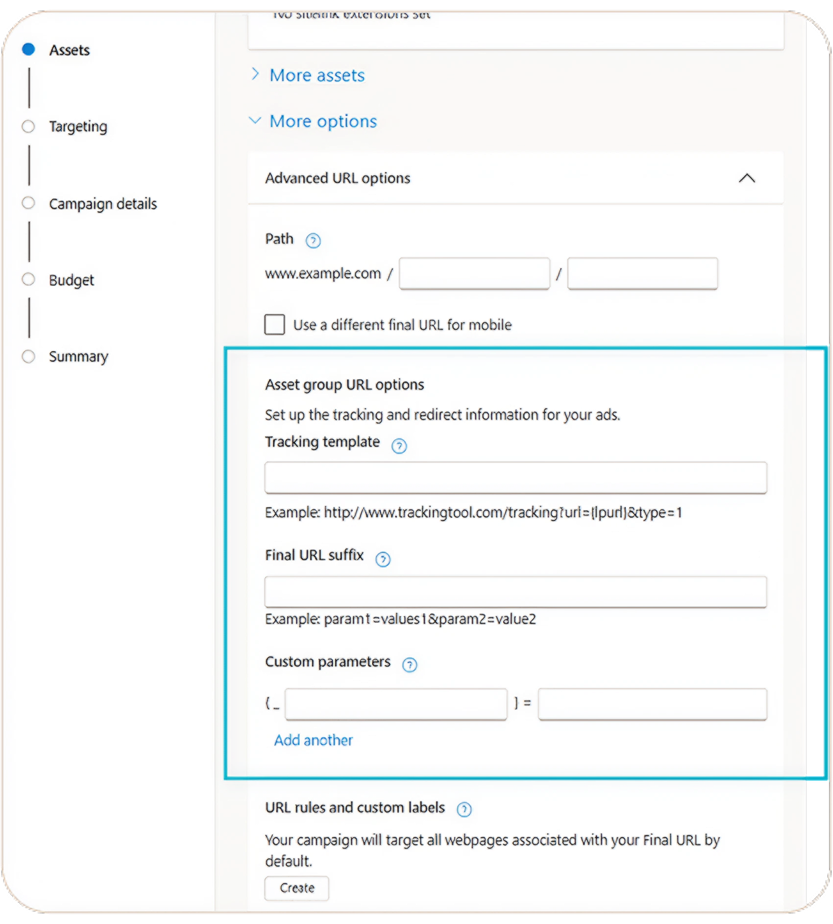
    Alongside these goals, Microsoft has also expanded transparency and controls within PMax. They now offer share of voice metrics, including impression share and losses due to budget or rank, giving me a better understanding of competitiveness in Search and Shopping placements. Plus, asset group-level URL options and tracking templates allow for more granular measurement without needing to reorganize campaigns.

    Performace Max goals

    What’s changing under the hood. The process for importing from Google has become more seamless. PMax campaigns now support up to 50 search themes, and asset group imports have become more flexible, meaning that non-eligible images or auto-generated logos won’t block the rest of the asset group from being imported.

    ```json
{
  "alt": "Screenshot of advanced URL options in a campaign setup, including tracking templates and custom parameters.",
  "caption": "Navigating digital campaigns can be tricky. Here's a look at advanced URL options, helping you track and optimize ad performance effortlessly.",
  "description": "This image is a screenshot highlighting advanced URL options within a campaign setup interface. It features sections for entering a path, using a different mobile URL, and setting up asset group URL options like tracking templates, final URL suffixes, and custom parameters. These elements are used to track and redirect information for ads effectively. The interface is clean and structured, aimed at enhancing user navigation and understanding in ad campaign management."
}
```

    Beyond PMax, I’m excited that Content Targeting for Audience ads is now generally available. I can target specific Microsoft-owned placements like MSN and Outlook, or align ads with content categories such as Finance or Travel. A new reporting view also shows where ads actually appear, aiding in refining contextual strategies.

    Microsoft - Audience targeting

    Why we care. These updates furnish me with greater command over how automation propels growth, especially in acquiring new customers. New customer acquisition goals and additional visibility in Performance Max make optimizing for long-term value easier rather than focusing solely on immediate conversions. With smoother imports and smarter creative automation, these advancements allow advertisers like me to enhance performance without giving up visibility or control.

    ```json
{
  "alt": "Advertising placement options on Microsoft sites with checkboxes for different categories.",
  "caption": "Explore the variety of advertising placements within Microsoft sites, offering tailored options from Edge to MSN for strategic ad displays.",
  "description": "This image displays a section of a digital marketing platform interface where users select ad placements. Options include Microsoft Edge Browsers, Productivity apps like Outlook, and various MSN categories such as Gaming, Health, and Money. Users can choose to display ads across the entire Microsoft Advertising Network or specific Microsoft sites, offering multi-platform engagement opportunities."
}
```

    On creative automation. Autogenerated assets are now being rolled out as a default setting for newly created Responsive Search Ads worldwide, excluding China and South Korea. Microsoft reports that advertisers using these assets witness around a 5% increase in CTR, as the system dynamically generates and tests more headlines and descriptions based on website content. Sensitive verticals remain opt-in only, leaving existing RSAs unaffected.

    The bottom line. Microsoft Advertising’s January updates aim to make automation more user-friendly, quantifiable, and advertiser-friendly, particularly for those of us managing Performance Max across multiple platforms.


    Inspired by this post on Search Engine Land.

    crushpress.ai community screenshot
  • Unlock Creative Freedom with Google’s Expanded Video Limits

    Unlock Creative Freedom with Google’s Expanded Video Limits

    I’ve noticed that Google is testing a new feature in their Performance Max campaigns that could really shake things up for us as advertisers. It seems they’re considering raising the limit on video assets from 5 to as many as 15 per Asset Group. This change could open up a whole new level of creative freedom without needing to fragment our campaigns.

    Why does this matter to us? Well, video content is becoming crucial for the success of Performance Max. The current five-video limit forces us to make tough choices between different formats and ratios, which in turn restricts our reach across platforms like YouTube, Discover, and others. This new limit could lift those restrictions considerably.

    With this potential update, we could include up to 15 videos per Asset Group. This means we can cover all major video ratios and formats without having to duplicate efforts or fragment campaigns. It’s an opportunity for richer, more versatile campaigns.

    For those of us managing multiple video versions, this change could mean significantly streamlined campaign management. We could test more creative ideas without losing out on reach or complicating our campaign structures.

    ```json
{
  "alt": "Interface for selecting up to 15 YouTube videos for an ad campaign, showing tabs for Suggested, Asset library, Search YouTube, and Upload.",
  "caption": "Easily curate up to 15 YouTube videos for your next ad campaign. Navigate through options with a streamlined interface for effective content selection.",
  "description": "This image shows a user interface for selecting YouTube videos to use in an advertisement. The interface features tabs including Suggested, Asset library (highlighted), Search YouTube, and Upload. Options for viewing content in 'Cards' or 'Table' format are available. A 'New' button allows for adding new content, while a filter option can refine selections. Ideal for digital marketers and SEO professionals managing video ad campaigns."
}
```

    It’s still early days, with Google not yet making a formal announcement about this update. It could be in testing, or maybe it’s slowly being rolled out. Keep an eye on any new developments in this area.

    This update first came to light when Growth Marketing Manager Molly Pritchard shared the new option on her LinkedIn profile. It sure caught my attention!

    Bottom line? This may seem like a small tweak, but for those of us utilizing Performance Max, increasing the video cap could greatly enhance our creative strategies with minimal trade-offs.


    Inspired by this post on Search Engine Land.

    crushpress.ai community screenshot
  • Microsoft PMax Update Increases Search Themes for Better Ad Targeting

    Microsoft PMax Update Increases Search Themes for Better Ad Targeting

    As an advertiser, I’m excited to share that Microsoft is empowering Performance Max campaigns by expanding search themes to 50. This change offers us more control, allowing better alignment with high-intent customer searches.

    Just ahead of next week’s major announcements, Microsoft Advertising has confirmed that we can now incorporate up to 50 search themes in our campaigns, a notable increase from previous restrictions.

    Why this matters to me. Search themes serve as strategic signals that guide Performance Max toward the search queries and intent patterns that we prioritize. With this expanded capacity, I have more room to refine how automation interprets customer demand, especially for businesses with diverse product lines or complex structures.

    This update also means I no longer need to compress different intents into a limited number of themes or run multiple campaigns just to portray various product offerings.

    The bigger picture. Microsoft’s focus is shifting towards signal-based control rather than strict keyword targeting. By combining search themes with LinkedIn profile targeting and other audience signals, including impression-oriented remarketing, I can better target high-value customers rather than a generic audience.

    What I’m looking forward to. Next week, Microsoft’s Advertising blog will feature additional updates, suggesting this change is part of a larger initiative to make Performance Max not only more flexible but also more responsive to advertisers’ needs without undermining the automation logic.

    Where I first learned about this. Microsoft Product Liaison Navah Hopkins shared these insights on LinkedIn, along with hints of upcoming updates slated for next Wednesday, January 14th.

    The bottom line for me. By increasing the number of available search themes to 50, Microsoft is improving our control over Performance Max, not through additional complexity, but by widening the range of pivotal signals.


    Inspired by this post on Search Engine Land.


    crushpress.ai community screenshot
  • Unlock Performance Max Potential with A/B Asset Testing

    Unlock Performance Max Potential with A/B Asset Testing

    Google has rolled out a new Beta feature that allows us, Performance Max advertisers, to A/B test asset sets. This expansion takes last year’s retail experiment to an exciting new level, now available for all campaigns.

    With this update, I can compare two sets of assets while keeping the ‘common assets’ steady across both versions. By accessing the Experiments page under the Assets sub-menu, I can determine which creative combinations yield the best results.

    I saw a similar experiment rolled out for retail campaigns last year, and I’m thrilled to see it expand to all Performance Max campaigns.

    Why it matters to me. Performance Max campaigns rely heavily on automation, often making it difficult for me to test specific creative assets. This new capability gives us more control over asset-level performance without compromising the integrity of the entire campaign.

    The big picture. From my perspective, tests must run for at least four weeks to consider the learning phase of P-Max and ad delivery stabilization. While the results aren’t immediate, they’ll allow me to make more informed choices about which images, headlines, and videos drive engagement.

    Between the lines. Asset-level A/B testing could be a pivotal factor in enhancing my Performance Max ROI, particularly when managing diverse creative and asset formats.

    First seen. This update caught my attention when web marketer Dario Zannoni highlighted it on LinkedIn.

    The bottom line. Although still in Beta, this experiment type offers a new degree of transparency and control over automated campaigns, potentially transforming how I approach asset strategies in Performance Max.

    Dig deeper. For more insights on this feature, check out About Performance Max optimization experiments: A/B testing assets (Beta).


    Inspired by this post on Search Engine Land.


    crushpress.ai community screenshot
  • Mastering 2026 PPC Trends: AI, Strategy & Human Insights

    Mastering 2026 PPC Trends: AI, Strategy & Human Insights

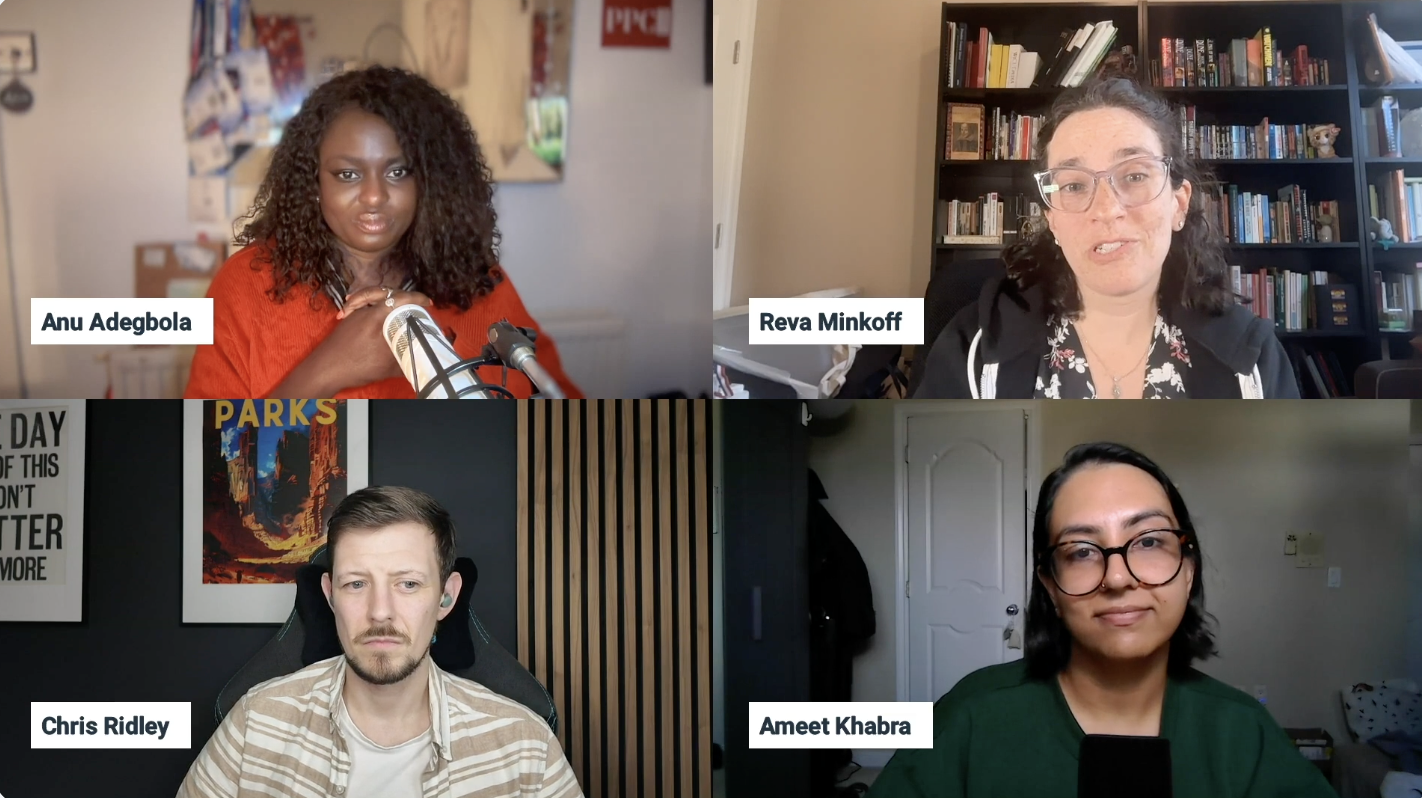
    In 2025, the PPC landscape evolved at breakneck speed, marking an unprecedented shift in the industry. During SMX Next, I had the opportunity to hear from experts discussing the evolution, what’s working, what’s not, and what to prepare for as we move into 2026.

    The insights shared were eye-opening, especially how Google interacted with advertisers in new, responsive ways. Ameet Khabra from Hop Skip Media particularly noted Google’s surprising openness to feedback, especially regarding Performance Max.

    Chris Ridley from Evoluted emphasized 2025 as the year AI truly took center stage, with platforms like Perplexity and ChatGPT dominating conversations. It’s evident that AI integration in paid media is reshaping the landscape.

    Meanwhile, Reva Minkoff of Digital4Startups dubbed it “the year of the max,” due to the sheer volume of features such as Performance Max emerging in the space. This whirlwind of innovation has left us both excited and challenged.

    Reflecting on what’s effective, going back to basics with campaign structure and maintaining quality signals rings true. Minkoff emphasized the importance of controlling your search campaigns and making sure they reach your intended audience.

    Khabra shared insights on the role of automation with a human touch, using scripts to ensure issues are addressed before they escalate. Meanwhile, Ridley highlighted the value of authentic user-generated content in crafting more relatable campaigns, resisting overly polished AI creations.

    Communication with clients and understanding their objectives beyond the figures remains critical, as Ridley suggested. Knowing their business goals can lead to more comprehensive success.

    ```json
{
  "alt": "Four people in a virtual meeting, each in their separate quadrant.",
  "caption": "A virtual meeting with four participants discussing ideas, each in their unique setting, showcasing a blend of professional engagement and personal style.",
  "description": "This image captures a virtual meeting with four individuals, each appearing in separate quadrants. Top left is a person with a microphone, wearing a red shirt. Top right, another participant speaks in front of a bookcase. Bottom left, a person sits against a dark wall with posters, focused on the conversation. Bottom right, a participant with glasses and a green top is speaking. The image highlights diverse home office settings and professional engagement in a digital conference context."
}
```

    On the flip side, the problematic nature of Automatic Created Assets (ACAs) was a focal point, bringing up concerns about brand safety and losing control over content narratives. Both Khabra and Minkoff voiced this sentiment, emphasizing the need for alignment in brand messaging.

    There are ongoing frustrations with user interfaces and prolonged learning periods, which complicate efficiency and adaptability for advertisers managing time-sensitive campaigns like Black Friday.

    Looking at surprises from 2025, the announcements from Google Marketing Live were intriguing, particularly A/B testing developments and the adaption of Performance Max features like Waze pins. AI advancements, especially their rapid rollout, caught many by surprise, showing no sign of slowing down.

    Looking ahead to 2026, there are so many possibilities. Whether it’s the unknown technological advances or the impacts of legal scenarios like the Google antitrust trial, the landscape is brimming with potential shifts.

    I’m excited about the ongoing evolution of PPC and the combined potential of AI and strategic human oversight. The only certainty in PPC is indeed uncertainty, but that dynamic is what keeps it exciting and full of opportunities for those who adapt and remain proactive.

    For a deeper dive, check out the full panel discussion from SMX Next 2025 below.


    Inspired by this post on Search Engine Land.

    crushpress.ai community screenshot