Recently, I’ve been following a concerning development involving Google, where the tech giant is urging a federal judge to halt the Department of Justice’s antitrust remedies. The primary concern? Forced ad syndication could lay bare Google’s proprietary technology and negatively affect advertisers.
In an affidavit filed on January 16 by Google’s director of product management, Jesse Adkins, the company stresses how these measures could lead to irreversible damage. The crux of the argument is about maintaining control over proprietary ad technology, which could be jeopardized if exposed.
The big picture. In Adkins’ testimony, the likely fallout includes forced exposure of confidential technology, detrimental effects on advertisers, and a loss of authority over query and pricing data.
Mehta’s final ruling could compel Google to share its search results, features, and ads with any qualified competitor for the next half-decade under the current terms.
Google contends that employing these remedies before the conclusion of their appeal would result in immediate and unchangeable damage.
Risk to Google’s ad technology. At the center of Google’s warning is the potential exposure of its search ad auctions, developed over many years by an enormous team of engineers.
Syndication on a large scale might allow competitors or outsiders to decipher Google’s ad targeting techniques, relevance factors, and auction mechanisms, according to Adkins.
Competitors could potentially use this data to enhance their ad systems, stripping Google of its competitive edge.
Sub-syndication amplifies risk. The judgment permits competitors to further share Google ads with third parties, creating multiple layers of vulnerability to scraping and misuse.
Even the most compliant partners might lack the motivation to monitor downstream entities, effectively transforming Google’s ad system into a near-open utility with limited protection.
Advertisers could face fraud. Adkins mentions advertisers are caught in this struggle, citing tactics like “trick-to-click” that incite accidental clicks or artificially inflate expenses.
One example involves a syndicator adding names of wealthier countries to queries while diverting low-cost international traffic to ads, resulting in tens of millions in click fraud within a couple of months.
As a result, users might see less relevant ads, yet advertisers would still be charged, leading to diminished conversion rates.
Pricing uncertainty. Google is also expected to offer syndication terms no less favorable than existing agreements, which are highly customized to each partner’s traffic quality and technical setup.
Imposing these terms universally could lead to suboptimal pricing and financial uncertainty linked to unpredictable query volumes.
Irreversibility is key. Throughout the affidavit, Adkins underscores the irreparable nature of the potential harm. Once proprietary ad insights are revealed, they can’t be recaptured.
Once advertisers lose confidence, it is nearly impossible to win back. Moreover, once competitors craft products based on Google’s systems, the market’s impact becomes permanent.
Google suggests that even if their appeal succeeds, it could be too late to undo the ensuing damage.
Why we care. Any court-mandated ad syndication could potentially dilute Google’s control over ad placement and targeting, resulting in irrelevant advertising and reduced conversion rates. Essentially, this affidavit highlights the risk of higher costs, lower returns on investment, and less predictable campaign performance.
What’s next. The court is set to decide whether to temporarily halt the syndication remedies while Google’s appeal is pending. Without this stay, Google might have to start licensing search ads and results to qualifying competitors under new regulations, reshaping the search advertising landscape in unexpected ways.
Dig deeper. For further reading, I recommend checking out the following resources:
When Google introduced Demand Gen campaigns in 2023, I saw them as a promising way to boost engagement across platforms like YouTube, Discover, and Gmail.
Initially, they felt experimental, straddling the line between awareness and performance, but they’ve come a long way since.
Now, the creative flexibility and enhanced audience control make Demand Gen a go-to campaign type for my ecommerce clients.
This strategy allows me to scale revenue in a controlled manner, maintaining brand consistency while testing creative approaches to drive conversions.
I’ve found that Demand Gen delivers the best results when strategically paired with Performance Max and Search campaigns.
Advertising with Demand Gen is ideal if you crave more control.
One major drawback of Performance Max is its lack of transparency and manual control.
If precise targeting, placement, or creative control is essential, Demand Gen stands out as the better option.
Performance Max auto-generates ads from your uploads, relying on Google’s AI to mix and match for the best performance.
This makes it crucial to provide top-notch creative assets.
For example, a fitness brand might create separate asset groups for products like leggings, shorts, and vests.
While this helps target relevant audiences, the control isn’t exhaustive.
However, Demand Gen offers far superior flexibility.
It allows me to upload, preview, and tweak ad combinations before launch, adapting each creative to its unique placement.
For instance, I can customize YouTube ads for in-feed, in-stream, and Shorts placements.
This control is perfect for ecommerce brands focusing on creative precision, message testing, and maintaining a strong visual identity.
Using Demand Gen alongside Performance Max can be incredibly effective if you leverage their roles within the customer journey. They enhance each other rather than compete.
Demand Gen builds awareness and sparks interest by reaching higher-funnel audiences before they actively start product searching.
Conversely, Performance Max focuses on converting lower-funnel users who are primed to purchase.
For example, a fitness retailer might utilize Demand Gen for lifestyle videos and discovery ads promoting their latest activewear.
When a potential customer begins to research or exhibit purchase intent, Performance Max engages with tailored Shopping and Search ads to finalize the sale.
I’ve set up feed-only Performance Max campaigns, providing only a product feed within the asset group.
This restricts Performance Max activities to Shopping placements, focusing it sharply on direct conversions.
Meanwhile, Demand Gen operates across platforms like YouTube, Gmail, Discover, and Shorts, covering the upper and mid-funnel with more visual, creative content focused on awareness.
This configuration minimizes overlap between campaign types while ensuring user engagement throughout the funnel, from brand discovery to purchase.
For larger accounts with flexible budgets, this dual structure drives holistic performance and clearer attribution.
In contrast, smaller accounts seeking efficiency should prioritize mastering high-intent campaigns before layering in Demand Gen once the core conversions are stable.
The diverse campaign types now offer advertisers more flexibility than ever, yet it requires understanding Google’s restructuring of video and discovery products.
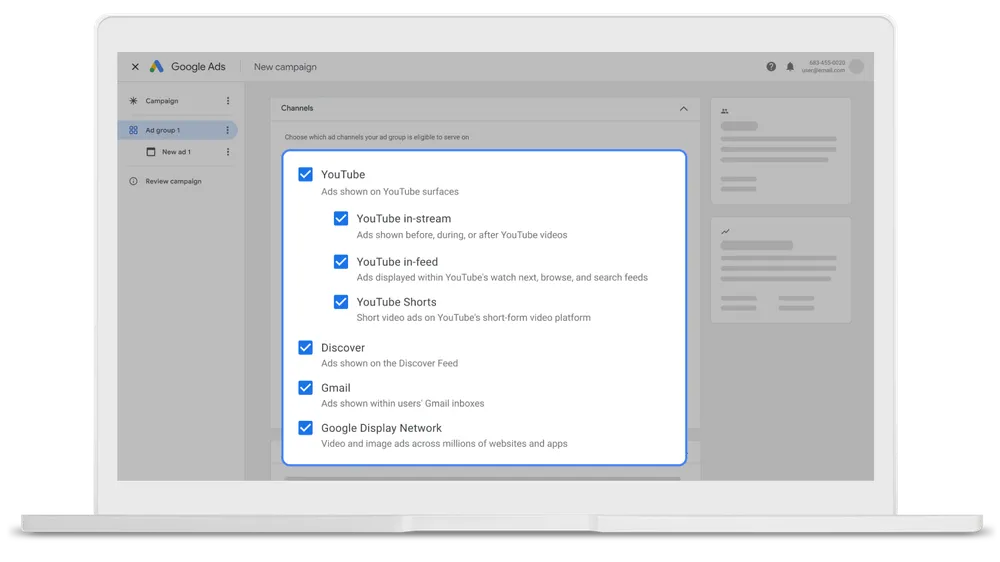
It streamlines Google’s visual placements into one campaign type, including YouTube in-stream, Shorts, in-feed, Gmail, and Discover.
This change is significant. VAC was successful for ecommerce, particularly for conversion-centric video. Its removal underscores Google’s encouragement to embrace Demand Gen.
The advantage is that Demand Gen provides stronger creative control and diverse testing options across YouTube placements.
If you previously ran VAC campaigns, they are now under Demand Gen. Ensure your top-performing assets and audiences have migrated correctly, then use the new controls to optimize performance.
Audience control is a significant benefit of Demand Gen, and it’s a reason why I consistently use it for ecommerce.
Demand Gen allows precise audience creation, letting me decide who sees the ads.
I can select placements, merge audience types, and allocate the budget strategically.
It’s the only Google Ads campaign type supporting lookalike audiences, valuable for brands focused on acquiring quality leads.
While Performance Max utilizes audience signals over fixed targeting, Demand Gen excels for control, testing, and segmentation strategies.
In mid-2025, Google rolled out an open beta for advertisers to opt out of specific Demand Gen channels manually.
This means I can now control ad display, excluding Discover or YouTube Shorts if they don’t align with my objectives or creative format.
This small but significant update offers more control, a feature often lacking in many of Google’s automated campaign types.
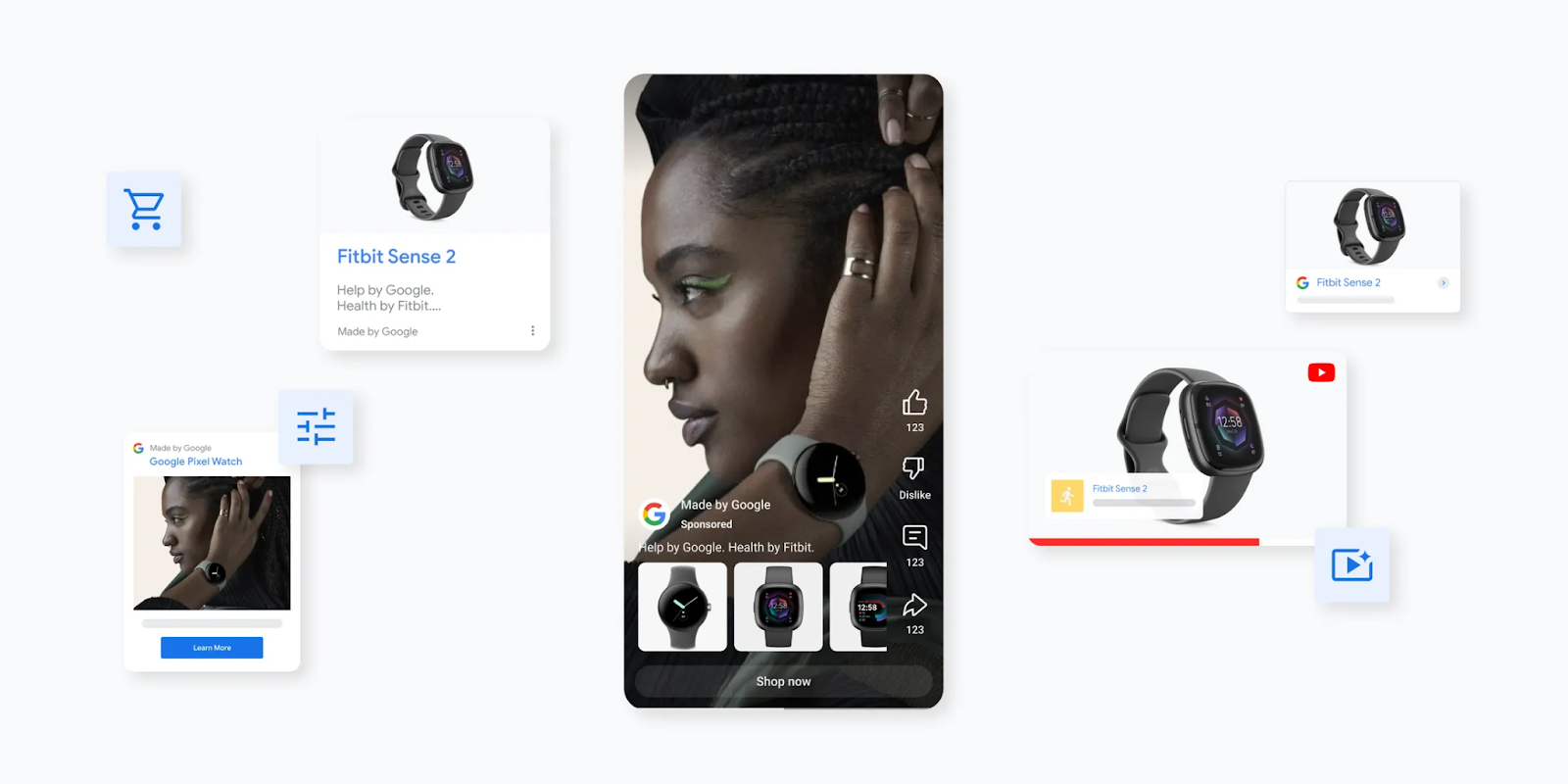
In early 2025, Google introduced product feed integration for Demand Gen campaigns. This change allows me to link the Google Merchant Center feed, incorporating live product data directly into visual ads.
This development bridges performance and branding for ecommerce, enabling storytelling through creative visuals while displaying actual products.
For instance, a fashion retailer can showcase a new collection in a video advert while featuring shoppable product cards below.
This update positions Demand Gen as a hybrid between Shopping and Display, a much-anticipated capability among ecommerce advertisers.
Demand Gen typically demands a larger budget than other campaign types.
Google recommends starting at about £100 per day per campaign or 20 times your target CPA/tROAS, whichever is higher.
Practically, the £100-per-day baseline is a viable starting point for effective data collection and optimization. Lower budgets restrict data flow and slow progress.
Demand Gen complements your broader Google Ads strategy, rather than replacing Search or Performance Max.
It’s a premium, visually led campaign type that boosts awareness leading to conversions, particularly effective when you have accurate measurement, a clean product feed, and clearly defined audiences.
The table compares Demand Gen and Performance Max on key aspects that matter to advertisers.
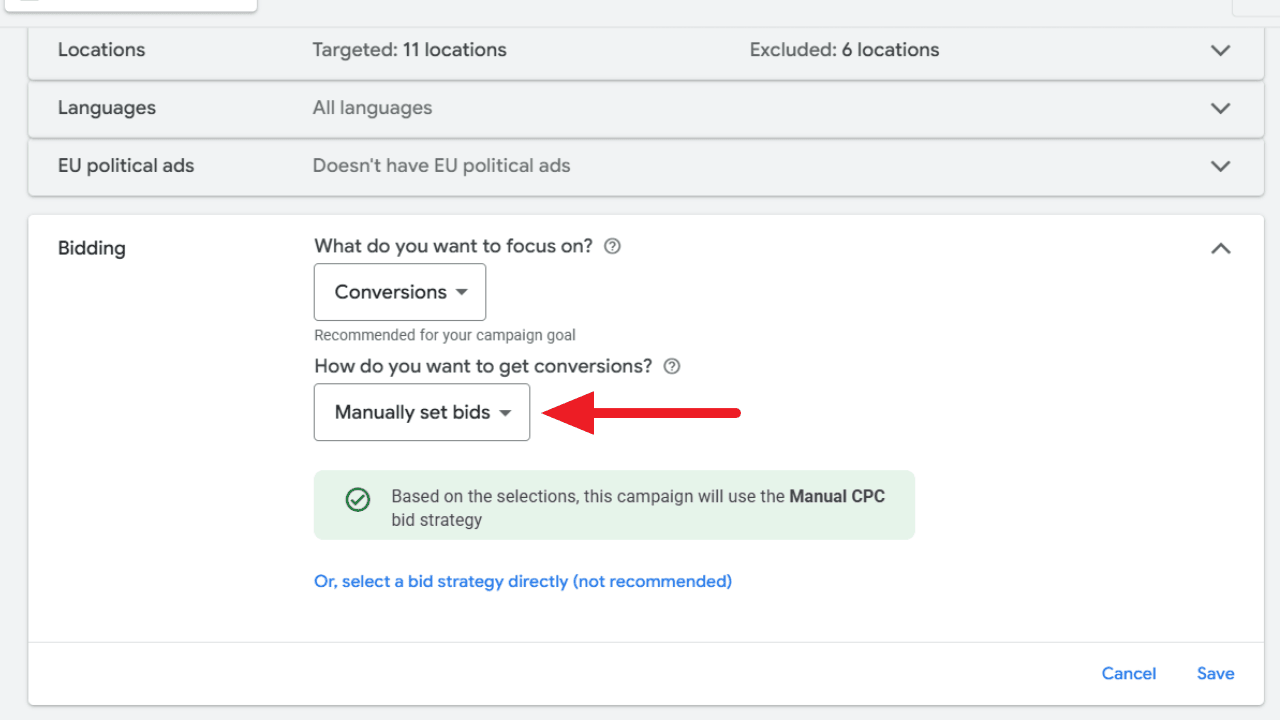
I’ve discovered that Google Ads has made it much simpler for us to access Manual CPC during campaign setups. Before this change, I had to go out of my way to select ‘a bid strategy directly (not recommended).’ Now, I can easily find ‘Manually set bids’ right under the Conversions goal. It’s a small but significant improvement in the user experience.
The change:
Manual CPC is now integrated directly into Google’s primary bidding flow.
I no longer have to bypass Google’s recommended strategies to find it.
This update is readily visible within the campaign bidding settings across the user interface.
Why it matters to me. Manual CPC has always been my go-to bidding strategy when I want hands-on control over my campaigns. Google’s previous setup often nudged me towards automated bidding, but with this update, I face less friction when opting for manual control.
The bigger picture. Despite Google’s push towards Smart Bidding, this change shows that manual bidding remains important, particularly for experienced advertisers like myself, or in niche campaigns where full automation may not be suitable.
Thanks go to: This update was shared by Hana Kobzová, founder of PPC News Feed.
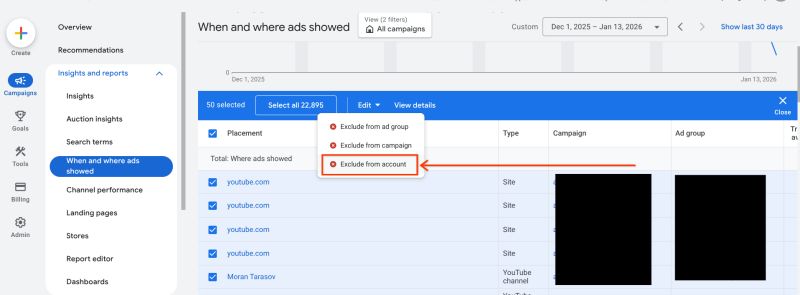
Recently, I discovered an exciting update from Google Ads that could really simplify how I manage my campaigns. They’ve introduced account-level placement exclusions, making it possible to block unwanted inventory from a single, centralized location.
What’s new? Now, I can apply one exclusion list at the account level. This efficiency extends across Performance Max, Demand Gen, YouTube, and Display campaigns. Before this, blocking had to be done at each ad group or campaign level separately.
How does it work? Once I’ve excluded certain placements at the account level, Google Ads ensures that spending is prevented on those websites, apps, or YouTube placements across all eligible campaigns.
Why is this important? Previously, placement control was a fragmented and tedious process prone to errors, especially for large accounts. With this update, brand safety is now more straightforward and efficient on a larger scale.
The big picture. As Google shifts towards more automation-heavy formats like Performance Max, this change answers the demand from advertisers for stronger, more streamlined control measures without disrupting automation advantages.
Between the lines. This update allows me to:
Reduce exposure to low-quality or irrelevant inventory
Enforce brand-safety standards consistently
Save time managing exclusions across complex accounts
What to watch. I need to review and carefully consolidate existing exclusion lists, as applying a single account-level block too broadly might unintentionally limit my reach.
First seen. This savvy update was first highlighted by Google Ads Campaigns Specialist Aleksejus Podpruginas on LinkedIn.
Bottom line. Google’s updates make controlling ad placements easier, tweaking the interface just enough to significantly enhance efficiency and maintain brand safety.
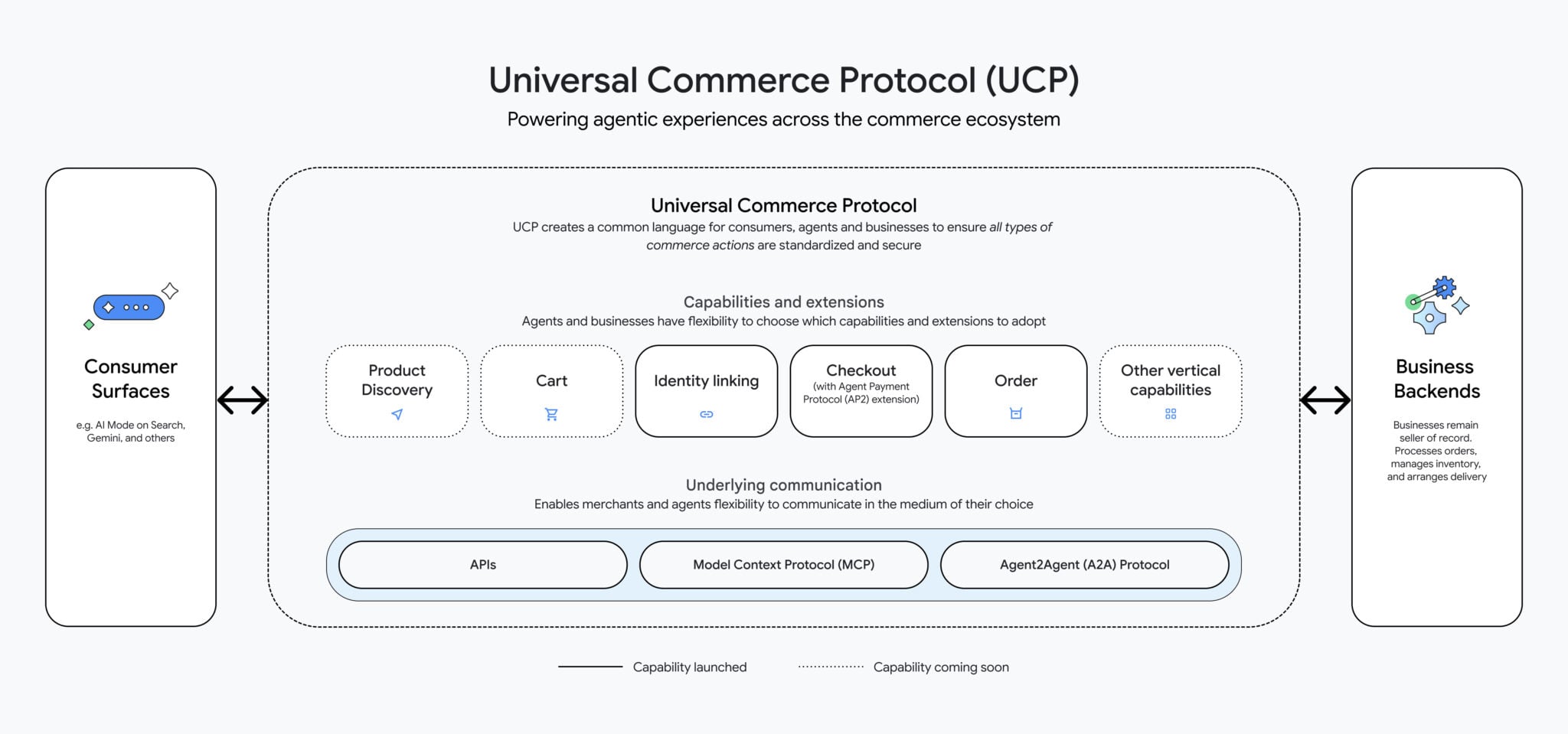
Have you heard the news? Google has just launched the Universal Commerce Protocol (UCP), an innovative open standard that integrates AI agents throughout the entire shopping experience. From discovering products to making purchases and even receiving support after the sale, UCP facilitates it all.
In exciting developments for retailers, Google is also rolling out new AI tools. These include branded shopping agents and ad formats that enhance AI-driven discovery, making the shopping experience more streamlined and engaging.
About UCP
This protocol offers a common language for AI agents and commerce systems, greatly simplifying the need for custom integrations across different platforms.
UCP is compatible with existing standards like Agent2Agent and the Model Context Protocol.
The protocol was co-developed with prominent partners such as Shopify, Etsy, Wayfair, and Target.
It’s already endorsed by over 20 additional companies in the retail and payments sectors.
What’s Changing
The UCP is set to enhance the checkout experience for Google product listings via AI Mode in Search and the Gemini app. Shoppers can make purchases through Google Pay, with options to use saved payment and shipping details. Integration with PayPal is also on the horizon.
Google aims to lower cart abandonment and provide retailers with tailored integration options suited to their needs.
Upcoming features include loyalty rewards and personalized shopping experiences.
Business Agent
In tandem with UCP, Google is unveiling the Business Agent, a branded AI assistant that provides shoppers with direct interaction opportunities on Search. Think of it as a virtual sales associate offering real-time responses in your brand’s own tone.
Major retailers like Lowe’s, Michael’s, Poshmark, and Reebok are already on board. Future capabilities may include deeper customization, data training, and a seamless agent-led checkout.
Direct Offer
Google is also testing Direct Offers, a fresh initiative within Google Ads tailored for AI adoption. When AI senses that a shopper is likely to make a purchase, a special discount can be presented.
This pilot will soon expand to incorporate offers such as product bundles, complimentary shipping, and more enticing incentives.
Why It Matters
The rise of agent-led shopping reshapes where and how buying choices are made. Google’s new AI tools and protocols are taking the lead, allowing advertisers to influence these pivotal moments during an AI-driven shopping journey.
Tools like Direct Offers and branded agents create new pathways for advertisers to finalize sales efficiently, all while safeguarding profit margins. The balance between conversion improvements and losses in direct site traffic remains an open discussion.
Bottom Line
According to Google, agentic shopping is unstoppable. With innovations like UCP and its complementary retail tools, Google ensures that AI-driven commerce remains inclusive and accessible, keeping retailers engaged as agents transform the buying landscape.
I’ve noticed that Google is testing a new feature in their Performance Max campaigns that could really shake things up for us as advertisers. It seems they’re considering raising the limit on video assets from 5 to as many as 15 per Asset Group. This change could open up a whole new level of creative freedom without needing to fragment our campaigns.
Why does this matter to us? Well, video content is becoming crucial for the success of Performance Max. The current five-video limit forces us to make tough choices between different formats and ratios, which in turn restricts our reach across platforms like YouTube, Discover, and others. This new limit could lift those restrictions considerably.
With this potential update, we could include up to 15 videos per Asset Group. This means we can cover all major video ratios and formats without having to duplicate efforts or fragment campaigns. It’s an opportunity for richer, more versatile campaigns.
For those of us managing multiple video versions, this change could mean significantly streamlined campaign management. We could test more creative ideas without losing out on reach or complicating our campaign structures.
It’s still early days, with Google not yet making a formal announcement about this update. It could be in testing, or maybe it’s slowly being rolled out. Keep an eye on any new developments in this area.
This update first came to light when Growth Marketing Manager Molly Pritchard shared the new option on her LinkedIn profile. It sure caught my attention!
Bottom line? This may seem like a small tweak, but for those of us utilizing Performance Max, increasing the video cap could greatly enhance our creative strategies with minimal trade-offs.
Google has rolled out a new Beta feature that allows us, Performance Max advertisers, to A/B test asset sets. This expansion takes last year’s retail experiment to an exciting new level, now available for all campaigns.
With this update, I can compare two sets of assets while keeping the ‘common assets’ steady across both versions. By accessing the Experiments page under the Assets sub-menu, I can determine which creative combinations yield the best results.
I saw a similar experiment rolled out for retail campaigns last year, and I’m thrilled to see it expand to all Performance Max campaigns.
Why it matters to me. Performance Max campaigns rely heavily on automation, often making it difficult for me to test specific creative assets. This new capability gives us more control over asset-level performance without compromising the integrity of the entire campaign.
The big picture. From my perspective, tests must run for at least four weeks to consider the learning phase of P-Max and ad delivery stabilization. While the results aren’t immediate, they’ll allow me to make more informed choices about which images, headlines, and videos drive engagement.
Between the lines. Asset-level A/B testing could be a pivotal factor in enhancing my Performance Max ROI, particularly when managing diverse creative and asset formats.
First seen. This update caught my attention when web marketer Dario Zannoni highlighted it on LinkedIn.
The bottom line. Although still in Beta, this experiment type offers a new degree of transparency and control over automated campaigns, potentially transforming how I approach asset strategies in Performance Max.
Hey there! Navigating the ever-evolving landscape of Google Ads can be quite the adventure. I’ve gathered some important insights to help us optimize our PPC campaigns by addressing common pitfalls like inconsistent tracking, outdated negative keywords, and an over-reliance on AI.
Google Ads is in a constant state of evolution. This means new challenges and mistakes often pop up as we optimize and manage our PPC campaigns. Let me share some insights on the most prevalent Google Ads mistakes in 2026, so we can dodge them effectively this year.
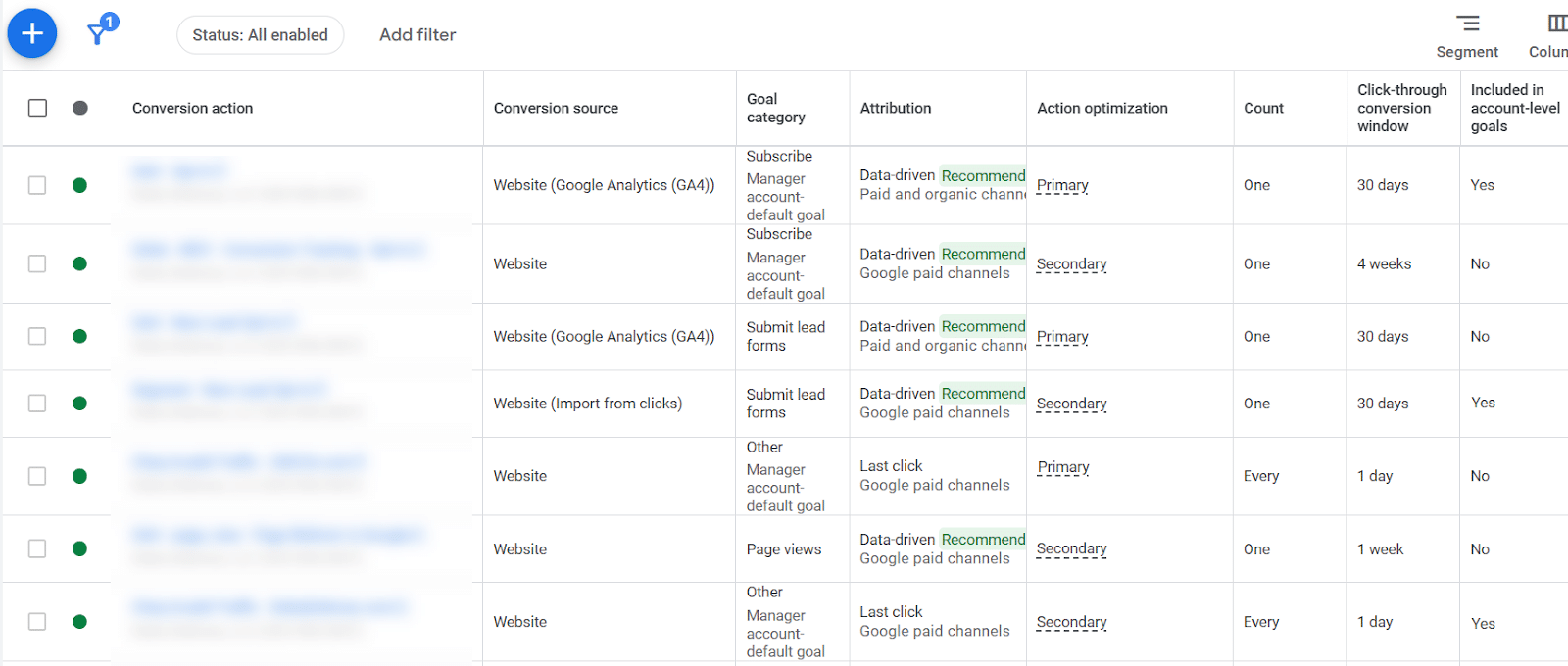
Optimization decisions hinge on conversion data. If our conversion tracking is inconsistent, it skews the entire account’s data, making it difficult to draw accurate insights.
Converting varying attribution methods, count types, and conversion windows means data is applied unevenly across our account, complicating any assessment of click value.
Occasionally, we might override tracking settings at the campaign level, achieving accuracy there but inconsistent data at the account level. Ensuring consistent application of conversion data is something I prioritize in my management tasks.
I’ve noticed many people losing sight of ‘exact match’ keywords as Google encourages broad match by making it the default setting in their interface. Yet, exact match is invaluable, consistently proving to be the highest-converting match type for many of us.
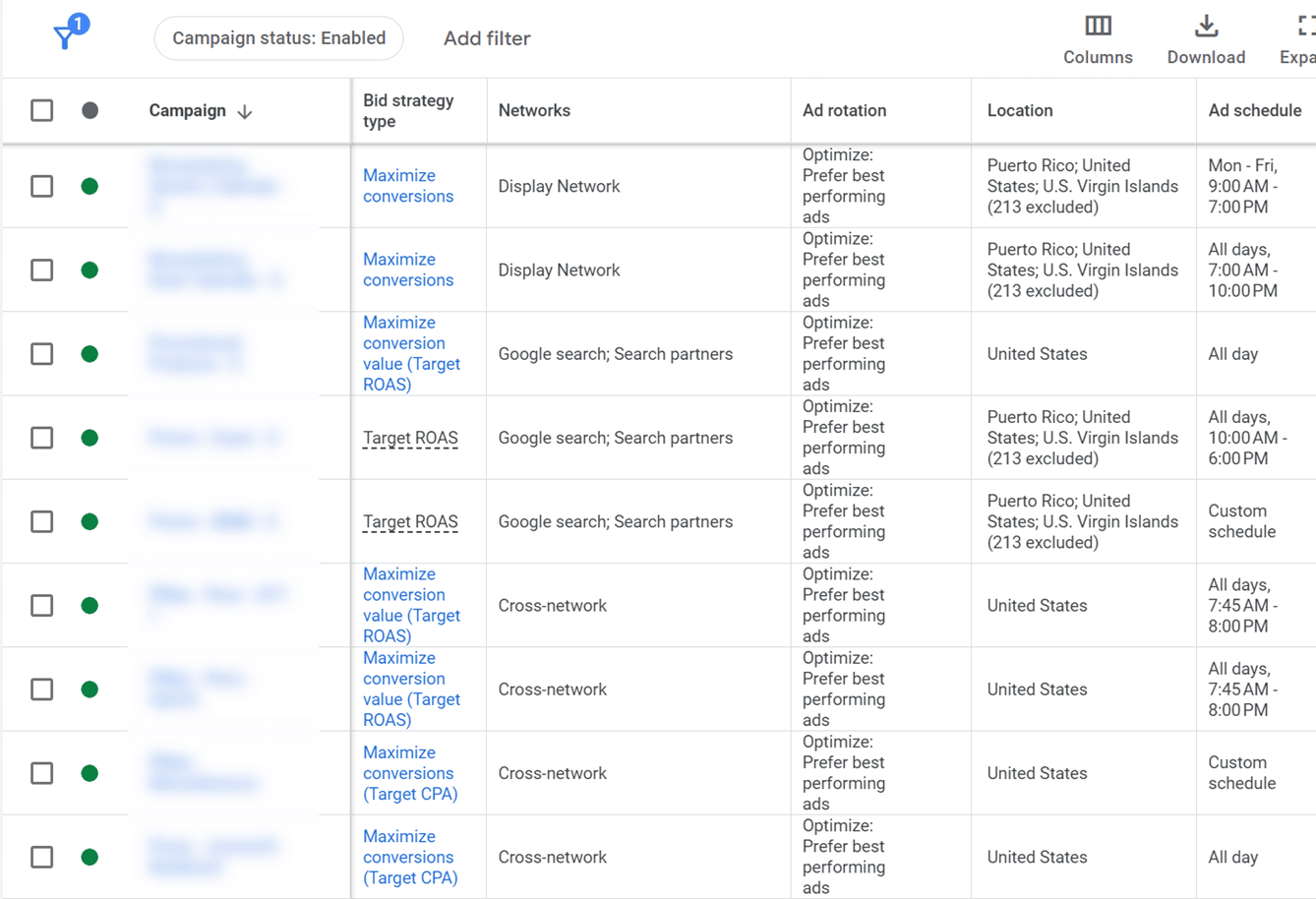
When campaigns vary widely in excluded regions, ad schedules, and bid strategies, it’s crucial to re-evaluate our settings. Consistency in campaign settings is vital to keeping everything running smoothly.
Ad strength directly affects how much control Google has over our ad content. Lower ad strength means more control for us, which I’ve found leads to higher conversion rates despite common misconceptions about its impact on quality scores.
The flexibility of match types has loosened in recent years, leading to search terms triggering multiple keywords. This duplication, without exact matches, can cause inconsistent messaging. I always make sure our keyword list includes top-performing search terms.
Broad match keywords can lead to different results based on our bidding strategies. I learned the importance of matching bid strategies with the right keyword types. After all, different goals require different approaches.
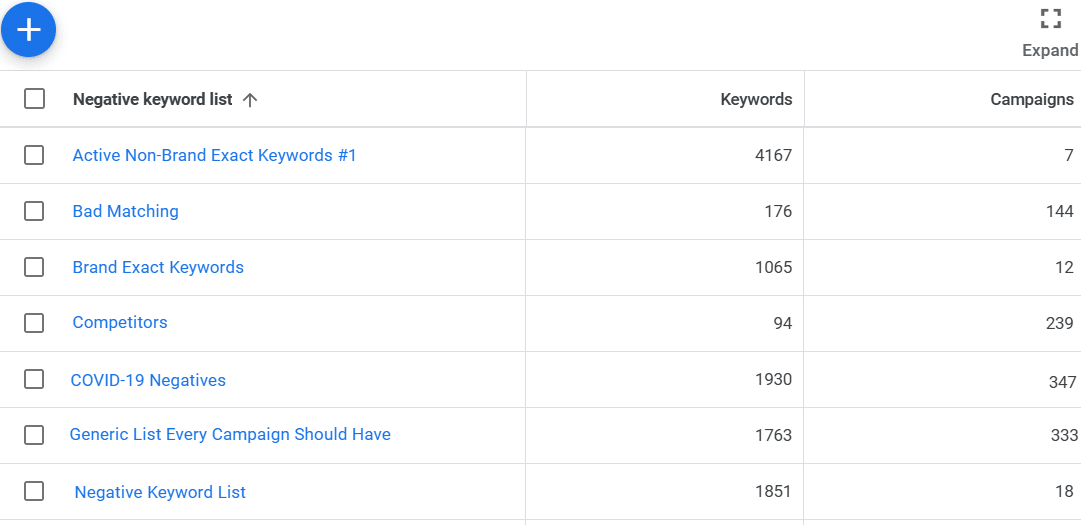
Blinded by our auto-pilot tendencies, we might use outdated negative keyword lists without review, which leads to keyword blocking and lost opportunities. It’s essential to review these regularly to prevent conflicts.
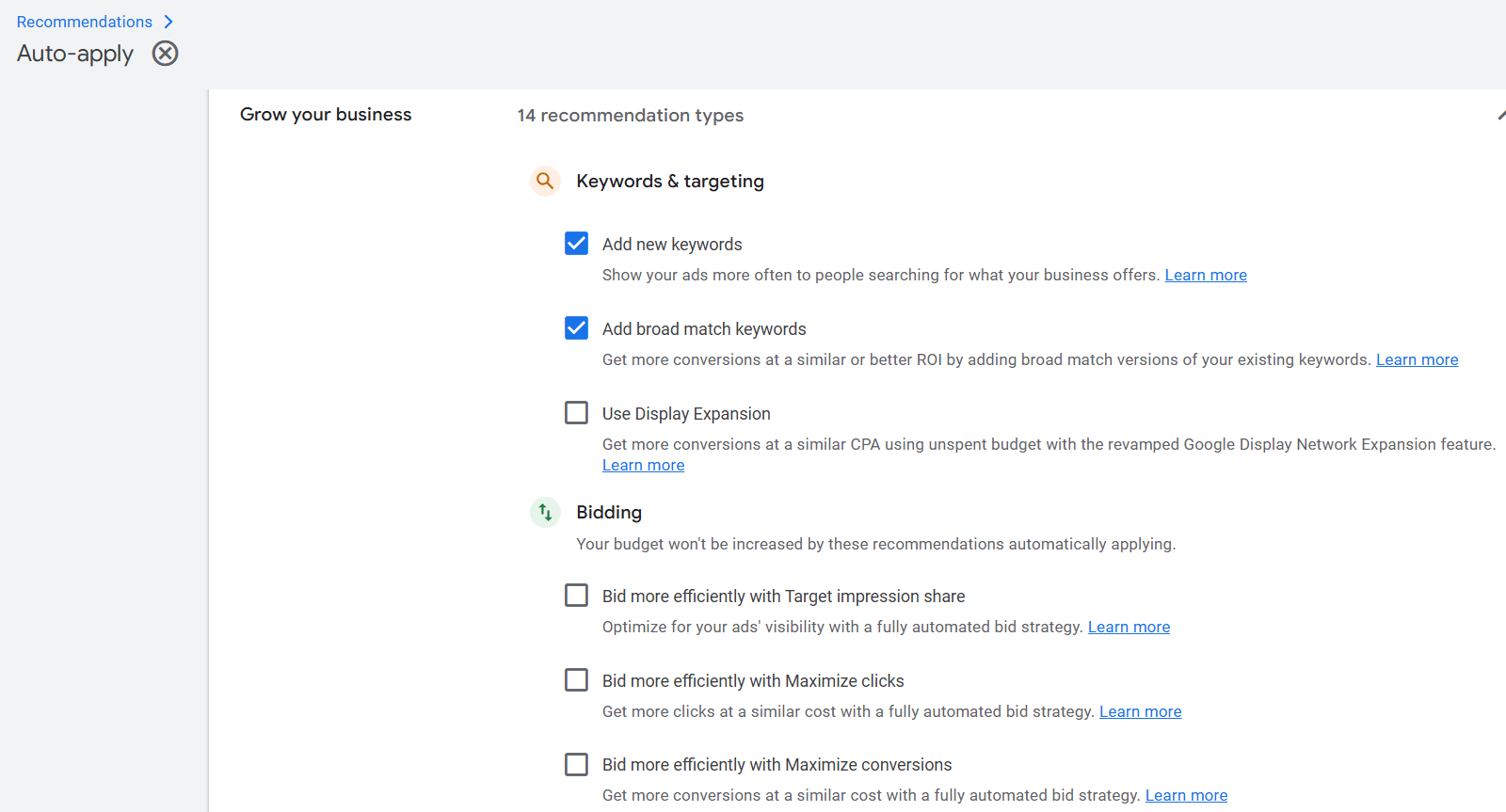
Having auto-apply turned on in Google Ads can lead to unexpected changes like added keywords or modified bid strategies. Turning it off gives me the power to make well-thought-out decisions instead.
Finally, while AI offers tremendous capabilities, believing it’s wiser than us can be a major pitfall. I always remember that it’s best used as a tool that complements our judgment and expertise in ensuring successful campaigns.
When I first heard about Google’s upcoming changes to the Ads API, I realized this could be a game-changer for many advertisers. Starting February 2nd, the Google Ads API will stop accepting new users of session attributes or IP address data in conversion imports. If you’re like me, and already using these fields, you might wonder what this means for your current set-up.
This shift marks Google’s efforts to guide us all toward the Data Manager API, which they aim to make the primary hub for complex conversion and user data transfer. It’s becoming clear that the Google Ads API is honing its focus on core functions like campaign management and conversion workflows, leaving the heavy lifting to the Data Manager API.
Here’s why this change matters to us: it directly influences whether our conversions are effectively captured. Blocking session attributes or IP data can cripple our conversion tracking and reporting, affecting performance insights and automated bidding strategies. Transitioning to the Data Manager API secures our data flow, ensures richer data signals, and aligns with Google’s long-term vision for measurement infrastructure.
Who needs to act? If you’re a new developer trying to use session attributes or IP addresses with the Ads API, you’ll be blocked from doing so. For those of us already on this path, our operations continue, but the expectation to migrate is loud and clear, underscored by Google’s developer-token allowlisting requirements.
What happens if we don’t transpose our setup? Post-change, some conversion imports will hit a roadblock with a CUSTOMER_NOT_ALLOWLISTED_FOR_THIS_FEATURE error, indicating rejection due to session attributes or IP address inclusions.
To fix this, we need to promptly update our systems: temporarily exclude session attributes and IP data from Ads API imports, reroute this information through the Data Manager API, and ultimately phase out Ads API conversion imports once our new setup is fully integrated.
The bottom line for those of us using the existing system is that while Google isn’t snipping the cord immediately, the roadmap is clear: if our tracking relies on session attributes or IP data, embracing the Data Manager API isn’t just advisable, it’s imperative.
Operating in niche markets with Google Ads presents unique challenges, and it’s something I’m navigating in 2026. While the search volume might be low, the potential for opportunity is significant.
I’ve noticed that in targeted markets, people might only search a handful of times each month for my solutions. It’s a stark contrast to other advertisers who can test a plethora of headline variations with ease.
Many niche advertisers mistakenly apply high-volume strategies to their ads. In my experience, without sufficient data, Google’s automation struggles, which can dampen or entirely stall results.
Through this guide, I’ve found out what actually works when dealing with low search volumes and extended conversion timelines.
Why Low-Volume Markets Challenge Google Ads
There are a couple of scenarios I’ve encountered:
I own my brand space: My distinctive brand ensures that when people search for my company, I appear prominently with unique industry terms.
I get washed out: Sometimes, my keywords compete with those of larger brands, making it tough to stand out. Here, I battle consistent keyword pollution.
Each situation requires a distinct approach to effectively manage my advertising strategies.
Smart Bidding strategies, like Target ROAS, require substantial conversions that niche environments often don’t produce solely from search traffic.
If my campaigns do hit those numbers, it’s usually due to a budget burn collecting low-quality data. It’s unsustainable for many, including myself.
However, I’ve found that automation remains viable by feeding Google the right signals differently.
Relying solely on Search campaigns has proven ineffective for me, especially as Google’s AI Overviews account for a significant percentage of queries.
Start with Search, then Move to Performance Max
Performance Max requires solid conversion data, focusing on qualified leads or paying customers to truly optimize results.
Audience signals guide me in allocating budgets wisely, ensuring I’m not wasting resources.
Performance Max has served me well once I’ve accumulated sufficient data. However, dealing with keyword pollution requires aggressive negative tactics.
Use Demand Gen for Awareness
Introducing Demand Gen has allowed me to reach users across YouTube and Gmail before they actively engage in search for my offerings.
This strategy builds awareness, paving the way for future branded searches.
Protect Your Brand Terms
While organic rankings are important, I maintain a dedicated budget to safeguard my brand’s terms, especially when keywords overlap with the competition.
Even during slower periods, maintaining control over brand terms remains a priority.
Based on my data from a niche B2B SaaS client, exact match keywords consistently deliver leads at a lower cost, showcasing the benefits of targeted campaigns.
Adopting a broad match approach without sufficient data may lead to unnecessary spending on low-converting searches.
After solidifying my match strategies, I start tight and carefully expand:
Initiate with exact match keywords on strong intent terms.
Incorporate phrase matches for variation while being wary of broad match until robust data guides me.
Broaden match scope after accumulating 30+ conversions.
Critical Search Term Mining
With niche volumes, Google may not always show which search terms directed traffic, but when available, these insights are invaluable for market comprehension.
The terms that do surface offer significant insights:
Valid searches leading to clicks but not conversions (adjust bids or landing pages).
Wasteful, irrelevant searches depleting budget (add instantly as negatives).
Incorporating new keyword variations identified.
Handling early funnel searches strategically.
In scenarios where brand terms are unique, I find broad match approaches more forgiving.
Conversely, with competitive keywords, a robust list of negative keywords is imperative before considering broader matches.
Full Utilization of Headline and Description Slots
With limited ad runs, maximizing headline and description slots provides ample opportunity for optimization and engagement.
Targeted Landing Page Design
Landing pages I design don’t just capture leads; they guide prospects through seamless self-qualification, emphasizing detailed specs or clear differentiation as necessary.
My pages prioritize standing out, expecting that visitors have explored competitor offerings.
Precision in demand gen campaigns is necessary, targeting custom market segments instead of industry-wide interests.
Immediate differentiation is crucial on landing pages, so prospects understand value quicker than with competing alternatives.
Strategies for Niche Advertising Success in 2026
In 2026, small budget advertisers win not by spending, but by leveraging quality signals, focusing on visibility and precision.
My focus remains on signal quality surpassing search volume expectations.
Visibility across multiple platforms ensures stronger engagement than singular strategies.
Precise audience targeting outweighs the advantages of simply broader reach.
Feeding Google automation with strategic, tailored data is essential to unlocking potential in niche advertising.
The key to success in niche markets is knowing which automation to implement at the right time, the patience to accumulate sufficient data, and the foresight to disregard outdated strategies.