I’ve noticed something quite unexpected happening with Google Ads lately. It seems that their system tool is re-enabling paused keywords automatically, which has led to increased campaign expenses without warning.
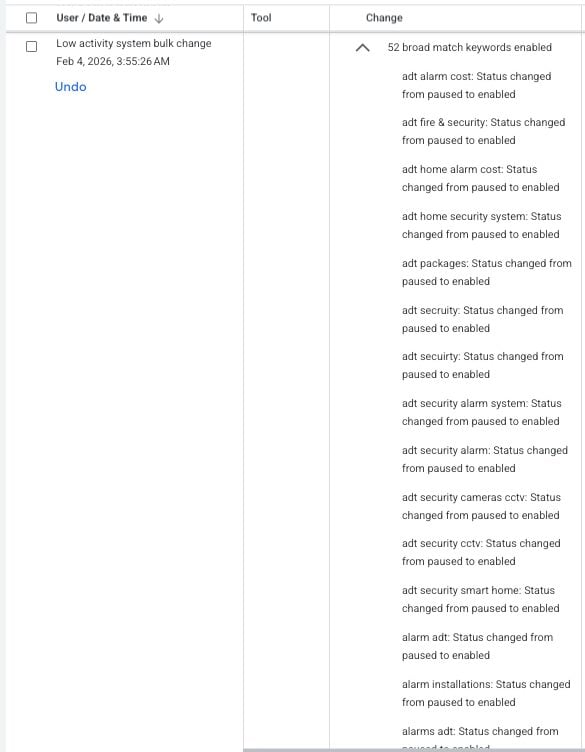
Some advertisers, including myself, have observed a Google Ads tool—created for low-activity bulk changes—unexpectedly switching paused keywords back to active. This unusual behavior has been a surprise to many account managers, like myself, who haven’t come across this issue before.
What’s happening? The activity logs are showing entries linked to Google’s ‘Low activity system bulk changes’ tool executing actions that enable previously paused keywords. These logs appear as automated bulk updates and, thankfully, have an ‘Undo’ option available.
In the past, this tool mainly paused inactive elements rather than reactivating them, so this change in behavior is quite perplexing.
What’s unclear? Google hasn’t issued any public documentation to explain this behavior, leaving us unsure whether it’s an intentional feature, a limited test, or a mere bug.
I find myself wondering what exactly triggers this reactivation and how widespread this phenomenon is becoming.
Why does this matter? If like me, you’re diligently managing your campaigns, unexpected keyword reactivation can change your campaign delivery in ways you didn’t plan for, impacting budgets, pacing, and overall performance—particularly if you’ve paused keywords for a specific reason.
For both agencies and in-house teams, this change is raising concerns about automated systems potentially overriding manual settings.
What steps should we take now? As account managers, we might want to regularly check change histories, be on the lookout for any unexpected keyword activations, and use the ‘undo’ function promptly if we notice unplanned changes.
Until Google clarifies the situation, more careful monitoring of campaigns relying heavily on paused keywords might be necessary.
First Alerted This issue was first brought to light by Performance Marketing Consultant Francesco Cifardi on LinkedIn.
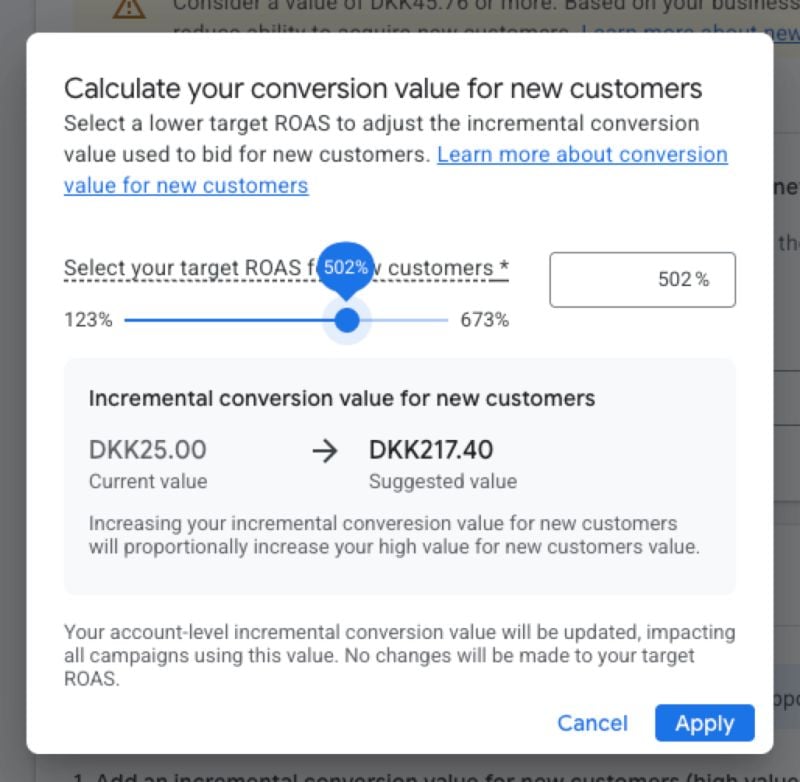
I’ve just discovered an exciting development in the Google Ads world that’s sure to interest any advertiser looking to optimize their campaigns. Google Ads is experimenting with a new ROAS-based tool that automatically suggests conversion values, aiming to enhance how we bid for new customers without the need for manual estimates.
For those like me who are focused on campaigns that target new customer acquisition, this update is a game changer. It empowers us to bid more assertively to capture those elusive first-time buyers.
How it works. I enter my desired ROAS target for new customers, and Google Ads does the rest. It proposes a conversion value that aligns with the goal I’ve set, removing much of the guesswork that previously complicated bidding strategies.
Currently, this feature doesn’t customize at the auction, campaign, or product levels. Instead, we apply values at a broader setting; this means the system doesn’t yet allow variable bids based on different contexts.
Why we care. This new tool addresses a significant shortfall in performance bidding—assigning the correct value to new customers. Many of us have relied on flat manual values, which don’t always reflect true profitability or align with our long-term goals.
By linking conversion values to a target ROAS, the door is opened to more strategy-driven bidding, potentially enhancing our balance between growth and efficiency in acquisition campaigns.
What advertisers are saying. Initial feedback suggests this feature is a notable improvement over the static manual inputs we’ve been using. Andrew Lolk, Founder of Savvy Revenue, believes the next step could be auction-level intelligence that dynamically adjusts values based on campaign or product performance.
What to watch. If Google decides to expand this feature to support more granular adjustments, it could significantly reshape how we plan our acquisition strategies and value long-term customer growth.
For now, the tool provides a more structured approach to calculating the value of new customers.
First seen. This update was first spotted by Andrew Lolk, who shared the insight on LinkedIn.
As I look ahead to 2026, Google’s innovative strides in AI are truly reshaping digital advertising and commerce. Thanks to the leadership of Vidhya Srinivasan, VP/GM of Ads & Commerce, AI is significantly enhancing the shopping and advertising landscape, making it more efficient and personalized for everyone involved.
Key Trends:
Creators to commerce: In my experience, YouTube is increasingly becoming a go-to platform for discovery, largely because creators act as influential tastemakers. AI plays a pivotal role in pairing the right creators with brands, transforming influence into tangible business outcomes.
Search ads evolve: With conversational and visual searches gaining popularity, AI Mode is revolutionizing ads to seamlessly integrate into the user’s discovery process. Innovative formats like sponsored retail listings and Direct Offers are crafted to assist users in their shopping journey while offering brands meaningful conversion opportunities.
Agentic commerce arrives: Through Google’s Universal Commerce Protocol (UCP), AI-driven shopping experiences are becoming standardized. This advancement allows users to browse, purchase, and finalize transactions effortlessly. Early adopters like Etsy and Wayfair have already started using this system, with giants like Shopify, Target, and Walmart soon joining the bandwagon.
AI-powered creative and performance: I’m thrilled to see how tools powered by Gemini 3 are enhancing creative production and campaign optimization. Generative platforms like Nano Banana and Veo 3 help advertisers produce high-quality assets swiftly, while AI Max boosts reach and performance.
Trust as a foundation: It’s reassuring to know that each advancement prioritizes privacy and security. Strong data management practices, alongside transparent ad personalization, are founded on Google’s legacy of trust.
Why we care: 2026 is poised to be a groundbreaking year, with AI enhancing every facet of the consumer journey. With cutting-edge tools like Gemini 3, Nano Banana, Veo 3, and AI Mode, brands like mine can efficiently create superior content, target the perfect audience, and seamlessly convert interest into purchases during search and discovery.
The advent of agentic commerce through UCP presents a novel approach, connecting advertisers to consumers at critical purchasing moments, all while preserving trust and transparency.
The big picture: The year 2026 heralds an expansive era for digital commerce and advertising, where the fusion of speed, personalization, and AI-driven insights eliminates barriers, facilitating smoother transitions from discovery to purchase while keeping trust paramount.
I’ve just discovered a game-changing update from Google Ads that’s making my life a whole lot easier. Now, Google Ads shows per-product campaign eligibility, which makes spotting gaps and overlaps a breeze.
With this new feature, I can see exactly which campaigns my products are eligible for, right within the Products section. This has transformed the way I approach campaign tracking.
How it works. I find the new dashboard in the Products section incredibly useful. It includes:
A table that shows product details, status, issues, and priority flags
A line graph summarizing campaign status trends
Filters that let me segment eligibility views
A pop-up panel listing “Eligible” and “Not eligible” campaigns per product
Why we care. This update helps me quickly identify products that are missing from essential campaigns or unintentionally overlapping, especially in Shopping and Performance Max. It saves me the hassle of bouncing between different campaign views to diagnose issues.
The big picture: These changes allow me to swiftly spot products not running in expected campaigns and identify overlap before it’s a budgeting issue, all while minimizing time spent on troubleshooting.
Between the lines. It’s clear that Google is focusing on giving advertisers like me more precise control over Shopping campaigns, a key factor in product-level optimization and profitability.
When. The feature is available now in Google Ads.
First seen. I first learned about this update thanks to Hana Kobzová from PPC News Feed.
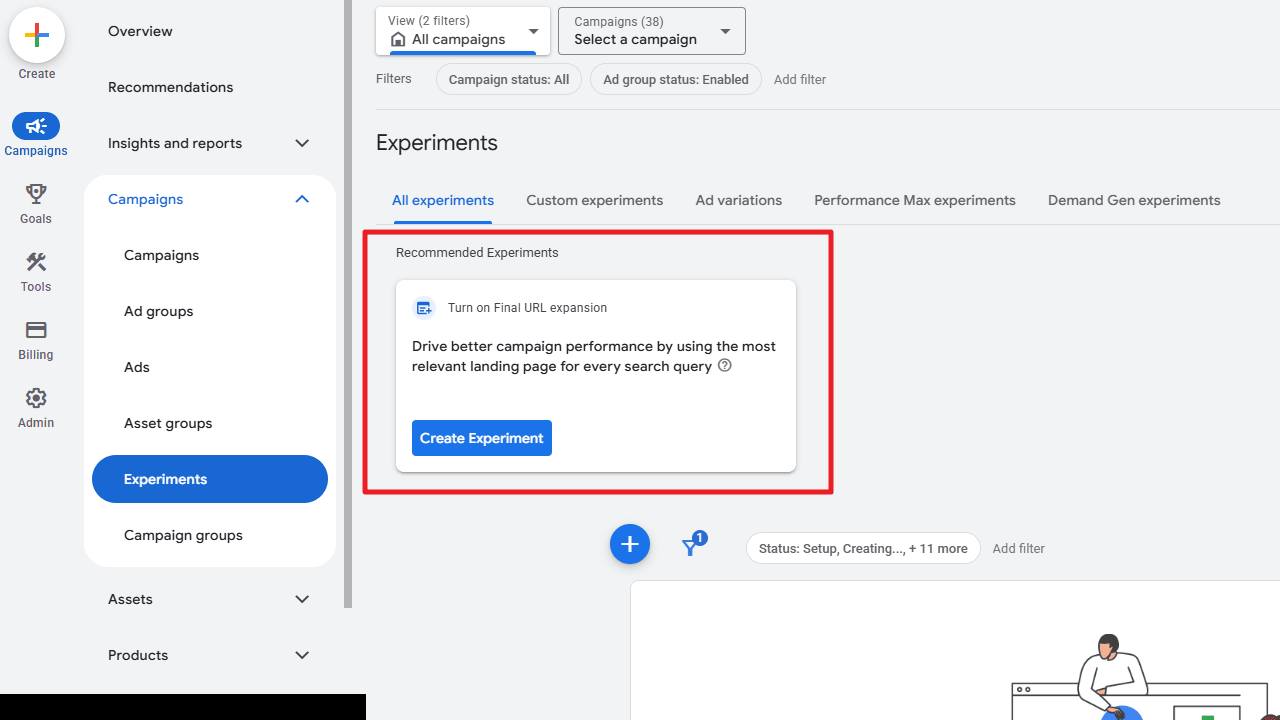
I’ve discovered that Google Ads now offers ready-to-run experiments directly within the Experiments page, making it easier for me to test optimizations quickly without a complicated setup.
These suggested experiments are based on my account’s setup and performance data, helping me uncover new ways to enhance results.
How it works: The platform provides suggestions for testing various bidding strategies, creative variations, and new campaign features, all accessible right in the Experiments dashboard.
Every recommendation comes with a pre-configured setup, so I can either launch them immediately or adjust the settings to better fit my needs. These suggestions are conveniently displayed alongside the standard Create Experiment option, streamlining the process.
Why I care: Google’s effort to simplify experiment setups significantly decreases the time and effort I need to put into testing. It allows me to act swiftly on optimization ideas and maintain a consistent flow of improvements. However, I still review each test configuration to ensure it aligns with my campaign goals and doesn’t lead to unnecessary resource expenditure.
Zoom in: For instance, I might see a prompt suggesting I enable final URL expansion to boost campaign performance. These recommendations appear as pop-ups inside the Experiments interface, guiding my decisions with relevant insights.
The big picture: Google is embedding more automated guidance into Ads workflows, nudging me towards continuous testing and pursuing data-driven optimizations.
First seen:This update was first spotted by PPC News Feed owner, Hana Kobzová, shedding light on these helpful enhancements.
I’ve noticed that when I leave Performance Max campaigns running without proper setup, they tend to focus on getting easy conversions, often leading to a rise in low-quality leads. While this can quickly rack up conversion numbers, the quality isn’t always great. Google tends to prioritize cheaper conversions, benefiting their revenue, but not necessarily my pipeline.
Many times, brands are surprised by these results after following Google’s sales advice too closely. Although low CPA metrics look tempting, they can often mask the fact that these new leads aren’t contributing to the real growth of my business.
That said, with the right adjustments, Performance Max can be optimized to generate high-quality leads. Building these ‘guardrails’ effectively is key to success, and I’m here to share what I’ve learned.
This guide will walk you through which strategies work for improving lead quality, tactics that don’t deliver desired results, and the notable differences between using Performance Max in Google versus Bing.
How to Improve Lead Quality in PMax Campaigns
Here are the actionable steps I’ve found to consistently impact lead quality:
Focus on conversion goals that align with higher quality targets. Try targeting metrics like closed-won leads or sales-qualified leads, which provide more valuable insights than just form fills. For this to work, ensure my CRM is accurately tracking offline conversions.
Utilize high-value audience signals. Target more specific behaviors, such as users who have ‘booked a meeting’ rather than just anyone who converts.
Concentrate on the correct audiences. Exclude irrelevant segments, and use Customer Match to help Google’s algorithms find users similar to my best customers.
Optimize campaign settings smartly. Examples include using brand exclusions, targeting high-performing geos, strategic scheduling, analyzing search themes, and employing site link extensions to channel traffic efficiently.
Refine forms for better lead filtering. Integrate reCAPTCHA to deter bots, implement field validation to block disposable domains, and include quality-check questions such as how they heard about my company or if they have budget allocations.
Some common optimizations don’t significantly enhance lead quality:
Switching bid strategies offers minimal impact.
Adding more assets or budget doesn’t inherently improve lead caliber.
I’ve learned to be cautious when seeking help from Google support, as results can vary.
Important Differences Between Google and Bing PMax Campaigns
Google and Bing both offer Performance Max campaigns, but they differ significantly. Google’s expansive network includes search, display, YouTube, discovery campaigns, and Gmail. If not carefully managed, this can lead to spam-driven conversions, particularly from display and YouTube.
Bing’s campaigns, on the other hand, focus on Bing search and their audience network, which covers display, Outlook, and MSN. I haven’t observed significant performance differences, but staying updated with platform changes is crucial.
Performance Max Isn’t Broken, but It Needs Control
Entering PMax for lead generation with caution is a wise approach. Although promising for ecommerce revenue, lead quality demands stringent campaign guidelines. For instance, preventing misaligned conversions for a luxury retailer requires effective PMax guardrails.
Considering Google’s shift towards automation and AI, it’s essential to continuously test and adapt. Recent updates like channel-level reporting and exclusion options offer new tools to shape my campaigns.
Achieving quality leads and a healthy ROI is possible by navigating the algorithm strategically. If past PMax efforts were paused due to poor returns, revisiting and applying lessons learned could significantly improve future outcomes.
Let me share a few valuable lessons I’ve learned about PPC advertising from seasoned experts. Even the most experienced among us encounter pitfalls—like hastily launching campaigns or leaving automation unchecked. Recently, I joined Greg Kohler from ServiceMaster Brands and Susan Yen from SearchLab Digital at SMX Next, where we candidly discussed the mistakes that catch us off guard.
Read on to discover the blunders that even the most seasoned marketers must navigate.
Never launch campaigns on a Friday
This is a well-known pitfall, yet it continues to happen. Susan Yen mentioned that due to client demands, campaigns often go live on Fridays, leading to weekend chaos if things go awry. A minor error like an inflated budget setting can cause significant issues.
Greg Kohler emphasizes the importance of reviewing setups with fresh eyes. Wait until Monday to launch; doing so may avert unnecessary problems. Even experts can become overconfident, only to be reminded of these lessons by a Friday crisis.
Takeaway: Avoid launching before the weekend or holidays and stand firm if clients push. It protects both your peace of mind and campaign performance.
Location targeting disasters
Greg shared an experience where an error in location targeting meant campaigns ran in the wrong timezone. By Saturday, ads intended for a U.S. audience accumulated thousands of views in Europe instead.
Takeaway: Configure location settings directly within the Google Ads interface to minimize risks and ensure precise targeting.
The search term report trap
Susan stressed that search term reports are essential for every campaign. Ignoring them can lead to wasted clicks and difficult client conversations later on. She advises checking these reports monthly to avoid irrelevant traffic.
Takeaway: Routine reviews help refine what to target or exclude, enhance performance, and maintain efficient account strategy.
Google Ads Editor vs. interface: A constant battle
The gap between the Google Ads Editor and the interface often leaves teams in a bind. Susan’s team preps in Excel before using Editor for bulk edits but prefers the interface to ensure accuracy in settings.
Takeaway: Use the interface for tasks requiring precision, like responsive ads or location targeting.
The automatically created assets problem
Automatically created assets often default to ‘on,’ requiring tedious navigation to disable. New types of assets can inadvertently apply to all campaigns.
Takeaway: Regularly review these settings. Set reminders to maintain control as new features roll out.
Importing campaigns from Google to Microsoft Ads
Yen warned of the pitfalls of importing Google campaigns directly into Microsoft Ads due to discrepancies in budget assumptions and automation settings.
Takeaway: Treat Microsoft Ads independently with a tailored strategy post-import for optimal results.
The App placement nightmare
A slip in excluding app audiences can direct spend to irrelevant categories. Yen advises vigilance, as settings to exclude these are often hidden.
Takeaway: Establish comprehensive exclusion lists to guard against inappropriate targeting.
Content exclusions and placement control
Applying content exclusions from the start helps avoid placement in irrelevant or inappropriate contexts, though manual follow-up remains necessary.
Takeaway: Consistent reviews ensure Google honors your settings, preventing unwelcome surprises.
Call tracking quality issues
Susan highlighted the importance of client communication in effectively tracking call quality, advocating for monthly check-ins focused on conversion metrics.
Kohler suggested distinguishing first-time from repeat callers in analytics to optimize automated bidding systems.
The promo date problem
Litner pointed out issues with scheduled assets appearing outside their promotional windows, urging manual checks to ensure proper timing.
Kohler echoed similar concerns with automated rules potentially misfiring.
Takeaway: Verify scheduled actions on their launch dates manually to prevent mishaps.
AI Max settings and control
The issues of AI-driven campaign settings defaulting to active require diligence in monitoring and fine-tuning each setting.
Takeaway: Despite AI advancements, practice consistent oversight to manage budget spend effectively.
Account-level settings that haunt you
Susan flagged the risk of overlooking critical account-level settings that can derail campaigns silently, suggesting a standardized checklist approach.
Takeaway: Establish and follow a thorough account setup checklist to catch any hidden conflicts with campaign goals.
Final wisdom
Here are several recurring themes from our discussion:
Always double-check automation; it’s not immune to errors.
New perspectives reveal potential errors.
Effective client communication prevents misunderstanding.
Manual reviews maintain balance as automation increases.
Keep updating exclusion lists to mitigate repeated issues.
The takeaway is that everyone makes mistakes. The difference lies not in avoiding them but in swiftly addressing them, learning from experiences, and creating systems to prevent recurrence. As Kohler notes, stay vigilant, question automation, and avoid the temptation of a Friday launch.
I often find myself reflecting on the challenges of PPC measurement in this privacy-driven era. As browser restrictions tighten, our reliance has shifted from perfect tracking to methods like redundancy, modeling, and inference.
Managing PPC accounts has shown me firsthand that something has changed. The signs are everywhere:
Missing GCLIDs, delayed conversions, and reports that are harder to explain have become routine.
Initially, it feels like something broke—perhaps a tracking update or a platform shift. Yet, it’s simpler than that. We often assume identifiers will persist from click to conversion, but that’s no longer a reliable expectation.
Measurement hasn’t ceased to function; what has changed are the conditions it relies on. These changes have been creeping up, gradually becoming the norm.
Why this shift feels so disorienting
Having dealt with this issue for most of my career, I find the evolution quite disorienting. Before native conversion tracking in Google Ads, I crafted my tracking pixels and parameters for affiliate campaigns. Moving towards automation and less control can feel unsettling compared to the traditional methods.
The things I once depended upon for PPC data interpretation don’t apply in the same way anymore. Adjusting my mindset is key to navigating this evolved landscape, as restoring the old assumptions won’t work.
The old world: click IDs and deterministic matching
Predictability was the hallmark of Google Ads measurement. A click led to a gclid being stored in a cookie and matched back upon conversion, creating an easy-to-explain deterministic system.
This depended heavily on things like parameters passing through browsers and cookies persisting. Thankfully, these conditions were favorable back then.
Why that model breaks more often now
Today’s browsers impose stricter limitations on identifiers. Apple’s Intelligent Tracking Prevention and similar techniques significantly reduce tracking data’s shelf life, directly impacting how data is stored, or even if it can be stored.
On occasions, click IDs fail to reach the site, and the behavior of browsers today necessitates adapting, rather than attempting to cling to outdated deterministic systems.
The adjustment isn’t just technical
On my team, GA4 poses challenges not because it’s ineffective, but because it suits a reality where some data is presumably missing. This experience is shared industry-wide; we must acknowledge that measurement now requires a new mentality.
Ultimately, surviving in this privacy-centric era demands refocusing energy on resolving data problems rather than merely optimizing ad settings.
What still works: Client-side and server-side approaches
The question now is how we can thrive under current constraints, and the answer involves both client-side and server-side measurement practices.
Pixels still matter, but they have limits
Though these pixels provide valuable data and instant feedback, their efficacy is limited by browser constraints and consent banners blocking data.
Relying solely on pixels for measurement affects both our reporting and optimization efforts. While they’re not obsolete, they no longer cover every base.
Changing how pixels are delivered
In search of better solutions, some focus on improving pixel delivery, such as Google Tag Gateway, which routes tags through the same-origin setup. This minimizes failures but does not define better measurement logic by itself.
There’s a distinction between improved infrastructure and improved measurement logic—we must remember that proper data collection and event definition are crucial.
Offline conversion imports: Moving measurement off the browser
Using offline conversion imports moves measurement away from browsers to backend systems, mitigating browser-imposed privacy restrictions and extending its efficacy to longer sales cycles.
Combining offline imports with pixel tracking ensures a complete view of customer interactions.
Even without click IDs, Google Ads utilizes other inputs to match conversions, although we must be aware that modeled data fills gaps when consent is denied or IDs are missing.
Even with complete information from pixels or offline imports, conversions sometimes remain elusive.
Determining how this aligns with privacy restrictions and user consent requires ongoing refinement and a strategic approach.
Designing for partial data
Partial data is now the status quo, and including multiple sources of input can create a robust strategy to overcome discrepancies in systems like CRMs and Google Ads.
By learning to accept this tension and strategically managing incomplete data, we can optimize campaigns for the current data landscape.
As we embrace a privacy-focused measurement strategy, perfect tracking is no longer feasible. Building useful measurement systems requires recognizing differing operational views and aligning accordingly.
Ultimately, strategic thinking, redundant data systems, and careful evaluation are essential components in adapting to a partially observable data world.
Today’s measurement landscape demands a strategic approach instead of recreating past perfection.
When I first heard about Performance Max, I was skeptical. It seemed like an unfinished product, but over the past 18 months, Google has made significant improvements in transparency and control. If you haven’t revisited Performance Max since its early days, now is the perfect time to take another look.
As I learned from Mike Ryan at SMX Next, the advancements are worthy of attention.
Taking a Fresh Look at Performance Max
Performance Max evolved from Smart Shopping campaigns, introduced with much excitement in 2019. Yet, industry experts quickly pointed out issues with transparency and control, which Google is only now beginning to address.
Smart Shopping took away vital controls critical for managing campaigns effectively. Essential features like promotional controls and search term reporting vanished, leaving many of us feeling limited.
Fortunately, Performance Max reintroduces much-needed functionality, enhancing what was once lacking.
Understanding Performance Max Search Terms
In my experience, search terms are crucial for understanding the effectiveness of our campaigns. With Performance Max, Google has added a unique match type that brings detailed and scriptable data, allowing us to optimize with precision.
Search Term Insights vs. Campaign Search Term View
Initially, Google introduced search term insights, grouping queries into categories. Unfortunately, these lacked depth as they didn’t provide essential cost data.
The game-changer, though, is the new campaign-level search term view, offering access to more metrics and clearer visibility on performance.
While these insights are only available at the search network level, they offer significant improvement over past limitations.
Search Theme Reporting
Through Performance Max, I’ve realized search themes act as a positive targeting method. By checking conversion data and the source of traffic, I can ascertain the value of search themes, identifying whether they contribute effectively or remain underutilized.
Search Term Controls and Optimization
Negative Keywords
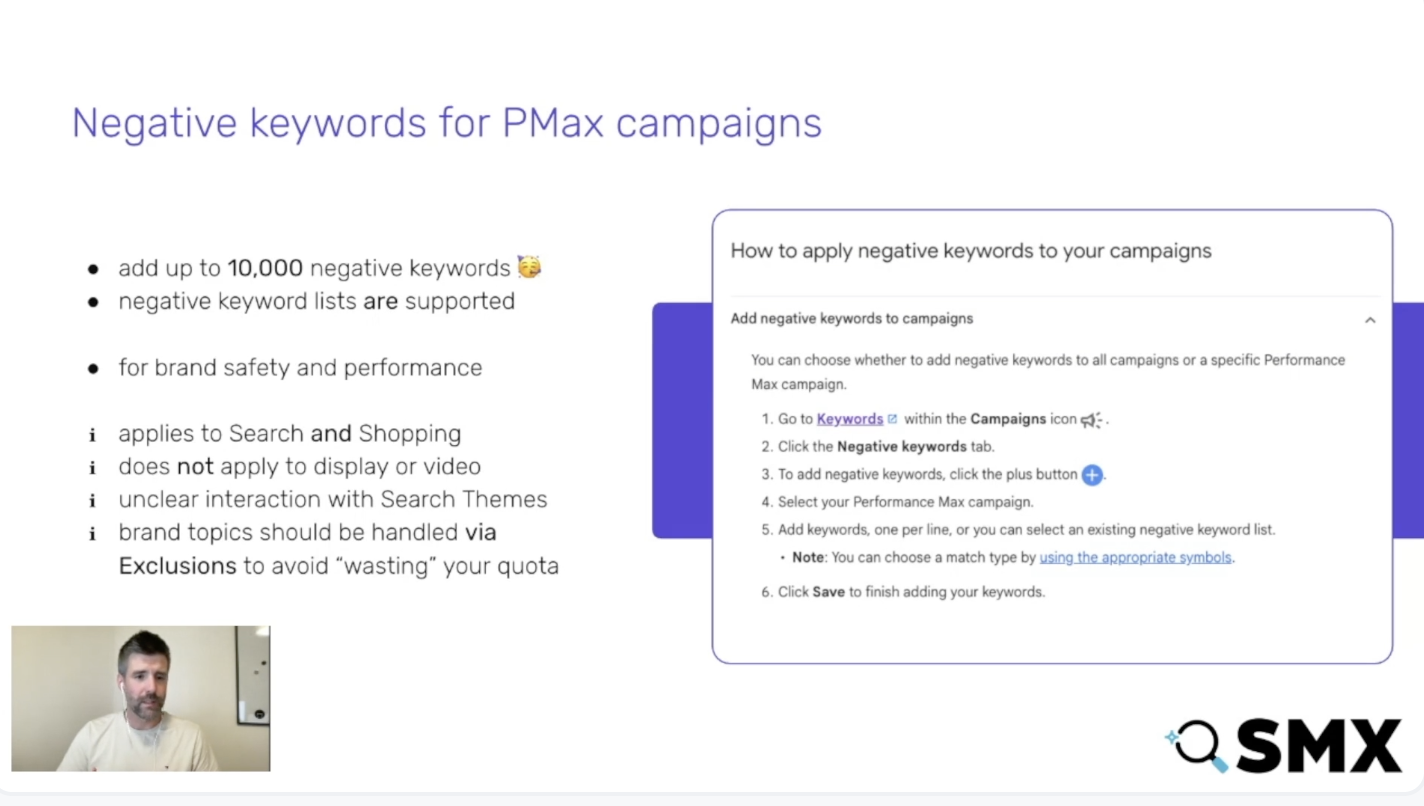
At first, negative keywords in Performance Max were limited, which was frustrating. But now, they are fully supported and much more robust, giving me the control I need to fine-tune performance.
Brand Exclusions
While Performance Max tends to favor brand queries because of their high intent, I’ve noticed that using negative keywords provides a stronger solution for ensuring optimal performance without leakage.
Optimization Strategy
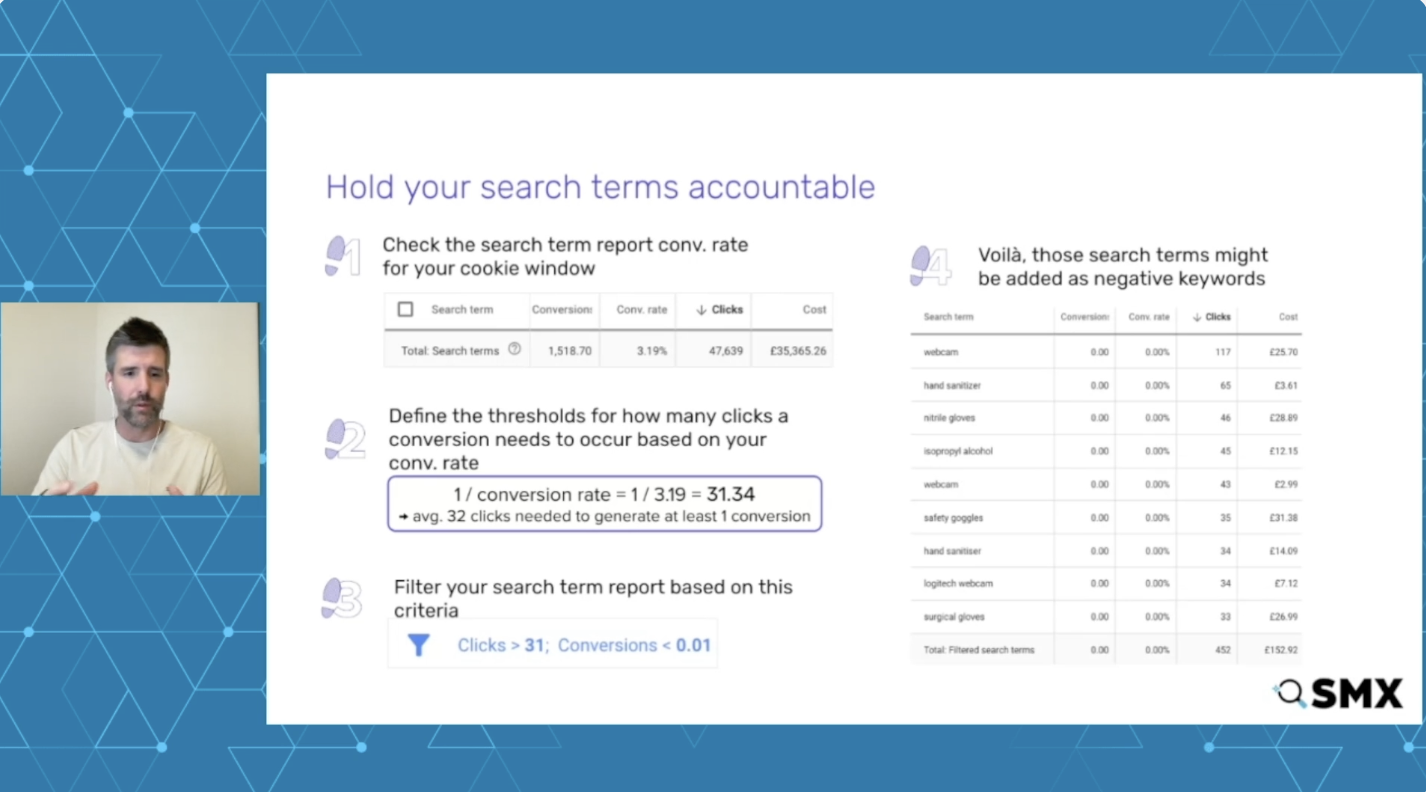
My strategy involves identifying non-performing search terms with higher-than-average clicks but zero conversions, making them strong candidates for exclusion. This approach prevents overcorrection while maintaining a focus on impactful terms.
Modern Optimization Approaches
Instead of spending countless hours manually reviewing search terms, I leverage automation. Using the API for high-volume accounts and scripts for mid-range volumes significantly optimizes my workflow.
Channels and Placements Reporting
Channel Performance Report
One of the tools I now rely on is the channel performance report, offering insights across different networks like Discover and Display. Though interpreting some diagrams can be tricky, it provides valuable data on how different channels perform.
Channel and Placement Controls
Placement Exclusions
Through API and Report Editor data, I focus on excluding specific placements that seem irrelevant or pose risks, particularly in sensitive content areas like politics and children’s videos on YouTube.
Tools for Placement Review
For reviews, especially in other languages, I’ve found that using Google Sheets’ translation function is effective. It helps me quickly determine the relevance of YouTube placements without relying on external systems.
Search Partner Network
The inability to opt out of the Search Partner Network can be frustrating. However, I mitigate this by prioritizing exclusions where performance is subpar compared to the Google Search Network.
Device Reporting and Targeting
Device Analysis
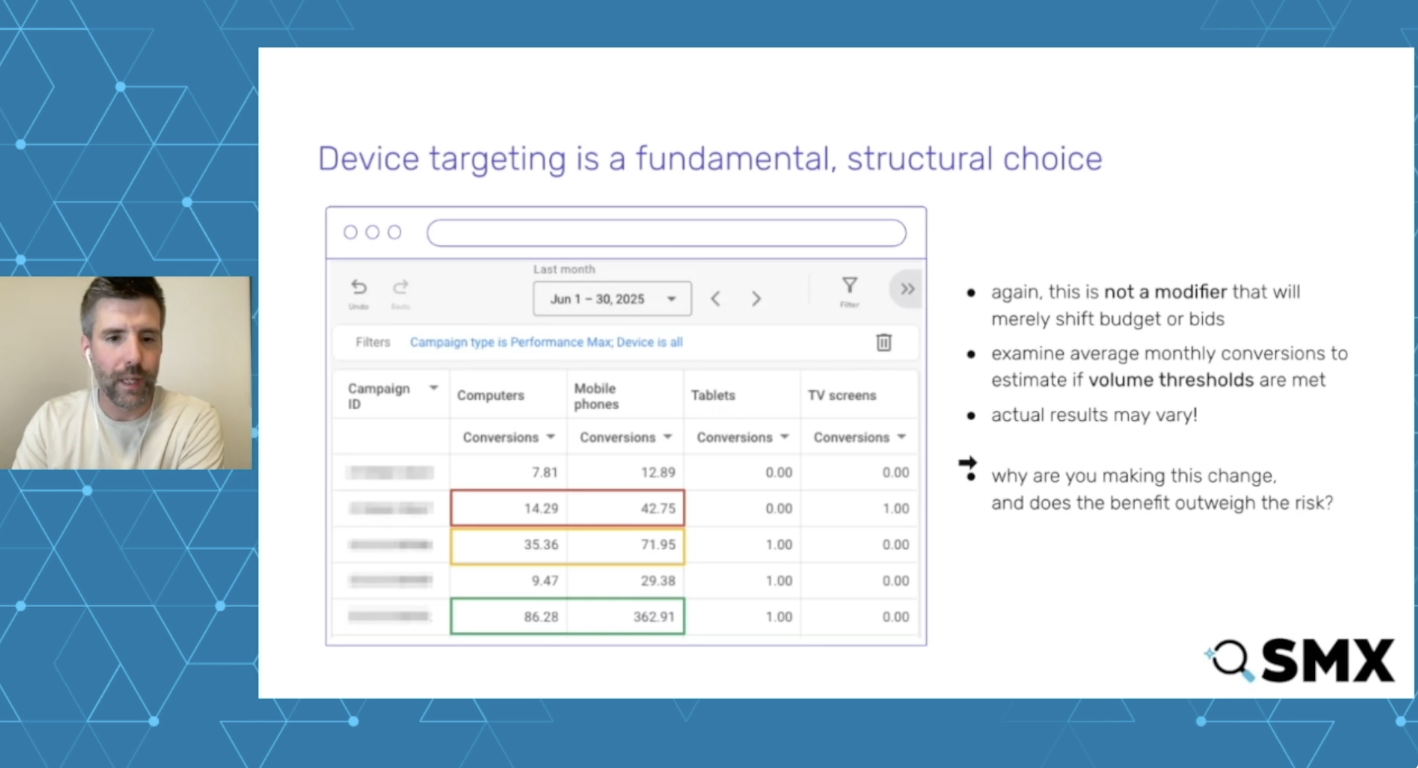
Analyzing device performance provides deeper insights into how specific products perform across different devices. This often reveals advantages or challenges when compared to competitors.
Device Targeting Considerations
Splitting campaigns by device can hurt data volume, impacting machine learning effectiveness. It’s crucial to weigh the benefits of splitting against the potential for data fragmentation.
Conclusion
Reflecting on Performance Max’s evolution, it’s evident that Google has made impressive strides in offering advertisers like myself more control and transparency. While it’s not without flaws, it’s a far more effective tool for ecommerce success now than ever before.
The key lies in understanding available data, using modern tools to streamline processes, and applying performance insights strategically to achieve the best results.
I’ve always found it challenging to keep my Google Ads campaigns running smoothly without a hitch. When I heard about Google Ads’ new diagnostics hub for data connections, I knew I had to explore it. This tool promises to catch issues early, which could significantly enhance my conversion tracking and overall campaign performance.
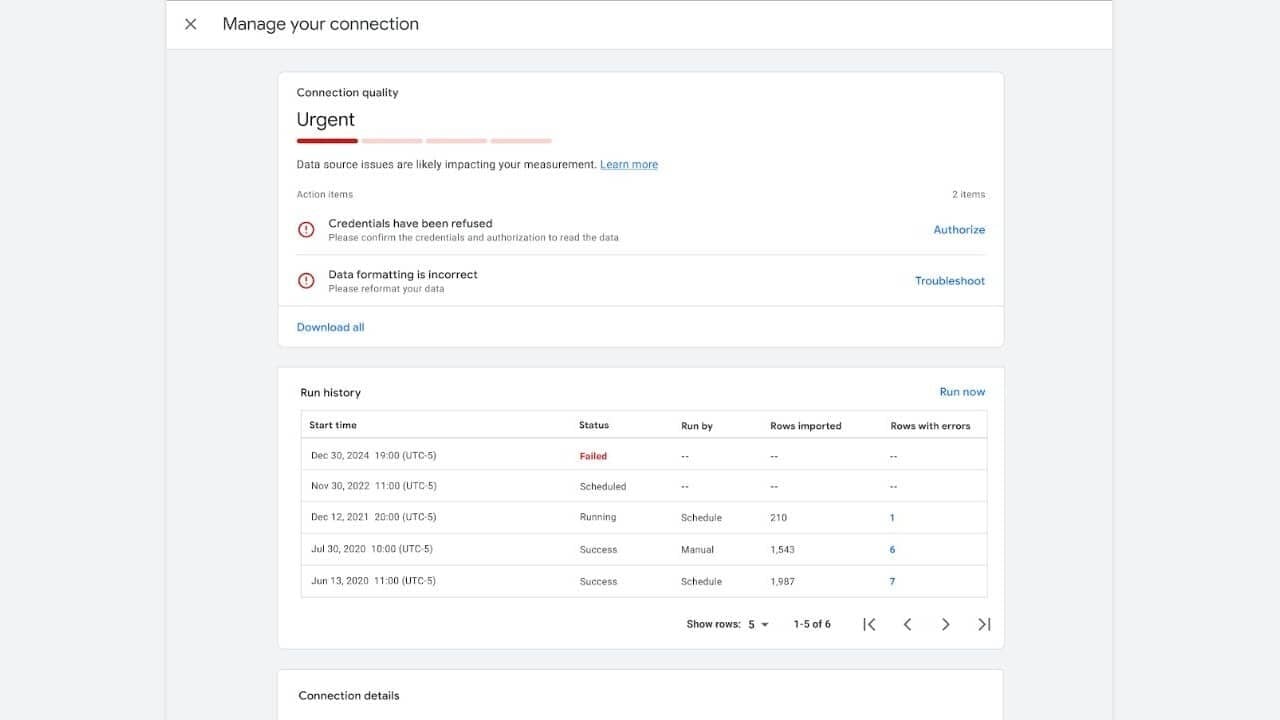
Recently, Google Ads introduced a data source diagnostics feature within their Data Manager. It’s designed specifically to help people like me monitor the health of my data connections. The tool is a lifesaver, flagging issues linked to offline conversions, CRM imports, and tagging mismatches.
How it works. The dashboard is centralized, and it assigns clear connection status labels like Excellent, Good, Needs Attention, or Urgent. It also provides actionable alerts, which is a huge plus for me. I can easily identify problems such as refused credentials, formatting errors, or failed imports. Additionally, there’s a run history that displays recent sync attempts and error counts.
Why we care. I’ve noticed that when conversion data breaks, campaign optimization collapses too. It’s the minor data connection failures that can distort conversion tracking and weaken automated bidding. This diagnostics tool is crucial as it helps my team and me spot and fix issues early, safeguarding our campaign performance and reporting accuracy. If you’re relying on CRM imports or offline conversions like I am, it’s truly a needed safety net.
Who benefits most. If you’re running complex conversion pipelines like I do, including Salesforce integrations and offline attribution setups, this feature is a game-changer. It addresses disruptions that could otherwise ripple through our bidding and reporting process.
The bigger picture. As we increasingly depend on accurate first-party data for automated bidding, having visibility into data pipelines has become as crucial as the campaign settings themselves.
Bottom line. Google Ads has effectively given us an early warning system for data failures, helping us fix broken connections before they affect performance.
First seen. I learned about this update when Digital Marketer Georgi Zayakov shared it on LinkedIn. I’m grateful to Georgi for sharing this valuable insight.