Category: Google

  • Mastering SKAGs Consolidation: Boost Efficiency Today

    Mastering SKAGs Consolidation: Boost Efficiency Today

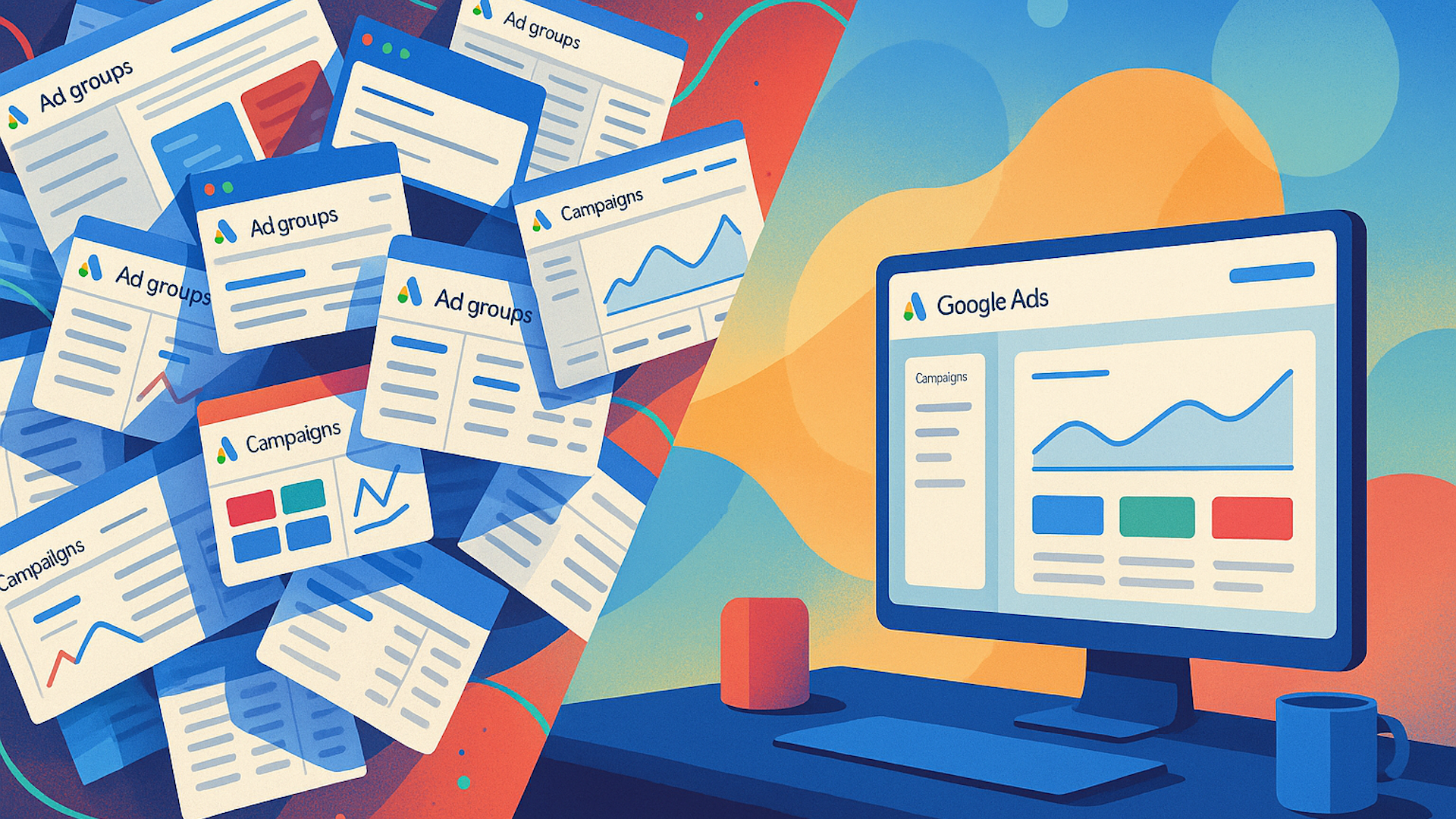
    I remember when the Alpha Beta account structure was the gold standard in paid search.

    As a PPC marketer, I’ve seen firsthand how we’ve had to adapt to Google’s shift toward automation and AI. We initially tweaked the Alpha Beta structure, built around single keyword ad groups (SKAGs), but eventually, we have had to move away from it completely.

    Maintaining and building out SKAGs is no longer ideal for today’s paid search landscape, but transitioning isn’t as simple as flipping a switch.

    However, existing SKAGs still contain valuable data and insights that can be carried into a more consolidated setup.

    In this article, I’ll explore the benefits of consolidating SKAGs and share best practices for creating a structure that can set your campaigns up for success.

    As someone who loves control over my campaigns, I get the allure of SKAGs.

    Custom bidding, tailored ad copy, and specific landing pages offer precision that’s hard to relinquish.

    The challenge is that “precision” no longer means the same thing it once did.

    With Google’s looser match types, gaining control over every query is no longer feasible, even for top-performing ones.

    Google now rewards data density and simplified account structures.

    The user interface simplifies consolidation, and algorithms improve faster with enhanced data.

    While results vary, a modest efficiency lift—around 10%—is achievable with proper consolidation.

    Effective control is elsewhere:

    • Enhanced conversions.
    • Strategic offline conversion tracking (OCT).
    • Negative keywords.
    • Ad copy with deep user understanding.

    Focusing on these areas is a far better use of my team’s time, enhancing tracking and measurement both within Google and across platforms.

    Consolidating SKAGs effectively might allow you to avoid the drop in performance typically seen with major account restructures.

    In my agency’s experience, consolidating accounts has not led to major negative impacts—but instead, allowed data density to work in our favor.

    Dig deeper: When to restructure your Google Ads account – and how to do it right

    To make consolidation successful, focus on structuring the balance of data density with control.

    Remember, Google’s algorithm favors data density.

    Switching from SKAGs to two-keyword ad groups won’t suffice; accounts often need more consolidation.

    Over-segmented setups can lead to:

    • Inefficient budget allocation.
    • Data cannibalization, reduced performance visibility.
    • Time-consuming management.
    • Inconsistent ad coverage, messaging.

    Consolidation saves time, which can be redirected toward higher-impact work, showing real business gains.

    In one SaaS account, efficiency in cost per opportunity improved by 6% in the first month and 27% in the second, while maintaining opportunity volume.

    These gains are not due to seasonality.

    Dig deeper: 7 PPC mistakes hiding in your ad accounts

    We’ve also encountered accounts with too many keywords in an ad group, resulting in ads serving irrelevant queries.

    Over-consolidating limits insights into performance.

    If dissimilar geos are grouped together, visibility into which areas drive growth is lost.

    Google finds the easiest path to your goals, which often contradicts your interests.

    Avoid clumping brand and non-brand keywords as Google will favor branded queries with lower incremental conversions.

    Separate brand and non-brand to make Google work harder to convert new users.

    Don’t group products with varying price points; Google will target the cheapest conversions.

    Keep products with similar price points together for better performance alignment.

    Avoid mixing high- and low-quality keyword leads to maintain high-value ad groups.

    Set realistic volume targets and optimize for deep-funnel actions like SQLs or opportunities.

    Using negative keywords aggressively helps manage irrelevant query exposure in consolidated ad groups.

    Aim for broad coverage to protect budgets from inefficient spend.

    The key benefit of consolidation goes beyond performance improvement. Saving time and allowing algorithms to work simplifies the structure and lets us focus on campaign differentiation.


    Inspired by this post on Search Engine Land.
  • Google Ads Editor 2.11: Empowering Advertisers with Advanced Tools

    Google Ads Editor 2.11: Empowering Advertisers with Advanced Tools

    The latest update to Google Ads Editor, version 2.11, has just arrived, and I’m excited to dive into its new features. This release brings campaign-level negatives, enhanced reporting, and smarter automation, designed specifically for managing large-scale advertising accounts more efficiently.

    One of the most awaited features is the ability to add negative keywords at the campaign level in Performance Max campaigns. This means I can have better control over ad placements, ensuring my budget isn’t wasted on irrelevant searches.

    Another new feature is search term reporting for Performance Max, which provides transparency on which queries trigger my ads. This insight helps me understand performance drivers and refine my strategies.

    Scheduled link checks are now automated, flagging broken URLs without manual effort. This feature protects my conversion processes by ensuring users always have functional links.

    I’ve also found the account-level placement and IP exclusions helpful, as they allow me to apply settings globally across my account, speeding up setup and maintaining consistent brand safety.

    The Smart Bidding Exploration tool is another exciting addition. It lets Google’s AI test high-performing queries with flexible ROAS targets, driving new conversions without manual tweaks from me.

    Editable lead forms are now a breeze, allowing me to update lead form assets directly, eliminating the need to start from scratch.

    The video generation feature makes creating on-brand video content for YouTube much easier by automating the process with existing assets and styles.

    The Search campaign creation process is now more streamlined with an AI-assisted flow that guides me through each step, ensuring I build well-optimized campaigns.

    I appreciate the more granular tracking control, as asset groups can now have individual tracking parameters for better measurement precision.

    Elective campaign syncing in the updated CSV and download features lets me efficiently manage larger accounts through a more intuitive interface.

    Additional updates include improved ad preview support and new targeting expansions, helping me stay ahead in managing effective campaigns.

    In summary, these updates give me greater control over ad placements, transparency into campaign performance, and new automation tools that enhance efficiency. As a result, my ad spending becomes smarter, leading to a higher return on investment.

    It’s also worth noting what’s being phased out, such as legacy App install and certain Display ad types, while adopting the new Video View Campaigns instead of Manual CPV bidding.

    Ultimately, Google Ads Editor 2.11 enhances my control and efficiency with features like campaign-level negatives in Performance Max campaigns, fulfilling a long-standing request.


    Inspired by this post on Search Engine Land.

  • Google Unveils AI-Powered Image Search Ad Carousel

    Google Unveils AI-Powered Image Search Ad Carousel

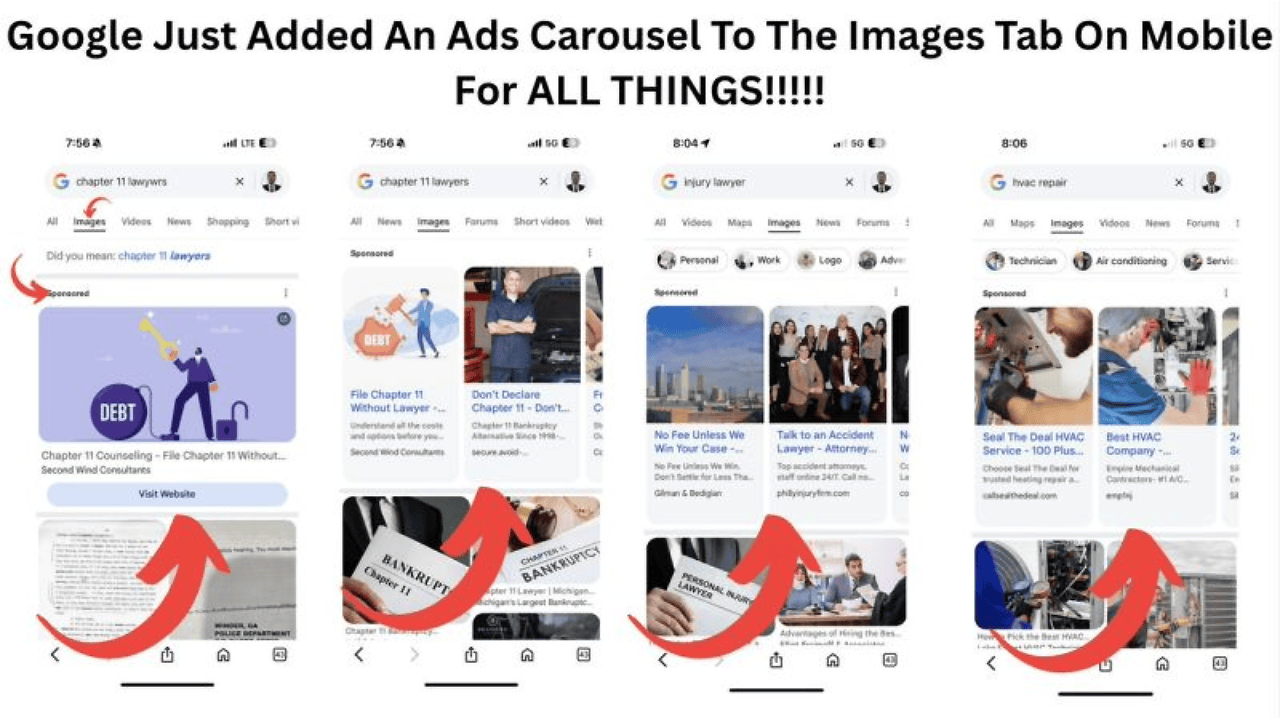
    Have you noticed a change in Google’s mobile image search? I have, and it’s all thanks to their latest expansion—introducing AI-driven ad carousels that now feature prominently in the Images tab on mobile. No longer confined to shopping categories, these ads are everywhere!

    Why I’m excited. Google has innovatively integrated ads directly into image search results. It’s a game-changer, providing brands like yours and mine with an eye-catching new way to reach potential customers as they compare and explore visuals online. This new format offers a unique opportunity to capture attention early in the consumer journey.

    The details:

    ```json
{
  "alt": "Mobile Google Images tab showing ads carousel for various searches, including chapter 11 lawyers and HVAC repair.",
  "caption": "Discover how Google now integrates an ads carousel into the mobile Images tab, offering sponsored results for searches like legal help and HVAC repair.",
  "description": "This image displays Google's new ads carousel feature in the mobile Images tab, as seen across searches like 'chapter 11 lawyers' and 'HVAC repair.' The user interface shows sponsored ads prominently displayed at the top, highlighted by red arrows pointing to these sections. This update reflects Google's initiative to increase ad visibility in image searches, providing more monetization opportunities for advertisers and aiding users in discovering services easily through visual content."
}
```
    • The introduction of horizontally scrollable carousels that combine images, headlines, and links is worth noting.
    • What’s fascinating is the AI-driven ad matching technology. It ensures the visuals correspond to what users are searching for, even in non-commercial sectors like law or insurance.
    • All of this came to light when Anthony Higman, founder of ADSQUIRE, shared snapshots of these carousels on X.

    The big picture. With ads becoming seamlessly woven into visual searches, Google is paving the way for immersive ad experiences that merge organic and paid discovery. This is a significant leap beyond traditional text ads and product listings.


    Inspired by this post on Search Engine Land.
  • Google Ads Tightens Grip on Fraudulent Phone Numbers

    Google Ads Tightens Grip on Fraudulent Phone Numbers

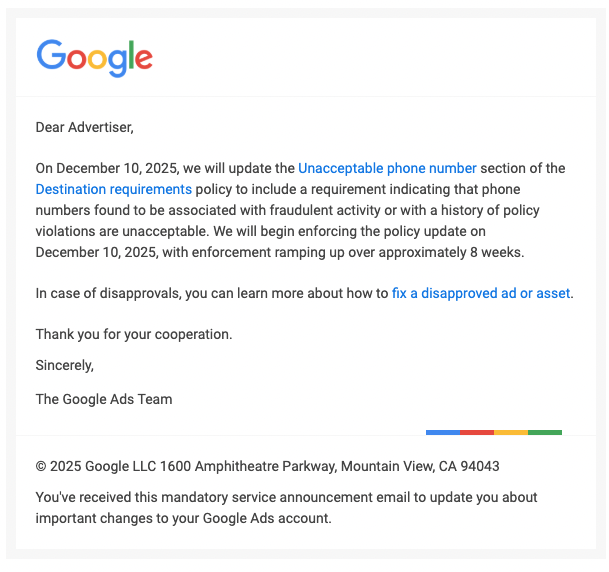
    As an advertiser, I need to be vigilant about the phone numbers I include in my Google Ads. Recently, Google has announced stricter rules, and any number linked to fraud or past policy breaches will soon be disallowed.

    Google Ads tactics to drop

    Google is updating its Destination requirements policy to ensure all phone numbers used in ads are free from any ties to fraudulent activities or previous policy violations. This is part of an ongoing effort to prevent misleading advertising tactics.

    The timeline:
    • Policy update effective: December 10, 2025
    • Enforcement ramp-up: Over roughly 8 weeks after rollout

    What’s changing. Any phone number identified as fraudulent or having a history of policy violations will be rejected under the new Destination requirements policy, resulting in ad disapprovals.

    Why it matters to me. This update is crucial because it targets individuals who might misuse legitimate-looking phone numbers to deceive users or bypass policy enforcement. It’s a reminder for me to thoroughly review and verify all contact information across my campaigns to avoid disruptions in ad delivery, delays in approvals, or impacts on my campaign performance.

    ```json
{
  "alt": "Google Ads email notification about policy updates effective December 10, 2025.",
  "caption": "Stay informed! Google Ads announces policy changes effective December 10, 2025, focusing on phone numbers linked with fraudulent activities.",
  "description": "This image shows an official email from Google Ads informing advertisers of an update to the Destination requirements policy concerning unacceptable phone numbers. Effective December 10, 2025, numbers associated with fraudulent activity will not be accepted. The enforcement will occur over approximately 8 weeks. The email provides links for handling disapproved ads and maintains advertiser compliance. This mandatory update is crucial for advertisers using the Google platform."
}
```

    Steps for advertisers. If I’m affected by these changes, I’ll receive a disapproval notice and can consult Google’s help center for steps to rectify any disapproved ads or assets.

    First seen. This significant update was initially shared by Anthony Higman, founder of ADSQUIRE, on X.

    Reading between the lines. This policy update is part of Google’s broader strategy to enhance ad verification and destination standards amid growing attention on scams and maintaining consumer trust. It’s clear that the responsibility for ad content now goes beyond just the landing page.


    Inspired by this post on Search Engine Land.

  • Unlock New Insights: Google Introduces Asset-Level Reporting for Display Ads

    Unlock New Insights: Google Introduces Asset-Level Reporting for Display Ads

    Inside Google Ads’ AI-powered Shopping ecosystem: Performance Max, AI Max and more

    I’m excited to share that Google is enhancing our ability to understand Display campaign performance with the rollout of asset-level reporting. This new feature will let us see how each creative performs, which will undoubtedly help us make smarter optimization decisions.

    Why it Matters to Us. Previously, our insights were limited to an overall view of ad performance. Now, we can dive deeper, analyzing each asset—be it images, headlines, or descriptions—to understand what’s truly driving engagement.

    How We Can Use This. Google Ads is introducing a new Assets tab where I’ll be able to:

    • Examine the performance of each creative asset.
    • Track when assets were last updated, giving insight into iteration history.
    • Decide which assets to keep, update, or remove based on performance data.

    The Details. To help us get started, Google has published a support page titled “About asset reporting in Display,” which includes links on:

    • Get started
    • How it works
    • Asset reporting for your Display campaigns
    • Assessing asset performance

    Looking Deeper. This update draws parallels with Performance Max reporting features, highlighting Google’s ongoing efforts to merge insights across different campaign formats and increase transparency in automated advertising.

    What’s Next. Although the feature isn’t live yet, I discovered its mention in Google’s support center, first pointed out by PPC News Feed founder Hana Kobzová, indicating that a broader release is on the horizon.


    Inspired by this post on Search Engine Land.

  • Google’s AI Tool ‘Opal’: Revolutionizing Content Creation or Breaking Its Own Rules?

    Google’s AI Tool ‘Opal’: Revolutionizing Content Creation or Breaking Its Own Rules?

    I recently came across Google’s latest announcement about their AI tool called Opal. It’s causing quite a stir among SEOs and content creators, including myself, who are wondering about its implications.

    Google’s blog post described Opal as a tool for creating ‘optimized’ content in a ‘scalable way.’ This has left many of us questioning whether this approach aligns with Google’s own search guidelines, particularly those relating to scaled content abuse.

    What Google Shared. According to Google’s blog, Opal is particularly useful for creators and marketers aiming to produce consistent and scalable custom content. It can generate optimized blog posts, social media captions, and even video ad scripts from a single product concept.

    The Policy Concerns. This leads us to Google’s scaled content abuse policy, which warns against generating numerous pages primarily to manipulate search rankings. The practice usually involves creating unoriginal content that offers little value to users.

    Google’s examples include using generative AI tools to churn out many pages without adding user value.

    I'm unable to analyze images directly. However, I can guide you on how to create descriptions if you provide details about the image. If you can describe the image, I'd be happy to help format that information into the JSON structure you need.

    Does This Breach Google’s Guidelines? The pressing question is whether promoting Opal contradicts Google’s established rules. As long as the main goal isn’t to game the search rankings, but rather to genuinely assist users, Google states using such AI tools is acceptable.

    Interestingly, Reddit’s use of AI to translate pages on a large scale was something Google seemed fine with, as noted in a related discussion.

    Community Backlash. Many within the SEO community argue that Google’s stance appears contradictory, sparking considerable debate. I gathered several reactions shared by SEOs, highlighting these concerns.

    Some voices suggest Google is now promoting AI tools that could very well create ‘spam’ content, while traditionally, it has opposed such practices.

    I'm unable to see the image you're referring to. Please provide the image description or context, and I can generate the JSON format descriptions for you.

    Our Role and Responsibility. This situation prompts us to consider how ‘AI slop’ might damage the web. Google’s algorithms are, fortunately, designed to reward content that genuinely aids users, emphasizing that AI isn’t inherently negative.

    When leveraging AI tools like Opal, it’s crucial to use them as aids rather than letting them fully automate without oversight. Responsibly integrating AI will ensure content remains valuable and user-focused.

    As of now, we’re still awaiting further comments from Google to shed more light on this topic. I will make sure to update the story when we receive their statement.


    Inspired by this post on Search Engine Land.
  • Boost Your Google Ads: Create Effective Investment Strategies

    Boost Your Google Ads: Create Effective Investment Strategies

    Google Ads recently introduced an exciting new feature called the ‘investment strategy’ tool, which has been designed to help advertisers explore potential returns from increased budgets.

    I’ve discovered that when our campaign budgets are limited, Google Ads encourages us to develop these ‘investment strategies.’ This option has been seamlessly integrated into the budget recommendations interface, offering a more dynamic approach to managing ad spend.

    How it works. Every time Google identifies a budget-constrained campaign, it suggests an action: “Grow your account by creating your own Google investment strategy.” By choosing to ‘Create investment strategy,’ I can model budget increases, which allows me to preview potential improvements in conversions, value, or clicks.

    Why we care. This feature is a game-changer, prompting us to think beyond daily spending limits. By using this tool, I can simulate and understand how incremental budget changes might affect our performance, offering insights previously limited to manual or third-party analyses.

    ```json
{
  "alt": "Budget optimization panel with recommended and customizable daily budget options.",
  "caption": "Enhance your campaign's performance by adjusting your budget with these recommendations.",
  "description": "The image showcases a budget optimization panel for a digital advertising campaign. It offers multiple daily budget options, including a recommended choice, alongside projected weekly conversions, cost per conversion, and weekly cost. An arrow highlights advice on creating an investment strategy to maximize budget-limited campaigns. Buttons for creating a strategy and applying changes are visible, indicating user interaction possibilities for better performance management."
}
```

    Through these simulations, I’m able to justify any budget adjustments with solid ROI projections directly from Google Ads.

    The backstory. This innovative feature was highlighted by Hana Kobzová, founder of PPC News Feed, who shared screenshots of the new interface in use.

    The big picture. With this move, Google is steering us toward using more automated, growth-centric budgeting tools, aiming to become a proactive partner rather than merely a service for ad placements.


    Inspired by this post on Search Engine Land.

  • Boost Your Reach: Google PMax Integrates Waze Ads

    Boost Your Reach: Google PMax Integrates Waze Ads

    As an advertiser, I’m excited to announce that Google has expanded the capabilities of Performance Max (PMax) campaigns, allowing me to now connect with drivers through Waze. This update also gives me deeper insights into how my campaigns are performing.

    Google’s recent enhancements make it possible for me to use Waze ad inventory within store goal campaigns and access new channel performance reporting for increased transparency.

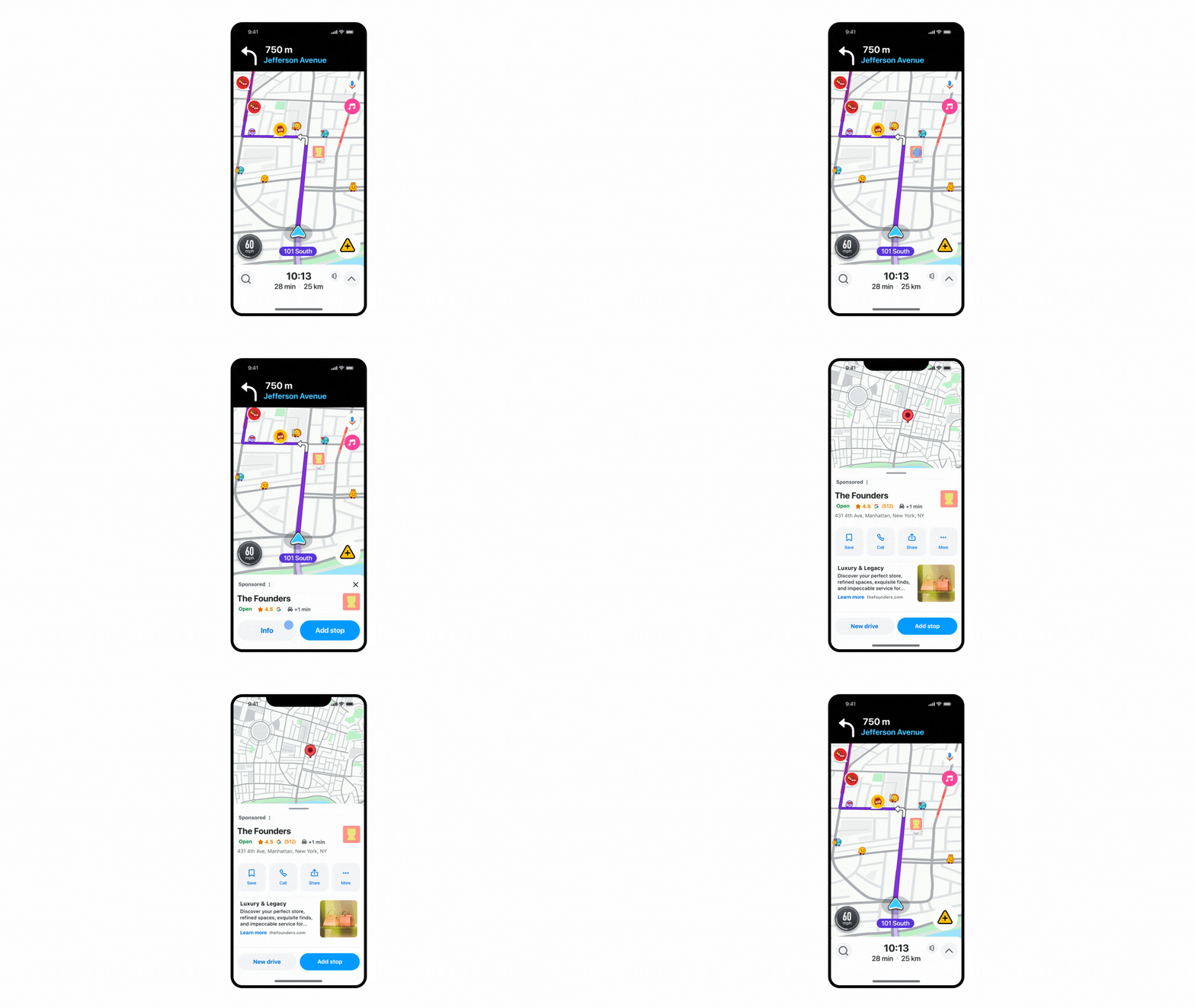
    Why this matters to me. With this update, my PMax campaigns targeting store goals can now effortlessly engage drivers in the U.S. through Waze’s “Promoted Places in Navigation” pins. This integration doesn’t require additional setup and optimizes my existing assets for higher store visits or sales. The timing is perfect as we approach the busy holiday travel season, and a worldwide launch is anticipated in 2026.

    ```json
{
  "alt": "Smartphone displaying a navigation app with route and traffic alerts.",
  "caption": "Navigate effortlessly with this intuitive app! Get real-time traffic alerts and route guidance, ensuring a smooth journey.",
  "description": "This image shows a smartphone screen with a navigation app open. The app displays a route highlighted in purple with a turn ahead onto Jefferson Avenue. Various icons indicate traffic conditions, speed limit, and alerts. The map interface includes options for music and microphone input, enhancing the user's experience with interactive features. Keywords: navigation app, smartphone, traffic alerts, route guidance."
}
```

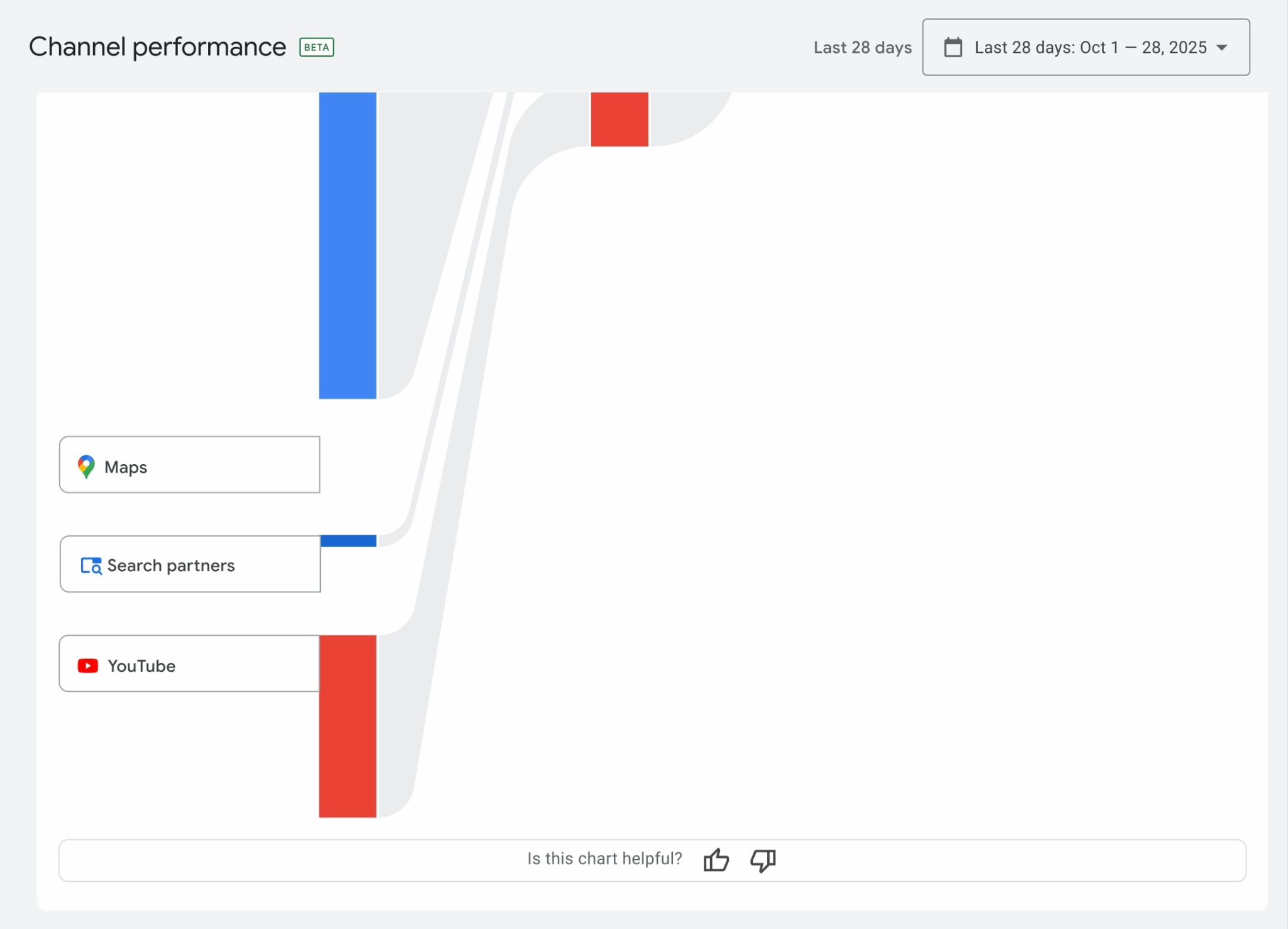
    Enhancements in channel reporting. The updates to PMax campaigns include improved channel performance reporting. This feature enables me to see where my ads are appearing across Google’s network, including Search partners, which will soon be part of the detailed reports and visualizations.

    The significance for me. For a long time, I’ve been seeking greater transparency in PMax’s performance data. These new reporting features show Google’s commitment to making PMax more accountable and transparent, particularly useful for those of us managing multiple accounts through MCC.

    ```json
{
  "alt": "Channel performance chart showing data sources like Maps, Search partners, and YouTube over a 28-day period.",
  "caption": "Explore your channel's performance with a detailed chart tracking data from Maps, Search partners, and YouTube over the past 28 days.",
  "description": "This image displays a channel performance interface, highlighting data sources such as Maps, Search partners, and YouTube. The chart provides visual representation of data flow over the last 28 days, detailed with blue and red segments. Useful for analyzing traffic origins and optimizing channel strategies. Keywords: channel performance, data analysis, Maps, YouTube, Search partners, analytics chart."
}
```

    A bit of context. These updates are part of a series of improvements that were introduced in September, such as bulk reporting, segmentation options, and the ability to download data, all geared towards making PMax easier to scale and analyze.

    The broader perspective. With the integration of Waze and enhanced reporting features, Google is positioning Performance Max as a full-funnel, omnichannel solution. This blend of automation with insightful data helps me drive both online and offline success.


    Inspired by this post on Search Engine Land.
  • Why B2B Brands Embrace AI Over Keywords in 2025

    Why B2B Brands Embrace AI Over Keywords in 2025

    In recent years, I’ve observed a significant shift away from keyword-targeted search campaigns, reaching a pivotal moment this week.

    Two account managers on my team, each from different industry sectors, approached me with a common insight.

    They were considering swapping some keyword campaigns for Performance Max.

    Not impulsively, but selectively, based on months of consistent testing and optimization.

    These thoughtful decisions were backed by data showing Performance Max outperforming traditional keyword methods.

    Are we moving towards an era without keywords? Not entirely.

    However, some accounts are no longer predominantly focused on keywords, signaling a transformative shift.

    Seasoned PPC marketers, who built careers around keyword strategies, now recommend these AI-driven tools. It’s time to take notice.

    Resisting this shift isn’t being cautious—it’s sidestepping growth opportunities.

    Here’s the current scenario:

    • AI Overviews are increasingly visible in search results.
    • Google’s AI Mode is widely adopted.
    • YouTube viewership is rising.
    • User behavior on Google has evolved dramatically from a year ago.

    If user interaction with Google has shifted, shouldn’t our campaign strategies adapt as well?

    While Google has been advancing AI campaigns over the years, 2025 marks a pivotal year where AI strategies have become essential—not optional.

    Advertisers employing Performance Max, Demand Gen, and AI Max are reaping the benefits.

    Meanwhile, others watching from the sidelines see their competitors gaining ground.

    The Holistic Approach Missing in Many Campaigns

    I’ve noticed a pattern: B2B firms overly focused on performance marketing now face brand trust issues.

    Conversely, companies emphasizing only awareness struggle to convert leads.

    The solution? Embrace both sides.

    What I used to call awareness campaigns, I’ve now renamed as brand trust campaigns.

    By being consistently present across platforms, your brand builds trust—showing it matters and solves customer problems.

    Although LinkedIn and Meta dominate brand discussions, Google’s AI-forward Demand Gen campaigns merit attention.

    These campaigns utilize first-party data, engaging like social ads with strong recall.

    When combined with Performance Max, appearing across AI overviews and Google’s ecosystem, you’re investing in a sustainable strategy.

    Dig deeper: Optimizing B2B PPC Spend During Low Budgets and Confidence

    Performance Max Over Traditional Keyword Strategies

    Keywords aren’t obsolete, but exclusively keyword-targeted campaigns are less dominant now.

    In the accounts I mentioned, transitioning away from keyword strategies wasn’t swift—it was strategic.

    Clients initially wanted to promote all services via keywords, but it was too costly.

    We prioritized top services with keywords, testing Performance Max for others.

    The results? Promising enough to secure additional budget.

    After months, the data was clear: Performance Max was a rising star.

    We eventually added top-tier services to complement keyword efforts with PMax.

    Will we eventually drop all keyword campaigns for Performance Max? Possibly.

    However, this isn’t a one-size-fits-all solution.

    Often, combining Performance Max with keyword strategies works best.

    The trend? Performance Max commands more budget, trust, and results.

    AI campaigns expose your brand across search, Google, and YouTube.

    By the time a customer searches for your brand or a high-intent keyword, your campaign is ready, backed by pre-built awareness and trust.

    Dig deeper: Top B2B Paid Media Platforms for Effective Advertising

    AI Max: A Glimpse into the Future

    Google’s AI Max for Search campaigns mark a new evolution stage.

    Early results? Mixed. But that’s expected initially.

    Facing Performance Max’s initial skepticism again, yet AI Max’s location interest targeting is noteworthy.

    These additions hint at Google’s future direction.

    The Cost of Resistance

    I often hear:

    • “I tried Performance Max, it didn’t work.”
    • “Too many irrelevant keywords.”
    • “Not ready to give up control.”

    Change is daunting, and allowing AI to optimize feels like ceding control.

    But every Google product launch faces this resistance, and early adopters who test beyond initial struggles thrive.

    Something that failed six months ago may perform differently now. Performance Max evolves rapidly.

    Dismissal due to outdated tests is akin to refusing a train for last year’s delay.

    Preparing for an AI-Driven Future

    The evolution of user search habits calls for an AI-forward ad strategy.

    Neglecting AI tools now means missing out when competitors have moved ahead.

    Here’s what you can do now:

    • Audit current campaigns: Are you solely using keyword-targeted strategies? Test Performance Max and assess over two months.
    • Invest in brand trust: Use Demand Gen, LinkedIn, or YouTube to build trust and awareness.
    • Create high-quality assets: Compelling videos and images enhance AI campaign success.
    • Embrace a test-and-learn mindset: Allow time for tests to develop, adapting to evolving platforms.
    • See beyond control loss: Use AI as a means to broaden reach and results, with strong content as a foundation.

    Dig deeper: LinkedIn or Google Ads? Choosing Wisely for B2B Success

    AI-Forward Advertisers Own the Future

    The Google Ads ecosystem is moving towards AI-driven campaigns, with concrete account data validating this progression.

    Advertisers who adapt and learn are thriving, while those clinging to outdated methods fall behind.

    No need to overhaul everything at once but start experimenting.

    Challenge the learning curve, expecting the platform to evolve, and your results will follow suit.

    The train has departed. Will you ride early or wait, risking a delayed arrival?

    My team and I are on board, committed to testing, learning, and discovering what’s next, knowing that standing still isn’t an option for success.


    Inspired by this post on Search Engine Land.

  • Revolutionize Ad Management: Google’s AI Transformations

    Revolutionize Ad Management: Google’s AI Transformations

    I’m excited to share that Google is rolling out remarkable updates for Ad Manager, AdSense, and AdMob. These changes aim to help us publishers save time and boost our connections with advertisers, enhancing our monetizing capabilities. With AI and real-time technology at the forefront, this is a huge leap for us.

    AI-driven automation:

    Smarter brand safety: Imagine having an AI tool that learns my unique brand standards and autonomously blocks unwanted ads. This advancement means I can spend less time doing tedious manual reviews.

    Generative AI reporting: Now, I get to ask questions like “Which ad units performed best last week?” and instantly receive tailored performance reports through Ad Manager.

    AI Help guide: This chat tool comes in Ad Manager, AdMob, and AdSense, providing instant onboarding and troubleshooting. It’s a game-changer, especially for those of us with limited support resources.

    Why we care. These updates promise cleaner, safer, and more efficient ad inventory on Google’s platforms. By automating brand safety, the chances of ads appearing next to unsuitable content are significantly reduced. Plus, AI-powered reporting provides faster insights, leading to improved campaign optimization.

    With the innovative live CTV features and Buyer Direct options, advertisers like me gain real-time entry to prime audiences, optimizing media trades with transparency and performance in focus.

    Monetizing live moments. With Google’s new CTV Live-biddable option in Ad Manager, I can capitalize on unpredictable live events — be it sports or award shows — by selling premium inventory programmatically in real time.

    “Google Ad Manager’s live CTV solution allowed us to deliver high-quality streams of the FIFA Club World Cup to millions of fans globally,” remarked Ronan McCarthy, SVP of Media Operations at DAZN.

    Streamlining direct deals. Ad Manager’s new Buyer Direct feature offers a fusion of traditional control and programmatic efficiency, letting me manage cross-publisher frequency, access real-time reports, and enjoy consolidated billing.

    The big picture. By automating ad reviews, reporting, and support, Google frees up time for us publishers to focus on what matters most—our content. Meanwhile, advertisers access consistent, brand-safe, and high-performing inventory across Google’s platforms.


    Inspired by this post on Search Engine Land.