Category: Google

  • Google AI Mode to Transform Complex Searches, Enhancing User Experience

    Google AI Mode to Transform Complex Searches, Enhancing User Experience

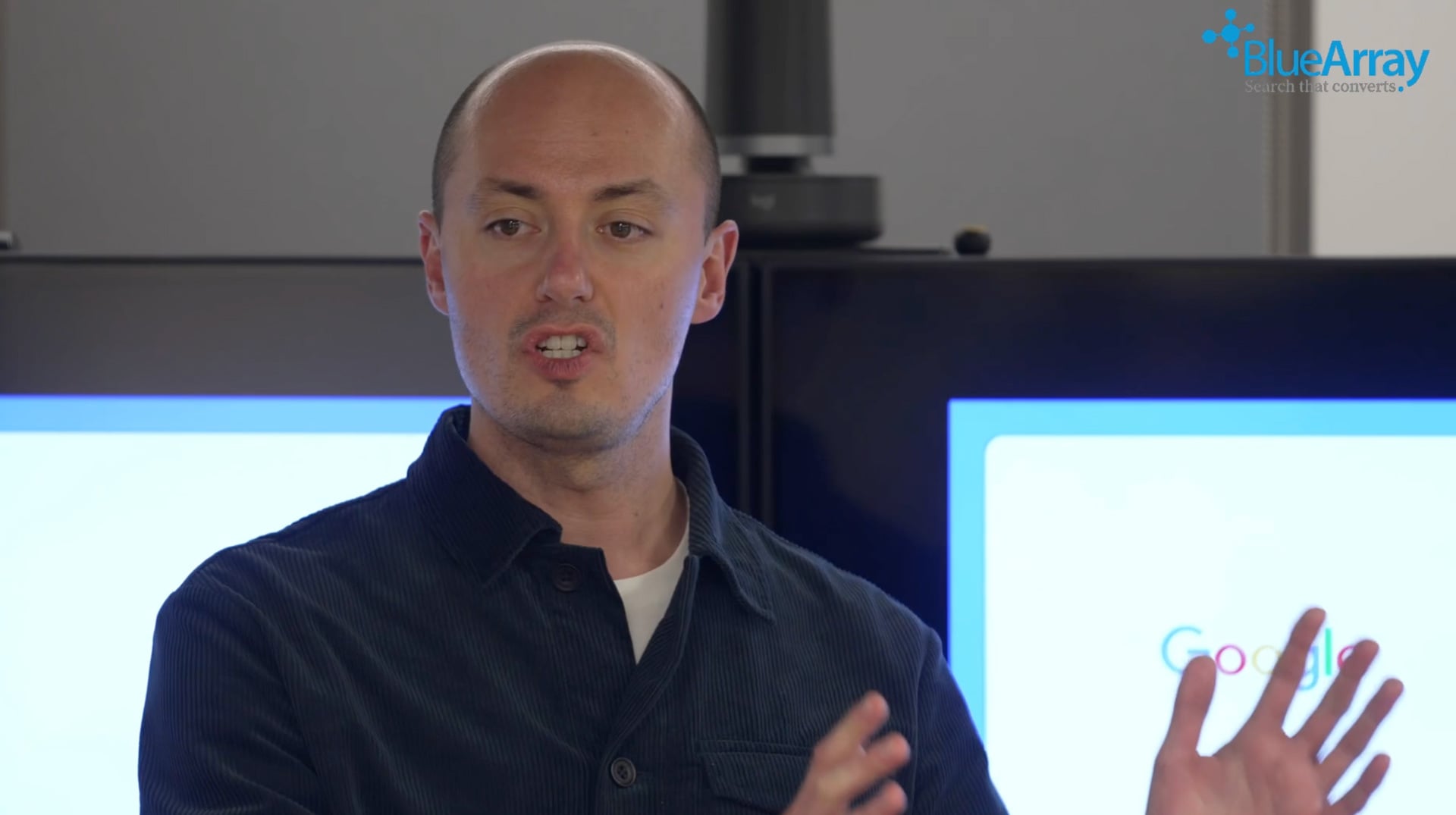
    I attended a fascinating talk yesterday at the Simply Business headquarters in London, where Jonathon Heard, the Industry Head, Insurance at Google, shared some groundbreaking insights. He revealed that Google Search is gearing up to direct complex queries straight to AI Mode, effectively bypassing the traditional search process.

    Heard also hinted at future enhancements in Google Search Console, aiming to provide separate reports for AI Mode and AI Overviews.

    Bypassing Google Search. According to Heard, with the advent of Gemini 3, complex queries will be automatically channeled through AI mode, a feature currently being tested in the US.

    One curious attendee asked about the implications of these changes. Heard confirmed that any query entered in the standard Google search could indeed be redirected to AI Mode. This revelation sparked a lively discussion, as the audience realized the significant shift this represents.

    Although Google previously hinted that AI Mode might become the default search experience, they later retracted those statements. Robby Stein from Google downplayed the speculation, emphasizing the company’s focus on easy access to AI Mode for interested users.

    AI Mode & AI Overview Search Console data. During the panel discussion, Simon Schnieders, Founder of Blue Array, inquired about the potential for separate AI Mode and AI Overview data within Search Console. Currently, these data points are lumped together, making it challenging to assess their individual performance.

    Heard responded that Google is actively exploring this possibility, acknowledging the need for new data structures as search interfaces evolve. Schnieders welcomed this openness, noting it was the first time a Google representative had mentioned it.

    Heard further elaborated, highlighting the rapid pace of change and the necessity to adapt reporting structures to keep up. He mentioned that although nothing is publicly announced yet, the transformation in reporting is a constant conversation within Google.

    Here is the video of the event:

    Why we care. I’ve reached out to Google to confirm the accuracy of Jonathan Heard’s statements. If Google transitions to an AI-centric approach bypassing traditional search, it will dramatically alter how users discover websites, content, and services.

    Additionally, Google’s reticence to discuss AI Mode and Overview data in Search Console since the SGE demo could signal substantial upcoming changes. We will update this story as soon as we receive new information.


    Inspired by this post on Search Engine Land.


    crushpress.ai community screenshot
  • Simplify Compliance with Google Ads’ New Political Content Setting

    Simplify Compliance with Google Ads’ New Political Content Setting

    When I heard about Google Ads’ latest update, I was excited to see how it could make life easier for advertisers like me. Google Ads now offers the ability to set a default, account-level declaration for political content. This change simplifies compliance, especially as new transparency regulations are coming into play.

    I remember when they first introduced the campaign-level setting back in August 2025. Quietly, without much fanfare, Google extended this feature to the account level, which means I no longer have to update each campaign individually. This enhancement allows me to define my political-advertising stance once and apply it across all my future campaigns.

    Why this matters to us. Having a more streamlined approach is crucial for advertisers who want to stay on top of political-ad regulations. With the EU’s TTPA rules taking effect in October 2025, these new features provide a much-needed consistency.

    Now, I can choose within my campaign settings:

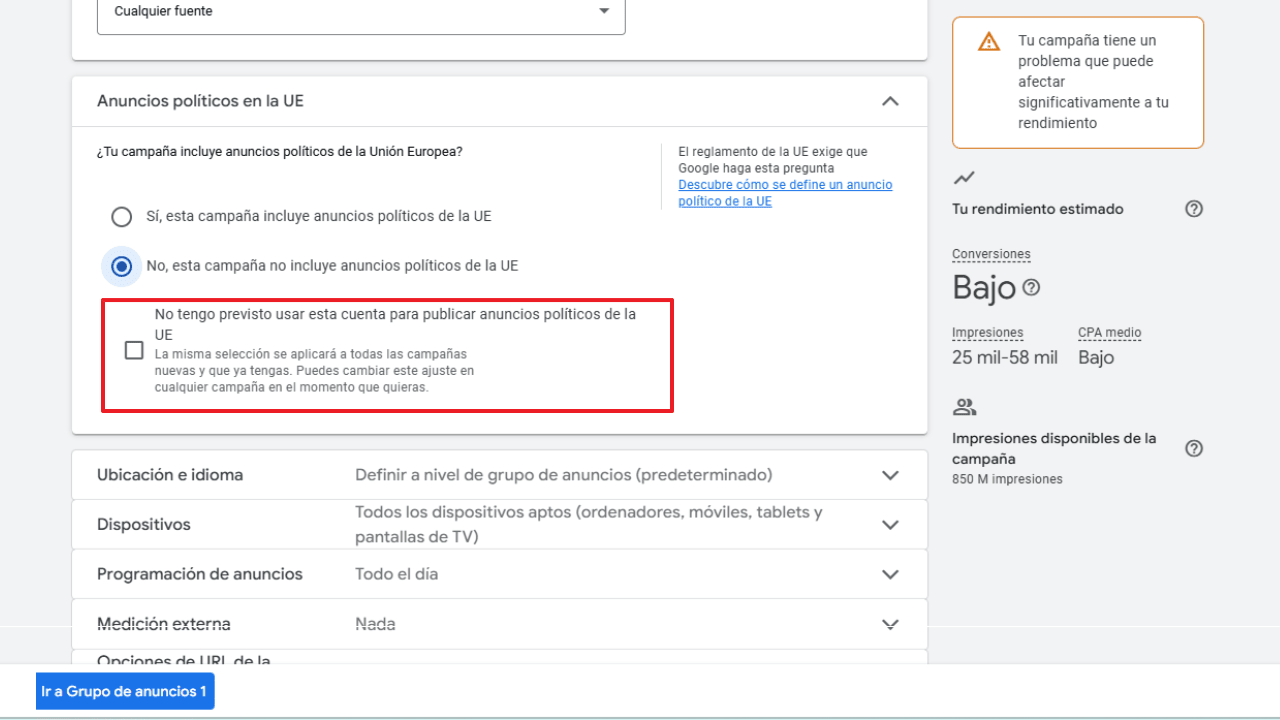
    • “I don’t intend to use this account to run political ads in the EU”
    • Or declare that my campaigns will include political content.
    ```json
{
  "alt": "Screenshot of a Google Ads setting for political ads in the EU, highlighting campaign performance issues.",
  "caption": "Navigating Google Ads settings for EU political campaigns can help address potential performance issues effectively.",
  "description": "This image displays a section of the Google Ads settings page concerning political ads in the EU. The options include whether the campaign includes EU political ads and a checkbox for not using the account for such ads. The sidebar shows an alert about a performance-affecting issue, along with estimated performance metrics like conversions and impressions. Keywords: Google Ads, EU political ads, campaign settings, performance metrics."
}
```

    This new toggle becomes the default setting for all my future campaigns, which reduces the chances of making mistakes and leaves fewer gaps in compliance.

    Recently, I came across a Spanish-language version of the user interface through Victor Sellés Guillemat, a Google Ads Specialist. He shared his find in a LinkedIn post, showcasing this update in action.

    The broader perspective. With election cycles worldwide and evolving regional rules, it’s clear that platforms like Google are under increasing pressure to maintain transparency in political advertising. This update from Google is designed to help compliant advertisers by reducing the complexities involved and providing clearer, more consistent disclosures to regulators.

    Bottom line. While it’s a minor update in the user interface, it carries significant operational benefits. For those of us managing multiple campaigns, it means fewer compliance issues, and for Google, it ensures that political content declarations are as accurate and reliable as possible across accounts.


    Inspired by this post on Search Engine Land.

    crushpress.ai community screenshot
  • Revolutionize Creativity with Google DeepMind’s Nano Banana Pro

    Revolutionize Creativity with Google DeepMind’s Nano Banana Pro

    Google vs. AI systems visitors

    When I discovered Google DeepMind had launched Nano Banana Pro, my creative possibilities instantly expanded. This new generation of image generation technology builds on the original Nano Banana and powers up Gemini 3 Pro. By offering sharper text rendering, deeper world knowledge, and consistent edits, it transforms even the vaguest ideas into studio-quality visuals.

    Why this matters to me. With Nano Banana Pro, I have newfound control and precision in creating on-brand content. Whether crafting perfectly rendered text or achieving consistent product visuals, the tools I regularly use—like Google Ads and Slides—seamlessly integrate to save time and enhance creative testing.

    The efficiency gains are significant, as they reduce production time and increase ad relevance, allowing for the scaling of campaigns with top-tier visuals and less manual effort.

    ```json
{
  "alt": "Illustration and photo of String of Turtles plant, Peperomia prostrata, in a pot on a windowsill.",
  "caption": "Discover the charm of the String of Turtles, a delightful Peperomia prostrata with unique foliage. Perfect for bright, indirect light and requiring moderate watering, it's a whimsical addition to your indoor garden.",
  "description": "The image features a String of Turtles plant, scientifically known as Peperomia prostrata, depicted both in a photograph and an illustration. The plant is shown in a terracotta pot placed on a wooden windowsill, thriving in indirect sunlight. The leaves are small, round, and succulent with dark green reticulated patterns. Originating from the rainforests of Ecuador, this plant suits bright, humid conditions and is slow-growing, making it ideal for hanging baskets or decorative displays."
}
```

    Features that excite me:

    • Generating visuals rich in context, using real-world data through Search

    ```json
{
  "alt": "Woodchuck on stacked logs with carved letters forming 'How much wood would a woodchuck chuck if a woodchuck could chuck wood?'",
  "caption": "A playful woodchuck poses atop a stack of logs, carved into the classic tongue twister. Nature meets whimsy in this forest tableau!",
  "description": "An imaginative image featuring a woodchuck perched on a pile of logs in a forest. The logs are artistically carved to display the famous tongue twister, 'How much wood would a woodchuck chuck if a woodchuck could chuck wood?' Surrounded by lush greenery, the scene combines humor and nature, capturing the whimsical essence of the classic saying. Ideal for adding a touch of humor and creativity to any setting."
}
```
    • Rendering easily legible text across multiple languages within images
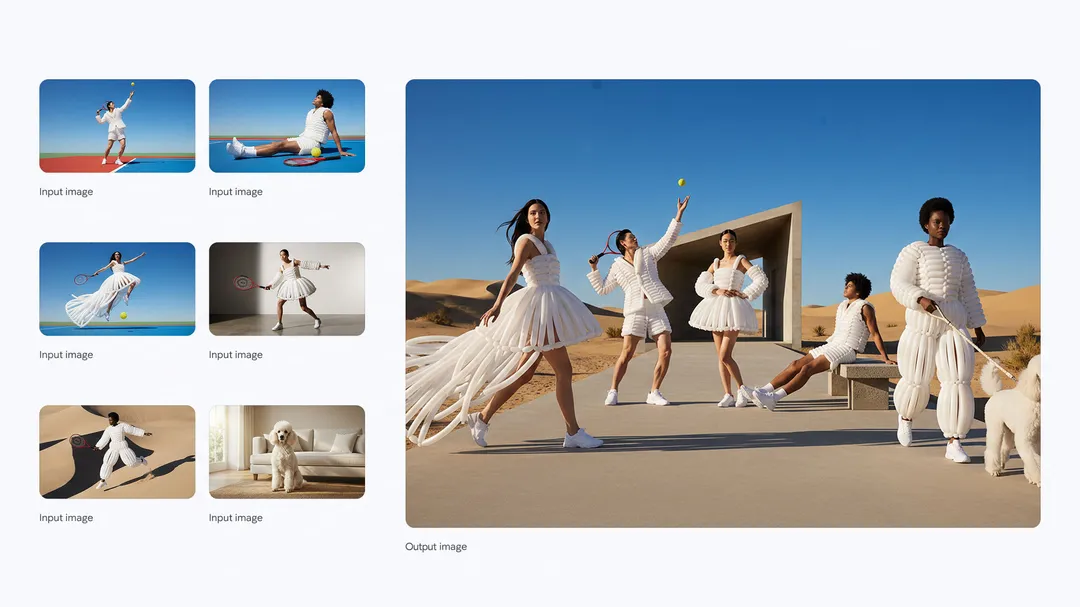
    • Holding character and object consistency across up to 14 inputs
    ```json
{
  "alt": "Collage with people in avant-garde tennis attire in a desert setting, accompanied by a dog.",
  "caption": "Step into the future of fashion and tennis with avant-garde outfits set against a stunning desert backdrop. This ensemble captures innovation and style seamlessly.",
  "description": "A captivating collage showcasing avant-garde fashion with a tennis theme. The main image features a group wearing futuristic white outfits with tennis elements in a desert. Smaller inset images highlight various poses and settings, including a dog indoors, creating a unique blend of high fashion and sports. This image combines elements of style, sport, and nature, making it a striking and imaginative visual. Keywords: fashion, tennis, avant-garde, desert, style, innovative clothing."
}
```

    • Transforming rough sketched ideas into polished scenes, diagrams, and storyboards
    • Executing localized edits, advanced lighting changes, and offering meticulous control over camera angles, color balancing, and aspect ratios

    ```json
{
  "alt": "Young person with red hair looking upwards, surrounded by floating white feathers against a deep blue sky.",
  "caption": "Lost in a moment of serene beauty, a young dreamer gazes skyward as gentle feathers drift by, creating a whimsical vision against a stunning blue backdrop.",
  "description": "The image depicts a young individual with red hair looking upwards, enveloped by floating white feathers against a deep blue sky. The soft, dreamy atmosphere creates an ethereal scene, capturing a sense of wonder and tranquility. The combination of the subject's expression and the ambient feathers evokes feelings of freedom and dreams. The composition includes both the original input image and processed outputs, showcasing varying perspectives of the same serene moment."
}
```

    The mechanics. By blending Gemini 3’s reasoning prowess with advanced image-editing capabilities, Nano Banana Pro is redefining how I create precise, on-brand visuals. It supports various creative outputs, making it valuable for:

    • Infographics and recipes using real-time data
    • Architectural and storyboard mockups
    • Crafting calligraphy, posters, and multilingual packaging
    • Making cinematic composites from numerous images
    • High-detail fashion, lifestyle, and landscape visuals
    • Studio-level lighting adjustments and refocusing techniques

    Accessing Nano Banana Pro. I’m thrilled to see Nano Banana Pro progressively debuting across Google’s platforms, with its image generation enhancements now available in Google Ads.

    The broader impact. As Nano Banana Pro elevates Google’s image capabilities, it shifts from producing quick visuals to crafting professional-grade content. With improved reasoning, nuanced control, and multilingual flexibilities, it’s poised to drive everything from classroom materials to comprehensive ad campaigns, and even cinematic productions.


    Inspired by this post on Search Engine Land.

    crushpress.ai community screenshot
  • Explore Google’s New Branded Queries Filter in Search Console

    Explore Google’s New Branded Queries Filter in Search Console

    I’ve got some exciting news about Google Search Console that’s just too good to keep to myself. They’ve introduced a branded queries filter that’s rolling out gradually, and trust me, you’ll want to get your hands on it!

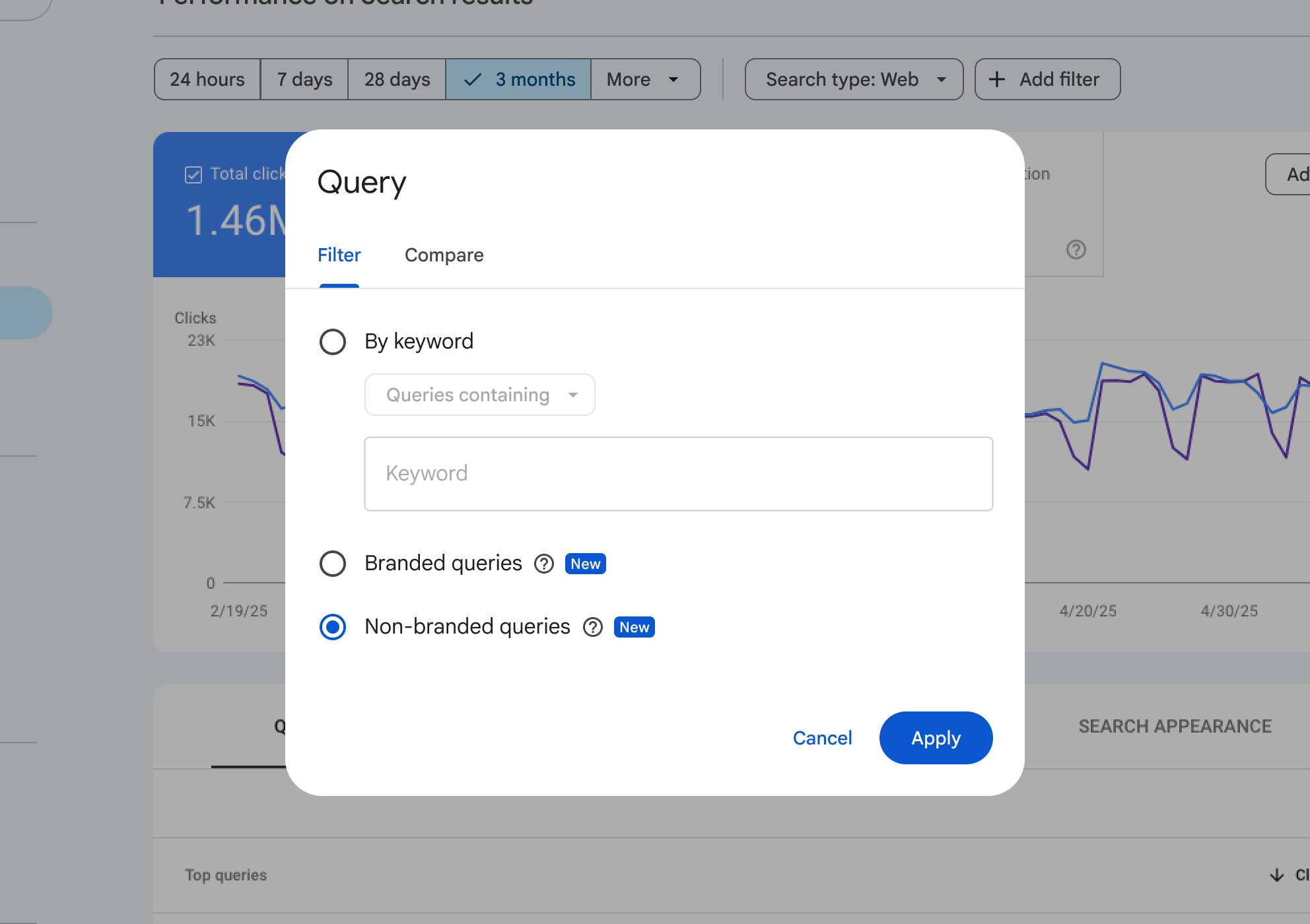
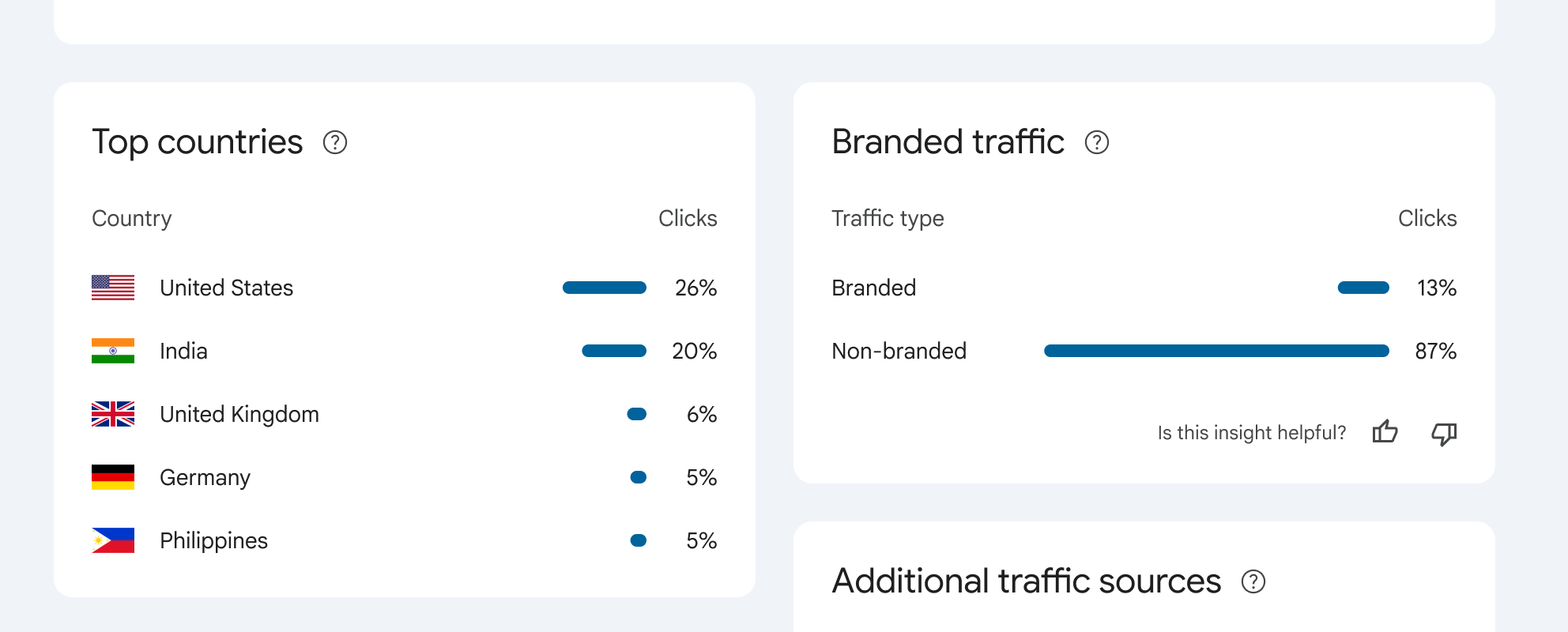
    With this new addition, I’ve found that filtering performance reports by branded or non-branded queries has never been easier. Google can now show me the percentage of traffic my site gets from either branded or non-branded sources, right from Search Console.

    This update made its debut at today’s Google Search Central event in Tel Aviv, and if you’re hearing about it now, it’s because news travels fast, especially from events like these.

    Understanding Branded Queries. Google defined branded queries for us: These are search queries that include my brand name, its variations or any brand-related products. For instance, if my brand was Google, related queries could be “Google,” “Gogle,” or even “Gmail.”

    This differentiation helps me see how returning users differ from new ones. Focusing on this can lead to higher click-through rates for branded queries. Meanwhile, non-branded ones show how new users find my content organically.

    ```json
{
  "alt": "Google Search Console filter menu for query settings with non-branded queries selected.",
  "caption": "Exploring search performance insights with Google Search Console's filter menu, focusing on non-branded queries for a three-month period.",
  "description": "This image displays the Google Search Console interface, specifically the filter menu for setting search query parameters. The menu shows options to filter by keyword, branded queries, and non-branded queries, with the latter selected. The background features a line graph representing performance data for a three-month timeframe. Key interface buttons 'Cancel' and 'Apply' are visible, providing a comprehensive tool for analyzing website performance metrics. Keywords: Google Search Console, filter, search queries, non-branded, performance analysis."
}
```

    Finding the Filter. Ready to use it? You can locate the branded versus non-branded filter within performance reports under search filters for queries. I love how it works across all search types, whether web, images, video, or news. Metrics like impressions and CTR tailored to my needs are just a click away.

    Here’s a handy screenshot for visuals:

    ```json
{
  "alt": "Chart showing top countries and branded traffic percentages. United States leads with 26% clicks, followed by India at 20%.",
  "caption": "Discover where your traffic comes from! The United States leads with 26% of clicks, while non-branded traffic dominates at 87%.",
  "description": "This image displays two charts: 'Top countries' and 'Branded traffic.' In the 'Top countries' section, the United States leads with 26% of clicks, followed by India at 20%, the United Kingdom at 6%, and both Germany and the Philippines at 5%. The 'Branded traffic' chart shows 13% branded and 87% non-branded clicks. These insights help understand the geographic and branding sources of website traffic."
}
```
    crushpress.ai community screenshot
  • Discover New Features on Google Maps: Insider Tips and More!

    Discover New Features on Google Maps: Insider Tips and More!

    I’ve recently discovered that Google Maps has introduced some exciting new features to better inform us about local businesses and events. Now, we can also choose to leave reviews using nicknames, giving us a bit more privacy when sharing our thoughts.

    Know Before You Go. One of the highlights is the ‘know before you go’ feature now available on Google Maps. I remember seeing this tested earlier, but it’s great to see it officially rolled out now.

    When I search for places, I can easily access ‘know before you go’ tips, showing me crucial details like parking tips, secret menu items, and ideal reservation methods. This information comes from user reviews and other online resources.

    These tips, dubbed ‘insider tips’ by Google, are now available in the U.S. on both Android and iOS. I’ve found them quite helpful in planning my visits more efficiently.

    Here’s a glimpse of how it looks:

    Trending Nearby in Explore Tab. There’s also a new addition to the Explore tab, highlighting trending restaurants, activities, and attractions nearby. I can simply swipe up on the explore tab to discover these popular spots.

    This feature sources trends from platforms like Viator, Lonely Planet, and local influencers, including Sisterssnacking. It’s been a fantastic way for me to stay updated on what’s happening around me.

    This update is available globally this month on both Android and iOS devices.

    Here’s what the new Explore tab looks like in action:

    Nicknames for Reviewers. One feature I particularly like is the option to use nicknames when leaving reviews. According to Google, “If you’d prefer not to use your real name, you can now choose a nickname and profile.”

    While there might be concerns about spammy reviews, Google assures us that their systems are equipped to monitor and detect fake reviews continuously, linking our reviews to our Google Accounts.

    This feature is rolling out globally this month on Android, iOS, and desktop.

    Here’s a quick look at how to set up a profile with a nickname:


    Inspired by this post on Search Engine Land.


    crushpress.ai community screenshot
  • Unveiling Gemini 3: Google’s Next AI Leap in Search

    Unveiling Gemini 3: Google’s Next AI Leap in Search

    I’m excited to share that Google has just introduced its latest AI marvel, Gemini 3. Sundar Pichai, Google’s CEO, described it as ‘our most intelligent model, combining all of Gemini’s capabilities to bring any idea to life.’

    As I delve into Gemini 3, I find it fascinating that it’s already powering the AI Mode in Search, bringing more complex reasoning and dynamic experiences right at our fingertips. Sundar Pichai highlighted, ‘This is the first time we are shipping Gemini in Search on day one.’

    AI Mode with Gemini 3. I’m thrilled to see how AI Mode in Search has evolved with Gemini 3, offering new generative UI experiences like immersive visual layouts and interactive simulations, all dynamically created based on our queries.

    Here’s a video demonstration showing how RNA polymerase functions with generative UI in AI Mode in Search. Watching it helped me better grasp these complex concepts.

    Robby Stein, VP of Product at Google Search, emphasizes how ‘Gemini 3 with generative layouts will make it easy to understand anything on your mind.’ It offers state-of-the-art reasoning, deep multimodal insights, and advanced agentic capabilities, making it shine in explaining advanced concepts or even coding interactive visuals instantly.

    More on Gemini 3. Diving deeper, I discovered that Gemini 3 features:

    • State-of-the-art reasoning
    • Deep multimodal understanding
    • Powerful vibe coding for seamless transitions from prompts to apps
    • Enhanced agentic capabilities for executing tasks efficiently

    Availability. I’m pleased to report that Gemini 3 is not just limited to AI Mode; it’s also accessible in:

    • The Gemini app and for Google AI Pro and Ultra subscribers in AI Mode in Search
    • Developers can integrate it via the Gemini API in AI Studio, on Google’s new agentic development platform, Google Antigravity; and through Gemini CLI
    • Enterprises can leverage its power through Vertex AI and Gemini Enterprise

    Why It Matters. For me, understanding Gemini 3’s impact is crucial as it continues to drive the future of Google Search. Staying ahead of these advancements is vital as they influence search dynamics and potentially impact sites and Google Ads strategies.


    Inspired by this post on Search Engine Land.


    crushpress.ai community screenshot
  • Revolutionize Your Google Ads with Journey Aware Bidding

    Revolutionize Your Google Ads with Journey Aware Bidding

    I’ve recently come across an exciting development from Google that could change the way we approach Google Ads. It’s called Journey Aware Bidding, and it’s designed to optimize Search campaigns by utilizing signals from every step of the customer journey. This aims to provide a smarter and more efficient way of managing campaigns.

    Google has rolled out this new Search bidding model to enhance prediction accuracy and improve campaign performance. The idea is to consider the entire customer journey, not just the final conversion point.

    How it works: Journey Aware Bidding learns not only from your primary conversion goal but also from non-biddable journey stages. If you’re someone who tracks and defines each step of your purchase funnel meticulously, this model could be particularly beneficial.

    Google advises mapping out the entire process—from lead submission to final purchase—and labeling all critical touchpoints as conversions within standard goals. This method promises to integrate more of the conversion funnel into Google’s prediction models, potentially streamlining lengthy, complex journeys such as lead generation.

    Why it matters: As someone who’s worked extensively with fragmented signals in conversion funnels, I’m intrigued by how Journey Aware Bidding could bring greater efficiency to our campaigns. It emphasizes learning from all key touchpoints, leading to smarter bidding strategies.

    What you should know: To get the most out of this feature, align your optimizations to a single KPI-driven stage, such as purchases or qualified leads. While other journey stages should be marked as primary conversions, they should be excluded from campaign-level or account-default bidding optimization.

    ```json
{
  "alt": "Infographic on Journey Aware Bidding for advertisers with key benefits and pilot information.",
  "caption": "Discover Journey Aware Bidding: A strategy that embraces the whole customer journey, promising improved ad performance for informed advertisers.",
  "description": "This infographic presents 'Journey Aware Bidding', a strategic initiative aimed at enhancing ad performance by monitoring the full customer journey. Key benefits include improved prediction accuracy and performance by leveraging conversion goals. The pilot program allows select advertisers to implement these strategies ahead of a wider rollout. Elements include icons of a magnifying glass and shopping bag, signifying search and commerce. Keywords: Journey Aware Bidding, advertisement strategy, customer journey, pilot program."
}
```

    Ensure that all tracking and categorization are accurate to achieve the best results.

    Pilot phase: Google is launching a closed pilot this year for select advertisers, with plans to expand after refining the model. This could be a game-changer in how we approach Search optimization.

    The bottom line: If you’re ready to rethink how you optimize your campaigns, Journey Aware Bidding might be the innovative approach you’ve been waiting for. By understanding not just what converts, but how users get there, we could see significant improvements.

    First seen: Senior Consultant Georgi Zayakov shared insights about this new bidding model on LinkedIn during Think Week 2025, alongside other intriguing products.


    Inspired by this post on Search Engine Land.


    crushpress.ai community screenshot
  • Google’s Strategic Ad-Tech Changes to Satisfy EU Demands

    Google’s Strategic Ad-Tech Changes to Satisfy EU Demands

    In an effort to appease European regulators, I’ve noticed that Google is proposing some interesting ad-tech fixes. These changes aim to avoid the disruption of a breakup while reshaping how advertisers operate across Europe’s digital landscape.

    Recently, I learned that Google has submitted a compliance plan to the European Commission. This plan outlines changes to its ad-tech operations but firmly rejects the idea of breaking up its operations.

    How it Works:

    First, Google is offering product-level changes. Notably, it will allow publishers to set different minimum prices for various bidders in Google Ad Manager.

    It’s also proposing to enhance interoperability between Google’s tools and those of its competitors, offering publishers and advertisers greater flexibility.

    Google believes these adjustments will address the concerns of the European Commission without causing a disruptive breakup.

    Why We Care

    As I see it, Google’s “non-disruptive” strategies can help maintain platform stability by avoiding the chaos of a forced breakup. These measures might also influence auction dynamics, pricing transparency, and access to competitive tools, impacting how advertisers control costs and make choices within Europe’s ad ecosystem.

    Between the Lines

    Google is focusing on technical fixes rather than a major overhaul. However, critics are questioning if without deeper reform, the power dynamics in ad tech will truly change.

    The Bottom Line

    Google is trying to strike a compromise by addressing the EU’s antitrust concerns while preserving its integrated ad-tech business. It’s now up to regulators to decide if these changes are sufficient or if a breakup should be pursued.

    Dig Deeper. EU fines Google $3.5 billion over anti-competitive ad-tech business


    Inspired by this post on Search Engine Land.


    crushpress.ai community screenshot
  • Revolutionize Your Travel Planning with Google AI

    Revolutionize Your Travel Planning with Google AI

    Recently, I’ve been exploring the latest features Google has introduced to streamline travel planning. With the release of AI Mode, Google now offers advanced ways to book flights and hotels, along with new tools to organize trips and discover deals more efficiently.

    Among these updates is the introduction of Canvas in AI Mode, which aids in travel planning, and the global rollout of flight deals. Additionally, Google’s agentic booking now allows for seamless dinner reservations, flights, and hotel bookings directly through their platform.

    I noticed these features are quite similar to the AI Shopping updates that were announced last week. But, what stands out is the agentic capability of Google AI Mode. It not only suggests restaurants, hotels, and flights but also assists with the booking process. Previously, these features were exclusive to Google Labs, but now anyone can access them without opting into Labs.

    The dinner reservation feature is particularly exciting. In the U.S., it’s now rolling out with integration through platforms like OpenTable, Resy, and more.

    Looking ahead, Google plans to enhance its AI Mode to assist in booking flights and hotels. They’re collaborating with industry partners to allow users to describe their travel preferences and effortlessly compare options based on schedules, prices, and reviews before completing bookings with chosen partners.

    I’m really intrigued by how the travel booking process will evolve with these innovations. Google is working closely with well-known partners like Booking.com, Expedia, and Marriott to refine this experience.

    Further enhancing our travel experience is the Canvas feature in AI Mode. It’s now available on desktops in the U.S., offering a space to manage and strategize travel plans effectively.

    Google’s flight deals feature is also expanding into over 200 countries and supporting multiple languages, making it easier to find great travel bargains by simply describing your travel desires as you would to a friend.

    The landscape of travel planning is changing, and as someone who’s invested in these innovations, I see these AI tools as pivotal in shaping the future of travel-related businesses. If you’re in the travel sector, understanding and adapting to these changes is crucial.


    Inspired by this post on Search Engine Land.


    crushpress.ai community screenshot
  • Unlock the Power of Annotations in Google Search Console

    Unlock the Power of Annotations in Google Search Console

    I’ve got great news—Google Search Console has officially rolled out custom annotations for performance reports! After extensive testing, this amazing feature is finally live.

    Now, I can easily annotate my reports directly within Search Console. This means I’ll never forget essential events like coding changes, algorithm updates, or any website bugs that might crop up.

    What are custom annotations? According to Google, custom annotations are “Notes you create yourself to mark important events specific to your property, such as when you launch a new feature, or fix a bug on your website.”

    Google began testing this feature in May 2025, and it’s thrilling to see it live now.

    What do they look like? Take a look at this screenshot of a custom annotation in Search Console:

    How does it work? Adding custom annotations to my performance reports is a breeze. Here’s how I do it:

    • Open the Performance report.
    • Right-click the chart on the specific date I want to annotate.
    • Select a date using the date picker.
    • Type my note in the text field (up to 120 characters).
    • Click Add.

    I can add up to 200 annotations on a single property, which is fantastic!

    ```json
{
  "alt": "Screenshot of an add annotation interface with graph data and an annotation field.",
  "caption": "Adding annotations to your analytics can provide valuable insights and context to your data trends.",
  "description": "This image shows a screenshot of an interface for adding annotations in a web analytics tool. The interface includes a date selector set to May 4, 2025, and an annotation text box reading 'Something important happened today!' Below is a line graph displaying data trends over several months, with a total of 97.1 million clicks noted. Users are reminded not to include sensitive information when adding annotations. The tool offers filters and a date range selection for customizing data views."
}
```

    To delete annotations, here’s what I do:

    • Click the annotation marker on the chart to see the note.
    • Select DELETE in the annotation pop-up window.
    • Select Cancel or Delete on the following screen to cancel/confirm.

    Note that I can’t edit annotations, and any annotations older than 500 days will be automatically deleted.

    Why do I care? Annotations are an excellent way to keep track of changes on my website as I review these performance reports. As Google mentioned, “Annotations in Search Console help you understand changes in your data by providing context on your charts.”

    Here are additional reasons Google encourages using annotations:

    • Infrastructure changes like updating a template or a site migration
    • SEO efforts like implementing a new plugin or hiring an agency
    • Changing content to focus on different user intents
    • External events that affect your business, such as holidays

    It’s important to remember that annotations are visible to anyone who has access to those properties, so I make sure to post cautiously.


    Inspired by this post on Search Engine Land.


    crushpress.ai community screenshot