Author: shivamcrushpressai

  • Keyword-Rich Google Reviews: A Practical Local SEO System

    Keyword-Rich Google Reviews: A Practical Local SEO System

    If your review request says only, Please leave us a review, you are leaving the hardest part to the customer: deciding what to write. Most people respond with a star rating and a few generic words. That may reflect a happy customer, but it tells Google and the next buyer very little about what your business actually does.

    You can get more useful Google reviews without telling customers which keywords to insert. The better approach is to ask a few experience-based questions that help them remember the service, product, need, attribute, or outcome that mattered. Their answers stay authentic while becoming far more relevant to local search and purchase decisions.

    Why specific review language matters beyond rankings

    Keywords inside reviews are not a dependable shortcut to higher local rankings. Their direct ranking influence remains debated, so no honest review strategy should promise a position change. The stronger case is visible on the search result and Business Profile itself: specific review language can shape review justifications, Place Topics, highlighted snippets, menu features, AI-generated summaries, and answers to customer questions.

    That distinction should change your goal. You are not trying to manufacture a ranking signal. You are building a body of customer evidence that helps Google understand your offerings and helps a searcher confirm that you handle the exact need behind their query.

    The same restraint applies to AEO and GEO claims. Detailed reviews can improve the material available to Google’s local AI features. That does not establish that repeating keywords will make every external AI assistant or frontier model recommend your business. Keep the promise tied to the surfaces you can actually observe.

    Key takeaways

    • Ask customers about their experience, not about your target keywords.
    • Prompt for the service or product, the original need, one distinguishing detail, and the outcome.
    • Use different prompts for different customer journeys instead of sending one universal script.
    • Let every customer choose their own language; similar reviews should not read as if one person wrote them.
    • Measure review specificity and visible Business Profile features before treating rankings as an outcome.

    Seven places where detailed reviews can do useful work

    A review does not stay confined to the review tab. Google can reuse its language across several parts of the local experience. Each surface affects discovery or decision-making differently.

    1. Review justifications: A relevant phrase from a review can appear with a local result and help explain why that business matches the query. A searcher looking for a particular repair, treatment, product, or service can see direct customer evidence before opening the profile.
    2. Place Topics: Google can turn recurring review terms into clickable topics. These labels advertise the subjects customers repeatedly discuss and let people filter the review set around a particular interest.
    3. Highlighted review snippets: Frequently relevant terms can be bolded within three review snippets on a Business Profile. The effect is small but useful: the language connected to the searcher’s need becomes easier to scan.
    4. Menu Highlights: For restaurants, Google can derive highlighted dishes and menu themes from customer reviews and photos. Reviews that naturally name a dish, drink, dietary option, or dining occasion give this feature more precise material to work with. Any ranking benefit should still be treated as possible rather than guaranteed.
    5. AI-generated business attributes: Google can use review language to describe qualities such as a cozy atmosphere. You cannot directly edit that generated description, but detailed and consistent customer observations give the system clearer evidence than a collection of reviews saying only that everything was great.
    6. AI review summaries: Repeated sentiments can be condensed into a summary of what customers commonly appreciate or criticize. Specific feedback makes that summary more informative because it connects sentiment to a service, product, attribute, or part of the experience.
    7. Answers to customer questions: Review content can help Google answer questions about a business. A detailed review may therefore remain useful long after publication by supplying information relevant to a future customer’s question.

    These features share one requirement: Google needs meaningful language to extract. A generic compliment contains positive sentiment but almost no context. A review that identifies what was purchased, why it was needed, and what stood out contains entities, attributes, and relationships that both machines and people can interpret.

    Build prompts around the experience, not a keyword list

    A business professional invites a customer to recall the need, service, quality, and outcome while leaving feedback on a phone.

    Start with what customers can truthfully describe. Search volume may help you understand demand, but it should not determine the words you ask a reviewer to use. If the requested phrase does not sound like a customer’s memory of the transaction, the resulting review will feel staged.

    A practical prompt has four core ingredients. Local context can be added when the location was genuinely part of the service, but it should never be tacked onto every review merely to repeat a city name.

    Prompt ingredientWhat it capturesNatural question
    OfferThe service, product, treatment, dish, or categoryWhat did you choose or ask us to help with?
    Need or occasionThe problem, use case, event, or buying intentWhat brought you to us?
    AttributeA meaningful quality of the work or experienceWhat part of the experience stood out?
    OutcomeThe result or change the customer experiencedHow did things turn out?
    Local contextA service area, venue, or neighborhood that was actually relevantWhere did the service take place, if that detail would help someone else?

    You rarely need all five ingredients in one message. Choose the two or three that fit the transaction. A restaurant customer can name a dish, an occasion, and an atmosphere. A home-service customer can name the repair, the initial problem, and the result. A consultant’s client may be better able to discuss the project, an aspect of the process, and the business outcome.

    1. Inventory real customer journeys. List the major services, product groups, menu categories, or project types people actually buy. Use customer-facing names rather than internal department labels.
    2. Identify details customers can observe. Focus on attributes they experienced directly, such as the item ordered, the issue addressed, the communication they received, or the atmosphere they encountered. Do not prompt them to endorse a claim they cannot verify.
    3. Turn each detail into a memory cue. Ask what they chose, what brought them in, what stood out, or how the situation ended. A question produces natural language; an exact phrase produces compliance.
    4. Match the prompt to the transaction. Connect your review system to the service or product category so a customer receives relevant cues. This also prevents every review from repeating the same structure.
    5. Leave authorship with the reviewer. State that they should use their own words and include only details that reflect their experience. Never provide a completed testimonial for them to paste.

    Consider the difference between telling a customer to mention emergency furnace repair Toronto and asking what problem brought them in, which service they received, and what happened afterward. The first request exposes the SEO agenda. The second can elicit the same relevant concepts if they are true, without dictating the review.

    Review request templates that produce natural detail

    Use these as frameworks, not universal scripts. Replace the bracketed text, remove any cue that does not fit, and place your direct Google review link at the end. Send the request while the experience is still easy for the customer to recall.

    For an appointment or local service

    Template: Thank you for choosing [business name]. If you would like to leave an honest Google review, it helps other customers when you mention what you needed help with, which service you received, and what stood out. Please use your own words and include only what reflects your experience: [review link]

    This version can naturally produce a service name, a problem, and an attribute. If your business offers many services, populate the message with the broad category the customer actually purchased, but do not insert a target phrase and ask them to repeat it.

    For a restaurant, cafe, or product-led visit

    Template: Thanks for visiting [business name]. If you leave a Google review, you might tell people what you ordered, what you especially noticed, and what kind of visit or occasion it suited. Your honest experience in your own words is what matters: [review link]

    Naming an actual dish or product gives Google more useful material for topics, snippets, and restaurant highlights. The occasion can be equally valuable because a future customer may be deciding whether the business suits a family meal, quick lunch, special event, or another specific need. Keep only the examples that are accurate for your business; do not seed an occasion the customer did not mention.

    For a longer project or professional engagement

    Template: Thank you for working with [business name] on [project category]. If you are comfortable leaving a Google review, it would be useful to describe what you wanted to accomplish, any part of the process that mattered to you, and the outcome. Please share only what you experienced and use your own wording: [review link]

    Longer engagements often contain more detail than a customer can fit into an unprompted response. The three cues give the review a useful arc without scripting praise: initial need, experienced process, and outcome.

    Whichever template you use, keep the request easy to answer. A long questionnaire creates work, and a customer may abandon it or respond mechanically. Three short cues are usually enough to unlock detail while preserving freedom.

    Measure review quality without turning it into keyword policing

    Two colleagues sort varied review cards by detail and usefulness using icons, colored trays, a magnifying glass, and an authenticity symbol.

    Do not evaluate this program only by searching your target phrase and watching the map order. Local results can move for many reasons, and a ranking-only scorecard encourages increasingly aggressive prompts. Measure the change you directly asked customers to make: more specific, more informative feedback.

    Use a small review-quality scorecard

    Choose a consistent review window and record the same fields for every new review. You do not need sophisticated sentiment software to begin.

    • Detail rate: What share of new reviews names at least one actual service, product, menu item, need, attribute, or outcome?
    • Priority-topic coverage: Which important customer journeys appear in reviews, and which remain absent?
    • Language diversity: Do customers describe similar experiences in their own ways, or do the reviews repeat your request almost word for word?
    • Profile presentation: Are relevant Place Topics, review justifications, highlighted snippets, menu features, or AI summaries appearing or changing?
    • Customer response: Are the profile interactions and leads you already track improving alongside richer reviews? Treat correlation as a reason to investigate, not automatic proof of causation.

    If detail rate improves but every review sounds alike, the prompt is too prescriptive. If reviews remain generic, the cues may be too broad. If one service dominates the language, segment the request so other genuine customer journeys receive prompts suited to them.

    Watch for five signs that optimization has gone too far

    • You ask reviewers to include an exact search query.
    • You add a city or neighborhood even when location was irrelevant to the experience.
    • You provide a finished sentence for the customer to paste.
    • You send every customer a long list of services and attributes to mention.
    • You judge success by keyword counts while ignoring whether the review helps a buyer make a decision.

    The corrective action is simple: replace the desired wording with a question about the real experience. If you want reviews to mention a service, ask what the customer needed. If you want a relevant attribute to emerge, ask what stood out. If you want outcome language, ask what changed. The customer’s answer determines whether the concept belongs in the review.

    Start with the customer journey that generates the most review requests. Replace the generic ask with three cues covering the actual offer, one memorable detail, and the outcome. Once new reviews become more specific without becoming repetitive, adapt the same structure to the next journey. You will end up with reviews that sound like customers, explain the business clearly, and give Google’s local features something meaningful to use.


    References

  • CrushPress AI Schema Suite 4.2.63: Practical Upgrade Guide

    CrushPress AI Schema Suite 4.2.63: Practical Upgrade Guide

    If you’re moving from CrushPress AI Schema Suite 4.2.43 to 4.2.63, the biggest change is operational: the plugin now makes it easier to see what is blocking automation, understand what the dashboard is showing, and control when work runs.

    Your first job after the upgrade isn’t to launch a site-wide run. It is to verify billing, privacy, OpenAI access, and queue behavior in that order. This prevents a configuration problem from being mistaken for a processing problem.

    Clear the dependencies that can block every run

    Four gated system checkpoints show payment, privacy, cloud access, and queued processing in a left-to-right sequence.

    Version 4.2.63 puts billing and connectivity notices at the top of every CrushPress screen. Treat those notices as prerequisites. A missing billing plan, an invalid OpenAI key, and a privacy opt-out can all stop the workflow, but they require different fixes.

    1. Open the CrushPress dashboard and deal with any billing-plan alert first. The alert includes a direct route to the relevant fix, so you don’t need to search through unrelated settings.
    2. Open the Privacy tab before testing the AI connection. If remote access is opted out, 4.2.63 deliberately pauses all remote calls. That is expected privacy behavior, not evidence of a broken key.
    3. Validate the OpenAI key with the inline diagnostic. When a submitted key is incorrect, the plugin explains the problem in plain language and retains an already working key instead of replacing it with the invalid value.
    4. Check the AI Engine card. Confirm that its connection status, selected model, and reasoning-effort display match the configuration you intend to use.
    5. Read the remaining checklist reminders, then use the one-click diagnostic before starting a larger processing run.

    This order matters. Testing an OpenAI connection while remote calls are paused can send you toward the wrong repair. Likewise, changing a valid key won’t resolve a missing billing plan. Diagnose the visible prerequisite rather than rotating settings until an alert disappears.

    Set automation limits before you process content

    The general settings in 4.2.63 bring four important automation decisions into one place. Make each decision deliberately before running the plugin across more than a small set of content.

    • FAQ limits: Set a limit that matches the amount of FAQ output your team can inspect. A larger queue has little value if nobody can review whether the questions and answers accurately reflect the page.
    • Speakable: Turn this on only when Speakable output is part of your implementation plan. Don’t enable it simply because the control is available.
    • Queue-only mode: Use this when you want work collected in the queue for deliberate processing. It is the safer choice when an editor or technical owner needs to inspect scope before execution.
    • Recurring refresh schedules: Match the refresh schedule to how often the underlying content materially changes. Stable pages do not need the same operational cadence as frequently revised content.

    Run, queue, and purge controls are available from both the dashboard and the Pages & Posts screens. Use the page-level controls when you are validating a known piece of content; use broader dashboard actions only after that smaller test behaves as expected.

    Treat purge as a potentially destructive operation. Before using it, read the scope presented in your installation and preserve any logs or state you may need for diagnosis. If the scope isn’t clear, stop and confirm it rather than using purge as a generic troubleshooting button.

    Do not mistake sample data for live performance

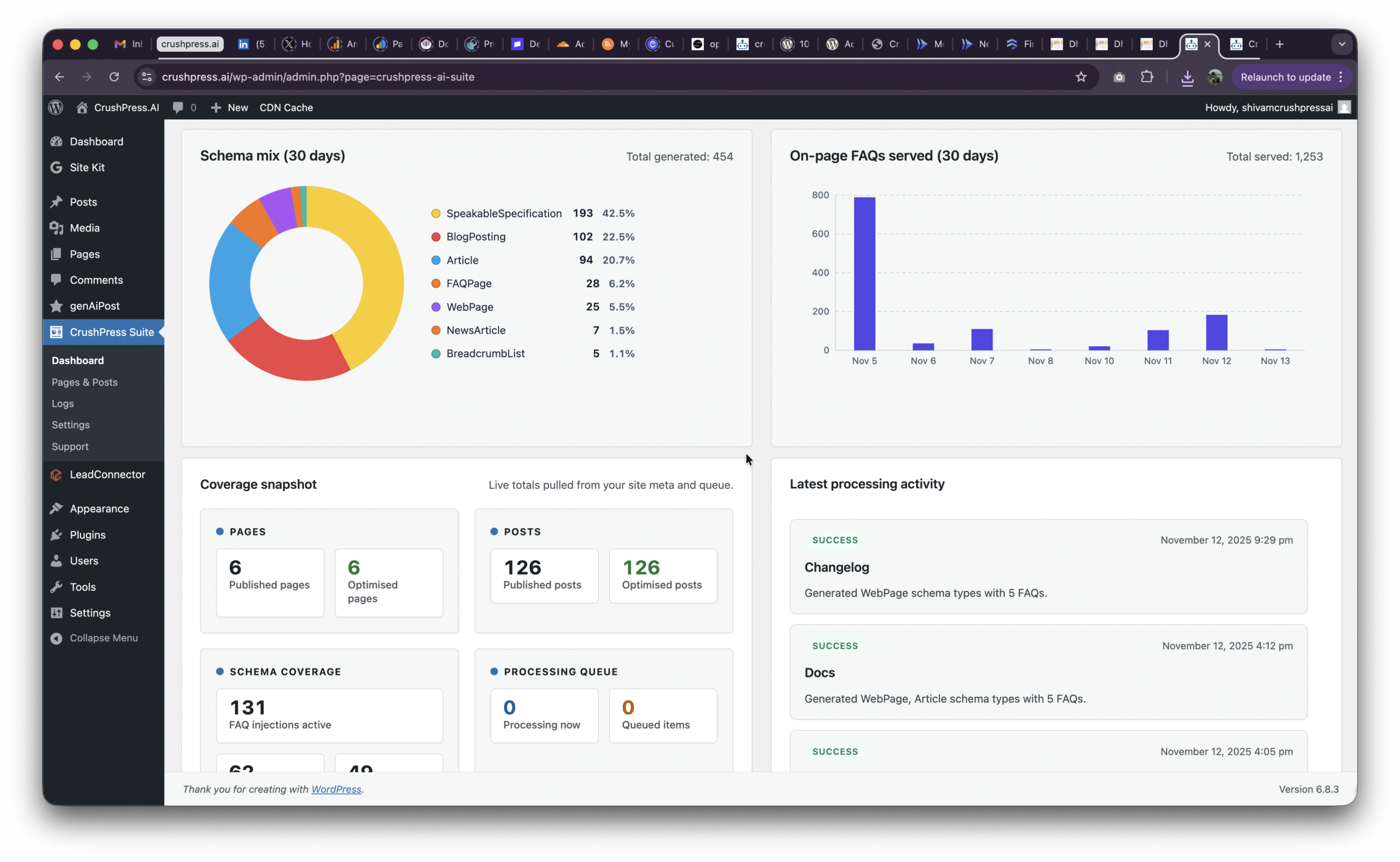
    A fresh 4.2.63 installation can display realistic sample information in trend charts, schema coverage, FAQ activity, and processing logs. This is an onboarding aid: it shows you how a populated dashboard will look before automation has produced enough real activity.

    The practical distinction is simple. Sample trends help you learn where information will appear; they do not prove that your pages have been processed or that schema coverage has changed.

    1. Verify the AI Engine connection and clear the visible alerts.
    2. Select one known page from Pages & Posts.
    3. Queue or run that page using the control appropriate to your workflow.
    4. Review the resulting processing log and activity areas.
    5. Only then use dashboard-wide coverage and trend views to monitor actual work.

    This small test gives you a recognizable input to follow through the system. If the result isn’t what you expected, you have a narrow case to diagnose instead of an ambiguous site-wide run.

    Turn persistent alerts and logs into an operating routine

    An operator reviews abstract status indicators and blank log cards while an amber alert moves into a resolved tray.

    System notices and logs now remain visible at the top of CrushPress screens, so a billing or connectivity issue is harder to miss while you move between settings and content. Scan that area whenever you begin a processing session and again before investigating an empty or stalled queue.

    The interface also uses more consistent buttons, inline status messages, and clearer empty states. Pay attention to those messages after an action. They are the fastest way to distinguish an accepted command from a screen that merely has nothing to display yet.

    If you need support, build the ticket around one reproducible action. Include the screen involved, the action you selected, what you expected, the exact alert or diagnostic explanation, and the relevant log context. The richer media-upload workflow in 4.2.63 lets you attach visual evidence without moving through a separate support process, while the tightened privacy flow helps keep the submission deliberate.

    The sticky WordPress administration footer also remains visible when the CrushPress billing view is locked. Its standard WordPress text and version information provide useful environment context when you document a problem, even though the footer itself does not change automation behavior.

    Key takeaways for a controlled 4.2.63 rollout

    • Resolve missing billing-plan notices before troubleshooting processing.
    • Check the Privacy tab before diagnosing OpenAI connectivity because opting out intentionally pauses every remote call.
    • Use the inline key validator; an invalid submitted key will not displace a working one.
    • Configure FAQ limits, Speakable, queue-only mode, and recurring refreshes before broad runs.
    • Regard fresh-install charts and activity as sample data until a known page has moved through your own workflow.
    • Test one page first, inspect its logs, and expand the processing scope only after the result is understood.

    Once 4.2.63 is installed, start with the dashboard alerts and finish with one controlled page-level run. That short validation path gives you a known-good configuration before recurring schedules or broader automation increase the scope.

    References

    • CrushPress.AI – Version 4.2.63 released
  • Book a call with our Support Team

    Book a call with our Support Team

    Need help or just want to discuss if crushpress.ai is right for you? Jump on with our team!


  • How to Install the CrushPressAI WordPress Plugin?

    How to Install the CrushPressAI WordPress Plugin?

    Step 1 – Download the CrushPressAI WordPress plugin .zip file

    This will download a .zip file on your computer. If you are prompted to approve thee download please do so.

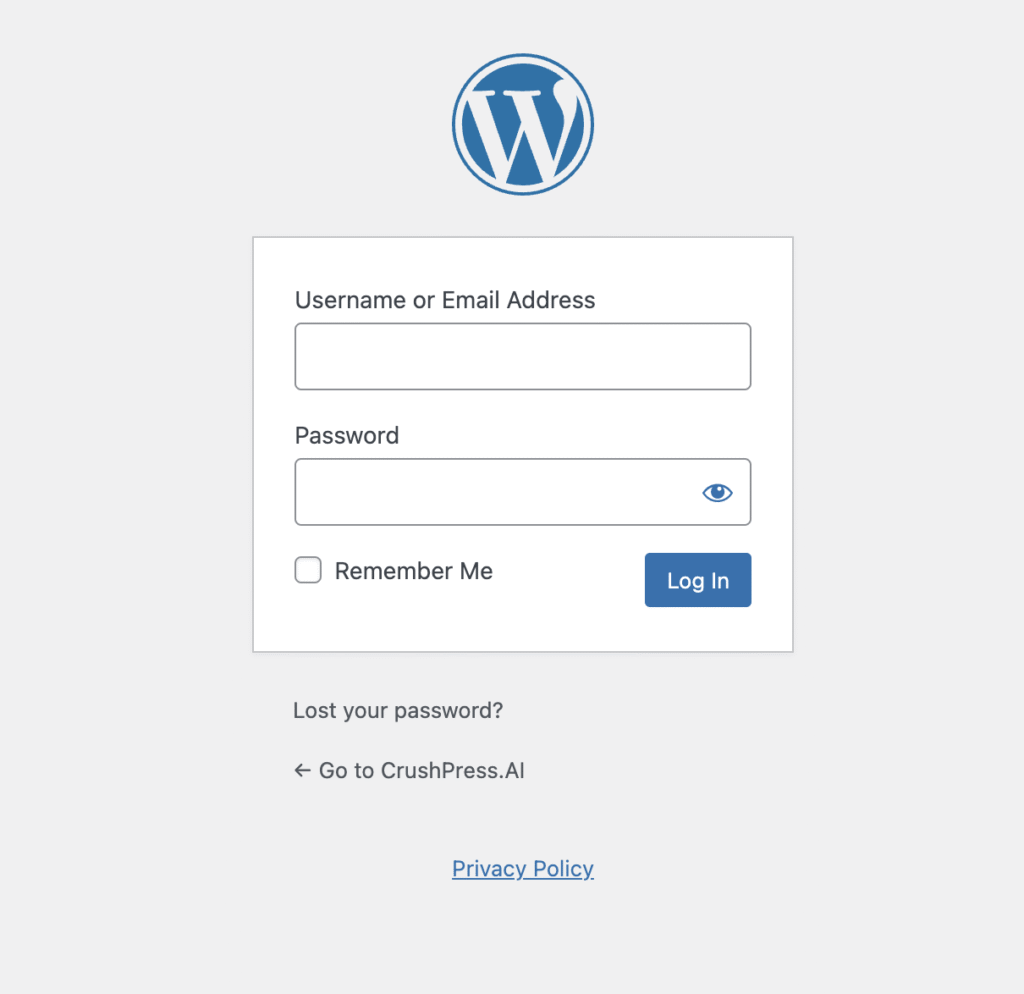
    Step 2 – Login to /wp-admin of your WordPress site and Add Plugin

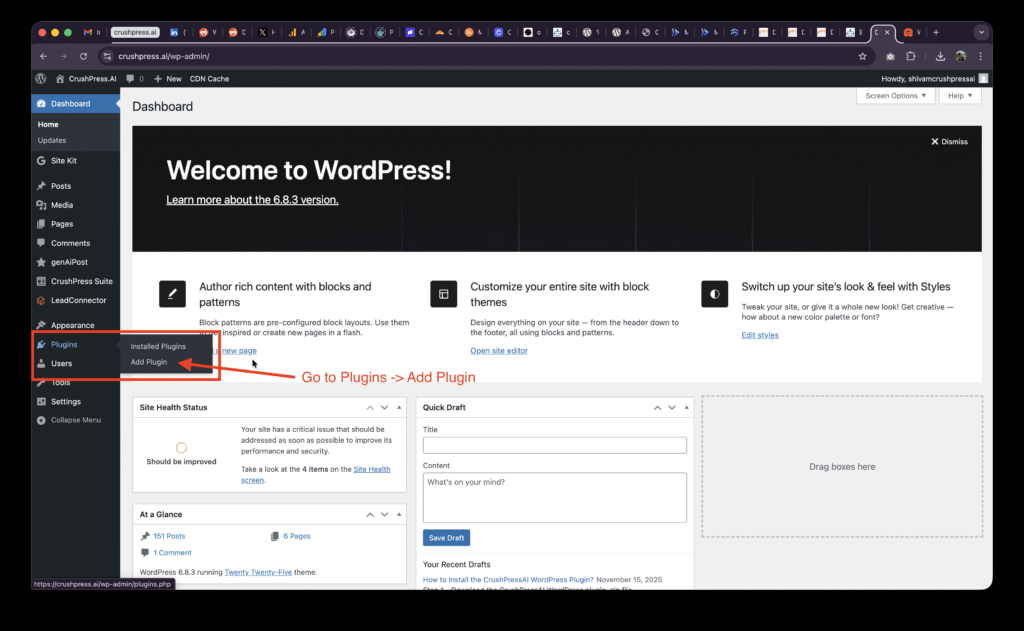
    After logging-in to your /wp-admin console go to Plugins -> Add Plugin

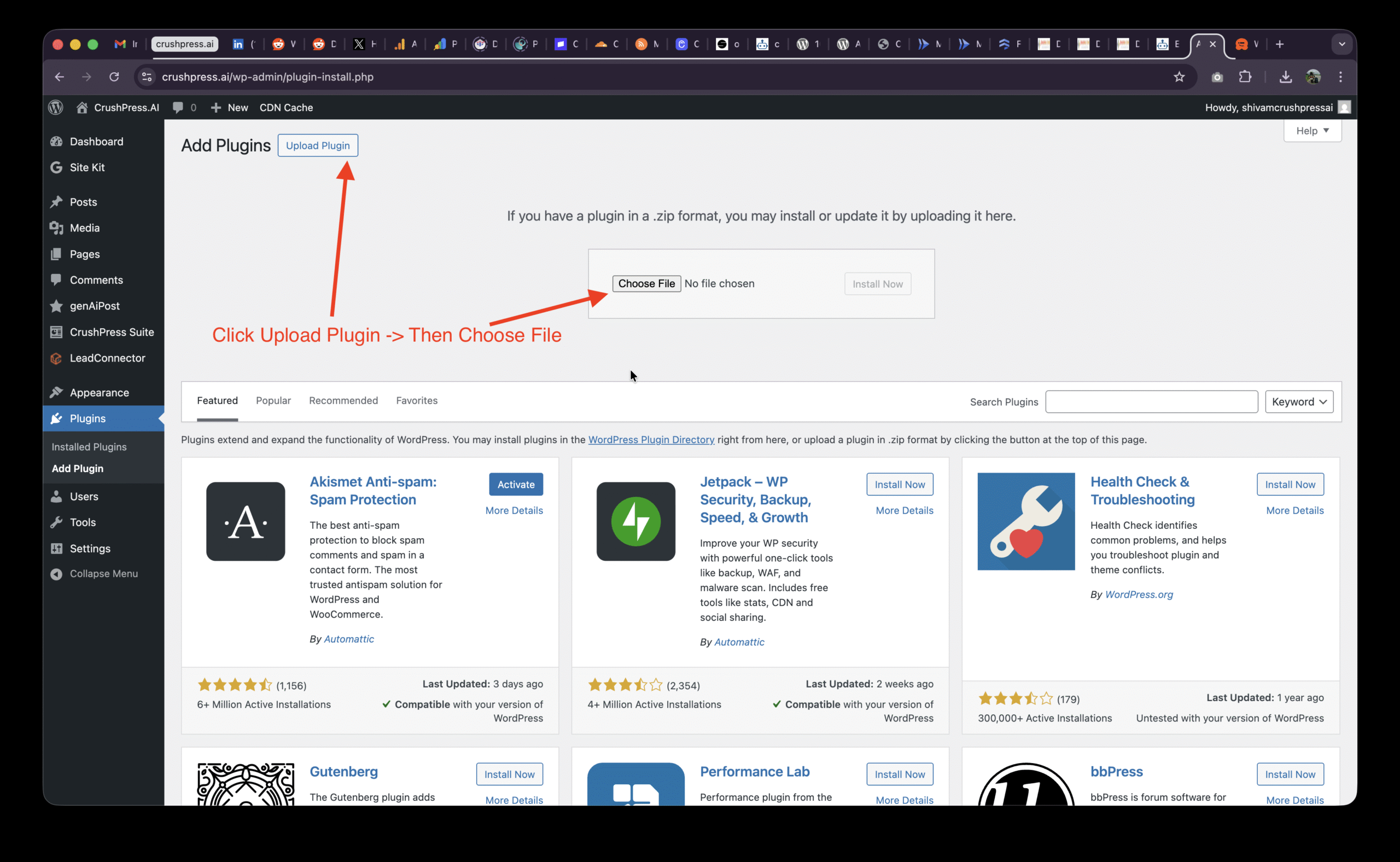
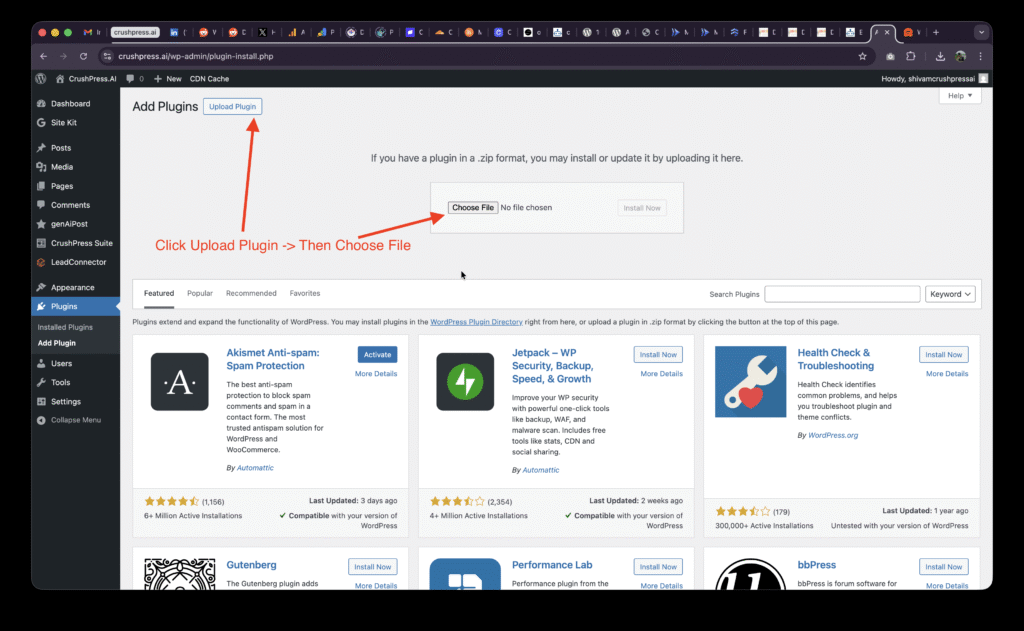
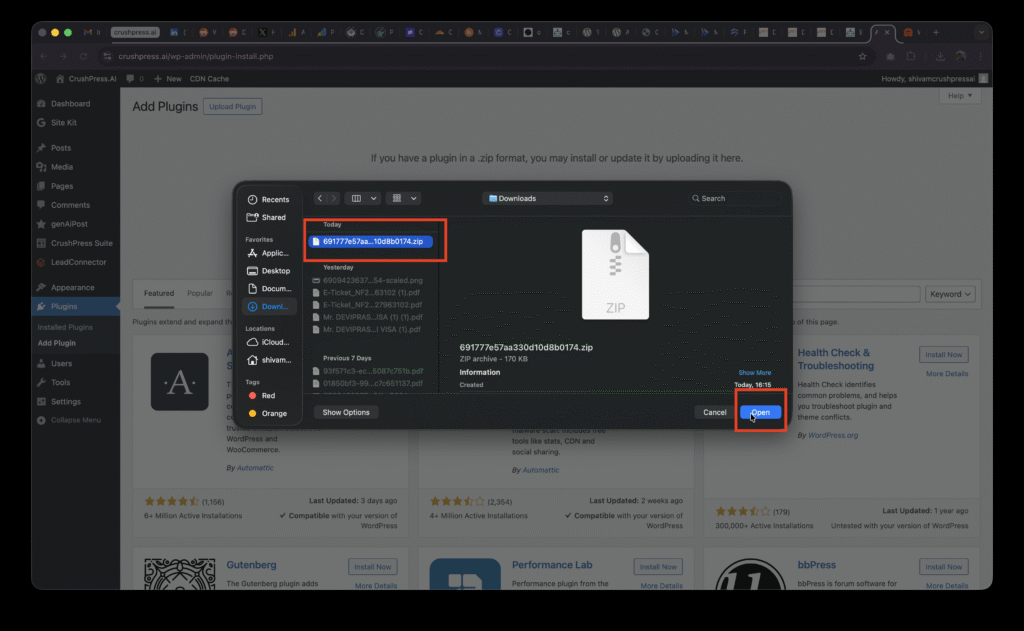
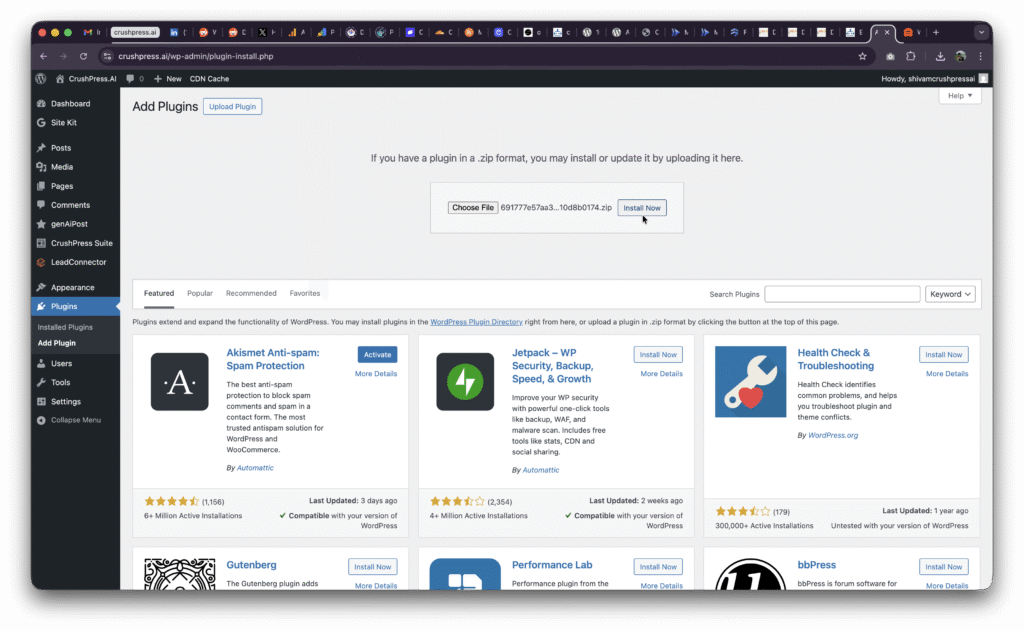
    Then Click on Upload Plugin and Choose File

    Select the .zip file and Upload Plugin

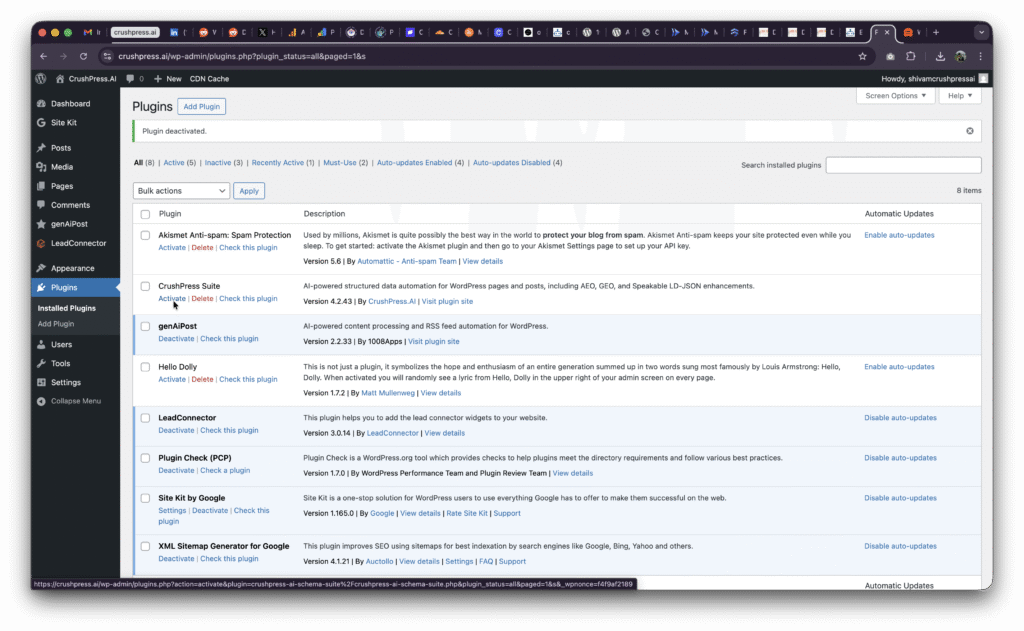
    You may need to Activate the plugin if this is your first install.

    Step 3 – Add card, choose plan, Setup OpenAI and ALL SET!

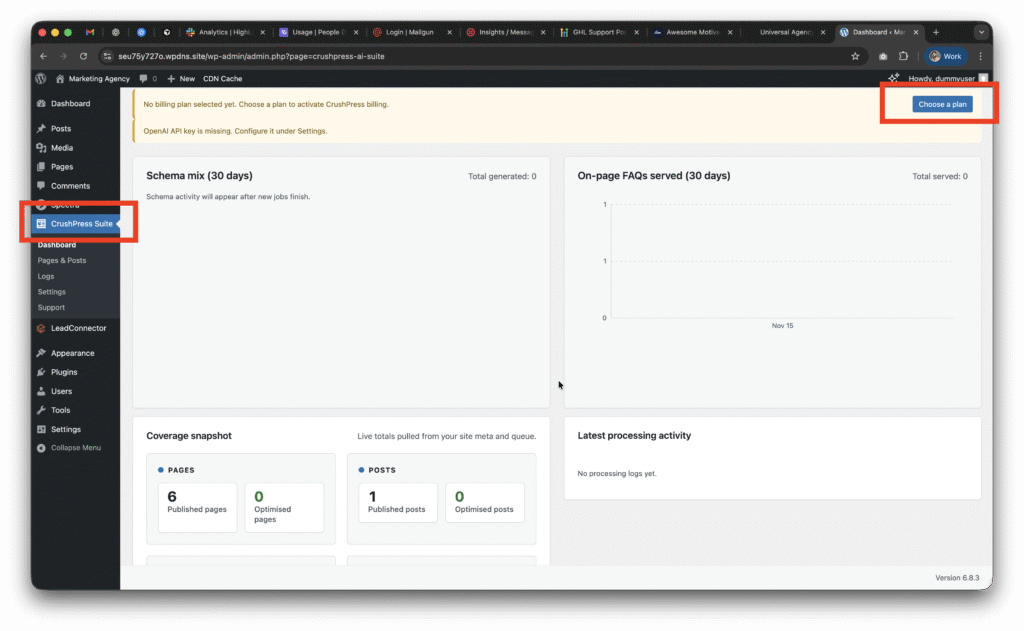
    You should be able to see CrushPress Suite in the left menu now

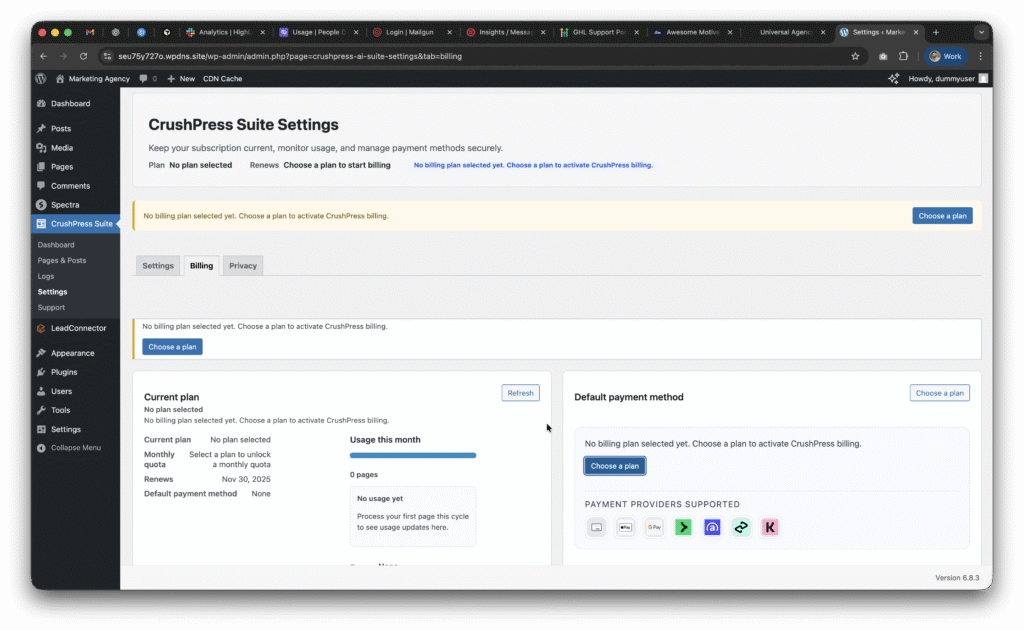
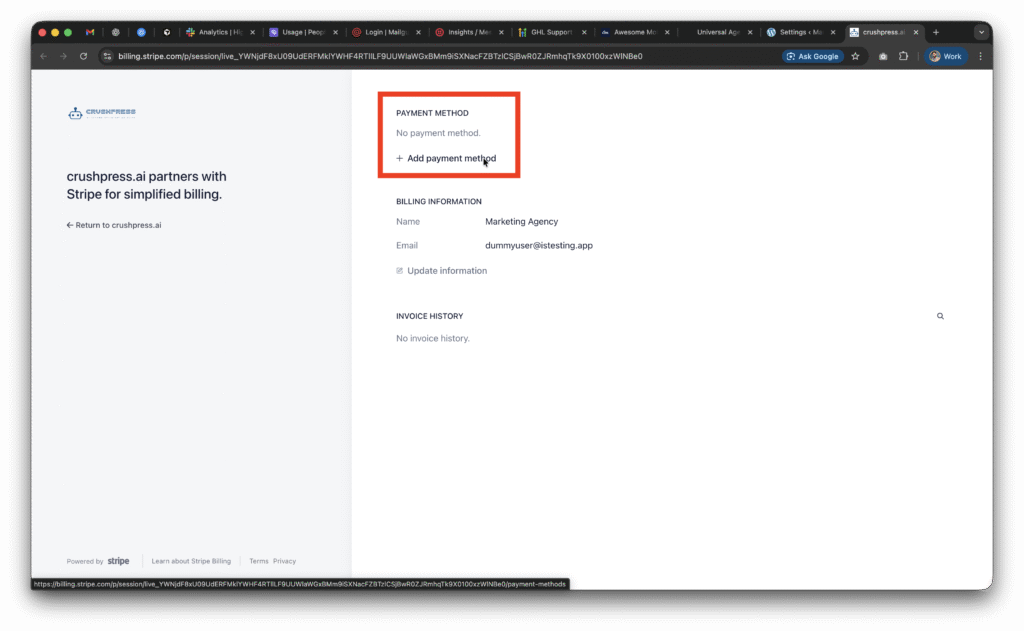
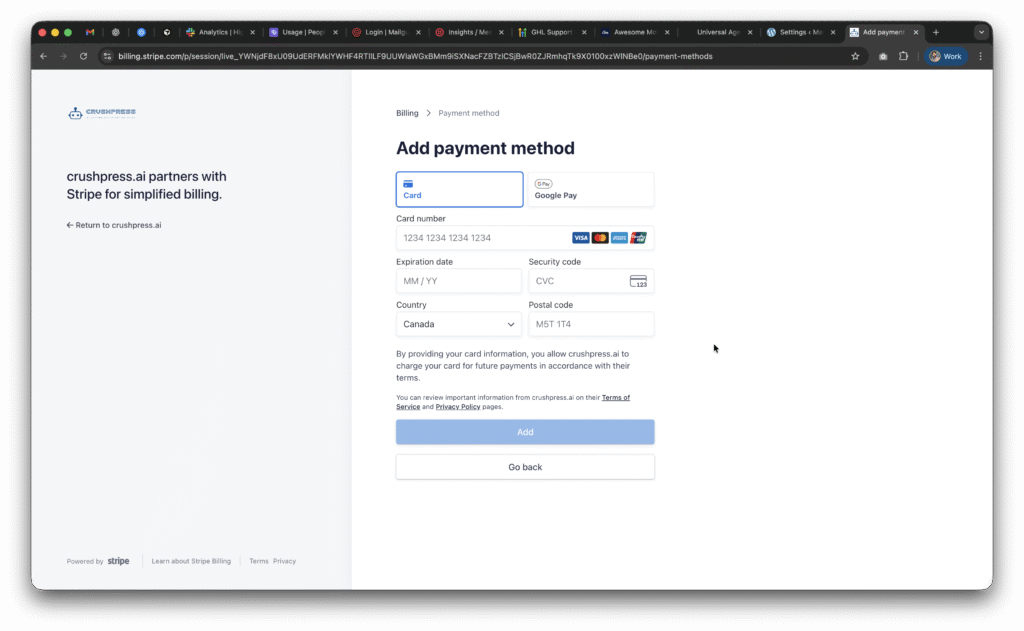
    Now go to CrushPress Suite -> Settings -> Billing page and add your card and choose your plan.

    You can choose the free pan to start with which will not charge you anything and is FREE FOREVER (be mindful of the overages though!)

    Checkout our 2025 Black Friday / Cyber Monday Promo to get unlimited usage free for 2 months on unlimited sites!

    Once you setup the card and choose a plan; you need to setup the OpeAI API Key.

    This post walks you through how to configure your OpenAI API Key.

  • CrushPress.ai – Agency & Hosting Provider FAQs

    CrushPress.ai – Agency & Hosting Provider FAQs

    1. What exactly does CrushPress.ai do for my WordPress sites?

    It auto-generates structured data (JSON-LD) that AI systems can reliably parse so your pages appear in AI answers (AEO) and generative summaries (GEO). It fixes the formatting issues most themes/plugins create.

    2. Is this replacing traditional SEO plugins like Yoast or RankMath?

    No. SEO plugins optimize for Google SERPs. CrushPress optimizes for AI-powered engines (ChatGPT Search, Google AI Overviews, Bing AI, Perplexity). They work side-by-side.

    3. How does this help my clients get more visibility?

    AI search rewrites content. CrushPress ensures your content is machine-trustworthy so AI engines quote it instead of skipping or paraphrasing it.

    4. What data formats does CrushPress generate?

    All schema.org JSON-LD types, including Article, BlogPosting, LocalBusiness, Product, FAQPage, HowTo, Review, Organization, Service, and more — automatically.

    5. Will it mess with my existing SEO schema?

    No. CrushPress safely merges, extends, or replaces broken schema depending on your site’s state. It never duplicates.

    6. Does it slow down my website?

    No. The plugin is lightweight, server-side rendered, and optimized for high-traffic environments.

    7. How does it handle sites with thousands of pages?

    It dynamically generates schema on request, supports caching, and is stable for very large sites or multisite networks.

    8. Can I use it on client sites under my agency license?

    Yes. There are agency/host plans specifically designed for bulk usage.

    9. Does the plugin work with custom post types?

    Yes — automatically. It detects CPTs, taxonomies, and custom fields.

    10. Does CrushPress integrate with popular page builders?

    Yes. Gutenberg, Elementor, Divi, WPBakery, Oxygen, Bricks — anything that outputs HTML.

    11. Does it support WooCommerce?

    Yes — Product, Offer, Review, AggregateRating, Brand, etc are auto-generated.

    12. What happens if my theme already outputs partial or broken schema?

    CrushPress repairs the schema, fills gaps, removes duplicates, and ensures compliance.

    13. How do you ensure JSON-LD is valid?

    Every output is validated against schema.org and Google Rich Result standards.

    14. Can I customize the schema?

    Yes. You can override templates, disable types, and map custom fields to schema.

    15. Does this help with Google AI Overviews?

    Yes. CrushPress outputs the content structures Google’s AI Overviews prefer.

    16. Is there a risk of over-optimization or penalties?

    No. JSON-LD is recommended by Google. CrushPress follows safe guidelines.

    17. Can hosting providers deploy this at scale?

    Yes. It supports WHMCS, provisioning scripts, multisite installs, and silent activation.

    18. Is support included?

    Yes. Agency/host plans include priority support and onboarding.

    19. Will AI engines actually quote my content because of this?

    You get significantly higher probability because your content becomes structured, trustworthy, and machine-readable.

    20. Do you store any data?

    No customer content is stored. All schema is generated on your server.

    21. Does it work with headless WordPress setups?

    Yes — WP-JSON endpoints expose structured data.

    22. Do I need to manually add schema on each page?

    No. Most pages are handled automatically. You can override if needed.

    23. Will this fix messy content built with custom HTML or shortcodes?

    Yes. CrushPress parses the page and generates proper machine-readable schema.

    24. Does it support multilingual sites?

    Yes — WPML, Polylang, Weglot.

    25. How fast is installation?

    One plugin → activate → done. No complicated setup.

  • How to Choose the Right B2B SaaS Marketing Agency

    How to Choose the Right B2B SaaS Marketing Agency

    Your shortlist can look impressive and still be wrong for your SaaS company. The expensive mistake is rarely hiring an obviously weak agency. It is hiring a capable team whose proof, channel mix, staffing, or operating model does not match the constraint you need removed.

    You can reduce that risk by defining the job before the pitch, scoring every candidate against the same evidence, and testing how the proposed team actually thinks. The process below gives you a defensible way to choose without letting reputation, chemistry, or a polished deck make the decision for you.

    Define the job before you invite agencies to solve it

    Do not start with a search for the best B2B SaaS marketing agency. Best is meaningless without a specific job. A firm built for category creation may be a poor choice for fixing technical SEO. A strong demand-generation team may not be equipped to improve how your company appears in answer engines. A content specialist cannot rescue a weak sales handoff simply by publishing more pages.

    Start by identifying the primary constraint in your buying system. It may be discoverability, category comprehension, trust, conversion, sales enablement, expansion, or measurement. Choose one as the main assignment. Secondary goals can remain in the brief, but they should not compete with the outcome that determines whether the engagement worked.

    Write a one-page decision brief

    Send every candidate the same brief. It should contain enough context for an agency to diagnose the problem without prescribing the answer for them.

    1. Business outcome: State the commercial change you want, such as creating qualified demand in a defined segment, improving conversion from an existing channel, or making the brand more discoverable for a named set of buying questions.
    2. Current bottleneck: Show where progress stops. Include the evidence you already have and distinguish an observed problem from an internal theory about its cause.
    3. Buyer and sales motion: Identify the buying roles, target accounts, product complexity, and how marketing activity becomes a sales conversation.
    4. Existing assets: List the website, content library, analytics, CRM, advertising accounts, customer evidence, subject-matter experts, and technical resources the agency could use.
    5. Internal ownership: Name who approves strategy, content, design, development, data access, legal claims, and product messaging. An agency cannot plan around an invisible approval chain.
    6. Constraints: Disclose fixed launch dates, regulated claims, development limitations, security requirements, excluded channels, and dependencies on another vendor or internal team.

    Turn the goal into acceptance criteria

    A goal such as improve AI visibility is too loose to buy against. Define the commercial questions that matter, the products and markets in scope, the AI surfaces you intend to observe, what counts as a mention versus a citation, and how often the agreed query set will be checked. Then connect those visibility measures to owned-site behavior and qualified opportunities where your data allows it.

    Separate leading indicators from business outcomes. Technical fixes, approved content, relevant coverage, indexed pages, answer-engine mentions, and conversion-path improvements can show whether the work is moving. Pipeline and revenue tell you whether that movement became commercially useful. The agency should explain both layers without pretending it controls the entire buying process.

    Record these criteria before outreach. If you let each agency redefine success during its pitch, you will receive attractive but incomparable proposals.

    Score fit with a 100-point evidence model

    An overhead evaluation board uses colored tiles and symbolic evidence pieces to compare three agency candidates consistently.

    A practical baseline assigns 20% each to relevant B2B SaaS clients and normalized third-party reviews, 10% each to agency age, leadership experience, founder involvement, employee tenure, and GEO capability, and 5% each to media references and AI visibility. Those weights total 100 points and balance market proof, organizational stability, and modern search capability.

    CriterionMaximum pointsEvidence to request
    Relevant B2B SaaS clients20Named examples with a comparable buyer, sales motion, market, problem, and service scope
    Independent reviews20Review profiles from multiple third-party platforms, plus an explanation of recurring positive and negative themes
    Year founded10Verifiable company history and evidence that the current service line has operated through market changes
    Leadership experience10Relevant leadership biographies, responsibilities, and direct involvement in quality control
    Founder-led operation10A clear account of where the founder participates after the sale and where responsibility is delegated
    Median employee tenure10Company-wide tenure context, delivery-team tenure, and expected staffing continuity for your account
    GEO offering10A documented workflow, sample deliverables, technical dependencies, query methodology, and measurement approach
    Media references5Links to independent, relevant coverage or citations rather than logos on a slide
    AI visibility5A defined query set, dated observations, platform context, and a transparent scoring method

    We recommend scoring each criterion from zero to five. Give zero when the capability is absent or the claim is contradicted, one when you have only an assertion, three when the evidence is credible but only partly relevant, and five when the evidence is relevant, verifiable, and tied to the proposed team. Use two and four for cases between those anchors.

    Convert each rating into weighted points with this calculation: rating divided by five, multiplied by the criterion’s maximum points. A rating of three on a 20-point criterion earns 12 points. Have stakeholders score independently before discussing the candidates so that the loudest person does not set the result by default.

    The weights are a baseline, not a universal truth. Change them before the first pitch if the assignment requires it. A new specialist agency may deserve fewer points for age but still win because its relevant client evidence is unusually strong. A founder-led firm should not receive full credit merely because the founder handled the sales call; the question is whether founder involvement improves the work after signing.

    Keep non-negotiable risks outside the score

    A high total should not compensate for a condition that makes the engagement unsafe or unworkable. Establish pass-or-fail gates before scoring.

    • The agency must identify the people expected to work on the account, not just the executives who sell it.
    • It must agree on a measurable problem and explain which parts of the result it can and cannot control.
    • Your company must retain appropriate ownership and administrative access to its domains, analytics, advertising accounts, CRM data, content, and other business-critical assets.
    • The agency must disclose relevant conflicts, subcontracting, and material dependencies on third-party tools or partners.
    • The agreement must provide a workable route for exporting data and handing off active work when the relationship ends.

    Interrogate proof until the conditions match your own

    Client logos establish exposure, not competence. A recognizable SaaS customer may have bought a different service, targeted a different market, supplied a large internal team, or completed the work under people who have since left. Relevant proof needs context.

    Reconstruct each case study

    Ask the agency to walk through a small number of closely matched engagements. For each one, get answers to the same questions:

    • What was the baseline condition, and how was it measured?
    • What business problem was the client trying to solve?
    • Which intervention did the agency choose, and what alternatives did it reject?
    • Which work came from the agency, the client’s team, or another vendor?
    • What changed, over what measurement period, and against which denominator?
    • Which members of that delivery team would work on your account?
    • What did not work as expected, and what changed afterward?

    A case without a baseline, scope boundary, measurement period, or agency contribution is a story rather than evaluable evidence. You do not need every client to resemble you exactly, but the agency should be able to explain which parts transfer to your situation and which do not.

    Use references and reviews for operating evidence

    Third-party reviews deserve substantial weight, but the average alone can hide the issue most likely to affect you. Group comments by staffing continuity, strategic depth, responsiveness, delivery quality, reporting clarity, scope control, and commercial pressure. Look for repeated patterns across platforms instead of treating every review as equally informative.

    Ask reference customers what happened after the pitch. Useful questions cover staffing changes, access to senior people, missed dependencies, feedback cycles, reporting disputes, scope changes, and the quality of the final handoff. Also ask what the customer would define differently if starting again. That answer often reveals the gap between a good agency and a well-designed engagement.

    Agency age, experienced leadership, founder involvement, and longer employee tenure can signal stability and exposure to changing market conditions. They are still proxies. Verify whether the proposed service, leaders, and delivery team have the relevant history. Company longevity does not prove that a newly assembled practice is mature.

    Make AI visibility evidence reproducible

    A screenshot of one favorable AI answer proves that the answer appeared once. It does not show coverage across the questions your buyers ask, distinguish a brand mention from a cited source, or establish that the result persists.

    Ask for the query set, AI product or search surface, date, market context, prompt method, repetition policy, and classification rules behind any visibility claim. The agency should separate mentions, citations, factual accuracy, sentiment, and referral behavior instead of compressing them into one unexplained number.

    Treat a proprietary AI visibility score as an index, not ground truth. It can help compare the same brand under a stable method, but only if you can inspect what enters the score and understand what caused it to move. Media references need similar scrutiny: verify the links, relevance, independence, and relationship to the work being proposed.

    Use the final round to inspect the work, team, and contract

    A SaaS leadership team observes an agency team collaborating during a final working session, with contract and handoff materials in the foreground.

    The final selection should reveal how the agency works when the answer is incomplete. Give finalists the same realistic scenario drawn from your brief. Do not demand a speculative campaign or a large amount of unpaid strategy. Ask for a paid diagnostic, a short working session, or a walkthrough of a sanitized deliverable from comparable work.

    Evaluate whether the team identifies assumptions, asks for missing evidence, ranks actions by likely value and dependency, and explains what it would defer. A useful diagnosis should show what the agency owns, what your team owns, and which conclusion could change when better data arrives.

    Test SEO, AEO, and GEO depth with operational questions

    Modern B2B SaaS discoverability can span conventional search results, answer engines, AI-generated overviews, third-party publications, communities, and the pages buyers visit after discovery. An agency does not need to own every channel. It does need to explain how its work fits that system.

    • How will you build and maintain the set of commercial questions we want to be found for?
    • How will you map those questions to buying stages, existing pages, new content, and third-party authority opportunities?
    • How will you distinguish a technical access problem, a content-quality problem, an entity-consistency problem, and an authority problem?
    • How will you validate that JSON-LD describes visible, accurate page content rather than adding unsupported claims?
    • How will you measure mentions and citations across agreed AI surfaces without presenting variable outputs as guaranteed rankings?
    • Which recommendations require developers, product experts, customers, legal review, digital PR, or changes outside the agency’s control?
    • How will classic search performance, AI visibility, on-site behavior, and qualified pipeline be reported without implying false attribution?

    Be cautious when a pitch treats structured data as a guarantee of inclusion or promises a fixed position inside a frontier model. JSON-LD can make page meaning more explicit to machines, but it cannot force an external system to cite, recommend, or rank the company. A credible proposal separates controllable implementation from outcomes the agency can only influence.

    Confirm the people behind the proposal

    Request a staffing map that names the account lead, strategist, individual contributors, subject-matter reviewers, analytics owner, executive sponsor, and backup coverage. Ask who makes routine decisions, who approves final work, and what happens when a named specialist becomes unavailable.

    Compare those answers with the proposal and pricing. If senior expertise drove the score, the agreement should make that expertise accessible in a defined role. If subcontractors perform material work, you should know which work, how it is reviewed, and whether they will access sensitive systems or customer information.

    Make the contract support a clean working relationship

    Before signing, check deliverables, exclusions, revision rules, reporting, meeting responsibilities, access requirements, intellectual-property ownership, renewal terms, notice periods, termination rights, data export, and transition assistance. Confirm who owns accounts and assets created during the engagement and whether your team will retain administrative access.

    Ambiguous ownership or renewal language can strand business data, delay a transition, or create unwanted cost. For a material agreement, have qualified legal counsel review unclear provisions rather than relying on a sales explanation that does not appear in the contract.

    If meaningful uncertainty remains, use a bounded paid pilot whose output remains valuable even if you do not continue. Depending on the assignment, that could be a technical audit, measurement design, query and content map, campaign diagnosis, or a small production package. Define the inputs, deliverables, quality standard, ownership, decision rights, and handoff before work begins.

    Do not judge a short pilot by whether it produces a full commercial outcome that normally depends on sales cycles, approvals, publishing, or market response. Use it to test diagnostic quality, prioritization, communication, craftsmanship, measurement discipline, and the proposed team’s ability to work with yours.

    Key takeaways

    • Choose an agency for a defined growth constraint, not for a broad claim of being full service or best in class.
    • Give every candidate the same one-page brief and set acceptance criteria before pitches begin.
    • Use a weighted 100-point scorecard, but keep ownership, conflicts, staffing transparency, and exit access as pass-or-fail gates.
    • Score client proof by similarity of conditions and verify what the agency actually contributed.
    • Require reproducible methods for GEO and AI visibility claims; a screenshot or unexplained proprietary score is not enough.
    • Inspect the proposed team, working process, contract, and handoff terms before allowing chemistry or reputation to decide.

    Your next move is concrete: write the decision brief, choose the weights and hard gates, and appoint the people who will score independently. Do that before contacting agencies. Once pitches begin, the criteria should control the conversation rather than changing to fit the most persuasive presentation.

    References

  • Generative Engine Optimization Tools and Pricing Guide

    Generative Engine Optimization Tools and Pricing Guide

    You are probably comparing GEO tools because your brand is difficult to find in ChatGPT, Gemini, Perplexity, or another generative answer engine. The hard part is not finding a dashboard. It is working out whether a quote buys useful measurement, practical recommendations, or the work required to change the answers.

    That distinction matters more than the advertised monthly price. A low-cost tracker can be exactly right for a team that can execute. The same subscription can become shelfware when nobody owns content, SEO, reviews, or digital PR. Use this guide to define the job, compare unlike pricing plans on the same basis, and buy only the scope you can turn into action.

    Decide whether you need a GEO tool, a service, or both

    GEO software and managed GEO services solve different parts of the problem. Treating them as substitutes is the fastest way to misread a proposal.

    A tool observes. It may collect answers for a defined prompt set, detect brand mentions, capture cited URLs, compare entities, and show changes over time. AI visibility and citation measurement across engines such as ChatGPT and Gemini are central uses of this product category.

    A service acts. It may improve pages on your website, create comparison content, pursue inclusion in third-party lists, develop review visibility, or conduct public relations. Some agencies include software access in the engagement, but the dashboard is still only the measurement layer.

    Start by naming your actual bottleneck:

    • You cannot see what is happening. You do not know which prompts matter, whether your brand appears, which pages are cited, or how competitors enter the answer. Begin with measurement software.
    • You can see the problem but cannot diagnose it. You have reports, but no reliable way to connect an answer change to content, authority, citations, or reputation. Look for a platform or advisory engagement that produces evidence-backed recommendations.
    • You know what should change but lack execution capacity. The backlog repeatedly loses to other work. A managed service may be more economical than another dashboard because implementation is the scarce resource.
    • Your website is not the main constraint. Competitors are recommended because they appear in respected comparisons, reviews, and press coverage. A tool can expose this gap, but fixing it requires off-site work.

    Do not pay for full-service execution merely because the reporting looks sophisticated. Conversely, do not buy a tracker and assume visibility will improve by itself. Write one sentence before any sales call: We need this purchase to help us decide or do ______. If a vendor cannot connect its deliverables to that sentence, the package is oversized, underspecified, or both.

    Require evidence for every capability on the feature list

    Feature matrices make GEO platforms look more interchangeable than they are. Two vendors can both advertise prompt tracking while using different engines, collection schedules, sampling methods, and definitions of visibility. Compare the records behind the dashboard, not the labels on the pricing page.

    CapabilityWhat to askAcceptable proof
    Engine coverageWhich engines, answer modes, markets, and account states are included in our quoted plan?A current coverage list and a raw result from every engine you intend to monitor.
    Prompt trackingDoes one tracked prompt cover one engine, or is each prompt-engine-market combination counted separately?The precise billing definition of a tracked prompt, including reruns and overages.
    Answer collectionHow often are answers collected, and how does the system handle variation between responses?Timestamped answer text with collection metadata and a documented sampling method.
    Brand detectionCan we define product names, parent brands, abbreviations, misspellings, and excluded terms?A configurable entity record and examples showing how ambiguous matches are handled.
    Citation captureDoes the platform preserve the cited page, domain, answer passage, and engine where the citation appeared?A citation-level export, not merely a domain total.
    Competitor analysisCan the same prompt set compare our brand with named alternatives without changing the collection method?A prompt-level view showing every detected entity and citation in the underlying answer.
    RecommendationsDoes each recommendation identify the evidence, affected prompt group, responsible team, and proposed change?A sample recommendation that can be accepted, rejected, assigned, and later evaluated.
    History and exportWhat data can we retain or export if we downgrade or leave?A machine-readable export containing prompts, answers, dates, mentions, citations, and relevant metadata.

    Raw answer evidence is essential because a brand mention, a recommendation, and a citation are not the same result. Your company can be named without being endorsed. It can be recommended without receiving a clickable citation. A page can be cited while the answer recommends a competitor. A single visibility score can hide all three situations.

    Define the scorecard before you watch the demo

    Ask every shortlisted vendor to calculate the same small set of metrics. The names are less important than stable definitions:

    • Answer inclusion rate: the share of eligible collected answers in which the defined brand or product appears.
    • Recommendation rate: the share in which the brand is presented as a suitable choice, not merely mentioned in passing.
    • Cited-source rate: the share that cites a page on a domain you own or another domain you have deliberately classified.
    • Competitor gap: the prompt groups where a named competitor appears or is recommended and your brand does not.
    • Evidence gap: the cited domains and page types supporting competitors but absent from your own authority footprint.
    • Action completion: the recommendations accepted, assigned, implemented, and annotated in the measurement history.

    Keep engine-level results separate until you have a reason to combine them. A blended score can rise because performance improved on a low-priority engine while declining where your buyers actually search. If you do create an overall index, document the business weighting so a future team member can reproduce it.

    Your prompt inventory needs the same discipline. Group prompts by the decision they represent: category discovery, direct comparison, problem diagnosis, vendor validation, or implementation. Tag branded and unbranded prompts separately. A report dominated by easy branded questions can look healthy while category-level discovery remains weak.

    Normalize GEO pricing before comparing quotes

    Three toolboxes are unpacked into matching rows of monitoring, recommendation, support, and service components beside a balance scale.

    There is no useful universal price without a common unit of scope. GEO packages can vary greatly in cost and included work, with entry-level options offering narrower functionality and premium engagements covering a broader program. A monthly total tells you little until you know what consumes the allowance and what still requires your team.

    Build a quote-normalization sheet with these rows:

    Pricing variableRecord for every quoteWhy it changes the real cost
    Prompts or queriesIncluded quantity, billing definition, and overage ruleA prompt may be counted once, once per engine, or once for every market and configuration.
    EnginesIncluded engines and any plan restrictionsBroad headline coverage is irrelevant if the engines you need sit behind an upgrade.
    Markets and languagesIncluded locations, languages, and regional configurationsLocal or international monitoring can multiply the number of configurations being tracked.
    Collection cadenceRefresh schedule, reruns, and sampling methodA frequently refreshed series is not equivalent to an occasional snapshot.
    Brands and competitorsIncluded entities and the price of additional onesA plan can become expensive when each product line or competitor consumes another allowance.
    Users and workspacesIncluded seats, clients, projects, and permission controlsAgency and enterprise use may require separation that an individual account cannot provide.
    HistoryRetention period and access after downgrade or cancellationTrend reporting loses value if the underlying evidence expires or cannot be exported.
    Exports and integrationsFile exports, API access, dashboards, and usage limitsManual transfer adds labor even when the platform subscription appears inexpensive.
    OnboardingSetup fee, prompt research, entity configuration, and trainingA low recurring fee may exclude the work needed to make the account usable.
    Analysis and executionIncluded analyst time, content work, SEO changes, outreach, reviews, and PRSoftware access should not be priced as though implementation is included when it is not.
    CommitmentBilling frequency, minimum term, renewal process, and cancellation conditionsAn annual commitment carries a different risk from a cancellable pilot, even at the same monthly equivalent.

    Then calculate the cost you will actually approve:

    Total operating cost = platform or service fee + required add-ons + internal analysis time + implementation labor + external execution spend.

    This is the figure that belongs in your decision memo. A subscription can look cheap while requiring hours of prompt cleanup, report interpretation, content production, and outreach. A managed engagement can look expensive while replacing work you would otherwise need to staff. Neither is automatically better; the relevant question is which quote buys the missing capability at the lower total cost.

    Use a common monitoring unit, but do not mistake it for value

    For quote comparison, define one monitoring configuration as a prompt paired with an engine, market, language, and refresh schedule. Ask vendors to price your exact inventory. This prevents a plan with broad but shallow coverage from appearing equivalent to one collecting the configurations you need.

    You can divide total software cost by comparable monitoring configurations to expose pricing differences. Do not use that result as your final value metric. A large inventory of irrelevant prompts is still waste. Value comes from resolving decisions: which content to improve, which evidence to publish, which citation gap to pursue, and which work to stop.

    Also separate included capacity from usable capacity. If your team can review only a small portion of the collected results, buying more prompts adds noise. If the allowance is too small to cover meaningful prompt groups, apparent volatility may send the team after isolated answer changes. Scope the inventory around decisions and ownership, then buy the capacity required to support it.

    Match the service tier to the work that must change

    Three connected workstations show analytics, collaborative content and outreach work, and improved source signals flowing into an abstract answer engine.

    Service tiers are useful as a procurement model, but their names are not standardized. Define each tier by responsibility rather than by labels such as starter, growth, or enterprise.

    • Measurement tier: establishes the prompt set, captures answers, reports mentions and citations, and identifies gaps. Choose it when your internal team can interpret the findings and implement changes.
    • Diagnosis and guidance tier: adds prioritized recommendations, content or authority analysis, and working sessions. Choose it when you have execution capacity but need help deciding what to change.
    • Managed execution tier: owns agreed work across measurement, website SEO, comparison content, reputation, third-party visibility, and PR. Choose it when the visibility gap extends beyond your site or when internal ownership is the constraint.

    A comprehensive GEO program may span several distinct workstreams. Ranking strong comparative or superlative pages can influence the information available to answer engines. Inclusion in third-party lists can create corroborating evidence. Reviews contribute reputation signals on platforms relevant to the category. Press coverage can strengthen the body of independent material associated with the brand. SEO, list visibility, reviews, and traditional PR can all form part of the broader GEO scope.

    Review work must be category-specific. Technology services may care about G2 and Clutch, software companies may encounter Capterra, travel brands may depend on TripAdvisor or Yelp, and B2B organizations may need to notice employer-review properties such as Glassdoor and Indeed. The point is not to create profiles everywhere. It is to identify which independent properties appear in the citations and recommendations for your commercial prompt set, then prioritize legitimate review generation and accurate profile management there.

    Ask a managed provider to separate owned, earned, and paid activity in its scope. A page published on your website is not equivalent to independent editorial coverage. A paid list placement is not equivalent to an earned recommendation. A review profile is not the same as a program that helps real customers leave candid feedback. If all of these appear under a vague authority-building line item, you cannot judge the method, risk, or expected deliverable.

    A lower tier is sensible when you already have strong brand recognition, search performance, editorial resources, or PR support. It is also sensible when you are still validating the prompt set. Premium execution earns its fee only when the provider is responsible for work you genuinely need and can show how that work connects to observed answer and citation gaps.

    Run the same buying test with every finalist

    1. Write the decision brief. Specify the products, market, engines, prompt groups, competitors, and business decisions the system must support.
    2. Send an identical inventory. Require every vendor to quote the same prompt-engine-market configurations, refresh expectations, users, history, and export needs.
    3. Inspect a raw record. Ask to see the prompt, collected answer, timestamp, detected entities, cited pages, and relevant collection metadata behind a dashboard result.
    4. Test a difficult distinction. Use a result where your brand is mentioned but not recommended, or where your page is cited while a competitor is favored. Ask how the platform classifies it.
    5. Request an action sample. A recommendation should identify the evidence, affected prompt group, proposed change, owner, and method for evaluating the result later.
    6. Price the full workflow. Add platform fees, overages, setup, analyst time, content or technical implementation, outreach, and any separate PR or review work.
    7. Confirm data control. Obtain the retention, export, cancellation, and post-termination access terms in writing before committing.

    If a pilot is available, judge it on traceability rather than a dramatic score change. You should be able to move from an executive chart to a collected answer, from that answer to its citations, and from the gap to an assigned action. A platform that cannot preserve that chain will make it difficult to defend spending or learn from changes.

    Key takeaways

    • Buy measurement software when you need visibility into prompts, mentions, recommendations, citations, and competitors. Buy services when you need someone to change the conditions producing those results.
    • Compare quotes using the same prompt, engine, market, language, refresh, history, entity, and user requirements. Headline monthly prices are not comparable without those units.
    • Demand raw, timestamped answer and citation evidence. A single visibility score cannot tell you whether the brand was merely mentioned, actively recommended, or cited.
    • Calculate total operating cost, including internal analysis and execution. The subscription fee is only one part of the budget.
    • Choose a lower service tier when your team already has authority and implementation capacity. Choose managed execution when content, third-party lists, reviews, PR, or ownership are the real constraints.
    • Do not reward data volume for its own sake. The best plan is the smallest one that reliably supports decisions your team is prepared to execute.

    Take your real prompt inventory and the normalization table into the next vendor call. Reject any proposal that cannot define its billing unit, expose the evidence behind its metrics, and name who owns the work after a gap is found. That will narrow the field faster than another feature comparison and leave you with a GEO budget tied to action rather than dashboard access.

    References

  • CrushPress 4.2.43: PHP 7.4 Compatibility and Update Steps

    CrushPress 4.2.43: PHP 7.4 Compatibility and Update Steps

    If CrushPress failed to install or activate on a client site running PHP 7.4, there is now a direct path forward: install CrushPress 4.2.43 and try the activation again. This compatibility release replaces PHP 8-only code paths that had caused fatal errors on a small number of older hosting environments.

    You do not need to redesign your schema, change your AEO or GEO workflow, or learn a revised dashboard. Version 4.2.43 changes runtime compatibility, not the plugin’s feature set. The important job is to identify affected sites, deploy the correct build, and verify that each installation can load normally.

    What changed in CrushPress 4.2.43

    CrushPress 4.2.43 restores full compatibility with PHP 7.4. Several code paths that previously depended on PHP 8 were rewritten so the plugin can run on PHP 7.4 hosting without removing functionality.

    Release detailWhat it means for you
    VersionCrushPress 4.2.43
    Compatibility addressedPHP 7.4
    Type of releaseCompatibility patch
    Feature changesNone
    Workflows retainedSchema generation, AEO and GEO tools, and dashboard workflows
    Manual installation packagecrushpress-ai-schema-suite-4.2.43.zip

    The distinction between compatibility and functionality matters. On an incompatible PHP runtime, a plugin can encounter a fatal error before its normal features are available. Changing settings inside CrushPress cannot correct that kind of failure because the plugin first has to load successfully. Version 4.2.43 addresses that loading barrier in the plugin code.

    This update does not change the PHP version configured by your hosting provider, and it does not establish compatibility for the rest of your WordPress stack. It specifically removes the PHP 7.4 blocker identified in the affected CrushPress code paths. Themes and other plugins still need to meet their own runtime requirements.

    Decide which WordPress sites need action

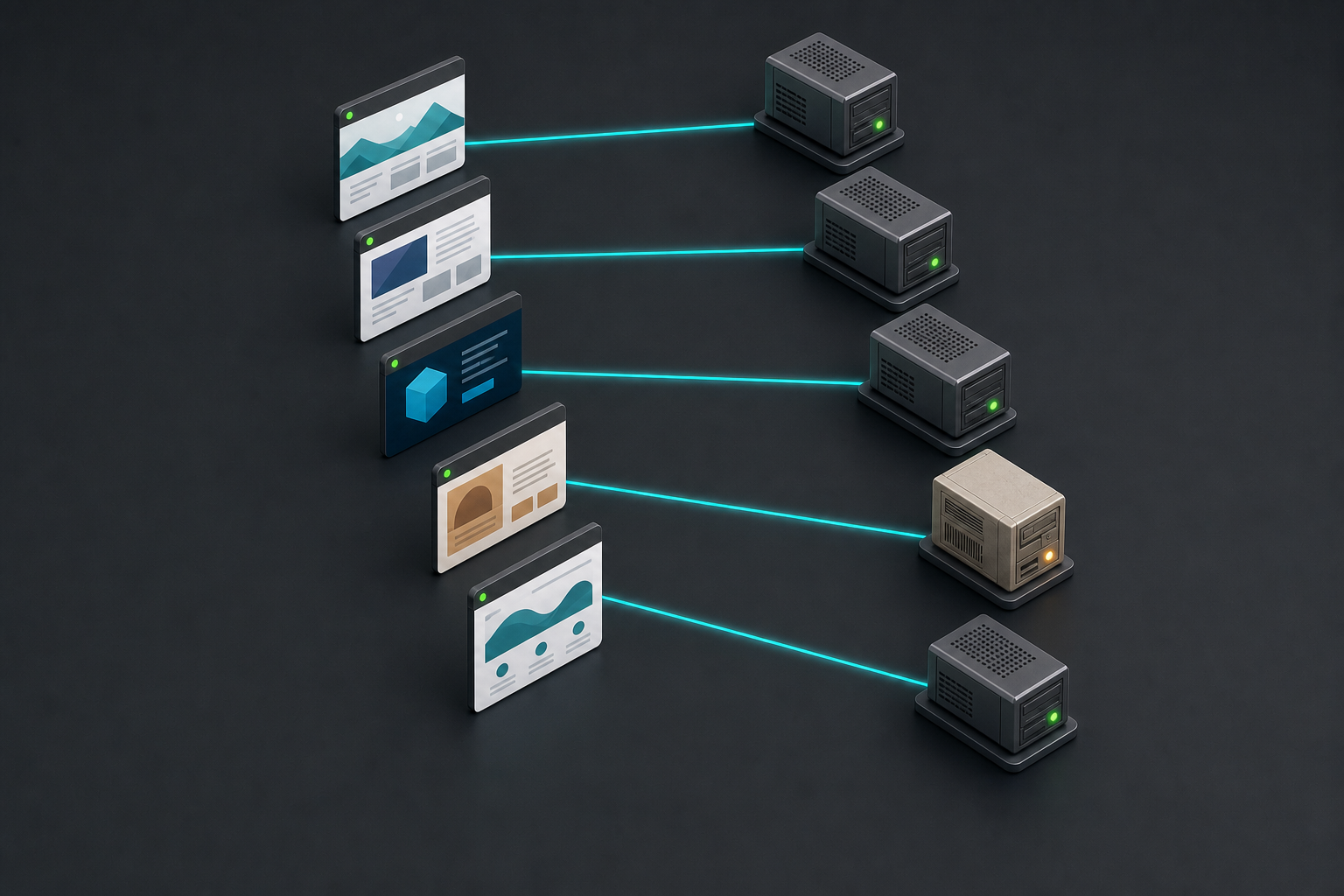
    Several generic website tiles connect to hosting servers, with one older server highlighted by an amber status light while the others show green lights.

    Start with the installation outcome, not the age of the site. A legacy site that already runs CrushPress 4.2.43 normally does not need another compatibility intervention. A site that failed during installation or activation on PHP 7.4 should be first in your update queue.

    • CrushPress previously produced a PHP error on PHP 7.4: install version 4.2.43 and reactivate the plugin.
    • You postponed installation because the host only offered PHP 7.4: use the 4.2.43 build for the new installation.
    • You have an earlier ZIP in an agency or deployment repository: replace it with crushpress-ai-schema-suite-4.2.43.zip so another site is not provisioned from the incompatible package.
    • Version 4.2.43 is already active: no additional action is required for this specific compatibility change.
    • The plugin was already working on a newer PHP environment: the patch does not require a new schema, AEO, GEO, or dashboard workflow.

    For agencies, the easily missed problem is often the stored deployment artifact. Fixing one failed site while leaving an older ZIP in an internal toolkit can reproduce the same activation problem on the next PHP 7.4 account. Treat the package replacement as part of the update, not as housekeeping for later.

    Update and verify the plugin without changing the workflow

    A software package is installed into a generic website interface and then shown connected to a server with a green confirmation light.

    A compatibility patch is narrow, but it still deserves a controlled rollout when you manage client sites. Keep the PHP environment and unrelated plugins unchanged during the first test where practical. That gives you a clear result: either the 4.2.43 build resolves the CrushPress activation barrier, or another issue remains to be diagnosed.

    1. Identify the affected installations. Prioritize sites on PHP 7.4 where CrushPress previously failed to install or activate.
    2. Record the starting state. Note the site’s PHP version, the installed CrushPress version, and the exact error previously shown. This prevents a general memory of a “PHP problem” from being mistaken for the specific issue fixed here.
    3. Use your normal recovery protection. Take the backup or staging step required by your WordPress maintenance process before replacing plugin code, especially on a production client site.
    4. Install CrushPress 4.2.43. Update through the WordPress dashboard, or use crushpress-ai-schema-suite-4.2.43.zip when performing a manual installation.
    5. Reactivate the plugin. This is necessary on sites where an earlier build failed or was deactivated after a fatal error.
    6. Confirm that the plugin remains active. Reload the relevant WordPress administration screen rather than treating the first success message as the entire test.
    7. Check the existing workflows. Open the CrushPress dashboard and confirm that the schema generation, AEO, and GEO tools you already use remain accessible.
    8. Inspect a representative page. Where your normal setup expects generated schema or other CrushPress output, verify that the output still appears as expected after the update.

    You should not need to rebuild the site’s configuration simply because of this release. The update is intended to preserve the existing feature behavior. If you change PHP, replace several plugins, alter the theme, and install CrushPress in the same maintenance window, however, any remaining error becomes harder to attribute. Separate those changes when the site allows it.

    If activation still fails on a legacy host

    A failure after installing 4.2.43 should not automatically be treated as the already-fixed PHP 7.4 issue. First confirm that WordPress is actually loading the new package. An older cached ZIP, an incomplete replacement, or a different error can look like the same problem from a distance.

    • Confirm that the installed version is 4.2.43, not an earlier package with a similar filename.
    • Confirm the PHP version reported by the affected hosting environment.
    • Capture the exact fatal-error text instead of paraphrasing it as an activation failure.
    • Record whether the error appears during upload, installation, activation, dashboard access, or a later CrushPress operation.
    • Compare the failing site’s environment with any site where the same 4.2.43 package activates successfully.
    • Use the in-plugin support panel if the problem continues on the legacy PHP host, and include the version and error details you collected.

    Do not keep forcing activation on a production site that repeatedly returns a fatal error. Restore the site to its known working state if necessary, retain the exact diagnostic details, and investigate from staging or through support. The compatibility patch removes one known blocker; it cannot make every unrelated hosting, theme, or plugin problem the same issue.

    Key takeaways

    • CrushPress 4.2.43 restores full compatibility with PHP 7.4.
    • The release rewrites PHP 8-only code paths that had caused fatal errors on some older hosting environments.
    • Schema generation, AEO and GEO tools, and dashboard workflows are unchanged.
    • Sites that previously failed on PHP 7.4 should be updated to 4.2.43 and reactivated.
    • The manual package is crushpress-ai-schema-suite-4.2.43.zip.
    • If the new build still fails, verify the installed version and capture the exact error before using the in-plugin support panel.

    Your next step is simple: find the PHP 7.4 sites that were excluded from your rollout, replace any older deployment package with 4.2.43, and test one affected installation under controlled conditions. Once activation and the existing workflows are verified, you can apply the same update process to the rest of that group.

    References

    • CrushPress.AI — Black Friday – Cyber Monday Deal: Unlock AI Visibility for All Your WordPress Sites (Free for 2 Months!)
    • CrushPress.AI — Version 4.2.43 released
  • Google Performance Max Budgets: Total vs. Average Daily

    Google Performance Max Budgets: Total vs. Average Daily

    If your Performance Max campaign has a fixed pot of money and a firm finish date, an average daily budget creates an unnecessary translation problem. You have to convert the approved total into a daily amount, then recalculate it whenever the budget, schedule, or cumulative spend changes.

    Total campaign budgets are appearing alongside the classic average daily budget in PMax, including in accounts outside the U.S. That gives you a more natural control for short flights, promotional bursts, and campaigns that must stop on a fixed date. The important decision is not which option sounds stricter. It is which one matches the financial constraint you actually have.

    Choose the budget model from the constraint

    Start with the commitment you made to the business. Is the approved amount tied to the entire campaign, or are you managing an ongoing rate of spend? That distinction should determine the setting.

    Campaign situationBetter starting controlReason
    Fixed media budget and fixed end dateTotal campaign budgetThe platform receives the campaign-wide amount directly, so you do not have to translate it into a daily average.
    Always-on campaign with no meaningful end dateAverage daily budgetThe operating constraint is an ongoing pace rather than a finite flight total.
    Short promotion, launch, event, or seasonal burstTotal campaign budgetSpend has to be managed across a defined window, often with little room for a late manual correction.
    Continuous campaign reviewed and funded periodicallyAverage daily budgetThe campaign continues while its acceptable spending rate is reviewed over time.

    A total budget is not automatically safer for every campaign. It is safer when the real liability is the full cost of a finite flight. An average daily budget remains the clearer instruction when the campaign is meant to continue and the business controls its pace rather than a final total.

    Key takeaways

    • Use a total campaign budget when both the approved media amount and the campaign end date are fixed.
    • Use an average daily budget when the campaign is ongoing and the controllable variable is its rate of spend.
    • Do not treat either budget type as a profitability or performance guarantee.
    • Check your own PMax setup before planning around the total-budget option because availability is still expanding.
    • Monitor cumulative cost and the required remaining pace even when Google handles campaign-level pacing.

    Build a fixed flight without losing control of the numbers

    A transparent container of brass tokens feeds a timed path of blank calendar tiles, with used tokens separated in a tray and a movable gate controlling the remaining supply.

    A total budget removes one calculation from campaign setup, but it does not remove the need for a precise brief. Before you publish a fixed flight, make the following decisions explicit.

    1. Define the spend amount. Confirm that the approved figure represents media spend inside Google Ads. Keep agency fees, production costs, taxes, and other expenses separate unless your internal budget owner has deliberately included them.
    2. Fix the campaign window. Record the intended start date, final eligible date, account time zone, and any business deadline that falls after advertising stops. A vague end date turns a total budget into a moving target.
    3. Select the unit that matches the approval. If the account offers a total campaign budget, enter the approved campaign-wide media amount. If it does not, calculate an average daily budget from the fixed total and scheduled campaign days.
    4. Check the setting before launch. A total amount entered into a daily field can create immediate financial exposure. A daily amount entered as the total can suppress the entire flight. Have the budget owner or a second operator verify the budget type, amount, and dates together.
    5. Create a pacing check. Track cumulative campaign cost, remaining approved budget, remaining campaign days, and the business outcome you are optimizing. The budget setting controls spend instructions; your reporting still has to show whether the money is producing acceptable results.
    6. Log every material edit. Record the old and new budget, the old and new end date, cumulative cost at the time of the change, the reason, and the approver. Without that record, a later change in delivery can be difficult to interpret.

    For monitoring, subtract cumulative campaign cost from the approved total to get the remaining budget. Divide that remainder by the remaining campaign days to see the implied pace required from that point. This is a diagnostic, not a replacement for the total-budget setting. It tells you whether a late budget or date change has created an unrealistic catch-up requirement.

    Be especially careful when editing an active campaign. Changing either the total or the end date changes the implied pace for the rest of the flight. If the interface does not make clear whether an edited amount represents the whole campaign or only the remaining period, do not guess. Read the field definition presented in your account and reconcile it against cost already recorded before saving.

    Budget control is not performance control

    The new option solves a budgeting mismatch: a fixed campaign total no longer has to be expressed as a daily average. It does not make every other PMax decision correct.

    • It does not promise identical spend each day. A campaign-level budget is designed around the full flight, so assess cumulative pacing rather than expecting a perfectly flat daily line.
    • It does not guarantee full delivery. A budget is permission to spend, not proof that enough eligible opportunities exist under the rest of the campaign setup.
    • It does not guarantee profitable delivery. Conversion measurement, campaign goals, assets, bidding decisions, and the underlying offer still determine whether spend creates value.
    • It does not create an account-wide ceiling. A PMax campaign budget controls that campaign. If several campaigns draw from one commercial allocation, you still need a separate portfolio or account-level control process.
    • It does not repair a weak objective. Giving automation a cleaner spending instruction cannot compensate for an outcome that is poorly defined or measured.

    This distinction prevents a common diagnostic error. If a campaign has budget headroom but is not delivering, increasing a cap that is not binding does not address the active constraint. Investigate campaign eligibility, measurement, bidding, assets, and demand before assuming the budget is the problem. If the campaign is spending at the intended pace but producing weak outcomes, work on performance inputs rather than switching budget models.

    Handle availability as a rollout, not an assumption

    The total-budget option has been reported live beyond the U.S. after plans to extend it to Search, Shopping, and Performance Max. That is evidence of an expanding rollout, but it is not a reason to assume that every account, market, or campaign setup exposes the same control at the same moment.

    Check the budget section of the actual PMax campaign you intend to run. Look for a choice between a total campaign budget and an average daily budget. If the total option is absent, keep the campaign plan intact and use the daily-budget fallback rather than delaying a time-sensitive flight solely for a setting you cannot access.

    Your fallback worksheet only needs a few controlled fields:

    • Approved media budget
    • Campaign start and end dates
    • Number of scheduled campaign days
    • Calculated average daily budget
    • Cumulative campaign cost
    • Remaining approved budget
    • Date, owner, and reason for the latest revision

    Calculate the initial daily setting by dividing the fixed media budget by the scheduled campaign days. Treat the result as the planning input for an average daily budget, not a promise that each calendar day will produce identical cost. Recalculate it whenever the approved total, schedule, or amount already spent changes. That change control is where many flighted campaigns lose alignment with their original approval.

    Read pacing and results as separate signals

    Two separate control instruments show token flow toward a finish marker and tokens branching into several illuminated outcome channels.

    A campaign can be on budget and still be commercially weak. It can also be behind its planned pace while the results it does generate are valuable. Your review should therefore answer two separate questions: Is spend moving appropriately through the flight, and is that spend producing an acceptable business outcome?

    • Pacing is aligned and outcomes are acceptable: avoid changing the budget simply because the control is available. Preserve a stable plan unless the business constraint changes.
    • Spending is faster than expected and outcomes are acceptable: confirm the fixed financial ceiling before approving more budget. Good performance does not silently expand spending authority.
    • Spending is slower than expected and outcomes are acceptable: inspect the remaining budget and remaining time. Decide whether the campaign truly needs to catch up or whether the original total was only a maximum.
    • Pacing is aligned but outcomes are weak: leave the budget-model question aside and diagnose the performance inputs. Changing from daily to total does not improve the value of the traffic or conversions.
    • Spending is slow and outcomes are weak: do not increase budget by reflex. More headroom is unlikely to help when the current budget is already not being reached.

    For your next fixed-duration PMax launch, put the budget model directly in the campaign brief alongside the approved amount, start date, end date, and change authority. Select the total campaign budget when it is available and matches the commitment. Otherwise, use the calculated daily fallback and keep the remaining budget visible. That gives Google a clear spending instruction while leaving the financial decision where it belongs: with you and the budget owner.

    References

  • YouTube Demand Gen Cost Adjustments: A Practical Guide

    YouTube Demand Gen Cost Adjustments: A Practical Guide

    Your new YouTube Demand Gen campaign is missing its target CPA, and the early spend looks hard to defend. Before you either shut it down or assume Google will make the numbers right, separate the campaign’s performance from a new kind of reporting adjustment.

    Google is testing a narrow beta that may retroactively lower the reported cost of qualifying Demand Gen target CPA campaigns when early conversions fall short of its forecast. That can reduce some learning-period risk, but it isn’t guaranteed, it doesn’t arrive as a visible credit, and it shouldn’t be built into your budget.

    Key takeaways

    • The experiment is aimed at new Demand Gen campaigns using target CPA bidding during their initial learning period.
    • A qualifying adjustment can begin within five days of launch and remain active for up to three weeks.
    • You won’t necessarily see a separate credit or adjustment entry. The campaign’s final reported cost may simply be lower.
    • Eligibility depends in part on account quality, reliable tracking, and adherence to best practices, but meeting those conditions doesn’t guarantee an adjustment.
    • A lower CPA caused by revised cost is financially useful, but it isn’t evidence that your creative, audience, or conversion rate improved.

    What the adjustment changes – and what it does not

    Treat target CPA as an optimization goal, not a contractual price. A campaign can spend above that target while the bidding system gathers enough information to predict which impressions are likely to convert.

    Under the beta, Google monitors a new Demand Gen tCPA campaign during that uncertain opening period. If conversions trail Google’s forecast, the system may recalculate costs retroactively so the resulting CPA is closer to the campaign’s target.

    The important word is cost. Observed CPA is reported cost divided by recorded conversions. If Google lowers the numerator while the conversion count stays unchanged, CPA improves mathematically. Nothing in that calculation proves that the ads generated more conversions, attracted better prospects, or became more persuasive.

    That distinction matters when you explain the result. If only reported cost changed, don’t write that campaign optimization produced a performance gain. Say that the platform adjusted reported media cost during the learning period. You can then evaluate creative and audience performance using the conversion evidence that remains.

    It is also safer to call this a cost adjustment than a refund. The experiment is designed to produce a revised final reported cost without a separate credit or line item. Don’t promise a client or finance team that cash is coming back, and don’t book a saving before the adjusted cost actually appears.

    Use the five-day and three-week windows correctly

    Five small day tiles and three larger weekly blocks form an abstract campaign evaluation timeline.

    A retroactive change is difficult to recognize if you only look at the latest dashboard total. Build a simple record from launch so you can see whether historical cost changes later.

    1. Before launch: Record the campaign identifier, launch date, target CPA, conversion action, and maximum approved spend. This gives you a fixed baseline if settings or reported totals change.
    2. During the first five days: Capture reported cost, conversions, and calculated CPA at the same cutoff each day. A high early CPA doesn’t prove that the campaign qualifies, and it doesn’t prove that an adjustment is on the way.
    3. Through the three-week window: Revisit earlier dates instead of checking only the newest day. Compare current historical cost with the values you previously recorded. The adjustment may apply only to particular campaigns or days, so an account-level total can hide it.
    4. At the end of the window: Reconcile the latest campaign total against your snapshots. If historical cost fell without a matching conversion change, label the movement as consistent with a retroactive cost adjustment. Unless Google explicitly identifies the cause, don’t present your inference as confirmation.

    The learning period isn’t permission to ignore a broken campaign. Repair defective conversion tracking as soon as you detect it, and keep any pre-approved budget ceiling or business stop condition in force. This beta changes how you interpret early cost; it doesn’t transfer budget control to Google.

    Audit the cost change without misreading performance

    Your audit doesn’t need a complex attribution model. It needs consistent snapshots. For every observation, preserve the date range, snapshot time, reported cost, recorded conversions, calculated CPA, target CPA, and any tracking or campaign-setting change you made.

    Then compare an earlier snapshot with the platform’s latest values for the exact same reporting period:

    What changedWhat you can concludeHow to report it
    Cost fell; conversions stayed the sameThe CPA improvement came from the cost side of the calculation.Describe a reported-cost revision, not stronger conversion generation.
    Conversions changed; cost stayed the sameThe CPA movement came from the conversion side.Investigate conversion reporting before attributing the result to a cost adjustment.
    Cost and conversions both changedThe snapshot alone cannot isolate the causes.Report both changes and avoid claiming that the beta explains the full CPA movement.
    Neither value changedNo retroactive effect is visible in the compared period.Do not assume future eligibility or include an expected saving.

    This comparison protects you from a common analytical mistake: treating every lower CPA as evidence of better ad delivery. A favorable cost revision can make the campaign more economical, which is valuable in its own right. It still needs to be separated from changes in conversion volume and quality.

    Keep that separation in dashboards and stakeholder updates. Show the latest platform-reported CPA, but retain the underlying cost and conversion fields beside it. Add a note when a historical cost movement is visible. Anyone reviewing the campaign later should be able to tell whether the ads produced a different result or whether Google changed what that result cost.

    Budget as though no adjustment will arrive

    A hand places solid budget tokens into a campaign tray while faint translucent tokens remain in a separate uncertain tray.

    The beta’s stated eligibility considerations include account quality, well-maintained tracking, and consistent use of best practices. Those are factors, not a deterministic application checklist. Even an apparently well-run account may receive no adjustment, and an eligible campaign may receive one for only part of the learning period.

    • Fund the unadjusted scenario. Approve the campaign only if you can absorb its planned spend without a retroactive reduction.
    • Verify tracking before launch. A cost safety mechanism cannot rescue a campaign whose conversion signal measures the wrong action or fails to record the intended outcome.
    • Document necessary changes. If you repair tracking or alter a campaign setting during the window, record what changed and when. Otherwise, later CPA movements will be easy to misattribute.
    • Keep your economic stop conditions independent. Don’t let the possibility of an adjustment justify spend that has already crossed an approved limit or no longer makes business sense.
    • Treat an observed reduction as upside. Once it appears in reported cost, include it in reconciliation while preserving a note about how the improvement occurred.

    At your three-week review, make the next budget decision from current economics, conversion quality, and the latest reconciled cost. If the campaign only looks viable when you assume an adjustment that hasn’t appeared, it hasn’t earned more budget yet.

    References