
Boost Your Campaigns: Google PMax Adds Seasonal Theming

```json
{
  "alt": "Google Ads logo with digital data icons in a futuristic background.",
  "caption": "Harness the power of Google Ads with cutting-edge digital marketing strategies! Dive into the future with this dynamic visual.",
  "description": "The image showcases the Google Ads logo prominently, against a sleek, futuristic background filled with digital data icons like graphs and targets. This creative composition symbolizes modern digital marketing and analytics. The vibrant colors and dynamic elements evoke innovation and technological advancement, making it ideal for illustrating articles or materials on online advertising strategies and data analytics."
}
```

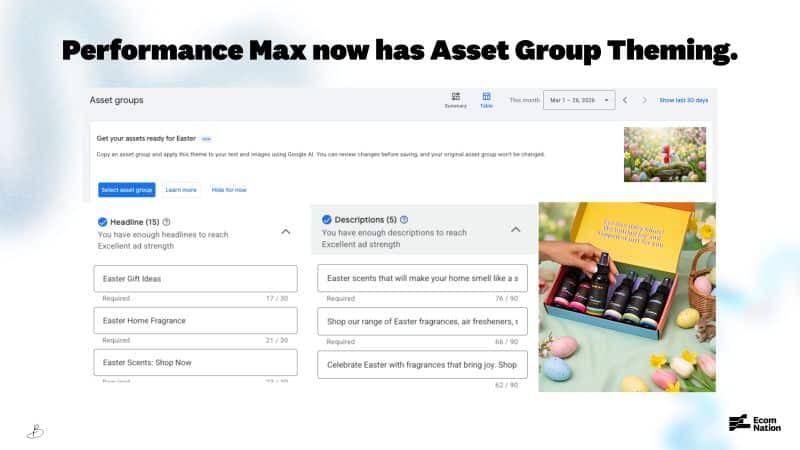
I’ve recently discovered an exciting update from Google that makes managing seasonal campaigns a breeze. Their new Asset Group Theming feature is a game changer inside Performance Max, allowing me to quickly apply seasonal themes to existing asset groups without having to start from scratch.

Here’s How It Works: I can clone a top-performing asset group and apply a theme. Google then takes care of generating themed image variations and suggesting headlines and descriptions that match, all while keeping the original group intact. This way, I can safely test new themes without any risks.

The Themes Available:

  • Promotional: Sale, Studio/Editorial
  • Seasons: Winter, Spring, Summer, Fall
  • Cultural moments: Christmas, Black Friday/Cyber Monday, Halloween, Valentine’s Day, Easter, Mother’s Day, Father’s Day, Hanukkah, New Year, Lunar New Year, and Back to School

Where to Find It: I find the theme application option inside Asset Groups ahead of major holidays, or by selecting “Apply theme to existing asset group” while setting up a new one.
```json
{
  "alt": "Screenshot of Performance Max Asset Group Theming for Easter promotions.",
  "caption": "Discover how Performance Max enhances your Easter campaigns with new Asset Group Theming features for dynamic ad creation.",
  "description": "This image showcases the new Asset Group Theming in Performance Max, designed for Easter promotions. It includes a screenshot of the asset group interface with headline and description options for ad creation, emphasizing Easter-themed marketing. Adjacent is an Easter-themed photo with colorful eggs and scented products, highlighting the festive appeal and potential engagement strategies using Performance Max. SEO keywords: Performance Max, Asset Group, Easter promotions, ad creation."
}
```

Important Note: This tool is a starting point, not a complete solution. It uses existing images and adds themed backgrounds without replacing videos, and only updates a few headlines. Everything still requires review to ensure it fits the campaign before going live.

Why This Matters: Seasonal creative refreshes used to consume a lot of time, especially when factoring in design resources and the risk of performance drops with asset changes. This feature minimizes that hassle, allowing me to adapt my best-performing strategies quickly.

The Bottom Line: Think of this as a creative assistant, rather than a designer replacement. For those of us juggling multiple seasonal peaks, the time savings alone make it worth exploring.

First Spotted: Google Ads specialist Bia Camargo first noticed this update and shared it on LinkedIn.


Inspired by this post on Search Engine Land.


crushpress.ai community screenshot

FAQs

What is Asset Group Theming in Google Performance Max?

Asset Group Theming is a feature inside Performance Max that lets you clone a top-performing asset group and apply a seasonal theme. Google then generates themed image variations and suggests headlines and descriptions that match, all while keeping the original group intact.

How do you apply Asset Group Theming?

Find the theme option inside Asset Groups ahead of major holidays, or select ‘Apply theme to existing asset group’ when setting up a new asset group.

What themes are available?

Promotional: Sale, Studio/Editorial; Seasons: Winter, Spring, Summer, Fall; Cultural moments: Christmas, Black Friday/Cyber Monday, Halloween, Valentine’s Day, Easter, Mother’s Day, Father’s Day, Hanukkah, New Year, Lunar New Year, and Back to School.

Is Asset Group Theming a complete solution?

Not a complete solution. It’s a starting point that uses existing images and adds themed backgrounds, and it only updates a few headlines; review is still required before going live.

Why is this feature useful?

It minimizes time spent on seasonal creative refreshes and lets you adapt your top-performing strategies quickly.

Who first spotted this update?

Google Ads specialist Bia Camargo first noticed the update and shared it on LinkedIn.

Comments

Leave a Reply

Your email address will not be published. Required fields are marked *