
I’ve recently discovered an exciting update from Google that makes managing seasonal campaigns a breeze. Their new Asset Group Theming feature is a game changer inside Performance Max, allowing me to quickly apply seasonal themes to existing asset groups without having to start from scratch.
Here’s How It Works: I can clone a top-performing asset group and apply a theme. Google then takes care of generating themed image variations and suggesting headlines and descriptions that match, all while keeping the original group intact. This way, I can safely test new themes without any risks.

The Themes Available:
- Promotional: Sale, Studio/Editorial
- Seasons: Winter, Spring, Summer, Fall
- Cultural moments: Christmas, Black Friday/Cyber Monday, Halloween, Valentine’s Day, Easter, Mother’s Day, Father’s Day, Hanukkah, New Year, Lunar New Year, and Back to School
Where to Find It: I find the theme application option inside Asset Groups ahead of major holidays, or by selecting “Apply theme to existing asset group” while setting up a new one.
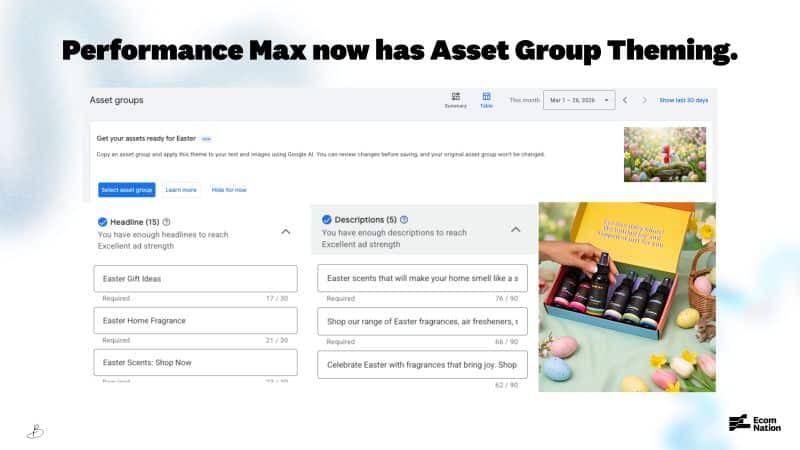
Important Note: This tool is a starting point, not a complete solution. It uses existing images and adds themed backgrounds without replacing videos, and only updates a few headlines. Everything still requires review to ensure it fits the campaign before going live.
Why This Matters: Seasonal creative refreshes used to consume a lot of time, especially when factoring in design resources and the risk of performance drops with asset changes. This feature minimizes that hassle, allowing me to adapt my best-performing strategies quickly.
The Bottom Line: Think of this as a creative assistant, rather than a designer replacement. For those of us juggling multiple seasonal peaks, the time savings alone make it worth exploring.
First Spotted: Google Ads specialist Bia Camargo first noticed this update and shared it on LinkedIn.
Inspired by this post on Search Engine Land.

Leave a Reply