Optimize Internal Linking: Avoid Tracking Parameter Pitfalls

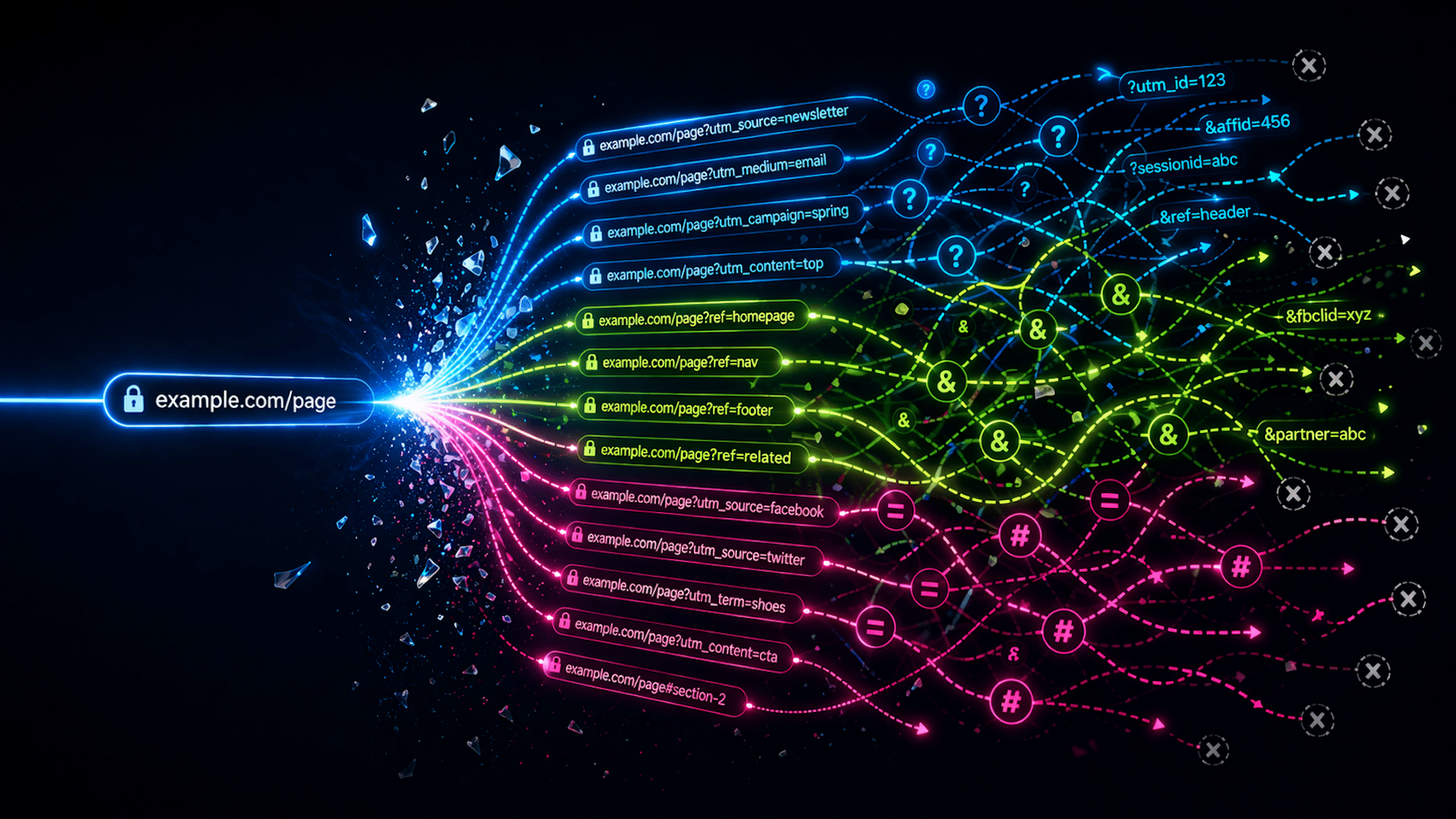
Digital visualization of URL paths branching into various parameters in blue, green, and pink hues on a dark background.

Internal links are powerful for boosting SEO, but using tracking parameters can be detrimental. Let me share how you can clean up your internal links to enhance your site
```json
{
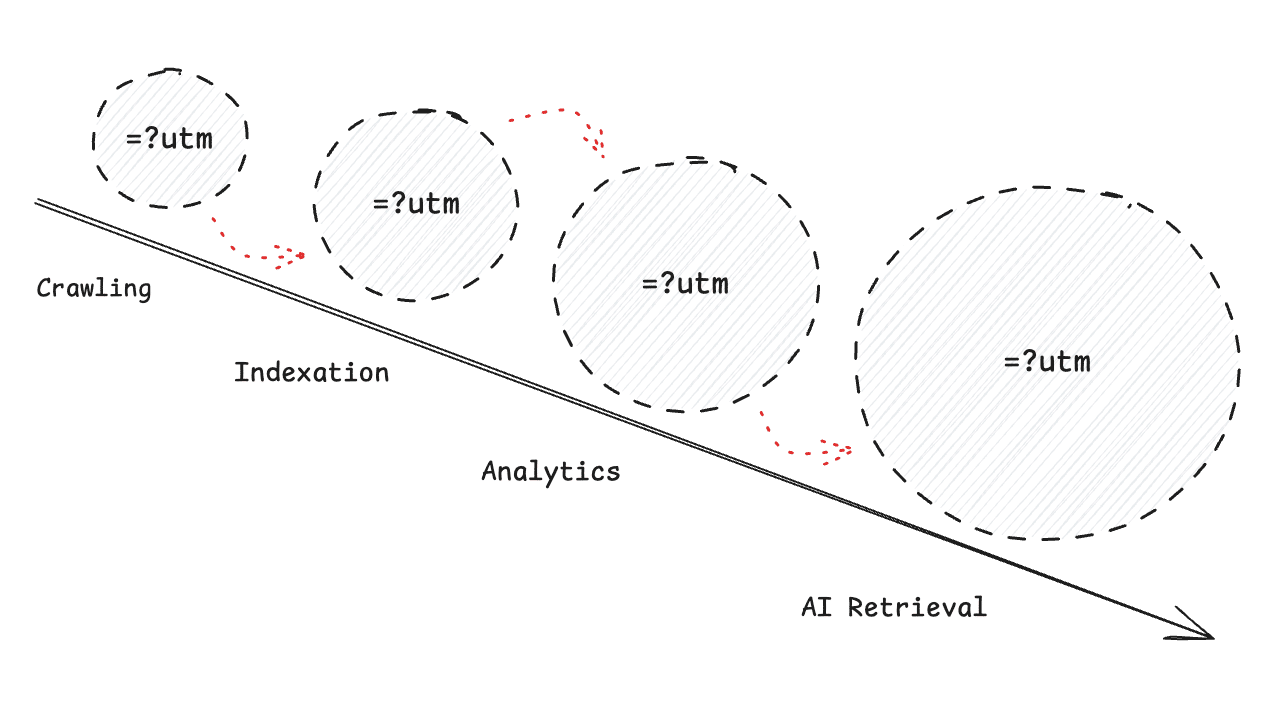
  "alt": "Visual diagram showing stages of web content lifecycle from crawling to AI retrieval.",
  "caption": "Exploring the stages of web content lifecycle: A visual journey from crawling to indexation, analytics, and AI retrieval.",
  "description": "This diagram illustrates the lifecycle of web content, emphasizing stages like crawling, indexation, analytics, and AI retrieval. Each stage is represented by circles increasing in size, labeled '=?utm', suggesting tracking or measurement aspects. Dotted lines connect these stages, indicating progression and interaction flow. Useful for understanding digital content strategy and SEO processes."
}
```
```json
{
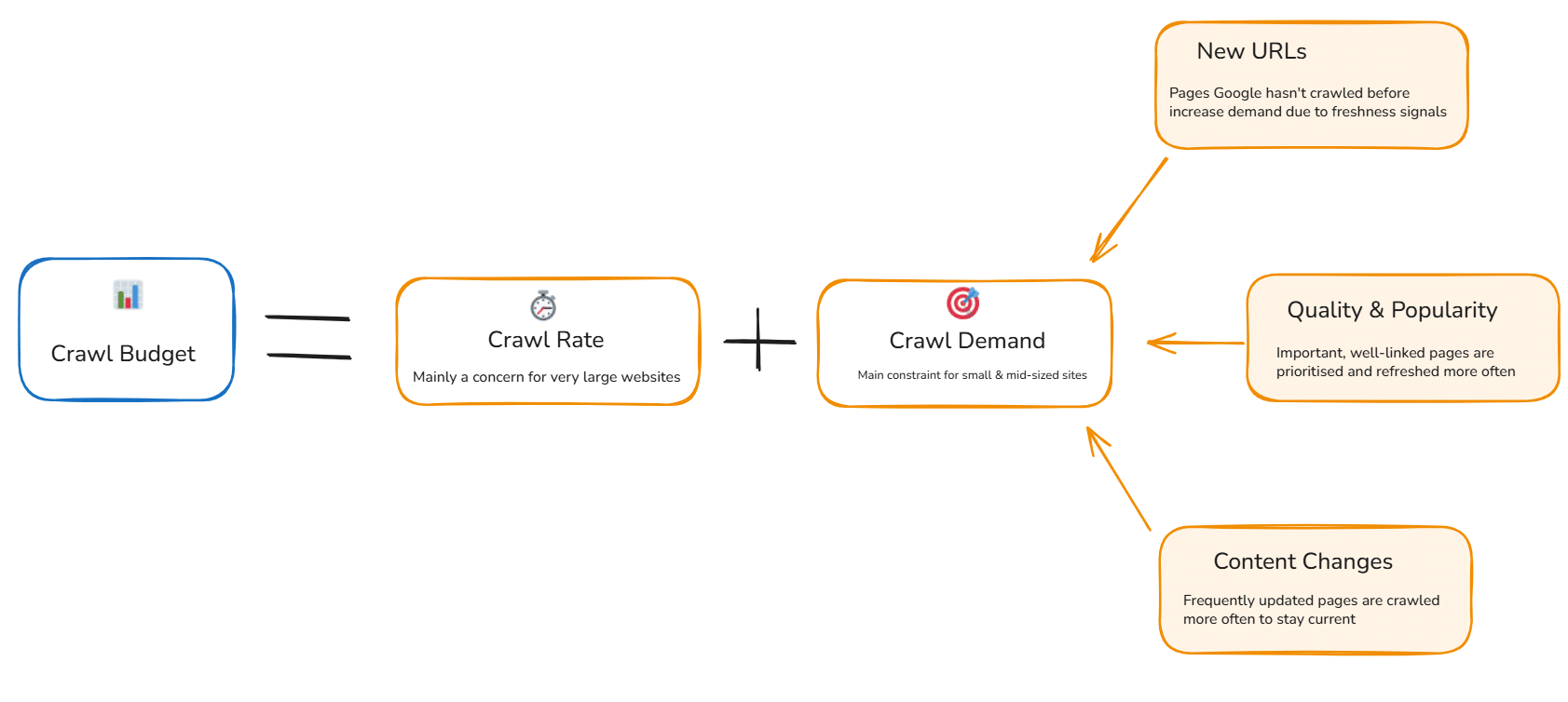
  "alt": "Diagram explaining crawl budget as a combination of crawl rate and crawl demand factors.",
  "caption": "Understanding Crawl Budget: A balance of crawl rate and demand. Essential for optimizing site indexability and efficiency.",
  "description": "This diagram illustrates the concept of crawl budget, defined as the combination of crawl rate and crawl demand. Crawl rate mainly concerns very large websites, while crawl demand is crucial for small and mid-sized sites. The factors influencing crawl demand include new URLs, quality and popularity, and content changes. Pages that are frequently updated or well-linked are prioritized for crawling to ensure freshness and relevance. This visualization helps site managers optimize their site's indexability and search engine efficiency."
}
```
```json
{
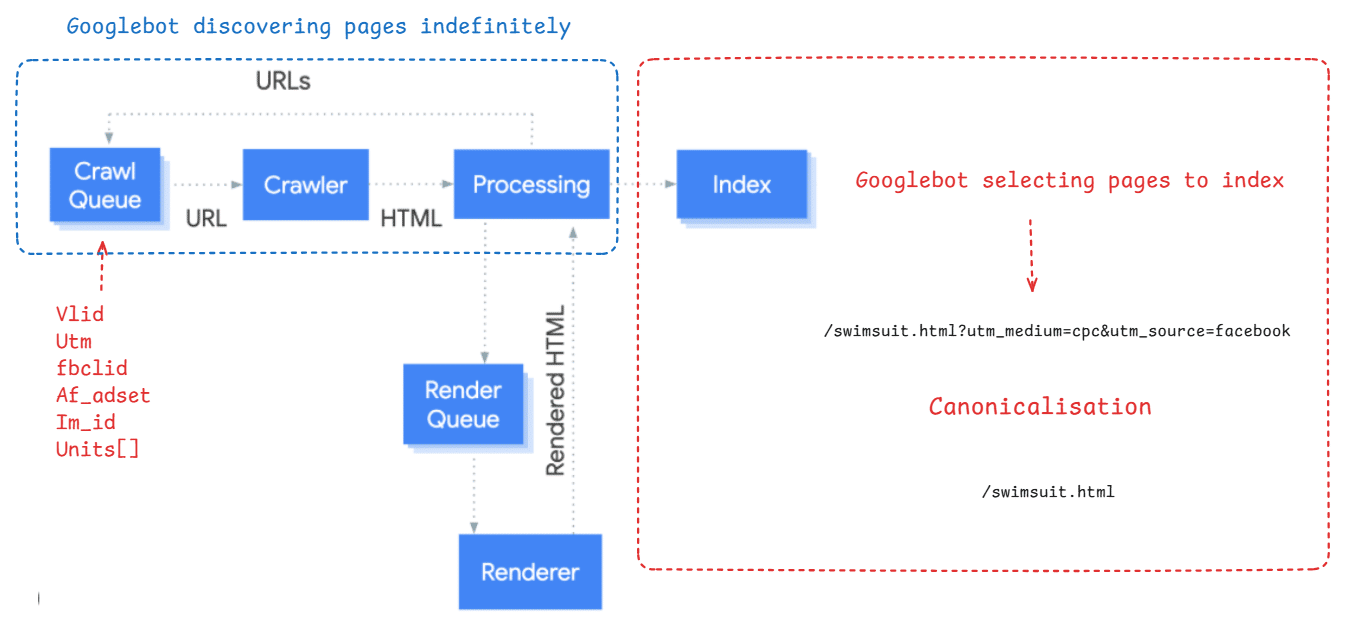
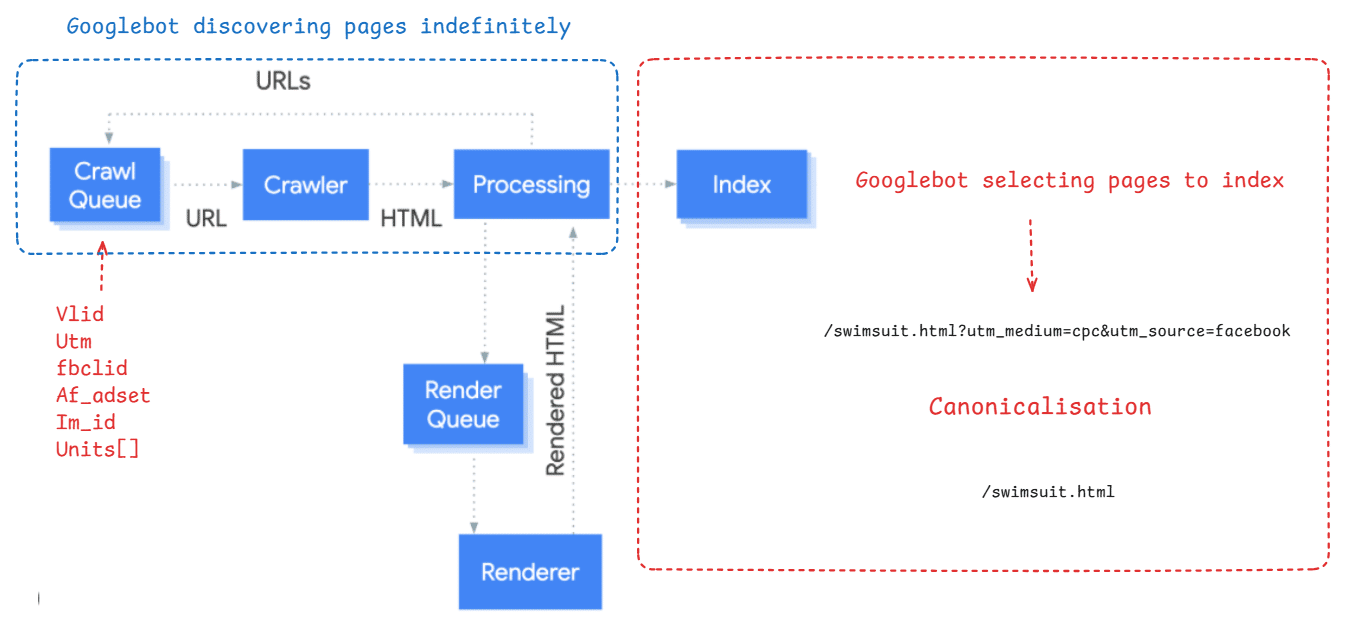
  "alt": "Diagram showing Googlebot's page discovery and indexing process with components like Crawl Queue, Crawler, and Renderer.",
  "caption": "Explore Googlebot's journey from infinite page discovery to efficient indexing, highlighting crawler components and canonicalization processes.",
  "description": "This image depicts a diagram illustrating Googlebot's process of discovering pages indefinitely and then selecting specific ones to index. It includes elements such as Crawl Queue, Crawler, Processing, Render Queue, and Renderer. It shows the transition from URL to HTML, and ultimately to rendered HTML for indexing. Canonicalization is illustrated with a path leading to a simplified URL, emphasizing the importance of clean URLs in indexing. Technical terms like Vlid, UTM, fbclid, and canonicalization are also highlighted, making this diagram a useful resource for understanding website indexing by Googlebot."
}
```
```json
{
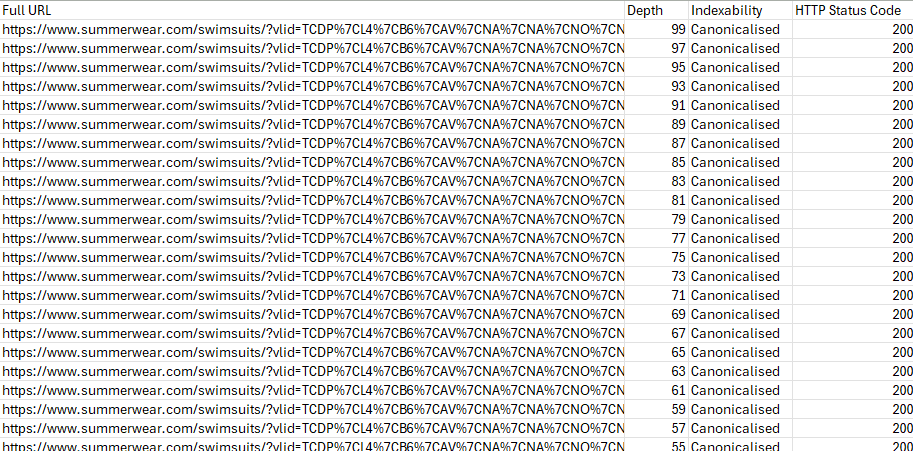
  "alt": "Spreadsheet displaying URLs, depth, indexability, and HTTP status codes from a website audit.",
  "caption": "An insightful glimpse into website audit data, showcasing URL structures and indexing details.",
  "description": "This image displays a spreadsheet from a website audit. The columns include Full URL, Depth, Indexability, and HTTP Status Code. Each row lists various swimsuit URLs from summerwear.com, all with a status of 'Canonicalised' and HTTP status code of 200. The depth values range from 99 to 55, providing insights into website structure and SEO performance."
}
```
```json
{
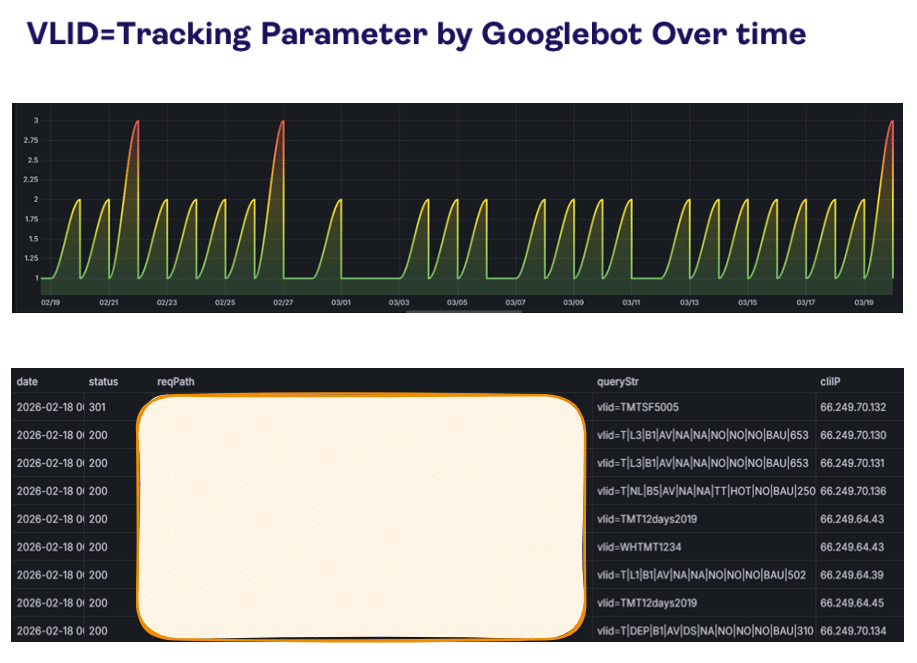
  "alt": "Graph showing Googlebot VLID tracking parameter over time with a data table below.",
  "caption": "Dynamic interaction of Googlebot's VLID tracking parameter over time, paired with detailed request data.",
  "description": "This image features a graph illustrating the Googlebot's VLID tracking parameter over time, highlighting fluctuations in bot activity. Above the graph, the title reads 'VLID=Tracking Parameter by Googlebot Over time'. The y-axis ranges from 1 to 3, and the x-axis spans from February to March. Below the chart, a table displays detailed request logs with columns for date, status, reqPath, queryStr, and cliIP, showing individual request details matched to specific IP addresses. This visualization aids in SEO analysis, offering insights into how Googlebot's tracking evolves with different parameters."
}
```
```json
{
  "alt": "The CapmatchOne logo with a gradient circle and bold text.",
  "caption": "Discover innovation with the CapmatchOne logo, featuring sleek typography and a modern gradient circle.",
  "description": "The CapmatchOne logo features bold, modern typography coupled with a gradient circle, symbolizing connection and innovation. The sleek design conveys a sense of progress and creativity. This image can be used for branding or promotional purposes, appealing to audiences interested in innovative solutions and forward-thinking designs."
}
```
```json
{
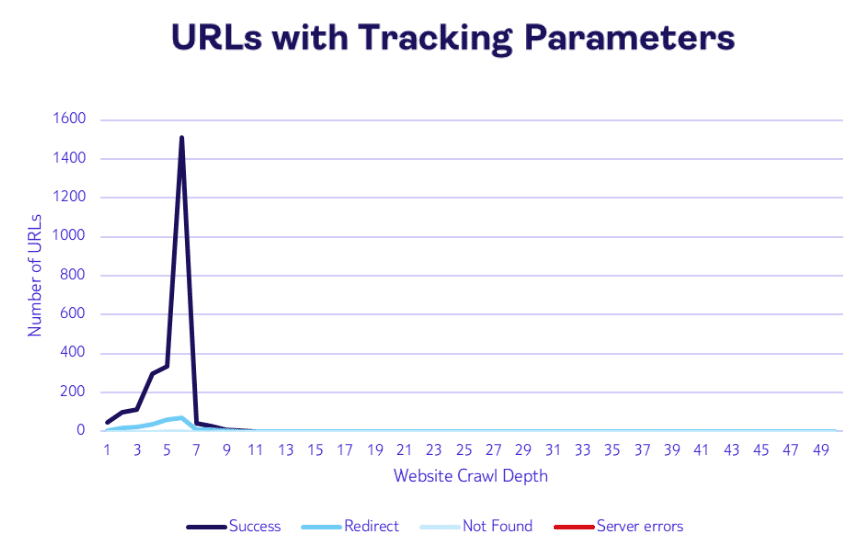
  "alt": "Line graph showing number of URLs with tracking parameters across website crawl depths, peaking at depth 4.",
  "caption": "The data reveals a significant spike in URLs with tracking parameters at crawl depth 4, highlighting potential areas for optimization.",
  "description": "This line graph illustrates the number of URLs with tracking parameters across various website crawl depths. The x-axis represents the crawl depth from 1 to 49, while the y-axis shows the number of URLs, ranging from 0 to 1600. A prominent peak occurs at depth 4, indicating a surge in URLs with tracking parameters at this point. The graph uses different colors to differentiate between success, redirect, not found, and server errors, providing a clear view of URL distribution."
}
```
```json
{
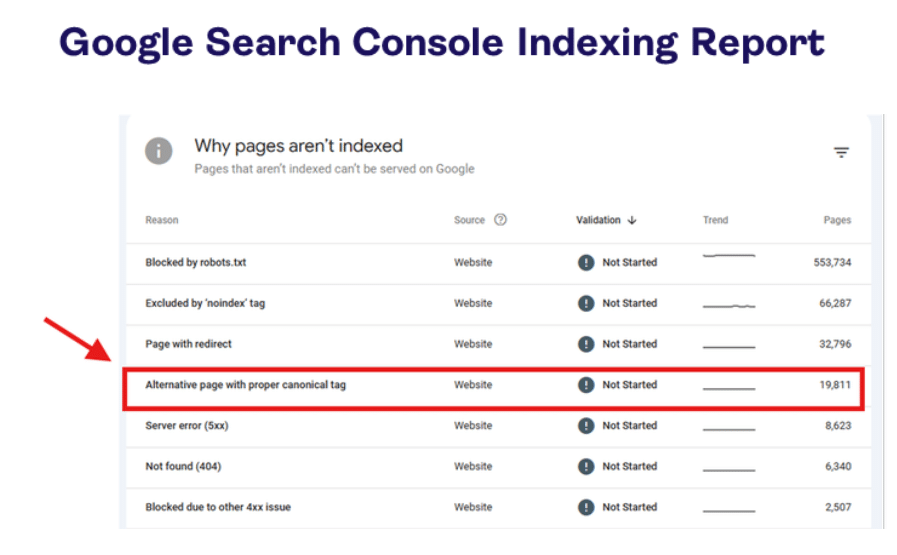
  "alt": "Google Search Console indexing report showing reasons why pages aren't indexed, including canonical tag issues.",
  "caption": "Discover the reasons behind indexing issues in this Google Search Console report. Learn about blocked pages, redirects, and more to optimize your site's visibility.",
  "description": "This image displays a Google Search Console indexing report highlighting various reasons why pages aren't indexed on Google. The highlighted entry points to 'Alternative page with proper canonical tag' issues, along with other entries like 'Blocked by robots.txt' and 'Server error (5xx)'. The report lists validation statuses, trends, and the number of pages affected, providing valuable insights for website optimization."
}
```
```json
{
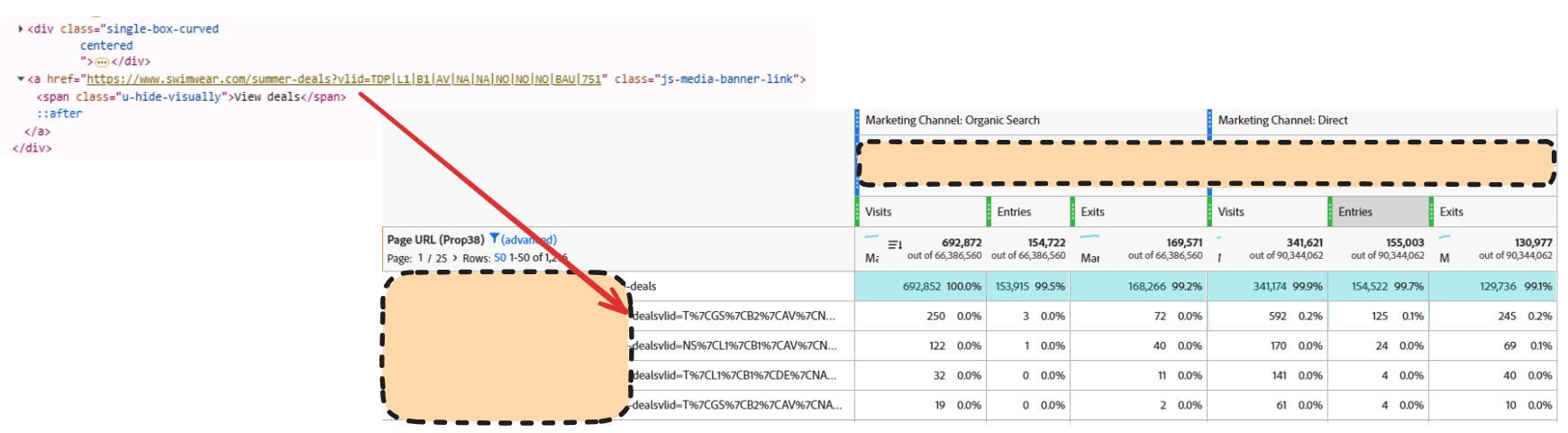
  "alt": "Webpage code snippet linked to analytics table showing visits, entries, and exits.",
  "caption": "A glimpse into website analytics, highlighting the connection between HTML elements and user visit data for organic and direct searches.",
  "description": "This image displays a section of webpage code, specifically HTML used for linking to a swimwear deals page, and its correlation to analytics data. The analytics table details visits, entries, and exits across two marketing channels: Organic Search and Direct. This illustrates how web page elements are tracked and analyzed for user engagement metrics, useful for improving website performance and marketing strategies. Keywords: HTML code, website analytics, marketing channels, user data."
}
```
```json
{
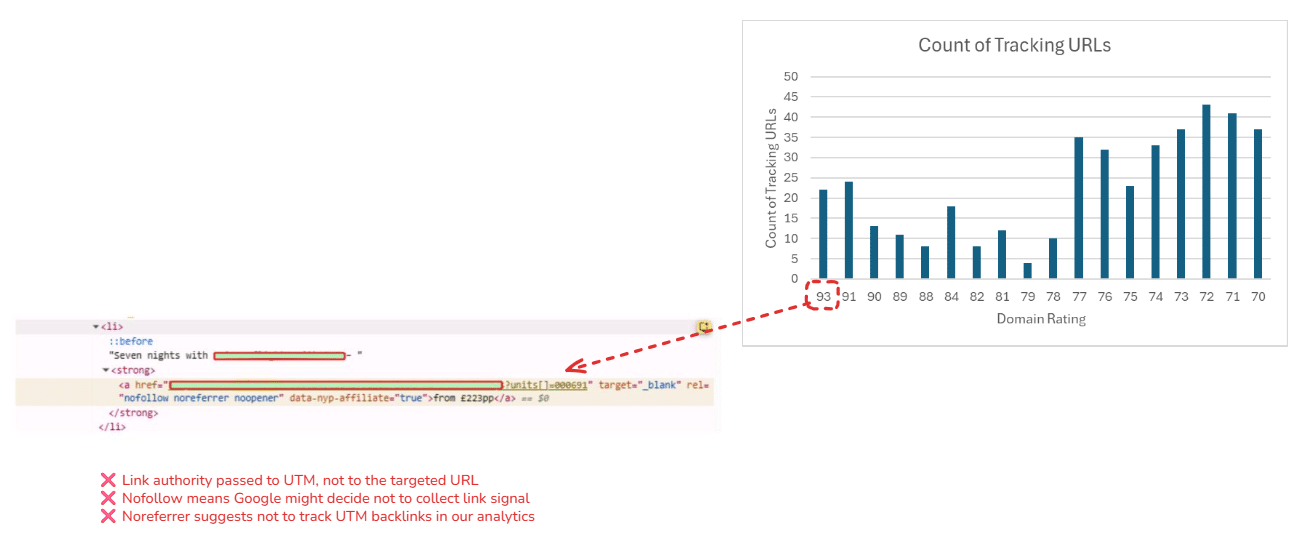
  "alt": "Screenshot of HTML code and graph displaying count of tracking URLs versus domain rating.",
  "caption": "Understanding UTM Tracking: A graph shows the count of tracking URLs by domain rating alongside HTML code insights on link properties.",
  "description": "The image features a screenshot of HTML code highlighting link attributes like 'nofollow', 'noreferrer', and 'noopener', with comments on link authority being passed to UTM links. Accompanying this is a graph showing the count of tracking URLs correlated with different domain ratings, illustrating the effects of link attributes on SEO tracking and analytics. The HTML snippet indicates issues like Google potentially ignoring links due to nofollow attributes, and the graph visualizes data across various domain ratings."
}
```
```json
{
  "alt": "Screenshot comparing two records of a document request for Spain deals with status 200 OK.",
  "caption": "Two parallel document requests for Spain deals, both returning a 200 OK status. Analyze performance and caching differences in web requests.",
  "description": "This image shows a side-by-side comparison of two document requests for 'spain-deals' under '/destinations/deals'. Both requests have a status of 200 OK, indicating successful retrieval. Details such as file sizes (35.8 kB and 203 kB), response times (528 ms and 491 ms; 456 ms and 408 ms), and cache control headers (max-age=0) are visible. Use this image to explore performance diagnostics and cache strategies in web development."
}
```
```json
{
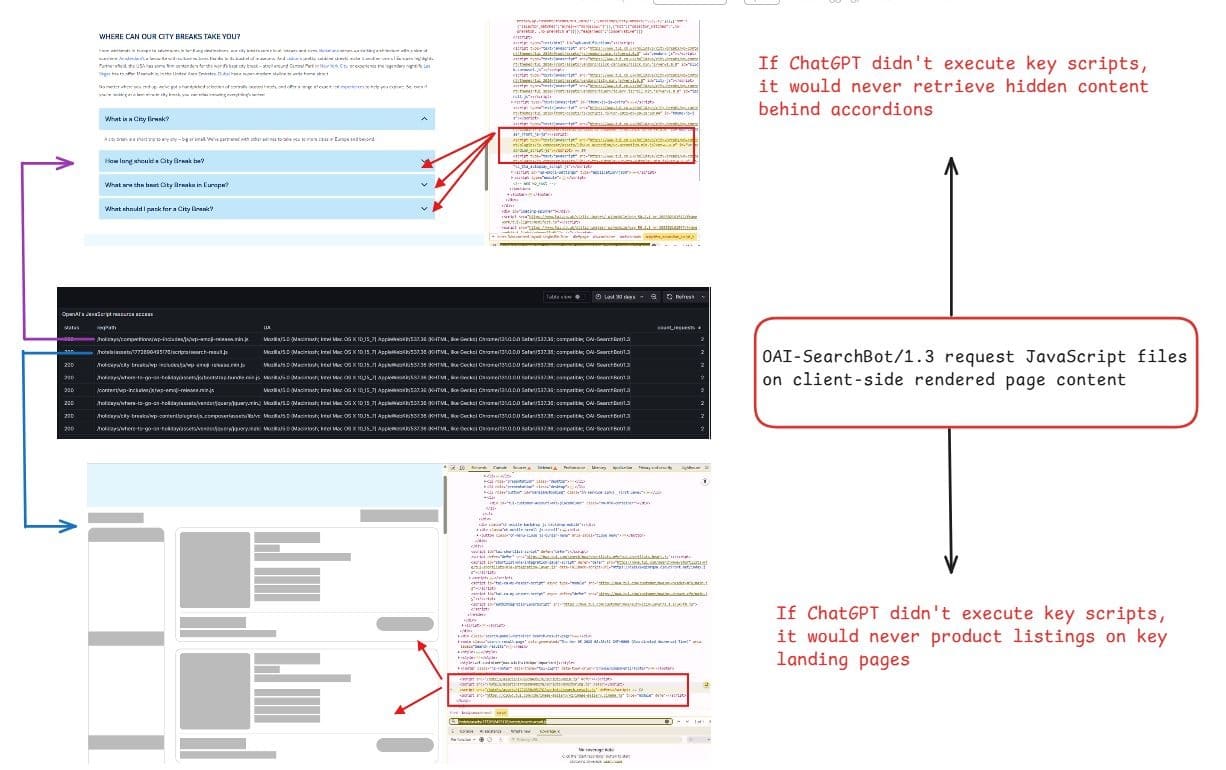
  "alt": "Diagram showing how ChatGPT processes server-side and client-side content on a web page.",
  "caption": "Exploring ChatGPT's capabilities to access content behind web elements, this diagram illustrates the bot's interaction with client-side scripts.",
  "description": "This image displays a diagram showcasing how ChatGPT can retrieve hidden web content by executing key JavaScript scripts on both client-side and server-side rendered pages. The diagram shows screenshots of a webpage with expandable sections and server requests, explaining the role of ChatGPT in accessing content behind accordion elements and other dynamic page elements. Keywords: ChatGPT, JavaScript, client-side, server-side, web content retrieval."
}
```
```json
{
  "alt": "Flowchart illustrating Googlebot's process of discovering and indexing web pages.",
  "caption": "Explore how Googlebot discovers and indexes pages through a structured process, ensuring the web is searchable and organized.",
  "description": "This flowchart visualizes Googlebot's process of discovering and indexing web pages. On the left, boxes labeled Crawl Queue, Crawler, Processing, Render Queue, and Renderer depict the stages from input URLs to rendered HTML. On the right, Googlebot selects pages to index, showing a canonicalization step. Technical labels like Vlid, Utm, and fbclid are shown as parameters. The diagram highlights Google's method for processing and organizing web content efficiently."
}
```
```json
{
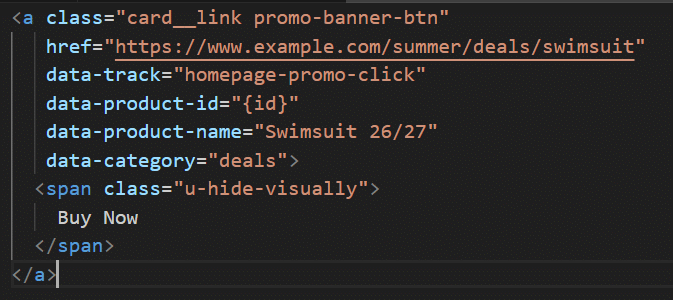
  "alt": "HTML anchor tag for a summer swimsuit promotion link",
  "caption": "Dive into summer savings with this HTML snippet promoting the latest swimsuit deals. Click and make a splash!",
  "description": "This image shows an HTML anchor tag with classes for styling, linking to a summer swimsuit deal at www.example.com. It includes data attributes for tracking clicks, product ID, and category. The visually hidden span displays 'Buy Now' text. Ideal for promoting online deals and tracking user engagement."
}
```

Inspired by this post on Search Engine Land.


crushpress.ai community screenshot

FAQs

What does the post say about tracking parameters in internal links?

It notes that tracking parameters in internal links can be detrimental to your site and its SEO. The article also suggests cleaning up internal links to improve indexing and overall site performance.

How does the article suggest improving internal linking?

It recommends cleaning up internal links to enhance your site’s indexability and user experience. The goal is to reduce tracking parameters that can interfere with crawling and ranking.

What related concepts are mentioned in the post's visuals?

The post includes diagrams about crawl budget, Googlebot indexing, and canonicalization. These visuals illustrate how tracking parameters can affect indexing and crawl efficiency.

Is the post inspired by external content?

Yes, it notes inspiration from a Search Engine Land article about tracking parameters in internal links. The original post is linked in the article.

What topics do the included images cover?

The images discuss topics like crawl budget, Googlebot indexing, and canonicalization. They also reference tracking parameters and related concepts such as UTM and fbclid.

Comments

Leave a Reply

Your email address will not be published. Required fields are marked *