

Making adjustments to a Google Ads budget mid-flight triggers a variety of changes and forecasts. It can be complex, but I’ve found that understanding how these work helps in modeling the impact of budget changes and staying clear of unexpected outcomes.
Managing budgets in paid search isn’t simply about setting a daily figure. I need to grasp how different platforms pace spending, handle exceptions, and what shifts when budgets are tweaked mid-month.
Most PPC advertisers, including myself, adjust budgets throughout the month and are curious about how these changes influence performance.
The challenge increases in enterprise scenarios, where fiscal calendars and promotional campaigns rarely sync perfectly with calendar months.
A frequent assumption is that spends will be evenly distributed, but that’s not always the case—resulting in either overspending one week or underspending another, both of which can be costly.
Overspending eats into profit, while underspending can leave potential conversions untapped and reduce future budget allocations.

It’s about more than just doing the math. Budgeting is crucial to the performance of paid search strategies, and without understanding pacing, I risk squandering budget, missing opportunities, and damaging credibility.
How budgets work in Google Ads
In Google Ads, I set a daily budget at the campaign level. Ideally, this budget is evenly spread over the month.
- The monthly rule: A $100 daily budget becomes $3,004 monthly.
- The promise: Google ensures charges won’t exceed this monthly cap.
- The busy day rule (overdelivery): Google may spend up to double the daily budget on high-traffic days but maintains the monthly cap.
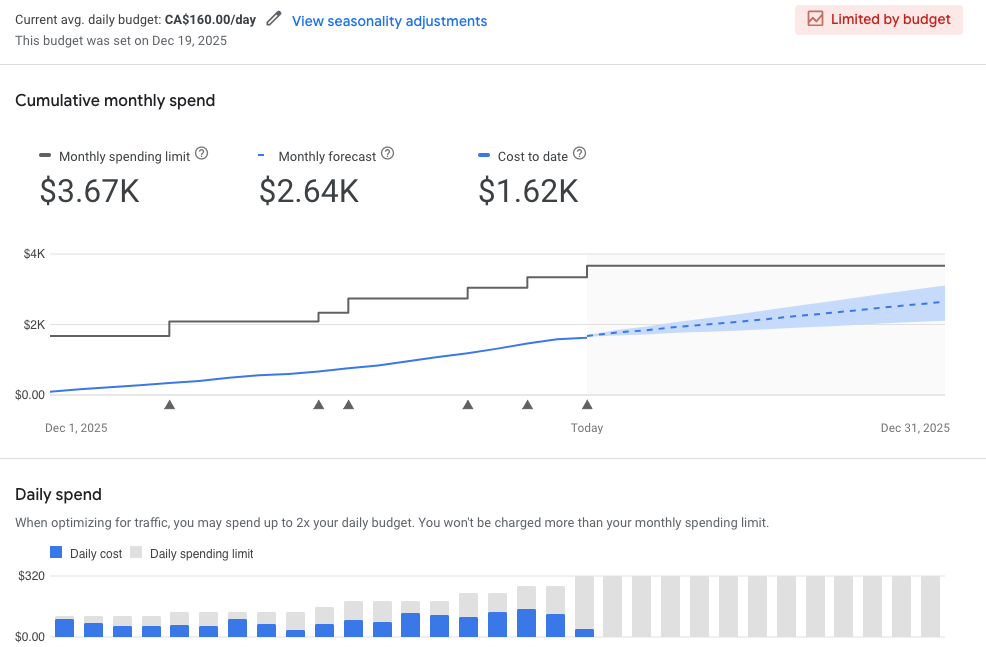
If my daily limit is reached, ads may stop appearing. This “Limited by budget” notice shows a demand that surpasses my spend capacity.
What happens when you change your budget mid-month
Changing a budget, say on the 8th of the month, recalculates everything moving forward from that date.
- Step change in monthly limit: The system merges the old budget for days 1-7 with the new budget from day 8 onward, which adjusts the monthly cap.
- Daily limit adjusts immediately: It recalibrates to twice the new daily budget as soon as changes happen.
- Pacing re-optimized: Google modifies how it allocates the spend over the remaining days.
- Visual indicators: A gray triangle in reports highlights the date of change with an apparent ‘step’ in the monthly spend line.
When opting for a campaign total budget, rules slightly differ. It’s less flexible, more rigid, without a daily cap, ideal for promotional or video campaigns.
Campaign totals, akin to a project fee, aim to spend evenly by the end date instead of on a daily basis, making it less adaptable during the running campaign.
The real challenge for paid search managers
PPC budgets interact with other factors like targeting and ROAS goals, often leading to underspending, as unused budgets can’t be reclaimed, directly affecting future spend capabilities.
Senior PPC managers, including myself, often rely on spreadsheets and continuous tracking to balance spending, targeting dynamics, and campaign performance.
Thankfully, Google Ads provides tools that simplify managing these changing budgets.
How to project spend and impact before adjusting budgets
When facing mid-month budget cuts, like trimming $2,000, understanding and utilizing available tools is essential for visualizing potential impacts.
1. The budget report (spend projection)
The budget report is my key tool for visualizing mid-month budget impacts on the final bill.
- Where to find it: Navigate to Campaigns in Google Ads, locate the campaign, hover over the Budget column, and select View budget report.
This report marks changes clearly and is instrumental in understanding spending shifts and confirming if the projected savings align with goals.

2. Performance planner (results projection)
The performance planner aids in understanding how different budget levels impact key metrics like clicks and conversions.
Inputting new budget scenarios allows me to communicate the expected results of changes, not just the monetary savings but also the trade-offs like lost conversions.
3. Manual calculation (logic check)
Sometimes a manual check is necessary to ensure accuracy in budget planning, aligning with monthly and promotional periods.
- Subtract the month-to-date spend from the new monthly goal, divide by remaining days.
Where paid search performance and financial planning intersect
I compare these tools to various aspects of driving for better understanding. Like choosing speed for gas savings, budget reports and performance planners elucidate impacts in real-time.
It underlines that paid search requires ongoing management, where budgets adapt to business needs, separating the best managers from the rest.
Inspired by this post on Search Engine Land.

Leave a Reply