In today’s ever-evolving digital landscape, I’ve witnessed the transformation of PPC from its traditional search roots to a more dynamic form. By leveraging new ad formats, creative strategies, and sophisticated AI, I’ve realized that we can truly gain a competitive edge.
I had the opportunity to chat with Ginny Marvin from Google and Navah Hopkins from Microsoft about the direction PPC is heading. This discussion was a highlight for me during the SMX Next keynote. Here’s a recap of our conversation.
When we explored emerging ad formats and channels beyond search, Ginny and Navah shared their excitement for AI-driven ad innovations. Navah pointed out Microsoft’s strides in AI-first formats, highlighting showroom ads as a standout feature:
“Showroom ads allow users to interact directly with content provided by advertisers, and with tools like Copilot for brand security, it’s a game-changer.”
As a gamer myself, Navah’s insights into gaming as an evolving ad channel resonated with me. We’re all familiar with the frustration of intrusive ads, but more engaging, intelligent formats are on the horizon.
Ginny agreed, emphasizing how conversational AI and visual discovery tools are reshaping user intent. These elements make conversion journeys far more dynamic than our standard keyword-to-click pathways.
For me, it was clear that embracing this new landscape means recognizing that traditional search is just one of many opportunities for advertising.
I was particularly struck by the discussion on the ever-growing importance of visual content. Navah summarized it well for me with:
“Most people are visual learners, and visual content belongs in every stage of the funnel.”
This really encouraged me to rethink how I view visual content within marketing strategies—not just at the top of the funnel or in remarketing, but throughout the entire process.
Ginny also touched on how brand-forward visuals are becoming indispensable. She mentioned that successful marketers will need to consistently reflect their brand’s essence through curated creative libraries across various channels.
We also delved into some common myths regarding AI and creative processes. I related to Navah’s caution against overly depending on AI for creativity:
“AI is not a substitute for our creativity. Don’t delegate your entire creative process to AI.”
In my experience, the real power lies in using AI to enhance our creative strengths. Even solitary elements like a headline or image need to resonate individually.
Ginny’s reinforcement of the need for diverse visual assets was enlightening. Campaigns that span multiple channels benefit from a broad range of creative assets, crucial for optimal performance and storytelling.
The conversation naturally progressed to the strategic use of assets. Ginny’s point on AI systems evaluating individual performance was eye-opening for me:
“Swap out underperforming assets, and let niche high-performers reveal audience insights.”
This approach helps me maintain relevance and reduce AI chaos moments, as Navah aptly called them, where asset overlap hampers clarity. Streamlining through distinct creative assets is crucial.
Finally, as we wrapped up, Ginny and Navah shared insights on partnering with AI for measurement. Navah outlined the foundational inputs AI depends on:
“First-party data, creative assets, ad copy, website content, goals, budgets – these guide AI toward achieving our desired outcomes.”
She emphasized incrementality, urging us to grasp the additional value our campaigns generate, now more crucial than ever.
Ginny acknowledged the transition from granular metrics to broader, privacy-focused analytics. She encouraged us to focus on understanding audience themes rather than individual queries.
I discovered that the Google Merchant Center is currently examining a problem that affects Feeds. This issue has been flagged on their public status dashboard, raising concerns for those of us who rely on these Feeds for product listings and Shopping ad performance.
Here’s what you need to know:
Incident began: Feb. 4, 2026, at 14:00 UTC.
Latest update (Feb. 20, 14:43 UTC): “We’re investigating reports of an issue with Feeds. We will provide more information shortly.”
Status: Service disruption
The notification you see is on the Merchant Center Status Dashboard, which closely monitors the availability of Merchant Center services.
Why is this important? Feeds are the backbone of product listings for Shopping ads and free listings. Any issues here can affect product approvals, updates, or their visibility in campaigns tied to retail inventory.
What to keep an eye on: Google has yet to clarify the extent, cause, or expected resolution timeline. If you’re experiencing any delay or disapproval in feed processing, I suggest keeping a close watch on the dashboard for updates.
The takeaway: Any disruption in feed processing can lead to a decline in ecommerce performance. As retail advertisers, we should continually check diagnostics and campaign delivery until we get more information.
Data serves as more than just a report card; it’s the roadmap for our performance marketing strategies. To make the most of this roadmap, I’ve learned it’s necessary to go beyond Google Analytics 4’s default tools.
If I were to rely solely on GA4’s built-in reports, I’d find myself juggling multiple interfaces and struggling to tell a clear story to stakeholders. That’s where Looker Studio becomes a game-changer for me.
Looker Studio allows me to transform raw GA4 and advertising data into interactive dashboards that provide decision-grade insights and drive campaign improvements.
In this guide, I’ll show you how to use GA4 and Looker Studio effectively for PPC reporting by comparing their roles, highlighting recent updates, and sharing specific use cases—from budget pacing visualizations to waste-reduction audits.
GA4 vs. Looker Studio: How They Differ for PPC Reporting
GA4 serves as my ultimate reference point for website and app interactions, offering insights into user behavior, clicks, page views, and conversions through a flexible, event-based model. It’s integrated with Google Ads, pulling key ad metrics into its Advertising workspace. However, GA4 primarily focuses on data collection and analysis, not on creating client-ready reports.
Conversely, Looker Studio is my go-to for creating comprehensive reports. It connects to over 800 data sources, allowing me to build interactive dashboards that consolidate all my data in one place.
Data Sources
While GA4 primarily focuses on on-site analytics, its late 2025 update allowed native integration for platforms like Meta and TikTok, enabling automatic imports of cost, clicks, and impressions. However, I find it to be somewhat rigid, requiring strict UTM matching and lacking the capability to clean campaign names or import specific conversion values.
In contrast, Looker Studio allows me more flexibility in blending data sources and connecting to platforms that GA4 doesn’t support natively, such as LinkedIn or Microsoft Ads.
Metrics and Calculations
GA4 has improved its reporting UI, now enabling up to 50 custom metrics per standard property, which is quite an upgrade from the previous limit of five. However, these metrics can often be static.
Looker Studio, on the other hand, lets me perform real-time calculations on my data through calculated fields. This allows for dynamic data manipulation, such as computing profit by subtracting cost from revenue, without altering the source data.
Data Blending
Looker Studio lets me blend multiple data sources to create richer insights. Even though enterprise users on Looker Studio Pro can utilize LookML models for robust data governance, the standard free version still offers flexible data blending capabilities to align ad spend with downstream conversions.
Sharing and Collaboration
While sharing insights in GA4 often requires granting property access or exporting static files, Looker Studio offers live web links that update automatically. I can even schedule the automatic email delivery of PDF reports for free.
The enterprise features in Looker Studio Pro provide advanced delivery options to Google Chat or Slack, although standard email scheduling is accessible to everyone.
Here’s why Looker Studio transitions from being simply helpful to absolutely essential for PPC teams like mine.
1. Unified, Cross-Channel View of PPC Performance
Managing multiple ad platforms, I find that a Looker Studio dashboard acts as my single source of truth, blending intent-based Google Ads data with awareness-driven Meta and Instagram Ads to provide a holistic view.
For example, with Looker Studio, I can normalize data and discover that X Ads drove 17.9% of users, while Microsoft Ads drove 16.1%, enabling me to allocate budgets based on actual blended performance.
2. Visualizing Creative Performance
In sectors such as real estate, visuals sell the clicks. Saying “Ad_Group_B performed well” doesn’t resonate with clients.
Utilizing the IMAGE function in Looker Studio, I can display the actual image of a luxury condo or HVAC promotion directly in the report table alongside the CTR, providing clients with a clear view of which creative elements are driving results.
3. Deeper Insight Into Post-Click Behavior
Effective reporting extends beyond the initial click. By integrating GA4 data with my Looker Studio reports, I can link ads to subsequent actions.
For instance, I might notice that a Cheap Furnace Repair campaign has a high CTR but a 100% bounce rate. Looker Studio enables me to visualize engaged sessions per click alongside ad spend, validating that lead quality is more crucial than sheer volume.
4. Custom Metrics for Business Goals
Every enterprise has unique KPIs. While a real estate firm might track tour-to-close ratios, an HVAC enterprise might prioritize seasonal efficiency.
Looker Studio allows me to create these unique formulas just once, with automatic updates. I can even bridge data gaps and calculate return on ad spend (ROAS) by dividing CRM revenue by Google Ads costs.
5. Storytelling and Narrative
Data alone lacks context. With Looker Studio, I can add text boxes, dynamic date ranges, and annotations, transforming numbers into compelling narratives.
An example is using annotations to explain metrics fluctuations. If cost per lead spiked in July, I might annotate, “Seasonal demand surge + competitor aggression,” preempting client queries and turning the report into a powerful strategic resource.
Use Cases: PPC Dashboards That Drive Real Insights
These dashboards extend beyond basic metrics, providing actionable insights for immediate implementation.
The Budget Pacing Dashboard
Concerned about overspending? Standard reports reveal what’s been spent but don’t indicate its relationship to the monthly budget cap.
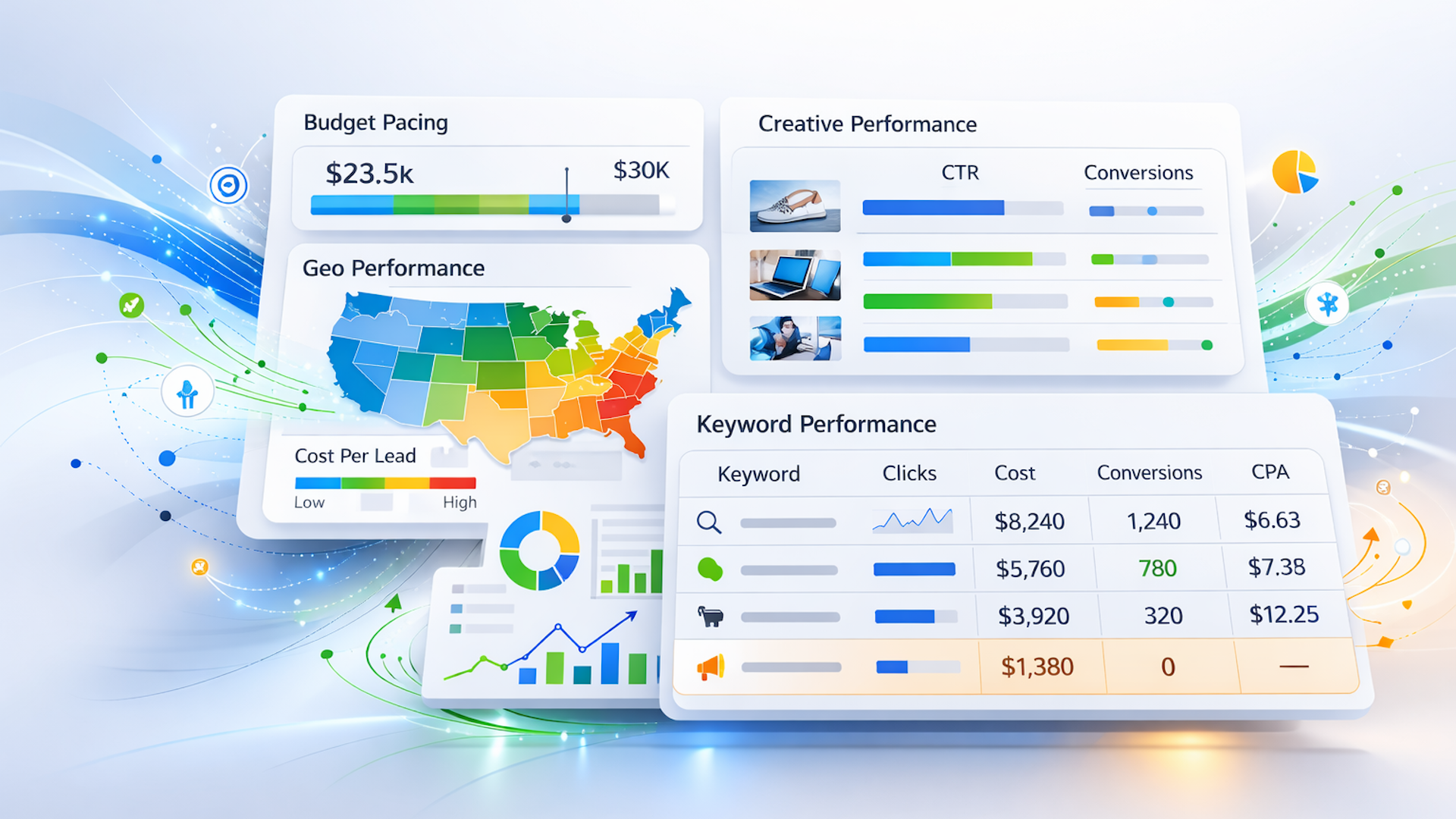
With bullet charts in Looker Studio, I set targets to align with linear monthly spend. For instance, if halfway through the month, the target line aligns with 50% of the budget. This visual helps stakeholders see real-time pacing to ensure budget compliance.
The Zero-Click Audit Report
High spending without conversions is a costly mistake, especially in service industries.
By creating a dedicated table to highlight wasteful spending — showing keywords with conversions at zero and a cost exceeding a set threshold — I can quickly identify and pause ineffective keywords, demonstrating proactive budget management internally and to clients.
Geographic Performance Maps
For local services, my geographic location is critical. While GA4 provides local reports, Looker Studio takes visualization to the next level.
In Looker Studio, I build geographic performance pages that shade areas based on cost per lead rather than mere traffic volume, helping me identify that while City A drives more traffic, City B yields leads more efficiently.
Getting the Most Out of GA4 and Looker Studio in 2026
To maximize success with GA4 and Looker Studio, I’ve learned a few essential tips.
Watch Your API Quotas
One of the main technical challenges today involves managing GA4 API quotas. If a dashboard has excessive widgets or draws too many concurrent viewers, charts might break or fail to load.
For heavy reporting demands, I consider extracting GA4 data to Google BigQuery first, then connecting Looker Studio to BigQuery, which bypasses API limits and greatly enhances report speed.
Enable Optional Metrics
Different stakeholders have varied needs. By enabling the “optional metrics” feature in charts, I provide viewers the convenience of toggling between metrics, such as changing a chart from clicks to impressions, without editing the report each time.
Validate and Iterate
Initially, I spot-check report numbers against the native GA4 interface to validate data and ensure attribution settings are correct.
Once I’ve established data trust, I treat the dashboard as a living product, continuously iterating on design per actual stakeholder use and needs.
I recently discovered that Google is changing how it attributes app campaign conversions. Instead of relying on the date when someone clicks on an ad, Google now ties the conversion to the actual install date of the app.
What’s Changing: Previously, Google linked conversions to the ad interaction date. Now, they’ll match the day of the app installation, aligning more closely with Mobile Measurement Partners (MMPs) like AppsFlyer and Adjust.
Why This Helps:
– This change reduces discrepancies between Google Ads and MMP dashboards, making life easier for mobile marketers who often deal with mismatched data.
– With Google’s old 30-day attribution window, many conversions were reported too late, hindering Smart Bidding’s access to the timely signals necessary for effective learning.
– By using the install date for attribution, Google’s algorithms will receive fresher, more accurate data, which could speed up optimization cycles and stabilize performance.
Why We Care: While it might seem technical, this change significantly affects how Google’s machine learning optimizes campaigns. The previous 30-day gap between ad clicks and conversion credit was a bottleneck. Now, Google’s machine learning gets the conversion data just when it needs it—right with the app install.
This shift should lead to smarter bidding and faster campaign optimization, helping to resolve the frustrating discrepancies between Google Ads and MMP reports. If you’ve ever been puzzled by inconsistencies between Google and platforms like AppsFlyer or Adjust, this update directly addresses that problem.
Between the Lines: Most advertisers don’t adjust their attribution window settings, leaving Google’s default 30-day window as is. Unfortunately, this was delaying crucial conversion signals that machine learning needs for improved bidding.
The Bottom Line: This seemingly minor tweak in attribution logic could have a significant impact on app campaign performance. I encourage mobile advertisers to monitor their data in the coming weeks for any shifts in conversion reports and optimization behaviors.
First Spotted: This update was first noticed by David Vargas, who shared a message about it on LinkedIn.
Recently, I’ve noticed something fascinating — ChatGPT ads have started making their presence felt, and they’re not hiding in the background. They’re right there from the start, catching users’ attention straight away.
It seems OpenAI’s approach to advertising within ChatGPT is evolving. Currently, ads pop up for signed-in desktop users in the U.S. based on findings from AI ad intelligence firm Adthena. It’s quite a shift from earlier expectations.
The biggest twist? Many thought ads would only show up after longer conversations. However, that’s not the case. Imagine asking, “What’s the best way to book a weekend away?” and seeing a sponsored message immediately. That’s the reality.
What do these ads look like? They’re marked by a brand favicon and a clear “Sponsored” label, a departure from the initial designs OpenAI shared publicly.
Why does this matter to us? ChatGPT ranks among the top sites globally, and advertising integrated into its responses indicates a major development in AI monetization. It could change how brands connect with consumers right when they’re seeking information.
Reading between the lines, the fact that ads are triggered by single, intent-driven prompts shows OpenAI sees these interactions as valuable ad space. This is a significant move for advertisers figuring out where to allocate their budgets.
The bottom line is clear — the era of ChatGPT advertising has quietly kicked off. As a marketer, I now understand it’s not about questioning the need for an AI search strategy anymore. It’s about asking if I’m already behind.
The first glimpse of these ads came from Adthena’s CMO, Ashley Fletcher, shared on LinkedIn.
I’m thrilled to share that Google has just launched its Scenario Planner, an incredibly user-friendly, no-code tool. This planner empowers me to transform Marketing Mix Model insights into practical budget and ROI forecasts effortlessly.
Google’s new Scenario Planner allows me to test various budget scenarios and forecast ROI using Meridian’s marketing mix model, all without requiring any data science expertise.
What’s new? The Scenario Planner makes complex MMM outputs accessible and actionable:
Intuitive, code-free interface: Testing different budget allocations and viewing ROI estimates is a breeze without needing to write any code.
Forward-looking planning: I can simulate investment scenarios and stress-test strategies, which moves beyond mere retrospective reporting.
Digestible insights: These technical model outputs are visualized in clear, easy-to-understand formats, making them highly usable for my strategy decisions.
Why do we care? With these predictive marketing insights at my fingertips, I can test budgets, foresee potential returns, and adjust campaigns in real-time. This helps me plan smarter and optimize every dollar I spend.
Closing the MMM actionability gap. The Scenario Planner effectively bridges the “usability gap” long existing in Marketing Mix Models, which previously required specialized skills. According to Harvard Business Review, nearly 40% of organizations face challenges in turning MMM outputs into actionable decisions.
Bottom line. By combining the rigor of MMM with an easy-to-use, interactive interface, Scenario Planner empowers me to plan more strategically, optimize spending, and make confident, data-driven decisions without having to rely on technical experts.
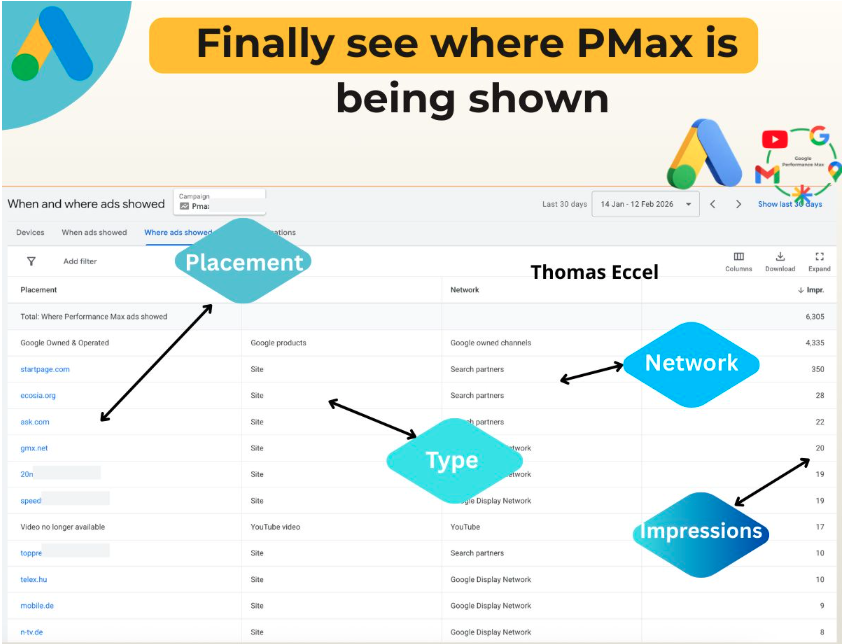
I’ve just discovered an incredibly beneficial update from Google Ads that I’m excited to share. Now, we can see precisely where our Performance Max campaigns are running through the “Where ads showed” report. This change opens up a new world of clarity and optimization possibilities that were previously inaccessible.
What’s New? This update allows me to see exactly where my PMax ads are appearing across Google’s network, including search partners, display, and other placements. By tracking impressions by placement type and network, I can now understand the detailed performance of my campaigns like never before.
Why It Matters to Me This is a game-changer for anyone managing PMax campaigns. It brings much-needed visibility into where ads are appearing, including Google Search Partners and beyond. With access to placement, type, and impression data, I can optimize budgets and make informed decisions rather than relying on guesswork. It transforms previously opaque reporting into actionable insights.
User Reaction Digital marketer Thomas Eccel shared his experience on LinkedIn, expressing that the report was once a blank page but now displays real data.
“I finally see where and how PMax is being displayed,” he wrote, highlighting the significance of this update for clarity.
He also noted how Google Search Partners are now no longer a “blurry grey zone.”
The Bottom Line For me, and many other marketers, this update offers actionable visibility into PMax campaigns, helping us understand placement performance, optimize spend, and pinpoint which networks are yielding results — all within one comprehensive report.
I was thrilled to learn that Microsoft Advertising has introduced a new Performance Max learning path. This offers marketers the tools they need to run more effective campaigns and to demonstrate their verified expertise.
A fresh applied learning path designed by Microsoft Advertising aims to enhance our ability to optimize Performance Max campaigns through practical, scenario-based training, moving beyond just theoretical knowledge.
What’s happening: This innovative learning path consists of three sequential courses focusing on real-world setup, optimization, and troubleshooting. It empowers us to learn at a comfortable pace, while directly applying newly acquired skills to current campaigns.
The courses address various levels of expertise, ranging from beginner fundamentals to advanced strategies and credentialing.
What’s included:
Course 1: Foundations
This course introduces the essentials of Microsoft Advertising Performance Max campaigns.
It’s an ideal starting point for beginners seeking to understand the workings of PMax campaigns.
The course emphasizes core concepts and terminology.
Course 2: Hands-on setup
This course offers a guided walkthrough for setting up Microsoft Advertising Performance Max campaigns.
Perfect for advertisers launching their initial PMax campaign or requiring a skill refresh.
It provides a step-by-step guide for campaign creation and addresses common setup queries.
Course 3: Advanced implementation
This course delves into implementation and optimization through scenario-based learning.
It’s tailored for advanced users enhancing their strategic and optimization skills.
It includes practical resources like checklists, videos, and reusable reference materials.
How it works: A standout feature of the third course is its embedded support options, which allow learners to access specialized educational resources mid-assessment via the “Help me understand” feature. This enables contextual review before returning to the questions.
The benefit: This design allows us to spend extra time on challenging areas while breezing through familiar content.
Credential payoff: Completing the advanced course gives us the opportunity to earn a Performance Max badge. This badge is a mark of proficiency in implementing and optimizing PMax campaigns, reinforcing the application of best practices.
The badge can be digitally shared and verified using Credly, which makes showcasing on professional platforms like LinkedIn easy.
Why we care: Microsoft Advertising is making it more streamlined and effective to gain practical skills needed for running successful Performance Max campaigns. This is more than just theoretical training; it’s grounded in practical scenarios that help us avoid common pitfalls, optimize with confidence, and elevate performance in live accounts.
Additionally, acquiring this shareable credential adds significant professional credibility, highlighting our proven expertise to clients and employers alike.
The bottom line:The new learning path is committed to bridging the gap between training and practical implementation. By integrating applied scenarios, embedded support, and credentialing, it offers advertisers a comprehensive path to build and demonstrate confidence in managing Performance Max campaigns.
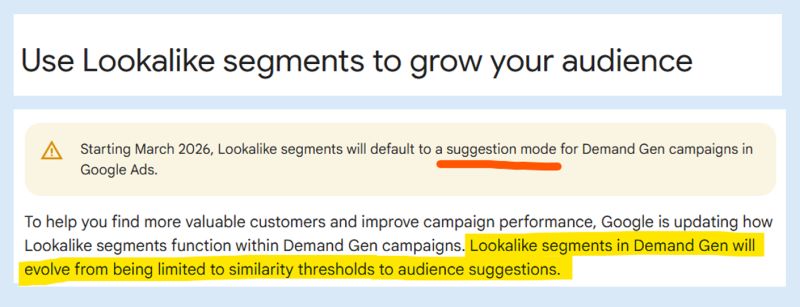
I’ve noticed some exciting changes coming to Google Demand Gen campaigns. Starting in March 2026, Lookalike audiences will no longer be the rigid framework we’re used to. Instead, they’ll serve as optimization signals, ushering in a new era of AI-driven campaign enhancements.
Google is updating its Help documentation to reflect this transformation where Lookalike segments shift from strict targeting to a more flexible, AI-enhanced recommendation model.
Understanding the Transition. Previously, I would choose a specific similarity tier (narrow, balanced, or broad) to dictate exactly who my campaigns targeted. That’s changing.
Now, Google will use these tiers as signals. The system will intelligently expand its reach beyond my chosen Lookalike lists to engage users predicted to convert.
Behind the Change. This transition turns Lookalikes from a barrier into an enabling tool. It allows Google’s automation to use intent signals to explore audience performance well beyond predefined limits.
Interaction with Optimized Targeting. The new Lookalike-as-signal approach resembles Optimized Targeting but doesn’t replace it. When they’re layered, Google mentions it could further expand my reach.
In practice, this means multiple automation signals will be at play, providing the algorithm more freedom to either reduce CPA or boost conversion rates.
Opting Out. If I prefer the traditional Lookalike approach, I can opt out via a dedicated form, preserving the old targeting behavior. Absent that, campaigns automatically switch to the new format.
Why This Matters. This update affects the control I have over ad targeting in Google Demand Gen campaigns. Lookalike audiences will now guide rather than confine targeting, significantly influencing scale, CPA, and performance.
Additionally, it indicates an industry-wide move toward automation, similar to shifts driven by Meta Platforms. I’ll need to test thoroughly, rethink strategies, and decide whether to embrace the added reach or opt out for tighter targeting.
Industry Context. Google’s strategy echoes a broader trend toward AI-first audience expansion, aligned with similar adaptations from Meta in recent years. The advertising landscape is increasingly prioritizing machine-led optimization over detailed manual control.
The Reasoning. According to digital marketer Dario Zannoni, there are two main reasons for Google’s shift:
Stringent Lookalike targeting can limit scale and hinder performance in conversion-focused campaigns.
The complexity of maintaining high-quality similarity models makes automation a more viable option.
The Bottom Line. For performance marketers like me, this marks another step towards automation-centric strategies. Reduced control might be daunting, but similar platform changes have historically yielded performance gains. A fresh testing cycle is on the horizon as I examine the impact of expanded Lookalike signals on CPA, reach, and conversions.
Observed and Shared. Dario Zannoni initially highlighted this update on LinkedIn.
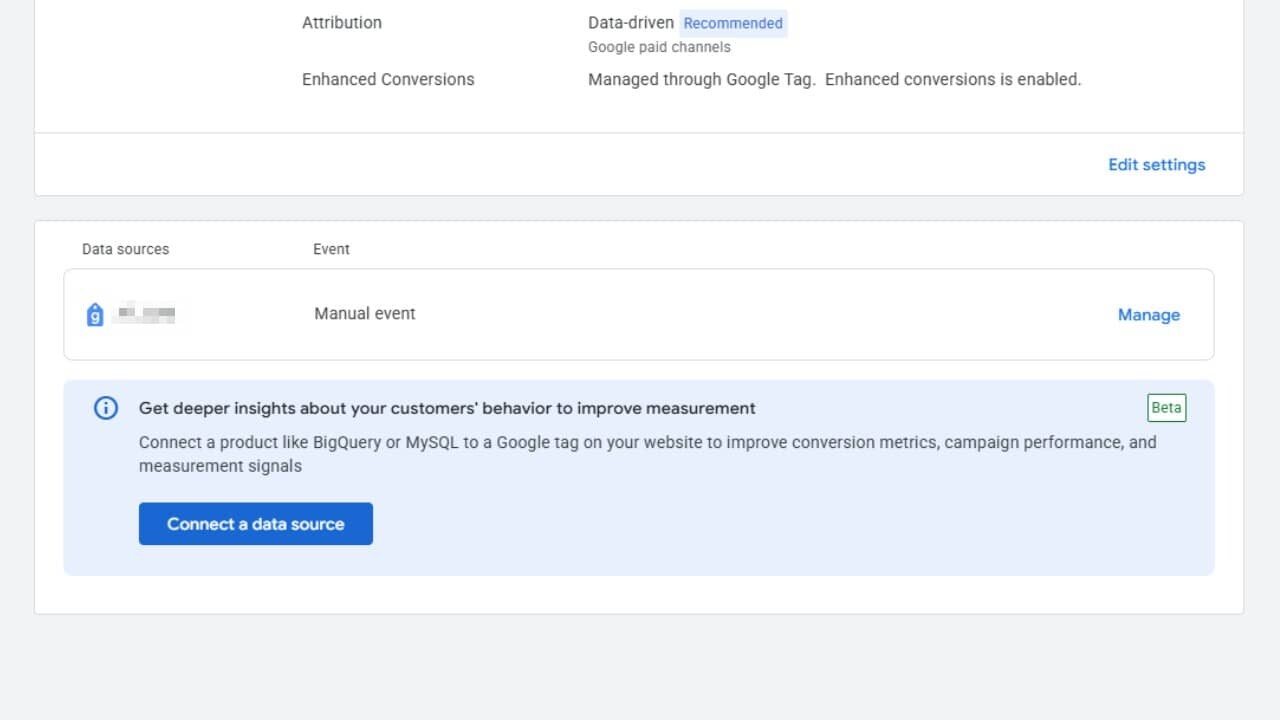
I’ve recently discovered an exciting development in Google Ads that’s set to revolutionize how we track and measure our advertising success. The platform is now testing a beta feature that allows us to link external data sources directly into the conversion action settings. This move aims to strengthen the bridge between our first-party data and campaign measurement.
How does this work, you might ask? In the conversion action details, a new section titled “Get deeper insights about your customers’ behavior to improve measurement” encourages us to connect our external databases to our Google tag, offering a seamless integration experience.
This integration supports platforms like BigQuery and MySQL, with the primary goal of enriching our conversion metrics and enhancing performance signals. Notably, this feature is highlighted within the data attribution settings and is gradually being rolled out in its Beta phase.
Why do we care? The ability to directly integrate these data sources reduces the hassle of syncing offline or backend data with ad measurements. This beta feature from Google Ads simplifies connecting first-party data to conversion tracking, improving our measurement accuracy and campaign optimization.
By harnessing the power of platforms like BigQuery or MySQL, we’re able to incorporate richer customer data into our signals, crucially offsetting any data loss resulting from recent privacy changes. In practical terms, this means smarter bidding, clearer attribution, and the potential for a stronger ROI.
Beneath the surface, embedding these data connections directly within conversion settings—rather than relying on separate pipelines—democratizes advanced measurement tactics, making them accessible not only to large enterprises but to advertisers like you and me.
As ad platforms compete for superior measurement accuracy, these native data integrations are emerging as a pivotal advantage, particularly for brands heavily investing in proprietary customer data.