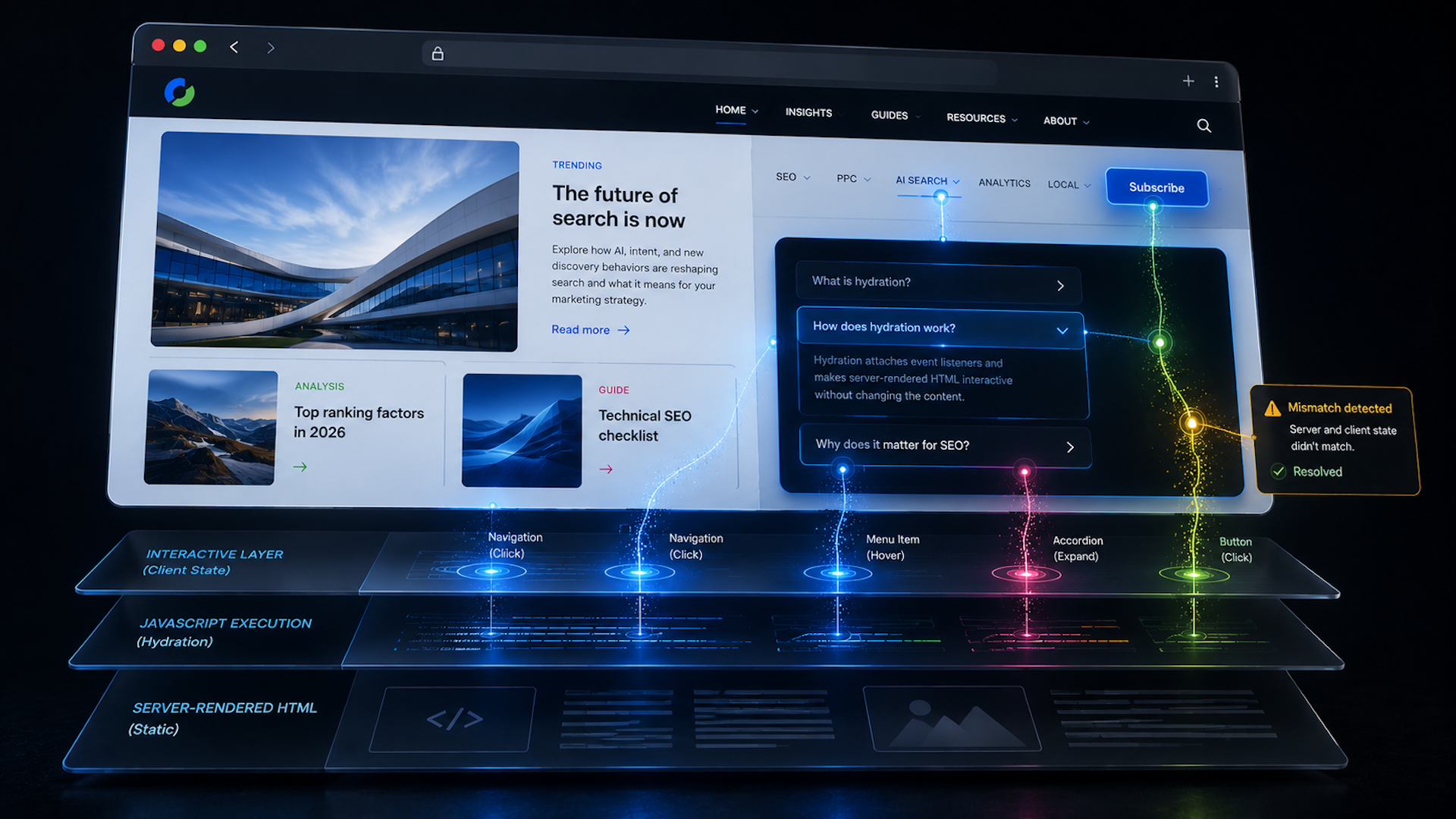
Tag: JavaScript

  • Use Google Documentation to Win SEO Buy-In With Proof

    Use Google Documentation to Win SEO Buy-In With Proof

    Let me be blunt: SEO advice can sound completely made up to people who do not live in search every day.

    When I say things like “change this canonical,” “don’t block that resource,” or “we need this content exposed in the rendered HTML,” I understand why someone outside SEO might hear it and wonder whether I am inventing rules on the spot.

    That is one reason SEO still gets treated like black magic inside many organizations.

    I have been pushing the idea of “un-nerding SEO” for years, but this is about something very practical: I use Google’s own documentation to earn approval, build trust, and help SEO work get prioritized.

    Not because Google tells us everything. Not because every sentence in its documentation should be treated as gospel. I use it because documented evidence is much harder to dismiss than personal opinion.

    When I need buy-in, the strongest argument is rarely “trust me.”

    It is usually something closer to: “Google has already documented how this should be approached.”

    The buy-in problem is usually not the recommendation itself

    In my experience, most SEO recommendations do not die because they are wrong. They die because they are competing with everything else happening inside the business.

    Dev sprints, product timelines, CMS limitations, legal concerns, brand standards, executive assumptions, and the classic “we’ve always done it this way” all have a seat at the table. SEO is rarely the only priority in the room, even when the recommendation is technically correct.

    That is why I do not rely on “best practice says” or “from an SEO perspective” when I am trying to move work forward. Those phrases sound optional, especially to teams already balancing risk, deadlines, and competing requests.

    But “Google has official documentation that supports this recommendation” lands differently.

    It may not automatically win the argument, and it definitely does not mean the work will be prioritized tomorrow. But it changes the conversation from “the SEO person said so” to “we have official Google documentation explaining why this matters.”

    Google documentation is not gospel

    I know the objection already: “Are we really pretending Google tells us the full truth about how search works?”

    Absolutely not.

    Google’s documentation is not the complete truth of search. It has omissions. It simplifies complex systems. Sometimes it explains how Google wants site owners to behave, not every technical factor that influences organic visibility.

    Google also writes for a broad audience, which means nuance gets smoothed out, edge cases get skipped, and the answer can be technically true without being the entire story.

    ```json
{
  "alt": "SEO For Lunch newsletter promotion with Nick Leroy smiling in checkered shirt.",
  "caption": "Join Nick Leroy for a fresh take on SEO with the #SEOForLunch newsletter—bringing actionable insights straight to your inbox.",
  "description": "This image promotes the #SEOForLunch newsletter by Nick Leroy, featuring a smiling Nick in a checkered shirt against a blue graphic background. The design includes a plate graphic with 'Not Your Average Table Talk' and emphasizes SEO insights, inviting viewers to subscribe at seoforlunch.com. Keywords: SEO, Nick Leroy, newsletter, marketing, insights."
}
```

    So no, I am not treating every Google statement as if it were carved into stone and carried down from Mountain View.

    But that does not make the documentation useless.

    It makes it a starting point. A receipt. An official reference point.

    It moves the discussion away from “I think this matters” and toward “Google has explicitly documented why this matters.” That distinction matters when I am asking someone else to approve and prioritize the work.

    Documentation is especially useful with developers

    This is where Google documentation often earns its keep the fastest. SEOs need developers, and I have learned that the quickest way to lose developer support is to treat every recommendation like a command instead of a requirement that needs to be implemented thoughtfully.

    And yes, just in case it ever works, I still wish I could run this:

    google.exe /disable-ai-overviews /please

    Bummer. No dice.

    Developers are not wrong just because they disagree with an SEO recommendation. Most of the time, they are optimizing for completely valid priorities: performance, code quality, technical debt, security, and avoiding the kind of production mistake that can take a whole site down.

    But sometimes developers are wrong about how Google discovers, crawls, renders, indexes, or interprets content.

    And telling a developer “you’re wrong” is a great way to make sure my ticket never sees the light of day.

    This is where documentation helps. It removes some of the subjectivity and shifts the discussion toward how to implement the requirement inside the existing technical environment.

    The point is never “SEO wins and dev loses.”

    The point is that I now have an external source of truth to discuss. That is a much better conversation than two teams arguing from preference.

    Documentation is also a client management tool

    For client-facing SEO work, documentation helps me separate serious recommendations from “trust me, bro, I have a contact at Google” consulting.

    Futuristic data archive with glowing server-like filing cabinets, stacked documents, and network lights symbolizing AI marketing data infrastructure.
    Rows of illuminated data cabinets and paper files stretch into the distance, capturing the pressure on marketers to turn fragmented customer data into a smarter performance engine.

    That matters even more when a client has been burned by bad SEO advice before.

    Instead of saying, “We need to change this because it’s better for SEO,” I can frame the recommendation with evidence.

    “Here’s what Google documents. Here’s where your current setup conflicts with that. Here’s the risk. Here’s the recommendation. Here is the estimated reward.”

    That framing builds trust because it shows the recommendation is not relying on blind faith.

    It also makes the SEO look less like a magician and more like an interpreter.

    That is how I see the real role of SEO: translating Google’s documented needs into business and technical decisions that a team can actually act on.

    Less black magic, more receipts

    SEO has a reputation problem, and some of it is earned.

    Too much SEO work is still explained with vague phrases and shaky confidence. I hear people say things like “Google likes this” or “this needs to exist for the bots” when the stronger version is: “Google documents this behavior here, and here is how it applies to our situation.”

    That does not mean documentation alone creates buy-in.

    Dropping a Google link into a ticket or Slack thread is not a strategy. I still have to translate what it means, explain the risk, connect it to business outcomes, and help the team understand why the recommendation deserves attention.

    Google documentation will never replace experience, testing, or judgment. It will not tell me everything, and I should not treat it like the final answer to every SEO debate.

    But it can make SEO easier to defend, easier to prioritize, and much harder for leaders to dismiss.

    The best SEOs are not just the ones who know what to recommend. They are the ones who can prove why the recommendation deserves to be taken seriously.

    Less black magic. More receipts. More results.

    Google documentation may not be the whole truth, but I would rather show up to a buy-in conversation with official references than with “my buddy from Google told me.” Suuuure they did.

    This post first appeared on the author’s website and is republished here with permission.


    Inspired by this post on Search Engine Land.


    crushpress.ai community screenshot
  • Hydration and SEO: What I Watch Before Rankings Slip

    Hydration and SEO: What I Watch Before Rankings Slip

    When I work on a site built with a framework like Next.js, Nuxt, SvelteKit, or a similar JavaScript framework, I pay close attention to hydration. It is the step that turns server-rendered HTML into an interactive page, but it is often explained in a way that does not connect clearly to SEO.

    I think hydration is easier to understand when I separate content from behavior. The content may already be visible, but the page may not be fully usable until the browser finishes connecting that content to the JavaScript behind it.

    What I mean by hydration

    Hydration is the process where JavaScript in the browser takes over the static HTML that was built on the server. The server sends a complete page first, and then the framework attaches the logic that makes buttons, menus, forms, filters, and other interactive pieces actually work.

    Here is how I usually explain the sequence. First, the server builds the page and sends fully formed HTML to the browser. I can see the content quickly, but the page is not interactive yet. Then the framework loads, walks through the existing HTML, attaches event listeners, and reconnects the visible markup to the application logic. Once that is done, the page behaves like a normal interactive app.

    This is why server-rendered HTML can feel fast at first. It can paint quickly and often helps with first impressions and Largest Contentful Paint (LCP). The tradeoff is that, with traditional hydration, the page may appear ready before it is actually usable.

    Hydration adds interactivity, not content

    The most important distinction I keep in mind is this: hydration does not add the main content to the page. The text, images, and layout should already be present in the server-rendered HTML. Hydration only adds behavior by wiring that HTML to the JavaScript that responds to clicks, typing, taps, and other user actions.
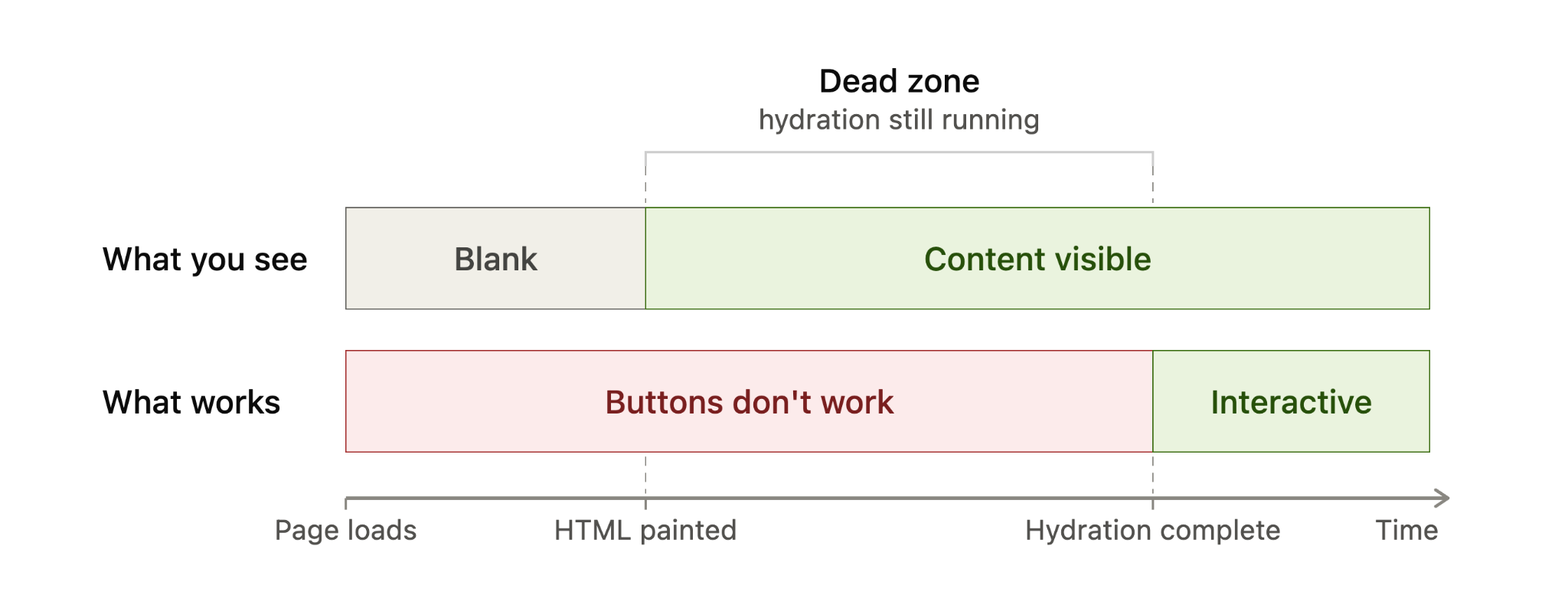
    Timeline diagram showing server-rendered HTML becomes visible before hydration, while buttons remain inactive until hydration completes.
    A hydration timeline shows the gap between content appearing and a page becoming usable: HTML is visible first, but buttons only work after hydration completes.

    Put simply, before hydration I can read the page. After hydration, I can use it.

    I also avoid confusing hydration with the rendering pattern itself. Server-side rendering (SSR), static site generation (SSG), and client-side rendering (CSR) describe where and when the page is built. Hydration describes what happens after server-rendered or statically generated HTML reaches the browser and needs to become interactive.

    From an SEO perspective, that distinction matters. When a page uses SSR or SSG correctly, the core content is already in the initial HTML. Google can discover and index that content from the HTML before depending on a JavaScript render step, which is generally more reliable than sending a mostly empty client-rendered shell.

    When I see hydration become an SEO problem

    Most of the time, I do not treat hydration itself as an SEO problem. It becomes a problem when hydration breaks, usually because the HTML created on the server does not match what the framework expects to create in the browser.

    That kind of mismatch can happen when content depends on browser-only APIs such as localStorage, when a value changes between server and client rendering such as new Date(), when a third-party script or browser extension changes the DOM before hydration finishes, or when invalid HTML causes the browser to rewrite the structure before the framework can attach to it.
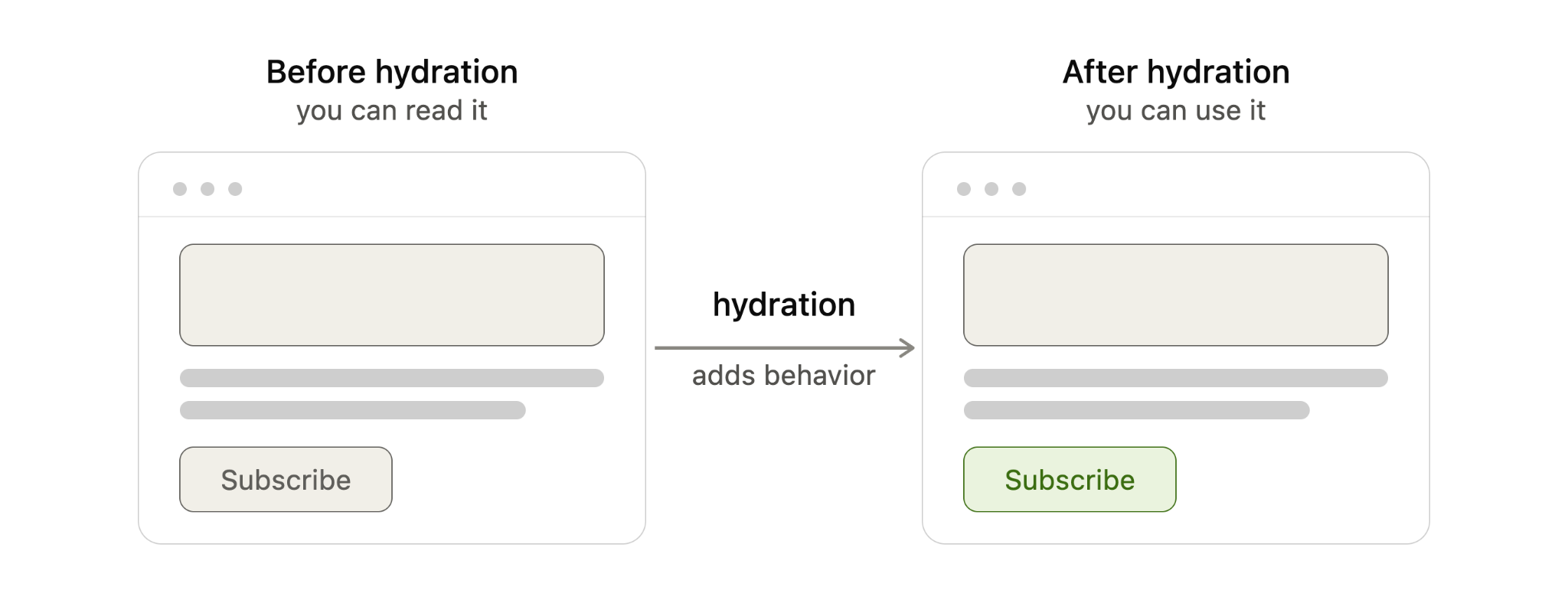
    Diagram comparing web page before and after hydration, showing JavaScript hydration adds behavior to make a subscribe button interactive.
    Before hydration, a server-rendered page can be read but not used; after hydration, JavaScript adds behavior so elements like the Subscribe button respond.

    When the two versions do not line up, the framework may throw away the mismatched section and re-render it in the browser. The exact behavior depends on the framework, but the SEO and performance risks are similar.

    For example, if a <time> value is generated with new Date(), the server may output one value while the browser generates another. That mismatch can force a re-render, even though the page appeared to load correctly at first.

    I worry about this because it can hurt the page in several ways. A re-render can make the page feel sluggish, which can affect Interaction to Next Paint (INP). It can shift the layout, which can affect Cumulative Layout Shift (CLS). It can also break user actions if event listeners fail to attach properly, leaving buttons, menus, or forms unresponsive.

    In severe cases, Google may read the raw server HTML before JavaScript finishes rendering and then index content that visitors never actually see after the page re-renders. That is the scenario I want to avoid most: search engines and users experiencing different versions of the same page.

    The fix is usually not an SEO trick. It is a development fix. I want the underlying mismatch removed by using valid HTML, avoiding browser-only logic during server rendering, stabilizing values that change between server and client, and controlling third-party scripts that alter the DOM too early.
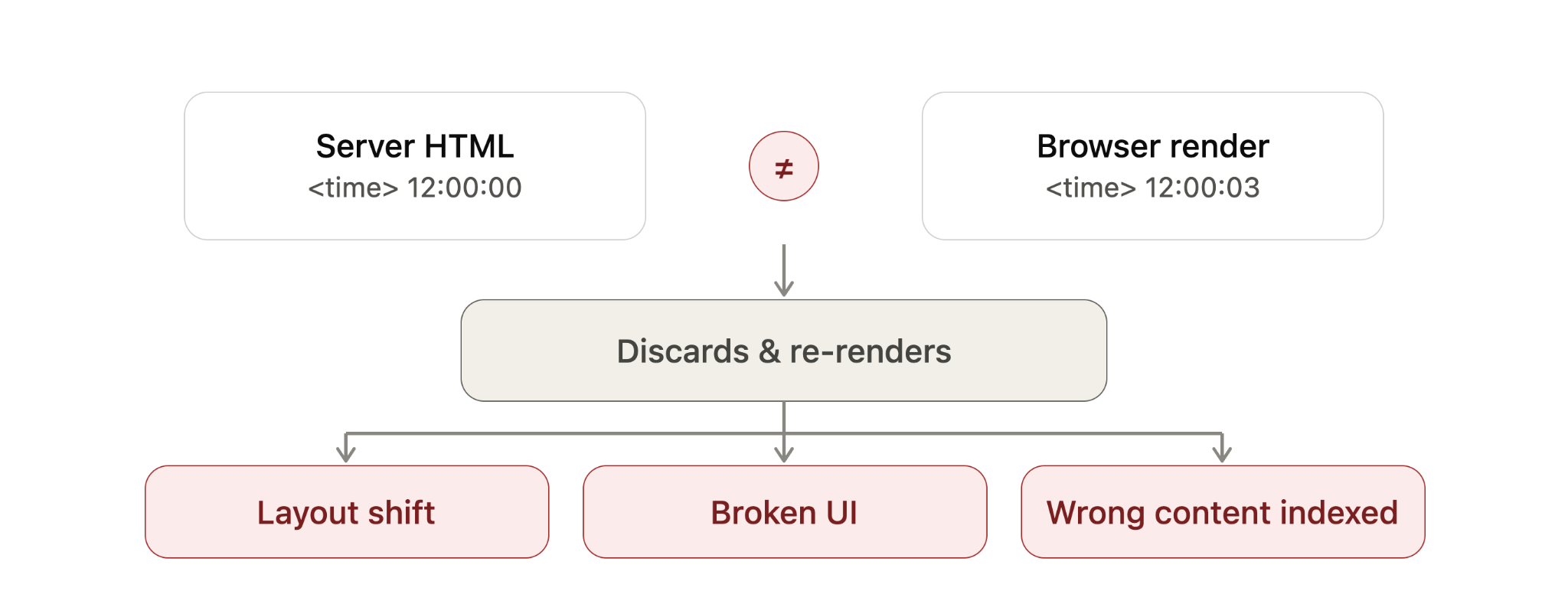
    Diagram showing a hydration mismatch where server HTML time differs from browser render, causing re-render, layout shift and SEO indexing issues.
    When server HTML and browser-rendered content disagree, hydration may discard and rebuild the page, creating layout shifts, broken UI and potential SEO indexing problems.

    How I spot hydration problems on a live site

    Hydration errors are usually easier to catch in development than on a live site, but I still look for a few practical signals. I start with the browser’s Developer Tools console and check for hydration warnings, JavaScript errors, or framework-specific mismatch messages.

    Then I watch the page load carefully. If content flickers, shifts, disappears, reappears, or stays unresponsive for longer than expected, I treat that as a sign worth investigating.

    I also use Google Search Console’s URL Inspection tool on important templates to see how Google renders the page. For larger sites, I prefer crawling with JavaScript rendering enabled in tools like Screaming Frog or Sitebulb so I can compare rendered output against raw HTML at scale.

    How I think about different hydration approaches

    Modern frameworks handle hydration in different ways, and I think of those differences as a balance between performance, interactivity, and how much JavaScript must run in the browser.

    Full hydration means the entire page hydrates in one pass. It is straightforward, but it usually ships the most JavaScript and asks the browser to do the most main-thread work. Next.js Pages Router is a common example of this model.

    Neon Google search bar with microphone icon over a futuristic digital data background, representing search technology and SEO updates.
    A glowing Google search bar cuts through streams of digital data, capturing the fast-moving world of search, shopping visibility, and SEO innovation.

    Partial hydration hydrates only the interactive pieces, often called islands. Static sections remain plain HTML and do not need client-side JavaScript. Astro’s islands architecture is a well-known example of this approach.

    Progressive hydration hydrates the page in pieces over time. A framework may hydrate sections as they scroll into view or as browser resources become available. Angular’s incremental hydration follows this general pattern.

    React Server Components take a different path by letting some components render entirely on the server and ship no client-side JavaScript for those server-only parts. In those cases, there is nothing for the browser to hydrate for that portion of the page. Next.js App Router uses this model.

    Resumability goes further by trying to skip hydration entirely. Instead of re-running components on load, the page resumes from the state the server already produced. Qwik is the main example here, although I still view it as newer and less battle-tested than some of the older patterns.

    When I compare these techniques, I look at what hydrates, how much JavaScript ships, and how much work the browser must do. Full hydration touches the entire page and usually ships the most JavaScript. Partial hydration touches only interactive components and ships less. Progressive hydration spreads the work over time. React Server Components reduce hydration for server-only parts. Resumability aims to avoid hydration altogether.

    What this means for my SEO work

    I do not assume hydration is bad for SEO. In most cases, it is simply part of how modern server-rendered and statically generated sites become interactive.

    What I do watch closely is whether the server HTML and the browser-rendered version agree. If they do, hydration is usually a performance and user experience consideration. If they do not, hydration can become a visibility problem, especially when Google indexes a version of the page that users never see.

    Newer frameworks reduce some of this risk by shipping less JavaScript and doing less work in the browser, but they do not remove the need for careful implementation. For me, the practical takeaway is simple: make sure the important content is present in the initial HTML, keep server and client output consistent, and test how search engines actually render the page.


    Inspired by this post on Search Engine Land.


    crushpress.ai community screenshot
  • Why Preparing for WebMCP Now is Crucial for SEO Success

    Why Preparing for WebMCP Now is Crucial for SEO Success

    I’ve seen many technologies come and go throughout my career. I used to chase after every new trend, trying to stay on the cutting edge. However, I quickly learned that this approach often cost me and my clients countless hours, with many technologies fading into obscurity. Does anyone remember Google Authorship?

    I’ve realized that by waiting for wider adoption, learning from early adopters’ mistakes, and catching up quickly, I avoid wasting time and create more value. This approach has been invaluable to me.

    However, some moments in technological advancement stand out—when being an early mover means not just succeeding but helping shape the future. The first people to realize the importance of PageRank and started building links can relate. WebMCP feels like another one of those pivotal moments, only larger.

    The change we’re facing isn’t just about search engine mechanics or generative engine visibility. Discovery itself is evolving, and the entities performing this discovery are changing too.

    I remember the age-old debate in SEO circles—should we focus on search engines or people? My answer is both. Yet now, this paradigm is shifting. What happens when discovery shifts from human-driven to being guided by AI agents?

    ```json
{
  "alt": "ChatGPT browser window showing network tab with response data related to Outer Banks search.",
  "caption": "Exploring the Outer Banks online through a network tab view, uncovering queries about scenic beach points.",
  "description": "This image displays a browser window with the network tab open, part of a developer's tool in a ChatGPT session. The visible section lists various network requests and responses associated with a query about Outer Banks. The response data mentions phrases like 'Outer Banks beaches sunrise dunes' and 'Nags Head beach coastline,' reflecting an exploration of scenic coastal locations. The layout captures elements like time graphs, filters, and specific headers, offering insight into the backend processing of web queries."
}
```

    When you ask ChatGPT a question today, it processes information, conducts additional searches, asks follow-ups, and delivers conclusions. The AI agent plans and decides for you, influenced entirely by its data sources and interpretive frameworks.

    This evolution represents just one chapter in the ongoing story of discovery:

    Discovery v1: Experiential interactions and word of mouth dominated.

    Discovery v2: The written word took prominence in libraries and print media.

    ```json
{
  "alt": "People sitting in futuristic chairs with AI company logos in a high-tech environment.",
  "caption": "In a bustling futuristic cityscape, individuals glide in high-tech seats advertising AI firms like OpenAI. The city embodies a vibrant digital age.",
  "description": "This image depicts a futuristic scene where people recline in advanced hover seats labeled with AI company logos such as OpenAI and Anthropic. The setting is a bustling, high-tech city with neon signs and digital advertisements, creating an immersive cybernetic environment. The image captures the essence of a digitally-driven future, with seamless integration of technology into everyday life."
}
```

    Discovery v3: The web spawned directories and search engines.

    Discovery v4: Today, we see AI and LLMs increasingly aid discovery.

    Discovery v5 (coming soon): Agentic systems will advance to perform actions autonomously.

    Embracing Discovery v5 could offer us significant liberation—freeing our minds from mundane decisions, and enabling a focus on what truly matters.

    ```json
{
  "alt": "The CapmatchOne logo with a gradient circle and bold text.",
  "caption": "Discover innovation with the CapmatchOne logo, featuring sleek typography and a modern gradient circle.",
  "description": "The CapmatchOne logo features bold, modern typography coupled with a gradient circle, symbolizing connection and innovation. The sleek design conveys a sense of progress and creativity. This image can be used for branding or promotional purposes, appealing to audiences interested in innovative solutions and forward-thinking designs."
}
```

    The path to Trustable AI is underway. I now trust AI systems with everyday queries, relying on them more each time they enhance their capabilities.

    Would I trust an AI to handle complex tax or health questions? Not entirely. Would I ask it to help plan dinner or schedule my day? Definitely.

    This gradual trust expansion parallels past experiences with technology. As it grows, so does our reliance on agents to act on our behalf.

    The tangible impact is visible: Automating grocery reorders or offering extraordinary travel deals are low-risk, high-reward changes.

    ```json
{
  "alt": "A man standing in front of a futuristic window displaying holographic code and digital elements, indicating technological advancements.",
  "caption": "As he stands before the glowing window of innovation, the future of coding and technology comes alive, offering a gateway to new digital horizons.",
  "description": "The image features a man observing a futuristic scene with a large, arched window showcasing holographic code and digital interfaces. Prominent phrases like 'Early Mover Advantage' and 'Cloudflare Integration' are displayed, suggesting a technological narrative. Two humanoid robots interact with the digital elements, illustrating advanced integration of technology and innovation. The scene is set against a backdrop of a digital landscape, highlighting the theme of progress and technological advancement. Keywords: futuristic, technology, innovation, coding, digital interface."
}
```

    The skepticism towards relinquishing control to technology is as old as technology itself. From fear of entering credit card details online to today’s reliance on smartphones and GPS, each shift was gradual but unstoppable.

    WebMCP, which facilitates AI interaction with websites, is a browser-native web standard. It’s gaining momentum, authored by Google and Microsoft. It’s about easing AI’s job in understanding actions on websites, not replacing human interaction.

    AI doesn’t need to infer tasks. WebMCP allows clear communication of a site’s capabilities, marking a shift like early schema markup days.

    Engaging with this framework ensures your site is AI-ready, simplifying AI interaction.

    WebMCP impacts discovery, influencing which sites AI agents prefer. Having your site AI-visible can make or break engagement in the emerging landscape of Discovery v5.

    I’m taking advantage of this moment, despite my usual skepticism of early adoption—it feels different this time.


    Inspired by this post on Search Engine Land.

    crushpress.ai community screenshot
  • Unveiling JavaScript SEO Secrets from Leading Ecommerce Sites

    Unveiling JavaScript SEO Secrets from Leading Ecommerce Sites

    JavaScript SEO seems like it should be a cinch by now, doesn’t it? Yet, here we are with persistent challenges that e-commerce sites continuously face. After five years of grappling with issues like crawling, rendering, and indexing, coupled with the complexities of headless builds and AI-powered recommendations, it’s clear we still have a ways to go. However, some top-tier ecommerce sites have cracked the code. Their innovative approaches offer invaluable lessons in maintaining organic visibility while shipping fast, modern JavaScript experiences. Let me share these five insights with you.

    Chewy is a giant in the U.S. pet food and supplies online retail space. They’ve harnessed the power of Next.js, a React framework, to seamlessly integrate server rendering, static generation, and full-stack development into their operations. Imagine visiting a product page like the Benebone Wishbone Chew Toy. Here, everything you need—product title, description, pricing, reviews, Q&A, and breadcrumb navigation—is already embedded in the initial HTML. This means Googlebot can access this information right away, without having to wait for JavaScript to render. This approach reduces the risk of rendering issues, especially significant with the rise of AI chatbots that still don’t handle JavaScript efficiently. While not all content needs to be on the initial load, like the ‘Compare Similar Items’ carousel meant for user engagement, Chewy perfectly balances what’s essential for indexing with user experience enhancements.

    ```json
{
  "alt": "Chewy site displaying a Benebone Bacon Flavor Wishbone Dog Chew Toy, priced at $9.99.",
  "caption": "Check out this Benebone Bacon Flavor Wishbone Dog Chew Toy available on Chewy for just $9.99! Perfect for keeping your dog entertained and their teeth healthy.",
  "description": "The Chewy website features a Benebone Bacon Flavor Wishbone Tough Dog Chew Toy, available in Medium size and priced at $9.99. Highlighted with a 4.5-star rating from over 11,646 reviews, the toy is designed for durability and dental health. Free delivery is offered on orders over $35, and a $20 eGift card is available for first-time customers spending $49 or more. The page includes options for autoship discounts, sizing selections, and easy delivery scheduling, making it convenient for pet owners."
}
```

    Switching gears to Myprotein, this brand masters the art of making navigation easily crawlable. Using Astro, a content-first framework, their site ships zero JavaScript by default and includes components that support React, Vue, or Svelte, making their SEO strategy a prime example to study. By ensuring all navigation links are present in the initial HTML response, Myprotein leverages Astro’s island architecture to hydrate these elements with JavaScript interactively. Crawlers like Googlebot can thus easily discover and process these links since they use proper anchor elements with href attributes. This proactive strategy prevents navigation from being invisible or empty during searches, thereby preserving efficient crawlability.

    ```json
{
  "alt": "HTML code snippet displaying product details for a dog chew toy.",
  "caption": "Peek behind the scenes at the HTML structure detailing a popular bacon-flavored dog chew toy.",
  "description": "This image captures a snippet of HTML code showcasing the product details for a Benebone Bacon Flavor Wishbone Tough Dog Chew Toy, Medium. It highlights elements such as product names, ratings, links, and navigation properties. This code indicates its presence on a retail website, providing key classifications and linking to reviews and manufacturer details, useful for web development insights and SEO analysis."
}
```

    Harrods, renowned for luxury goods, ensures their structured data delivers in the HTML’s initial response. By embedding structured data using the Product schema within the HTML directly, Harrods guarantees that Google can parse this data right from the first crawl, without waiting for page rendering. This foresight prevents client-side dependencies and ensures Google has immediate access to important data like pricing and availability, which is critical due to frequent updates in product details.

    ```json
{
  "alt": "Comparison chart of dog chew toys featuring Benebone and Nylabone products with prices and reviews.",
  "caption": "Discover the perfect durable chew toy for your canine companion with these top-rated options from Benebone and Nylabone, designed for medium and small breeds.",
  "description": "This image displays a comparison of various dog chew toys from Benebone and Nylabone. Products include flavors like bacon and peanut butter, designed for medium and small breeds. Prices range from $9.69 to $12.78, with customer ratings visible. Each product is marked 'Made in United States' and offers a handy 'Add to Cart' option. Ideal for those seeking durable and flavorful chew toys for dogs."
}
```

    Over at Under Armour, the elegance of their faceted navigation shines. Built on Next.js like Chewy, Under Armour ensures filters on category pages are fast, interactive, and SEO-friendly. When shoppers apply filters, the product grid seamlessly updates without a full reload, leveraging client-side updates while maintaining clean, readable URLs that Google can index effectively. By avoiding hash fragments and bracketed query strings, these URLs become shareable and bookmark-friendly, thus enhancing both user experience and SEO performance.

    ```json
{
  "alt": "The CapmatchOne logo with a gradient circle and bold text.",
  "caption": "Discover innovation with the CapmatchOne logo, featuring sleek typography and a modern gradient circle.",
  "description": "The CapmatchOne logo features bold, modern typography coupled with a gradient circle, symbolizing connection and innovation. The sleek design conveys a sense of progress and creativity. This image can be used for branding or promotional purposes, appealing to audiences interested in innovative solutions and forward-thinking designs."
}
```

    Finally, Manors Golf demonstrates SEO prowess by efficiently managing third-party scripts on their site. Utilizing Shopify’s Hydrogen framework, they cleverly defer scripts using async attributes, ensuring they don’t block the initial rendering process. This tactic not only protects the Largest Contentful Paint (LCP) metric but also eases Google’s rendering workload, contributing to a robust SEO strategy.

    ```json
{
  "alt": "Navigation bar of MyProtein website showcasing categories like Protein and Supplements.",
  "caption": "Explore the diverse range of categories on MyProtein's navigation bar, from trending items to sports nutrition staples.",
  "description": "This image displays the navigation bar from the MyProtein website. Featured categories include Trending, Protein, Creatine, Supplements, Bars, Food & Snacks, and more. The search bar is prominently placed. The image is vital for understanding how users can access different sections of the site quickly. Keywords: MyProtein, navigation, protein, supplements, e-commerce."
}
```

    The secret isn’t in using JavaScript itself but in how it’s used. When JavaScript serves to enhance rather than deliver the core functionality and content, it paves the way for an excellent user experience while preserving SEO integrity. These lessons from major e-commerce players are testament to the delicate balance between interactivity and search engine crawlability.

    ```json
{
  "alt": "HTML code snippet with navigation links for nutrition products.",
  "caption": "Explore the nutritional products featured in this HTML snippet, including creatine and protein drink options.",
  "description": "This image shows an HTML code snippet from a website, highlighting navigation links for various nutrition products. The links include Creatine, Clear Protein Drinks, and Bundles, directing users to specific product categories. The CSS classes suggest design styling and user interaction, such as 'hover:underline' for link emphasis. Useful for web developers and SEO specialists studying navigation structure and link optimization."
}
```

    Inspired by this post on Search Engine Land.


    crushpress.ai community screenshot
  • The Importance of No-JavaScript Fallbacks for SEO in 2026

    The Importance of No-JavaScript Fallbacks for SEO in 2026

    Rendering isn’t always immediate or complete. Discover where no-JavaScript fallbacks still safeguard critical content and indexing in 2026.

    I’ve noticed that Google has the capability to render JavaScript, but it doesn’t always do so instantly or flawlessly. Since Google’s 2024 comments on rendering all HTML pages, developers have questioned the necessity of no-JavaScript fallbacks. Now, in 2026, the answer is clearer yet nuanced.

    ```json
{
  "alt": "The CapmatchOne logo with a gradient circle and bold text.",
  "caption": "Discover innovation with the CapmatchOne logo, featuring sleek typography and a modern gradient circle.",
  "description": "The CapmatchOne logo features bold, modern typography coupled with a gradient circle, symbolizing connection and innovation. The sleek design conveys a sense of progress and creativity. This image can be used for branding or promotional purposes, appealing to audiences interested in innovative solutions and forward-thinking designs."
}
```

    Google’s position on JavaScript rendering has been a hot topic since July 2024. During an episode of Search Off the Record, Martin Splitt and Zoe Clifford from Google’s rendering team discussed rendering costs and prioritization.

    ```json
{
  "alt": "Guide explaining JavaScript usage and Googlebot URL crawling process.",
  "caption": "Discover how Googlebot handles JavaScript on your site, managing URLs and leveraging HTTP status codes for efficient crawling.",
  "description": "This image provides a detailed guide on how Googlebot interacts with JavaScript-heavy websites. It explains the importance of the app shell model, how Googlebot manages URLs with a 200 HTTP status code, and the role of server-side or pre-rendering. The content emphasizes the need for efficient rendering to optimize crawling and indexing by Google, highlighting essential elements like robots meta tags and headers."
}
```

    Developers, especially those working on JavaScript-heavy applications, began to question the need for fallbacks. On the other hand, many SEOs remained skeptical, wary of removing fallbacks without understanding Google’s consistency and limits in rendering processes.

    ```json
{
  "alt": "Document detailing updates on JavaScript, HTTP status codes, and SEO from Google's guidelines.",
  "caption": "Explore key updates from Google on JavaScript execution and SEO best practices, ensuring efficient website indexing and crawling.",
  "description": "This image captures a document from Google detailing updates related to JavaScript execution with non-200 HTTP status codes, migrating crawling documentation, and clarifying canonicalization and noindex best practices in JavaScript. The content stresses the importance of setting canonical URLs correctly, avoiding noindex tags where indexing is desired, and explaining the handling of HTTP status codes for enhanced SEO and crawler efficiency. These updates are aimed at improving the performance of web pages in search indexing and rendering."
}
```

    While developers debated, Google’s documentation clarified how JavaScript rendering functions. Pages are queued for rendering, and once resources become available, a headless browser processes the JavaScript. This means that not all interactions within JavaScript elements are parsed immediately.

    ```json
{
  "alt": "Screenshot of text explaining Google's 2MB limit on HTML page fetching and processing.",
  "caption": "Discover how Google handles large HTML files with a 2MB fetching limit, affecting data processing and JavaScript rendering.",
  "description": "This image contains a detailed explanation of Google's approach to handling HTML files larger than 2MB. It outlines four key points: partial fetching, processing the cutoff, ignoring unseen bytes, and bringing in resources, specifically addressing the impact of JavaScript and CSS. Additionally, it discusses how the Web Rendering Service (WRS) processes and renders these resources and its implications for web page indexing. Important keywords include 2MB limit, Googlebot, HTML, JavaScript, and WRS."
}
```

    Google’s guidelines on rendering emphasize the importance of pre-rendering strategies like server-side rendering to ensure critical content is indexed properly. Although Google claims it renders all pages, there are practical limits, such as a 2MB HTML and resource cap.

    Google's update log for March 2026 listing changes in documentation for SEO, JavaScript, and more.
    Discover Google's March 2026 updates, enhancing clarity in forum markup, meta tag processing, and modernizing accessibility content for SEO.

    Although Google’s JavaScript capabilities have improved, the broader web hasn’t uniformly adapted, with many systems still dependent on HTML-first delivery. As AI crawlers and other non-Google bots often don’t execute JavaScript, the need for no-JavaScript fallbacks remains critical.

    ```json
{
  "alt": "Text about Googlebot rendering with HTTP status codes and pre-rendering tips.",
  "caption": "Understanding Googlebot's behavior: Learn how HTTP status codes impact webpage rendering and why server-side pre-rendering is beneficial for website performance.",
  "description": "This image provides insights into how Googlebot processes webpages using HTTP status codes. Pages with a 200 status go through rendering, utilizing a headless browser if JavaScript is present. It highlights the importance of server-side or pre-rendering to enhance site speed since not all bots can handle JavaScript. The text emphasizes the roles of meta tags, headers, and error codes like 404 in this process."
}
```

    Despite Google’s advancements, fallbacks for critical architecture, content, and links are still vital. Google’s documentation and recent updates reinforce this by highlighting the ongoing importance of server-side rendering and resilient HTML.

    ```json
{
  "alt": "Graph showing percentage of pages with valid rel=canonical links from Jan 2020 to Mar 2026.",
  "caption": "Explore the trends in valid rel=canonical pages over time, showing a noticeable jump in compliance around November 2024.",
  "description": "This image features a time series graph depicting the percentage of web pages with valid canonical links, as detected by Lighthouse. The data spans from January 2020 to March 2026. A sharp increase is observed around November 2024, indicating higher compliance rates with rel=canonical standards. Desktop and mobile results are displayed, sourced from httparchive.org. Key insights can be drawn from the fluctuations noted in the graph."
}
```

    From personal experience, it’s clear that while blanket no-JavaScript fallbacks might not be universally necessary, critical content should not solely depend on JavaScript. In 2026, no-JavaScript fallbacks for essential content are more than just a good idea; they are often essential for maintaining SEO integrity.

    ```json
{
  "alt": "Bar graph showing canonical inconsistency in desktop and mobile SEO from Web Almanac 2025.",
  "caption": "Exploring canonical inconsistencies in SEO for 2025, this graph illustrates the variances between desktop and mobile metrics.",
  "description": "This bar graph titled 'Canonical inconsistency' from Web Almanac 2025 compares SEO performance discrepancies between desktop and mobile platforms. It highlights three categories: Canonical Mismatch, Rendered Change Canonical, and HTTP Header Changed Canonical, each showing different percentage values for desktop and mobile. Desktop shows a higher percentage in Rendered Change Canonical at 2.71%, while mobile records 3.02%. The visual emphasizes critical areas for SEOs in addressing canonical issues across device types. Useful for digital marketers, SEOs, and analysts."
}
```

    Inspired by this post on Search Engine Land.


    crushpress.ai community screenshot
  • Uncover the Impact of the DOM on SEO and Web Crawling

    Uncover the Impact of the DOM on SEO and Web Crawling

    Have you ever wondered how the structure of your webpage affects its visibility on search engines? As someone who regularly dives deep into the technicalities of SEO, understanding the DOM (Document Object Model) is crucial for optimizing your site.

    I’ve often encountered discussions about the DOM with developers, and maybe you’ve seen it referenced in tools like Google Search Console. But why does it matter so much for SEO? Let me walk you through its significance and how to optimize it.

    In essence, the Document Object Model is the browser’s dynamic, in-memory representation of your webpage. It serves as a bridge that allows programs, notably JavaScript, to interact with your content.

    ```json
{
  "alt": "Screenshot showing HTML document structure in the browser's Developer Tools.",
  "caption": "Explore the living DOM! This browser Developer Tools snapshot reveals the dynamic structure of a webpage.",
  "description": "The image shows a browser page with Developer Tools open, highlighting HTML code structure. The page title reads 'The DOM is Alive' with a button 'Click to Add Text'. The Developer Tools display the HTML structure, including document type, head, and body elements. This visual is useful for web developers and those learning about the Document Object Model (DOM) and HTML coding."
}
```

    The DOM is structured like a family tree:

    The document: Acts as the root of this tree.

    ```json
{
  "alt": "The CapmatchOne logo with a gradient circle and bold text.",
  "caption": "Discover innovation with the CapmatchOne logo, featuring sleek typography and a modern gradient circle.",
  "description": "The CapmatchOne logo features bold, modern typography coupled with a gradient circle, symbolizing connection and innovation. The sleek design conveys a sense of progress and creativity. This image can be used for branding or promotional purposes, appealing to audiences interested in innovative solutions and forward-thinking designs."
}
```

    Elements: HTML tags such as <body> and <p> transform into branches or nodes.

    Relationships: There are parent-child-sibling relationships among elements.

    ```json
{
  "alt": "Diagram of web page rendering process from bytes to DOM structure.",
  "caption": "Explore the intricate process of transforming bytes into a fully structured DOM in web development.",
  "description": "This image illustrates the web page rendering process, detailing how a webpage transitions from raw bytes to a structured Document Object Model (DOM). It includes steps of parsing characters, generating tokens, and forming nodes, culminating in a visual DOM tree that displays HTML tags and their hierarchical relationships. Key elements such as 'html', 'head', 'body', and text nodes are depicted. This educational diagram is invaluable for understanding web performance and optimization."
}
```

    This hierarchy is key for the browser and search engines in understanding your content’s structure, helping them discern, for instance, which paragraph is associated with a given heading.

    The exploration of the DOM doesn’t end there. Let’s look at how you can inspect it directly.

    ```json
{
  "alt": "Webpage showing dynamic DOM update where a button click adds paragraphs to the page.",
  "caption": "Witness the dynamic power of the DOM! With just a button click, new content seamlessly appears, illustrating interactive web elements.",
  "description": "This image demonstrates a dynamic change to the Document Object Model (DOM) on a webpage. A button labeled 'Click to Add Text' is clicked, resulting in new paragraph elements appearing on the page. The browser's developer tools window displays the HTML structure, showing the added paragraphs within a highlighted red box. The process exemplifies real-time updates and user interactions in web development, highlighting concepts such as DOM manipulation and JavaScript interactivity. Useful keywords include DOM, web development, JavaScript, and dynamic content."
}
```

    The DOM, a JavaScript object, can be viewed in a format akin to HTML using browser DevTools—just right-click on your page, select Inspect > Elements, and you’ll see the Elements panel.

    In this panel, it’s easy to dive into the structure by:

    ```json
{
  "alt": "Flowchart illustrating web crawling process from crawl queue to index and rendering.",
  "caption": "A visual guide to web crawling and indexing, showing the journey from URLs to rendered HTML.",
  "description": "The image presents a flowchart of the web crawling process. It starts at the 'Crawl Queue,' moves through 'Crawler,' 'Processing,' and ends at 'Index.' There’s a side process involving 'Render Queue' and 'Renderer,' culminating in 'Rendered HTML.' This illustrates the sequence and relation between different stages in page indexing and rendering."
}
```

    Expanding and collapsing nodes to explore hierarchy,

    Searching for elements using Ctrl+F (Cmd+F on Mac), and

    ```json
{
  "alt": "Google Search Console URL Inspection tool displaying example.com test-page details.",
  "caption": "Google Search Console confirms example.com/test-page is indexed and visible in search results, showcasing effective SEO health.",
  "description": "This image shows the Google Search Console URL Inspection tool analyzing 'https://example.com/test-page'. The page is indexed and available on Google, with enhancements like HTTPS and breadcrumbs. The right panel displays HTML code from the crawled page. The console interface shows options for page indexing and enhancements, essential for tracking website SEO performance."
}
```

    Identifying JavaScript-added or -modified elements as they flash briefly on change.

    However, do remember that this tool sometimes shows a different view from what Googlebot crawls. I’ll delve into this discrepancy a bit later.

    ```json
{
  "alt": "Diagram showing the relationship between a Document Tree, Shadow Tree, and Flattened Tree.",
  "caption": "Exploring HTML Structures: This diagram illustrates the integration of a Shadow Tree into a Document Tree, forming a Flattened Tree for rendering.",
  "description": "This image presents a visual representation of how an HTML Document Tree interacts with a Shadow Tree to create a Flattened Tree for rendering purposes. The Document Tree includes a 'document' node leading to a 'shadow host'. The Shadow Tree branches off from the 'shadow host' and contains a 'shadow root' with two child nodes. The Flattened Tree diagram illustrates how these components combine, using a dashed box to indicate the embedded Shadow Tree structure. This visualization aids in understanding web component architecture and rendering processes."
}
```

    Next, understanding how the DOM is built is essential. It starts with the browser converting the HTML file retrieved from a server line-by-line into tokens, which are then turned into nodes forming a tree structure.

    This tree-building process allows browsers to create a hierarchical structure necessary for rendering the web page you see, which also includes building a CSS Object Model (CSSOM), but this is less crucial for SEO than the DOM.

    ```json
{
  "alt": "Screenshot showing the DOM inspector with shadow DOM elements highlighted.",
  "caption": "Exploring the shadow DOM: A screenshot reveals how elements are isolated within the shadow tree using developer tools.",
  "description": "This image is a screenshot of a browser's developer tools, showcasing the Document Object Model (DOM) inspector with an emphasis on shadow DOM elements. Highlighted in red, the image shows the HTML structure with styling applied inside a shadow root. The display includes elements such as buttons, divs, and scripts, offering a visual guide to shadow DOM implementation and CSS styling. Key terms include DOM, shadow DOM, web development, and CSS."
}
```

    JavaScript often runs during this DOM construction. On encountering a <script> tag without async or defer attributes, the browser pauses to execute the script before continuing. These scripts might modify the DOM by adding content or changing links, differing from the initial HTML code.

    Let me illustrate this: Each click on a button dynamically adds a paragraph to the DOM, changing the page’s visible content.

    ```json
{
  "alt": "Google Search Console report showing no rich results detected and HTML code with shadow DOM highlighted.",
  "caption": "A Google Search Console report reveals the absence of rich results, alongside highlighted shadow DOM code.",
  "description": "This image displays a Google Search Console report indicating 'No items detected' for rich results. The HTML code on the right highlights the shadow DOM section, showcasing a 'This is the shadow DOM in action.' message. The crawl was completed successfully on Jan 24, 2026. Keywords: Google Search Console, rich results, shadow DOM, HTML code, web development."
}
```

    The original HTML is just a starting blueprint; the final constructed DOM is what the browser utilizes. It can dynamically change based on JavaScript operations.

    Why does the DOM matter for SEO? Modern search engines like Google render pages using headless browsers (Chromium). They evaluate the DOM, not just the initial HTML response.

    ```json
{
  "alt": "Web development interface showing HTML and CSS code for an accordion tab.",
  "caption": "Dive into the code! This web development screenshot showcases an accordion menu with tabs and a focus on 'Tab 2'.",
  "description": "This image displays a web development interface with HTML and CSS code for an accordion menu. In the screenshot, an orange arrow points to 'Tab 2', highlighting its content within the HTML code. The browser's developer tools are open, with the 'Elements' and 'Styles' panels visible, providing insight into the code's structure and styling. Keywords: HTML, CSS, accordion, web development, code inspection."
}
```

    Googlebot’s crawl process includes parsing HTML, executing JavaScript, and taking a DOM snapshot for indexing. However, remember:

    Googlebot doesn’t interact with pages like humans—content triggered by user actions might go unnoticed.

    ```json
{
  "alt": "HTML snippet showing a paragraph with a hyperlink and an arrow pointing to it.",
  "caption": "Discover how a simple HTML structure with a hyperlink can enhance webpage interactivity. Dive into code and learn more with just one click!",
  "description": "This image displays an HTML code snippet featuring a paragraph element with static text and an embedded hyperlink labeled 'Learn more' linking to 'https://example.com'. A red arrow points towards the hyperlink, emphasizing its clickable feature. The image highlights basic webpage structure elements, contributing to understanding HTML interactivity. Keywords: HTML, hyperlink, web development, code snippet."
}
```

    Other crawlers might not render JavaScript, missing out on JavaScript-dependent content.

    With AI agents harnessing DOM data for task execution, a well-structured and accessible DOM becomes ever more crucial.

    Verifying what Google sees via Google Search Console’s URL inspection tool reveals the rendered HTML version indexed by Google, showcasing any issues.

    Using this tool can alert you to discrepancies in what Google indexes versus what you expect, impacting your SEO efforts if overlooked.

    For instances without console access, you can resort to Google’s Rich Results Test for similar page insights.

    To ensure your webpages are crawled and indexed well, here are some best practices:

    Make sure significant content loads in the DOM by default—Googlebot doesn’t interact beyond initial page loads.

    Use proper <a> tags to ensure links are crawlable, avoiding JavaScript-based navigation that search engines don’t execute.

    Maintain a clear semantic HTML structure. Search engines rely on tags like <header>, <article>, and <section> to understand content organization, unlike ambiguous <div> nesting.

    Keep your DOM lean—under about 1,500 nodes—to avoid performance lags and enhance user experience.

    In a digital landscape increasingly reliant on AI interactions and advanced crawling methods, understanding and optimizing the DOM is key to maintaining your site’s SEO competitiveness.


    Inspired by this post on Search Engine Land.


    crushpress.ai community screenshot
  • Google Updates JavaScript SEO: Accessibility Advice Removed

    Google Updates JavaScript SEO: Accessibility Advice Removed

    I recently discovered that Google has adjusted its JavaScript SEO guidelines by removing the ‘design for accessibility’ section. This decision was made because the advice was deemed outdated. Nowadays, Google handles JavaScript smoothly.

    When Google announced the change, they explained the section was no longer as useful as it once was. Previously, they warned that JavaScript might obscure content from Google, but clearly, that’s not an issue anymore.

    The Old Advice. Here’s what the original guidance stated:

    “Design for accessibility: Create pages for users, not just search engines. When designing your site, consider users who might not use a JavaScript-capable browser, like those with screen readers or less advanced mobile devices. Test your site’s accessibility by viewing it with JavaScript turned off or in a text-only browser like Lynx. This can help identify content hard for Google to see, such as text in images.”

    Why It Was Removed. Google clarified:

    • “The information was outdated and less helpful. Google Search has successfully rendered JavaScript for years, so using it for content loading doesn’t hinder visibility.”
    • “Most assistive technologies can now handle JavaScript as well.”

    The Importance. Even though Google is adept at processing JavaScript, it’s still critical to verify what Google Search sees. I recommend using the URL inspection tool within Google Search Console to ensure everything checks out.

    Remember, while Google and probably Microsoft Bing manage JavaScript efficiently, some emerging AI engines might not render it as effectively.


    Inspired by this post on Search Engine Land.


    crushpress.ai community screenshot
  • Understanding Google’s JavaScript Execution on Non-200 Pages

    Understanding Google’s JavaScript Execution on Non-200 Pages

    As I delve into the intricacies of JavaScript and SEO, I came across a fascinating update from Google that caught my attention. It’s about how Google handles JavaScript execution on pages that don’t return a typical 200 HTTP status code.

    Google recently updated their JavaScript SEO documentation to shed light on this topic. They explained that all pages with a 200 HTTP status code are automatically queued for rendering, irrespective of the presence of JavaScript.

    However, if a page returns a non-200 status code, like a 404 error page, rendering might be bypassed, which is something Google emphasized in their updated guidelines.

    Diving deeper, I discovered that Googlebot efficiently queues all pages with a 200 status code for rendering. This clarification came as a pleasant surprise to me as it paints a clearer picture of how Google handles such pages.

    In fact, the specific section in the documentation that got an update provides a visual explanation, and I appreciated the added clarity it brings.

    ```json
{
  "alt": "Googlebot rendering process description with HTTP status code 200.",
  "caption": "Exploring Googlebot's rendering process: Learn how HTTP status codes impact page indexing and rendering.",
  "description": "The image explains Google's rendering process for pages with a 200 HTTP status code. Pages without a meta tag to block indexing are queued for rendering. Googlebot uses headless Chromium to render and execute JavaScript, parsing the HTML for links and indexing them. A highlighted section stresses that all 200 status code pages are rendered, while non-200 status codes like 404 may be skipped. Keywords: Googlebot, rendering, HTTP status code, indexing."
}
```

    Google explained further that while pages with a 200 status code head to rendering, pages with other status codes might not meet the same fate.

    Google’s weekly updates to the JavaScript SEO documentation also included other significant changes. Notably, they clarified aspects like JavaScript’s role in canonicalization and cautioned against using JavaScript for noindex tags directly in the original page code.

    Why do we care about these updates? Well, understanding these nuances ensures I make informed decisions about my web pages. Ensuring my pages return a 200 status code is crucial; otherwise, Google might skip rendering them, which could negatively impact my website’s search ranking.


    Inspired by this post on Search Engine Land.


    crushpress.ai community screenshot
  • Master Canonicalization with Google’s JavaScript SEO Update

    Master Canonicalization with Google’s JavaScript SEO Update

    Earlier this week, I noticed Google made another tweak to its JavaScript SEO best practices document. This time, they focused on clarifying canonicalization best practices. In essence, Google suggests that setting the canonical URL to match the URL in the original HTML is crucial. If that’s not possible, it’s better to leave the canonical URL out of the HTML altogether.

    Google’s New Additions. Google introduced a fresh section that explains:

    “The rel=‘canonical’ link tag helps Google identify a page’s canonical version. While you can use JavaScript for this, it shouldn’t alter the canonical URL from what’s set in the original HTML. Ideally, use HTML to set it, but if JavaScript is necessary, ensure the JavaScript sets it identically to the HTML. If HTML isn’t an option, use JavaScript and omit the canonical URL in the HTML.”

    Understanding Google’s Stance on Noindex. They also issued a warning earlier regarding noindex tags—advising not to use them in the original page code if you want the page indexed.

    Why This Matters to Me. If I rely on JavaScript for setting canonical links, Google’s advice is to verify its recognition through the Google Search Console’s URL Inspection tool. It’s a great reminder to review these updated best practices, especially if JavaScript plays a crucial role on my site.


    Inspired by this post on Search Engine Land.


    crushpress.ai community screenshot
  • Avoid Noindex Tag in JavaScript: Google’s Key SEO Advice

    Avoid Noindex Tag in JavaScript: Google’s Key SEO Advice

    I recently discovered that Google has made some updates to their JavaScript SEO basics documentation. This change has brought clarity to how Google’s crawler deals with noindex tags on pages utilizing JavaScript. The main takeaway? If you’re aiming to have your page indexed, definitely avoid including a noindex tag in the original page code.

    What’s New: Google has adjusted this section to specify that when Google encounters a noindex tag, it may bypass rendering and executing JavaScript. Consequently, efforts to modify or remove the robots meta tag using JavaScript might not yield the desired results. So, if indexing is a goal, keep the noindex tag out of the original code.

    Previously, the guidelines indicated a certain certainty: if a noindex tag was detected, Google skipped rendering and executing any JavaScript. This meant any attempts to counter this with JavaScript adjustments would simply not work. The advice stood firm—keep noindex tags out of the original code if there’s any chance you need the page indexed.

    Reason for Change: Google clarified that while it can render pages employing JavaScript, this behavior is not consistently defined and is subject to change. If there’s any chance you want your page to show up in search, play it safe and leave out the noindex tag from the original code.

    Why This Matters: It’s often safer to steer clear of JavaScript when setting crucial protocols, especially concerning the blocking of Googlebot or other crawlers. If you need a search engine not to rank a particular page, avoid using JavaScript to execute those directives.


    Inspired by this post on Search Engine Land.


    crushpress.ai community screenshot