Tag: Google Ads

  • Unveiling 2025’s Top PPC Updates: Exciting Shifts in Advertising

    Unveiling 2025’s Top PPC Updates: Exciting Shifts in Advertising

    2025 was a whirlwind year for those of us in the pay-per-click (PPC) marketing world, with changes coming fast and growing increasingly complex.

    I noticed how significant many of Google’s updates were throughout the year, from the introduction of deeper automation with AI Max to ads being integrated directly into AI Overviews and more transparency and control being offered with Performance Max campaigns.

    There were also key updates to Google Tag Manager and conversion tracking that really changed how I trust and collect data, not to mention the effects of policy shifts, automatic content extraction, and major advertisers like Amazon and Temu pulling back from Google Shopping, shaking up auction dynamics.

    Now that 2025 is coming to a close, let me walk you through the headlines that caught my attention, ranked by pageviews.

    10. Google changed how Tag Manager works with Google Ads

    On March 10th, Google updated Google Tag Manager, ensuring that the Google tag would load before any events, thereby improving tracking accuracy and data collection from April 10th onwards. For me, this meant GTM automatically loaded the Google tag for containers with Google Ads and Floodlight tags, allowing simplified access to Enhanced Conversions and cross-domain tracking directly within tag settings.

    9. Google Performance Max campaign API placement exclusions

    On January 28th, Google revealed we can actually control Performance Max campaigns using API-based placement exclusions, overturning prior documentation and support guidance that stated otherwise. I found research from ad tech firm Optmyzr confirming that these API exclusions effectively blocked spending on excluded placements, providing stronger programmatic control over PMax campaigns.

    8. Search Terms visibility in Google Performance Max campaigns

    On March 21st, Google gave us the ability to see which search terms were triggering ads in Performance Max campaigns and introduced the option to add negative keywords directly from the Search Terms report, enhancing transparency and giving us more control.

    7. Google Ads AI Max for Search campaigns beta

    On May 6th, Google introduced AI Max, a one-click enhancement for Search campaigns, offering us the power of advanced AI to expand reach and dynamically generate ads, while adapting creative elements in real time.

    6. Google AI Overviews ads

    Starting May 22nd, Google began placing ads directly within AI Overviews, marking a significant shift in monetizing its generative search experience. This new feature was confirmed during Google Marketing Live 2025.

    5. Google Ads allowed multiple ads for the same business on one results page

    On March 31st, Google allowed the display of multiple ads for the same business on a single results page, provided they appeared in different locations, thereby opening up opportunities for larger brands to increase their visibility.

    4. Google launched automatic marketing content extraction

    On April 3rd, Google introduced a feature that automatically pulls existing marketing content from merchants to boost visibility across Search, Shopping, and Maps. Merchants were auto-enrolled, but could opt-out anytime?

    3. Temu pulled its U.S. Google Shopping ads

    On April 14th, Temu’s abrupt withdrawal of its U.S. Google Shopping ads revealed the heavy reliance on paid acquisition. This move, coinciding with increased tariffs and strict enforcement of import regulations, significantly impacted its market presence.

    2. Amazon pulled out of Google Shopping ads

    On July 25th, Amazon’s unexpected cessation of Google Shopping ads shook the market, given its historical role in driving auction competition and ad revenue. A month later, it resumed internationally but remained absent in the U.S.

    1. Google Ads simplified conversion tracking with new tag manager feature

    Google Ads, on February 5th, simplified conversion tracking within Google Tag Manager by introducing a wizard-style setup for creating conversion events without manual coding, revolutionizing my approach to tracking and optimization.

    PPC in 2025 was undoubtedly dominated by major headline-worthy updates, largely centered around Google’s changes. Moving forward, I expect 2026 to bring even deeper AI integration. The real game-changer will be how expertly we can apply AI strategically.


    Inspired by this post on Search Engine Land.


    crushpress.ai community screenshot
  • Why Seasonality Adjustments Mislead Advertisers on Black Friday

    Why Seasonality Adjustments Mislead Advertisers on Black Friday

    I recently came across a fascinating study highlighting how seasonality adjustments can actually backfire for advertisers during Black Friday, driving up costs and reducing efficiency.

    A thorough analysis over three years, involving up to 6,000 advertisers, indicates that using Google’s seasonality bid adjustments during Black Friday and Cyber Monday (BFCM) often undermines efficiency, despite the platforms recommending them.

    The big picture. Smart Bidding models are crafted to foresee predictable retail surges. Optmyzr analyzed tens of billions of impressions between 2022 and 2024, finding that advertisers who avoided seasonality adjustments usually had better efficiency metrics.

    Without adjustments, Smart Bidding:

    • Recognized the BFCM conversion lift independently
    • Increased bids rationally
    • Maintained stable or improved ROAS, particularly in 2024

    With adjustments: CPCs surged faster than the actual conversion rates, eroding efficiency.

    Reality check: Google doesn’t need your “heads up.” Seasonality adjustments prompt Google to expect a conversion rate rise and to bid accordingly. If your prediction is off—and it usually is—Smart Bidding overshoots.

    For example:

    • You predict a +50% CVR lift
    • The actual lift is +40%
    • This results in an overbid of about 7.1%

    During BFCM’s high sales volumes, even minor mistakes become costly quickly.

    The data: 3 years of the same story

    ```json
{
  "alt": "Table showing CPC inflation from 2022 to 2024 with and without seasonal bid adjustment.",
  "caption": "A comparison of CPC inflation rates over three years reveals significant seasonal adjustments.",
  "description": "This table illustrates the CPC inflation rates from 2022 to 2024, comparing figures with and without seasonal bid adjustments. In 2022, CPC inflation without adjustment is 17%, increasing to 36.7% with adjustment. For 2023, the rates are 16% without adjustment and 32% with adjustment. In 2024, both rates without and with adjustment are 17% and 34%, respectively. This data highlights the impact of seasonal adjustments on advertising costs, a crucial insight for marketers and advertisers."
}
```

    1. Smart Bidding already adjusts for the CVR spike

    • 2022: +17.5%
    • 2023: +11.9%
    • 2024: +7.5%

    No additional guidance needed.

    2. CPC inflation doubles with adjustments

    Across all observed years, CPCs increased approximately twice as much when a seasonal adjustment was used.

    3. ROAS drops significantly

    Advertisers relying on Smart Bidding saw stable or improved ROAS, whereas those who intervened suffered double-digit losses.

    The one exception: “Volume at all costs.” If the aim is pure revenue growth, disregarding margins, seasonality adjustments can be beneficial.

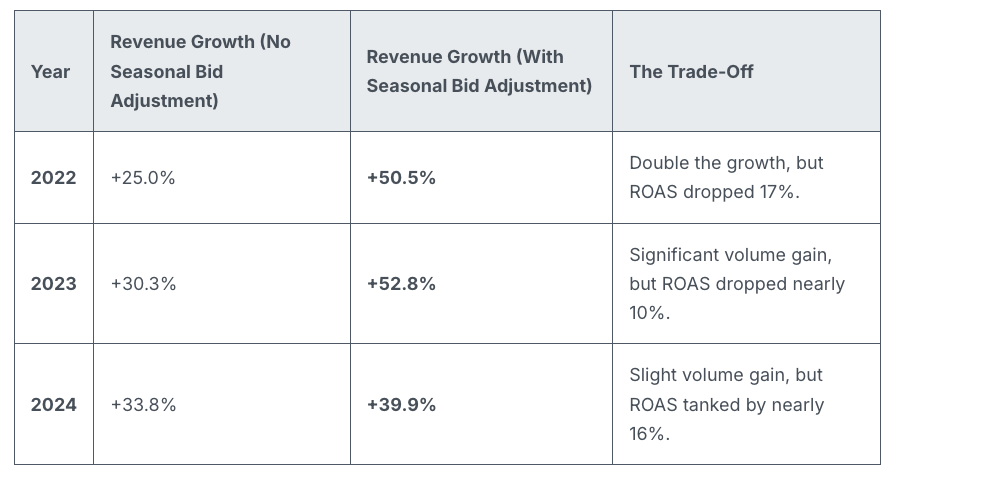
    Revenue lifts were notably higher with adjustments:

    • 2022: +50.5% vs. +25.0%
    • 2023: +52.8% vs. +30.3%
    • 2024: +39.9% vs. +33.8%
    ```json
{
  "alt": "Table showing revenue growth from 2022 to 2024 with and without seasonal bid adjustment with related trade-offs.",
  "caption": "Seasonal bid adjustments impact revenue growth significantly, but come with trade-offs in ROAS, as shown from 2022 to 2024.",
  "description": "This table presents a comparison of revenue growth from 2022 to 2024, analyzing scenarios with and without seasonal bid adjustments. In 2022, a 25% growth without adjustment jumps to 50.5% with it, though ROAS drops by 17%. In 2023, adjustments raise growth from 30.3% to 52.8%, with a 10% ROAS decline. By 2024, growth is 33.8% without and 39.9% with adjustment, noting a 16% ROAS reduction. Keywords: seasonal bid adjustment, revenue growth, ROAS, trade-off."
}
```

    Efficiency may decline, but volume certainly increases.

    When seasonality adjustments make sense. They’re useful when Google doesn’t have prior signals, like one-off or niche events.

    Good for:

    • One-time flash sales
    • Email-only offers
    • Surprise clearance sales
    • Niche seasonal spikes

    Not recommended for:

    • Black Friday
    • Cyber Monday
    • Christmas
    • Valentine’s Day
    • Any event with a predictable historic pattern

    Why we care. Google already recognizes the significance of Black Friday. Smart Bidding is trained with years of BFCM data and can detect conversion rate spikes independently. Overriding this can lead to excessive bidding, increased CPCs, and reduced ROAS, so many marketers might be wasting their budget during this crucial week.

    By recognizing when Smart Bidding has an adequate signal, advertisers can avoid expensive errors, maintain efficiency, and reserve seasonality adjustments for when they add true value.

    Bottom line. Smart Bidding effectively manages major retail holidays. Seasonality adjustments often bring more chaos than benefits during predictable retail peaks. Keep them for unique, brand-specific events that Google can’t predict.

    Smart move: Trust the algorithm — use tools like anomaly alerts, pacing monitors, and bid caps for control without conflicting with Smart Bidding’s core models.

    Dig Deeper. Do Seasonality Adjustments Actually Help During BFCM? A 3-Year Study Says No.


    Inspired by this post on Search Engine Land.


    crushpress.ai community screenshot
  • Simplify Video Ad Campaigns with Google’s Direct Uploads

    Simplify Video Ad Campaigns with Google’s Direct Uploads

    I recently discovered a game-changing update from Google that’s bound to catch the attention of many advertisers. Google’s Performance Max now allows me to upload video files directly in the “Edit assets” panel, simplifying the campaign setup process significantly. What’s even better? I don’t need a YouTube channel or Shared Library for this.

    Here’s the scoop. This handy feature pops up as an “Upload” tab in the Google Ads UI, making it super easy to add video assets during PMax campaign creation. Just a simple drag-and-drop, and I’m set to move on, especially helpful if I’m new to video advertising.

    In the YouTube ad setup, I’ll find a clear, highlighted box prompting me to drop in my video file, smoothing out what used to be a more complicated process.

    How does it work? These video files are stored in a Google-managed channel, not on my personal YouTube account. While they’re usable in ads, they don’t function like typical YouTube uploads, which might affect how I manage my content.

    Why it matters to me. This update is a boon if I don’t have a YouTube presence or need a quick way to upload video assets. However, I should be mindful of the trade-offs: I’ll have no analytics, no remarketing capabilities, no metadata access, and crucially, I won’t own the assets long-term. It’s a convenient option for quick setups, but I must proceed with caution and ideally upload through a proper brand channel when possible.

    ```json
{
  "alt": "YouTube ad upload interface highlighting channel selection option.",
  "caption": "Easily select your YouTube channel for ad video uploads and manage your content efficiently with full control over analytics and features.",
  "description": "This image shows the YouTube ad upload interface, specifically focusing on the section where users can choose their channel for uploading videos. The interface allows up to 5 video selections for ad campaigns. The interface highlights the option to upload videos to 'Your own channel,' ensuring users have full control, access to analytics, and various features through YouTube Studio. This process is part of the ad campaign setup on YouTube, emphasizing the importance of channel selection for video management."
}
```

    Important limitations. Using this method imposes several restrictions:

    • No YouTube Analytics
    • No remarketing audiences
    • No metadata editing
    • No custom thumbnails
    • No ability to appeal rejections or restrictions
    • No brand-channel presence or asset ownership

    How I found out. The first mention of this update came from Web Marketing Consultant Dario Zannoni, who shared it on LinkedIn. I appreciated his insights into how this could change my advertising approach.

    The takeaway. This feature is a great shortcut if I’m in a hurry or don’t have a robust YouTube setup. Still, maintaining best practices by using my official brand channel ensures I preserve analytics, gather audience data, and retain creative control.


    Inspired by this post on Search Engine Land.


    crushpress.ai community screenshot
  • Effortless YouTube and Google Ads Integration Boosts Advertiser Insights

    Effortless YouTube and Google Ads Integration Boosts Advertiser Insights

    Recently, I’ve noticed Google has started automatically linking YouTube channels with Google Ads accounts. This innovation allows advertisers like me to quickly tap into valuable audience data, though it does require careful permission management.

    When Google’s system detects a strong connection between a YouTube channel and a Google Ads account, it takes action by linking them. This gives us richer audience signals without us having to do a manual setup.

    What’s happening now? Google will set up these links automatically if a strong relationship is identified, notifying us 30 days in advance. This email notification allows us to decide whether to opt out or connect sooner.

    How does it work?

    During the 30-day period, if no one opts out, the link will be completed automatically. If I manage both accounts, I can even connect them immediately. There’s flexibility here, too, as I can always adjust permissions or unlink later if needed.

    Why this matters to us. This development simplifies how we, as advertisers, access YouTube audience data. It makes it straightforward to target viewers and construct data segments. However, it also introduces uncertainties about control over our assets and the permissions we’ve set.

    Benefits for advertisers. Once linked, I can:

    • Use YouTube interactions to run more effective ads.
    • Leverage organic views and earned actions for performance insights.
    • Create data segments from how audiences engage with my channel.
    • Consider channel engagement as conversion activities, like subscriptions.

    Limitations I’ve noticed

    • Channel owners gain no control over the actual Google Ads account.
    • Copy or edit capabilities for channel videos are not given to advertisers.
    • If personalized ads are disabled, audience data reports are also turned off.
    • Restrictions on Video Ads Certification (VAC) are still applicable; removal of these is specific to the linked Ads account.

    Managing these links. If I, as an admin, choose to opt out, I can easily do so through the links provided in the notification emails from Google. If opted out, the link won’t be made. Meanwhile, manual linking can always be done via the traditional Google Ads settings menu.

    Initial discovery. The new auto-linking feature was first highlighted by Hana Kobzová, founder of PPC News Feed. More on this can be read here.

    Final thoughts. With Google’s new auto-linking, we as advertisers can enjoy less setup hassle and better YouTube performance insights. However, it’s crucial to monitor our notifications to ensure that data sharing aligns with our privacy preferences and company policies.


    Inspired by this post on Search Engine Land.

    crushpress.ai community screenshot
  • Dale Olorenshaw’s £15K PPC Blunder: Lessons in Honesty & Recovery

    Dale Olorenshaw’s £15K PPC Blunder: Lessons in Honesty & Recovery

    On episode 331 of PPC Live The Podcast, I had an enlightening conversation with Dale Olorenshaw, the Head of Paid Media and Search at StrategiQ. Dale shared a painful yet invaluable experience involving a high-budget test campaign and a critical oversight that taught him powerful lessons.

    The costly tale centered around a test campaign with a £15,000 budget. While the campaign saw impressive clicks and engagement, it surprisingly yielded almost no conversions. A month later, the client pointed out that all traffic was directed to the wrong landing page, never reaching the newly built dedicated test page.

    Several internal missteps led to this error. Dale bypassed the internal QA process by managing the campaign solo. He shrugged off instincts that flagged something was amiss and, due to seemingly normal top-line metrics, he overlooked a deeper dive into conversion discrepancies. The most humbling moment was realizing the client discovered the oversight first.

    Although initial panic ensued, Dale refrained from sending a hasty, emotional response. Instead, he acknowledged the issue, paused to clear his mind, and waited to gather all the facts. The following morning, he approached his account director with full transparency and honesty, declaring, “I’ve messed up.”

    StrategiQ stood firmly behind Dale, focusing on solutions rather than blame. They managed to recover part of the wasted budget, provided extra work at no additional cost, and offered discounted fees for the next project phase. Once relaunched correctly, the client relationship remained intact.

    This experience profoundly impacted Dale’s professional approach. He now adheres strictly to QA processes, trusts his instincts when numbers seem off, and promotes team accountability with second opinions and checks, acknowledging that seniority doesn’t shield from human errors.

    Dale also highlighted a common PPC issue he continues to observe: the overcrowding of Responsive Search Ads. Google’s push for numerous headlines and descriptions can saturate ads with small budgets, leading to insufficient data for meaningful insights. His advice is to streamline assets for clarity and quality.

    For Dale, discussing mistakes openly is crucial. He argues that the PPC community needs to normalize these conversations since newcomers may only witness success stories online and equate mistakes with incompetence. Sharing real experiences shows that growth often springs from problem-solving.

    In closing, Dale offers leadership advice on fostering a supportive culture. Encouraging honesty, removing blame, and focusing on collective problem-solving ensures that mistakes are seen as learning opportunities rather than failures.

    If there’s one takeaway, let it be this: Don’t react impulsively, stay honest, and treat client funds with the utmost care as if they were your own.


    Inspired by this post on Search Engine Land.


    crushpress.ai community screenshot
  • Revolutionize Your Google Ads with Journey Aware Bidding

    Revolutionize Your Google Ads with Journey Aware Bidding

    I’ve recently come across an exciting development from Google that could change the way we approach Google Ads. It’s called Journey Aware Bidding, and it’s designed to optimize Search campaigns by utilizing signals from every step of the customer journey. This aims to provide a smarter and more efficient way of managing campaigns.

    Google has rolled out this new Search bidding model to enhance prediction accuracy and improve campaign performance. The idea is to consider the entire customer journey, not just the final conversion point.

    How it works: Journey Aware Bidding learns not only from your primary conversion goal but also from non-biddable journey stages. If you’re someone who tracks and defines each step of your purchase funnel meticulously, this model could be particularly beneficial.

    Google advises mapping out the entire process—from lead submission to final purchase—and labeling all critical touchpoints as conversions within standard goals. This method promises to integrate more of the conversion funnel into Google’s prediction models, potentially streamlining lengthy, complex journeys such as lead generation.

    Why it matters: As someone who’s worked extensively with fragmented signals in conversion funnels, I’m intrigued by how Journey Aware Bidding could bring greater efficiency to our campaigns. It emphasizes learning from all key touchpoints, leading to smarter bidding strategies.

    What you should know: To get the most out of this feature, align your optimizations to a single KPI-driven stage, such as purchases or qualified leads. While other journey stages should be marked as primary conversions, they should be excluded from campaign-level or account-default bidding optimization.

    ```json
{
  "alt": "Infographic on Journey Aware Bidding for advertisers with key benefits and pilot information.",
  "caption": "Discover Journey Aware Bidding: A strategy that embraces the whole customer journey, promising improved ad performance for informed advertisers.",
  "description": "This infographic presents 'Journey Aware Bidding', a strategic initiative aimed at enhancing ad performance by monitoring the full customer journey. Key benefits include improved prediction accuracy and performance by leveraging conversion goals. The pilot program allows select advertisers to implement these strategies ahead of a wider rollout. Elements include icons of a magnifying glass and shopping bag, signifying search and commerce. Keywords: Journey Aware Bidding, advertisement strategy, customer journey, pilot program."
}
```

    Ensure that all tracking and categorization are accurate to achieve the best results.

    Pilot phase: Google is launching a closed pilot this year for select advertisers, with plans to expand after refining the model. This could be a game-changer in how we approach Search optimization.

    The bottom line: If you’re ready to rethink how you optimize your campaigns, Journey Aware Bidding might be the innovative approach you’ve been waiting for. By understanding not just what converts, but how users get there, we could see significant improvements.

    First seen: Senior Consultant Georgi Zayakov shared insights about this new bidding model on LinkedIn during Think Week 2025, alongside other intriguing products.


    Inspired by this post on Search Engine Land.


    crushpress.ai community screenshot