I’ve noticed some exciting changes coming to Google Demand Gen campaigns. Starting in March 2026, Lookalike audiences will no longer be the rigid framework we’re used to. Instead, they’ll serve as optimization signals, ushering in a new era of AI-driven campaign enhancements.
Google is updating its Help documentation to reflect this transformation where Lookalike segments shift from strict targeting to a more flexible, AI-enhanced recommendation model.
Understanding the Transition. Previously, I would choose a specific similarity tier (narrow, balanced, or broad) to dictate exactly who my campaigns targeted. That’s changing.
Now, Google will use these tiers as signals. The system will intelligently expand its reach beyond my chosen Lookalike lists to engage users predicted to convert.
Behind the Change. This transition turns Lookalikes from a barrier into an enabling tool. It allows Google’s automation to use intent signals to explore audience performance well beyond predefined limits.
Interaction with Optimized Targeting. The new Lookalike-as-signal approach resembles Optimized Targeting but doesn’t replace it. When they’re layered, Google mentions it could further expand my reach.
In practice, this means multiple automation signals will be at play, providing the algorithm more freedom to either reduce CPA or boost conversion rates.
Opting Out. If I prefer the traditional Lookalike approach, I can opt out via a dedicated form, preserving the old targeting behavior. Absent that, campaigns automatically switch to the new format.
Why This Matters. This update affects the control I have over ad targeting in Google Demand Gen campaigns. Lookalike audiences will now guide rather than confine targeting, significantly influencing scale, CPA, and performance.
Additionally, it indicates an industry-wide move toward automation, similar to shifts driven by Meta Platforms. I’ll need to test thoroughly, rethink strategies, and decide whether to embrace the added reach or opt out for tighter targeting.
Industry Context. Google’s strategy echoes a broader trend toward AI-first audience expansion, aligned with similar adaptations from Meta in recent years. The advertising landscape is increasingly prioritizing machine-led optimization over detailed manual control.
The Reasoning. According to digital marketer Dario Zannoni, there are two main reasons for Google’s shift:
Stringent Lookalike targeting can limit scale and hinder performance in conversion-focused campaigns.
The complexity of maintaining high-quality similarity models makes automation a more viable option.
The Bottom Line. For performance marketers like me, this marks another step towards automation-centric strategies. Reduced control might be daunting, but similar platform changes have historically yielded performance gains. A fresh testing cycle is on the horizon as I examine the impact of expanded Lookalike signals on CPA, reach, and conversions.
Observed and Shared. Dario Zannoni initially highlighted this update on LinkedIn.
I’ve just learned that Meta has begun embedding Manus AI directly into Ads Manager, a move that drastically simplifies the way we handle reporting, research, and campaign optimization.
What’s happening: If you’re like me, you might have noticed prompts encouraging us to activate Manus AI within Ads Manager. Exciting, right?
Manus is available for everyone through the Tools menu, and some of us are also seeing pop-ups suggesting we try it as we work.
This rollout suggests even more integration in the future.
What is Manus: Manus AI acts like a supercharged assistant within our ad workflow, capable of handling tasks such as report creation and audience research.
Why it matters: By placing AI-driven automation tools directly in our hands, Manus AI speeds up key processes such as report building and audience analysis, making our campaigns more efficient.
Meta is keen on linking its AI investments to better ad performance, offering us the chance to tweak workflows for maximum gains.
The bigger picture: Meta feels the heat to showcase tangible benefits from its AI investments. By weaving Manus AI into our daily tools, it’s easier to see how AI can boost performance.
Looking ahead: This move is in line with Mark Zuckerberg’s vision to integrate AI throughout Meta’s products. By promoting Manus as an ad performance booster, Meta aims to enhance ad results and strengthen its financial narrative.
The takeaway: For us advertisers, Manus offers another layer of automation to explore. Early adopters might find significant time and efficiency savings as Meta ramps up its AI capabilities.
I’m thrilled to share that Profound Agents now offer direct integration with Contentful CMS. This integration brings native Contentful support right to your AEO automation stack, enhancing your strategy and capabilities.
With this development, I’m sure you’ll find managing content and automations far more streamlined and efficient. Having the power of Contentful within reach means we can align more closely with modern content management needs.
I’m eager to see how this integration will open up new avenues for optimizing our automated processes and elevating overall performance.
I’ve noticed something quite unexpected happening with Google Ads lately. It seems that their system tool is re-enabling paused keywords automatically, which has led to increased campaign expenses without warning.
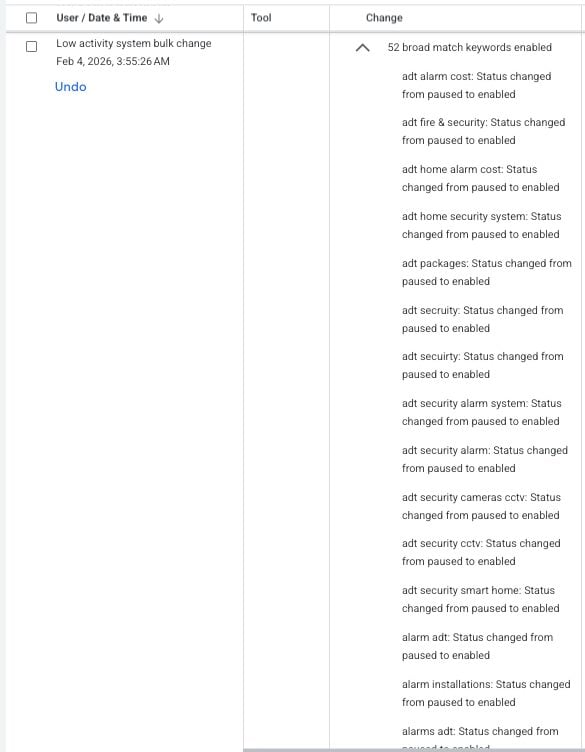
Some advertisers, including myself, have observed a Google Ads tool—created for low-activity bulk changes—unexpectedly switching paused keywords back to active. This unusual behavior has been a surprise to many account managers, like myself, who haven’t come across this issue before.
What’s happening? The activity logs are showing entries linked to Google’s ‘Low activity system bulk changes’ tool executing actions that enable previously paused keywords. These logs appear as automated bulk updates and, thankfully, have an ‘Undo’ option available.
In the past, this tool mainly paused inactive elements rather than reactivating them, so this change in behavior is quite perplexing.
What’s unclear? Google hasn’t issued any public documentation to explain this behavior, leaving us unsure whether it’s an intentional feature, a limited test, or a mere bug.
I find myself wondering what exactly triggers this reactivation and how widespread this phenomenon is becoming.
Why does this matter? If like me, you’re diligently managing your campaigns, unexpected keyword reactivation can change your campaign delivery in ways you didn’t plan for, impacting budgets, pacing, and overall performance—particularly if you’ve paused keywords for a specific reason.
For both agencies and in-house teams, this change is raising concerns about automated systems potentially overriding manual settings.
What steps should we take now? As account managers, we might want to regularly check change histories, be on the lookout for any unexpected keyword activations, and use the ‘undo’ function promptly if we notice unplanned changes.
Until Google clarifies the situation, more careful monitoring of campaigns relying heavily on paused keywords might be necessary.
First Alerted This issue was first brought to light by Performance Marketing Consultant Francesco Cifardi on LinkedIn.
I’ve discovered that Google Ads now offers ready-to-run experiments directly within the Experiments page, making it easier for me to test optimizations quickly without a complicated setup.
These suggested experiments are based on my account’s setup and performance data, helping me uncover new ways to enhance results.
How it works: The platform provides suggestions for testing various bidding strategies, creative variations, and new campaign features, all accessible right in the Experiments dashboard.
Every recommendation comes with a pre-configured setup, so I can either launch them immediately or adjust the settings to better fit my needs. These suggestions are conveniently displayed alongside the standard Create Experiment option, streamlining the process.
Why I care: Google’s effort to simplify experiment setups significantly decreases the time and effort I need to put into testing. It allows me to act swiftly on optimization ideas and maintain a consistent flow of improvements. However, I still review each test configuration to ensure it aligns with my campaign goals and doesn’t lead to unnecessary resource expenditure.
Zoom in: For instance, I might see a prompt suggesting I enable final URL expansion to boost campaign performance. These recommendations appear as pop-ups inside the Experiments interface, guiding my decisions with relevant insights.
The big picture: Google is embedding more automated guidance into Ads workflows, nudging me towards continuous testing and pursuing data-driven optimizations.
First seen:This update was first spotted by PPC News Feed owner, Hana Kobzová, shedding light on these helpful enhancements.
Let me share a few valuable lessons I’ve learned about PPC advertising from seasoned experts. Even the most experienced among us encounter pitfalls—like hastily launching campaigns or leaving automation unchecked. Recently, I joined Greg Kohler from ServiceMaster Brands and Susan Yen from SearchLab Digital at SMX Next, where we candidly discussed the mistakes that catch us off guard.
Read on to discover the blunders that even the most seasoned marketers must navigate.
Never launch campaigns on a Friday
This is a well-known pitfall, yet it continues to happen. Susan Yen mentioned that due to client demands, campaigns often go live on Fridays, leading to weekend chaos if things go awry. A minor error like an inflated budget setting can cause significant issues.
Greg Kohler emphasizes the importance of reviewing setups with fresh eyes. Wait until Monday to launch; doing so may avert unnecessary problems. Even experts can become overconfident, only to be reminded of these lessons by a Friday crisis.
Takeaway: Avoid launching before the weekend or holidays and stand firm if clients push. It protects both your peace of mind and campaign performance.
Location targeting disasters
Greg shared an experience where an error in location targeting meant campaigns ran in the wrong timezone. By Saturday, ads intended for a U.S. audience accumulated thousands of views in Europe instead.
Takeaway: Configure location settings directly within the Google Ads interface to minimize risks and ensure precise targeting.
The search term report trap
Susan stressed that search term reports are essential for every campaign. Ignoring them can lead to wasted clicks and difficult client conversations later on. She advises checking these reports monthly to avoid irrelevant traffic.
Takeaway: Routine reviews help refine what to target or exclude, enhance performance, and maintain efficient account strategy.
Google Ads Editor vs. interface: A constant battle
The gap between the Google Ads Editor and the interface often leaves teams in a bind. Susan’s team preps in Excel before using Editor for bulk edits but prefers the interface to ensure accuracy in settings.
Takeaway: Use the interface for tasks requiring precision, like responsive ads or location targeting.
The automatically created assets problem
Automatically created assets often default to ‘on,’ requiring tedious navigation to disable. New types of assets can inadvertently apply to all campaigns.
Takeaway: Regularly review these settings. Set reminders to maintain control as new features roll out.
Importing campaigns from Google to Microsoft Ads
Yen warned of the pitfalls of importing Google campaigns directly into Microsoft Ads due to discrepancies in budget assumptions and automation settings.
Takeaway: Treat Microsoft Ads independently with a tailored strategy post-import for optimal results.
The App placement nightmare
A slip in excluding app audiences can direct spend to irrelevant categories. Yen advises vigilance, as settings to exclude these are often hidden.
Takeaway: Establish comprehensive exclusion lists to guard against inappropriate targeting.
Content exclusions and placement control
Applying content exclusions from the start helps avoid placement in irrelevant or inappropriate contexts, though manual follow-up remains necessary.
Takeaway: Consistent reviews ensure Google honors your settings, preventing unwelcome surprises.
Call tracking quality issues
Susan highlighted the importance of client communication in effectively tracking call quality, advocating for monthly check-ins focused on conversion metrics.
Kohler suggested distinguishing first-time from repeat callers in analytics to optimize automated bidding systems.
The promo date problem
Litner pointed out issues with scheduled assets appearing outside their promotional windows, urging manual checks to ensure proper timing.
Kohler echoed similar concerns with automated rules potentially misfiring.
Takeaway: Verify scheduled actions on their launch dates manually to prevent mishaps.
AI Max settings and control
The issues of AI-driven campaign settings defaulting to active require diligence in monitoring and fine-tuning each setting.
Takeaway: Despite AI advancements, practice consistent oversight to manage budget spend effectively.
Account-level settings that haunt you
Susan flagged the risk of overlooking critical account-level settings that can derail campaigns silently, suggesting a standardized checklist approach.
Takeaway: Establish and follow a thorough account setup checklist to catch any hidden conflicts with campaign goals.
Final wisdom
Here are several recurring themes from our discussion:
Always double-check automation; it’s not immune to errors.
New perspectives reveal potential errors.
Effective client communication prevents misunderstanding.
Manual reviews maintain balance as automation increases.
Keep updating exclusion lists to mitigate repeated issues.
The takeaway is that everyone makes mistakes. The difference lies not in avoiding them but in swiftly addressing them, learning from experiences, and creating systems to prevent recurrence. As Kohler notes, stay vigilant, question automation, and avoid the temptation of a Friday launch.
As someone who navigates the complex world of B2B marketing, I’ve learned that automation isn’t just for ecommerce anymore. In fact, harnessing AI-powered tools can drive more leads and streamline processes, cutting costs and saving precious time.
B2B marketing presents unique challenges because many automation tools are optimized for ecommerce, not lead generation. Unlike ecommerce, where conversions can number in the hundreds, B2B deals with fewer, more complex conversions.
But here’s the silver lining: automation still holds remarkable potential. According to Melissa Mackey from Compound Growth Marketing, the right strategy can convert these tools into prolific drivers of B2B leads.
The Fundamental Challenge: Why Automation Struggles with Lead Gen
The truth is, automation is tailor-made for ecommerce glory, posing three major hurdles for B2B marketers.
Customer journey length: Unlike quick ecommerce sales, B2B sales cycles can extend over a year. This disconnects initial engagement from eventual revenue.
Conversion volume requirements: Google’s automation thrives on high conversion volumes, something B2B campaigns struggle to achieve.
The cart value conundrum: With no instantaneous cart value, B2B marketers have little guidance for optimization.
The Solution: Sending the Right Signals
Even with these challenges, there’s a clear path forward for making automation work effectively in B2B lead gen.
Offline Conversions: Your Number One Priority
Integrating your CRM with platforms like Google Ads is crucial to successful automation. This connection builds the necessary foundation for strategic optimization.
In Google Ads’ Data Manager, options galore await—whether it’s seamless integrations with HubSpot and Salesforce or custom solutions with tools like Snowflake and Zapier.
Embrace Micro Conversions with Strategic Values
Micro conversions demonstrate intent, showcasing engaged visitors who aren’t quite leads yet. By assigning relative values to these actions, we can teach automation what’s essential.
Video views (value: 1): Demonstrates initial curiosity.
Form fills (value: 100): Indicates strong interest and commitment.
Marketing qualified leads (value: 1,000): The ultimate signal of potential value.
This structured value system guides automation towards prioritizing high-value actions over mere conversion rates.
Making Performance Max Work for Lead Generation
Don’t discount PMax for lead generation. When combined with proper conversion values and offline data using a Target ROAS bid strategy, PMax can yield outstanding results.
One client’s strategic tracking of offline conversions led to significant increases across leads, opportunities, and closed deals.
Leads increased 150%
Opportunities up 350%
Closed deals improved by 200%
Utilizing a Target ROAS strategy made all the difference, focusing on real customer value rather than superficial numbers.
Campaign-Specific Goals: An Underutilized Feature
Optimizing with campaign-specific goals provides control and flexibility, allowing for focused conversions and avoiding conflicts within campaigns.
Mid-funnel campaigns: Target lead form submissions.
Audience building: Use form fills to engage prospects.
Qualified lead campaigns: Promote offers to warm audiences.
This strategy prevents conflicting objectives and enables more focused targeting.
Portfolio Bidding: Reaching the Data Threshold Faster
Portfolio bidding helps combine similar campaigns to cross the 30-conversion-per-month mark quicker, feeding the system with substantial data for optimization.
Despite potentially needing separate campaigns for logistical reasons, portfolio bidding maintains campaign structure while delivering ample data.
Bonus: It lets you cap CPCs to prevent runaway bids, offering control beyond what’s typically accessible.
First-Party Audiences: Powerful Targeting Signals
First-party audiences are critical in signaling your target preferences, especially in AI-driven campaigns.
Did you know you can leverage your CRM to create these audience signals?
Customer lists: Exclude or use as lookalikes to refine targeting.
Contact lists: Enable observation or direct targeting as needed.
This approach builds trust in broader keyword strategies within AI campaigns by anchoring them to real audience data.
Leveraging AI for B2B Lead Generation
AI tools can be game-changers in optimizing B2B ad efficiency, especially when used with a clear intent recognizing their consumer-oriented training.
The Essential B2B Prompt Addition
When using AI, always specify that your target audience is other businesses. It shifts the AI’s focus and aligns its output to suit B2B contexts.
Client Onboarding and Profile Creation
Use AI to build dynamic client profiles by detailing what you offer, your unique value propositions, and your target personas.
Core values and offerings
Unique selling propositions
Target personas
Ideal client profiles
These profiles enhance every AI interaction, increasing accuracy and relevance exponentially.
Competitor Research in Minutes, Not Hours
Let AI handle competitive analysis, transforming what once took several hours into a streamlined 15-minute task. Instruct AI to assess competitors, analyzing their positioning, offers, and customer sentiment quickly.
Current offers
Positioning
Value propositions and customer feedback
AI provides clean, digestible outputs, perfect for presentations or further analysis.
Competitor Keyword Analysis
With tools like Semrush, I efficiently examine competitor keywords and use AI to determine unique opportunities or gaps in our strategy.
Find gaps: Discover keywords competitors rank for that you don’t.
Identify strengths: Highlight keywords you dominate.
Theme grouping: Spot patterns to refine campaign structure.
This precise analysis, once labor-intensive, is now streamlined to a matter of minutes.
Automating Routine Tasks
Leverage AI to handle tedious tasks, freeing up time for strategic work.
Negative keyword review: Automate decision logic for faster processing.
Ad copy generation: Use AI-generated drafts for efficient refinement.
Experiments: Testing What Works
Experiment with different campaign elements using the Experiments feature to find what works best without manual math effort.
Bid strategies
Match types
Landing pages
Solutions: Pre-Built Scripts Made Easy
Google Ads provides solutions for automating tasks like reporting and anomaly detection without manually inserting code.
Reporting and dashboards
Anomaly detection
Keyword list creation
These tools are excellent time-savers, though use them with caution in complex enterprise setups.
Key Takeaways
Although automation is traditionally not geared toward lead generation, informed strategies make it work wonders for B2B marketing.
Strategic signals: Integrate offline conversions and use first-party data to bolster targeting.
AI partnership: Automate to enhance productivity, letting your team focus on higher-value tasks.
Utilize platform features: Leverage built-in tools for enriched campaign performance.
By 2026, Google Ads automation has transformed drastically, with signal quality becoming paramount for exceptional performance. In this post, I’ll guide you on how signals drive these changes and how you can align them for optimal outcomes.
Back in 2015, I had tight control over my PPC campaigns. I directed Google on which keywords to pursue, set manual bids, and handled budgets with precision. Skillful use of spreadsheets allowed me to efficiently manage vast keyword inventories.
Those meticulously controlled days have faded. Now, in 2026, automation steers the wheel, moving beyond being a mere helper to a key driver of our advertising success. Fighting it is futile; embracing it is wise.
Automation has evened the playing field, liberating time for PPC marketers like me. But effectiveness now hinges on understanding how automation gleans insights from our data.
This piece delves into the intricacies of Google Ads signals, illustrating how to preserve their quality and prevent automation from veering off course.
The Mechanics of Signals in Automation
Contrary to seeing Google’s system as a mystery, it requires input of robust signals to perform optimally. Accurate signals lead to triumph; flawed data gears us for failure.
Automation runs on the signals I provide. AI interprets these signals, adjusting bids and targeting with unparalleled precision and efficiency.
While traditional documentation might suggest a primary focus on audience segments, the reality is that automation learns from a broader spectrum of signals.
Decoding What Qualifies as a Signal
In my experience, every component in a Google Ads account serves as a signal—shaping Google’s algorithm to determine successful advertising strategies.
Structural elements, budgets, conversion quality, and more provide insights into user intent, modeling a detailed blueprint for targeting.
The entire ecosystem, from landing pages to real-time data, contributes—guiding the AI in its decision-making process.
Here’s what stands out:
Conversion Actions: These signal what success looks like for my business.
Keyword Signals: Essential for decoding user search intent.
Creative Signals: Influences user attraction via visual cues.
Landing Page Signals: Ensures alignment with user expectations.
Bid Strategies: Communicates my advertising priorities to Google.
Innovation in signal interpretation has shifted, with the introduction of campaign total budgets, indicating a comprehensive financial commitment to Google.
Retailers, like Escentual.com, witnessed increased traffic through this approach, showcasing how signal precision offers tangible results.
Understanding Auction-Time Realities
Every user search triggers a unique bid calculation based on myriad signals, moving beyond generalized assumptions to precise decision-making.
This tailored approach ensures identification of “pockets of performance,” optimizing for predicted user outcomes aligned with our objectives.
Without quality signals, however, the system is left with assumptions, demonstrating the critical nature of providing accurate inputs.
Identifying and Prioritizing Signals
Not all signals wield equal influence. I’ve recognized that conversion signals bear the most weight, providing essential guidance for AI performance.
Conversion Dominance
Accurate conversion tracking underpins robust algorithmic learning, crucial for successful B2B and eCommerce advertising.
Enhanced Conversions and First-Party Data
In an era where third-party cookies disintegrate, relying on enriched data tracking is invaluable for understanding user interactions.
Quality audience signals and custom segments are imperative, enabling nuanced targeting, especially in niche markets.
Signal Category
Specific Input
Weight
Importance
Primary
Offline Conversion
Critical
Speaks to profit, not mere leads.
Primary
Value-based Bidding
Critical
Prioritizes profitable products.
Secondary
Customer Match Lists
High
Offers AI a model audience.
Tertiary
Keywords
Medium
Identifies search semantics.
Pollutant
Soft Conversions
Negative
Skews intent towards lower value.
Proper signals form the foundation for successful automation, requiring constant vigilance and correction of detrimental factors like signal pollution.
Combating and Correcting Signal Drift
Signal drift occurs when automation diverges from desired outcomes. Identifying subtle shifts in user targeting and making strategic corrections is key.
By tightening conversion signals, reinforcing audience data, and refining campaign structures, I can steer systems back to intended paths.
Reinforce Audience Patterns: Update lists and segments.
Adjust Campaign Structure: Separate high and low intent traffic.
Remaining proactive is about guiding automation, ensuring the system aligns with my business goals while leveraging Google’s robust AI insights.
Building a Winning Signal Strategy
Creating a coherent signal strategy in 2026 requires segmenting data wisely, isolating brand traffic, and differentiating products by ROAS for clarity in campaign objectives.
Achieving Competitive Edge
In a landscape where automation is universally accessible, the true advantage lies in the quality of signals I feed to Google.
By protecting these signals and timely correcting any drift, I ensure Google’s automation works for me, transforming it into a powerful asset in my advertising arsenal.
I recently discovered an exciting update from Google Ads that promises to enhance the security of high-risk account changes. They have silently introduced a multi-party approval feature that ensures a second administrator must approve specific actions before they are finalized. This step adds a critical layer of protection against unauthorized or malicious changes, enhancing the overall safety of our accounts.
This new feature is particularly important as our ad accounts grow larger and carry more value. A single unauthorized change can quickly disrupt campaigns and even affect our billing. By requiring approval from another administrator, this feature effectively reduces such risks without hindering our regular campaign management processes.
For agencies and large teams like mine, this tool becomes invaluable. It helps us avoid costly mistakes and significantly bolsters our account security. I appreciate how Google is responding to the increasing necessity for robust access control.
Here’s how it works: when I, as an admin, initiate a sensitive change, Google Ads automatically sends an approval request to other eligible admins. This request is delivered as an in-product notification, requiring an action within 20 days—either approval or denial—otherwise, it simply expires, and the change will not be implemented.
Moreover, tracking the status of these requests is hassle-free. Each change request is tagged as Complete, Denied, or Expired, allowing my team to easily monitor and review our account changes.
To manage these approval requests, we can head over to the Access and security section within the Admin menu. It’s quite straightforward and keeps us in the loop with all ongoing requests.
This update points to a growing concern about account security, especially for advertisers managing large teams with multiple user permissions. With reports of expensive hacks escalating, this added security is a much-welcomed relief for us.
In the end, although multi-party approval may add a bit of friction to the process, it’s definitely a good kind. It grants us more control over who can make vital changes to our accounts, thus protecting them from unauthorized access. In my opinion, it’s a prudent step towards safer, more secure ad management.
I’ve discovered how custom GPTs can revolutionize how we handle SEO, transforming repetitive tasks into efficient workflows. By leveraging AI, we can speed up our processes, from planning and analysis to reporting and technical work.
If you don’t have access to paid ChatGPT, don’t worry. You can still utilize these prompts by saving them as standalone references in your notes. Remember, they’re just starting points, so modify them to fit your team’s requirements.
Working with AI requires trial and error. My advice is to start with small tasks to practice writing prompts. Iterate on them and take notes on what produces good outputs.
AI can sometimes be verbose, so it’s helpful to set strict formatting guidelines and clear context. Upload resources and articles to guide AI results, and always define the role and audience upfront.
Let’s dive into seven prompts that I’ve found incredibly useful for developing custom GPTs dedicated to planning, analysis, and ongoing SEO tasks:
1. Project plan GPT
By analyzing previous project plans, I can create a GPT that assists in drafting this year’s focus areas.
How to set it up
Input project plans from previous years.
Specify a format for consistency.
Determine the number of items or sections to include.
Include specific details unique to your team.
Optionally, integrate team feedback and retrospectives.
Example prompt
Based on last year’s project plan, outline this year’s focus. List three critical items for each quarter, ensuring at least one covers link building.
Include a one-sentence summary for each recommended item and at least two KPIs to measure success.
[Insert last year’s plan.]
Now critique the plan. Offer three reasons against focusing on these items, providing sources for your notes.
By connecting performance dashboards or custom GA reports to ChatGPT, it can handle initial issue identification. This allows me to focus on investigating critical trends.
How to set it up
Hook up reporting tools or upload data directly.
Direct AI on specific aspects to investigate.
Set frequency for data review, such as daily or weekly.
Provide examples of pages or categories to analyze.
Example prompt
Here’s the weekly site report. Analyze this week’s performance against last week’s data, summarizing sessions, conversions, and engagement.
Highlight three successes and three areas needing improvement, color-coded by significance.
[Insert report doc.]
3. Competitor analysis GPT
I’ve found it invaluable to scrutinize what works on competitor sites. This often involves tools like Semrush or Ahrefs.
How to set it up
Integrate Ahrefs, Semrush, or upload relevant reports.
Select competitors and identify top-performing pages.
List key metrics for evaluation.
Create unique prompts for various levels of analysis.
Now, more than ever, custom GPTs are making a significant impact alongside existing SEO tools and workflows. They’re not about replacing the tools we use, but about making initial tasks smoother so that we can focus on insightful and strategic actions. By integrating them into our everyday processes, from planning to technical checks, we can really enhance our productivity.