Are you looking to elevate your affiliate marketing efforts? With Profound and PartnerStack, I’ve been able to efficiently activate the right affiliate publications on a larger scale than ever before.
Through this powerful collaboration, I’ve discovered new ways to enhance my campaigns and drive significant growth by engaging with the right audiences at the right time.
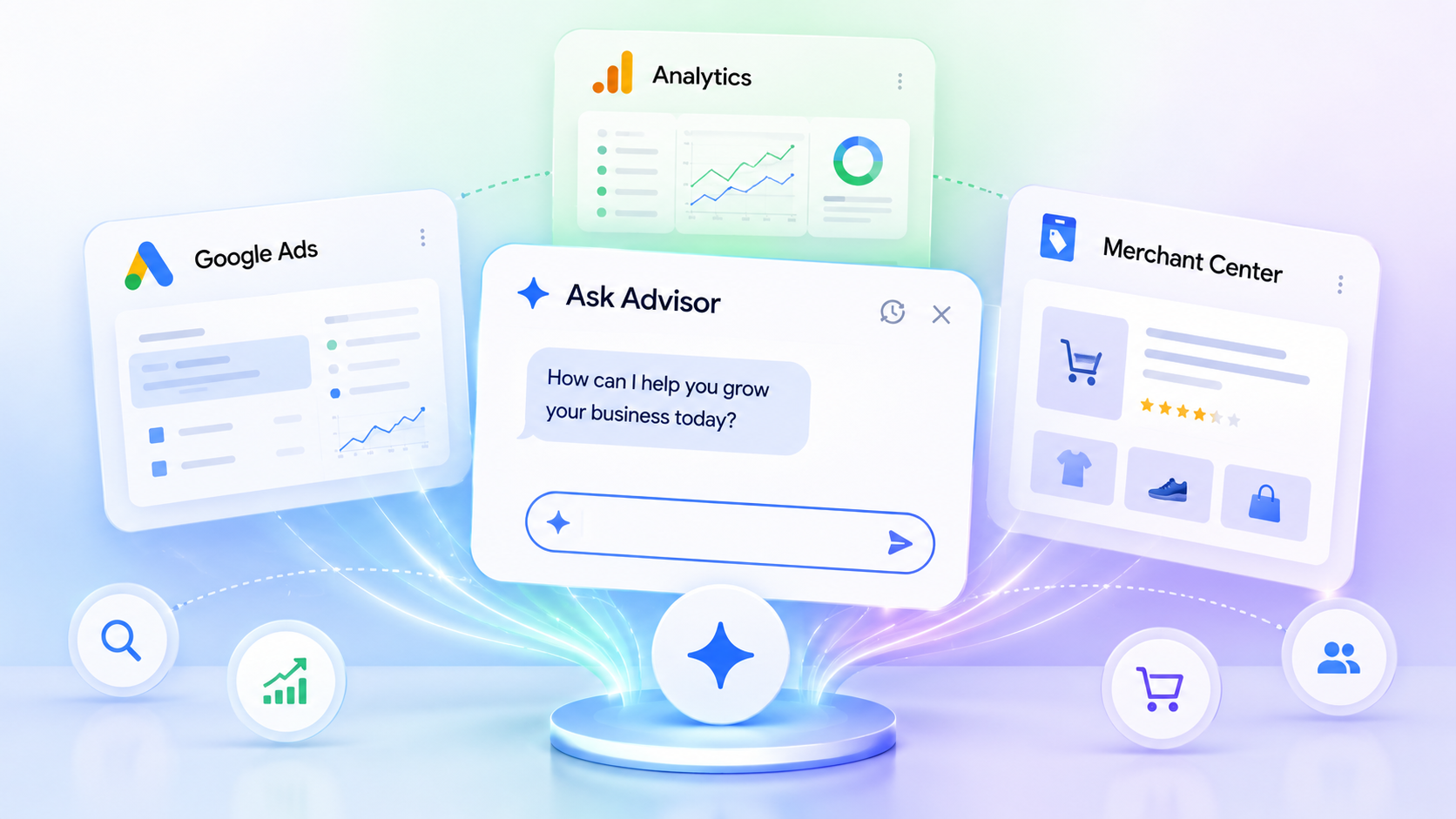
I’m thrilled to share that Google has just unveiled Ask Advisor, a new AI-driven tool designed to transform the way we approach campaign management, analytics, and optimization. Announced at Google Marketing Live 2026, this Gemini-powered AI is here to integrate seamlessly across Google Ads, Google Analytics, Merchant Center, and the Google Marketing Platform.
Making Waves. Ask Advisor is set to be a game-changer, acting as a unifying force that weaves together insights, workflows, and recommendations across Google’s vast marketing ecosystem.
For those of us in marketing, this means we can launch campaigns, analyze performance, and uncover optimization recommendations all without having to juggle between different tools.
Imagine asking Ask Advisor to “find new customers for my hair care products.” It would seamlessly pull details from the Merchant Center and assist in crafting a campaign right in Google Ads.
Understanding the Process. Ask Advisor connects the dots between Google Ads, Analytics, the Merchant Center, and the Marketing Platform via a Gemini-powered interface. This connectivity allows it to access a range of data to create recommendations, automate tasks, and offer insights that align with marketing goals.
It doesn’t stop there. The integration of insights from Google Ads and Google Analytics helps explain campaign performance and suggests subsequent steps.
The aim, Google states, is to democratize advanced campaign management, enabling even those without extensive technical expertise to make the most out of their advertising strategies.
This launch supports Google’s expanding lineup of AI-driven in-product agents, positioning Gemini as a fundamental layer in advertising and measurement tools.
Why This Matters to Us. Ask Advisor symbolizes one of Google’s most direct steps into agent-based advertising workflows.
Instead of interacting manually with separate reporting dashboards, campaign tools, and optimization settings, AI agents are being poised to handle operational tasks and present strategic insights.
The more substantial evolution is structural: Google is anchoring Gemini as the core across its advertising platform, potentially redefining how campaigns are developed, optimized, and evaluated.
Keep an Eye On. The biggest discussion point will be how much control advertisers are willing to cede to AI agents. Transparency over recommendations, automation choices, and reporting accuracy will be under scrutiny as Ask Advisor rolls out.
When You Can Get It. Currently in beta, Ask Advisor is available for English-language accounts, with more features anticipated later this year.
Want to Learn More? Here’s additional news from Google Marketing Live 2026:
You have found a search query that deserves more than another long page. The user needs to calculate, compare, filter, check, choose or generate something, and an interactive tool could finish that job faster than prose.
An AI coding assistant can shorten the path from idea to working interface. It cannot decide whether the idea deserves a page, make unreliable logic trustworthy or turn a frustrating widget into a useful search result. Your advantage comes from choosing the right task, specifying it clearly and building the surrounding page as carefully as the tool.
Key takeaways
Start with a repeatable user decision, not a keyword that merely contains the word calculator or generator.
Choose the smallest interface that removes a meaningful step from the user’s work.
Write the rules, inputs, outputs, edge cases and failure states before asking AI to generate code.
Keep the methodology, assumptions and useful supporting information visible in ordinary page content.
Verify the logic independently, then test accessibility, mobile use, performance, privacy and analytics.
Scale a tool format only after real search and usage data show that people can find and complete it.
Choose a task that deserves an interactive result
Vibe coding is the use of natural-language instructions to generate and refine software with an AI coding assistant. For an SEO team, its immediate value is a shorter prototyping loop. A marketer can describe a calculator, selector or comparison interface, inspect a working version and refine the behavior without waiting for every experiment to enter a development roadmap.
That lower barrier creates a new problem: it becomes easy to publish tools nobody needs. A useful tool compresses a task. It accepts information the user already has, applies a defensible rule and returns an answer that changes what the user does next.
Before you build, test the idea with these questions:
What decision is the user trying to make? Write it as a sentence that ends with an action, such as choosing an option, checking likely eligibility or finding a date.
Which inputs change the answer? If every visitor receives the same result, you probably need a concise answer page rather than a tool.
Can you explain the transformation? You should be able to state how each input affects the result without hiding behind the AI that wrote the code.
Is the result useful immediately? A tool should return the answer, show the important assumptions and make the next step obvious.
Can you maintain the rules? If rates, deadlines, program criteria or product data change, someone must own those updates.
The interface should follow the task. A calculator fits deterministic arithmetic. An eligibility checker fits a set of explicit conditions. A checklist fits a process with completion states. A calendar or countdown fits a date-based question. A dynamic table fits comparison across variables. A persona selector fits a situation in which different users care about different parts of the same offer. A generator fits a request for a novel output, provided you can keep the output relevant and safe.
Persona controls deserve special attention. A traveler arranging an airport transfer with children has different concerns from someone traveling alone. Tabs can let each visitor identify their situation and reveal the safety, convenience or flexibility information that matters to them. The control is useful because it resolves a real information-selection problem, not because tabs look more sophisticated than headings.
Use your own search data to find comparable opportunities. Group Search Console queries by the task behind them. Look for repeated questions involving cost, quantity, dates, eligibility, compatibility, comparison or selection. Read the landing page for each group and identify the manual work it still leaves to the visitor. Then inspect the search results. A results page filled with explanations can expose an interface gap, but only when the query actually requires interaction.
Reject an idea when the answer is static, the underlying data cannot be maintained, the result would imply certainty you cannot support or the tool would collect sensitive information without a necessary reason. Faster code generation does not improve a weak premise.
Turn the idea into a behavior contract before prompting
A loose prompt such as “build an SEO calculator” delegates the product decision to a model that does not know your audience, business rules or tolerance for error. The first deliverable should be a behavior contract: a plain-language specification detailed enough that another person could predict what the tool will do.
Include the following in that contract:
User and job: who is using the tool, the question they bring and the decision the result should support.
Inputs: every field, its format, unit, valid range, default state and whether it is required.
Rules: the calculation, decision tree, data mapping or content-selection logic in plain language.
Output: the primary answer, supporting explanation, assumptions, rounding behavior and next action.
States: the initial view, active input, validation error, completed result, loading state and external-service failure where relevant.
Data ownership: where changeable rules come from, who approves them and how an expired rule will be detected.
Privacy boundary: which inputs stay in the browser, which are transmitted and what does not need to be collected at all.
Measurement: the user actions that indicate a start, successful completion, error or valuable next step.
Accessibility: labels, keyboard behavior, focus movement, error announcements and a result that does not depend on color alone.
Now split generation into reviewable stages. Ask for the input model and core logic before visual polish. Review those rules. Ask for the smallest working interface. Review it on narrow and wide screens. Add validation and error states. Review them with a keyboard. Add tracking only after the event names and permitted data are clear. Small changes make it easier to see when a later prompt breaks behavior that already worked.
Keep reference outcomes outside the generated implementation. Work through representative cases manually or with an independently reviewed calculation, record the expected result and compare the tool against it. If the model writes both the logic and the only test that declares that logic correct, the same misunderstanding can appear on both sides.
Do not expose credentials in browser code or paste private production data into a coding prompt. Bring a developer into the loop when the tool requires authentication, sensitive data, payments, complex integrations or infrastructure that must handle material scale. Vibe coding changes prototype speed; it does not remove engineering, security or operational ownership.
Build a page that remains useful without operating the tool
The tool should be the main event, but it should not be the page’s only intelligible content. A person, crawler or answer system should be able to understand the purpose, method and limitations without guessing what happens after every possible interaction.
A strong tool page usually follows this order:
State the job. Use a short opening that identifies what the tool returns and the information the visitor will need.
Present the interface. Keep labels explicit, put units beside their fields and avoid making users read a long preamble before they can begin.
Explain the result. Show the answer in selectable text, name the assumptions and say what the user can do with it.
Show the method. Describe the formula, rules or decision path in language a qualified reader can audit.
Prevent predictable mistakes. Cover confusing inputs, common interpretation errors and cases the tool does not handle.
Support the next step. Add the relevant walkthrough, comparison, application path or related resource.
Expose maintenance context. When the tool depends on changeable criteria, identify what the criteria cover and make updates visible on the page.
This combination can be more competitive than either a bare widget or a text-only page. An eligibility page that paired its interactive check with a transparent algorithm, application-error guidance, historical updates and a walkthrough reached the first page within three days in one documented launch. Treat that outcome as an example of what strong intent satisfaction can enable, not as a ranking timetable you can promise.
Make the experience legible to search and answer systems
Give the page a stable canonical URL. Do not create indexable URLs for every input combination unless each state represents a durable search intent and has unique, maintainable value.
Keep the task definition, input meanings, method, assumptions and limitations in ordinary HTML content. Do not place all useful context inside a canvas, image or interaction-only state.
Write labels and explanations with explicit entities and units. “Monthly cost in Canadian dollars” is clearer than “Amount,” both for a visitor and for a system extracting meaning.
Return a result that can be selected, copied and understood out of context. A number without its unit, period or qualifying condition is not a complete answer.
Use accessible control semantics. Tabs should behave like tabs, form controls need associated labels, and keyboard focus should move predictably when an error or result appears.
Apply JSON-LD only when the selected type accurately describes the visible page. Keep names, descriptions and other marked-up claims consistent with what the visitor can verify. Structured data can clarify a page; it cannot repair misleading logic or missing content.
Link the tool from pages that already serve the same intent. A relevant guide can explain the problem and hand the calculation to the tool, while the tool can return users to the deeper explanation.
Performance is part of the product decision. A simple formula does not need a heavy application shell. Load only what the interaction uses, reserve space for results so the layout does not jump and make external-service failures understandable. If a remote API is optional, decide whether a local fallback can still answer part of the user’s question.
Verify logic and consequence, not just appearance
A polished result can still be wrong. Build a test matrix before publication and repeat it whenever a rule, dependency or generated component changes.
Test case
What to verify
Empty state
The tool explains what is required without showing a misleading default result.
Invalid input
The message identifies the field, explains the correction and preserves valid work.
Boundary condition
The rule changes at the intended point and the explanation matches the output.
Representative input
The result agrees with an independently established reference outcome.
Conflicting selections
The interface prevents or clearly resolves combinations the rules do not support.
Refresh, back and shared state
The page retains, resets or reconstructs inputs according to the behavior contract.
Keyboard and assistive use
Every control, error and result can be reached and understood without a pointer.
Dependency failure
The page avoids false answers and gives the user a safe next step.
If the output could influence a medical, legal or financial decision, do not let an AI-generated implementation become the final authority. Have the rules and wording reviewed by an appropriately qualified person, distinguish an estimate from a determination and state the limits beside the result. The specific downside is false confidence: an interface can make uncertain or incomplete logic look definitive.
Measure task completion before you scale the format
Organic visits tell you that a page was discovered. They do not tell you whether the tool worked. Instrument the interaction as a short funnel: tool view, meaningful start, validation error, successful completion and result action. A result action might be copying the answer, opening a relevant application page, viewing a recommended option or continuing to a related guide.
Do not send raw personal inputs into analytics simply because the interface makes them available. Record the minimum event information needed to diagnose the experience. For many tools, the event name, tool version, broad error type and completion state are more useful than the user’s exact values.
Read search and product signals together:
Impressions increase but clicks do not: check whether the title and description make the utility clear and whether the page is appearing for the intended task.
Clicks arrive but starts are scarce: check query-to-page fit, the placement of the interface and whether the required inputs feel disproportionate to the promised answer.
Starts are healthy but completions are weak: inspect validation events, confusing labels, mobile controls, load failures and unnecessary fields.
Completions occur but the next step is ignored: confirm that the action logically follows the result. Do not force a commercial call to action onto an informational task.
Usage is strong but search discovery is weak: improve internal links, visible explanations and query alignment before rebuilding a tool users already understand.
Search traffic grows but rule maintenance slips: pause expansion and fix ownership. An outdated answer becomes more harmful as its audience grows.
A dedicated category can become worthwhile once several tools serve related demand and each has a clear purpose. One documented category containing ten simple tool pages generated more than 5,000 clicks in two months, even with seasonal variation. That is a useful proof of possibility, not a portfolio benchmark. Your decision to scale should depend on your own query demand, completion data, maintenance cost and downstream value.
When a format works, standardize the repeatable parts: the input shell, validation patterns, result component, methodology section, analytics events, accessibility behavior and update record. Keep the rules and explanatory content specific to each task. A shared component system speeds later launches; duplicated thin pages merely multiply maintenance.
Start with one Search Console query family in which users must perform work after reading the current answer. Write the behavior contract, calculate the reference outcomes and build the smallest interface that completes that work. If people can find it, finish it and trust the explanation, you have a format worth extending.
Your team can buy an AI visibility dashboard and still have no idea what to fix. The hard part is not detecting a brand mention. It is deciding whether that mention reflects accurate representation, genuine authority, growing demand, or one unstable answer.
A useful strategy connects AI answers to the conditions that produced them and the business result that followed. That means testing real prompts, examining who gets recommended and cited, strengthening the evidence around your brand, and measuring demand and behavior outside the AI platform.
Measure AI visibility as a chain, not a single score
Build your scorecard in layers. Each layer answers a different question, so a change in one cannot silently stand in for all the others.
Measurement layer
Question it answers
What to record
Business result
Did AI exposure contribute to valuable behavior?
Qualified visits, leads, purchases, subscriptions, assisted conversions, or revenue where your attribution setup supports it.
Brand demand
Are more people actively looking for you?
Branded queries, branded search interest, direct visits, and other demand indicators relevant to your business.
AI representation
Do answer engines include your brand, and how do they describe it?
Brand presence, recommendation role, factual accuracy, sentiment, citations, named competitors, and omitted capabilities.
Search and site foundations
Can search systems find the relevant pages, and what happens after a visit?
Indexing, impressions, clicks, landing-page engagement, conversion behavior, and referral traffic from identifiable AI platforms.
Define the business result before collecting visibility data. For one company, the meaningful action might be a completed purchase. For another, it might be a qualified inquiry rather than every form submission. Without that definition, an impressive mention count can become a reporting endpoint instead of evidence for a decision.
Give branded demand its own place in the scorecard. Growth in people deliberately searching for your name is a clearer indicator of rising market demand than citations alone. Google Trends, Keyword Planner, and Search Console can help you examine that demand from different angles, while GA4 can show what identifiable AI-referred visitors do on your site.
Do not turn the layers into one opaque composite score. If citations increase while branded demand and qualified activity remain flat, you have learned something specific: machine visibility changed, but you have not yet demonstrated greater preference or business impact. That is a diagnosis, not necessarily a failure.
Build a prompt benchmark you can repeat
Your benchmark should represent decisions a potential customer makes, not merely the keywords your site already targets. Include prompts from distinct stages of the decision so you can see where your brand enters, disappears, or gets described incorrectly.
Category discovery: prompts such as Which [category] options suit [audience and constraint]? reveal which brands are associated with the market before the user names one.
Problem solving: prompts such as How should [audience] solve [problem] when [constraint] applies? show which methods, entities, and providers become part of the answer.
Evaluation and comparison: prompts about tradeoffs, selection criteria, alternatives, or use-case fit expose how the system differentiates brands.
Brand verification: prompts about what your brand does, who it serves, where it fits, or how it compares reveal factual and positioning errors.
Use the language customers would use. A prompt set written entirely in your internal product vocabulary will measure whether an assistant can repeat your positioning, not whether your brand appears in the buyer’s actual decision process.
For every test, save enough context to reproduce and interpret it:
A stable prompt ID and the exact prompt text.
The intent category and audience represented by the prompt.
The platform, available mode, test date, and any conditions you controlled.
Every brand named and its role: primary recommendation, alternative, example, warning, or passing mention.
The claims made about your brand, including omissions and factual errors.
The pages and domains cited, when citations are available.
The competitors that recur and the evidence used to support them.
The action the observation triggered, or a clear note that no action is justified yet.
Keep the original output or a sufficiently complete capture. A binary present-or-absent field cannot tell you whether your brand was the preferred option, an unsuitable alternative, or an incidental example.
If your brand appears only when named, the system may recognize it without associating it strongly enough with the broader category. Investigate category coverage, independent mentions, demand, and positioning.
If competitors repeatedly appear in category and comparison prompts, inspect the claims and third-party evidence supporting them. The gap may be authority or distribution, not another missing keyword page.
If your brand appears but is described inconsistently, create an entity and messaging issue list. Separate incorrect facts from legitimate differences in how the market sees you.
If citations increase but visits do not, remember that a direct answer can satisfy the user without a click. Check branded demand, later visits, and business outcomes before declaring the citation worthless.
If visibility looks strong only in low-value prompts, revise the benchmark. You may be measuring questions that are easy to win but irrelevant to a buying decision.
Build the authority that keyword coverage cannot create
Publishing more pages does not automatically make your brand authoritative. Keyword coverage can show that you have discussed a subject. It cannot, by itself, show that the market trusts your expertise or thinks of your brand when the subject arises.
The more useful question is: what do credible people, publications, customers, and communities say about you? Consistent brand co-occurrence connects a brand with a topic across independent mentions. Those associations help explain why one company becomes a routine recommendation while another has a larger content library but little presence outside its own domain.
Create an evidence map around the association you want to earn. State it in a working sentence: For [audience] dealing with [problem], [brand] is relevant because [verifiable proof]. Then audit each part:
Do you have first-party evidence for the proof, or only a marketing claim?
Does the evidence contain original data, a useful method, a distinctive tool, or an insight another person would have a reason to reference?
Do independent mentions connect the brand to the intended problem and audience?
Do reviews and customer discussions support the positioning, qualify it, or contradict it?
Are the relevant facts stated consistently on pages that search systems can find?
Do competitors have stronger recurring evidence for the same association?
The answers tell you which intervention belongs next. If the underlying evidence is weak, produce work worth citing: original data, a transparent method, a practical resource, or an analysis that advances the conversation. If the evidence is strong but unseen, the bottleneck is distribution, public relations, community participation, or outreach. If independent mentions exist but describe the company inconsistently, fix the positioning and entity facts before adding more topic coverage.
Reviews, customer testimony, and genuine recommendations matter because they show human preference rather than self-description. Treat them as evidence to understand, not text to manufacture. Record which use cases customers associate with your brand, the language they use, and where their experience narrows or challenges your preferred positioning.
Your owned content still has an important job. It should explain the product or expertise accurately, answer consequential questions, expose the evidence behind claims, and give other people something precise to reference. Technical SEO should keep those pages discoverable and indexable. Structured data can state entities and relationships more explicitly, but it remains self-declared markup; use it to describe visible facts, not as a substitute for reputation.
This changes content planning. Do not ask only which keywords remain uncovered. Ask which claim your market needs help evaluating, what evidence would resolve it, who would find that evidence useful, and why anyone outside your company would mention it. Original data and useful insights that earn attention do more for authority than a stack of interchangeable pages.
Choose each tool for a decision it can support
No tool covers the complete chain from prompt exposure to market authority and revenue. Start with the question you need to answer, then choose the smallest tool set that provides the necessary evidence.
Tool or tool group
Use it to decide
What it gives you
What it cannot prove
ChatGPT, Claude, and Perplexity
Where and how does the brand appear in real answer formats?
Manual prompt tests, competitor framing, content gaps, entity coverage, cited pages where available, and preferred answer structures.
A one-off output cannot establish a stable ranking or market share. Manual testing also becomes time-consuming without a fixed framework.
Profound
Do you need repeatable cross-platform visibility and competitor monitoring at greater scale?
Brand mentions, sentiment, citation share, competitor visibility, and identification of content associated with AI mentions.
Its metrics remain snapshots of changing outputs. Cost also needs to be justified by a decision your team will make from the data.
Google Trends and Google Keyword Planner
Is demand growing, declining, seasonal, or too small to prioritize?
Search Console is Google-centric, while Analytics depends on correct configuration. Neither reveals every interaction that happened inside an answer engine.
Ahrefs
Which competitors have stronger external authority or reference-worthy content?
Backlinks, content gaps, and discovery of high-performing content that may support broader authority and citation opportunities.
These are indirect AEO signals, not a direct view of what an AI system will answer.
AI Trust Signals and Roadway AI
Is an emerging specialist tool able to close a defined credibility or revenue-attribution gap?
AI Trust Signals focuses on credibility indicators, while Roadway AI is developing attribution between AEO activity and revenue.
Both should be evaluated against your own workflow and decision requirements rather than assumed to be mature, universal replacements for the core stack.
A spreadsheet or database remains the connective tissue even when you use specialist software. Keep separate views for prompts, outputs, citations, authority evidence, actions, and outcomes. Join them with stable prompt, page, topic, and intervention identifiers. Otherwise, your answer tracker and analytics data will remain adjacent dashboards with no diagnostic relationship.
Use decision rules to turn observations into work
Write the rules before the next reporting cycle. This prevents the most visually dramatic metric from dictating your priorities.
Freeze the benchmark. Keep the core prompts, intent labels, platforms, and recorded conditions stable enough to make later observations interpretable. Add emerging prompts without rewriting the baseline.
Locate the bottleneck. Decide whether the problem is discovery, inaccurate representation, weak external authority, low underlying demand, or poor business response.
Check corroborating evidence. Compare prompt observations with cited pages, competitor mentions, backlinks, branded searches, Search Console data, and Analytics outcomes. Do not let one system confirm itself.
Choose one intervention tied to the bottleneck. That may be correcting facts, improving a decision page, publishing stronger evidence, earning independent coverage, repairing indexing, or revising a low-value prompt portfolio.
Record the expected movement. Name the measurement layer that should change if the intervention works. An authority campaign should not be judged solely by immediate referral clicks, and an analytics repair should not be credited with creating demand.
Retest the full chain. Recheck AI representation, citations, branded demand, search performance, and qualified behavior. Keep the intervention only if the combined evidence supports it.
Some patterns deserve especially careful interpretation. High Search Console impressions with falling click-through rate can justify inspecting whether direct search answers or AI Overviews are affecting clicks, but it does not prove the cause. A recurring competitor citation can reveal a useful evidence gap, but copying the competitor’s page structure will not reproduce the reputation behind it. Better diagnosis usually leads to a different action than surface imitation.
Paid AI monitoring becomes worthwhile when manual testing has already established a useful benchmark and the volume of platforms, prompts, markets, or competitors exceeds what your team can review consistently. If you cannot name the decision that additional tracking will change, more coverage will create a larger reporting burden rather than a better strategy.
Key takeaways
Treat AI visibility as a chain connecting machine representation, external authority, brand demand, site behavior, and business outcomes.
Benchmark category, problem-solving, comparison, and brand-verification prompts using exact, repeatable prompt records.
Interpret AI answers as variable observations. Look for recurring patterns across prompts and platforms instead of declaring a precise rank from a snapshot.
Build authority through verifiable work, independent mentions, reviews, public relations, and useful distribution. Keyword coverage and schema cannot manufacture market preference.
Select tools by the decision they support: assistants for firsthand testing, Profound for scaled monitoring, Google tools for demand and behavior, and Ahrefs for external authority analysis.
Connect every intervention to the layer expected to move, then validate it against the rest of the measurement chain.
Your first move is to create the benchmark before buying another dashboard. Put category, problem, comparison, and brand-verification prompts in one working file. Add the brands, claims, citations, demand signals, and business outcomes beside them. The first column that repeatedly lacks credible evidence is where your next optimization effort belongs.
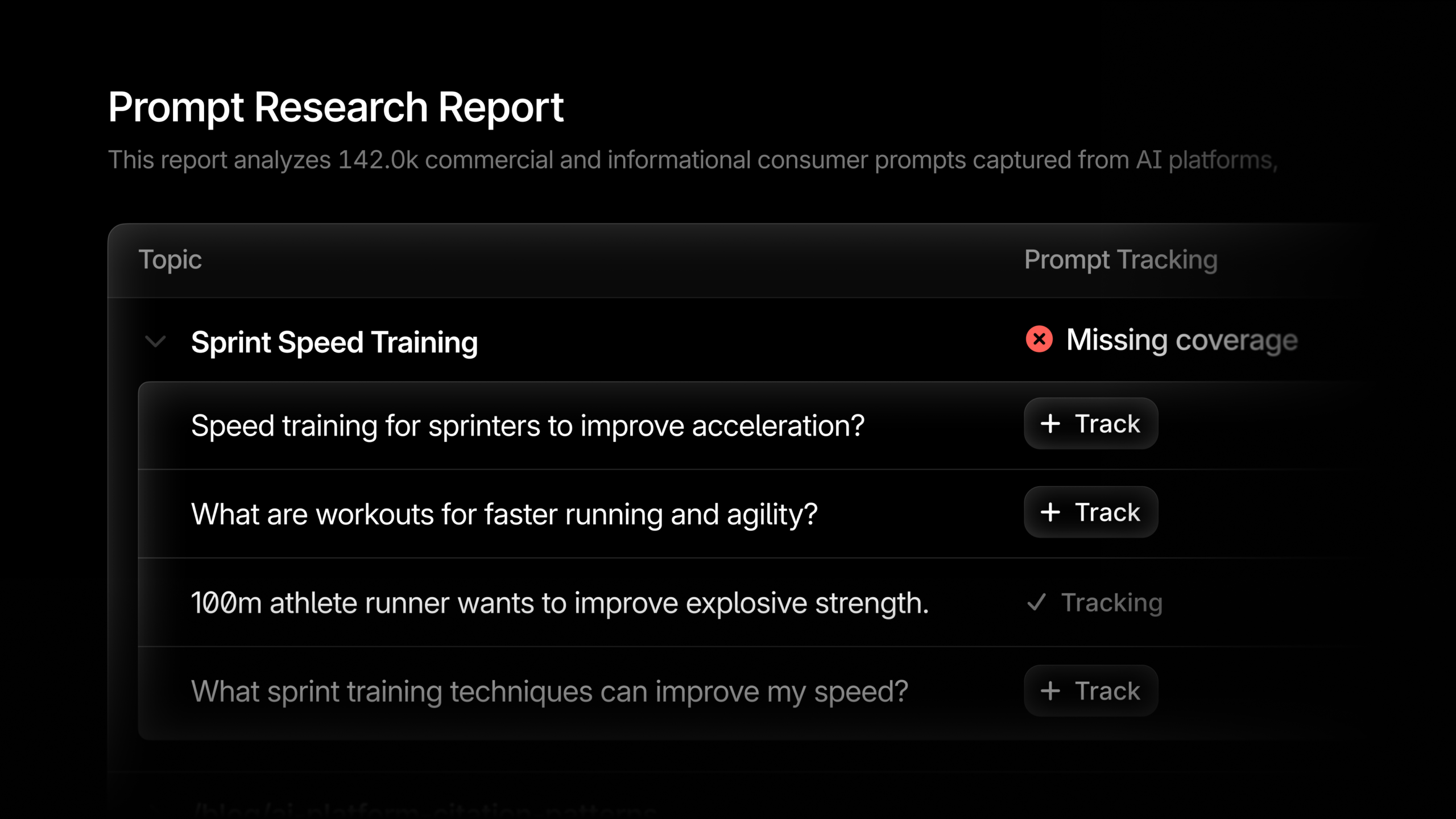
I’m excited to introduce you to a game-changing development in the world of research and data analysis. With Profound’s Prompt Research Reports, I have the power to pull insights from a staggering 1.5+ billion real user prompts. This transformative tool utilizes a proprietary ranking and clustering model, paving the way for data-driven decision making. Now, I no longer have to rely on guesswork when choosing prompts.
The system we use classifies and ranks user prompts, enabling me to access the most relevant data quickly and efficiently. This innovation not only optimizes my research process but also significantly enhances its accuracy and impact. By integrating such cutting-edge technology, I am able to stay ahead of the curve and meet my data needs with precision.
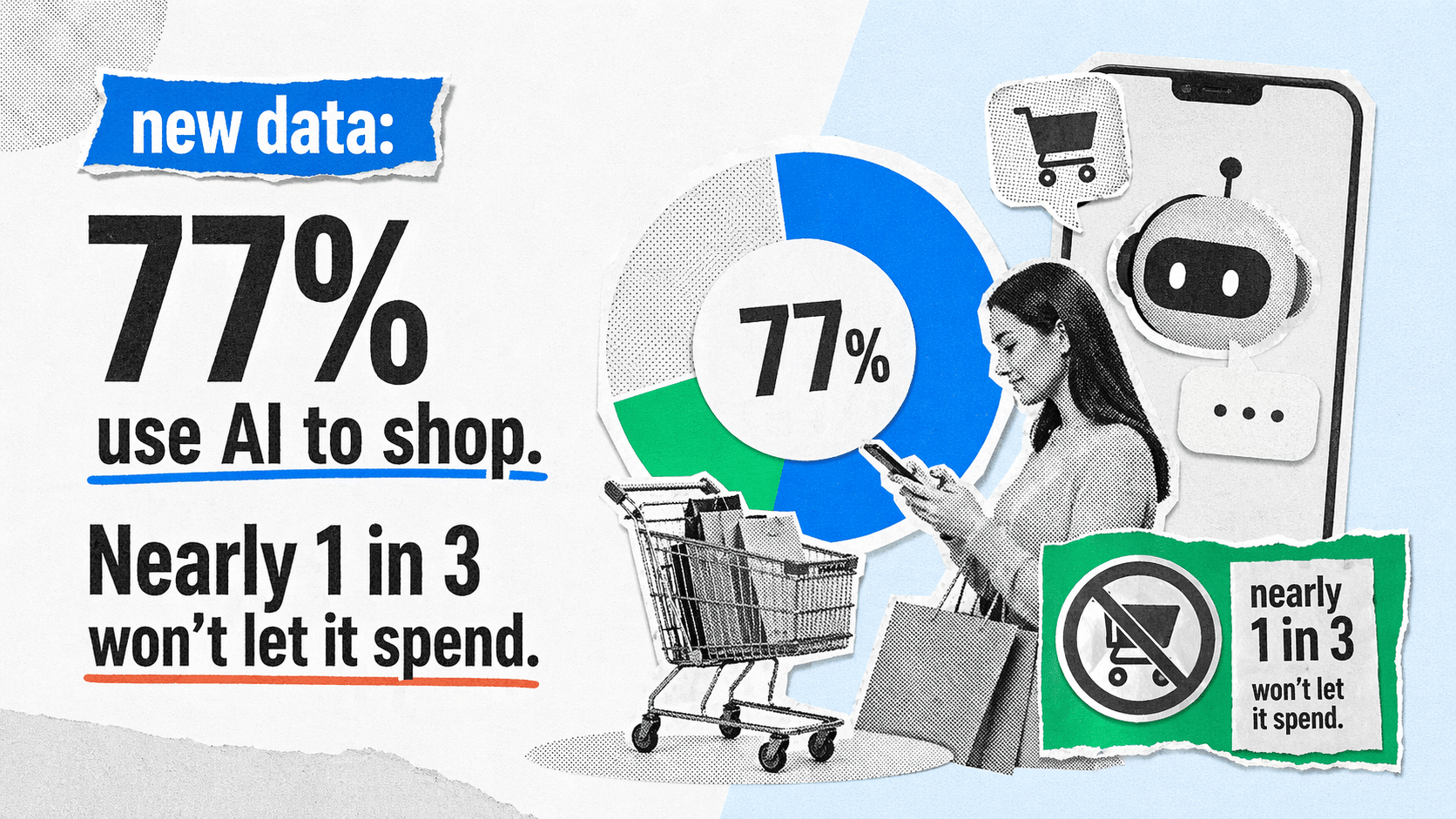
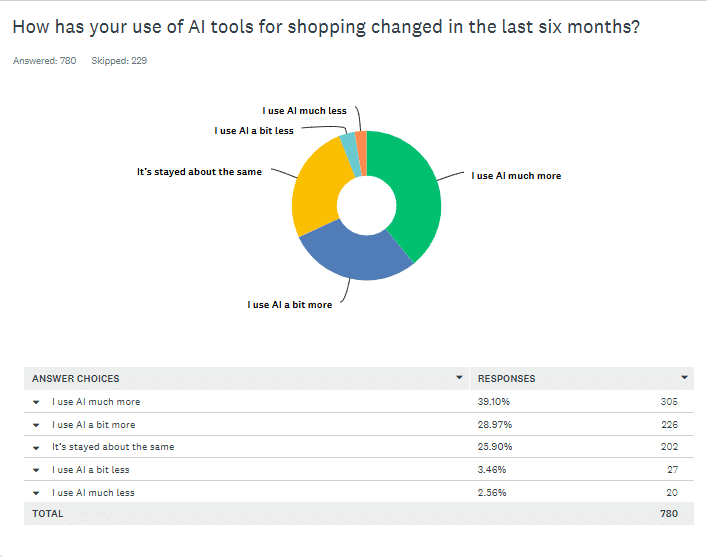
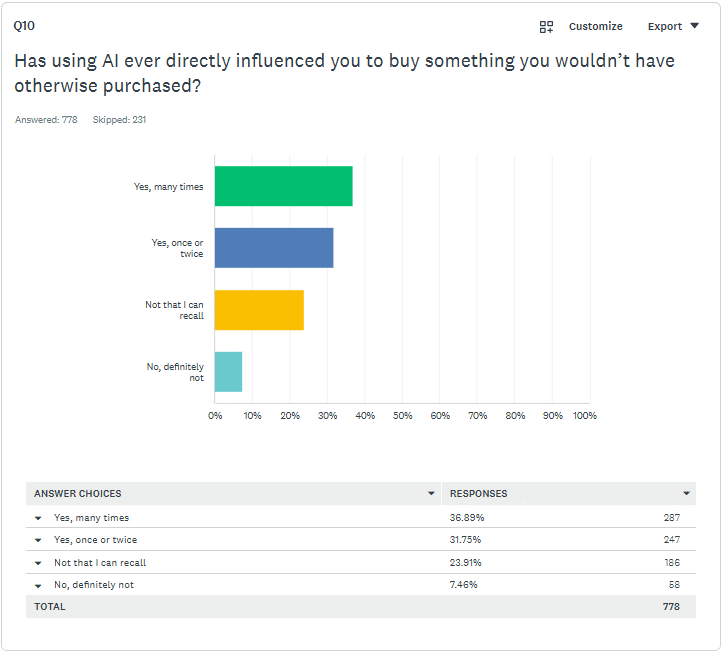
In my latest dive into the world of AI commerce, I discovered that over 77% of people, like myself, are tapping into AI to make shopping decisions. However, when it comes to allowing it to spend our money, trust dramatically drops.
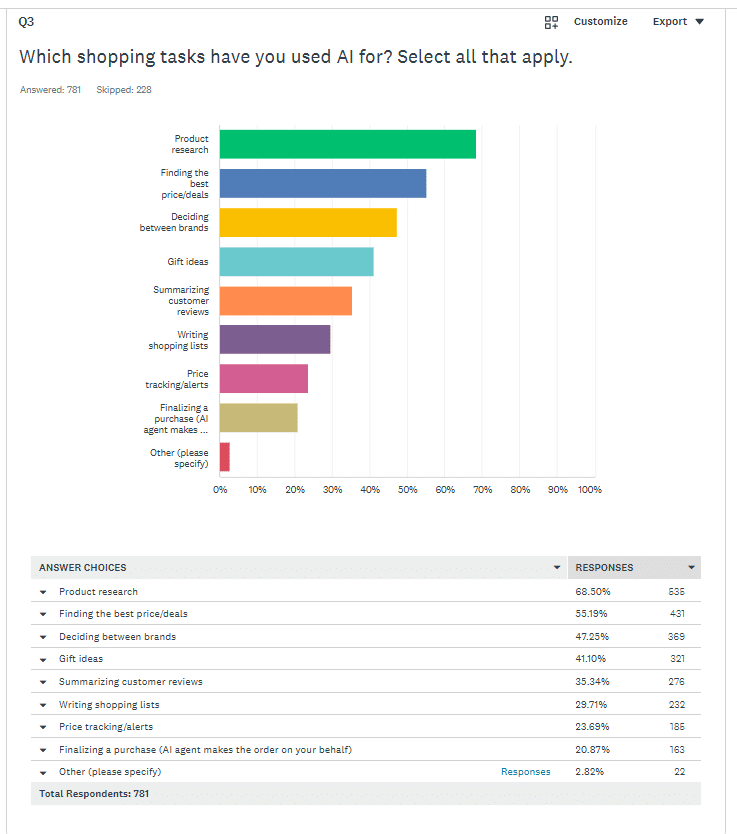
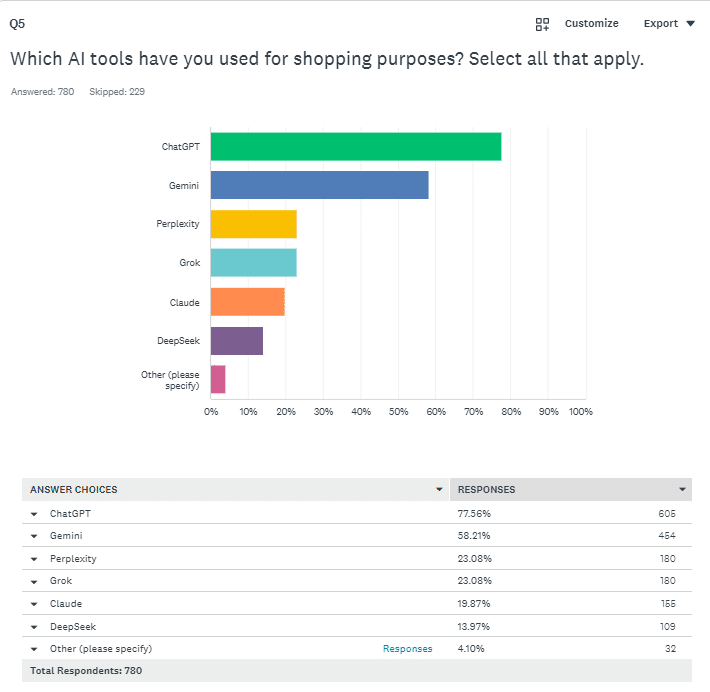
When we consider the current landscape of AI shopping, tools such as ChatGPT and Google Gemini are becoming staples for weekly shopping routines. They help us compare prices and perform product research, but hand over our credit cards? Not so fast.
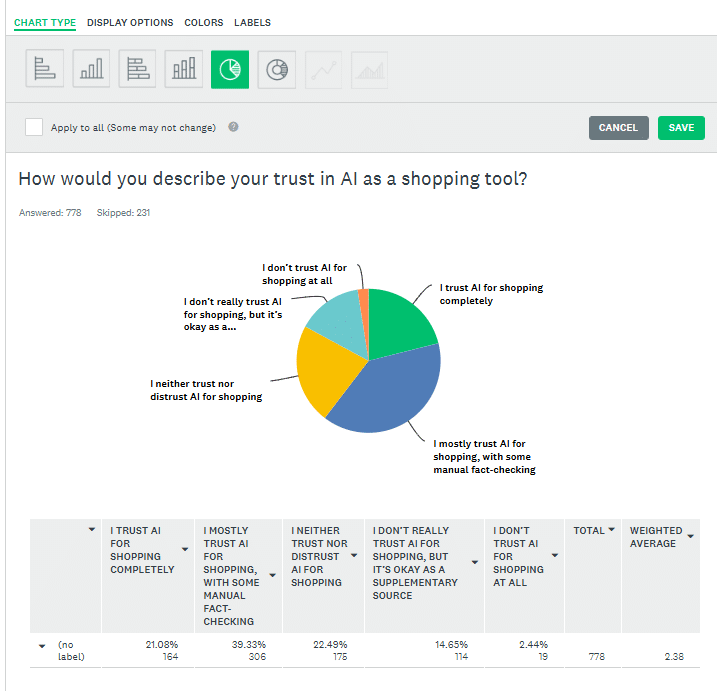
From the research conducted by Exploding Topics, discomfort still looms around AI’s potential to handle our payments. Even though I’m using AI more, especially for researching the best deals, there’s still significant skepticism about allowing AI to make autonomous purchases.
Fast forward to the future, our shopping habits might evolve, but certain barriers, such as consumer trust, will need to be addressed for AI to play an even larger role.
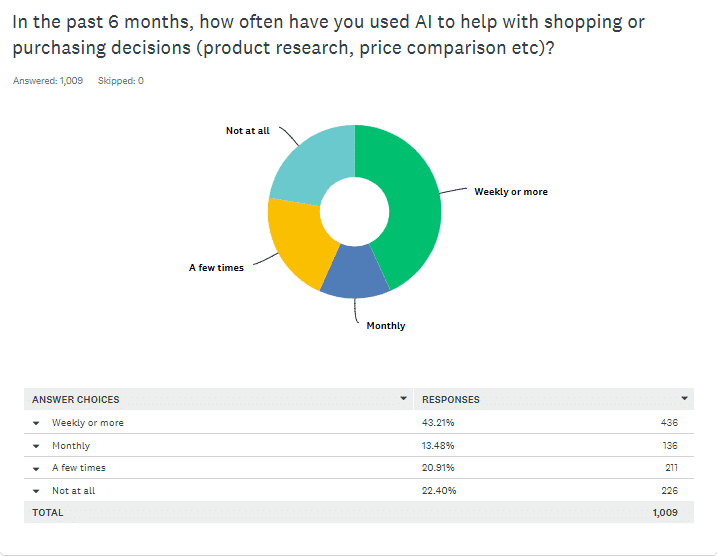
Here are some quick insights: 77.6% of us have used AI for shopping in the last six months, with 43.21% using it weekly. AI influences purchase decisions for clothing and technology, but when it comes to storing payment details or allowing autonomous purchases, the hesitation persists.
People like me are cautious, with the mode average for trusting AI to spend being a whopping $0. The uncertainty is real, but one thing’s for sure, AI in commerce isn’t going anywhere.
For businesses, leveraging tools like Semrush’s Exploding Topics Pro could provide insights into these AI shopping trends, ensuring they stay ahead in this evolving market.
Download the complete findings for a deep dive into the data and discover potential strategies for tapping into this growing AI-driven shopping landscape.
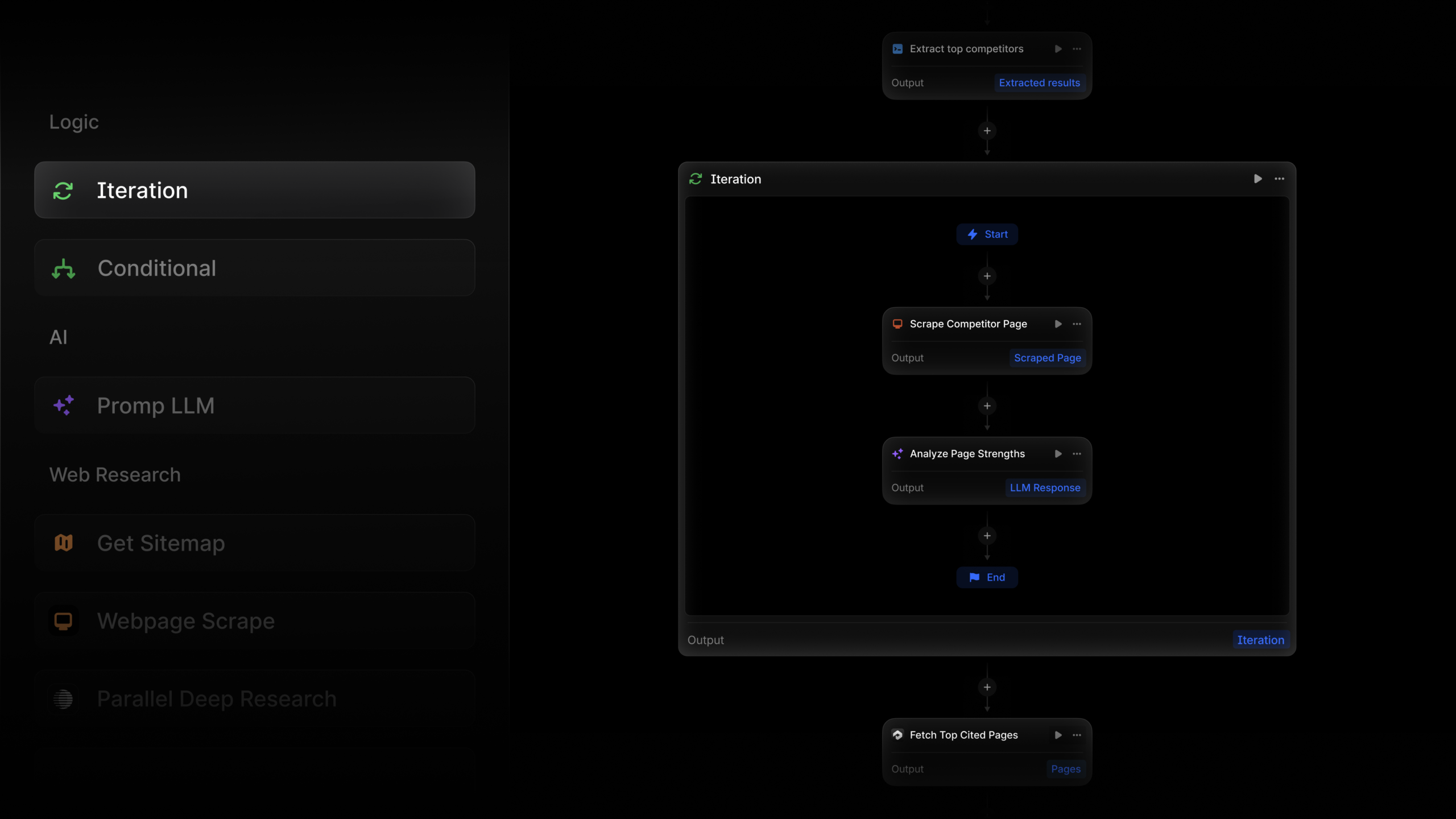
I’m excited to introduce you to the innovative iteration nodes in Profound Agents, designed to revolutionize the way we manage complex workflows.
The beauty of the iteration node lies in its ability to encapsulate a series of steps within your Agent. By setting up these steps just once, I can easily pass in a list of items, and watch as each item seamlessly progresses through the specified sequence, simultaneously.
In this report, I’m going to walk you through a comparison of conversion rates among the four leading AI chatbots: ChatGPT, Gemini, Claude, and Perplexity.
From May 2025 through April 2026, my research team conducted an in-depth study on AI conversion rates across various industries. We used anonymized data from more than 150 client companies, honing in on the most popular generative AI chatbots. Building on our previous analysis of ChatGPT conversion rates, we noted that most companies in our dataset had invested in generative engine optimization. The fascinating results of our study are presented below.
While all chatbot traffic converts at higher rates than traditional SEO, my study shows that ChatGPT and Perplexity typically have higher conversion rates compared to Gemini and Claude. This might be due to the greater user trust vested in ChatGPT and Perplexity’s recommendations.
Claude stands out in knowledge-driven and regulated industries. Its performance in Healthcare, Higher Education, and Industrial IoT indicates that professionals in these fields favor Claude for more detailed, analytical queries.
Industries such as Engineering, Software Development, and Transportation & Logistics exhibit relatively low conversion rates overall. This might suggest less dependence on AI tools or more specialized workflows not captured within this dataset.
B2B SaaS and Financial Services demonstrate moderate but closely clustered conversion rates across all models, likely reflecting significant but cautious AI adoption given potential compliance concerns and familiarity with AI limitations.
If you want a PDF copy of this report or wish to know more about our GEO services, reach out here.
First Page Sage Internal Research Study, February 2026, First Page Sage.
You are probably not short of AI SEO tools to evaluate. The harder problem is deciding which ones deserve a place in your stack when several products generate briefs, audit pages, track prompts, suggest schema, and summarize reports in slightly different ways.
The answer is not to buy the platform with the longest AI feature list. Build a system in which every tool produces evidence, that evidence leads to a named decision, and a person verifies the result before it changes a page. That gives you a stack that can support conventional search, answer engines, and generative search without paying for three versions of the same dashboard.
Choose tools by the decision they improve
Tool consolidation and AI adoption are happening at the same time. In the 2025 MarTech Replacement Survey’s cohort of 154 marketers who had replaced an application in the preceding year, 43.8% cited cost reduction, while 37.1% considered AI capabilities crucial and 33.9% wanted AI features in a new tool. Those figures describe one survey cohort, not the entire market, but they expose the decision most SEO teams now face: add AI capability without adding another layer of overlapping cost.
Start by inventorying decisions rather than products. Your working stack needs to cover these jobs:
Technical discovery: identify crawling, indexing, rendering, internal-linking, response-code, and metadata problems that block or weaken discovery.
Demand and intent: connect queries and audience questions to the page that should answer them.
Entity and structured-data management: make the people, organizations, products, topics, and relationships on a page explicit and internally consistent.
Search and AI visibility monitoring: record rankings, impressions, mentions, linked citations, cited URLs, and the accuracy of generated descriptions.
Workflow and reporting: turn findings into tickets, briefs, annotations, summaries, and accountable next actions.
One platform may cover several jobs. That is useful only when the outputs remain specific enough to act on. A single interface filled with generic scores is not an integrated stack; it is a consolidated reporting problem.
Use a keep, replace, remove, or build audit
Assign every current tool to one of four buckets:
Keep it when it produces evidence you use, fits the workflow, and has a clear owner.
Replace it when an important requirement is missing, the data cannot be exported, or another product can remove genuine duplication.
Remove it when nobody can name a recent decision that changed because of its output.
Build a narrow utility when your process, data model, or reporting logic is genuinely specific to your business.
For each product, complete this sentence: “When the tool shows ______, the owner does ______, and success is checked with ______.” A blank in any position reveals the real gap. You may have a data problem, an ownership problem, or a validation problem rather than a software problem.
Do not accept “AI-powered” as a requirement. Translate it into an observable capability. For example: classify a crawl export by likely impact; preserve citations when summarizing evidence; identify the URL cited in an answer; generate JSON-LD from approved fields; or turn approved metrics into a report narrative without changing the underlying numbers.
Custom software has become more plausible for these narrow jobs. Homegrown applications accounted for 8.1% of replacements in the 2025 survey, up from 3.4% in 2024. That is evidence of renewed interest, not proof that building is automatically cheaper. Buy common infrastructure such as crawling when a mature product already solves the problem. Consider building the small connector, classification rule, or reporting layer that reflects how your organization actually works.
Make vendors demonstrate the evidence trail
A useful evaluation should begin with your data and end with your decision. Give each shortlisted tool the same representative input, then inspect the complete path from evidence to recommendation.
Can you see the page, query, answer, citation, crawl row, or measurement behind a recommendation?
Can you export the raw evidence and the processed result in a usable format?
Can you distinguish observed facts from the tool’s interpretation?
Can you segment results by page type, intent, market, language, or another dimension that matters to your decisions?
Can a reviewer correct the output without rebuilding the workflow outside the product?
Can you connect the finding to an owner, ticket, brief, or content update?
Does the tool replace an existing cost, or does it merely add a new dashboard?
If a vendor can show a polished recommendation but not the evidence behind it, treat the output as a hypothesis. That distinction matters more in AI search because an answer can change across prompts and contexts. A tool that preserves the prompt, response, cited URL, date, and evaluation conditions gives you something you can audit. A visibility score without those components is much harder to interpret.
Put AI on high-friction work, not final judgment
AI earns its place in an SEO workflow when it reduces the effort between raw input and a reviewable result. It should not quietly become the authority that decides whether a claim is true, a page satisfies intent, or code is safe to deploy.
Use a repeatable prompt specification rather than an improvised request. Give the model the page’s purpose, audience, target query or task, approved evidence, constraints, required output format, and review criteria. Tell it how to mark uncertainty and what it must not invent. The last instruction is especially important when the input does not contain enough evidence to complete every field.
Accelerate content work without outsourcing expertise
Several practical AI-assisted SEO workflows share the same pattern: the model creates options or performs a first pass, while a person supplies expertise and approves what gets published.
First drafts: provide a real brief, audience, intended angle, target query, source material, and exclusions. Ask for a structure before a full draft. The editor must then add original reasoning, examples supported by evidence, and the publication’s voice.
Content refreshes: give the model the existing page, its target intent, performance context, and current approved facts. Ask it to separate missing coverage, stale material, unsupported claims, structural problems, and optional expansion ideas. Verify each proposed change rather than accepting a rewritten page wholesale.
Titles and descriptions: generate variations within your supplied constraints, then choose or combine them manually. Check that each option accurately describes the page; an enticing promise that the page does not fulfill is not optimization.
FAQ development: use AI to organize questions found in query research and audience conversations. Remove duplicates, verify that each question belongs on the page, and write answers from approved evidence. Do not manufacture an FAQ merely to create schema.
Alt text: supply the image and its function in the surrounding page, not just a filename. Review the result for accessibility and accuracy. A target keyword belongs only when it naturally helps describe the image.
The quality check is simple: can the reviewer identify what was supplied by the evidence, what was inferred by the model, and what was added by an expert? If those layers are blended together, the workflow is too opaque for reliable publishing.
Use AI as a technical interpreter and code assistant
Technical SEO often contains small, high-friction tasks that suit supervised generation:
Translate an error message or log excerpt into plain language, possible causes, evidence needed, and reversible diagnostic steps.
Generate a regular expression for a clearly described Google Search Console filter, then test it against examples that should and should not match.
Classify a crawl export into issue types and propose an order of investigation, while preserving the original rows used for each recommendation.
Generate JSON-LD from approved page facts and a named schema type, then compare every value with the visible page before validation.
AI-generated code can be syntactically tidy and still be wrong. Test regular expressions on a limited dataset. Validate structured data before deployment. Treat suggested fixes to templates, redirects, canonical tags, robots directives, or rendering behavior as code changes that require review and a rollback path.
Separate reporting observations from explanations
AI can help scan performance exports for anomalies, compress a long report into an executive summary, or draft the narrative connecting several approved metrics. The model should never be allowed to turn correlation into a confident cause.
Require reporting output in four labeled parts:
Observation: what changed in the supplied data.
Possible explanations: hypotheses that could account for the change.
Evidence still needed: data required to distinguish those explanations.
Next action: the check, experiment, or decision an owner should make.
This structure makes AI useful without hiding uncertainty. It also creates prompts worth saving. A maintained prompt library for recurring briefs, crawl analysis, metadata, reporting, and schema tasks is more valuable than repeatedly improvising requests, because the inputs, constraints, and review standard become part of the operating process.
Optimize pages for retrieval, comprehension, and citation
An AI visibility tool cannot compensate for a page that is inaccessible, unfocused, internally inconsistent, or difficult to support with a citation. Conventional SEO remains the retrieval layer. Answer engine optimization and generative engine optimization add a comprehension and representation layer on top of it.
Build each important page around a clear evidence path:
Assign one dominant intent. Decide which real question, comparison, task, or decision the page should resolve.
State the direct answer early. Do not make a reader or retrieval system work through several paragraphs before discovering the page’s position.
Break complex material into answerable units. Use descriptive headings, a direct explanation, applicable conditions, necessary caveats, and the supporting detail needed to act.
Keep entity names and attributes consistent. A product, organization, person, date, or feature should not acquire different names or conflicting descriptions across the title, body, metadata, structured data, and linked pages.
Support important claims where they appear. Link the words carrying the fact, and distinguish evidence from your interpretation.
Connect related pages deliberately. Internal links should tell a reader what the destination adds, not rely on vague anchor text.
Confirm technical availability. The intended canonical page must be crawlable, indexable where appropriate, renderable, and free from contradictory directives.
This approach also makes editorial review easier. A reviewer can inspect one answer unit at a time and ask whether it is clear, supported, current, and useful. That is a better quality control mechanism than chasing an aggregate optimization score.
Treat schema as a translation layer, not a ranking switch
Structured data gives machines explicit labels for information that may otherwise be expressed only in prose. It can clarify what a page and its entities represent, but it does not repair weak content, establish that an unsupported claim is true, or guarantee a citation in an AI answer.
Use this schema workflow:
Extract the facts that are visibly present on the page.
Select a schema type that accurately represents that page, such as Article for an editorial page or FAQ when genuine questions and answers appear in the visible content.
Generate or author the JSON-LD from those approved facts.
Compare every populated property with the visible page, including names, descriptions, dates, relationships, and URLs.
Validate the markup. AI can generate Article or FAQ JSON-LD quickly, but the resulting code should still be checked with Google’s Rich Results Test where applicable.
Publish through a controlled template or field mapping so later page edits do not leave stale values in the markup.
Recheck the rendered page and structured data after deployment.
Validation proves that a parser can understand the code and may surface eligibility issues. It does not prove that the data is accurate, that a search feature will appear, or that a language model will cite the page. Those remain separate checks.
Schema also should not become an isolated technical project. AI-search strategy increasingly connects technical foundations, content, social activity, public relations, mentions, and citations. The practical lesson is not that every channel needs another tool. It is that your content and reporting systems need a shared view of the entities, claims, questions, and pages the organization wants to be known for.
Measure AI visibility without disguising it as rank tracking
Rank tracking records an ordered search result under defined conditions. AI answer monitoring records a generated response that may vary with wording, context, system behavior, market, and time. Putting both into one visibility score may be convenient, but it can hide what actually changed.
License cost, active use, duplicated output, integration burden, maintenance owner
Whether to keep, replace, remove, or build
Clicks remain useful, but they cannot describe every zero-click or AI-generated experience. That is one reason teams now seek tools that can measure visibility beyond traditional rankings and clicks. Do not solve that limitation by treating every brand mention as equivalent. An unlinked mention, a citation to your page, a citation to someone else’s page, and an inaccurate description are four different outcomes.
Create a repeatable AI-answer benchmark
Build the benchmark from questions that matter to the business, not prompts chosen because the brand already performs well. Include the informational questions, comparisons, objections, and decision-stage tasks that your priority pages are meant to resolve.
Freeze the wording of each benchmark prompt and document its intended user intent.
Record the engine, market or language conditions, date, complete response, citations, and cited URLs.
Capture a baseline before changing content, templates, structured data, internal links, or external promotion.
Change a single meaningful variable where the workflow allows it, and annotate every other known change.
Run the same benchmark on a planned cadence rather than testing only when you expect a favorable answer.
Look for repeated patterns across relevant prompts before claiming that an optimization caused the outcome.
A mention is not automatically a success. Review whether the answer gives the correct name, category, attributes, limitations, and relationship to the user’s question. Also record which URL earned the citation. If an outdated page or a third-party page is repeatedly cited, that finding should lead to a different action than a simple absence from the answer.
Measurement should also expose automation failures. Record which AI suggestions were rejected and why. Repeated factual corrections point to an evidence or prompting problem. Repeated voice corrections point to an editorial specification problem. Repeated technical corrections point to a workflow that needs stronger tests, not a model that needs more freedom.
Key takeaways and your first move
Choose an AI SEO tool only when you can name the decision it improves, the evidence it preserves, the owner who acts, and the way the result will be checked.
Keep conventional crawling, indexing, intent, and content quality at the base of the stack. AI visibility monitoring adds a measurement layer; it does not replace the retrieval layer.
Use AI for first passes, classification, variants, interpretation, and formatting. Keep factual approval, strategic judgment, and deployment control with a qualified reviewer.
Make pages easier to retrieve and cite by answering a defined question, using consistent entities, supporting claims in place, and connecting related pages clearly.
Use schema only when it matches visible content. Validate the code and verify the facts separately.
Track generated answers with their exact prompts, citations, cited URLs, conditions, and accuracy. Do not compress unlike outcomes into one unexplained visibility score.
Your first move does not require a new subscription. Open the current stack inventory and complete the evidence-action-validation sentence for every tool. Remove the entries nobody can complete. Then choose one recurring workflow with visible friction, such as turning a crawl export into reviewed tickets or turning an approved brief into a review-ready draft. Define its inputs, output, owner, and checks before testing automation.
Once that workflow is reliable, extend the same operating model to structured data and AI-answer monitoring. You will know what to buy because the missing capability will be explicit, and you will know whether it worked because the evidence trail already exists.
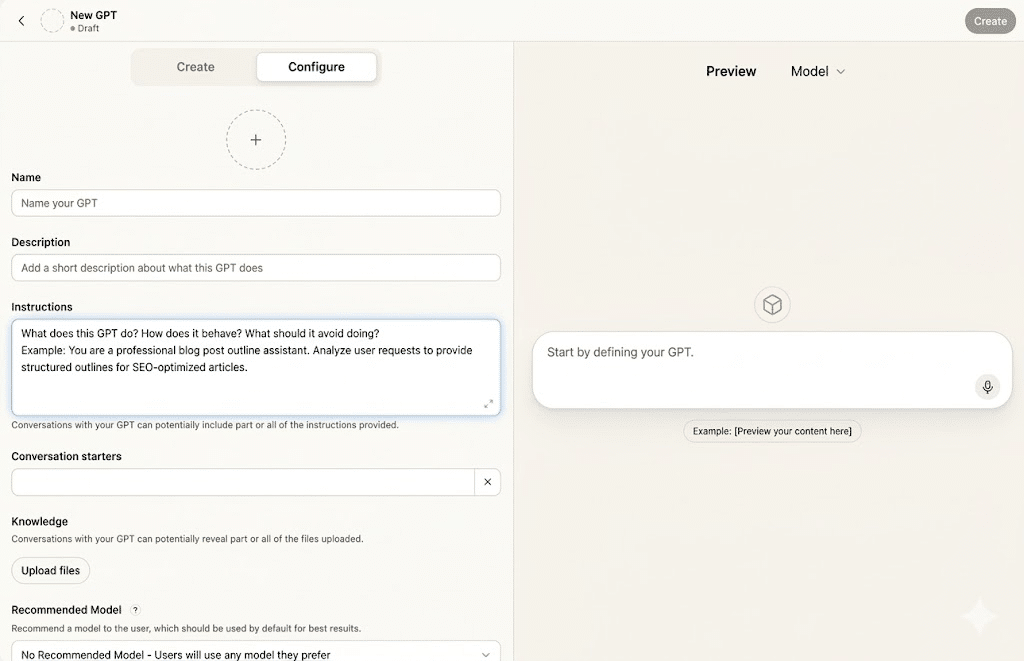
Have you ever wondered why most GPTs in businesses fail to be truly effective? It’s often because they are either too broad or haven’t been properly tested. Allow me to guide you through building focused, high-ROI GPTs that your team will not only adopt but use consistently every week.
The OpenAI GPT Store made waves in January 2024 with its launch, hosting over three million custom GPTs. But, if you ask teams how many they actively use, the answer tends to be disappointingly low, often zero or just one.
I’ve personally built and audited over a dozen custom GPTs for marketing, SEO, and sales teams. The pattern is consistent: only a select few are used daily, while the rest simply collect dust. Let me share with you a practical approach to crafting GPTs that your team will genuinely engage with—from identifying suitable use cases to structuring, testing, and launching them effectively.
If you’re eager to dive in, start with these foundational steps: Choose a task your team performs at least three times a week, typically taking over 15 minutes. Articulate this in a simple sentence: ‘This GPT helps [role] do [task] by [method].’
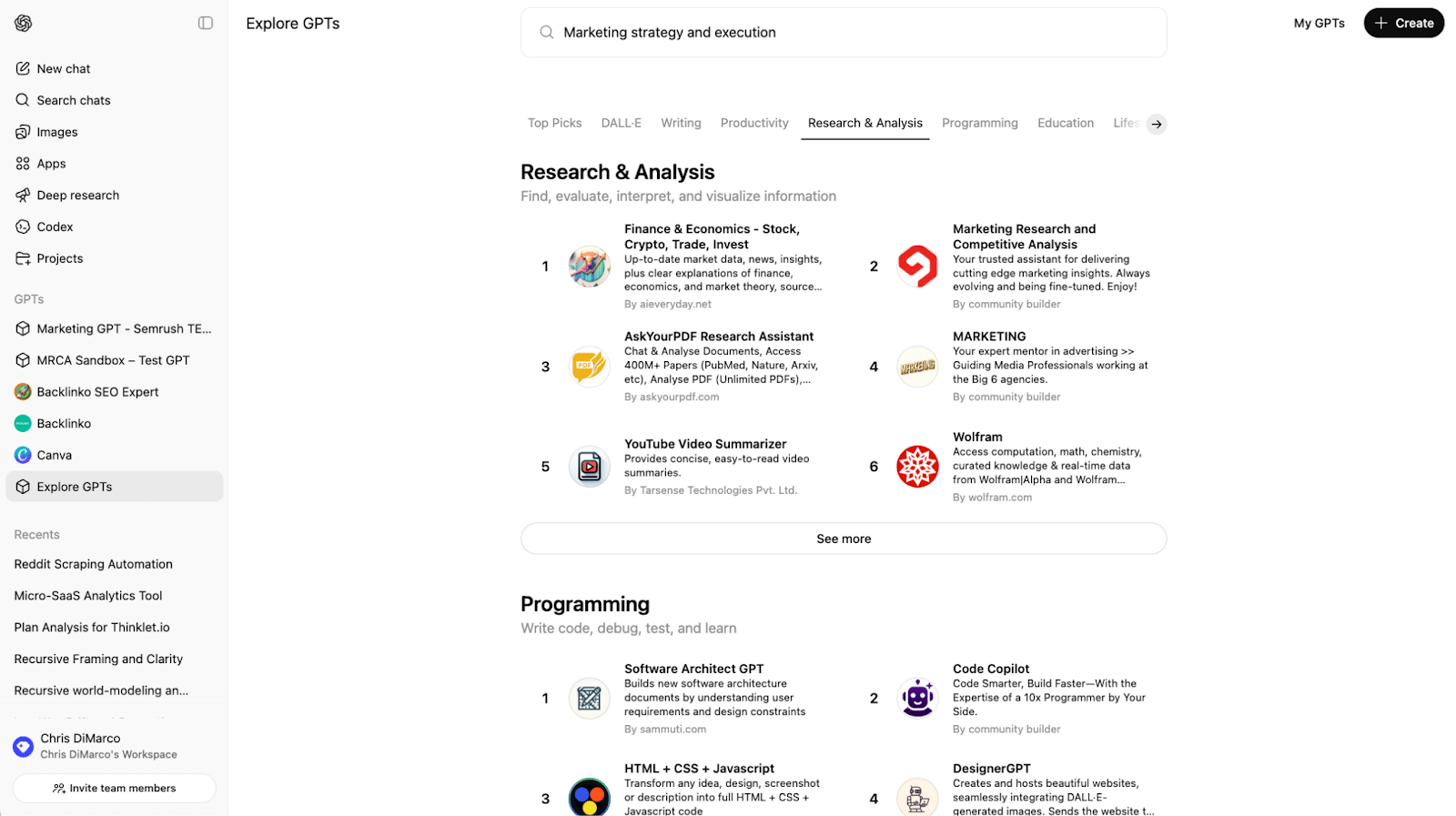
For a deeper understanding, I recommend checking out Marketing Research & Competitive Analysis or MARKETING, both highly ranked in the GPT Store’s Research & Analysis category. These projects showcase the build patterns I’ll cover here.
Now, let’s discuss what a business GPT truly entails. Unlike a generic AI assistant, a business GPT is a custom version of ChatGPT designed to handle one specific, recurring task for a particular role. Think of it like hiring a highly specialized worker for a job, rather than a generalist who does a little bit of everything.