Web push advertising is not disappearing, but the conditions that once rewarded scale are changing. Easier opt-outs and tighter platform enforcement have made subscriber quality, compliant messaging, and durable performance more important.
A sponsored article published by Search Engine Land and supplied by RollerAds presents the channel as a maturing market rather than a declining one. Its figures and platform observations point to modest growth, alongside near-term pressure for publishers, advertisers, and ad networks.
Platform controls changed the economics of push
Web push lets opted-in users receive browser-based notifications outside a publisher’s active webpage. That reach can make the format useful for timely campaigns, but it also means poor messaging practices can become intrusive quickly.
According to the Search Engine Land article, Google introduced changes in the fourth quarter of 2024 that made unsubscribing more accessible on Android and strengthened Google Safe Browsing policies. The stated direction was greater user control, fewer deceptive notification practices, and better engagement quality.
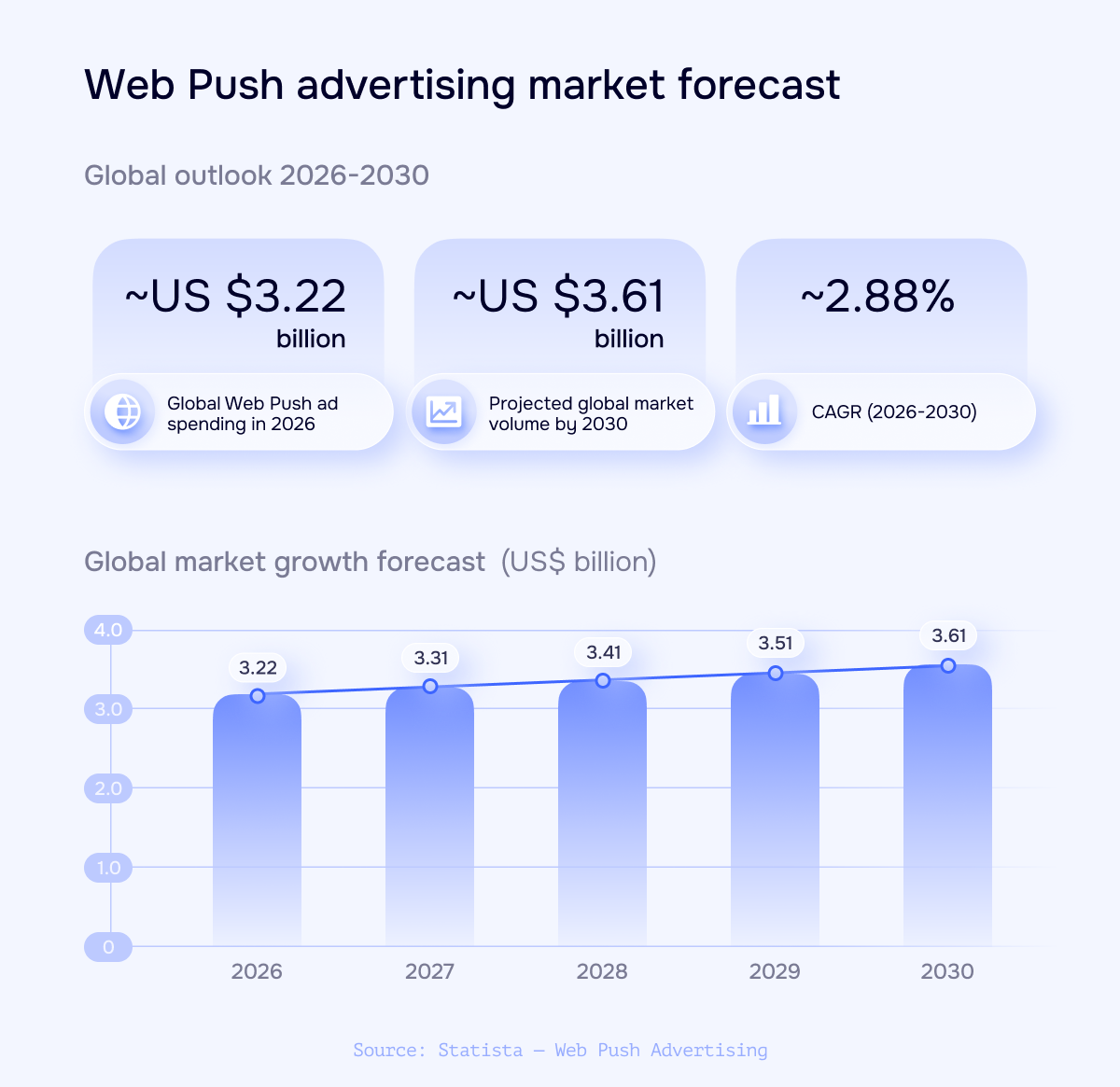
Global web push advertising is shown rising from about US$3.22 billion in 2026 to US$3.61 billion in 2030, with a stated 2026-2030 CAGR of roughly 2.88%.
The immediate commercial effect was less comfortable. RollerAds reported that unsubscribe rates increased by 30% to 40% in some cases on its own platform. The article also says some domains were flagged, restricted, or banned over compliance problems and negative quality signals. That platform-specific result should not be treated as an industry-wide rate, but it illustrates the exposure publishers face when access to an audience depends on browser rules.
The forecast describes maturity, not rapid expansion
The market outlook cited in the source projects global web push ad spending of about US$3.22 billion in 2026 and approximately US$3.61 billion in 2030. The reported compound annual growth rate for 2026 through 2030 is about 2.88%.
Year
Projected global spending
2026
About US$3.22 billion
2027
About US$3.31 billion
2028
About US$3.41 billion
2029
About US$3.51 billion
2030
About US$3.61 billion
These projections indicate continued expansion, but not a return to a volume-at-any-cost phase. Moderate growth is consistent with a channel moving toward established use cases, more selective inventory, and closer scrutiny of traffic quality. The forecast does not guarantee better returns for an individual campaign; results will still depend on targeting, creative, acquisition costs, and the quality of the underlying subscriber base.
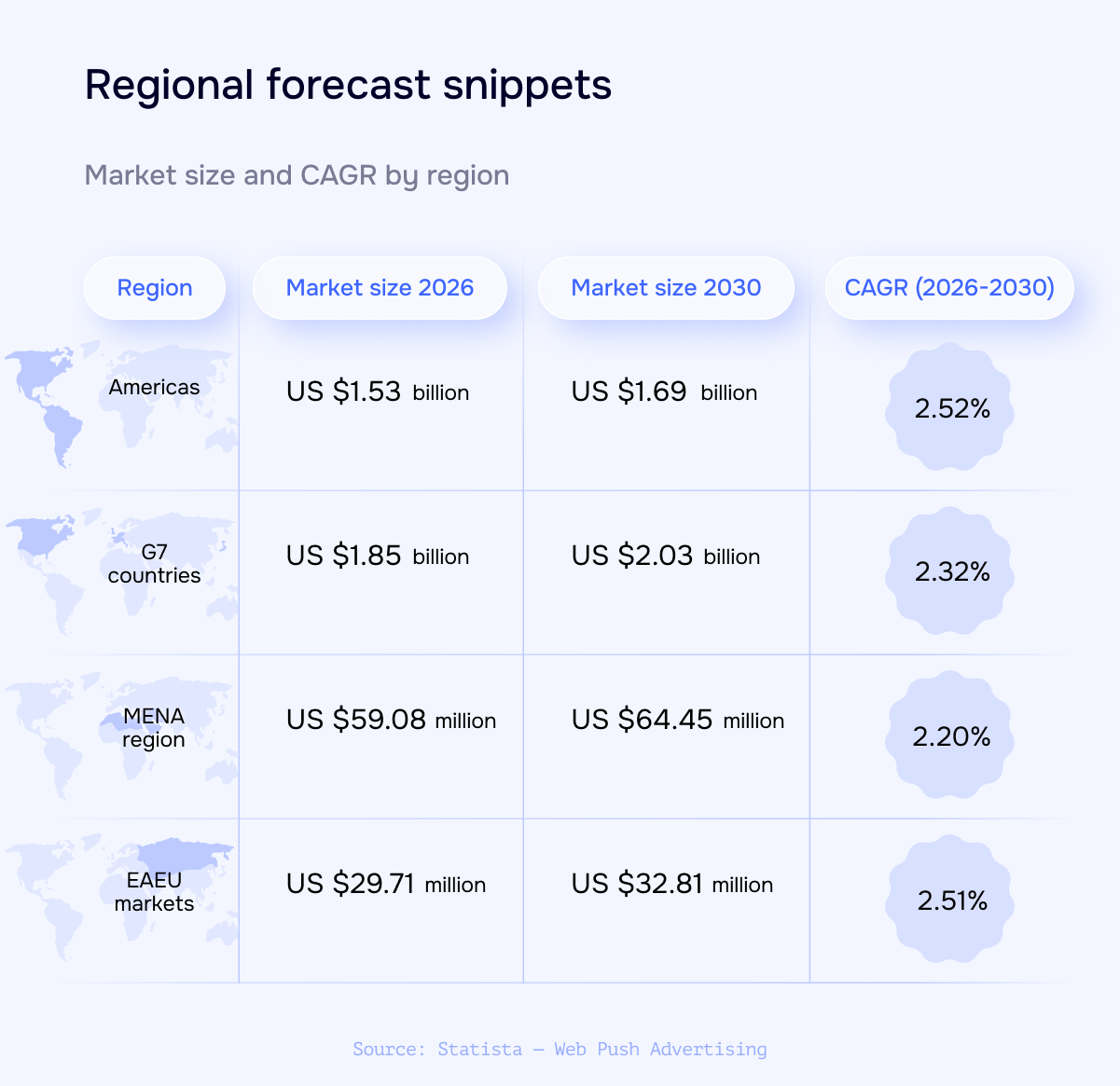
Regional forecast table lists 2026 and 2030 market sizes for the Americas, G7 countries, MENA region, and EAEU markets, with CAGR from 2.20% to 2.52%.
Regional projections point in the same direction
The regional forecasts cited by the article vary in size and pace, yet all four examples show growth through 2030.
Market
2026
2030
Reported CAGR
Americas
About US$1.53 billion
About US$1.69 billion
About 2.52%
G7 countries
About US$1.85 billion
About US$2.03 billion
About 2.32%
MENA
About US$59.08 million
About US$64.45 million
About 2.20%
EAEU markets
About US$29.71 million
About US$32.81 million
About 2.51%
The differences are relatively narrow in growth-rate terms. As the source interprets them, they reflect varying levels of market maturity and digital advertising penetration rather than opposing regional trajectories. The projections are best used as market context, not as a substitute for country-level campaign evidence.
Key takeaways
Web push remains a growing advertising channel in the forecast cited by Search Engine Land, although its expected growth is moderate.
More accessible opt-outs can reduce the size of a subscriber list while making consent and audience relevance more visible performance factors.
RollerAds’ reported 30% to 40% unsubscribe increase applies to some cases on its platform, not necessarily to the whole market.
Stricter enforcement raises compliance risk for publishers and networks using misleading language or low-quality traffic.
Advertisers should judge the channel by qualified engagement, acquisition economics, and customer value rather than notification volume alone.
What advertisers and publishers should change
For publishers, the central issue is no longer simply how quickly a subscriber list can grow. They need clear opt-in expectations, messaging that matches what users agreed to receive, and monitoring that reveals whether campaigns are driving engagement or accelerating opt-outs.
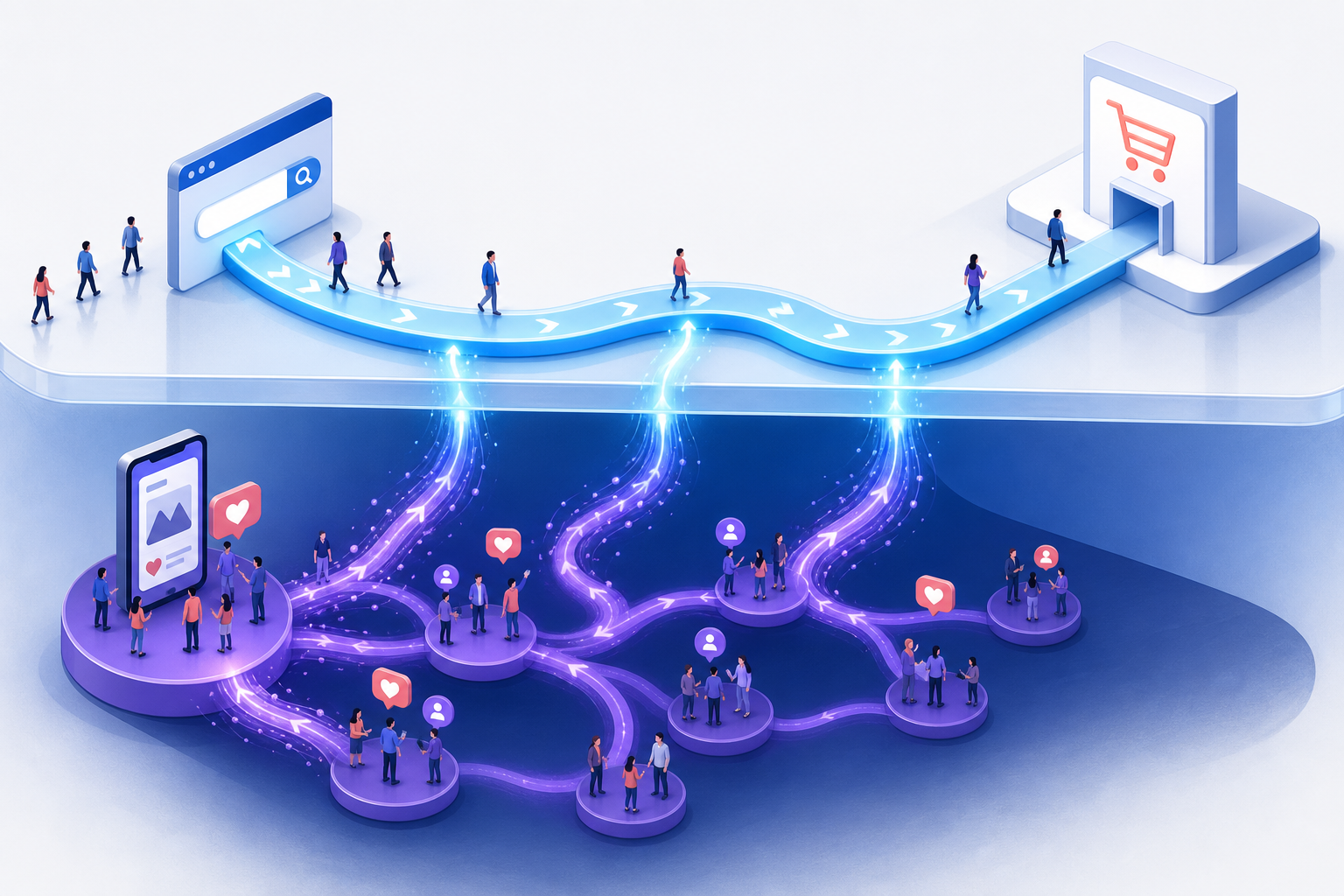
Organic visibility, paid media and artificial intelligence merge into one connected search ecosystem, where vivid data streams link a creative website with a powerful analytics dashboard.
Advertisers should examine the source and quality of push inventory, segment audiences by relevant behavior, and test the complete funnel rather than optimizing only for clicks. A high click-through rate can still be unhelpful if the post-click experience fails to produce worthwhile outcomes. Networks, meanwhile, have an incentive to improve screening and technical controls because weak supply can expose every participant to policy and performance problems.
The source argues that lower message pressure may eventually support stronger engagement and click-through rates, but that remains an expectation rather than a guaranteed timeline. The safer conclusion is narrower: web push still has a market, while its next phase will favor operators that can demonstrate relevance, compliance, and sustainable economics.
A limited Performance Max alpha could give selected advertisers a consequential new choice: whether a campaign includes Search Partners and the Google Display Network. The reported setting does not dismantle campaign automation, but it may let advertisers define two important boundaries around the inventory that automation can use.
The distinction matters for both expectations and testing. This is a reported network-level control, not evidence of comprehensive placement management, and its value will depend on whether advertisers can measure the effects of each configuration reliably.
Key takeaways
CrushPress.AI reported that a Partners (Alpha) setting is appearing in some Performance Max campaigns.
The reported interface provides separate inclusion choices for Search Partners and the Google Display Network.
Because the setting is labelled Alpha and has limited availability, it should be treated as an experiment rather than an established campaign feature.
The most useful evaluation is a controlled comparison based on business outcomes such as cost per acquisition or return on ad spend.
The reported controls apply to networks; they should not be interpreted as proof of granular control over individual websites, apps, searches or placements.
The alpha changes the boundary of automation
According to CrushPress.AI’s report, advertisers with access can use checkboxes to include or exclude Search Partners and the Google Display Network. The publication said both networks had previously been included automatically in Performance Max without a corresponding exclusion option.
That makes the test notable without making Performance Max a manually managed campaign type. Google would still automate decisions within the inventory available to the campaign; the advertiser would gain a higher-level choice about whether two sources of inventory are available at all. In practical terms, the control changes the perimeter in which the system operates rather than replacing automated delivery.
The terminology also deserves care. Although network selection affects where ads may appear, the reported setting is broader than a conventional placement exclusion. It does not, based on the available report, establish controls for selecting particular sites, apps, pages or search contexts.
Why network choice could improve campaign diagnosis
When several inventory sources contribute to one automated campaign, an aggregate result can show whether the campaign succeeded without fully explaining which environments helped or hurt. An option to remove Search Partners or the Google Display Network creates a clearer diagnostic question: does the campaign produce stronger business results when either network is unavailable?
That question should be framed around the campaign’s actual objective. CrushPress.AI identified return on ad spend and cost per acquisition as relevant measures for evaluating the setting. Advertisers may also need to examine whether changes in those outcomes accompany changes in conversion volume, reach or delivery stability. A lower cost per acquisition is less useful if the configuration can no longer produce the required volume, while additional reach is not automatically valuable if it fails to support the campaign goal.
The setting may also help separate an inventory concern from a broader campaign problem. If excluding a network does not materially improve the chosen outcome, attention may be better directed toward inputs such as creative, offers, audience signals, conversion measurement or landing-page experience. If performance changes consistently, the result supplies a more focused basis for deciding which inventory belongs in the campaign.
A useful test requires more than toggling a checkbox
A credible comparison begins with a decision rule established before the configuration changes. The advertiser should specify the primary business metric, the acceptable trade-off between efficiency and volume, and the conditions that would justify retaining or reversing the exclusion. This reduces the risk of choosing whichever metric looks most favorable afterward.
The comparison should also avoid unnecessary simultaneous changes. Major adjustments to budgets, conversion definitions, creative assets or landing pages can make it difficult to attribute a result to network selection. Normal volatility and automated learning further argue against drawing a conclusion from a brief movement in performance.
Interpretation should account for interaction effects. Excluding inventory can change the opportunities available to the campaign, which may alter how automation distributes delivery elsewhere. The meaningful comparison is therefore the campaign’s total outcome under each configuration, not an assumption that removed activity would have transferred unchanged to another network.
What remains unresolved while access is limited
The available evidence is preliminary. CrushPress.AI described the control as an Alpha available to a limited group and reported that Google had not announced whether or when it would become more broadly available. The report attributed the discovery to PPC Growth Strategist Saquib Syed, who shared the setting on LinkedIn.
The report does not establish how eligibility is determined, whether the interface will remain unchanged, or whether Google will add related reporting and controls. Those omissions are especially important because a network toggle is most actionable when advertisers can clearly evaluate the inventory affected by it.
The next meaningful signal will be broader availability accompanied by documented behavior and sufficient reporting to support sound comparisons. Until then, advertisers with access can treat the alpha as a structured learning opportunity, while those without it should avoid planning around a control that has not been confirmed as a general release.
Search can appear to be the most efficient paid channel while benefiting from demand that paid social created earlier. That makes channel-level return on ad spend useful for optimization but potentially misleading for budget allocation.
The practical question is not whether social deserves credit for every later search conversion. It is whether reducing social changes the volume, readiness, or acquisition cost of people arriving through search. Answering that question requires treating search and social as connected parts of the customer journey.
Key takeaways
Paid social can influence search without generating a measurable click, particularly when exposure leads to a later branded query.
Search ROAS may reflect both search execution and the strength of upstream demand generation.
Brand-query impressions, non-brand conversion rates, and search auction metrics can provide early evidence of a cross-channel effect.
A social budget cut may not damage search immediately because previously exposed audiences can continue searching for several weeks.
Budget decisions should combine channel reports with lagged analysis and controlled tests wherever practical.
The mechanism extends beyond attribution credit
ROAS compares attributed revenue with advertising spend. It does not, by itself, reveal which activity originated the demand. Search is often positioned near the end of a journey because a query expresses an existing need or interest. Paid social can operate earlier, introducing a brand or product before the person is ready to act.
The supplied source article describes three ways this relationship may appear. First, its author reports frequently seeing weekly Meta or TikTok spend move with branded-query impressions in Google Ads. The proposed explanation is that some people notice a social ad, do not click, and later search for the advertiser by name.
Second, the article reports stronger conversion rates on generic search queries when audiences may already know the brand. The query, auction, and landing page can remain unchanged while prior exposure alters the searcher’s willingness to convert. In that situation, search captures the transaction, but its conversion rate partly reflects work performed upstream.
Third, the article proposes an auction effect: greater familiarity may improve click-through rates on brand-adjacent searches, which can affect expected click-through rate and potentially influence cost per click. This is a more indirect hypothesis than the branded-search relationship, so it should be tested rather than assumed.
Together, these mechanisms separate two questions that channel dashboards often merge: which ad received conversion credit, and which advertising changed the probability that the conversion would happen. The second question is the more important one for incremental budget decisions.
Why channel reports can overstate search’s independence
Last-click reporting naturally favors the touchpoint nearest the transaction. Even data-driven attribution remains constrained by the interactions a measurement system can observe. A social impression followed by no click may leave little or no usable path data when the same person searches later.
Social platforms may report view-through conversions, but the source notes that teams often distrust figures calculated by the platform selling the ads. Discarding view-through credit entirely avoids accepting an inflated platform claim, yet it creates the opposite risk: treating an unobserved influence as no influence at all.
This produces an uneven comparison. Search is judged largely on its ability to capture expressed intent, while social is judged on whether its exposure generated an observable conversion path. A search campaign showing a higher reported ROAS can therefore be the better conversion-capture channel without necessarily being the best destination for the next unit of budget.
The source is best read as a practitioner account rather than controlled proof. Its author identifies as a paid search specialist and bases the argument on patterns observed across accounts. Those observations offer a credible hypothesis and useful diagnostic signals, but correlation between social spend and search results can also be affected by promotions, seasonality, total media investment, or changing demand. Attribution reports should not settle the question, but neither should a simple correlation chart.
Delayed search decay can hide a poor reallocation
The timing of the effect complicates budget evaluation. According to the source, search performance can remain stable for four to eight weeks after social spending is reduced because people reached by earlier campaigns may continue to search. The apparent success of moving money into search can therefore precede a decline in the audience that social had been preparing.
The article recounts cases in which teams cut social spending by 40% and later saw search cost per acquisition rise by 25%, despite no meaningful changes inside the search account. These figures are reported examples, not a universal forecast. Their value is in illustrating why the date of a budget change should remain visible when later search deterioration is investigated.
A useful diagnosis connects several signals over time. Weekly social spend can be compared with branded-query impressions using multiple lag periods. Non-brand conversion rate can show whether generic searchers are becoming less likely to buy. Click-through rate and cost per click on relevant terms can indicate whether auction behavior is also changing. Promotions, pricing changes, search impression share, competitive pressure, and seasonality should be examined alongside those trends so that an upstream-media explanation does not become the default answer to every decline.
The sequence matters more than any isolated metric. A social reduction followed by softer branded demand and weaker non-brand conversion provides a more coherent signal than a simultaneous movement in two weekly charts. Even then, the pattern supports a hypothesis; it does not prove causation.
Measure the halo before changing the channel mix
The strongest evaluation asks what happens to total acquisition when upstream exposure changes. Where scale and operations permit, a holdout or geographic test can compare markets or audiences with different levels of paid social support while search activity remains as consistent as possible. The evaluation window must be long enough to capture the lag suggested by normal buying behavior rather than only immediate social conversions.
When a controlled test is not feasible, teams can still improve the decision. They can mark budget changes, examine lagged relationships, separate branded and non-branded search, and compare channel results with blended revenue or acquisition outcomes. The aim is not to assign a perfect fractional credit to every impression. It is to estimate whether social spending causes enough additional business, including downstream search performance, to justify its marginal cost.
The underlying principle is channel-agnostic. The source argues that YouTube and Demand Gen can generate upstream exposure within Google’s ecosystem, while Microsoft Audience Ads can play a similar role across Microsoft properties. Keeping discovery and search activity on one platform does not eliminate the measurement problem: an earlier visual exposure can still assist a later search conversion without receiving proportionate credit.
Budget governance should therefore distinguish reported channel ROAS from incremental portfolio value. Search teams can optimize queries, ads, bids, and landing pages while also monitoring the demand inputs that make those optimizations productive. Social teams, in turn, should be accountable for more than platform-reported conversions by tracking credible downstream indicators and participating in incrementality tests.
The next budget cycle should treat search efficiency as a shared outcome, then test how much of it persists when upstream exposure changes. That approach protects strong search performance without assuming that search created all the demand it converted.
I’m adjusting how I refer to Google’s shopping platform now that Google has dropped “Next” from Merchant Center Next. Going forward, the product is simply called Google Merchant Center.
Google made the change official in a Merchant Center announcement, saying, “The platform you use today will simply be referred to as Google Merchant Center.” For anyone managing product feeds, shopping campaigns, or merchant accounts, this is mainly a naming update rather than a product change.
I remember when Google Merchant Center Next was introduced in 2023 as the newer version of the old Google Merchant Center. Over the past few years, more merchants, site owners, and advertisers moved into that updated experience.
At this point, it appears that Merchant Center Next has effectively become the standard experience. So Google is removing the “Next” branding and returning to the simpler name: Google Merchant Center.
Rows of illuminated data cabinets and paper files stretch into the distance, capturing the pressure on marketers to turn fragmented customer data into a smarter performance engine.
Google said users will start seeing the “Next” branding removed from Help Center articles, email communications, and the Merchant Center interface.
Google also clarified that no action is required and that the name change does not affect existing accounts. In other words, I do not need to update settings, migrate anything, or make account-level changes because of this rebrand.
Why does this matter? When I talk about Google’s merchant tools now, I can leave off “Next” and just call the platform Google Merchant Center. Honestly, that is what many of us were already calling it anyway.
Google Search Partners can extend a campaign beyond the main Google search results page, but additional reach is useful only when it produces meaningful business outcomes. Lower click costs and higher traffic volume can look efficient while concealing weak conversion quality.
The practical question is therefore not whether the network can generate clicks, but whether its traffic creates enough incremental value to justify the spend. The supplied CrushPress.AI article recommends answering that question with network-level reporting, placement review and conversion-quality checks.
Key takeaways
Search Partners should be assessed separately from Google Search because blended campaign totals can hide major differences in traffic quality.
Cheap clicks are not sufficient evidence of efficiency; advertisers need to examine valuable conversions and the quality of the actions used for optimization.
New Search and Shopping campaigns can begin without Search Partners, establish a reliable Google Search baseline and then test the additional reach deliberately.
Performance Max requires a different response because Search Partners cannot simply be disabled; monitoring and optimization controls become more important.
Why lower CPCs can give the wrong performance signal
Search Partners are third-party properties that use Google-powered search results. According to the source article, eligible environments can include YouTube, directories, other search experiences and parked domains. Although the activity remains search-related, the context and audience quality may differ from traffic generated on Google’s primary search results page.
The article reports a recurring pattern of substantial impressions and clicks at lower cost per click, followed by limited meaningful conversion value. That distinction matters because CPC measures the price of acquiring a visit, not the commercial value of the visit. A less expensive click is beneficial only if its downstream results remain economically useful.
Search Partners should also not be treated as another name for the Google Display Network. The source distinguishes search-based partner activity from ads shown while people browse websites or apps using AdSense. Some properties may participate in both systems, but the user context and placement logic are different.
Traffic source
Underlying context
Primary audit question
Google Search
Searches on Google’s main results page
Does this provide a dependable performance baseline?
Search Partners
Search-based activity on participating third-party properties
Does the added reach produce valuable incremental conversions?
Google Display Network
Ads encountered while browsing participating sites and apps
Does the audience and placement context support the campaign objective?
A useful audit separates volume, outcomes and quality
For Search and Shopping campaigns, the source recommends opening the campaign view and using the Network (with search partners) segment. This creates separate rows for Google Search and Search Partners, preventing stronger results from one network from masking weaker results on the other.
The comparison should move through three layers. First, impressions, clicks and CPC show how much traffic each network supplies and what that traffic costs. Second, conversion volume, conversion rate, cost per conversion and conversion value indicate whether the visits produce measurable outcomes. Third, the advertiser must determine whether those outcomes represent genuine business progress rather than merely easy-to-complete actions.
That final layer is especially important. The source cautions that Search Partner traffic can appear productive when optimization relies on shallow signals such as page views or low-friction form submissions. A campaign can meet its reported conversion target while generating outcomes that sales teams cannot use or that contribute little economic value.
The Content Suitability report under Insights and reports provides another diagnostic view. The article says it can reveal websites or YouTube channels where Search Partner ads appeared. Placement context does not replace outcome data, but it can explain suspicious performance and expose properties that appear irrelevant or low quality.
Performance Max changes the available controls
The opt-out decision applies differently across campaign types. The source states that Search Partners are required within Performance Max, so advertisers cannot manage the network with the same checkbox available to conventional Search or Shopping campaigns.
Instead, the article directs advertisers to the Channel Performance report. Heavy Search Partner activity should prompt a review of conversion tracking, bid-strategy settings and the conversion actions guiding optimization. This reframes the task from excluding the network to ensuring that the automated system is learning from business-relevant signals.
The source also reports that conversion-focused Smart Bidding may reduce Search Partner spend as it learns that the placements are not producing desired conversions. That observation should not be treated as a guarantee. Automated bidding can only respond to the objectives and measurement signals supplied to it; weak conversion definitions can reward weak traffic.
A baseline-first test makes the decision clearer
The source’s starting recommendation is to leave Search Partners disabled when launching new Search or Shopping campaigns. Concentrating the initial budget on Google Search can establish a cleaner baseline for traffic quality, conversion behavior and unit economics before another source of variability is introduced.
Once the core campaign is performing reliably, Search Partners can be evaluated as an incremental-volume test. The decision should be based on the additional network’s own results rather than on blended totals or CPC alone. If it supplies conversions that retain their value after qualification, the extra reach may be worthwhile. If it mainly adds inexpensive visits, questionable placements or low-value actions, disabling it protects budget for the stronger source.
This approach avoids turning a campaign setting into a universal rule. Search Partners remains a testable inventory source, but it should have to demonstrate business value independently. As Google Ads automation takes on more delivery decisions, accurate conversion definitions and network-level scrutiny will become even more important.
SMX Next returns online Nov. 18, and I’m excited to help shape a program focused on today’s complex search landscape and the tactics that will define success in 2027 and beyond.
Search marketing isn’t just changing. From my perspective, it has become an entirely new kind of challenge, and that is exactly why fresh voices and practical expertise matter so much right now.
In SEO, I’m seeing the field shift toward AI Overviews, search everywhere optimization, and the rise of autonomous AI agents that browse on behalf of users. Trustworthiness, digital authority, and precise alignment with user intent are no longer nice-to-have ideas. They are becoming essential.
On the PPC side, generative AI and deep automation are creating new levels of personalization. At the same time, they are raising urgent questions for marketers: How do we keep strategic control, protect data privacy, and avoid wasted spend?
If you’re an enthusiastic search marketer with a passion for sharing what you know, I hope you’ll consider submitting a session pitch for SMX Next. I’m looking for subject matter experts who can share insights, strategies, and tactics that help SEO and PPC marketers thrive in 2027.
Whether you’ve been speaking for years or you’re a practitioner ready to share something new you’ve developed, I want to hear from you. I’m especially interested in new speakers with diverse points of view and real-world experience.
The deadline for SMX Next pitches is Aug. 7.
When I review session proposals, I’m looking for ideas that feel original, specific, and useful. Advanced, forward-thinking topics or unique frameworks that aren’t already common at other search events will stand out.
I also want to see actionability. Be clear about what attendees will be able to do better, faster, or differently after your session.
Bring the data whenever you can. A case study, concrete example, or tested approach makes your pitch stronger, especially when you explain how the lesson can scale across different types of organizations.
Keep the scope focused. A 30-minute session works best when it goes deep on a narrow or specialized topic instead of trying to cover too much at once.
Most importantly, give attendees something tangible to take with them. I’m looking for sessions that leave people with a clear action plan, framework, or process they can put to work right away.
Visit this page for more details on how to submit a session idea, or go directly to this page to create your profile and submit your pitch.
If you have questions, feel free to contact me directly at kathy.bushman@semrush.com. I’m looking forward to reading your proposals!
I’m watching Google update its advertising policy to make clearer how certain ads are limited while the company estimates a user’s age. The change gives advertisers more transparency as Google expands its age assurance technology worldwide.
What I’m seeing: Google has renamed its Default Ads Treatment policy to “Categories restricted while Google is estimating a user’s age.” To me, that wording matters because it makes the policy sound less like a permanent restriction and more like a temporary safeguard while Google’s systems work out whether a user is old enough to see certain types of ads.
What’s changing: I see three main updates here: the policy has a clearer name, the language now emphasizes that these protections are interim measures during the age estimation process, and enforcement remains unchanged.
What’s different: Google has also narrowed the list of ad categories restricted while a user’s age is being estimated. Previously, the restricted categories included adult content and pornography, alcohol, gambling, and shocking content.
Under the updated policy, I now see only three restricted categories: adult content and pornography, alcohol, and gambling. Shocking content no longer appears on that restricted list.
Why I care: This update does not introduce new advertising restrictions, but it does make the policy easier to understand. For advertisers in affected verticals, the key takeaway is that these limits are tied to Google’s age estimation process, not a broader or permanent policy shift.
The bottom line: I do not see any operational change for advertisers, but Google’s updated policy makes it much clearer that restrictions on adult, alcohol, and gambling ads are temporary safeguards while a user’s age is being estimated.
I’m seeing Google Ads roll out a redesigned All Campaigns selector, and the goal is clear: make it easier to move through large, complicated account structures without wasting time hunting for the right campaign.
What’s happening is that Google is refreshing the All Campaigns selector across Google Ads with a cleaner layout and better navigation tools. For advertisers who manage bigger accounts, this should make day-to-day campaign work feel more organized.
The selector has also been moved to a new location in the interface, which means I’d expect some advertisers to need a short adjustment period before the new placement feels familiar.
The biggest improvement I notice is the new expandable hierarchy view. Campaigns now appear in a structure that makes campaign groups and nested setups easier to browse, especially when an account has grown beyond a simple list of campaigns.
Google has also added search inside the selector, which should help advertisers quickly find specific campaigns or campaign groups instead of manually scanning through long account lists.
Why I care: this update could save meaningful time for anyone managing large Google Ads accounts. When campaigns are split across multiple groups or complex organisational structures, faster navigation can make daily optimization work less frustrating.
The bottom line is that Google’s redesigned All Campaigns selector is meant to streamline campaign management with a clearer hierarchy and built-in search, helping advertisers navigate complex accounts more efficiently.
The update was first spotted by performance marketer Vivek Gupta on LinkedIn. Since the rollout is gradual, I would not expect it to be available in every Google Ads account immediately.
I know competitive brand bidding is now a common PPC tactic, but that does not mean I treat it as harmless background noise. When competitors, affiliates, coupon sites, or misleading advertisers show up on branded searches, they can inflate CPCs, divert high-intent traffic, and confuse people who were already looking for my brand.
I have seen how much difference visibility can make. Industry examples show that brands often uncover meaningful CPC inflation once they start tracking competitor bidding, affiliate activity, and trademark misuse. In documented cases, brands reduced branded CPCs by 25% to 75% after identifying infringing advertisers and enforcing their policies.
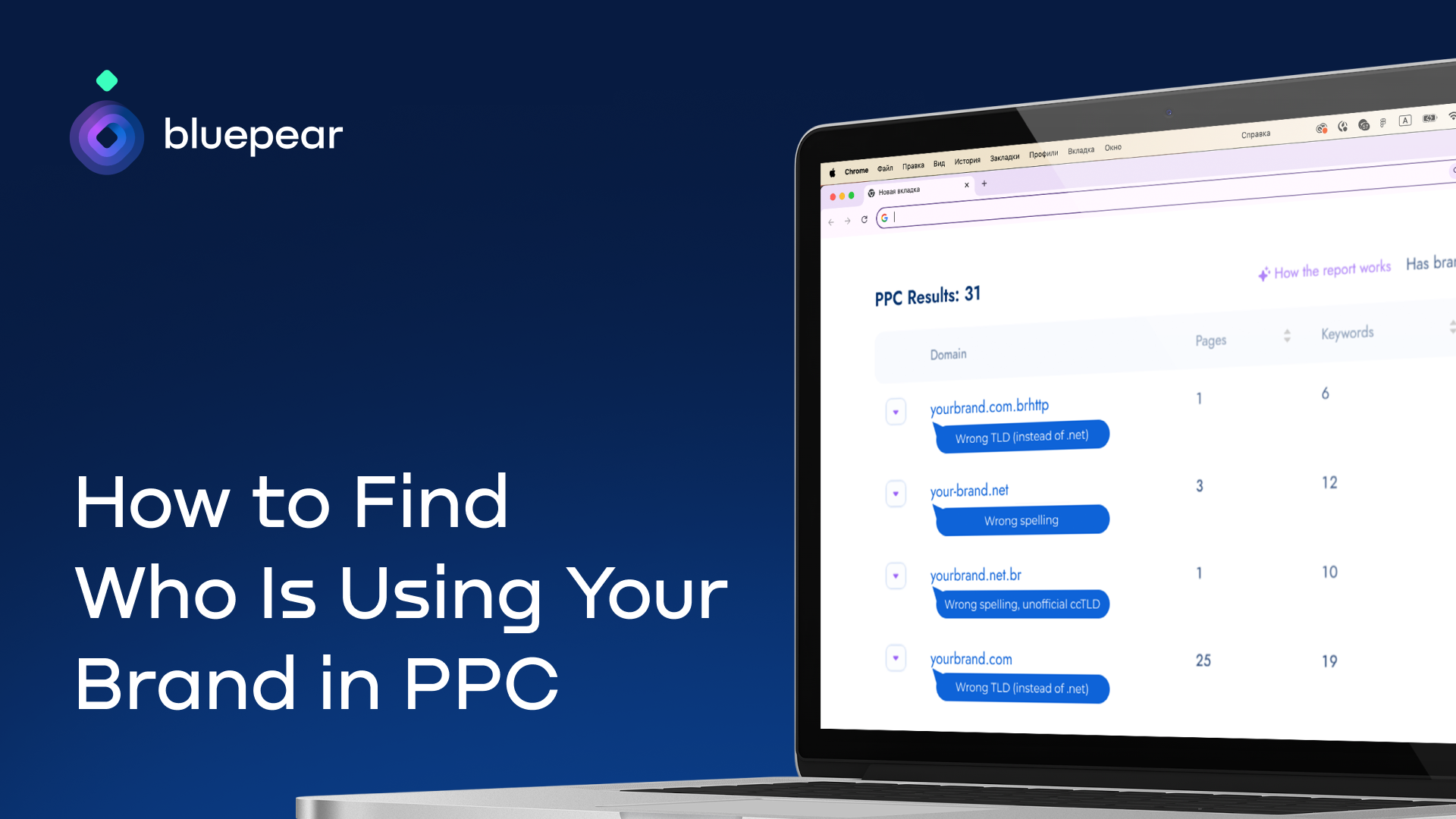
In this guide, I walk through how I monitor branded keywords, identify who is advertising on them, and decide what actions may be available based on the evidence I find.
Choosing Keywords So I Do Not Miss Hidden Activity
When I want to find out who is using my brand in search ads, I start by deciding which keywords I need to monitor.
The biggest mistake I try to avoid is watching only my exact brand name. That is a useful starting point, but it rarely shows the full picture. Some advertisers deliberately target brand-related coupon, discount, review, or alternative queries because those searches often come from high-intent users and attract less scrutiny.
For example, someone searching for “Brand coupon” or “Brand discount code” may be much closer to buying than someone searching for the brand alone. Those queries often attract coupon affiliates, loyalty sites, and unauthorized advertisers trying to intercept branded traffic.
I also pay attention to searches that include terms like “reviews” or “alternatives,” because those queries can bring in competitors and comparison sites that position themselves directly against my brand.
Misspellings matter too. Some advertisers target spelling variations because they are less likely to be monitored and may face less competition.
For a solid monitoring setup, I include my core brand name, “official page” and “login” variations, coupon and promo-code searches, review and alternative searches, commercial terms such as “buy,” “order,” and “sign up,” common misspellings, and localized versions of my brand name.
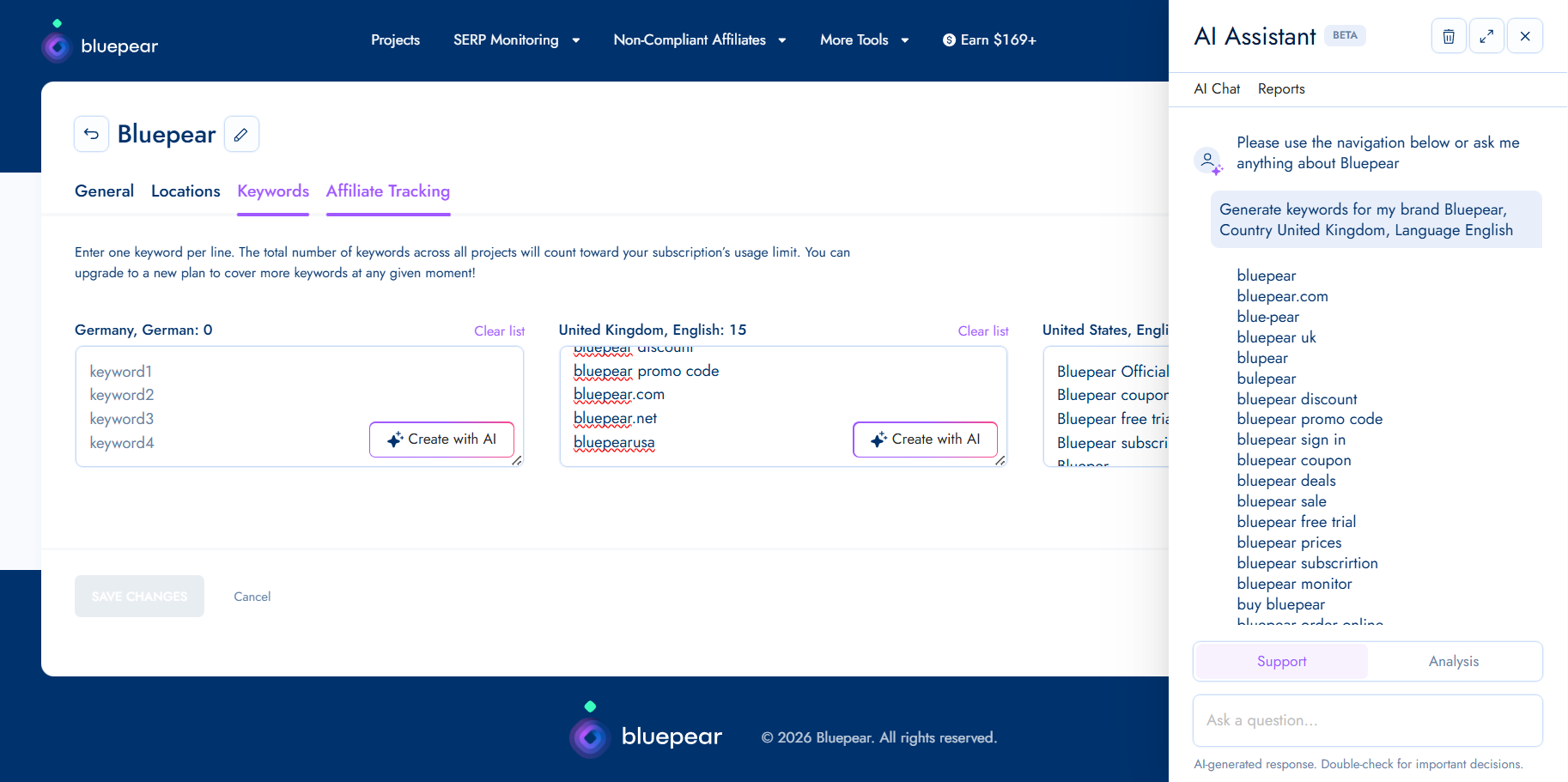
If I am using Bluepear, its built-in AI assistant can generate keyword suggestions from this kind of list and help me expand coverage faster.
The number of terms I monitor depends on the size of the brand portfolio, including trademarks, local branches, and product names. For many small to medium-sized brands, I would start with about 20 keywords and then expand as new risks, markets, and opportunities appear.
Choosing Locations and Monitoring Frequency
I do not rely on a single search from my office, on my device, at one moment in time. Search results are too dynamic for that. Two people searching the same branded keyword can see completely different ads and organic listings depending on their location, device, timing, and other variables.
I also assume that some advertisers may be trying to hide their activity. A fraudster or an affiliate violating my PPC policy might run ads outside normal business hours to reduce the chance of being caught. If I only check manually during the workday, I may never see those ads.
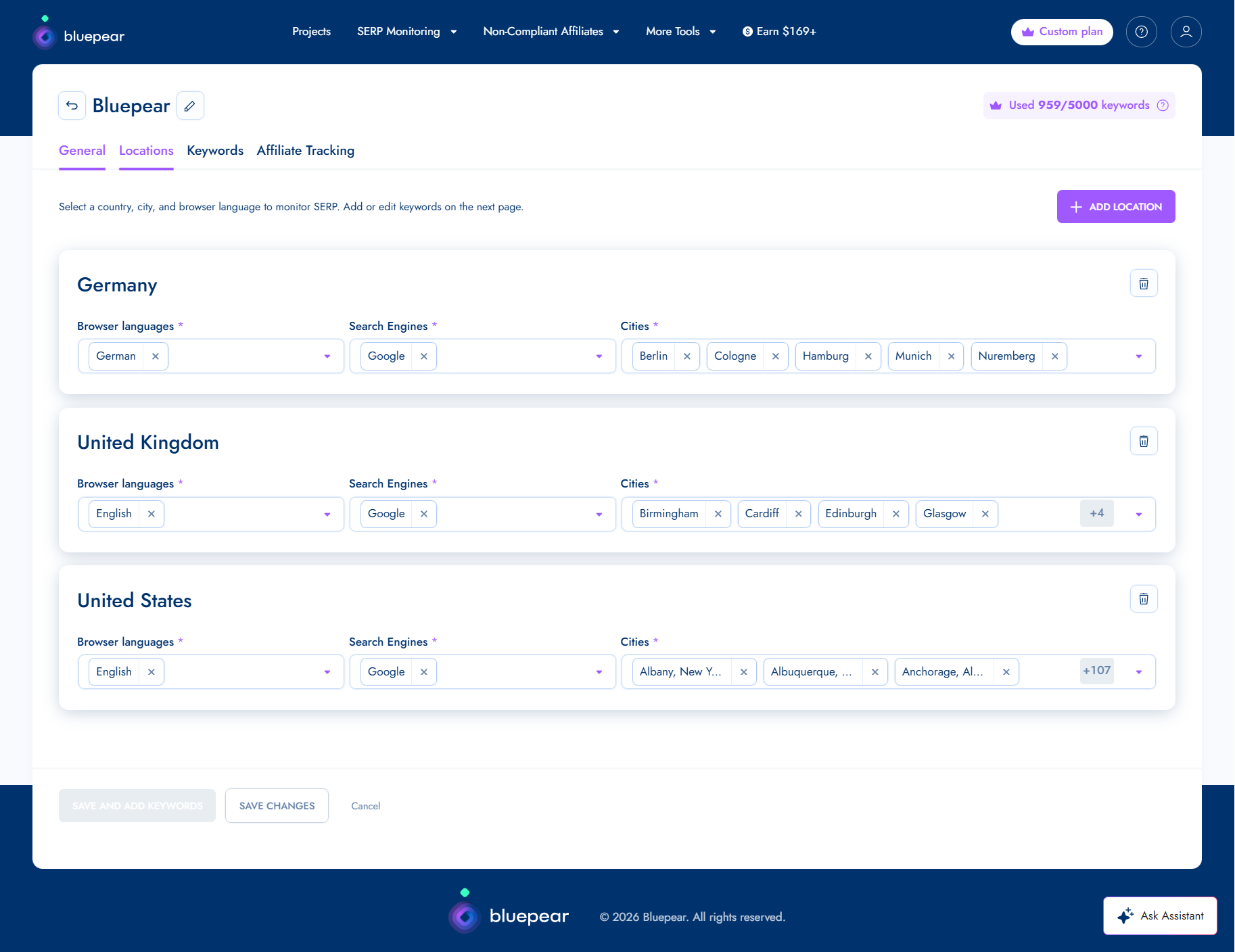
When I monitor branded search results, I look across the countries and markets where my brand operates, regional differences within those markets, mobile and desktop results, different times of day, and weekday versus weekend activity.
Frequency matters just as much as coverage. Some violations appear briefly and then disappear. Running checks multiple times throughout the day gives me a better chance of capturing activity that would otherwise go unnoticed.
Tracking all of these variables manually can become tedious, especially when a brand operates across multiple markets. Bluepear accounts for locations, devices, time zones, and redirects that can obscure the true destination of traffic. I can set the parameters once and gain continuous visibility without turning monitoring into a weekly time sink.
Reviewing Search Results and Recording Evidence
I do not assume every advertiser bidding on my branded keywords is breaking a rule. Competitors may be allowed to bid on branded keywords if they do not use my trademark in their ad copy. Affiliates may also be authorized to promote my brand under specific program conditions.
Still, I need to know when an advertiser’s behavior crosses the line from legitimate brand bidding into trademark misuse, policy violations, or customer deception.
The first signal I investigate is trademark use in ad copy. If the ad mentions my brand name in the headline or description, and my trademark rules or affiliate policies restrict that use, I treat it as a possible compliance issue.
I also look for misleading claims. Phrases that imply the advertiser is “official,” references to exclusive offers, or language that suggests authorization when none exists can confuse users and deserve review.
Coupon and discount promotions need special attention. I verify whether the advertised discount, promo code, or offer is legitimate, because some affiliates use expired, misleading, or fabricated offers to win clicks.
I also watch for impersonation signals. Some ads and landing pages are designed to resemble a brand’s official website. Even if the advertiser does not directly claim to be my company, that kind of presentation can still confuse users and divert branded traffic.
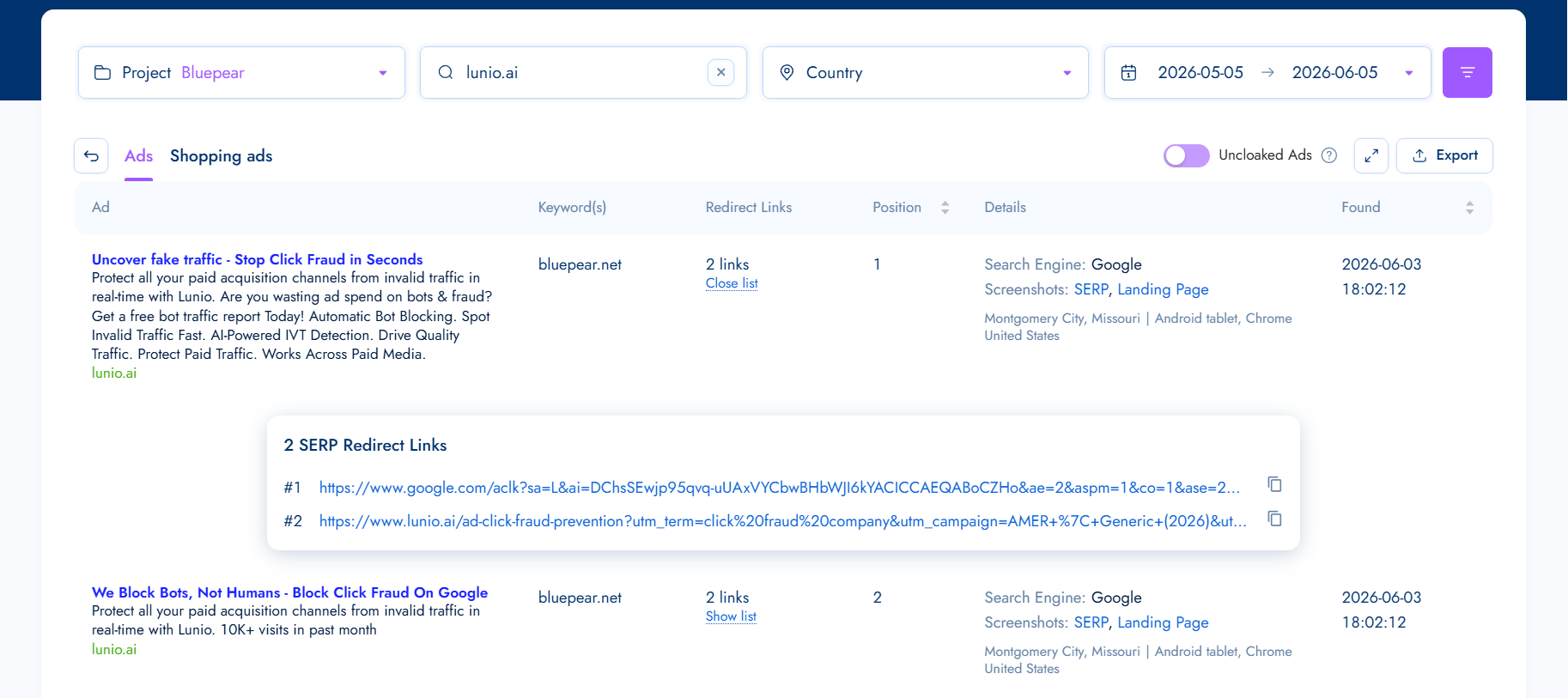
Because advertisers can change ad copy, pause campaigns, or remove landing pages at any time, I collect evidence quickly. I record the ad copy, SERP position, triggering keyword, location, URLs, redirects, landing page content, and timestamps.
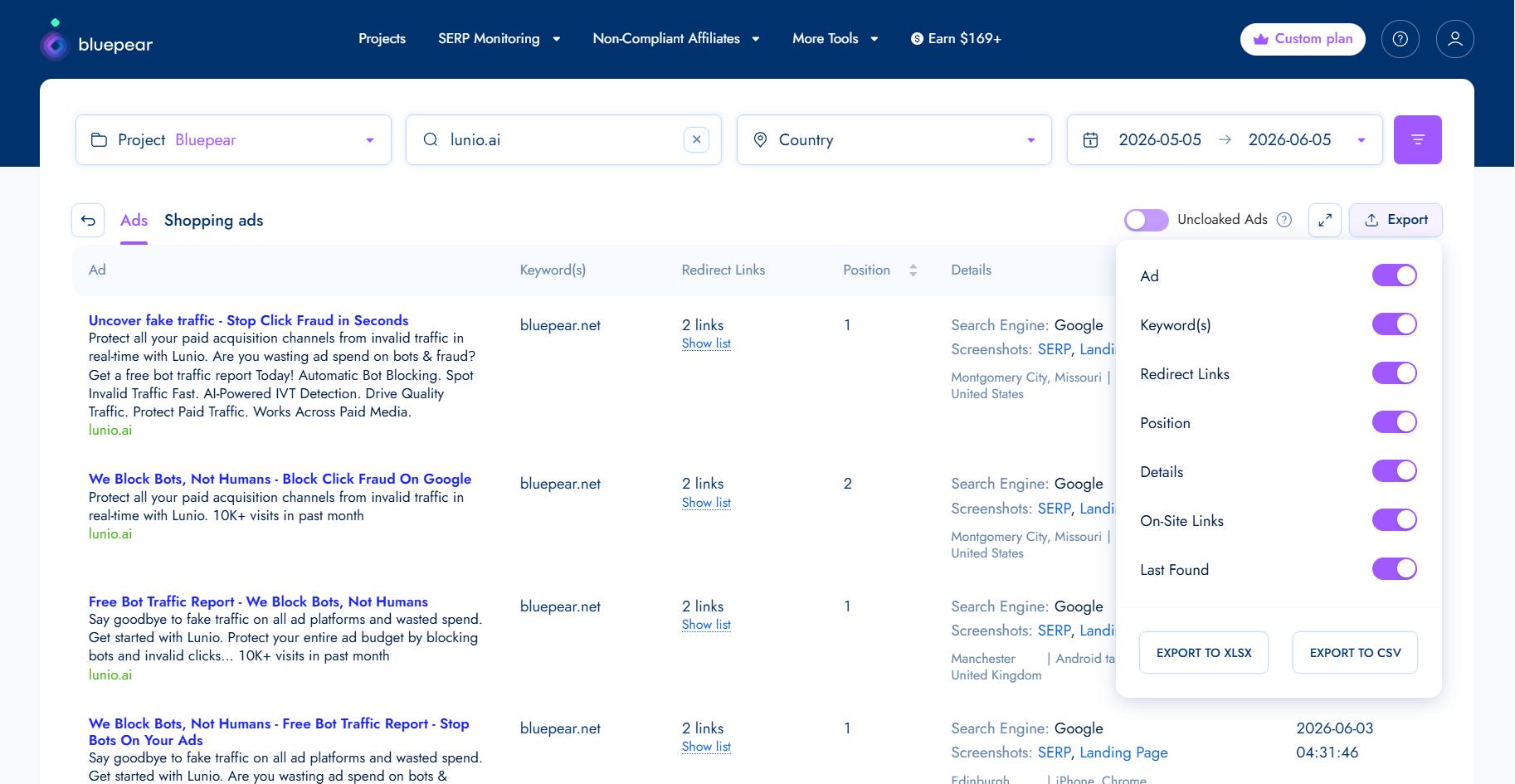
Bluepear can handle this automatically by compiling a report with the relevant details, which makes follow-up easier when I need to contact an affiliate, review a competitor’s behavior, or escalate a trademark issue.
Identifying Who Is Behind the Activity
Sometimes I cannot immediately tell whether an advertiser is a competitor, an affiliate, a coupon site, or something riskier. Branded search results often include multiple participants with different motivations, so I need to understand who I am dealing with before I decide what to do next.
I look for patterns. A direct competitor domain usually points to competitor bidding. A coupon or cashback page may indicate an affiliate, coupon site, or loyalty site. Affiliate network tracking links often suggest affiliate activity, although they can also appear in more questionable setups. Product comparison pages often point to competitors or comparison publishers.
Other signals raise the risk level. If an ad uses my trademark, claims to be “official,” sends users through multiple redirects, promotes coupon codes I cannot verify, or lands on a page that imitates my brand’s design or messaging, I investigate more carefully.
No single signal gives me a definitive answer. I combine multiple pieces of evidence before drawing conclusions. Once I know who is advertising on my brand terms, I can move beyond detection and decide whether their activity aligns with my policies and business goals.
What I Do Next
After I identify who is advertising on my brand terms and review their ads, the next step is choosing the right response.
Competitor Brand Bidding
Not every competitor bidding on my branded keywords requires immediate intervention. Before acting, I ask how often the competitor appears, which keywords they are targeting, whether they are using trademarked terms in ad copy, and whether they are sending users to comparison content or direct offers.
In many cases, I monitor the activity and evaluate its business impact over time. Documenting patterns helps me establish a baseline, which can support future compliance reviews or legal conversations if escalation becomes necessary.
Affiliate Violations
If an affiliate is bidding on restricted branded keywords or violating program rules, I gather evidence and contact the affiliate or network. My workflow is straightforward: document the violation, verify the affiliate ID, share the evidence, request removal or corrective action, and apply program enforcement measures if needed.
Screenshots, timestamps, and redirect data make those conversations much easier because I can show exactly what happened, where it happened, and when it was detected.
Trademark Misuse
Trademark-related issues require careful review. I look for unauthorized trademark use in ad copy, ads that create confusion about brand affiliation, impersonation attempts, and misleading claims that the advertiser is an official brand representative, partner, or reseller.
The right response depends on the circumstances, internal policies, and applicable laws. In many jurisdictions, competitors are generally allowed to bid on trademarked keywords. However, ads that confuse users about the advertiser’s relationship with my brand may raise trademark or unfair competition concerns, depending on the facts and local law.
The advertising platform’s policies matter too. Google allows advertisers to bid on trademarked keywords, but it may restrict trademark use in ad text when a valid trademark complaint is submitted. Google also prohibits ads that use trademarks in a confusing, deceptive, or misleading way.
Before I take action, I collect as much evidence as possible, including screenshots, detection timestamps, URLs, redirects, and landing page content. Once the facts are documented, I may contact the advertiser directly, submit a trademark complaint to the advertising platform, send a cease and desist letter, or escalate through legal channels if necessary.
Why I Keep Monitoring Brand Search
The main lesson is that branded search protection is not a one-time audit. Affiliates can activate and pause campaigns throughout the month. Some violations appear only on weekends, outside business hours, or in specific markets. An advertiser that disappears today may return next week with new ad copy, a new domain, or a different affiliate account.
That is why I treat brand protection as an ongoing process. Occasional searches are not enough. I need consistent monitoring and a repeatable investigation workflow that shows who is appearing on my brand terms, how they operate, and whether action is warranted.
If I want easier visibility into my branded search landscape, Bluepear helps identify issues earlier, respond faster, and make more informed decisions about protecting traffic and advertising investments.
I see Google rolling out new Agency Admin and Standard roles in Merchant Center for Agencies, giving agencies a more centralized way to control client access while improving security and day-to-day efficiency.
What is new: I can now look at client access differently because clients are linked directly to an agency instead of being tied to individual users. That makes it easier to manage permissions from one place, especially when team members join, move roles, or leave.
I also see custom labels becoming a useful part of this update. Agency Admins can organize client accounts by brand, business vertical, internal team, or another structure that fits how the agency works.
Those labels can then be used to give Standard users access to groups of accounts in bulk. For me, that is the practical improvement: agencies no longer need to configure access one account at a time when the same permission logic applies across multiple clients.
Why I care: Agencies managing several Merchant Center accounts have often had to depend on user-level permissions, which can make onboarding, offboarding, and account management more cumbersome than they need to be. This role-based structure moves client management to the agency level, which should reduce administrative work and strengthen access controls.
How it works: Agency Admins get full administrative privileges inside the Merchant Center agency account. In that role, I can link and unlink clients’ Merchant Center accounts, add or remove Standard users, modify Standard users, manage their access to client accounts, and create custom labels for organizing clients.
Standard users receive more limited permissions, which helps agencies follow stronger security practices. I see this as a way to make sure team members only access the client accounts they actually need.
Bottom line: For agencies managing large client portfolios, I expect centralized client linking, bulk access management, and customizable account labels to reduce manual work while making Merchant Center administration more secure and scalable.