As a seasoned PPC professional, I’ve learned the hard way that even experts can fall victim to default settings. It’s become clear to me how crucial it is to thoroughly double-check every campaign setting.
On episode 334 of PPC Live: The Podcast, I chatted with Sophie Fell, Head of Paid Media at Liberty Marketing Group. We delved into a memorable PPC mishap involving location targeting, illustrating how minor oversights can escalate into significant issues—but also how to resolve them effectively.
Sophie shared a story where she inadvertently launched a campaign with worldwide location targeting. The campaign quickly amassed 1,500 leads, which appeared promising until she realized they were from unintended locations.
At first glance, such a spike in leads seemed like a triumph, yet we soon saw it as a cautionary tale. Upon further investigation, the reason was clear: the location settings were misconfigured. This experience taught us the importance of scrutinizing results that seem unusually favorable.
The client noticed the mistake around the same time as Sophie. She addressed the situation with honesty, acknowledging the error, clarifying the misstep, and resolving it promptly. This transparency was crucial in maintaining trust, even if the client felt understandably frustrated.
This wasn’t a case of lacking expertise; rather, it was about rushing through processes and assuming reviews had been done. We’ve all made assumptions that trip us up, and this incident was a stark reminder of the dangers inherent in default settings.
Once the issue was corrected, Sophie’s campaign achieved exceptional results, hitting targets early and surpassing revenue goals by £3.5 million. This success wasn’t defined by the initial error but by the way it was handled.
Nowadays, Sophie double-checks campaign settings multiple times for assurance. She examines settings during any unusual performance shifts and ensures results are thoroughly vetted. Her key takeaway: post-launch reviews often catch what pre-launch overlooks.
When mistakes occur, Sophie advises: pause, assess, and be transparent. It’s critical to take responsibility, explain the error, and detail preventive measures. Errors only escalate into issues if mishandled.
In her audits, Sophie frequently encounters outdated accounts, over-reliance on brand campaigns, and misapplied automation tools. She emphasizes the ongoing importance of aligning keywords, ads, and landing pages, even in the era of AI-driven marketing.
Discussing mistakes is vital—many assume industry veterans no longer err, but learning never stops. Sharing these experiences fosters junior confidence, enhances leadership, and propels industry evolution.
I believe a healthy team culture tolerates experimentation and accountability. Sophie highlights the need for clear testing frameworks, budget constraints, and openness. Teams claiming perfection often lack innovation.
The key takeaway? Regularly verify your campaign settings. Platforms evolve, defaults change, and assumptions can lead astray. Ensuring campaigns align with intentions prevents mishaps.
When I watch a TV commercial that truly connects with me, it’s more than just a fleeting moment of entertainment. It triggers curiosity, encourages me to search online, and often leads to making a purchase.
This is precisely why the “Breaking TV Ads Report,” collaboratively launched by Kinetiq and DAIVID, should be on every search marketer’s radar.
The report ranks the top-performing new TV ads in the U.S., combining Kinetiq’s real-time ad detection with DAIVID’s AI-driven creative analytics to identify which ads truly stand out, why they connect with audiences, and what brands can learn from their success.
It’s a powerful reminder that search doesn’t begin with typing into Google, it starts with a spark in our mind.
As Barney Worfolk-Smith, chief growth officer at DAIVID, said to me via email:
“Search + TV matter – together. TV can boost search volume by up to 60%, and even more in well-coordinated campaigns. AI has altered, and will continue to shape, the TV-to-search relationship, though the principle remains constant: impactful, emotive TV advertising leads to all favorable brand outcomes – search being a prominent one. It’s also key to note that search volume itself is an invaluable indicator of TV ad effectiveness.”
How LeBron James and Indeed Captured Attention
In the first issue of the “Breaking TV Ads Report,” one commercial stood out: Indeed’s “What If LeBron James’ Skills Were Never Seen?”
The ad traces James’s journey from his early days, linking it to Indeed’s “skills-first” hiring message, resonating with viewers due to its authenticity and star power.
Indeed’s ad sparked 11% higher intense positive emotions and garnered 7% more attention than an average U.S. TV ad according to DAIVID. It was among the top 10 ads, alongside campaigns from TikTok, Subaru, and Taco Bell, each with themes revolving around family, mentorship, and belonging.
These ads aren’t merely entertaining stories – they ignite search actions.
When an emotional bond is formed with a brand message, I, like many others, am compelled to explore more – often turning to Google or YouTube for details, reviews, or purchase options.
In 2011, Google introduced the “Zero Moment of Truth” concept, emphasizing that the initial “stimulus” step, like a TV ad, precedes the ZMOT buying journey step.
For many search marketers, focus remains on the measurable second step – insights from clicks and conversions – neglecting the initial step which drives search but often feels like it drains our budgets.
However, research over the past decade indicates that TV advertising significantly extends into search behavior:
In 2015, a Google and Nielsen study revealed TV ads could increase branded search queries by up to 20%, often within just hours after airing.
By 2022, Thinkbox found UK TV advertising provided the strongest multiplier effect on search, social, and web traffic.
In 2024, Comscore identified that coordinated TV and digital campaigns deliver stronger engagement, prompting “second-screen” actions.
In essence, successful TV campaigns quickly translate into search demand – sometimes within mere minutes.
For those of us in SEO and PPC, this generates a clear call to action: be ready to capitalize on these moments.
The Integration of TV and Search by Leading Brands
Prominent brands have effectively demonstrated that coordinated TV stories and search strategies boost performance across both channels.
Apple: Building Curiosity to Ignite Search
Apple’s product launches exemplify cross-channel synergy. Airing an iPhone ad leads to skyrocketing search for “iPhone 17 Pro Max” or its release date.
Following major campaigns, Apple’s branded search traffic can see a up to 40% spike, per Semrush data.
Apple crafts its TV ads to spur questions, not provide answers – nudging viewers to seek more online, where Apple’s search-optimized content completes the user journey.
Progressive: Tying Humor to Searchability
Progressive’s “Flo” campaign is a lesson in how consistent creative narration cultivates search interest.
The campaign’s narratives arouse curiosity, leading to increased branded searches like “Progressive car insurance” or “Flo from Progressive.”
Their media team precisely aligns search and display campaigns with TV schedules, ensuring spikes in interest are met with ready search ads.
Coca-Cola: An Ad Both Shareable and Searchable
Coca-Cola’s historic success with “Share a Coke” underlines TV’s capacity to drive search behavior.
The original campaign, born in Australia in 2011, replaced Coke logos with popular names, enhancing emotional connections and boosting sales globally through a focus on personalization.
The 2025 relaunch targets Gen Z, fostering digital and in-person connections, featuring personalized cans and new interactive tools.
Strategies like QR codes invite consumers to Google “custom Coke” or “share a Coke names.”
Data insights support their approach. By monitoring spikes in branded searches and social mentions, Coca-Cola fine-tuned its campaign strategies.
Assessing Creative Success with Real Audience Indicators
The “Breaking TV Ads” report stands out due to its data-centered approach to measuring creativity.
Kinetiq deploys propietary technology to capture TV ads across the U.S., while DAIVID’s AI gauges emotional responses and attention, yielding a comprehensive creative effectiveness score based on real audience experience.
In today’s fleeting media landscape, such insights are vital to understanding which narratives break through, directly connecting with downstream behaviors like searches or site visits.
As Kinetiq CEO Kevin Kohn highlighted, this partnership offers marketers a panoramic understanding of TV and CTV advertising – not only insights into aired content, but its audience resonance.
This type of insight is what performance marketers, like me, need to bridge the gap between creative resonance and measurable outcomes.
In February 2025, Neal Mohan, YouTube’s CEO, shared that TV has overtaken mobile, becoming the primary device for YouTube viewing in the U.S., according to Nielsen.
Search marketers can apply insights from the Breaking TV Ads Report in various strategic ways:
Expect search spikes: With emotionally charged or celebrity-driven TV ads, branded search activity is likely to rise. Tailor PPC budgets, ad messaging, and keywords to match campaign themes and taglines.
Target intent-rich moments: TV spots spark “navigational” and “informational” queries. Ensure that organic content – landing pages, FAQs, YouTube videos – caters to such queries.
Coordinate search campaigns with TV airings: Use ad scheduling to sync with TV airings or streaming releases. Nielsen Catalina Solutions research shows that coordinated efforts can greatly amplify conversion rates.
Monitor branded search as a creative KPI: Tracking branded search volume can signal advertising impact. Utilize Google Trends or Search Console for tracking shifts post major media campaigns.
Adopt emotional cues in marketing copy: Insights from DAIVID highlight the need for emotionally resonant headlines, ad extensions, and meta descriptions that align with TV-driven sentiment.
Why Cross-Channel Strategies Are the Future of Performance Marketing
Traditionally seen as a response channel, search today functions as the connective tissue between inspiration and action.
Whether it’s a QR code at the end of a TV ad, or a YouTube masthead following a TV broadcast, search seamlessly bridges storytelling and sales.
As brands increasingly embrace connected TV (CTV) and streaming, the lines between “brand” and “performance” marketing will increasingly blur.
Creative effectiveness data helps bridge that gap by highlighting which emotional and visual cues drive search and conversions.
The “Breaking TV Ads” report is a vital reminder that the most impactful search strategies start long before the search itself.
They start with captivating attention and sparking emotions, usually on the biggest screen in the house.
I have to admit, I was surprised when our dark-themed landing page outperformed the light one.
Everything I believed about conversion optimization suggested the light background would dominate.
Light themes are generally the norm for B2B lead generation due to their readability and clean look, aligning perfectly with accessibility standards.
Unbounce’s study of 41,000 landing pages backs up this trend for light backgrounds. Betting on the light theme seemed like a safe decision.
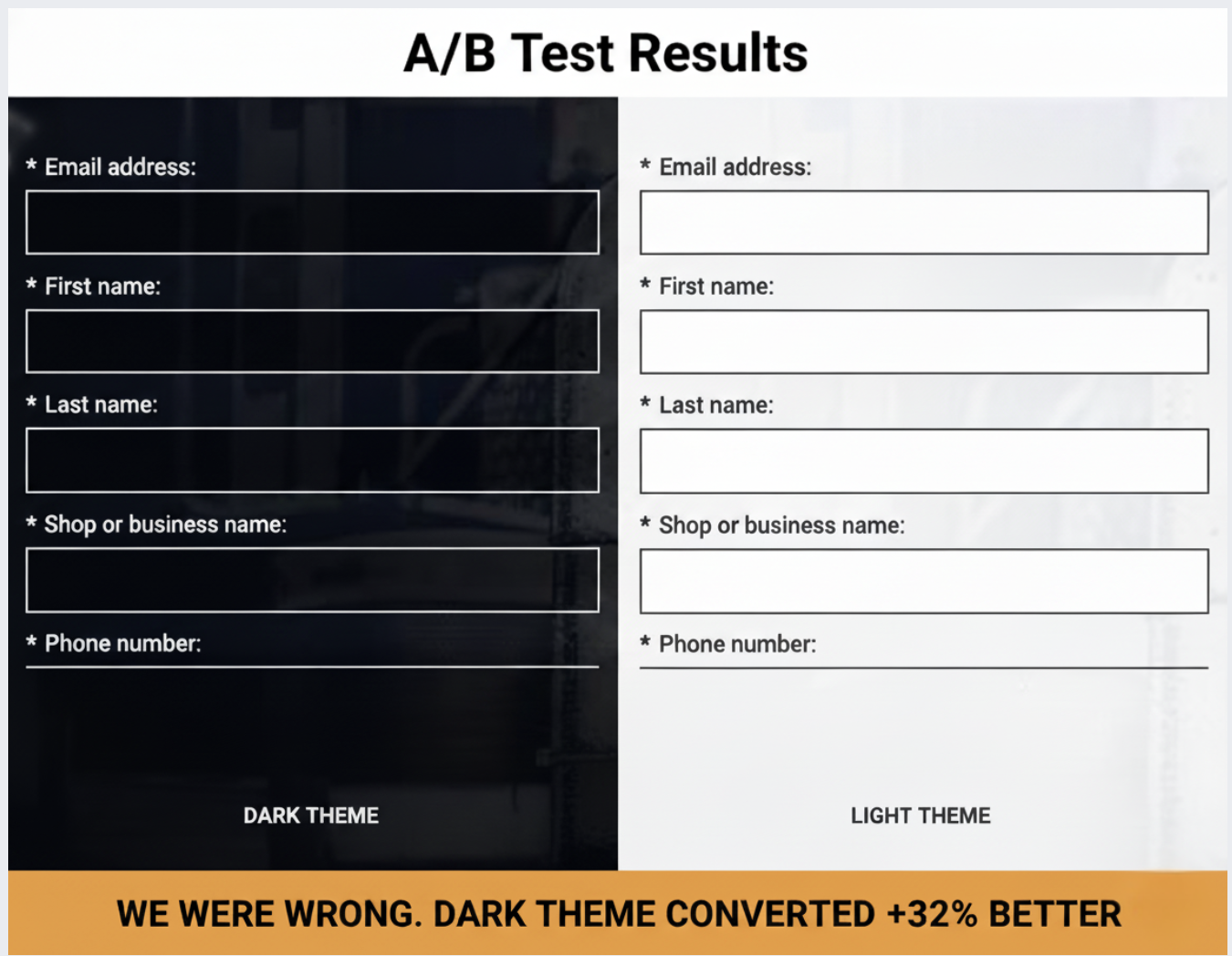
However, after dividing our paid traffic equally between a dark and a light landing page for our industrial fleet repair SaaS, despite a 16.62% higher CTR for the light variant, it resulted in 42% fewer conversions.
This isn’t a call for adopting dark themes universally.
Rather, it’s a case study showing how audience context and industry-specific associations can outweigh best practices drawn from broader samples.
We cater to a niche in the B2B SaaS market, particularly serving the transportation industry—businesses maintaining commercial vehicles and equipment.
Our intended audience includes shop owners and operators engaged in industrial settings, managing technicians, equipment, and demanding commercial clients.
Going into this test, my expectations were clear.
I anticipated light backgrounds would be more effective for our text-heavy lead generation pages, given their emphasis on whitespace and visual hierarchy. Our 7-field form aimed at busy shop operators seemed poised for success with light mode.
I also assumed blue CTAs would yield better results, with blue being associated with trust and security crucial for B2B software purchases. Thus, we used a blue CTA button.
I was incorrect on both fronts.
We conducted this test by isolating the visual design, directing traffic through Google Ads and Meta to two vastly different landing pages with identical copy.
The control page sported a dark theme with a black background, white text, high-contrast form fields, and a subtly outlined black CTA button. The header lacked a brand logo, intensifying the focus on the content.
Conversely, the treatment page featured a light theme, employing white and light gray elements, dark text, and a blue CTA button. Here, our brand logo was prominently placed in the header.
All other variables remained the same, emphasizing the importance of isolating design as the sole differentiating factor.
This test spanned three to four weeks, with Google Ads search campaigns topping $8,205.97, yielding 767 clicks and 30 conversions.
The light theme’s seemingly advantageous CTR masked the truth—it attracted less qualified traffic, converting at a similar or worse rate than expected.
A consistent preference for the dark theme also emerged in Meta tests, reinforcing the role of audience preference rather than algorithmic anomaly.
Understanding why the dark theme won lies in recognizing how it aligns with the psychological and environmental cues of our target audience in the industrial sector.
The dark theme resonated well with the familiarity of industrial aesthetics—functional, robust environments characterized by dark, metallic tones.
The contrast provided by white form fields on a dark background was unmistakable, drawing eye attention naturally.
Dark themes carry a tone of seriousness and value, fitting for the weighty decision-making expected in B2B software acquisitions.
Moreover, embracing familiar industry conventions, the dark interface enhanced trustworthiness and familiarity.
This test taught me that testing design psychology is just as crucial as testing visual elements themselves. Before embarking on similar experiments, consider what your design communicates to your audience rather than just aesthetic appeal.
Finally, ensure your experiments include significant contrast between variations while keeping other elements constant to draw accurate conclusions.
Audience context should guide optimization efforts more than generalized best practices. By focusing on specific audience needs and signals, I’ve learned that real, lasting optimization success can be achieved.
I never realized how much traffic I was losing every day until I learned about unauthorized bidding, affiliate violations, and ad hijacking. It’s a common issue, but don’t worry, I’m here to guide you through building a robust brand protection strategy in paid search.
Did you know that ad fraud reached an estimated $84 billion in global digital ad spend in 2023? If you’re facing a steady rise in branded CPCs or see competitors continuously appearing above you in searches for your own name, this guide is exactly what you need to understand why and what steps to take next.
Brand protection in PPC is about defending your brand from unauthorized use of your branded search terms in PPC ads and any deceitful ad placements. My main goal here is to make sure that people searching for my brand or product name find my official pages rather than those of a competitor, affiliate, or reseller.
Having a well-executed brand protection strategy not only safeguards my traffic but also reinforces my brand’s image and fosters customer loyalty. Without it, I risk facing significant losses, such as higher CPCs, rising affiliate costs, and losing customer acquisition opportunities.
My brand protection activities include:
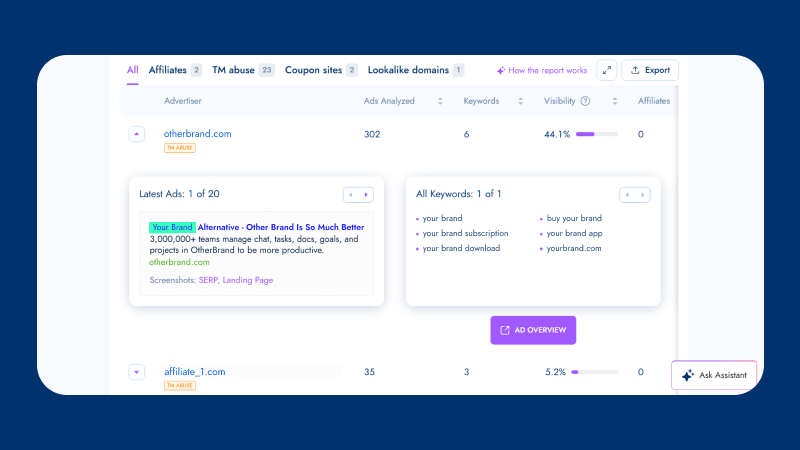
Monitoring who bids on my branded keywords.
Spotting unusual spikes in CPCs or impression share.
Identifying unauthorized trademark use in paid search.
Detecting hidden, geo-targeted ads meant to evade detection.
Enforcing compliance rules for affiliates and partners.
Three main sources of threats exist:
Competitors: They target my branded searches to tap into high-intent traffic, intercepting my audience.
Affiliates: If I miss their dishonest tactics, I end up paying for leads I would have acquired anyway, increasing costs without gaining additional customers.
Fraudsters: Their advanced tactics can cause serious financial and reputational harm to my brand.
Without protecting my brand in paid search, I’m at risk of these common threats:
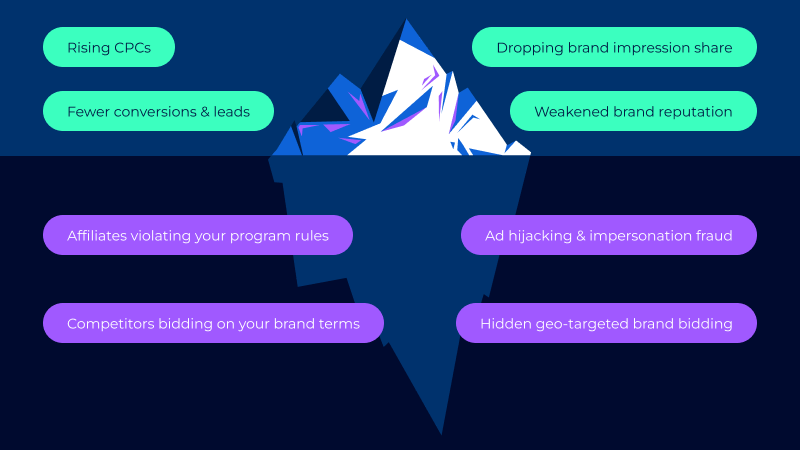
Brand bidding: Others bid on my branded queries to capture high-intent searches, driving up CPCs and reducing my impression share. Over time, this forces me to spend more to regain position, lowering my return on investment (ROI).
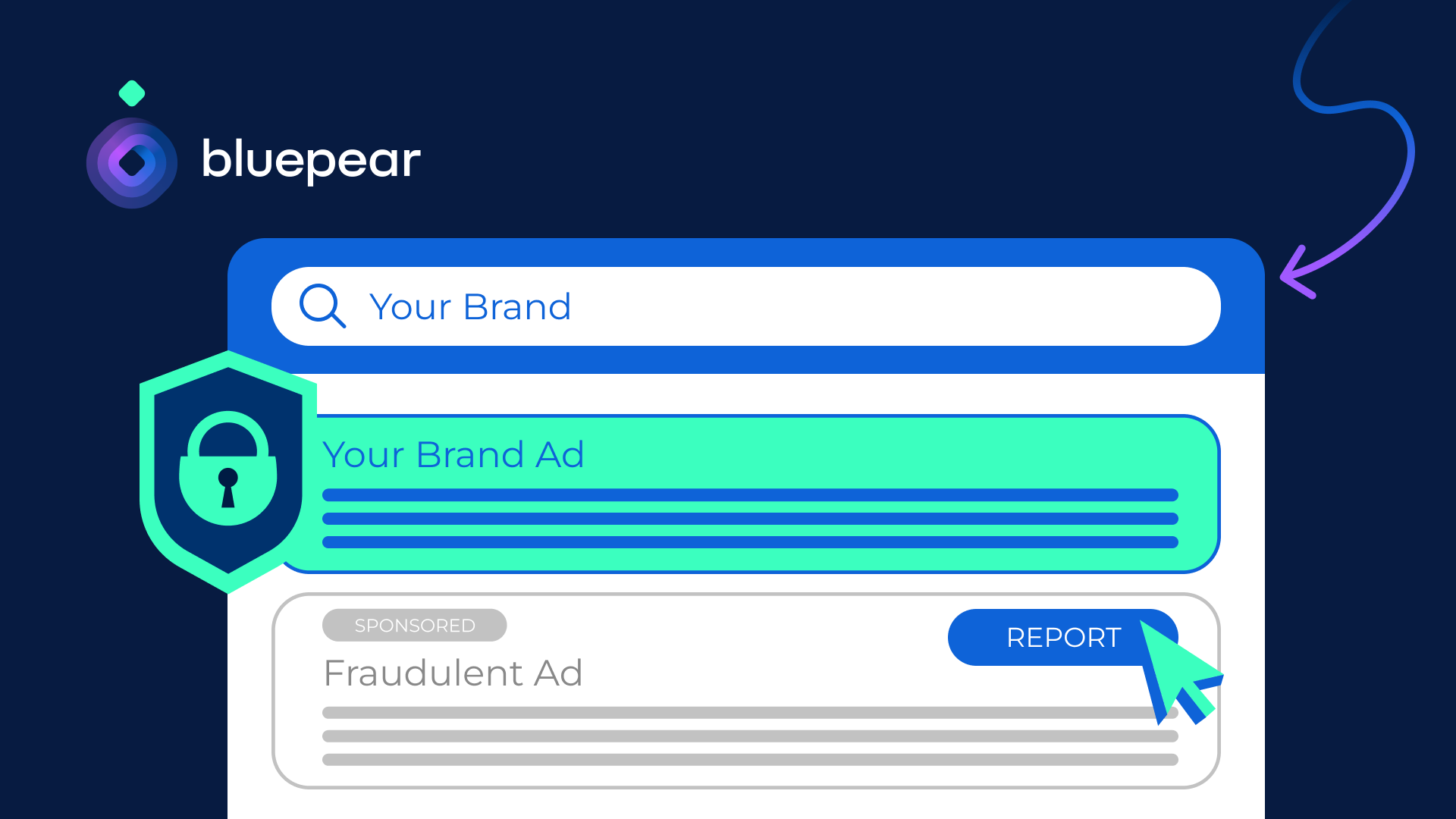
Ad hijacking: Competitors or fraudsters mimic my ad structure to deceive users into clicking what they believe is my official ad.
Malicious redirects: Users clicking on “brand-looking” ads might end up on phishing, malware, or low-quality pages.
Ad copy misalignment: Affiliates may use unapproved or outdated messaging harming my brand image.
Misleading ad copies: Ads that position another product as a direct substitute for mine to divert traffic and conversions.
Given these risks, a dedicated PPC protection strategy is crucial. Without it, my acquisition costs could rise significantly, and I might lose customers at the critical decision-making stage.
In today’s PPC landscape, not protecting my brand erodes trust, skews attribution, and weakens my marketing efforts over time. Consequently, conversions drop, ROI slips, and my paid media effectiveness diminishes.
Important stats to consider:
Global ad fraud costs are projected to rise to $172 billion by 2028 (Statista).
69.7% of marketers reported issues with “spam or fake lead submissions” in their paid media campaigns (Lunio).
U.S. advertisers saved $10.8 billion through anti-fraud initiatives in 2023 (TAG).
For an effective brand protection strategy, I employ these PPC tactics:
Account structure: I ensure my campaigns are clearly segmented to easily spot anomalies in CPCs and impression share.
Negative keyword strategy: I use targeted negatives—partner names, resellers, and irrelevant variations—to cut out the noise.
Affiliate rules: I set clear policies to minimize violations and facilitate compliance enforcement.
Automation and monitoring play a crucial role in a strong brand protection strategy. Relying on automated monitoring, I can catch threats early and resolve them promptly, preserving my budget and performance metrics.
With Bluepear, I detect unauthorized bidding, affiliate violations, and suspicious competitor activities. Real-time alerts help me take swift action as issues appear.
Metrics are vital in measuring my brand protection strategy’s effectiveness. I track:
Violations count: The number of unauthorized activities detected on branded searches over time.
Enforcement rate: How efficiently I respond to and handle these violations.
Cost savings: The budget I recover by curbing CPC inflation and preventing commission leakage.
Branded CTR recovery: How removing violators improves my visibility and click-through rates.
Blueprint has helped companies like Car.co.uk and Rhino Affiliates successfully protect their brand from PPC threats. By adopting similar strategies, I ensure that my brand remains competitive and trustworthy in the digital landscape.
With Bluepear’s platform, I automatically protect my brand without dedicating significant time to manual monitoring. After signing up, I set up my account in just 10 minutes, gaining access to a powerful monitoring tool. This system has allowed me to quickly identify and act against brand bidding, affiliate violations, and hidden ads.
Ultimately, by using tools like Bluepear, I not only protect my brand but also enhance my marketing efficiency, leading to better ROI and more robust brand integrity.
In conclusion, a solid PPC brand protection strategy is no longer optional—it’s a necessity in today’s competitive landscape. By continuously monitoring, enforcing rules, and leveraging automation, I keep my brand safe and thriving.
Discover more about how you can protect your brand. Try Bluepear’s solution for brand protection and start detecting hidden brand bidding in minutes.
I can’t contain my excitement as Google unveils the Developer Assistant for the Google Ads API. This breakthrough tool allows us, as advertisers and developers, to leverage natural language to create, manage, and export Ads API queries effortlessly.
Google has introduced the Google Ads API Developer Assistant v1.0, an innovative Gemini CLI extension. It empowers us to interact with the Ads API seamlessly, transforming our everyday language into instant answers, functional code, and even real-time API calls.
How it works: Embedded within the Gemini CLI, the assistant utilizes project contexts from GEMINI.md and configuration files to generate precise code tailored to our specific environment. With a simple query like, “How do I filter by date in GAQL?”, I receive immediate assistance. If I describe a task, such as “Show me campaigns with the most conversions in the last 30 days,” it provides both the GAQL query and a well-optimized Python script using the google-ads-python client library.
Key features include: The ability to execute read-only API calls directly from the terminal, presenting the results in cleanly formatted tables. Plus, any tabular data can be exported to CSV, filed neatly in a dedicated directory. All code generated by the assistant is automatically organized within a saved_code/ folder for easy access.
Why it matters to us: The Google Ads API is immensely powerful yet complicated. This new Developer Assistant simplifies our workflow drastically, making it quicker and more efficient for teams to create, refine, and optimize Google Ads API workflows—the core of comprehensive campaign management and reporting.
By converting natural language into GAQL queries and operational code, it minimizes technical obstacles and speeds up our ability to glean insights that could lead to better optimization strategies. The ease of one-command execution and CSV exports means we spend less time dealing with coding complexities and more on boosting performance.
The big picture: Google positions the assistant as a dual-purpose tool—a learning aid for beginners and a productivity enhancer for experienced users. For newcomers, the use of natural language commands significantly lowers the learning curve.
For advanced users like me, features such as code generation, automatic file management, and command-line execution streamline and minimize repetitive tasks involved in daily API operations.
Getting started is straightforward: Ensuring you have a Google Ads API token, a configured google-ads.yaml, Python 3.10+, the Gemini CLI, and a local clone of the google-ads-python library is essential. A setup script handles the cloning process, with full instructions available on GitHub.
What’s next: Google invites early users to provide feedback, suggest features, and engage with the community on the Discord channel as the platform evolves with more enhancements and AI-driven tools.
The bottom line: By enabling developers to query, code, and execute using everyday language, Google is transforming the Google Ads API into a faster, more intuitive, and broadly accessible tool.
I’ve just come across some exciting news from Shopify. They’ve launched something called the Product Network, which essentially allows advertisers to connect with potential shoppers across various merchant sites using contextually relevant products. It’s a game-changer!
What’s amazing is that this system can suggest products from other merchants, even when I’m shopping at a store that doesn’t have what I’m looking for. For instance, if I search for “organic cleaning supplies” and the store doesn’t carry them, the Product Network might still offer me alternatives from different merchants. This means I can add everything to a single cart, without even realizing some items come from other merchants.
Here’s how Shopify is positioning themselves: It reminds me of ad platforms like Google Performance Max or Meta Advantage+ Shopping, where advertisers set a cost-per-acquisition goal, and the platform handles the rest. But Shopify is focusing more on the merchandising aspect rather than traditional advertising, which I find quite refreshing.
Amanda Engelman, who’s their advertising product director, summed it up nicely by saying, “It’s just a different approach to the world.”
Historically, Shopify has shied away from profiting heavily off advertising. Their Audiences program is a good example; it creates customer segments for various channels like Google and Meta, but doesn’t take a share of the ad spend.
For merchants, there’s an added incentive to join the network. They earn commissions on the sale of products from other merchants, either in cash or Shopify ad credits. It’s like getting extra ad budget support without the usual upfront investment.
In the early stages, placements in the Product Network are determined by context rather than being driven by revenue targets, though there’s potential for optimization in favor of higher commission items.
The reason this is relevant is that Shopify’s Product Network now allows brands to extend their reach with ease. Shoppers are introduced to relevant products seamlessly, as these can be featured on search results or even on different stores’ homepages.
Unlike typical ads, the focus here is on driving conversions through relevant, context-driven placements rather than simply filling ad space. This could mean better traffic quality and merchants benefiting from third-party sales commissions, thereby expanding the network’s reach and impact.
Looking ahead, Shopify is planning to further enhance the personalization and monetization of this network, all while keeping users within their ecosystem. The whole aim is to support merchants in selling more, even if the products aren’t their own.
Recently, I’ve discovered that YouTube Shorts has updated its ads, making them more interactive and creator-focused. These enhancements are aimed at helping advertisers engage more effectively during those important holiday seasons.
I’ve noticed that the new advertising features are particularly designed for Shorts, offering brands a chance to maximize their holiday marketing budgets by riding the short-form video trend.
So, what’s new?
First, advertisers can now allow comments on eligible Shorts ads, which brings the ad experience closer to organic content. This opens up new ways for real-time engagement with audiences.
Additionally, creators who share branded content on Shorts can link directly to a brand’s website. This provides viewers with an easy path from discovery to action.
Finally, YouTube is expanding Shorts ad placement to the mobile web, allowing advertisers to reach viewers as they move across different devices, such as TV, desktop, and mobile apps.
Why does this matter? These updates make Shorts ads not only more engaging and native but also more actionable. This is crucial for improving performance in the crowded holiday market. Ads with comment features increase engagement signals and allow brands to understand audience reactions in real time.
Link-outs from creators can shorten the path from discovery to purchase, effectively transforming creator influence into measurable traffic. The expanded placement to mobile web ensures a broader reach during busy shopping periods.
The bigger picture? As more of us are watching short-form videos across various screens, YouTube is positioning Shorts as a platform that marries creator authenticity with measurable results. This strategy is directly aimed at advertisers planning for the holiday season.
Looking ahead, advertisers might find these new, more interactive Shorts ads on YouTube beneficial in cutting through the noise and converting viewer attention into holiday sales.
As someone who navigates the complexities of Google Ads, I know the mere mention of ‘Recommendations’ can send shivers down your spine. It’s like a pop-up that corners you on every platform screen—when you’re tweaking keywords, setting campaigns, or batching bids, even when you’re simply checking on things!
I’ve had countless emails from clients fretting over why their ‘Optimization Score’ has suddenly dipped. In this article, I want to demystify what Google Ads Recommendations really are, dispel some myths, and share some tactical advice on how to handle them.
Why do Google Ads Recommendations get such a bad rap?
So why this widespread disdain? To me, it’s plain: the expectations simply don’t align. While the system tailors Recommendations to our accounts, it often lacks the nuance needed for unique business goals.
The algorithm’s designed to spot patterns and suggests tweaks based on what’s working in other accounts. Say you only use Exact and Phrase match keywords—the system might suggest ‘Test Broad Match’ because, theoretically, it could broaden reach, but it may not align with budget constraints or niche specifics.
Bear in mind, Recommendations initially served as a tool for Google Ads sales reps to identify potential client improvements. In their hands, human insight ensured suggestions were relevant. Now, the human filter is absent, making Recommendations feel less tailored.
Is the Optimization Score really that important?
When Google tells you your Optimization Score is low, it’s tempting to perceive it as a failing report card. Many fall into the trap of blindly accepting every suggestion just to see that 100% score light up.
Let me be candid: resist the urge. This score doesn’t reflect performance but rather measures how actively you are reviewing recommendations. Dismissing a suggestion has the same impact on your score as applying it. So, keep your score at 100% if it’s crucial to your Google Partner status—but otherwise, let it slide.
Decoding Recommendations vs. Real Issues
Recommendations might pop up anywhere across the ad platform, not just the designated tab. You’ll see them during account setup, keyword addition, or bid adjustment. These prompts can set off alarms due to their visibility.
Remember, blue or yellow notifications are mere suggestions. Red or purple signals require immediate attention, potentially indicating a billing error or disapproved ad. Maintain a calm head, and only adopt changes that align with your objectives.
Are Recommendations just Google’s strategy to boost spending?
An argument often made is that Recommendations aim to skyrocket spending, subtly capturing more dollars. And sure, Google is profit-driven, but they understand you’ll curb spending if returns don’t justify the expense.
Suggestions are twofold: some aim at increasing reach and expenditure, while others focus on ROI and account refinements that might not increase costs but enhance efficiency.
Turn Off Auto-Apply Recommendations
It’s crucial to mention Auto-Apply Recommendations when discussing these aspects. It’s a feature Google previously championed, enabling automatic implementation of suggestions without checks. Thankfully, it’s losing focus now.
To take control, head to the Recommendations tab, switch to All Campaigns, click Auto-Apply Settings, and ensure all selections are unchecked. Keep the reins in your hands—Google doesn’t need unsupervised access to your budgets, bids, or keywords.
Recommendations aren’t inherently good or bad. They are mere prompts to evaluate and test. Listen to your instincts: review, test if promising, or move on if irrelevant.
This article is part of our ongoing Search Engine Land series, Everything you need to know about Google Ads in less than 3 minutes. In each edition, Jyll highlights a different Google Ads feature and how to maximize it efficiently.
I’ve just discovered a game-changer from Google that could simplify our advertising efforts significantly. Their new Data Manager API offers a streamlined way for us to feed our valuable first-party data directly into Google’s sophisticated AI systems.
As an advertiser, utilizing the Data Manager API means I can seamlessly connect our first-party data with Google’s AI-driven ad tools. This connection is poised to elevate our measurement, targeting, and overall performance, eliminating the hassle of managing multiple systems.
Why I care. By leveraging the Data Manager API, I’m able to inject high-quality data into Google’s AI, which optimizes targeting, measurement, and bidding processes. It replaces the need for various APIs, reducing our engineering workload and accelerating insights into our campaigns. With the decline of cookies, this API is crucial for maximizing the data we already have.
Driving the news. This API serves as a single integration point, unifying multiple Google platform APIs. It’s designed for advertisers, agencies, and developers, making our lives a lot easier.
Here’s what I can do with it:
Upload and refresh audience lists
Send offline conversions for improved measurement
Enhance bidding performance by providing Google AI with richer signals
This API expands upon Google’s existing codeless Data Manager tool, which is already in use by thousands of advertisers to activate first-party data.
Partnership push. To speed up adoption, Google is integrating with several partners, including AdSwerve, Customerlabs, Data Hash, and others.
State of play. Starting today, the API is available across Google Ads, Google Analytics, and Display & Video 360, with more integrations to follow.
The bottom line. Adopting the Data Manager API empowers us by enhancing Google’s AI capabilities, improving measurement, reducing technical complexities, and driving better ad performance, all while gearing up for a future that prioritizes privacy.
I’ve noticed something exciting: Google is testing an innovative feature that enhances the local feel of Shopping ads. Some ads that utilize local inventory feeds now showcase the merchant’s city or town just above the product title. Imagine seeing ‘London’ or ‘Tonbridge’ alongside your favorite product, giving you an instant connection to where the store is located.
Why this matters to me. The addition of these location labels makes Shopping ads significantly more personable and trustworthy. For retailers in my vicinity, this could be a game-changer, as it helps them stand out against a sea of competitors. By clearly indicating a store’s location, there’s a greater likelihood of increased click-through rates and more in-store visits from shoppers, just like myself, who prefer supporting local businesses.
This feature also offers merchants using local inventory feeds a competitive advantage by promoting their proximity without the need for new ad formats or extra configuration.
How it operates. These labels are integrated into Shopping ads that already incorporate local inventory data. This addition complements existing tags like:
In-store
Pickup later
Curbside pickup
What’s unique about this label is its exclusive focus on the store’s location, as opposed to fulfillment options.
The drawback. Google hasn’t officially announced this feature, and details about its rollout, eligibility, and technical requirements are still under wraps.
Reading between the lines. For merchants operating in renowned or high-trust locations, this could significantly boost visibility. As a customer, I’m nudged to prefer nearby retailers over expansive marketplaces or distant sellers, which is a win for local communities.
Spotted first. This update was originally reported by Hana Kobzová, founder of PPC News Feed. Her keen eye on these developments certainly keeps us informed.