Category: PPC

  • From Mailroom to PPC CEO: Anthony Higman’s Journey of Redemption

    From Mailroom to PPC CEO: Anthony Higman’s Journey of Redemption

    I recently spoke with Anthony Higman, the CEO of AdSquire, on episode 336 of PPC Live The Podcast. Anthony’s remarkable journey took him from the mailroom of a law firm to the helm of his own company with a panoramic view of Philadelphia. His story exemplifies how dedication, learning from missteps, and perseverance can forge a successful career path.

    Learning from Client Missteps

    Anthony opened up about one of his early blunders with a client, where he allowed them to chase after quick-win promises in numerous emails. Though some were outright scams, others were genuine but unaligned with the client’s goals. His decision to let a client engage with an ineffective SEO agency resulted in subpar outcomes and a revolving door of agencies for the client.

    The lesson learned was clear: building trust with clients is vital, but it’s equally important to provide them with strategic guidance. Striking a balance between educating them and respecting their autonomy is key.

    A Career Lesson from ‘Cowboy Moves’

    Recalling another early career incident at a large advertising agency managing car dealership accounts, Anthony described how he took independent action to correct widespread account mismanagement, considerably enhancing results. However, his proactive steps clashed with company norms, leading to his dismissal.

    This taught him invaluable lessons: knowing one’s values and finding workplaces aligned with them is crucial. Moreover, balancing client success with company expectations is crucial. Today, at AdSquire, he emphasizes consistent account management and clear communication within his team.

    Managing Client Expectations in a Complex Industry

    Anthony highlighted the challenges of managing expectations in competitive industries like legal marketing. While clients often seek various services like SEO and social media, focusing on core strengths rather than spreading resources thin is essential for achieving the best results.

    The Role of Mistakes in Growth

    He believes that mistakes are fundamental to growth. At AdSquire, he encourages his team to learn from their errors without fear of losing their jobs, as long as they remain honest and aligned with the company’s vision. This approach cultivates a culture of learning, accountability, and innovation.

    Common Mistakes in Modern Paid Search

    With AI advancements in Google Ads, Anthony has noticed frequent mistakes such as improper search partner and location settings, automated assets misuse, and auto-apply recommendations. While AI can streamline processes, strategic oversight is essential to avoid undermining performance.

    Key Takeaways from Anthony’s Stories

    Anthony’s experiences offer two main insights:

    1. Guide clients strategically, steering them away from scams while presenting genuine growth opportunities.
    2. Understand your values and choose environments where your ethics and skills align. Never compromise on your principles.

    His philosophy illustrates that mistakes can lead not to failure but to redemption, innovation, and enduring success.

    Looking Ahead: AI and the Future of Google Ads

    Anthony envisions continued AI integration in Google Ads by 2026. While some tools may falter or conflict with specific needs, maintaining strategic oversight and adding a personal touch will remain crucial. Misguided use of AI, such as automated video inventory creation, can yield inconsistent results and demands vigilant monitoring.

    Conclusion: F-Ups Lead to Redemption

    Reflecting on his career, Anthony draws parallels with The Shawshank Redemption. Every misstep contributed to future opportunities, eventually enabling him to establish AdSquire and earn recognition as a top PPC influencer. The overarching lesson: embrace your mistakes, learn from them, and let them serve as pathways to success.


    Inspired by this post on Search Engine Land.


    crushpress.ai community screenshot
  • Unlock Creative Freedom with Google’s Expanded Video Limits

    Unlock Creative Freedom with Google’s Expanded Video Limits

    I’ve noticed that Google is testing a new feature in their Performance Max campaigns that could really shake things up for us as advertisers. It seems they’re considering raising the limit on video assets from 5 to as many as 15 per Asset Group. This change could open up a whole new level of creative freedom without needing to fragment our campaigns.

    Why does this matter to us? Well, video content is becoming crucial for the success of Performance Max. The current five-video limit forces us to make tough choices between different formats and ratios, which in turn restricts our reach across platforms like YouTube, Discover, and others. This new limit could lift those restrictions considerably.

    With this potential update, we could include up to 15 videos per Asset Group. This means we can cover all major video ratios and formats without having to duplicate efforts or fragment campaigns. It’s an opportunity for richer, more versatile campaigns.

    For those of us managing multiple video versions, this change could mean significantly streamlined campaign management. We could test more creative ideas without losing out on reach or complicating our campaign structures.

    ```json
{
  "alt": "Interface for selecting up to 15 YouTube videos for an ad campaign, showing tabs for Suggested, Asset library, Search YouTube, and Upload.",
  "caption": "Easily curate up to 15 YouTube videos for your next ad campaign. Navigate through options with a streamlined interface for effective content selection.",
  "description": "This image shows a user interface for selecting YouTube videos to use in an advertisement. The interface features tabs including Suggested, Asset library (highlighted), Search YouTube, and Upload. Options for viewing content in 'Cards' or 'Table' format are available. A 'New' button allows for adding new content, while a filter option can refine selections. Ideal for digital marketers and SEO professionals managing video ad campaigns."
}
```

    It’s still early days, with Google not yet making a formal announcement about this update. It could be in testing, or maybe it’s slowly being rolled out. Keep an eye on any new developments in this area.

    This update first came to light when Growth Marketing Manager Molly Pritchard shared the new option on her LinkedIn profile. It sure caught my attention!

    Bottom line? This may seem like a small tweak, but for those of us utilizing Performance Max, increasing the video cap could greatly enhance our creative strategies with minimal trade-offs.


    Inspired by this post on Search Engine Land.

    crushpress.ai community screenshot
  • Unlock Performance Max Potential with A/B Asset Testing

    Unlock Performance Max Potential with A/B Asset Testing

    Google has rolled out a new Beta feature that allows us, Performance Max advertisers, to A/B test asset sets. This expansion takes last year’s retail experiment to an exciting new level, now available for all campaigns.

    With this update, I can compare two sets of assets while keeping the ‘common assets’ steady across both versions. By accessing the Experiments page under the Assets sub-menu, I can determine which creative combinations yield the best results.

    I saw a similar experiment rolled out for retail campaigns last year, and I’m thrilled to see it expand to all Performance Max campaigns.

    Why it matters to me. Performance Max campaigns rely heavily on automation, often making it difficult for me to test specific creative assets. This new capability gives us more control over asset-level performance without compromising the integrity of the entire campaign.

    The big picture. From my perspective, tests must run for at least four weeks to consider the learning phase of P-Max and ad delivery stabilization. While the results aren’t immediate, they’ll allow me to make more informed choices about which images, headlines, and videos drive engagement.

    Between the lines. Asset-level A/B testing could be a pivotal factor in enhancing my Performance Max ROI, particularly when managing diverse creative and asset formats.

    First seen. This update caught my attention when web marketer Dario Zannoni highlighted it on LinkedIn.

    The bottom line. Although still in Beta, this experiment type offers a new degree of transparency and control over automated campaigns, potentially transforming how I approach asset strategies in Performance Max.

    Dig deeper. For more insights on this feature, check out About Performance Max optimization experiments: A/B testing assets (Beta).


    Inspired by this post on Search Engine Land.


    crushpress.ai community screenshot
  • Unveiling the Power of Demand Gen in Google Ads

    Unveiling the Power of Demand Gen in Google Ads

    Looking to expand your reach beyond Google Search? Demand Gen campaigns push your ads to ideal audiences across YouTube, Discover, and Gmail.

    As someone deeply involved with Google Ads, I spend most of my time optimizing Search, Shopping, or Performance Max campaigns. It’s understandable, as the Google SERP is foundational to Google Ads. But there’s a significant opportunity within your Google Ads account that many overlook.

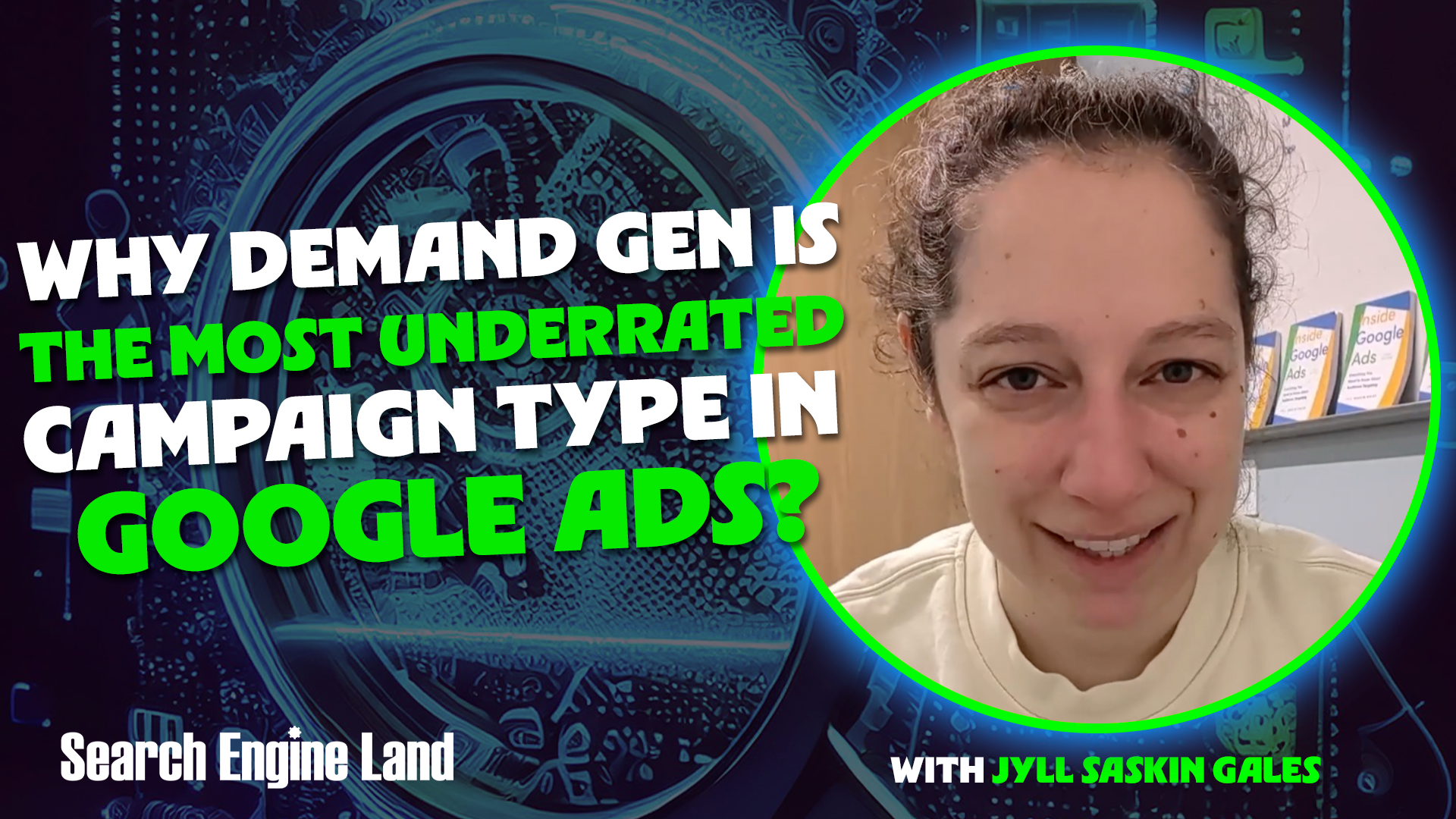
    I firmly believe Demand Gen is the most undervalued campaign type in Google Ads, and this needs to change.

    If you’ve been cautious about trying Demand Gen or have written it off due to past failures, consider this your nudge to incorporate it into your 2026 strategy. Demand Gen offers a transformative approach to using Google’s ecosystem for growth through paid advertising.

    To understand Demand Gen, move away from a keyword-centric mindset. Think of it as running Meta (Facebook or Instagram) ads but leveraging Google’s platforms instead.

    Where traditional Search campaigns react to a user’s query, Demand Gen focuses on the user themselves, distributing creative content—images or videos—based on user characteristics rather than their immediate actions or searches.

    Demand Gen can place your ads on Google’s various “owned and operated” properties, including:

    • YouTube (Shorts, In-stream, In-feed)
    • Gmail
    • Discover
    • Google Maps (coming soon!)

    I advise starting with all these channels activated but opting in or out of specific channels as desired.

    While the Google Display Network is an option, it’s wise to prioritize Google-owned properties where intent signals are more robust.

    In Demand Gen, targeting moves away from content and instead utilizes Google’s extensive audience targeting capabilities:

    • Lookalikes: Build audiences mirroring your converters, similar to Meta.
    • Remarketing: Re-engage past visitors or customers.
    • In-Market, Life Events & Affinity segments: Reach people based on interests or behaviors.
    • Detailed demographics: Target based on user demographics.
    • Custom Segments: Focus on search terms or websites/apps users frequent.

    However, combined segments aren’t compatible with Demand Gen; you can only exclude your data segments.

    Demand Gen supports a versatile range of ads: standard image ads, carousel image ads, and video ads. If you’re in ecommerce, integrate your Google Merchant Center feed for product-based ads.

    Unlike Video campaigns, which aim for impressions or views, Demand Gen targets clicks or conversions using these bid strategies:

    • Maximize Clicks
    • Maximize Conversions
    • Maximize Conversion Value
    • Target CPC
    • Target CPA
    • Target ROAS

    You must choose a conversion category, whether it’s a purchase or another action like a YouTube subscription.

    What’s more, Demand Gen uniquely permits the Target CPC strategy, allowing control over CPC in a space dominated by AI-driven bidding. This manual control is beneficial for tightly managed budgets.

    Demand Gen surpasses standard Display campaigns in several ways:

    1. Inventory Quality:

    It primarily serves on authenticated Google-owned properties, ensuring higher engagement compared to random web placements typical in Display campaigns.

    2. Spam Reduction:

    Higher audience and inventory quality reduce the likelihood of spam leads, a crucial factor for lead generation.

    3. The Cost Reality:

    While CPCs in Demand Gen often exceed Display, the quality justifies the price. Plus, it remains cheaper than Search campaigns, with CPCs typically between $0.50 to $2.00.

    Demand Gen isn’t a black box; it provides transparent reporting similar to Performance Max:

    • Asset-level reporting: Analyze text, image, and video performance.
    • Audience insights: Understand who engages with your ads.
    • Channel segmentation: Control where ads appear (YouTube, Discover, Gmail) and tailor placements accordingly.
    • Placement reporting: Inspect YouTube placements to refine targeting.

    Feeling ready to launch a Demand Gen campaign? Here’s my advice for structuring a test:

    For smaller businesses:

    With a tight budget ($5-40/day), go simple.

    Targeting: Use your “Google Engaged” remarketing audience and a Custom Segment of top-performing search terms.

    Why: Capture high-intent users yet to convert with Demand Gen’s cost-effective inventory.

    For ecommerce businesses:

    Creative reigns supreme! Run one Demand Gen campaign with and one without your product feed.

    Why: Test whether product ads or lifestyle visuals better drive engagement. Results will reveal optimal strategy.

    For larger businesses:

    If budget allows, Demand Gen should be a strategic staple, not just a test. Treat it as an “always-on” layer for targeting specific audiences.

    Targeting: In-Market, Life Events, Detailed demographics, Affinities.

    Why: This approach keeps your brand visible and top-of-mind among your target audience.

    In conclusion, Demand Gen stands out by bridging high-intent Search with social storytelling, offering superior quality over Display and cost-efficiency compared to Search. Will Demand Gen make it into your strategy this year? If growth beyond the search bar is your goal, it absolutely should.

    This article is a part of Search Engine Land’s ongoing series, Everything you need to know about Google Ads in less than 3 minutes. Each edition, curated by Jyll, highlights a different Google Ads feature to maximize your results swiftly.


    Inspired by this post on Search Engine Land.

    crushpress.ai community screenshot
  • Must-Avoid Google Ads Mistakes in 2026 for Success

    Must-Avoid Google Ads Mistakes in 2026 for Success

    Hey there! Navigating the ever-evolving landscape of Google Ads can be quite the adventure. I’ve gathered some important insights to help us optimize our PPC campaigns by addressing common pitfalls like inconsistent tracking, outdated negative keywords, and an over-reliance on AI.

    Google Ads is in a constant state of evolution. This means new challenges and mistakes often pop up as we optimize and manage our PPC campaigns. Let me share some insights on the most prevalent Google Ads mistakes in 2026, so we can dodge them effectively this year.

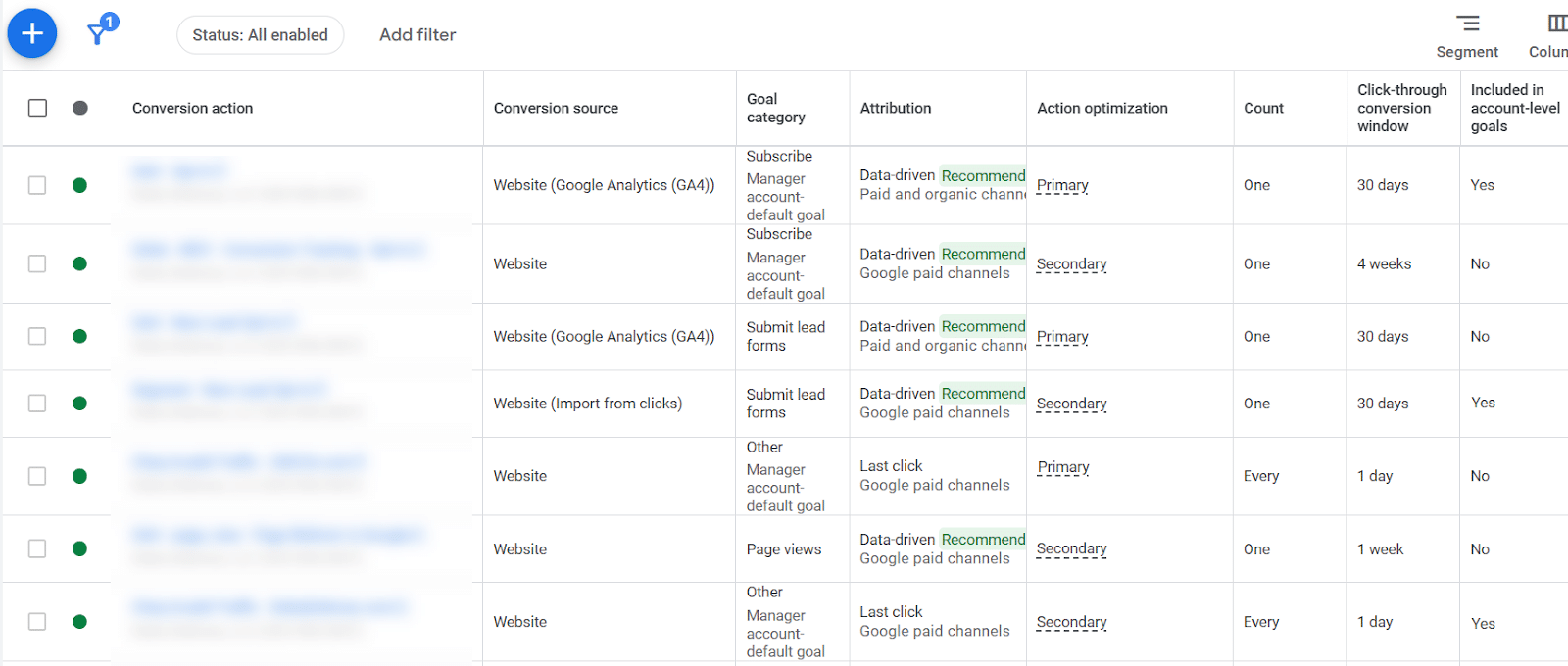
    Optimization decisions hinge on conversion data. If our conversion tracking is inconsistent, it skews the entire account’s data, making it difficult to draw accurate insights.

    ```json
{
  "alt": "Screenshot of a conversion action table from a digital marketing platform showing various metrics and attributions.",
  "caption": "Explore the intricacies of conversion actions with this table, revealing data-driven insights and attribution details crucial for optimizing digital campaigns.",
  "description": "This image is a screenshot of a conversion action table from a digital marketing platform. It displays information such as the conversion action, conversion source, goal category, attribution, action optimization, count, click-through conversion window, and account-level goal inclusion. Key phrases include 'Website', 'Google Analytics (GA4)', and 'Data-driven'. Each row provides specific metrics, offering insights into digital marketing performance."
}
```

    Converting varying attribution methods, count types, and conversion windows means data is applied unevenly across our account, complicating any assessment of click value.

    Occasionally, we might override tracking settings at the campaign level, achieving accuracy there but inconsistent data at the account level. Ensuring consistent application of conversion data is something I prioritize in my management tasks.

    ```json
{
  "alt": "Screenshot of an online ad management dashboard showing campaign status, bid strategy, and schedule.",
  "caption": "A glimpse into an ad manager's world: Dashboard snapshot showing diverse campaigns and their strategies across networks.",
  "description": "This image shows a screenshot of an online advertising dashboard. The interface displays various ad campaigns, each with details including bid strategy type, network, ad rotation, location, and ad scheduling. Campaigns are set to 'Maximize conversions' or 'Target ROAS', with networks like Display and Google Search. Locations include Puerto Rico and the U.S., with specific scheduling times. Keywords: ad management, campaign, bid strategy, scheduling."
}
```

    I’ve noticed many people losing sight of ‘exact match’ keywords as Google encourages broad match by making it the default setting in their interface. Yet, exact match is invaluable, consistently proving to be the highest-converting match type for many of us.

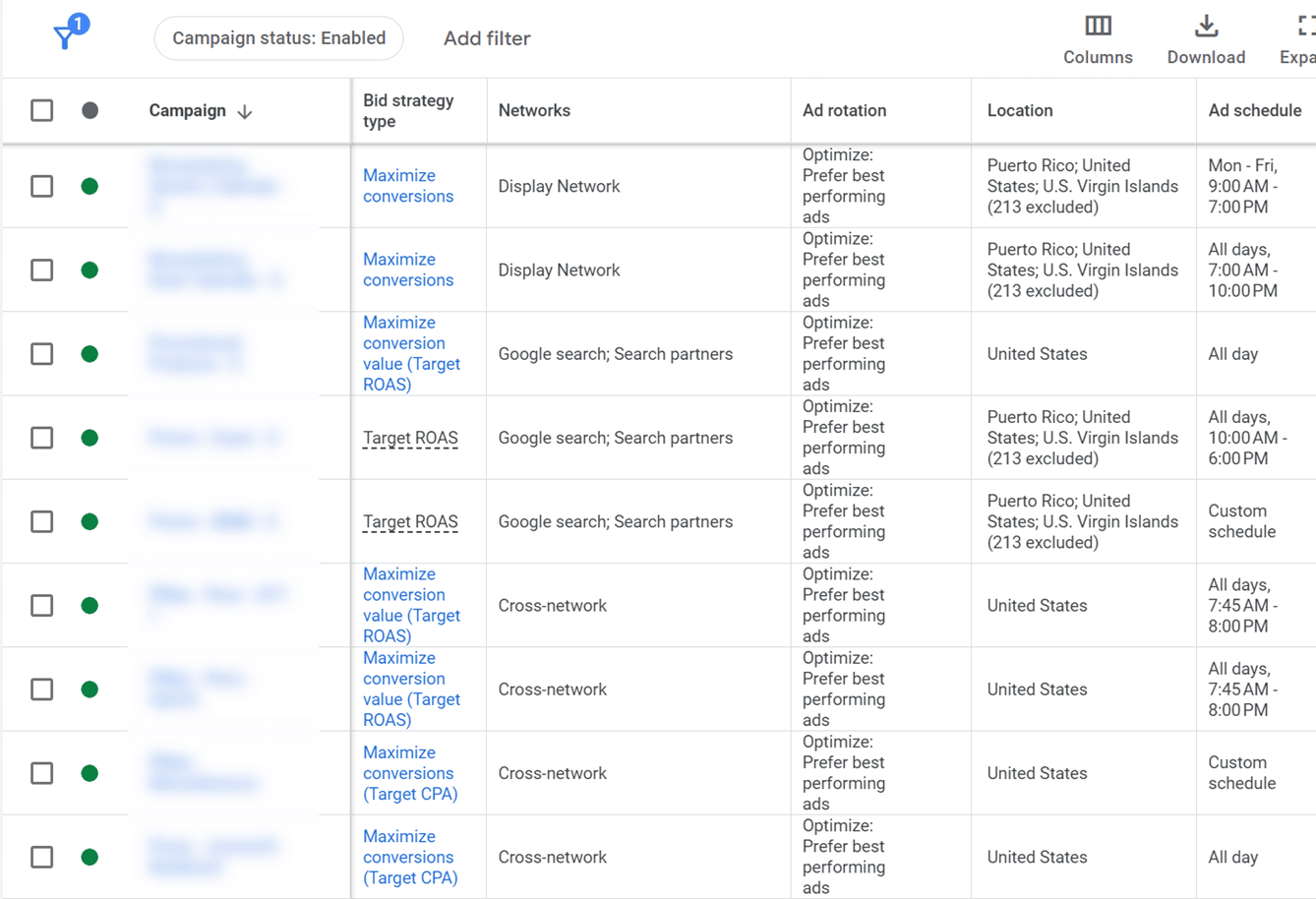
    When campaigns vary widely in excluded regions, ad schedules, and bid strategies, it’s crucial to re-evaluate our settings. Consistency in campaign settings is vital to keeping everything running smoothly.

    ```json
{
  "alt": "Negative keyword list table showing various categories, keyword counts, and campaign numbers.",
  "caption": "Explore the diverse landscape of negative keywords to optimize your ad campaigns. This table breaks down keyword categories, counts, and related campaigns.",
  "description": "This image displays a table of negative keyword lists used in digital advertising campaigns. It includes categories such as Active Non-Brand Exact Keywords, Brand Exact Keywords, and COVID-19 Negatives. Each category lists the number of keywords and campaigns associated with them. The data assists in refining ad strategies by identifying keywords to exclude, thereby improving targeting and efficiency. Keywords and campaigns are essential metrics for marketers aiming to maximize ad spend."
}
```

    Ad strength directly affects how much control Google has over our ad content. Lower ad strength means more control for us, which I’ve found leads to higher conversion rates despite common misconceptions about its impact on quality scores.

    The flexibility of match types has loosened in recent years, leading to search terms triggering multiple keywords. This duplication, without exact matches, can cause inconsistent messaging. I always make sure our keyword list includes top-performing search terms.

    ```json
{
  "alt": "Google Ads recommendations for keywords and bidding strategies",
  "caption": "Level up your ad campaigns with Google Ads' tailored recommendations for keywords and bidding strategies, helping you optimize performance and reach.",
  "description": "This image shows a Google Ads recommendations page for optimizing ad campaigns. It includes suggestions for keywords and targeting, such as adding new and broad match keywords, and bidding strategies to maximize impressions, clicks, and conversions. Checkboxes indicate selectively applied suggestions. These insights help improve ad reach and efficiency."
}
```

    Broad match keywords can lead to different results based on our bidding strategies. I learned the importance of matching bid strategies with the right keyword types. After all, different goals require different approaches.

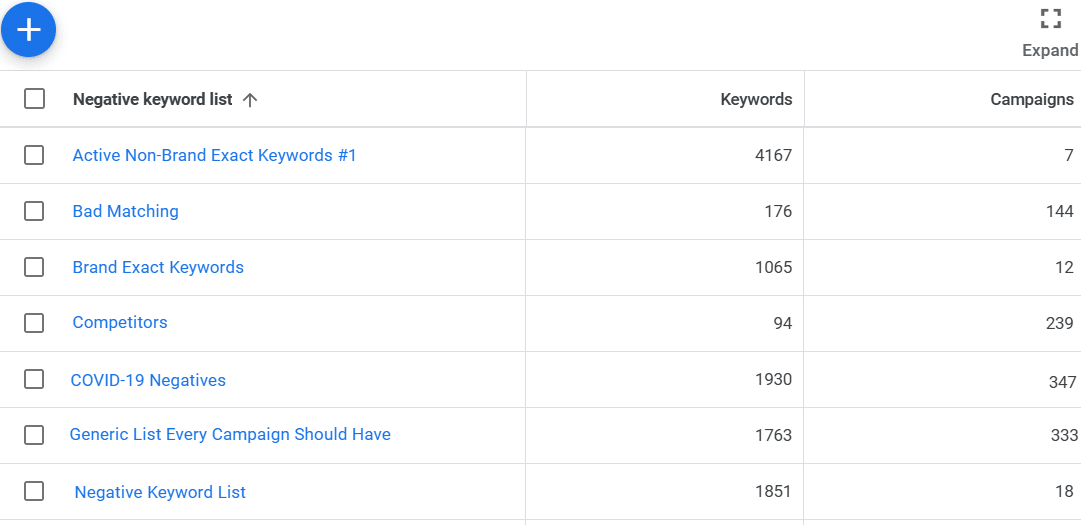
    Blinded by our auto-pilot tendencies, we might use outdated negative keyword lists without review, which leads to keyword blocking and lost opportunities. It’s essential to review these regularly to prevent conflicts.

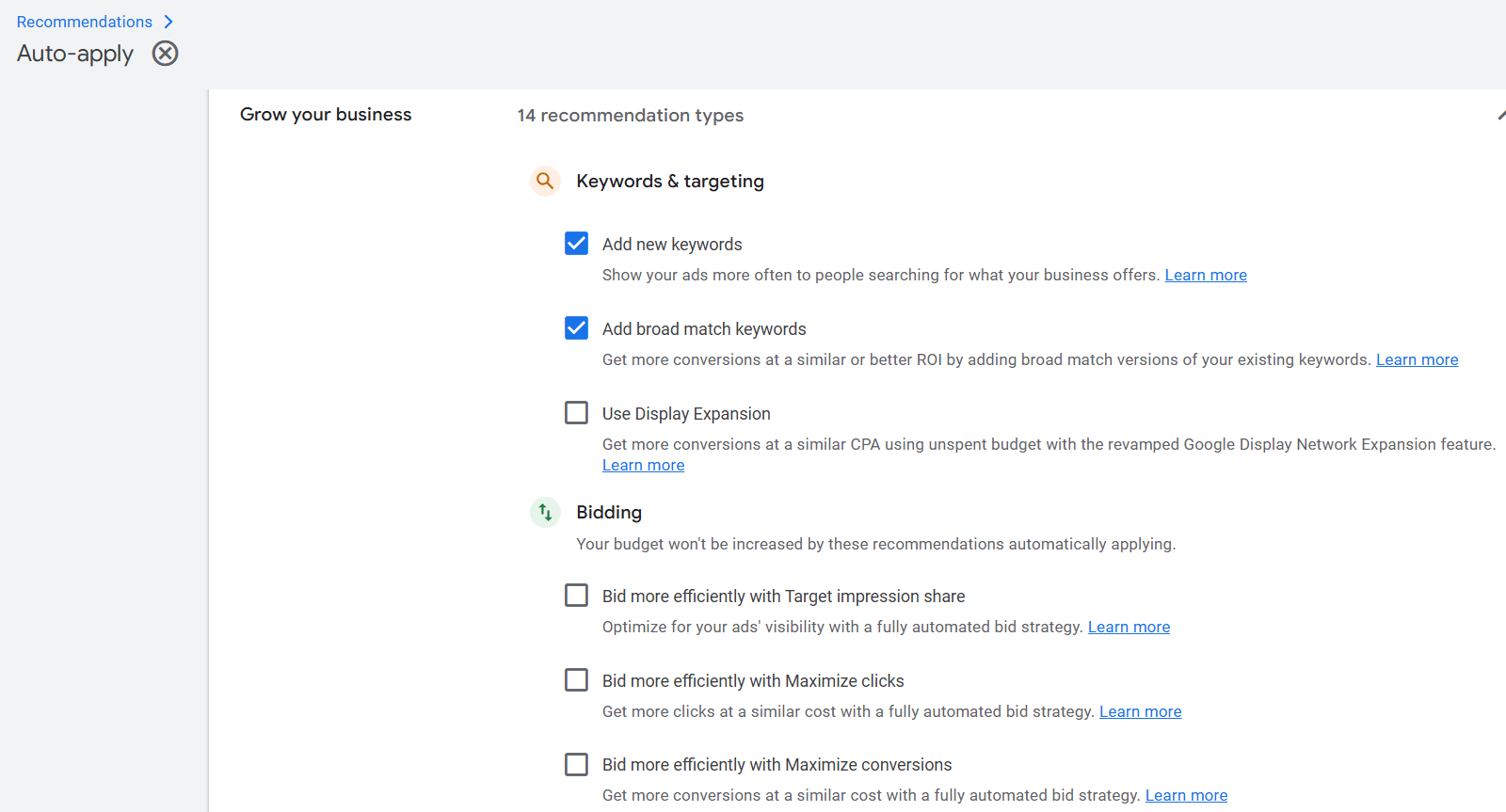
    Having auto-apply turned on in Google Ads can lead to unexpected changes like added keywords or modified bid strategies. Turning it off gives me the power to make well-thought-out decisions instead.

    Finally, while AI offers tremendous capabilities, believing it’s wiser than us can be a major pitfall. I always remember that it’s best used as a tool that complements our judgment and expertise in ensuring successful campaigns.


    Inspired by this post on Search Engine Land.

    crushpress.ai community screenshot
  • Google Ads API Update: Secure Your Conversion Tracking Now

    Google Ads API Update: Secure Your Conversion Tracking Now

    When I first heard about Google’s upcoming changes to the Ads API, I realized this could be a game-changer for many advertisers. Starting February 2nd, the Google Ads API will stop accepting new users of session attributes or IP address data in conversion imports. If you’re like me, and already using these fields, you might wonder what this means for your current set-up.

    This shift marks Google’s efforts to guide us all toward the Data Manager API, which they aim to make the primary hub for complex conversion and user data transfer. It’s becoming clear that the Google Ads API is honing its focus on core functions like campaign management and conversion workflows, leaving the heavy lifting to the Data Manager API.

    Here’s why this change matters to us: it directly influences whether our conversions are effectively captured. Blocking session attributes or IP data can cripple our conversion tracking and reporting, affecting performance insights and automated bidding strategies. Transitioning to the Data Manager API secures our data flow, ensures richer data signals, and aligns with Google’s long-term vision for measurement infrastructure.

    Who needs to act? If you’re a new developer trying to use session attributes or IP addresses with the Ads API, you’ll be blocked from doing so. For those of us already on this path, our operations continue, but the expectation to migrate is loud and clear, underscored by Google’s developer-token allowlisting requirements.

    What happens if we don’t transpose our setup? Post-change, some conversion imports will hit a roadblock with a CUSTOMER_NOT_ALLOWLISTED_FOR_THIS_FEATURE error, indicating rejection due to session attributes or IP address inclusions.

    To fix this, we need to promptly update our systems: temporarily exclude session attributes and IP data from Ads API imports, reroute this information through the Data Manager API, and ultimately phase out Ads API conversion imports once our new setup is fully integrated.

    The bottom line for those of us using the existing system is that while Google isn’t snipping the cord immediately, the roadmap is clear: if our tracking relies on session attributes or IP data, embracing the Data Manager API isn’t just advisable, it’s imperative.

    If you, like me, want to learn more, check out Google’s detailed update on this transition: Changes to IP Address and Session Attribute Support in the Google Ads API.


    Inspired by this post on Search Engine Land.

    crushpress.ai community screenshot
  • Master Google Ads Budget: Control Spend, Maximize Results

    Master Google Ads Budget: Control Spend, Maximize Results

    How Google Ads paces, caps, and recalculates spend when budgets change

    Making adjustments to a Google Ads budget mid-flight triggers a variety of changes and forecasts. It can be complex, but I’ve found that understanding how these work helps in modeling the impact of budget changes and staying clear of unexpected outcomes.

    Managing budgets in paid search isn’t simply about setting a daily figure. I need to grasp how different platforms pace spending, handle exceptions, and what shifts when budgets are tweaked mid-month.

    Most PPC advertisers, including myself, adjust budgets throughout the month and are curious about how these changes influence performance.

    The challenge increases in enterprise scenarios, where fiscal calendars and promotional campaigns rarely sync perfectly with calendar months.

    A frequent assumption is that spends will be evenly distributed, but that’s not always the case—resulting in either overspending one week or underspending another, both of which can be costly.

    Overspending eats into profit, while underspending can leave potential conversions untapped and reduce future budget allocations.

    ```json
{
  "alt": "Digital screen showing a budget notification for an ad campaign.",
  "caption": "Budget alert: Ensuring you stay within your limits. Discover a clear breakdown of your campaign's spending cap this December!",
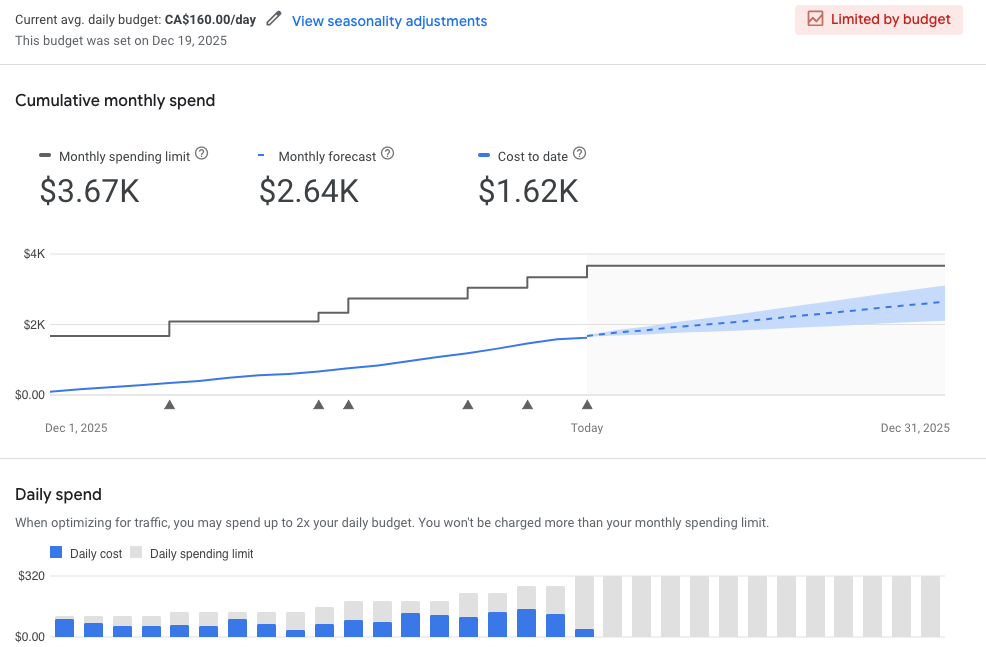
  "description": "This image displays a digital notification with a budget alert for an advertising campaign. The message states that the maximum charge for the campaign in December will be CA$3,666.27. There is an option to view a detailed budget report. Keywords: budget notification, ad campaign, December spending, digital alert, financial planning."
}
```

    It’s about more than just doing the math. Budgeting is crucial to the performance of paid search strategies, and without understanding pacing, I risk squandering budget, missing opportunities, and damaging credibility.

    How budgets work in Google Ads

    In Google Ads, I set a daily budget at the campaign level. Ideally, this budget is evenly spread over the month.

    • The monthly rule: A $100 daily budget becomes $3,004 monthly.
    • The promise: Google ensures charges won’t exceed this monthly cap.
    • The busy day rule (overdelivery): Google may spend up to double the daily budget on high-traffic days but maintains the monthly cap.

    If my daily limit is reached, ads may stop appearing. This “Limited by budget” notice shows a demand that surpasses my spend capacity.

    What happens when you change your budget mid-month

    Changing a budget, say on the 8th of the month, recalculates everything moving forward from that date.

    • Step change in monthly limit: The system merges the old budget for days 1-7 with the new budget from day 8 onward, which adjusts the monthly cap.
    • Daily limit adjusts immediately: It recalibrates to twice the new daily budget as soon as changes happen.
    • Pacing re-optimized: Google modifies how it allocates the spend over the remaining days.
    • Visual indicators: A gray triangle in reports highlights the date of change with an apparent ‘step’ in the monthly spend line.

    When opting for a campaign total budget, rules slightly differ. It’s less flexible, more rigid, without a daily cap, ideal for promotional or video campaigns.

    Campaign totals, akin to a project fee, aim to spend evenly by the end date instead of on a daily basis, making it less adaptable during the running campaign.

    ```json
{
  "alt": "Budget report showing cumulative monthly spend and daily spending limits.",
  "caption": "A detailed budget analysis graph highlights cumulative monthly expenditures and daily spending trends, providing a clear financial overview.",
  "description": "This budget report image displays two sections: the cumulative monthly spend and the daily spend. The monthly section includes spending limits, monthly forecasts, and costs to date, with visual lines and labels—$3.67K, $2.64K, and $1.62K respectively. The daily spend chart shows bars representing daily costs against a $160 daily spending limit, providing insights into spending habits and adjustments. Keywords: budget report, financial overview, spending trends."
}
```

    The real challenge for paid search managers

    PPC budgets interact with other factors like targeting and ROAS goals, often leading to underspending, as unused budgets can’t be reclaimed, directly affecting future spend capabilities.

    Senior PPC managers, including myself, often rely on spreadsheets and continuous tracking to balance spending, targeting dynamics, and campaign performance.

    Thankfully, Google Ads provides tools that simplify managing these changing budgets.


    How to project spend and impact before adjusting budgets

    When facing mid-month budget cuts, like trimming $2,000, understanding and utilizing available tools is essential for visualizing potential impacts.

    1. The budget report (spend projection)

    The budget report is my key tool for visualizing mid-month budget impacts on the final bill.

    • Where to find it: Navigate to Campaigns in Google Ads, locate the campaign, hover over the Budget column, and select View budget report.

    This report marks changes clearly and is instrumental in understanding spending shifts and confirming if the projected savings align with goals.

    ```json
{
  "alt": "Graph showing estimated conversion value based on varying spend amounts with an average conversion rate of 17.14%.",
  "caption": "Optimize your campaign strategy with this insightful graph showing potential conversion values at a 17.14% average rate. Discover how a $15.6K spend could yield $54.7K!",
  "description": "This graph illustrates the relationship between spend amounts and estimated conversion values, highlighting a 17.14% average conversion rate. By shifting campaign spends, the forecast predicts a conversion value of 54.7K at a spend of $15.6K, offering a conversion value per spend of 3.51. Two scenarios are shown: current and planned settings, facilitating strategic budget adjustments."
}
```

    2. Performance planner (results projection)

    The performance planner aids in understanding how different budget levels impact key metrics like clicks and conversions.

    Inputting new budget scenarios allows me to communicate the expected results of changes, not just the monetary savings but also the trade-offs like lost conversions.

    3. Manual calculation (logic check)

    Sometimes a manual check is necessary to ensure accuracy in budget planning, aligning with monthly and promotional periods.

    • Subtract the month-to-date spend from the new monthly goal, divide by remaining days.

    Where paid search performance and financial planning intersect

    I compare these tools to various aspects of driving for better understanding. Like choosing speed for gas savings, budget reports and performance planners elucidate impacts in real-time.

    It underlines that paid search requires ongoing management, where budgets adapt to business needs, separating the best managers from the rest.


    Inspired by this post on Search Engine Land.

    crushpress.ai community screenshot
  • Google’s New Multi-Channel Product ID Rule: Prepare for Change

    Google’s New Multi-Channel Product ID Rule: Prepare for Change

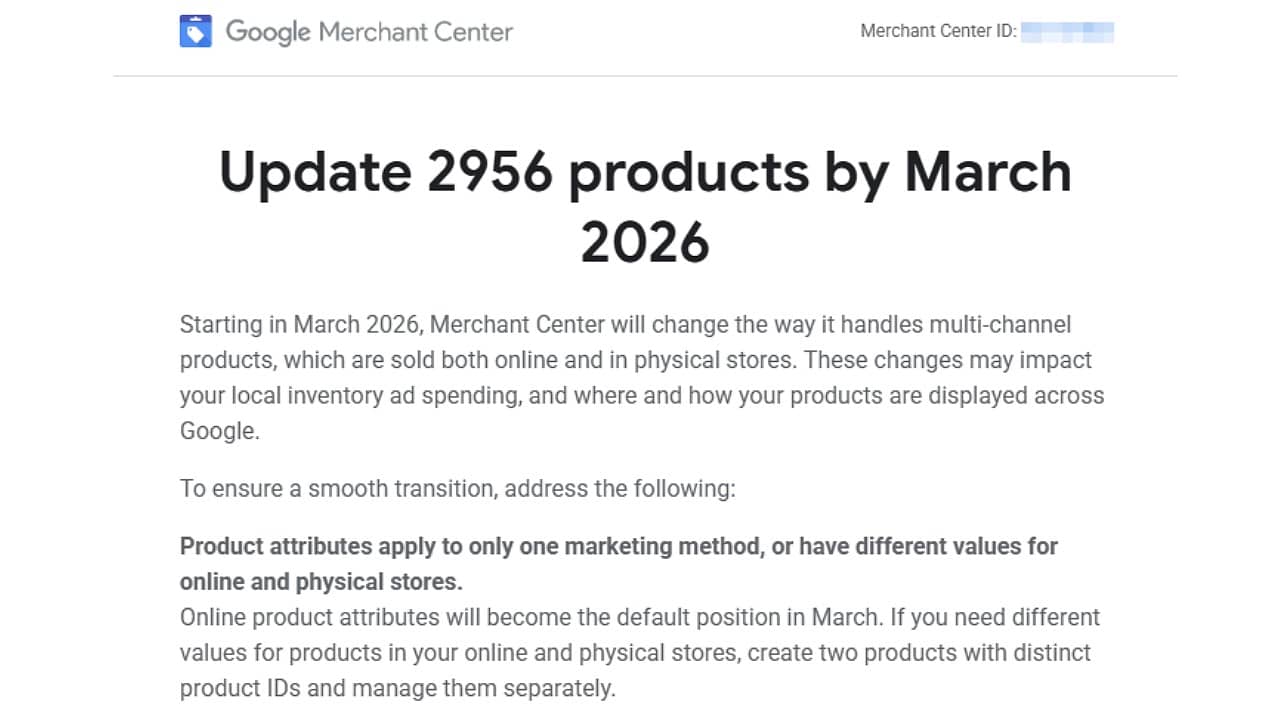
    I recently came across an important update from Google that I believe every retailer should pay attention to. Starting in March 2026, Google Merchant Center will implement a new requirement for multi-channel products, which are those available both online and in stores. This involves using separate product IDs when product details differ by channel.

    Understanding the Changes. So, what’s changing? Essentially, online product attributes will now act as the standard. If there is a variation in the product details for in-store items, such as different pricing or availability, I’ll need to create a separate version with a distinct product ID and manage it separately in my feeds.

    Steps to Take. Google has already started reaching out to affected accounts, marking products that will need updates before the March deadline. It’s critical for me to review my product data feeds to ensure that items are properly segmented between online and in-store, especially if I’m utilizing Local Inventory Ads or operating across multiple Google platforms.

    The Importance of Compliance. This change is not just procedural; it’s crucial because many retailers, including myself, have been managing online and in-store versions of products under a single ID. Google’s update demands that I now explicitly separate these products when attributes like price, availability, or condition differ.

    The Broader Impact. This update, while providing Google with cleaner, more consistent product data across channels, places additional responsibility on advertisers like me for feed management, especially if my inventory is complex and extensive.

    ```json
{
  "alt": "Google Merchant Center notice to update 2956 products by March 2026, addressing multi-channel product handling changes.",
  "caption": "Prepare your Google Merchant Center for change by March 2026! Update 2956 products to adapt to new multi-channel handling strategies for optimal performance.",
  "description": "A notification from Google Merchant Center instructs users to update 2956 products by March 2026. The update involves changes in handling multi-channel products impacting local inventory and ad spending. Users are advised to apply product attributes to a single marketing method or create separate entries for online and physical stores. This aims to align with the new default settings for online product attributes, ensuring smoother operations across Google's platforms."
}
```

    Initial Announcements. This update and the communication from Google were initially highlighted by PPC News Feed founder Hana Kobzová. I’m grateful for their early insights.

    Key Takeaway. If my products catalog for online and in-store are not perfectly aligned, Google’s new system requires that I start treating them as separate entities to maintain visibility and eligibility on Google’s platform.

    Learn More. To understand more about Google’s multi-channel product system update, I suggest visiting this support page.


    Inspired by this post on Search Engine Land.

    crushpress.ai community screenshot
  • Crafting Year-End PPC Reports that Captivate Leadership

    Crafting Year-End PPC Reports that Captivate Leadership

    As the new year arrives, it’s my job to present an end-of-year (EOY) PPC report that truly reflects our performance.

    EOY reports are not merely extended versions of our monthly check-ins. Instead, they cater to a different audience—mainly the leadership team, who need a broader narrative.

    Executed well, these reports set the stage for the upcoming strategies, garnering buy-in and positioning me as a strategic ally rather than just a campaign overseer.

    ```json
{
  "alt": "Collage of colorful charts and graphs including bar graphs, line charts, pie charts, and a world map on white paper.",
  "caption": "Dive into a sea of data with vibrant charts and graphs, showcasing trends, distributions, and insights, ready to tell your story in numbers.",
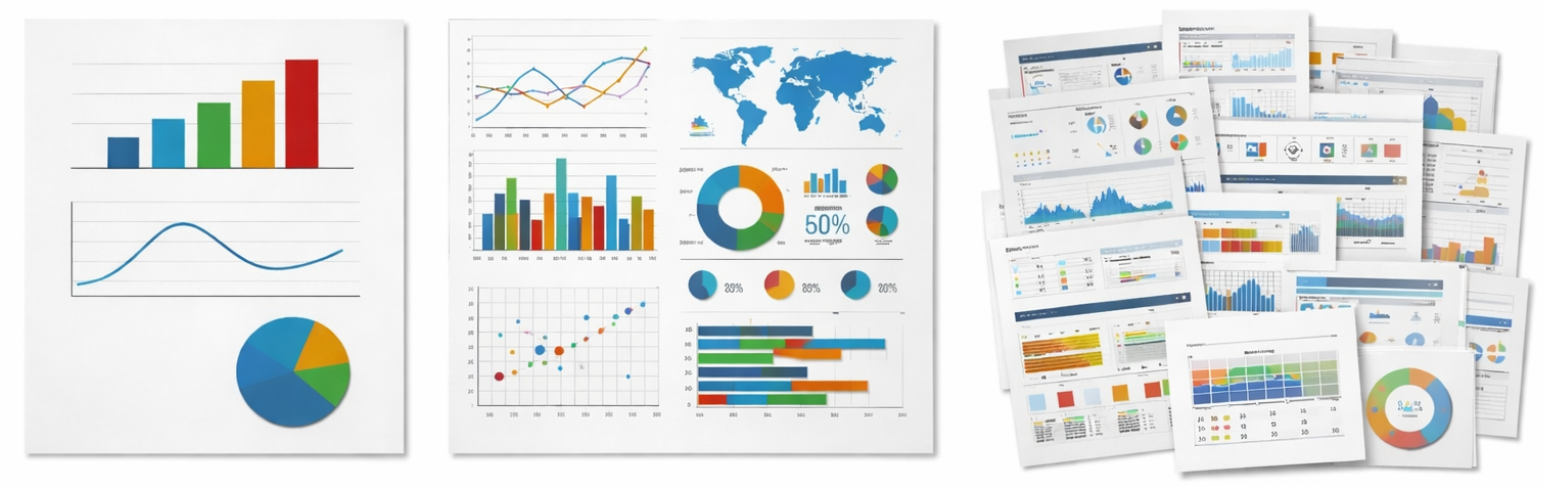
  "description": "This image features a variety of colorful charts and graphs on white paper, illustrating diverse data sets. The left section shows bar, line, and pie charts, while the central section includes a world map, mixed charts, and a 50% donut chart. To the right is a collection of stacked papers with various graphs and diagrams, ideal for presentations or reports. This assortment aids in visualizing data hierarchies, comparisons, and trends, making it perfect for analytic and business contexts. Keywords: charts, graphs, data visualization, bar graph, pie chart, line chart, world map."
}
```

    Here’s my approach for creating an impactful EOY PPC report that engages leadership and sets us on a successful path for the new year.

    1. Understanding My Audience’s Priorities

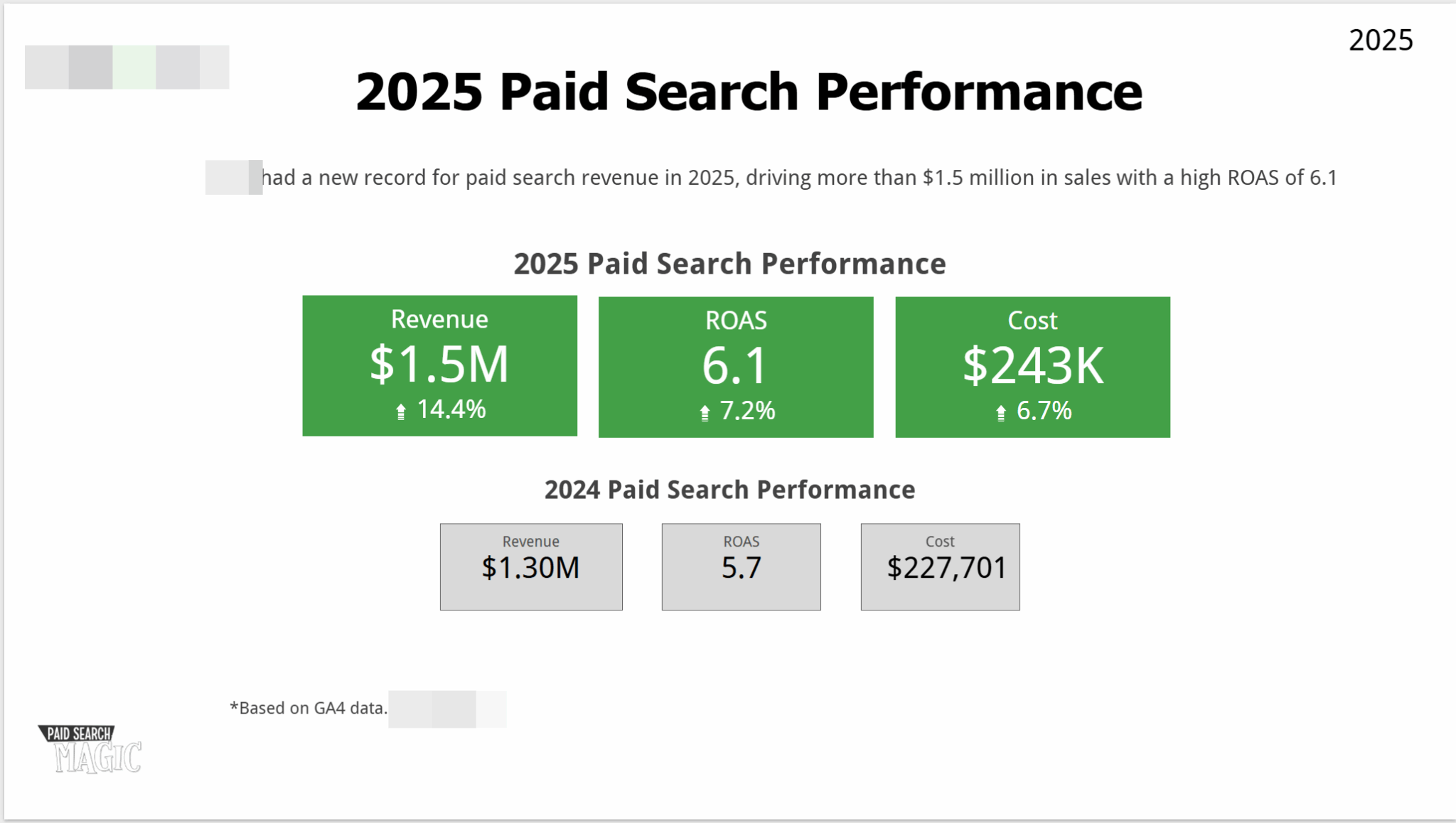
    Launching a new campaign without defined goals and target audiences is unheard of, and the same goes for my EOY report.

    ```json
{
  "alt": "2025 Paid Search Performance chart showing revenue of $1.5M, ROAS of 6.1, and cost of $243K compared to 2024 figures.",
  "caption": "2025 marked a significant growth in paid search performance with a revenue of $1.5M and ROAS of 6.1, showing a positive trend over 2024.",
  "description": "The image illustrates the 2025 Paid Search Performance, highlighting a revenue increase to $1.5M, a ROAS of 6.1, and costs of $243K. Compared to 2024, there's a notable improvement with revenue up by 14.4%, ROAS by 7.2%, and a cost increase of 6.7%. This reflects successful strategy adjustments, based on GA4 data, achieving over $1.5 million in sales."
}
```

    This year, my clients include diverse leadership teams—from those new to me wanting concise summary reports, to detail-oriented CEOs desiring a rich narrative.

    Instead of a generic template, I tailor each report to fit the unique needs of each audience, avoiding confusion and maximizing satisfaction.

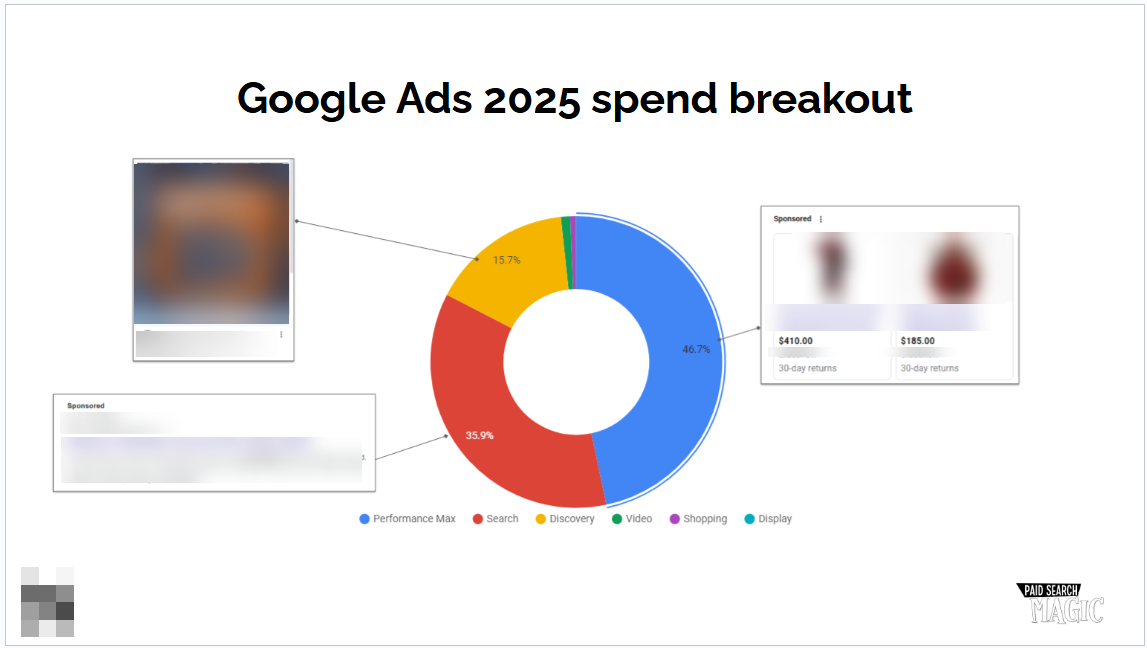
    ```json
{
  "alt": "Pie chart showing Google Ads 2025 spend breakout with segments for Performance Max, Search, Discovery, Video, Shopping, and Display.",
  "caption": "Unpacking Google Ads 2025 spending: Discover the projected distribution across Performance Max, Search, and other key ad platforms.",
  "description": "This image features a pie chart depicting the projected Google Ads spend distribution for 2025. The chart illustrates allocations: Performance Max (46.7%), Search (35.9%), Discovery (15.7%), with smaller segments for Video, Shopping, and Display. Each segment is linked to a blurred representation of sponsored content, highlighting Google’s strategic ad platform focus. Ideal for understanding future digital ad strategies and budget prioritization."
}
```

    If you’re unsure of your audience, engage your primary contact to better understand the report’s recipients, their focal points, and decision-making goals.

    2. Building a Clear Executive Summary

    My executive summary’s role is to quickly provide leadership with an understanding of our PPC performance.

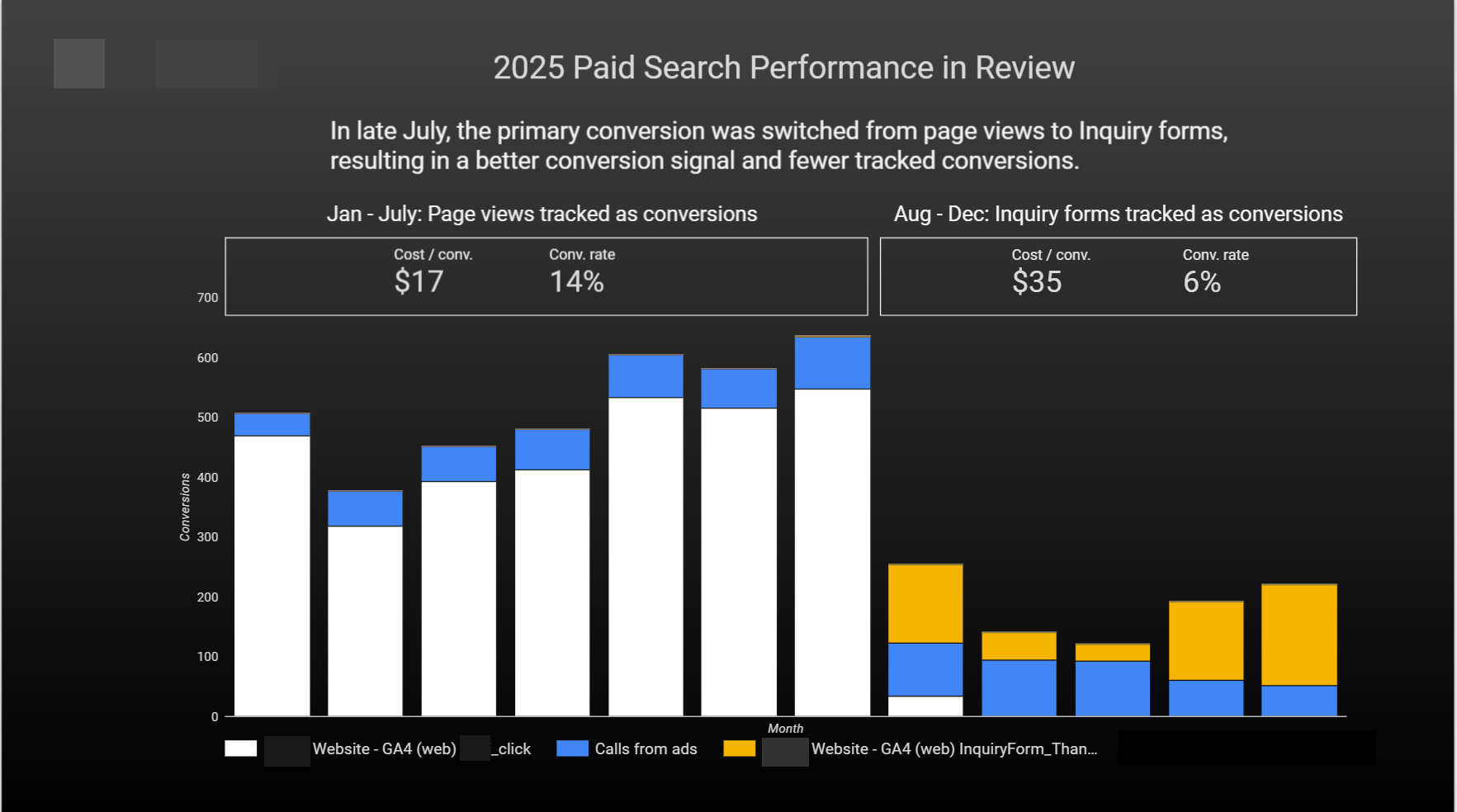
    ```json
{
  "alt": "Bar graph showing 2025 paid search performance, comparing page views and inquiry forms conversion rates and costs.",
  "caption": "2025’s strategic shift to inquiry forms boosts conversion signals, though tracked conversion rates and costs reflect distinct changes.",
  "description": "This bar graph illustrates the 2025 paid search performance review, highlighting a strategic transition in conversion tracking from page views to inquiry forms in late July. The graph compares the costs per conversion and conversion rates for January to July with inquiry forms from August to December. Key visual elements include a segmented bar chart showcasing conversions over time, color-coded by source: website GA4 and calls from ads. The overall analysis indicates a shift to fewer but higher-value tracked conversions."
}
```

    It’s the gateway that frames everything that follows, and though taught to write it last, I start with it to shape the report’s flow.

    Focusing on Key KPIs

    I prioritize metrics vital to my audience—be it revenue, leads, or conversions—ensuring these are front and center in my summary.

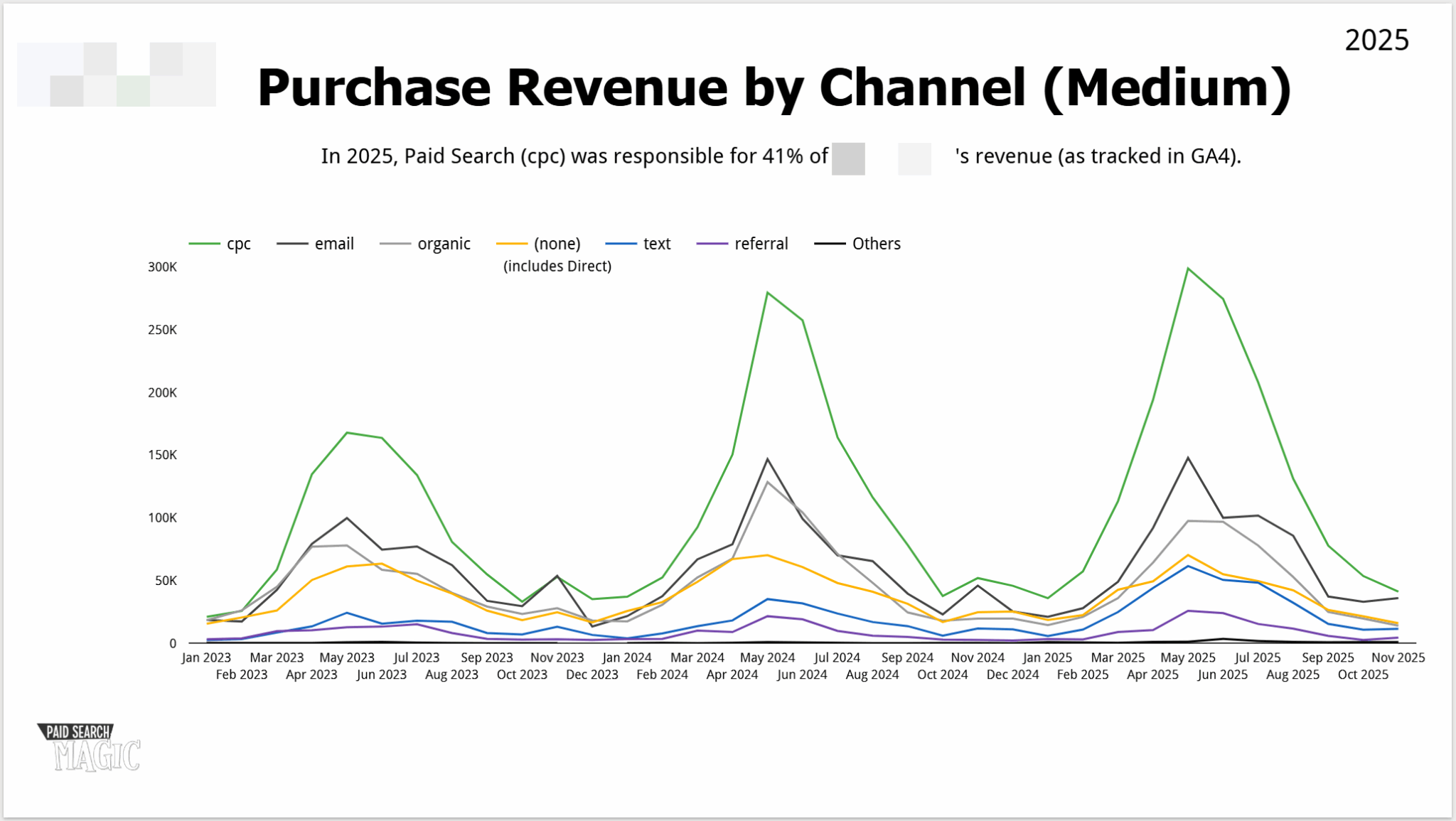
    ```json
{
  "alt": "Line graph showing purchase revenue by channel for 2023-2025, with CPC leading.",
  "caption": "The line graph illustrates the trend in purchase revenue from various channels over 2023-2025, highlighting CPC as the leading source.",
  "description": "This image presents a line graph depicting purchase revenue by channel from January 2023 to October 2025. Channels include CPC, email, organic, none, text, referral, and others. CPC (green line) shows a significant lead over other channels, particularly in peak months. The graph suggests CPC's crucial role in 2025 revenue, accounting for 41% of the total as tracked in GA4. Keywords: purchase revenue, channel, CPC, 2025, line graph."
}
```

    Providing Context with Benchmarks

    By leveraging year-over-year performance, target achievements, and industry benchmarks, I ensure leadership comprehends our standing without needing to guess.

    These benchmarks provide busy executives with an immediate grasp of our performance, priming them for deeper insights and actions to follow.

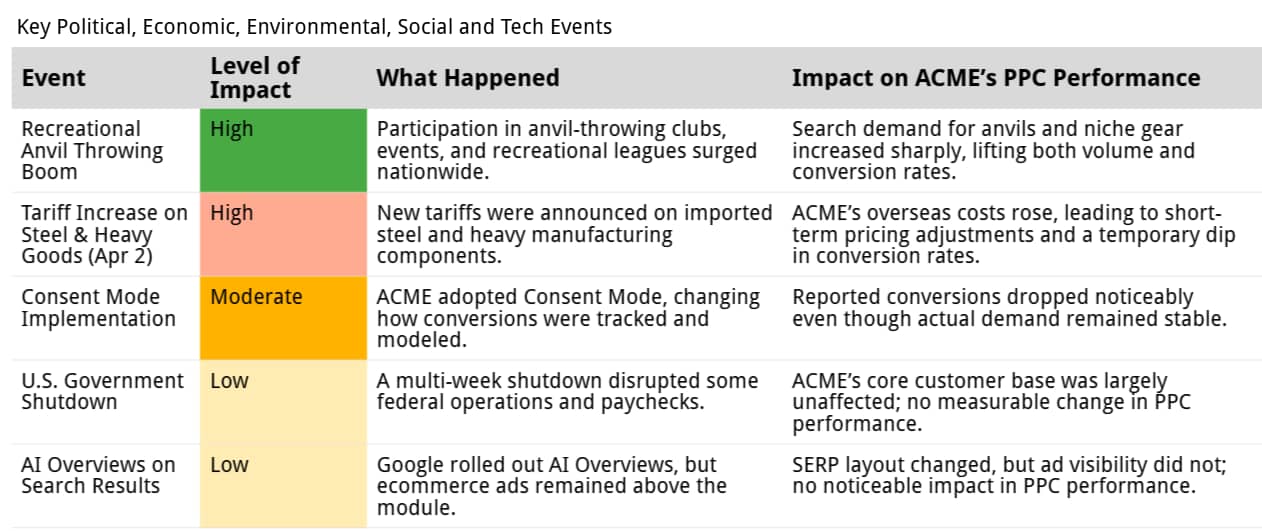
    ```json
{
  "alt": "Table outlining events impacting ACME's PPC performance, including anvil boom, tariffs, and more.",
  "caption": "Discover how key events like the anvil-throwing boom and new tariffs impacted ACME's PPC performance across different levels.",
  "description": "This table provides an overview of key political, economic, and technological events affecting ACME's PPC performance. Events such as the recreational anvil throwing boom and the tariff increase on steel are highlighted alongside their levels of impact, ranging from high to low. The table details what happened during each event and analyzes the subsequent effects on ACME's performance, such as changes in search demand, pricing adjustments, and conversion rates. Keywords: ACME, PPC performance, anvil throwing, tariffs, economic impact."
}
```

    3. Diving into Performance Details

    Here, I delve into the ‘why’ behind our performance, illuminating the strategies and decisions driving key outcomes.

    Whether limited to pivotal insights or an in-depth analysis, my focus remains on information supporting the summary and informing our future direction.

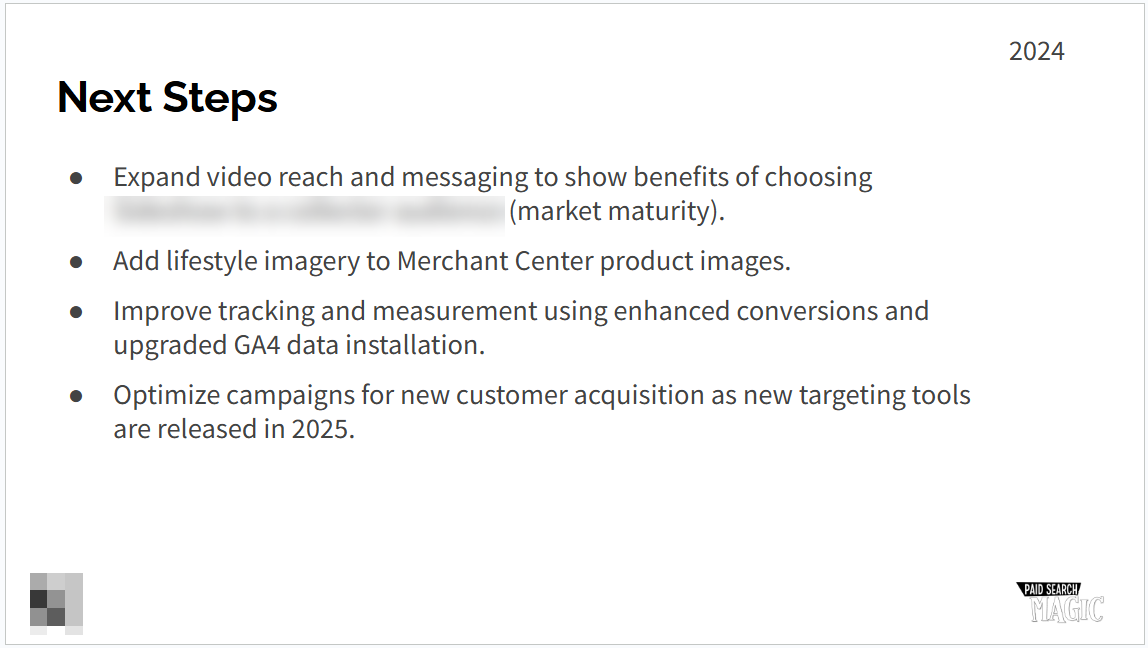
    ```json
{
  "alt": "Slide titled 'Next Steps' listing strategies for 2024, including video expansion, lifestyle imagery, improved tracking, and campaign optimization.",
  "caption": "Discover the 2024 strategic roadmap focusing on video reach, imagery enhancement, advanced tracking, and innovative campaign optimization.",
  "description": "This slide, titled 'Next Steps' for the year 2024, outlines key strategic initiatives. The focus is on expanding video reach and messaging, adding lifestyle imagery to Merchant Center, improving tracking with GA4 data, and optimizing campaigns for new customer acquisition. It highlights the planned enhancements to maintain market maturity and leverage new targeting tools in 2025. Keywords: strategy, video, imagery, tracking, campaigns, 2024."
}
```

    Highlighting Best Performers and Resource Allocation

    By showcasing top-performing assets and how we distributed efforts, I help leadership see where we’ve excelled and intelligently invested resources.

    Reflecting on Tests and Trends

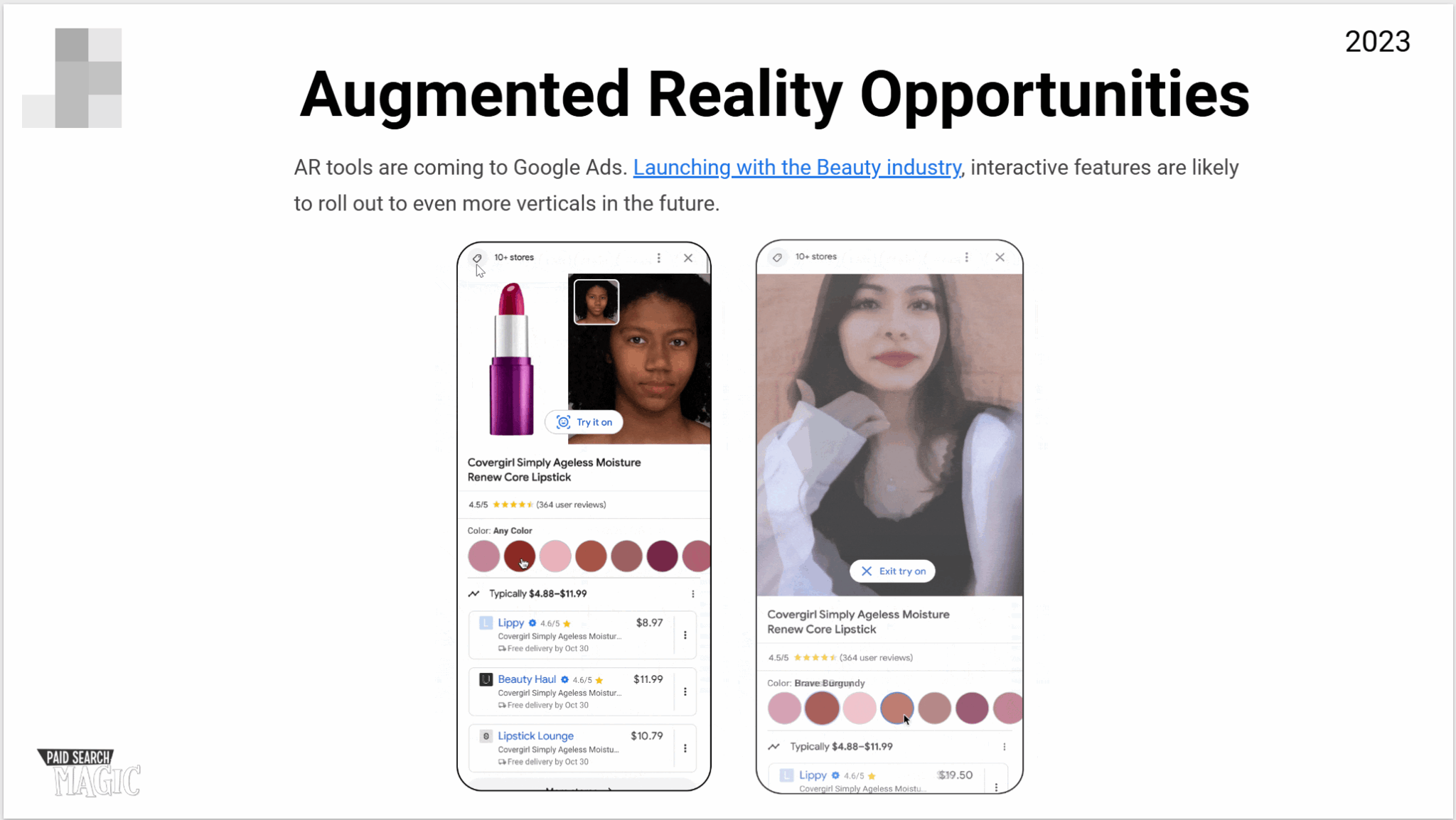
    Sharing tests and trends that have shaped our year helps leadership understand the evolution of our strategy and sets the stage for potential opportunities.

    ```json
{
  "alt": "Augmented reality tools in Google Ads for beauty products displayed on smartphones.",
  "caption": "Discover the future of shopping with augmented reality in Google Ads, showcasing interactive beauty product experiences.",
  "description": "This image highlights the integration of augmented reality (AR) in Google Ads, focusing on the beauty industry. Two smartphones display virtual try-on features for Covergirl lipstick, allowing users to visualize products in real-time. The concept promises to expand into more industries following its beauty launch in 2023. Keywords include AR tools, Google Ads, beauty industry, and interactive features."
}
```

    4. Considering External Influences

    It’s crucial to frame our performance within the wider environment, highlighting external factors that influenced results either positively or negatively.

    An Analysis of Digital and Economic Factors

    From shifts in digital marketing channels to broader macroeconomic trends, I contextualize performance against external events, explaining both impacts and non-impacts.

    5. Planning for What’s Next

    Looking ahead, I focus not on pre-determined paths, but on our decision-making framework, assuring leadership of a structured plan for adapting to future changes.

    Outlining Next Steps and Innovations

    By sharing strategic moves tied to last year’s data, as well as exploratory initiatives and adaptation strategies, I foster confidence and excitement for the year to come.

    Finalizing with a Leadership Lens

    Before submitting, I ensure all data is clearly sourced, negatives are addressed up front, and all stakeholder queries have been thoroughly answered.

    This reflective practice not only strengthens my relationship with stakeholders but also lays the foundation for seamless reporting in the years ahead.


    Inspired by this post on Search Engine Land.

    crushpress.ai community screenshot
  • Enhanced Google Ads Creator Tools Streamline YouTube Partnerships

    Enhanced Google Ads Creator Tools Streamline YouTube Partnerships

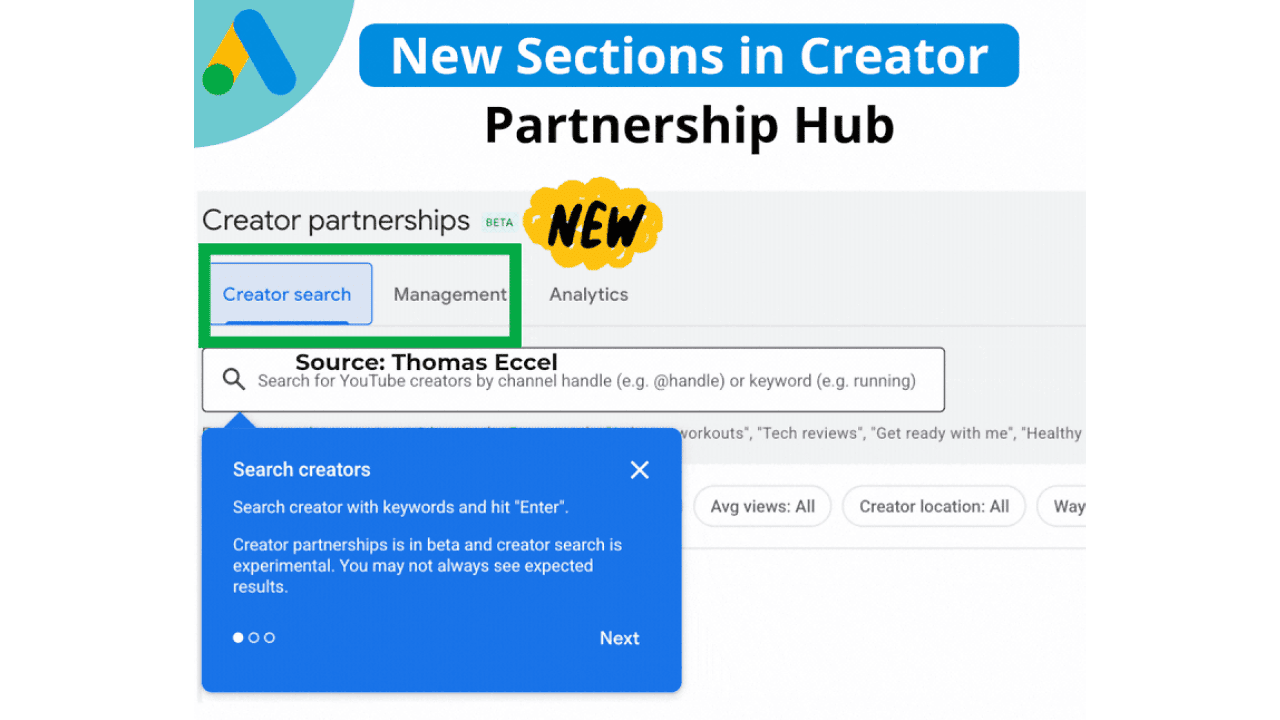
    Google Ads has introduced exciting updates to its Creator Partnerships, making it easier for me to manage collaborations with YouTube talents on a larger scale.

    With the introduction of Creator Search, I can now effortlessly find YouTube creators by utilizing keywords or channel handles. This tool allows me to refine my search based on subscriber count, average views, location, and their availability for contact. It’s a game-changer, significantly cutting down the manual work involved in discovering and reaching out to creators.

    In addition to the search feature, Google has unveiled a new Management section. This centralizes all communications with creators, allowing me to view their names, the status of inquiries, subjects, the latest updates, and scheduled response dates—all in one place with the convenience of direct email access.

    Why this matters to me. As creator-led campaigns become a core aspect of media strategies, having better tools to identify the right collaborators and maintain organized partnerships is crucial. The latest enhancements to Google Ads’ Creator Partnerships (beta) cater to these needs perfectly.

    ```json
{
  "alt": "Screenshot of new sections in Creator Partnership Hub with search features.",
  "caption": "Explore the latest features in the Creator Partnership Hub, including a new creator search tool to enhance your collaboration experience.",
  "description": "This image showcases the new sections in the Creator Partnership Hub, highlighting features like 'Creator search', 'Management', and 'Analytics'. A search box invites users to search for YouTube creators by channel handle or keyword. A blue dialog box provides guidance on the experimental 'Search creators' feature, noting it is in beta. Keywords for searchability include Creator Partnership Hub, search tool, collaboration, beta feature."
}
```

    First sightings. This update made headlines when Google Ads Specialist Thomas Eccel shared it on LinkedIn, making industry professionals eager to explore its capabilities.

    The big picture. These upgrades are pushing Creator Partnerships closer to a comprehensive workflow tool, aiding teams like mine to manage creator collaborations with the same efficiency and accountability that we apply to other paid media endeavors.

    Bottom line. By enhancing both discovery and organization, Google’s updates to Creator Partnerships empower me to execute creator campaigns at scale with ease.


    Inspired by this post on Search Engine Land.

    crushpress.ai community screenshot