I’ve been noticing the rapid transformation in how brands are tracking user behavior online. With privacy laws tightening and browser extensions increasingly blocking data, the demand for cleaner data from ad platforms is higher than ever. This change urged me to explore server-side tagging as a solution.
By implementing server-side tagging, I’ve managed to reduce data loss while collecting cleaner, privacy-compliant data. This approach is invaluable, especially considering the experiences I’ve had with providers like Elevar and Littledata.
So, what exactly is server-side tagging, and in which situations does it really shine? Let’s dive into the details!
What is server-side tagging?
Traditionally, tracking scripts ran directly in the browser. However, with server-side tagging, these scripts operate on a server I control, giving me more control over data processing.
Here’s how it works: instead of sending data straight to multiple third parties from the browser, events are sent to a first-party server endpoint, often using a Google Tag Manager server-side container. The server then processes, enriches, and forwards this data to tools like Meta and Google Analytics.
This setup provides benefits such as more data control, a cleaner page performance, and better compliance with privacy laws.
Moreover, server-side tagging grants me the flexibility to enrich and transform data before it reaches ad platforms, standardizing event names, filtering out low-quality events, and adding custom parameters for better audience segmentation.
Is server-side tagging right for you?
While server-side tagging isn’t a one-size-fits-all solution, many brands find it essential, particularly if you:
You need to meet strict privacy or compliance requirements
Server-side setups allow for greater control over how data is processed and shared, supporting compliance with regulations like GDPR and CCPA.
You want faster website performance
In my experience, client-side tracking can slow your page down, but server-side tagging shifts data processing to the server, resulting in faster websites.
You want more accurate tracking (despite ad blockers)
Ad blockers can hinder client-side scripts, but server-side tagging circumvents many of these restrictions, making your data collection more reliable.
You’re investing heavily in paid media
For those heavily invested in platforms like Meta and Google Ads, achieving better data accuracy can significantly impact return on ad spend.
How to implement server-side tagging
When it comes to implementing server-side tagging, you have two main options: building it internally or using a service provider.
Option 1: Internal setup
Choosing an internal setup gives me complete control but requires technical expertise and ongoing maintenance. This involves setting up a GTM server-side container and adding logic for data processing.
Option 2: Use a server-side tagging service
Platforms like Elevar and Littledata offer turnkey solutions that integrate seamlessly with existing tools, allowing me to focus on strategy rather than technicalities.
Our direct experience: Littledata vs. Elevar
In my experience with Littledata and Elevar, each caters to different needs. Littledata is ideal for emerging brands with simpler tech stacks, while Elevar is suitable for those outgrowing entry-level solutions.
Investing in server-side tagging has transformed how I handle data, ensuring that I remain compliant with privacy laws while boosting site performance and data reliability across all my platforms.
Embrace audience engineering to influence AI decisions, manage ad spend wisely, and connect with high-value customers through creativity and data.
I’m witnessing a significant transformation in the paid media landscape as platforms shift from manual targeting to AI-driven audience discovery. This change is redefining how we approach advertising, with automation tools consolidating campaigns, obscuring data, and favoring prediction algorithms over manual selection.
This transition requires me to innovate by mastering the art of audience engineering. By doing so, I ensure I’m equipped with strategies to thrive in this evolving landscape.
The End of Manual Targeting as I Knew It
Previously, I depended on detailed keyword lists and demographic filters to pinpoint my ideal audience. I directed platforms about where to focus and paid to access the desired market.
However, these options are now outdated:
Google has transitioned to Performance Max, which eliminates keyword-specific targeting in favor of more fluid groups and signals.
Meta’s Advantage+ automates demographic focus, turning my role into that of a signal provider instead of an audience selector.
Microsoft’s inclusion of this model confirms this is an industry-wide evolution.
While traditional targeting seems to have vanished, it has merely moved to the internal structures of the platforms where algorithms dictate the direction based on their indigenous data.
The Rise of Audience Engineering
My role shifts from targeting to engineering as it becomes more about guiding algorithms than manually selecting audiences.
From Targeting to Teaching
The distinction is crucial. Traditionally, targeting emphasized choosing audiences, but now it’s about educating AI with comprehensive conversion data, targeted creativity, and insightful first-party data.
Previously, I might have targeted CFOs with job filters, but now I feed the AI robust data (e.g., “deal closed” signals) to characterize valuable prospects and devise creative content tailored to their needs.
The New Competitive Discipline
Embracing this transformation gives me an edge. By finetuning conversion signals, honing creative content, and fortifying data systems, I ensure our performance remains robust.
The performance gap now relies on the quality of signals, making audience engineering pivotal for success.
The Three Levers that Now Drive Targeting
I focus on optimizing these three crucial AI inputs to ensure effective audience segmentation:
1. Conversion Signal Quality
By providing the algorithm with relevant business outcomes rather than superficial metrics, I encourage it to find results that truly matter.
Using tools like Offline Conversion Imports (OCI) and the Conversions API (CAPI), I ensure our data highlights genuine sales by leveraging value-based bidding techniques.
2. Creative as a Targeting Mechanism
With no demographic filters, my creative content now acts as the primary targeting tool, filtering users through its message.
If my creative targets niche pain points, the AI connects with users aligned with that perspective, even without traditional filters.
3. First-Party Data as Competitive Moat
Our customer lists and engagement signals become core learning elements for the algorithm, replacing third-party signals and offering a competitive edge.
Essentially, I’m arming the AI with a guide to discover the most profitable audiences.
How This Plays Out in Real Campaigns
The journey to AI-led targeting isn’t just theoretical. Within our agency, managing over $215 million in media spend annually, we have evaluated this approach across different platforms, witnessing its power firsthand.
Advantage+ Audiences in Practice
One long-standing client had a specific perception of their audience based on a vast history of accurate data. Initially, our campaigns ran with tightly controlled targeting to maintain efficiency.
Transitioning to Advantage+ allowed for data-driven optimization, revealing an unexpectedly lucrative older demographic, improving their click-through rates by 37% and conversion rates immensely.
Broader AI-optimized targeting cut costs and raised revenue — outperforming past manual methods.
By aligning goals with data and creative, we found valuable segments conventional targeting schemes previously overlooked.
Microsoft PMax Placement Transparency and Advanced Audience Signal Targeting
Another client benefited from a Microsoft PMax test, effectively targeting high-intent prospects using internal data across several Microsoft networks, seeing notable increases in performance metrics each month.
This trial highlighted the importance of combining strategic oversight with smart AI deployment, enhancing the algorithm’s reach while maintaining disciplined campaign direction.
The balance between scale and strategic input preserved efficiency and bolstered overall performance.
The Risks Nobody is Talking Enough About
While automated targeting offers significant advantages, it’s essential to understand its limitations. Here’s what I strive to avoid:
Garbage In, Garbage Out
Poorly defined conversion objectives, weak data quality, or junk data hinder performance and mislead the algorithm. Feeding it quality information and focused outcomes is crucial.
An overly broad goal without distinct signals results in quantity over quality, which doesn’t necessarily translate to business success.
The Self-Reinforcement Trap
If the seed data has biases, the AI will continuously optimize for those biases, possibly neglecting valuable audience segments.
These underrecognized biases present inherent risks in leveraging automated systems without mindfulness.
Automation Without Oversight
Platforms promote broad automation, but I recognize the need for continued oversight to realign campaigns with business goals.
Constant monitoring is essential to ensure objectives are met, avoiding a passive management style.
Creative Complacency
As automation advances, creative strategy becomes a crucial differentiator and shouldn’t be neglected.
Crafting compelling creative that addresses core customer issues is vital in distinctively standing out.
How to Put Audience Engineering into Practice
Here’s how I integrate audience engineering into everyday operations:
Restructure Creative: Focus on intent signals, addressing what beliefs inspire conversion.
Predefine Guardrails: Establish performance boundaries before unleashing the algorithm, allowing for better campaign control.
The Future Belongs to Audience Engineers
The era of manual targeting is closing, but precision remains crucial. Audience engineering acts as an invaluable skill, unlocking AI’s full potential to achieve maximum results in this dynamic landscape.
If AI-led campaigns keep producing form fills that sales rejects, the system may be succeeding at the wrong task. A thank-you page tells an ad platform that an action occurred. It does not tell the platform whether the lead was qualified, reachable, commercially relevant, or likely to become revenue.
Your first job is to connect those business outcomes to acquisition. Your second is to make the offer equally clear on the landing page, in the feed, across map profiles, and inside every creative asset. Do those two things before increasing spend, and automation has a much better signal to optimize.
Key takeaways: what to fix before spending more
Optimize toward business quality, not raw form volume. Define an accepted lead, return downstream statuses from the CRM, and keep diagnostic actions separate from primary conversion goals.
Make the offer unambiguous. A visitor and an automated system should both be able to identify what you sell, who it is for, why it matters, what action to take, and what happens next.
Measure each funnel stage on its own terms. Awareness, consideration, lead capture, qualification, opportunity creation, and revenue do not share one useful success metric.
Treat feeds, map listings, structured data, pages, and creative as one information system. Conflicting names, categories, locations, or conversion labels weaken both targeting and attribution.
Audit placements as well as campaigns. Automated campaigns can reach visual discovery surfaces that behave differently from conventional text search, so a blended click-through rate can hide what changed.
Teach the buying system what a qualified lead means
Begin in the CRM or lead management system, not in the bidding interface. Write down the point at which an inquiry becomes worth pursuing. That definition might depend on service fit, geography, budget, need, or another criterion your sales team already uses. The exact criteria are yours; the important part is that marketing, sales, the CRM, and the ad platform use the same definition.
You did not lose control of paid search when platforms automated bidding, audience expansion, and ad assembly. Control moved upstream. The expensive mistake is still managing the account as though a perfect keyword list can compensate for weak conversion data, muddled economics, thin creative, or a poor product page.
Your job now is to give the system a clear commercial objective, reliable evidence, and firm boundaries. Do that well and automation can explore more demand than a person could manage manually. Do it poorly and it will scale the wrong outcome with impressive efficiency.
Control the system through the inputs it learns from
That is why an automation feature should never be evaluated only by whether it finds additional conversions. Some AI Max campaigns have been credited with up to 27% more conversions, but that is a reason to run a controlled test, not a forecast you should put into a budget. More conversions help only when they are valid, incremental enough to matter, and economically acceptable.
Control area
Decision you own
Evidence to inspect
Business outcome
Which conversion is primary and how it is valued
Completed orders, revenue, margin proxy, cancellations, and returns
Learning data
Which customer and transaction signals are accurate enough to use
Duplicate events, missing values, currency consistency, and match quality
Demand
How discovery traffic is separated from proven demand
Search terms, product-level sales, conversion rate, ROAS, and ACOS
Experience
Which product information, creative, and destination represent the offer
Message continuity, availability, price, page relevance, and purchase completion
Risk
Where automation may spend and when a person must intervene
Budgets, exclusions, brand traffic, inventory, and unexplained mix changes
Start with a conversion contract: a short, explicit definition of what the bidding system is supposed to maximize. This is not a tracking implementation document. It is the agreement between marketing, commerce, and analytics about what counts as success.
Name the primary event. For a commerce campaign, that will usually be a completed purchase. Add-to-cart, product-view, and checkout events can remain useful diagnostics without being treated as equivalent to revenue.
Define the value. Decide whether the platform receives gross order revenue, a margin-weighted value, or another consistent commercial proxy. If two orders produce very different contribution margins, equal revenue values may teach the system to prefer the less profitable mix.
Define validity. Document how duplicate purchases, cancellations, refunds, taxes, shipping, and currency are handled. A bidding model cannot infer that an inflated or duplicated value is wrong.
Define the observation window. Review performance only after the normal conversion and reporting lag has had time to mature. Otherwise, recent traffic will look artificially weak and invite unnecessary changes.
Name an owner. Someone must be accountable for detecting broken events, abrupt value changes, and gaps between platform reporting and the commerce system.
Well-structured first-party data now does much of the strategic work once associated with exhaustive keyword research. It helps the platform distinguish valuable customers and transactions from activity that merely looks busy. But volume does not cure bad measurement. A larger stream of duplicated purchases is still bad data, and automation can magnify its effect faster than a manual bidder would.
Before expanding automation across the account, validate the contract in a bounded campaign or product group. Changing conversion definitions, bidding targets, audience inputs, and creative at the same time can expose the business to avoidable spend while making the result impossible to interpret.
Separate discovery from profitable scale
Commerce advertising has two jobs that pull in different directions. Discovery needs freedom to test unfamiliar queries, audiences, and products. Performance needs concentration: more budget behind combinations already linked to acceptable sales. Put both jobs in one undifferentiated campaign and the blended result hides what each dollar is doing.
A stronger architecture creates a deliberate path from exploration to scale. Search environments are especially useful here because shoppers express intent in their queries, while Google Shopping and Amazon Ads can connect that demand to product-level or keyword-level revenue. That creates a feedback loop between search behavior, sales, and budget allocation.
Discovery captures uncertainty. It explores a wider set of eligible demand under its own budget and economic limits. Its purpose is to find useful search terms and product-demand combinations, not to look as efficient as a mature campaign.
Performance concentrates evidence. It gives proven converters dedicated budgets and targets so they do not have to compete with every exploratory term for spend.
Brand protection isolates known demand. Branded searches often behave differently from generic acquisition. Separate reporting prevents strong brand results from disguising weak prospecting.
Ranking activity has an explicit cost. If you spend more aggressively to improve visibility or marketplace position, keep that objective distinct from a profit-maximizing campaign.
The handoff between discovery and performance should use written promotion rules. A term or product is not proven because it converted once, and it should not stay in discovery forever after building credible evidence. Define the minimum evidence your business needs, then test that evidence against four questions:
Has the query or product produced enough mature sales to reduce the chance that one unusual order controls the decision?
Does its ROAS or ACOS fit the contribution economics of that product after the costs the business actually bears?
Can inventory and fulfillment support more demand without creating cancellations or a poor customer experience?
Does the landing page or marketplace listing genuinely satisfy the intent that generated the sale?
Use demotion rules as well. A proven term can return to discovery or lose budget when its economics deteriorate after a mature measurement window, when stock becomes unreliable, or when the offer no longer matches the query. Graduation is a status based on current evidence, not a permanent award.
Do not impose one universal efficiency target on every layer. Discovery may operate under a stricter spending cap while accepting more variance. A performance campaign may receive more budget but face a firm profitability requirement. Brand and ranking campaigns need their own definitions of success. The crucial point is that each layer has a known job, budget, and exit condition.
Use platform-specific structures without losing the common logic
Google Shopping and Amazon Ads can share the same discovery-to-scale strategy, but their campaign mechanics and commercial roles are different. Reproducing the same campaign map on both platforms creates superficial consistency at the cost of useful control.
Route Google Shopping demand through distinct layers
Branded layer: A shopping-focused, assetless Performance Max campaign can be used to concentrate on shopping inventory and reduce unintended expansion into other channels. Inspect the actual traffic and placement mix rather than assuming the setup label guarantees isolation.
Catch-all layer: Keep a wide net for search-term discovery, but contain it with a separate budget and lower bids or a suitably conservative target. Its output is evidence: which queries and products deserve focused investment.
Performance layer: Move reliable, high-intent demand into a dedicated campaign where budget and bidding can reflect its demonstrated economics.
This structure is useful only if routing works as intended. Inspect search terms, product distribution, brand share, and channel mix. If the catch-all keeps taking proven demand, or the branded layer expands beyond its assignment, the labels on the campaigns are not describing the account you actually have.
Performance Max can also operate alongside AI Max for Search, but overlap should have a reason. Decide which campaign is responsible for known product demand, which is exploring broader intent, and how you will detect duplication or channel substitution. Reach is not automatically incremental growth.
Organize Amazon Ads around the SKU and the commercial objective
Amazon gives you a different feedback loop. The shopper is already in a marketplace, reporting can be granular at the product and category level, and ad conversion can contribute to stronger organic position. The practical structure is therefore SKU-level research, performance, and ranking tiers.
Research tier: Explore broad keyword possibilities and collect evidence about how shoppers describe the need. Control the downside with a defined budget and ACOS boundary.
Performance tier: Concentrate proven converters and manage them toward the product’s profit requirement.
Ranking tier: Bid more aggressively only when improving organic position is a deliberate objective and the business has approved the cost of doing so.
ROAS and ACOS describe the same relationship from opposite directions. ROAS is attributed revenue divided by ad spend. ACOS is ad spend divided by attributed revenue. Neither metric knows your profit. Set the acceptable range from contribution margin after relevant product costs, marketplace fees, fulfillment, discounts, and expected returns. A generic benchmark can make an unprofitable SKU look healthy or constrain a high-margin SKU that could support more growth.
Higher conversion rates on Amazon can support organic ranking and reduce later acquisition pressure, but do not count that future benefit twice. Keep direct ad economics visible, document when ranking is the primary objective, and check whether organic position actually changes before continuing the extra spend.
Across Google and Amazon, use the same product economics as the common language. The campaigns may optimize differently, but both should ultimately answer whether the next unit of spend creates acceptable commercial value.
Make product data, creative, and landing pages part of targeting
When automation assembles ads and expands matching, every customer-facing input can affect both eligibility and persuasion. Creative is not decoration added after targeting. Landing-page content is not merely the place traffic goes. These assets help the system interpret what you sell, who may want it, and which message belongs with a particular intent.
Build a message system for each important product group before asking the platform to generate combinations. It should cover:
Product identity: What the item is, using the language a qualified shopper would recognize.
Use case: The job, occasion, or problem the product genuinely addresses.
Differentiator: A factual reason to choose it over a plausible alternative.
Proof: Verifiable product details, policies, or other substantiation available on the destination.
Offer conditions: Price, eligibility, availability, shipping, or promotional limits that could change the buying decision.
That framework gives automation useful variety without inviting random claims. It also makes creative testing interpretable. If one asset emphasizes a use case and another emphasizes price, you can learn something from the difference. If every asset changes the product, audience, offer, and tone at once, a winning combination tells you little about why it worked.
Then audit continuity from query to ad to destination. A shopper who searches for a specific variant should not land on a generic category page and be expected to restart the search. A promotion in an ad should be visible with the same conditions on the page. Product names, images, price, availability, and purchase options should agree across the feed, creative, and destination.
Landing-page quality matters twice. It affects whether a visitor can complete the purchase, and automated systems can use the post-click experience and page content as relevance signals. Diagnose a weak product group accordingly. The problem may be bidding, but it may also be a page that sends an ambiguous signal or fails to finish the promise made by the ad.
Confirm that the destination resolves to the correct product or tightly matched category.
Keep price, inventory, variant, and promotion information synchronized with the advertisement.
Make the primary purchase action obvious and functional on the devices receiving paid traffic.
Remove claims from generated or assembled creative when the destination cannot substantiate them.
Separate products with materially different margins, availability, or buying intent instead of forcing them into one undifferentiated asset and bidding group.
Do not compensate for a weak offer with broader automation. Broader matching can find more people, but it cannot make an unclear product, unavailable variant, or contradictory price more attractive. Fix the commercial experience before paying the system to expose it at greater scale.
Run a human operating system around the automation
The human role is not to outbid the bidding model one adjustment at a time. It is to decide what the model should learn, recognize when the evidence has become unreliable, and intervene at the level that caused the problem.
Use a repeatable review loop:
Observe mature performance. Wait for the normal reporting and conversion lag, then compare actual results with the campaign’s stated job.
Locate the failure class. Check measurement, demand mix, product economics, inventory, creative, destination, and campaign routing before changing bids.
Change one class of input. For example, repair conversion values, adjust a budget boundary, refine routing, or replace weak assets. Avoid simultaneous changes that erase causal clarity.
Write the expected effect. Record what should change, which metric should reveal it, what observation window is appropriate, and what would justify reversal.
Promote, hold, demote, or stop. Use the rules established for discovery and performance rather than making a fresh subjective decision every time.
Not every bad-looking period calls for intervention. Hold when conversion data is still immature and spend remains inside the approved boundary. Change the campaign when mature evidence shows a persistent problem with an identifiable input. Stop or contain it immediately when tracking breaks, spend escapes its guardrail, inventory cannot support orders, or an ad makes an inaccurate claim. Those failures can waste money or harm customers while the model continues optimizing against corrupted conditions.
Your review should also distinguish a performance change from a mix change. A stable blended ROAS can conceal a shift from new-customer demand toward branded traffic, from high-margin products toward low-margin products, or from direct shopping placements toward less valuable inventory. Look below the account total before calling automation successful.
Keep an intervention log. For every material change, record the campaign, business reason, affected products, input changed, expected outcome, and rollback condition. This turns account management into an accumulating decision system instead of a sequence of reactions. It also prevents one operator from undoing another operator’s test without knowing why it exists.
Key takeaways
Keywords remain useful signals and diagnostics, but conversion quality, first-party data, creative, and landing pages increasingly determine what automated campaigns learn.
Define the primary conversion, its value, its validity rules, and its owner before expanding automation.
Give discovery, proven performance, branded demand, and ranking activity separate jobs, budgets, and exit conditions.
Use the same discovery-to-scale logic across Google Shopping and Amazon Ads, but adapt the campaign mechanics to each platform.
Judge ROAS and ACOS against product contribution economics rather than a generic account benchmark.
Let people own measurement, commercial judgment, guardrails, creative truth, and the decision to promote or stop an experiment.
Start with one meaningful product group. Write its conversion contract, calculate its acceptable economics, identify which traffic is discovery and which is proven, and audit the message from query through purchase. Only then widen automation. If you cannot explain the value entering the bidding system, the system is not ready to scale it.
Expanding beyond paid social? Discover how I learned to structure campaigns, control spend, and unlock demand without depending solely on the Meta playbook.
My paid social campaigns were thriving. I understood my audience intimately, had a tight creative process, and watched results improve each year. Naturally, when leadership proposed expanding into Google Ads, I was thrilled—envisioning it as a new revenue channel.
But sticking to our existing strategy only led to difficult conversations. Google demands different tactics—intent signals and campaign structures vary, and common budget-draining mistakes aren’t always obvious. Many brands mirroring their Meta strategy end up with flashy dashboards but disappointing balance sheets.
From my experiences, six frequent mistakes can cause substantial damage before they’re even noticed. They’re what I’ve seen most often with ecommerce brands transitioning to Google Ads—and each error is reversible.
Mistake 1: Treating Google like a retention channel
Utilizing Google Ads for retention and brand defense is possible, but relying solely on it as a strategy is problematic. I often notice brands new to the platform diving straight into Performance Max. Initially, the ROAS shines bright, making everyone happy. However, when the right question surfaces—”Are we truly growing or just capturing purchases?”—issues arise.
For example, a client approached me with branded search and retargeting doing most of the work in PMax—a mere tax on demand already created elsewhere, leading to stagnant revenue. Although ad spend was soaring, growth wasn’t.
Acquiring new customers requires a different setup, like:
Shopping campaigns to highlight products to new audiences.
Search campaigns centered on non-branded, high-intent keywords.
Layered PMax configurations to bypass defaulting to easy conversions.
When Google grants vast access to new audiences, focusing solely on closing disregards most of this opportunity.
Mistake 2: Not knowing how to leverage Google’s core levers
Although paid social expertise is somewhat transferable to Google, I’ve observed four major gaps. Let me share them with you in more detail.
Search intent: Social media ads interrupt, but search ads meet users actively seeking your offerings, transforming campaign structure, ad copy, and keyword targeting entirely.
Data feed optimization: An optimized product feed enhances visibility and targeting in Shopping or Performance Max campaigns.
Keyword research: Understanding match types and search intent is critical for reach and cost efficiency.
Landing pages: Engaging landing pages outperform product pages for high-intent but unfamiliar visitors.
Mistake 3: Allowing operational issues to interrupt campaign momentum
Consistent data is key for Google’s algorithms. Every unintended campaign pause can reset learning, causing weeks of degraded performance and wasted spend.
Common disruptions include:
Payments: Bill lapses, leading to campaign pauses, overshadow the actual cost when factoring in downtime recovery.
Tracking and feed integrity: Broken pixels and feed errors silently degrade performance.
Setting up automated alerts and regular audits can prevent these costly errors.
Mistake 4: Overly granular campaign structures
Detail-oriented advertisers may over-segment campaigns, believing it provides control. However, widespread budget allocation hinders Google’s automation from optimizing effectively.
Instead, tight, well-funded campaigns optimize better and are more manageable.
Mistake 5: Leaving campaigns on Max Conversion Value without ROAS targets
Max Conversion Value aims for conversion volume, neglecting cost efficiency. A realistic ROAS goal encourages the algorithm to maximize efficiency. Setting this correctly is crucial.
Mistake 6: Underfunding campaigns, keeping them in learning mode
Underfunding during the learning phase results in indefinite stalled progress. Adequately funding new campaigns from the outset fosters quicker, more accurate results.
Expanding beyond Meta to include Google is a strategic move, accessing actively expressed demand. These pitfalls aren’t deterrents but guideposts for smoother transitions and optimized strategies.
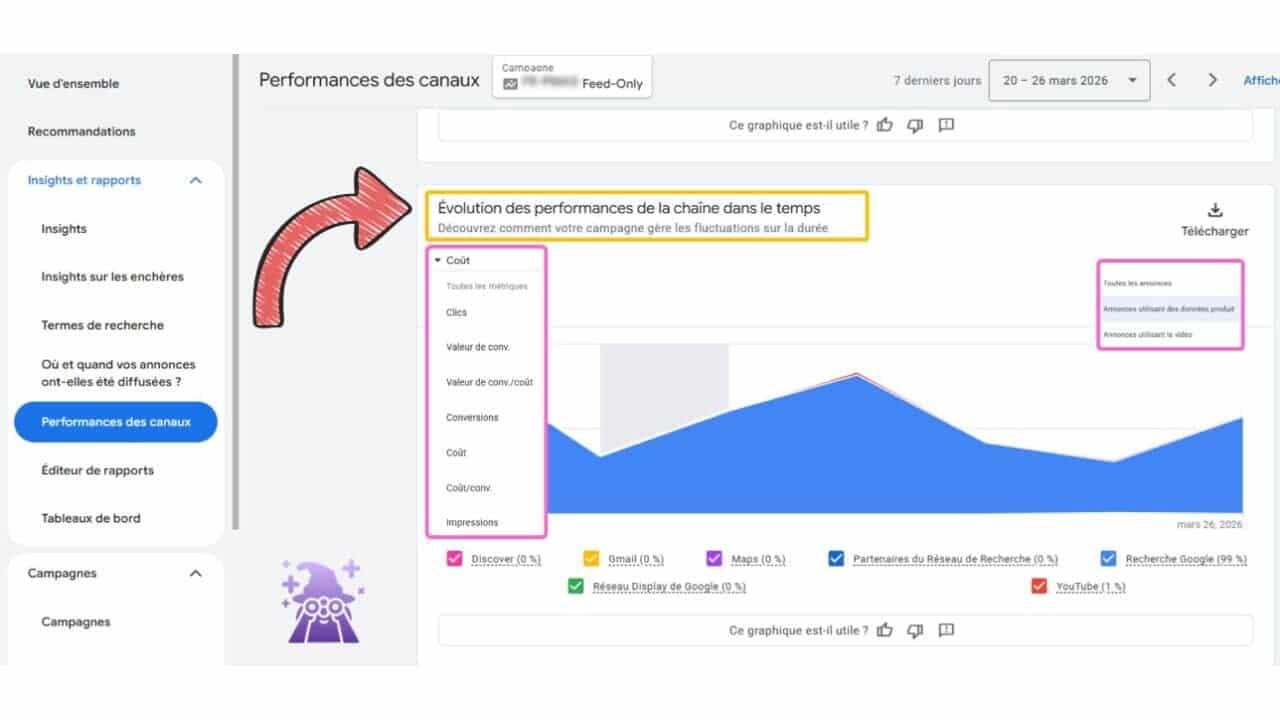
Recently, I discovered that Google has launched an exciting new feature for Performance Max campaigns. As an advertiser, I’m always on the lookout for tools that provide clearer insights, and this new channel performance timeline view does just that. It offers a comprehensive breakdown of how different channels like Search, YouTube, and Display contribute to my campaign results over time.
What’s New
The latest update introduces a timeline graph that showcases channel-level contributions over a selected period, complete with investment and performance filters. This means I can quickly identify which channels are excelling and which ones might need a bit more attention.
The chart features helpful visual cues—like a yellow box highlighting channel performance evolution over time, and a pink box indicating different ad types, such as All Ads, Ads Using Product Lists, and Ads Using Video.
Why I Care
Managing Performance Max campaigns across multiple channels often left me guessing about where my budget was working best. This new view provides valuable insights into channel-level trends, allowing me to adjust strategies or budgets more efficiently. If I notice YouTube underperforming while Search is thriving, I can now make informed decisions without relying purely on guesswork or exported data.
The Big Picture
This new view empowers me to evaluate PMAX performance more effectively, without relying solely on Google’s automated decisions. Now, I can see consistent underperformance or excellence across channels, which guides my budget and asset strategies moving forward.
The Bottom Line
Though it’s not full transparency, this update is a significant move in the right direction. I now have a more structured way to detect trend anomalies in PMax campaigns early and make necessary adjustments to optimize performance.
First Spotted
This feature was first noticed by Axel Falck, Head of Search at Le Mage du SEA, who shared his insights on LinkedIn.
Your paid search account can look healthier while the business behind it gets worse. Cost per conversion falls, the dashboard fills with activity, and automation appears to be working – yet purchases weaken, qualified leads become rarer, or the sales team spends more time rejecting inquiries.
That usually isn’t an automation failure. It is an instruction failure. Automated bidding, targeting, and testing follow the goals you make visible to them. If those goals reward easy actions rather than valuable outcomes, the system can become highly efficient at acquiring the wrong conversions.
Make the business outcome the strongest conversion signal
A bidding system doesn’t independently decide which website action matters to your company. It learns from the conversion actions, values, and campaign goals you provide. When purchases, qualified leads, pageviews, button clicks, and form starts are all treated as optimization targets, frequent low-friction actions can overwhelm the events that produce revenue.
This is the central conversion-quality problem: more conversion data is not automatically better conversion data. A pageview is easier to generate than a sale. A form start is easier to generate than a qualified submission. If the system receives no meaningful value hierarchy, it has a strong incentive to find the predictable action rather than the commercially important one.
Too few signals can also slow learning, so the answer is not to delete every intermediate event. The answer is to distinguish observation from optimization. Keep useful micro-conversions for analysis, audience understanding, and funnel diagnosis, but do not automatically make every event a primary campaign goal.
Build a conversion hierarchy before changing bids
Name the final business outcome. For ecommerce, that will normally be a completed purchase. For lead generation, it may be a qualified lead, an accepted opportunity, or another offline stage that represents genuine commercial intent.
Identify the earliest event that reliably predicts that outcome. A submitted form might be useful if nearly every submission is legitimate. If submissions vary sharply in quality, the stronger signal sits later in the sales process.
Separate primary and secondary actions. Use the commercially meaningful action for bidding. Retain form starts, calls below your qualification standard, page engagement, and similar events as diagnostic signals unless they have demonstrated business value.
Send offline outcomes back to the ad platform. When value is established after a call, review, consultation, or sales conversation, online form tracking alone gives automation an incomplete picture. Offline conversion tracking lets the system learn which clicks created real outcomes.
Use values to express meaningful differences. If two outcomes have materially different business value, representing them as equal conversions hides that distinction. Value-based bidding only helps when the values reflect the hierarchy you actually care about.
Validate the data path. Check that each event fires at the intended stage, is not duplicated, carries the right value, and can be connected to its originating campaign. A sophisticated bidding strategy cannot repair a mislabeled or duplicated conversion.
Do not compensate for sparse final conversions by promoting every available event into the primary goal set. First check whether delayed or offline outcomes are missing. Adding weak signals may increase reported volume while moving optimization farther away from revenue.
Use intent and creative to qualify traffic before the click
Conversion quality starts before someone reaches the landing page. Your keywords, product feed, campaign structure, and ad language determine which searches can enter the funnel. The more freedom you give automated targeting, the clearer those inputs need to be.
This becomes especially important in housing, employment, credit, healthcare, and legal services. Google Ads can restrict website and app remarketing, Customer Match, YouTube interaction audiences, and custom segments in sensitive-interest categories. Housing campaigns may face additional demographic limitations. Even with those controls unavailable, advertisers can still work with keywords, feeds, permitted Google audiences, content targeting, conversion tracking, and certain forms of automated targeting.
When audience history cannot do the qualifying, search intent and creative have to carry more of the load:
Start with the problem expressed in the query. Organize keywords around what the searcher needs, not just the service name your company uses internally.
Use phrase or broad match deliberately. Exact match may miss different ways of expressing the same need, particularly in restricted categories. Broader matching can recover that demand, but it should be paired with meaningful conversion signals and regular query review.
Make the offer specific in the ad. State who the service is for, what is being offered, and any important eligibility boundary that can be communicated lawfully. Clear creative discourages unsuitable clicks before they consume budget.
Keep feeds accurate. For Shopping and feed-led campaigns, titles, categories, prices, availability, and other product attributes shape which searches can surface an item. Feed quality is part of targeting quality.
Separate genuinely different services. If a company offers both sensitive and non-sensitive services, distinct sites or domains can preserve a clean operational boundary. That separation should reflect a real difference in the business and user journey, not an attempt to disguise a restricted service.
Placement changes can complicate the picture. Microsoft has tested a larger, double-row sponsored product carousel in Bing Shopping results, although the format was not visible to every user and should be treated as an experiment rather than a universal layout. More sponsored inventory can increase impressions and clicks without improving the intent of those clicks.
If Shopping traffic rises abruptly, do not assume the campaign has found a better audience. Compare product-level conversion quality, revenue, query composition, and final outcomes before raising budgets. A larger ad surface is an inventory change; it is not evidence that the additional traffic is valuable.
Put automated experiments behind business guardrails
Experiments are valuable because they isolate a proposed change from the existing campaign. The risk appears at the handoff from test result to live account. Google Ads includes an experiment setting that can apply a winning result automatically and is enabled by default. That can shorten the testing cycle, but it also removes the review point where downstream quality problems are often discovered.
The experiment interface allows directional evaluation or statistical-significance thresholds of 80%, 85%, or 95%. It also prevents automatic application when a selected success metric performs significantly worse. The limitation is just as important: an experiment can use only two success metrics, so an unselected third metric can deteriorate without stopping the rollout.
Before launching a test, write down three things outside the platform: the result that would count as a win, the business metric that must not fall below an acceptable level, and the conditions that require manual review. This prevents a visually convincing dashboard from redefining success after the test ends.
When automatic application is reasonable
The change is easy to reverse and has limited reach.
The primary success metric represents a final or strongly qualified outcome.
The second metric protects the most important cost, value, or quality constraint.
No critical business measure sits outside those two metrics.
Conversion tracking has been validated before the experiment starts.
When to require manual review
The test changes the conversion goal, assigned values, or bidding strategy.
The change expands traffic through broader matching, automated targeting, new inventory, or a substantially different feed.
Lead quality is determined offline or only after a meaningful delay.
The campaign operates in a regulated or sensitive category.
The commercial downside of a false winner is larger than the operational cost of reviewing it.
For a manual review, look beyond the two headline metrics. Inspect the conversion-action mix, qualified-lead or purchase rate, revenue or assigned value, search-query and product composition, spend distribution, and any delayed offline outcomes. If the experiment appears to win only because it generated more low-value actions, it has not passed a conversion-quality test.
Diagnose quality loss from the symptom, not the dashboard score
Automation problems leave recognizable patterns. Use the visible symptom to identify which instruction the system may be following, then correct the signal or boundary before making another bid adjustment.
What you notice
Likely mechanism
What to inspect
What to change
Reported CPA falls while qualified-lead or purchase rate falls
An easy micro-conversion is dominating optimization
Primary goals, conversion-action mix, duplicate events, and assigned values
Move weak actions to observation, correct duplication, and optimize toward the final or qualified outcome
Form volume rises but the sales team rejects more leads
The platform sees submission volume but not downstream qualification
Offline outcome imports, attribution identifiers, and the delay between submission and review
Import qualified stages and use them as the stronger bidding signal
Shopping impressions and clicks jump without comparable revenue
More prominent or expanded ad inventory is creating extra exposure
Product-level revenue, query composition, conversion rate, and average order value
Hold budget decisions until final conversion quality is clear; refine products and feed inputs where needed
A sensitive-category campaign has very little eligible traffic
Audience restrictions and narrow matching are constraining reach
Policy status, prohibited audience dependencies, keyword coverage, feeds, and ad specificity
Use compliant intent targeting, permitted audiences, phrase or broad match where appropriate, and clearer qualifying creative
An experiment wins but downstream revenue weakens
The deteriorating business metric was not one of the two protected success metrics
The complete funnel, not only the experiment summary
Reverse or withhold the rollout, redesign the metrics, and keep automatic application off for that test class
Smart bidding has too little useful data
Final outcomes are sparse, delayed, or missing from the platform
Tracking completeness, offline imports, attribution matching, and conversion lag
Repair the final-outcome data path before adding low-intent events as optimization goals
Resist the urge to solve every symptom by loosening targets or increasing budget. Those changes may give the system more room to pursue the same incorrect objective. Fix the definition of success first, then decide how aggressively to scale it.
Key takeaways
Automated bidding optimizes the conversions and values you expose; it does not independently know which actions create revenue.
Keep micro-conversions available for funnel analysis, but make them primary goals only when they are reliable proxies for business value.
For lead generation, send qualified offline outcomes back to the platform instead of asking form submissions to stand in for lead quality.
When remarketing or audience controls are restricted, use search intent, accurate feeds, and self-qualifying creative to shape traffic.
Treat increases caused by new or expanded ad inventory as exposure gains until purchase or lead-quality data proves otherwise.
Review auto-applied experiment settings before launch, especially when an important business metric cannot fit among the two success metrics.
Start your next optimization session in the conversion-goal settings, not the bidding controls. Confirm which actions are primary, trace them to a real business outcome, and identify the quality metric that could deteriorate unnoticed. Once those instructions are sound, automation has something worth scaling.
I recently stumbled upon a tricky issue in Google Ads Editor that’s affecting many advertisers. A bug is causing structured snippet extensions copied between accounts to unintentionally stay linked. Whenever I change the language setting in one account, it seems to magically update the extension in another account too.
Why this matters to us. For those of us running multi-market campaigns, this bug could introduce hidden inconsistencies, especially if we’re managing accounts that require different languages.
What I’ve been experiencing. This issue came to light for digital marketer Marcin Wsół while handling Czech and Slovak e-commerce accounts. A change in snippet language in one account inadvertently altered the same setting in another.
The extensions appear separate at first glance but act like they’re mysteriously synced.
Zoom in on the details. If you use the Google Ads web interface, you can temporarily correct this, but any further edits in Editor might cause the language settings to toggle again.
A deeper issue. This bug isn’t confined to cross-account use. PPC News Feed founder Hana Kobzová discovered that even copying structured snippets within the same account can lead to incorrect language settings after making additional edits.
Reading between the lines. For those of us who depend on bulk edits in the Editor, there’s a risk of unintentionally overwriting localization settings, which could lead to mixed messaging across our markets.
The bottom line. Until Google fixes this, I recommend double-checking structured snippet languages after copying or editing in Google Ads Editor, especially when you’re working across different accounts or regions.
When this issue was first seen. This was initially identified by Marcin Wsół and later reported by PPC News Feed.
Your paid campaigns can generate leads this week while the resulting revenue takes months to appear. That delay creates an uncomfortable decision: should the ad platform optimize for the form submission it can see quickly, or for the closed sale that reflects the outcome you ultimately care about?
The answer is not simply “optimize further down the funnel.” In a human-led sales process, a closed deal measures more than media quality. It also reflects rep skill, follow-up speed, capacity, product availability, approval delays, and seasonal behavior. You need a bidding signal that rewards valuable demand without teaching the platform to react to every operational swing.
Key takeaways for long-cycle campaigns
Use the deepest conversion event that is frequent, timely, and operationally stable. A closed sale is not automatically the best bidding signal.
For many long sales cycles, the practical optimization boundary is a valued lead at submission: not every form fill receives the same value, but the value is assigned before sales execution changes the outcome.
Estimate lead value from conversion probability and typical deal size using information available when the inquiry arrives.
Keep downstream revenue in your measurement system even when it is not the primary bidding input. You need it to calibrate lead values and judge business performance.
Diagnose media quality and sales operations separately. Stable lead volume and predicted value alongside a falling close rate is not sufficient evidence that targeting has failed.
Why a closed sale can be the wrong bidding signal
An ad platform sees the conversion outcome, but it does not understand your organization. If a strong sales rep closes more leads than a new rep, the platform can observe the difference in recorded sales. It cannot inherently know that rep assignment caused it.
Imagine that the same campaigns, keywords, landing pages, and lead profiles continue running while your most effective closer takes leave. A less experienced colleague receives the leads, follow-up slows, and the close rate falls. An automated system optimizing for sales may treat the decline as evidence that those clicks or audiences became less valuable. It can then reduce bids, shift budget, or suppress targeting that was still generating suitable prospects.
Rep composition is only one source of noise. Close rates can change when workloads increase, response times stretch from days into a week, a competitive product is withdrawn, an approval stalls, or vacation coverage leaves inquiries untouched. Leads from other channels can also consume the sales team’s capacity even though nothing changed inside the paid account.
Calendar behavior can make the distortion severe. In one observed financial-services pattern, lead-to-sale conversion around the third week of December rose by as much as 150% compared with normal weeks, then fell sharply during the holiday week. The leads and placements had not suddenly become much better and then much worse. Sales urgency, customer availability, bonus incentives, and leave schedules had changed.
This is the core diagnostic distinction: a sale is a business outcome, but it is not always a clean media-quality label. When you ask an algorithm to bid on it, you are asking the platform to optimize all the forces embedded in that outcome, including forces the campaign cannot control.
Set the optimization boundary at a stable quality signal
Your optimization boundary should sit at the latest funnel event that satisfies three conditions: the event happens often enough for automation to learn from it, it arrives soon enough to guide current bidding, and its definition remains stable enough to mean the same thing from one period to the next.
A raw lead count is too shallow when inquiries have materially different probabilities of conversion or deal sizes.
A closed sale is too deep when it is rare, delayed, or heavily shaped by sales execution and operational capacity.
A valued lead at submission is the middle path when you can estimate commercial potential from information already available at the point of inquiry.
The phrase “at submission” matters. If you assign the value after seeing which rep handled the lead, whether the buyer answered a follow-up call, or how the opportunity progressed, you have allowed downstream execution back into the bidding label. The model should use attributes known when the lead enters the funnel.
The optimization boundary is not the reporting boundary. Continue importing final status and realized revenue. Use those outcomes to evaluate the business, recalibrate the lead-value model, and identify sales-process problems. You are separating two jobs: the bidding system needs a timely and stable signal, while management reporting needs the complete commercial outcome.
Build a lead-value model from matured historical cohorts
A useful lead-value model estimates expected revenue rather than merely labeling a lead “good” or “bad.” Start with historical inquiries that have had enough time to reach a final outcome. A full year is preferable because it captures more operating conditions and seasonality, although six months can be sufficient when that is all the reliable history you have.
Select matured cohorts. Group leads by the date they entered the funnel, then include cohorts old enough that most opportunities have reached a meaningful final status. Mixing fresh, unresolved leads with completed cohorts will make recent traffic appear artificially weak.
Freeze the information available at inquiry. Retain fields the campaign could reasonably influence or attract: requested product, project scope, stated timing, loan characteristics, company size, industry, and other submission-time attributes relevant to your business.
Calculate conversion probability by meaningful segment. Determine which inquiry-time characteristics correspond with different eventual conversion rates. Keep the segments understandable enough that you can explain why a lead received its value.
Measure typical deal value for each segment. A segment that closes frequently is not necessarily the most valuable if its average commercial outcome is small. Conversely, a lower-probability segment may deserve attention when successful deals are much larger.
Assign expected revenue. The basic logic is conversion probability multiplied by typical deal value. The result is a monetary estimate that a value-based bidding system can compare across leads.
Reconcile predictions with realized revenue. Add the predicted values for a matured acquisition cohort and compare that total with the revenue eventually produced by the same cohort. Large or persistent gaps mean the probabilities, deal values, segments, or data quality need adjustment.
Version and revisit the model. Preserve the value assigned at submission and record which model version produced it. Reassess the model quarterly so changes in campaign mix, products, buyer behavior, and operations do not leave old assumptions running indefinitely.
The most useful segmentation variables depend on the transaction. Financial-services leads may differ by loan value or terms. B2B inquiries may differ by company size or industry. Construction opportunities may differ by scope and immediacy. Choose fields that were genuinely known at inquiry and have a defensible relationship with conversion probability or deal size.
Do not confuse an expected-revenue value with a conventional lead score. A score of 90 may rank above a score of 40, but it does not tell a bidding system whether the first lead is twice as valuable, ten times as valuable, or only marginally better. Monetary values express the size of the difference and allow value-based bidding to make an economically meaningful tradeoff.
Guard against data leakage as you build the model. Opportunity stage, rep assessment, response behavior, and later qualification calls may predict sales extremely well, but they were not known when the ad produced the inquiry. Using them to label historical leads can create a model that looks accurate in analysis but cannot assign equivalent values consistently at submission.
Feed values into bidding without losing revenue accountability
Once the values reconcile reasonably with matured revenue, configure the lead conversion to send its expected value with the event. Value-based bidding, including Google Ads target return on ad spend, can then pursue the mix of inquiries with the highest predicted commercial value rather than the largest number of identical form fills.
Treat the implementation as a measurement change before treating it as a bidding change. First log the dynamic values while the existing strategy remains in place. Confirm that each valid lead is counted once, the correct value reaches the correct conversion action, and the platform’s aggregate value matches your lead system for the same inquiry dates. Only then should you let a value-based strategy act on the signal.
Keep a compact acquisition record for every lead. At minimum, preserve the lead identifier, inquiry timestamp, paid-media attribution, value assigned at submission, model version, rep assignment, first-response timing, final status, and realized revenue. This lets you distinguish what the model knew from what happened after the handoff.
Evaluate performance through two related views:
Predicted return compares total expected lead value with the spend that produced those leads. It is available quickly enough to guide campaign management.
Realized return compares eventual revenue with spend for the same acquisition cohort. It arrives later but tells you whether the model and the wider commercial process delivered what the early signal implied.
Keep the cohort alignment intact. Revenue closed this month may have come from leads acquired months ago, so comparing it with this month’s spend can produce a convincing but false trend. Join eventual revenue back to the date and campaign that generated the inquiry. That makes the lag explicit and prevents old pipeline from being credited to current media.
Roll the bidding change into a controlled part of the account rather than changing every campaign at once. Watch lead counts, predicted value, spend, and the distribution of value tiers. As cohorts mature, compare their predicted totals with realized revenue. A strategy that raises platform-reported value but repeatedly produces less realized revenue is exposing a calibration or tracking problem, not proving business growth.
Diagnose a performance drop before changing the media
When sales fall, resist the reflex to rewrite ads or cut audiences immediately. Walk through the funnel in causal order. The goal is to locate the first point where performance changed.
Check inquiry volume. Did the number of valid paid leads change, or did only closed sales change?
Check predicted lead value. Did the mix move toward lower-value tiers even if total lead volume remained stable?
Check media inputs. Look for meaningful changes in targeting, search terms, audience composition, placements, creative, landing-page behavior, budget, or tracking.
Check routing and response time. Determine whether leads reached the right people and whether follow-up slowed.
Check staffing and capacity. Review rep assignment, leave, onboarding, workload, and competing lead sources.
Check the commercial offer. Identify withdrawn products, changed eligibility, approval delays, pricing constraints, or other conditions that made the same lead harder to close.
Check calendar effects. Separate customer availability and sales-team urgency from changes in demand quality.
Change the layer that failed. Adjust campaigns when the deterioration begins in traffic or predicted lead value. Address operations when the early media signal is stable but handoff or close performance worsens.
This sequence gives you a cleaner interpretation. If lead volume and predicted value remain stable while response times rise and close rates fall, the evidence points downstream. If response times and sales coverage remain stable while the account produces a weaker value mix, the media deserves scrutiny. If both change, treat them as separate problems instead of asking one campaign adjustment to solve both.
Your first move should be an export of matured lead cohorts, not another bid adjustment. Identify the inquiry-time attributes that separate conversion probability and deal size, assign expected revenue, and reconcile the total against actual revenue. Once that model holds together, use it as the bidding signal and keep closed sales as the accountability signal. That division gives automation something it can learn from without letting every staffing or operational change rewrite your media strategy.
Heidi Sturrock, a seasoned paid search consultant, shared her insights with me in a recent episode of PPC Live The Podcast. With over two decades of industry experience, Heidi discussed a memorable campaign blunder that surprisingly turned into a strategic win, as well as her experiences with AI Max across numerous accounts.
Heidi’s career story includes a significant misstep she made while running a competitor campaign using broad match without negative keywords. Launched on a Friday, this led to a weekend surge of calls from irate customers of a competitor, a situation both alarming and chaotic for the client’s call center.
Unexpectedly, her client saw potential in this turmoil. Instead of dwelling on the mistake, they chose to transform these calls into sales opportunities by offering a discounted first month to switchers. By dividing the campaign for better focus, they turned a problem into a pathway for growth.
From this experience, I learned two valuable lessons: never initiate major campaigns on a Friday and ensure all stakeholders are involved in client meetings. Having both the business owner and the sales leader aware of the situation allowed for quick, effective problem-solving.
When facing a mistake, I’ve realized the importance of halting the issue swiftly, taking responsibility, and presenting a clear plan for resolution. Clients value honesty, and this approach can reinforce trust even in difficult times.
Common failures in account management often involve misaligned attribution windows and undue focus on secondary KPIs. It’s crucial to align metrics with the primary goals, ensuring that higher CPCs are understood within the broader context of achieving ROAS targets.
Regarding AI tools, Heidi’s exploration of AI Max across various accounts delivered mixed results. Success often hinged on the availability of comprehensive historical data and well-defined goals. Her advice is to experiment gradually and prepare upcoming guidelines on her blog.
For those in the industry, embracing technological changes, especially in AI, is essential. Mastering these tools can propel us ahead as marketers.
Stay connected with Heidi on LinkedIn or visit HeidiSturrock.com for her expert guides, including tips on crafting effective ad copy. Also, catch her live at SMX Advanced in Boston this June, where she’ll participate in an engaging expert panel discussion.