I’ve just learned that Perplexity AI’s Comet browser agent can no longer make purchases on Amazon. This decision comes after a federal judge ruled in Amazon’s favor, expressing concerns about AI shopping bots.
Why this matters to us. The ruling challenges AI’s ability to simplify tasks, such as online shopping, by acting on our behalf. If similar restrictions are enacted, AI agents might face significant hurdles when trying to access logged-in areas of popular platforms.
The situation as it unfolded. U.S. District Judge Maxine Chesney in San Francisco issued a preliminary injunction, favoring Amazon’s position.
Perplexity is now prohibited from using Comet to enter password-protected sections of Amazon, like those reserved for Prime members.
Judge Chesney noted Amazon’s “strong evidence” indicating Comet’s access was granted by users but not authorized by Amazon itself.
The court order also mandates that Perplexity must eliminate all Amazon data it has gathered.
Getting up to speed. Back in November, Amazon filed a lawsuit against Perplexity, accusing it of computer fraud and unauthorized platform access. Allegedly, Comet completed purchases on user accounts without properly identifying itself as a bot.
Next steps. There’s a one-week suspension on the order, giving Perplexity the chance to appeal.
What Amazon says. According to Lara Hendrickson, an Amazon spokesperson, this injunction is crucial for stopping Perplexity’s unauthorized Amazon access and is a vital move towards maintaining trust for customers.
We all dream of gaining media coverage that positively impacts our brand. It leads to increased exposure, builds authority, fosters trust, and often provides valuable backlinks.
However, the path to such coverage often seems shrouded in mystery for many of us. Some hold myths about needing to be top-of-the-industry to catch the media’s eye. But let me tell you, that’s not entirely accurate.
There’s also a belief that media coverage is a commodity that can simply be bought. While you might find contributors willing to feature you for a fee, this practice is against most outlet guidelines. Even if you momentarily land a feature, it’s not sustainable; once discovered, it leads to content removal and getting blacklisted.
So, how can you get featured? It starts with understanding the process and applying it consistently.
Develop Your Story
Each of us likely has a compelling story waiting to be discovered. For the media, content is a never-ending demand, and having a strong story is your ticket to being featured.
But let’s dig into what doesn’t make a compelling story. It isn’t enough to be the first, claim to be the best, or even aim to change the world.
The key lies in telling an actual story that resonates. Explain why the audience should care. Like how I rebuilt my success story using PR, our agency’s approach comes from personal experience, aiming to empower others similarly.
Remember, you don’t need a life-or-death struggle for a great story. Tap into a mission that engages people and gives them something to care about.
Craft Your Pitch
Even with the best story, crafting an effective pitch is vital. It must stand out amidst hundreds of emails journalists receive daily. Your pitch should succinctly communicate your story and compel a response.
Focus on connecting your story to current events. Remember, while it involves you, the story isn’t solely about you. Always prioritize what the audience wants.
Condense your story into a few engaging sentences and align a short, punchy subject line with your pitch to grab attention positively. A well-aligned subject line is crucial for getting your email opened and read.
Build Your Media List
PR isn’t a numbers game. The goal is to send the right pitch to the right people at the right moment. Identify media contacts who align with your story, which you can often do through search engines or social media.
Timing is partly chance, but with persistence, you can always improve your odds.
Send Your Pitch
The perfect time to send your pitch doesn’t exist—unless pressing news demands immediate attention. Avoid bombarding contacts with follow-ups; once a week is sufficient. After two or three attempts with no response, move on.
It’s not personal; given the volume of pitches received, a lack of reply isn’t uncommon. Patience and perseverance are essential.
Nurture Your Relationships
Most pitches won’t result in immediate media coverage, and many stop after initial rejection; I find this approach baffling.
I’ve faced many “no” responses before achieving a feature. The key is in fostering relationships; these media contacts were strangers at first. Investing in building real relationships has ensured that my emails get opened. Once you have a network of responsive press contacts, consistent pitching becomes much easier.
I’ve been following the latest updates from OpenAI, and they recently made some significant changes to their privacy policy, especially with the introduction of ads in ChatGPT. These updates are designed to allow advertisers to run personalized ads while ensuring that our chats remain private and secure.
OpenAI shared these updates with ChatGPT users, detailing how ads will function within the platform and clarifying what data is accessible to advertisers. It’s a refreshing assurance that our personal interactions remain confidential.
Why this matters to me. Privacy is paramount, and OpenAI emphasizes that personal chats and histories remain shielded from advertisers. They utilize anonymized engagement signals for ad personalization, ensuring advertisers can target relevant users without accessing sensitive information.
This method allows advertisers to evaluate the performance of their ads within a privacy-first framework, fostering user trust.
Ads in ChatGPT For users like me on Free and Go plans, ads might start appearing, but if you opt for paid tiers like Plus, Pro, Enterprise, Business, and Education, you can enjoy an ad-free experience. OpenAI promises clear labeling and separation of ads from chatbot responses.
Importantly, the content generated by ChatGPT remains unbiased and unaffected by these advertisements.
How ad targeting is handled. OpenAI uses in-platform signals such as ad interactions to personalize ads, but advertisers do not get access to our conversations, chat histories, or personal information.
Advertisers receive only aggregated metrics like total views or clicks, ensuring our personal data stays protected.
Additional privacy updates A new feature allows for optional contact syncing, helping us connect with friends who also use OpenAI services. It’s up to us whether to enable this feature.
They also provided more transparency on data storage durations, processing methods, and user control options, helping us understand our data management better.
Safety and product enhancements. The update encompasses new safety tools and age prediction systems aimed at ensuring a safer environment for teenagers. Documentation for new features like Atlas, Sora 2, and parental controls for teen accounts has also been included.
The bottom line. With the expansion of advertising in ChatGPT, OpenAI is committed to maintaining strict boundaries concerning user privacy, offering advertisers valuable insights without infringing on personal conversations or data.
This update was first spotted by Paid Media expert Arpan Banerjee, who shared insights on LinkedIn. It’s a promising move towards privacy-centric advertising in AI-powered platforms.
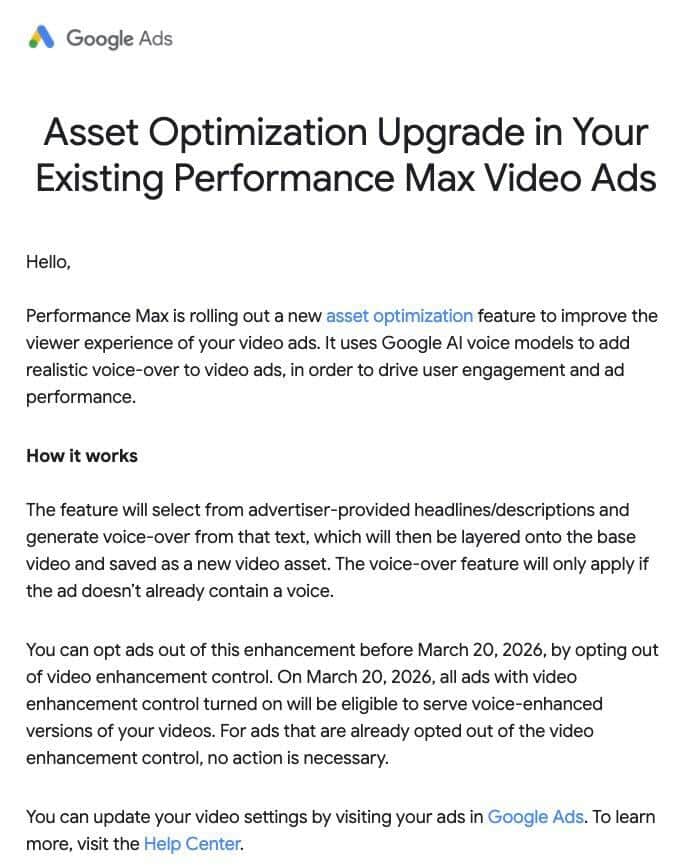
Have you heard the news? Google Ads is taking the advertising world by storm with its latest feature: AI voice-over for Performance Max video ads! They’re rolling out this innovative enhancement, automatically narrating video ads with realistic voice-overs, unless, of course, we choose to opt out by March 20.
Google is enhancing viewer engagement and ad performance by utilizing advanced AI voice models. This update will make ads more appealing without any additional creative output on our part. Exciting, isn’t it?
Why this matters to us. If we don’t actively opt out by March 20, our video ads will automatically benefit from Google’s AI voice models. This could transform how our ads sound to viewers, all without any creative effort on our part.
How does it work?
This feature kicks in only when videos lack a voice track.
Google’s AI chooses text from the headlines and descriptions we’ve provided and crafts a realistic voice-over from it.
The voice-over is seamlessly layered onto the original video, transforming it into a new asset.
The catch. This process is set to default, meaning our ads will be automatically eligible for voice enhancements unless we opt out proactively.
Key dates. We have until March 20 to decide if we want to exclude our ads from this feature. To step back from this feature, we need to adjust the video enhancement control settings. After the deadline, any ad with video enhancement control will be open to voice-enhanced updates automatically.
Action steps for us as advertisers. Configuring our video settings is simple. Just visit your Google Ads portal to make any necessary adjustments.
First seen. This update was brought to light by Paid Search specialist Arpan Banerjee in a LinkedIn post. Take a look at his insights here.
I recently came across an intriguing study that shows AI tools are now responsible for generating 45 billion monthly sessions globally. This accounts for an impressive 56% of all search engine activity, according to Graphite.io CEO Ethan Smith.
The analysis combines web and mobile app usage across leading AI platforms and suggests that AI activity matches 56% of global search use and 34% in the U.S.
The surge is particularly evident in mobile applications like ChatGPT, Gemini, Perplexity, Grok, and Claude.
Why it matters: AI is broadening the horizons of discovery, rather than limiting the demand for search. Since 2023, combined usage across search engines and AI assistants has increased by 26% globally. It’s clear that having visibility in both LLMs and traditional rankings is crucial.
Key insights: The report dives into the performance of the top five LLM products—ChatGPT, Gemini, Perplexity, Grok, and Claude—and compares them to the biggest search engines. Here are some standout insights:
AI platforms generate 45 billion monthly sessions worldwide.
Within the U.S., AI accounts for roughly 5.4 billion monthly sessions.
An astounding 83% of global AI usage takes place within mobile apps (75% in the U.S.).
ChatGPT is leading the charge, representing 89% of AI sessions globally.
When looking at search-like prompts, AI usage constitutes 28% of the global search and 17% within the U.S.
The report leaves out prompts in the “doing” or “expressing” categories. According to OpenAI, around 52% of prompts focus on seeking information, akin to traditional search queries.
Reading between the lines: Most forecasts comparing AI and search focus only on website traffic, often just Google.com and ChatGPT site visits. This approach overlooks much of AI’s impact.
The research suggests these comparisons undervalue AI activity by a factor of 4-5 times because a significant chunk occurs on mobile apps.
The analysis takes into account various LLMs and search engines, rather than only comparing Google and ChatGPT.
What to keep an eye on: Google remains a dominant force in discovery, but the report estimates its share of search-related activity has declined from 89% in 2023 to 71% by the fourth quarter of 2025.
While global AI usage seems stabilized since July 2025, the U.S. usage is still on a rapid climb—up about 300% year over year by December 2025.
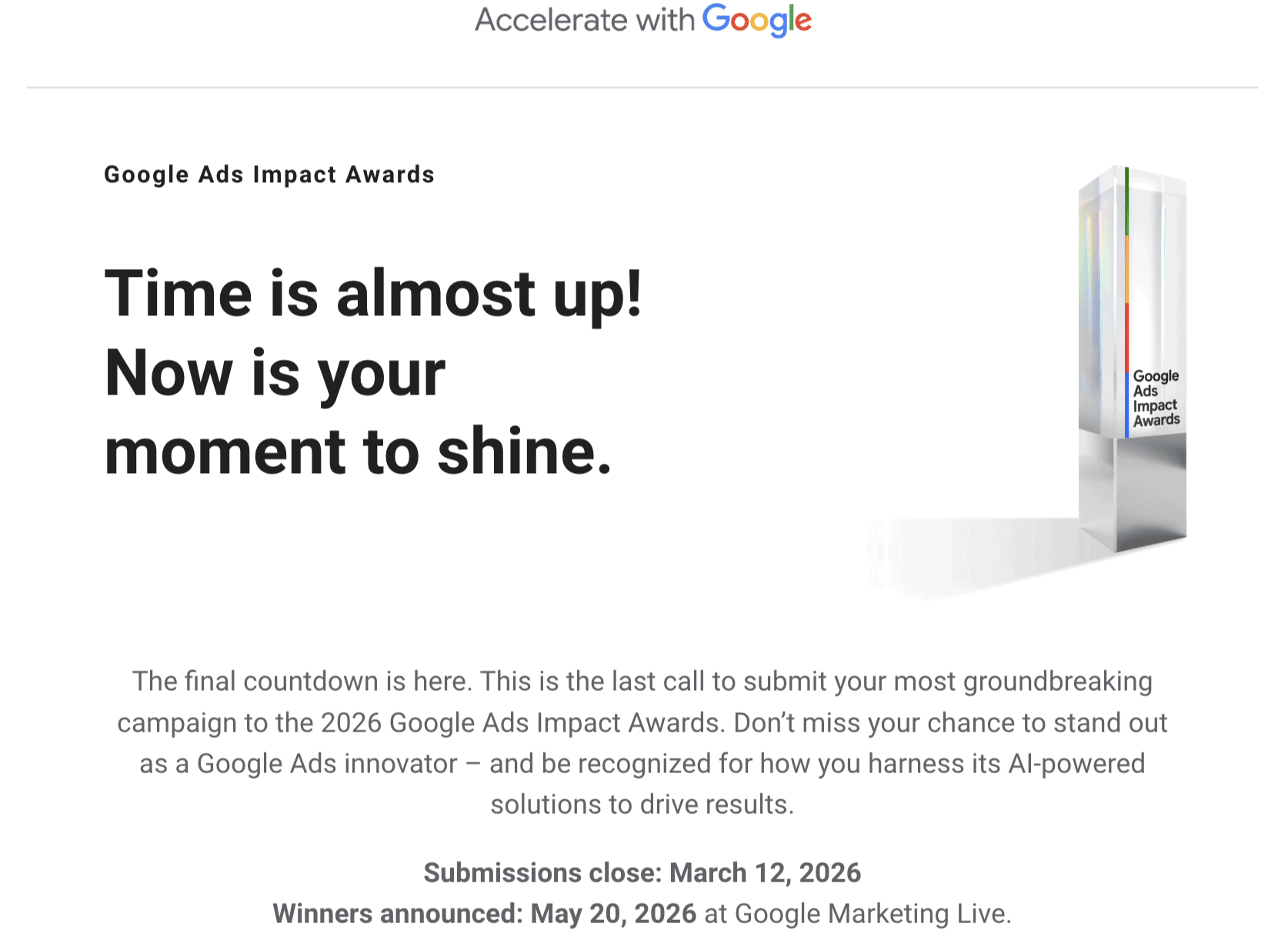
I recently received thrilling news about Google Marketing Live 2026, which is officially scheduled for May 20. I’m eagerly anticipating the event where Google will unveil the latest enhancements in advertising, AI, and campaign automation.
In fact, I discovered the date through an email from the Accelerate with Google program. This communication not only confirmed the event date but also invited entries for the prestigious Google Ads Impact Awards.
You might be interested to know that the winners of these awards will be announced during the event, adding an extra layer of excitement.
Why it matters to me. As a user of Google Ads, I’m always on the edge of my seat for this annual event. It’s the moment Google reveals its groundbreaking innovations—new AI features, campaign types, and measurement tools that will hugely impact how I manage and optimize my campaigns.
Each year, the most pivotal updates in Google’s advertising strategies are first introduced at this event. It provides invaluable insights into the future of digital advertising.
The bigger picture. This year’s event aligns with Google I/O 2026 (May 19–20), which goes beyond just advertising. I/O covers the broader Google ecosystem including AI and Search technologies, which often guide the direction of advertising products.
What to watch for. I’m eagerly expecting announcements related to AI-driven advertising, automation, and enhanced performance metrics. It’s a must-watch for any marketer keen on staying ahead of Google’s ad strategy for the coming year.
First heard about it. The PPC News Feed by Hana Kobzová was where I initially got the scoop. It’s always exciting to find such vital information from reliable sources I trust.
He did caution, “If you’re sure that it’s what you want to do, you can use ‘domain:abc’ in the disavow file. Keep in mind that you can’t carve out specific domains if you like some, but if you find the TLD is almost only annoying spammers, it’ll save you time.”
However, he also advised, “I’m sure all TLDs have some good sites.” This method is powerful but should be used judiciously. It’s a big decision—like using a sledgehammer when sometimes a chisel might do.
Why should you care about this? If you find a TLD that’s causing issues or is full of low-quality spammy backlinks, disavowing it might just be the clean-up you need. But be cautious—it’s often better to carefully choose which links to disavow and avoid blanket decisions.
For those interested in exploring the disavow tool further, there’s a helpful document available here.
This feature is undocumented because, as John put it, “Given how big of a hammer it is, I don’t know if it’s something we should really suggest in the docs.” Essentially, you can block all links from a specific TLD, a top-level-domain, using a special syntax.
Let me break down how it works. You simply add “domain:abc” to your disavow file if you’re certain that you need to block an entire TLD. John shared this insight on his Bluesky post, and it’s a fascinating possibility if you’re often dealing with spammy domains.
He did caution, “If you’re sure that it’s what you want to do, you can use ‘domain:abc’ in the disavow file. Keep in mind that you can’t carve out specific domains if you like some, but if you find the TLD is almost only annoying spammers, it’ll save you time.”
However, he also advised, “I’m sure all TLDs have some good sites.” This method is powerful but should be used judiciously. It’s a big decision—like using a sledgehammer when sometimes a chisel might do.
Why should you care about this? If you find a TLD that’s causing issues or is full of low-quality spammy backlinks, disavowing it might just be the clean-up you need. But be cautious—it’s often better to carefully choose which links to disavow and avoid blanket decisions.
For those interested in exploring the disavow tool further, there’s a helpful document available here.
This feature is undocumented because, as John put it, “Given how big of a hammer it is, I don’t know if it’s something we should really suggest in the docs.” Essentially, you can block all links from a specific TLD, a top-level-domain, using a special syntax.
Let me break down how it works. You simply add “domain:abc” to your disavow file if you’re certain that you need to block an entire TLD. John shared this insight on his Bluesky post, and it’s a fascinating possibility if you’re often dealing with spammy domains.
He did caution, “If you’re sure that it’s what you want to do, you can use ‘domain:abc’ in the disavow file. Keep in mind that you can’t carve out specific domains if you like some, but if you find the TLD is almost only annoying spammers, it’ll save you time.”
However, he also advised, “I’m sure all TLDs have some good sites.” This method is powerful but should be used judiciously. It’s a big decision—like using a sledgehammer when sometimes a chisel might do.
Why should you care about this? If you find a TLD that’s causing issues or is full of low-quality spammy backlinks, disavowing it might just be the clean-up you need. But be cautious—it’s often better to carefully choose which links to disavow and avoid blanket decisions.
For those interested in exploring the disavow tool further, there’s a helpful document available here.
He did caution, “If you’re sure that it’s what you want to do, you can use ‘domain:abc’ in the disavow file. Keep in mind that you can’t carve out specific domains if you like some, but if you find the TLD is almost only annoying spammers, it’ll save you time.”
However, he also advised, “I’m sure all TLDs have some good sites.” This method is powerful but should be used judiciously. It’s a big decision—like using a sledgehammer when sometimes a chisel might do.
Why should you care about this? If you find a TLD that’s causing issues or is full of low-quality spammy backlinks, disavowing it might just be the clean-up you need. But be cautious—it’s often better to carefully choose which links to disavow and avoid blanket decisions.
For those interested in exploring the disavow tool further, there’s a helpful document available here.
This feature is undocumented because, as John put it, “Given how big of a hammer it is, I don’t know if it’s something we should really suggest in the docs.” Essentially, you can block all links from a specific TLD, a top-level-domain, using a special syntax.
Let me break down how it works. You simply add “domain:abc” to your disavow file if you’re certain that you need to block an entire TLD. John shared this insight on his Bluesky post, and it’s a fascinating possibility if you’re often dealing with spammy domains.
He did caution, “If you’re sure that it’s what you want to do, you can use ‘domain:abc’ in the disavow file. Keep in mind that you can’t carve out specific domains if you like some, but if you find the TLD is almost only annoying spammers, it’ll save you time.”
However, he also advised, “I’m sure all TLDs have some good sites.” This method is powerful but should be used judiciously. It’s a big decision—like using a sledgehammer when sometimes a chisel might do.
Why should you care about this? If you find a TLD that’s causing issues or is full of low-quality spammy backlinks, disavowing it might just be the clean-up you need. But be cautious—it’s often better to carefully choose which links to disavow and avoid blanket decisions.
For those interested in exploring the disavow tool further, there’s a helpful document available here.
As I was exploring Google’s lesser-known features, I came across an intriguing method to disavow an entire TLD using their link disavow tool. John Mueller from Google mentioned this capability, though it’s not officially documented.
Why should you care about this? If you find a TLD that’s causing issues or is full of low-quality spammy backlinks, disavowing it might just be the clean-up you need. But be cautious—it’s often better to carefully choose which links to disavow and avoid blanket decisions.
For those interested in exploring the disavow tool further, there’s a helpful document available here.
He did caution, “If you’re sure that it’s what you want to do, you can use ‘domain:abc’ in the disavow file. Keep in mind that you can’t carve out specific domains if you like some, but if you find the TLD is almost only annoying spammers, it’ll save you time.”
However, he also advised, “I’m sure all TLDs have some good sites.” This method is powerful but should be used judiciously. It’s a big decision—like using a sledgehammer when sometimes a chisel might do.
Why should you care about this? If you find a TLD that’s causing issues or is full of low-quality spammy backlinks, disavowing it might just be the clean-up you need. But be cautious—it’s often better to carefully choose which links to disavow and avoid blanket decisions.
For those interested in exploring the disavow tool further, there’s a helpful document available here.
This feature is undocumented because, as John put it, “Given how big of a hammer it is, I don’t know if it’s something we should really suggest in the docs.” Essentially, you can block all links from a specific TLD, a top-level-domain, using a special syntax.
Let me break down how it works. You simply add “domain:abc” to your disavow file if you’re certain that you need to block an entire TLD. John shared this insight on his Bluesky post, and it’s a fascinating possibility if you’re often dealing with spammy domains.
He did caution, “If you’re sure that it’s what you want to do, you can use ‘domain:abc’ in the disavow file. Keep in mind that you can’t carve out specific domains if you like some, but if you find the TLD is almost only annoying spammers, it’ll save you time.”
However, he also advised, “I’m sure all TLDs have some good sites.” This method is powerful but should be used judiciously. It’s a big decision—like using a sledgehammer when sometimes a chisel might do.
Why should you care about this? If you find a TLD that’s causing issues or is full of low-quality spammy backlinks, disavowing it might just be the clean-up you need. But be cautious—it’s often better to carefully choose which links to disavow and avoid blanket decisions.
For those interested in exploring the disavow tool further, there’s a helpful document available here.
He did caution, “If you’re sure that it’s what you want to do, you can use ‘domain:abc’ in the disavow file. Keep in mind that you can’t carve out specific domains if you like some, but if you find the TLD is almost only annoying spammers, it’ll save you time.”
However, he also advised, “I’m sure all TLDs have some good sites.” This method is powerful but should be used judiciously. It’s a big decision—like using a sledgehammer when sometimes a chisel might do.
Why should you care about this? If you find a TLD that’s causing issues or is full of low-quality spammy backlinks, disavowing it might just be the clean-up you need. But be cautious—it’s often better to carefully choose which links to disavow and avoid blanket decisions.
For those interested in exploring the disavow tool further, there’s a helpful document available here.
This feature is undocumented because, as John put it, “Given how big of a hammer it is, I don’t know if it’s something we should really suggest in the docs.” Essentially, you can block all links from a specific TLD, a top-level-domain, using a special syntax.
Let me break down how it works. You simply add “domain:abc” to your disavow file if you’re certain that you need to block an entire TLD. John shared this insight on his Bluesky post, and it’s a fascinating possibility if you’re often dealing with spammy domains.
He did caution, “If you’re sure that it’s what you want to do, you can use ‘domain:abc’ in the disavow file. Keep in mind that you can’t carve out specific domains if you like some, but if you find the TLD is almost only annoying spammers, it’ll save you time.”
However, he also advised, “I’m sure all TLDs have some good sites.” This method is powerful but should be used judiciously. It’s a big decision—like using a sledgehammer when sometimes a chisel might do.
Why should you care about this? If you find a TLD that’s causing issues or is full of low-quality spammy backlinks, disavowing it might just be the clean-up you need. But be cautious—it’s often better to carefully choose which links to disavow and avoid blanket decisions.
For those interested in exploring the disavow tool further, there’s a helpful document available here.
It’s fascinating to see the evolution of Google’s AI Mode and how it increasingly cites Google itself. In fact, almost one out of every five sources in its AI-generated answers now originates from Google, often guiding users back to more Google searches.
Why does this matter to us? As someone deeply involved in the world of digital content and SEO, I’m aware that AI search should highlight the best online sources. If Google prioritizes its own content, there’s a risk that we might encounter fewer direct links and see a reduction in traffic as users remain within Google’s ecosystem.
So let’s delve into the details. Research by SE Ranking reveals that Google.com is the most cited source within AI Mode responses, making up 17.42% of all references. This makes Google more mentioned than even the combined total of the next six well-known platforms: YouTube, Facebook, Reddit, Amazon, Indeed, and Zillow.
In an accelerated trend, back in June 2025, Google referenced itself in only 5.7% of AI-generated answers, but now that figure has tripled.
Almost one out of five AI citations is from Google. When considering YouTube, Google-owned properties account for about 20% of all sources.
This self-referencing is quite pronounced, with AI Overviews linking heavily to Google properties such as Maps, Images, and YouTube. AI Mode expands on this by further embedding users within the Google environment, often through presenting additional search results rather than directing them to external sites.
This strategy keeps users engaged with Google platforms where monetized content such as ads and reviews can be found.
What’s changed? Previous research showed that Google was mostly citing Google Business Profiles. However, this trend has shifted:
Travel: 53.18% of citations
Entertainment & hobbies: 48.74% of citations
Real estate: 30.54% of citations
Interestingly, the one area where Google is not the top source is Careers and Jobs, where Indeed appears more than three times as often as Google.
The data supporting these findings were gathered by SE Ranking, who analyzed 68,313 keywords across 20 industries, reviewing over 1.3 million AI Mode citations to determine how frequently Google.com was referenced.
59% of citations now direct to conventional Google search results.
36.1% still reference Google Business Profiles.
A smaller portion links to Google Support (1.7%), Google Flights (0.1%), and other Google services.
Often, these AI citations are accompanied by a mini search results panel beside the answer, effectively creating a new search opportunity.
Industry differences are also evident. Google dominates citations across several topics, but some sectors show a stronger dependency on Google:
Travel: 53.18% of citations
Entertainment & hobbies: 48.74% of citations
Real estate: 30.54% of citations
Interestingly, the one area where Google is not the top source is Careers and Jobs, where Indeed appears more than three times as often as Google.
The data supporting these findings were gathered by SE Ranking, who analyzed 68,313 keywords across 20 industries, reviewing over 1.3 million AI Mode citations to determine how frequently Google.com was referenced.
As I delve into the world of Google, I’m fascinated by Liz Reid’s insights on Google Search and Gemini. While these might eventually converge or further diverge, the journey remains equally captivating.
The big picture Reid painted is compelling. Search mainly helps us connect with the web, while Gemini leans towards enhancing productivity and creativity. But with the rapid evolution of AI, the boundaries feel almost fluid to me.
What she’s saying. Reid clarified that despite sharing tech, Search and Gemini follow different “north stars.” It’s intriguing to think about whether they might overlap more as time progresses or if their paths will widen further. Here are Reid’s thoughts from her interview:
“I don’t know the answer is the short answer.”
“Some areas they’re converging more and some areas they’re diverging more, right?”
“Are they getting closer or further apart? I think we’ll see.”
“Maybe a third product emerges altogether.”
Gemini vs. Search. Reid’s distinction piqued my interest:
On Gemini: “Focused on being an assistant, leaning towards productivity and creation.”
On Search: “Information-based, fostering connection and engagement with the web.”
Agents and the web’s future. Reid’s vision of increased agent activity on the internet is enthralling. Imagine a world where not just people, but agents interact online.
“Agents are doing a lot of interaction, not just people.”
“Agents communicating with each other as we evolve.”
Google vs. ChatGPT. Contrary to popular belief, Reid believes we won’t end up with only one dominant AI product, which is enlightening.
“Not just one product will dominate the landscape.”
“Tech advances allow more questions and tool adoption.”
Trusted sources. Reid’s emphasis on highlighting trusted or paid sources resonates with me. Google’s Preferred Sources and subscription-aware features are steps in the right direction.
“How do you enhance relationships with trusted sources?”
“Content from loved or paid-for sources should surface easily.”
Why we care. Reid’s insights remind us that Google’s long-term role in an AI-centric world is still being defined. It’s an exciting time to follow these developments as AI assistants and search dynamics shift.
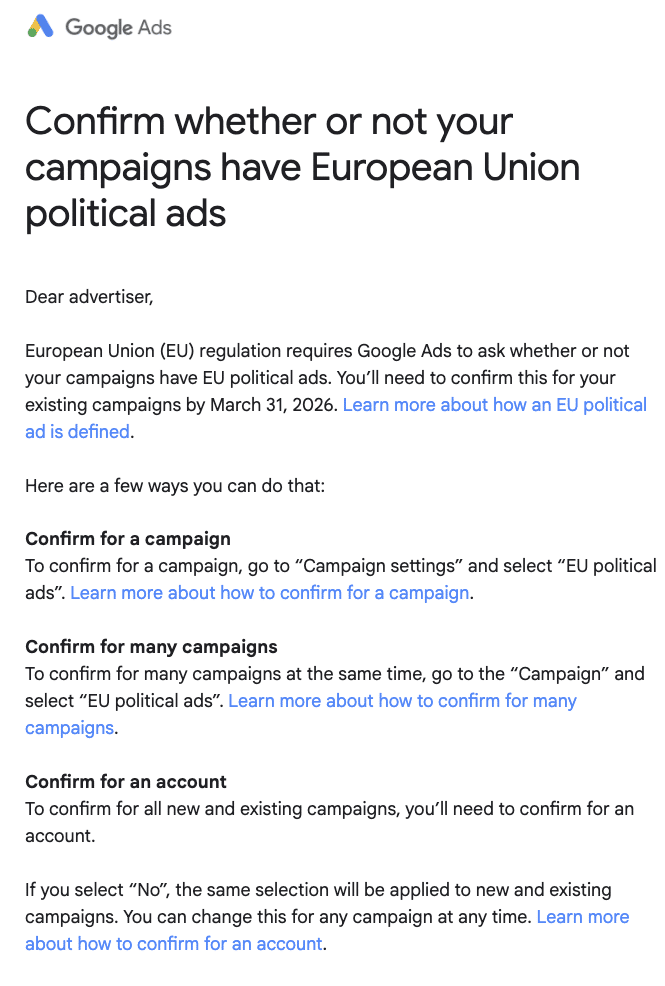
I recently received an email from Google reminding advertisers about a critical deadline. They’re reaching out directly, requiring us to confirm if our campaigns include EU political ads by March 31st.
Why this matters to us. This requirement isn’t optional. The EU regulation mandates Google to verify the political ad status of every active campaign, and missing this deadline could mean compliance issues for us.
Here’s what’s happening. Google needs each advertiser to declare whether their current campaigns involve EU political ads. This request applies across all campaigns, and we must act by March 31, 2026.
How can we comply? Google offers three ways to submit our confirmation:
Campaign level — In the campaign settings, we can select ‘EU political ads’ to confirm for individual campaigns.
Multiple campaigns — By visiting the Campaigns tab, we can use the ‘EU political ads’ option to confirm multiple campaigns simultaneously.
Account level — We can confirm for all existing and new campaigns at once. Opting ‘No’ at the account level applies to every campaign, but we can override this anytime.
Read between the lines. The account-level option seems the most efficient for most of us who know our campaigns don’t involve EU political ads. Google makes it hassle-free to reverse our choice later, so there’s no harm in acting early.
The takeaway. It’s time to check our inboxes because Google is contacting us. If you’re targeting EU audiences, ensure you log in and complete the confirmation before the deadline to remain compliant.
First noticed. This update was first observed by Paid Search expert, Arpan Banerjee, who shared the communication details on LinkedIn.