Category: Google Business Profile

  • Google Discovery and Local Visibility: A Practical Plan

    Google Discovery and Local Visibility: A Practical Plan

    If your business appears when someone searches its name but disappears when they search for a service nearby, you don’t have a single ranking problem. You have a discovery mismatch. Google can surface a business through the Local Pack, cite a page in AI Mode, group it under a Web Guide topic, or favor a publisher a searcher has deliberately chosen.

    Your job is to determine which discovery path matters for each query, then give that system the information and evidence it needs. That calls for more precision than completing the same SEO checklist for every location.

    Map the Google surface before you change the page

    A strategist sorts query tokens across a blank city map into routes leading to a map pin, an AI-like orb, page clusters, and editorial sheets.

    A conventional rank tracker can tell you where a URL appears, but it may not explain what now occupies the useful part of the results page. Start by identifying the surface that answers the query:

    • Local Pack: The searcher is choosing a nearby business. Location, category relevance, operating details, reputation and local behavior matter more than a generic national content campaign.
    • AI Mode: Google synthesizes an answer and may attach links to particular claims or branches of the question. Google has been adding more inline links and contextual introductions that explain why a linked page may be useful.
    • Web Guide: Google organizes links into topic groups rather than presenting one undifferentiated list. Its custom version of Gemini interprets the query and page content, while query fan-out runs multiple related searches. The expansion into the all tab still required a Search Labs opt-in, so you shouldn’t assume every searcher sees the same layout.
    • Preferred Sources: This applies to publishers appearing in Top Stories. A searcher can choose publications they want Google to show more often when those publications have relevant, recent coverage.

    Create a query map with a row for each commercially important search. Record the likely intent, the dominant Google surface, the location implied by the query, the page or profile you expect to qualify, and what actually appears. A query such as “accountant near me” needs a different asset from “how to choose an accountant for a growing company,” even when both ultimately support the same business.

    This diagnosis prevents a common waste of effort: rewriting an informational page when the Local Pack owns the decision, or editing a Google Business Profile when Google is looking for a page that answers a detailed question.

    Build signal fit into every Google Business Profile

    Profile completeness is a baseline, not a complete local strategy. Google is trying to identify which nearby result best fits what people expect from that kind of business. Those expectations change by category and can vary by region.

    A Yext analysis of 8.7 million Google Business Profiles found that review activity, profile information and visual content did not carry the same apparent importance across every industry. Because this was a vendor analysis of observed profiles, it should guide prioritization rather than be treated as proof of a universal ranking formula.

    Business typeSignals to inspect firstPractical response
    HospitalityHours, descriptions and complete practical informationMake arrival, availability and operating details easy to verify before investing in more image volume.
    HealthcareReviews, accurate hours and clear location detailsRemove uncertainty about access and reliability. Check every location independently.
    RetailReview volume, sentiment and listing upkeepTreat reputation and profile maintenance as operating signals, not occasional marketing tasks.
    Food and diningRatings and continuing engagement with feedbackMonitor new reviews and respond sincerely; basic completeness alone may not distinguish a competitive listing.
    Financial servicesGenuine reviews and real-world reputationPrioritize trust evidence over accumulating polished photos that add little decision value.

    Use three layers when you audit a location. First, verify the stable identity: business name, address, phone number, primary category, hours and destination URL. Second, inspect the signals customers use to choose within your category. Third, compare the location with nearby competitors serving the same intent. A national average can hide the gap that determines whether one branch appears locally.

    Don’t copy a successful location’s profile changes across the entire estate in one move. A restaurant in one region may benefit from a feature that produces no meaningful difference elsewhere. Test the change on comparable locations, keep the untouched profiles as a reference where practical, and judge the result using both visibility and customer actions.

    Reviews deserve an operating process of their own. Ask real customers for honest feedback without scripting the sentiment. Route new reviews to the person who can answer them accurately. A quick, specific response shows that the location is active; a batch of generic replies creates activity without adding much trust.

    Publish pages that fit a branch of the search journey

    AI-organized search makes broad relevance less useful than precise usefulness. Web Guide can fan a query out into related searches and group the resulting pages by facet. AI Mode can then present a link next to the part of an answer it supports. Neither feature means you should generate a page for every wording variation. It means each worthwhile page should have a clear job.

    1. Break the query into genuine decision branches. Someone looking for an emergency dentist may need to know whether the practice is open, which urgent problems it handles, where it is and how to contact it. Those are user needs, not keyword variants.
    2. Assign each branch to the right asset. Put operating facts on the location page and profile. Use a focused service page for a service that needs explanation. Use an educational page when the person is still deciding what kind of help they need.
    3. State the page’s value early. Identify the service, audience, location and question being answered before drifting into background copy. A visitor following an inline AI link should be able to confirm immediately that the page matches the context around that link.
    4. Supply verifiable detail. Include the facts a customer would need to act, such as availability, eligibility, process, location or limitations, when they genuinely apply. Replace generic claims with information the business can keep current.
    5. Connect the page to the location. Keep business identity, service descriptions and operating details consistent with the corresponding Google Business Profile. Link users to the appropriate location rather than forcing them through a generic homepage.

    Applicable LocalBusiness structured data can describe facts already visible on the page and reduce ambiguity about the entity. Use it as a consistency layer. It cannot compensate for stale hours, a mismatched category, weak reputation or a page that never answers the query.

    Avoid mass-produced city pages that change only the place name. They don’t give Google a distinct facet to retrieve, and they give the reader no local reason to trust the page. Create a separate location page when you can maintain distinct operating facts, directions, services or other genuinely local information.

    Use Preferred Sources only when you are really a publisher

    Preferred Sources can be valuable for a local news organization, trade publication or other site that regularly qualifies for Top Stories. It is not a general local ranking switch for every service business.

    Google expanded the feature globally for English-language users after launches in the United States and India. Searchers use the star beside Top Stories to choose publications they prefer, and Google can show more of those publications’ recent work when it is relevant. People have selected nearly 90,000 sources, ranging from local blogs to global outlets.

    Google also reported that people clicked a chosen publication about twice as often on average. That does not mean asking readers to select you will double traffic. People who deliberately choose a publication are already more likely to value it, and relevance and freshness still determine whether suitable coverage exists.

    If the feature fits your publication, add a brief instruction near the places where loyal readers already engage, such as a subscriber message or membership page. Explain what the star does and let the reader decide. Then maintain a dependable publishing rhythm around the local topics for which you want to be found. Preference cannot make an unrelated story relevant.

    If you run a clinic, restaurant, retailer or professional practice without a genuine news operation, leave this tactic alone. Put the effort into the Local Pack, location pages and useful answers connected to your services. A feature being available does not make it appropriate to your discovery problem.

    Measure each location and discovery surface separately

    An analyst compares six separate abstract measurement panels positioned above different miniature neighborhoods and storefronts.

    A single visibility score conceals too much. Local results depend on the searcher’s location. AI and experimental layouts can differ by account or feature access. Preferred Sources are explicitly personalized. Keep the measurements separate enough to tell which change produced which result.

    • For the Local Pack: Check a stable set of query-and-location combinations. Record whether the correct branch appears, which competitors surround it, and whether profile actions such as calls, website visits or direction requests change when those measurements are available.
    • For standard organic and Web Guide discovery: Group Search Console queries by intent rather than tracking isolated wording. Watch the landing pages receiving impressions and clicks, and annotate meaningful page revisions.
    • For AI surfaces: Record the exact query, observed linked page and context in which the link appeared. Keep the account state and test conditions consistent enough to make repeated observations useful. Treat a single appearance as a lead to investigate, not proof of stable inclusion.
    • For Preferred Sources: Monitor relevant Top Stories appearances and returning search traffic. Separate that audience from first-time discovery so loyalty does not disguise weak reach.

    Change one class of signal at a time where practical. If you revise categories, hours, photos, landing pages and review outreach together, even a positive result won’t tell you what to repeat. Compare similar locations, preserve a baseline and look for movement in both discovery and the user action tied to the query.

    Key takeaways

    • Identify whether the query is governed by a local choice, an AI answer, a grouped web result or a publisher preference before editing anything.
    • Complete every Google Business Profile, then prioritize the reputation, access, information or engagement signals that matter in that location’s category.
    • Build pages around real branches of intent, not slight keyword or city-name variations.
    • Use structured data to reinforce visible, accurate facts; don’t treat markup as a substitute for content or profile maintenance.
    • Reserve Preferred Sources promotion for sites that genuinely publish timely material and can appear in Top Stories.
    • Measure locations and discovery surfaces separately so you can connect a change with an outcome.

    Start with one revenue-relevant query and one location. Identify the surface that controls the decision, find the largest mismatch between user intent and your profile or page, and correct that mismatch. Once you can see what changed in visibility and customer action, apply the lesson to the next comparable location.

    References

  • Effortlessly Manage Google Posts with New Scheduling & Multi-location Tools

    Effortlessly Manage Google Posts with New Scheduling & Multi-location Tools

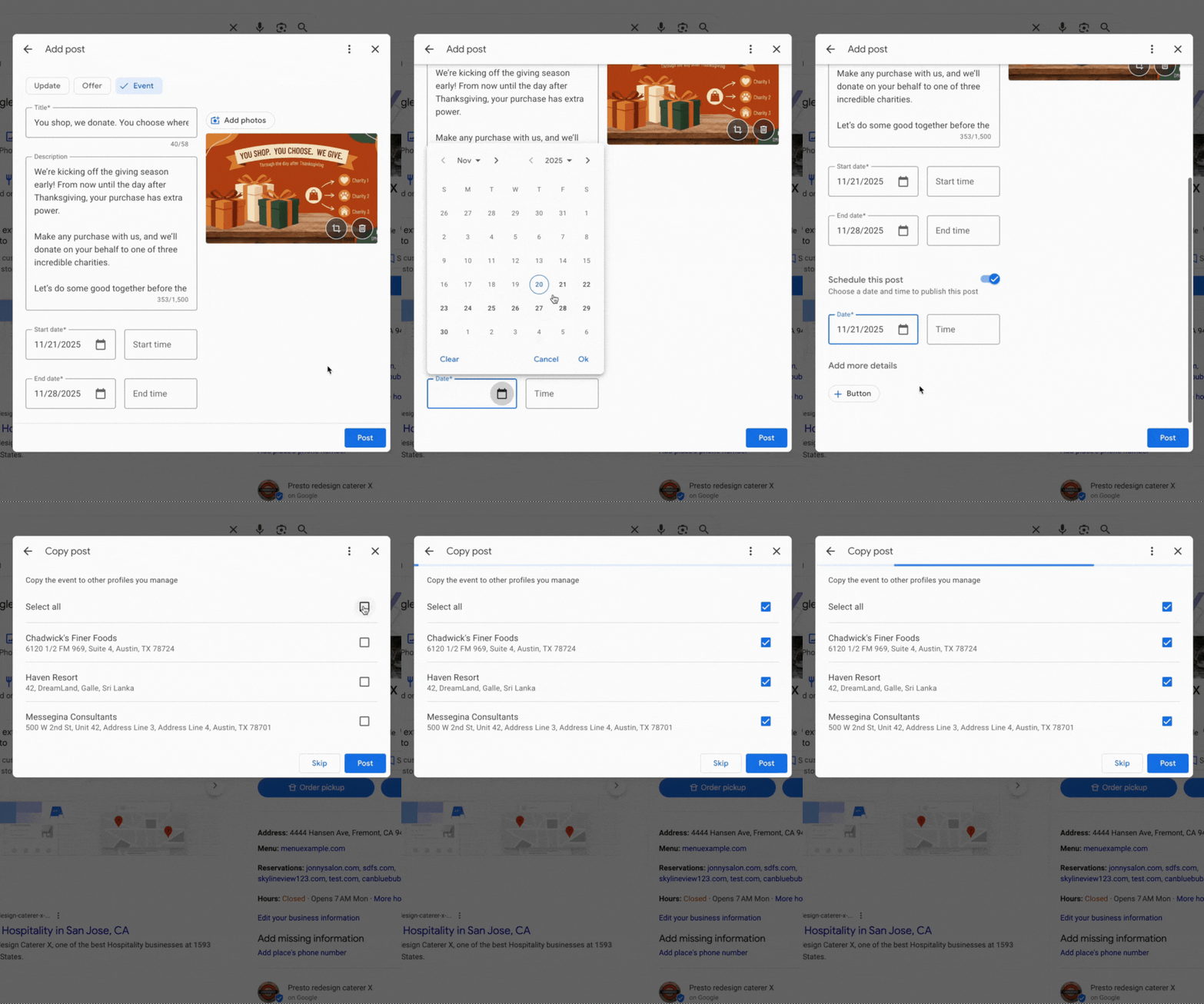
    I’m thrilled to share that Google Posts now includes features that support scheduling and multi-location publishing within Google Business Profiles. These updates are designed to make it easier for us to manage our Google Posts, whether they are for our businesses or clients.

    Scheduling. One exciting new feature when adding a Google Post within our Google Business Profiles is the option to “schedule this post.” We can now select the exact date and time when we want our posts to go live.

    Lisa Landsman from Google shared on LinkedIn, “Plan your entire week or month in advance! You can now schedule your Google Posts to go live automatically at the perfect time.”

    Multi-location publishing. If you, like me, manage several locations for a business, you’ll find the new multi-location feature incredibly convenient. It allows us to quickly copy Google Posts to some or all of our locations with just a click. Lisa Landsman explained, “Easily create a single post and apply it instantly to multiple business locations in one click.”

    ```json
{
  "alt": "Event post interface with title, description, and dates for a charitable shopping event.",
  "caption": "Join our Giving Season event: shop with us, and we'll donate on your behalf to a charity of your choice. Every purchase makes a difference!",
  "description": "This image displays an online post creation interface for an event themed 'You shop, we donate. You choose where.' The event promises to donate on customer purchases to one of three charities. It features a brown background image with wrapped gifts and charity icons. The start and end date fields are set from 11/21/2025 to 11/28/2025, encouraging community involvement in charitable giving during the holiday season."
}
```

    What it looks like. Here’s a GIF that shows this functionality in action:

    Why we care. I care about these updates because I know how busy businesses can be. Often, we don’t have the time to pause everything just to create a timely Google Post about an upcoming event or important message. Now, we can schedule these posts in advance and copy them effortlessly across locations we manage.

    As Lisa Landsman from Google pointed out, “We know the upcoming holiday season is a crucial, and hectic, time for your business. It’s also your biggest opportunity to get your events, offers, and updates in front of potential customers who are actively searching.”


    Inspired by this post on Search Engine Land.


    crushpress.ai community screenshot
  • Keyword-Rich Google Reviews: A Practical Local SEO System

    Keyword-Rich Google Reviews: A Practical Local SEO System

    If your review request says only, Please leave us a review, you are leaving the hardest part to the customer: deciding what to write. Most people respond with a star rating and a few generic words. That may reflect a happy customer, but it tells Google and the next buyer very little about what your business actually does.

    You can get more useful Google reviews without telling customers which keywords to insert. The better approach is to ask a few experience-based questions that help them remember the service, product, need, attribute, or outcome that mattered. Their answers stay authentic while becoming far more relevant to local search and purchase decisions.

    Why specific review language matters beyond rankings

    Keywords inside reviews are not a dependable shortcut to higher local rankings. Their direct ranking influence remains debated, so no honest review strategy should promise a position change. The stronger case is visible on the search result and Business Profile itself: specific review language can shape review justifications, Place Topics, highlighted snippets, menu features, AI-generated summaries, and answers to customer questions.

    That distinction should change your goal. You are not trying to manufacture a ranking signal. You are building a body of customer evidence that helps Google understand your offerings and helps a searcher confirm that you handle the exact need behind their query.

    The same restraint applies to AEO and GEO claims. Detailed reviews can improve the material available to Google’s local AI features. That does not establish that repeating keywords will make every external AI assistant or frontier model recommend your business. Keep the promise tied to the surfaces you can actually observe.

    Key takeaways

    • Ask customers about their experience, not about your target keywords.
    • Prompt for the service or product, the original need, one distinguishing detail, and the outcome.
    • Use different prompts for different customer journeys instead of sending one universal script.
    • Let every customer choose their own language; similar reviews should not read as if one person wrote them.
    • Measure review specificity and visible Business Profile features before treating rankings as an outcome.

    Seven places where detailed reviews can do useful work

    A review does not stay confined to the review tab. Google can reuse its language across several parts of the local experience. Each surface affects discovery or decision-making differently.

    1. Review justifications: A relevant phrase from a review can appear with a local result and help explain why that business matches the query. A searcher looking for a particular repair, treatment, product, or service can see direct customer evidence before opening the profile.
    2. Place Topics: Google can turn recurring review terms into clickable topics. These labels advertise the subjects customers repeatedly discuss and let people filter the review set around a particular interest.
    3. Highlighted review snippets: Frequently relevant terms can be bolded within three review snippets on a Business Profile. The effect is small but useful: the language connected to the searcher’s need becomes easier to scan.
    4. Menu Highlights: For restaurants, Google can derive highlighted dishes and menu themes from customer reviews and photos. Reviews that naturally name a dish, drink, dietary option, or dining occasion give this feature more precise material to work with. Any ranking benefit should still be treated as possible rather than guaranteed.
    5. AI-generated business attributes: Google can use review language to describe qualities such as a cozy atmosphere. You cannot directly edit that generated description, but detailed and consistent customer observations give the system clearer evidence than a collection of reviews saying only that everything was great.
    6. AI review summaries: Repeated sentiments can be condensed into a summary of what customers commonly appreciate or criticize. Specific feedback makes that summary more informative because it connects sentiment to a service, product, attribute, or part of the experience.
    7. Answers to customer questions: Review content can help Google answer questions about a business. A detailed review may therefore remain useful long after publication by supplying information relevant to a future customer’s question.

    These features share one requirement: Google needs meaningful language to extract. A generic compliment contains positive sentiment but almost no context. A review that identifies what was purchased, why it was needed, and what stood out contains entities, attributes, and relationships that both machines and people can interpret.

    Build prompts around the experience, not a keyword list

    A business professional invites a customer to recall the need, service, quality, and outcome while leaving feedback on a phone.

    Start with what customers can truthfully describe. Search volume may help you understand demand, but it should not determine the words you ask a reviewer to use. If the requested phrase does not sound like a customer’s memory of the transaction, the resulting review will feel staged.

    A practical prompt has four core ingredients. Local context can be added when the location was genuinely part of the service, but it should never be tacked onto every review merely to repeat a city name.

    Prompt ingredientWhat it capturesNatural question
    OfferThe service, product, treatment, dish, or categoryWhat did you choose or ask us to help with?
    Need or occasionThe problem, use case, event, or buying intentWhat brought you to us?
    AttributeA meaningful quality of the work or experienceWhat part of the experience stood out?
    OutcomeThe result or change the customer experiencedHow did things turn out?
    Local contextA service area, venue, or neighborhood that was actually relevantWhere did the service take place, if that detail would help someone else?

    You rarely need all five ingredients in one message. Choose the two or three that fit the transaction. A restaurant customer can name a dish, an occasion, and an atmosphere. A home-service customer can name the repair, the initial problem, and the result. A consultant’s client may be better able to discuss the project, an aspect of the process, and the business outcome.

    1. Inventory real customer journeys. List the major services, product groups, menu categories, or project types people actually buy. Use customer-facing names rather than internal department labels.
    2. Identify details customers can observe. Focus on attributes they experienced directly, such as the item ordered, the issue addressed, the communication they received, or the atmosphere they encountered. Do not prompt them to endorse a claim they cannot verify.
    3. Turn each detail into a memory cue. Ask what they chose, what brought them in, what stood out, or how the situation ended. A question produces natural language; an exact phrase produces compliance.
    4. Match the prompt to the transaction. Connect your review system to the service or product category so a customer receives relevant cues. This also prevents every review from repeating the same structure.
    5. Leave authorship with the reviewer. State that they should use their own words and include only details that reflect their experience. Never provide a completed testimonial for them to paste.

    Consider the difference between telling a customer to mention emergency furnace repair Toronto and asking what problem brought them in, which service they received, and what happened afterward. The first request exposes the SEO agenda. The second can elicit the same relevant concepts if they are true, without dictating the review.

    Review request templates that produce natural detail

    Use these as frameworks, not universal scripts. Replace the bracketed text, remove any cue that does not fit, and place your direct Google review link at the end. Send the request while the experience is still easy for the customer to recall.

    For an appointment or local service

    Template: Thank you for choosing [business name]. If you would like to leave an honest Google review, it helps other customers when you mention what you needed help with, which service you received, and what stood out. Please use your own words and include only what reflects your experience: [review link]

    This version can naturally produce a service name, a problem, and an attribute. If your business offers many services, populate the message with the broad category the customer actually purchased, but do not insert a target phrase and ask them to repeat it.

    For a restaurant, cafe, or product-led visit

    Template: Thanks for visiting [business name]. If you leave a Google review, you might tell people what you ordered, what you especially noticed, and what kind of visit or occasion it suited. Your honest experience in your own words is what matters: [review link]

    Naming an actual dish or product gives Google more useful material for topics, snippets, and restaurant highlights. The occasion can be equally valuable because a future customer may be deciding whether the business suits a family meal, quick lunch, special event, or another specific need. Keep only the examples that are accurate for your business; do not seed an occasion the customer did not mention.

    For a longer project or professional engagement

    Template: Thank you for working with [business name] on [project category]. If you are comfortable leaving a Google review, it would be useful to describe what you wanted to accomplish, any part of the process that mattered to you, and the outcome. Please share only what you experienced and use your own wording: [review link]

    Longer engagements often contain more detail than a customer can fit into an unprompted response. The three cues give the review a useful arc without scripting praise: initial need, experienced process, and outcome.

    Whichever template you use, keep the request easy to answer. A long questionnaire creates work, and a customer may abandon it or respond mechanically. Three short cues are usually enough to unlock detail while preserving freedom.

    Measure review quality without turning it into keyword policing

    Two colleagues sort varied review cards by detail and usefulness using icons, colored trays, a magnifying glass, and an authenticity symbol.

    Do not evaluate this program only by searching your target phrase and watching the map order. Local results can move for many reasons, and a ranking-only scorecard encourages increasingly aggressive prompts. Measure the change you directly asked customers to make: more specific, more informative feedback.

    Use a small review-quality scorecard

    Choose a consistent review window and record the same fields for every new review. You do not need sophisticated sentiment software to begin.

    • Detail rate: What share of new reviews names at least one actual service, product, menu item, need, attribute, or outcome?
    • Priority-topic coverage: Which important customer journeys appear in reviews, and which remain absent?
    • Language diversity: Do customers describe similar experiences in their own ways, or do the reviews repeat your request almost word for word?
    • Profile presentation: Are relevant Place Topics, review justifications, highlighted snippets, menu features, or AI summaries appearing or changing?
    • Customer response: Are the profile interactions and leads you already track improving alongside richer reviews? Treat correlation as a reason to investigate, not automatic proof of causation.

    If detail rate improves but every review sounds alike, the prompt is too prescriptive. If reviews remain generic, the cues may be too broad. If one service dominates the language, segment the request so other genuine customer journeys receive prompts suited to them.

    Watch for five signs that optimization has gone too far

    • You ask reviewers to include an exact search query.
    • You add a city or neighborhood even when location was irrelevant to the experience.
    • You provide a finished sentence for the customer to paste.
    • You send every customer a long list of services and attributes to mention.
    • You judge success by keyword counts while ignoring whether the review helps a buyer make a decision.

    The corrective action is simple: replace the desired wording with a question about the real experience. If you want reviews to mention a service, ask what the customer needed. If you want a relevant attribute to emerge, ask what stood out. If you want outcome language, ask what changed. The customer’s answer determines whether the concept belongs in the review.

    Start with the customer journey that generates the most review requests. Replace the generic ask with three cues covering the actual offer, one memorable detail, and the outcome. Once new reviews become more specific without becoming repetitive, adapt the same structure to the next journey. You will end up with reviews that sound like customers, explain the business clearly, and give Google’s local features something meaningful to use.

    References

  • How to Report Fake Google Reviews and Preserve Evidence

    How to Report Fake Google Reviews and Preserve Evidence

    When a Google review looks fabricated, your first impulse may be to challenge it in public. Pause. The useful work happens before the reply: preserve the review, identify exactly what makes it suspect, and send the evidence through the reporting route that matches the problem.

    If someone is demanding money, goods, services, or another concession in exchange for removing a bad review or stopping more reviews, treat the incident differently from an ordinary rating dispute. Google provides a dedicated reporting form for negative review extortion scams. The workflow below will help you build a clearer case without escalating the situation or making claims you cannot prove.

    First decide what kind of review problem you have

    Fake is often used as shorthand for any review a business disputes. That is too broad for an effective report. A real customer can be wrong, unfair, confused, or posting under a name you do not recognize. None of those facts automatically proves fabrication.

    Classify the incident by its observable features. That determines what evidence to collect and which reporting path to use.

    SituationWhat you can verifyBest next step
    Genuine but negative experienceThe event, order, booking, or service interaction can be identified, even if you disagree with the accountRespond to the substance and try to resolve the complaint; do not label it fake merely because it is unfavorable
    Reviewer cannot be matchedThe displayed name does not appear in the records you checkedInvestigate other names, purchasers, guests, dates, and channels before reporting; treat the mismatch as an indicator, not proof
    Wrong business or locationThe review describes a different company, branch, product, address, or servicePreserve the mismatch and report the review using the closest available reason
    Fabricated or coordinated activitySeveral observable signals align, such as repeated wording, connected demands, implausible details, or a cluster of related profilesSave every review separately, document the connections, and report the specific reviews
    Negative review extortionA message makes a concession conditional on removing a review, changing a rating, or preventing additional reviewsPreserve the complete demand and use the dedicated extortion-reporting route

    The distinction matters most when you cannot find the reviewer in your customer records. A customer may use a nickname, post through a family member’s account, buy through a third party, or complain about an interaction that did not create a normal transaction record. Write down what you searched and what you found. Do not turn an incomplete match into a categorical accusation.

    For an extortion report, focus on the conditional exchange rather than trying to prove a legal label. The important fact is that the person connected a demand to the review: provide something, or the review stays, changes, or multiplies.

    Build an evidence packet before you report anything

    A person photographs a suspicious review on a laptop while organizing screenshots, records, and other digital evidence.

    A review can be edited, removed, or separated from the message that explains it. Capture the original context before replying, negotiating, blocking the sender, or asking staff members to report it.

    1. Preserve the complete review. Save a screenshot showing the review text, rating, displayed reviewer name, review date, and the business profile. Copy the review text and its direct URL when one is available. Avoid a tight crop that removes identifying context.
    2. Preserve the reviewer profile context. Record the profile URL and the public information visible when you collected it. If other reviews appear relevant, save their URLs and screenshots separately rather than relying on a single composite image.
    3. Keep demands in their original channel. Retain the original email, text message, direct message, voicemail, or letter. Include sender information and timestamps. If an email service allows you to download the original message, keep that file in addition to a screenshot.
    4. Create a chronology. List the first contact, the review publication, each demand, any promised consequence, later reviews, and your responses. Record the date, time, and time zone. A simple timeline is easier to evaluate than a folder of unsorted screenshots.
    5. Document your internal check. Note which booking system, order history, CRM, support inbox, or staff schedule you searched. Record the names, phone numbers, email addresses, reference numbers, locations, and date ranges used. State that no match was found only if that is what the search established.
    6. Separate observations from conclusions. Repeated wording and close timing are observations. A claim that several profiles are controlled by one person is a conclusion unless you have evidence connecting them. Keep that distinction clear in your submission.

    Keep untouched originals in one folder and working copies in another. A practical case folder can contain four subfolders: originals, timeline, submitted evidence, and Google correspondence. Name files with the date, review identifier, and evidence type so another employee can understand the record without reconstructing the incident from memory.

    Include only information relevant to the report. Do not publish customer records, private contact details, payment information, or employee data in a public response. If a demand includes credible threats of violence, stalking, disclosure of private information, or continuing fraud, preserve the material and seek appropriate local legal or law-enforcement guidance. A platform review report is not a substitute for responding to an immediate safety risk.

    Use the Google reporting path that matches the conduct

    A business owner compares a standard suspicious-review report with a separate extortion-related reporting route.

    For an ordinary suspected fake or misplaced review

    Open the review through the Google Business Profile management surface available to your business and use the review’s report or flag control. Interface wording can change, so choose the available reason that most closely describes the observable problem rather than the outcome you want.

    1. Confirm that you are reporting the correct review on the correct location profile.
    2. Select the reason that matches the evidence, such as irrelevant, misplaced, deceptive, or otherwise prohibited content, when that option is available.
    3. If you receive a field for additional information, explain the specific mismatch in a few factual sentences.
    4. Save the submission date, confirmation, case number, or other reference Google provides.
    5. Record the result in your case log and retain the evidence even if the review later disappears.

    A useful explanation identifies the contradiction. For example, say that the review describes a service your business does not offer or names an employee who has never worked at that location. A bare statement that the reviewer is not a customer gives the reviewer no context and gives the evaluator little to assess.

    For a review tied to an extortion demand

    Use the dedicated extortion form and make the conditional demand the center of the submission. Identify the linked review or reviews, then attach the chronology and original communications that connect the demand to them.

    Submission template: On [date, time, and time zone], [verifiable account or contact] demanded [specific payment, product, service, refund, or other concession] in exchange for [removing or changing a review, or not posting further reviews]. The linked review or reviews appeared on [dates]. The attached material includes the original messages, review URLs, screenshots, and a chronological timeline. We have retained unedited copies of the originals.

    Replace every bracketed field with a fact you can support. If you suspect that a message sender controls a reviewer profile but cannot prove it, describe the connection as suspected and explain why. Do not fill the gap with certainty.

    Keep one tracking row for each review, even when several belong to the same incident. Record the review URL, displayed profile, reporting path, submission date, selected reason, case reference, evidence included, current status, and next follow-up date. This prevents a multi-review incident from turning into a series of undocumented reports.

    Protect your reputation while the report is pending

    Use this sequence whenever possible: preserve the evidence first, submit the report second, and decide on a public reply third. Replying first can alert the sender before you have captured material that may later change or disappear.

    If you respond publicly, write for the prospective customer reading the exchange, not for the reviewer you suspect. Keep the reply short, avoid personal information, and offer a verifiable channel through which a genuine customer could identify the transaction.

    Public response template: We take complaints seriously, but we cannot match the details in this review to an interaction in our records. Please contact [verified support channel] with the service date, location, and reference number so we can investigate.

    Do not publicly call the reviewer a criminal, disclose an alleged payment demand, threaten legal action, or post screenshots containing private information. Those moves can intensify the dispute and create avoidable legal or privacy exposure. When legal counsel is already involved, have counsel review any public statement before it goes live.

    Do not organize a counterattack. Employees, friends, and customers should not be directed to argue with the reviewer or flood the profile with defensive ratings. Continue your normal review-request process with real customers, ask for honest feedback without prescribing a rating, and keep the incident response separate from ordinary reputation management.

    Assign one case owner. Route new demands, staff questions, Google correspondence, and public replies through that person. During an active incident, set a review-monitoring cadence you can maintain, such as one check each business day. Save new evidence before reporting it, add it to the existing chronology, and tell customer-facing employees not to engage independently.

    FAQ about fake Google review reporting

    Is a missing customer record enough to prove a review is fake?

    No. It is a reason to investigate, not proof by itself. Search alternate names, purchasers, guests, phone numbers, email addresses, locations, booking channels, and the date range implied by the review. Report the facts you can verify and avoid claiming more.

    Should you reply before reporting the review?

    Usually, preserve the review and connected evidence first, submit the appropriate report, and then consider a neutral public reply. If the incident includes credible threats, private information, or an active legal matter, get appropriate advice before responding publicly.

    Can you use the extortion form for every suspected fake review?

    No. The distinguishing feature is a demand tied to the review or the threat of further reviews. Use the normal review-reporting control for suspected spam, fabricated experiences, irrelevant content, or reviews posted to the wrong business when no conditional demand exists.

    What should you do if Google does not remove the review?

    Do not promise your team or client a removal date. Keep the case log, retain the original evidence, and use any follow-up or appeal option presented in your review-management interface. Add genuinely new evidence instead of repeatedly submitting the same assertion. Maintain a measured public response and continue collecting legitimate customer feedback. If threats, impersonation, fraud, or harassment continue outside the review platform, seek help through the channel appropriate to that conduct.

    Start with the evidence you can preserve now: the complete review, its URL, the reviewer profile, and any connected demand. Build the chronology before the incident grows. Once the facts are organized, the choice becomes straightforward: use the ordinary review-reporting control for a suspected fake or misplaced review, and the dedicated form when a conditional demand turns the incident into negative review extortion.

    References