Category: Google Ads

  • Discover Google Ads API v23.2: Enhancements and Insights

    Discover Google Ads API v23.2: Enhancements and Insights

    I’m excited to share that Google has released version 23.2 of its Ads API, bringing several exciting updates that enhance video, app campaigns, and audience planning tools.

    What’s New in This Release?

    First, there’s the new VideoEnhancement resource. It now allows me to identify whether a video ad is Google-generated or advertiser-provided. This provides much-needed clarity on how ads are enhanced automatically.

    Additionally, the AppTopCombinationView resource offers read-only insights into top-performing asset combinations in app campaigns, a valuable tool for optimizing my campaign strategy.

    For those utilizing Demand Gen campaigns, I can now disable the hotel feed using HotelSettingInfo.disable_hotel_setting. This gives me more control over my ad placements.

    This update also introduces a new conversion metric for tracking indirect first in-app installs across Campaign, Customer, and AdGroup resources, giving me deeper insights into conversion performance.

    Moreover, enhancements to ContentCreatorInsightsService and ReachPlanService means I can further refine my content strategies and audience reach planning.

    Steps to Upgrade

    To benefit from these updates, I’ll need to upgrade to v23.2 by updating both client libraries and client code. Fortunately, all updated libraries and code examples are already available.

    Join the Live Walkthrough

    If you’re looking for more information, I recommend attending Google’s live release walkthrough on March 26 at 11am ET. It will be streamed live on Discord and YouTube, and a recording is provided afterward.

    Why This Matters

    The addition of the VideoEnhancement resource addresses a significant gap in Performance Max reporting. For those of us developing custom reporting tools, this means improved visibility into creative performance.

    Final Thoughts

    Although this release is part of Google’s routine updates, the enhancements, particularly in the VideoEnhancement resource, are worth noting. It’s a significant step forward for developers like myself working on Performance Max creative reporting.


    Inspired by this post on Search Engine Land.


    crushpress.ai community screenshot
  • Unleashing AI in B2B: Your Patient Path to Growth

    Unleashing AI in B2B: Your Patient Path to Growth

    B2B buyers start their journey long before they even search for us. I’ve learned that AI-powered Google Ads campaigns can ignite early demand and reward patience over time.

    If I’m relying solely on brand and non-brand keywords in Google Ads, my growth becomes limited. A decline in performance isn’t due to the platform but the strategy behind it.

    Discovering a brand doesn’t begin with a non-brand search. Buyers are researching on platforms like Reddit, ChatGPT, Facebook, LinkedIn, and YouTube. They watch demos, read testimonials, and become familiar long before actively searching for us.

    For complex sales processes with lengthy customer journeys, this transformation is crucial, demanding a strategic shift. Here’s how I can make it effective in B2B.

    AI-powered Campaigns: Your Growth Treasure

    Over the years, Google has innovated with multi-channel, multi-asset campaigns like Performance Max and Demand Gen. These campaigns place my brand front and center as audiences research and evaluate options.

    When my audience is ready to choose vendors, they’ve already built trust in my brand. They’ll search specifically for me because of the trust I’ve cultivated through consistent visibility.

    A well-rounded Performance Max campaign includes diverse ad types, like image and video ads displaying demos or testimonials on YouTube. These ads also engage audiences across the web via the Display Network and retarget them as they continue their research. This process naturally leads to branded searches that ultimately convert.

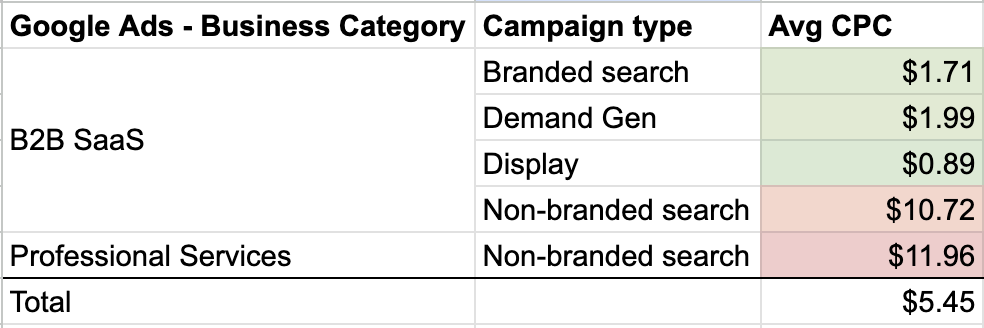
    Such campaigns are cost-effective, allowing me to leverage customer data alongside keywords as intelligent signals, not replacements. It’s about smarter keyword usage.

    Dig deeper: Why B2B brands are shifting from keywords to Performance Max

    Adapting to the Evolving Search Experience

    As AI Overviews and AI Mode transform Google’s search results pages, it’s time I reconsider my ad strategies to align with these changes.

    I’m fond of the 4S framework: search, scroll, stream, and shop.

    Adding “ask” captures how people now engage with AI tools. They consult ChatGPT or Gemini, search on Google, scroll through LinkedIn, stream videos on YouTube, and shop across numerous platforms. If my strategy focuses on only a couple of these behaviors, I’m missing the full growth opportunity.

    ```json
{
  "alt": "The CapmatchOne logo with a gradient circle and bold text.",
  "caption": "Discover innovation with the CapmatchOne logo, featuring sleek typography and a modern gradient circle.",
  "description": "The CapmatchOne logo features bold, modern typography coupled with a gradient circle, symbolizing connection and innovation. The sleek design conveys a sense of progress and creativity. This image can be used for branding or promotional purposes, appealing to audiences interested in innovative solutions and forward-thinking designs."
}
```

    Solely targeting keywords means missing the larger narrative. Brand keywords undoubtedly convert better, but how do people arrive at searching my brand? Consistent visibility ensures they notice my brand in their feeds.


    Embrace Testing and Learn with Patience

    This strategy requires time, especially in B2B settings with protracted sales cycles.

    For example, it took almost a year to appreciate how Performance Max contributed to one of my life science client’s success, whose deals typically take months to finalize. There was a moment where our account manager nearly paused the campaign because initial data wasn’t promising.

    Integrating sales data changed the perspective. As revenue figures rolled in, the campaign’s value became transparent.

    If I can sync beyond MQLs with data like Proposal Sent, it keeps Google well-informed and offers reassurance until the sales data solidifies our insights.

    Patience is key when providing the system quality data. I must remain steadfast and avoid quitting prematurely, accepting the complexity of B2B cycles.

    An event might draw 100 people, some catch a webinar email later, and months pass before they search for us and request a proposal, eventually becoming customers. With long sales cycles, phenomena like this unfold subtly.

    Dig deeper: How to optimize B2B PPC spend when budgets and confidence are low

    Start with Small Steps, Then Scale Success

    If testing funds are limited, I can designate 5% to 10% for AI-forward campaigns. Strategic testing without major commitments at peak times allows room to maneuver while the system adjusts.

    Investing time in this strategy ensures sustainable growth. Those who master it gain an enduring competitive edge, unlike those focused on diminishing demand.


    Inspired by this post on Search Engine Land.


    crushpress.ai community screenshot
  • Boost Your Campaigns: Google PMax Adds Seasonal Theming

    Boost Your Campaigns: Google PMax Adds Seasonal Theming

    I’ve recently discovered an exciting update from Google that makes managing seasonal campaigns a breeze. Their new Asset Group Theming feature is a game changer inside Performance Max, allowing me to quickly apply seasonal themes to existing asset groups without having to start from scratch.

    Here’s How It Works: I can clone a top-performing asset group and apply a theme. Google then takes care of generating themed image variations and suggesting headlines and descriptions that match, all while keeping the original group intact. This way, I can safely test new themes without any risks.

    The Themes Available:

    • Promotional: Sale, Studio/Editorial
    • Seasons: Winter, Spring, Summer, Fall
    • Cultural moments: Christmas, Black Friday/Cyber Monday, Halloween, Valentine’s Day, Easter, Mother’s Day, Father’s Day, Hanukkah, New Year, Lunar New Year, and Back to School

    Where to Find It: I find the theme application option inside Asset Groups ahead of major holidays, or by selecting “Apply theme to existing asset group” while setting up a new one.

    ```json
{
  "alt": "Screenshot of Performance Max Asset Group Theming for Easter promotions.",
  "caption": "Discover how Performance Max enhances your Easter campaigns with new Asset Group Theming features for dynamic ad creation.",
  "description": "This image showcases the new Asset Group Theming in Performance Max, designed for Easter promotions. It includes a screenshot of the asset group interface with headline and description options for ad creation, emphasizing Easter-themed marketing. Adjacent is an Easter-themed photo with colorful eggs and scented products, highlighting the festive appeal and potential engagement strategies using Performance Max. SEO keywords: Performance Max, Asset Group, Easter promotions, ad creation."
}
```

    Important Note: This tool is a starting point, not a complete solution. It uses existing images and adds themed backgrounds without replacing videos, and only updates a few headlines. Everything still requires review to ensure it fits the campaign before going live.

    Why This Matters: Seasonal creative refreshes used to consume a lot of time, especially when factoring in design resources and the risk of performance drops with asset changes. This feature minimizes that hassle, allowing me to adapt my best-performing strategies quickly.

    The Bottom Line: Think of this as a creative assistant, rather than a designer replacement. For those of us juggling multiple seasonal peaks, the time savings alone make it worth exploring.

    First Spotted: Google Ads specialist Bia Camargo first noticed this update and shared it on LinkedIn.


    Inspired by this post on Search Engine Land.


    crushpress.ai community screenshot
  • Unlock Your Control Over Performance Max Campaigns

    Unlock Your Control Over Performance Max Campaigns

    When I first delved into Performance Max, I shared the sentiment that it felt like a black box. But as I’ve explored its functionalities over time, it’s become an essential part of my marketing toolkit. Google’s quarterly updates have continued to enhance its visibility and usability.

    While the additional reporting is helpful, I focus on leveraging the aspects I can control for meaningful impact. Although not everything is adjustable in Performance Max, there are several key levers that I utilize for optimizing my campaigns. Here’s how I get more out of Performance Max by controlling the controllable aspects.

    Control what you can: Search terms and placements

    One of the best updates to come to Performance Max is the ability to add campaign-level negative keywords. No more cumbersome processes with Google; now, I can directly update these within my campaigns.

    Thanks to the search terms report, I can directly select a keyword and add it to my campaign’s negative keyword list, much like other campaign types, maximizing efficiency and minimizing wasted spend.

    Another optimization opportunity lies within the placements report. Google’s recent change moved the Performance Max placements report from general reporting to the campaign’s ‘Where ads have shown’ section, simplifying analysis. Here, I review impressions and decide on negative placements at the account level if needed.

    Though impression-level reporting can be limiting, I use these insights to decide if certain ads, like those appearing in kids’ programming, should be excluded due to high impressions from unintended sources like mobile apps.

    ```json
{
  "alt": "The CapmatchOne logo with a gradient circle and bold text.",
  "caption": "Discover innovation with the CapmatchOne logo, featuring sleek typography and a modern gradient circle.",
  "description": "The CapmatchOne logo features bold, modern typography coupled with a gradient circle, symbolizing connection and innovation. The sleek design conveys a sense of progress and creativity. This image can be used for branding or promotional purposes, appealing to audiences interested in innovative solutions and forward-thinking designs."
}
```

    Use budget signals to improve efficiency

    Another area I monitor closely is the ad schedule found in the ‘When and where ads showed’ section. Even without an initial schedule, Google provides hour-by-hour data, which helps me refine ad timing to match budgets more efficiently.

    When working with a limited budget, I optimize ad schedules to avoid non-converting hours, thus maximizing my ROI. I adjust ad timings in ‘Campaigns > Audiences, keywords, and content > Ad schedule’ to align with peak performance times.

    Dig deeper: Top Performance Max optimization tips for 2026


    Refine targeting with the right constraints

    Campaign settings now include demographic exclusions, which I find particularly valuable for excluding non-converting audiences based on demographics.

    This feature is quite useful when specific demographics are unlikely to engage with my offerings. To make these adjustments, I navigate to ‘Campaign-level settings > Other settings > Demographic exclusions’, enabling me to refine my target audience further.

    ```json
{
  "alt": "Demographic exclusions settings in a campaign interface, with options for age and gender exclusions.",
  "caption": "Configure your campaign with demographic exclusions to tailor your audience based on age and gender preferences.",
  "description": "The image shows a section of a campaign interface titled 'Demographic exclusions.' It offers options to turn on age and gender exclusions, which will override any specific hints that are active on asset groups within the campaign. The interface includes 'Cancel' and 'Save' buttons, providing flexibility in adjusting these settings. This feature enhances campaign targeting by allowing precise audience customization."
}
```

    Although PMax originally lacked device-level insights, the new device targeting features help me review and adjust devices for better performance. It’s crucial to periodically evaluate which devices are contributing positively to the campaign goals.

    Based on performance insights, I decide which devices to include or exclude under ‘Other settings’. This approach enhances my strategy by ensuring my ads appear on devices that align best with my objectives.

    Improve inputs: Creative and AI assets

    Creative assets are critical to the success of Performance Max campaigns, especially across display, YouTube, and Discover networks. To bridge the gap in quality creative, I’m incorporating AI assets more often.

    AI-generated assets are becoming increasingly sophisticated, helping me more effectively target these networks. As AI technology evolves, it’s unlocking new possibilities for creating compelling visuals and video content.

    Google’s AI assets, derived from shopping feed products, are impressively close to replacing traditional creative methods. However, producing glitch-free AI-generated videos remains a future goal I’m keenly observing.

    ```json
{
  "alt": "Device selection interface for ad appearances with options for computers and mobile phones checked.",
  "caption": "Customize where your ads appear with options selected for computers and mobile phones. Ensure targeted advertising with this easy-to-use interface.",
  "description": "The image displays a device selection interface from an ad platform, showing checkboxes for selecting where ads appear. 'Computers' and 'Mobile phones' options are checked, while 'Tablets' and 'TV screens' are unchecked. This setup helps advertisers target specific devices, optimizing ad reach and effectiveness. Keywords: ad targeting, device selection, advertising platform."
}
```

    Dig deeper: How to reduce low-quality leads from Performance Max campaigns

    Understand the limits of control in Performance Max

    I appreciate the channel controls report for the insights it offers on ad placements, even though actionable adjustments are limited at times, which can be frustrating.

    Looking forward, I expect Performance Max to offer more control similar to Demand Gen campaigns. Until then, I adjust my creative and bidding strategies to influence where my ads appear, using feed-only campaigns to focus solely on shopping.

    Performance Max continues to transform from an opaque platform to an integral tool for marketers. With each update, it offers more actionable levers like negative keywords, placements, and smart scheduling to optimize efficacy.

    Using these tools strategically, I ensure my campaigns are as precise and efficient as possible, moving beyond the ‘set-it-and-forget-it’ mindset.


    Inspired by this post on Search Engine Land.


    crushpress.ai community screenshot
  • Unlocking AI-Powered Video: Google PMax’s New Animated Ads

    Unlocking AI-Powered Video: Google PMax’s New Animated Ads

    I’ve recently discovered an intriguing update in Google Ads Performance Max campaigns that could significantly shift how I and other advertisers approach animated display advertising.

    Imagine the possibilities with Google’s new AI image animation feature! It could be a game-changer for those of us who’ve been sticking to static images in our PMax campaigns.

    What I Found. Nikki Kuhlman, Vice President of Search at JumpFly, Inc., shared her discovery of an option to generate animated video clips directly within PMax asset groups. These clips use AI to transform a single source image into engaging animations.

    How It Works.

    • I can upload a source image like a logo, a product shot, or a property photo.
    • The AI works its magic, generating several “enhanced” versions of my image.
    • Each enhanced image then produces two animated clips.
    • I can choose up to five animated clips per asset group to enrich my campaign.
    • Note: While faces can’t be used in the source images, AI might introduce people in the enhanced versions.

    Early Testing Insights. I tested it, and observing a logo turn into a spinning animation and a house image pan out cinematically was impressive. Simple inputs, but the quality of the animated outputs is certainly suitable for display advertising without the need for a video production team.

    ```json
{
  "alt": "Screenshot showing options for creating animated clips in a user interface.",
  "caption": "Easily create engaging animated clips with a simple interface. Perfect for adding dynamic visuals to your content!",
  "description": "This image displays a user interface where users can create animated clips. The section is highlighted with a red border and offers options like ‘Animated clips’ and ‘Generate animated clips’. Additionally, there is a call to action section with a ‘Learn more’ button. This is ideal for users looking to enhance their digital content with animations."
}
```

    Ad Placements. While Google hasn’t officially documented ad placements, early tests show these animated clips appear in Display ad previews when integrated into an asset group.

    Why I Care. Video assets have always been vital in Paid Media for their creative potential, but not everyone, including myself, has the time, budget, or resources for video production. Now, this feature offers me the chance to easily convert a single photo or logo into dynamic display content, effectively removing previous barriers.

    This opens a new door for advertisers like me who’ve relied on static images in PMax campaigns. I see it as a simple but effective win.

    The Bottom Line. Although Google hasn’t confirmed this feature officially, it’s advisable for anyone running PMax to check their asset groups. If this is present, it’s worth testing, especially for those of us who have solely utilized static images.

    First Seen. This exciting feature was initially spotted by Nikki Kuhlman and shared on LinkedIn.


    Inspired by this post on Search Engine Land.


    crushpress.ai community screenshot
  • EU’s Verdict on Google’s Compliance: A Game Changer for Digital Markets

    EU’s Verdict on Google’s Compliance: A Game Changer for Digital Markets

    Google vs. publishers: What the EU probe means for SEO, AI answers, and content rights

    I’ve been eagerly anticipating the European Union’s decision on whether Google is violating the Digital Markets Act (DMA), and I sense this ruling is just around the corner. While Competition Commissioner Teresa Ribera hasn’t specified an exact date, she assures us that a decision is imminent.

    What She Said: “It will come,” Ribera mentioned to Dow Jones Newswires, emphasizing the complexity of these cases. She reinforced the EU’s commitment to fair procedures and evidence-based decisions.

    The Context: This all began in March 2024, when the European Commission started investigating Google’s search business under the DMA. Although fines have already been imposed on Meta and Apple, Google’s case is still pending after almost two years.

    The Mounting Pressure: Recently, 18 lobby groups and civil society organizations wrote to Ribera, urging a substantial fine and definitive remedies to ensure non-compliance isn’t profitable. They stressed that Google’s dominant 90% share in the EU search market is a cause for concern.

    “Every day without a decision is a day that European businesses are systematically disadvantaged,” their letter cautioned.

    Why This Matters to Us: A decision against Google could fundamentally alter how its search business operates in Europe. This might change the dynamics of ad serving, ranking, and pricing, potentially impacting campaign performance and competition across the board. For those of us with European audiences, staying informed is crucial as outcomes here could have a global impact on Google’s advertising ecosystem.

    Meanwhile, This Week: Ribera is in California, meeting with tech leaders like Sundar Pichai and Mark Zuckerberg, before heading to Washington D.C. for discussions with the U.S. Justice Department’s antitrust division.

    The Bigger Picture: Google isn’t the only tech giant under scrutiny. The commission is also looking into how Google uses AI Overviews and ranks news publishers. Additionally, they are investigating Meta for potential restrictions on rival chatbots using WhatsApp’s business software.

    The Bottom Line: Although the EU has been slow to act against Google, mounting political and public pressure is undeniable. This impending decision might set a significant precedent for enforcing the Digital Markets Act more broadly.


    Inspired by this post on Search Engine Land.


    crushpress.ai community screenshot
  • Navigate Google’s New Rule on Duplicate Lookalike Lists

    Navigate Google’s New Rule on Duplicate Lookalike Lists

    I recently discovered an important update from Google affecting how I run Demand Gen campaigns using Lookalike user lists. Starting April 30, Google will block creating duplicate Lookalike lists via the Google Ads API and return an error code for any breaches.

    This update might seem quiet, but its implications are significant, especially for those of us utilizing automated systems or third-party tools. Google is now enforcing a uniqueness check to prevent duplicates that have identical seed lists, expansion level, and country targeting.

    Why do I care about this change? An unaddressed error could disrupt the workflow of my campaigns if I don’t update my integrations in time.

    Here’s what I plan to do:

    • Audit my current Lookalike lists and reuse those that already align with my goals instead of creating new ones.
    • Update my API error handling processes to catch the new DUPLICATE_LOOKALIKE error code in versions v24 and above, or RESOURCE_ALREADY_EXISTS in older versions.

    The bottom line is, while this change is housekeeping, the deadline is firm. I need to ensure my campaigns are technically prepared before the end of April to maintain stability in Google’s systems.

    If you’re interested in a deeper dive, I highly recommend checking out Google’s blog post detailing these changes: Upcoming changes to Lookalike user lists in the Google Ads API, starting April 30, 2026.


    Inspired by this post on Search Engine Land.


    crushpress.ai community screenshot
  • Identical Google Ads Metrics Spark Industry Concerns

    Identical Google Ads Metrics Spark Industry Concerns

    I recently stumbled upon an intriguing issue with Google’s paid search ads. Imagine my surprise when I noticed multiple competing ads displaying identical web statistics! This strange occurrence immediately made me question whether it’s a bug or perhaps a deliberate change by Google.

    What’s happening? I’ve seen several paid search ads showcasing the same website statistics simultaneously, despite these metrics usually being unique to each site. This uniformity makes the data appear dubious, leaving me uncertain if it’s a display glitch, an experimental test, or something more intentional.

    Why we care. Trust signals in search ads play a crucial role in helping users like us make informed decisions. They boost click-through rates by instilling confidence in the results. If identical stats appear across competing ads, it risks undermining their credibility—potentially impacting the confidence and trust advertisers rely on.

    What we don’t know.

    ```json
{
  "alt": "Sponsored search results featuring ads for legal and marketing services with call buttons and visit metrics.",
  "caption": "Discover top-rated services with ease! These highlighted sponsored ads showcase legal and marketing solutions, complete with call options and visit statistics.",
  "description": "This image displays a series of sponsored search results from an online platform. The ads focus on legal services, such as accident attorneys, and marketing agencies, each with a prominent 'Call us' button and '10K+ visits in past month' metric. Red arrows emphasize the call-to-action features, guiding the viewer's attention to engage with the services offered. Keywords: sponsored results, legal services, marketing agencies, call-to-action."
}
```
    • Whether Google is testing this actively or it’s an unintended bug
    • How widespread the issue is across different search queries or markets
    • Whether it’s affecting user click behavior or advertiser performance

    No official word. So far, Google has not confirmed or commented on this behavior. Paid Media expert and Founder Anthony Higman was the first to notice and flag this anomaly, sharing his findings on LinkedIn.

    The bottom line. If trust signals can’t be trusted, they fail to serve their purpose. As someone invested in digital advertising, I’m keenly watching whether this pattern gains momentum or fades away. Observing these developments is critical for both advertisers and users.


    Inspired by this post on Search Engine Land.


    crushpress.ai community screenshot