Author: shivamcrushpressai

  • Shopify Outage Response: Protect Sales, Ads and SEO

    Shopify Outage Response: Protect Sales, Ads and SEO

    Your Shopify admin will not load, customers are reporting checkout errors, and paid campaigns are still sending people to the store. The worst response is to change everything at once.

    You need to identify which part of the buying journey is broken, stop avoidable losses, preserve reliable data, and keep a temporary platform failure from becoming a lasting search problem.

    Key takeaways

    • Test the store as a customer. An inaccessible admin does not automatically mean the storefront or checkout is unavailable.
    • Pause conversion campaigns when customers cannot complete payment, and record when you changed each campaign.
    • Do not noindex products, redirect product URLs, or mark inventory as out of stock solely because Shopify checkout is unavailable.
    • Resume promotion only after you have tested the complete journey from product page to order confirmation.

    Triage the customer journey before changing campaigns

    An isometric customer purchase journey shows working storefront and cart stages followed by an interrupted payment connection.

    Start outside Shopify Admin. Open a private browser window and follow the same path a new customer would take: load a product page, add the product to the cart, begin checkout, and attempt to reach the final payment stage. If you operate physical locations, check Retail POS separately.

    This separation matters because one service can fail while another remains usable. During the reported Tuesday disruption, Shopify acknowledged problems involving Admin and Retail POS at 9:27 a.m. EDT, while merchants and customers also encountered trouble with storefronts, checkout, and support access. Shopify was still investigating at 9:45 a.m. and reported an identified cause and improving service at 10:37 a.m. That improvement did not, by itself, prove that every merchant’s customer journey had recovered.

    What you observeWhat it means for your response
    Admin is unavailable, but a customer can browse and complete checkoutKeep monitoring sales. Do not pause every campaign merely because store management is difficult.
    Storefront loads, but checkout failsPause campaigns intended to produce immediate purchases and hold scheduled promotional sends.
    Storefront does not loadStop traffic whose landing pages are unavailable and publish a clear service notice on a channel you can still control.
    Retail POS fails while online checkout worksSeparate the retail response from the ecommerce response. Do not treat all revenue channels as unavailable.
    Support is inaccessibleMaintain an internal incident log and use the platform’s available public updates without waiting for a support reply.

    Assign one person to maintain the incident record. Capture what failed, how it was tested, when the failure was first confirmed, which promotions were active, and which actions the team took. This prevents several people from making conflicting campaign, site, or customer-service changes.

    Control paid traffic without destroying useful evidence

    If checkout cannot accept orders, each additional conversion-focused click can add cost without creating a sale. Pause the affected campaigns rather than deleting them. A pause preserves campaign settings and makes it easier to compare performance before, during, and after the interruption.

    Make decisions by destination and objective. A campaign leading to a failed product or checkout path should stop. A campaign serving a functioning market, store, or non-transactional resource may not need the same treatment. The test result should decide, not the frustration of being locked out of Admin.

    Record the time of every pause, budget adjustment, promotional cancellation, and restart. Add the incident window to your analytics annotations or reporting notes. Keep Shopify’s acknowledgement and recovery updates in the record, but use your own customer-path tests to define the period when your store was actually unable to convert.

    Do not evaluate that window as an ordinary campaign-performance decline. Separate traffic sent during the failure from normal traffic, then reconcile ad-platform conversions with completed Shopify orders after access returns. Otherwise, automated bidding changes and human budget decisions may both react to a platform problem as though it were weak demand or poor creative.

    Protect SEO, product schema and AI-facing answers

    A temporary checkout failure is not an inventory change. Do not switch Product or Offer structured data to OutOfStock unless the item is genuinely unavailable. Machine-readable availability can remain visible after the checkout problem ends, leaving search engines, shopping systems, and AI assistants with an inaccurate description of the product.

    Likewise, do not noindex product pages, remove canonical tags, delete URLs, or redirect the catalog to the homepage as an emergency measure. Those changes can outlive the incident and create crawling, indexing, and reporting problems that are harder to reverse than the outage itself.

    If you can publish outside the affected storefront, maintain one plain-language status message. State which customer action is failing, which channels still work, and when you last verified the condition. Use the same wording in social updates, support replies, and internal scripts. Consistent public language gives customers a clearer answer and reduces the chance that search or AI systems encounter contradictory explanations.

    Avoid promising a recovery time you do not control. A platform update saying that services are improving is a reason to retest, not a reason to declare your own store operational.

    Restart only after a complete purchase succeeds

    A merchant verifies a successful test payment as a package enters fulfillment and customer traffic begins to reopen.

    Recovery should be verified from the customer’s side. Restored Admin access is useful, but it does not establish that product pages, carts, checkout, payment, confirmation, and order recording are all working together.

    1. Repeat the full purchase path in a clean browser session.
    2. Confirm that the completed order appears where your team expects to manage it.
    3. Check Retail POS separately if physical stores were affected.
    4. Review the incident window for incomplete, delayed, or unexpectedly repeated customer activity before sending more promotion.
    5. Resume campaigns in a controlled order, starting with the paths you have directly verified.
    6. Update the public service message only after your own checks pass, and preserve the incident notes for reporting.

    Once operations are stable, save a short outage runbook containing the incident owner, customer-path tests, campaign controls, analytics annotation process, and status-message template. The next Shopify disruption should trigger a familiar sequence, not a fresh argument about what to do.
    References

  • Navigate AI-Driven Searches with Engaging Reading Strategies

    Navigate AI-Driven Searches with Engaging Reading Strategies

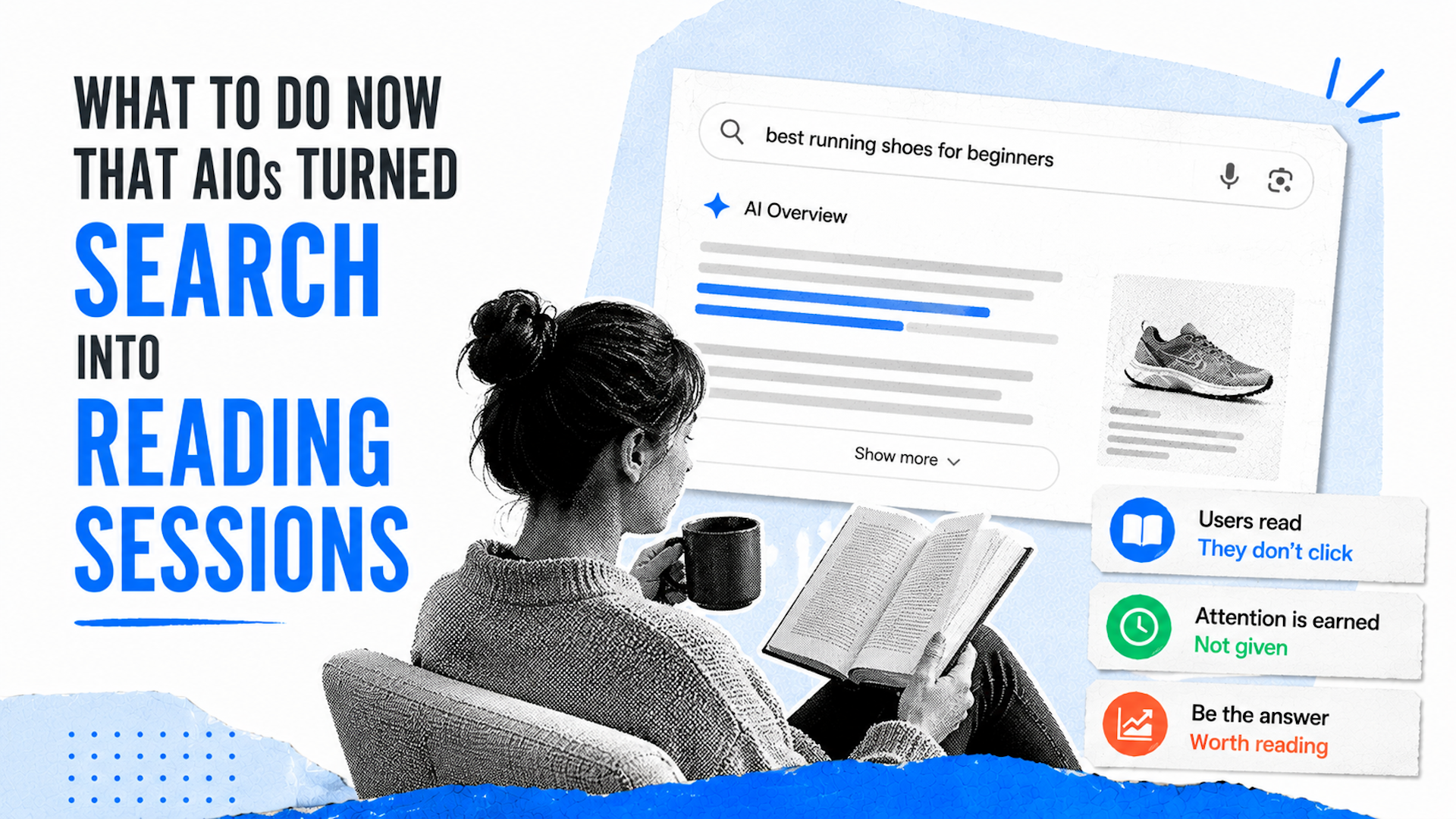
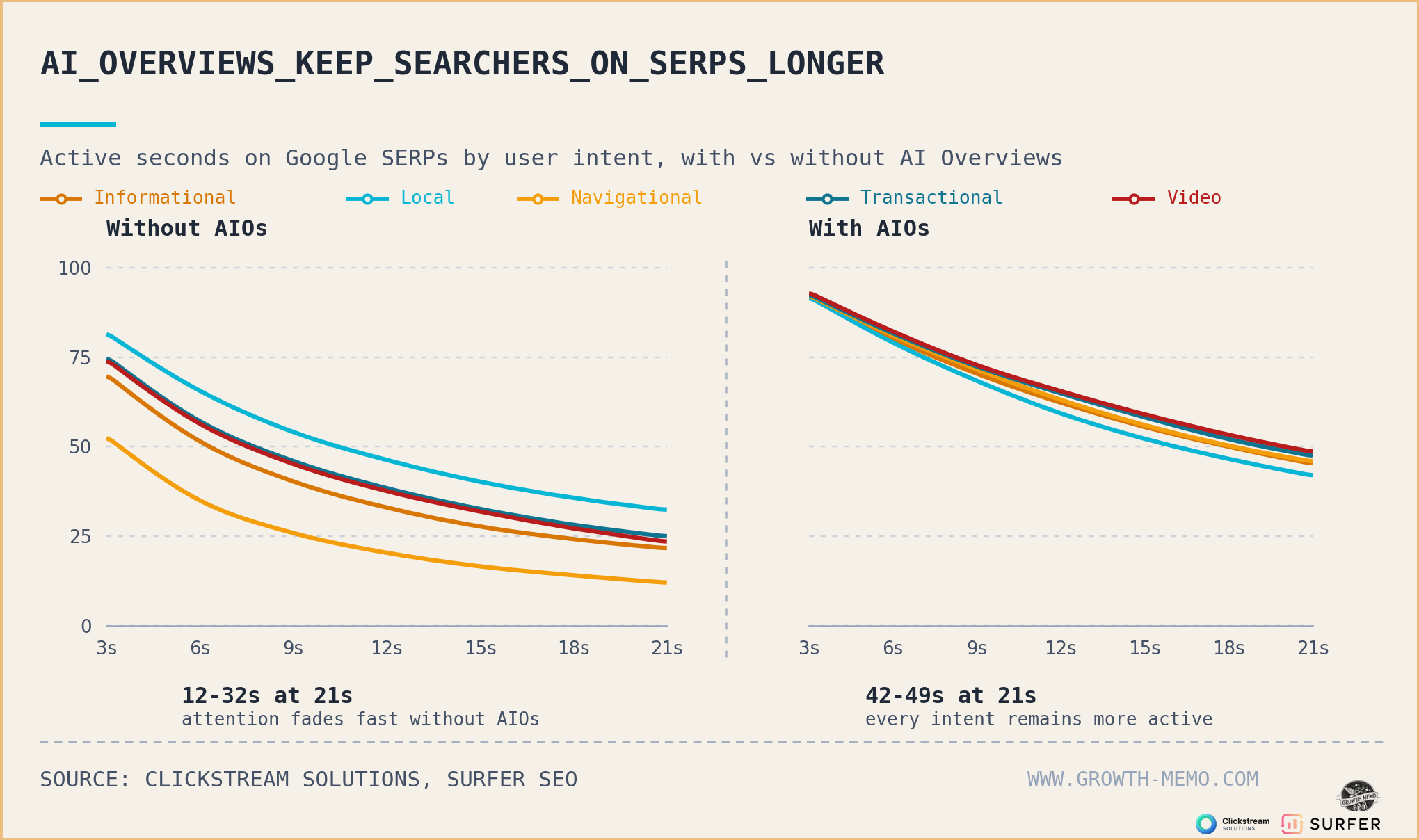
    I’ve realized that AI Overviews are fundamentally changing how users interact with search results. Gone are the days of simple, task-oriented searches. Today, AI Overviews encourage users to dive into comprehensive reading sessions right on the search engine results pages (SERPs).

    Let’s talk about some critical insights. AI Overviews merge multiple search intents into a single reading session, disrupting the traditional understanding of search behavior. Winning what I call the ‘second impression’ is crucial for different types of web pages.

    Recently, I teamed up with Eric Van Buskirk from Clickstream Solutions to analyze vast amounts of anonymized clickstream data. We discovered that time-on-SERP is no longer solely dependent on search intent when AI Overviews are in play.

    Historically, search intent—navigational, informational, etc.—predicted user behavior. But with AI Overviews, now users spend similar amounts of time regardless of their initial intent.

    ```json
{
  "alt": "Graph comparing active seconds on Google SERPs by user intent with and without AI overviews, showing increased engagement with AI.",
  "caption": "AI Overviews Enhance Engagement: A comparative graph shows user activity on Google SERPs is prolonged with AI overviews across various intents.",
  "description": "This image displays a graph depicting the active seconds users spend on Google SERPs, categorized by user intents: informational, local, navigational, transactional, and video. The left side shows activity without AI overviews, while the right illustrates increased engagement with AI overviews. The data highlights a significant extension in user activity across all intents when AI overviews are applied. Source: Clickstream Solutions, Surfer SEO."
}
```

    These insights are crucial. Consider Google’s change in approach: it’s less about presenting links and more about providing exact answers. This requires us to think differently about how we engage users.

    For operators like me, understanding the significance of the ‘second impression’ helps us adapt our strategy for product, category, and blog pages.

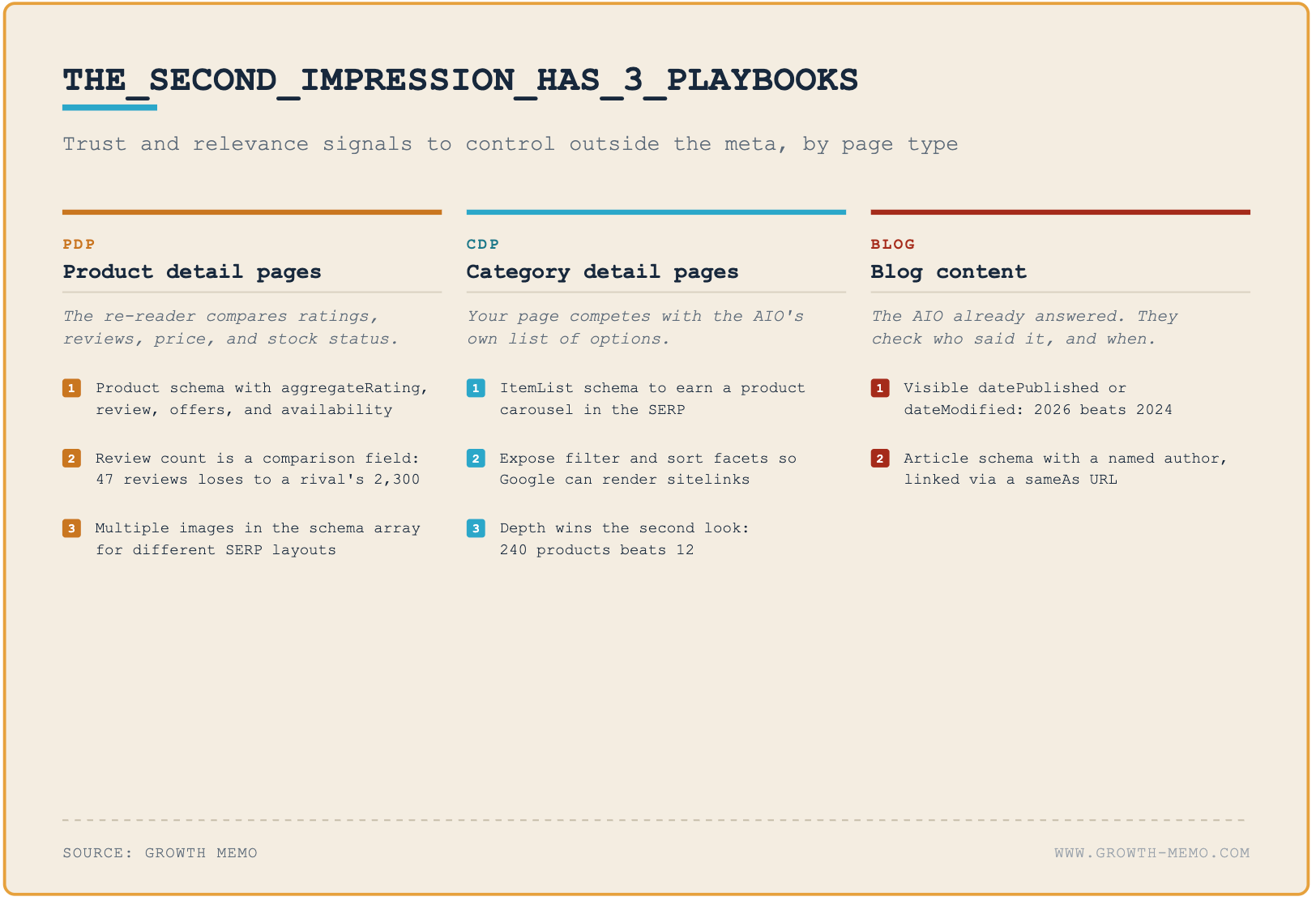
    In product detail pages (PDPs), it’s important to manage schemas and compare competitors’ offerings. On category detail pages (CDPs), having visible filters and vast product arrays can make all the difference.

    ```json
{
  "alt": "Visual guide outlining three playbooks for PDP, CDP, and Blog content focusing on trust and relevance signals.",
  "caption": "Discover strategic playbooks for product detail, category detail pages, and blogs to boost trust and relevance. Enhance online visibility with targeted schema and content strategies.",
  "description": "This image presents a structured guide titled 'THE_SECOND_IMPRESSION_HAS_3_PLAYBOOKS', focusing on enhancing online trust and relevance through three types of content: Product Detail Pages (PDP), Category Detail Pages (CDP), and Blogs. It details strategies like using product schemas, comparison review counts, and exposing filter facets for better Google sitelinks. The guide emphasizes the importance of visible publication dates and article schemas. Ideal for SEO and content strategists aiming to enhance SERP visibility. Source: Growth Memo."
}
```

    As for blog content, I’m focusing on credibility signals like publication dates and author names within schema markup to gain trust and validation clicks.

    Instead of predicting user behavior as before, the new focus is on optimizing my content’s visibility and trustworthiness in an AI-influenced SERP landscape. This shift doesn’t change our core content strategy but adds new layers of intricacy to how we optimize for SERP.


    Inspired by this post on Search Engine Land.


    crushpress.ai community screenshot
  • Unveiling Google Search Console’s AI Controls and Reports

    Unveiling Google Search Console’s AI Controls and Reports

    As someone who eagerly follows Google’s updates, I was thrilled to learn about the latest developments in Google Search Console. Recently, Google has started to roll out new Search Generative AI performance reports. These reports, along with a feature to block your content in AI responses, are designed to give website owners more control.

    Currently, these features are being introduced to a select group of website owners in the UK, but there are plans to expand access in the near future. This gradual rollout allows us to get accustomed to these changes before they become widely available.

    Exploring the Search Generative AI Performance Report

    The new AI performance report in Google Search Console is something I’ve been anticipating. Although it doesn’t cover everything, it does provide some important insights into how our content is performing within AI responses, AI Mode, and AI Overviews on Google Search. The report includes data on impressions, pages, countries, devices, and dates. However, a notable omission is click data, so we’re left guessing about the exact number of searchers clicking through to our sites from AI responses.

    Google stated:

    – We’re rolling out new insights for website owners regarding their pages’ appearances in generative AI Search features. These insights include impressions metrics and information on which pages appear in AI responses and in which countries. We’re working closely with website owners to determine what insights would be most helpful and will expand the metrics available over time. 

    Additionally, Google shared more details about the metrics we can expect:

    – Impressions: Frequency of your site’s URLs appearing in generative AI features in Search and Discover.

    – Pages: Identifying URLs that appeared within AI features.

    – Countries: Understanding visibility on a country basis.

    – Devices: Identifying the devices used to view your website. Available for Search results.

    – Dates: Monitoring performance with hourly, daily, weekly, and monthly granularity.

    I inquired about click data from a Google representative, who mentioned that they are exploring additional metrics that will help inform our strategies in the future.

    Initially, this report is available to a subset of users in the UK, with plans to expand globally in the future.

    If you want to explore more about this report, I recommend checking out the Google help center document.

    Introducing AI Blocking Controls

    Another exciting feature Google introduced is the ability to block your content from appearing in AI search features like AI Overviews, AI Mode, or AI Discover. Google described this as a “new toggle” within Google Search Console, allowing us to decide whether or not our site should be part of these AI search features.

    Google notes that opting out will prevent your site from receiving traffic or impressions from these features. Importantly, this control won’t affect your ranking in standard search results outside of generative AI Search features, so there’s no risk of negatively impacting core web search visibility.

    Again, like the performance report, this toggle is currently available to a subset of UK website owners, with plans to widen access as they complete further testing. Google had promised these controls after facing some backlash from the EU, and it’s promising to see them starting to roll out now.

    One study even showed that 1/3rd of SEOs are willing to block Google from showcasing their content in AI search features.

    Why It Matters

    As site owners and publishers, many of us have been asking for control over how and if our content appears in Google’s AI features. Now, we have just that. Although it’s initially limited, I’m hopeful these features will eventually be available to all.

    Moreover, we’ve been requesting AI Search reporting from Google from day one. With Google’s announcement following Bing’s release of its own AI performance report, we’re taking a significant step forward. While Google’s report currently targets UK site owners and lacks click data, it holds promise for a global rollout soon.


    Inspired by this post on Search Engine Land.


    crushpress.ai community screenshot
  • Microsoft Web IQ: How to Optimize for AI-Agent Search

    Microsoft Web IQ: How to Optimize for AI-Agent Search

    If you’re wondering whether Microsoft Web IQ requires a new SEO playbook, the short answer is no. You don’t need a Web IQ schema or a separate version of your site. You do need content that an AI agent can discover, interpret, verify, and reuse across a chain of searches.

    That shifts the work from chasing one visible ranking to making every useful fact easy to retrieve. Here’s how to adapt without abandoning the technical SEO and content standards that already matter.

    Key takeaways

    • Web IQ connects AI systems with current web pages, news, images, and videos through AI-native grounding APIs built on Bing’s index.
    • AI agents may run several searches, refine their questions, and collect evidence before producing an answer.
    • A conventional rank position is a limited way to judge visibility when an agent is assembling an answer from multiple retrieval steps.
    • Clear answer sections, crawlable HTML, consistent entities, supported claims, and accurate structured data make your content easier to use.
    • There is no confirmed Web IQ-specific markup shortcut. Optimize the underlying information, not an imagined scoring system.

    What Web IQ changes about search

    Web IQ is a suite of AI-native grounding APIs that connects AI systems to fresh online information. It can retrieve web, news, image, and video material from Bing’s index. The underlying infrastructure also serves Microsoft Copilot, ChatGPT, and other large language model experiences.

    The important distinction is the customer. A traditional search results page is arranged for a person who scans titles, compares choices, and clicks. Web IQ is designed for software that needs to extract information quickly and continue working.

    An agent may begin with a broad request, identify missing details, issue narrower searches, and repeat that process until it can complete its task. Microsoft therefore reworked more than the presentation of results. The system extends from indexing into orchestration, with an emphasis on relevance, speed, and economical token use.

    This is why a single rank number becomes less informative. Microsoft has said that human-style ranking isn’t the priority for this service. That doesn’t mean relevance has disappeared. It means an agent’s repeated retrieval and extraction process may matter more than whether your page occupies one fixed blue-link position.

    Optimize for a search chain, not one keyword

    A luminous agent follows multiple branching paths through document nodes before reaching a verified result.

    Start with the task behind the query. A person asking how to choose accounting software may cause an agent to investigate pricing, integrations, security, migration, support, and suitability for a particular business. A page that repeats the broad keyword but leaves those questions unanswered offers little material for the later steps.

    Map one primary question and the follow-up questions a careful buyer would ask before acting. Give each substantial follow-up its own descriptive heading. If a follow-up requires a full explanation, publish a dedicated page and link it from the main page with anchor text that names the question it answers.

    Build self-contained answer sections

    Each important section should make sense when retrieved without the paragraphs above it. State the subject explicitly, answer the question early, and then add conditions or evidence. Replace vague openings such as “it depends on several factors” with language that identifies what depends on what.

    For example, don’t hide a product’s eligibility rule inside a long narrative. Put the rule under a heading that names the product and decision. Explain who qualifies, who doesn’t, and what the reader should check next. That structure helps people scan the page and gives an agent a coherent passage to extract.

    Cover adjacent questions without bloating the page

    Agent-search readiness isn’t permission to add every remotely related keyword. Include a subtopic when it changes a decision, resolves a likely ambiguity, or supplies evidence for the main answer. Move tangents to their own pages. Thin expansions make the central answer harder to identify.

    Use internal links to form a deliberate evidence path: overview to requirements, requirements to implementation, and implementation to troubleshooting. The destination should answer the promise made by the link. This gives an agent a useful route for deeper retrieval while keeping each page focused.

    Make each page economical for an agent to process

    Web IQ was engineered for frequent searches and low token use. You can’t control how an external agent budgets its context, but you can remove avoidable interpretation work from your pages.

    Lead with the usable answer

    Place the direct answer near the start of the relevant section. Follow it with the reasoning, limitations, and examples. Don’t make a reader or agent work through a brand story before reaching the fact promised by the heading.

    Keep entities and claims consistent

    Use one clear name for each company, product, service, or concept, then explain aliases where necessary. Keep prices, availability, policies, and specifications consistent across landing pages, documentation, feeds, and structured data. Conflicting facts force an agent to resolve ambiguity and weaken the page’s usefulness as grounding material.

    Attach qualifications to the claim they modify. If an offer applies only in one region or a feature requires a certain plan, say so in the same section. A technically correct statement can still mislead when its condition sits several screens away.

    Use structured data as corroboration

    JSON-LD can clarify entities and relationships, but it isn’t a Web IQ access pass. Choose schema types that match the page, populate properties from visible information, and keep the markup synchronized with the content. Don’t mark up answers, reviews, prices, authors, or dates that visitors can’t verify on the page.

    Treat structured data as a machine-readable confirmation of the page, not a substitute for an explicit answer. The visible copy still needs to explain what the entity is, what the claim means, and when it applies.

    Give media enough context to stand alone

    Because Web IQ can source images and videos as well as pages, don’t publish important media with a generic filename and a one-word caption. Use accurate alternative text, descriptive captions, transcripts where appropriate, and nearby copy explaining what the media demonstrates. Keep the media attached to a canonical page with enough context to identify its subject.

    Run an AI-agent readiness audit

    Scanning beams inspect a modular website structure, with accessible content blocks and connections glowing green.

    You can audit a high-value page without access to Web IQ itself. Use the primary question the page should answer, then work through this sequence:

    1. Check discovery. Confirm that the canonical URL is crawlable, returns the intended content successfully, and isn’t blocked by an accidental robots directive or login requirement.
    2. Inspect the delivered page. Verify that the main answer, headings, links, and essential facts exist in the rendered output available to a crawler. Don’t leave the core answer dependent on an interaction that may never occur.
    3. Extract sections out of context. Read each important section by itself. Add the subject or qualification when the passage becomes ambiguous without its surrounding copy.
    4. Trace every consequential claim. Link to supporting documentation where readers need verification. Remove stale claims and unsupported precision.
    5. Compare visible content with JSON-LD. Resolve differences in names, dates, offers, authorship, and entity relationships.
    6. Follow the likely next questions. Make sure internal links lead to complete answers rather than thin category pages or unrelated sales copy.
    7. Test the task in AI assistants. Ask the same realistic question in experiences relevant to your audience. Record whether your brand appears, which page is used, whether the claim is represented correctly, and which competing evidence fills the gaps.
    8. Watch your own evidence. Review referral traffic and server logs where available, but don’t treat either as a complete count of agent visibility. Use them alongside repeated answer checks and conversion data.

    Prioritize corrections that affect the answer itself: inaccessible pages, conflicting facts, missing qualifications, unclear entity names, and unsupported claims. Cosmetic rewrites can wait. An agent can’t use a polished passage it can’t retrieve or trust.

    Web IQ access may broaden as Microsoft scales the service, but you don’t need to wait for a new dashboard. Choose one commercially important topic this week, map the likely follow-up searches, and repair the weakest answer path. That work improves your site for human visitors now while making its information more usable in agent-driven search.

    References

  • Google Ads AI Changes: A Practical Policy and Audit Plan

    Google Ads AI Changes: A Practical Policy and Audit Plan

    If you run Google Ads, the uncomfortable part of deeper automation isn’t simply that software can make more decisions. It’s that Google may have broader latitude to build and manage ads while your team still owns the consequences.

    You don’t need to abandon automation. You do need a clearer record of what Google can use, which changes require human review, how regulated placements are handled, and whether invalid activity credits are reflected in your performance numbers. Here’s a practical way to put those controls in place.

    Key takeaways

    • Treat the July 1, 2026 terms as a change in operating permissions, not a routine administrative notice.
    • Document which inputs, URLs, accounts, claims, and assets Google may use before expanding campaign automation.
    • Keep compliance requirements ahead of eligibility for ads in AI-generated search experiences, especially in regulated sectors.
    • Add invalid activity credits to recurring campaign reviews so media performance and billed costs tell the same story.

    Reset your risk boundary before July 1

    The updated Google Ads terms take effect July 1, 2026. They apply to Google Ads accounts rather than unrelated products such as Workspace, and advertisers aren’t being asked to complete an immediate account action.

    That lack of an account prompt shouldn’t become a reason to ignore the change. Updated language covers how your inputs may be used across Ads features, information supplied through conversational tools, and the URLs and accounts authorized for automated campaign setup. It also gives automation a larger role while leaving advertisers accountable for campaign review and outcomes.

    Control areaWhat to examineDecision you need to record
    Input rightsCopy, images, product data, prompts, audience material, and other information supplied to AdsWho owns it, who approved its use, and whether Google may reuse it across campaign features
    Authorized propertiesWebsites, landing pages, feeds, accounts, and connected properties available to automated setupWhich properties are in scope and which must remain excluded
    Automated managementCampaigns where Google can create, combine, select, or optimize elementsWhat can run automatically and what requires human approval
    Regional termsContract entity, arbitration language, fees, and local legal requirementsWhich legal or procurement owner must review each affected account

    Start with your highest-spend, highest-risk, and regulated accounts. Create a simple inventory of active automation, connected properties, approved asset libraries, and responsible owners. For every input, be able to answer two questions: do you have the right to provide it, and would you be comfortable seeing it adapted into a live ad?

    Regional language deserves separate review. Changes involving arbitration, fees, legal compliance, and Google BR’s transactional authority in Brazil won’t affect every advertiser in the same way. Route the relevant terms to counsel or procurement instead of relying on a universal account-level interpretation.

    Put human approval around the decisions that matter

    Two reviewers evaluate automated campaign recommendations at a digital approval checkpoint with security and verification symbols.

    A useful AI policy doesn’t require a person to approve every bid adjustment. It identifies the decisions where an error could create a legal, financial, reputational, or measurement problem.

    1. Set the generation boundary. List the materials automation may use, including authorized pages, feeds, existing assets, and conversational inputs. Exclude expired offers, unapproved claims, restricted pages, and material with uncertain ownership.
    2. Set the activation boundary. Decide whether generated assets can go live automatically or require review. Regulated claims, brand promises, pricing language, and required disclosures should have a named approver.
    3. Set the inspection cadence. Review live combinations, destination pages, policy status, and account changes on a recurring schedule. Assign the task to a role, not a vague team.
    4. Set stop conditions. Pause or remove an asset when its rights are unclear, a required disclosure is missing, a claim hasn’t been approved, or the destination doesn’t support the promise made in the ad.
    5. Preserve evidence. Keep the approved wording, reviewer, date, authorized property, and reason for any exception in one change record.

    Conversational tools need the same discipline. A prompt can contain customer information, internal positioning, licensed copy, or an unapproved claim. Treat prompt content as material supplied to an advertising system, not as a private scratchpad. A conversational shortcut is not an approval workflow.

    This separation lets you retain fast bidding and optimization while keeping human control over the assertions customers actually see. It also gives an agency a defensible answer when a client asks who approved a generated asset or why a particular property was available to automation.

    Handle AI Mode ads without weakening compliance

    Google has begun a small healthcare advertising test in AI Mode for English-language queries in the United States. Eligible participation can come from Performance Max, AI Max with search term matching, Shopping, and broad match campaigns. Those campaign types can also place ads in AI Overviews.

    The current creative boundary matters: healthcare ads with pinned assets or text disclaimers aren’t eligible for this initial test. That is an eligibility condition, not a reason to remove a disclosure your organization requires. If a disclaimer or pinned message is necessary for compliance, accuracy, or patient safety, keep it and accept that the ad may not qualify.

    Healthcare advertisers should maintain a small eligibility register for candidate campaigns. Record the market, query language, campaign type, pinned assets, required disclaimers, approval owner, and whether an AI Mode or AI Overview appearance has actually been observed. Don’t label every eligible campaign as participating, and don’t assume a test has expanded beyond its stated sector or market.

    If you work outside healthcare, use the test for planning rather than access claims. Review which creative controls your sector cannot surrender and which landing pages are suitable for an AI-generated search context. You will be ready if eligibility expands, without rebuilding compliant assets around a placement that isn’t available to you.

    Keep paid and organic AI visibility separate in reporting. An ad shown near an AI-generated response is paid distribution; it isn’t an organic citation, brand recommendation, or proof of generative search authority. Your AEO or GEO dashboard should identify those outcomes separately even when they appear in the same user interface.

    Make invalid activity credits part of campaign reporting

    More automated distribution makes cost reconciliation more important. Google says its systems filter invalid traffic before it creates a charge, but activity detected later may result in a credit. The Invalid Activity Credit Report for Search and Performance Max exposes credited clicks, credited interactions, credited spend, campaign-level effects, and performance after credits are applied.

    You can generate it in Google Ads by opening Report Editor, going to the Template Gallery, and selecting Invalid Activity Credit Report: Search & PMax. Add the campaign metrics used in your normal performance review so the credit information isn’t examined in isolation.

    1. Use the same date range as the billing and campaign review you are reconciling.
    2. Include campaign name, cost, clicks or interactions, and the applicable credited columns.
    3. Compare campaign-level credits with billing and transaction records.
    4. Use adjusted performance fields where provided, and avoid subtracting the same credit twice in a separate spreadsheet.
    5. Investigate concentration. A credit clustered in one campaign deserves more attention than the same amount dispersed across an account.
    6. Annotate material credits before making budget, bidding, or client-reporting decisions.

    An invalid activity credit doesn’t, by itself, prove deliberate click fraud or identify an attacker. It shows that spend or interactions were adjusted. Use it to reconcile costs and spot patterns, then keep any stronger conclusion tied to evidence you actually have.

    Build one operating record for policy, placement, and spend

    An analyst reviews a central audit ledger connected to organized policy, placement, approval, activity, and credit records.

    These changes become manageable when one campaign record connects permissions, approvals, placement eligibility, and financial adjustments. At minimum, track the campaign owner, automation in use, authorized URLs or accounts, rights owner, creative approver, regulated-sector status, mandatory disclosures, AI Mode eligibility or observation, invalid activity credits, and the latest review date.

    Before July 1, review that record for your most consequential accounts and close any ownership or approval gaps. Then add the invalid activity report to your recurring performance process and keep AI-generated search placements distinct from organic AI visibility. You can continue using automation, but you’ll know where it is allowed to act, who checks its work, and which numbers belong in the final decision.

    References

  • Why ‘It’s Just SEO’ is Limiting Our Industry’s Growth

    Why ‘It’s Just SEO’ is Limiting Our Industry’s Growth

    I’ll be honest; the ongoing discourse around the GEO debate feels like a distraction from a much more significant transformation. AI systems are reimagining how brands, sources, and recommendations are surfaced, demanding our full attention.

    It’s both impressive and frustrating how search has managed to spark such passionate debate at a time when it should be becoming more pivotal to clients. Yet, our industry is stuck in arguments that render us irrelevant.

    So, who truly owns the future of search? That’s the real question we need to tackle.

    Who defines the next phase of search? Who secures the budget? Who articulates the shift from a list of links to a machine-driven recommendation system?

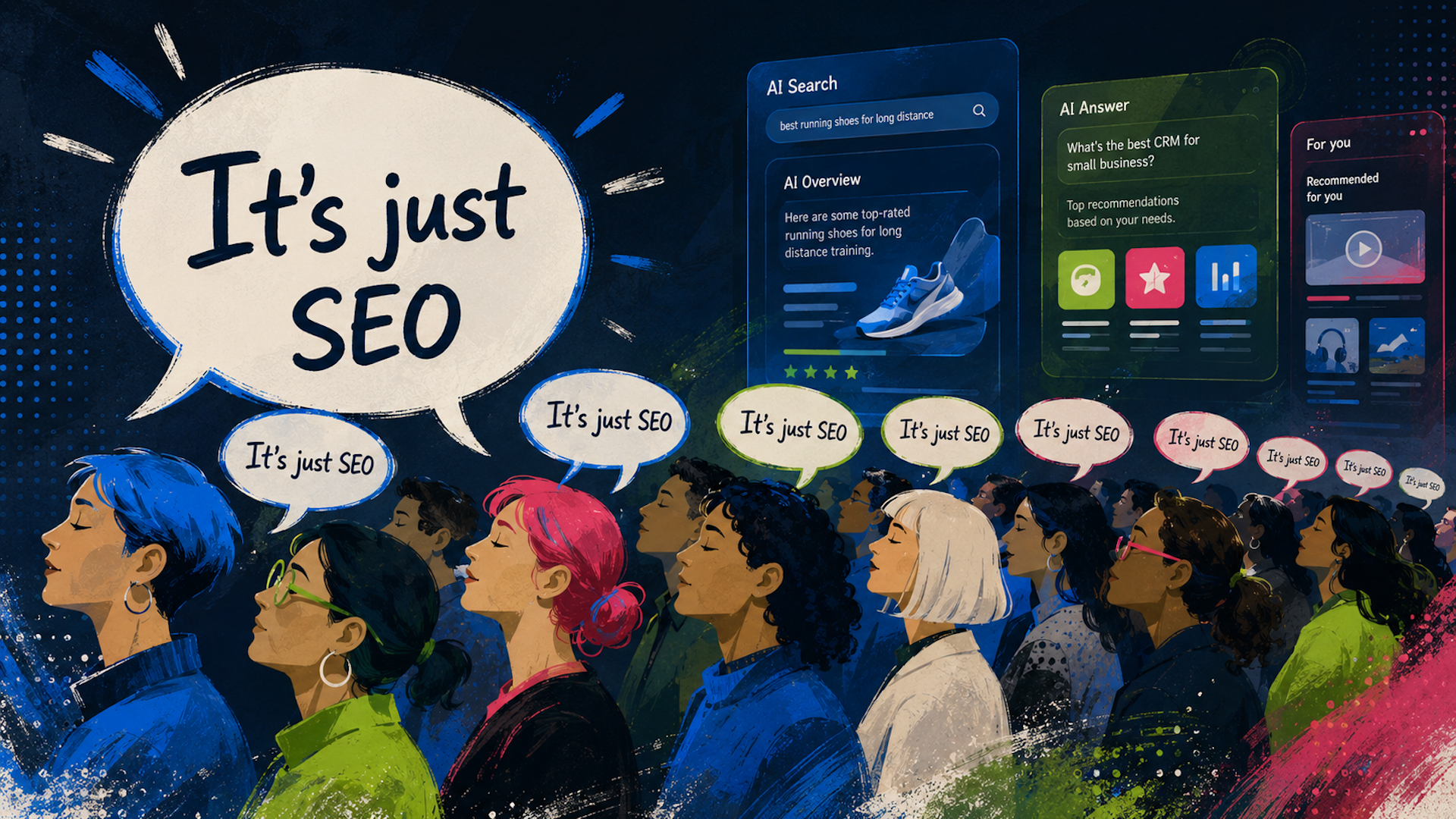
    The phrase “it’s just SEO” has caused considerable damage. It sounds like the calm, seasoned wisdom you’d expect from a search veteran. However, it lacks strategic depth. It’s a meme that constrains one of the most substantial commercial opportunities in years.

    Why Memes Matter in Search

    Memetics isn’t a new concept. Richard Dawkins introduced it in “The Selfish Gene” in 1976, suggesting that ideas spread through culture in a fashion similar to genes. Susan Blackmore expanded on this, claiming we’re essentially ‘meme machines’ built to propagate cultural information. The most resilient ideas aren’t necessarily true; they’re the stickiest.

    Take “Happy Birthday to You,” it’s memorable and universally known not because it’s brilliant, but because it’s easy to replicate and emotionally fulfilling. Slogans and professional clichés endure for their simplicity and utility, not their accuracy.

    SEO and GEO are entangled in a memetic struggle. This issue is amplified as the phrase “it’s just SEO” became predominant when GEO appeared, driving a wedge into meaningful conversation.

    When GEO first came into the discussion, reactions varied. While some recognized the need for new tools and methods, others viewed it as a threat, repelling it with the phrase “it’s just SEO” — turning it into a chant and then a weapon. It was an ideal meme, short and socially protective.

    The follow-up meme “GEO grifter” did even more harm, framing advocates of GEO as opportunists and stifling exploration and innovation. This behavior causes harm when consensus forms based solely on repetition, with the algorithms rewarding those repeating the framing, creating a false sense of agreement.

    Clients Seek Certainty, Not Acronyms

    I’ve observed firsthand at conferences like BrightonSEO that many marketers are already leveraging generative systems. They don’t need debates over terms; they’ve adapted to new processes accordingly.

    SEO has always been difficult to sell against paid counterparts due to previous uncertainties and failures. Nonetheless, good SEO generates tangible success. Failing to clarify the changes will see budgets drift elsewhere, especially to paid avenues.

    ```json
{
  "alt": "The CapmatchOne logo with a gradient circle and bold text.",
  "caption": "Discover innovation with the CapmatchOne logo, featuring sleek typography and a modern gradient circle.",
  "description": "The CapmatchOne logo features bold, modern typography coupled with a gradient circle, symbolizing connection and innovation. The sleek design conveys a sense of progress and creativity. This image can be used for branding or promotional purposes, appealing to audiences interested in innovative solutions and forward-thinking designs."
}
```

    The B2B Institute’s Findings

    According to LinkedIn’s B2B Institute, growth for B2B brands stems from being easy to locate. Digital environments now demand visibility across new platforms.

    The report views GEO as an extension of SEO and emphasizes establishing authority, relevance, and credibility. Discoverability is altering, yet core principles endure.

    The 9 a.m. to 5 p.m. Dilemma

    “It’s just SEO” oversimplifies a vast concept. When someone insists GEO is “just SEO,” I must ask — which kind? Each interpretation involves different practices and focuses.

    If our response to generative systems is “helpful content,” we’re on the wrong track. The future demands more than vague promises; it requires adopting digital PR, brand strategies, and tactical marketing insights.

    No Name, No Funding

    Markets can’t invest in what they don’t recognize. Naming GEO is crucial as it turns abstract threats into actionable categories. Without a name and a defined category, the industry will fail to secure the investments needed to thrive in an altered landscape.

    Ultimately, whether we call it GEO, AI search visibility, or SEO evolved, defining it ensures survival and growth. Brands that embrace this will capture opportunities that arise as search evolves.

    A New Framing for Change

    It’s time to acknowledge change and redefine the narrative. The transformation involves becoming the recommended brand — present, visible, and credible. It’s about expanding SEO to embrace the broader spectrum of digital marketing.

    Adapting to these shifts will ensure brands maintain their visibility as search continues to evolve. Those clinging to outdated debates are at risk of missing out entirely.


    Inspired by this post on Search Engine Land.


    crushpress.ai community screenshot
  • Google May 2026 Core Update: A Practical Recovery Plan

    Google May 2026 Core Update: A Practical Recovery Plan

    Your traffic graph dropped during the May core update, and now you need to know whether to rewrite pages, change your SEO strategy, or simply wait. Start by resisting the urge to make sitewide edits. A core update can expose weak content, but it can also coincide with changes in demand, search-result layouts, competitors, or tracking.

    The useful response is a page-level diagnosis. You want to identify where visibility changed, determine what those pages now fail to deliver, and improve them without destroying content that still works.

    Anchor your diagnosis to the actual rollout

    The official rollout ran from May 21 through June 2. Noticeable ranking movement appeared by May 23 and continued into the following week. This was the second core update of 2026, so earlier changes in your reporting may belong to a different event.

    Build clean comparison periods

    In Google Search Console, compare May 7-20 with June 3-16. These are equal 14-day periods immediately before and after the rollout, without mixing rollout days into either side. If your business has strong weekly or seasonal patterns, compare each period with the equivalent days from a normal prior period as a second check.

    Export clicks, impressions, click-through rate, and average position by query and page. A chart of total clicks is not enough. It can tell you that performance changed, but not why.

    Separate ranking losses from other traffic losses

    If positions declined across several important queries for the same pages, investigate relevance, usefulness, and competition. If impressions declined while positions remained broadly stable, check whether search demand or the set of queries triggering those pages changed. If positions and impressions held steady but click-through rate fell, inspect the live results for new answer features, stronger titles, or a changed search intent.

    Also rule out unrelated technical problems. Check whether affected URLs are indexed, canonicalized as intended, crawlable, and returning the correct status code. Review analytics changes, security incidents, migrations, and major template releases. A core-update diagnosis cannot fix a broken canonical or missing tracking tag.

    Find the losses that actually need intervention

    A magnifying glass isolates three webpage tiles connected to abstract signals for demand, competition, search layout, and measurement.

    Sitewide averages hide the decisions you need to make. Group affected URLs by topic, search intent, template, author, and content type. Then calculate the change for each group. A fall concentrated in old comparison pages calls for a different response than a decline across every page using the same template.

    Start with URLs that combine three traits: a material visibility loss, meaningful business value, and a problem you can clearly describe. Do not prioritize a page merely because its percentage decline looks dramatic. A page that fell from ten impressions to two is usually less urgent than one that lost a large share of qualified visits.

    Inspect the queries that disappeared

    For each priority URL, compare its pre-update and later query sets. Ask whether it lost its main query, a cluster of secondary questions, or visibility for terms that never matched its real purpose. Losing poorly matched impressions may not require a repair. Losing the queries that express the page’s central promise does.

    Search those important queries manually and examine the pages now appearing above yours. Look for differences in intent, scope, specificity, first-hand evidence, freshness, and format. The goal is not to copy competitors. It is to understand what searchers can accomplish with the current results that they cannot accomplish with yours.

    Look for patterns across winners and losers

    Your unaffected and improving pages are useful controls. Compare them with declining pages from the same site. If both groups share the same design, author box, and schema, those elements are less likely to explain the difference. If losses cluster around thin location pages, outdated tutorials, or articles built from the same generic outline, you have a stronger hypothesis to test.

    Audit for satisfaction, not an imaginary update factor

    The update was intended to favor relevant and satisfying content. That direction is more useful than hunting for a new word-count target, schema type, or keyword-density rule. Google has not provided a single prescribed fix for pages that lost visibility.

    Test whether the page fulfills its promise

    Read the title, opening, and major headings without relying on your memory of the page. They should define one clear task or question. Then check whether a reader can complete that task without returning to search for missing steps, definitions, evidence, or limitations.

    Remove introductions that delay the answer. Put the central answer or decision criteria near the relevant heading, then support it with explanation. If the query requires a procedure, make the sequence explicit. If it requires a choice, explain who each option suits and what changes the decision.

    Add value that another generic page cannot reproduce

    A rewrite that merely changes wording preserves the original weakness. Add the missing substance: a worked example, a transparent method, a limitation, an expert interpretation, a screenshot that proves a step, or an explanation of what happens when the standard advice fails. Keep only material that helps the reader act or decide.

    For factual or high-consequence claims, make the basis visible. Identify the responsible organization or expert where that identity matters. Link to supporting material you actually used. Show when the page was reviewed, and update that date only after a meaningful review. An unexplained assertion does not become trustworthy because it sounds confident.

    Check ownership, duplication, and internal competition

    Decide which URL should own each core intent. Several pages targeting the same question can divide internal links and leave each version incomplete. Consolidate genuine duplicates when one stronger destination can serve the reader. Keep separate pages when the intents, audiences, or required answers are materially different.

    Update internal links so descriptive anchor text points to the intended owner. Make sure related pages support one another instead of repeating the same opening-level information. Do not delete a large group of URLs solely because traffic fell during the rollout; first determine whether each page has a distinct, supportable purpose.

    Improve search and AI visibility without conflating them

    A Google core update and visibility inside frontier language models are not the same measurement system. A decline in Google rankings does not prove that ChatGPT, Claude, or another answer engine stopped citing you for the same reason. Track conventional search performance and AI citations separately, even when the same content improvements may benefit both.

    For answer-oriented visibility, make important facts easy to locate and interpret. Use descriptive headings, answer the stated question directly, name entities consistently, and keep qualifications beside the claim they modify. Tables should represent real comparisons, while lists should represent genuine steps or criteria. Formatting cannot compensate for an unsupported answer, but it can make a strong answer easier to extract correctly.

    Apply JSON-LD only when it accurately describes visible content and the page’s real entity relationships. Schema is packaging, not evidence. Adding more markup will not repair stale facts, unclear authorship, duplicated intent, or an answer that misses the query.

    Measure AI visibility with a stable set of prompts tied to your customers’ questions. Record whether your brand is mentioned, cited, represented accurately, or omitted. Keep that record beside, but not merged into, your Search Console analysis. This prevents a gain in one channel from concealing a loss in another.

    Make controlled changes and preserve what you learn

    Two parallel sets of webpage cards show one controlled change while the original version remains preserved for comparison.

    Create a change log for every priority URL. Record the date, the affected query or intent, your diagnosis, and the substantive edits. That turns recovery work into a testable process. Without a log, several teams can modify the same page and leave you unable to connect later movement with a plausible cause.

    Work in related batches rather than changing the entire site at once. Start with a small group that shares a documented weakness. Recheck query-level performance after those pages have accumulated enough impressions for a meaningful comparison. Keep the changes if the intended queries recover without harming conversions or accuracy; revise the hypothesis if they do not.

    Do not judge success only by restored clicks. A revised page may attract fewer but better-matched visits. Review conversions, qualified leads, engaged visits, and the queries now associated with the page. The objective is durable visibility for the right need, not the recreation of every impression that existed before May 21.

    Key takeaways

    • Use May 21 through June 2 as the rollout window, and keep those dates out of your before-and-after comparison periods.
    • Diagnose changes by page and query; total traffic alone cannot distinguish ranking, demand, click-through, and technical problems.
    • Prioritize valuable pages with a clear loss and a specific weakness instead of rewriting the whole site.
    • Improve intent match, distinct value, evidence, ownership, and internal linking before reaching for more schema.
    • Measure Google rankings and AI-answer visibility separately, with a written change log for both.

    Your next move is simple: export the two 14-day comparison periods, select the five affected URLs with the greatest business value, and write one testable diagnosis for each. Make only the changes that diagnosis supports. That gives you a recovery plan you can measure instead of a collection of update myths.

    References

  • How to Scale a High-ROAS Campaign Without Wasting Budget

    How to Scale a High-ROAS Campaign Without Wasting Budget

    Your campaign is profitable, lead quality looks good, and someone wants to double the budget. The tempting assumption is that twice the spend will produce twice the revenue.

    That only works when the campaign has profitable demand left to capture. Before you raise the budget, verify the business value behind the reported ROAS, confirm that budget is the real constraint, and decide how much efficiency you are prepared to trade for additional volume.

    High average ROAS does not prove the next dollar will perform

    A curved transparent funnel converts successive gold tokens into progressively fewer glowing spheres.

    The ROAS in your dashboard describes the spend you have already made. It does not tell you what the next dollar will return. A tightly constrained campaign may be collecting the easiest conversions: high-intent searches, familiar audiences, strong locations, or the most responsive hours. More budget can push delivery into less efficient opportunities.

    That is why budget scaling should be judged on marginal performance. Calculate incremental ROAS as additional revenue divided by additional spend. If spend rises but qualified revenue barely moves, the campaign has not scaled successfully, even if its blended ROAS still looks respectable.

    You also need an economic floor. Your target should reflect gross margin, fulfillment costs, returns, sales costs, and any other expense that changes when you acquire another customer. A campaign can exceed a platform ROAS target and still produce weak profit.

    Key takeaways

    • Scale only when the campaign is constrained by budget and still has qualified demand available.
    • Validate conversion tracking, lead quality, order value, and profitability before trusting a high ROAS.
    • Increase budget in controlled steps and avoid changing bids, targeting, creative, and budget at the same time.
    • Judge the test by incremental qualified revenue and profit, not spend growth alone.

    Validate the business result before funding it

    A scaling decision is only as reliable as the conversion signal behind it. Run this audit before approving more spend:

    1. Check conversion tracking. Confirm that each important action fires once, carries the correct value, and represents a result the business actually wants. Remove duplicate, test, or low-value actions from the primary optimization signal.
    2. Trace leads to outcomes. Compare campaigns using qualified opportunities, closed sales, or another downstream milestone. A form submission is not equivalent to revenue when lead quality varies.
    3. Reconcile order value. Check whether the value sent to the ad platform reflects cancellations, refunds, discounts, and unusually large purchases that can distort the average.
    4. Compare revenue with profit. Establish the lowest acceptable return before scaling. This gives you a stopping rule if marginal efficiency declines.
    5. Confirm operational capacity. Make sure sales, inventory, fulfillment, and customer support can absorb more volume. Paying for demand that the business cannot serve is not productive growth.

    If any of these checks fails, fix the measurement or business constraint first. Increasing the budget would amplify the uncertainty rather than resolve it.

    Prove that budget is the constraint

    A strong campaign can have limited scale for reasons that money cannot fix. Search demand may be finite. Targeting may be narrow. Inventory may be unavailable. The sales team may reject additional leads. Budget should rise only when the evidence points to a spend constraint.

    What you observeLikely interpretationWhat to do next
    The campaign regularly reaches its budget while qualified conversions remain profitableBudget may be limiting useful demandRun a controlled budget increase
    The campaign does not consistently spend its current budgetBudget is probably not the immediate constraintInvestigate demand, bids, eligibility, targeting, and creative
    Platform ROAS is high but downstream lead quality is weakThe optimization signal does not match business valueRepair tracking and feed stronger outcomes back into optimization
    Spend rises but qualified revenue stays nearly flatMarginal demand is weak or already exhaustedStop increasing budget and diagnose the expansion
    More orders create stock or service problemsThe constraint sits outside advertisingResolve operational capacity before buying more demand

    Do not treat a platform recommendation to spend more as sufficient evidence. It can identify delivery capacity, but your business data must determine whether that capacity is worth buying.

    Scale in stages with a written stopping rule

    Gold budget blocks move up three platforms with checkpoint gates, while a stop lever and reserve blocks sit nearby.

    Large budget changes can disturb a stable campaign and make the result harder to interpret. In Microsoft Advertising, changes beyond 15% may introduce volatility or a renewed learning period. Other platforms have their own behavior, so check the system you use and favor measured adjustments.

    1. Save the baseline. Record spend, qualified conversions, qualified revenue, profit, cost per acquisition, ROAS, and conversion volume before the change.
    2. Name the hypothesis. Write down why more budget should capture additional profitable demand. For example, the campaign is repeatedly constrained while downstream conversion quality remains stable.
    3. Set the guardrails. Define the minimum acceptable marginal ROAS or maximum acceptable acquisition cost. Include lead-quality or profit requirements where platform revenue is incomplete.
    4. Change the budget only. Keep bidding strategy, targeting, ads, landing pages, and conversion definitions stable. Otherwise, you will not know what caused the result.
    5. Allow the campaign to settle. Avoid reacting to an isolated day. Wait until you have enough conversion volume to compare the new period with the baseline while accounting for normal business conditions.
    6. Choose the next action. Increase again only if incremental volume meets the guardrails. Hold when the result is promising but uncertain. Reduce the budget when additional spend fails the profitability test.

    Document each change with its date, amount, rationale, and result. This creates a usable scaling history and prevents a sequence of undocumented increases from turning into a permanent efficiency loss.

    Read the result as a business decision

    A lower blended ROAS after scaling is not automatically a failure. Additional volume can justify some efficiency loss if the new customers or leads remain profitable. The decision depends on what happened at the margin.

    • Spend and qualified profit both rise: the campaign has demonstrated headroom. Consider another controlled increase.
    • Spend rises, revenue rises, but profit does not: you have crossed the economic limit. Return to the last profitable level or improve margins and conversion quality before testing again.
    • Spend rises but qualified volume barely changes: more budget is not solving the active constraint. Examine demand, auction eligibility, targeting, the offer, and the landing experience.
    • Platform conversions rise while sales outcomes weaken: the campaign is optimizing toward the wrong signal. Pause scaling and reconnect optimization to verified business outcomes.

    Your next budget increase should be earned by evidence. Establish the profit floor, verify headroom, make one controlled change, and fund the next step only when the additional spend produces business value.

    References

  • Transforming Customer Success into AI-Driven SEO Evidence

    Transforming Customer Success into AI-Driven SEO Evidence

    n

    When I consider the impact of SEO on customer success, it’s fascinating to see how much of the invaluable evidence lives within the operations of our customer success, support, and delivery teams. These insights are crucial for AI systems, and SEO is our tool to make them visible.

    n nnn

    SEO has evolved to extend beyond mere conversions, embedding itself in the core operations of our business where crucial AI signals are generated. This expansion allows us to surface invaluable operational data.

    n nnn

    AI systems, when recommending our brand, consider several post-sale metrics such as the accuracy of onboarding, success of integrations, and levels of customer advocacy. These insights often lie within our internal teams, rather than in our marketing content.

    n
    ```json
{
  "alt": "The CapmatchOne logo with a gradient circle and bold text.",
  "caption": "Discover innovation with the CapmatchOne logo, featuring sleek typography and a modern gradient circle.",
  "description": "The CapmatchOne logo features bold, modern typography coupled with a gradient circle, symbolizing connection and innovation. The sleek design conveys a sense of progress and creativity. This image can be used for branding or promotional purposes, appealing to audiences interested in innovative solutions and forward-thinking designs."
}
```
    nnn

    This presents a significant SEO opportunity. There is a treasure trove of evidence in CRMs and support platforms that can influence AI visibility if codified properly into machine-readable formats.

    n nnn

    Bots and algorithms need to understand the intricacies of our business, from what we provide to how it satisfies our customers. I’m excited to explore how each element contributes to this understanding.

    n
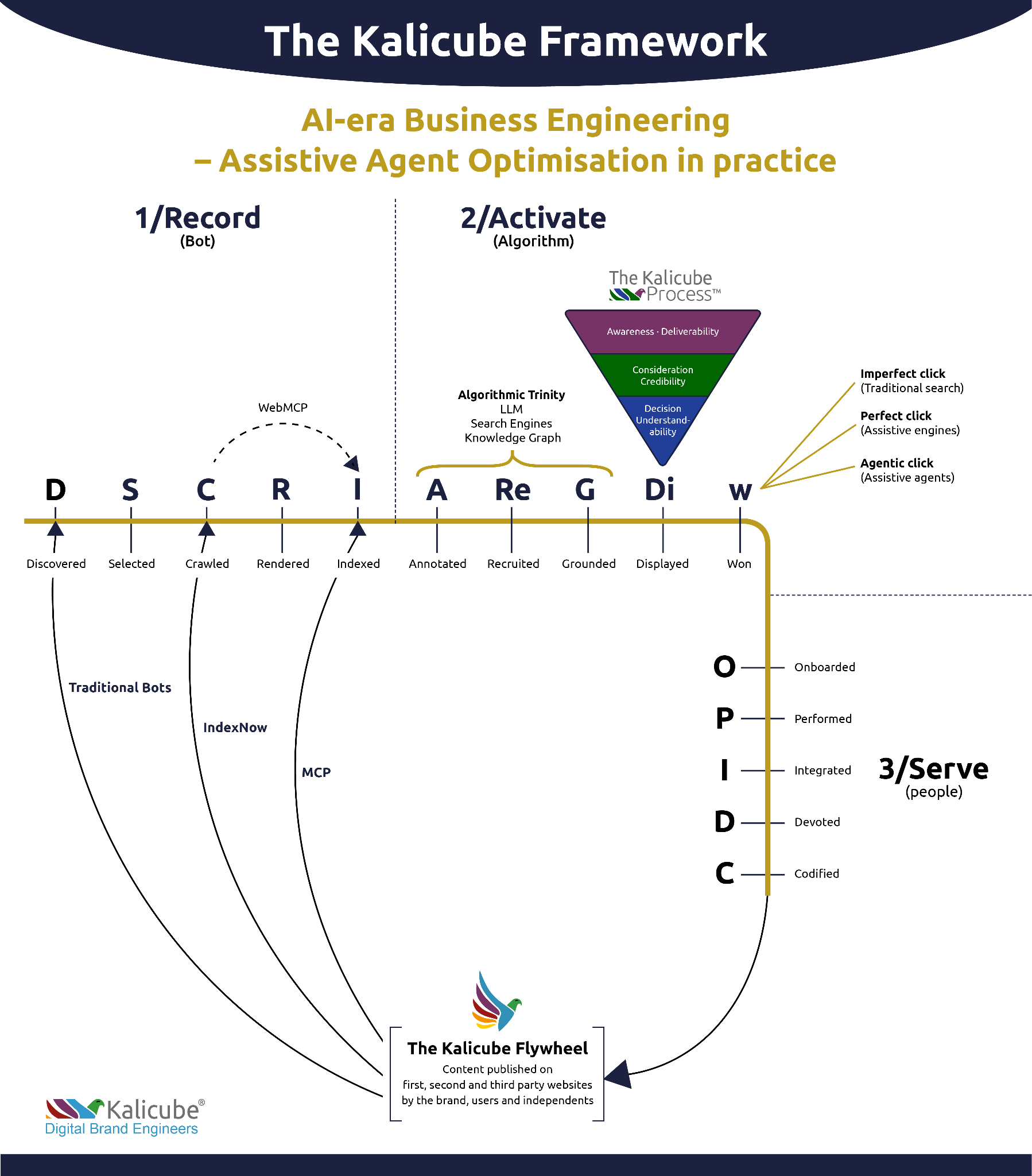
    ```json
{
  "alt": "Kalicube Framework diagram showing AI-era business engineering with three stages: Record, Activate, and Serve.",
  "caption": "Explore the Kalicube Framework: A visual guide to AI-driven business engineering, showcasing phases from recording to activation and service delivery.",
  "description": "This image illustrates the Kalicube Framework for AI-era Business Engineering, emphasizing Assistive Agent Optimization. It details three core phases: Record, Activate, and Serve, each involving steps like discovery, indexing, annotation, and onboarding. The framework incorporates concepts such as traditional bots, algorithmic trinity (LLMs, search engines, knowledge graphs), and the Kalicube Flywheel. The flowchart highlights the transition from bots to algorithms and eventual service to people, aimed at enhancing digital brand presence."
}
```
    nnn<h2 class=

    Inspired by this post on Search Engine Land.


    crushpress.ai community screenshot
  • How to Build Reusable AI Content Skills That Stay Useful

    How to Build Reusable AI Content Skills That Stay Useful

    You probably have a prompt that everyone on your team is supposed to use. It may be buried in a document, copied from an old chat, or rewritten from memory whenever someone starts a draft. That works until the prompt changes, a rule gets dropped, or two people interpret it differently.

    A reusable AI content skill gives those recurring instructions a stable home. Build it well, and you can spend less time rebuilding prompts while keeping voice, quality, and answer-engine requirements consistent across projects.

    Move durable decisions out of individual prompts

    The first decision is what deserves to become a skill. A useful candidate appears repeatedly, applies across multiple assignments, and should produce a consistent result regardless of who starts the workflow. Saving recurring instructions for reuse can reduce repetition while helping teams apply the same writing style, AEO practices, and content standards.

    Do not turn every long prompt into a permanent asset. Campaign facts, temporary offers, target keywords, product claims, and assignment-specific angles belong in the content brief. If you embed them in a reusable skill, they can quietly leak into unrelated work or become outdated.

    Put in the reusable skillKeep in the content brief
    Brand voice and prohibited languageThe audience for this specific page
    Required content structureThe query, topic, and search intent
    AEO and editorial quality checksApproved facts, claims, and references
    Citation and uncertainty rulesCampaign messaging and calls to action
    Standard output formatDeadlines, owners, and publishing details

    Use a simple test before promoting an instruction: would you want it applied to the next unrelated assignment? If the answer depends on the topic, client, campaign, or date, leave it in the brief.

    Write the skill as an operating contract

    A skill should tell the AI what job it is doing, what information it needs, which rules are mandatory, and how to recognize an acceptable result. Vague instructions such as “write high-quality SEO content” leave too much room for interpretation. Replace them with observable requirements.

    Skill fieldWhat to write
    PurposeThe narrow outcome this skill produces, such as an answer-first educational page.
    Use whenThe assignments that should trigger it, plus cases where it should not be used.
    Required inputsThe audience, intent, approved facts, desired action, and output destination.
    Non-negotiable rulesVoice, claim boundaries, citation requirements, prohibited language, and compliance constraints.
    MethodThe sequence for interpreting the brief, drafting, checking, and revising.
    Output contractThe required headings, markup, metadata, fields, or schema-ready information.
    Quality checksConditions the result must meet before it can be returned.
    Escalation ruleWhat the AI must flag instead of guessing when information is missing or contradictory.

    Write rules so an editor can verify them. “Use a direct answer near the opening” is testable. “Make it engaging” is not. “Link factual claims to approved references” is testable. “Sound authoritative” is not.

    Define priorities before instructions conflict

    Reusable defaults will eventually collide with a project brief. State the order of precedence inside the skill. A practical hierarchy is mandatory legal and brand policy first, assignment requirements next, skill defaults after that, and model discretion last. Adjust that hierarchy to match your organization, but do not leave it implicit.

    Add an escalation rule for unresolved conflicts. The AI should identify the clashing instructions and request a decision rather than quietly choosing whichever wording appeared most recently.

    Separate writing, optimization, and validation

    Three separate workstations represent writing, optimization, and final content validation in a staged workflow.

    One giant skill may look efficient, but it becomes difficult to maintain. A change to your brand voice should not require rewriting your structured-data rules. A new citation policy should not disturb the way product pages are organized.

    Use a small set of focused layers. A voice skill can control tone, sentence style, terminology, and banned phrasing. A content-type skill can define the structure for an explainer, comparison, landing page, or documentation page. An AEO skill can require a direct response to the main question, intent-aligned headings, clear entities, useful follow-up coverage, and supported claims. A validation skill can check the finished draft for omissions and violations.

    Keep validation separate from generation when possible. Asking the same instruction block to draft and approve its own output can hide errors. A dedicated check should compare the result with the brief and return specific failures: an unsupported claim, a missing answer, an inconsistent term, or an invalid output field.

    This separation also makes ownership clearer. Brand teams can maintain voice rules, search teams can maintain AEO requirements, subject experts can maintain claim boundaries, and content operations can maintain formatting. Each group can update its layer without reopening the entire workflow.

    Test the skill against real editorial failures

    A technician tests a modular content system against abstract obstacles representing common editorial failures.

    A skill is not ready because it worked on the prompt used to create it. Test it with representative briefs: a straightforward assignment, an incomplete one, a request that conflicts with brand policy, and a topic where the supplied evidence does not support a confident claim.

    Review the outputs by failure type. Check whether the voice drifted, the answer arrived too late, unsupported details appeared, mandatory fields were omitted, or the AI followed a lower-priority instruction. Record the failure and revise the smallest instruction that caused it.

    Change a single rule at a time when practical. Otherwise, you will not know which revision fixed the problem or introduced a new one. Preserve previous versions and note why each update was made. That turns the skill into a managed editorial asset instead of an anonymous prompt that gradually accumulates exceptions.

    Watch for rules that belong elsewhere

    Repeated exceptions are diagnostic. If editors constantly override the same voice rule for product pages, you may need a separate product-page skill. If factual corrections recur, the problem may be the approved material supplied with the brief rather than the writing instructions. If output fields disappear, strengthen the output contract and validation layer.

    Do not solve every failure by adding more words. Remove duplicated rules, merge instructions that mean the same thing, and replace subjective adjectives with checks an editor can observe. A shorter skill with clear boundaries is easier to trust than a long one full of overlapping advice.

    Key takeaways

    • Save stable, recurring editorial decisions as skills; keep assignment-specific facts and goals in the brief.
    • Define the skill’s purpose, trigger, inputs, mandatory rules, output contract, checks, and escalation behavior.
    • Use focused layers for voice, content type, AEO requirements, and validation so each can be maintained independently.
    • Make every instruction observable enough for an editor to verify.
    • Test against incomplete and conflicting briefs, then revise the smallest rule responsible for each failure.
    • Version skills and record why they changed so teams know which standard is active.

    Start with the instruction block your team copies most often. Remove anything tied to a single assignment, give the remaining rules a clear output contract, and test the skill on work your editors already know well. Once that first skill performs reliably, use the same pattern for the next recurring workflow.

    References