Tag: SEO Tools

  • Transform Your SEO Workflow with Claude Code

    Transform Your SEO Workflow with Claude Code

    Claude Code

    Recently, I’ve found myself immersed in Claude Code, especially within Cursor. I’m not a coder by trade; I run a digital marketing agency. But using Claude Code through Cursor has dramatically sped up how I handle critical tasks such as data extraction and analysis from Google Search Console, GA4, and Google Ads.

    Setting up this system takes about an hour, but once it’s done, asking questions like “Which keywords am I overpaying for that I already rank for organically?” becomes a breeze. It provides answers in seconds, eliminating the need for tedious hours spent on spreadsheets.

    ```json
{
  "alt": "The CapmatchOne logo with a gradient circle and bold text.",
  "caption": "Discover innovation with the CapmatchOne logo, featuring sleek typography and a modern gradient circle.",
  "description": "The CapmatchOne logo features bold, modern typography coupled with a gradient circle, symbolizing connection and innovation. The sleek design conveys a sense of progress and creativity. This image can be used for branding or promotional purposes, appealing to audiences interested in innovative solutions and forward-thinking designs."
}
```

    Let me share the step-by-step process I developed for our agency clients. If any of this seems too intricate, simply paste this article’s URL into Claude, and ask it to guide you through the steps.

    Ultimately, you’ll build a project directory where Claude Code can access Python scripts that pull live data from your Google APIs. The data is fetched, stored in JSON files, and you’re free to interact with it without the need for dashboards or complex templates.
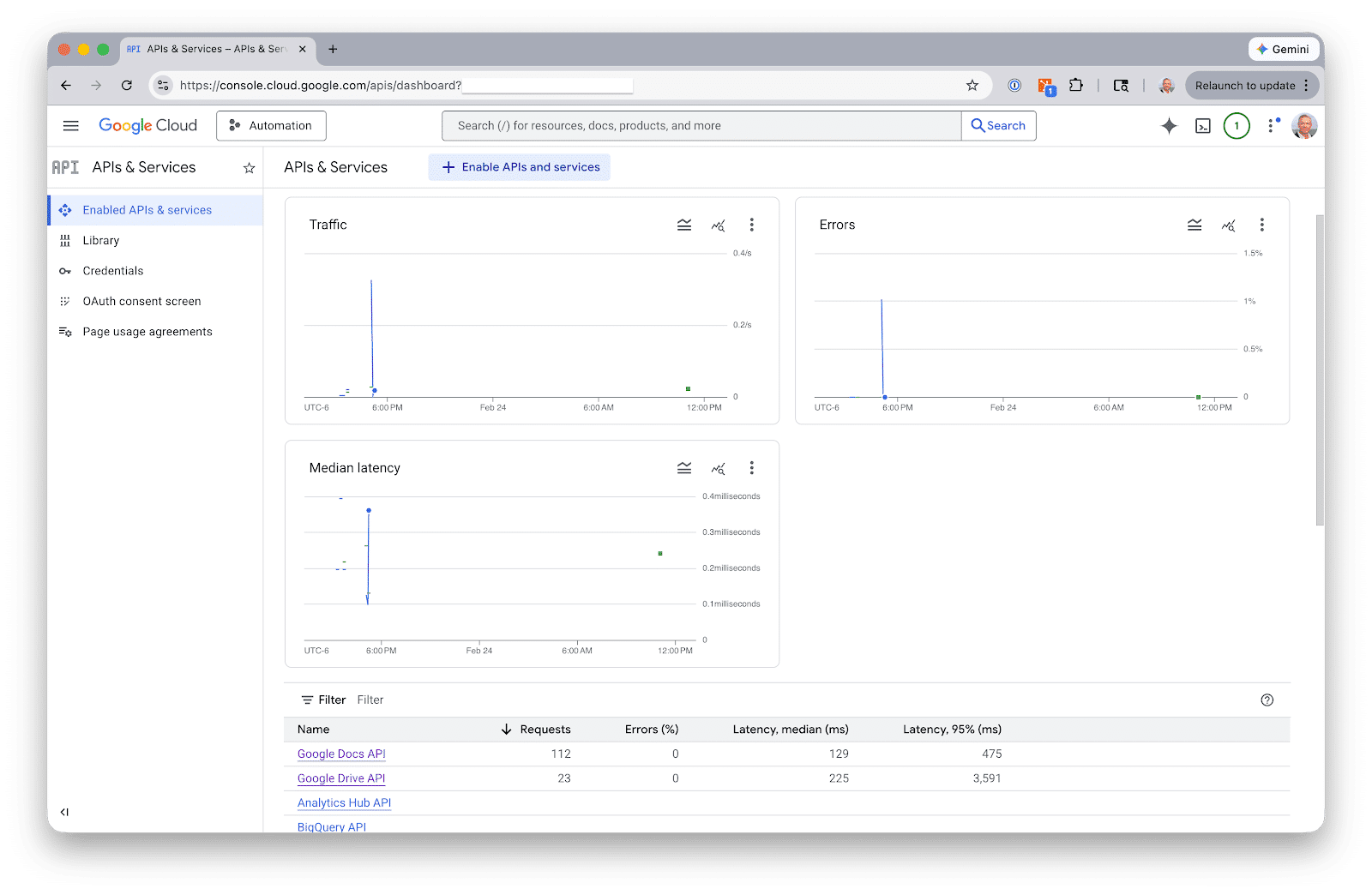
    ```json
{
  "alt": "Google Cloud API dashboard showing graphs for traffic, errors, and latency.",
  "caption": "Visualize your API performance with Google Cloud's detailed dashboard for traffic, errors, and latency metrics.",
  "description": "This image displays a Google Cloud API dashboard, featuring graphs that illustrate traffic, errors, and median latency. The interface includes sections such as 'Enabled APIs & services' and shows API usage details with requests, errors, and latency metrics. This tool aids users in monitoring API performance, optimizing service, and ensuring seamless functionality. Ideal for developers managing multiple APIs, it provides critical insights at a glance."
}
```

     
    seo-project/
    ├── config.json               # Client details + API property IDs
    ├── fetchers/
    │   ├── fetch_gsc.py         # Google Search Console
    │   ├── fetch_ga4.py         # Google Analytics 4
    │   ├── fetch_ads.py         # Google Ads search terms
    │   └── fetch_ai_visibility.py  # AI Search data 
    ├── data/
    │   ├── gsc/                 # Query + page performance
    │   ├── ga4/                 # Traffic by channel, top pages
    │   ├── ads/                 # Search terms, spend, conversions
    │   └── ai-visibility/       # AI citation data
    └── reports/                 # Generated analysis
    

    Begin by setting up Google API authentication. This step requires a Google Cloud service account, which covers GSC and GA4. Google Ads, however, requires its own OAuth setup.
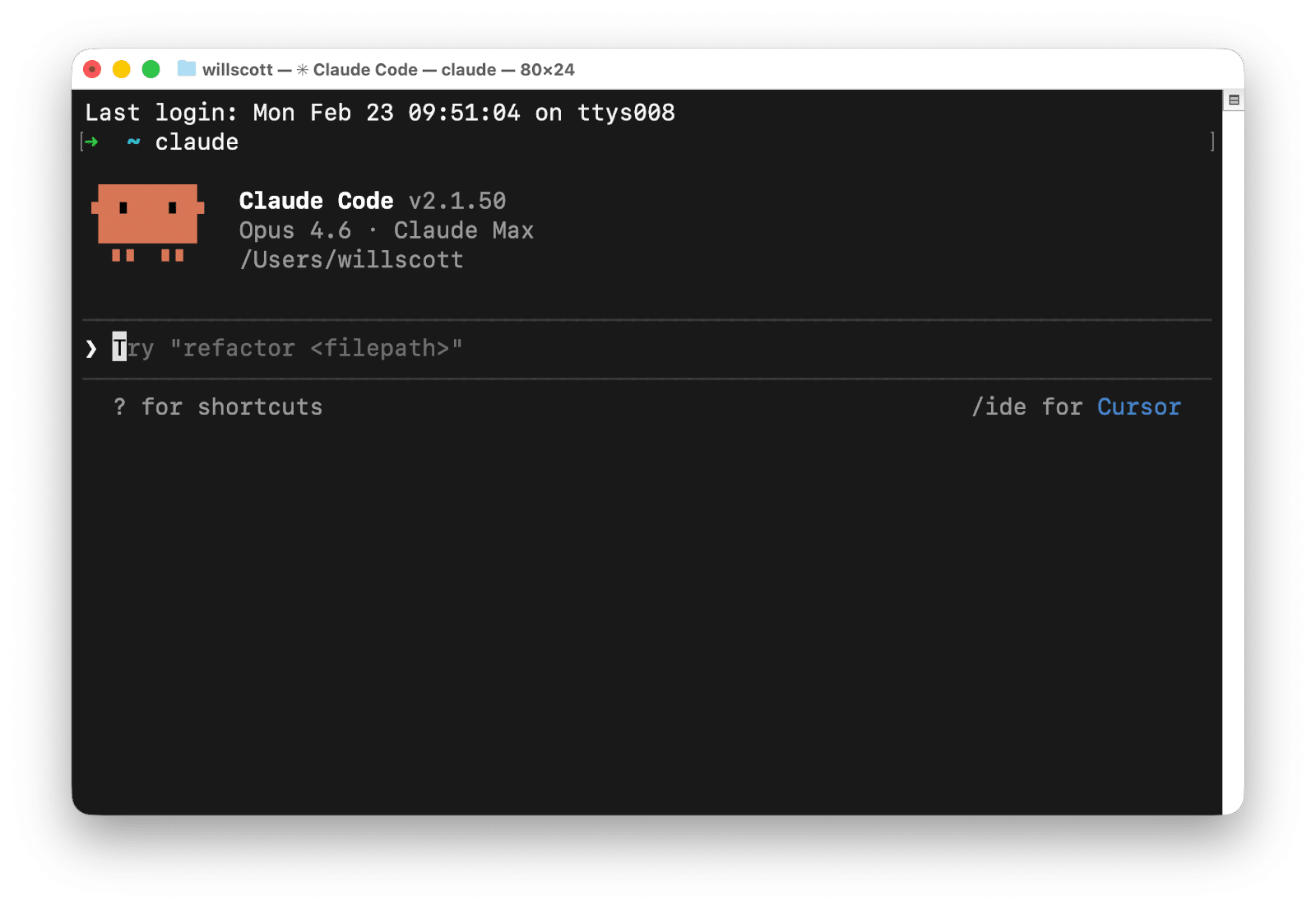
    ```json
{
  "alt": "Terminal window displaying Claude Code version 2.1.50 interface with shortcuts and commands.",
  "caption": "Dive into coding with Claude Code v2.1.50! Discover efficient shortcuts and commands in this intuitive terminal interface.",
  "description": "This image shows a terminal window running Claude Code version 2.1.50, featuring the Opus 4.6 Claude Max interface. The screen displays a welcoming ASCII art, current directory path, shortcuts, and command suggestions such as 'refactor <filepath>'. The interface appears user-friendly and streamlined, ideal for coding enthusiasts seeking efficient workflows. Keywords: Claude Code, terminal, version 2.1.50, coding interface, shortcuts."
}
```

    Next, you’ll move on to building the data fetchers. Each fetcher is a Python script that authenticates, pulls data, and saves it in JSON format. You won’t need to dive into API documentation either; Claude Code can write the scripts based on simple descriptions of what you want to achieve.

    Once you’ve got your data, Claude Code can answer cross-source questions, such as spotting keywords with paid and organic gaps, or analyzing content performance across platforms.
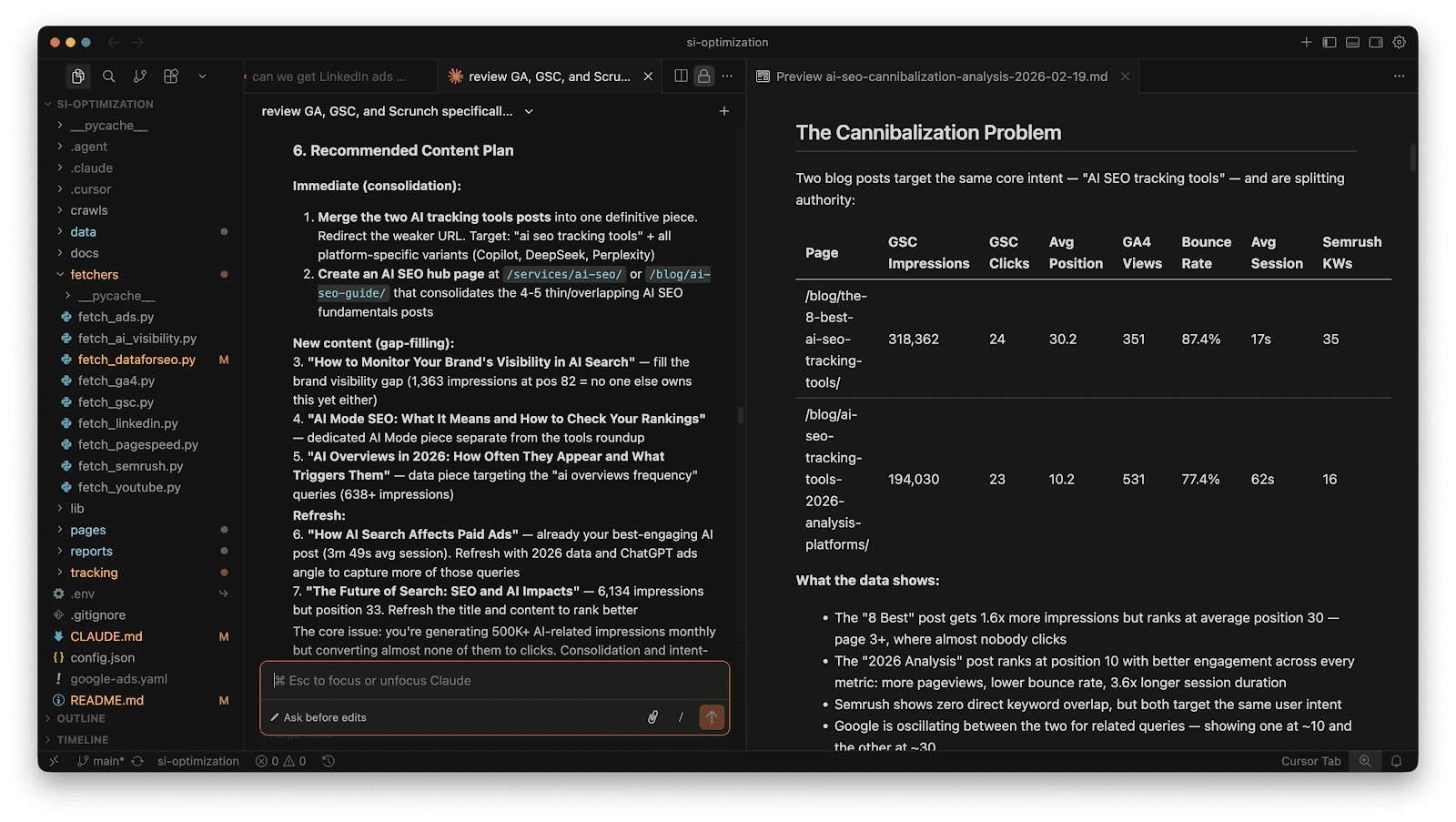
    ```json
{
  "alt": "Screenshot of a content plan and data analysis for AI SEO.",
  "caption": "Exploring the challenges of AI SEO cannibalization: a detailed content strategy and data analysis.",
  "description": "This image captures a screenshot of a desktop workspace focusing on an AI SEO content plan and data analysis. On the left, there's a list of content recommendations to optimize SEO, including merging posts and creating new pages. On the right, a table breaks down the 'Cannibalization Problem' for AI SEO tracking tools, showing statistical data such as impressions, clicks, and average position. This visual serves as a comprehensive resource for understanding the strategic planning of AI-driven SEO content and its implications on search visibility and engagement."
}
```

    For AI visibility tracking, consider tools like Scrunch or Semrush. Export your data as CSV or JSON to further enhance your insights through Claude Code.

    Overall, this workflow takes about thirty-five minutes for a new client and reduces monthly refresh times to about twenty minutes. It saves you from the hassle of manually managing and deciphering data across multiple platforms.
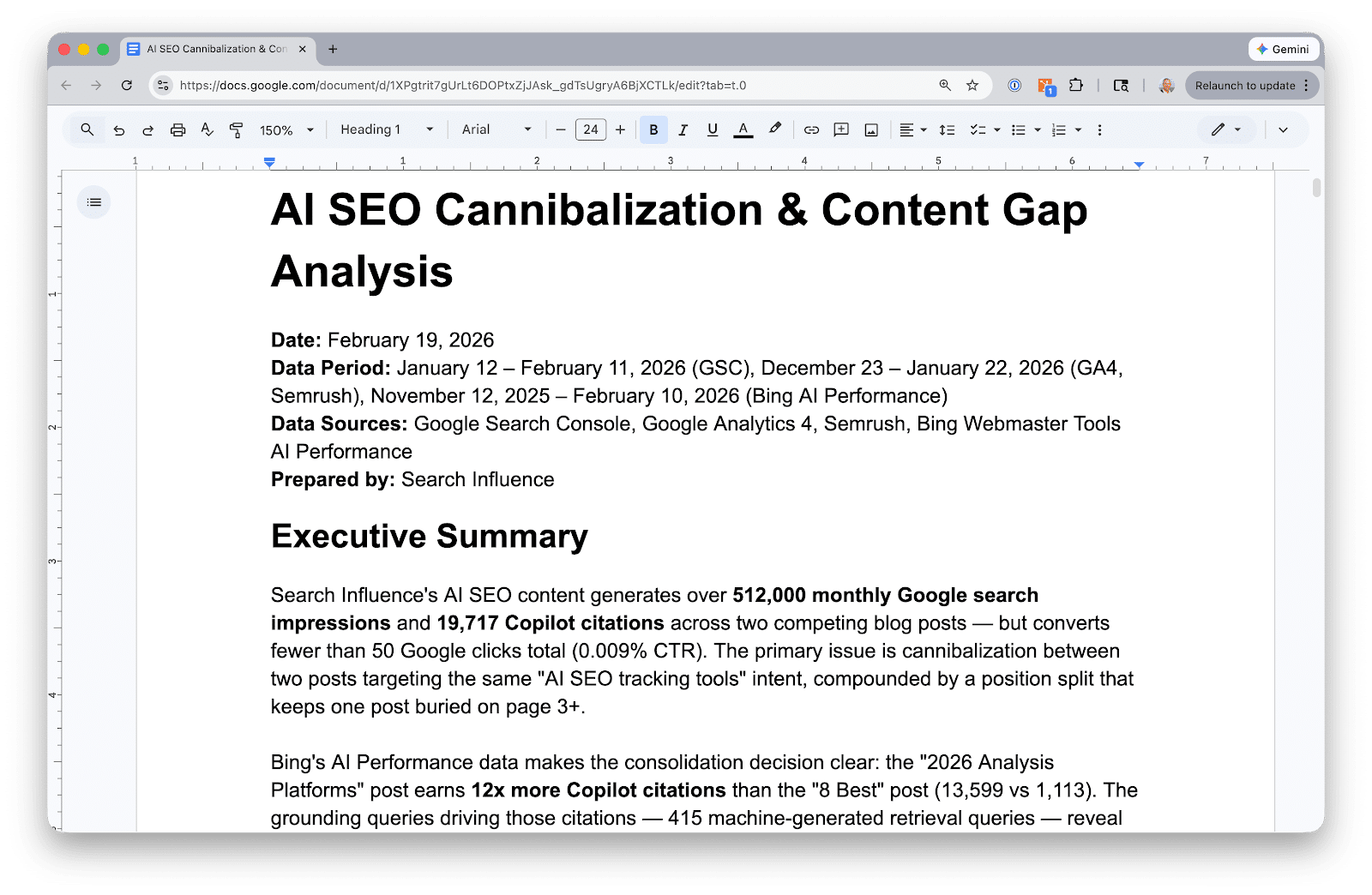
    ```json
{
  "alt": "Google Doc titled 'AI SEO Cannibalization & Content Gap Analysis', dated February 19, 2026.",
  "caption": "Discover how AI SEO content generates traffic but faces challenges with content cannibalization in this detailed 2026 analysis.",
  "description": "This Google Doc, titled 'AI SEO Cannibalization & Content Gap Analysis', highlights key insights into SEO performance dated February 19, 2026. The document discusses the impact of content cannibalization on Google search impressions and Copilot citations, drawing from data sources like Google Analytics and Bing AI Performance. Prepared by Search Influence, it offers an executive summary and detailed findings on competing blog posts and retrieval queries."
}
```

    Claude Code enhances your data analysis capabilities, but it’s not a replacement for strategic insight. Remember to verify results just as you would scrutinize work from a new team member.


    Inspired by this post on Search Engine Land.


    crushpress.ai community screenshot
  • Unlocking WebMCP: AI’s Key to Seamless Web Interaction with Chrome

    Unlocking WebMCP: AI’s Key to Seamless Web Interaction with Chrome

    Recently, while exploring the latest developments in web technology, I stumbled upon something groundbreaking: WebMCP, introduced in Chrome 146. Being a tech enthusiast, I was intrigued to learn how this emerging protocol could reshape the way AI agents interact with websites.

    Chrome 146 has rolled out an exciting early preview of WebMCP, hidden behind a flag. This protocol, known as Web Model Context Protocol (WebMCP), is designed as a web standard to lay out website tools in a structured manner, guiding AI agents in executing tasks seamlessly.

    So, what does this mean for us? Historically, the internet has been developed with humans in mind. Buttons, forms, and dropdowns are all elements we understand. But there’s an emerging user—AI agents. Soon, they will be completing registrations, purchasing tickets, and achieving other goals autonomously on websites.

    Currently, AI agents face a daunting task. They navigate websites by crawling and attempting to decipher their functionalities. Imagine an AI agent trying to book a flight. It has to identify input fields, guess data formats, and pray nothing goes awry. It’s far from ideal.

    The introduction of WebMCP is set to change this. By exposing the structure behind web tools, AI agents will be equipped to understand and execute tasks with ease.

    ```json
{
  "alt": "The CapmatchOne logo with a gradient circle and bold text.",
  "caption": "Discover innovation with the CapmatchOne logo, featuring sleek typography and a modern gradient circle.",
  "description": "The CapmatchOne logo features bold, modern typography coupled with a gradient circle, symbolizing connection and innovation. The sleek design conveys a sense of progress and creativity. This image can be used for branding or promotional purposes, appealing to audiences interested in innovative solutions and forward-thinking designs."
}
```

    Let’s dive a bit deeper to understand WebMCP. Picture yourself needing to book a flight.

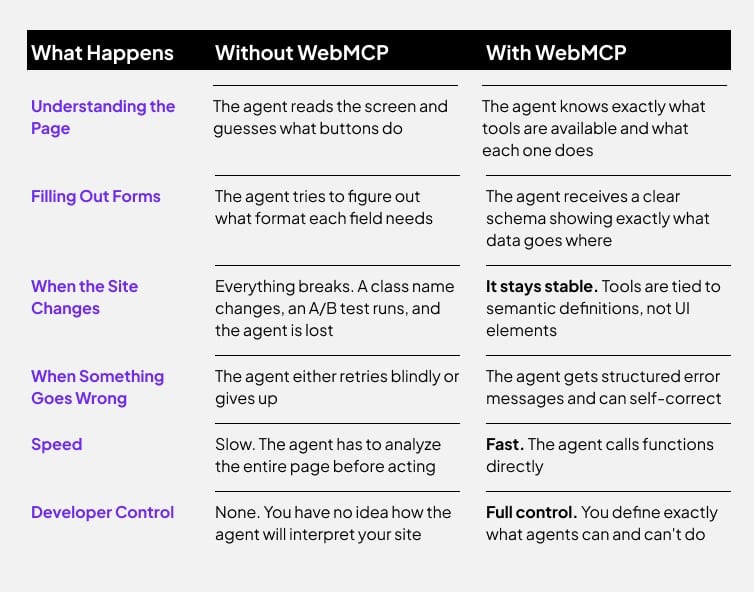
    Without WebMCP: An AI agent scrambles to find a relevant button like “Book a Flight” or “Search Flights.” It then interprets the on-screen information, hoping it inputs correctly.

    With WebMCP: Forget searching for buttons. Instead, the agent calls a function, like bookFlight(), using well-defined parameters (such as date, origin/destination, and passengers), receiving a structured result in return. Much like developers interacting via APIs, AI agents will seamlessly call functions.

    WebMCP empowers websites with JavaScript APIs and HTML form annotations, guiding AI agents on interacting with web tools in three steps:

    ```json
{
  "alt": "Comparison chart showing differences between using WebMCP and not using it in website management.",
  "caption": "WebMCP transforms website management by providing clear schemas, stability, structured error messages, and full developer control.",
  "description": "This image presents a comparison chart between managing a website with and without WebMCP. It highlights six areas: understanding the page, filling out forms, site changes, error handling, speed, and developer control. Without WebMCP, agents guess actions, face instability, react blindly to errors, operate slowly, and developers lack control. With WebMCP, agents use defined tools, maintain stability, self-correct from structured errors, execute tasks quickly, and provide developers full control. Keywords: WebMCP, website management, comparison, agent performance, developer tools."
}
```

    Discovery: What tools does the page support? Examples include Checkout, BookFlight, or searchProducts.

    JSON Schemas: They precisely define expected inputs and the kind of output that will be returned.

    State: Tool availability alters based on the page’s state, allowing agents to only see actions relevant to the current context.

    My website, for instance, could offer a list of actions each detailing its functionality, accepted inputs, returned outputs, and required permissions.

    ```json
{
  "alt": "Comparison table of Imperative API vs Declarative API across six categories.",
  "caption": "Discover the differences between Imperative and Declarative APIs, highlighting usage, work effort, flexibility, and more.",
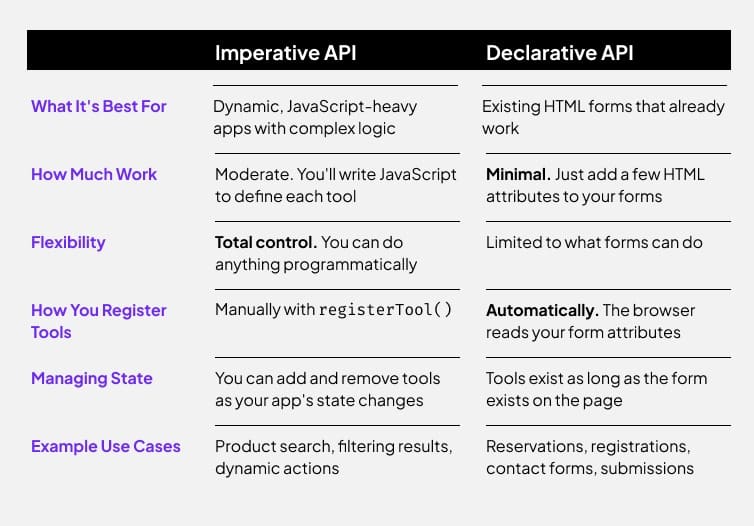
  "description": "This image showcases a comparison table contrasting Imperative and Declarative APIs. It outlines categories like 'What It's Best For,' 'How Much Work,' 'Flexibility,' 'How You Register Tools,' 'Managing State,' and 'Example Use Cases.' Imperative API suits dynamic, JavaScript-heavy apps with complex logic, requiring moderate work and offering total control. Declarative API is ideal for existing HTML forms, involves minimal work, and automates tool registration, providing limited flexibility. Searchability tags: API comparison, web development, JavaScript, HTML forms, software architecture."
}
```

    But why does this matter? AI agents are infiltrating our daily workflows rapidly. Soon, AI will handle our flight bookings, fill out forms, and publish content. But, as of now, AI agents struggle to interact seamlessly with websites due to two current approaches:

    Automation (fragile): An AI acts by clicking buttons and inputting data like we do, but since websites frequently update, this can lead to failures.

    APIs (limited): While APIs offer a structured approach for interaction, they’re not universally available or comprehensive.

    WebMCP offers a middle ground, allowing websites to make tools accessible without the drawbacks of UI automation or needing separate APIs.

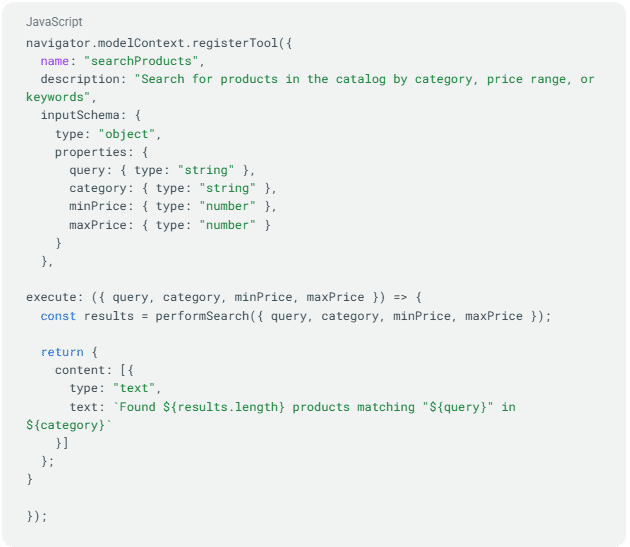
    ```json
{
  "alt": "JavaScript code for registering a product search tool with input schema and execution function.",
  "caption": "This code snippet showcases how to register a product search tool in JavaScript, featuring a customizable input schema and dynamic result display.",
  "description": "The image displays a JavaScript code snippet for registering a 'searchProducts' tool. It includes a description, input schema for query parameters like category and price range, and an execution function that performs a search based on these inputs. The function then returns results showing the number of products found. Keywords include JavaScript, tool registration, product search, and code snippet."
}
```

    Like the early 2000s SEO race, WebMCP symbolizes a shift towards optimization for AI agents. Those who adopt this early could enjoy significant advantages as AI-centric search and commerce grow.

    This opportunity is not merely about SEO anymore. It’s about realizing broader growth potential through WebMCP, which signifies not just being discoverable, but actionable by AI agents who’ll soon connect with future customers.

    Practical applications of WebMCP in B2B and B2C scenarios are vast, from simplifying quote requests to expediting inventory checks, offering a seamless experience for business and everyday consumers alike.

    To start experimenting with WebMCP, Chrome 146 lets you access it behind a feature flag. It’s still in its nascent stage but provides a valuable chance for developers and innovative teams to play around with the conceptual framework.

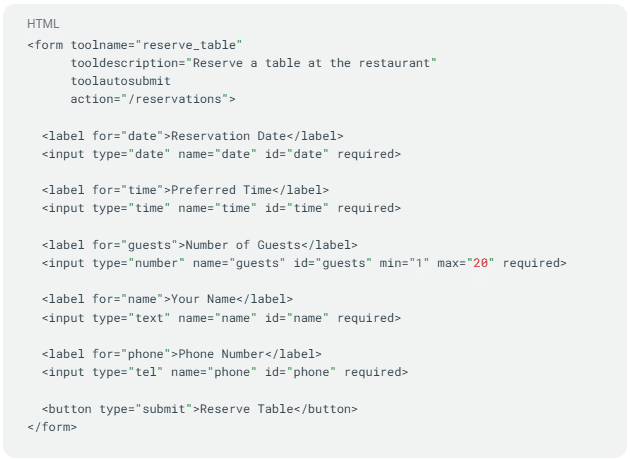
    ```json
{
  "alt": "HTML code for a restaurant table reservation form with fields for date, time, guests, name, and phone number.",
  "caption": "Streamline your dining plans with this easy-to-use HTML form for restaurant reservations. Fill in your details to secure a table effortlessly.",
  "description": "This image displays an HTML code snippet for a restaurant table reservation form. It includes input fields for reservation date, preferred time, number of guests, name, and phone number. Each field is labeled and required for submission. The form has a submit button labeled 'Reserve Table'. This code is a useful reference for creating a user-friendly reservation system."
}
```

    While getting acquainted with WebMCP, you’ll need Chrome version 146.0.7672.0 or later and a basic understanding of Chrome flags. Follow these steps to set up:

    • Navigate to chrome://flags/#enable-webmcp-testing in Chrome.
    • Set the “WebMCP for testing” flag to “Enabled”.
    • Relaunch Chrome.

    Start experimenting with WebMCP today and perhaps even install the Model Context Tool Inspector Extension to witness WebMCP in action. It’s an exciting era we’re stepping into, enabling websites to be as understandable to AI as they are to us.


    Inspired by this post on Search Engine Land.


    crushpress.ai community screenshot
  • Mastering Google Search Console for SEO Success

    Mastering Google Search Console for SEO Success

    As an SEO professional, Google Search Console is like a trusty sidekick for me. It’s no secret that this free tool from Google provides an in-depth look at how my website performs. It’s like having a pair of X-ray glasses to see through the web’s layers.

    With its robust data, I can delve into reports to uncover hidden treasures like clicks, impressions, and Core Web Vitals. It’s like exploring a digital gold mine inside my site.

    ```json
{
  "alt": "The CapmatchOne logo with a gradient circle and bold text.",
  "caption": "Discover innovation with the CapmatchOne logo, featuring sleek typography and a modern gradient circle.",
  "description": "The CapmatchOne logo features bold, modern typography coupled with a gradient circle, symbolizing connection and innovation. The sleek design conveys a sense of progress and creativity. This image can be used for branding or promotional purposes, appealing to audiences interested in innovative solutions and forward-thinking designs."
}
```

    Search Console’s custom regex filters are my guide through my vast website, ensuring I navigate it seamlessly, page by page.

    ```json
{
  "alt": "Screenshot of website property type selection with options for Domain and URL prefix.",
  "caption": "Choosing between full site verification with 'Domain' and specific sections with 'URL prefix'.",
  "description": "This image displays a user interface for selecting a property type in a web management tool. Two options are presented: 'Domain' for full site coverage with DNS verification, and 'URL prefix' for specific site sections with multiple verification methods. The Domain option is highlighted in red with notes on including all subdomains and protocols, while URL prefix is highlighted in green, indicating customization for sections of the site."
}
```

    While I hope to sidestep any SEO-related disasters, especially with Google’s AI advancements, it’s always best to be prepared. That’s why diving into this Search Console guide is essential.

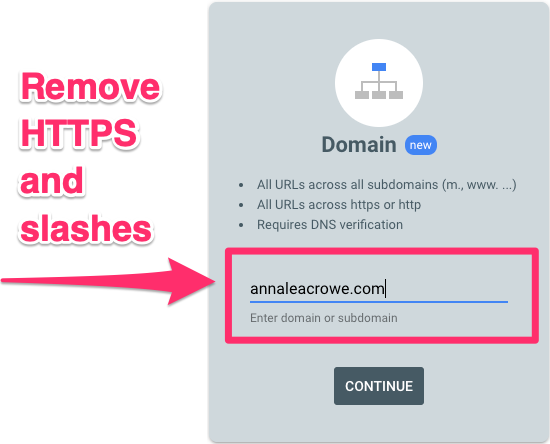
    ```json
{
  "alt": "Domain setup screen showing input field for domain name with arrow pointing to text.",
  "caption": "Simplify your domain setup: just enter your domain without HTTPS or slashes.",
  "description": "The image shows a domain setup screen where users are instructed to enter their domain name without HTTPS or slashes. An arrow emphasizes the text input field containing 'annaleacrowe.com', with a note to remove HTTPS and slashes for verification. This screenshot suggests a straightforward approach to DNS verification and URL input, making the setup process more user-friendly for domain management."
}
```

    This guide has been crafted for those times when the SEO world becomes unpredictable, much like a thrilling adventure in a post-apocalyptic world.

    ```json
{
  "alt": "Screenshot showing steps to verify domain ownership via DNS record for annaleacrowe.com.",
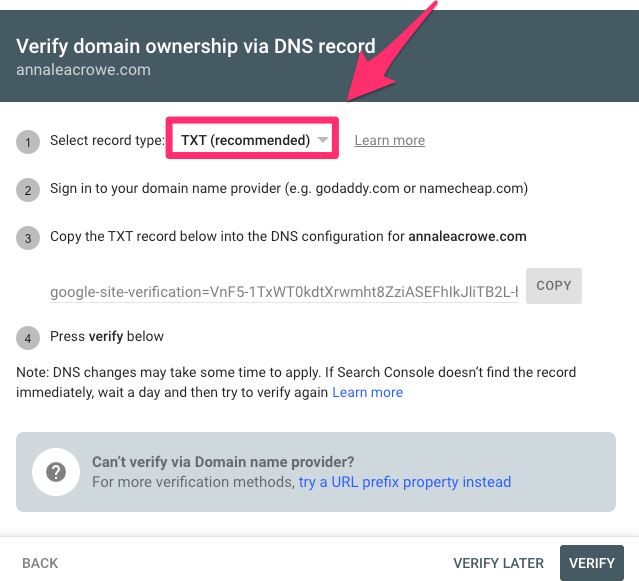
  "caption": "Easily verify domain ownership for annaleacrowe.com using a TXT record in your DNS settings.",
  "description": "This image is a screenshot instructing users on how to verify domain ownership for annaleacrowe.com via a DNS record. It highlights the steps: selecting TXT as the record type, signing into a domain provider, copying a verification code into DNS settings, and clicking 'verify'. The note advises patience for DNS changes to take effect. Keywords: domain verification, DNS record, TXT record, annaleacrowe.com."
}
```

    For instance, as an SEO director, I rely on Search Console daily. It’s my go-to for monitoring content performance, validating technical enhancements, and tracking grows in branded and non-branded queries. It’s integral to my SEO strategy, helping me prioritize tasks with precision.

    ```json
{
  "alt": "Screenshot showing steps to verify domain ownership via DNS record by adding a CNAME for annaleacrowe.com.",
  "caption": "Verifying domain ownership can be simple! Follow these steps to add a CNAME record and secure your website's authenticity.",
  "description": "This image is a screenshot detailing the process to verify domain ownership for annaleacrowe.com via DNS record. It instructs users to select CNAME as the record type, log into their domain provider, and add the specified CNAME record into the DNS configuration. The screenshot includes an option to copy the CNAME Label/Host and CNAME Destination/Target, highlighting steps 1 to 4. It's a helpful guide for ensuring your domain is properly verified through the Google Search Console."
}
```

    What does Search Console do? And how does it help SEO?

    Search Console stands as Google’s free website analytics and diagnostic platform. It tracks how a site performs in search results, potentially expanding soon into Gemini and AI Mode, offering us what feels closest to first-party search truth.

    ```json
{
  "alt": "Google Search Console page to verify website ownership via HTML file upload.",
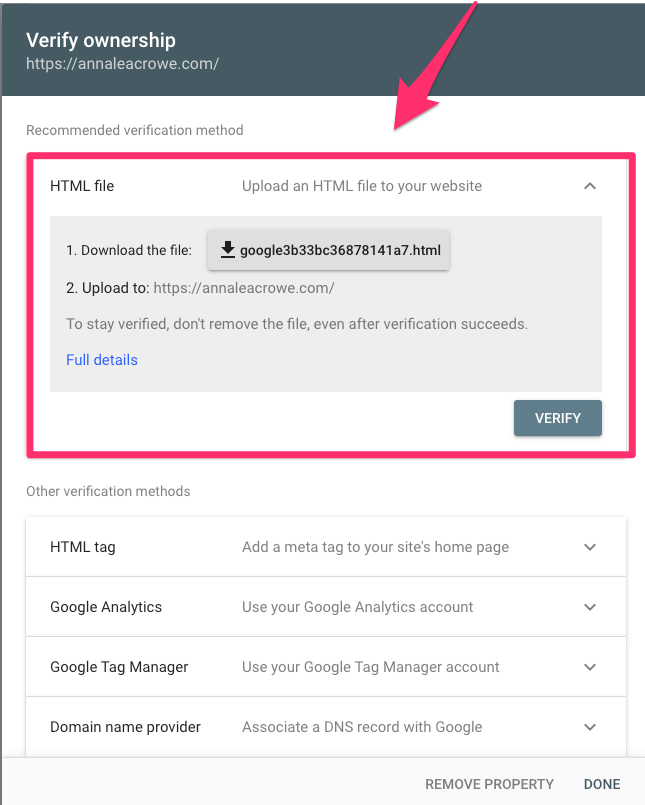
  "caption": "Learn how to verify your website on Google Search Console by uploading an HTML file. Ensure your online presence is accurate and authenticated.",
  "description": "The image shows the Google Search Console interface for verifying website ownership by uploading an HTML file. Users are instructed to download a specific HTML file and upload it to their website's root domain to complete verification. The page also lists alternative verification methods, such as using an HTML tag or Google Analytics. This process is crucial for SEO and website management, ensuring that the website's details are accurately reflected in search engine results."
}
```

    To set it up, it’s as simple as having a Google account and visiting the website. If profiles aren’t visible, simply verify ownership via a domain or prefix URL.

    ```json
{
  "alt": "Google Search Console dashboard showing web search clicks and recommendations.",
  "caption": "Peek into your website's performance with Google Search Console. Analyze clicks and explore recommendations to boost your site's visibility and SEO.",
  "description": "This image displays a Google Search Console dashboard, highlighting the website's performance metrics including a graph of total web search clicks over time, with a peak visible. The sidebar shows various menu options such as 'Overview', 'Performance', and 'Indexing'. Recommendations for improving impressions are provided in a section below. Ideal for understanding website analytics and optimizing SEO performance."
}
```

    Domain property is the default recommendation

    By default, I prefer setting up a domain property. It offers a holistic overview of my site’s search performance, autonomously including HTTP, HTTPS, www, and non-www versions.

    ```json
{
  "alt": "Analytics dashboard showing clicks, impressions, and traffic sources.",
  "caption": "Explore your site's performance with key metrics like clicks and impressions, along with detailed content and query data from top countries.",
  "description": "This analytics dashboard displays key website metrics, including 1.33K clicks with a 21% increase and 383K impressions showing a 40% growth. The dashboard highlights content performance and queries leading to the site, with top-performing entries illustrated alongside percentage changes. It also showcases the top countries driving traffic, led by the United States at 66%, and additional traffic sources such as image search."
}
```

    With a verified domain property, I enjoy an uncomplicated setup, often via a DNS TXT record through my hosting provider.

    ```json
{
  "alt": "Google Search Console screen showing URL inspection with indexing details and options.",
  "caption": "Exploring Google's Search Console URL inspection tool, highlighting options like 'Test Live URL' and 'Request Indexing'.",
  "description": "This image depicts a Google Search Console interface focused on the URL Inspection section. The page indicates that a specific URL is not indexed with details about discovery and crawl processes. Highlighted features include options for 'Test Live URL' and 'Request Indexing'. The console displays information on last crawl time, crawl status, and indexing permissions. Ideal for understanding web page indexing and troubleshooting SEO issues."
}
```

    URL prefix property allows you to dissect sections of a site

    For more detailed insights, the URL prefix property lets me focus on specific sections like subfolders or subdomains. This is especially handy for producing targeted reports and troubleshooting.

    ```json
{
  "alt": "Google Search Console performance report showing total clicks and impressions data.",
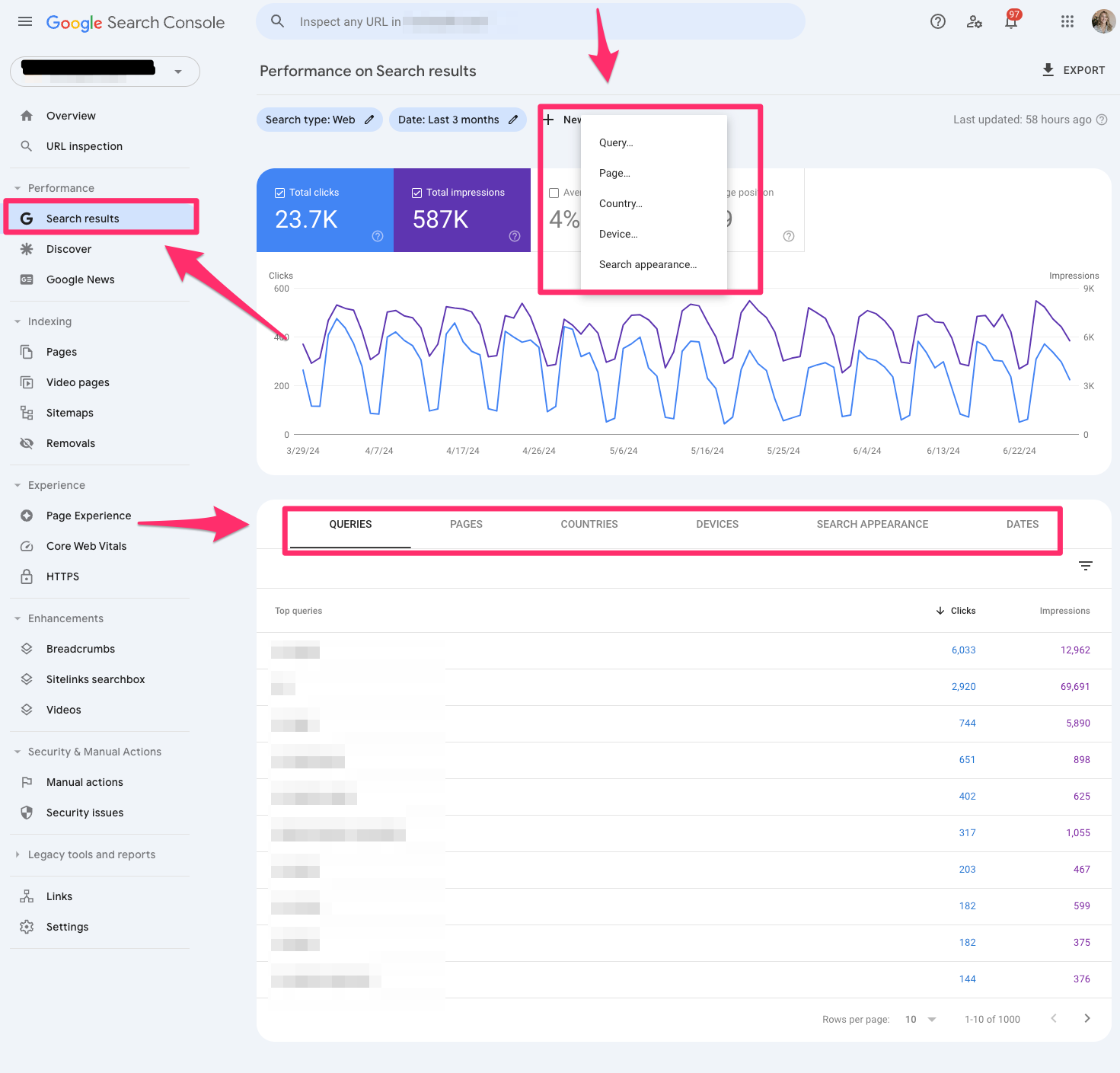
  "caption": "Explore your website's performance with Google Search Console, revealing total clicks, impressions, and search queries over the past three months.",
  "description": "This image displays a Google Search Console performance report. It shows a graph with total clicks (23.7K) and impressions (587K) over the last three months, along with the average position. The sidebar includes various menu options like URL inspection and performance. Tabs for queries, pages, countries, devices, search appearance, and dates are visible for detailed analytics. This tool helps in understanding website search performance through detailed metrics and filters."
}
```

    Working with colleagues, such as customer support teams, becomes seamless when I can provide detailed data on specific site sections their work influences.

    ```json
{
  "alt": "Google Search Console performance dashboard showing clicks and impressions over three months.",
  "caption": "Explore your website's performance on Google Search Console with detailed insights on clicks and impressions trends.",
  "description": "The image displays a dashboard from Google Search Console, highlighting search performance metrics over three months. It shows a line graph of total clicks (3.66K) and total impressions (806K) with additional stats like average CTR and position. An AI-powered configuration panel on the right offers example prompts for data views. This setup provides valuable insights for monitoring web traffic and SEO performance."
}
```

    Key moments in Search Console history

    The journey of Search Console has been quite eventful. Launched as Google Webmaster Tools in 2005, it evolved significantly over the years, adding key functionalities like mobile usability reports, security issue improvements, and Core Web Vitals report.

    ```json
{
  "alt": "Google Search Console Discover performance report showing clicks, impressions, and CTR over a 3-month period.",
  "caption": "Explore your Google Discover performance insights over the last three months with this detailed analysis of clicks, impressions, and CTR trends.",
  "description": "This image displays a Google Search Console report focusing on Discover performance. It highlights total clicks, impressions, and average CTR over three months. The graph depicts click trends, with a notable spike around 4/25/24. Tabs at the bottom segment data by pages, countries, and other categories. The interface is designed for easy navigation and detailed performance tracking."
}
```

    The enhancements continue as we advance into an era increasingly intertwined with AI, making Search Console a dynamic tool for SEO professionals like myself.

    ```json
{
  "alt": "Google Search Console dashboard displaying Google News performance data, including clicks and impressions.",
  "caption": "Explore your Google News performance with Search Console's detailed dashboard—track clicks, impressions, and optimize your content strategy for better SEO results.",
  "description": "This image shows the Google Search Console interface, specifically focusing on the 'Google News' performance section. It displays a graph representing total clicks, total impressions, and average CTR over the past three months. The navigation panel on the left provides access to other features like URL inspection, Page Experience, and more. Highlighted areas include tabs for filtering data by pages, countries, devices, Google News appearance, and dates. Ideal for tracking and optimizing content performance on Google News, this dashboard aids in strategic SEO planning."
}
```

    Was Google preparing us for AI through Search Console all along?

    Reflecting on its evolution, I see a clear narrative. Search Console is transitioning from a mere technical tool into an AI visibility intelligence platform. Google’s approach suggests a future-bound strategy where not just queries but topic clusters define our analysis.

    ```json
{
  "alt": "Google Search Console Page Indexing dashboard showing indexed and non-indexed pages, with reasons for indexing issues and improvement suggestions.",
  "caption": "Explore your site's SEO performance with Google Search Console. Dive into detailed indexing reports, understand non-indexed pages, and discover ways to enhance your page appearances.",
  "description": "This image displays the Google Search Console Page Indexing dashboard, detailing the number of indexed and non-indexed pages. A bar chart shows indexing over time. A highlighted section reveals reasons why pages aren't indexed, such as redirects and 'noindex' tags. Another section suggests improvements for page appearance. This tool helps in understanding and optimizing website SEO and visibility. Keywords: Google Search Console, SEO, page indexing, website optimization."
}
```

    Breakdown of Search Console for SEOs

    Within Search Console, I explore various features like URL inspection, search results, Core Web Vitals, and sitemaps, each offering unique insights into the health and performance of my sites.

    ```json
{
  "alt": "Google Search Console video page indexing report showing 22 videos indexed and 53 not indexed.",
  "caption": "Explore the nuances of video page indexing with Google Search Console, highlighting which videos are effectively indexed and those that aren't.",
  "description": "This Google Search Console interface displays a report on video page indexing, dated 6/30/24. It shows 22 indexed videos and 53 not indexed, along with a bar graph visualizing impressions over time. The left sidebar highlights options like 'Performance' and 'Security issues'. A box below provides reasons why certain videos aren't indexed, specifically noting 'Video is not the main content of the page'. This layout helps webmasters optimize their video content for better visibility."
}
```

    With advanced tools like regex filters and manual action alerts, Search Console stands as a fortress of data, informing my SEO tactics with precision.

    ```json
{
  "alt": "Google Search Console showing sitemap submissions and their status.",
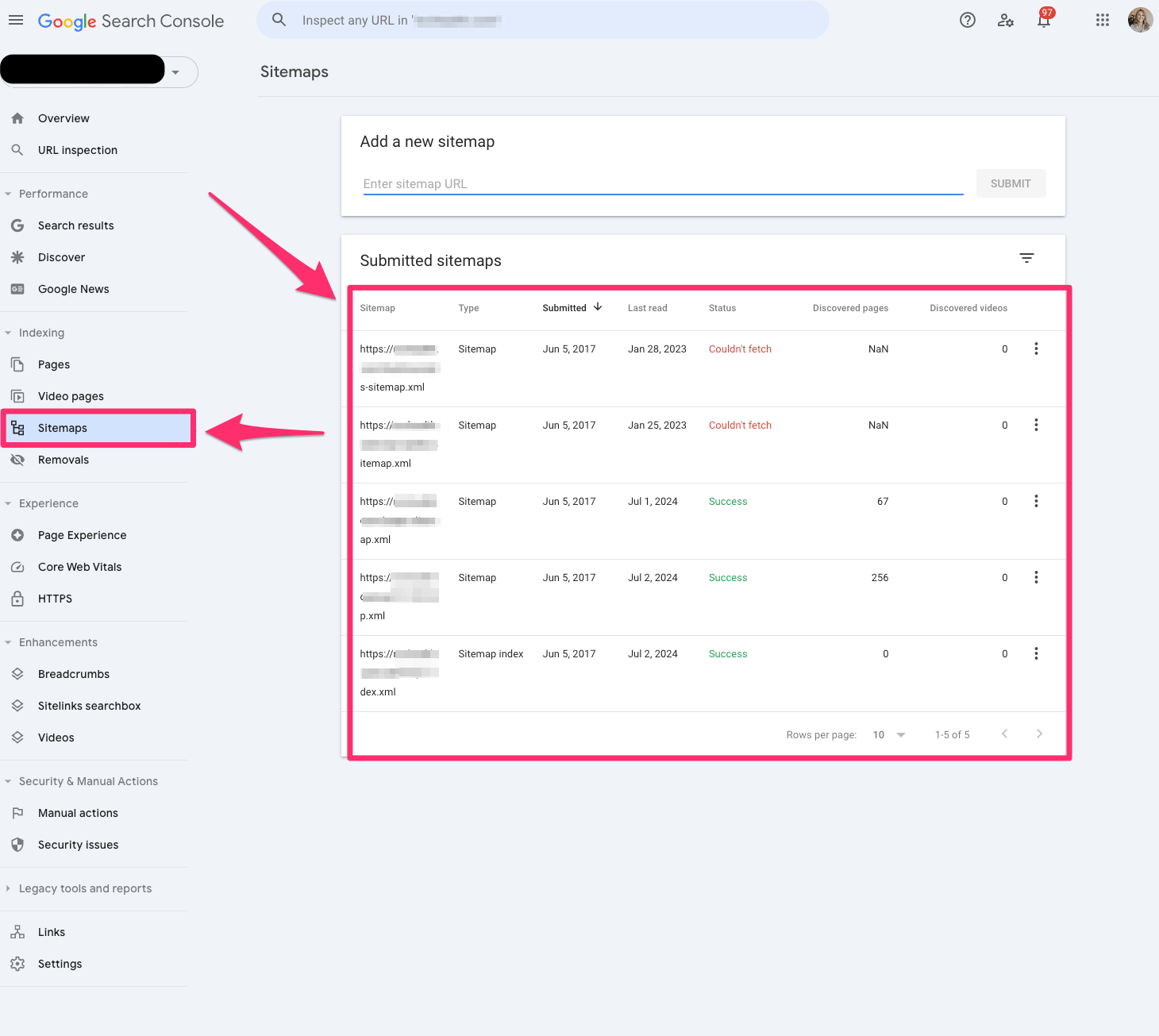
  "caption": "A glance at the Google Search Console interface revealing sitemap submissions, highlighting success and error statuses.",
  "description": "This image shows the Google Search Console interface, focusing on the 'Sitemaps' section. It lists multiple submitted sitemaps with details like submission date, last read date, status (such as success or 'couldn't fetch'), and the number of discovered pages and videos. The intuitive layout aids in efficient website management and SEO optimization. Key elements include a navigation sidebar, submission panel, and status indicators for quick reference."
}
```

    Overview

    The Overview section quickly outlines key data sets, setting the stage for deeper dives into performance metrics across my websites.

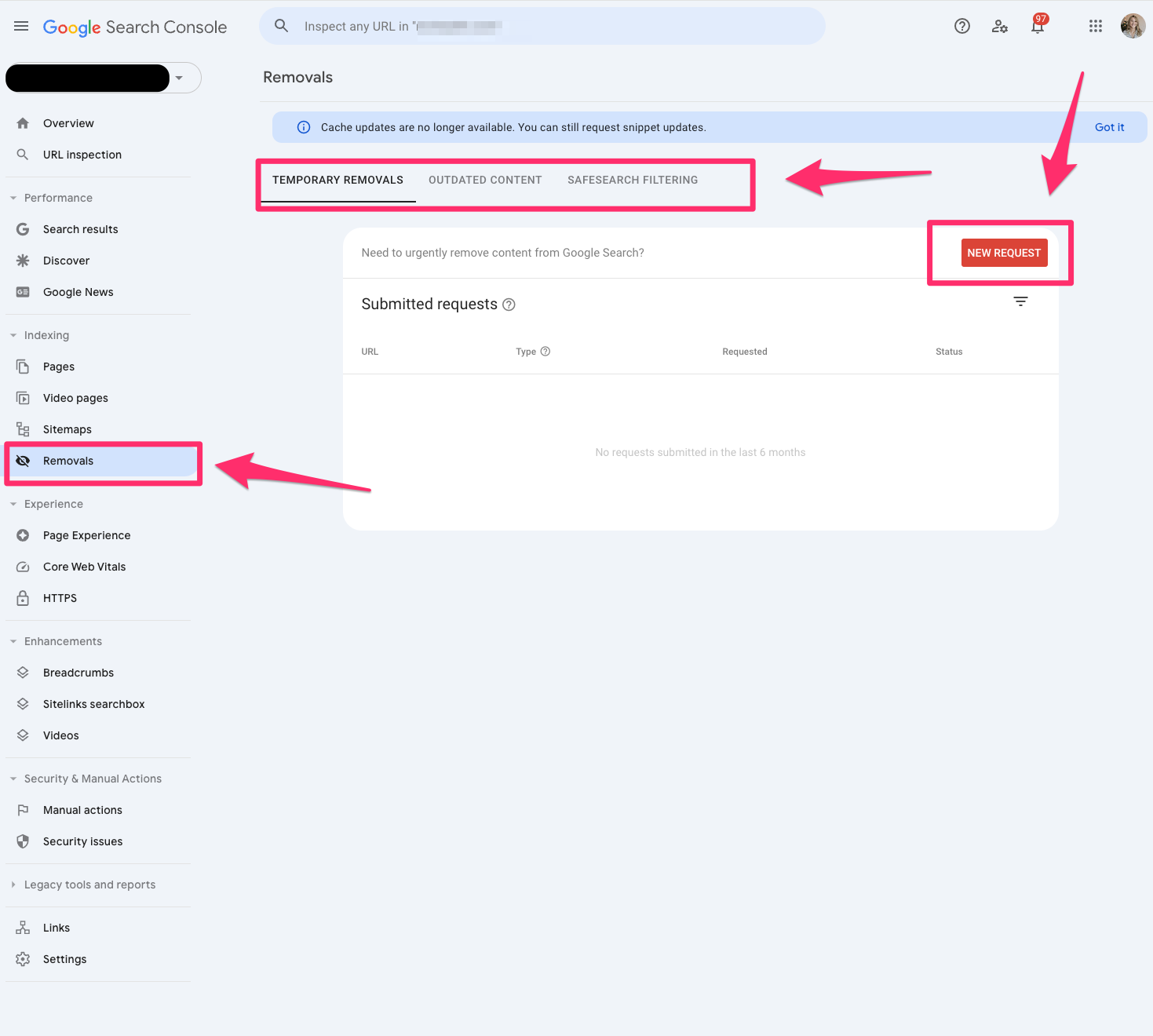
    ```json
{
  "alt": "Google Search Console removal request page with options for temporary removals, outdated content, and SafeSearch filtering.",
  "caption": "Explore the Google Search Console removal request page, designed for managing URL removals with options like temporary removals, outdated content, and SafeSearch filtering.",
  "description": "This image showcases the Google Search Console interface, specifically the removals section where users can manage requests to remove URLs from search results. Key features include options for temporary removals, outdated content, and SafeSearch filtering. The 'New Request' button allows users to submit removal requests. Ideal for users seeking to maintain their site's search listing by removing specific content efficiently."
}
```

    Inspired by this post on Search Engine Land.

    crushpress.ai community screenshot
  • Master SEO with These 8 Essential Tips for Beginners

    Master SEO with These 8 Essential Tips for Beginners

    Diving into the world of SEO can be exciting yet overwhelming. As someone early in their SEO journey, I’ve realized the importance of grasping the business context, mastering search intent, understanding technical basics, and conducting hands-on research before jumping into using AI tools.

    Working in SEO means constantly staying on top of trends in a fast-paced, marketing-focused industry. When I started, it often felt like navigating without a map. However, establishing a strong foundation made all the difference.

    SEO is multifaceted, with specializations emerging as one advances in their career — including local, technical, content, and more. However, as a newbie, I found it beneficial to first gain a broad understanding of SEO before delving into specific areas.

    1. Start with the Business

    When I begin an SEO project, whether in-house or at an agency, it’s tempting to jump straight into optimizing meta tags or backlinks. But instead, I’ve learned to start by thoroughly understanding the business itself.

    ```json
{
  "alt": "Startup business questionnaire titled 'The Business' with checklist questions about company goals and strategies.",
  "caption": "Kickstart your business journey with this essential checklist, designed to help you define goals, identify customers, and position your brand effectively.",
  "description": "This image displays a 'The Business' questionnaire with a checklist format aimed at helping startups and companies refine their strategy. It includes questions about company goals, ideal customers, brand positioning, focus products or services, and a 3-5 year plan. Additionally, it addresses unique selling propositions, competitor analysis, expertise identification, and current metrics. Keywords include business strategy, startup, branding, customer personas, and competitive analysis."
}
```

    Key questions I consider while exploring the website include:

    • What product or service is being offered?
    • Who is the target audience?
    • What sets the company apart from its competitors?

    If I get the chance, I always ask broader questions about the company’s goals and plans to better tailor my SEO strategies.

    2. Be Curious, Ask Questions

    SEO touches nearly every aspect of digital marketing, making curiosity a critical trait. I continuously ask questions not only to expand my understanding but also to foster collaboration with other departments.

    Asking questions, no matter how basic they seem, is a great way to learn quickly and thoroughly.

    ```json
{
  "alt": "The CapmatchOne logo with a gradient circle and bold text.",
  "caption": "Discover innovation with the CapmatchOne logo, featuring sleek typography and a modern gradient circle.",
  "description": "The CapmatchOne logo features bold, modern typography coupled with a gradient circle, symbolizing connection and innovation. The sleek design conveys a sense of progress and creativity. This image can be used for branding or promotional purposes, appealing to audiences interested in innovative solutions and forward-thinking designs."
}
```

    3. Build from the Foundations of SEO

    Starting with basics like understanding website fundamentals and how Google displays search results was crucial for me. Analyzing competitors’ search rankings provided practical insights and helped improve my SEO strategies.

    Trying simple exercises, like comparing search results with current page optimization, helped me identify areas for improvement and align more closely with what Google values.

    4. Get Technical and Network with Developers

    While diving into the technical side of SEO can seem daunting, I found learning from developers to be incredibly rewarding. Building these relationships opened doors for deeper technical insights and support.

    Coding courses and personal projects enabled me to enhance my technical skills at a comfortable pace.

    ```json
{
  "alt": "Split-screen image showing Nike's website with running shoes on the left and a Google search for running shoes on the right.",
  "caption": "Browsing Nike's latest running shoes while comparing the best options via Google Search. Which pair will you choose for your next run?",
  "description": "The image shows a split-screen view of two web pages. On the left, Nike's website displays upcoming Nike Vomero 18 running shoes in various colors. On the right, a Google search results page highlights articles featuring top-rated running shoes for 2025. This image captures the juxtaposition of online shopping with informational search, offering insights into consumer behavior and decision-making processes around athletic footwear purchases."
}
```

    5. Familiarize with Google’s Search Features

    The evolution of Google’s search result presentations introduced me to a diverse range of features, challenging my ability to optimize different types of content effectively.

    Understanding these features not only enhanced my SEO approach but also kept my strategies aligned with Google’s user-focused developments.

    6. Understand Query Intent

    Grasping the varying intents behind search queries allowed me to create content that aligns more closely with user needs, improving engagement and relevance.

    Using Google’s guidelines to classify intents significantly refined my keyword strategies and content planning.

    ```json
{
  "alt": "Text explaining user intent including Know, Do, Website, and Visit-in-person queries.",
  "caption": "Understanding user intent is crucial for effective digital interaction. This text outlines the types of queries people make, from informational to action-oriented needs.",
  "description": "This image text highlights the concept of user intent, categorizing queries into four types: Know, Do, Website, and Visit-in-person. Each category reflects a different user goal, such as obtaining information, completing tasks, navigating to specific sites, or finding physical locations. Understanding these helps tailor digital experiences. Copyright 2025, page 101."
}
```

    7. Conduct Research Independently Before Using AI

    While AI can streamline SEO tasks, I’ve found invaluable learning by initially executing projects manually. This hands-on experience has been critical to my strategic development and understanding of SEO complexities.

    Resisting the allure of AI solutions early on helped me build a solid foundation that AI could later enhance without overshadowing the fundamentals.

    8. Know How GEO/AEO Differs

    Understanding the distinctions between traditional SEO and emerging channels like GEO/AEO has equipped me to advise on brand visibility throughout diverse platforms and optimize accordingly.

    Exploring how LLMs work, their training data, and how to effectively influence their output, has added a strategic layer to my SEO toolkit.

    Laying the Groundwork for SEO Success

    By focusing on the core elements of business understanding, search results, and user intent, I’ve laid a robust foundation that continuously supports my SEO growth and adaptability.

    Engaging deeply with the basics has empowered me to navigate the complexities of SEO strategically and effectively.


    Inspired by this post on Search Engine Land.

    crushpress.ai community screenshot