I’ve recently discovered an exciting development in Google Ads that’s set to revolutionize how we track and measure our advertising success. The platform is now testing a beta feature that allows us to link external data sources directly into the conversion action settings. This move aims to strengthen the bridge between our first-party data and campaign measurement.
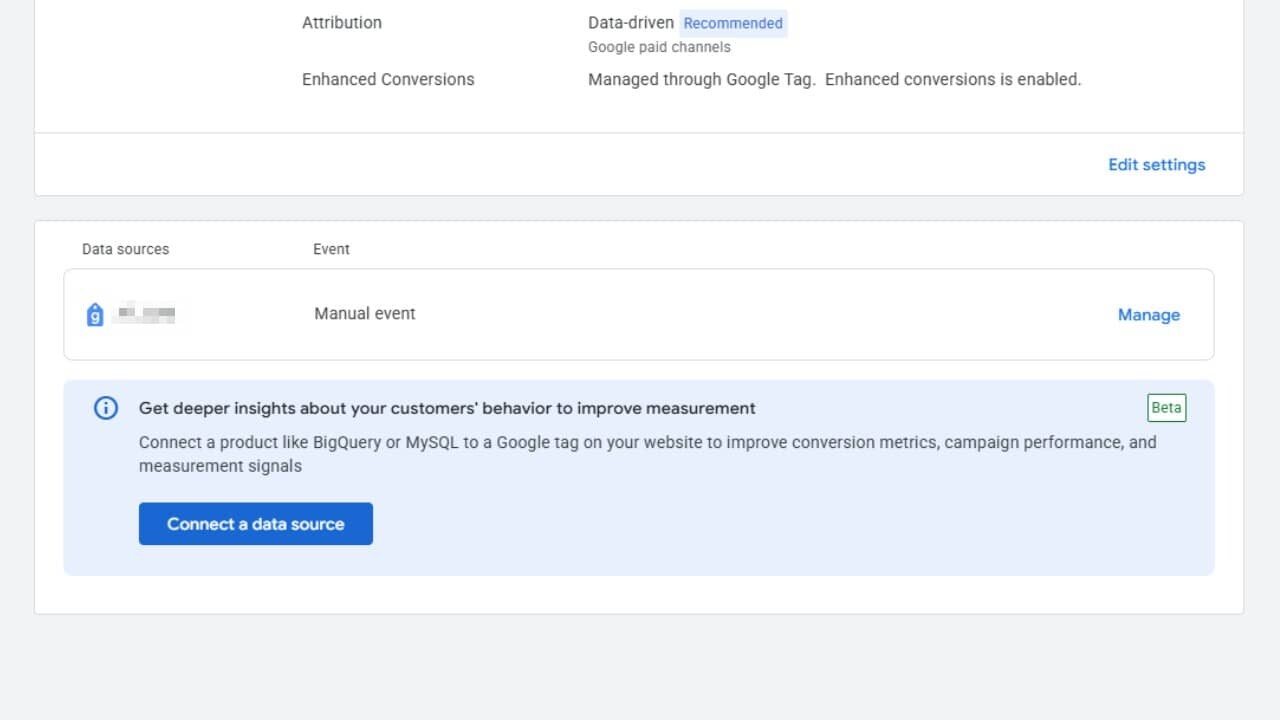
How does this work, you might ask? In the conversion action details, a new section titled “Get deeper insights about your customers’ behavior to improve measurement” encourages us to connect our external databases to our Google tag, offering a seamless integration experience.
This integration supports platforms like BigQuery and MySQL, with the primary goal of enriching our conversion metrics and enhancing performance signals. Notably, this feature is highlighted within the data attribution settings and is gradually being rolled out in its Beta phase.
Why do we care? The ability to directly integrate these data sources reduces the hassle of syncing offline or backend data with ad measurements. This beta feature from Google Ads simplifies connecting first-party data to conversion tracking, improving our measurement accuracy and campaign optimization.
By harnessing the power of platforms like BigQuery or MySQL, we’re able to incorporate richer customer data into our signals, crucially offsetting any data loss resulting from recent privacy changes. In practical terms, this means smarter bidding, clearer attribution, and the potential for a stronger ROI.
Beneath the surface, embedding these data connections directly within conversion settings—rather than relying on separate pipelines—democratizes advanced measurement tactics, making them accessible not only to large enterprises but to advertisers like you and me.
As ad platforms compete for superior measurement accuracy, these native data integrations are emerging as a pivotal advantage, particularly for brands heavily investing in proprietary customer data.
I’ve noticed something quite unexpected happening with Google Ads lately. It seems that their system tool is re-enabling paused keywords automatically, which has led to increased campaign expenses without warning.
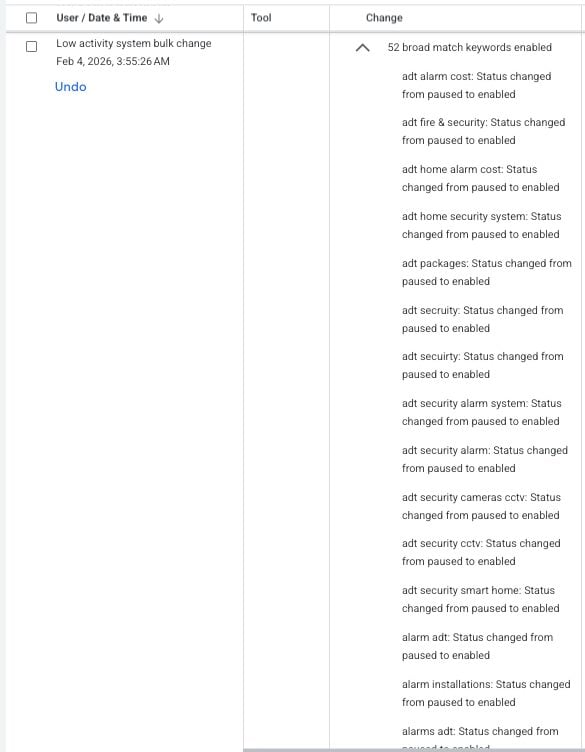
Some advertisers, including myself, have observed a Google Ads tool—created for low-activity bulk changes—unexpectedly switching paused keywords back to active. This unusual behavior has been a surprise to many account managers, like myself, who haven’t come across this issue before.
What’s happening? The activity logs are showing entries linked to Google’s ‘Low activity system bulk changes’ tool executing actions that enable previously paused keywords. These logs appear as automated bulk updates and, thankfully, have an ‘Undo’ option available.
In the past, this tool mainly paused inactive elements rather than reactivating them, so this change in behavior is quite perplexing.
What’s unclear? Google hasn’t issued any public documentation to explain this behavior, leaving us unsure whether it’s an intentional feature, a limited test, or a mere bug.
I find myself wondering what exactly triggers this reactivation and how widespread this phenomenon is becoming.
Why does this matter? If like me, you’re diligently managing your campaigns, unexpected keyword reactivation can change your campaign delivery in ways you didn’t plan for, impacting budgets, pacing, and overall performance—particularly if you’ve paused keywords for a specific reason.
For both agencies and in-house teams, this change is raising concerns about automated systems potentially overriding manual settings.
What steps should we take now? As account managers, we might want to regularly check change histories, be on the lookout for any unexpected keyword activations, and use the ‘undo’ function promptly if we notice unplanned changes.
Until Google clarifies the situation, more careful monitoring of campaigns relying heavily on paused keywords might be necessary.
First Alerted This issue was first brought to light by Performance Marketing Consultant Francesco Cifardi on LinkedIn.
I’ve been there myself. A client approaches me, eager to upscale their Google Ads spend from €10,000 to €100,000 monthly. Like any dedicated PPC manager, I dive into the usual strategies:
Refine bidding strategies.
Test new ad copy.
Expand keyword lists.
Optimize landing pages.
Boost Quality Scores.
Launch Performance Max campaigns.
Several months in, the ad spend only grows by 15%. The client is content, but I know we can do better.
Here’s a harsh truth I’ve learned: much of what we consider PPC optimization is really just sophisticated procrastination.
The theory of constraints, introduced by Eliyahu Goldratt, offers insights for PPC much like it does for manufacturing. It shows that every system has a single constraint that limits its potential.
It doesn’t matter if the marketing team is super-efficient if the production capacity is what’s limited. Likewise, a 20% improvement in ad copy CTR isn’t useful if the real constraint lies in budget or conversion tactics.
This theory calls for radical focus: pinpoint the weakest link, make it your priority, and tune out the rest.
Applying this to PPC means stopping the widespread optimization efforts. Detect the primary barrier, resolve it, and press on.
Over time, managing PPC accounts has shown me that scaling challenges usually fit within one of seven categories:
Budget: Profitability could be higher, but client approval caps spending.
For instance, a campaign might run successfully at €10,000 monthly, with scope to go to €50,000, yet the client hesitates due to risk aversion or cash flow concerns.
Developing a compelling business case that showcases past ROI and projected returns is vital here.
I ignore ad copy tests or keyword expansions because, if I can’t increase budget, they won’t help.
Impression Share: Already capturing over 90% share, limiting traffic growth.
Entering new markets or ad platforms can often be the solution for these scenarios.
The Creative aspect needs tightening when high impressions yield low CTRs, and so on for conversion rate, fulfillment, profitability, and tracking or attribution challenges.
With my diagnostic steps, I start by running an audit to benchmark the key metrics—impression share, CTRs, CPCs, and conversion rates— to pinpoint what’s genuinely holding the account back.
The moment I finish an audit and single out the top challenge, the focus becomes precise. For instance, if it turns out conversion rate optimization can unlock growth, that’s where all my efforts channel into until I see a breakthrough.
Every time the constraint is overcome, a new bottleneck emerges, signifying growth and the movement to new phases. It is both a marker of success and a roadmap to what needs attention next.
Working as an office manager in my early 20s, I discovered Dale Carnegie’s “How to Win Friends and Influence People.”
The timeless principles in that book have been my guiding compass through various career shifts. I’ve realized that success in most professions hinges on how we interact with others—be they clients or colleagues.
For many years, combining human touch with technical skills has been a winning formula for digital marketers. It was this ability to demystify complex machines coupled with strong relationship-building that allowed agencies to retain clients.
But now, this model is under scrutiny as AI becomes integral to PPC platforms, raising a pertinent question: why shouldn’t clients dive into an entirely AI-driven approach?
What agencies have an edge on is their relational strength—their ability to communicate effectively and understand what business owners genuinely need.
1. Ask questions
I’ve learned that one of the most effective ways to understand people and what makes them tick is by asking questions. Though it seems straightforward, communication often becomes lost in translation or obscured by assumptions.
Whenever I walk into a sales call, I arm myself with a list of questions. How much can I uncover about this potential client in a brief half-hour conversation?
Similarly, during strategy discussions, I prepare a comprehensive set of queries—some for myself, and some for the client. What are they aiming to achieve? What aspects of their current strategy need refinement? How can we enhance it?
To this day, AI can’t fulfill this role—not yet, at least. Our exchanges with AI remain predominantly one-sided.
AI doesn’t actively seek to understand us as individuals or identify our unique challenges. These discoveries only come from asking questions and actively listening, which leads to the next point.
How often do I find myself in conversations, impatiently waiting for a pause to insert my thoughts? I’m guilty of this, but I’ve found that clients crave the opportunity to be heard.
Allow them to express themselves fully, encourage them with more clarifying questions, and just keep listening. It’s remarkable what you can learn about someone when you enter a conversation with no other agenda but to understand the other person.
Fill the silences only if they become awkward, and if you have valuable agenda points to address based on what you’ve learned. This approach fosters collaboration and generates ideas more swiftly than dominating the conversation could. It solidifies agreement, which is foundational in building relationships.
Whenever possible, I aim to discover commonalities between myself and new acquaintances. By doing so, I build rapport, enriching both personal and professional relationships.
Being personal and specific, whether dealing with a friend or a client, is key. I love recalling little details about people and bringing them up in future conversations. People appreciate being remembered and valued.
Though AI is beginning to develop memory, finding shared experiences with others is a uniquely human skill that, fortunately, remains beyond AI’s reach.
In the fast-paced marketing realm, it’s easy to succumb to the all-consuming cycle of data analysis and testing. Remember, though, not to take ourselves too seriously.
After all, this profession is relatively new, and its evolution is unpredictable. Let’s not forget why we ventured into marketing—to help and connect with people. Let’s embrace opportunities to be less serious and inject humor when it fits.
We’re human, and it’s vital for those we work for to recognize this humanity as an integral part of any relationship.
In a world increasingly dominated by AI, the focus is shifting from technical prowess to personal connection. AI excels at data and analysis, available at a moment’s notice, but knowledge alone isn’t sufficient anymore.
Empathy, shared experiences, and true rapport are beyond AI’s capability to replicate. These human principles, combined with expertise, are what enabled agencies to decode machines for clients and nurture enduring relationships.
By returning to relational basics—posing insightful questions, practicing active listening, and establishing common ground—agencies can affirm their indispensable value.
These relational skills are vital in distinguishing a partner from an algorithm, ensuring that the work of agencies remains not just relevant but essential.
As I delve into the world of digital advertising, I realize that AI is more than just a buzzword; it’s a fundamental component of our strategies in 2026. Especially with video ads, where visuals speak louder and clearer than text, leveraging AI has become crucial not just for creating content but for innovating how we connect with audiences.
The power of video in advertising is undeniable as it allows consumers to process information rapidly. With the drop in creative costs, using video is more viable and impactful than ever. The real question I find myself asking is not if PPC teams should use AI, but how to optimize its usage to maximize results and ensure our content remains compelling and governed well, safeguarding against pitfalls like hallucinations that might disrupt performance.
Why has AI adoption in PPC alone become insufficient to enhance performance? Nearly 90% of marketers now integrate AI for creating or modifying video ads—a testament to its widespread use, though it does not guarantee success. Being successful in this domain now hinges more on our ability to feed AI the right creative inputs, data signals, and monitoring practices instead of relying on outdated manual bidding strategies.
Here are five AI-backed strategies that I believe are key to enhancing video PPC campaigns effectively:
1. Embrace Modular Asset Libraries Over Perfection
Historically, we have approached video production with a mindset tailored for TV-style advertising. However, in this new age of Performance Max, providing a rich library of modular assets allows AI to dynamically craft video experiences, tailored to user behavior, device, and intent. Flexibility in creative elements does not hinder, but rather enhances, performance by offering multiple hooks, bodies, and CTAs that AI can creatively assemble.
2. Move Beyond Keywords to Intent Orchestration
In today’s AI-driven ad environment, keywords are more about nuances rather than triggers, aimed at helping systems understand audience themes. Rather than allowing AI to optimize within broad, unguided targets that may reduce quality, it’s imperative to guide it toward understanding and targeting true intent, using negative keywords and first-party data to inform its decisions.
3. Optimize With Value-Centric Data
One common pitfall we face is feeding generic or low-value conversion signals to AI systems, which misdirects efforts toward less fruitful outcomes. By aligning AI optimization strategies with value-based conversions through enhanced and offline data imports, we can refine how AI perceives and prioritizes user actions, ensuring a focus on quality over mere quantity.
4. Opt for Lift Measurement Over Last-Click Attribution
In assessing the impact of AI-driven video formats like YouTube Shorts, adopting advanced attribution models becomes crucial since traditional models fall short. By employing media mix modeling or simple tests that monitor consistency in spend and revenue growth, we can better understand and demonstrate the true value ads deliver across channels.
5. Cater to Silent Viewers
Many viewers start by watching videos on mute, especially during initial discovery phases. Therefore, ensuring that visual elements of a video are clear and engaging without the necessity of sound can effectively maintain audience interest and ensure message retention from the first visual frame onward.
Shaping the Future of PPC
The role of the PPC manager resembles that of an architect, structuring the framework in which AI operates. The emphasis has shifted from direct control to strategic input planning and data management, allowing for scalable and efficient AI-guided campaigns that propel brands toward success.
Here’s how LinkedIn professional attributes enhance intent, automation, and creative decisions in Microsoft Advertising.
Using LinkedIn targeting within Microsoft Advertising allows me to align creative strategies with the perfect audience. By engaging with this thoughtfully, I can apply professional insights to intent-driven inventory without breaking the bank.
The key is understanding how these targeting methods collaborate across different campaign types. In this guide, I’ll walk you through leveraging LinkedIn data within Microsoft Advertising, including:
LinkedIn in Search campaigns, including Multimedia ads.
Using LinkedIn insights for an enhanced audience strategy.
Performance Max targeting signals.
Audience reach and composition insights via Audience Planner.
Disclosure: As a Microsoft employee, I’ve kept this article objective, focusing on LinkedIn targeting mechanisms, targeting action items, reporting, and message mapping strategies.
LinkedIn Profile Targeting in Search
Microsoft Advertising search campaigns fully support LinkedIn profile targeting, allowing me to layer professional attributes on top of keyword targeting. The supported attributes include:
Company
Industry
Job function
These audiences can be utilized across Microsoft‑owned environments, such as Bing Search, Microsoft Edge, Microsoft Start, and other eligible search surfaces, provided users are signed in.
In search, LinkedIn targeting works as a contextual guide rather than a standalone target. Keywords carry the main weight, while LinkedIn data helps me adjust my response when professional relevance is present.
How to Approach It
Start with keywords that already convert: LinkedIn targeting enhances existing intent with proven keywords. I apply bid adjustments to campaigns or ad groups where search terms already demonstrate business value, potentially increasing bids by 10%-15% for aggressive bidding or more aggressive adjustments when impression share is lost to rank.
Choose one professional dimension first: I begin with either company, industry, or job function instead of applying all three simultaneously. This approach prevents double-bidding on potential customers.
Use bid-only mode to establish a baseline: Observation mode provides performance clarity before I make delivery decisions. This acts as audience research to identify who engages profitably.
LinkedIn Professional Demographics in Audience Ads
Audience Ads leverage LinkedIn Professional Demographics as both a targeting and observation layer, introducing professional context into native, display, and video formats tailored for scalable reach.
Audience Ads aren’t driven by keyword intent; however, Professional Demographics anchor delivery and insights in real-world business contexts, bridging broad reach with professional relevance.
These ads let me apply company, industry, and job function as professional audience layers, which I can use to observe performance trends or influence delivery, depending on campaign objectives.
How to Approach It
Start in observation to understand natural performance: By observing performance trends in Professional Demographics, I learn which industries, job functions, or company types naturally engage with Audience Ads before imposing delivery constraints.
Let LinkedIn data inform creative, not just delivery: In content-rich environments, creative matters more than targeting alone. I use insights from high-performing professional segments to shape tone, examples, and value framing in my messaging.
Align format choice with professional mindset: Different formats perform distinct roles. For example, native and display formats excel in awareness and education within professional segments, while video supports storytelling and industry-specific narratives. Professional Demographic insights guide the most suitable formats for varied business audiences.
LinkedIn Data in Performance Max: Guiding Automation with Purpose
LinkedIn profile targeting is available within Performance Max campaigns, where it functions as an audience signal. These signals help the system identify professional profiles most likely to yield profit for my business and influence budget allocation.
Within Performance Max, professional signals are most effective when representative and directional, rather than exhaustive, providing the system a strong starting point.
How to Approach It
Select signals that reflect your best customers, not every customer: Using LinkedIn attributes to describe my most valuable segments is crucial, especially if different personas represent varying ROAS/CPA goals, as this affects PMax campaign asset groups’ shared ROAS/CPA bidding.
Pair LinkedIn signals with strong conversion definitions: Automation improves when reinforced by clear success metrics. Ensuring at least 30 conversions over a 30-day period is vital for autobidding effectiveness.
Allow time for learning: Audience signals need sufficient volume to influence delivery, so I avoid frequent changes during the initial learning period (two weeks). Afterward, budget adjustments up to 15% can be made without triggering learning period fluctuations.
Aggregated LinkedIn audience reporting is divided by company, industry, and job function, letting me analyze how professional segments contribute to campaign performance. This reporting, found under Reporting > Professional demographics, includes LinkedIn targeting or audiences applied through predictive targeting.
How to Approach It
Look for consistency across time, not single spikes: Patterns emerging over weeks or months are more actionable than short-term anomalies. I allow “observation” audiences ample time to prove themselves or use Audience Planner for informed decisions at scale.
Use reporting to inform creative and bids together: Upon identifying outperforming professional segments, I scrutinize messaging and bidding before initiating changes. It’s crucial to confirm creative resonance without overbidding.
Avoid over-segmentation early: Excessive audience segmentation can weaken signal strength, especially when conversion scarcity is a concern.
Bidding with LinkedIn Audiences
In Microsoft Advertising, I use bid adjustments alongside automated strategies, enabling flexibility in how LinkedIn audiences influence auctions. Overlapping audiences can amplify bid adjustments, necessitating overlap awareness as part of my bid strategy.
Effective bidding adjustments should be incremental and reversible, aiming for calibration rather than acceleration.
Creative Strategy: Professional Relevance Without Narrow Assumptions
LinkedIn targeting controls ad visibility, but creative determines engagement. Professional cohorts encompass a variety of experiences, identities, and viewpoints. My aim is effective creative that respects diversity while remaining relevant to shared contexts.
Effective creative exhibits professional empathy, addressing challenges, goals, and constraints without reliance on stereotypes.
How to Approach It
Anchor creative in shared problems, not titles: I focus on challenges common to roles and seniority levels within a LinkedIn targeting segment.
Keep language inclusive and adaptable: I avoid assumptions about background, experience, or decision-making authority.
Use AI tools to localize, not homogenize: Adapting tone or examples by region or industry while preserving message intent is crucial.
Test creative alongside audience layers: I evaluate messaging performance within LinkedIn segments to refine both together.
Extending LinkedIn Insights Across B2B Campaigns
LinkedIn targeting in Microsoft Advertising provides an opportunity to combine professional expertise with intent-driven media scalably, in a privacy-conscious and economical manner.
Teams already using LinkedIn Ads can leverage this strategy to extend learnings into additional inventory via automation, amplifying reach and efficiency.
The value lies not in complexity, but in alignment – aligning data, mechanics, and human behavior enhances results.
Key takeaways:
LinkedIn profile targeting is fully accessible in Search and Performance Max on Microsoft surfaces.
Professional attributes act as targeting layers in search and optimization signals in Performance Max.
An observation-first approach fosters understanding before commitment.
Aggregated reporting aids informed optimization without revealing individual data.
Empathy-anchored creative fosters professional relevance.
When I use LinkedIn data with curiosity and care, it offers a way to view audiences more clearly rather than control them more tightly. For B2B advertisers navigating complex buying journeys, such clarity often becomes the most valuable optimization.
This past year, PPC has been anything but static – it has evolved. As I explored the insights from 2025, I found these articles resonated deeply. They addressed crucial questions like maintaining a competitive edge, eliminating wasteful spending, collaborating with automation, and gearing up for the future.
Join me as I take you through the links to the top 10 most-read PPC columns on Search Engine Land from 2025, crafted by our incredible experts.
Though it might seem challenging, even the smallest businesses can carve out their niche and captivate customers. Discover the strategies that make this possible. (By Sophie Logan. Published Sept. 16.)
Update your optimization techniques for 2025 with innovative approaches to keywords, Performance Max, and audience targeting. (By Pauline Jakober. Published Feb. 6.)
With increasing CPCs, understanding the pace of this inflation and comparing it to the consumer price index is essential for shaping your ad strategies. (By Mark Meyerson. Published April 16.)
AI is bridging the gap between organic and paid search. Learn how integrating SEO and PPC can enhance your visibility and brand presence. (By Jen Cornwell. Published Oct. 6.)
PPC scripts have limitations, but with vibe coding, you can remove obstacles and transform complex seasonal data into practical planning tools. (By Frederick Vallaeys. Published Aug. 21.)
Streamline your ad creation process without losing your core message. Leveraging generative AI can help craft engaging, personalized copy that truly connects. (By Jason Tabeling. Published Aug. 1.)
Discover filtering techniques that refine targeting, reduce unnecessary clicks, and reveal new keyword opportunities. (By Menachem Ani. Published July 22.)
Enhance your campaign management with Google Ads scripts. Uncover insights, actionable tips, and use cases for leveraging automation to improve performance. (By Frederick Vallaeys. Published Jan. 9.)
As clicks become scarcer, maintaining visibility requires precise targeting and value-based bidding. Achieving this ensures your prominence in both paid and organic searches. (By Sarah Stemen. Published Oct. 7.)
With Google’s environment becoming more automated, some PPC tactics are now obsolete. Discover what to eliminate and what to focus on for the coming year. (By Sarah Vlietstra. Published Nov. 4.)
2025 was a whirlwind year for those of us in the pay-per-click (PPC) marketing world, with changes coming fast and growing increasingly complex.
I noticed how significant many of Google’s updates were throughout the year, from the introduction of deeper automation with AI Max to ads being integrated directly into AI Overviews and more transparency and control being offered with Performance Max campaigns.
There were also key updates to Google Tag Manager and conversion tracking that really changed how I trust and collect data, not to mention the effects of policy shifts, automatic content extraction, and major advertisers like Amazon and Temu pulling back from Google Shopping, shaking up auction dynamics.
Now that 2025 is coming to a close, let me walk you through the headlines that caught my attention, ranked by pageviews.
10. Google changed how Tag Manager works with Google Ads
On March 10th, Google updated Google Tag Manager, ensuring that the Google tag would load before any events, thereby improving tracking accuracy and data collection from April 10th onwards. For me, this meant GTM automatically loaded the Google tag for containers with Google Ads and Floodlight tags, allowing simplified access to Enhanced Conversions and cross-domain tracking directly within tag settings.
9. Google Performance Max campaign API placement exclusions
On January 28th, Google revealed we can actually control Performance Max campaigns using API-based placement exclusions, overturning prior documentation and support guidance that stated otherwise. I found research from ad tech firm Optmyzr confirming that these API exclusions effectively blocked spending on excluded placements, providing stronger programmatic control over PMax campaigns.
8. Search Terms visibility in Google Performance Max campaigns
On March 21st, Google gave us the ability to see which search terms were triggering ads in Performance Max campaigns and introduced the option to add negative keywords directly from the Search Terms report, enhancing transparency and giving us more control.
7. Google Ads AI Max for Search campaigns beta
On May 6th, Google introduced AI Max, a one-click enhancement for Search campaigns, offering us the power of advanced AI to expand reach and dynamically generate ads, while adapting creative elements in real time.
6. Google AI Overviews ads
Starting May 22nd, Google began placing ads directly within AI Overviews, marking a significant shift in monetizing its generative search experience. This new feature was confirmed during Google Marketing Live 2025.
5. Google Ads allowed multiple ads for the same business on one results page
On March 31st, Google allowed the display of multiple ads for the same business on a single results page, provided they appeared in different locations, thereby opening up opportunities for larger brands to increase their visibility.
4. Google launched automatic marketing content extraction
On April 3rd, Google introduced a feature that automatically pulls existing marketing content from merchants to boost visibility across Search, Shopping, and Maps. Merchants were auto-enrolled, but could opt-out anytime?
3. Temu pulled its U.S. Google Shopping ads
On April 14th, Temu’s abrupt withdrawal of its U.S. Google Shopping ads revealed the heavy reliance on paid acquisition. This move, coinciding with increased tariffs and strict enforcement of import regulations, significantly impacted its market presence.
2. Amazon pulled out of Google Shopping ads
On July 25th, Amazon’s unexpected cessation of Google Shopping ads shook the market, given its historical role in driving auction competition and ad revenue. A month later, it resumed internationally but remained absent in the U.S.
1. Google Ads simplified conversion tracking with new tag manager feature
Google Ads, on February 5th, simplified conversion tracking within Google Tag Manager by introducing a wizard-style setup for creating conversion events without manual coding, revolutionizing my approach to tracking and optimization.
PPC in 2025 was undoubtedly dominated by major headline-worthy updates, largely centered around Google’s changes. Moving forward, I expect 2026 to bring even deeper AI integration. The real game-changer will be how expertly we can apply AI strategically.
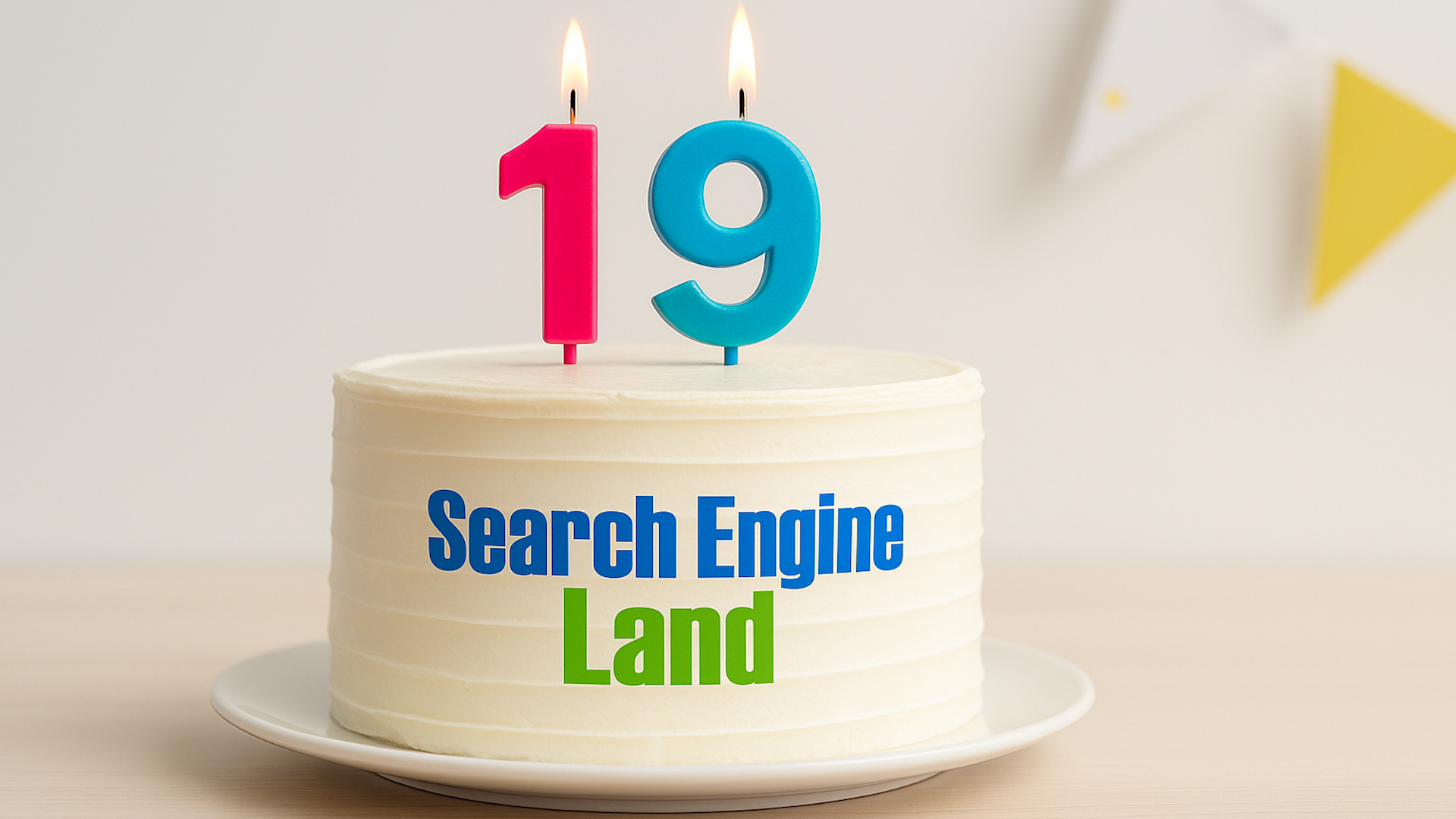
Today, I am thrilled to share that Search Engine Land is celebrating its 19th anniversary!
Nineteen years is an incredible milestone. For almost two decades, we have been diving deep into the ever-evolving world of search engines, always striving to make sense of the changes and challenges Google and the search industry present.
This year, 2025, has been one of the most transformative since our launch in 2006. The rapid pace of change has been exhilarating.
Through it all, our mission remains steadfast: to provide clear news, insightful analysis, and practical guidance to help you navigate the world of search.
Before we look to the future, I want to express my heartfelt thanks for your support and reflect on the past year with you.
Thank you for reading
Sincerely, thank you for being with us.
Every day, we focus on you: what you need to know, what really matters, and what changes will impact your work today or your strategy months down the line.
Our goals include:
Focusing on meaningful stories, not filler.
Delivering news clearly and quickly.
Providing essential context and expertise.
Being a dependable resource in a fast-changing industry.
Helping you anticipate where search is heading, even when it’s unclear.
If you haven’t yet, I encourage you to subscribe to our daily newsletter for a curated summary of all things search, helping you stay updated without feeling overwhelmed.
Thank you to the Search Engine Land team
Our team’s passion is what has driven our success for almost two decades.
Though small, our team accomplishes significant and impactful work because we are mission-driven and dedicated to search.
I extend my greatest thanks to:
Barry Schwartz. With 22 years of experience, Barry’s passion for search ensures complex topics become understandable. He is indispensable.
Anu Adegbola. Focusing on paid media, Anu offers clarity amidst constant changes with her insightful writing.
Angel Niñofranco. Angel plays a crucial role in our SME articles through his coordination and editorial oversight.
Kathy Bushman. Kathy’s behind-the-scenes expertise ensures SMX events are seamless and valuable.
And to the entire team at Third Door Media within Semrush, whether or not your name appears here, your contributions are invaluable.
Top highlights from the past year
Despite the uncertainties of this year, Search Engine Land thrived, thanks to the trust of our community.
SMX Advanced returned in person for the first time in 6 years
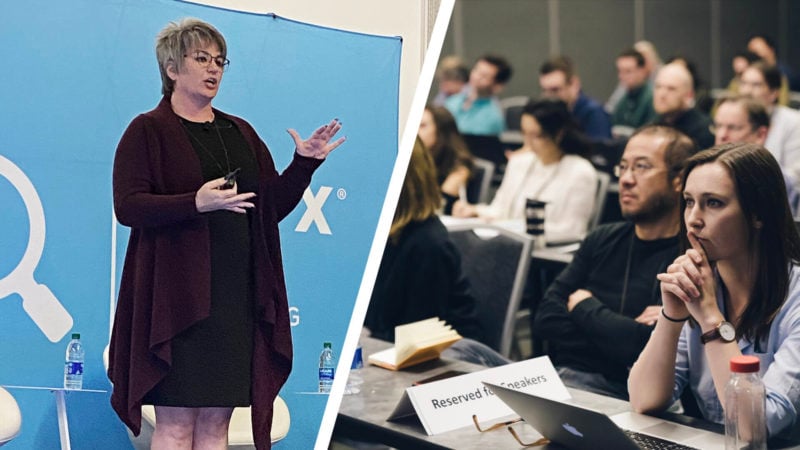
This was arguably the highlight of the year. SMX Advanced’s return in person after six years was electrifying.
With attendance surpassing expectations, the sessions were dynamic, and conversations felt like reunions for the search marketing community. It was clear that we all missed these face-to-face exchanges about AI, Google’s updates, and more.
We learned again that when great minds gather, extraordinary things happen. We eagerly await our next gathering in Boston, June 3-5.
Defining industry coverage of AI Overviews and the new era of search
This year, more than ever, transformed the search landscape. We’ve provided the clarity and reporting needed in this evolving environment.
Our readers rely on us for insights during times of change, and we take pride in shaping the industry’s future understanding of search.
Subject Matter Expert (SME) program growth
This year saw a surge of new and returning readers turning to us for insight into SEO and PPC shifts, from AI to SERP experiments.
Our growth owes much to our fantastic contributors, and I extend my gratitude for their impactful work.
Looking ahead: What’s next for Search Engine Land
As we embrace our 19th year, our resolution is steadfast: to offer unparalleled coverage of search-related topics.
This year, you can anticipate:
Continued breaking news on SEO, PPC, AI, and more.
In-depth analysis, guides, and contextual explainers on industry evolution.
SMX events tailored around the nuances of AI-driven search.
Enhanced expert viewpoints, data, and market clarity.
Mark your calendars for:
SMX Advanced: June 3-5
SMX Next: Nov. 18-19
We have much in store for you, with the aim of equipping you with the insights necessary for your best work.
A brief look back to where it all began
Launched on Dec. 11, 2006, Search Engine Land began with a vision of search as a vast community. A place of exploration, connection, and evolution. Over these years, it’s grown beyond our expectations.
The mission remains the same:
Search Engine Land is your destination to remain informed, educated, and connected within the world of modern search engines.
Thank you for 19 incredible years
From everyone here at Search Engine Land and Semrush, thank you for your readership, engagement, and passion for the evolving world of search.
Here’s to a promising rest of 2025 and a remarkable 2026.
I’m excited to share with you that SMX Advanced is gearing up to make its mark in Boston from June 3rd to 5th, 2026, hosted at the Westin Boston Seaport. This is the premier event for those of us committed to mastering search marketing.
We’re really keen on highlighting the advanced strategies in SEO, PPC, and AI, and we can’t do it without your expertise.
The world of search is evolving incredibly fast.
As SEOs, we find ourselves adapting to AI SEO trends, making sense of AI Overviews dominating SERPs, and navigating Google’s ever-changing landscape and algorithm updates.
For those in PPC, there’s the challenge of making informed, data-driven decisions while seamlessly integrating new AI tools and maintaining that essential human touch.
We’re looking for speakers at SMX Advanced who can provide real solutions to these complex issues.
Do you have proven, high-level strategies for today’s marketing landscape? Now is the perfect time to share your session idea with us. Even if you haven’t spoken at SMX before, in person or virtually, we encourage diverse voices and perspectives to come forward.
The deadline for submitting your SMX Advanced session pitch is January 30th. Don’t delay—spots are limited and fill up quickly.
Consider these tips for crafting a compelling session proposal:
Ensure that your topic is truly advanced and tailored for intermediate to advanced professionals in search marketing.
Introduce an original idea or a unique session format.
Include a case study or specific examples to illustrate your points.
Be mindful of what can realistically be covered in a 20-minute timeframe.
Provide clear, actionable takeaways for participants to implement.
Clarify what skills or insights attendees will gain from your session.