Tag: PPC

  • How I Defend Branded Traffic From Competitor Google Ads

    How I Defend Branded Traffic From Competitor Google Ads

    How competitors target your branded traffic with Google Ads

    I no longer think of branded search protection as simply bidding on my own brand name. Competitors can position themselves against my brand through landing pages, ad copy, modifier keywords, and Google Ads automation, often in ways that look completely legitimate.

    The real pressure often goes beyond keyword bids. Comparison pages that pass review, dynamic keyword insertion that pulls brand names into headlines, and policy gaps that allow competitors to appear beside my brand can quietly weaken performance without clearly breaking Google’s rules.

    By the time I notice the pattern, the damage may already be visible in branded CPCs, impression share, or conversion rate. That is why I pay close attention to how these tactics work, how to spot them early, and how to respond without overreacting.

    1. Dynamic keyword insertion

    Dynamic keyword insertion, or DKI, is designed to make ads feel more relevant by automatically inserting a user’s search query into the headline. In competitive brand auctions, I see it as a tactic that can create a meaningful loophole.

    If a competitor bids on my branded terms and uses DKI, Google can dynamically place my brand name in the ad headline in real time, even if the competitor never typed my trademark into the ad copy.

    That distinction matters. The competitor is not explicitly writing my trademark into the ad. Google is inserting the searcher’s query. To the user, the ad may look like it directly references my brand. Inside Google’s system, it is treated as standard query matching.

    The result is frustrating: an ad can appear to reference my brand, capture high-intent traffic, and send that user to a competing offer without obviously violating policy.

    I have seen this happen from both sides. Sometimes competitors use it intentionally. Sometimes brands trigger it in their own accounts without realizing what is happening. In one case, a competitor’s name started appearing in a brand’s ad headlines because of DKI. No one had written that name into the ad; Google inserted it based on the query.

    The bigger challenge is that I cannot reliably detect this from inside Google Ads alone. I have to audit the search results page directly. Otherwise, I may only notice the problem after branded CPCs rise or conversion rates start to slip.

    Dig deeper: When to use branded and competitor keywords in PPC

    2. Comparison landing pages

    Comparison landing pages sit in a gray area. Google does not evaluate landing page content the same way it reviews ad copy. If a competitor creates a page such as “[Your Company] alternatives” or “[Competitor vs. Your Company]” and bids on my branded terms, the ad can still run as long as the ad itself stays neutral.

    The ad does not have to mention my brand at all. It can use broad language like “Find the right solution,” “Compare top tools,” or “See your options.” The competitive positioning happens after the click.

    Once the user lands on the page, the comparison does the work. The page may include feature charts, pricing callouts, benefit comparisons, and carefully framed language such as “Why teams choose us over [Your Company].” The page may not be misleading or technically noncompliant, but the intent is obvious.

    Google’s review process tends to focus on the ad rather than the full post-click experience. As long as the ad copy does not make explicit competitive claims, the system may treat it as compliant, even when the landing page is built entirely around positioning against my brand.

    This works because landing page relevance can reinforce auction strength. A page built around my brand and the keywords in the ad group may align closely with the searcher’s intent. Even if the ad copy stays generic, the post-click experience can help the ad compete because it matches what the searcher is trying to evaluate.

    When I respond, I do not focus only on one advertiser. If competitors are using comparison-driven experiences to intercept branded demand, I look at the broader search ecosystem around my brand.

    • I strengthen my presence across the full search results page, not just my own ads.
    • I invest in publishers, review platforms, directories, analysts, and affiliates that influence comparison and alternative searches.
    • I work to build a search results page where credible third-party sources reinforce my positioning when prospects search for alternatives, comparisons, reviews, or competitor evaluations.

    The brands that win these moments do not rely only on their own landing pages. They shape the narrative across the entire search results page.

    Dig deeper: Own your branded search: Building a competitive PPC defense

    3. Brand modifier keywords

    Brand keyword bidding is not new, but I see competitors using it in more strategic ways. Instead of bidding only on my exact brand name, they target brand-and-modifier combinations that give them more flexibility.

    For example, if my brand were “Acme Project Manager,” a competitor might bid on searches like “Acme Project Manager alternative,” “Acme vs. competitors,” or “Acme pricing review.” Their ad copy can avoid mentioning Acme by name while still using the search context to position itself as the alternative.

    Google allows this because the ad itself does not explicitly mention my brand. The searcher does. Modifier keywords provide enough context for the ad to compete without directly referencing a trademark in the copy.

    When competitors bid on terms like “[Your Brand] alternative” or “[Your Brand] vs.,” they are targeting lower-funnel research queries. These searchers may not convert at the same rate as people searching only for my brand, but they can still change the auction dynamics.

    That pressure can increase branded CPCs, force me to spend more to maintain visibility, and raise the cost of my core brand terms, even if competitors convert relatively few of those modifier searches.

    I treat brand modifier queries as a separate audience. I segment them by intent, including pricing, reviews, alternatives, competitors, and comparisons, and I monitor Auction Insights for each group. Exact brand searches and comparison-driven searches need different strategies.

    I also build dedicated landing pages and messaging for each modifier intent. That helps me control high-intent research moments without overpaying for every branded variation.

    Dig deeper: How to benchmark PPC competitors: The definitive guide

    How I monitor and respond

    Manual SERP checks are useful, but they do not scale. If I have meaningful branded spend or active competitors targeting my terms, I use automated brand monitoring tools to identify activity across devices, geographies, and browsers that manual checks can miss.

    This is especially important when competitors use geotargeting, dayparting, or other tactics designed to limit visibility. A competitor may not appear every time I check manually, but that does not mean the activity is not happening.

    I also use a clear escalation framework. If a competitor uses my trademarked term directly in ad copy, I start with Google’s trademark complaint process. If the behavior continues after enforcement action, I document the pattern and involve legal counsel.

    Most other scenarios, including modifier bidding, comparison pages, and competitive positioning, are usually better handled through PPC strategy than legal action.

    Before I decide how aggressively to respond, I measure the economics. I estimate the monthly cost of competitor activity by calculating the increase in branded CPCs and the additional spend required to maintain visibility.

    Then I compare that number with the cost of my response, whether that means higher bids, new landing pages, expanded monitoring, or more investment in third-party visibility. My goal is to keep the cost of defending the brand lower than the value I am protecting.

    Build a proportionate response

    Competitors use modifier keywords, comparison landing pages, dynamic keyword insertion, and other policy-compliant tactics to influence buyers during critical research moments. Often, they can do this while staying within Google’s policies.

    The strongest defense I can build combines continuous monitoring, thoughtful audience segmentation, proportionate responses, and disciplined budget decisions.

    Competitive PPC success comes from understanding the auction, shaping the narrative across search results, and investing where my defensive efforts deliver the greatest return.


    Inspired by this post on Search Engine Land.


    crushpress.ai community screenshot
  • Submit Your SMX Next Pitch and Share Bold Search Ideas

    Submit Your SMX Next Pitch and Share Bold Search Ideas

    SMX Next returns online Nov. 18, and I’m excited to help shape a program focused on today’s complex search landscape and the tactics that will define success in 2027 and beyond.

    Search marketing isn’t just changing. From my perspective, it has become an entirely new kind of challenge, and that is exactly why fresh voices and practical expertise matter so much right now.

    In SEO, I’m seeing the field shift toward AI Overviews, search everywhere optimization, and the rise of autonomous AI agents that browse on behalf of users. Trustworthiness, digital authority, and precise alignment with user intent are no longer nice-to-have ideas. They are becoming essential.

    On the PPC side, generative AI and deep automation are creating new levels of personalization. At the same time, they are raising urgent questions for marketers: How do we keep strategic control, protect data privacy, and avoid wasted spend?

    If you’re an enthusiastic search marketer with a passion for sharing what you know, I hope you’ll consider submitting a session pitch for SMX Next. I’m looking for subject matter experts who can share insights, strategies, and tactics that help SEO and PPC marketers thrive in 2027.

    Whether you’ve been speaking for years or you’re a practitioner ready to share something new you’ve developed, I want to hear from you. I’m especially interested in new speakers with diverse points of view and real-world experience.

    The deadline for SMX Next pitches is Aug. 7.

    When I review session proposals, I’m looking for ideas that feel original, specific, and useful. Advanced, forward-thinking topics or unique frameworks that aren’t already common at other search events will stand out.

    I also want to see actionability. Be clear about what attendees will be able to do better, faster, or differently after your session.

    Bring the data whenever you can. A case study, concrete example, or tested approach makes your pitch stronger, especially when you explain how the lesson can scale across different types of organizations.

    Keep the scope focused. A 30-minute session works best when it goes deep on a narrow or specialized topic instead of trying to cover too much at once.

    Most importantly, give attendees something tangible to take with them. I’m looking for sessions that leave people with a clear action plan, framework, or process they can put to work right away.

    Visit this page for more details on how to submit a session idea, or go directly to this page to create your profile and submit your pitch.

    If you have questions, feel free to contact me directly at kathy.bushman@semrush.com. I’m looking forward to reading your proposals!


    Inspired by this post on Search Engine Land.

    crushpress.ai community screenshot
  • How I Cut Google Ads Invalid Clicks by 50% With Audiences

    How I Cut Google Ads Invalid Clicks by 50% With Audiences

    A Google Ads targeting tactic that cut invalid clicks by 50%

    Advertisers are projected to lose $172 billion a year to ad fraud by 2028. I have seen how quickly that problem can move from an abstract industry statistic to a very real performance issue inside a Google Ads account.

    The risk is especially high in competitive industries where CPCs are expensive and every wasted click hurts. One client I worked with was in exactly that situation, and invalid click activity was dragging campaign performance below any profitable level.

    After testing the usual defenses, I adjusted Google Ads audience targeting in a way that reduced invalid-click activity by 50% and brought the campaigns back to profitable performance.

    Case study: How I cut invalid clicks by 50%

    The client sold book editing and ghostwriting services. The search terms triggering the ads were relevant and high intent, but the traffic was not converting anywhere close to the level needed for profitability.

    The warning signs appeared quickly. Google was reporting a 60% to 80% invalid click rate. Microsoft Clarity recordings showed bot-like behavior from Google Ads traffic. Many search terms had click-through rates above 80%, and some were even above 100%. GA4 and other analytics tools also showed far fewer sessions than the number of clicks reported in Google Ads.

    I tested third-party click fraud tools first, but they did not produce any measurable improvement in performance.

    Next, I filed an investigation with Google. Google agreed that suspicious activity existed, but said it had already caught all of it and had not charged the account for those clicks.

    Google Ads invalid click investigation response

    I was still confident that Google was not filtering out all of the invalid activity, so I decided to use the targeting controls inside the account more aggressively.

    I added 540 Google-defined audiences to the Google Search campaigns and set them to Targeting.

    The result was immediate. The invalid click rate dropped by 50%, and the conversion rate rose back to profitable levels.

    Image

    Here is why I tested this approach, why I believe it worked, and what advertisers should understand before trying it in their own accounts.

    What click fraud and invalid clicks actually are

    Google defines invalid clicks as clicks on ads that do not come from genuine user interest. That includes intentionally fraudulent activity, accidental clicks, and duplicate clicks.

    In practice, this can include actual fraud, such as competitors clicking ads, as well as less malicious behavior like accidental double-taps.

    Google does not charge advertisers for clicks it determines are invalid. If Google initially charges for a click and later classifies it as invalid, it credits the advertiser back for that activity.

    Why the usual defenses can fall short

    Google catches a lot of invalid click activity, but this account showed me that the system is not perfect.

    That gap is why so many third-party click fraud tools exist. Most of them try to identify suspicious IP addresses and block them before they can keep costing advertisers money.

    The challenge is that fraudsters understand how these tools work. They can cycle through IP addresses with VPNs and avoid being stopped by a system that only blocks previously identified addresses.

    If a tool blocks an IP address after suspicious activity occurs, that may help only if the same IP address is used again. When the source keeps changing, old IP exclusions lose much of their value.

    There is also a platform limit to consider: Google allows a maximum of 500 IP address exclusions per campaign.

    Image

    The tactic: Add audiences set to Targeting

    I started thinking about what might separate fraudulent traffic from legitimate traffic. Google’s predefined audiences stood out because Google builds hundreds of audience segments from demographics, search behavior, and browsing behavior.

    For example, someone researching private jet companies and Rolex watches might be classified by Google as a luxury shopper and added to that audience.

    My hypothesis was simple: fraudsters who constantly rotate IP addresses may not also be building normal-looking online behavior profiles that fit neatly into Google’s predefined audiences.

    So I added most of the available audiences to the Search campaigns. I was not trying to target only audiences that matched the ideal customer. I was using the audiences as a filter for users who carried enough Google audience signals to look more like real people.

    The key detail is that I chose Targeting, not Observation.

    When I use Targeting, Google limits ads to people who trigger the keywords and also belong to the selected audiences.

    When I use Observation, Google simply reports how people in those audiences engage with the ads compared with everyone else. The ads can still show to anyone who triggers the keywords.

    I would only test this tactic in accounts with unusually high invalid click rates. It can create real downside, including the risk of blocking legitimate searchers who do not fit inside Google’s predefined audience segments.

    How to test this in your own account

    In a Search campaign, go to Audiences > Edit audience segments > Targeting > Browse. Then select the audiences you want to add and click Save.

    Image
    Google Ads audience targeting setup

    Common questions about fighting click fraud

    Will Google refund clicks it identifies as invalid?

    If Google identifies a click as invalid when it happens, I am not charged for that click. If Google identifies the click as invalid later, the account receives a credit toward future advertising.

    How do I see how many invalid clicks I am getting?

    The Invalid activity credit report in Report Editor inside the Google Ads UI provides the most detailed reporting.

    I look at two key metrics there: Invalid clicks, which are clicks I was not charged for, and Credited clicks, which are clicks I was originally charged for but later credited back.

    Google Ads invalid activity credit report

    I can also add the Invalid clicks and Invalid click rate columns at the campaign level, though not at the ad group or keyword level.

    What is a normal invalid click rate?

    A February study found an 11.4% invalid click rate across 43,700 accounts.

    Industry makes a major difference. While the average invalid click rate for StubGroup clients is very close to that study’s finding, I have seen advertisers in competitive industries with invalid click rates above 40%.

    Should I file an investigation with Google?

    If I have reason to believe Google is charging for invalid clicks, I consider filing an investigation here.

    Why this approach worked best

    Using Google’s predefined audiences as a filter cut this account’s reported invalid click rate in half. More importantly, it blocked activity that Google had said it was already catching, which turned failing campaigns into profitable ones.


    Inspired by this post on Search Engine Land.

    crushpress.ai community screenshot
  • Google AI Ad Summaries Could Reshape Paid Search Ads

    Google AI Ad Summaries Could Reshape Paid Search Ads

    I’m watching a new Google Search ad test that could change how people understand sponsored results. Google appears to be experimenting with AI-generated summaries beneath paid search ads, giving its own AI more influence over how advertiser messaging is framed.

    What’s happening. Some advertisers are seeing AI-generated summaries appear directly below Google Ads descriptions in Search results. These summaries include a warning from Google that says: “Google AI responses are generated independently and can make mistakes, so double-check responses.”

    I first saw this test surface through digital marketer Darcy Burk, who shared a screenshot of the experience on X. The placement is notable because the AI-generated text appears close enough to the ad that users may treat it as part of the paid result, even though Google says the response is generated independently.

    Why I care. If Google expands this more broadly, these summaries could shape how users interpret ads by emphasizing the details Google considers most relevant, not necessarily the exact message the advertiser intended to highlight. That raises real questions about accuracy, brand control, and whether click-through rates could be helped or hurt by AI-written context.

    Between the lines. Google has already tested AI-generated summaries for organic search listings, so seeing similar functionality move into paid ads feels like another step in bringing generative AI deeper into the Search experience. What I still do not know is how these summaries are created, what sources they rely on, or whether advertisers will get any say in the copy.

    Image

    What I’m watching. Google has not publicly announced this feature or responded to requests for comment, so it is unclear whether this is a small experiment or the beginning of a wider rollout. Until Google explains the mechanics, advertisers are left guessing how much control they may have over AI-generated text attached to their ads.

    The bottom line. Google is testing AI-generated summaries inside Search ads, and I see that as a sign that generative AI could soon play a larger role in paid search presentation, even when advertisers are not writing that extra copy themselves.

    First spotted. Darcy Burk, understandably, was not pleased with this update.


    Inspired by this post on Search Engine Land.

    crushpress.ai community screenshot
  • Why Google Ads Structure Can Make or Break Performance

    Why Google Ads Structure Can Make or Break Performance

    How campaign structure shapes Google Ads performance

    When I audit Google Ads accounts, it is easy to focus first on the obvious issues: keywords, bids, ad copy, and Quality Scores. But one of the biggest performance barriers I see is not buried inside a single campaign setting. It is the way the account was structured from the start.

    Campaign structure shapes how Google’s machine learning reads the account, how budget moves across goals, and whether useful data is collected in one place or scattered across too many campaigns. When the structure is wrong, I am not just leaving performance on the table. I am making the algorithms work harder with weaker signals.

    That is why I look closely at structure across standard Search campaigns, Performance Max, and Smart Bidding. The account architecture often determines whether optimization efforts can actually work.

    How campaign structure shapes Google’s learning

    I used to see advertisers treat campaign structure mainly as a cleanup exercise: tidy ad groups, logical naming, and campaigns separated by product line or geography. To Google’s systems, though, structure means something much more important.

    Every campaign is a data container. The way I segment campaigns determines which signals Google can pool together for bidding and targeting decisions. When the structure is scattered, the learning is scattered too, and optimization becomes slower and less accurate.

    Smart Bidding and automation usually perform better when more data is concentrated in fewer campaigns. Google’s algorithm needs meaningful volume, often around 30 to 50 conversions per campaign per month, to move beyond the learning phase and make reliable predictions. If I spread conversions across too many campaigns, each campaign can end up starved of the data it needs.

    A common example is an ecommerce account with 12 separate Search campaigns, one for each product category. Each campaign averages 8 to 12 conversions per month. Smart Bidding is active, but no campaign consistently exits the learning phase.

    In that situation, the fix is usually consolidation.

    Over-segmentation breaks Smart Bidding

    Smart Bidding strategies such as Target CPA, Target ROAS, Maximize Conversions, and Maximize Conversion Value depend on real-time signals like device, location, time of day, audience, search query, and more. Google weighs those signals together to predict which auctions are worth entering and how much to bid.

    When I see campaigns that are over-segmented, I usually see the same problems appear. First, conversion volume is too low, so each campaign operates below the level Google needs for confident bidding decisions. That often leads to unstable CPAs and CPCs.

    Second, learning phases last too long. Every budget change, bid strategy switch, or structural edit can trigger a new learning period. Over-segmented accounts can feel permanently stuck there, never reaching their full potential.

    Third, signal consolidation is missed. Bidding signals do not freely transfer across campaigns. A branded campaign cannot teach the algorithm inside a non-branded campaign, even when both campaigns share the same conversion goal.

    Finally, bid cannibalization becomes a real risk. When multiple campaigns compete in the same or overlapping auctions, I can end up driving up my own costs and creating avoidable inefficiency.

    The result is an account that looks optimized on the surface, with Smart Bidding enabled, audiences attached, and conversion tracking active, but still underperforms because the structure underneath is working against every optimization layered on top of it.

    The impact of Performance Max

    Performance Max adds another layer to campaign structure. Unlike Search campaigns, PMax runs across Google inventory, including Search, Display, YouTube, Gmail, Discover, and Maps. It uses asset groups and audience signals to guide automation, which makes setup more important and more complicated.

    Asset group segmentation

    I think of asset groups inside PMax as mini-campaigns. Google uses them to understand context, match creative to searches, and optimize delivery. When asset groups are too broad, mixing unrelated products, audiences, or themes, the algorithm has a harder time matching the right creative to the right situation.

    I prefer to segment asset groups by product category or service line, audience intent level such as prospecting versus retargeting, and creative theme or offer type.

    This gives Google clearer signals about what each group is meant to accomplish, which can improve both creative matching and bidding efficiency.

    PMax and Search campaign overlap

    One of the most damaging mistakes I see in accounts running both Search and Performance Max is failing to set clear boundaries between them. PMax can serve across all placements, including branded and non-branded searches, so it can compete with Search campaigns if I do not define where each campaign type should operate.

    Without proper segmentation, PMax can cannibalize high-intent branded search traffic and inflate costs on terms I might have won more cheaply through Search. Search campaigns can lose impression share they otherwise would have captured, and attribution becomes harder to interpret because it is less clear which campaign is truly driving performance.

    My preferred solution is to use campaign-level negative keywords, brand exclusions, and clear audience segmentation. PMax should complement Search campaigns, not compete with them.

    Budget allocation and automation conflict

    PMax runs as a single campaign with a single budget, but because it delivers across multiple channels, budget allocation happens dynamically. When PMax and Search campaigns are not organized around clear goals, Google may spend on the easiest placements rather than the best ones.

    Structural choices, such as whether I run one PMax campaign or split campaigns by product line, directly affect how budget is distributed and how well automation can support business goals.

    Match type strategy and its structural implications

    Match types are often treated as a keyword-level decision, but I see them as a structural decision too. Running broad match, phrase match, and exact match across separate campaigns, or even separate ad groups, without a coherent strategy can create overlap and wasted budget.

    Google Ads looks very different than it did a few years ago. Broad match now casts a much wider net, and Google increasingly pushes advertisers to pair it with Smart Bidding. That combination can work, but only when the campaign structure gives the algorithm enough support.

    Broad match with Smart Bidding works best when there is enough conversion data, a clear goal, and enough traffic for Google to learn from. In a fragmented account, broad match can make the problem worse. It brings in more searches, but the algorithm does not have enough clean data to make good use of them.

    The safer approach is to keep match types within fewer campaigns, use negative keywords to prevent campaigns from bidding against each other, and review search term reports regularly so I can tighten boundaries where needed.

    Keyword and ad group architecture: When granularity becomes an obstacle

    Single Keyword Ad Groups, or SKAGs, are mostly a thing of the past, but many accounts still carry their legacy: hundreds of tiny ad groups with one or two keywords and nearly identical ads. That level of detail made sense when advertisers managed bids manually. Today, it often works against Smart Bidding.

    Too many ad groups create the same data problem at a smaller scale. Responsive search ads perform better when they have more to learn from, including which headlines get clicked, which asset combinations work, and how auctions behave. That learning happens faster when ad groups are consolidated around broader themes.

    I usually aim for three to five tightly themed ad groups per campaign instead of dozens of micro-segmented groups. Each ad group should include enough keyword variation to generate useful data while staying focused enough to preserve message relevance.

    The goal is maximum signal quality. If structural granularity does not improve data consolidation, it is usually unnecessary complexity.

    Conversion goals and campaign alignment

    Structure also determines which conversion actions each campaign optimizes toward, and I consider goal misalignment one of the quietest performance killers in Google Ads.

    If multiple campaigns share a poorly defined conversion goal, or if different campaigns optimize toward different actions without a clear hierarchy, Smart Bidding receives conflicting instructions. It may optimize toward micro-conversions like page views or add-to-carts when the real objective is form fills or phone calls. It may also treat goals as equal when one is clearly more valuable than another.

    A structurally sound account connects campaign goals to business objectives, not just platform metrics. It separates primary conversions from secondary tracking actions, and it uses accurate conversion values when campaigns rely on value-based bidding.

    Performance Max is especially sensitive to conversion goal quality. Because PMax controls its own bidding and placement decisions, it will optimize aggressively toward whatever I tell it matters most. If that signal is wrong, the campaign may optimize efficiently toward the wrong outcome.

    Signs your structure is hurting performance

    Structural problems rarely announce themselves clearly. I usually see them show up as issues that are easy to blame on ads, bids, or audiences.

    Persistent learning phase warnings are one sign. Campaigns may be frequently flagged as limited by learning even when budgets are consistent. Unstable CPAs or ROAS are another warning, especially when performance swings do not settle over time.

    I also watch for high impression share lost to budget when total budgets seem adequate, disproportionate spend flowing into a small number of campaigns, limited visibility into PMax search terms, and declining Quality Scores as the account grows across too many ad groups.

    When two or more of these symptoms appear at the same time, I treat structure as a likely root cause. Bid adjustments and creative testing will not fix the problem until the foundation is corrected.

    A framework for structural audits and consolidation

    Restructuring an active account carries risk. Any major structural change can trigger learning phases and temporary performance disruption, so I consolidate carefully and use data as the guide.

    Step 1: Assess conversion volume by campaign

    I start by identifying which campaigns consistently generate 30 or more conversions per month and which fall below that threshold. Campaigns with low volume are usually candidates for consolidation.

    Step 2: Map audience and intent overlap

    Next, I look for campaigns that compete against each other for similar searches or audiences. Overlap creates waste, and structural waste is one of the most expensive forms of inefficiency.

    Step 3: Evaluate PMax and Search boundaries

    Then I audit how PMax and Search interact. I want to know whether brand terms are being captured by the right campaign type and whether negative keywords are in place to prevent cannibalization.

    Step 4: Simplify ad group architecture

    From there, I move away from SKAG-style granularity and toward theme-based groupings. Ad groups that serve overlapping intent should usually be consolidated into broader, cleaner themes.

    Step 5: Align conversion goals

    Finally, I audit conversion actions across all campaigns. Primary goals should match real business outcomes, and value-based bidding inputs should reflect actual revenue data whenever possible.

    Important: I would not restructure everything at once. I would start with the highest-spend campaigns, monitor performance through the learning phase, and validate results before moving to the next round of consolidation.

    Campaign structure comes first

    I see campaign structure as the foundation of Google Ads performance. When it is right, Smart Bidding, Performance Max, and audience targeting can work with stronger signals, clearer goals, and more efficient budget allocation.

    When it is wrong, no optimization layered above it can fully solve the problem. Bids cannot fix fragmented data. Creative cannot correct misaligned conversion goals. Performance Max cannot prioritize efficiently when its boundaries with Search are unclear.

    The biggest performance improvements in Google Ads often do not come from a new bid strategy or a sharper headline. They come from stepping back, auditing the account architecture, and rebuilding the foundation everything else depends on.

    Structure first. Optimization second.


    Inspired by this post on Search Engine Land.

    crushpress.ai community screenshot
  • Google Performance Max Diagnostics Reveal Asset Gaps

    Google Performance Max Diagnostics Reveal Asset Gaps

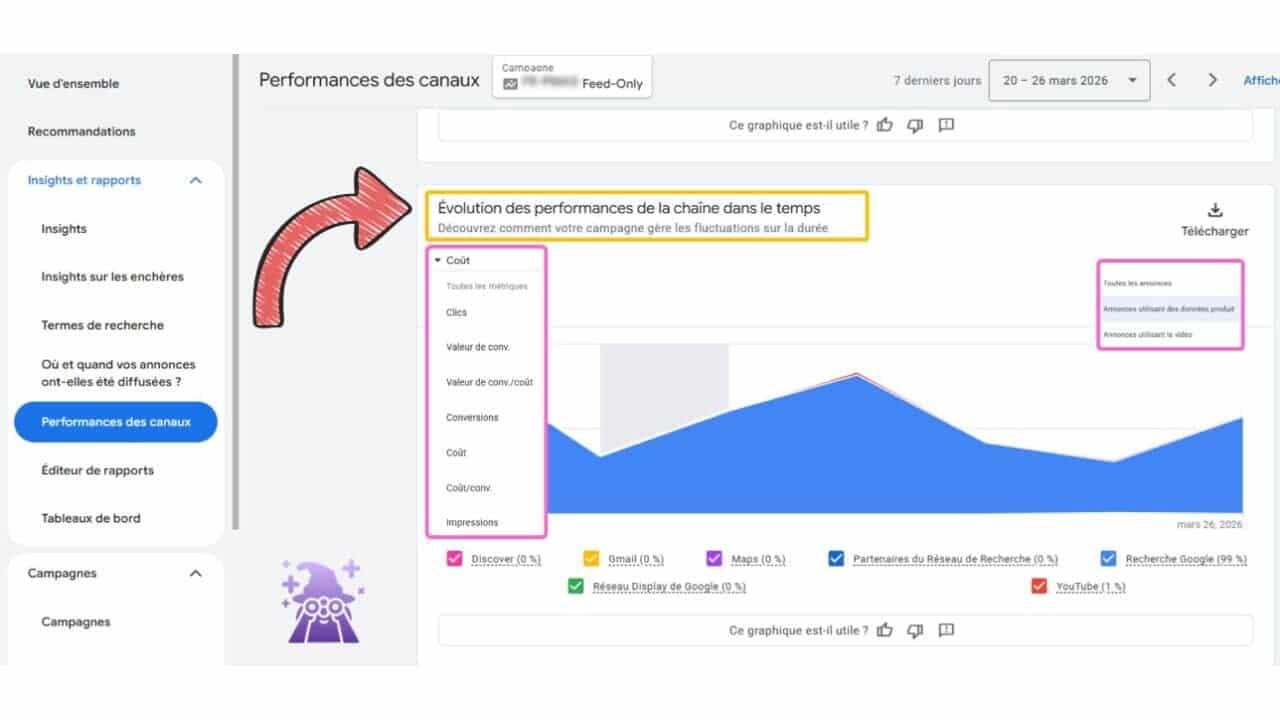
    I’m seeing Google add a new Channel Diagnostics feature to Performance Max, and it gives advertisers a more centralized way to understand asset issues that may be holding back campaign delivery across Google’s channels.

    The new Channel Diagnostics section is available inside Insights & Reports > Channel Performance for Performance Max campaigns. For me, the value is that advertisers no longer have to dig as deeply to figure out whether missing or disapproved assets are limiting where a campaign can serve.

    With this update, I can review diagnostics across all Performance Max channels or drill into a specific channel when I need more detail. I can also identify missing or disapproved assets that affect campaign eligibility and see which asset types, such as headlines, descriptions, or images, need attention.

    This matters because Performance Max has often been criticized for limited visibility into campaign issues. I see Channel Diagnostics as a useful step toward making those issues easier to spot, especially when missing creative assets may prevent campaigns from serving across Search, Display, YouTube, Discover, Gmail, and Maps.

    Image

    By surfacing channel-specific asset gaps in one place, Google is giving advertisers more actionable insight without forcing them to manually audit every asset group. That can make troubleshooting faster and help teams prioritize the fixes most likely to restore eligibility or improve delivery.

    The bottom line is that Channel Diagnostics gives Performance Max advertisers a quicker way to identify and fix missing assets. I see it as a practical improvement for keeping campaigns eligible across Google’s full range of inventory.

    This update was spotted by a Google Ads Specialist who shared it on LinkedIn.


    Inspired by this post on Search Engine Land.

    crushpress.ai community screenshot
  • Google Clarifies Age Estimation Ads Policy for Advertisers

    Google Clarifies Age Estimation Ads Policy for Advertisers

    I’m watching Google update its advertising policy to make clearer how certain ads are limited while the company estimates a user’s age. The change gives advertisers more transparency as Google expands its age assurance technology worldwide.

    What I’m seeing: Google has renamed its Default Ads Treatment policy to “Categories restricted while Google is estimating a user’s age.” To me, that wording matters because it makes the policy sound less like a permanent restriction and more like a temporary safeguard while Google’s systems work out whether a user is old enough to see certain types of ads.

    What’s changing: I see three main updates here: the policy has a clearer name, the language now emphasizes that these protections are interim measures during the age estimation process, and enforcement remains unchanged.

    What’s different: Google has also narrowed the list of ad categories restricted while a user’s age is being estimated. Previously, the restricted categories included adult content and pornography, alcohol, gambling, and shocking content.

    Under the updated policy, I now see only three restricted categories: adult content and pornography, alcohol, and gambling. Shocking content no longer appears on that restricted list.

    Why I care: This update does not introduce new advertising restrictions, but it does make the policy easier to understand. For advertisers in affected verticals, the key takeaway is that these limits are tied to Google’s age estimation process, not a broader or permanent policy shift.

    The bottom line: I do not see any operational change for advertisers, but Google’s updated policy makes it much clearer that restrictions on adult, alcohol, and gambling ads are temporary safeguards while a user’s age is being estimated.


    Inspired by this post on Search Engine Land.


    crushpress.ai community screenshot
  • Google Ads All Campaigns Redesign Makes Navigation Easier

    Google Ads All Campaigns Redesign Makes Navigation Easier

    I’m seeing Google Ads roll out a redesigned All Campaigns selector, and the goal is clear: make it easier to move through large, complicated account structures without wasting time hunting for the right campaign.

    What’s happening is that Google is refreshing the All Campaigns selector across Google Ads with a cleaner layout and better navigation tools. For advertisers who manage bigger accounts, this should make day-to-day campaign work feel more organized.

    The selector has also been moved to a new location in the interface, which means I’d expect some advertisers to need a short adjustment period before the new placement feels familiar.

    The biggest improvement I notice is the new expandable hierarchy view. Campaigns now appear in a structure that makes campaign groups and nested setups easier to browse, especially when an account has grown beyond a simple list of campaigns.

    Google has also added search inside the selector, which should help advertisers quickly find specific campaigns or campaign groups instead of manually scanning through long account lists.

    Image

    Why I care: this update could save meaningful time for anyone managing large Google Ads accounts. When campaigns are split across multiple groups or complex organisational structures, faster navigation can make daily optimization work less frustrating.

    The bottom line is that Google’s redesigned All Campaigns selector is meant to streamline campaign management with a clearer hierarchy and built-in search, helping advertisers navigate complex accounts more efficiently.

    The update was first spotted by performance marketer Vivek Gupta on LinkedIn. Since the rollout is gradual, I would not expect it to be available in every Google Ads account immediately.


    Inspired by this post on Search Engine Land.


    crushpress.ai community screenshot
  • Microsoft PMax Experiments: Smarter Testing Arrives

    Microsoft PMax Experiments: Smarter Testing Arrives

    I’m seeing Microsoft bring experimentation into Performance Max campaigns, giving advertisers a more practical way to test campaign changes and measure incremental impact without disrupting live performance.

    What’s new: Microsoft is adding two Performance Max experiment types designed to help advertisers understand whether their campaigns are truly driving better results.

    Uplift experiments help me measure the incremental impact of Performance Max campaigns by comparing results against a control group.

    Upgrade experiments give me a way to compare an existing campaign with an upgraded Performance Max version before I fully roll out the change.

    For eligible accounts, both experiment types are available under Campaigns > Experiments.

    Why I care: Until now, Microsoft Ads experiments were limited to Search campaigns. Bringing testing into Performance Max gives advertisers a safer path to validate changes, improve performance, and make more data-driven decisions before committing budget.

    Image

    Between the lines: As Microsoft expands experimentation, it has also renamed its existing experiment offering to Search optimization experiments. That distinction helps separate traditional Search testing from the new Performance Max testing capabilities.

    I see this as part of Microsoft’s broader push to give advertisers more advanced optimization tools across automated campaign formats.

    The bottom line: Microsoft is closing an important gap in its Performance Max offering. With dedicated uplift and upgrade experiments, advertisers can test with more confidence and get a clearer view of the real impact of automated campaigns.

    First spotted: The help docs were spotted by PPC News Feed founder Hana Kobzová.

    Dig deeper: Microsoft’s help docs include details on the Uplift experiment for Performance Max and the Upgrade experiment for Performance Max.


    Inspired by this post on Search Engine Land.


    crushpress.ai community screenshot
  • How I Find Who Is Using My Brand in Paid Search Ads

    How I Find Who Is Using My Brand in Paid Search Ads

    I know competitive brand bidding is now a common PPC tactic, but that does not mean I treat it as harmless background noise. When competitors, affiliates, coupon sites, or misleading advertisers show up on branded searches, they can inflate CPCs, divert high-intent traffic, and confuse people who were already looking for my brand.

    I have seen how much difference visibility can make. Industry examples show that brands often uncover meaningful CPC inflation once they start tracking competitor bidding, affiliate activity, and trademark misuse. In documented cases, brands reduced branded CPCs by 25% to 75% after identifying infringing advertisers and enforcing their policies.

    In this guide, I walk through how I monitor branded keywords, identify who is advertising on them, and decide what actions may be available based on the evidence I find.

    Choosing Keywords So I Do Not Miss Hidden Activity

    When I want to find out who is using my brand in search ads, I start by deciding which keywords I need to monitor.

    The biggest mistake I try to avoid is watching only my exact brand name. That is a useful starting point, but it rarely shows the full picture. Some advertisers deliberately target brand-related coupon, discount, review, or alternative queries because those searches often come from high-intent users and attract less scrutiny.

    For example, someone searching for “Brand coupon” or “Brand discount code” may be much closer to buying than someone searching for the brand alone. Those queries often attract coupon affiliates, loyalty sites, and unauthorized advertisers trying to intercept branded traffic.

    I also pay attention to searches that include terms like “reviews” or “alternatives,” because those queries can bring in competitors and comparison sites that position themselves directly against my brand.

    Image

    Misspellings matter too. Some advertisers target spelling variations because they are less likely to be monitored and may face less competition.

    For a solid monitoring setup, I include my core brand name, “official page” and “login” variations, coupon and promo-code searches, review and alternative searches, commercial terms such as “buy,” “order,” and “sign up,” common misspellings, and localized versions of my brand name.

    If I am using Bluepear, its built-in AI assistant can generate keyword suggestions from this kind of list and help me expand coverage faster.

    The number of terms I monitor depends on the size of the brand portfolio, including trademarks, local branches, and product names. For many small to medium-sized brands, I would start with about 20 keywords and then expand as new risks, markets, and opportunities appear.

    Choosing Locations and Monitoring Frequency

    I do not rely on a single search from my office, on my device, at one moment in time. Search results are too dynamic for that. Two people searching the same branded keyword can see completely different ads and organic listings depending on their location, device, timing, and other variables.

    I also assume that some advertisers may be trying to hide their activity. A fraudster or an affiliate violating my PPC policy might run ads outside normal business hours to reduce the chance of being caught. If I only check manually during the workday, I may never see those ads.

    Image

    When I monitor branded search results, I look across the countries and markets where my brand operates, regional differences within those markets, mobile and desktop results, different times of day, and weekday versus weekend activity.

    Frequency matters just as much as coverage. Some violations appear briefly and then disappear. Running checks multiple times throughout the day gives me a better chance of capturing activity that would otherwise go unnoticed.

    Tracking all of these variables manually can become tedious, especially when a brand operates across multiple markets. Bluepear accounts for locations, devices, time zones, and redirects that can obscure the true destination of traffic. I can set the parameters once and gain continuous visibility without turning monitoring into a weekly time sink.

    Reviewing Search Results and Recording Evidence

    I do not assume every advertiser bidding on my branded keywords is breaking a rule. Competitors may be allowed to bid on branded keywords if they do not use my trademark in their ad copy. Affiliates may also be authorized to promote my brand under specific program conditions.

    Still, I need to know when an advertiser’s behavior crosses the line from legitimate brand bidding into trademark misuse, policy violations, or customer deception.

    The first signal I investigate is trademark use in ad copy. If the ad mentions my brand name in the headline or description, and my trademark rules or affiliate policies restrict that use, I treat it as a possible compliance issue.

    Image

    I also look for misleading claims. Phrases that imply the advertiser is “official,” references to exclusive offers, or language that suggests authorization when none exists can confuse users and deserve review.

    Coupon and discount promotions need special attention. I verify whether the advertised discount, promo code, or offer is legitimate, because some affiliates use expired, misleading, or fabricated offers to win clicks.

    I also watch for impersonation signals. Some ads and landing pages are designed to resemble a brand’s official website. Even if the advertiser does not directly claim to be my company, that kind of presentation can still confuse users and divert branded traffic.

    Because advertisers can change ad copy, pause campaigns, or remove landing pages at any time, I collect evidence quickly. I record the ad copy, SERP position, triggering keyword, location, URLs, redirects, landing page content, and timestamps.

    Bluepear can handle this automatically by compiling a report with the relevant details, which makes follow-up easier when I need to contact an affiliate, review a competitor’s behavior, or escalate a trademark issue.

    Identifying Who Is Behind the Activity

    Sometimes I cannot immediately tell whether an advertiser is a competitor, an affiliate, a coupon site, or something riskier. Branded search results often include multiple participants with different motivations, so I need to understand who I am dealing with before I decide what to do next.

    Image

    I look for patterns. A direct competitor domain usually points to competitor bidding. A coupon or cashback page may indicate an affiliate, coupon site, or loyalty site. Affiliate network tracking links often suggest affiliate activity, although they can also appear in more questionable setups. Product comparison pages often point to competitors or comparison publishers.

    Other signals raise the risk level. If an ad uses my trademark, claims to be “official,” sends users through multiple redirects, promotes coupon codes I cannot verify, or lands on a page that imitates my brand’s design or messaging, I investigate more carefully.

    No single signal gives me a definitive answer. I combine multiple pieces of evidence before drawing conclusions. Once I know who is advertising on my brand terms, I can move beyond detection and decide whether their activity aligns with my policies and business goals.

    What I Do Next

    After I identify who is advertising on my brand terms and review their ads, the next step is choosing the right response.

    Competitor Brand Bidding

    Not every competitor bidding on my branded keywords requires immediate intervention. Before acting, I ask how often the competitor appears, which keywords they are targeting, whether they are using trademarked terms in ad copy, and whether they are sending users to comparison content or direct offers.

    In many cases, I monitor the activity and evaluate its business impact over time. Documenting patterns helps me establish a baseline, which can support future compliance reviews or legal conversations if escalation becomes necessary.

    Image

    Affiliate Violations

    If an affiliate is bidding on restricted branded keywords or violating program rules, I gather evidence and contact the affiliate or network. My workflow is straightforward: document the violation, verify the affiliate ID, share the evidence, request removal or corrective action, and apply program enforcement measures if needed.

    Screenshots, timestamps, and redirect data make those conversations much easier because I can show exactly what happened, where it happened, and when it was detected.

    Trademark Misuse

    Trademark-related issues require careful review. I look for unauthorized trademark use in ad copy, ads that create confusion about brand affiliation, impersonation attempts, and misleading claims that the advertiser is an official brand representative, partner, or reseller.

    The right response depends on the circumstances, internal policies, and applicable laws. In many jurisdictions, competitors are generally allowed to bid on trademarked keywords. However, ads that confuse users about the advertiser’s relationship with my brand may raise trademark or unfair competition concerns, depending on the facts and local law.

    The advertising platform’s policies matter too. Google allows advertisers to bid on trademarked keywords, but it may restrict trademark use in ad text when a valid trademark complaint is submitted. Google also prohibits ads that use trademarks in a confusing, deceptive, or misleading way.

    Before I take action, I collect as much evidence as possible, including screenshots, detection timestamps, URLs, redirects, and landing page content. Once the facts are documented, I may contact the advertiser directly, submit a trademark complaint to the advertising platform, send a cease and desist letter, or escalate through legal channels if necessary.

    Why I Keep Monitoring Brand Search

    The main lesson is that branded search protection is not a one-time audit. Affiliates can activate and pause campaigns throughout the month. Some violations appear only on weekends, outside business hours, or in specific markets. An advertiser that disappears today may return next week with new ad copy, a new domain, or a different affiliate account.

    That is why I treat brand protection as an ongoing process. Occasional searches are not enough. I need consistent monitoring and a repeatable investigation workflow that shows who is appearing on my brand terms, how they operate, and whether action is warranted.

    If I want easier visibility into my branded search landscape, Bluepear helps identify issues earlier, respond faster, and make more informed decisions about protecting traffic and advertising investments.


    Inspired by this post on Search Engine Land.

    crushpress.ai community screenshot