When I’m faced with the challenge of optimizing for keywords that I can’t explicitly use, I gear up with a strategic mindset. Legal constraints, brand guidelines, or public perceptions might put certain terms off-limits, but there are effective ways to capture demand without using them directly.
Here’s my approach to overcoming this hurdle, aligning with search behaviors, and enhancing visibility despite limitations.
When Certain Keywords Are Off-Limits
In the world of SEO, it’s not uncommon to hear, “We want to rank for (insert competitive term),” followed by, “Avoid using (that exact term) in content.”
My journey began over 10 years ago, tasked with ranking for “custom koozies.” This sparked endless debates on the correct nomenclature for these drink holders. At home, we referred to them as “coolie cups,” but data revealed that most people simply called them “koozies.” However, “Koozie®” being a trademark meant we had to cleverly position ourselves at the top without relying on that term as our primary focus.
Years later, at a marketing agency focusing on senior living, I encountered new terminology like assisted and independent living. Despite a bias against the term “nursing home” due to negative connotations, our research showed it was still widely used, presenting similar challenges to what I had faced before.
Strategies for Ranking Without Using Specific Keywords
Even if I can’t use a keyword, by sending the correct signals through related terms and creative strategies, I can still rank effectively. Here’s how:
1. Pull the Data and Confirm Direction
Sometimes, showcasing data alone can shift perspectives. Sharing insights like “skilled nursing near me” having 4,400 monthly searches compared to “nursing home near me” with 27,100 searches can be eye-opening. Understanding the local search volume is crucial in determining the best strategy.
2. Surround the Terms
Creating contextual relevance is essential. For example, around the term “Koozies,” I include words like “beer,” “drink,” and occasions such as “bachelorette party.” These help build search engine context.
3. Use Synonyms and Break Down Phrases
Utilizing synonyms or splitting phrases works well. Instead of “Koozies,” I might say “cozies” or “coolies,” and for “nursing homes,” highlighting “nursing” and “home” separately enriches content.
4. Employ Indirect Usage
Referring indirectly can be impactful, such as using headers like “More than a nursing home” or integrating the terms into questions or statements naturally within the content.
5. Incorporate Unnameable Products
Incorporating trademarked items alongside other products allowed me to use the term “Can Coolers & Koozies” even when the latter couldn’t be the focal point.
6. Craft Creative Anchor Text
Using the primary term in both off-site and internal links can guide search engines effectively. Controlling anchor text is key.
7. Optimize Non-Visible Elements
Leveraging alt text and strategically placing terms in title tags ensures that search engines get the right signals without visible usage, balancing between being search-friendly and on-brand.
8. Add Definitions
Adding definitions helps clarify common terms related to your offerings, boosting SEO and enhancing your site’s authority.
Always consult with legal advisors regarding trademarked terms. By gathering data, crafting strategic approaches, and adjusting tactics as necessary, you can achieve SEO success even with restrictions.
AI search expands the long tail into a multitude of prompt variations. Let me guide you through how fan-out queries, grounding, and task completion are reshaping SEO.
When I speak naturally, my language flows. It’s often messy, incomplete, and not always coherent. In contrast, the Google search bar made me condense my needs into short-tail or long-tail queries.
To navigate this, I would stack queries along a journey, refining them from A to B by stripping out personal nuances to suit what I thought the search engine could grasp. SEO experts built strategies around this, organizing queries by search volume and intent.
That’s evolving now. With Google promoting Gemini and companies like Samsung highlight AI features as key selling points, the landscape is shifting. I’m encouraged to be more expressive and detailed with my searches.
Moving from Keyword Research to Prompt Research
We need to transition from keyword research to prompt research. Traditionally, keyword research involved quantifying demand and optimizing at a phrase level. The new AI-driven search environment calls for understanding demand as generative concepts, preserving needs across numerous prompt formats.
This shift doesn’t render keyword research obsolete, but changes its scope. I’m learning to model user journeys, considering decision stages and user uncertainty, rather than just relying on search volume.
What I get from this isn’t merely a keyword map, but a task map reflecting real audience constraints. This signifies a shift from short and long-tail keywords to an infinite tail of prompt research.
The infinite tail is more than just an expansion of the long tail. It’s about personalization at each request. Users, like me, are layering contexts and preferences, creating unique prompt combinations.
As Ai systems evaluate these prompts, they predict responses probabilistically, shifting away from exact-match keywords. Now, it’s not just about ranking for specific phrases but ensuring my content solves the user’s problems.
In this journey, finding what users truly seek is as crucial as completing a task. With divergent user paths, flexibility replaces rigid step-by-step processes.
Query fan-out is crucial in AI search. It breaks complex prompts into subquestions, enabling a deeper evaluation framework.
Content now needs to satisfy clusters of queries instead of single matches. Covering multiple dimensions of a task creates resilience in this network-centric world.
Grounding queries ensure AI answers are validated against the broader web, checking consistency and reputability across sources. For my content to be part of AI responses, it must seamlessly fit this network.
This evolution redefines authority in how corroborated content appears over technically manipulated content. It emphasizes structure, data consistency, and external validation, significantly easing an AI system’s decision-making process by reducing uncertainty.
Organic search remains integral. It still dictates discovery and influences crawlability. However, AI now layers on top, impacting which brands feature in conversational responses. It’s a blend where organic visibility and AI selection coexist.
In this hybrid mode, the infinite tail favors genuine audience understanding, where my content should be designed to satisfy users’ situations instead of merely matching keywords.
This isn’t just a process renamed from keyword research to prompt research. It’s about understanding search motivations, decision-making, uncertainties, and evidential needs, fostering the infinite tail by prioritizing task completion over string matching.
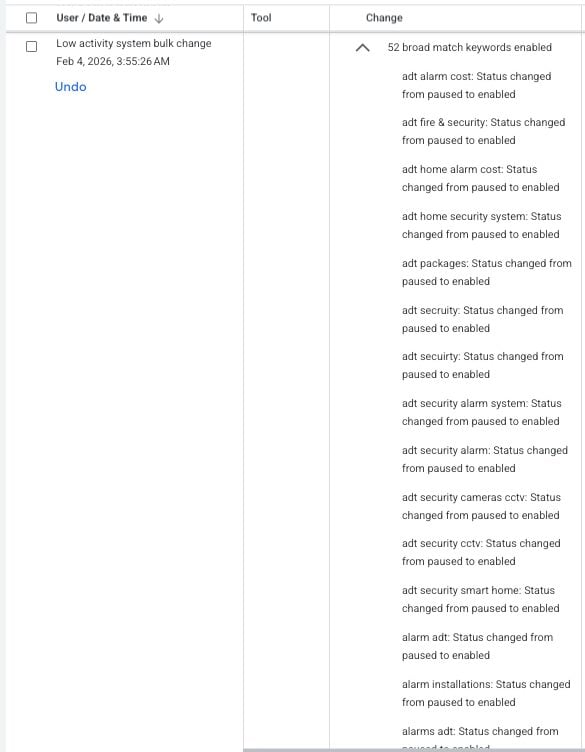
I’ve noticed something quite unexpected happening with Google Ads lately. It seems that their system tool is re-enabling paused keywords automatically, which has led to increased campaign expenses without warning.
Some advertisers, including myself, have observed a Google Ads tool—created for low-activity bulk changes—unexpectedly switching paused keywords back to active. This unusual behavior has been a surprise to many account managers, like myself, who haven’t come across this issue before.
What’s happening? The activity logs are showing entries linked to Google’s ‘Low activity system bulk changes’ tool executing actions that enable previously paused keywords. These logs appear as automated bulk updates and, thankfully, have an ‘Undo’ option available.
In the past, this tool mainly paused inactive elements rather than reactivating them, so this change in behavior is quite perplexing.
What’s unclear? Google hasn’t issued any public documentation to explain this behavior, leaving us unsure whether it’s an intentional feature, a limited test, or a mere bug.
I find myself wondering what exactly triggers this reactivation and how widespread this phenomenon is becoming.
Why does this matter? If like me, you’re diligently managing your campaigns, unexpected keyword reactivation can change your campaign delivery in ways you didn’t plan for, impacting budgets, pacing, and overall performance—particularly if you’ve paused keywords for a specific reason.
For both agencies and in-house teams, this change is raising concerns about automated systems potentially overriding manual settings.
What steps should we take now? As account managers, we might want to regularly check change histories, be on the lookout for any unexpected keyword activations, and use the ‘undo’ function promptly if we notice unplanned changes.
Until Google clarifies the situation, more careful monitoring of campaigns relying heavily on paused keywords might be necessary.
First Alerted This issue was first brought to light by Performance Marketing Consultant Francesco Cifardi on LinkedIn.
I’ve got some exciting news for those of us tracking changes in the digital advertising space. Apple’s expanding ad opportunities within the App Store search results, offering advertisers new chances to connect with users right at the moment they’re ready to download apps.
Starting March 3rd, there will be more ad slots in the UK, and following closely, Japan will see these changes too. By the end of March, this rollout is expected to reach all Apple Ads markets.
Why is this important? With more ad slots in the App Store, we have more chances to capture installs. But, this also means heightened competition for those high-intent queries, which could drive costs upward. Since we can’t pick our ad placements, ensuring creative relevance, refining keyword strategies, and monitoring conversion tracking have never been more crucial.
What’s changing? Previously, there was just a single sponsored ad spot at the top of the search results. Now, multiple ads can show up for a search query, not only in the top spot but also further down the page.
Devices running iOS and iPadOS 26.2 or later will support these additional placements.
How eligibility works: There’s no need for us advertisers to tweak anything to tap into the new ad slots. Our existing search results campaigns are automatically eligible for these new positions.
While we can’t choose our placement or bid for a specific spot, Apple determines where our ads appear within search results.
Ad formats and pricing remain constant. Ads look the same, relying either on a standard product page or a custom one. If we want, we can even direct users to specific in-app destinations via optional deep links.
Billing remains unchanged, continuing on a cost-per-tap or cost-per-install basis.
Matching ads to searches: Ads in search results still hinge on keywords—those we choose or those suggested by Apple. According to Apple, their relevance-based matching achieves an average conversion rate exceeding 60% for top-of-search ads.
Placement is a mix of relevance and bid, but relevance remains non-negotiable. Even a high bid won’t allow an ad into auctions if it’s not a strong match for the user’s query.
What should we keep an eye on? More ad slots could lead to greater opportunities, albeit with increased competition on the same search results page. It’s prudent to keep a close eye on performance metrics, query alignment, and conversion rates as the global rollout of this feature proceeds.
Looking ahead: As March progresses, more App Store search ads will be seen in all Apple Ads markets. For those of us in app marketing, this shift represents a significant transformation in how search visibility and competition will play out within the App Store.
Hey there! Navigating the ever-evolving landscape of Google Ads can be quite the adventure. I’ve gathered some important insights to help us optimize our PPC campaigns by addressing common pitfalls like inconsistent tracking, outdated negative keywords, and an over-reliance on AI.
Google Ads is in a constant state of evolution. This means new challenges and mistakes often pop up as we optimize and manage our PPC campaigns. Let me share some insights on the most prevalent Google Ads mistakes in 2026, so we can dodge them effectively this year.
Optimization decisions hinge on conversion data. If our conversion tracking is inconsistent, it skews the entire account’s data, making it difficult to draw accurate insights.
Converting varying attribution methods, count types, and conversion windows means data is applied unevenly across our account, complicating any assessment of click value.
Occasionally, we might override tracking settings at the campaign level, achieving accuracy there but inconsistent data at the account level. Ensuring consistent application of conversion data is something I prioritize in my management tasks.
I’ve noticed many people losing sight of ‘exact match’ keywords as Google encourages broad match by making it the default setting in their interface. Yet, exact match is invaluable, consistently proving to be the highest-converting match type for many of us.
When campaigns vary widely in excluded regions, ad schedules, and bid strategies, it’s crucial to re-evaluate our settings. Consistency in campaign settings is vital to keeping everything running smoothly.
Ad strength directly affects how much control Google has over our ad content. Lower ad strength means more control for us, which I’ve found leads to higher conversion rates despite common misconceptions about its impact on quality scores.
The flexibility of match types has loosened in recent years, leading to search terms triggering multiple keywords. This duplication, without exact matches, can cause inconsistent messaging. I always make sure our keyword list includes top-performing search terms.
Broad match keywords can lead to different results based on our bidding strategies. I learned the importance of matching bid strategies with the right keyword types. After all, different goals require different approaches.
Blinded by our auto-pilot tendencies, we might use outdated negative keyword lists without review, which leads to keyword blocking and lost opportunities. It’s essential to review these regularly to prevent conflicts.
Having auto-apply turned on in Google Ads can lead to unexpected changes like added keywords or modified bid strategies. Turning it off gives me the power to make well-thought-out decisions instead.
Finally, while AI offers tremendous capabilities, believing it’s wiser than us can be a major pitfall. I always remember that it’s best used as a tool that complements our judgment and expertise in ensuring successful campaigns.
Operating in niche markets with Google Ads presents unique challenges, and it’s something I’m navigating in 2026. While the search volume might be low, the potential for opportunity is significant.
I’ve noticed that in targeted markets, people might only search a handful of times each month for my solutions. It’s a stark contrast to other advertisers who can test a plethora of headline variations with ease.
Many niche advertisers mistakenly apply high-volume strategies to their ads. In my experience, without sufficient data, Google’s automation struggles, which can dampen or entirely stall results.
Through this guide, I’ve found out what actually works when dealing with low search volumes and extended conversion timelines.
Why Low-Volume Markets Challenge Google Ads
There are a couple of scenarios I’ve encountered:
I own my brand space: My distinctive brand ensures that when people search for my company, I appear prominently with unique industry terms.
I get washed out: Sometimes, my keywords compete with those of larger brands, making it tough to stand out. Here, I battle consistent keyword pollution.
Each situation requires a distinct approach to effectively manage my advertising strategies.
Smart Bidding strategies, like Target ROAS, require substantial conversions that niche environments often don’t produce solely from search traffic.
If my campaigns do hit those numbers, it’s usually due to a budget burn collecting low-quality data. It’s unsustainable for many, including myself.
However, I’ve found that automation remains viable by feeding Google the right signals differently.
Relying solely on Search campaigns has proven ineffective for me, especially as Google’s AI Overviews account for a significant percentage of queries.
Start with Search, then Move to Performance Max
Performance Max requires solid conversion data, focusing on qualified leads or paying customers to truly optimize results.
Audience signals guide me in allocating budgets wisely, ensuring I’m not wasting resources.
Performance Max has served me well once I’ve accumulated sufficient data. However, dealing with keyword pollution requires aggressive negative tactics.
Use Demand Gen for Awareness
Introducing Demand Gen has allowed me to reach users across YouTube and Gmail before they actively engage in search for my offerings.
This strategy builds awareness, paving the way for future branded searches.
Protect Your Brand Terms
While organic rankings are important, I maintain a dedicated budget to safeguard my brand’s terms, especially when keywords overlap with the competition.
Even during slower periods, maintaining control over brand terms remains a priority.
Based on my data from a niche B2B SaaS client, exact match keywords consistently deliver leads at a lower cost, showcasing the benefits of targeted campaigns.
Adopting a broad match approach without sufficient data may lead to unnecessary spending on low-converting searches.
After solidifying my match strategies, I start tight and carefully expand:
Initiate with exact match keywords on strong intent terms.
Incorporate phrase matches for variation while being wary of broad match until robust data guides me.
Broaden match scope after accumulating 30+ conversions.
Critical Search Term Mining
With niche volumes, Google may not always show which search terms directed traffic, but when available, these insights are invaluable for market comprehension.
The terms that do surface offer significant insights:
Valid searches leading to clicks but not conversions (adjust bids or landing pages).
Wasteful, irrelevant searches depleting budget (add instantly as negatives).
Incorporating new keyword variations identified.
Handling early funnel searches strategically.
In scenarios where brand terms are unique, I find broad match approaches more forgiving.
Conversely, with competitive keywords, a robust list of negative keywords is imperative before considering broader matches.
Full Utilization of Headline and Description Slots
With limited ad runs, maximizing headline and description slots provides ample opportunity for optimization and engagement.
Targeted Landing Page Design
Landing pages I design don’t just capture leads; they guide prospects through seamless self-qualification, emphasizing detailed specs or clear differentiation as necessary.
My pages prioritize standing out, expecting that visitors have explored competitor offerings.
Precision in demand gen campaigns is necessary, targeting custom market segments instead of industry-wide interests.
Immediate differentiation is crucial on landing pages, so prospects understand value quicker than with competing alternatives.
Strategies for Niche Advertising Success in 2026
In 2026, small budget advertisers win not by spending, but by leveraging quality signals, focusing on visibility and precision.
My focus remains on signal quality surpassing search volume expectations.
Visibility across multiple platforms ensures stronger engagement than singular strategies.
Precise audience targeting outweighs the advantages of simply broader reach.
Feeding Google automation with strategic, tailored data is essential to unlocking potential in niche advertising.
The key to success in niche markets is knowing which automation to implement at the right time, the patience to accumulate sufficient data, and the foresight to disregard outdated strategies.

I’ve heard that Apple plans to launch more ads within App Store search results in 2026, enhancing their ad inventory but maintaining their focus on relevance, not bid amount.
What’s changing? New ads are set to appear in-line with App Store search results, sitting alongside organic listings. Existing top-result ads will remain. And guess what? There’s nothing we need to do to get into these new placements — bidding won’t help.
What Apple is saying: According to guidance Apple shared with Apple Insider, relevance remains key: “If your app isn’t relevant to what the user is searching for, it won’t be displayed — no matter how much you’re willing to pay,” an Apple rep said.
They also mentioned that apps irrelevant to a user’s query won’t even make it to the auction, regardless of bid size. While relevance and bids matter, relevance is the real gatekeeper.
Why I care: As Apple expands its ad inventory, the competition might heat up, and this could affect how often ads show up during user discovery. Their relevance-first policy suggests that mere bidding isn’t enough, putting a premium on keyword strategy and creative finesse.
Without placement control, aligning closely with user intent seems to be the winning strategy for better exposure.
What I can control: The creative side still matters a great deal. Preparing multiple ad variations to align with different audiences or keyword themes can be a game-changer. If there’s no custom creative, Apple will auto-generate ads from the app’s product page.
Billing stays the same: Apple confirmed no pricing changes. We’ll continue to pay per tap or per install, depending on our current setup.
The big picture: Apple has been ramping up its ads business steadily. It added ads to the Today tab in 2022 and recently rebranded Apple Search Ads to Apple Ads, signaling its broader ambitions despite resisting traditional auction dynamics found elsewhere.
The bottom line: Apple is increasing ad density in the App Store search but not advertiser control. More ads are on the way — just not the ability to buy your way into better positions.
I’ve been diving into some recent updates from Google regarding keyword match types, especially for those of us working with AI Overviews (AIO) and AI Mode ad placements. It’s crucial to understand these changes, particularly for those testing AI Max and using various match-type strategies. Let’s break it down so we can all optimize our ad reach effectively.
Why this matters to us. As the digital advertising landscape embraces AI-powered placements, it’s more important than ever to grasp which keywords are ready to serve ads and avoid unintentionally limiting our ad reach or misjudging performance metrics.
In May’s developments. When I followed the conversation between Marketing Director Yoav Eitani and Google’s Ads Liaison, Ginny Marvin, it was clarified that ads can serve either above or below an AI Overview—or appear within—but not in both placements simultaneously. Marvin stated, “Your ad could trigger to show either above/below AIO or within AIO, but not both at this time.”
When we talk about ad placements, it turns out both exact and broad match keywords can trigger ads above or below AIO. However, only broad match keywords (or those using keywordless targeting) have the privilege to appear within the AI Overviews.
What’s different now. In a later discussion with Paid Search specialist Toan Tran, Marvin provided further insight into Google’s updated eligibility criteria. Before this update, the presence of an exact match keyword could block a broad match keyword from filling AIO spots. But thanks to Google’s revisions, that’s no longer an issue.
Marvin detailed, “The presence of the same keyword in exact match will not prevent the broad match keyword from triggering an ad in an AI Overview, since the exact match keyword is not eligible to show Ads in AI Overviews and hence not competing with the broad match keyword.”
This adjustment means that with exact and phrase match keywords not qualifying for AI Overview placements, they won’t compete with broad match keywords in those auctions. So, a broad match can still trigger successfully even if its exact match counterpart is present.
The broader perspective. Google’s strategic update strengthens the distinction between traditional keyword matching and AI-powered intent matching. Ads in AI Overviews now depend on a keen understanding of both user queries and AI-generated content, requiring broader targeting signals.
The takeaway for us. If you, like me, are pushing into AI Max and AIO placements, it’s clear that broad match and keywordless strategies are key to tapping into Google’s AI-driven ad spaces. Exact and phrase match keywords might not appear in AI Overviews, but crucially, they won’t stop us from leveraging broad matches.
I recently dived into how Google’s new AI Max setting is changing the game for search term matching and reporting. It’s like an adventure where advertisers find themselves facing challenges in maintaining precise keyword control.
Why AI Max Might Not Be Ideal It’s important to note that AI Max isn’t necessarily negative. However, if broad match has underperformed in your past account history, or if your budget already limits top exact or phrase match keywords, then AI Max might require a second thought.
If you dislike text customization or Final URL expansion, which are inherent features of AI Max, you might want to reconsider.
You can maintain control by adding broad match keywords manually if they suit your objectives.
Understanding AI Max and Your Keywords From the Adalysis test, I learned that even when your campaigns lack a broad match version, AI Max behaves as if it includes one, distributing impressions and clicks to your existing keywords. This can obscure match-type reporting, crediting AI Max for traffic already earned by exact and phrase match terms.
To achieve clearer reporting, I recommend adding broad match versions of core keywords.
Trouble with Search-Term Reporting By checking search terms under AI Max, I’ve observed issues like brand terms matching non-brand queries and vice versa. Even with brand filters, misspellings and variants might sneak in. Strong negative keywords remain a vital defense line.
AI Max Isn’t Always Unearthing New Searches More often, AI Max is merely claiming credit for existing queries and can override Google’s usual matching hierarchy, misallocating impressions to less relevant ad groups.
This could partly explain why its metrics seem inflated.
The Mystery Bucket I’ve found that AI Max sometimes generates search terms not aligned with any current keyword or past searches. This might relate to Google’s keywordless technology, although confirmation is pending.
Adalysis advises de-duplicating search terms across match types to pinpoint real performance enhancements.
Decoding Google’s Priority Order Though Google asserts that exact matches should take precedence when search terms are identical, our tests sometimes revealed AI Max taking over. This inconsistency necessitates adding exact matches for even minor spelling variations to protect valued search queries.
Why It Matters This journey with AI Max highlights how it can blur match types and reporting clarity. This murkiness makes it difficult to discern the true drivers of results, hindering budget optimization and protection of brand traffic.
Final Thoughts The Adalysis test strongly suggests that while AI Max offers campaign scaling opportunities, its structure can deceive with inflated metrics by reallocating impressions from original match types.
If you’re using AI Max or planning to test it, ensure to include broad match versions, differentiate traffic with strong negatives, and keep exact match for your key queries while watching for mixed search terms. Managing search terms is as crucial now as it has always been to align your spending with high-performing searches.
Explore Further For more insights on AI Max, check these valuable reads:
I’ve discovered that mastering the Google Ads search terms report can revolutionize my targeting strategies, help cut unnecessary costs, and uncover exactly what potential customers are searching for.
You might believe you’ve got the hang of the Google Ads search terms report, but this crucial tool is often overlooked or misapplied. Let me share five personalized tips that can enhance the effectiveness of your campaigns, by using the search terms report effectively.
Keywords vs. Search Terms: A quick refresh
When I speak about keywords and search terms, the distinction can get blurry. Here’s a clear breakdown:
Keyword: It’s the word or phrase I add to my Search campaign to indicate the types of searches I want my ads to appear beside.
Search term: This is the actual phrase a user typed into Google that triggered my ad.
My ads appear for a search query and create a search term in my account due to:
Manually entered keywords.
Keywordless targeting using tools like Shopping Ads, Dynamic Search Ads (DSA), AI Max, or Performance Max.
Which campaign types have a search terms report?
The search terms report isn’t exclusive to Search campaigns; it’s available across various campaign types utilizing search queries:
Search Campaigns (can be keyword-based or keywordless via AI Max)
Shopping Campaigns (keywordless)
Performance Max (keywordless)
All these campaign types enable me to add negative keywords, helping fine-tune the targeting either through keyword lists or specific ad group levels. Regardless of the type, the search terms report remains my primary tool for understanding user intent and how ads align with real searches.
Tip 1: Your search terms have match types, too
Interestingly, every search term also has a match type, distinct from keyword match types. Here’s how I think about it:
A keyword match type is the rule I set for Google.
A search term match type reflects Google’s judgment on the alignment of a user query with that rule.
For instance, even if I set a broad match, the triggering search term may be seen as an “exact match close variant.” By exporting the search terms report into a pivot table by match type, I get a clear performance view, aiding in my optimization decisions.
Tip 2: The search terms report isn’t just for adding negatives
A common misstep I see is adding too many negative keywords from the search terms report. It’s important to add irrelevant queries as negatives, but needing to negate over 10% signifies deeper issues. Before jumping into adding negatives, I reassess my targeting strategy:
Are my keywords too broad?
Should I consider a narrower match type?
Is it time to turn off AI Max?
Do I need to refine my product feed for better matches?
By refining targeting from the outset, the amount of irrelevant traffic—and consequently the need to add negatives—diminishes. It’s crucial to be precise with how I match negative keywords to avoid conflicts.
Tip 3: Customize your search terms report for DSA or AI Max
If I rely on keywordless features like DSA or AI Max, I tweak my report view for comprehensive insights. By selecting the right dropdown options:
DSA View: Reveals landing pages for each search term, highlighting DSA’s query-page connection.
AI Max View: Displays landing pages and RSA headlines, helping evaluate the effectiveness of features like URL expansion.
Tip 4: Don’t ignore the “Other Search Terms”
I always pay attention to the “Total: Other search terms” row at the search term report’s bottom. Though these queries are hidden, likely for privacy or low volume, their performance data are insightful. Comparing visible vs. non-visible search term performance guides my targeting adjustments.
If “other search terms” excel, broadening targeting or employing more broad match keywords or AI Max might be beneficial.
If they perform poorly, narrowing targeting or using exact match keywords or a stricter strategy like Target CPA could be advantageous.
Tip 5: Analyze your search terms alongside their respective keywords
This simple yet impactful practice involves adding a Keyword column to see the keyword responsible for triggering each search term. If certain keywords frequently lead to irrelevant terms, I consider pausing or replacing them, while elevating effective search terms into distinct keywords.
Get more from your Google Ads campaigns
The search terms report is my gateway into understanding user behavior and preferences. These tips extend beyond mere negative keyword adjustments, empowering me to make precise decisions for optimizing Google Ads campaigns.
This article is part of the Search Engine Land series, “Everything you need to know about Google Ads in less than 3 minutes.” Each edition by Jyll provides insights into Google Ads features for optimal results, all designed for a quick 3-minute read.