Tag: Google Search Console

  • Mastering Canonicalization for SEO and GEO Success in 2026

    Mastering Canonicalization for SEO and GEO Success in 2026

    Canonicalization and SEO: A Personal Guide for 2026

    Canonicalization has always been pivotal in SEO, yet it’s surprisingly easy to overlook. In 2026, managing duplicate content and optimizing for generative engines is becoming essential. Let’s explore this together.

    Canonicalization helps search engines pinpoint original content sources and prevent duplicate versions from competing. This is a must-know for large sites aiming to stay organized and small ones looking to avoid ranking dilution.

    As 2026 approaches, canonicalization is gaining even greater traction with the rise of generative engine optimization (GEO), alongside traditional SEO. AI and tools like ChatGPT are reshaping content selection and attribution processes. Let’s dig into why this matters.

    This guide will walk you through essential canonical tags, practical strategies for implementation, and advanced insights benefiting both SEO and GEO.

    What is canonicalization?

    Canonicalization, a cornerstone of technical SEO, allows you to specify the preferred version of a webpage when similar content exists across different URLs. Think of it as designating the primary source or ‘master copy.’

    Using canonical tags effectively tells search engines which URL to index and rank, sidestepping confusion and focusing your site’s authority and ranking power on the right page.

    Key terms

    The crucial terms we’ll cover include canonical tag, self-referencing canonical, origin, target URL, and duplicate content. Grasping these will enhance your understanding as we delve deeper.

    Why canonicalization matters for SEO and GEO

    Canonicalization is crucial for boosting SEO and GEO performance. It enables search engines to consolidate sources and choose the authoritative page while generative systems respond to precise canonical signals. Let’s explore the essentials of a solid strategy.

    ```json
{
  "alt": "HTML code snippet showing a canonical link in the head tag.",
  "caption": "Explore the importance of canonical links in HTML headers to enhance SEO and direct search engines effectively.",
  "description": "This image shows an HTML code snippet with a canonical link element inside the head tag, pointing to 'https://example.com/product/123'. Canonical links help inform search engines of the preferred version of a webpage, which is crucial for SEO optimization and managing duplicate content. This is a basic, yet essential practice in web development and digital marketing strategies."
}
```

    How to implement a canonical tag

    You may need a developer to implement canonical tags, but many CMS platforms have features to add self-referencing canonicals automatically. However, some situations require manual specification for certain page types.

    Practical applications for canonicalization

    Deploying self-referencing canonicals even on unique content is a best practice. It ensures indexing efficiency and prevents confusion. Technical nuances like www/non-www, HTTP/HTTPS variations, and URL parameters can present issues that canonical tags can address.

    Let’s also look at cross-domain canonicalization, pagination strategy, and managing ecommerce complexities associated with product variations and faceted navigation, ensuring your implementation remains current with 2026 best practices.

    The role of tools and monitoring

    Monitoring canonicalization through Google Search Console, Screaming Frog, and similar tools is critical. Catching issues early prevents them from affecting rankings. Regular checks for canonical conflicts ensure your strategy’s success.

    Canonicalization trends to watch

    With search evolving rapidly, canonicalization is now integral not just for managing duplicates but as a foundational signal for both indexing and appearing in AI-generated answers. Keeping up with 2026 trends will ensure your strategy remains effective.

    Takeaways on canonicalization

    Mastering the fundamentals of canonicalization, maintaining URL hygiene, and tailoring strategies to specific site needs are crucial. Regular monitoring and adapting to ongoing changes, especially with AI’s impact, sustains your site’s health and authority.


    Inspired by this post on Search Engine Land.


    crushpress.ai community screenshot
  • Explore Google’s New Branded Queries Filter in Search Console

    Explore Google’s New Branded Queries Filter in Search Console

    I’ve got some exciting news about Google Search Console that’s just too good to keep to myself. They’ve introduced a branded queries filter that’s rolling out gradually, and trust me, you’ll want to get your hands on it!

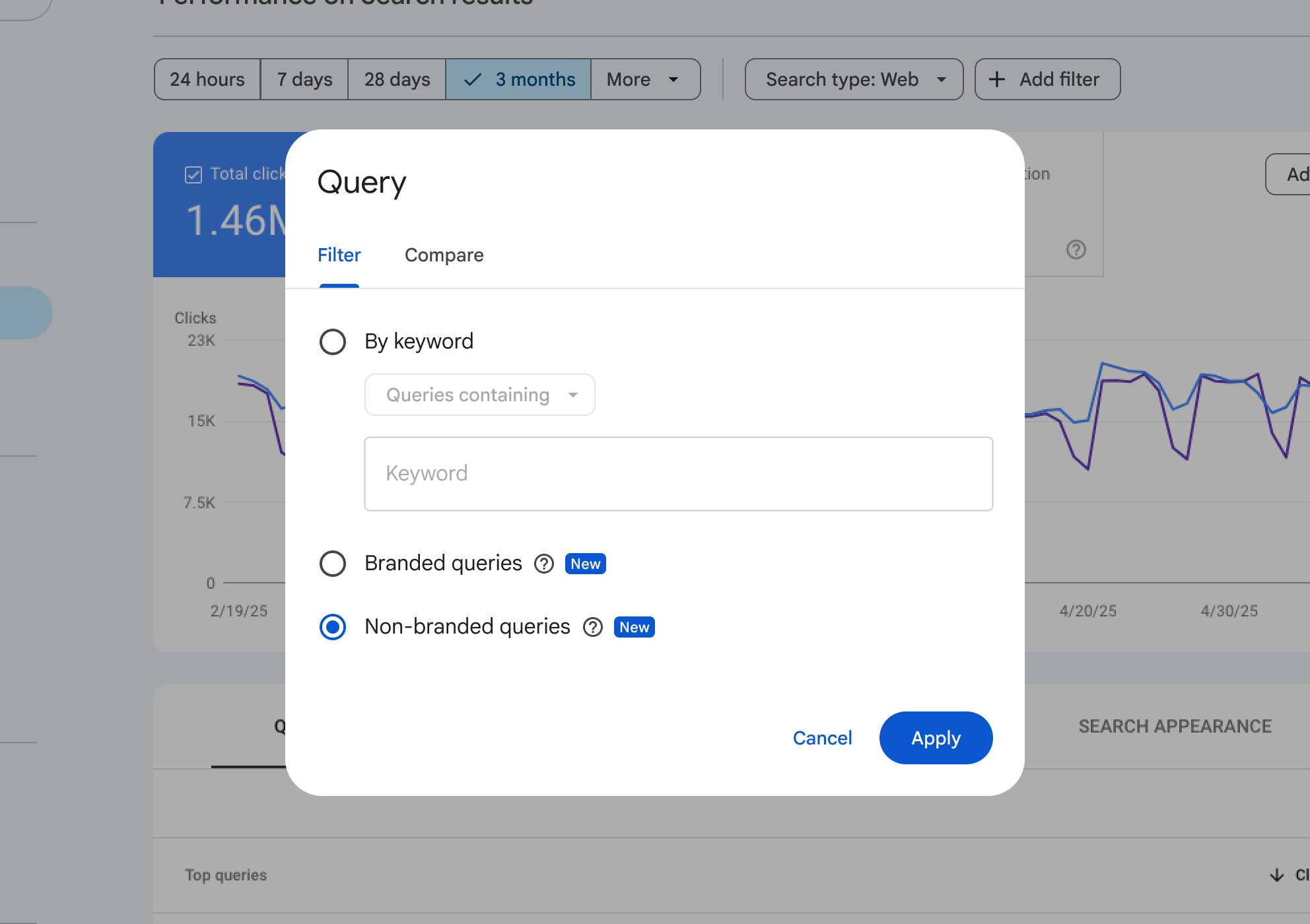
    With this new addition, I’ve found that filtering performance reports by branded or non-branded queries has never been easier. Google can now show me the percentage of traffic my site gets from either branded or non-branded sources, right from Search Console.

    This update made its debut at today’s Google Search Central event in Tel Aviv, and if you’re hearing about it now, it’s because news travels fast, especially from events like these.

    Understanding Branded Queries. Google defined branded queries for us: These are search queries that include my brand name, its variations or any brand-related products. For instance, if my brand was Google, related queries could be “Google,” “Gogle,” or even “Gmail.”

    This differentiation helps me see how returning users differ from new ones. Focusing on this can lead to higher click-through rates for branded queries. Meanwhile, non-branded ones show how new users find my content organically.

    ```json
{
  "alt": "Google Search Console filter menu for query settings with non-branded queries selected.",
  "caption": "Exploring search performance insights with Google Search Console's filter menu, focusing on non-branded queries for a three-month period.",
  "description": "This image displays the Google Search Console interface, specifically the filter menu for setting search query parameters. The menu shows options to filter by keyword, branded queries, and non-branded queries, with the latter selected. The background features a line graph representing performance data for a three-month timeframe. Key interface buttons 'Cancel' and 'Apply' are visible, providing a comprehensive tool for analyzing website performance metrics. Keywords: Google Search Console, filter, search queries, non-branded, performance analysis."
}
```

    Finding the Filter. Ready to use it? You can locate the branded versus non-branded filter within performance reports under search filters for queries. I love how it works across all search types, whether web, images, video, or news. Metrics like impressions and CTR tailored to my needs are just a click away.

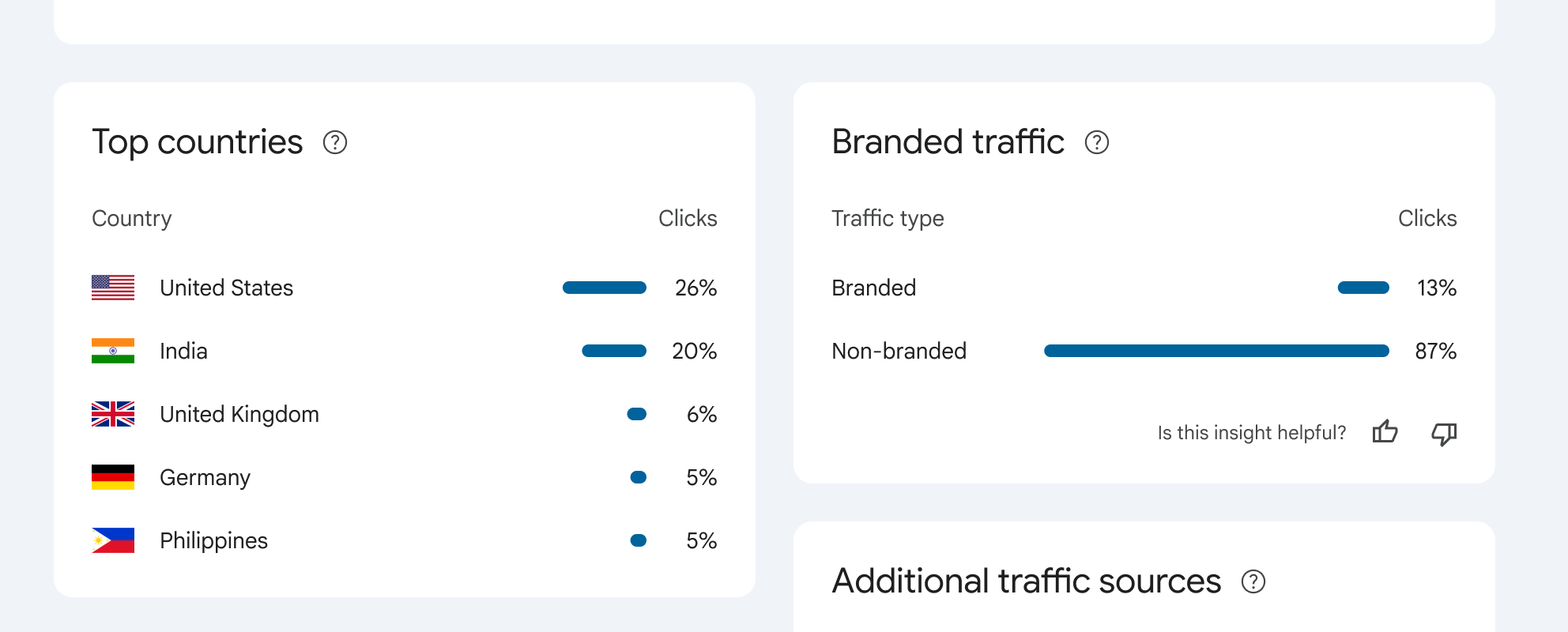
    Here’s a handy screenshot for visuals:

    ```json
{
  "alt": "Chart showing top countries and branded traffic percentages. United States leads with 26% clicks, followed by India at 20%.",
  "caption": "Discover where your traffic comes from! The United States leads with 26% of clicks, while non-branded traffic dominates at 87%.",
  "description": "This image displays two charts: 'Top countries' and 'Branded traffic.' In the 'Top countries' section, the United States leads with 26% of clicks, followed by India at 20%, the United Kingdom at 6%, and both Germany and the Philippines at 5%. The 'Branded traffic' chart shows 13% branded and 87% non-branded clicks. These insights help understand the geographic and branding sources of website traffic."
}
```
    crushpress.ai community screenshot