I recently discovered how crucial first-party data has become in the evolving landscape of AI-powered advertising. It’s fascinating to see how it shapes the optimization and measurement of automated ad campaigns.
During a chat with Search Engine Land, I learned from Julie Warneke, CEO of Found Search Marketing, about the profound impact first-party data has on profitable advertising, regardless of potential changes to Google’s third-party cookie policies.
Embracing first-party data means tapping into customer information that I own, typically stored in a CRM, like lead details, purchase history, revenue, and customer value collected from various touchpoints.
This type of data is distinct from platform-owned or browser-based data, over which I have limited control.
Digital advertising has evolved over the years. The shift from focusing on impressions and clicks to outcomes emphasizes profitable conversions, according to Warneke. Advertisers who provide AI systems with quality customer data gain a significant edge.
Although rising cost-per-clicks (CPCs) are inevitable in paid media, first-party data enhances conversion quality, revenue, and return on ad spend, making higher costs justifiable with better results.
By leveraging first-party data tied to revenue and customer value, AI bidding systems can target users resembling high-value customers, even beyond usual demographic or geographic signals, leading to better conversions.
Among campaign types, Performance Max (PMax) thrives with first-party data activation. It performs best when I shift from manual optimizations to feeding it accurate data, allowing the system to learn, as Warneke highlighted.
Even small and mid-sized businesses can leverage first-party data, as seen in Warneke’s examples of success with small customer lists. The challenge lies in setting up proper infrastructure for tracking, consent management, and data flow.
Common mistakes include weak data capture, where brands rely on browser-side tracking that falters on platforms like iOS, and broken feedback loops from sporadic CRM data uploads. Continuous data streams are crucial.
Warneke advises taking a step back to audit how data is captured, stored, and relayed to platforms. Incremental improvements can pave the way for significant long-term gains, even starting with a small portion of a budget as a test.
Ultimately, AI optimization reflects the quality of signals received. By refining first-party data, I can influence outcomes favorably, avoiding inefficiency risks.
By 2026, Google Ads automation has transformed drastically, with signal quality becoming paramount for exceptional performance. In this post, I’ll guide you on how signals drive these changes and how you can align them for optimal outcomes.
Back in 2015, I had tight control over my PPC campaigns. I directed Google on which keywords to pursue, set manual bids, and handled budgets with precision. Skillful use of spreadsheets allowed me to efficiently manage vast keyword inventories.
Those meticulously controlled days have faded. Now, in 2026, automation steers the wheel, moving beyond being a mere helper to a key driver of our advertising success. Fighting it is futile; embracing it is wise.
Automation has evened the playing field, liberating time for PPC marketers like me. But effectiveness now hinges on understanding how automation gleans insights from our data.
This piece delves into the intricacies of Google Ads signals, illustrating how to preserve their quality and prevent automation from veering off course.
The Mechanics of Signals in Automation
Contrary to seeing Google’s system as a mystery, it requires input of robust signals to perform optimally. Accurate signals lead to triumph; flawed data gears us for failure.
Automation runs on the signals I provide. AI interprets these signals, adjusting bids and targeting with unparalleled precision and efficiency.
While traditional documentation might suggest a primary focus on audience segments, the reality is that automation learns from a broader spectrum of signals.
Decoding What Qualifies as a Signal
In my experience, every component in a Google Ads account serves as a signal—shaping Google’s algorithm to determine successful advertising strategies.
Structural elements, budgets, conversion quality, and more provide insights into user intent, modeling a detailed blueprint for targeting.
The entire ecosystem, from landing pages to real-time data, contributes—guiding the AI in its decision-making process.
Here’s what stands out:
Conversion Actions: These signal what success looks like for my business.
Keyword Signals: Essential for decoding user search intent.
Creative Signals: Influences user attraction via visual cues.
Landing Page Signals: Ensures alignment with user expectations.
Bid Strategies: Communicates my advertising priorities to Google.
Innovation in signal interpretation has shifted, with the introduction of campaign total budgets, indicating a comprehensive financial commitment to Google.
Retailers, like Escentual.com, witnessed increased traffic through this approach, showcasing how signal precision offers tangible results.
Understanding Auction-Time Realities
Every user search triggers a unique bid calculation based on myriad signals, moving beyond generalized assumptions to precise decision-making.
This tailored approach ensures identification of “pockets of performance,” optimizing for predicted user outcomes aligned with our objectives.
Without quality signals, however, the system is left with assumptions, demonstrating the critical nature of providing accurate inputs.
Identifying and Prioritizing Signals
Not all signals wield equal influence. I’ve recognized that conversion signals bear the most weight, providing essential guidance for AI performance.
Conversion Dominance
Accurate conversion tracking underpins robust algorithmic learning, crucial for successful B2B and eCommerce advertising.
Enhanced Conversions and First-Party Data
In an era where third-party cookies disintegrate, relying on enriched data tracking is invaluable for understanding user interactions.
Quality audience signals and custom segments are imperative, enabling nuanced targeting, especially in niche markets.
Signal Category
Specific Input
Weight
Importance
Primary
Offline Conversion
Critical
Speaks to profit, not mere leads.
Primary
Value-based Bidding
Critical
Prioritizes profitable products.
Secondary
Customer Match Lists
High
Offers AI a model audience.
Tertiary
Keywords
Medium
Identifies search semantics.
Pollutant
Soft Conversions
Negative
Skews intent towards lower value.
Proper signals form the foundation for successful automation, requiring constant vigilance and correction of detrimental factors like signal pollution.
Combating and Correcting Signal Drift
Signal drift occurs when automation diverges from desired outcomes. Identifying subtle shifts in user targeting and making strategic corrections is key.
By tightening conversion signals, reinforcing audience data, and refining campaign structures, I can steer systems back to intended paths.
Reinforce Audience Patterns: Update lists and segments.
Adjust Campaign Structure: Separate high and low intent traffic.
Remaining proactive is about guiding automation, ensuring the system aligns with my business goals while leveraging Google’s robust AI insights.
Building a Winning Signal Strategy
Creating a coherent signal strategy in 2026 requires segmenting data wisely, isolating brand traffic, and differentiating products by ROAS for clarity in campaign objectives.
Achieving Competitive Edge
In a landscape where automation is universally accessible, the true advantage lies in the quality of signals I feed to Google.
By protecting these signals and timely correcting any drift, I ensure Google’s automation works for me, transforming it into a powerful asset in my advertising arsenal.
I recently discovered an exciting update from Google Ads that promises to enhance the security of high-risk account changes. They have silently introduced a multi-party approval feature that ensures a second administrator must approve specific actions before they are finalized. This step adds a critical layer of protection against unauthorized or malicious changes, enhancing the overall safety of our accounts.
This new feature is particularly important as our ad accounts grow larger and carry more value. A single unauthorized change can quickly disrupt campaigns and even affect our billing. By requiring approval from another administrator, this feature effectively reduces such risks without hindering our regular campaign management processes.
For agencies and large teams like mine, this tool becomes invaluable. It helps us avoid costly mistakes and significantly bolsters our account security. I appreciate how Google is responding to the increasing necessity for robust access control.
Here’s how it works: when I, as an admin, initiate a sensitive change, Google Ads automatically sends an approval request to other eligible admins. This request is delivered as an in-product notification, requiring an action within 20 days—either approval or denial—otherwise, it simply expires, and the change will not be implemented.
Moreover, tracking the status of these requests is hassle-free. Each change request is tagged as Complete, Denied, or Expired, allowing my team to easily monitor and review our account changes.
To manage these approval requests, we can head over to the Access and security section within the Admin menu. It’s quite straightforward and keeps us in the loop with all ongoing requests.
This update points to a growing concern about account security, especially for advertisers managing large teams with multiple user permissions. With reports of expensive hacks escalating, this added security is a much-welcomed relief for us.
In the end, although multi-party approval may add a bit of friction to the process, it’s definitely a good kind. It grants us more control over who can make vital changes to our accounts, thus protecting them from unauthorized access. In my opinion, it’s a prudent step towards safer, more secure ad management.
As a new advertiser, I’ve often found myself overwhelmed by Google’s Performance Max recommendations.
While well-intentioned, following them blindly can reduce my control and insight, leaving me to wonder if I’m truly making the best strategic decisions.
Initially, my journey with Performance Max felt promising. Google Ads reps offered support, but I soon realized their alignment was more with Google’s interests than my own business objectives.
It’s important to remember that they don’t have insight into my specific needs or business goals. They encourage the adoption of new features that might not align with my early-stage needs.
Understanding Google Reps’ Role
Google Ads reps are not strategic consultants for my business. Their main role is to promote Google’s products and services.
Your margins or cash flow are not their concerns. Their focus isn’t on whether my ads are profitable, but on pushing newer ad types and increasing my ad spend.
Therefore, understanding their incentives helps in taking their advice with the right perspective.
Performance Max provides efficiency and scale for Google. However, for a new advertiser, this can lead to unclear insights and misaligned strategies.
Performance Max: Who Does it Really Benefit?
Performance Max often benefits Google more than it benefits me as the advertiser.
Google controls how my budget is allocated across various channels, offering limited visibility into how these funds drive results. For me, this can be challenging, especially when new and needing clear insights.
This model monetizes Google’s ecosystem efficiently, but leaves me with diluted budgets and unpredictable costs.
Understanding these dynamics helps ensure my campaign choices are aligned with my actual business needs.
Rethinking Google’s ‘Best Practices’
What Google labels as ‘best practices’ might not fit my specific business strategy.
Recommendations often stem from aggregated data rather than being tailored for my unique circumstance, creating a gap between my needs and their blanket solutions.
For budding advertisers like myself, what’s globally optimal might not serve my business nuances and constraints.
The Value of Earning Automation
I’ve learned that automation success is something to be earned with data, not started with blindly.
Shopping Ads have provided me with high-intent, controllable data—essential for testing and learning.
This approach allows a clearer understanding of what truly works, paving the way for informed decisions.
When done right, these strategies lay a solid foundation for future automation without risking budget waste.
A Lesson in Practicality: Reviewing a Case Study
Consider a chocolatier’s experience—a new Google Ads account, $3,000 spent, but only one purchase. Incorrect conversion tracking led to misleading data.
After reworking the setup to a Shopping campaign, results began improving quickly, informing future campaigns with real performance data.
Why Shopping Ads Offer Insight
Focused on real behaviors and intent, Shopping Ads give granular control and transparency, which is crucial when each marketing dollar counts.
This control allows me to experiment deliberately, understanding and scaling the strategies that work.
Adopting a Hybrid Approach
A mix of Standard Shopping and selective Performance Max can be powerful once a data foundation is set.
This balance ensures sustainable growth by protecting proven strategies while allowing room for innovation driven by Performance Max.
Strategizing for Long-term Success
Starting small with clear data-driven campaigns creates a launchpad for successful automation.
By validating products and refining acquisition costs through Shopping Ads, I set the stage for Performance Max to elevate proven strategies.
It’s all about disciplined, strategic advertising that safeguards my investment and fuels long-term growth.
Have you ever wondered where your Performance Max ads truly run? With the latest Google Ads API v23 update, we finally have the answer!
An exciting change has arrived with the v23 Ads API launch. Now, Performance Max campaign results can be broken down by channel, including Search, YouTube, Display, Discover, Gmail, Maps, and Search Partners. Previously, all your performance data was lumped together, obscuring critical insights.
Here’s the inside scoop. In earlier API versions, I always received a MIXED value for the ad_network_type segment in my Performance Max campaigns. But with v23, these results have transformed into distinct channel enums. It’s a major step forward for those of us who crave precision in reporting and optimization.
Why this matters to us. This update isn’t just about new features — it reshapes how we comprehend Performance Max. With channel-specific reporting now on the table, marketers gain much-needed clarity on where these ads are displayed.
How we can leverage this. Now, we can access channel-level data at the campaign, asset group, and even individual asset levels. This means we can observe how each creative piece performs across Google’s array of platforms. Coupled with v22 segments like ad_using_video and ad_using_product_data, the possibilities for optimizing video performance on YouTube or Shopping ads on Search are endless.
Attention, developers. Upgrading to v23 unveils a level of reporting detail that was previously unreachable. If your system relied on the old MIXED values, it’s time to gear up for the new channel enums.
Keep an eye out for:
Channel data is accessible only for dates beginning June 1, 2025.
Remember, asset group–level channel reporting remains exclusively within the API and is not visible in the Google Ads UI.
The takeaway. The newest Google Ads API rollout quietly transforms what was once a black-box campaign category into an analyzable channel-specific type. Finally, advertisers like you and me can dive into the metrics we’ve long sought.
As I delve into Google Ads API v23, I’m excited to share this update marks the beginning of a faster-paced release cycle in 2026. With this update, I’m now able to access improved Performance Max reporting, sophisticated AI-driven audience tools, and more detailed campaign controls.
What’s new:
Performance Max Transparency: I’ve discovered that PMax campaigns now offer ad network type breakdowns, making it easier for me to analyze performance.
More Detailed Invoices: Through InvoiceService, I can retrieve campaign-specific costs, regulatory fees, and adjustments, allowing for more precise financial tracking.
More Precise Scheduling: It’s a game-changer for me to now schedule campaigns using precise start and end date-times instead of limiting to date-only fields.
Local Data Access: I’m now able to access store location details via PerStoreView, which matches the data in the Stores report accurately.
New Audience Dimension: With life-event-based audience building through LIFE_EVENT_USER_INTEREST, my Insights tools are more powerful than ever.
Smarter Demand Gen Planning: The conversion rate forecasts I rely on now vary by surfaces such as Gmail and Shorts, enhancing my strategy planning.
Generative AI Audiences: I can efficiently translate free-text audience descriptions into structured attributes, simplifying audience target creation.
Expanded Shopping Metrics: The inclusion of new competitive and conversion metrics by conversion date helps me improve my shopping ads performance.
Why I care: A quicker update cycle means I can leverage new features faster. With Google’s shift towards automation and AI-driven insights, staying on top of these updates helps me optimize campaigns effectively.
Between the lines: These updates require my team to upgrade client libraries and code, so scheduling development time is crucial to benefit fully from v23.
Bottom line: The Google Ads API v23 is setting the stage for 2026. I’m ready to embrace these improvements that introduce faster releases coupled with enhanced AI insights, refined reporting, and better campaign control for large-scale advertisers.
I’ve noticed something pretty exciting in Google’s recent update to Performance Max. They have introduced one-click ad previews, making it incredibly easy to review creatives directly from the asset group table. This update feels like a breath of fresh air to anyone who’s ever been bogged down by the previous clunky process.
What’s new? Now, with just a click on any image or video within the Asset Groups table, I can instantly see how my ads will look across different Performance Max placements, without needing to navigate away from the page.
Why we care. Before this, checking ad previews meant jumping through various hoops into different views or settings. Now, everything is streamlined, keeping my workflow smooth and efficient, which makes creative quality assurance and iteration a lot less of a hassle.
Between the lines. There has been consistent feedback about the transparency limitations of Performance Max. So, even these small UI changes that bring creatives to the forefront are a big deal for me and many others in the field.
The bottom line. While one-click previews aren’t a game-changer in terms of strategy, they are a real time-saver. This especially helps when I’m handling large asset libraries or frequent creative updates.
First seen. This handy update was first spotted by Paid Search marketer Bia Camargo, adding another reason to appreciate these nuanced yet impactful changes.
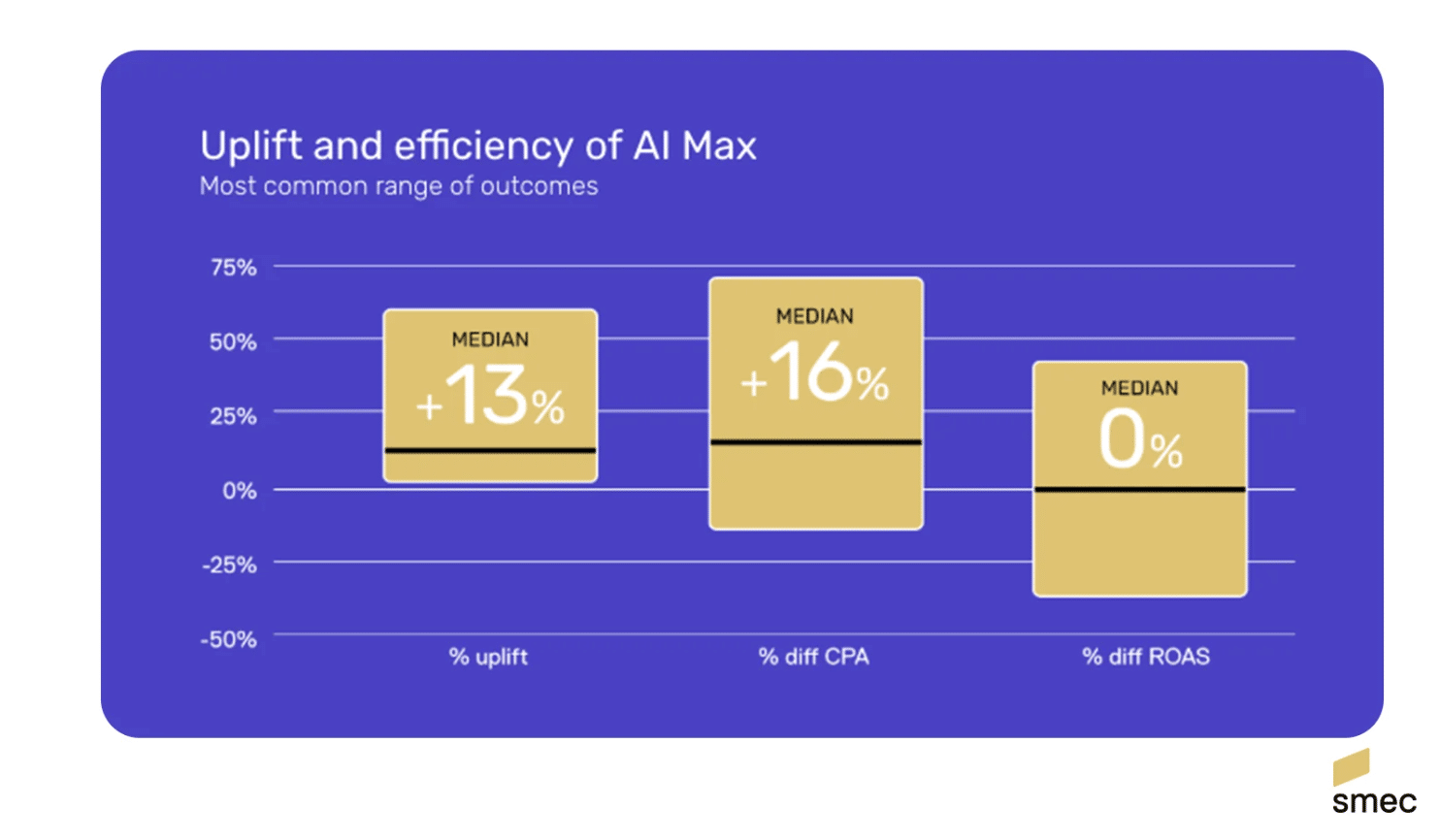
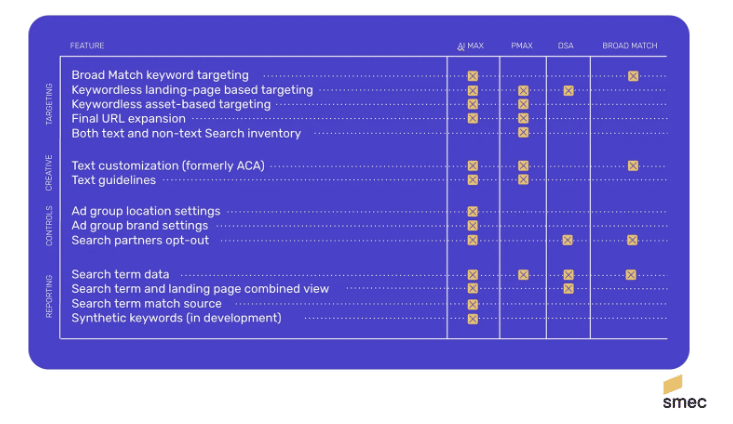
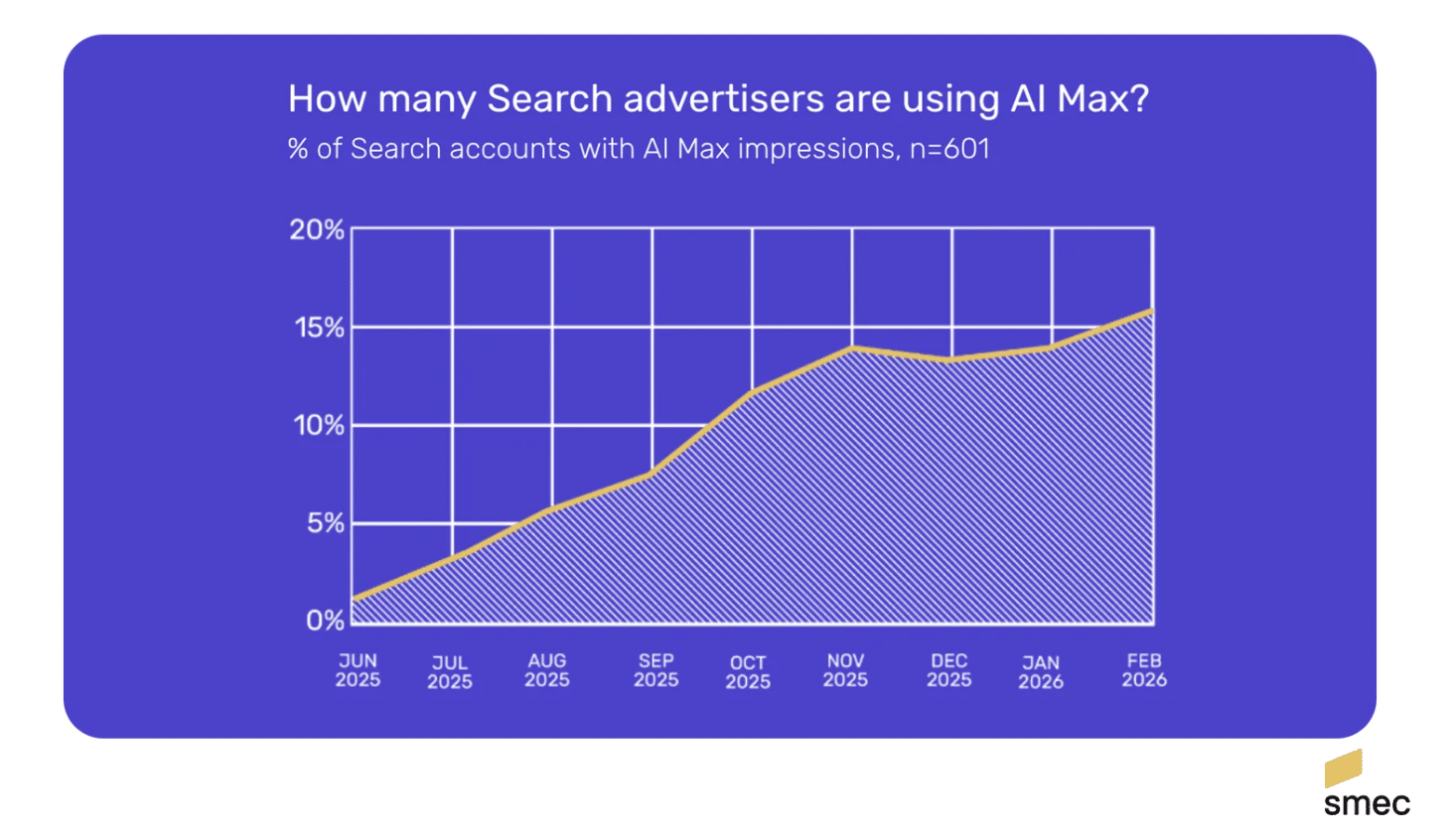
I recently discovered the potential of Google AI Max and, like many of us, wondered if my account is ready to harness its power. Google AI Max promises to unlock additional conversions if set up correctly. Before jumping in, I knew I had to ensure everything was primed and in place.
Google’s AI Max is designed to transcend traditional keyword targeting by utilizing various signals to determine ad displays. It’s a game-changer for those with a history of broad match success. However, if not optimized, it could quickly deplete your budget.
One important clarification: using AI Max is not mandatory for ad appearances in AI Overviews. Broad match keywords can place ads in AI Overviews regardless of AI Max usage. I see AI Max more as a tool to expand conversions beyond mere AI Overviews.
We’ll explore the essential steps to review before testing AI Max. These insights are crucial to ensure our campaigns are fully prepared.
What to Check Before Enabling AI Max
Accurate Conversion Tracking
Having precise conversion tracking is vital. AI Max optimizes based on our defined success metrics. Inaccurate or inflated conversions can lead to poor AI decisions. This insight made me double-check everything.
Automated Bidding with a Conversion-Focused Strategy
For broad match to function optimally, a conversion-centered bid strategy is necessary. Options like ‘Maximize Conversion Value’ or ‘Target CPA’ should align with your updated strategy. My experiments indicated more consistent results with target bids than max bids.
Using max bids without watching over budget and collected data might not yield the best results. I’ve learned to keep a careful eye on it.
Conversion Volume
AI Max needs sufficient data to perform well. With over 100 conversions monthly, its reliability has been strong, provided there’s a positive history with broad match. Based on this, I aimed to test in campaigns with at least 30 monthly conversions.
No Impression Share Lost Due to Budget
If budget constraints already hinder impression share, AI Max could exacerbate this issue. Prioritize spending on top keywords and let AI Max utilize remaining funds for experimentation.
Proven Broad Match Success
AI Max treats keywords as broad match and extends beyond them. Without past success, it could be ineffective. Preparing through ad group optimization and new ad testing has been my strategy.
Should You Use URL Expansion?
Enabling URL expansion allows Google to pick any webpage for landing when AI Max triggers an ad. However, indiscriminate use can be detrimental—excluding non-conversion-oriented pages mitigates risks.
Those who created landing pages for specific geographies should carefully manage page exclusions to avoid mismatching.
Should You Try Automatically Created Assets?
I’m hopeful about automatically created assets. They can significantly enhance messaging but require caution to avoid irrelevant sitelinks and incompatible callouts. Establishing clear guidelines ensures alignment with brand objectives.
How to Test AI Max
Because of its performance inconsistencies with brand keywords, I’ve found it best to initially focus on non-brand keywords in AI Max tests. Starting with successful ad groups rich in conversion data offers the best chance to test its potential.
Operating AI Max at the ad group level via the Google Ads Editor proved efficient in my testing experience.
Is Your Account Ready to Test AI Max?
As AI Max continues to evolve, its integration into our existing systems may provide significant advantages. But, readiness involves assessing if our accounts meet all setup criteria before diving in. By following my steps, you’ll recognize its readiness and potential for success.
I’ve recently experienced a glitch in Google Ads that’s been quite the headache. It has unexpectedly removed the option for adding notes in some accounts, making change tracking and documentation far more challenging. I know how important these notes are for keeping track of optimizations and performance shifts.
This issue was initially brought to my attention by Odi Caspi, a fellow paid search consultant. Over the past couple of weeks, the problem has surfaced sporadically, causing quite a bit of disruption. Let me share what advertisers are meant to see in their dashboard:
I find it incredibly essential to understand why we care about this issue. Account notes are an invaluable tool for agencies and in-house teams to trace changes over time. When we lose the ease of access to these notes, troubleshooting performance fluctuations becomes tougher, and our collective memory weakens.
In accounts affected by this bug, the “Add note” option simply vanishes from the popup where I usually annotate changes. It’s an intermittent issue, with the functionality sometimes working perfectly and disappearing at other times.
As for workarounds, Caspi mentions that clicking on an existing note could reveal the option to add a new one. However, this method works only if there’s already a note available within the current date range we’re examining.
Another workaround I came across, suggested by Paid Media Specialist Dids Reeve, involves opening the Notes panel from the “More” menu. It seems this option still allows for adding notes in some cases.
Looking forward, it’s frustrating not knowing when Google might officially recognize or address this bug. Until it’s resolved, I’ll need to be more vigilant about documenting significant changes using alternate methods.
The first reported instance of this glitch came from Caspi himself, who shared insights from his campaign reports on LinkedIn.
A recent bug in Google Ads is causing frustration among advertisers, as it has started blocking any attempts to edit Performance Max (PMax) asset groups. I’ve personally encountered error messages when trying to update asset groups, making it impossible to save any changes directly in the platform.
Why This Matters to Us. As an advertiser, the freshness and adaptability of our assets are crucial for campaign success. Without the ability to update asset groups, there’s a risk of my campaigns running with outdated content, potentially harming their performance and efficiency.
What I’m Experiencing. Like others, I’ve faced an error message stating, “An error occurred. Please try again later. Value is required,” each time I’ve tried editing any asset group details. This error shows up in the Google Ads UI, stopping me from saving any changes even if all required fields appear to be filled.
Google’s Response. Google acknowledges this issue and is looking into it. However, they haven’t provided a timeline for a fix or any further guidance through their official channels yet.
Temporary Workaround. For now, I’ve found that using the Google Ads Editor allows me to make necessary changes and upload them directly. While this method works, it introduces additional steps that disrupt my usual workflow of managing PMAX via the web interface.
Next Steps for Advertisers. If you’re running Performance Max campaigns like I am, it’s essential to revisit recent changes to ensure they’ve been saved correctly. In the meantime, directing any necessary updates through Ads Editor may be a wise choice until Google resolves the issue.
Looking Ahead. Until Google addresses this glitch, a new level of uncertainty might accompany managing Performance Max campaigns. It’s important for us to double-check our versions and explore alternative workflows.
First to Report. PPC professional Chelsea Harding initially flagged this issue and shared her experience about the error message on LinkedIn.