Category: PPC

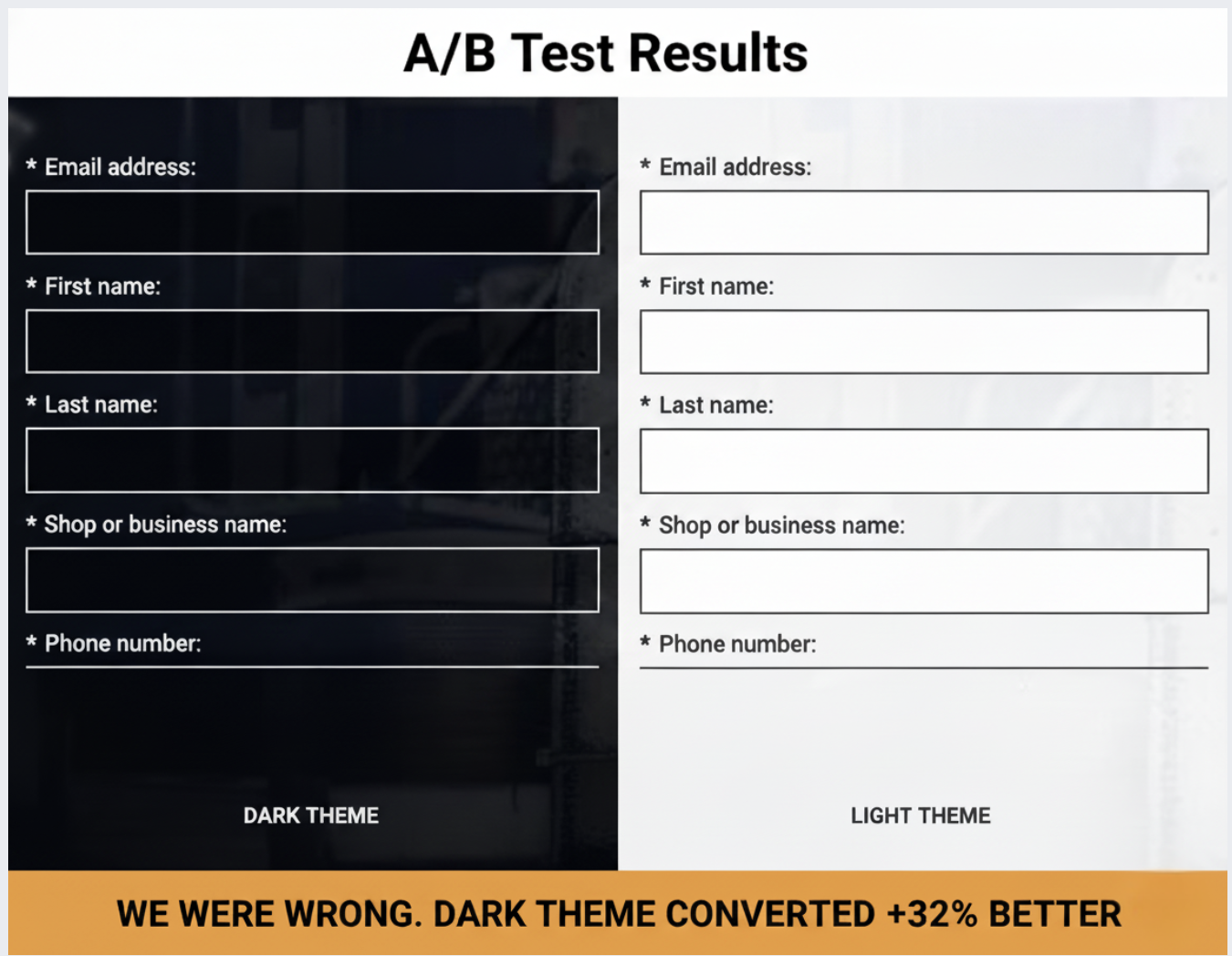
  • How Dark Themes Outperformed in Our B2B Landing Page Test

    How Dark Themes Outperformed in Our B2B Landing Page Test

    I have to admit, I was surprised when our dark-themed landing page outperformed the light one.

    Everything I believed about conversion optimization suggested the light background would dominate.

    Light themes are generally the norm for B2B lead generation due to their readability and clean look, aligning perfectly with accessibility standards.

    Unbounce’s study of 41,000 landing pages backs up this trend for light backgrounds. Betting on the light theme seemed like a safe decision.

    However, after dividing our paid traffic equally between a dark and a light landing page for our industrial fleet repair SaaS, despite a 16.62% higher CTR for the light variant, it resulted in 42% fewer conversions.

    This isn’t a call for adopting dark themes universally.

    Rather, it’s a case study showing how audience context and industry-specific associations can outweigh best practices drawn from broader samples.

    We cater to a niche in the B2B SaaS market, particularly serving the transportation industry—businesses maintaining commercial vehicles and equipment.

    Our intended audience includes shop owners and operators engaged in industrial settings, managing technicians, equipment, and demanding commercial clients.

    Going into this test, my expectations were clear.

    I anticipated light backgrounds would be more effective for our text-heavy lead generation pages, given their emphasis on whitespace and visual hierarchy. Our 7-field form aimed at busy shop operators seemed poised for success with light mode.

    I also assumed blue CTAs would yield better results, with blue being associated with trust and security crucial for B2B software purchases. Thus, we used a blue CTA button.

    I was incorrect on both fronts.

    We conducted this test by isolating the visual design, directing traffic through Google Ads and Meta to two vastly different landing pages with identical copy.

    The control page sported a dark theme with a black background, white text, high-contrast form fields, and a subtly outlined black CTA button. The header lacked a brand logo, intensifying the focus on the content.

    Conversely, the treatment page featured a light theme, employing white and light gray elements, dark text, and a blue CTA button. Here, our brand logo was prominently placed in the header.

    All other variables remained the same, emphasizing the importance of isolating design as the sole differentiating factor.

    This test spanned three to four weeks, with Google Ads search campaigns topping $8,205.97, yielding 767 clicks and 30 conversions.

    The light theme’s seemingly advantageous CTR masked the truth—it attracted less qualified traffic, converting at a similar or worse rate than expected.

    A consistent preference for the dark theme also emerged in Meta tests, reinforcing the role of audience preference rather than algorithmic anomaly.

    Understanding why the dark theme won lies in recognizing how it aligns with the psychological and environmental cues of our target audience in the industrial sector.

    The dark theme resonated well with the familiarity of industrial aesthetics—functional, robust environments characterized by dark, metallic tones.

    The contrast provided by white form fields on a dark background was unmistakable, drawing eye attention naturally.

    Dark themes carry a tone of seriousness and value, fitting for the weighty decision-making expected in B2B software acquisitions.

    Moreover, embracing familiar industry conventions, the dark interface enhanced trustworthiness and familiarity.

    This test taught me that testing design psychology is just as crucial as testing visual elements themselves. Before embarking on similar experiments, consider what your design communicates to your audience rather than just aesthetic appeal.

    Finally, ensure your experiments include significant contrast between variations while keeping other elements constant to draw accurate conclusions.

    Audience context should guide optimization efforts more than generalized best practices. By focusing on specific audience needs and signals, I’ve learned that real, lasting optimization success can be achieved.


    Inspired by this post on Search Engine Land.


    crushpress.ai community screenshot
  • Master PPC Brand Protection: Safeguard Your Brand Now

    Master PPC Brand Protection: Safeguard Your Brand Now

    I never realized how much traffic I was losing every day until I learned about unauthorized bidding, affiliate violations, and ad hijacking. It’s a common issue, but don’t worry, I’m here to guide you through building a robust brand protection strategy in paid search.

    Did you know that ad fraud reached an estimated $84 billion in global digital ad spend in 2023? If you’re facing a steady rise in branded CPCs or see competitors continuously appearing above you in searches for your own name, this guide is exactly what you need to understand why and what steps to take next.

    Brand protection in PPC is about defending your brand from unauthorized use of your branded search terms in PPC ads and any deceitful ad placements. My main goal here is to make sure that people searching for my brand or product name find my official pages rather than those of a competitor, affiliate, or reseller.

    Having a well-executed brand protection strategy not only safeguards my traffic but also reinforces my brand’s image and fosters customer loyalty. Without it, I risk facing significant losses, such as higher CPCs, rising affiliate costs, and losing customer acquisition opportunities.

    ```json
{
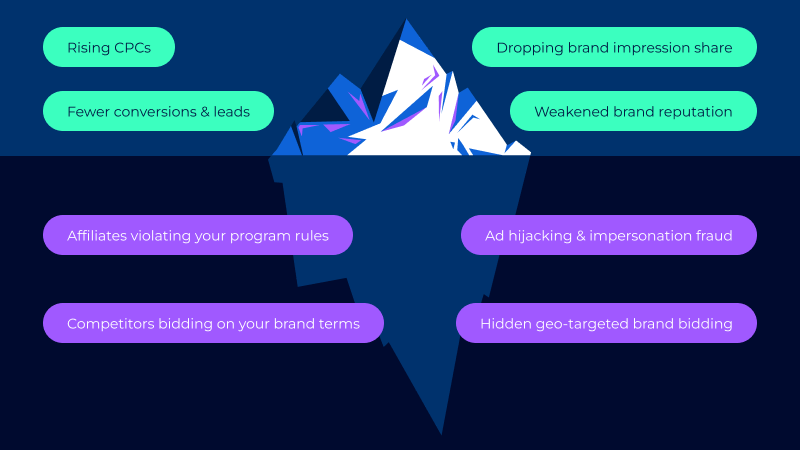
  "alt": "Iceberg diagram depicting visible and hidden risks in advertising, such as rising CPCs and ad fraud.",
  "caption": "Above the surface are visible challenges like rising CPCs, but below lurk hidden threats like ad fraud and rule violations.",
  "description": "This iceberg diagram illustrates the visible and hidden threats in digital advertising. Above the waterline are obvious issues like rising CPCs, fewer conversions, dropping impression share, and weakened brand reputation. Below it, hidden risks such as rule violation by affiliates, ad hijacking, competitors bidding on brand terms, and geo-targeted brand bidding are featured. This visual portrays the complexity of managing brand visibility and the unseen challenges underneath."
}
```

    My brand protection activities include:

    • Monitoring who bids on my branded keywords.
    • Spotting unusual spikes in CPCs or impression share.
    • Identifying unauthorized trademark use in paid search.
    • Detecting hidden, geo-targeted ads meant to evade detection.
    • Enforcing compliance rules for affiliates and partners.

    Three main sources of threats exist:

    • Competitors: They target my branded searches to tap into high-intent traffic, intercepting my audience.
    • Affiliates: If I miss their dishonest tactics, I end up paying for leads I would have acquired anyway, increasing costs without gaining additional customers.
    • Fraudsters: Their advanced tactics can cause serious financial and reputational harm to my brand.

    Without protecting my brand in paid search, I’m at risk of these common threats:

    ```json
{
  "alt": "PPC Brand Protection Framework diagram with five components including Account Structure, Negative Keywords, Affiliate Rules, Monitoring & Automation, and Enforcement.",
  "caption": "Discover the PPC Brand Protection Framework: a comprehensive strategy encompassing Account Structure, Negative Keywords, Affiliate Rules, Monitoring & Automation, and Enforcement to safeguard your online presence.",
  "description": "This image illustrates the PPC Brand Protection Framework, highlighting its five integral components: Account Structure, Negative Keywords, Affiliate Rules, Monitoring & Automation, and Enforcement. Each component is depicted in a black box with icons, all pointing to the central framework. Designed in shades of blue and purple, this diagram provides a strategic overview for maintaining and protecting brand integrity in pay-per-click advertising. Keywords: PPC, brand protection, advertising strategy, digital marketing."
}
```
    • Brand bidding: Others bid on my branded queries to capture high-intent searches, driving up CPCs and reducing my impression share. Over time, this forces me to spend more to regain position, lowering my return on investment (ROI).
    • Ad hijacking: Competitors or fraudsters mimic my ad structure to deceive users into clicking what they believe is my official ad.
    • Malicious redirects: Users clicking on “brand-looking” ads might end up on phishing, malware, or low-quality pages.
    • Ad copy misalignment: Affiliates may use unapproved or outdated messaging harming my brand image.
    • Misleading ad copies: Ads that position another product as a direct substitute for mine to divert traffic and conversions.

    Given these risks, a dedicated PPC protection strategy is crucial. Without it, my acquisition costs could rise significantly, and I might lose customers at the critical decision-making stage.

    In today’s PPC landscape, not protecting my brand erodes trust, skews attribution, and weakens my marketing efforts over time. Consequently, conversions drop, ROI slips, and my paid media effectiveness diminishes.

    Important stats to consider:

    ```json
{
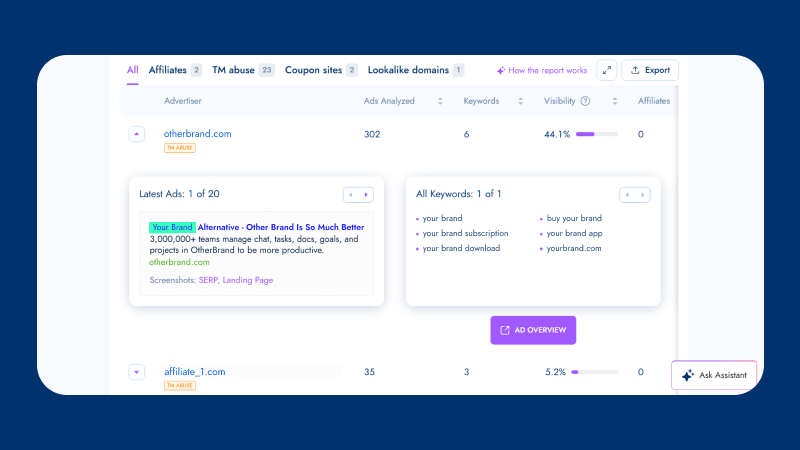
  "alt": "Dashboard screenshot showing advertisement analysis for online brands with metrics like ads analyzed, keywords, and visibility.",
  "caption": "Explore an insightful dashboard that reveals key metrics in advertisement analysis, offering a glimpse into online brand performance.",
  "description": "This image shows a detailed dashboard interface for analyzing advertisements of online brands. It highlights metrics such as the number of ads analyzed, keywords tracked, and visibility percentage. The dashboard provides insights into two advertisers, including their latest ads and all keywords used. Designed for easy navigation, it includes options for how the report works, exporting data, and asking assistance. Key features are SEO-focused, aiding in productivity and brand management."
}
```
    • Global ad fraud costs are projected to rise to $172 billion by 2028 (Statista).
    • 69.7% of marketers reported issues with “spam or fake lead submissions” in their paid media campaigns (Lunio).
    • U.S. advertisers saved $10.8 billion through anti-fraud initiatives in 2023 (TAG).

    For an effective brand protection strategy, I employ these PPC tactics:

    • Account structure: I ensure my campaigns are clearly segmented to easily spot anomalies in CPCs and impression share.
    • Negative keyword strategy: I use targeted negatives—partner names, resellers, and irrelevant variations—to cut out the noise.
    • Affiliate rules: I set clear policies to minimize violations and facilitate compliance enforcement.

    Automation and monitoring play a crucial role in a strong brand protection strategy. Relying on automated monitoring, I can catch threats early and resolve them promptly, preserving my budget and performance metrics.

    With Bluepear, I detect unauthorized bidding, affiliate violations, and suspicious competitor activities. Real-time alerts help me take swift action as issues appear.

    ```json
{
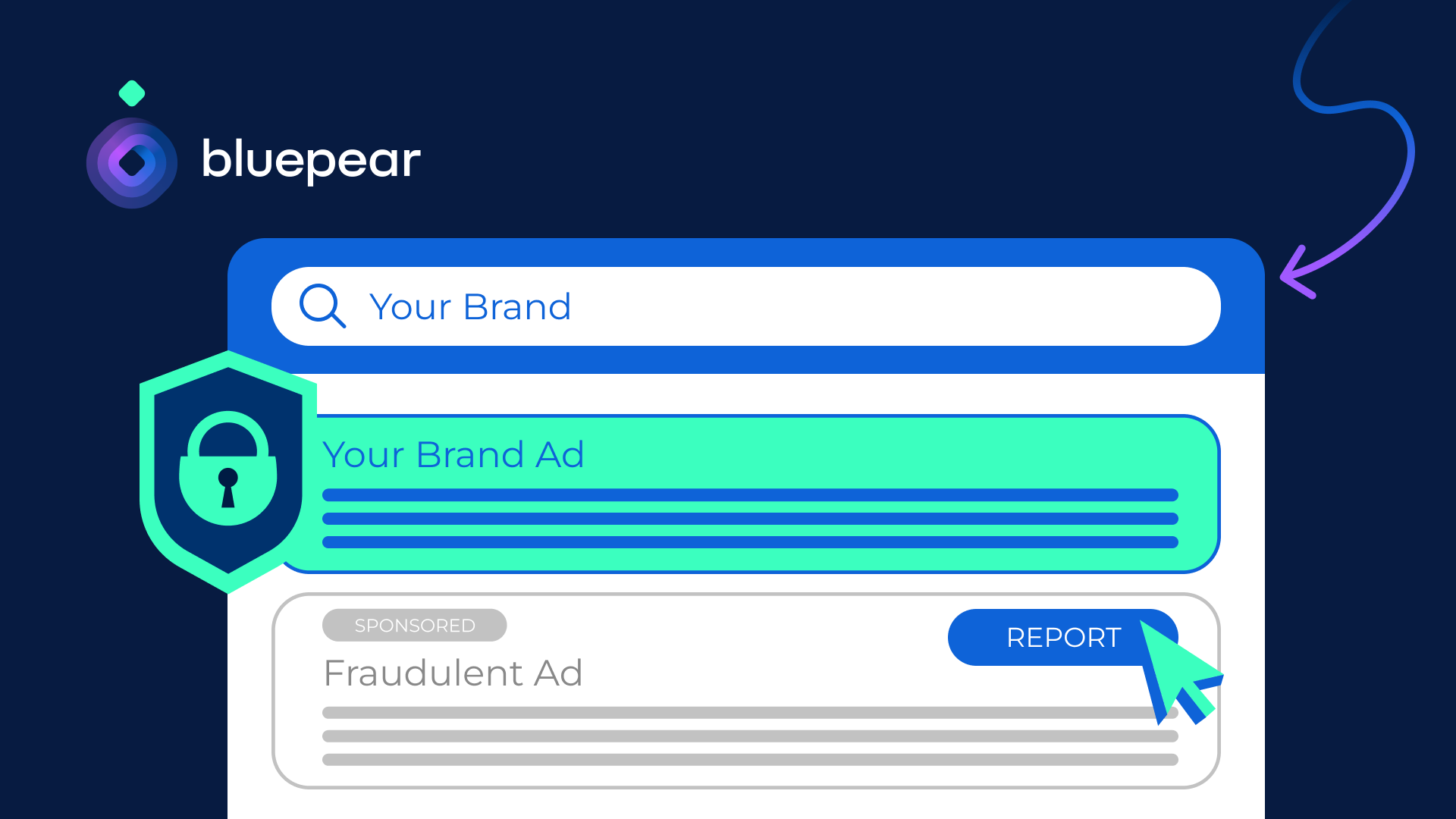
  "alt": "PPC Brand Protection with Bluepear featuring a padlock shield icon on a dark background.",
  "caption": "Secure your brand with Bluepear's PPC protection. Enjoy easy signup and instant activation for real results!",
  "description": "This image promotes Bluepear's PPC Brand Protection service. The design features a blue shield with a padlock, symbolizing security. The text highlights key benefits like easy signup and instant activation. Bluepear’s logo is at the bottom left, set against a dark background, making it visually striking and modern."
}
```

    Metrics are vital in measuring my brand protection strategy’s effectiveness. I track:

    • Violations count: The number of unauthorized activities detected on branded searches over time.
    • Enforcement rate: How efficiently I respond to and handle these violations.
    • Cost savings: The budget I recover by curbing CPC inflation and preventing commission leakage.
    • Branded CTR recovery: How removing violators improves my visibility and click-through rates.

    Blueprint has helped companies like Car.co.uk and Rhino Affiliates successfully protect their brand from PPC threats. By adopting similar strategies, I ensure that my brand remains competitive and trustworthy in the digital landscape.

    With Bluepear’s platform, I automatically protect my brand without dedicating significant time to manual monitoring. After signing up, I set up my account in just 10 minutes, gaining access to a powerful monitoring tool. This system has allowed me to quickly identify and act against brand bidding, affiliate violations, and hidden ads.

    Ultimately, by using tools like Bluepear, I not only protect my brand but also enhance my marketing efficiency, leading to better ROI and more robust brand integrity.

    In conclusion, a solid PPC brand protection strategy is no longer optional—it’s a necessity in today’s competitive landscape. By continuously monitoring, enforcing rules, and leveraging automation, I keep my brand safe and thriving.

    Discover more about how you can protect your brand. Try Bluepear’s solution for brand protection and start detecting hidden brand bidding in minutes.


    Inspired by this post on Search Engine Land.

    crushpress.ai community screenshot
  • Revolutionize Your Google Ads API Interaction with New Developer Assistant

    Revolutionize Your Google Ads API Interaction with New Developer Assistant

    I can’t contain my excitement as Google unveils the Developer Assistant for the Google Ads API. This breakthrough tool allows us, as advertisers and developers, to leverage natural language to create, manage, and export Ads API queries effortlessly.

    Google has introduced the Google Ads API Developer Assistant v1.0, an innovative Gemini CLI extension. It empowers us to interact with the Ads API seamlessly, transforming our everyday language into instant answers, functional code, and even real-time API calls.

    How it works: Embedded within the Gemini CLI, the assistant utilizes project contexts from GEMINI.md and configuration files to generate precise code tailored to our specific environment. With a simple query like, “How do I filter by date in GAQL?”, I receive immediate assistance. If I describe a task, such as “Show me campaigns with the most conversions in the last 30 days,” it provides both the GAQL query and a well-optimized Python script using the google-ads-python client library.

    Key features include: The ability to execute read-only API calls directly from the terminal, presenting the results in cleanly formatted tables. Plus, any tabular data can be exported to CSV, filed neatly in a dedicated directory. All code generated by the assistant is automatically organized within a saved_code/ folder for easy access.

    Why it matters to us: The Google Ads API is immensely powerful yet complicated. This new Developer Assistant simplifies our workflow drastically, making it quicker and more efficient for teams to create, refine, and optimize Google Ads API workflows—the core of comprehensive campaign management and reporting.

    By converting natural language into GAQL queries and operational code, it minimizes technical obstacles and speeds up our ability to glean insights that could lead to better optimization strategies. The ease of one-command execution and CSV exports means we spend less time dealing with coding complexities and more on boosting performance.

    The big picture: Google positions the assistant as a dual-purpose tool—a learning aid for beginners and a productivity enhancer for experienced users. For newcomers, the use of natural language commands significantly lowers the learning curve.

    For advanced users like me, features such as code generation, automatic file management, and command-line execution streamline and minimize repetitive tasks involved in daily API operations.

    Getting started is straightforward: Ensuring you have a Google Ads API token, a configured google-ads.yaml, Python 3.10+, the Gemini CLI, and a local clone of the google-ads-python library is essential. A setup script handles the cloning process, with full instructions available on GitHub.

    What’s next: Google invites early users to provide feedback, suggest features, and engage with the community on the Discord channel as the platform evolves with more enhancements and AI-driven tools.

    The bottom line: By enabling developers to query, code, and execute using everyday language, Google is transforming the Google Ads API into a faster, more intuitive, and broadly accessible tool.

    Dig Deeper: For more insights, check out Introducing the Google Ads API Developer Assistant v1.0: Interact with the API using Natural Language.


    Inspired by this post on Search Engine Land.

    crushpress.ai community screenshot
  • Boost Your Reach with Shopify’s New Product Network

    Boost Your Reach with Shopify’s New Product Network

    I’ve just come across some exciting news from Shopify. They’ve launched something called the Product Network, which essentially allows advertisers to connect with potential shoppers across various merchant sites using contextually relevant products. It’s a game-changer!

    What’s amazing is that this system can suggest products from other merchants, even when I’m shopping at a store that doesn’t have what I’m looking for. For instance, if I search for “organic cleaning supplies” and the store doesn’t carry them, the Product Network might still offer me alternatives from different merchants. This means I can add everything to a single cart, without even realizing some items come from other merchants.

    Here’s how Shopify is positioning themselves: It reminds me of ad platforms like Google Performance Max or Meta Advantage+ Shopping, where advertisers set a cost-per-acquisition goal, and the platform handles the rest. But Shopify is focusing more on the merchandising aspect rather than traditional advertising, which I find quite refreshing.

    Amanda Engelman, who’s their advertising product director, summed it up nicely by saying, “It’s just a different approach to the world.”

    Historically, Shopify has shied away from profiting heavily off advertising. Their Audiences program is a good example; it creates customer segments for various channels like Google and Meta, but doesn’t take a share of the ad spend.

    For merchants, there’s an added incentive to join the network. They earn commissions on the sale of products from other merchants, either in cash or Shopify ad credits. It’s like getting extra ad budget support without the usual upfront investment.

    In the early stages, placements in the Product Network are determined by context rather than being driven by revenue targets, though there’s potential for optimization in favor of higher commission items.

    The reason this is relevant is that Shopify’s Product Network now allows brands to extend their reach with ease. Shoppers are introduced to relevant products seamlessly, as these can be featured on search results or even on different stores’ homepages.

    Unlike typical ads, the focus here is on driving conversions through relevant, context-driven placements rather than simply filling ad space. This could mean better traffic quality and merchants benefiting from third-party sales commissions, thereby expanding the network’s reach and impact.

    Looking ahead, Shopify is planning to further enhance the personalization and monetization of this network, all while keeping users within their ecosystem. The whole aim is to support merchants in selling more, even if the products aren’t their own.


    Inspired by this post on Search Engine Land.


    crushpress.ai community screenshot
  • Boost Holiday Sales with YouTube Shorts’ New Interactive Ads

    Boost Holiday Sales with YouTube Shorts’ New Interactive Ads

    Recently, I’ve discovered that YouTube Shorts has updated its ads, making them more interactive and creator-focused. These enhancements are aimed at helping advertisers engage more effectively during those important holiday seasons.

    I’ve noticed that the new advertising features are particularly designed for Shorts, offering brands a chance to maximize their holiday marketing budgets by riding the short-form video trend.

    So, what’s new?

    First, advertisers can now allow comments on eligible Shorts ads, which brings the ad experience closer to organic content. This opens up new ways for real-time engagement with audiences.

    Additionally, creators who share branded content on Shorts can link directly to a brand’s website. This provides viewers with an easy path from discovery to action.

    Finally, YouTube is expanding Shorts ad placement to the mobile web, allowing advertisers to reach viewers as they move across different devices, such as TV, desktop, and mobile apps.

    Why does this matter? These updates make Shorts ads not only more engaging and native but also more actionable. This is crucial for improving performance in the crowded holiday market. Ads with comment features increase engagement signals and allow brands to understand audience reactions in real time.

    Link-outs from creators can shorten the path from discovery to purchase, effectively transforming creator influence into measurable traffic. The expanded placement to mobile web ensures a broader reach during busy shopping periods.

    The bigger picture? As more of us are watching short-form videos across various screens, YouTube is positioning Shorts as a platform that marries creator authenticity with measurable results. This strategy is directly aimed at advertisers planning for the holiday season.

    Looking ahead, advertisers might find these new, more interactive Shorts ads on YouTube beneficial in cutting through the noise and converting viewer attention into holiday sales.


    Inspired by this post on Search Engine Land.

    crushpress.ai community screenshot
  • Unlocking the Truth Behind Google Ads Recommendations

    Unlocking the Truth Behind Google Ads Recommendations

    As someone who navigates the complexities of Google Ads, I know the mere mention of ‘Recommendations’ can send shivers down your spine. It’s like a pop-up that corners you on every platform screen—when you’re tweaking keywords, setting campaigns, or batching bids, even when you’re simply checking on things!

    I’ve had countless emails from clients fretting over why their ‘Optimization Score’ has suddenly dipped. In this article, I want to demystify what Google Ads Recommendations really are, dispel some myths, and share some tactical advice on how to handle them.

    Why do Google Ads Recommendations get such a bad rap?

    So why this widespread disdain? To me, it’s plain: the expectations simply don’t align. While the system tailors Recommendations to our accounts, it often lacks the nuance needed for unique business goals.

    The algorithm’s designed to spot patterns and suggests tweaks based on what’s working in other accounts. Say you only use Exact and Phrase match keywords—the system might suggest ‘Test Broad Match’ because, theoretically, it could broaden reach, but it may not align with budget constraints or niche specifics.

    Bear in mind, Recommendations initially served as a tool for Google Ads sales reps to identify potential client improvements. In their hands, human insight ensured suggestions were relevant. Now, the human filter is absent, making Recommendations feel less tailored.

    Is the Optimization Score really that important?

    When Google tells you your Optimization Score is low, it’s tempting to perceive it as a failing report card. Many fall into the trap of blindly accepting every suggestion just to see that 100% score light up.

    Let me be candid: resist the urge. This score doesn’t reflect performance but rather measures how actively you are reviewing recommendations. Dismissing a suggestion has the same impact on your score as applying it. So, keep your score at 100% if it’s crucial to your Google Partner status—but otherwise, let it slide.

    Decoding Recommendations vs. Real Issues

    Recommendations might pop up anywhere across the ad platform, not just the designated tab. You’ll see them during account setup, keyword addition, or bid adjustment. These prompts can set off alarms due to their visibility.

    Remember, blue or yellow notifications are mere suggestions. Red or purple signals require immediate attention, potentially indicating a billing error or disapproved ad. Maintain a calm head, and only adopt changes that align with your objectives.

    Are Recommendations just Google’s strategy to boost spending?

    An argument often made is that Recommendations aim to skyrocket spending, subtly capturing more dollars. And sure, Google is profit-driven, but they understand you’ll curb spending if returns don’t justify the expense.

    Suggestions are twofold: some aim at increasing reach and expenditure, while others focus on ROI and account refinements that might not increase costs but enhance efficiency.

    Turn Off Auto-Apply Recommendations

    It’s crucial to mention Auto-Apply Recommendations when discussing these aspects. It’s a feature Google previously championed, enabling automatic implementation of suggestions without checks. Thankfully, it’s losing focus now.

    To take control, head to the Recommendations tab, switch to All Campaigns, click Auto-Apply Settings, and ensure all selections are unchecked. Keep the reins in your hands—Google doesn’t need unsupervised access to your budgets, bids, or keywords.

    Recommendations aren’t inherently good or bad. They are mere prompts to evaluate and test. Listen to your instincts: review, test if promising, or move on if irrelevant.

    This article is part of our ongoing Search Engine Land series, Everything you need to know about Google Ads in less than 3 minutes. In each edition, Jyll highlights a different Google Ads feature and how to maximize it efficiently.


    Inspired by this post on Search Engine Land.

    crushpress.ai community screenshot
  • Unlock Google Data Manager API for Enhanced Ad Performance

    Unlock Google Data Manager API for Enhanced Ad Performance

    I’ve just discovered a game-changer from Google that could simplify our advertising efforts significantly. Their new Data Manager API offers a streamlined way for us to feed our valuable first-party data directly into Google’s sophisticated AI systems.

    As an advertiser, utilizing the Data Manager API means I can seamlessly connect our first-party data with Google’s AI-driven ad tools. This connection is poised to elevate our measurement, targeting, and overall performance, eliminating the hassle of managing multiple systems.

    Why I care. By leveraging the Data Manager API, I’m able to inject high-quality data into Google’s AI, which optimizes targeting, measurement, and bidding processes. It replaces the need for various APIs, reducing our engineering workload and accelerating insights into our campaigns. With the decline of cookies, this API is crucial for maximizing the data we already have.

    Driving the news. This API serves as a single integration point, unifying multiple Google platform APIs. It’s designed for advertisers, agencies, and developers, making our lives a lot easier.

    Here’s what I can do with it:

    • Upload and refresh audience lists
    • Send offline conversions for improved measurement
    • Enhance bidding performance by providing Google AI with richer signals

    This API expands upon Google’s existing codeless Data Manager tool, which is already in use by thousands of advertisers to activate first-party data.

    Partnership push. To speed up adoption, Google is integrating with several partners, including AdSwerve, Customerlabs, Data Hash, and others.

    State of play. Starting today, the API is available across Google Ads, Google Analytics, and Display & Video 360, with more integrations to follow.

    The bottom line. Adopting the Data Manager API empowers us by enhancing Google’s AI capabilities, improving measurement, reducing technical complexities, and driving better ad performance, all while gearing up for a future that prioritizes privacy.


    Inspired by this post on Search Engine Land.

    crushpress.ai community screenshot
  • Boost Local Sales with Google Shopping’s New Location Labels

    Boost Local Sales with Google Shopping’s New Location Labels

    I’ve noticed something exciting: Google is testing an innovative feature that enhances the local feel of Shopping ads. Some ads that utilize local inventory feeds now showcase the merchant’s city or town just above the product title. Imagine seeing ‘London’ or ‘Tonbridge’ alongside your favorite product, giving you an instant connection to where the store is located.

    Why this matters to me. The addition of these location labels makes Shopping ads significantly more personable and trustworthy. For retailers in my vicinity, this could be a game-changer, as it helps them stand out against a sea of competitors. By clearly indicating a store’s location, there’s a greater likelihood of increased click-through rates and more in-store visits from shoppers, just like myself, who prefer supporting local businesses.

    This feature also offers merchants using local inventory feeds a competitive advantage by promoting their proximity without the need for new ad formats or extra configuration.

    How it operates. These labels are integrated into Shopping ads that already incorporate local inventory data. This addition complements existing tags like:

    • In-store
    • Pickup later
    • Curbside pickup

    What’s unique about this label is its exclusive focus on the store’s location, as opposed to fulfillment options.

    ```json
{
  "alt": "Sponsored product listing showing three colouring books with prices and collect locations.",
  "caption": "Explore creative opportunities with these sponsored colouring books, available for pickup in Tonbridge and London. Prices start at just £4.00!",
  "description": "The image displays a sponsored product listing for three colouring books: 'Zen Colouring 51: Advanced Art', 'Floral Pocket Colouring Book', and 'Kawaii Mandala Colouring Book'. The Zen Colouring book is priced at £6.99 and available in Tonbridge, while the other two are priced at £4.00 and £7.99, available for collection in London. The listing features collecting details, pricing, and user ratings to assist potential buyers."
}
```

    The drawback. Google hasn’t officially announced this feature, and details about its rollout, eligibility, and technical requirements are still under wraps.

    Reading between the lines. For merchants operating in renowned or high-trust locations, this could significantly boost visibility. As a customer, I’m nudged to prefer nearby retailers over expansive marketplaces or distant sellers, which is a win for local communities.

    Spotted first. This update was originally reported by Hana Kobzová, founder of PPC News Feed. Her keen eye on these developments certainly keeps us informed.


    Inspired by this post on Search Engine Land.


    crushpress.ai community screenshot
  • Google Firmly Denies 2026 Ad Plans for Gemini AI

    Google Firmly Denies 2026 Ad Plans for Gemini AI

    Recently, I stumbled upon claims that Google is planning to introduce ads to its Gemini AI chatbot by 2026. However, Google’s top executive has firmly denied these rumors.

    The Buzz: According to AdWeek, Google supposedly informed major advertisers that Gemini is set to feature its own ad slots in 2026—distinct from AI Mode’s current ads. Could this mean something big is on the horizon?

    On these calls, advertisers were curious but noted a lack of concrete details or prototypes.

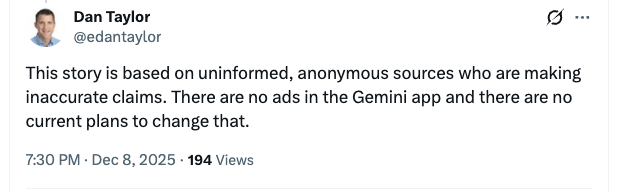
    Google’s Rebuttal: Dan Taylor, the VP of Global Ads at Google, took to X, flatly dismissing these claims. He insisted, “There are no ads in the Gemini app and no plans to change that.”

    Why This Matters: As advertisers, we are on the edge of our seats, wondering how AI interfaces like Gemini might change the ad landscape. Could an ad-supported chatbot alter advertising strategies and user interactions dramatically?

    ```json
{
  "alt": "Social media post refutes claims about ads in the Gemini app.",
  "caption": "Dan Taylor addresses unfounded rumors, confirming no ads in Gemini app.",
  "description": "Screenshot of a social media post by a user named Dan Taylor. The tweet disputes rumors from anonymous sources about the presence of ads in the Gemini app, asserting there are no current plans for ads. The post is timestamped at 7:30 PM on December 8, 2025, with 194 views. This image highlights a public statement addressing misinformation about app advertising practices."
}
```

    Discussions are already underway about whether AI chatbots should solely serve as utility tools or evolve into revenue-generating platforms. Even whispers of ads in Gemini drive agencies to consider future possibilities.

    Moving Forward: Google’s stance is clear; for now, Gemini remains ad-free. Yet with competitors exploring monetization avenues, we must watch this space closely. The conversation about ads in Gemini is far from over.

    Read More: EXCLUSIVE: Google Tells Advertisers It’ll Bring Ads to Gemini in 2026


    Inspired by this post on Search Engine Land.

    crushpress.ai community screenshot
  • Accelerate B2B Optimization with Proxy Metrics

    Accelerate B2B Optimization with Proxy Metrics

    Embarking on the complex B2B journey can feel like navigating a labyrinth. I know this from firsthand experience, especially when it comes to optimizing campaigns amidst long sales cycles and low conversion volumes.

    In the realm of selling high-value items, waiting for months to see tangible results can be frustrating. That’s where I discovered the power of proxy metrics, or micro-conversions, to drive faster optimization.

    Let’s dive into the specifics of proxy metrics and their transformative impact on B2B campaigns.

    Understanding Proxy Metrics

    From my perspective, proxy metrics are like the early indicators of success that help predict final outcomes. Think of them as a weather vane pointing towards future achievements.

    Engagement rates hint at potential conversions, while add-to-cart events often precede sales. Watching these early signs allows me to course-correct campaigns sooner and optimize budget allocations.

    Proxy metrics also prove invaluable when navigating Google’s 90-day latency window. I’ve learned to identify key predictors within this time frame to maintain tracking efficiency.

    Dig deeper: How to use GA4 predictive metrics for smarter PPC targeting

    Enhancing Algorithmic Bidding with Proxy Metrics

    In my work with digital ad platforms like Google and Meta, I’ve seen the crucial role of machine learning in campaign optimization. Feeding these systems with early signals like micro-conversions enhances their ability to target quality users effectively.

    ```json
{
  "alt": "Digital illustration of a correlation funnel showing predictors like engaged sessions, newsletter signups, and add to cart leading to sales.",
  "caption": "Unlocking Sales Success: A visual guide to the correlation funnel, showcasing how online activities like engagement and signups drive sales.",
  "description": "This image illustrates a correlation funnel concept, displaying predictors such as engaged sessions, newsletter signups, and cart additions funneling into sales. The diagram highlights the importance of each component in the digital sales process. Keywords: correlation funnel, predictors, sales strategy, digital marketing."
}
```

    With metrics like time on site and scroll depth, I can refine targeting even when conversion data appears sparse, creating training signals that define algorithms’ paths.

    Building Audiences and Gaining Insights with Proxy Metrics

    Segmentation through proxy metrics opens up smarter audience building. By identifying engaged users, I craft lookalike audiences that mirror high-value customers, shifting focus from mere click-through metrics.

    I’m also able to expedite testing cycles by employing leading indicators instead of waiting for long-term data, thereby speeding up hypothesis validations and subsequent decisions.

    Proxy metrics frequently offer more robust statistical significance in models than distant revenue markers, enabling reliable market assessments.

    Evaluating the Trustworthiness of Proxy Metrics

    I’ve learned that not all proxy metrics pack the same punch. Some signal genuine interest more effectively than others. Newsletter signups, for example, often predict engagement, whereas add-to-cart events can be misleading due to frequent abandonment.

    To choose the right proxies, I measure correlation strength, timeliness, actionability, and stability to ensure they provide reliable guidance for strategic decisions.

    By focusing on these factors, I navigate the intricate path of B2B optimization with confidence, leveraging insights to drive impactful outcomes.


    Inspired by this post on Search Engine Land.

    crushpress.ai community screenshot