I’m excited to share with you that SMX Advanced is gearing up to make its mark in Boston from June 3rd to 5th, 2026, hosted at the Westin Boston Seaport. This is the premier event for those of us committed to mastering search marketing.
We’re really keen on highlighting the advanced strategies in SEO, PPC, and AI, and we can’t do it without your expertise.
The world of search is evolving incredibly fast.
As SEOs, we find ourselves adapting to AI SEO trends, making sense of AI Overviews dominating SERPs, and navigating Google’s ever-changing landscape and algorithm updates.
For those in PPC, there’s the challenge of making informed, data-driven decisions while seamlessly integrating new AI tools and maintaining that essential human touch.
We’re looking for speakers at SMX Advanced who can provide real solutions to these complex issues.
Do you have proven, high-level strategies for today’s marketing landscape? Now is the perfect time to share your session idea with us. Even if you haven’t spoken at SMX before, in person or virtually, we encourage diverse voices and perspectives to come forward.
The deadline for submitting your SMX Advanced session pitch is January 30th. Don’t delay—spots are limited and fill up quickly.
Consider these tips for crafting a compelling session proposal:
Ensure that your topic is truly advanced and tailored for intermediate to advanced professionals in search marketing.
Introduce an original idea or a unique session format.
Include a case study or specific examples to illustrate your points.
Be mindful of what can realistically be covered in a 20-minute timeframe.
Provide clear, actionable takeaways for participants to implement.
Clarify what skills or insights attendees will gain from your session.
Your Google Ads conversions are falling, clicks are starting to follow, and an old warning email suddenly looks much less routine. Treat that sequence as a measurement incident before you treat it as a demand problem.
The fastest path back is not another bid adjustment. You need to identify which signal stopped, determine what automation depends on it, restore trustworthy measurement, and verify that the business outcome and the advertising report agree again.
Why a tracking warning can become a traffic problem
A Google Ads warning is easy to dismiss when campaigns are still serving. That is the trap. Some warnings describe a weakness that has not yet affected delivery. Others tell you that Google may stop accepting or processing data your bidding strategy needs.
The conversion feedback loop has several dependencies:
A customer completes a valuable action, such as a purchase, booking, or qualified lead.
Your website or business system records that outcome.
Your consent and tagging setup determines whether an advertising signal can be sent.
Google Ads receives and processes the signal as a conversion action.
An automated bidding strategy uses eligible conversion data to inform future bids.
A failure between the business system and Google Ads can leave the real outcome intact while making it disappear from the advertising report. The immediate symptom looks like a reporting problem. Once automated bidding begins responding to the missing signal, the problem can affect auction participation, clicks, and future customer acquisition.
Read every warning for three things: the affected dependency, the stated consequence, and the scope. A general recommendation can enter your normal optimization queue. A notice that data processing may stop belongs in incident response. That is an internal severity distinction, not an official Google Ads warning taxonomy, but it prevents consequential notices from being buried with routine suggestions.
Triage the warning without contaminating the diagnosis
When performance has already moved, every rushed change makes the cause harder to isolate. Preserve the evidence first, then work through the signal chain in order.
Capture the warning exactly as received. Save its full wording, receipt time, sender, customer ID, named domain, affected product, stated consequence, and any remediation link. Do this before changing the consent platform, tag configuration, conversion goals, or bidding strategy.
Resolve the scope. Identify every account, domain, subdomain, conversion action, campaign goal, and website owner that may be involved. An acquired business or newly added domain can sit outside the monitoring and access model used for the original account.
Establish the last known good signal. Find the last point at which Google Ads recorded the affected conversion normally. Place the warning, account handoff, site release, tag change, consent change, and performance decline on the same timeline. Sequence is evidence; dashboard correlation alone is not.
Check the independent business record. Compare Google Ads with the system that records the actual purchase, booking, or lead. If the backend outcome continues while Ads conversions fall, investigate measurement and processing before declaring a demand collapse.
Test the consent and tag path end to end. For each affected domain, confirm that the consent interface records the user’s choice, communicates the resulting state to the tag setup, and allows or restricts the advertising signal as intended. Then complete a test conversion and verify that it reaches the intended Ads account and conversion action without duplication.
Inspect the receiving side. Confirm that the conversion action remains active, belongs to the expected account, and is still part of the goal configuration used for optimization. Look for account-level diagnostics or messages that explain why incoming data is not being accepted or processed.
Contain automation carefully. Do not raise budgets, loosen targets, or make several bid changes merely to restore lost clicks while the conversion signal is untrustworthy. Any temporary intervention should have a named owner, a documented reason, and a reversal condition.
Escalate with a reproducible evidence packet. Give support the customer ID, affected domains, conversion action identifiers, warning text, relevant timestamps, test results, screenshots, change history, and earlier case identifiers. If a domain flag cannot be cleared, ask for a documented workaround and test it before relying on it.
A support response is not proof of recovery. Close the incident only after new conversions complete the entire path, Google Ads processes them, campaign automation can use them, and the resulting trend is plausible against the independent business record.
Separate measurement loss, demand loss, and bidding reaction
The same dashboard decline can have different causes. Use the observations below as investigation routes, not as automatic diagnoses.
What you observe
What it may mean
What to check next
Backend outcomes continue while reported Ads conversions fall
The business event is occurring, but the measurement or processing path may be broken
Consent state, tag transmission, domain configuration, conversion-action status, and account diagnostics
Reported conversions fall before clicks fall
Automated bidding may be reacting to a weakened or missing optimization signal
The timing of the signal loss, campaign goal configuration, bid changes, and subsequent traffic movement
Backend outcomes and Ads conversions fall while traffic remains steady
The issue may be on the site, in lead handling, or in conversion quality rather than ad delivery
Checkout or form operation, confirmation events, lead processing, landing-page changes, and outcome definitions
Only one domain or newly acquired business is affected
The problem may be isolated to an onboarding, ownership, domain, consent, or tag configuration gap
Domain inventory, access, account linkage, implementation differences, and monitoring coverage
Neither Ads nor the backend provides dependable outcome data
You do not yet have enough evidence to classify the failure
Restore an independent record of real outcomes before making a commercial-impact claim
This distinction matters when you communicate the incident. A lost reported conversion is not automatically a lost sale. Actual bookings can continue while advertising measurement is unavailable. At the same time, a measurement outage can later create real commercial harm if automated bidding reduces traffic in response.
Keep the detection window, measurement outage, traffic effect, and verified business impact separate. Do not convert missing dashboard conversions directly into a compensation figure. Reconcile bookings, orders, or qualified leads first, then isolate any later change that can reasonably be tied to reduced advertising traffic.
Your incident update should state what is known, what remains uncertain, what evidence supports each conclusion, what has been contained, and what will prove recovery. This gives the client or internal stakeholder a defensible account of the failure without minimizing it or overstating losses.
Build controls that make ignored warnings difficult
The durable fix is not a promise to pay closer attention. It is an operating system that assigns ownership, exposes missing signals, and prevents onboarding exceptions from becoming invisible risks.
Make onboarding a control gate
An acquisition, account transfer, or urgent launch still needs a minimum control set. Commercial pressure may change the depth of the initial audit, but it should not remove the safeguards that tell you whether campaigns are optimizing against valid data.
Map the manager-account hierarchy, customer IDs, administrative access, billing access, and alert recipients.
Inventory every website domain and subdomain, including who can change its consent and tag implementation.
Map each business outcome to its website event, Google Ads conversion action, and use in campaign optimization.
Record the consent-management platform, tag deployment method, relevant consent states, and implementation owner.
Confirm which monitoring scripts, account checks, and reporting alerts cover the new account.
Save a baseline showing normal traffic, reported conversions, and independently recorded business outcomes before the handoff.
If part of onboarding must be deferred, create a written exception. Name the missing control, the risk it creates, the temporary monitoring that compensates for it, the person responsible, and the condition for completing the work. An informal promise to revisit the account later is not a control.
Turn warning emails into owned work
Do not leave consequential Google communications in a personal inbox. Route them into a shared queue or ticketing system where someone can acknowledge, classify, investigate, and close them.
Store the exact warning text, account ID, affected domains, consequence, owner, status, evidence, and next checkpoint.
Assign both a primary owner and backup so leave or turnover does not create a blind spot.
Interrupt routine optimization work when a warning threatens data processing, conversion measurement, policy eligibility, or account delivery.
Require an explicit disposition for every message: actionable incident, planned maintenance, verified false alarm, or informational notice.
Close the item with end-to-end evidence, not because the email stopped arriving.
Monitor the outcome outside Google Ads
A warning system is useful, but it should not be your only detector. Compare reported Ads conversions with the system that records orders, bookings, or qualified leads. Watch the relationship between those measurements, not only the raw campaign total.
Set alerts around discontinuities that are unusual for the account’s own history. There is no universal percentage that proves tracking has failed; normal variation depends on volume, conversion delay, sales cycles, and how the business records outcomes. A threshold copied from another account can either create constant noise or miss the failure you care about.
Keep a change log for consent, tags, conversion actions, domains, and bidding goals. Retain the last known good configuration where practical. During a handoff or website change, increase review attention until the business record and advertising measurements establish a stable relationship again.
Key takeaways
Treat any warning that threatens conversion-data processing as an operational incident, even if ads are still serving.
Verify purchases, bookings, or leads outside Google Ads before calling a conversion decline a demand decline.
Restore the measurement path before using aggressive bid or budget changes to compensate for lost traffic.
Trace the full dependency chain: consent choice, tag behavior, domain configuration, conversion action, campaign goal, and automated bidding.
Do not waive onboarding controls without documenting the missing safeguard, owner, risk, and temporary monitoring.
Consider recovery complete only when real outcomes, processed Ads conversions, and campaign behavior are consistent again.
Open your unresolved Google emails and account notifications, then start with any message that mentions conversion processing, consent implementation, or a consequence for delivery. Assign an owner and verify the last valid conversion against your business system. If you cannot name the affected signal, its owner, and the evidence required to close the warning, the incident is still open.
AI Max can make a Search campaign look as if it has found new demand when much of the movement is happening inside the account. An old query may be credited to a different keyword, routed through another ad group, or served with a different URL or message. If you judge the setting from its headline totals, that movement can look like growth.
Your real question is not whether AI Max is good or bad. It is whether the setting adds valuable searches after you remove traffic the campaign could already reach, without weakening control over brand terms, landing pages, messaging, or budget.
AI Max turns match precision into four separate questions
A query shown under AI Max is therefore not automatically a query that AI Max discovered. It may be a search your exact or phrase keywords already captured. Evaluate precision across four separate dimensions:
Query precision: Does the search term express an intent you want to buy?
Ownership precision: Did the intended keyword, ad group, and campaign receive the query?
Message precision: Did the user see suitable text and reach the right final URL?
Attribution precision: Is AI Max receiving credit for genuinely incremental demand, or for traffic that existed before activation?
Google’s stated matching priority gives an identical exact match precedence. In practice, AI Max has sometimes taken traffic even when a corresponding exact keyword was available. That observation does not prove every account will behave the same way, but it does mean you should treat exact priority as an expected rule rather than a substitute for auditing.
Keep commercially important searches as explicit exact-match keywords. Add valuable misspellings and minor variants when ownership matters. This does not guarantee that every impression will follow your preferred path, but it gives you a clear control point for noticing when the path changes.
Decide whether your account is ready for the trade-off
AI Max is a poor candidate for automatic, account-wide adoption. Start with the conditions already visible in your account, because the feature does not erase weak economics or limited budget.
What you see in the account
Why it matters
Practical decision
Broad match has repeatedly underperformed
AI Max introduces broad-like expansion even without broad versions of your keywords
Use a limited, guarded test instead of assuming a different label will fix the underlying problem
Budget already restricts strong exact or phrase keywords
Expanded traffic can compete with proven demand for the same constrained budget
Fund the searches you already know are valuable before paying for wider exploration
Build explicit negative boundaries and audit actual search terms, including variants and misspellings
Text customization or Final URL expansion is unacceptable
Match expansion is not the only behavior involved in AI Max
Do not activate the setting solely for query expansion if you cannot tolerate its message or destination changes
Match-type reporting must remain directly comparable
Reassigned impressions and clicks can make the AI Max contribution look more incremental than it is
Create a query-level baseline before activation and judge the test outside the headline attribution
Because this is paid traffic, an overly broad launch can consume budget before the reporting explains where it went. A safer test uses a campaign where exploration is affordable, conversion measurement is dependable, and brand leakage or an incorrect destination will not create an unacceptable business risk.
Build a precision test that can survive muddy attribution
The test needs to answer a narrow question: did AI Max create useful incremental reach, or did it relabel and reroute reach you already had? Set up the evidence before activation.
Capture the pre-test query map. Export search terms from a period representative of the current offer, geography, and campaign structure. For each term, record its keyword, match type, campaign, ad group, cost, conversion outcome, and intended landing page. This becomes the baseline against which apparent discovery is checked.
Protect high-value searches explicitly. Keep your core queries as exact keywords and add commercially important spelling variations. Record the ad group and landing page that should own each one so a later routing change is visible.
Add broad versions where they improve auditability. Adding broad keywords to a test of an expansion system sounds counterintuitive. In this case, explicit broad versions of core keywords can make expanded traffic easier to identify instead of allowing it to be distributed invisibly across exact and phrase coverage. This can clarify reporting, but it does not restore guaranteed matching priority.
Design brand and non-brand negatives together. Do not rely on brand filters alone. Include known misspellings and variants that could cross the boundary, then check each negative against legitimate traffic before applying it. An overly broad negative can block the very demand you meant to protect.
Define acceptable messages and destinations. Record the URL family, offer, and claims appropriate for the test traffic. If text customization or Final URL expansion produces a route you cannot approve, pause the AI Max test; a keyword change alone will not solve a message or destination problem.
Write the success rule before reading the results. Count a query as incremental only when it is absent from the available pre-test history, relevant to the intended offer, routed appropriately, and economically acceptable under the same business KPI used for the rest of the campaign. An AI Max label is not evidence of incrementality by itself.
This setup will not produce a perfectly isolated experiment. It will, however, prevent the most common analytical mistake: comparing an AI Max total with zero instead of comparing each underlying query with the account’s existing coverage.
Audit search terms by identity, not by Google’s label
Deduplicate search terms across match types before you total their contribution. Normalize obvious differences in capitalization and spacing, but keep misspellings visible because they can receive different ownership. Then place each query into a decision bucket.
Query bucket
What it tells you
What to do next
Existing and correctly owned
The term appeared before AI Max and still reaches the intended keyword, ad group, and destination
Keep it in campaign performance, but do not count it as AI Max discovery
Existing but reassigned
The term existed before activation but is now credited or routed differently
Check whether the new route changes bids, budget, messaging, landing pages, or brand classification; reinforce exact ownership and negative boundaries where needed
New to the available history and relevant
The term is a credible candidate for incremental reach
Evaluate its economics and routing; promote it to exact or phrase coverage when it deserves deliberate control
New to the available history but irrelevant
Expansion found traffic that does not match the offer or intended buying intent
Add a precise negative and inspect nearby variants rather than blocking a broad concept reflexively
Brand or non-brand crossover
The term is being measured in the wrong economic or strategic segment
Correct the negative architecture and re-evaluate the affected campaign results before scaling
Unmapped or unexplained
The term does not align clearly with a current keyword or known past query
If most AI Max-labelled traffic falls into the existing or reassigned buckets, the result does not demonstrate meaningful query expansion. It is more consistent with reattribution, even if the AI Max line in the interface looks strong. The setting may still affect performance through routing, text, or URLs, but you should not call that new demand.
If the new and relevant bucket produces acceptable results without displacing protected queries, the case for incremental value is stronger. Promote recurring high-value terms into controlled keyword coverage, keep the negative map current, and continue checking which ad group and destination receive them.
A rise in conversions does not excuse a broken brand split. When branded searches move into a non-brand campaign, the non-brand line can appear more efficient while the brand line loses credit. Fix the classification first; otherwise, the next budget decision will be based on distorted campaign economics.
Key takeaways
AI Max can introduce broad-like matching even when a broad version of the keyword is absent.
An AI Max-labelled search term is not necessarily a new search; it may be existing exact or phrase traffic that was reassigned.
A pre-test query map and explicit broad versions of core keywords can make the expansion easier to audit.
Exact keywords, valuable spelling variants, and carefully checked negatives remain essential for protecting query ownership and brand separation.
Scale only when deduplicated search terms show relevant, economically acceptable reach that was not already present in the available history.
Before your next budget change, classify the highest-spend AI Max search terms into these buckets and correct brand leakage or wrong ownership first. Then let the new and relevant bucket decide whether AI Max has earned more budget. If you cannot isolate that bucket, you do not yet have evidence to scale.
You’ve probably been handed a familiar contradiction: let the ad platforms automate more decisions, but remain accountable for every dollar they spend. The answer isn’t to micromanage every bid, and it isn’t to treat an automated campaign as self-driving.
Your job is to design the system around the automation. That means concentrating the budget, assigning each campaign a clear role, measuring channels as a portfolio and checking whether AI-generated search results are changing the visibility you thought you had.
Allocate the budget before you configure the campaigns
AI can optimize toward a target, but it can’t decide which business constraint matters most. Before opening a platform, write a one-page constraint sheet that answers five questions:
What business outcome are you buying? Name the sale, qualified lead, subscription, store visit or other outcome that ultimately matters.
What economics must the outcome meet? Use the maximum acceptable acquisition cost, minimum return or other threshold your business has approved. Don’t substitute a platform metric merely because it is available.
How much spending is committed? Separate the budget you expect to deploy from money that is optional, experimental or contingent on performance.
When is demand likely to change? Mark peak buying periods, expected slumps, launches and deadlines. Historical performance and Google Trends can help shape the monthly curve because an annual budget rarely deserves twelve equal allocations.
Which campaigns can you actually support? A channel that needs a steady supply of approved video or social creative is not a realistic allocation if that production process is blocked.
Then divide the available money by purpose, not by platform. A useful portfolio has three conceptual pools:
Core delivery funds campaigns with an established job and credible performance evidence.
Growth funds additional reach, audience building or expansion beyond the demand you already capture.
Exploration funds a specific, bounded test of a channel, format, audience or message.
There is no defensible universal percentage for these pools. The correct split depends on budget size, demand, business maturity, creative capacity and confidence in your measurement. What does generalize is the need for concentration. Spreading a modest budget across too many campaigns limits the data each campaign can collect, leaving the platform with too little signal and you with too many inconclusive results.
Fund the smallest coherent campaign structure first. Add another campaign only when you can state its distinct job, give it enough budget to perform that job and explain how you will judge it. A new campaign created merely to use an available targeting option is fragmentation, not strategy.
When more money becomes available, look first for campaigns that are both efficient and budget-constrained. That is a better starting point than dividing the increase evenly. Still, don’t assume that historical efficiency will survive unlimited scale. Increase spending in stages and inspect the economics of the additional volume. A higher budget creates financial exposure; if you don’t know the acceptable marginal acquisition cost, don’t scale solely because the platform forecasts more conversions.
Give every channel a job in the portfolio
A channel-by-channel return table often rewards the campaign that collects the conversion and punishes the campaign that created the demand. That can produce a tidy report and a weaker media plan.
Portfolio role
Typical campaign use
Reason to fund it
Evidence to inspect
Demand capture
Paid search against relevant queries
Reach people already expressing intent
Query quality, conversion economics, impression availability and budget constraints
Demand creation
YouTube or social prospecting
Build awareness and qualified audiences before the final search
Reach, audience growth, later search behavior and change in portfolio-level efficiency
Re-engagement
Viewer or visitor remarketing
Continue the journey with people who have already encountered the brand
Incremental outcomes, frequency and overlap with other campaigns
Exploration
Demand Gen, a new social channel or an unproven format
Test a defined path to additional demand
The stated hypothesis, spend boundary, delivery quality and downstream business outcome
These roles prevent two common mistakes. The first is expecting every campaign to close the sale directly. The second is excusing weak performance with a vague claim that a campaign is building awareness. A demand-creation campaign still needs a measurable theory of change.
For example, a YouTube campaign may produce few attributed conversions while search conversion rates improve and video-viewer remarketing audiences perform well. That pattern can justify continued investigation because campaigns can affect the efficiency of other channels. It does not, by itself, prove that video caused the improvement. Seasonality, promotions, competitive changes or measurement differences may also be involved.
Use three levels of evidence so you don’t confuse a plausible contribution with a demonstrated one:
You can run a busy Black Friday ad account and still lose money after the click. When media costs rise, every unclear offer, unnecessary form field, checkout surprise, and unworked lead consumes traffic you already paid to acquire.
The practical response is to manage the ad, landing page, checkout or form, and follow-up process as one conversion system. That gives you more useful decisions than simply chasing cheaper clicks or celebrating a higher click-through rate.
Higher ad costs change the acceptable post-click error rate
That combination matters because engagement and profitability can move in different directions. A campaign can attract more clicks while producing worse economics if its landing page converts poorly, its orders carry weak margins, its returns increase, or its leads fail to become customers. The early Black Friday figures could not settle that question because final conversion value and return on ad spend were still pending.
Do not respond by rejecting every expensive click. A higher CPC can work when the visitor converts at a strong enough rate and produces sufficient margin. A lower CPC can fail when cheap traffic generates low-quality leads, abandoned carts, cancelled orders, or purchases that are later returned.
Set your bidding and budget limits from unit economics before the promotion begins. For ecommerce, a useful starting relationship is:
Maximum sustainable CPC = post-click conversion rate x contribution margin per retained order.
Use retained orders rather than initial orders when returns and cancellations materially affect the business. Define contribution margin with the costs your finance team actually uses, rather than treating revenue as profit. If margins vary significantly by product, calculate the limit by product group or offer instead of applying one account-wide figure.
For lead generation, work backward from acquired customers:
Maximum sustainable cost per lead = lead-to-customer rate x acceptable cost per acquired customer.
Base the lead-to-customer rate on qualified, followed-up leads from a comparable campaign. A form submission is not equivalent to a sale. If your sales team rejects many submissions or cannot contact them, the headline cost per lead is hiding the real acquisition cost.
Build the destination from the ad promise backward
Post-click optimization starts before anybody reaches the page. Every ad makes a promise about a product, price, discount mechanism, eligibility condition, deadline, benefit, or next step. The destination must let the visitor verify and act on that promise without reconstructing it from banners, menus, and fine print.
List every decision-relevant claim in the ad. Include what is offered, who or what qualifies, how the saving is applied, and any material restriction.
Send the click to the narrowest page that can fulfil that promise. A product ad should reach the relevant product or variant. A category offer should reach a filtered collection. A lead-generation ad naming a specific service or resource should reach a page dedicated to it.
Repeat the decisive terms near the first meaningful action. The visitor should not need to enter checkout or submit a form to discover that the advertised condition does not apply.
Remove competing actions that do not help the visitor complete the promised journey. Navigation can remain useful, but unrelated promotions should not overpower the action the ad introduced.
Test the complete path with the campaign parameters attached. Confirm that the destination loads, the offer persists, the intended variant appears, the form or checkout works, and the conversion is recorded once.
Message match does not mean copying the ad word for word. It means preserving meaning. If the ad promotes a particular item, the page should not make the visitor search for it. If a code is required, show the code and its instructions where the visitor can use them. If eligibility or availability varies, disclose that before the visitor commits time or payment details.
For ecommerce traffic
The first useful view of the destination should establish the product, the applicable offer, the effective price when it can be calculated accurately, availability, fulfilment terms, return conditions, and the purchase action. Do not manufacture urgency with a countdown or stock claim your systems cannot support. That may produce clicks or carts, but it also creates avoidable cancellations, refunds, support work, and distrust.
Then test the transaction, not just the page. Add the advertised item or qualifying combination, apply the promotion as a customer would, select fulfilment, and reach the payment stage. Use an approved test environment, test payment method, or safely reversible transaction. An unreviewed live checkout change can break payments, tax handling, shipping rules, discount logic, or measurement at the most expensive point in the funnel, so keep a rollback path.
For lead-generation traffic
Ask for fields that support qualification, routing, compliance, or the next conversation. Every additional question should have an owner and a use. If nobody acts on the answer, remove it from the first interaction or collect it later.
The confirmation experience should explain what happens next without promising a response time the team cannot meet. Route the submission to a named queue or owner, retain the ad and offer context, and give the follow-up team the same promise the prospect saw. A lower CPC does not help if qualified prospects wait unassigned or receive a generic response unrelated to the ad.
Find the first expensive leak before changing the whole funnel
A conversion rate tells you that a problem exists, but not where it lives. Break the journey into transitions and inspect the first meaningful loss. Use your own comparable baseline rather than a universal benchmark: product prices, offer strength, traffic intent, checkout design, sales process, and measurement rules make account-to-account comparisons unreliable.
Transition
What a weak transition may indicate
First checks
Ad click to recorded landing session
A destination, page-load, consent, or tracking problem
Final URL, campaign parameters, redirects, page availability, and session recording
Landing session to product, cart, or form action
Weak message match, unclear value, poor hierarchy, or an unusable primary action
Headline, offer terms, selected product or variant, call to action, and device behaviour
Total price, fulfilment choices, required fields, error handling, promotion logic, and payment flow
Purchase to retained order
Expectation mismatch, fulfilment issue, cancellation, or return pressure
Product and offer accuracy, availability, delivery communication, cancellations, refunds, and margin
Submitted lead to qualified opportunity or sale
Poor traffic fit, weak qualification, routing delay, or ineffective follow-up
Lead validity, qualification outcome, owner assignment, contact attempts, opportunity creation, and closed customers
Use a disciplined triage sequence while the promotion is live:
Validate the offer and measurement first. A broken discount or duplicated conversion event can make every later decision wrong.
Segment the journey by ad, offer, destination, device class, audience, and new versus returning visitor where those distinctions are available and appropriate.
Locate the earliest transition that deteriorated against a comparable baseline. Downstream symptoms often begin upstream.
Weight the problem by spend and business value. A severe issue on a low-spend path may matter less than a moderate leak consuming most of the budget.
Change the smallest element capable of testing the diagnosis. Preserve a control where traffic supports a proper experiment, and record when each change went live.
Verify both the user experience and the analytics after deployment. A visual improvement is not complete if the offer, transaction, or measurement has broken.
Do not declare a winner from a short burst of promotional traffic simply because the percentage moved. Offer periods can change traffic mix rapidly, and returns or lead outcomes may not be visible immediately. If the campaign cannot produce enough observations for a reliable controlled test, use a careful change log, compare like-for-like segments, and label the result as directional rather than certain.
Prioritize high-confidence friction before cosmetic experimentation. An offer that fails to apply, a dead button, an invalid form rule, or an unassigned lead has a clear mechanism and consequence. Small wording and design preferences come later unless your funnel evidence points directly to them.
Measure the outcome that can afford the next click
Maintain an operational view for managing the live campaign and an economic view for deciding whether it worked. Mixing them into a single dashboard encourages premature conclusions.
The operational view
Spend, impressions, clicks, CTR, and CPC show how the market and ads are behaving.
Recorded landing sessions reveal whether paid clicks are reaching a measurable destination.
Product views, cart starts, form starts, and checkout starts expose intermediate movement.
Promotion failures, payment errors, form errors, and lead-routing failures identify problems that need immediate intervention.
These indicators are useful for control, but they are not the final business result. A campaign should not receive more budget merely because it produces an attractive CTR or a lower CPC.
The economic view
For ecommerce, connect each conversion to collected revenue, discount cost, product and fulfilment economics, advertising cost, cancellations, refunds, and returns using the definitions approved by your business. Review conversion rate, cost per acquired customer, revenue per click, contribution per retained order, and campaign contribution together. A blended ROAS can conceal a shift toward low-margin products or orders that do not remain completed.
For lead generation, retain the campaign, creative, offer, and destination identifiers through the customer system. Report submitted leads, valid leads, qualified leads, opportunities, customers, lead-to-customer rate, cost per acquired customer, and contribution from acquired customers. This prevents a cheap but unqualified lead source from taking budget away from a more expensive source that closes.
A provisional view helps you manage active spend. A reconciled view tells you whether the campaign created durable value. Keep both, label them clearly, and use the reconciled economics when setting the next campaign’s limits.
Key takeaways for your Black Friday operating plan
Set CPC, cost-per-lead, and budget guardrails from conversion rates and contribution economics, not from last year’s media price alone.
Treat every advertisement as a promise that the destination, form or checkout, confirmation, and follow-up process must preserve.
Diagnose the funnel by transition. Fix the first meaningful, spend-weighted leak before redesigning everything downstream.
For ecommerce, optimize toward retained orders and contribution, not initial revenue alone.
For lead generation, connect clicks to qualification and acquired customers, not just submitted forms.
Use live engagement data for operational decisions, but label profitability as provisional until delayed outcomes have been reconciled.
Before you raise your next Black Friday budget, open the highest-spend ad and follow its actual path through the landing page, offer, checkout or form, confirmation, and order or lead handoff. Write down the first place where the promise becomes unclear or the action becomes harder. Fix that point, verify the measurement, and then decide whether the next click deserves more budget.
Your Demand Gen campaign is generating activity, but the next move is unclear. Should you change the audience, replace the creative, rewrite the landing page, or adjust the conversion goal? If you change all four, performance may move, but you will not know why.
The way out is to optimize the entire path as a sequence of decisions. Diagnose the weak link, form one testable explanation, change the layer responsible for it, and judge the result against the business outcome you actually want.
Demand Gen optimization starts with the whole journey
A Demand Gen campaign is only one part of the conversion system. Its performance depends on how well five elements connect:
Audience: The people Google is being asked to reach.
Creative: The visual, message, and reason to pay attention.
Promise: What the person expects after interacting with the ad.
Landing page: The experience that explains and fulfils that promise.
Conversion: The action Google records and your business values.
Demand Gen traffic can arrive before someone has expressed the precise intent you would see in a search query. That changes the job of the page. It may need to establish relevance, explain the offer, provide evidence, and make the next step feel proportionate before asking for a commitment.
Start by writing the five elements above on one line. Read them as if you were the person seeing the ad. If the creative promises a useful explanation but the page immediately demands a sales conversation, the problem is not necessarily targeting. The journey has changed its terms between the click and the page.
This distinction matters because campaign-level averages hide broken handoffs. A strong ad can produce inexpensive interactions with people who are poorly prepared for the page. A persuasive page can underperform because the ad created the wrong expectation. More traffic amplifies either outcome; it does not repair the connection.
Define the outcome before you edit the campaign
You cannot optimize coherently when every positive action is treated as success. An ad interaction, meaningful page visit, form submission, qualified opportunity, and completed purchase represent different levels of commitment. Decide which one is the business outcome and which ones are only diagnostic signals.
Create a short measurement contract before making changes. It should answer these questions:
What is the primary conversion? Choose the action closest to business value that is recorded reliably enough to guide decisions.
What makes that conversion valuable? Define the qualification, revenue, retention, or other downstream property that separates a useful conversion from a hollow one.
What is a leading signal? Identify the page and ad interactions that help you diagnose behaviour without mistaking them for the final result.
Which promise is being measured? Record the offer and message attached to the traffic so that unlike propositions are not evaluated as if they were interchangeable.
Where can measurement fail? Check whether confirmation pages, forms, consent behaviour, redirects, and analytics events represent the completed action accurately.
This prevents a common optimization error: improving the easiest recorded action while weakening the outcome that matters. A shorter form may generate more submissions, for example, but that is not an improvement if the additional contacts consistently lack the required fit. Read conversion volume and conversion quality together.
Do not choose a winner from a convenient reporting window alone. Demand Gen performance can be noisy, especially when conversions are sparse or delayed. Keep a change running until you have enough relevant outcome data to make a decision with confidence appropriate to the budget at risk. If the evidence remains inconclusive, label it inconclusive rather than turning a small fluctuation into a rule.
Read performance symptoms by layer
Optimization becomes faster when you match the symptom to the layer capable of causing it. Use the table below as a diagnostic starting point, not as an automatic verdict. More than one mechanism can produce the same surface result, so verify the explanation before acting.
What you observe
What may be happening
What to inspect next
Delivery is limited before meaningful traffic develops
The campaign may be constrained by audience rules, budget, assets, or a goal that is difficult to optimize toward
Check campaign eligibility and constraints before rewriting the landing page
Ads attract interaction, but visitors do little on the page
The creative promise may not match the page, or the first screen may not confirm relevance
Compare the ad message with the page headline, offer, visual context, and first requested action
Visitors engage with the page but rarely complete the action
The offer may lack proof, the next step may feel too large, or the conversion flow may contain friction
Inspect objections, form requirements, mobile usability, errors, trust signals, and action clarity
Recorded conversions rise, but business quality falls
The optimization event may be too shallow, or the message may be attracting people who cannot become valuable customers
Review qualification and downstream outcomes; improve the signal before buying more of the same traffic
Results change after several simultaneous edits
The campaign has produced an outcome without producing a usable lesson
Freeze unrelated variables and design the next change around one explicit hypothesis
The placement of the failure tells you where to begin. If people never meaningfully reach or use the page, changing form fields is premature. If qualified visitors repeatedly abandon a functioning form, broader audience expansion is unlikely to solve that friction. Work downstream from the earliest weak handoff.
Segment before declaring the whole campaign weak. Creative, audience, device experience, landing page, and conversion path can behave differently inside the same aggregate. Look for a repeatable concentration of the problem. A mobile-only page failure calls for a different decision than uniformly poor traffic quality.
Turn landing-page ideas into controlled experiments
Google appears to be testing a revived Website Optimizer connected with Google Ads and GA4. The early setup information places it under Google Ads reporting and calls for Google Ads access plus administrator permission on a linked GA4 property. It also indicates that a GA4 property can be created when one is not already available.
Treat those details as preliminary. Availability, the eventual depth of A/B testing, and support for server-side experiments are not settled. Do not delay a necessary testing program or design your measurement architecture around an unconfirmed feature.
Whether you use a Google tool or another testing method, begin with a hypothesis rather than a list of preferred designs. A useful hypothesis has four parts:
Observation: State the behaviour you can see, such as qualified visitors reaching the form but not completing it.
Mechanism: Explain why you think it happens, such as the form requesting information whose purpose has not been explained.
Change: Alter the element that tests that explanation while leaving unrelated variables stable.
Decision rule: Name the primary outcome, quality check, and evidence required to keep, reject, or refine the variation.
Prioritize tests according to the order in which a visitor experiences the page:
Message continuity: Make sure the page immediately fulfils the expectation established by the ad.
Offer comprehension: Help the visitor understand what is being offered, for whom, and why it is relevant.
Evidence: Place proof close to the claim or decision it supports.
Commitment level: Match the requested action to how much context and confidence the visitor is likely to have.
Conversion friction: Remove unnecessary fields, unclear requirements, broken interactions, and avoidable mobile obstacles.
Avoid bundling a new headline, offer, form, layout, and audience into one experiment. A bundled redesign can still produce a business result, but it cannot tell you which mechanism mattered. If a broad change is unavoidable, treat it as a replacement experience rather than pretending it isolated a specific cause.
Protect the experiment from a subtler mistake as well: allowing the ad and page variants to contradict one another. If you change the page promise, verify which ads still lead to it. Otherwise the test may measure inconsistent message matching rather than the page idea you intended to evaluate.
Run a decision loop instead of a queue of tweaks
A useful optimization process produces both performance and knowledge. Give every material change a record containing the date, affected layer, hypothesis, primary outcome, quality guardrail, and final decision. That record prevents old ideas from returning without context and makes later changes easier to interpret.
Capture the baseline. Save the current audience, creative promise, page experience, conversion definition, and relevant performance view.
Locate the earliest weak handoff. Determine whether the problem begins with delivery, traffic relevance, message continuity, page persuasion, conversion friction, or downstream quality.
Write one causal hypothesis. Describe the mechanism you expect the change to affect.
Change the responsible layer. Keep unrelated elements stable wherever practical.
Check implementation. Confirm that the intended audience, creative, URL, page variation, and conversion recording are actually live.
Read outcome and quality together. Do not scale a result that improves a dashboard metric while damaging business value.
Keep, reject, or refine. Record the decision and the evidence behind it before starting the next test.
Key takeaways
Optimize Demand Gen as a connected audience-to-conversion journey, not as an isolated campaign screen.
Separate the primary business outcome from leading engagement signals before judging performance.
Start at the earliest broken handoff and change the layer capable of fixing it.
Use landing-page experiments to test a stated mechanism, not to compare arbitrary design preferences.
Treat Google’s revived Website Optimizer as a promising but still preliminary option.
Scale only when conversion volume and downstream quality point in the same direction.
At your next campaign review, replace the question “What should we tweak?” with “Where does the journey first stop working?” Write down the answer, the mechanism you believe is responsible, and the single change that would test it. That is enough to turn the next edit into a decision you can learn from.
Your Google Ads account can be busy and still be difficult to improve. Search terms are accumulating, automated targeting is expanding, new creative is entering rotation, and every dashboard seems to offer a different explanation for the result.
The way through is to optimize in a fixed order: diagnose the traffic, identify the failing input, change the narrowest relevant lever, and monitor the result in a view built for that decision. This keeps you from treating every performance problem as a bidding problem or every irrelevant query as another negative keyword.
Start with the search terms that actually triggered your ads
A keyword is an instruction you give Google. A search term is the query a person actually entered before your ad appeared. That distinction matters because you optimize keywords, feeds, pages, audiences, and automation settings, but the search term tells you what demand those inputs attracted.
The search terms report is useful beyond conventional keyword-based Search campaigns. Search, Shopping, and Performance Max campaigns can expose query data, even though Shopping and Performance Max do not rely on advertiser-entered keywords. Search can also operate with keywordless features such as AI Max.
Run the following audit whenever the account has accumulated enough traffic to reveal a pattern:
Add the Keyword column. Find the keyword responsible for each search term. If one keyword repeatedly attracts unrelated intent, the keyword or its match strategy is the problem; the individual queries are only symptoms.
Analyze the search-term match type. A keyword match type is the rule you selected. The match type shown for a search term describes how Google classified that query against the rule. Export the report and create a pivot by search-term match type so you can see whether useful and wasteful traffic is concentrated in a particular class.
Use the campaign-specific view. In a Dynamic Search Ads view, inspect the landing page connected to each query. In an AI Max view, inspect both the landing page and the responsive search ad headline. These fields reveal whether the system understood the intent but routed it to the wrong message or page.
Inspect the aggregate row for Other search terms. The individual queries are not visible, but their combined performance still matters. Compare that row with the visible terms instead of assuming the visible sample represents all query traffic.
Classify before acting. Label each visible term as relevant and valuable, relevant but weak, irrelevant, or ambiguous. Promote consistently useful terms into explicit keywords where that gives you more control. Exclude proven irrelevant intent. Investigate relevant but weak terms before blocking them.
Check negative-keyword scope and match type. An overly broad negative can suppress qualified traffic and revenue. Apply the narrowest exclusion that removes the unwanted intent, then check for conflicts with active keywords and shared negative lists.
If you need to negate more than roughly 10% of the queries you review, treat that as an investigation trigger rather than a victory. Your keywords may be too broad, AI Max may be reaching beyond the intended market, or a Shopping or Performance Max feed may be giving Google weak matching inputs. Correcting that upstream cause is more durable than maintaining an ever-growing exclusion list.
The Other search terms row can also change the decision. Strong aggregate performance may justify cautiously testing broader reach. Weak aggregate performance supports a tighter match strategy, more controlled targeting, or stricter efficiency goals. It cannot tell you which hidden query succeeded or failed, so use it as a directional signal, not as evidence for a query-level exclusion.
Choose the targeting lever that matches the failure
The same high acquisition cost can come from four different failures: irrelevant demand, incorrect page routing, an unsuitable audience, or relevant traffic that does not convert. Identify which one you have before changing a bid strategy.
When irrelevant queries cluster around one keyword
Pause or replace the keyword if its useful traffic is too small to justify the irrelevant traffic. If the keyword is strategically important, test a narrower match type before abandoning it. When the drift appears mainly after enabling AI Max, compare performance with the feature’s expanded reach and review its page and headline selections.
A negative keyword is appropriate when the unwanted intent is clear and should never qualify. It is not the best first response when dozens of unrelated searches share the same triggering input. In that situation, repair the input.
When the query is right but the page or headline is wrong
Do not exclude a valuable query because automation sent it to an unsuitable page. Use the DSA or AI Max report view to identify the selected URL and, for AI Max, the responsive search ad headline. Then review page eligibility, URL expansion, site structure, and the relationship between the ad promise and the landing page.
Shopping and Performance Max require the same upstream thinking. If product queries repeatedly map to the wrong inventory, review the feed information that distinguishes products before adding query after query as a negative. Better product inputs give the system a better basis for matching.
Check the targeting options inside the specific eligible campaign instead of assuming access at the account level. If Custom Segments appear, test a tightly defined intent or interest segment separately so you can evaluate its effect. For sensitive categories such as health, the presence of a control does not remove the need to review policy, privacy, and the implications of personalized messaging.
When relevant traffic still does not convert
If the query, ad promise, and landing page all align, more exclusions may only reduce qualified volume. Verify that the campaign is optimizing toward the intended conversion action, then inspect the offer, page experience, and measurement setup. Targeting cannot repair a weak offer or an incorrectly recorded conversion.
Use AI creative for controlled variation, not final approval
Creative affects who responds to an ad and what expectation they bring to the landing page. In an automated campaign, a fast supply of new images can increase testing capacity, but low-quality or off-brand variations can also muddy the performance signals used for optimization.
Google Ads’ Nano Banana Pro is best suited to ideation and variations involving seasons, mood, lighting, materials, and finishes. It can preserve texture and perspective in some furniture and cabinet edits, and it can often place larger objects convincingly in general marketing scenes. That makes it useful when an asset-heavy Display or Performance Max campaign needs a coherent set of visual hypotheses.
A polished result is not necessarily a production-ready result. The tool can struggle with logos, branded products, detailed text, demographic representation, object placement, image combinations, and scenes that require zooming out. It may mix seasons or interpret subjective prompts such as “luxury” and “masculine” too literally. Strong holiday elements can also overwhelm the actual message.
Use this test protocol:
State one hypothesis. Decide whether you are testing a seasonal context, lighting treatment, material finish, mood, or another single visual idea.
Create a restrained asset family. Keep the product, offer, framing, and landing destination stable. Avoid combining unrelated images or asking for several conceptual changes at once.
Place the variants in an isolated asset group. This limits the chance that an unreviewed image will influence unrelated creative and makes the resulting performance easier to interpret.
Run a human preflight. Check product geometry, object placement, people and demographic representation, brand elements, text accuracy, seasonal consistency, and agreement with the landing page.
Review business results, not visual novelty. A surprising image is not automatically a useful ad. Retain it only if it attracts the intended audience and supports the campaign’s conversion goal.
Do not use generated assets as the sole creative process for a brand-sensitive or high-stakes campaign. Use them to accelerate concepts and low-risk variations, then rely on professional creative judgment for final composition, brand accuracy, and approval.
Turn custom Overview views into a decision system
Google Ads allows you to create up to five custom views on the Overview tab. The value is not having five collections of charts. It is giving each view a question and a defined next action.
Use the metrics, charts, and reports available in your account to build this operating layout:
View
Question it should answer
Next action
Business outcomes
Are the intended conversions and conversion value moving in proportion to spend?
Validate the conversion selection before changing bids or budgets.
Query quality
Has the mix of relevant, irrelevant, and Other search terms changed?
Open the search terms report and trace the change to keywords, automation, or feed inputs.
Routing and message
Are DSA or AI Max selecting suitable pages and headlines?
Review URL eligibility, expansion, page structure, and ad-to-page alignment.
Audience tests
Did a new segment change reach, traffic quality, or efficiency?
Keep, refine, or stop the isolated segment test.
Creative tests
Which reviewed asset family changed response and conversion performance?
Retain the useful concept, revise it, or remove it after sufficient data.
Pair volume with efficiency in every view. A lower cost per acquisition can look encouraging while qualified volume is collapsing; rising conversions can look encouraging while spend grows faster. The dashboard should expose both sides of the decision.
Keep a stable date comparison and metric definition so a visual change reflects the campaign rather than a changed reporting setup. For agencies, use the same view names across accounts where possible, but select the conversion and value metrics that match each client’s actual objective.
The Overview tab should tell you where to investigate. It should not replace the search terms, landing-page, asset, or audience reports needed to identify the cause. Remove any card that does not lead to a repeatable decision.
Key takeaways: a repeatable optimization loop
Begin with the query a person entered, not just the keyword or campaign setting that received credit.
Add the Keyword column, inspect search-term match types, use DSA or AI Max views when relevant, and compare visible queries with Other search terms.
If exclusions become a large share of your query review, investigate broad keywords, AI Max, page routing, or product-feed inputs before adding more negatives.
Match the intervention to the failure: keyword controls for query drift, routing controls for unsuitable pages, audience controls for segment problems, and page or offer work for relevant traffic that does not convert.
Keep AI-generated creative in isolated asset groups, test one visual idea at a time, and require human approval for brand accuracy and representation.
Use custom Overview views as investigation triggers, with one business question and one next action assigned to each view.
Start by creating a Query quality view and reviewing the most recent period with enough traffic to show a pattern. Make one structural targeting change and one isolated creative test, record the reason for each, and let the next review answer a question you chose in advance.
I recently came across a fascinating study highlighting how seasonality adjustments can actually backfire for advertisers during Black Friday, driving up costs and reducing efficiency.
A thorough analysis over three years, involving up to 6,000 advertisers, indicates that using Google’s seasonality bid adjustments during Black Friday and Cyber Monday (BFCM) often undermines efficiency, despite the platforms recommending them.
The big picture. Smart Bidding models are crafted to foresee predictable retail surges. Optmyzr analyzed tens of billions of impressions between 2022 and 2024, finding that advertisers who avoided seasonality adjustments usually had better efficiency metrics.
Without adjustments, Smart Bidding:
Recognized the BFCM conversion lift independently
Increased bids rationally
Maintained stable or improved ROAS, particularly in 2024
With adjustments: CPCs surged faster than the actual conversion rates, eroding efficiency.
Reality check: Google doesn’t need your “heads up.” Seasonality adjustments prompt Google to expect a conversion rate rise and to bid accordingly. If your prediction is off—and it usually is—Smart Bidding overshoots.
For example:
You predict a +50% CVR lift
The actual lift is +40%
This results in an overbid of about 7.1%
During BFCM’s high sales volumes, even minor mistakes become costly quickly.
The data: 3 years of the same story
1. Smart Bidding already adjusts for the CVR spike
2022: +17.5%
2023: +11.9%
2024: +7.5%
No additional guidance needed.
2. CPC inflation doubles with adjustments
Across all observed years, CPCs increased approximately twice as much when a seasonal adjustment was used.
3. ROAS drops significantly
Advertisers relying on Smart Bidding saw stable or improved ROAS, whereas those who intervened suffered double-digit losses.
The one exception: “Volume at all costs.” If the aim is pure revenue growth, disregarding margins, seasonality adjustments can be beneficial.
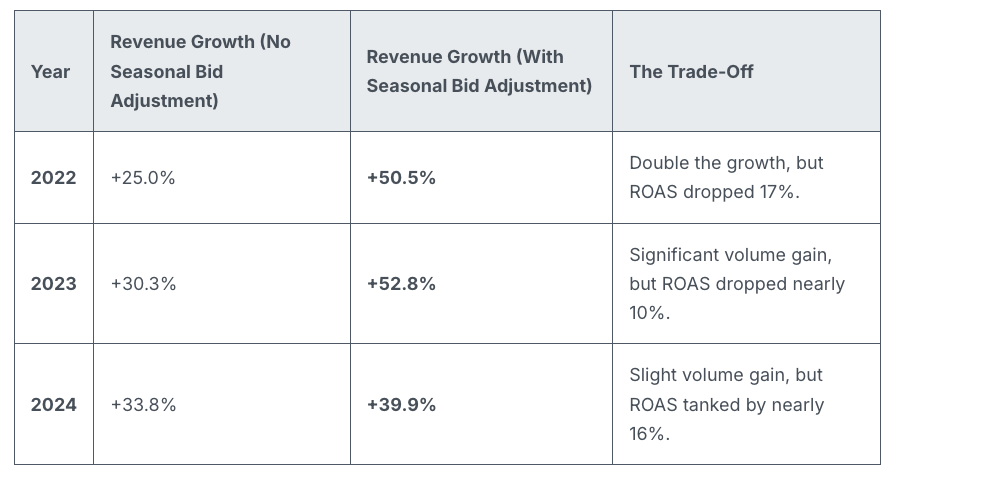
Revenue lifts were notably higher with adjustments:
2022: +50.5% vs. +25.0%
2023: +52.8% vs. +30.3%
2024: +39.9% vs. +33.8%
Efficiency may decline, but volume certainly increases.
When seasonality adjustments make sense. They’re useful when Google doesn’t have prior signals, like one-off or niche events.
Good for:
One-time flash sales
Email-only offers
Surprise clearance sales
Niche seasonal spikes
Not recommended for:
Black Friday
Cyber Monday
Christmas
Valentine’s Day
Any event with a predictable historic pattern
Why we care. Google already recognizes the significance of Black Friday. Smart Bidding is trained with years of BFCM data and can detect conversion rate spikes independently. Overriding this can lead to excessive bidding, increased CPCs, and reduced ROAS, so many marketers might be wasting their budget during this crucial week.
By recognizing when Smart Bidding has an adequate signal, advertisers can avoid expensive errors, maintain efficiency, and reserve seasonality adjustments for when they add true value.
Bottom line. Smart Bidding effectively manages major retail holidays. Seasonality adjustments often bring more chaos than benefits during predictable retail peaks. Keep them for unique, brand-specific events that Google can’t predict.
Smart move: Trust the algorithm — use tools like anomaly alerts, pacing monitors, and bid caps for control without conflicting with Smart Bidding’s core models.
During Black Friday, I’ve noticed many retailers, including myself, wasting substantial advertising budgets on Google Shopping ads. The main issue arises when these ads are still running for products that have already sold out, clearly demonstrating a pressing need for real-time stock management.
As we all know, Black Friday marks the peak of the retail season. However, it’s disheartening to find that so many brands, myself included, end up losing money on Google Shopping ads for items no longer available in inventory.
The problem: The ads continue to run even after items are out of stock, incurring cost-per-click charges with no possibility of conversion. Through a comprehensive study by ShoppingIQ involving 500 global retailers, it was revealed that a staggering 97% kept paying for clicks on items no longer in stock, sometimes persisting for 24–48 hours.
Why I care. Out-of-stock ads are not just a financial drain; they also skew campaign performance and disrupt algorithmic learning. When conversion rates plummet for unavailable products, it damages rankings, reduces ROI, and hampers future bidding strategies.
Example: Take Argos, for instance; they reportedly advertised items that were out of stock during Black Friday, leading to frustrated customers and depleted ad budgets.
Stock update refresh rates:
~24 hours: 90% of retailers
6–23 hours: 5%
48 hours: 2%
Other: 3%
Retailers’ response: Some companies, such as Mamas & Papas, have started leveraging ShoppingIQ’s real-time stock technology. This helps them focus ads solely on products that are actually available. Samantha Dabek, Senior Digital Marketing Manager, shares that they have managed to cut unnecessary costs and ensure advertising is targeted toward in-stock products.
The bigger picture: Google Shopping commands around 75% of US retail search spending. However, the default settings let out-of-stock ads run unchecked. ShoppingIQ strongly advocates for retailers to seek more transparency and control from Google to prevent wasted spending.
Bottom line: For those of us running high-stakes campaigns during Black Friday and other peak times, real-time stock management is essential. Otherwise, each wasted click represents money lost.
Recently, I’ve noticed Google has started automatically linking YouTube channels with Google Ads accounts. This innovation allows advertisers like me to quickly tap into valuable audience data, though it does require careful permission management.
When Google’s system detects a strong connection between a YouTube channel and a Google Ads account, it takes action by linking them. This gives us richer audience signals without us having to do a manual setup.
What’s happening now? Google will set up these links automatically if a strong relationship is identified, notifying us 30 days in advance. This email notification allows us to decide whether to opt out or connect sooner.
How does it work?
During the 30-day period, if no one opts out, the link will be completed automatically. If I manage both accounts, I can even connect them immediately. There’s flexibility here, too, as I can always adjust permissions or unlink later if needed.
Why this matters to us. This development simplifies how we, as advertisers, access YouTube audience data. It makes it straightforward to target viewers and construct data segments. However, it also introduces uncertainties about control over our assets and the permissions we’ve set.
Benefits for advertisers. Once linked, I can:
Use YouTube interactions to run more effective ads.
Leverage organic views and earned actions for performance insights.
Create data segments from how audiences engage with my channel.
Consider channel engagement as conversion activities, like subscriptions.
Limitations I’ve noticed
Channel owners gain no control over the actual Google Ads account.
Copy or edit capabilities for channel videos are not given to advertisers.
If personalized ads are disabled, audience data reports are also turned off.
Restrictions on Video Ads Certification (VAC) are still applicable; removal of these is specific to the linked Ads account.
Managing these links. If I, as an admin, choose to opt out, I can easily do so through the links provided in the notification emails from Google. If opted out, the link won’t be made. Meanwhile, manual linking can always be done via the traditional Google Ads settings menu.
Initial discovery. The new auto-linking feature was first highlighted by Hana Kobzová, founder of PPC News Feed. More on this can be read here.
Final thoughts. With Google’s new auto-linking, we as advertisers can enjoy less setup hassle and better YouTube performance insights. However, it’s crucial to monitor our notifications to ensure that data sharing aligns with our privacy preferences and company policies.