Category: Local

  • Google Maps Contributor Features: A Practical Workflow

    Google Maps Contributor Features: A Practical Workflow

    You have useful photos on your phone and first-hand details about a place, but turning them into a clear Google Maps contribution still takes judgment. The latest contributor features reduce the mechanical work: they surface media sooner, draft captions and make contributor history more visible.

    Use that convenience to publish more useful evidence, not simply more content. A faster upload, an AI-written caption or a prominent badge can attract attention, but none of them can make a vague or inaccurate contribution trustworthy.

    Key takeaways

    • Local Guides profiles now place greater emphasis on total points, levels and badges. Gold profile indicators can make top contributors more noticeable, but prominence is not proof that every contribution is accurate.
    • Gemini can analyze selected photos and propose a caption. You can edit or discard the draft, so treat it as a starting point rather than an observation you must accept.
    • The Contribute tab surfaces recent uploads, while camera-roll suggestions can shorten the path from taking a photo to sharing it. Media access is required for those suggestions.
    • These features may affect which reviews and businesses receive attention. They do not, by themselves, establish a direct improvement in local rankings, AI-search visibility or business performance.

    Match each contributor feature to the job it actually does

    The contributor changes solve three different kinds of friction. Keeping those jobs separate prevents you from treating every feature as a ranking tool.

    • Contributor profiles provide context. The redesigned Local Guides profile displays total points and levels more prominently, gives badges a refreshed presentation and adds gold profile indicators for top contributors. These are reputation and attention signals around a contribution. They do not verify the claim inside it.
    • Gemini caption drafts reduce writing friction. The feature analyzes the photos you select and proposes text that you can edit or reject. Its useful job is getting you past the blank field, not supplying knowledge that the image cannot contain.
    • Media suggestions reduce retrieval friction. Recent uploads appear in the Contribute tab, and Google Maps can suggest camera-roll images after you allow media access. This helps when the obstacle is finding the right photo later.

    If you contribute regularly, test every photo or review without its profile decoration: would the content still help someone choose an entrance, recognize a storefront, understand the layout or set an accurate expectation? If not, more points and a brighter badge will not repair it.

    If you manage local visibility for a business, reverse the test. A gold indicator may cause a user to notice a review, but you should still inspect the review’s specificity, recency and visible evidence. Contributor status is context for evaluating a claim, not a substitute for evaluating it.

    Edit Gemini captions until they say what the photo proves

    A contributor compares a phone photo with a cafe's accessible entrance while editing a draft description.

    At its introduction, the Gemini caption feature was available in English on iOS in the United States. Broader Android and international availability was planned. Availability can therefore differ by device, language and location; keep a manual caption workflow even if another contributor already has the control.

    The most important limitation is conceptual. Gemini can analyze the selected image, but a photo does not necessarily prove how the service felt, how food tasted, whether a route is fully accessible or whether a temporary display will remain in place. The draft can turn a visual impression into a stronger claim than the evidence supports.

    Use a four-pass caption edit

    1. Name the visible subject. Identify the entrance, seating area, menu board, counter, parking area or other feature the photo is meant to show.
    2. Remove inferred praise. Delete generic judgments such as “excellent,” “welcoming” or “perfect” unless the caption is deliberately expressing your own experience and the wording makes that clear.
    3. Add decision-relevant context. Explain where the photographed feature is located or why someone might need to recognize it. Add only details you observed or verified.
    4. Check whether the claim will age badly. Prices, hours, displays and layouts can change. Do not present a time-sensitive detail as a permanent feature.

    For example, a draft such as “A cozy cafe with plenty of seating” is broad and evaluative. A more useful edit would be “Indoor tables are beside the front window, with the order counter at the back.” The second version tells a visitor what the image is intended to establish without pretending that the photo proves comfort, availability or service quality.

    There is also a quick test for generic AI text: ask whether the same caption could be pasted onto a different venue’s photo without anyone noticing. If it could, the caption is not finished. Name the concrete feature that makes this image useful at this place.

    Turn camera-roll suggestions into a controlled publishing queue

    A smartphone displays selected and dimmed place-photo thumbnails arranged as a controlled publishing queue.

    The media-sharing update has a broader footprint than the initial caption rollout. Recent media and camera-roll suggestions were made available on iOS and Android globally. Suggestions depend on granting media access.

    A suggestion is an invitation to review an image, not confirmation that the image belongs on Maps. Camera rolls also contain duplicates, screenshots, private details and photos whose location is ambiguous. Put a short verification step between the prompt and the publish button.

    1. Open the Contribute tab after a visit. Review the recent media while you can still distinguish the venue and remember what each image shows.
    2. Confirm the exact place. Check the name and location, especially when a business has several branches or neighboring listings look similar.
    3. Choose the highest-information image. Prefer a photo that answers a practical question over several nearly identical angles.
    4. Inspect the full frame. Exclude unrelated or sensitive details and any image too blurry, dark or obstructed to support its caption.
    5. Write or generate the caption. Apply the evidence test even when Gemini supplies the first draft.
    6. Read the listing and caption together. Make sure the text describes this image at this place, then publish only when both are unambiguous.

    If you are not comfortable enabling camera-roll access, do not enable it merely to save a few taps. A slower, deliberate selection process is better than a convenient workflow you will not review carefully. You can also revisit the relevant operating-system permissions if your comfort level or contribution habits change.

    Do not mistake contributor visibility for a ranking result

    More prominent contributor profiles, faster media sharing and clearer captions can change what people notice. That can influence which reviews they consider credible and which businesses receive attention. It is still a leap from increased attention to a claim that a feature directly raises a business in Google Maps, local search results or an AI-generated answer.

    Three outcomes need separate measurement:

    • Publishing efficiency: Did the recent-media flow help you turn relevant photos into completed contributions instead of leaving them in a backlog?
    • Contribution quality: Did the final captions become more specific, accurate and useful after editing, or did AI merely increase the volume of generic text?
    • Search or business visibility: Did the business’s observed visibility change after the contribution? If it did, record the timing as a correlation. Do not assign causation without isolating other listing, review, competition and search changes.

    The same restraint applies to AEO and GEO claims. A Google Maps caption may add useful public context around a place, but these contributor changes do not demonstrate that a frontier model will retrieve, cite or rank that caption. Treat any such effect as a hypothesis to measure, not a benefit to promise.

    Start with one recent photo that answers a real visitor question. Verify the place, edit the caption until every claim is supportable and record when you published it. If the workflow consistently produces clearer contributions, keep it. If it only produces more contributions, tighten the review step before you scale it.

    References


  • Local Discovery Across Google and ChatGPT: A Practical Plan

    Local Discovery Across Google and ChatGPT: A Practical Plan

    A customer who searches Google for a nearby provider and another who asks ChatGPT for a local recommendation may want the same outcome, but they reach it through different discovery systems. If you optimize only for the map pack or only for conversational answers, your business can be easy to find in one place and absent in the other.

    Your job is to establish one dependable record of each location, then present and measure that record appropriately on each surface. That means treating your Google Business Profile, location page, visible business facts and structured data as one system without pretending Google and ChatGPT have the same ranking model.

    Google and ChatGPT answer different versions of a local question

    Google local discovery is strongly tied to explicit profile fields and geography. Your business name, primary category, secondary categories, services, reviews, linked landing page and physical proximity can all shape where the business appears. A geo-grid can show that visibility changing from one neighborhood or city boundary to the next.

    ChatGPT handles the discovery moment as a conversation. The user can describe a service, constraint and area in ordinary language, and shared location can make the local response more precise. Location is therefore a meaningful input, but that does not establish a permanent ChatGPT rank comparable to a map-pack position.

    This distinction changes how you work. Measure Google across physical points on a grid. Evaluate ChatGPT with repeatable prompts and controlled location context. A strong result on either surface is useful, but it cannot serve as a proxy for the other.

    Key takeaways

    • Build a single, accurate location record before optimizing individual discovery surfaces.
    • Audit Google Business Profile signals against the businesses that actually rank in your local grid, not against generic benchmarks.
    • Use a dedicated page for each real location and align it with the profile that links to it.
    • Keep LocalBusiness structured data consistent with facts a visitor can see on the page.
    • Test ChatGPT with fixed prompts and compare responses with and without shared location when that option is available.
    • Treat proximity limits and conversational omissions as different problems requiring different fixes.

    Start with a five-part Google Business Profile audit

    A business owner uses a tablet while five icon-based checkpoints surround a neighborhood storefront, including a map pin, clock, phone, category symbol, and rating stars.

    A profile audit becomes useful when it explains a visibility gap. Begin with the competitors appearing for the same commercial query in the areas you want to reach. Their lifetime review totals may look impressive, but totals alone do not tell you which signals separate the current winners.

    1. Compare review recency and velocity. Look at how frequently leading competitors have earned reviews recently, not just how many they have accumulated. Fresh and consistent review activity can matter more than a large historical total. There is no universal target in this evidence, so derive your benchmark from the listings winning your own searches. Places Scout or Whitespark geo-grid data can help you connect review patterns with visibility. If you manage many markets, Places Scout API data can turn that comparison into a recurring monitor.
    2. Verify the business name. A relevant keyword in a legitimate business name can have an outsized effect on local visibility. Do not add a service or city merely as a profile tactic when it is not part of the documented name. A DBA may make a name change legitimate, but it also creates legal, administrative and brand consequences. Treat it as a business decision, not a metadata shortcut.
    3. Inspect the primary category first. The primary category can substantially influence local ranking. Compare the primary categories used by top businesses for the query you care about, then choose the closest truthful description of your core offering. Add relevant secondary categories and review the available service selections, but do not dilute the profile with categories the location cannot support.
    4. Evaluate the linked landing page. A generic homepage forces both customers and machines to work out which location, service and contact details apply. A dedicated, keyword-focused location page can create better alignment between the profile and its destination. Check that the page identifies the same business, location and services as the profile.
    5. Map the proximity ceiling. Visibility often contracts as the search point moves away from the location or crosses a city boundary. A ranking-radius view helps you distinguish an optimization problem from a geographic limitation. Local Falcon’s Share of Local Voice can help show the realistic reach of a location. If the business is strong nearby and consistently weak farther away, more profile edits may not solve the actual constraint.

    Complete the audit before changing fields. Otherwise, a category edit, review campaign and page rewrite can overlap, leaving you unable to tell which change helped or hurt. Record the starting grid, profile configuration, linked page and recent review pattern, then make the change supported by the clearest gap.

    Turn each location page into a reliable entity record

    The page linked from your profile should resolve local uncertainty quickly. A visitor should not have to infer whether the location offers the requested service, whether it serves the relevant area or how to contact it. The same clarity also gives parsers less ambiguity to reconcile.

    Make the visible page complete before adding schema

    • Identify the business and location in the opening copy using the same legitimate name shown on the profile.
    • Describe the primary services in plain language and keep them aligned with the profile’s categories and service selections.
    • Show the applicable address, service area, telephone number, opening hours and contact path.
    • Explain meaningful local constraints such as appointment coverage, access, service boundaries or location-specific availability.
    • Address the questions that determine whether a nearby customer is a fit instead of filling the page with interchangeable city-name paragraphs.
    • Link the corresponding Google Business Profile directly to this location page rather than sending every profile to the homepage.

    If you operate multiple locations, give each real location its own URL and its own accurate details. Do not manufacture local relevance with addresses, service areas or location pages that do not represent an operating business. Besides misleading the reader, false location claims make your first-party record harder to keep consistent.

    Use LocalBusiness JSON-LD to describe, not embellish

    Choose the most specific LocalBusiness subtype that truthfully describes the location. Give the entity a stable @id and include relevant properties such as name, URL, telephone, address and openingHoursSpecification when those facts apply. Each physical location should have its own URL, identifier and location-specific values.

    The markup should agree with the page and profile. Do not put a different name in JSON-LD, mark up an address the visitor cannot find, or use areaServed to claim places the business does not genuinely serve. Validate the syntax before deployment, then verify the rendered page still exposes the underlying facts to a human reader.

    Structured data is useful for explicit entity description, but it is not a substitute for the profile, reviews, landing-page content or physical relevance. It also should not be treated as a guaranteed switch for ChatGPT inclusion. Its immediate job is simpler: prevent your own publishing stack from telling conflicting stories about the business.

    Measure Google visibility and ChatGPT answers in separate loops

    Two separate circular icon loops for map search and conversational recommendations connect to the same miniature storefront.

    Use a geo-grid to diagnose Google

    Run the same commercially meaningful query from fixed points around the location. Record where the business appears, where visibility fades and which competitors replace it. Mark city borders and meaningful neighborhood changes on the grid so that a geographic pattern does not get misread as a page problem.

    Then compare the profile variables that can explain the pattern: recent review activity, primary and secondary categories, selected services, business name and landing-page alignment. If visibility is weak even close to the location, begin with those controllable signals. If it is strong nearby and falls away predictably, revise the target area or query expectations before considering another location. A new location should exist because demand and operations justify it, not merely to color more grid points.

    Use a prompt set to diagnose ChatGPT

    Build prompts from real customer decisions rather than from your brand name. Include requests for a provider offering a specific service near a named place, requests with a meaningful constraint and broader nearby requests that depend on the user’s location.

    • Keep the wording fixed when comparing results.
    • When location sharing is available, run the same local request with location shared and not shared.
    • Record whether the business appears, what reason is given, which business facts are used and which links or citations are shown, if any.
    • Flag incorrect names, services, locations and hours separately from a complete omission.
    • Retest under the same conditions after a meaningful profile, page or data correction.

    A single conversational response is an observation, not a stable ranking report. Look for repeated patterns across the intents that matter. If the system describes the business incorrectly, inspect your visible location page, profile and structured data for conflicts. If the facts are correct but the business is not mentioned, improve the page’s explanation of who the location serves and which needs it can meet; do not randomly rewrite the profile in response to one answer.

    What you observeLikely constraint to investigateBest next move
    Google visibility is weak across the grid, including near the locationProfile relevance, review activity or landing-page alignmentRun the complete profile audit and correct the clearest competitor gap
    Google is strong nearby but fades near borders or outer neighborhoodsProximity and city geographyTarget areas where the location can compete and reconsider unrealistic radius expectations
    Google is strong but ChatGPT rarely mentions the businessConversational fit or unclear first-party informationTest actual customer prompts and make services, location and constraints explicit on the page
    ChatGPT mentions the business with incorrect factsAmbiguous, incomplete or conflicting location dataCorrect the visible page, profile and JSON-LD, then retest the same prompt
    ChatGPT mentions the business but Google is weakGoogle-specific profile or proximity signalsUse the geo-grid to separate an optimization gap from a geographic ceiling

    Begin with a baseline, then choose the mismatch supported by the clearest evidence. If the Google grid collapses at a city boundary, stop expecting a title edit to erase geography. If ChatGPT gets a service wrong, correct the underlying fact before chasing mentions. If the profile is weak close to the location, audit categories, reviews and the linked page first. Fix the smallest defensible problem, rerun the same test and keep the two measurement loops separate.

    References


  • Boost Local SEO: Fix Your Google Map Pin for Better Rankings

    Boost Local SEO: Fix Your Google Map Pin for Better Rankings

    Your local business rankings might be suffering, and surprisingly, it could all be due to your map pin. Google’s placement of your business on their map significantly impacts your visibility, and addressing hidden addresses and setup issues is crucial.

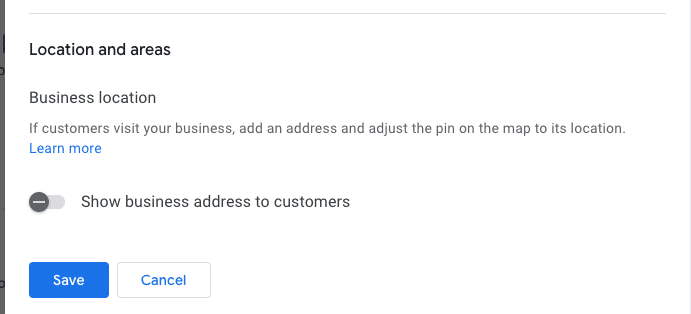
    I’ve often found myself engrossed in the ongoing debate within the local SEO community about the ‘hide address’ toggle for service area businesses (SABs). Many business owners consider this option a mere privacy setting, but it’s much more—a decision that affects how Google’s algorithm perceives your physical relevance.

    ```json
{
  "alt": "Settings interface for business location visibility with toggle option and save button.",
  "caption": "Easily manage the visibility of your business address with a simple toggle switch. Options to save or cancel changes make location management straightforward.",
  "description": "The image displays a digital settings interface focused on business location visibility. It features a toggle switch labeled 'Show business address to customers,' which is turned off. Below the toggle are 'Save' and 'Cancel' buttons for submitting changes. This screenshot is relevant for understanding business location management settings in online profiles or platforms. Keywords: business location, settings interface, visibility toggle, save button."
}
```

    Here are some questions to consider:

    ```json
{
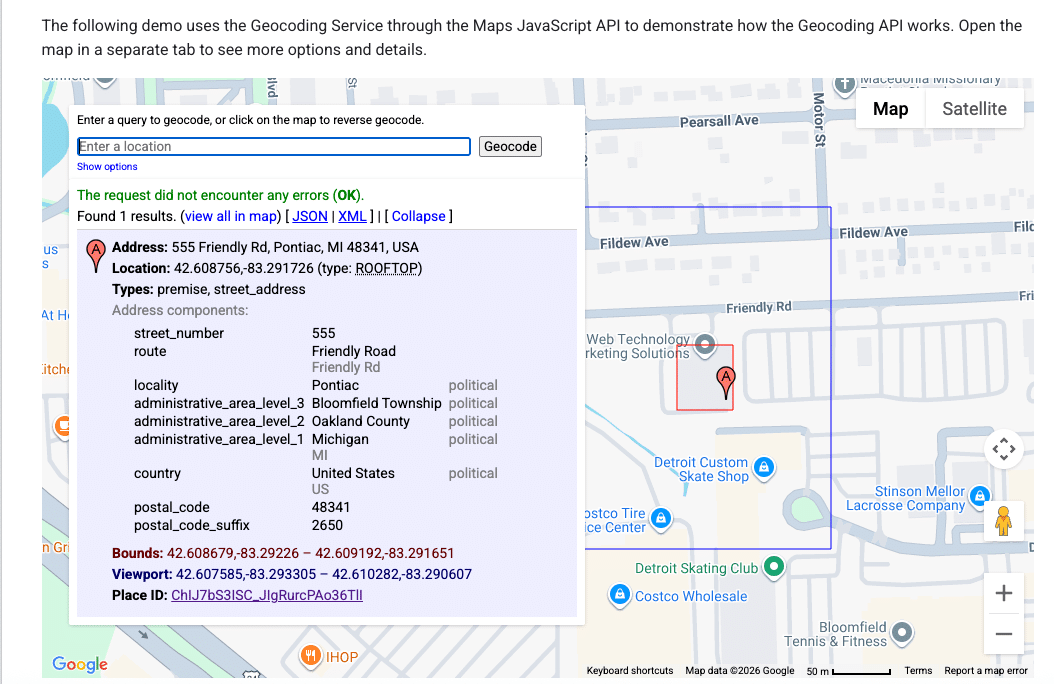
  "alt": "Geocoding service demo using Maps JavaScript API with address details and location on map.",
  "caption": "Explore the Maps JavaScript API with this geocoding demo, showcasing address details for 555 Friendly Rd, Pontiac, MI.",
  "description": "This image displays a geocoding service demo using the Maps JavaScript API. It highlights the detailed address of 555 Friendly Rd, Pontiac, MI 48341, USA. The interface shows the address components, coordinates (42.608756, -83.291726), and a map section indicating the location. The demo explains how to use geocoding for retrieving precise address information and viewing it on a map with options for different data formats like JSON and XML."
}
```
    • Does your defined service area affect your ranking?
    • Does hiding your street address impact your visibility in the local pack?
    • Is Google erasing that data, or does your map pin become an invisible anchor?
    ```json
{
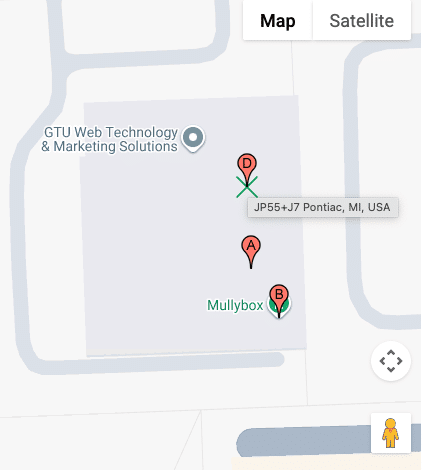
  "alt": "Map showing GTU Web Technology & Marketing Solutions and Mullybox with pinpoints in Pontiac, MI.",
  "caption": "Discover the location of GTU Web Technology & Marketing Solutions and Mullybox in Pontiac, MI, with this detailed map view.",
  "description": "This image displays a map highlighting GTU Web Technology & Marketing Solutions and Mullybox in Pontiac, MI. The map features pinpoints indicating specific locations labeled A, B, and D. The area is shown in a standard map view with street outlines and an overlay for easy navigation. This visual guide can help users find exact locations and understand the surrounding layout in Pontiac. Keywords: map, GTU Web Technology & Marketing Solutions, Mullybox, Pontiac, MI, location."
}
```

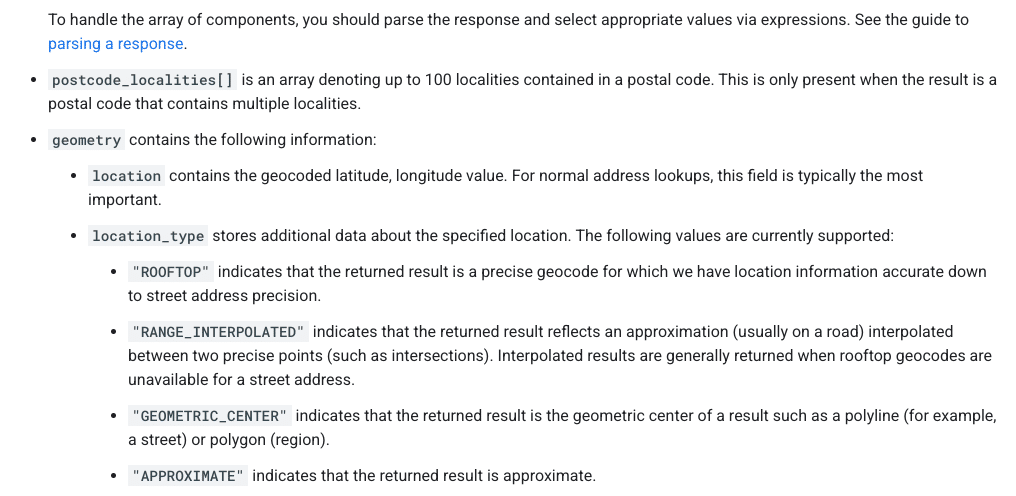
    These are foundational questions in understanding how proximity works when you choose to ‘hide’ on the map.

    ```json
{
  "alt": "Guide on parsing response components with types like ROOFTOP and APPROXIMATE.",
  "caption": "Understanding Geocode Location Types: Dive into the specifics of parsing response components from postal code localities to precise geocodes.",
  "description": "This image provides detailed guidance on parsing response components in geolocation data. It highlights how to interpret arrays like postcode_localities, and explains geometry details that include location types such as ROOFTOP, RANGE_INTERPOLATED, GEOMETRIC_CENTER, and APPROXIMATE. This is crucial for understanding accuracy and the precision of geocoding results, aiding in effective data handling and utilization."
}
```

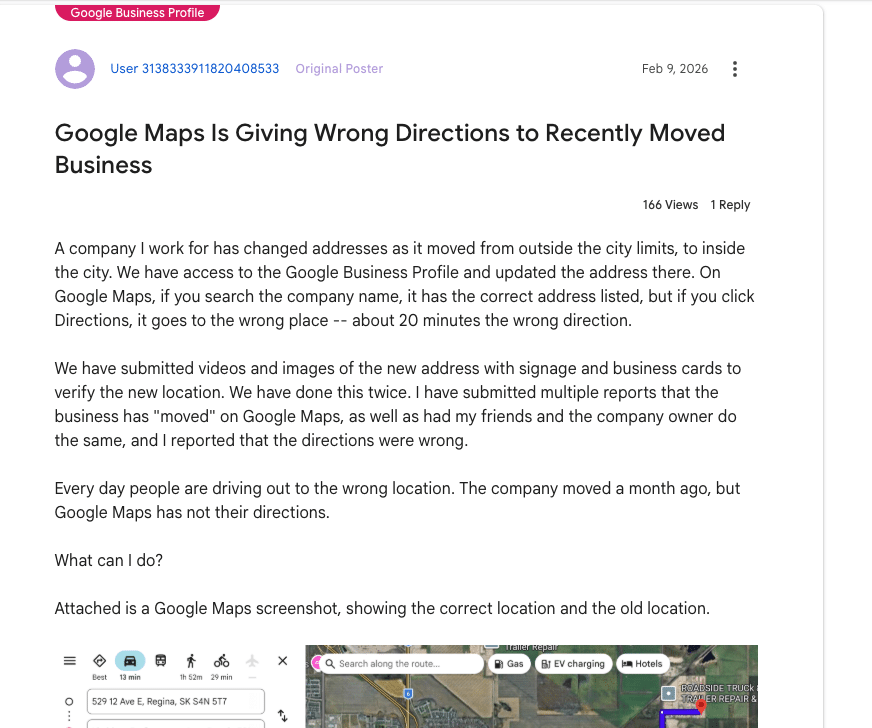
    How Google Determines Your Map Pin

    ```json
{
  "alt": "Forum post discussing Google Maps giving wrong directions after business address change.",
  "caption": "Frustration mounts as a business struggles with incorrect Google Maps directions following an address change, causing customers to get lost.",
  "description": "The image shows a forum post about issues with Google Maps providing incorrect directions to a business after its address change. Despite updating Google Business Profile, the directions lead 20 minutes off. Attached is a Google Maps screenshot indicating both old and new locations. The post has had 166 views and 1 reply, highlighting the frequent errors with directions and the efforts taken to rectify the situation."
}
```

    It’s essential to know that your address and map pin are not the same. Entering an address into your Google Business Profile doesn’t just place a pin; it’s processed through Google’s geocoding engine, comparing it against their database.

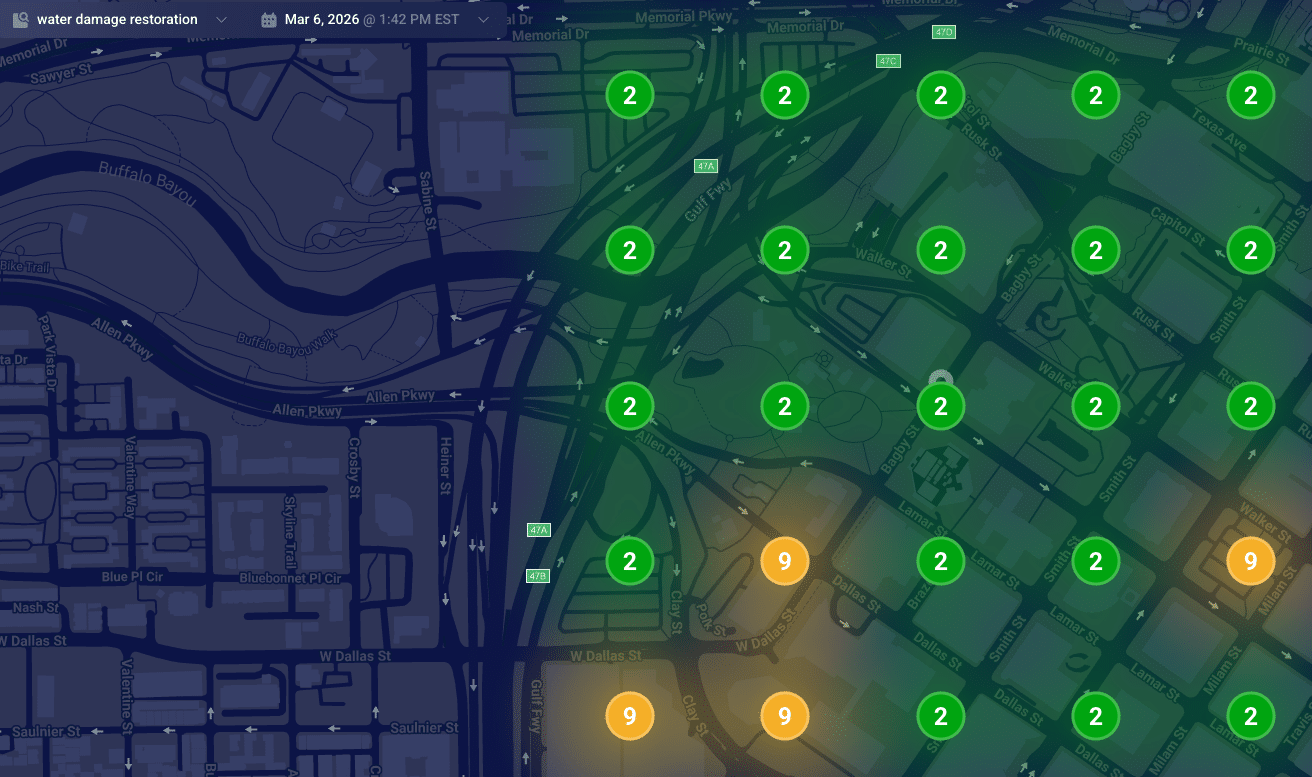
    ```json
{
  "alt": "Heat map visualization of water damage restoration needs in an urban area, showing numbered zones with color coding.",
  "caption": "Explore this dynamic heat map illustrating water damage restoration priorities across a city with distinct color-coded zones.",
  "description": "This image represents a heat map of water damage restoration needs in an urban area on March 6, 2026, at 1:42 PM EST. The map features a darkened city street layout with numbered circular zones indicating priority levels. Green circles with the number '2' indicate low priority areas, while orange circles marked with '9' highlight higher urgency zones. This visualization aids in strategic planning for restoration services."
}
```

    Understanding Google’s data models is key to understanding why your pin might be misplaced:

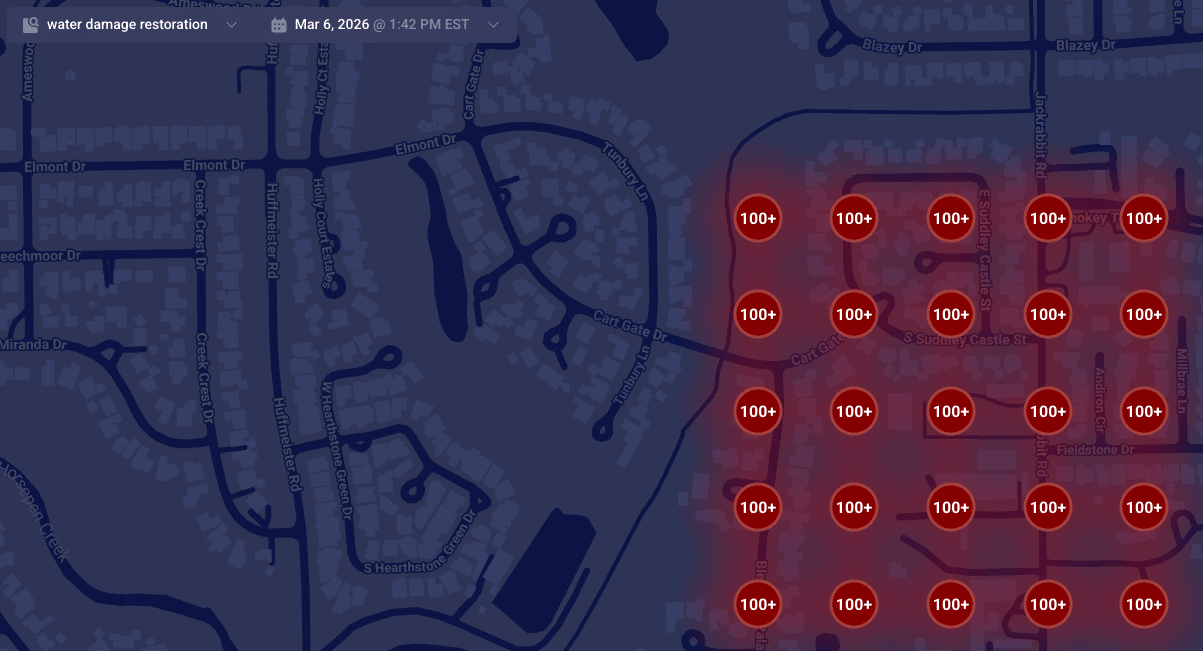
    ```json
{
  "alt": "Map highlighting areas with over 100 instances of water damage restoration services.",
  "caption": "A map visualization displaying clusters of water damage restoration needs, with over 100 cases highlighted in red.",
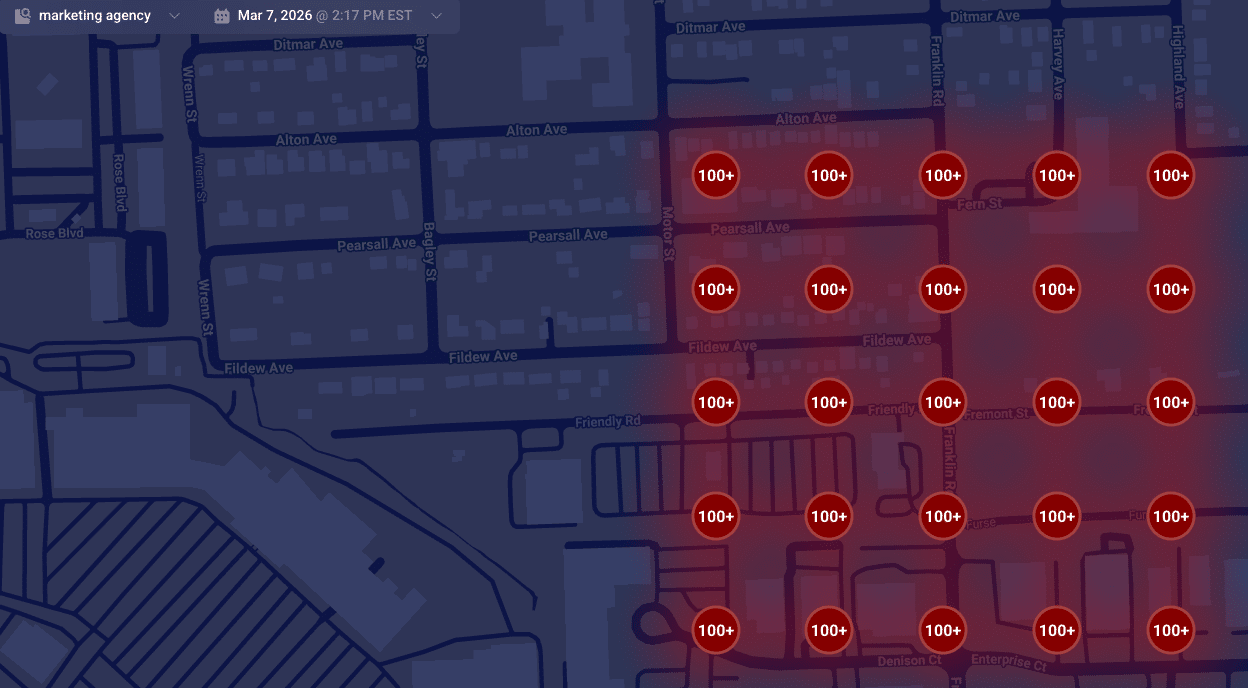
  "description": "This map illustrates a dense concentration of water damage restoration demands in a residential area. Red circles marked with '100+' indicate regions with over 100 service instances. The map is set against a dark background, featuring roads and street names for context. This visualization aids in identifying service hotspots, essential for targeting restoration efforts efficiently."
}
```
    ```json
{
  "alt": "Heatmap showing numerical data points on a dark map layout.",
  "caption": "A vibrant heatmap reveals numerical trends across a dark-themed map, spotlighting key data points for insightful analysis.",
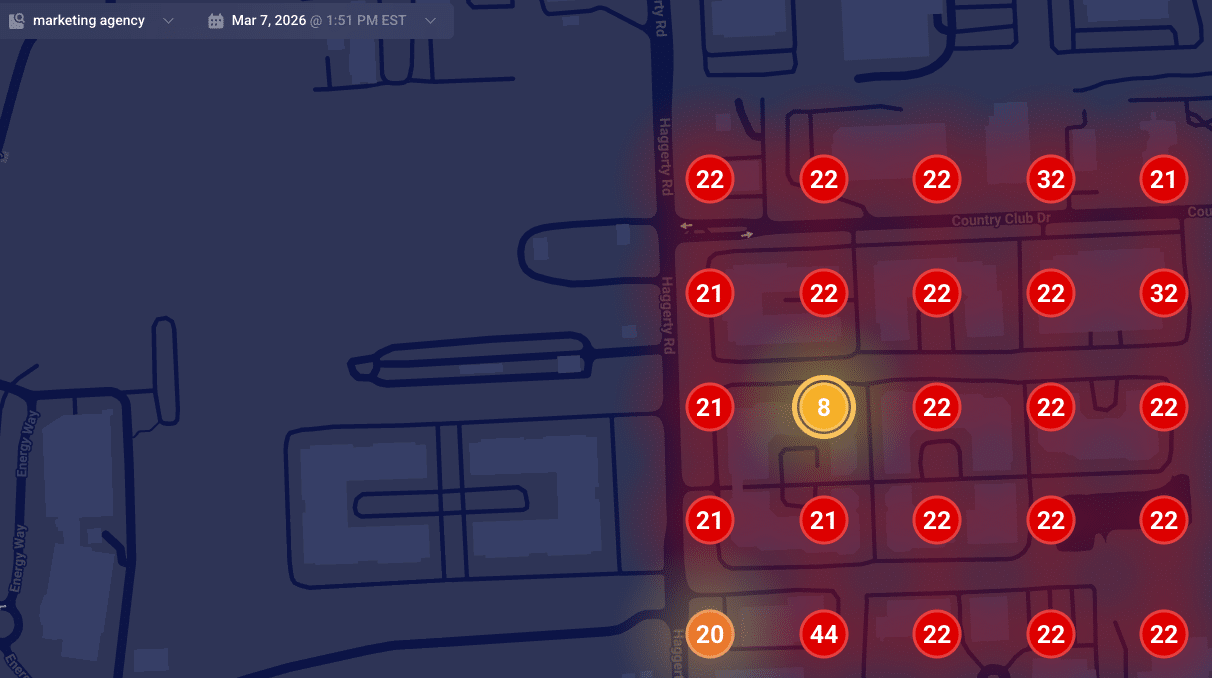
  "description": "This image showcases a heatmap overlaid on a map, displaying various data points marked with numbers. The numbers, like 8, 22, and 44, are highlighted within colored circles ranging from yellow to red, indicating varying data intensities. Designed for data visualization, it suggests a real-time analysis function, useful for trend analysis or strategic planning. The heatmap context is set against a dark map background, enhancing the visibility of the highlighted data points."
}
```

    When Google finds a reliable match, they place your pin accurately at your building’s rooftop. Understanding how these data models work can help explain why SABs sometimes rank differently in local searches.

    ```json
{
  "alt": "Map displaying high-density markers with '100+' in a red shaded area across various streets.",
  "caption": "This heat map reveals a high concentration area, with red-marked zones indicating significant density across streets like Pearsall Ave and Fildew Ave.",
  "description": "The map illustrates a geographic area with a high concentration of points marked '100+', shaded in red to indicate density. Streets such as Pearsall Ave, Fildew Ave, and Motor St are visible, providing a visual representation of congestion or population density. The interface is dated March 7, 2026, at 2:17 PM EST, possibly generated by a marketing agency tool, useful for spatial analysis or resource planning."
}
```

    Is Your Map Pin Placement Accidental?

    Don’t be mistaken, it’s not a bug but a failure in converting text to precise map coordinates. When this fails, your business may end up with a map pin that’s misplaced, affecting your local ranking authority.

    When unable to secure a high-confidence match from your building, Google defaults to using the city’s center as your pin’s fallback location, often causing your business to rank from a less relevant area.

    Suite Number Issues

    I’ve warned clients countless times about the pitfalls of including suite numbers in Address line 1. These numbers aren’t street-level data; embedding them can lead to geocoding conflicts, making your map pin default to a broader location like a city center.

    Properly Anchoring Your Map Pin

    For accurate map pin placement, ensure your address in Google’s system is geocoding-friendly. Keep unnecessary details out of the first address line and verify how Google reads your address using their developer tools.

    When addressing geocoding problems, prepare for possible re-verification requests. Stay consistent in your corrections until Google verifies your business’s precise location.


    Inspired by this post on Search Engine Land.


    crushpress.ai community screenshot
  • Technical SEO for Local Leads: Fix the Path to Inquiry

    Technical SEO for Local Leads: Fix the Path to Inquiry

    Your local website can rank for a service name and still miss the customer who eventually buys. The gap often appears one step earlier, when that customer is searching for a symptom, trying to understand the problem and deciding whether professional help is necessary.

    To generate more qualified inquiries, treat technical SEO and local content as one system. The right page must exist for the customer’s question, search engines must be able to crawl and index it, and the page must move the visitor toward an appropriate service without forcing them to translate their problem into your internal terminology.

    Find the demand that appears before the service query

    Most local sites are organized around what the business sells: plumbing, drain cleaning, furnace repair, roof replacement or another named service. That structure serves people who already know what to request. It does much less for someone asking why a sink keeps backing up, why a room never gets warm or whether a roof stain needs urgent attention.

    Those searches aren’t merely informational. The person is diagnosing a visible symptom, estimating the seriousness of the situation and deciding what to do next. A site that answers only service-name searches can therefore miss high-intent demand during the decision stage that precedes a direct local-service query.

    Start by separating three jobs your pages need to perform:

    • Problem pages help a visitor understand a symptom, its plausible causes, safe next steps and the point at which professional help makes sense.
    • Service pages explain the professional solution, what the work involves and how to request it.
    • Location pages establish where the service is available and give locally relevant information rather than repeating a generic service page with a different place name.

    Build your initial problem-page list from actual customer language. Review search queries, on-site searches, inquiry forms, call notes, sales questions and customer-service messages. Record the symptom as the customer describes it, the service it normally maps to and the decision the person is trying to make. A question such as “Can this wait?” represents a different content need from “What causes this?” even when both eventually lead to the same service.

    Don’t turn every wording variation into a separate URL. If several phrases describe the same condition and require the same answer, consolidate them on one strong page. Create a new page only when the symptom, likely causes, available options or appropriate service materially changes. That distinction prevents a useful resource library from becoming a collection of overlapping, low-value URLs.

    Prioritize technical fixes by their effect on leads

    A technician repairs blocked pathways in a website structure while local customers wait near the route to an inquiry point.

    A technical audit can produce hundreds of findings, but a long export isn’t a delivery plan. Development capacity is a real constraint: up to 67% of respondents have identified non-SEO development work as an impediment to technical implementation. Your backlog must distinguish a blocked revenue path from a cosmetic imperfection.

    Triage issues in this order:

    1. Make priority pages accessible and indexable. Confirm that each important service, problem and location URL returns a successful response, isn’t blocked from crawling, doesn’t carry an unintended noindex directive and identifies the correct canonical URL. Check the rendered page, not only its raw source, when JavaScript supplies essential copy, navigation or forms.
    2. Resolve competing URL signals. Look for duplicate paths, outdated URLs, parameter versions and inconsistent canonical tags. Redirect retired URLs to the closest relevant replacement, link internally to the preferred version and keep noncanonical duplicates out of the XML sitemap.
    3. Remove architectural dead ends. Every priority page should be reachable through a relevant hub or service page. A URL that exists only in a sitemap has far less contextual support than one connected to the site’s visible customer journey.
    4. Fix performance where it interrupts action. Address backend delays before polishing minor front-end details. Then inspect excessive JavaScript, rendering dependencies, late layout movement and resources that delay the information or controls a visitor needs first.
    5. Test the complete mobile journey. Check navigation, readable content, tap targets, telephone links, forms, validation messages and confirmation states on a narrow screen. A fast landing page still fails commercially if the form becomes difficult to complete.

    Score each task against four questions: Does it affect a page capable of generating a lead? Does it prevent crawling, indexing, understanding or conversion? How many priority URLs inherit the problem? What implementation effort and coordination does it require? A shared template defect affecting every service page should usually outrank an isolated warning on an old resource, even if an audit tool labels both issues the same way.

    Performance work should also follow the user’s sequence. Prioritize the page heading, main explanation, navigation and primary action before secondary widgets. Backend bottlenecks can affect the whole experience; after those are addressed, techniques such as critical CSS, selective preloading and reserving space for dynamic elements can improve perceived speed and stability. The point isn’t to chase a score in isolation. It is to keep the visitor’s path to an informed decision usable.

    Build an architecture that connects problems to solutions

    Your site structure should reflect the customer’s journey without abandoning clear service organization. A practical model contains a main service hub, individual service pages, a problem or advice hub, focused problem pages and useful location pages. The exact folder names matter less than the relationships between those pages.

    Make the internal links intentional:

    • A problem page should link to the service that resolves the issue, using language that explains the relationship.
    • A service page should link back to the common symptoms or situations that lead customers to need it.
    • A service hub should help visitors distinguish between related services instead of presenting an undifferentiated list.
    • A location page should link to services genuinely available in that area and to any problem resources that add local relevance.
    • Breadcrumbs and visible parent navigation should preserve the hierarchy for visitors as well as crawlers.

    This structure does more than distribute internal authority. It tells search engines that a symptom page, a professional solution and a service area belong to the same topic. It also gives a visitor an obvious next step without making every page behave like a hard-sell landing page.

    Watch for signal dilution as the site grows. Multiple URLs competing for the same intent, inconsistent canonical choices and weak internal links can prevent search engines from identifying the page you consider most important. Consolidating overlapping topics and strengthening links to priority pages are often more achievable than a complete architecture rebuild, especially when development resources are limited.

    Avoid automatically multiplying every service by every city and every symptom. A service-location page deserves its own URL when it can provide distinct, accurate value about that service in that place. A problem page deserves its own URL when it answers a distinct decision. Swapping a place name across otherwise identical pages creates inventory, not usefulness.

    Write problem pages that turn uncertainty into action

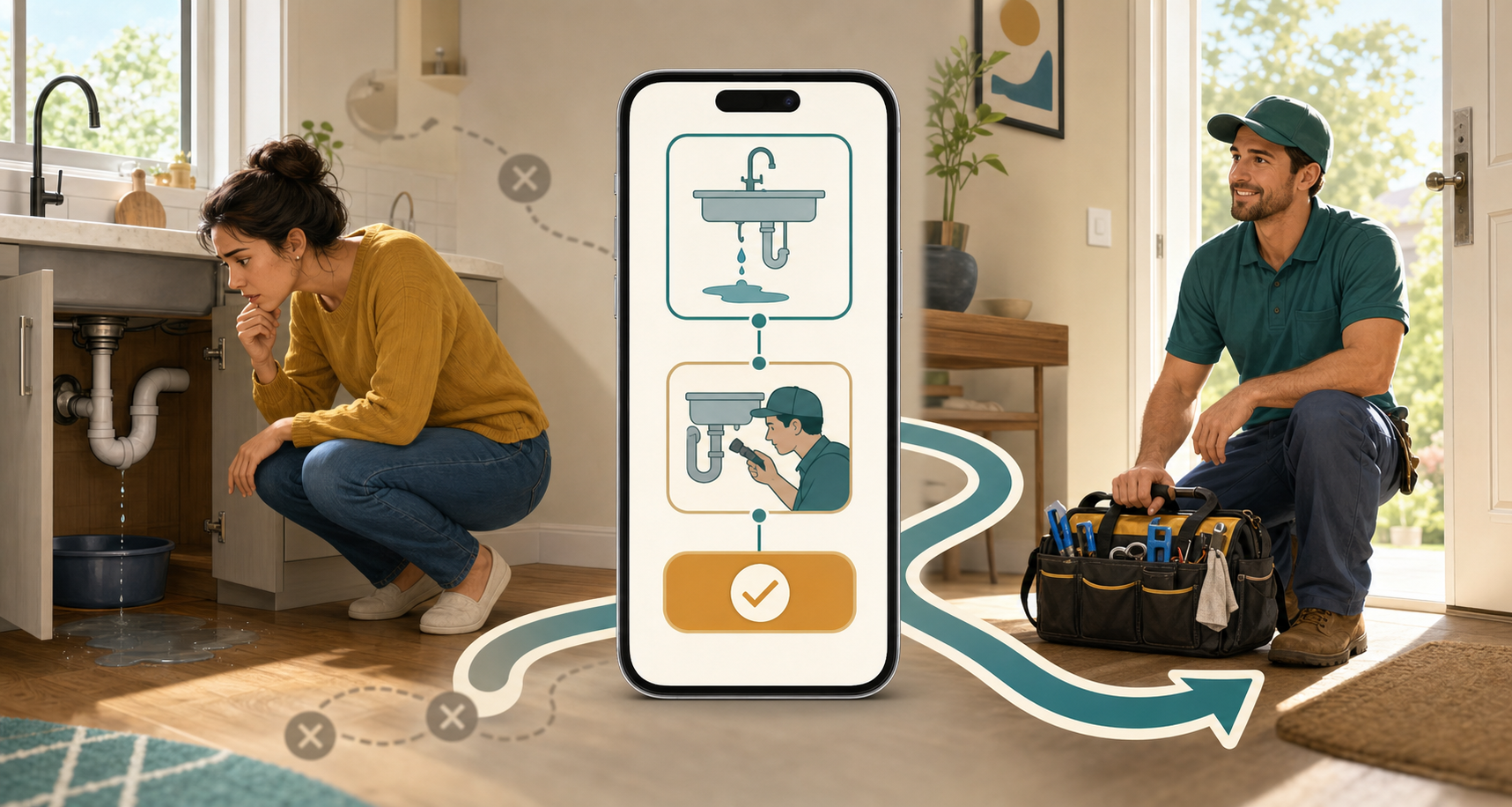
    A resident with a leaking sink follows a visual path through a mobile problem page to a visiting plumber.

    A useful problem page follows the visitor’s reasoning. It doesn’t open with a company history, a broad definition or a sales pitch. It begins with the situation the person can observe and then helps them make a safer, better-informed decision.

    Use this page sequence:

    1. Name the symptom precisely. Put the customer’s description in the title, opening paragraph and relevant subheadings. Confirm what the page covers and distinguish it from a similar-looking problem when that distinction matters.
    2. Give the short answer early. Explain what the symptom commonly indicates, whether several causes are possible and what the visitor should determine next. Don’t force someone to read an essay before learning whether the page applies to them.
    3. Order plausible causes usefully. Move from simpler or more common explanations toward causes that require inspection or specialist work. Explain the signs that separate one possibility from another without pretending to diagnose an unseen situation.
    4. Offer only safe checks. A visual observation or a basic setting check may be reasonable. Instructions involving gas, live electricity, structural damage, hazardous materials or equipment disassembly are not appropriate DIY lead magnets. State the stop condition and identify the qualified professional needed.
    5. Explain the available options. Tell the reader what can sometimes be monitored, what may require maintenance and what generally calls for professional diagnosis or repair. This is where the page earns trust by helping the visitor decide, not merely urging them to call.
    6. Set honest cost expectations. Publish a range only when it is supported by the business’s real service data and can be qualified appropriately. Otherwise, explain the factors that change the price, such as the underlying cause, access, parts, extent of damage or work required. Cost context and explicit signals for professional help reduce uncertainty without making an unsupported promise.
    7. Connect the problem to the service. Name the relevant service, explain how a professional would investigate the issue and offer an action that matches the urgency: request an assessment, call about an urgent condition or review the service before deciding.

    Place these pages inside a visible resource or problem hub, not in a forgotten chronological blog archive. A permanent position in the architecture makes their purpose clearer and lets service pages support them with relevant internal links.

    Make each answer easy for search and AI systems to interpret

    Clear structure helps beyond conventional rankings. Use headings that state the question being answered, concise paragraphs for direct explanations, lists for causes or decision criteria and consistent names for the symptom, service and location. A predictable symptom-to-cause-to-option-to-service relationship gives both search systems and AI-generated summaries less ambiguity about what the page means. Problem-led pages can therefore support indexing accuracy and visibility in AI-mediated search experiences, although no format guarantees inclusion.

    Clarity is more valuable than repetition. Don’t force the city, service and symptom into every heading. State the location where it changes the answer or establishes availability, and keep the diagnostic explanation readable for the person who actually has the problem.

    Key takeaways: measure the whole local lead path

    Don’t judge this work from rankings alone. Measure the handoffs between technical eligibility, discovery, consideration and inquiry:

    • Eligibility: priority service, problem and location URLs are crawlable, canonicalized correctly, rendered properly and eligible for indexing.
    • Discovery: problem pages receive impressions for symptom and decision-stage queries, not only for branded terms.
    • Movement: visitors use contextual links from problem pages to the relevant service pages or inquiry actions.
    • Conversion: calls, forms or bookings can be attributed to the landing page and page type that began the session.
    • Lead quality: the inquiries concern services the business provides in areas it actually serves.
    • Prioritization: the next fix is selected by lead impact, affected page reach and implementation effort, not by the raw number of audit warnings.

    The pattern in the data tells you what to change. Impressions without visits point toward a mismatch between the query, title and promised answer. Visits without movement to a service page suggest that the page isn’t resolving the visitor’s decision or making the next step clear. Service-page visits without inquiries shift attention to relevance, mobile usability, form friction and the offer itself. No impressions at all require you to revisit demand, internal linking and indexability before rewriting the call to action.

    Choose one commercially important service area for the next implementation cycle. Map its symptom questions, identify the existing service and location pages, fix the technical barriers across that small cluster, publish only the missing problem pages and connect the journey with deliberate internal links. Once you can measure that path from crawl to qualified inquiry, extend the model to the next service cluster.

    References

  • How Tripadvisor Supports Local SEO for Travel Businesses

    How Tripadvisor Supports Local SEO for Travel Businesses

    If you market a hotel, restaurant, tour, or attraction, a weak Tripadvisor listing can shape the decision before a traveler reaches your website. The platform can occupy valuable search-result space for your business name, appear during category discovery, and expose reviews, photos, and business details while the customer is deciding where to book.

    Your goal is not to make Tripadvisor the center of your local SEO strategy. It is to manage the listing as one coordinated part of your search presence: accurate business facts, a clearly described experience, fresh evidence, useful customer language, and a credible path from discovery to action.

    Tripadvisor influences discovery before it influences rankings

    Tripadvisor performs three jobs at once. It is a search result, a comparison marketplace, and a reputation page. That combination matters because travelers visiting it are often beyond general inspiration and actively comparing places, experiences, or meals.

    The scale is difficult to dismiss: Tripadvisor receives about 490 million monthly visits. Its large, programmatically structured collection of indexable destination, category, and business pages also gives it substantial visibility in conventional search results. In some tourism and hospitality searches, a Tripadvisor listing can even appear above the business’s own website.

    That does not mean optimizing Tripadvisor will directly raise your website or Google Business Profile rankings. There is no defensible reason to report it as a guaranteed ranking shortcut. Its local SEO contribution is broader and more practical:

    • Search-result coverage: A complete listing gives searchers a credible third-party result when they look for your brand, location, or business type.
    • Internal discovery: Categories, tags, reviews, and profile content help Tripadvisor understand where the business belongs within its own marketplace.
    • Entity consistency: Matching identity information across Tripadvisor, your website, and Google Business Profile reduces ambiguity about which business each page represents.
    • Decision support: Current photos, detailed reviews, and clear descriptions answer questions that might otherwise stop a booking.
    • Qualified referral traffic: Visitors who reach your website after comparing options on Tripadvisor may arrive with stronger intent than someone conducting broad destination research.

    Tripadvisor can also contribute to AI discovery, but the mechanism should be described carefully. Detailed profile text and factual owner responses create more explicit language about your amenities, audience, setting, and experiences. That gives AI-driven search systems more context to interpret; it does not guarantee that an AI answer will mention or recommend you. For AEO and GEO, prioritize clear passages and verifiable details, not inserted keyword strings.

    Fix identity, duplicates, categories, and tags before polishing copy

    Isometric illustration of duplicate map listings merging into one organized listing for a boutique inn.

    A beautifully written description cannot repair a fragmented business identity. Begin with the fields that determine which entity the listing represents and where it can be discovered.

    1. Look for duplicate and outdated listings. Search Tripadvisor and conventional search results using the exact business name, previous names, address, and common variations. Do this before creating anything new. A duplicate can divide attention, reviews, photos, and brand signals between competing pages.
    2. Claim and verify the correct listing. Use the profile representing the current operating business. Resolving duplicates can require official business documents and information that matches Google Business Profile, so keep the legal and customer-facing identity records available.
    3. Align the core facts. Check the operating name, address, website, primary business type, and other defining details against your website and Google Business Profile. Consistency means the facts agree; it does not mean every platform needs an identical marketing description.
    4. Select accurate categories and tags. Represent the full set of experiences the business genuinely provides. Tripadvisor uses these classifications for internal discovery and curated collections, so an omitted attribute can prevent an otherwise suitable business from appearing in a relevant list.
    5. Complete the decision-making fields. Describe the experience, amenities, menu, and other material offerings that a prospective guest needs to understand. Remove details that are no longer true.
    6. Review the public page as a customer. Confirm that the lead image, summary information, categories, and recent customer feedback create one coherent expectation. Owner dashboards can hide how disconnected a listing feels when its public elements are viewed together.

    Do not add categories merely because they attract desirable searches. If the listing claims a romantic dining experience, family-oriented amenity, or particular type of cuisine, the photos, menu, description, and customer feedback should support that claim. A misleading classification may win an impression but lose the booking when the visitor inspects the page.

    Use this priority order when resources are limited: correct identity, remove duplication, choose the right categories, update the offer, refresh the visual evidence, and then refine promotional wording. The early steps determine whether the right listing can be found; the later steps help it convert.

    Reviews and images should explain the experience, not decorate it

    Traveler photographing a guide presenting a regional dish to a small group inside an independent restaurant.

    Write owner responses that add useful context

    A review response is not only reputation management. It is public content attached to a specific customer experience. A thoughtful reply can turn a vague mention into a clearer explanation of what the business offers.

    If a guest says only that the pool was enjoyable, for example, a useful response can acknowledge the comment and mention a relevant family feature or activity, provided that feature genuinely exists. This creates additional semantic context around the property’s amenities. The response should still sound like a reply to a person, not a paragraph built to carry search terms.

    A reliable response structure is:

    • Acknowledge the specific experience. Refer to what the customer actually mentioned instead of opening with a generic template.
    • Add one relevant clarification. Explain a feature, setting, audience, or use case that helps the next reader understand the experience. Only add details you can substantiate.
    • Close naturally. Keep the response proportionate to the review. Repeating the business name, location, and service keywords adds clutter rather than value.

    You can also encourage more informative reviews without scripting praise. After the visit, invite the customer to describe which experience they booked, what stood out, who the experience suited, or what they would tell another traveler. That produces more decision-useful language than asking only for a star rating.

    Review velocity matters as an operational signal, but do not confuse velocity with sudden volume. The sustainable objective is a continuing stream of feedback from real customers, followed by regular owner attention. A burst of requests followed by months of silence leaves the listing looking less current and gives you fewer recent customer questions to learn from.

    Use current images as evidence of what someone can book

    Travel and hospitality decisions are visual. The strongest images quickly show what the guest will receive: the room, dish, view, activity, atmosphere, or defining feature. Replace photos that show an old menu, previous decor, unavailable amenities, or an experience that no longer represents the business.

    You do not need to guess which creative deserves the lead position. If you already publish comparable photos on Instagram, use the engagement data as a directional signal for which subjects and compositions attract attention, then confirm that the selected image accurately represents the bookable experience. Popularity is useful only after accuracy.

    Captions should describe the image in natural language. A practical formula is: what is shown, where or how it is experienced, and who or when it may be relevant. For example, a dish caption can identify the meal, the terrace or dining setting, and the season in which it is offered. Include audience claims such as “popular with solo travelers” only when you have a real basis for them. A string of location and service keywords does not help a traveler understand the image.

    Manage Tripadvisor as a measurable local search channel

    Profile optimization becomes difficult to defend when the only metric is average rating. Rating matters to customers, but it does not tell you whether the listing is accurate, discoverable, engaging, or sending qualified demand.

    Track the channel in layers:

    • Presence: Record whether the correct Tripadvisor page appears for your business name and relevant local discovery searches. Note duplicate or outdated results separately.
    • Profile health: Monitor completeness, category accuracy, current menu or experience information, image freshness, and unanswered-review backlog.
    • Activity: Watch review velocity, owner response activity, new image publication, and recurring themes in customer language.
    • Engagement: Use the interaction and click information available to the account to identify whether people are moving beyond a listing impression.
    • Business outcomes: In your web analytics, segment Tripadvisor referral visits and evaluate them against the booking, reservation, enquiry, or purchase action that matters to the business.

    Capture a baseline before making a substantial change. Compare equivalent reporting periods and annotate major profile updates, promotions, closures, and seasonal offer changes. This will not prove that a single caption or response caused a result, but it will prevent you from attributing every movement to the most recent edit.

    Website traffic is only one part of the journey. Tripadvisor also functions as a comparison environment where a customer may make a decision without visiting your domain. Read referral traffic alongside profile engagement and actual bookings rather than declaring the channel successful or unsuccessful from sessions alone.

    A manageable recurring workflow is to inspect identity fields and duplicates, clear the review-response backlog, replace outdated images or offer information, record emerging customer themes, and review referral outcomes. Assign ownership to a person or role. A listing that belongs vaguely to “marketing” is likely to remain untouched until a negative review or incorrect detail creates urgency.

    Key takeaways

    • Use Tripadvisor as a distributed local landing page and comparison surface, not merely a place to collect ratings.
    • Resolve duplicate listings and align core identity information with your website and Google Business Profile before rewriting promotional copy.
    • Choose categories and tags for experiences the business actually delivers; those classifications affect internal discovery and customer expectations.
    • Respond to reviews with one useful, factual layer of context instead of inserting keywords or repeating a template.
    • Refresh images, captions, menus, and experience details whenever the public offer changes.
    • Measure profile health, engagement, qualified referral traffic, and business outcomes separately so you can see where the journey is improving or breaking.

    Start with a duplicate and identity audit of the listing that already exists. Once the correct entity is established, improve one decision layer at a time: classification, offer clarity, reviews, images, and measurement. That sequence turns Tripadvisor from an unmanaged reputation page into a useful part of your local search system.

    References

  • Google AI Search and Local Visibility: A Practical Guide

    Google AI Search and Local Visibility: A Practical Guide

    Your Google Business Profile is accurate, your location page is live, and you rank for at least some local searches. The uncomfortable question is what happens when a potential customer asks Google an open-ended local question and receives an AI-generated answer instead of a familiar list of links.

    The practical response is not to chase a separate set of AI keywords. Make your business identity easy to verify, keep every important fact consistent, and publish enough location-specific information for an answer system to understand when your business is relevant. That work supports local packs, conventional results, AI Overviews, and other AI-assisted discovery without betting your strategy on one interface.

    Local AI visibility starts with a resolvable business identity

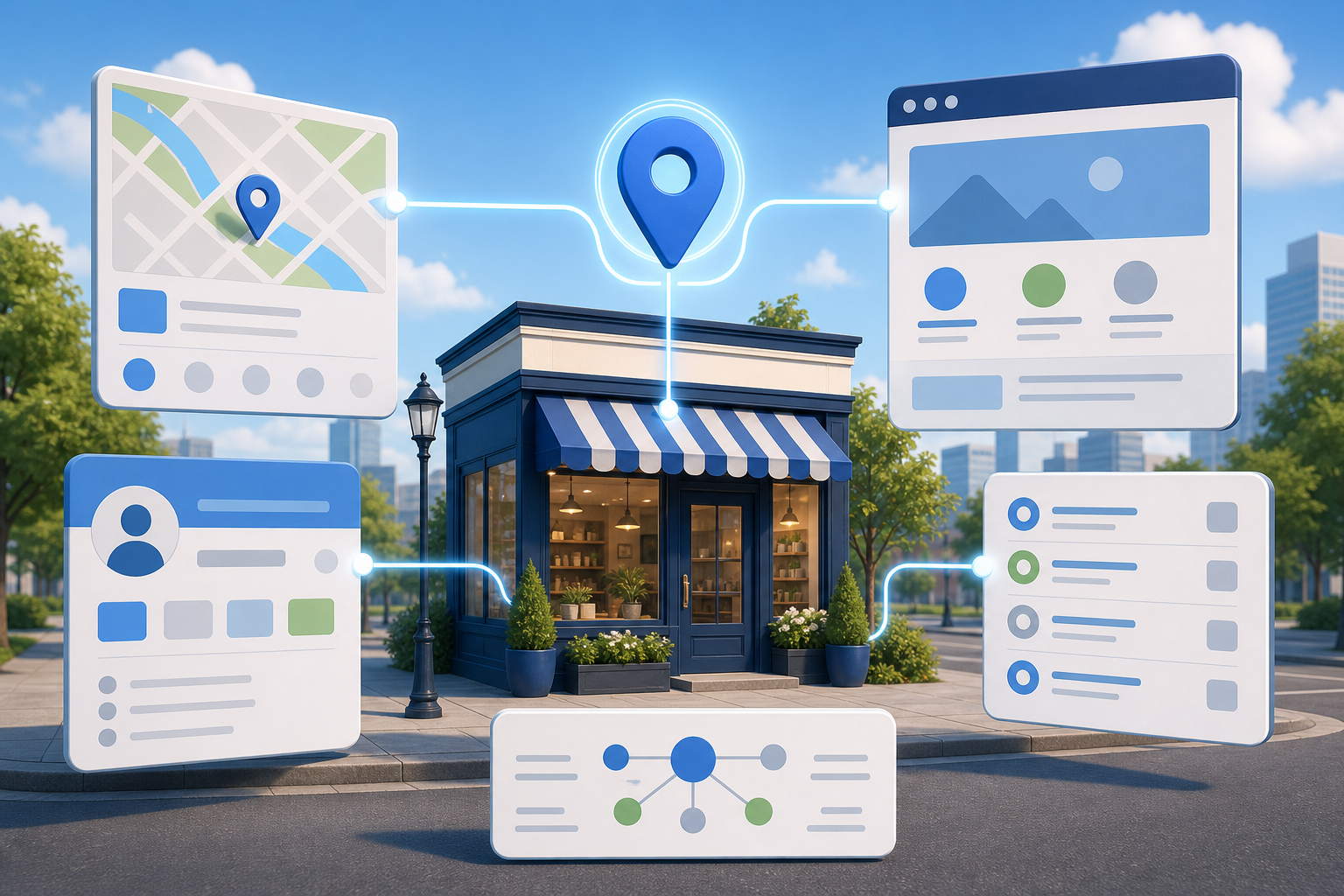
    A storefront is connected to matching map, profile, website, directory, and structured-data symbols that converge on one location pin.

    Google does not have to rely on one page or database to decide what your business is. It can compare on-page content, site structure, Google Business Profile data, citations, reviews, and schema markup. Agreement among those signals gives the system a coherent entity to work with. Contradictions force it to choose between competing versions of your name, location, hours, services, or status.

    That distinction matters because local AI optimization is not simply another ranking exercise. A system may need to establish that your business exists, determine where it operates, understand what it offers, and decide whether the evidence is strong enough to include in an answer. Schema can make facts explicit, but it cannot turn conflicting information into reliable information.

    You should also avoid treating every Google AI experience as the same destination. Google Search is oriented toward information, engagement, and connections to the web, while Gemini is positioned more as an assistant for productivity and creation. Those products share technology but follow different objectives, and their eventual degree of convergence remains unsettled. Build facts that can travel across systems instead of optimizing around a guessed interface.

    Key takeaways

    • Treat local visibility as an entity-confidence problem before treating it as a content-volume problem.
    • Create one approved record of your business name, location, contact details, hours, services, and service area.
    • Make visible page content, Google Business Profile data, citations, reviews, internal links, and structured data tell the same story.
    • Use schema to confirm facts that people can also see on the page, not to introduce a more convenient version of the business.
    • Measure factual accuracy and visibility separately across standard search, local results, AI Overviews, and Gemini.

    Write a canonical local fact sheet before editing schema

    Most consistency problems begin inside the business. The website owner has one phone number, the operations team has another, and an old directory still lists the number used before a move. A schema plugin then reproduces whichever version happened to be entered during setup.

    Create a canonical fact sheet for each location. This is an internal operating record, not marketing copy. Give one person or team responsibility for approving changes, then use the record whenever you update the website, profiles, directory listings, or structured data.

    1. Identity: Record the customer-facing business name, the most accurate primary business category, and a short factual description of the operation.
    2. Location: Distinguish a staffed customer-facing location from an office, headquarters, mailing address, or service area. Do not let one address imply a function it does not have.
    3. Contact details: Choose the public phone number, canonical location-page URL, and any official appointment or enquiry URL.
    4. Availability: Record normal operating hours and identify services that follow different schedules. If customers can visit only by appointment, say so in visible language.
    5. Offerings: Use the service names customers will see on the website and confirm which location actually provides each one.
    6. Geographic scope: List the areas the business genuinely serves. Keep a service area distinct from an address and from places you merely hope to target.
    7. Official profiles: Maintain the URLs of the Google Business Profile and other profiles that clearly represent the same business entity.

    Resolve ambiguity instead of encoding it

    A fact sheet is useful only if it contains decisions. If the storefront sign, website header, and profile use different names, do not copy all three into different schema fields. Decide which customer-facing identity is correct, determine whether the alternatives still serve a legitimate purpose, and plan a coordinated correction.

    Apply the same discipline after a relocation, rebrand, acquisition, phone-system change, or adjustment to opening hours. Old information is not harmless just because it appears on a low-priority page. It can still create another version of the entity for machines and customers to reconcile.

    Do not place aspirational claims on the fact sheet. A city you want to enter is not yet a service area. A service you plan to launch is not an available offering. A shared building is not evidence of a customer-facing branch. Structured data should describe the operation customers can actually use.

    Align every place Google can compare

    Once the canonical record is approved, audit the surfaces that can confirm or contradict it. Work from high-consequence identity facts down to descriptive enhancements. A wrong address, closed status, or phone number can block a customer journey; a less-than-perfect description usually does not deserve priority over those failures.

    SignalWhat to inspectCommon conflictCorrective action
    Visible website contentHeader, footer, contact page, location page, service pages, and booking instructionsThe footer shows current hours while an old contact page shows a previous scheduleUpdate the reusable template and every page that states the fact
    Internal links and site structureNavigation, location finders, breadcrumbs, service links, and XML sitemap entriesCurrent pages still point to a retired location URLLink to the canonical live location page and remove obsolete paths from normal navigation
    Google Business ProfileName, category, address or service area, phone, hours, website URL, and listed servicesThe profile and website describe different operating scopesCorrect the underlying business record, then update both surfaces from it
    Citations and directoriesProminent industry, regional, and customer-facing listingsAn old brand, address, or phone number remains activeCorrect the profiles most likely to be encountered or reused, keeping the same canonical facts
    Reviews and reputation contextRecent customer language and references to a location, brand, or serviceCustomers continue to refer to a former name or locationDo not rewrite customer reviews; clarify the transition on properties the business controls

    Structured dataRendered JSON-LD, not only the fields displayed in a plugin dashboardA theme or second plugin emits an outdated duplicate business entityFix the generating component and leave one coherent representation of each entity

    Do not turn consistency into a demand that every description be word-for-word identical. A directory may need a short category label while a service page needs a detailed explanation. The facts must agree even when the wording and level of detail differ.

    Audit from the customer’s point of view as well as the database owner’s. If one page says a branch is open but its booking link offers no way to select that branch, the site is making two operational claims. Fix the journey, not just the sentence.

    Use LocalBusiness schema as a confirmation layer

    LocalBusiness structured data converts important business facts into explicit relationships and properties. Its value is clarity: it can help a machine distinguish the entity’s name from a page heading, the business address from a publisher address, and the location URL from a general site URL. In AI-assisted local search, that clarity helps reduce uncertainty about who the business is, what it does, and where it operates.

    It is not a private channel for claims that the visible page cannot support. If the page says the office closes at one time and openingHoursSpecification says another, the markup has created a conflict. If areaServed lists places the page never discusses and the business does not genuinely serve, the markup is not providing stronger optimization; it is weakening the integrity of the entity record.

    • Use the most specific LocalBusiness subtype that accurately represents the business. Specificity is useful only when it is true.
    • Give each real location a stable page URL and a stable @id so repeated references can point to the same entity.

    • Match name, url, telephone, address details, and opening hours to the approved record and visible page.
    • Add areaServed only for genuine service coverage. Do not use it as a list of geographic keywords.
    • Use sameAs for official profiles that represent the same entity, not for any page that happens to mention the business.
    • Include only properties your team can keep current. More markup creates more maintenance obligations.
    • Inspect the rendered output after theme, plugin, template, or location-data changes. A correct admin form does not prove that the live page emits one correct graph.

    Keep multi-location entities separate

    A multi-location organization should not collapse every branch into one ambiguous local entity. Give each genuine location its own visible facts and structured-data identity, then connect it to the parent organization where that relationship is accurate. This lets a system answer a local question with the appropriate branch instead of inheriting a headquarters address, organization-wide phone number, or service that is unavailable locally.

    The same caution applies to practitioners operating inside a larger business. Represent a practitioner, department, location, and parent organization as distinct entities when they are distinct in the real world. Do not merge them merely because one plugin form is easier to complete.

    No schema property guarantees a local ranking, an AI citation, or inclusion in an AI Overview. The useful test is narrower: does the markup make the correct business easier to identify without disagreeing with the rest of the web presence?

    Create answerable local pages, then keep them synchronized

    An organized set of illustrated local website pages receives synchronized business details from a central hub connected to an abstract search assistant.

    Consistency helps a system trust a fact, but it does not establish relevance to every local question. Your location pages must also explain the decisions customers are trying to make. A page containing only a business name, map, phone number, and generic brand copy identifies a place but says little about why that place fits a particular need.

    Write for local decisions

    Start the page with a plain statement of what the location provides and where it provides it. Then answer the questions that materially change whether someone can use the business.

    • Which services are available at this location, and which are not?
    • Is the address a place customers can visit, or does the business travel to them?
    • What geographic area does the team actually serve?
    • Are there appointment, access, delivery, or availability conditions a customer needs to know before acting?
    • What should a customer do next: call, book, request a quote, visit, or choose another location?
    • Which page provides the best supporting detail for each important service?

    Use internal links to connect a location to the services genuinely available there, and connect service pages back to the appropriate locations. That structure gives people a usable path and gives machines a clearer relationship between the organization, its branches, and its offerings.

    Avoid manufacturing near-identical city pages that change only a place name. They repeat a target phrase without adding evidence about local availability. If you cannot state what is operationally different or specifically useful for a location, strengthen the primary service-area or location page instead of multiplying weak pages.

    Use a change protocol

    Local information drifts when operational changes are handled as one-off edits. Treat every change to a name, address, phone number, schedule, service, location status, or service area as a coordinated release.

    1. Approve the new fact in the canonical record and note when it becomes effective.
    2. Update the visible website content, including reusable headers, footers, contact modules, and booking instructions.
    3. Update the structured-data generator and inspect the JSON-LD rendered on the live page.
    4. Update the corresponding Google Business Profile fields.
    5. Correct important citations and official profiles that still expose the previous fact.
    6. Check internal links, redirects, sitemap entries, and location finders if a URL or location status changed.
    7. Record what was changed so a later audit can distinguish an overlooked property from a system that has not yet reflected the update.

    Measure each discovery surface separately. For standard search, local results, AI Overviews, and Gemini, record whether the business appears, whether the displayed facts are correct, which page or profile is surfaced, and whether the result offers a usable next action. A correct answer with no visibility is a relevance problem. Visibility with the wrong hours or location is an entity-accuracy problem. Those failures need different fixes.

    Begin with one commercially important location and one service customers regularly seek there. Approve its fact sheet, compare every major signal, repair the highest-consequence conflict, and only then expand the process across the rest of the business. That gives you a repeatable local AI visibility system rather than another markup project that goes stale after launch.

    References

  • Local Business Contact Page SEO: A Practical Blueprint

    Local Business Contact Page SEO: A Practical Blueprint

    If your contact page contains only a phone number and a form, your customer still has work to do. They must find out when you are open, whether they can text you, where to park, which payment methods you accept, and what will happen after they submit an inquiry.

    Those missing details also make your business harder for search systems to interpret. Google can crawl and interpret a contact page to extract business details, so this page should function as a complete local business record as well as a conversion page.

    Give the contact page three clear jobs

    A useful contact page answers three questions without making the visitor search the rest of your site:

    • Have I found the right business? The page confirms your name, brand, location, and what you do.
    • Can this business meet my practical needs? The visitor can check hours, service options, amenities, directions, parking, and payment methods.
    • What should I do next? The page presents a visible action and explains what happens after the customer takes it.

    That makes the contact page closer to a focused local landing page than an administrative endpoint. It still needs to be concise, but concise does not mean incomplete. The goal is to put every fact needed for a call, visit, message, pickup, delivery, or appointment in one dependable place.

    Key takeaways

    • Publish a complete business identity, not just a name, address, and phone number.
    • Make shared details agree with your Google Business Profile.
    • Answer practical questions about contacting, visiting, buying, and arriving.
    • Support your claims with verifiable reviews, credentials, awards, and local involvement.
    • Use a prominent call to action, explain the follow-up process, and track completed actions.

    Publish one complete and consistent business record

    Illustration of a storefront linked to matching phone, location, hours, and email icons across a computer, smartphone, card, map tile, and directory panel.

    Start with facts before rewriting headlines or changing the design. Open the contact page beside your Google Business Profile and compare every field they share. A customer should not see one phone number on the page, another on the profile, and unexplained hours somewhere else.

    Make the business identity unmistakable

    Use the same recognizable logo that appears on your signage and other marketing materials. State the full customer-facing business name prominently. If you use a slogan, keep it accurate and useful; forcing location phrases or service keywords into it will make the page sound less credible.

    Follow the identity block with a short introduction that says what you do, where you operate, and why someone would choose you. A practical pattern is: business type, location, main area of expertise, and a genuine differentiator. This gives a first-time visitor enough context to confirm that they reached the intended company.

    Include the details customers otherwise have to hunt for

    • Full business name: Use the name customers encounter on your storefront, Google Business Profile, invoices, and other public materials.
    • Complete address: Include every part needed to reach the correct entrance or unit.
    • Phone number: Make it easy to select on a mobile device and label its purpose if you publish more than one number.
    • Text number: If texting is supported, say so explicitly. Do not leave visitors guessing whether the main number accepts messages.
    • Contact form and email address: Provide an alternative when the form fails, the request needs an attachment, or the visitor prefers email.
    • Operating hours: Publish normal hours and keep special or holiday variations current.
    • Social profiles: Link only to profiles you actively associate with the business.
    • Ways to buy: State whether you offer in-store shopping, curbside pickup, delivery, appointments, or another relevant arrangement.
    • Map and directions: Embed the Google Map connected to the business and include a direct link to its Google Maps listing. A generic pin for the street address can be less useful than the actual business listing.
    • Accepted payment methods: Tell customers what they can use before they arrive or place an order.
    • Parking information: Explain where customers can park and identify any instructions they need before reaching the entrance.

    The shared facts on this page and your Google Business Profile should agree. That does not mean every channel must contain identical prose. It means the business name, location, contact routes, hours, service options, and applicable attributes should not contradict one another.

    When something changes, update both records as part of the same task. Assign an owner for the page and include it in the workflow for holiday hours, phone changes, relocations, new payment methods, and revised pickup or appointment policies. A technically polished page with stale operational information still fails the customer.

    Remove friction from calling, visiting, and buying

    A customer holds a phone with icon-based contact actions while a clear route leads to an accessible local shop with parking, a bicycle rack, and welcoming staff.

    Visitors do not all arrive with the same intention. One wants to call immediately. Another needs directions. A third is checking whether curbside pickup is available. The page should support those paths without forcing everyone through the contact form.

    • For callers: Place the phone number near the primary call to action and show the hours during which a response is available.
    • For people who want to text: Label the text option and set an expectation for how the conversation continues.
    • For visitors traveling to you: Pair the address with the business map, a Google Maps link, parking instructions, and any arrival detail that prevents confusion.
    • For shoppers: State whether the relevant option is in-store service, pickup, curbside collection, delivery, an appointment, or some combination.
    • For people comparing fit: Publish relevant amenities and business attributes in plain language rather than assuming they will infer them from photos.
    • For written inquiries: Offer both the form and an email address, then explain what information will help your team respond.

    Put the most common action early on the page, but do not hide the supporting details below a long promotional introduction. Someone standing outside your building needs the address, hours, map, and parking information more than another paragraph about brand values.

    Amenities deserve particular attention because they often decide whether a customer can use a business at all. Review the attributes shown on your Google Business Profile, confirm which ones are still accurate, and reproduce the applicable facts on the page. Add other genuinely useful amenities that are specific to your location. Do not claim an attribute merely because it sounds desirable.

    If you operate multiple locations, do not mix several addresses, phone numbers, and sets of hours into an unlabeled block. Make the selected location obvious, separate its facts from every other branch, and ensure each call to action reaches the right team or destination.

    Put trust and local relevance beside the decision

    Reaching the contact page does not mean the visitor has decided to contact you. They may be looking for one final reason to proceed or one warning sign that tells them to leave. Place evidence close to the action instead of expecting them to visit a separate company-history page.

    Explain what happens after contact

    Uncertainty is a conversion barrier. State the expected response time, whether the visitor will receive a confirmation, and what the next step normally involves. If different channels have different processes, explain them separately. A form submission might lead to a callback, while an appointment request might require confirmation before the time is reserved.

    Make those expectations operationally honest. A vague promise such as “we respond quickly” gives the customer no usable information. A clearly stated response window is better, but only if your team can maintain it. If you cannot commit to a window, describe the sequence instead: confirmation, review, and follow-up.

    Use proof that a visitor can verify

    • Associations and memberships: Name relevant industry groups, chambers of commerce, professional organizations, neighborhood associations, and community groups. Link to your business entry on the organization’s site when one exists.
    • Ratings and credentials: Display current credentials and any applicable Better Business Bureau information without overstating what the rating or membership means.
    • Awards and press: Identify the award or coverage and link to the organization or publication that issued it.
    • Reviews and testimonials: Use external reviews or testimonials that include enough context to feel authentic, such as the reviewer’s name, photo, city, or public profile when you have permission to publish those details.

    Verification matters more than the number of badges. An unfamiliar logo with no explanation can become visual clutter. A named organization, a clear relationship, and a link to an independent listing give the visitor something they can evaluate.

    The page can also serve existing customers. Include a clear link for leaving a Google review where appropriate, especially for repeat customers who arrived looking for your contact details. Keep that request separate from the main inquiry action so a new customer does not mistake it for the contact route.

    Replace generic local copy with specific local evidence

    Calling yourself a trusted local business does not establish local relevance. Show it through details: team names and photographs, areas of expertise, the customer needs you handle, neighborhoods you serve, current guarantees, local events, volunteer work, and partnerships.

    Only include details that help someone decide or verify. A list of neighborhood names added solely for keyword coverage is not useful local content. A short explanation of where you work, which services are available there, and what a customer should expect is useful.

    Specificity also helps systems answer constrained questions about fit. Clear amenities and business attributes can help traditional and AI-powered search understand whether a location meets a particular need. That is not a guarantee of visibility or rankings. It is a reason to publish accurate facts that a search system does not have to infer.

    Make the next action obvious, reliable, and measurable

    Choose a primary call to action that matches the way the business actually converts inquiries. “Request an appointment,” “Call the store,” “Get directions,” and “Ask about pickup” each describe an outcome. “Submit” describes only what the button does.

    Repeat the primary action at sensible decision points: after the identity and contact details, after the trust evidence, and near the end. Keep its wording consistent. Secondary actions can support visitors with a different intent, but they should not make every option look equally important.

    Treat the form as a working contact channel

    • Pair the form with an email address so customers have a fallback.
    • Tell the visitor what happens after submission and how your team will respond.
    • Use an appropriate spam control, such as reCAPTCHA, a form plugin’s protection, a double opt-in process, or an obfuscated public email address.
    • Test the spam protection on a phone and with keyboard navigation so it does not block legitimate inquiries.
    • Send submissions to a monitored destination and verify that confirmation messages and internal notifications arrive.
    • Track a successful form completion as a conversion. Measuring a button click alone can count attempts that failed validation or never reached your team.

    Tracking should reflect the actions that matter to the business. At minimum, verify the form completion event. If calls, text messages, map visits, appointment requests, or pickup inquiries are important contact paths, decide which of those interactions should also be measured. Analytics cannot repair a broken contact experience, but it can reveal which routes customers use and whether a redesign disrupted them.

    Run this publishing audit from a customer’s point of view

    1. Confirm identity. Check the full name, logo, location, business description, and differentiator.
    2. Reconcile business data. Compare the address, phone and text numbers, hours, service options, and applicable attributes with the Google Business Profile.
    3. Test every contact route. Call the number, open the text option, send the form, use the email link, and confirm that each route reaches the intended destination.
    4. Test the visit. Open the embedded map and Google Maps link, then verify that they lead to the actual business listing. Read the parking and arrival instructions as though you have never visited.
    5. Check practical fit. Confirm that payment methods, shopping options, amenities, and appointment requirements are accurate.
    6. Verify the proof. Open association, award, press, review, and credential links. Remove expired claims and unexplained badges.
    7. Complete the primary action. Use both a mobile and a larger screen. Confirm that the call to action is visible, the form is usable, the confirmation appears, the inquiry reaches the team, and the conversion is recorded.
    8. Assign maintenance. Identify who will update the page when hours, staff, contact details, service methods, parking, amenities, or credentials change.

    Start your first pass with the facts, not the design. Reconcile the page with your Google Business Profile, fix every broken contact route, and then add the missing visit details and proof. Once a customer can identify you, assess fit, trust the business, and complete the next step without guessing, the contact page is doing its real job.

    References

  • Why Stable Local Rankings No Longer Guarantee Engagement

    Why Stable Local Rankings No Longer Guarantee Engagement

    Your map-pack position has not moved, yet calls and website visits are down. Before you blame demand, seasonality, or your sales team, inspect the result customers actually saw. An AI-generated local answer may have shortened the list, substituted different businesses, or removed the call and website controls that once turned visibility into action.

    Your local search program now has to answer four separate questions: Was your business available to the search system? Was it included in the result? Could the searcher act from that result? Did the interaction become a lead or customer? A ranking report answers only part of the second question. Here is how to measure and improve the rest of the funnel.

    A stable rank can conceal a smaller conversion opportunity

    The traditional local pack gave businesses a familiar bargain: earn a prominent position and receive a visible route to a phone call, website visit, or direction request. AI local results change both sides of that bargain. They can show fewer businesses, choose a different set of businesses, and present a generated explanation without the action buttons attached to a conventional listing.

    The reduction is not merely theoretical. Sterling Sky’s 2026 market analysis found that AI local packs surfaced only 32% as many unique businesses as traditional map packs. The total number of visible businesses fell in 88% of the 322 markets examined. That does not establish an identical loss for every industry or location, but it shows why a business can retain its conventional rank while losing exposure in the interface customers increasingly encounter.

    Advertising adds another layer. Sponsored listings, Local Services Ads, and expanded Google Ads units can occupy space around or inside local results. In some layouts, organic listings lose their direct call or website controls even when the businesses themselves remain visible. Your listing can therefore register an impression without offering the same conversion opportunity that an impression used to represent.

    This is the practical meaning of zero-click local search. It does not always mean that the searcher received no value or that your business received no exposure. It means the result may satisfy part of the decision journey inside Google while giving you less traffic, less interaction data, and fewer immediate actions.

    Key takeaways

    • A traditional map-pack rank measures one result type, not your visibility across AI answers, paid local units, and other discovery surfaces.
    • Track inclusion and actionability separately. Being named in an AI answer is not equivalent to receiving a call button or website link.
    • Treat a decline in actions per impression as a funnel diagnosis problem before treating it as a ranking problem.
    • Audit business identity, primary category, services, and real-world positioning before investing in another round of authority building.
    • Use paid local search to fill a verified conversion gap, then judge it by qualified outcomes rather than the visibility it buys.

    Build a scorecard around the local search funnel

    A storefront signal moves through four connected stages, with some signals dropping away before a customer reaches a business reception desk.

    Start by retiring the idea that one visibility number can describe local performance. A useful scorecard separates availability, inclusion, actionability, and outcomes. This distinction prevents you from applying the wrong fix to the wrong failure.

    What you observeWhat it may meanWhat to inspect next
    Traditional rank is stable, but calls and website visits fallThe visible surface or its action controls changedCapture the actual results, including AI packs, ads, and the presence of call, website, booking, and direction controls
    Your business appears in the traditional pack but not the AI local answerYou may have an eligibility, classification, or corroboration gapCompare your business name, primary category, services, local pages, structured data, and third-party descriptions
    Your business is mentioned by AI, but no direct action followsYou have exposure without an immediate conversion pathCheck whether the result links to your site or profile, then strengthen owned conversion paths and evaluate paid coverage
    Impressions remain steady while the action rate declinesThe denominator may include less actionable exposureReview calls, clicks, bookings, and direction requests independently instead of treating impressions as visits
    Both impressions and actions move sharplyDemand, seasonality, tracking issues, campaigns, or interface changes may be interactingAnnotate known platform issues and paid activity before assigning the movement to SEO

    Build the scorecard from a fixed set of commercially important service-and-location queries. For each query, record which surface appears, which businesses are included, how each business is described, and which action controls are available. Keep the location, device context, and query wording consistent when comparing observations. A national rank scan cannot represent what a customer sees from a particular service area.

    Add an AI inclusion measure alongside your conventional rank: the share of sampled AI local answers in which the business appears. Label it as a sampled visibility metric, not an official Google ranking. Also record the context of the mention. A recommendation for your core service is materially different from a passing mention or an appearance for a service you do not provide.

    For engagement, calculate a diagnostic action rate by dividing recorded profile actions by impressions, while preserving calls, website clicks, bookings, and direction requests as separate lines. This rate is not a perfect conversion metric. AI-generated mentions can count as impressions even when they do not produce the familiar listing actions, and current reporting does not cleanly separate every organic, paid, and AI exposure. Its value is diagnostic: it tells you when the relationship between exposure and action has changed.

    Do not stop at Google Business Profile data. Connect tagged website visits, call records, booking completions, form submissions, and qualified leads wherever your systems permit. A call count tells you whether the interface generated activity. A qualified-lead count tells you whether that activity was commercially useful. Preserve both because a campaign can raise calls while lowering lead quality.

    Annotate the scorecard when advertising changes, tracking fails, an API issue is known, or seasonal demand moves. U.S. action trends have been less stable than trends in markets exposed to fewer search-interface experiments, which supports investigating result-format changes without proving they caused every decline. An annotation keeps a coincidental movement from becoming an expensive SEO diagnosis.

    Fix AI eligibility before chasing another ranking gain

    Traditional local SEO asks how strongly a business competes on proximity, relevance, prominence, reviews, citations, and engagement. AI-mediated local search adds an earlier gate: whether the system considers the business an appropriate candidate for the specific request.

    This is the difference between ranking and eligibility. A ranking problem means the system understands what you are and prefers another eligible business. An eligibility problem means the system may not place you in the candidate set at all. More links or reviews will not reliably solve a classification mismatch.

    Run the eligibility audit in this order:

    1. Write the real-world promise in one sentence. State what the location actually does, for whom, and where. Use this as the control statement against which every profile, page, and citation is checked.
    2. Verify the business name. It should represent the name used in the real world, not a string expanded with services or locations for ranking purposes. A manipulated name may create inconsistency instead of clarity.
    3. Reassess the primary category. Choose the category that best describes the location’s main operation. Do not use an aspirational category simply because it matches a valuable query.
    4. Reconcile services with operations. The profile service list, local landing page, navigation, visual assets, and customer-facing language should agree about what the location provides. Remove stale services and add real services that are missing.
    5. Check location boundaries. Make the address, service area, hours, and availability claims consistent wherever they appear. Do not imply a staffed location or service footprint that does not exist.
    6. Inspect the machine-readable version. LocalBusiness JSON-LD should mirror the visible page and the verified business facts. Use the most specific accurate business type available, and keep core properties such as name, URL, telephone, address, opening hours, and service information aligned with the customer-facing content.
    7. Retest the query set. Separate queries where you are absent from queries where you appear but rank poorly. The first group remains an eligibility investigation; the second can move into competitive ranking work.

    Structured data is a consistency mechanism, not a way to manufacture eligibility. Marking up a service that the location does not visibly offer creates another contradiction. The same principle applies to categories and landing pages: describe the operation precisely before trying to make it look broader.

    This audit matters because business name, primary category, and real-world service positioning can influence inclusion in AI local results. When strong traditional performance coexists with repeated AI exclusion, inspect those signals before concluding that you need more generic authority.

    Give AI systems corroborating local evidence

    Glowing map, photo, calendar, review, and route symbols connect a neighborhood shop to a translucent AI prism and a mobile search surface.

    Your Google Business Profile is still central, but it is no longer the whole representation of your business. AI systems encounter business facts and reputation signals across maps, directories, review platforms, community discussions, social channels, and your own site. If those descriptions disagree, the system has to decide which version is trustworthy.

    Data freshness is therefore a visibility issue, not an administrative detail. When local records stagnate, AI systems can reproduce inconsistencies and reduce a brand’s control over how each location is represented. Correcting Google while leaving Apple Maps, Yelp, Tripadvisor, local directories, and important niche platforms untouched leaves the underlying ambiguity in place.

    Create one governed record for each location. It should hold the approved name, address or service area, phone number, URL, hours, primary category, secondary categories, active services, accessibility details, and a short factual description. Give local operators a defined way to report temporary hours, moves, closures, and service changes. Central control protects identity; local input keeps the record true.

    Then audit the places that can independently corroborate that record:

    • Major map and review ecosystems: correct identity and operational facts, resolve duplicate listings, and update stale categories or hours.
    • Industry and local directories: prioritize sources that customers in the market genuinely use rather than creating large volumes of low-value listings.
    • Community references: earn accurate mentions through real associations, events, partnerships, sponsorships, customer recommendations, and local coverage. Do not manufacture forum conversations or undisclosed endorsements.
    • Owned location pages: include the services, service boundaries, hours, contact route, local proof, and useful answers that belong to that specific location. Avoid pages that differ only by a place name.
    • Reviews and responses: monitor whether customer language reflects the services and experience you actually want associated with the location. Respond to factual problems and operational changes rather than inserting target phrases into every reply.
    • Photos and video: publish current, high-quality visuals that show the premises, team, equipment, products, or service process when those elements are relevant and safe to display. Visuals should provide evidence, not decorative stock imagery.

    Fresh visual material deserves special attention because AI systems can use photos and video as clues about services, intent, and business classification. A profile categorized one way but illustrated with unrelated or outdated imagery sends a weaker signal than a profile whose words and visuals describe the same real operation.

    Local publishing can expand discovery beyond the immediate map result. Google’s February 2026 Discover update was designed to favor more locally relevant recommendations, reduce sensationalism, and elevate original, in-depth work from sites with subject expertise. Discover is not a substitute for map visibility, but it creates another reason to publish genuinely local expertise instead of thin service-and-city permutations.

    Useful local content answers questions that arise before and after the initial business search: service limitations, preparation, availability, local conditions, the decision process, and what happens next. Assign the content to someone who understands the location’s work. A central team can supply structure and quality controls, but it should not invent local facts on the location’s behalf.

    Recover the next customer action on every surface

    Eligibility gets you considered. Corroboration makes you easier to trust. Neither guarantees that the result will contain a usable conversion control. You still need a plan for the next action when Google changes the interface.

    Start with the result itself. For every priority query, note whether the searcher can call, visit the site, request directions, book, or continue into another Google experience. If the business is visible but the intended action is missing, classify that as an actionability gap. Do not send the SEO team looking for a ranking fix when the interface is the constraint.

    Strengthen the paths you control. A location page should make the phone number, booking route, hours, service area, and next step easy to find. It should also answer the deeper questions that remain after a generated summary. That matters because AI Mode queries are about three times longer than traditional searches, frequently lead to follow-up questions, and use voice or images in nearly one in six cases. Customers are increasingly expressing the full situation, not merely typing a category and city.

    Organize content around those fuller decisions. Explain which needs the location handles, which it does not, where service is available, what information a customer should have ready, and which contact route fits the request. Use direct language that can be understood in a conversational answer. Do not bury a crucial eligibility or booking condition in promotional copy.

    Paid local search becomes a tactical option when a high-value organic result repeatedly lacks the call or website control you need. Test Local Services Ads or another appropriate paid format against the specific gap you observed. Set a controlled budget, separate paid calls from organic calls where measurement permits, and evaluate qualified leads, booked work, and acquisition cost. Buying back a prominent button is useful only when the resulting customers justify the spend.

    Do not assume every location needs permanent paid coverage. A location that already receives actionable organic visibility may gain little from paying for duplicate exposure, while a location pushed below ads or stripped of direct controls may have a clearer case. The decision belongs in the scorecard: interface gap, paid coverage, qualified outcome, and cost.

    For a multi-location organization, review performance at the location level before rolling out a network-wide response. AI inclusion, ad pressure, community signals, demand, and conversion economics can differ by market. Use central standards for data, schema, measurement, and brand identity, then let each location supply the facts, media, relationships, and service detail that make its local evidence genuine.

    Begin with one priority query and trace it from result format to qualified outcome. Record whether the location was eligible, included, actionable, and commercially successful. Once that chain is visible, you can fix the actual break instead of defending a rank that no longer guarantees the engagement you need.

    References

  • Local SEO Agencies for 2026: A Practical Hiring Guide

    Local SEO Agencies for 2026: A Practical Hiring Guide

    You may already have several agency tabs open and still not know who should be trusted with your listings, reviews, location pages, and reporting. The phrase local SEO can describe a strategic partnership, a standardized managed service, software your team operates, or a narrow fulfillment task.

    Your decision gets easier when you stop asking which agency is best in the abstract and ask which operating model fits your business. Use the framework below to build a defensible shortlist, test each sales claim, and define an engagement you can exit without losing control of your accounts or data.

    Key takeaways

    • Choose the agency for the constraint you actually have: one-location execution, franchise governance, Canadian or bilingual visibility, international localization, software-assisted control, or citation fulfillment.
    • Treat Google Business Profile management, review operations, localized content, citation management, reporting, and AI visibility as separate capabilities. A provider can be strong in one and limited in another.
    • Reweight any published ranking around your business model. A missing must-have capability should disqualify a candidate even when its overall score is high.
    • Ask the people assigned to your account for concrete artifacts: a change log, citation report, content brief, review workflow, location-level report, and ownership plan.
    • Keep business-critical accounts, data, domains, tracking assets, and content under business-controlled ownership. Contract for a usable handoff before work starts.

    Build a scorecard around the work you need

    A hand places evaluation tokens beside unbranded proposal folders and objects representing maps, reviews, content, account access, team capacity, and reporting.

    Start with the eight criteria used in a 2026 evaluation of 73 firms. Its weighting provides a useful first draft:

    • Average review score, 20%: satisfaction signals gathered across review platforms.
    • Google Business Profile management, 18%: the ability to optimize and maintain profiles.
    • Local SEO expertise, 15%: depth in local search strategy and execution.
    • Review management systems, 12%: the process for collecting, routing, answering, and learning from customer feedback.
    • Localized content creation, 10%: the ability to produce useful content for specific places rather than interchangeable pages.
    • Media references, 10%: external recognition and coverage.
    • Leadership experience, 8%: the strength and tenure of the leadership team.
    • Specialty, 7%: the distinct use case the provider is designed to serve.

    Those percentages add up cleanly, but they are not universal. Media references and leadership experience together receive the same weight as Google Business Profile management. That may be reasonable for a broad assessment, but it may not reflect your risk. A franchise with inconsistent listings can fail operationally even when its agency has excellent press. An agency seeking citation fulfillment does not need to pay a specialist to build its entire content strategy.

    Add a Gate column and an Evidence column before you score anything. A gate is pass or fail: multilingual delivery, location-level permissions, white-label reporting, or hands-on profile management. Evidence is what the candidate must show to earn credit: an anonymized report, a real workflow, a sample deliverable, or access to the person who will do the work. Do not let a high review average compensate for a failed gate.

    Your gates should follow your operating model:

    • Single-location business: confirm how much work is managed for you and how much must be completed inside a dashboard by your team.
    • Multi-location or franchise brand: require centralized governance, location-level exceptions, permission controls, and reporting that exposes weak locations instead of hiding them in an average.
    • Canadian or bilingual business: require evidence of regional directory knowledge and content workflows for every language you publish.
    • International organization: test cultural and market adaptation, not translation alone. The team should be able to explain how local business information, review handling, citations, and content vary by market.
    • Agency or reseller: decide whether you need invisible fulfillment, strategic consulting, or both. White-label reporting does not automatically include strategy.

    Match seven 2026 contenders to their actual use cases

    The seven providers below should not be treated as interchangeable full-service agencies. First Page Sage appears at No. 1 in a ranking it publishes, so the order is not independent validation. Use these names for discovery, then verify every candidate against your own gates and evidence requirements.

    Provider and published review averageBest starting fitListed strengthsWhat you should test
    First Page Sage
    4.8/5
    Local and multi-location businesses prioritizing lead generationAdvanced local SEO, comprehensive profile and review management, premium content, and AIO/GEO servicesAsk for milestone ownership and a delivery calendar. Its thorough process has also been associated with longer project timelines.
    BrightLocal
    4.5/5
    Teams that want software, citation tools, rank tracking, and operational controlSpecialized local SEO delivered through a software-driven model with managed-service optionsTest the exact reporting and customization your larger campaigns require; customization can become limiting at scale.
    Hibu
    4.2/5
    Small and micro-businesses, including organizations that value standardized deliveryComprehensive profile management plus listings, website design, and digital advertisingClarify which services are necessary for your location and who will help you operate the platform. The breadth can be more complex than a single location needs.
    Local SEO Search
    4.4/5
    Canadian businesses and organizations serving francophone marketsCanadian directory submissions, regional expertise, and bilingual optimizationIf you operate across the Canadian border, require a separate explanation of the cross-border strategy rather than assuming the Canadian model transfers.
    Rank Locally
    4.1/5
    Owners who prefer mobile monitoring and app-based managementMobile local search optimization, real-time ranking information, alerts, and comprehensive review managementInspect desktop reporting and the wider content and SEO workflow. Its mobile emphasis may not cover a broader campaign by itself.
    GeoTarget
    4.0/5
    Brands operating local campaigns across countries or languagesInternational local SEO, multilingual optimization, global citation building, translated content, and comprehensive review managementConfirm which markets receive original localization work. Its premium international scope may be unnecessary for a small, single-market company.
    Citation Vault
    4.3/5
    Agencies that need white-label citation and directory fulfillmentNAP consistency, directory management, execution transparency, and white-label reportingDo not mistake fulfillment for a complete local SEO strategy. It is a citation specialist, not a substitute for profile, content, review, and measurement leadership.

    A review average is a signal, not a decision. Ask which platforms contributed to it, how recent the reviews are, whether the reviewers bought the service you need, and which complaints recur. The score matters less than whether the underlying comments describe the team, communication, deliverables, and operating model you are evaluating.

    Demand proof from the delivery team, not just the sales deck

    The best-looking case study may have been produced by a different team, for a different business model, under a different scope. Ask the people assigned to your account to walk through representative artifacts. A capable agency should be able to explain the decisions behind its work without exposing another client’s confidential information.

    Google Business Profile operations and account control

    • Who will audit each profile, make changes, approve changes, and respond when information is disputed?
    • Which fields and recurring updates are included, and which requests become extra work?
    • Can the team show an anonymized audit and change log for one representative location?
    • How are shared brand rules applied while preserving legitimate location differences?
    • What happens when a location opens, closes, moves, changes hours, or needs a duplicate resolved?
    • Will your business retain the highest available ownership level while the agency receives only the access it needs?

    Keep access under a business-controlled identity and use role-based permissions where the platform supports them. Informal credential sharing creates a security and handoff risk. If a provider insists on controlling the account through its own identity, require a safer access structure before authorizing work.

    Reviews, local content, citations, and structured data

    • Reviews: request the full workflow from customer request to internal routing, response approval, and escalation. Complaints involving privacy, legal exposure, safety, or an active dispute should go to a designated person in your business rather than receiving an improvised agency response.
    • Localized content: ask for one example from brief through publication. Look for actual local evidence, a clear search need, a useful next action, and differences that extend beyond replacing a city name.
    • Citations: request an inventory showing the directories checked, records corrected, duplicates found, unresolved exceptions, and completion evidence. A submission count alone does not show that business information became consistent.
    • Structured data: establish who owns LocalBusiness or Organization JSON-LD, who validates it, and how it is updated when an address, telephone number, service, or opening hour changes. The markup should reflect the same factual business identity shown on the site, profiles, and citations.

    These workstreams have to agree. A perfectly formatted citation cannot repair an outdated location page. JSON-LD cannot make conflicting business information disappear. A thoughtful review response does not solve a broken escalation process. Ask the agency to identify the system of record for each business field and explain how changes propagate.

    AI search and generative visibility

    If AIO or GEO appears in the proposal, make the provider define the deliverable. AI visibility should not be reduced to an unexplained score. Require a named set of customer questions, the models or interfaces being observed, date-stamped evidence, and separate reporting for mentions, citations, links, and measurable referral activity.

    • Which customer questions will be tracked, and why do they represent commercial or informational demand?
    • Which business entities, services, locations, and attributes should an answer identify correctly?
    • How will the team distinguish a brand mention from a recommendation, citation, link, or visit?
    • Which changes are intended to improve machine-readable clarity: entity consistency, useful local content, structured data, citations, or authoritative mentions?
    • How will the agency preserve evidence when generated answers vary between prompts or observations?

    The agency does not need to promise control over a model’s answer. It does need to show what it will change, what it will observe, and how it will keep measurement separate from speculation.

    Scope the first engagement so failure is contained

    A business owner and agency team examine three illuminated miniature storefronts inside a transparent pilot boundary while account keys and data remain with the owner.

    Do not begin with a vague line item for ongoing optimization. Put the operating system for the engagement into the statement of work. That gives a good provider a clear target and protects your budget if the fit is wrong.

    • Asset inventory: list every location, profile, domain, analytics property, tracking asset, directory account, content repository, and structured-data implementation in scope.
    • Baseline: record the queries, locations, profile condition, citation issues, review workflow, landing pages, conversions, and AI-search observations that will be compared later. Define each metric before reporting begins.
    • Deliverables: name the profiles, pages, reports, citations, review processes, and technical changes included. Assign an owner and approval path to each.
    • Change register: require a record of what changed, where it changed, why it changed, who approved it, and when it was published.
    • Location-level reporting: preserve individual location results alongside any portfolio summary. An average can hide a location that is losing visibility or carrying unresolved data problems.
    • Commercial boundaries: separate setup fees, recurring service fees, software charges, per-location costs, and advertising spend. Mark any subcontracted work.
    • Handoff: specify account access, exports, working files, content rights, tracking continuity, and the process for removing agency permissions when the relationship ends.

    Use acceptance tests instead of aspirations. A profile-management deliverable is accepted when approved fields are updated and logged. Citation work is accepted when specified records have evidence and unresolved cases are documented. Local content is accepted when it follows the approved brief and passes factual review. AI-search reporting is accepted when the tracked questions, surfaces, observation dates, and evidence are visible.

    You can send the same evidence request to every shortlisted provider: identify the proposed account team, show an audit sample, a profile change log, a review workflow, a localized content brief, a citation report, a location-level performance report, the AI-visibility methodology, and the ownership and handoff terms. Ask the provider to mark anything handled by software, a subcontractor, or your own staff.

    Then make the decision in the right order: enforce your non-negotiable gates, compare proof, confirm the delivery team, and only then weigh reputation and price. You are not buying the label local SEO. You are choosing who will maintain the public facts, customer signals, content, and measurement systems that help people and machines understand each location.

    References

  • Local Discovery in Google and ChatGPT: A Practical Plan

    Local Discovery in Google and ChatGPT: A Practical Plan

    If your business appears in Google for one service but disappears for a broader search, adding more reviews may not solve the problem. If ChatGPT overlooks you, turning every keyword into a long conversational question may not solve it either.

    Local discovery starts with recognition: can the system confidently identify what your business is, what it offers and where it operates? Selection comes next. Your strategy should strengthen that identity first, then give Google, ChatGPT and prospective customers enough evidence to choose you.

    Google has to recognize you before it can rank you

    Google does not begin every local search by lining up all nearby businesses and comparing reviews, links and proximity. It first has to decide which businesses plausibly satisfy the query. That eligibility decision precedes the familiar ranking competition.

    This distinction changes how you diagnose weak local visibility. A business that is not recognized as an eligible match cannot review its way to the top of that result set. The immediate problem is interpretation, not popularity.

    Your business name and primary category are central to that interpretation. Google processes them as a combined identity signal: the name communicates how the business identifies itself, while the category supplies a structured description of what kind of business it is. Together, they create an entity boundary around the searches Google can confidently associate with you.

    The boundary changes with query breadth. A narrow service query may require a close match between the requested service and your recognized identity. A broad query such as “restaurants” creates a larger eligible set because many categories and business concepts can satisfy it. Once the set exists, reviews, clicks, relevance and real-time facts such as whether a location is open can help distinguish the candidates.

    A highly specific business name can reinforce a niche interpretation while making a broader interpretation less obvious. That is not a reason to add keywords to your official business name. It is a reason to keep the name accurate, choose the most truthful primary category and understand which queries that combination naturally supports.

    Run this eligibility audit before starting another general link or review campaign:

    1. List your commercially important query families. Write the service and location combinations customers actually use, including both specialist and broad category terms.
    2. Separate narrow queries from broad ones. “Emergency dentist in [area]” asks for a more specific interpretation than “dentist in [area].” Do not assume one result represents the other.
    3. Place your exact business name and primary Google Business Profile category beside each family. Ask whether that pair makes you an obvious candidate without relying on a human to infer services that are not stated.
    4. Mark each family clear, ambiguous or outside the boundary. “Outside” is acceptable when the service is not genuinely part of your business. The objective is accurate eligibility, not visibility for every adjacent phrase.
    5. Correct factual mismatches first. If the primary category understates or misrepresents the core business, fix that identity issue before treating reviews or links as the main remedy.

    You can use result patterns as a working diagnosis, although they are not proof of Google’s internal decision. If you are absent for a highly specific service you genuinely provide, inspect the identity and service signals first. If you appear for specialist queries but not broader ones, your entity boundary may be too narrow. If you appear consistently but lose position, selection signals are the more plausible next area to investigate.

    Design for the short local prompts people actually use

    Using ChatGPT does not automatically turn a local transaction into a long conversation. In observed local healthcare and aesthetic service searches, 75% of sessions contained at least one keyword-style prompt. Participants often entered compact combinations such as a service and location instead of explaining their full situation in a sentence.

    The same behavior appeared in the length of the interaction. Forty-five percent of sessions ended after one prompt, the overall average was about 2.1 prompts and 34% of follow-up prompts simply asked for more results. These observations came from a limited set of local healthcare and aesthetic tasks, so they should not be treated as a universal law for every market. They do, however, give you a strong reason not to abandon concise service-and-location language.

    For a one-shot prompt, your first-answer visibility matters. You cannot depend on every user conducting a long dialogue that eventually uncovers your business. You need to be understandable from compact intent such as “dentist 11214,” “chiropractor [city]” or “hair transplant [area].”

    Give each real service a clear discovery layer

    A service page should make its basic proposition recoverable without requiring interpretation across several paragraphs. Near the beginning of the page, state:

    • The plain-language name of the service.
    • The business or practitioner providing it.
    • The city, neighborhood or genuine service area.
    • What the service includes and, just as importantly, what it does not include.
    • The next step a prospective customer can take.

    This is not an instruction to repeat the same keyword mechanically. It is an instruction to remove avoidable ambiguity. If a visitor has to infer the service from brand language such as “complete transformation solutions,” an automated system has to resolve the same ambiguity.

    Do not create a separate thin page for every rearrangement of the same phrase. Build pages around real distinctions: a separate service, a location where the service is genuinely available or a decision that needs materially different information. A page should exist because the offer is distinct, not because the word order changed.

    Add the evidence a person needs after discovery

    Keyword clarity may help a system understand the candidate, but it does not finish the customer’s decision. People searching for local services still move among websites, social profiles and reviews. Your page should therefore answer the practical questions that arise after recognition: availability, location, relevant qualifications, service scope, appointment process and any constraints that could make the business unsuitable.

    Keep transactional content concise, but do not remove useful explanations merely to imitate a short prompt. Longer, question-led content remains valuable when the user’s intent is informational. The mistake is making an extended conversational format the only place where a transactional service is named clearly.

    Build one consistent local facts layer for both paths

    A central business building and fact symbols connect consistently to a map interface and a conversational assistant interface.

    You do not need a “Google identity” and a separate “ChatGPT identity.” You need one accurate public description of the business that remains coherent wherever a customer or system encounters it. The platforms can produce different results, but contradictory source facts make recognition harder in either environment.

    Fact to alignWhy it mattersWhat to inspect
    Business nameEstablishes the entity’s self-identificationGoogle Business Profile, website header and contact information, major public profiles
    Primary categoryDefines the structured business type and helps set the eligibility boundaryWhether it truthfully represents the core offer rather than a secondary service
    ServicesConnects narrow prompts with specific capabilitiesProfile services, service-page headings and visible descriptions
    Location or service areaConnects the business to local intentContact page, location pages and public profiles
    Hours and availabilityCan affect results when the user needs an open businessHoliday hours, temporary closures and discrepancies between profiles and the site
    Decision evidenceHelps an eligible candidate earn selectionReviews, qualifications, policies, service details and clear next steps

    Start with the highest-authority fields you directly control. Confirm the exact business name, primary category, current hours, location and core services in Google Business Profile. Then compare those facts with the website. Correct contradictions before expanding the site with more articles.

    Next, standardize the vocabulary used for genuine services. A business can keep its brand voice while still using the ordinary nouns customers put into short prompts. If your profile calls an offering one thing, the service page calls it another and customers use a third term, connect those terms explicitly in visible copy instead of expecting a system to infer the relationship.

    Structured data belongs after this factual alignment. If you publish local business or service markup, make it reflect the verified information visible on the page. Do not use markup to introduce an alternative identity, an unsupported service or different hours. Machine-readable inconsistency is still inconsistency.

    Apply corrections in this order:

    1. Identity: official name, core business type and primary category.
    2. Offer: the services the business actually provides and the distinctions among them.
    3. Place and time: location, service area, hours and availability.
    4. On-page explanation: one substantial destination for each real service-and-location need.
    5. Selection evidence: accurate reviews, qualifications, policies and useful decision details.

    This order prevents a common waste of effort. Reviews and links may strengthen an eligible candidate, but they do not repair a basic misunderstanding about what the business is. Identity work and selection work support different stages of discovery.

    Measure recognition separately from selection

    A visual sequence moves from identifying one relevant storefront on a street to narrowing several business cards and highlighting a final choice.

    A single visibility score will hide the problem you need to fix. Build a small, repeatable prompt set and record two separate outcomes: whether your business enters consideration and what happens after it does.

    Start with 12 prompts as a manageable diagnostic baseline. This is a working set, not a platform requirement:

    • Four narrow prompts: a specific service plus city, neighborhood or postal code.
    • Four broad prompts: the primary business category plus the same locations.
    • Four constraint prompts: a service and location combined with a real decision factor such as current availability or a relevant specialty.

    Run the same core set in Google and ChatGPT. For ChatGPT, also test the natural follow-up “more results” because expansion requests made up a substantial share of the observed follow-ups. Preserve the exact wording instead of rewriting prompts between checks; otherwise, you will not know whether the business changed or the test changed.

    For every prompt, record:

    • Inclusion: did the business appear at all?
    • Interpretation: was it described as the correct type of business and matched to the correct service?
    • Accuracy: were the location, hours, service and other stated facts correct?
    • Selection: did it appear in the initial result or only after expansion, and what evidence was presented with it?
    • Context: the date, prompt wording and any visible citation or destination, so the observation can be compared later.

    Do not treat a manual prompt check as a permanent rank. Results can vary, and the two platforms do not expose the same discovery process. The value of the record is diagnostic: it shows repeated patterns across a controlled set.

    Use those patterns to choose the next action:

    Observed patternLikely area to inspect first
    Absent from narrow and broad Google queriesBusiness identity, primary category and basic location eligibility
    Present for narrow Google queries but absent for broad onesWhether the recognized entity boundary is narrower than the intended market
    Present in Google but absent from ChatGPT checksWhether public service-and-location information is explicit, consistent and supported by usable decision details
    Present in ChatGPT but absent from relevant Google resultsGoogle Business Profile identity and the name-category relationship
    Present in both but rarely selected earlyReviews, accurate availability, usefulness of landing pages and other selection evidence
    Present with incorrect factsThe conflicting public profile or page before any visibility campaign continues

    These are triage rules, not claims about a platform’s private logic. Use them to decide where to inspect, then verify the underlying facts. Change one class of signal at a time – identity, service content or selection evidence – and rerun the same set. A change log will tell you more than an expanding collection of unrelated prompts.

    Key takeaways

    • Local visibility begins with eligibility. Google must recognize the business as a plausible match before reviews, links and other ranking signals can differentiate it.
    • Your business name and primary category form a combined identity signal. Audit that pair against both narrow service queries and broad category queries.
    • Do not abandon keywords for elaborate ChatGPT prompts. In one set of local healthcare and aesthetic searches, 75% of sessions included keyword-style input and 45% ended after one prompt.
    • Use one consistent facts layer across your profile, website, public profiles and structured data: accurate identity, services, location, hours and decision evidence.
    • Track recognition separately from selection. Absence, incorrect interpretation and weak placement are different problems and require different work.

    Your next move is small and concrete: choose four narrow queries and four broad ones, place your exact business name and primary category beside them, and mark where the match becomes ambiguous. That sheet will show whether you need to repair recognition or strengthen the evidence that earns selection.

    Once the identity is clear, carry the same service and location facts through the pages and profiles a customer can encounter. Then repeat the same prompts. Local discovery becomes manageable when you stop treating every absence as a ranking problem.

    References