Category: Local

  • A Practical Framework for Auditing Local AI Visibility

    A Practical Framework for Auditing Local AI Visibility

    A strong Google Maps presence does not reveal whether an AI assistant will recommend a local business, describe it accurately, or favor a competitor. A local generative engine optimization (GEO) audit measures those outcomes directly.

    The goal is to establish a controlled baseline before changing content, citations, reviews, or technical settings. That baseline turns an uncertain visibility problem into a set of errors and opportunities that can be tracked.

    Why local AI visibility needs its own benchmark

    Traditional local rankings and AI recommendations are related, but they are not interchangeable. Search Engine Land cites SOCi’s 2026 Local Visibility Index, which analyzed nearly 350,000 business locations. ChatGPT reportedly recommended 1.2% of those locations, compared with a 35.9% appearance rate in Google’s local three-pack. The reported recommendation rates were 11% for Gemini and 7.4% for Perplexity.

    The source also reports that business information was about 68% accurate on ChatGPT and Perplexity, while Gemini reached 100% accuracy in that analysis and relied entirely on Google Maps data. These findings illustrate why map rankings alone cannot serve as an AI visibility scorecard: different systems can select different businesses, consult different sources, and reproduce business facts with different levels of accuracy.

    Key takeaways

    • Test discovery, comparison, trust, and logistics questions across the AI platforms customers may use.
    • Record whether the business appears, where it appears, how it is framed, whether its details are correct, and which sources support the answer.
    • Separate visibility failures from factual errors and weak competitive positioning.
    • Resolve crawl access and business-data inconsistencies before investing heavily in new local content.
    • Repeat the same test set over time so changes can be compared against a stable baseline.

    Build a test that produces comparable evidence

    Begin with a spreadsheet and a fixed set of prompts. The prompt set should represent four kinds of customer questions: discovery queries such as the best service in a city, comparisons between the brand and a competitor, trust questions about reviews or reliability, and logistics questions covering hours, address, parking, or phone number.

    Run the same questions in the relevant interfaces, which may include ChatGPT, Perplexity, Gemini, and Google AI Overviews. For every response, log the prompt, platform, date, test location, and session state. Search Engine Land recommends comparing logged-in and clean logged-out sessions to help identify personalization noise. The city or ZIP code must also remain explicit because local context can change the answer.

    Each result should capture five observations: whether the brand was mentioned, its order in the answer, the positive, neutral, or negative framing, the accuracy of operational facts, and the cited sources. Competitors should be recorded in the same rows, including their position and supporting sources. This makes the audit useful for both brand diagnosis and competitive analysis.

    Translate results into three types of failure

    An aggregate visibility percentage shows how often the business appears, while an accuracy percentage shows how often its details are correct. Those summary figures are useful, but the underlying problem determines the appropriate response.

    Futuristic web browser and analytics dashboard overlap amid neon data streams, illustrating the convergence of SEO, PPC and AI-driven search marketing.
    Organic visibility, paid media and artificial intelligence merge into one connected search ecosystem, where vivid data streams link a creative website with a powerful analytics dashboard.
    • Invisible: The business is absent from relevant answers. Possible causes identified by the source include crawler restrictions, insufficient citable material, or limited third-party mentions.
    • Inaccurate: The business appears with an obsolete address, incorrect hours, or outdated services. On-site errors and inconsistent name, address, and phone data across directories should be investigated.
    • Misframed: The business is mentioned but placed below competitors or presented as a weaker choice. A limited review profile or weaker authority signals may be contributing factors.

    This classification prevents a common planning mistake. Publishing another city page will not correct blocked access, and adding schema will not by itself overcome weak third-party validation. The audit should connect each observed symptom to the most plausible layer of the problem.

    Prioritize access, trust, and then relevance

    Remediation should follow the dependency chain. First, confirm that relevant crawlers can reach the site by reviewing robots.txt and applicable security or Cloudflare controls. Search Engine Land notes Cloudflare’s announcement that AI crawlers would be blocked by default on sites using its network, making the site’s actual configuration worth checking rather than assuming access.

    Next, align the business name, address, and phone number across the website and external profiles. Validate appropriate structured data, including LocalBusiness, Organization, FAQ, and Service markup where the page content supports it. Then strengthen trust through accurate profiles, reviews, responses to customer questions, and a consistent description of the business across directories, social accounts, and coverage.

    Content becomes the priority after those foundations are sound. Useful local pages should contain genuine city-specific information, concrete service examples, and practical details rather than repeating a template with a different place name.

    Turn the baseline into an operating metric

    Search Engine Land suggests a quarterly audit for most local businesses. Reuse the same core prompts and controls, then compare mention rate, position, factual error rate, citation count, and competitor share of voice with the previous run. Changes in cited sources or answer wording may indicate model drift and should be documented rather than treated as isolated anomalies.

    Clicks are not the only relevant outcome because an AI answer may influence a decision without producing a website visit. Branded search activity, calls, and direction requests can provide additional business context. The next audit should then test whether the chosen fixes improved the specific weakness originally observed.


    Inspired by this post on Search Engine Land.


    crushpress.ai community screenshot
  • Google Ask Maps SEO: Earn Visibility Through Trust

    Google Ask Maps SEO: Earn Visibility Through Trust

    I see Google Ask Maps changing local visibility in a meaningful way. Instead of showing people a long list of nearby businesses and leaving them to sort through everything, Ask Maps narrows the options, interprets the searcher’s intent, and explains why certain businesses look like a strong fit.

    That changes how I think about local SEO. Visibility is no longer only about ranking somewhere near the top of a long results list. It is increasingly about whether Google understands a business well enough to recommend it with confidence.

    I would not treat Ask Maps as a separate optimization channel or a brand-new tactic to chase. I would focus on making the business easier for Google to understand, easier to match to real customer situations, and easier to trust. The foundations of local SEO still matter, but the way those signals work together matters even more.

    Visibility in Ask Maps starts with filtering

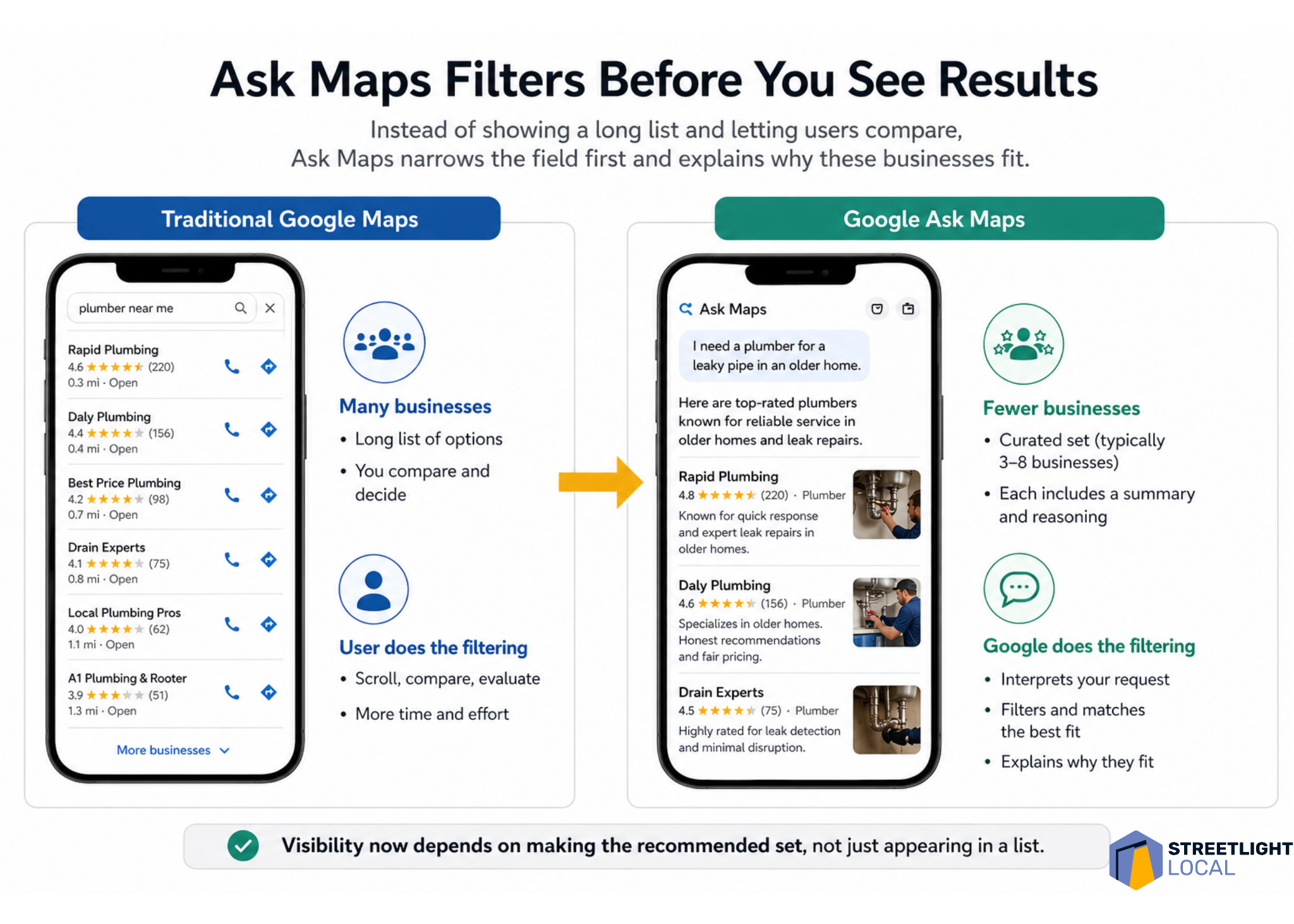
    One of the first things I notice about Ask Maps is how small the result set can be. In testing, it often showed around three to eight businesses, depending on the query. That feels very different from traditional Google Maps, where people can scroll through dozens of options and compare them on their own.

    With Ask Maps, much of that comparison happens earlier. Google filters the market first, interprets what the person is really asking for, and then presents a smaller group of businesses with an explanation of why each one fits.

    That means I have to think beyond the question of whether a business ranks. I also have to ask whether Google has enough confidence to include that business in a short recommendation set and explain why it belongs there.

    ```json
{
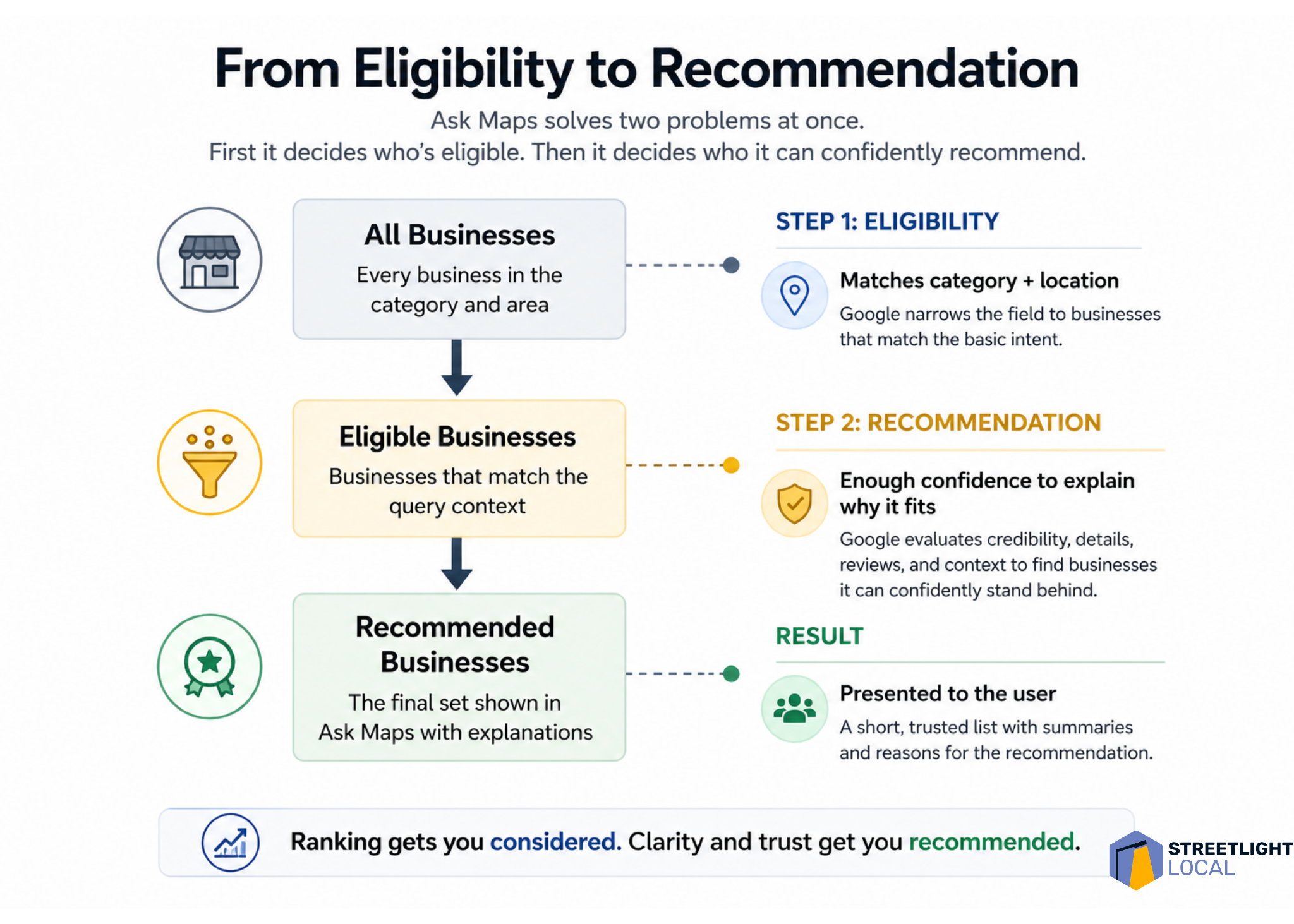
  "alt": "Flowchart illustrating Ask Maps process from eligibility to recommendation for businesses.",
  "caption": "Discover how Ask Maps efficiently determines business recommendations, ensuring clarity and trust in every listing.",
  "description": "This infographic explains the Ask Maps process from selecting eligible businesses to making confident recommendations. It shows three stages: all businesses, eligible businesses, and recommended businesses, detailing how Google evaluates category, location, credibility, and reviews. This visual provides a step-by-step guide to how trust and clarity improve business rankings and recommendations, branded by Streetlight Local."
}
```

    I think of this as a two-step problem. First, Google decides which businesses are eligible for the query. Then, it decides which eligible businesses it can confidently recommend.

    Ask Maps needs enough detail to explain the business

    Ask Maps does more than list businesses. It interprets and describes them. Even for simple searches, I often see businesses framed around qualities such as responsiveness, experience, specialization, professionalism, or the kinds of situations they seem best suited for.

    That creates a different optimization challenge. It is not enough for Google to know that a business exists or that it offers a basic service. Google needs enough information to answer a more practical question: when should this business be recommended?

    To support that, I want Google to understand the types of jobs the business handles, the situations it commonly deals with, the concerns customers usually have, and how the business approaches those situations.

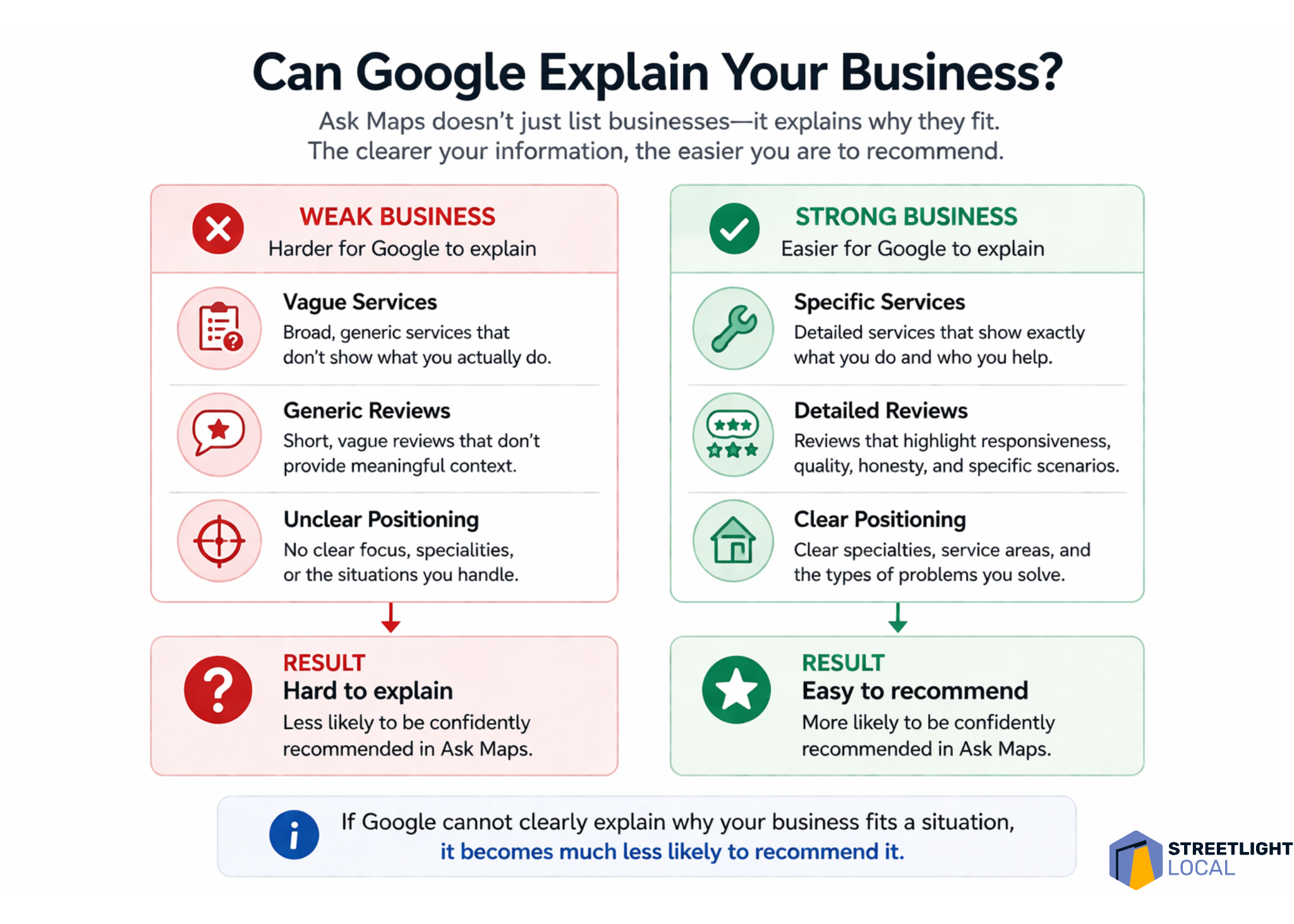
    If that information is vague, scattered, or inconsistent, Ask Maps has less to work with. When Google cannot clearly explain why a business fits a specific situation, I would expect that business to be less likely to appear as a recommendation.

    ```json
{
  "alt": "Comparison between Traditional Google Maps and Google Ask Maps with highlighted features and filtering process.",
  "caption": "Discover the efficiency of Google Ask Maps, a tool that pre-filters search results, providing users with top-rated options and reasons for selection.",
  "description": "This image illustrates the difference between Traditional Google Maps and Google Ask Maps interfaces. Traditional Maps display a long list of business options, requiring user filtering. In contrast, Ask Maps pre-filters results to show a curated list of top businesses with rationales. The image features two smartphones displaying both app interfaces and icons highlighting user experience differences. It emphasizes Ask Maps' efficiency in offering tailored recommendations, saving users time and effort."
}
```

    Google Business Profile becomes the identity layer

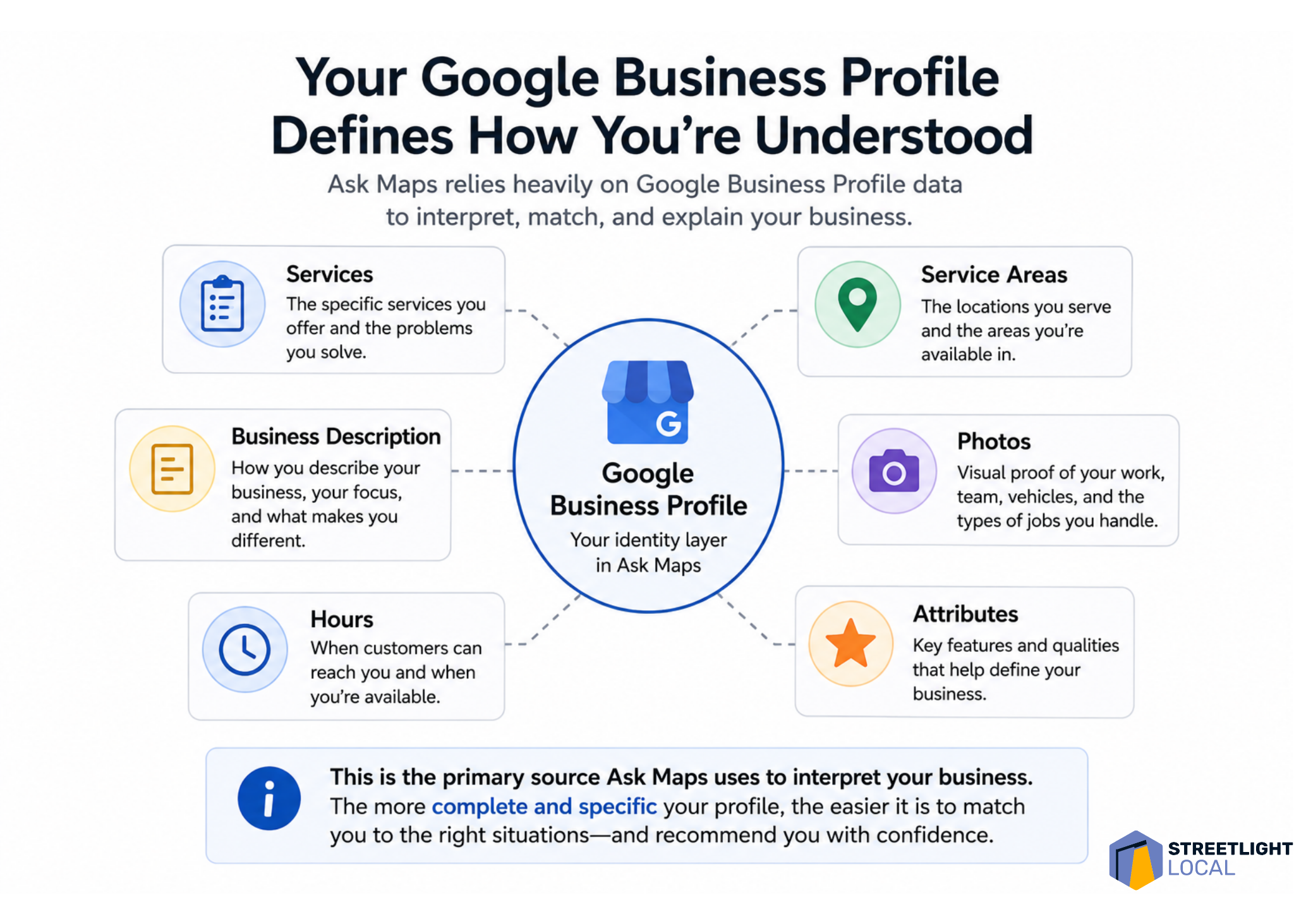
    For me, the Google Business Profile sits at the foundation of this whole process. In earlier-stage queries, Ask Maps appears to rely heavily on profile data, including business descriptions, services, reviews, ratings, hours, and operational details.

    Many businesses still treat their profile like a basic listing to fill out and keep current. That is necessary, but I do not think it is enough for an environment where Google is trying to describe and recommend businesses. The profile needs to communicate a clear, specific identity.

    A generic profile might say that a business offers plumbing, HVAC, electrical work, or another broad service. A stronger profile clarifies the kinds of problems it handles, the situations it is built for, and the details that make it useful to specific customers.

    For example, I would use the profile to reinforce details such as emergency availability, response times, specific repair or installation types, experience with older homes, complex systems, or common customer problems the business solves.

    That level of specificity gives Google more direct evidence. Instead of forcing the system to infer what the business is known for, I want the profile to make that identity clear.

    ```json
{
  "alt": "The CapmatchOne logo with a gradient circle and bold text.",
  "caption": "Discover innovation with the CapmatchOne logo, featuring sleek typography and a modern gradient circle.",
  "description": "The CapmatchOne logo features bold, modern typography coupled with a gradient circle, symbolizing connection and innovation. The sleek design conveys a sense of progress and creativity. This image can be used for branding or promotional purposes, appealing to audiences interested in innovative solutions and forward-thinking designs."
}
```

    Reviews shape positioning, not just credibility

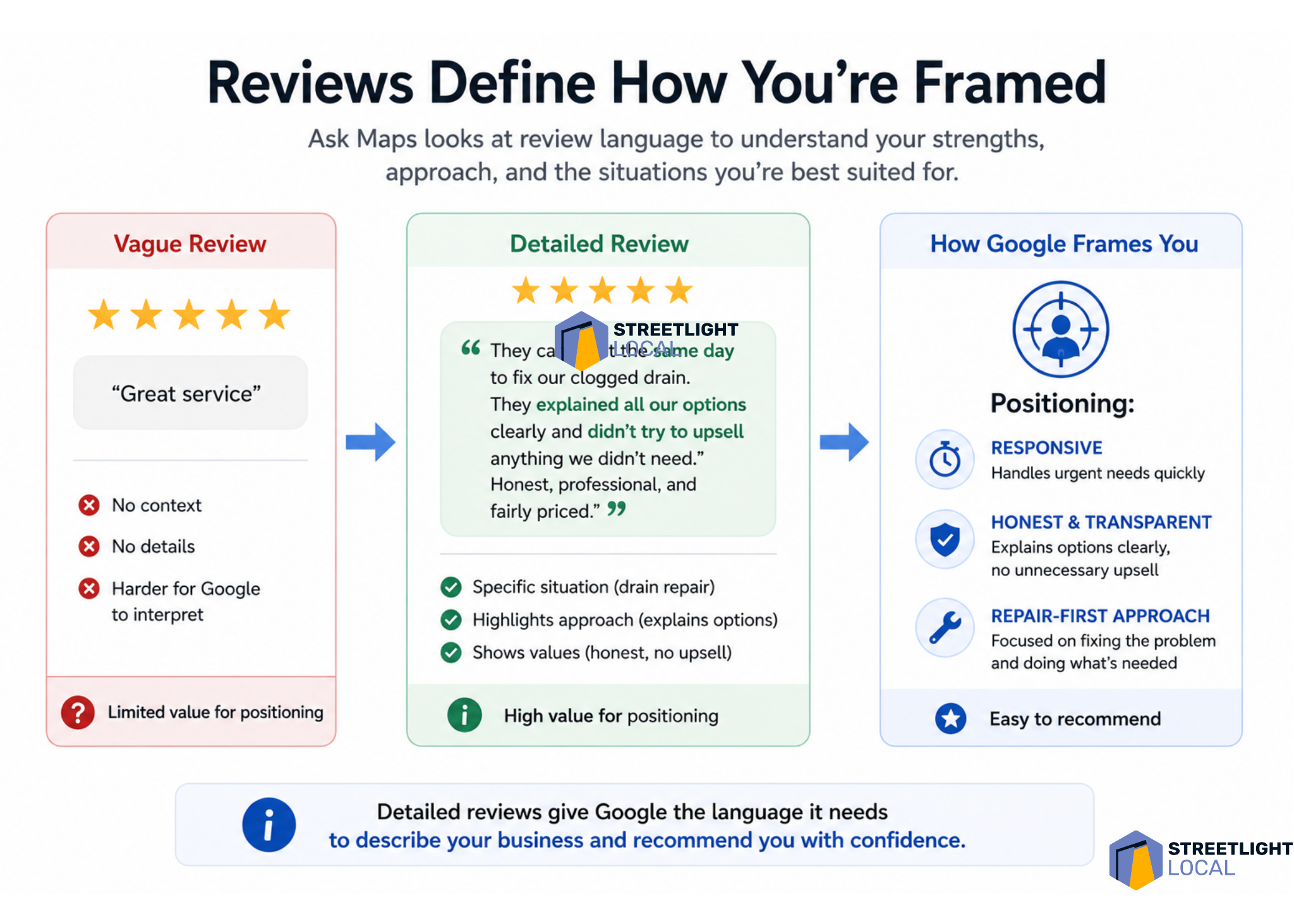
    Reviews have always mattered in local search, but I see them playing a more structured role in Ask Maps. Review language can show up in the way Google describes a business, especially around themes like responsiveness, honesty, communication, professionalism, and quality of work.

    That tells me reviews are doing more than supporting credibility. They are helping define how the business is positioned.

    I would still pay attention to rating, volume, and recency. But I would also look closely at what customers actually say. The language inside reviews can give Google useful context about what the business does, how it works, and what customers value about the experience.

    A vague review such as “great service” signals satisfaction, but it does not explain much. A detailed review that mentions a same-day response, a drain backup, clear communication about options, and a repair-focused solution gives Google several stronger signals about the business.

    Over time, those patterns accumulate. In that sense, I view reviews as one of the main ways Google learns what a local business is known for.

    ```json
{
  "alt": "Infographic contrasting weak versus strong business descriptions for Google explanations.",
  "caption": "Optimize your business presence on Google by crafting clear, specific descriptions and reviews. Strong positioning makes your business easier to recommend.",
  "description": "This infographic compares weak and strong business profiles for Google explanations. Weak businesses show vague services, generic reviews, and unclear positioning, leading to a 'hard to explain' result. In contrast, strong businesses provide specific services, detailed reviews, and clear positioning, resulting in an 'easy to recommend' status. Keywords include business clarity, Google explanation, and online presence optimization."
}
```

    Website content matters more when decisions get harder

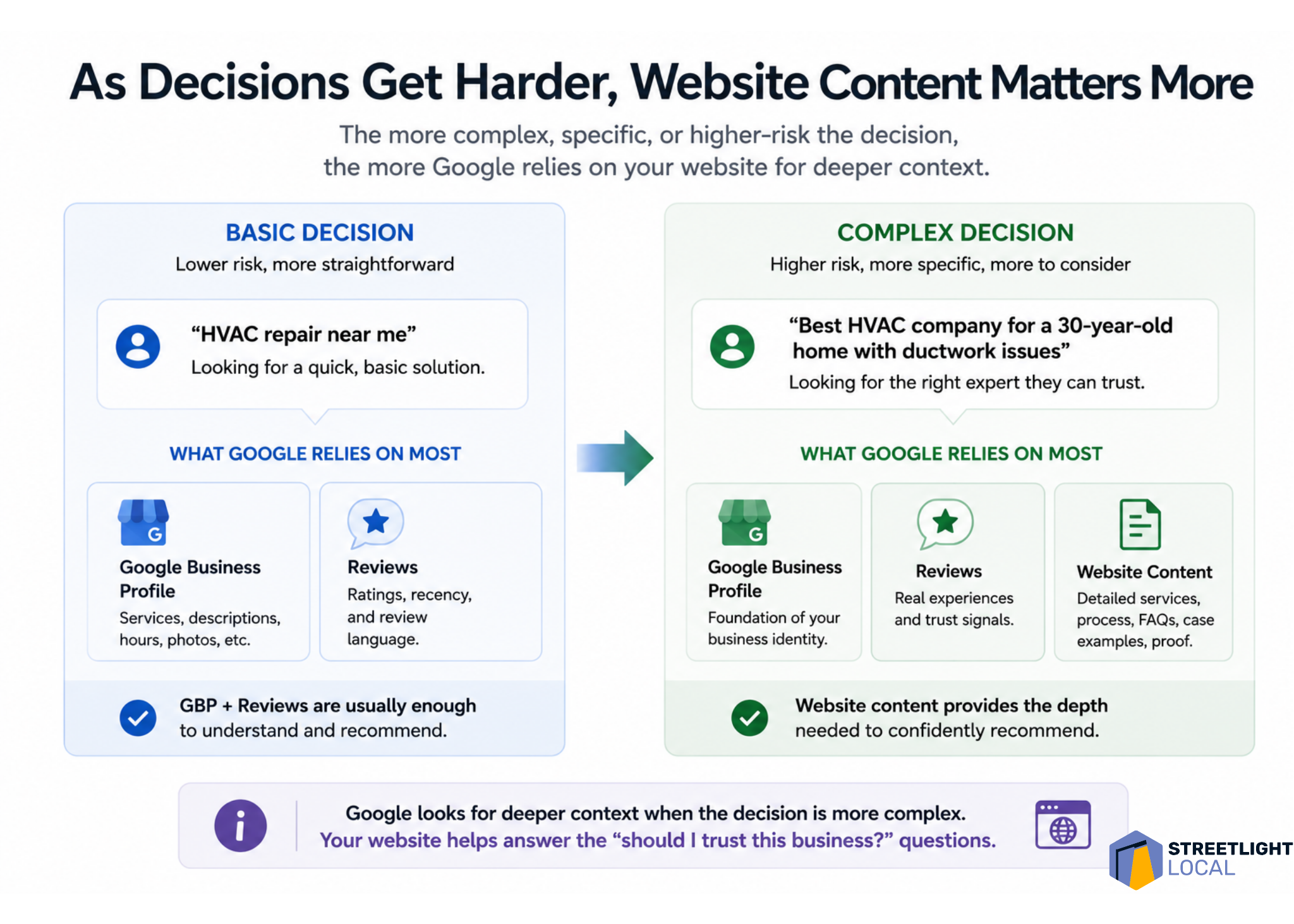
    I also see website content becoming more important as queries become more complex. For basic service searches, the Google Business Profile and reviews may carry a lot of the weight. But when the search involves higher cost, uncertainty, or trust, Google appears to look for deeper supporting evidence.

    That is where the website can help. Many service pages explain what a business offers and why it is qualified. That still matters, but it does not always match how people search when they are trying to make a difficult decision.

    In more situational searches, people are not just looking for a service. They are trying to understand a problem, compare options, reduce risk, and decide what to do next.

    That is why I would build content around the customer’s situation, not just around the service name. Stronger pages explain what leads to the problem, how to recognize it, what options are available, how to think through the decision, and what outcomes to expect.

    For example, a furnace repair page can go beyond a basic list of services. It can cover common symptoms, when repair makes sense, when replacement might be worth considering, and how a homeowner can evaluate the decision. That kind of content lines up more closely with the prompts Ask Maps is trying to interpret.

    ```json
{
  "alt": "Diagram illustrating the elements of a Google Business Profile, such as services, areas served, photos, and business description.",
  "caption": "Explore how your Google Business Profile shapes public understanding, highlighting services, service areas, and more for improved visibility.",
  "description": "This image presents a detailed diagram of a Google Business Profile, emphasizing how it defines business perception. Central to the diagram is the profile, surrounded by elements like Services, Service Areas, Business Description, Photos, and Attributes. Each component is essential for building a comprehensive profile that helps businesses stand out on Google Maps. The image underscores the importance of specificity and completeness in business profiles for improved match and recommendation accuracy."
}
```

    I also see a strong fit for jobs-to-be-done pages. Instead of organizing every page around a service category, I would create pages around the situation the customer is trying to solve and the decision they are working through.

    Trust signals matter more as risk increases

    As searches move from simple service needs into decision-making, trust becomes more important. When people mention cost, honesty, uncertainty, or fear of making the wrong choice, Ask Maps tends to highlight qualities such as transparency, fairness, careful workmanship, and clear communication.

    That makes sense to me because it reflects how people actually think in those moments. When someone faces an expensive repair or an unexpected issue, they are not only asking who can do the work. They are asking who they can trust to handle it correctly.

    I would support that trust with evidence across the business’s online presence. Reviews can show that customers felt respected and informed. Website content can explain the process. Examples of completed work can show experience. Clear “what to expect” sections can reduce uncertainty.

    The higher the perceived risk, the more supporting evidence matters. I want Google to see a consistent pattern that the business explains options clearly, avoids unnecessary pressure, handles similar situations, and leaves customers confident in the outcome.

    Infographic showing how detailed Google reviews help Ask Maps frame a local business as responsive, honest and repair-focused.
    Detailed customer reviews do more than boost ratings. They give Google Ask Maps the context it needs to understand, position and confidently recommend a local business.

    External signals should reinforce the same story

    For more complex or trust-heavy queries, Ask Maps may look beyond the Google Business Profile, reviews, and website. Third-party platforms, directories, and other public sources can help reinforce how Google understands a business.

    I do not take that to mean every external mention is equally important. I take it to mean consistency matters. If a business is described one way on its website, another way in reviews, and differently across directories or social platforms, the overall picture becomes harder to interpret.

    When those signals align, they strengthen each other. Business descriptions, services, customer experiences, types of work handled, and overall positioning should tell the same story wherever they appear.

    From a practical standpoint, I would not try to appear on every possible platform. I would make sure the important sources are accurate, credible, and consistent.

    I would optimize for evidence, not just keywords

    Infographic comparing basic and complex HVAC local searches, showing Google relies more on website content as decisions get harder.
    As local search decisions become more specific and higher risk, Google needs deeper signals from business profiles, reviews, and website content to recommend the right provider.

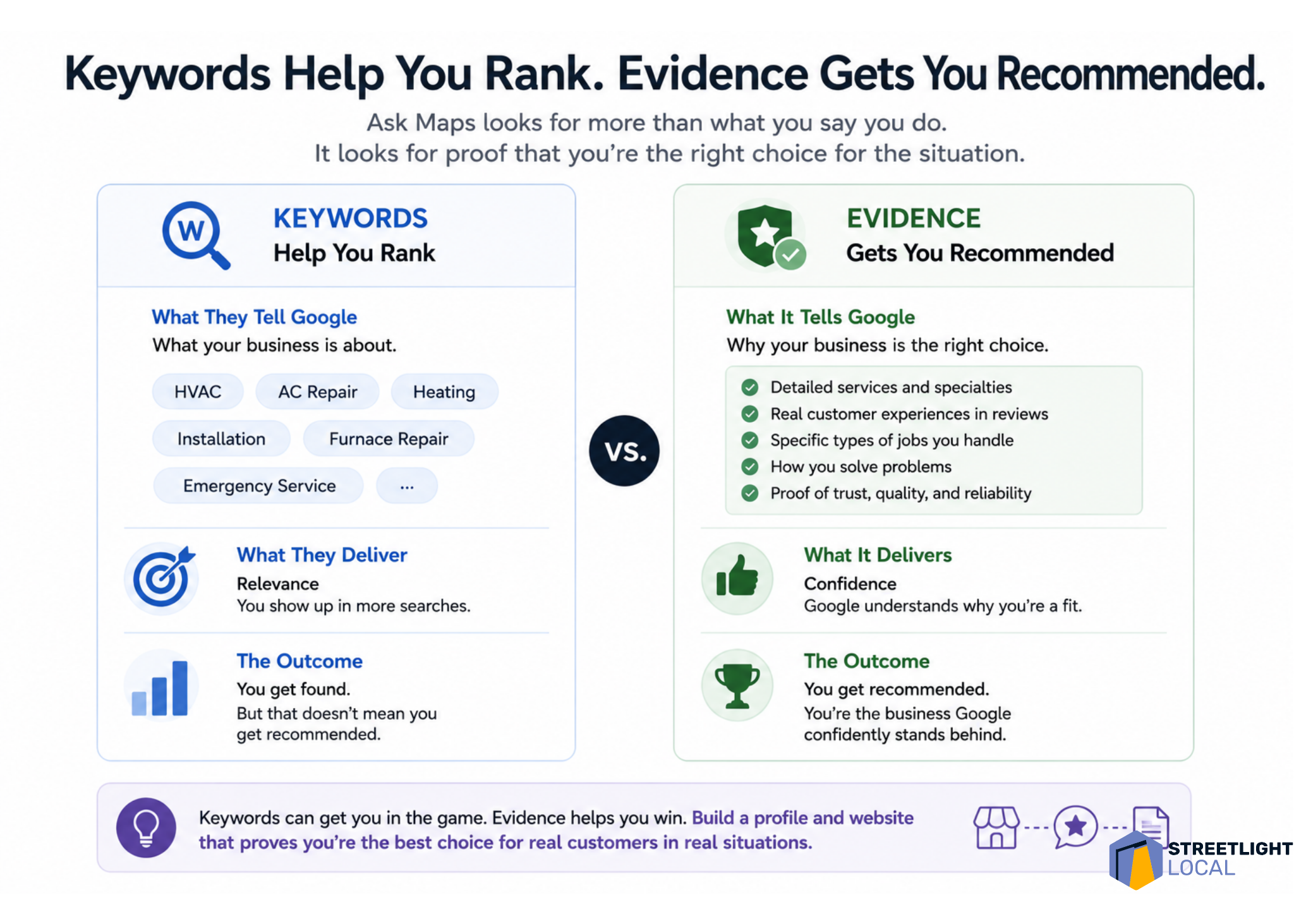
    Taken together, these patterns push me to think differently about optimization. Traditional local SEO often starts with keywords and rankings. Those still matter, but they do not fully explain what Ask Maps is doing.

    I find it more useful to think in terms of evidence. For a business to be recommended, Google needs enough information to understand what it does, what types of jobs it handles, what situations it fits, how customers experience it, and whether it can be trusted in higher-stakes decisions.

    Each source contributes something different. The Google Business Profile establishes the baseline identity. Reviews add real-world context. Website content provides depth and explanation. External sources help confirm the same picture.

    Individually, none of those elements tells the whole story. Together, they create a clearer and more consistent understanding of the business. That is where the shift from ranking to recommendation becomes most obvious: keywords can support relevance, but evidence supports recommendation.

    My practical framework for Ask Maps visibility

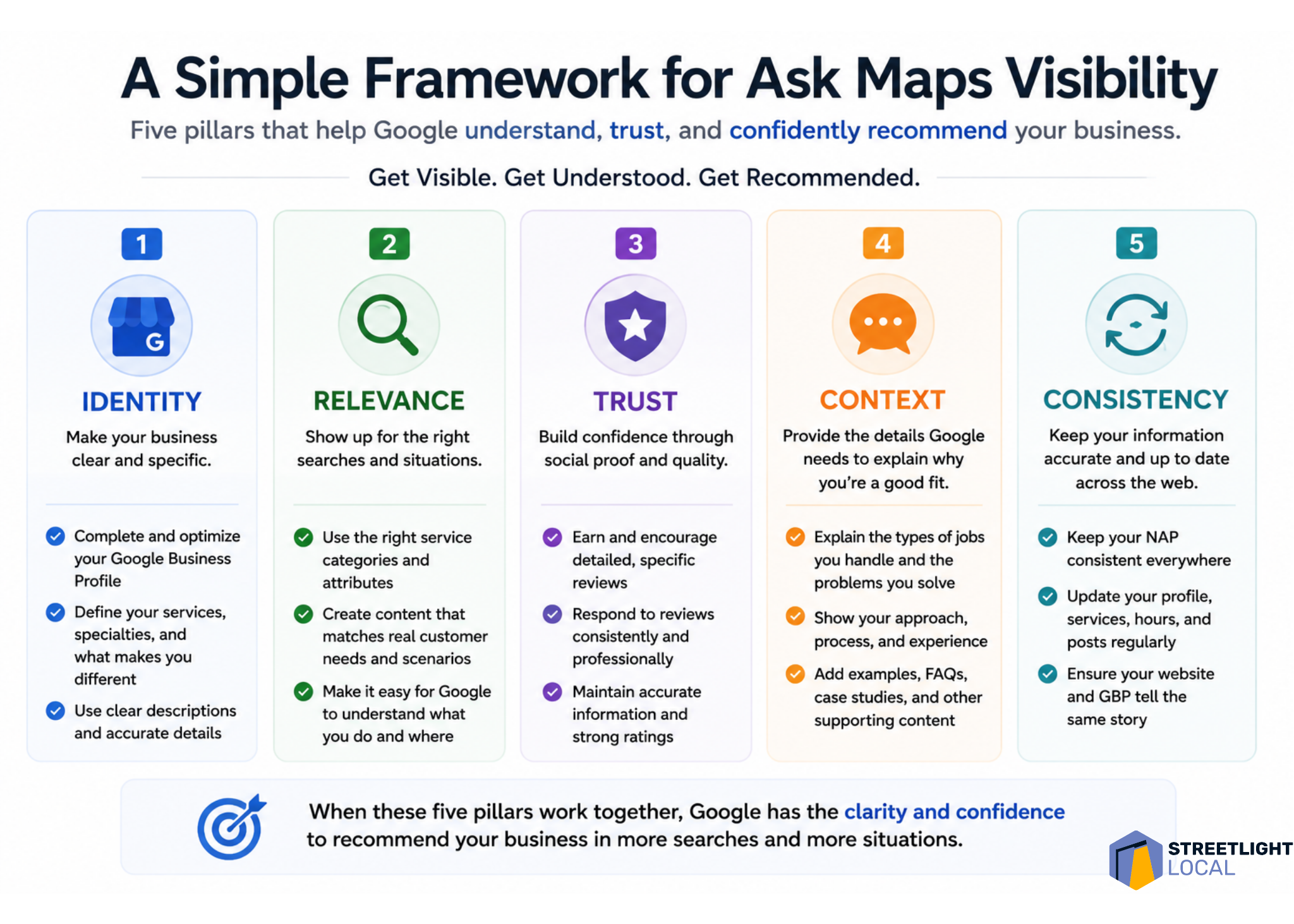
    When I evaluate a business for Ask Maps visibility, I would look at five areas: identity, relevance, trust, context, and consistency.

    Infographic comparing keywords and evidence for Google Ask Maps visibility, showing keywords help local SEO rankings while evidence earns recommendations.
    Google Ask Maps rewards more than keyword relevance. This visual shows why reviews, service details, trust signals, and real proof help local businesses get recommended.

    Identity asks whether Google can clearly understand what the business does and where it operates. Relevance asks whether the business can be matched to specific services and situations. Trust asks whether there is enough proof that customers feel confident choosing it.

    Context asks whether the content reflects the decisions customers are actually trying to make. Consistency asks whether different sources reinforce the same understanding of the business.

    I do not see this as a checklist to complete once. I see it as a practical way to evaluate how clearly and consistently a business is represented across the sources Ask Maps appears to use.

    What I would avoid

    With any new search feature, it is easy to overcorrect. I would avoid treating Ask Maps as an isolated channel that needs thin content, unnatural profile language, generic service-page duplication, or review language that feels forced.

    Those tactics may create more content, but they do not necessarily create more useful evidence. The better approach is to align more closely with how customers actually search, evaluate options, and make decisions.

    Infographic outlining five pillars for Google Ask Maps visibility: identity, relevance, trust, context, and consistency for local SEO recommendations.
    A practical local SEO framework shows how businesses can earn visibility in Google Ask Maps by clarifying identity, proving relevance, building trust, adding context, and staying consistent online.

    When the business presence reflects real customer needs clearly and consistently, it naturally creates the kinds of signals Ask Maps seems to rely on.

    What I still do not know about Ask Maps

    I would treat all of this as directional, not definitive. Ask Maps is still being tested and refined, and the system is not fully documented.

    The result structure can vary by query and test environment. The feature’s usability is also still changing. In many cases, users may still need to click into a Google Business Profile to call, book, or engage, rather than acting directly from the Ask Maps response.

    Measurement is another open issue. Right now, I do not see a clean way to isolate Ask Maps visibility or performance inside standard reporting tools. That makes it difficult to attribute calls, traffic, or conversions directly to this experience.

    I also would not assume the same signal weighting applies to every query. Google Business Profile data, reviews, website content, and external sources may all matter, but their relative importance likely changes based on the search intent and the complexity of the decision.

    The real shift is from ranking to recommendation

    I see Ask Maps as a version of local search where retrieval, evaluation, and decision support are moving closer together. Instead of making users search, compare, research, and decide across several steps, Google is trying to guide more of that process inside one experience.

    That changes the meaning of visibility. In Ask Maps, it is not enough for a business to simply appear. The business needs to be understood well enough for Google to explain why it fits the situation and trusted enough to be recommended.

    For businesses and SEOs, I would not respond by chasing a narrow trick. I would build a clearer, more complete, and more consistent representation of the business across the sources that shape Google’s understanding.

    The businesses most likely to benefit are the ones that are easiest to interpret, easiest to trust, and easiest to match to real-world customer needs.


    Inspired by this post on Search Engine Land.


    crushpress.ai community screenshot
  • Local AI Search Visibility: A Practical Citation Workflow

    Local AI Search Visibility: A Practical Citation Workflow

    Your Google Business Profile is complete, your name and address are consistent, and you collect reviews. Yet when someone asks an AI assistant for the best provider in your area, your business is missing.

    The gap is usually bigger than one listing or one page. Websites, business profiles, citations, and reviews remain foundational, but AI recommendations also reflect what the wider web says about a business. You need a repeatable way to find those external signals, strengthen them, and automate the routine work without spreading bad information.

    Key takeaways

    • Track repeated AI recommendations before deciding which citations matter.
    • Prioritize domains that appear in answers for valuable local questions, not every directory you can find.
    • Automate approved listing submissions and data updates, while keeping outreach and editorial claims under human review.
    • Make your business details, service descriptions, and review themes consistent enough to reinforce one clear local identity.
    • Measure recommendation frequency and cited-source coverage, not just whether a listing was created.

    Measure the recommendation gap before adding citations

    A magnifying glass highlights a broken connection between one storefront and an AI recommendation network on a local map.

    Start with the questions a prospective customer would actually ask. A plumber might test “Who repairs hot water tanks in Denver?” alongside questions about emergency availability, weekend service, pricing, and specific neighborhoods. A restaurant, clinic, or agency would use a different set based on its services and buying journey.

    Record the prompt, location, brands mentioned, cited domains, answer position, and date. Run each important query repeatedly because AI responses can vary between runs. Twenty runs per core query can expose recurring recommendations that a single test would miss.

    Separate two observations in your worksheet. First, which competitors are recommended most often? Second, which websites are used to support those recommendations? The second question gives you a practical citation target list. It may reveal directories, local publications, industry resources, review platforms, videos, podcasts, forums, or city-specific roundups.

    Do not treat every brand mention as equally useful. A mention on a site that repeatedly appears beside a high-intent query deserves more attention than a listing on a large directory that never surfaces in your results.

    Turn cited domains into a prioritized citation queue

    Create one row for every domain found during monitoring. Then score each opportunity using criteria you can verify:

    • Query relevance: Does the domain appear for a service and location you want to win?
    • Recurrence: Does it surface across several runs or only once?
    • Local or industry fit: Does the site serve your city, customer group, or professional category?
    • Placement type: Can you claim a listing, correct an existing profile, contribute expertise, earn editorial coverage, or participate in the community?
    • Accuracy risk: Could an automated submission create duplicate profiles or overwrite verified details?

    Assign each domain to one of three queues. The first is claim or correct: existing profiles, directories, and review pages you can control. The second is earn: local news coverage, industry publications, podcasts, videos, and best-of lists that require a credible pitch or contribution. The third is participate: forums, social networks, and community spaces where useful engagement can build genuine recognition over time.

    This classification prevents a common mistake: treating citation building as bulk directory submission. AI visibility depends on the broader reputation surrounding your business, so local publications, industry channels, communities, and review platforms can matter alongside traditional listings.

    Automate placement without automating judgment

    A person supervises an automated workflow that checks business information before distributing it to directories and maps.

    Citation automation is most useful when the destination and business data have already been approved. It can reduce repetitive work when placing a brand in eligible listings, freeing time for higher-value strategy. It should not decide what your company claims, invent local relevance, or impersonate genuine community participation.

    Build a canonical business record before connecting any automation. Include the exact brand name, primary category, physical address or service-area description, phone number, website, hours, booking method, services, cities and neighborhoods served, approved business description, and links to official profiles.

    Then use a controlled workflow:

    1. Approve the destination. Confirm that the platform is relevant and that a listing does not already exist.
    2. Map the fields. Match each destination field to the canonical record rather than generating a new answer each time.
    3. Validate before submission. Flag missing categories, conflicting hours, unsupported claims, and possible duplicates for review.
    4. Save evidence. Record the submitted URL, status, date, and version of the business data used.
    5. Recheck published profiles. Confirm that the destination displays the correct information and working links.
    6. Monitor changes. When hours, services, or contact details change, update the canonical record first and then distribute the approved revision.

    Keep editorial outreach outside the unattended workflow. Guest contributions, podcast pitches, community replies, and requests for inclusion require context. Automation can prepare a queue and surface contact details, but a person should decide whether the approach is relevant and truthful.

    Make every citation reinforce usable local evidence

    A correct name, address, and phone number establish identity, but they do not answer why someone should choose you. Strengthen important profiles with specific facts about services, locations, availability, booking, qualifications, pricing approach, and customer fit. Only include details you can keep accurate.

    Use explicit sentences when a platform allows a description. “Rescue Plumbing offers drain cleaning in Denver” is clearer than “We offer a complete range of solutions.” The first sentence identifies the business, relationship, service, and location. This subject-predicate-object structure reduces ambiguity for readers and machines.

    Apply the same clarity to your own site. Put the direct answer near the beginning of a relevant page, then support it with process details, examples, common questions, and first-hand expertise. Cover what you do, who you serve, where you operate, when you are available, how customers book, what makes the service different, and what it costs when that information can be stated responsibly.

    Reviews add another layer of evidence. Do not rely on one platform alone. Reviews across Google, Yelp, BBB, Facebook, and relevant industry platforms can create a broader view of customer experience. Ask customers to describe the service received, the problem resolved, punctuality or professionalism, and whether the outcome met their needs. Never tell them what sentiment to express.

    Respond to reviews with useful context. A response can confirm the service, location, or process without repeating private customer information. It also gives you a chance to correct misunderstandings calmly and show how the business handles feedback.

    Review your tracking sheet on a consistent schedule. Watch recommendation frequency for priority queries, the share of recurring cited domains where your brand has an accurate presence, unresolved listing errors, and whether new third-party mentions begin appearing in answers. Visibility can fluctuate, so judge progress across repeated observations rather than one favorable screenshot.

    Your first move is simple: choose five commercially important local questions, run each one repeatedly, and log every cited domain. That small evidence set will tell you where citation automation can help and where your reputation still has to be earned.

    References

  • Unlock Local Visibility: Harness AI in Local Search Now

    Unlock Local Visibility: Harness AI in Local Search Now

    I recently discovered how AI is revolutionizing the way customers find local businesses. Tools like Google AI Overviews, Gemini, and Ask Maps are paving the way for more detailed, conversational searches.

    It’s clear to me that traditional search rankings are no longer the sole factor in gaining visibility. Ensuring your business details are complete and accurate—like your Google Business Profile, reviews, and local content—can make a big difference.

    I’m excited to join SOCi and Google for an exclusive webinar, Winning the Next Era of Local Visibility, on June 3. It’s a golden opportunity for anyone looking to stay ahead of the curve.

    During this webinar, I look forward to learning:

    • How AI is transforming local search dynamics.
    • The types of signals that AI considers for recommendations.
    • Strategies to boost visibility on Search, Maps, and Gemini.
    • The implications of Ask Maps for your brand.

    I’m convinced that AI is already shaping customer discovery, so it’s crucial to ensure your business isn’t left behind.

    Register now to secure your spot.


    Inspired by this post on Search Engine Land.


    crushpress.ai community screenshot
  • Yelp AI-Assisted Bookings: A Local Optimization Playbook

    Yelp AI-Assisted Bookings: A Local Optimization Playbook

    If your Yelp profile gets seen but still produces too few bookings, the problem may no longer be simple visibility. A customer can now ask a detailed question, compare the suggested businesses, and act without following the familiar path from search result to website.

    Your job is to make that compressed journey work. Yelp needs clear business facts, customers need credible evidence of fit, and the booking or ordering connection needs to survive the handoff. A weakness in any one of those layers can turn a recommendation into an abandoned transaction.

    Optimize the decision, not just the listing

    Traditional local SEO often treats discovery and conversion as separate stages. You rank or appear in a marketplace, earn a click, and then persuade the visitor on your own site. Yelp Assistant narrows that distance because it can answer complex questions, recommend businesses, explain why a business fits, refine the results conversationally, and continue into supported booking, ordering, or quote flows.

    That changes the optimization target. A conversational local request usually contains several constraints at once: the service, location, occasion, timing, preferences, and desired next step. A profile can be relevant to the broad category while failing to resolve one of those constraints. The customer may never reach your website to investigate further.

    Audit your Yelp presence against four questions:

    • What does the business actually provide? Categories, service names, menu items, and descriptive copy should agree about your core offer.
    • Who or what situation is it suitable for? Include meaningful distinctions customers use when choosing, but only where they are accurate and supported by your operation.
    • Why should the customer believe the fit? Reviews and photos should give the customer evidence, not merely repeat promotional claims.
    • What can the customer do next? The appropriate reservation, appointment, quote, or ordering action should be visible, current, and connected to a working destination.

    Build the audit from real customer language. Collect the questions that appear in calls, messages, quote requests, appointment notes, and reviews. Group them by intent, then check whether a person could answer each one from the information visible in Yelp. If the answer depends on an assumption or an old photo, you have found a content gap.

    Correct the underlying field wherever possible. Put hours in the hours field, services in the relevant service area, menu information in the menu, and the primary transaction in the appropriate action. Descriptive copy can clarify the offer, but it should not become a container for disconnected phrases. Treat this as an answerability audit, not as a claim that repeating keywords will influence Yelp’s selection logic.

    Your website still matters, including its LocalBusiness structured data. Keep the name, address, telephone number, URL, hours, and applicable business subtype aligned with the facts you publish elsewhere. Use a sameAs link when it accurately identifies your Yelp profile. That consistency helps search systems understand the same entity, but JSON-LD on your website cannot repair stale Yelp information or reconnect a broken booking calendar.

    Close every gap between recommendation and transaction

    A recommendation is not the conversion. The final action may depend on Yelp, your profile configuration, a scheduling or delivery partner, inventory or calendar data, and the confirmation experience. Every connection can look present while still sending the customer to the wrong service, location, or availability view.

    Yelp has expanded integrations involving Vagaro, Zocdoc, and Calendly across areas such as beauty, healthcare, and home services, alongside delivery support involving DoorDash. The practical implication is not that every business automatically receives every transaction type. It is that a connected marketplace profile and the external system behind it must be managed as one customer journey.

    Test the journey in the environment where customers encounter it:

    1. Open the Yelp profile on a supported mobile experience and identify the primary action presented to a customer.
    2. Confirm that the action matches the intent you want to win. A restaurant reservation, food order, healthcare appointment, service appointment, and home-service quote are not interchangeable conversions.
    3. Follow the action into the connected system. Verify the business name, location, selected service, availability, and contact information at each step.
    4. Continue to the final confirmation screen, but do not consume a real appointment or reservation unless your operation has a safe test procedure.
    5. Check the resulting confirmation or lead record. It should give both the customer and your staff enough information to fulfil the request without another round of clarification.

    Test more than the happy path. Try a service that has limited availability, a different location if you operate more than one, and a request that should become a quote rather than an instant booking. The purpose is to find mismatches between what the profile promises and what the connected system can actually accept.

    Assign ownership for each layer. The person updating the Yelp profile may not control the scheduling platform, menu, delivery availability, or service calendar. Record who owns each one and where changes originate. Otherwise, a corrected profile can be overwritten by old partner data, or the profile can continue advertising an option that operations no longer fulfils.

    The initial feature availability was described as mobile-first on iOS and Android, with broader category and desktop expansion planned. Rollout scope can differ by experience, so verify what customers can actually see instead of assuming that an announcement describes every account, category, or device.

    Give the assistant evidence it can explain

    An abstract AI lens gathers visual details about a restaurant's amenities, service, atmosphere, and customer evidence to guide a recommendation.

    Yelp Assistant draws on Yelp’s reviews and photos to tailor recommendations and explain why a business may be a good match. That makes customer-generated evidence part of the conversion surface. Your description can state that you provide a service; reviews and photos can show what receiving it is like.

    Do not translate that into a campaign for generic praise. Broad comments such as great service reveal little about the specific situations in which the business succeeds. Honest reviews are more useful when customers naturally mention the service received, the type of need, the location, and the experience. Any request for feedback should remain neutral and comply with the platform’s current policies.

    Use reviews as an operating dataset, not as copy you control:

    • Identify recurring service names and customer questions. Check whether your profile uses the same clear, accurate terminology.
    • Notice repeated misunderstandings. If customers arrive expecting an option you do not provide, correct the promise in your profile or connected flow.
    • Look for evidence gaps. A service may be listed but rarely described or photographed, leaving a customer with little basis for choosing it.
    • Respond to factual confusion calmly. Clarify the business detail that matters, then fix the underlying listing or operational issue when you control it.

    Photos need a similar job-based audit. Cover the decision points a new customer cannot infer: what the exterior looks like on arrival, what the relevant space or service looks like, what is actually delivered, and how distinct options differ. Accuracy matters more than decorative volume. An attractive image that no longer represents the current offer can create a stronger expectation mismatch than having no image at all.

    Restaurants have an additional surface to watch. Yelp’s revised Menu Vision can place dish information, reviews, and photos into visual overlays while a customer browses a menu. Menu item names, current availability, and corresponding images therefore need to describe the same dish. Remove or update obsolete material wherever your listing or connected system gives you control; do not let a retired item become the evidence for a current order.

    The same principle applies outside restaurants. A salon service name, healthcare appointment type, contractor quote category, and the evidence surrounding each one should remain consistent from recommendation through confirmation. The assistant can shorten the journey, but it cannot reconcile a profile, photograph, review pattern, and booking system that tell different stories.

    Measure the compressed funnel with transaction outcomes

    If a customer can complete more of the journey inside Yelp or a connected partner flow, website traffic alone becomes an incomplete scorecard. Flat website sessions do not prove that local visibility is stagnant, and more profile activity does not prove that qualified business increased.

    Choose the completed outcome that matches the action:

    • For restaurants, distinguish completed reservations or orders from action taps.
    • For appointment businesses, track booked appointments separately from completed appointments and cancellations.
    • For home services, separate raw quote requests from requests that fit the service area and become qualified opportunities.
    • For delivery, distinguish an ordering action from a completed order that the business successfully fulfils.

    Use the reporting fields available in Yelp and the connected platform, and keep definitions stable. If a partner exposes an origin label or channel field, preserve it through your export or customer-management workflow. If it does not, do not manufacture precise attribution from incomplete data. Record the limitation and compare only metrics that are defined consistently.

    Read funnel patterns as diagnostic clues, not proof of a single cause. If profile visibility rises while actions stay flat, start by checking whether the listing resolves fit and presents a clear next step. If actions rise while completed transactions do not, inspect the partner handoff, availability, eligibility rules, and confirmation flow. If transactions rise but cancellations, no-shows, or poor-fit requests also rise, compare the promise in Yelp with what the customer can actually book.

    Keep a change log alongside those measures. Record which profile fact, image set, menu item, service name, or transaction connection changed and when. Without that record, several simultaneous edits can make an improvement impossible to interpret and a regression hard to reverse.

    Key takeaways

    • Optimize for the customer’s complete decision, not for a broad category phrase in isolation.
    • Keep business facts, customer evidence, and the connected transaction system consistent.
    • Test booking, ordering, appointment, and quote paths from Yelp through confirmation.
    • Use reviews and photos to find unanswered questions and expectation mismatches; do not treat them as keyword containers.
    • Measure completed business outcomes because an in-platform transaction may never appear as a website visit.
    • Use website schema to reinforce accurate entity information, not as a substitute for maintaining the Yelp profile itself.

    Run the audit around one valuable customer intent

    A business owner examines a visual pathway from customer intent through recommendation, comparison, scheduling, payment, and booking confirmation.

    A full profile overhaul can hide the problem you need to solve. Start with one commercially meaningful intent: the reservation type, appointment, service request, or order you most need Yelp to support.

    1. Write the exact questions and constraints a suitable customer brings to that intent.
    2. Mark where each answer lives: profile field, service or menu information, review evidence, photo, booking system, or confirmation.
    3. Correct contradictions and remove unsupported promises before adding more copy.
    4. Test the transaction path on the customer-facing experience available to your category.
    5. Record the current funnel outcomes, the change made, and the operational owner responsible for keeping it accurate.
    6. Recheck the path whenever hours, services, locations, menus, calendars, or integration settings change.

    The businesses best prepared for AI-assisted local bookings will not necessarily be those with the longest descriptions. They will be the ones whose facts answer the question, whose evidence supports the choice, and whose transaction path does exactly what the recommendation promised. Pick the path tied most closely to revenue or qualified demand, and make that one dependable first.

    References


  • How to Test Google Ads Visual Creative in Local Search

    How to Test Google Ads Visual Creative in Local Search

    If you advertise physical locations, Google’s local video experiment puts a practical decision in front of you: prepare visual assets now, or wait until the format is more established and rush production later. You don’t need to gamble your local budget or commission a polished brand film to get ready.

    The useful move is to build a small, reusable creative system around proof of place. Show what a nearby customer needs to see, connect each asset to the correct location, and test it against business outcomes. That approach remains valuable even while access to the emerging placement is uncertain.

    Local video should prove the place, not merely promote the brand

    A camera operator films the entrance, counter, staff, and customers inside an unbranded neighborhood cafe.

    Google has been testing video ads inside the local pack through an immersive, map-style experience. This puts paid visual creative in a context where the user is already comparing nearby businesses. The format is still preliminary, and its performance against conventional local ads hasn’t been established.

    That context changes the creative brief. A general brand montage may look polished but still leave the local decision unanswered. Your video should help the viewer confirm that this is the right place, understand what is available there, or feel confident about the next step.

    Give each asset a clear local job:

    • Confirm the place. Show a recognizable exterior, entrance, sign, storefront, or other accurate location detail.
    • Reduce arrival friction. Show the approach, parking arrangement, reception area, pickup point, or check-in process when that information matters.
    • Demonstrate the local offering. Show the product, service, equipment, room, menu item, or experience that is actually available at the advertised location.
    • Set an honest expectation. Let the viewer see the environment they will encounter rather than substituting generic stock imagery.
    • Support the next action. Align the ending with the action you want the customer to take, such as calling, booking, ordering, requesting directions, or visiting.

    Don’t force every job into the same edit. A short asset focused on finding the entrance can be more useful than a compressed tour of the brand, building, staff, services, offers, and history. If the customer uncertainty is specific, the creative answer should be specific too.

    Write the local promise before you choose footage

    Use a brief that can fit on a small card. Complete these fields before opening a production tool:

    • Search situation: What is the nearby customer trying to find or decide?
    • Question to answer: What uncertainty could stop that person from choosing this location?
    • Visual proof: What real image or sequence resolves that uncertainty?
    • Destination: Where should the ad send the person, and does that page continue the same promise?
    • Business outcome: Which available action or conversion will tell you the creative helped?

    A useful brief might be as simple as showing a first-time visitor where to enter and then sending them to that location’s booking page. It doesn’t need a cinematic concept. It needs continuity from search, to image, to arrival or conversion.

    Keep that promise location-specific. If footage shows the flagship branch’s amenities while the ad is attached to a smaller branch, the creative may win attention by creating an expectation the business can’t meet. Treat location accuracy as part of ad accuracy, not as a final production check.

    Make the location connection part of creative QA

    Business photo thumbnails are connected by colored cords to matching pins on a generic map, while one mismatched image is set aside for review.

    The reported implementation appears connected to Google Ads Location Manager and may involve a pre-opted control in the Shared Library. Because the placement is experimental, you shouldn’t assume that uploading a video makes an account eligible, that every account exposes the same controls, or that an asset will appear in the local pack.

    Before changing a setting or adding assets, create a record of the current configuration. That gives you a clean way to distinguish a creative change from an account or location change.

    1. Document the existing setup. Record the location groups, business identities, campaigns, Location Manager configuration, and relevant Shared Library controls already in use.
    2. Map every asset to a physical location. Use a naming convention that includes the location, the creative job, and the version. A filename such as a generic video final is almost impossible to audit later.
    3. Verify visible facts. Check signage, entrances, products, services, prices, offers, opening information, and amenities represented in the creative. Remove anything that isn’t true for the linked location.
    4. Inspect the destination. The landing page should name or clearly represent the same location and make the intended local action easy to complete.
    5. Check the scope before enabling anything. If a control is already selected or its reach is unclear, determine which campaigns and locations it can affect before changing it across the account.
    6. Preserve a change log. Note when assets and settings were added, removed, or replaced so later performance shifts can be interpreted responsibly.

    An unfamiliar pre-enabled setting isn’t a reason to switch the entire account on or off. Use the smallest reversible scope the interface allows, and confirm which locations are included. The downside of a mismatched local ad isn’t merely a weaker click-through rate. It can send a customer toward the wrong branch, offer, entrance, or service.

    Also separate inventory from eligibility. Having an approved video in the account means you have an asset available; it doesn’t prove that the experimental local format served it. If delivery doesn’t occur, investigate placement access, campaign configuration, location linkage, and asset status before declaring the creative ineffective.

    Build a production system that survives Asset Studio’s limits

    Google Ads Asset Studio, available through Google Ads > Tools > Asset Studio, can manage visual assets and turn supplied images into video variations. AI-assisted features such as Veo and Nano Banana can make simple animation and versioning more accessible when you don’t have a full production workflow.

    Speed is not the same as direction, though. Asset Studio has shown limited scene-level control, errors involving face-like content, and constrained audio choices without custom-track uploads. Those constraints matter most when your concept depends on exact motion, a human performance, precise pacing, or a distinctive soundtrack.

    Use the tool as a production lane, not as the owner of your creative strategy. Decide what must be shown before generating anything, and choose the production route according to how much control the idea requires.

    Creative requirementRecommended starting routeWhat to verify
    Simple motion from accurate location or product imagesAsset Studio template or AI-assisted generationSigns, architecture, product details, sequence, and location identity
    Exact scene order, movement, or pacingA manually edited masterEvery required shot survives the final placement treatment
    Human-led demonstration or testimonialApproved original footage, with Asset Studio used only where the input is acceptedIdentity, consent, facial integrity, gestures, and spoken claims
    Custom music or a tightly timed audio conceptExternal production or editingAudio rights and whether the visual story remains understandable without relying on the score
    Fast variations of a stable conceptAsset Studio trimming, templates, or image-to-video toolsEach version still represents the same location and offer accurately

    Keep the master assets modular

    Start with a library of accurate source material rather than a single finished video. Capture or collect the exterior, entrance, arrival path, interior, product or service detail, staff activity where appropriate, and a clean ending image. Label every file by location and keep its usage approval with it.

    Then storyboard the sequence outside the generator. This can be plain language: establish the place, show the relevant proof, and support the next action. The storyboard becomes your acceptance test. If a generated version changes the order, invents a feature, deforms a sign, alters a product, or obscures the local proof, reject it rather than trying to justify the output after production.

    Keep original images and edited masters outside Asset Studio as well. A modular library lets you rebuild the ad when placement requirements change, a location is renovated, an offer expires, or the generator can’t reproduce an acceptable version. It also prevents the generated file from becoming the only surviving copy of your creative.

    If the available audio choices don’t fit, simplify the concept instead of attaching unsuitable music. The visual sequence should communicate the local point on its own. If sound is central to the idea, move that concept into a workflow that gives you the necessary audio control.

    Test business outcomes, not the novelty of video

    Performance for the emerging local format remains unclear, while easier production can create more assets than a team can evaluate responsibly. The right question isn’t whether Asset Studio produced a video quickly. It is whether the creative improved conversions, sales, or another meaningful campaign outcome without compromising accuracy.

    Set up the test so you can make a decision when the data arrives:

    1. State a local hypothesis. Describe the customer uncertainty and why the proposed visual proof may resolve it. Avoid a circular hypothesis such as video will perform better because it is video.
    2. Choose the primary outcome in advance. Use a local action or business conversion your existing setup can measure, such as an eligible call, booking, order, qualified lead, store action, or sale. Don’t select the winner afterward based on whichever metric happened to rise.
    3. Preserve a comparison. Keep a suitable existing asset or campaign state as a control where account settings allow it. If Google selects assets automatically and the format can’t be isolated, annotate the introduction date and describe the result as directional rather than causal.
    4. Change one creative idea at a time. Test proof of entrance against proof of service, for example, rather than changing the footage, destination, offer, audience, and bidding setup together.
    5. Read results by location when locations differ. A pooled average can hide a useful asset at one branch and a misleading one at another.
    6. Review quality alongside performance. Check the served or approved asset for visual errors, outdated facts, mismatched locations, and promises the destination doesn’t support.

    Use the pattern in the data to decide what to inspect next:

    • No meaningful delivery: investigate eligibility, settings, campaign scope, location linkage, and asset status before revising the creative concept.
    • Delivery without useful interaction: inspect the opening image, local relevance, clarity, and whether the asset answers a real customer question.
    • Interaction without a local action: inspect the gap between the visual promise, landing page, offer, and conversion path.
    • A higher click-through rate without better business outcomes: treat the video as attention-getting, not proven. Don’t scale it on clicks alone.
    • Better business outcomes with accurate creative: expand carefully to comparable locations, then verify that the result holds rather than assuming every branch will respond the same way.

    Production efficiency is still useful. Templates, trimming, and image-to-video generation can lower the effort required to reach a testable asset. But the time saved in production should be reinvested in location verification, experiment design, and outcome review. Otherwise, automation simply helps you publish weak creative faster.

    Key takeaways

    • Treat local video as proof of place: answer a nearby customer’s practical question with accurate visual evidence.
    • Audit Location Manager, Shared Library controls, campaign scope, and location-to-asset mapping before enabling an unfamiliar format.
    • Use Asset Studio when the concept can tolerate template and generation constraints; use controlled production when exact scenes, faces, pacing, or custom audio are essential.
    • Keep source images and masters modular, labeled by location, and available outside the generation tool.
    • Separate lack of delivery from creative failure, especially while the local placement remains an early test.
    • Choose winners by conversions, sales, or another preselected business outcome, not by novelty or click-through rate alone.

    Start with the location where you can verify the visual promise, destination, and business outcome most cleanly. Build one focused brief, prepare accurate source assets, and document the account state before launch. That gives you a controlled pilot without betting the wider local program on an unproven placement.

    References


  • Google Maps Contributor Features: A Practical Workflow

    Google Maps Contributor Features: A Practical Workflow

    You have useful photos on your phone and first-hand details about a place, but turning them into a clear Google Maps contribution still takes judgment. The latest contributor features reduce the mechanical work: they surface media sooner, draft captions and make contributor history more visible.

    Use that convenience to publish more useful evidence, not simply more content. A faster upload, an AI-written caption or a prominent badge can attract attention, but none of them can make a vague or inaccurate contribution trustworthy.

    Key takeaways

    • Local Guides profiles now place greater emphasis on total points, levels and badges. Gold profile indicators can make top contributors more noticeable, but prominence is not proof that every contribution is accurate.
    • Gemini can analyze selected photos and propose a caption. You can edit or discard the draft, so treat it as a starting point rather than an observation you must accept.
    • The Contribute tab surfaces recent uploads, while camera-roll suggestions can shorten the path from taking a photo to sharing it. Media access is required for those suggestions.
    • These features may affect which reviews and businesses receive attention. They do not, by themselves, establish a direct improvement in local rankings, AI-search visibility or business performance.

    Match each contributor feature to the job it actually does

    The contributor changes solve three different kinds of friction. Keeping those jobs separate prevents you from treating every feature as a ranking tool.

    • Contributor profiles provide context. The redesigned Local Guides profile displays total points and levels more prominently, gives badges a refreshed presentation and adds gold profile indicators for top contributors. These are reputation and attention signals around a contribution. They do not verify the claim inside it.
    • Gemini caption drafts reduce writing friction. The feature analyzes the photos you select and proposes text that you can edit or reject. Its useful job is getting you past the blank field, not supplying knowledge that the image cannot contain.
    • Media suggestions reduce retrieval friction. Recent uploads appear in the Contribute tab, and Google Maps can suggest camera-roll images after you allow media access. This helps when the obstacle is finding the right photo later.

    If you contribute regularly, test every photo or review without its profile decoration: would the content still help someone choose an entrance, recognize a storefront, understand the layout or set an accurate expectation? If not, more points and a brighter badge will not repair it.

    If you manage local visibility for a business, reverse the test. A gold indicator may cause a user to notice a review, but you should still inspect the review’s specificity, recency and visible evidence. Contributor status is context for evaluating a claim, not a substitute for evaluating it.

    Edit Gemini captions until they say what the photo proves

    A contributor compares a phone photo with a cafe's accessible entrance while editing a draft description.

    At its introduction, the Gemini caption feature was available in English on iOS in the United States. Broader Android and international availability was planned. Availability can therefore differ by device, language and location; keep a manual caption workflow even if another contributor already has the control.

    The most important limitation is conceptual. Gemini can analyze the selected image, but a photo does not necessarily prove how the service felt, how food tasted, whether a route is fully accessible or whether a temporary display will remain in place. The draft can turn a visual impression into a stronger claim than the evidence supports.

    Use a four-pass caption edit

    1. Name the visible subject. Identify the entrance, seating area, menu board, counter, parking area or other feature the photo is meant to show.
    2. Remove inferred praise. Delete generic judgments such as “excellent,” “welcoming” or “perfect” unless the caption is deliberately expressing your own experience and the wording makes that clear.
    3. Add decision-relevant context. Explain where the photographed feature is located or why someone might need to recognize it. Add only details you observed or verified.
    4. Check whether the claim will age badly. Prices, hours, displays and layouts can change. Do not present a time-sensitive detail as a permanent feature.

    For example, a draft such as “A cozy cafe with plenty of seating” is broad and evaluative. A more useful edit would be “Indoor tables are beside the front window, with the order counter at the back.” The second version tells a visitor what the image is intended to establish without pretending that the photo proves comfort, availability or service quality.

    There is also a quick test for generic AI text: ask whether the same caption could be pasted onto a different venue’s photo without anyone noticing. If it could, the caption is not finished. Name the concrete feature that makes this image useful at this place.

    Turn camera-roll suggestions into a controlled publishing queue

    A smartphone displays selected and dimmed place-photo thumbnails arranged as a controlled publishing queue.

    The media-sharing update has a broader footprint than the initial caption rollout. Recent media and camera-roll suggestions were made available on iOS and Android globally. Suggestions depend on granting media access.

    A suggestion is an invitation to review an image, not confirmation that the image belongs on Maps. Camera rolls also contain duplicates, screenshots, private details and photos whose location is ambiguous. Put a short verification step between the prompt and the publish button.

    1. Open the Contribute tab after a visit. Review the recent media while you can still distinguish the venue and remember what each image shows.
    2. Confirm the exact place. Check the name and location, especially when a business has several branches or neighboring listings look similar.
    3. Choose the highest-information image. Prefer a photo that answers a practical question over several nearly identical angles.
    4. Inspect the full frame. Exclude unrelated or sensitive details and any image too blurry, dark or obstructed to support its caption.
    5. Write or generate the caption. Apply the evidence test even when Gemini supplies the first draft.
    6. Read the listing and caption together. Make sure the text describes this image at this place, then publish only when both are unambiguous.

    If you are not comfortable enabling camera-roll access, do not enable it merely to save a few taps. A slower, deliberate selection process is better than a convenient workflow you will not review carefully. You can also revisit the relevant operating-system permissions if your comfort level or contribution habits change.

    Do not mistake contributor visibility for a ranking result

    More prominent contributor profiles, faster media sharing and clearer captions can change what people notice. That can influence which reviews they consider credible and which businesses receive attention. It is still a leap from increased attention to a claim that a feature directly raises a business in Google Maps, local search results or an AI-generated answer.

    Three outcomes need separate measurement:

    • Publishing efficiency: Did the recent-media flow help you turn relevant photos into completed contributions instead of leaving them in a backlog?
    • Contribution quality: Did the final captions become more specific, accurate and useful after editing, or did AI merely increase the volume of generic text?
    • Search or business visibility: Did the business’s observed visibility change after the contribution? If it did, record the timing as a correlation. Do not assign causation without isolating other listing, review, competition and search changes.

    The same restraint applies to AEO and GEO claims. A Google Maps caption may add useful public context around a place, but these contributor changes do not demonstrate that a frontier model will retrieve, cite or rank that caption. Treat any such effect as a hypothesis to measure, not a benefit to promise.

    Start with one recent photo that answers a real visitor question. Verify the place, edit the caption until every claim is supportable and record when you published it. If the workflow consistently produces clearer contributions, keep it. If it only produces more contributions, tighten the review step before you scale it.

    References


  • Local Discovery Across Google and ChatGPT: A Practical Plan

    Local Discovery Across Google and ChatGPT: A Practical Plan

    A customer who searches Google for a nearby provider and another who asks ChatGPT for a local recommendation may want the same outcome, but they reach it through different discovery systems. If you optimize only for the map pack or only for conversational answers, your business can be easy to find in one place and absent in the other.

    Your job is to establish one dependable record of each location, then present and measure that record appropriately on each surface. That means treating your Google Business Profile, location page, visible business facts and structured data as one system without pretending Google and ChatGPT have the same ranking model.

    Google and ChatGPT answer different versions of a local question

    Google local discovery is strongly tied to explicit profile fields and geography. Your business name, primary category, secondary categories, services, reviews, linked landing page and physical proximity can all shape where the business appears. A geo-grid can show that visibility changing from one neighborhood or city boundary to the next.

    ChatGPT handles the discovery moment as a conversation. The user can describe a service, constraint and area in ordinary language, and shared location can make the local response more precise. Location is therefore a meaningful input, but that does not establish a permanent ChatGPT rank comparable to a map-pack position.

    This distinction changes how you work. Measure Google across physical points on a grid. Evaluate ChatGPT with repeatable prompts and controlled location context. A strong result on either surface is useful, but it cannot serve as a proxy for the other.

    Key takeaways

    • Build a single, accurate location record before optimizing individual discovery surfaces.
    • Audit Google Business Profile signals against the businesses that actually rank in your local grid, not against generic benchmarks.
    • Use a dedicated page for each real location and align it with the profile that links to it.
    • Keep LocalBusiness structured data consistent with facts a visitor can see on the page.
    • Test ChatGPT with fixed prompts and compare responses with and without shared location when that option is available.
    • Treat proximity limits and conversational omissions as different problems requiring different fixes.

    Start with a five-part Google Business Profile audit

    A business owner uses a tablet while five icon-based checkpoints surround a neighborhood storefront, including a map pin, clock, phone, category symbol, and rating stars.

    A profile audit becomes useful when it explains a visibility gap. Begin with the competitors appearing for the same commercial query in the areas you want to reach. Their lifetime review totals may look impressive, but totals alone do not tell you which signals separate the current winners.

    1. Compare review recency and velocity. Look at how frequently leading competitors have earned reviews recently, not just how many they have accumulated. Fresh and consistent review activity can matter more than a large historical total. There is no universal target in this evidence, so derive your benchmark from the listings winning your own searches. Places Scout or Whitespark geo-grid data can help you connect review patterns with visibility. If you manage many markets, Places Scout API data can turn that comparison into a recurring monitor.
    2. Verify the business name. A relevant keyword in a legitimate business name can have an outsized effect on local visibility. Do not add a service or city merely as a profile tactic when it is not part of the documented name. A DBA may make a name change legitimate, but it also creates legal, administrative and brand consequences. Treat it as a business decision, not a metadata shortcut.
    3. Inspect the primary category first. The primary category can substantially influence local ranking. Compare the primary categories used by top businesses for the query you care about, then choose the closest truthful description of your core offering. Add relevant secondary categories and review the available service selections, but do not dilute the profile with categories the location cannot support.
    4. Evaluate the linked landing page. A generic homepage forces both customers and machines to work out which location, service and contact details apply. A dedicated, keyword-focused location page can create better alignment between the profile and its destination. Check that the page identifies the same business, location and services as the profile.
    5. Map the proximity ceiling. Visibility often contracts as the search point moves away from the location or crosses a city boundary. A ranking-radius view helps you distinguish an optimization problem from a geographic limitation. Local Falcon’s Share of Local Voice can help show the realistic reach of a location. If the business is strong nearby and consistently weak farther away, more profile edits may not solve the actual constraint.

    Complete the audit before changing fields. Otherwise, a category edit, review campaign and page rewrite can overlap, leaving you unable to tell which change helped or hurt. Record the starting grid, profile configuration, linked page and recent review pattern, then make the change supported by the clearest gap.

    Turn each location page into a reliable entity record

    The page linked from your profile should resolve local uncertainty quickly. A visitor should not have to infer whether the location offers the requested service, whether it serves the relevant area or how to contact it. The same clarity also gives parsers less ambiguity to reconcile.

    Make the visible page complete before adding schema

    • Identify the business and location in the opening copy using the same legitimate name shown on the profile.
    • Describe the primary services in plain language and keep them aligned with the profile’s categories and service selections.
    • Show the applicable address, service area, telephone number, opening hours and contact path.
    • Explain meaningful local constraints such as appointment coverage, access, service boundaries or location-specific availability.
    • Address the questions that determine whether a nearby customer is a fit instead of filling the page with interchangeable city-name paragraphs.
    • Link the corresponding Google Business Profile directly to this location page rather than sending every profile to the homepage.

    If you operate multiple locations, give each real location its own URL and its own accurate details. Do not manufacture local relevance with addresses, service areas or location pages that do not represent an operating business. Besides misleading the reader, false location claims make your first-party record harder to keep consistent.

    Use LocalBusiness JSON-LD to describe, not embellish

    Choose the most specific LocalBusiness subtype that truthfully describes the location. Give the entity a stable @id and include relevant properties such as name, URL, telephone, address and openingHoursSpecification when those facts apply. Each physical location should have its own URL, identifier and location-specific values.

    The markup should agree with the page and profile. Do not put a different name in JSON-LD, mark up an address the visitor cannot find, or use areaServed to claim places the business does not genuinely serve. Validate the syntax before deployment, then verify the rendered page still exposes the underlying facts to a human reader.

    Structured data is useful for explicit entity description, but it is not a substitute for the profile, reviews, landing-page content or physical relevance. It also should not be treated as a guaranteed switch for ChatGPT inclusion. Its immediate job is simpler: prevent your own publishing stack from telling conflicting stories about the business.

    Measure Google visibility and ChatGPT answers in separate loops

    Two separate circular icon loops for map search and conversational recommendations connect to the same miniature storefront.

    Use a geo-grid to diagnose Google

    Run the same commercially meaningful query from fixed points around the location. Record where the business appears, where visibility fades and which competitors replace it. Mark city borders and meaningful neighborhood changes on the grid so that a geographic pattern does not get misread as a page problem.

    Then compare the profile variables that can explain the pattern: recent review activity, primary and secondary categories, selected services, business name and landing-page alignment. If visibility is weak even close to the location, begin with those controllable signals. If it is strong nearby and falls away predictably, revise the target area or query expectations before considering another location. A new location should exist because demand and operations justify it, not merely to color more grid points.

    Use a prompt set to diagnose ChatGPT

    Build prompts from real customer decisions rather than from your brand name. Include requests for a provider offering a specific service near a named place, requests with a meaningful constraint and broader nearby requests that depend on the user’s location.

    • Keep the wording fixed when comparing results.
    • When location sharing is available, run the same local request with location shared and not shared.
    • Record whether the business appears, what reason is given, which business facts are used and which links or citations are shown, if any.
    • Flag incorrect names, services, locations and hours separately from a complete omission.
    • Retest under the same conditions after a meaningful profile, page or data correction.

    A single conversational response is an observation, not a stable ranking report. Look for repeated patterns across the intents that matter. If the system describes the business incorrectly, inspect your visible location page, profile and structured data for conflicts. If the facts are correct but the business is not mentioned, improve the page’s explanation of who the location serves and which needs it can meet; do not randomly rewrite the profile in response to one answer.

    What you observeLikely constraint to investigateBest next move
    Google visibility is weak across the grid, including near the locationProfile relevance, review activity or landing-page alignmentRun the complete profile audit and correct the clearest competitor gap
    Google is strong nearby but fades near borders or outer neighborhoodsProximity and city geographyTarget areas where the location can compete and reconsider unrealistic radius expectations
    Google is strong but ChatGPT rarely mentions the businessConversational fit or unclear first-party informationTest actual customer prompts and make services, location and constraints explicit on the page
    ChatGPT mentions the business with incorrect factsAmbiguous, incomplete or conflicting location dataCorrect the visible page, profile and JSON-LD, then retest the same prompt
    ChatGPT mentions the business but Google is weakGoogle-specific profile or proximity signalsUse the geo-grid to separate an optimization gap from a geographic ceiling

    Begin with a baseline, then choose the mismatch supported by the clearest evidence. If the Google grid collapses at a city boundary, stop expecting a title edit to erase geography. If ChatGPT gets a service wrong, correct the underlying fact before chasing mentions. If the profile is weak close to the location, audit categories, reviews and the linked page first. Fix the smallest defensible problem, rerun the same test and keep the two measurement loops separate.

    References


  • Boost Local SEO: Fix Your Google Map Pin for Better Rankings

    Boost Local SEO: Fix Your Google Map Pin for Better Rankings

    Your local business rankings might be suffering, and surprisingly, it could all be due to your map pin. Google’s placement of your business on their map significantly impacts your visibility, and addressing hidden addresses and setup issues is crucial.

    I’ve often found myself engrossed in the ongoing debate within the local SEO community about the ‘hide address’ toggle for service area businesses (SABs). Many business owners consider this option a mere privacy setting, but it’s much more—a decision that affects how Google’s algorithm perceives your physical relevance.

    ```json
{
  "alt": "Settings interface for business location visibility with toggle option and save button.",
  "caption": "Easily manage the visibility of your business address with a simple toggle switch. Options to save or cancel changes make location management straightforward.",
  "description": "The image displays a digital settings interface focused on business location visibility. It features a toggle switch labeled 'Show business address to customers,' which is turned off. Below the toggle are 'Save' and 'Cancel' buttons for submitting changes. This screenshot is relevant for understanding business location management settings in online profiles or platforms. Keywords: business location, settings interface, visibility toggle, save button."
}
```

    Here are some questions to consider:

    ```json
{
  "alt": "Geocoding service demo using Maps JavaScript API with address details and location on map.",
  "caption": "Explore the Maps JavaScript API with this geocoding demo, showcasing address details for 555 Friendly Rd, Pontiac, MI.",
  "description": "This image displays a geocoding service demo using the Maps JavaScript API. It highlights the detailed address of 555 Friendly Rd, Pontiac, MI 48341, USA. The interface shows the address components, coordinates (42.608756, -83.291726), and a map section indicating the location. The demo explains how to use geocoding for retrieving precise address information and viewing it on a map with options for different data formats like JSON and XML."
}
```
    • Does your defined service area affect your ranking?
    • Does hiding your street address impact your visibility in the local pack?
    • Is Google erasing that data, or does your map pin become an invisible anchor?
    ```json
{
  "alt": "Map showing GTU Web Technology & Marketing Solutions and Mullybox with pinpoints in Pontiac, MI.",
  "caption": "Discover the location of GTU Web Technology & Marketing Solutions and Mullybox in Pontiac, MI, with this detailed map view.",
  "description": "This image displays a map highlighting GTU Web Technology & Marketing Solutions and Mullybox in Pontiac, MI. The map features pinpoints indicating specific locations labeled A, B, and D. The area is shown in a standard map view with street outlines and an overlay for easy navigation. This visual guide can help users find exact locations and understand the surrounding layout in Pontiac. Keywords: map, GTU Web Technology & Marketing Solutions, Mullybox, Pontiac, MI, location."
}
```

    These are foundational questions in understanding how proximity works when you choose to ‘hide’ on the map.

    ```json
{
  "alt": "Guide on parsing response components with types like ROOFTOP and APPROXIMATE.",
  "caption": "Understanding Geocode Location Types: Dive into the specifics of parsing response components from postal code localities to precise geocodes.",
  "description": "This image provides detailed guidance on parsing response components in geolocation data. It highlights how to interpret arrays like postcode_localities, and explains geometry details that include location types such as ROOFTOP, RANGE_INTERPOLATED, GEOMETRIC_CENTER, and APPROXIMATE. This is crucial for understanding accuracy and the precision of geocoding results, aiding in effective data handling and utilization."
}
```

    How Google Determines Your Map Pin

    ```json
{
  "alt": "Forum post discussing Google Maps giving wrong directions after business address change.",
  "caption": "Frustration mounts as a business struggles with incorrect Google Maps directions following an address change, causing customers to get lost.",
  "description": "The image shows a forum post about issues with Google Maps providing incorrect directions to a business after its address change. Despite updating Google Business Profile, the directions lead 20 minutes off. Attached is a Google Maps screenshot indicating both old and new locations. The post has had 166 views and 1 reply, highlighting the frequent errors with directions and the efforts taken to rectify the situation."
}
```

    It’s essential to know that your address and map pin are not the same. Entering an address into your Google Business Profile doesn’t just place a pin; it’s processed through Google’s geocoding engine, comparing it against their database.

    ```json
{
  "alt": "Heat map visualization of water damage restoration needs in an urban area, showing numbered zones with color coding.",
  "caption": "Explore this dynamic heat map illustrating water damage restoration priorities across a city with distinct color-coded zones.",
  "description": "This image represents a heat map of water damage restoration needs in an urban area on March 6, 2026, at 1:42 PM EST. The map features a darkened city street layout with numbered circular zones indicating priority levels. Green circles with the number '2' indicate low priority areas, while orange circles marked with '9' highlight higher urgency zones. This visualization aids in strategic planning for restoration services."
}
```

    Understanding Google’s data models is key to understanding why your pin might be misplaced:

    ```json
{
  "alt": "Map highlighting areas with over 100 instances of water damage restoration services.",
  "caption": "A map visualization displaying clusters of water damage restoration needs, with over 100 cases highlighted in red.",
  "description": "This map illustrates a dense concentration of water damage restoration demands in a residential area. Red circles marked with '100+' indicate regions with over 100 service instances. The map is set against a dark background, featuring roads and street names for context. This visualization aids in identifying service hotspots, essential for targeting restoration efforts efficiently."
}
```
    ```json
{
  "alt": "Heatmap showing numerical data points on a dark map layout.",
  "caption": "A vibrant heatmap reveals numerical trends across a dark-themed map, spotlighting key data points for insightful analysis.",
  "description": "This image showcases a heatmap overlaid on a map, displaying various data points marked with numbers. The numbers, like 8, 22, and 44, are highlighted within colored circles ranging from yellow to red, indicating varying data intensities. Designed for data visualization, it suggests a real-time analysis function, useful for trend analysis or strategic planning. The heatmap context is set against a dark map background, enhancing the visibility of the highlighted data points."
}
```

    When Google finds a reliable match, they place your pin accurately at your building’s rooftop. Understanding how these data models work can help explain why SABs sometimes rank differently in local searches.

    ```json
{
  "alt": "Map displaying high-density markers with '100+' in a red shaded area across various streets.",
  "caption": "This heat map reveals a high concentration area, with red-marked zones indicating significant density across streets like Pearsall Ave and Fildew Ave.",
  "description": "The map illustrates a geographic area with a high concentration of points marked '100+', shaded in red to indicate density. Streets such as Pearsall Ave, Fildew Ave, and Motor St are visible, providing a visual representation of congestion or population density. The interface is dated March 7, 2026, at 2:17 PM EST, possibly generated by a marketing agency tool, useful for spatial analysis or resource planning."
}
```

    Is Your Map Pin Placement Accidental?

    Don’t be mistaken, it’s not a bug but a failure in converting text to precise map coordinates. When this fails, your business may end up with a map pin that’s misplaced, affecting your local ranking authority.

    When unable to secure a high-confidence match from your building, Google defaults to using the city’s center as your pin’s fallback location, often causing your business to rank from a less relevant area.

    Suite Number Issues

    I’ve warned clients countless times about the pitfalls of including suite numbers in Address line 1. These numbers aren’t street-level data; embedding them can lead to geocoding conflicts, making your map pin default to a broader location like a city center.

    Properly Anchoring Your Map Pin

    For accurate map pin placement, ensure your address in Google’s system is geocoding-friendly. Keep unnecessary details out of the first address line and verify how Google reads your address using their developer tools.

    When addressing geocoding problems, prepare for possible re-verification requests. Stay consistent in your corrections until Google verifies your business’s precise location.


    Inspired by this post on Search Engine Land.


    crushpress.ai community screenshot
  • Technical SEO for Local Leads: Fix the Path to Inquiry

    Technical SEO for Local Leads: Fix the Path to Inquiry

    Your local website can rank for a service name and still miss the customer who eventually buys. The gap often appears one step earlier, when that customer is searching for a symptom, trying to understand the problem and deciding whether professional help is necessary.

    To generate more qualified inquiries, treat technical SEO and local content as one system. The right page must exist for the customer’s question, search engines must be able to crawl and index it, and the page must move the visitor toward an appropriate service without forcing them to translate their problem into your internal terminology.

    Find the demand that appears before the service query

    Most local sites are organized around what the business sells: plumbing, drain cleaning, furnace repair, roof replacement or another named service. That structure serves people who already know what to request. It does much less for someone asking why a sink keeps backing up, why a room never gets warm or whether a roof stain needs urgent attention.

    Those searches aren’t merely informational. The person is diagnosing a visible symptom, estimating the seriousness of the situation and deciding what to do next. A site that answers only service-name searches can therefore miss high-intent demand during the decision stage that precedes a direct local-service query.

    Start by separating three jobs your pages need to perform:

    • Problem pages help a visitor understand a symptom, its plausible causes, safe next steps and the point at which professional help makes sense.
    • Service pages explain the professional solution, what the work involves and how to request it.
    • Location pages establish where the service is available and give locally relevant information rather than repeating a generic service page with a different place name.

    Build your initial problem-page list from actual customer language. Review search queries, on-site searches, inquiry forms, call notes, sales questions and customer-service messages. Record the symptom as the customer describes it, the service it normally maps to and the decision the person is trying to make. A question such as “Can this wait?” represents a different content need from “What causes this?” even when both eventually lead to the same service.

    Don’t turn every wording variation into a separate URL. If several phrases describe the same condition and require the same answer, consolidate them on one strong page. Create a new page only when the symptom, likely causes, available options or appropriate service materially changes. That distinction prevents a useful resource library from becoming a collection of overlapping, low-value URLs.

    Prioritize technical fixes by their effect on leads

    A technician repairs blocked pathways in a website structure while local customers wait near the route to an inquiry point.

    A technical audit can produce hundreds of findings, but a long export isn’t a delivery plan. Development capacity is a real constraint: up to 67% of respondents have identified non-SEO development work as an impediment to technical implementation. Your backlog must distinguish a blocked revenue path from a cosmetic imperfection.

    Triage issues in this order:

    1. Make priority pages accessible and indexable. Confirm that each important service, problem and location URL returns a successful response, isn’t blocked from crawling, doesn’t carry an unintended noindex directive and identifies the correct canonical URL. Check the rendered page, not only its raw source, when JavaScript supplies essential copy, navigation or forms.
    2. Resolve competing URL signals. Look for duplicate paths, outdated URLs, parameter versions and inconsistent canonical tags. Redirect retired URLs to the closest relevant replacement, link internally to the preferred version and keep noncanonical duplicates out of the XML sitemap.
    3. Remove architectural dead ends. Every priority page should be reachable through a relevant hub or service page. A URL that exists only in a sitemap has far less contextual support than one connected to the site’s visible customer journey.
    4. Fix performance where it interrupts action. Address backend delays before polishing minor front-end details. Then inspect excessive JavaScript, rendering dependencies, late layout movement and resources that delay the information or controls a visitor needs first.
    5. Test the complete mobile journey. Check navigation, readable content, tap targets, telephone links, forms, validation messages and confirmation states on a narrow screen. A fast landing page still fails commercially if the form becomes difficult to complete.

    Score each task against four questions: Does it affect a page capable of generating a lead? Does it prevent crawling, indexing, understanding or conversion? How many priority URLs inherit the problem? What implementation effort and coordination does it require? A shared template defect affecting every service page should usually outrank an isolated warning on an old resource, even if an audit tool labels both issues the same way.

    Performance work should also follow the user’s sequence. Prioritize the page heading, main explanation, navigation and primary action before secondary widgets. Backend bottlenecks can affect the whole experience; after those are addressed, techniques such as critical CSS, selective preloading and reserving space for dynamic elements can improve perceived speed and stability. The point isn’t to chase a score in isolation. It is to keep the visitor’s path to an informed decision usable.

    Build an architecture that connects problems to solutions

    Your site structure should reflect the customer’s journey without abandoning clear service organization. A practical model contains a main service hub, individual service pages, a problem or advice hub, focused problem pages and useful location pages. The exact folder names matter less than the relationships between those pages.

    Make the internal links intentional:

    • A problem page should link to the service that resolves the issue, using language that explains the relationship.
    • A service page should link back to the common symptoms or situations that lead customers to need it.
    • A service hub should help visitors distinguish between related services instead of presenting an undifferentiated list.
    • A location page should link to services genuinely available in that area and to any problem resources that add local relevance.
    • Breadcrumbs and visible parent navigation should preserve the hierarchy for visitors as well as crawlers.

    This structure does more than distribute internal authority. It tells search engines that a symptom page, a professional solution and a service area belong to the same topic. It also gives a visitor an obvious next step without making every page behave like a hard-sell landing page.

    Watch for signal dilution as the site grows. Multiple URLs competing for the same intent, inconsistent canonical choices and weak internal links can prevent search engines from identifying the page you consider most important. Consolidating overlapping topics and strengthening links to priority pages are often more achievable than a complete architecture rebuild, especially when development resources are limited.

    Avoid automatically multiplying every service by every city and every symptom. A service-location page deserves its own URL when it can provide distinct, accurate value about that service in that place. A problem page deserves its own URL when it answers a distinct decision. Swapping a place name across otherwise identical pages creates inventory, not usefulness.

    Write problem pages that turn uncertainty into action

    A resident with a leaking sink follows a visual path through a mobile problem page to a visiting plumber.

    A useful problem page follows the visitor’s reasoning. It doesn’t open with a company history, a broad definition or a sales pitch. It begins with the situation the person can observe and then helps them make a safer, better-informed decision.

    Use this page sequence:

    1. Name the symptom precisely. Put the customer’s description in the title, opening paragraph and relevant subheadings. Confirm what the page covers and distinguish it from a similar-looking problem when that distinction matters.
    2. Give the short answer early. Explain what the symptom commonly indicates, whether several causes are possible and what the visitor should determine next. Don’t force someone to read an essay before learning whether the page applies to them.
    3. Order plausible causes usefully. Move from simpler or more common explanations toward causes that require inspection or specialist work. Explain the signs that separate one possibility from another without pretending to diagnose an unseen situation.
    4. Offer only safe checks. A visual observation or a basic setting check may be reasonable. Instructions involving gas, live electricity, structural damage, hazardous materials or equipment disassembly are not appropriate DIY lead magnets. State the stop condition and identify the qualified professional needed.
    5. Explain the available options. Tell the reader what can sometimes be monitored, what may require maintenance and what generally calls for professional diagnosis or repair. This is where the page earns trust by helping the visitor decide, not merely urging them to call.
    6. Set honest cost expectations. Publish a range only when it is supported by the business’s real service data and can be qualified appropriately. Otherwise, explain the factors that change the price, such as the underlying cause, access, parts, extent of damage or work required. Cost context and explicit signals for professional help reduce uncertainty without making an unsupported promise.
    7. Connect the problem to the service. Name the relevant service, explain how a professional would investigate the issue and offer an action that matches the urgency: request an assessment, call about an urgent condition or review the service before deciding.

    Place these pages inside a visible resource or problem hub, not in a forgotten chronological blog archive. A permanent position in the architecture makes their purpose clearer and lets service pages support them with relevant internal links.

    Make each answer easy for search and AI systems to interpret

    Clear structure helps beyond conventional rankings. Use headings that state the question being answered, concise paragraphs for direct explanations, lists for causes or decision criteria and consistent names for the symptom, service and location. A predictable symptom-to-cause-to-option-to-service relationship gives both search systems and AI-generated summaries less ambiguity about what the page means. Problem-led pages can therefore support indexing accuracy and visibility in AI-mediated search experiences, although no format guarantees inclusion.

    Clarity is more valuable than repetition. Don’t force the city, service and symptom into every heading. State the location where it changes the answer or establishes availability, and keep the diagnostic explanation readable for the person who actually has the problem.

    Key takeaways: measure the whole local lead path

    Don’t judge this work from rankings alone. Measure the handoffs between technical eligibility, discovery, consideration and inquiry:

    • Eligibility: priority service, problem and location URLs are crawlable, canonicalized correctly, rendered properly and eligible for indexing.
    • Discovery: problem pages receive impressions for symptom and decision-stage queries, not only for branded terms.
    • Movement: visitors use contextual links from problem pages to the relevant service pages or inquiry actions.
    • Conversion: calls, forms or bookings can be attributed to the landing page and page type that began the session.
    • Lead quality: the inquiries concern services the business provides in areas it actually serves.
    • Prioritization: the next fix is selected by lead impact, affected page reach and implementation effort, not by the raw number of audit warnings.

    The pattern in the data tells you what to change. Impressions without visits point toward a mismatch between the query, title and promised answer. Visits without movement to a service page suggest that the page isn’t resolving the visitor’s decision or making the next step clear. Service-page visits without inquiries shift attention to relevance, mobile usability, form friction and the offer itself. No impressions at all require you to revisit demand, internal linking and indexability before rewriting the call to action.

    Choose one commercially important service area for the next implementation cycle. Map its symptom questions, identify the existing service and location pages, fix the technical barriers across that small cluster, publish only the missing problem pages and connect the journey with deliberate internal links. Once you can measure that path from crawl to qualified inquiry, extend the model to the next service cluster.

    References