Author: shivamcrushpressai

  • Google Ads Tag Manager Integration: A Safe Workflow

    Google Ads Tag Manager Integration: A Safe Workflow

    You open Google Ads to investigate a conversion problem, but the change itself lives in Tag Manager. That usually means switching tools, reconstructing the implementation, and finding out who is allowed to publish.

    Embedded Tag Manager controls can shorten that path. They don’t make tagging risk-free, however. If you can manage tags from Google Ads, you still need a controlled way to inspect, test, approve, publish, and verify every change.

    What the integration changes – and what it does not

    Inside Google Ads Data Manager, an observed Manage action for a connected Tag Manager source opens embedded controls. That puts campaign configuration, data connections, and at least some tag-management actions closer together.

    The immediate benefit is less navigation. A marketer investigating campaign measurement may be able to reach the relevant Tag Manager controls without leaving Google Ads. That can be especially useful for a small team that doesn’t have a developer available for every routine inspection.

    Don’t read the shared interface as a merger of the underlying responsibilities. Your website or app still produces the action and its data. Tag Manager still decides whether a tag should fire and what it should send. Google Ads still receives and uses the resulting signal. Moving the controls closer together doesn’t remove any of those layers.

    The functional scope also appears unsettled. It isn’t yet clear whether the complete Tag Manager experience will be embedded or whether Google Ads will expose only selected management actions. Availability may vary while the interface is surfacing. Treat the embedded view as a convenient entry point, not as proof that every preview, permission, versioning, or troubleshooting function is present.

    That distinction gives you a simple rule: use the embedded controls when they show enough context to make the change safely. Move to the full Tag Manager interface when you can’t see the trigger logic, variables, testing state, version history, permissions, or rollback path you need.

    Run each tag change as a controlled measurement release

    A geometric tracking module passes through inspection, testing, peer review, a guarded release gate, and final verification.

    The dangerous part of tag management isn’t opening the right interface. It is publishing a plausible-looking change without proving what will happen. A conversion tag that fires twice can inflate results. A trigger that stops matching can interrupt measurement. Either problem can distort campaign decisions and obscure whether performance actually changed.

    Use the same release sequence whether you start in Google Ads or Tag Manager:

    1. Define the business action. Write one sentence describing what should count. Name the user action, the point at which it qualifies, and any value or category the implementation must carry. “Track leads” is too vague; distinguish a successful submission from a form view, button click, validation error, or duplicate confirmation-page load.
    2. Map the existing path before editing it. Identify what the site emits, which trigger listens for it, which tag sends it, and which Google Ads destination expects it. Check for another site-installed tag or container that may already send the same action.
    3. Confirm that the available controls are sufficient. The embedded surface is appropriate only if it exposes the objects and context required for your task. If you can’t inspect dependencies or run your normal preview process there, continue in the full Tag Manager interface.
    4. Make one scoped change. Avoid combining a trigger repair, naming cleanup, consent adjustment, and destination change in one release. A narrow change is easier to test and much easier to reverse.
    5. Test qualifying and non-qualifying behavior. Prove that the intended action fires once. Then test a page view without the action, a failed or abandoned action, repeated interaction, and any relevant consent states. Confirm the destination identifiers and variable values, not merely that some tag fired.
    6. Publish with a useful record. Record what changed, why it changed, who approved it, what was tested, and which version can be restored. A label such as “tag fix” won’t help during a later incident.
    7. Verify the receiving side. After publishing, repeat the action in a controlled test and check both the tag behavior and the Google Ads side. Allow for normal processing delay before concluding that a working tag is broken, but don’t use that delay as a reason to skip implementation-level evidence.

    Keep screenshots or a short test log for material conversion changes. The useful evidence is specific: the scenario tested, the event or input observed, the trigger result, the tag result, the destination used, and the version published. This makes a future discrepancy diagnosable instead of debatable.

    Consent behavior deserves its own test case. Opening Tag Manager from Google Ads doesn’t change what a visitor permitted, what your configuration allows, or what your organization is responsible for. If the correct behavior is unclear, pause the release and involve the person responsible for privacy requirements and consent implementation.

    Keep ownership clear when the interfaces converge

    The integration reduces tool switching, but it may also blur who owns a measurement change. Access to a Manage control is not the same as authority to publish. Decide that boundary before someone is troubleshooting a live campaign.

    A workable division of responsibility looks like this:

    • The campaign owner defines what the conversion means, confirms the correct Google Ads destination, and checks whether reporting matches the intended business action.
    • The Tag Manager owner maintains tags, triggers, variables, naming, preview evidence, versions, and publishing discipline.
    • The site or app owner controls the event and data produced by the user experience. This person fixes missing, unstable, or incorrectly populated data at its origin.
    • The privacy owner defines the applicable consent requirements; the implementation owner translates those requirements into testable behavior.

    One person may fill several of these roles on a small team. The roles still need to be named. Otherwise, the person who can reach the control becomes the person assumed to understand every downstream consequence.

    Set three permissions explicitly: who may inspect, who may edit, and who may publish. Inspection can be broad. Publishing should stay with people who can evaluate the implementation, its consent behavior, and its effect on campaign measurement.

    Your handoff record can be brief, but it should connect the systems. Include the business event, affected container or version, changed tag and trigger, Google Ads destination, test evidence, publisher, and rollback point. That record prevents Google Ads and Tag Manager from becoming two separate stories about the same conversion.

    Diagnose the failing layer before changing anything

    A technician inspects an isolated break in one layer of a stacked digital conversion-tracking system.

    When a conversion disappears or looks inflated, start at the user’s action and move downstream. Don’t begin by republishing tags or changing campaign settings. Each speculative change introduces another variable and can erase the evidence you need.

    LayerQuestion to answerWhat a failure usually requires
    Site or appDid the qualifying action produce the expected event and values?Repair the event, data, or user-flow behavior at its origin.
    Tag Manager triggerDid the intended trigger match, and did non-qualifying actions stay excluded?Correct trigger conditions or the variables they evaluate.
    Tag executionDid the correct tag fire once with the intended identifiers and values?Correct tag configuration, duplicates, runtime problems, or consent-dependent behavior.
    Google Ads connectionWas the signal sent to the intended Ads destination?Check the destination configuration and the connection between the systems.
    ReportingIs the received signal being interpreted as the business expects?Separate an implementation problem from a reporting or attribution interpretation.

    This order matters. If the site never emitted the event, changing a Tag Manager trigger won’t create reliable source data. If the trigger and tag worked but the destination was wrong, rewriting the site adds risk without addressing the failure.

    Duplicate conversions require the same discipline. Reproduce the action once, then look for multiple matching events, repeated trigger matches, multiple tags targeting the same destination, and parallel installations outside the container. Don’t delete the first duplicate-looking tag you find until you know which implementation is authoritative and what else depends on it.

    For a missing conversion, capture evidence at each boundary: the action occurred, the event existed, the trigger matched, the tag executed, and the intended destination received the signal. Stop at the first failed boundary. That is where the next investigation belongs.

    After a website release, repeat the same path before blaming Google Ads. Changes to forms, confirmation states, URLs, element selectors, or data structures can invalidate trigger assumptions even when the container itself hasn’t changed. The tag configuration may be unchanged and still no longer match the site.

    Key takeaways

    • Embedded Tag Manager controls shorten the route from a Google Ads measurement problem to the relevant management surface.
    • The shared interface doesn’t collapse the site, tag, destination, consent, and reporting layers into one system.
    • Use the full Tag Manager interface whenever the embedded view lacks the context, testing, permissions, versioning, or rollback controls needed for a safe release.
    • Define inspection, editing, and publishing permissions separately; visible controls should not silently redefine ownership.
    • Troubleshoot from the user action downstream, stopping at the first boundary where the expected evidence disappears.

    If the Manage option is available in your account, start with inspection rather than a live edit. Choose one important conversion, map its complete path, document its current owner, and run the qualifying and non-qualifying tests. That gives you a safe baseline for deciding which future tasks belong in Google Ads and which still need the full Tag Manager workflow.


    References

  • How to Build AI Search Visibility Through Brand Recognition

    How to Build AI Search Visibility Through Brand Recognition

    Your pages rank, your traffic reports look respectable, yet your brand disappears when a prospect asks an AI assistant for options. That gap is not just a reporting curiosity. Your content may be discoverable while your brand remains absent from the answer that shapes the decision.

    Fixing that gap starts by changing what you measure. You need to know whether AI systems recognize your brand in the right unbranded conversations, describe it accurately, and do so often enough that one lucky mention cannot fool you.

    Recognition is the outcome; rankings are one input

    Traditional rank tracking asks whether a page earned a particular position for a query. AI visibility adds a harder question: when a system assembles an answer, does it connect your brand with the category, problem, product attribute, or recommendation context that matters?

    That distinction matters because brand recognition increasingly matters alongside conventional rankings. A strong organic position can help people and machines discover your information, but it does not guarantee that an AI response will name your brand, frame it correctly, or use it as a preferred example.

    Recognition is more specific than general awareness. For AI search measurement, treat it as the repeated and accurate association of your brand with a relevant topic or decision. A mention is useful only when the surrounding answer helps the user understand why your brand belongs there.

    • Topical fit: The brand appears for a problem or category it genuinely serves.
    • Accurate framing: The response describes what the brand does without confusing its audience, offer, or positioning.
    • Decision relevance: The mention appears where a user is discovering, evaluating, or selecting an option, not in an unrelated aside.
    • Credible support: The response connects the claim to a useful citation or supporting context when the interface provides one.
    • Repeatability: The result survives repeated runs instead of appearing in one favorable screenshot.

    This is why a mention count by itself is weak. A brand can be named frequently but described as the wrong type of company. It can appear in a long list without any explanation. It can also be cited as an information source while a competitor receives the actual recommendation. Record those outcomes separately.

    Rankings still matter, but their role changes. They are part of the evidence and discovery layer, not the final visibility score. The practical endpoint is whether your brand becomes a clear, trusted part of the answer, especially when users can receive an answer without visiting a result page.

    Build a prompt panel that represents real decisions

    A research team arranges illustrated scenario cards around a compass on a large table.

    You cannot measure AI visibility with whichever prompt happens to come to mind during a meeting. A useful baseline needs a fixed prompt panel: a time-stamped collection of exact questions that represent the situations in which you want to be recognized.

    Start with unbranded prompts. If the prompt already contains your name, the resulting mention says little about discovery. Keep branded prompts in a separate diagnostic set for checking factual accuracy, positioning, and direct brand understanding.

    Organize the unbranded panel into three intent buckets:

    • Category discovery: Questions asking which tools, companies, services, or approaches exist for a defined need.
    • Requirement-led research: Questions built around a feature, constraint, audience, use case, or product specification.
    • Evaluation and selection: Questions asking for suitable options, trade-offs, or criteria before a decision.

    A practical coverage panel can contain 25 exact prompts in each bucket, producing 75 queries. That is a testing design, not a universal minimum. If 75 prompts are too costly to repeat, preserve the three-bucket balance and select a smaller experimental cohort from the full panel. For a focused change, a cohort of 5-10 target prompts run daily across seven consecutive days gives you a more defensible baseline than a single session.

    Do not rewrite prompts between the baseline and measurement periods. A change from a broad category question to a product-specific question is not a harmless variation; it changes what the system is being asked to retrieve and compare. Save alternate phrasings as separate prompt records.

    For every run, record the exact prompt, model, displayed model version when available, date, environment, login state, location or locale, and response. Use a consistent testing environment. A logged-out browser with a cleared cache is one option; an API or synthetic testing platform can provide tighter control where available. The aim is not to create a perfectly sterile laboratory. It is to keep avoidable differences from becoming explanations for the result.

    Then label each response using the same fields:

    SignalWhat to recordWhat it tells you
    InclusionWhether the brand appears in the responseHow often the model associates the brand with the prompt context
    Position in responseWhere the first substantive mention appearsWhether the brand is central to the answer or peripheral
    FramingRecommended, neutral, compared, cautioned against, or merely citedWhether visibility is helping the intended positioning
    AccuracyCorrect or incorrect category, audience, capabilities, and limitationsWhether the model recognizes the right entity and facts
    CitationThe linked or named supporting page, when citations are exposedWhich evidence appears to support the mention

    Calculate inclusion rate as the number of eligible runs that mention the brand divided by the total number of eligible runs. Keep the raw labels as well as the percentage. A single combined score can conceal an important failure, such as higher inclusion paired with inaccurate framing.

    Break results out by model and prompt bucket. An average across every system and intent can make a brand look moderately visible when it is actually strong in category discovery, absent during evaluation, and misrepresented by one model. That is not one problem; it is three different problems requiring different changes.

    Strengthen the signals that make your brand understandable

    Linked pages, profiles, books, seals, and network nodes converge to form one clear blue geometric object.

    AI recognition is not created by repeating a brand name more often. It grows when the web contains clear, consistent evidence about what the brand is, which topics it belongs to, what it offers, and why it is relevant in a particular context.

    Make the visible content answer a precise question

    Generic claims leave little for a system to connect with a detailed prompt. Replace vague category language with facts that resolve a real requirement: the product type, intended user, model, offer, relevant specifications, supported use case, and meaningful constraints. The goal is not maximal detail on every page. It is enough detail for the page to answer the prompt it is meant to support.

    For example, if your prompt panel contains requirement-led questions and the relevant page never states those requirements explicitly, that is the first gap to fix. Add one self-contained paragraph that connects the brand, product, and requirement in plain language. Do not simultaneously rewrite the introduction, change the page template, and add schema if you want to know whether that paragraph mattered.

    Keep core entity facts consistent across your own pages. The canonical brand name, category, audience, product naming, and relationship between the company and its offers should not shift according to which team wrote the copy. Consistency reduces ambiguity; mechanical repetition does not.

    Use structured data to clarify, not to invent

    Structured data can make relationships such as brand, model, and offer explicit in a machine-readable layer. Its effect on AI answers should still be tested rather than assumed. Schema is not a guarantee of selection, and it cannot create authority or factual support that the visible page lacks.

    Markup should describe information that users can already verify on the page. If a page has a visible question-and-answer section, adding the corresponding FAQ markup creates a clean experiment: the visible answers stay fixed while the explicit structured-data signal changes. Likewise, brand, model, or offer properties can be added without rewriting the HTML copy when you want to isolate the machine-readable layer.

    Do not add unsupported claims to JSON-LD because you want an AI system to repeat them. At best, the test becomes uninterpretable because the markup and page disagree. At worst, you make inaccurate information easier to reproduce. Treat structured data as a precise description of the page, not a hidden promotional channel.

    Build recognition beyond your own domain

    Your website can define the entity, but self-description is only one part of recognition. Brands become easier to identify when they appear consistently in meaningful external contexts and are cited for topics they genuinely cover. That makes public relations, content distribution, industry participation, and reputation work part of AI search strategy rather than separate activities.

    Audit external mentions for context, not just volume. A mention is more useful when it associates the right brand with the right category and a concrete area of expertise. Repeated mentions that use obsolete product names, vague descriptors, or the wrong category can reinforce confusion instead of authority.

    For each important prompt cluster, create an evidence map with four lines:

    <!– wp:list {
  • Boost Your Site’s Relevance: Aligning Intent Over Technical SEO

    Boost Your Site’s Relevance: Aligning Intent Over Technical SEO

    These days, simply fixing technical SEO issues on my site isn’t enough to make a significant impact.

    When my site achieves technical parity with competitors, the ranking focus shifts from infrastructure to relevance. Google evaluates relevance based on how well my content aligns with search intent.

    Let’s explore how I can make my site more relevant.

    Why an intent mismatch may be suppressing my site’s performance

    An intent mismatch happens when the content on my page doesn’t meet user expectations. If the page isn’t relevant or the signals sent are mixed, it results in poor behavior signals, like users bouncing off the page without finding answers.

    These signals suggest to Google that my page doesn’t satisfy the query, causing ranking drops, fewer users viewing the page, and worsening behavior signals. It’s a situation that technical SEO alone won’t solve.

    Technical SEO improvements may no longer make a difference

    Initially, when I start an SEO strategy, improvements come quickly. If my website lags in technical standards, resolving crawl errors, addressing duplicate content, boosting page speed, and adding schema can result in significant gains.

    However, once these changes place my site on par with competitors, Google evaluates sites based on user query satisfaction. Now, my technical foundation is solid, but the rules have changed.

    Intent alignment becomes the primary improvement focus here.

    Signals that reinforce search intent

    Various elements affect a page’s intent and Google’s decision on whether it matches. These include:

    • Click-through rate.
    • Engagement signals.
    • Core Web Vitals.
    • Schema type.
    • Internal linking anchor texts.
    • URL structure.

    Click-through rate (CTR)

    My CTR can be influenced by factors like my title tag, meta description, URL structure, and schema, all measured against intent.

    If my title tag is well-optimized yet mismatched with user queries, CTR will drop. Google sees low CTR as a relevance signal and adjusts rankings.

    Engagement rate

    Intent misalignment can harm time-on-page, scroll depth, and interaction rates. A user searching to purchase something might exit immediately if they land on a how-to guide. Similarly, a user seeking an emergency plumber might bounce from a page lacking contact details.

    Core Web Vitals (CWV)

    LCP, INP, and CLS measure page load speed. A slow transactional page frustrates users ready to buy, whereas informational article readers are more patient.

    While CWV thresholds matter everywhere, they heavily impact conversion and behavior on high-intent pages.

    ```json
{
  "alt": "The CapmatchOne logo with a gradient circle and bold text.",
  "caption": "Discover innovation with the CapmatchOne logo, featuring sleek typography and a modern gradient circle.",
  "description": "The CapmatchOne logo features bold, modern typography coupled with a gradient circle, symbolizing connection and innovation. The sleek design conveys a sense of progress and creativity. This image can be used for branding or promotional purposes, appealing to audiences interested in innovative solutions and forward-thinking designs."
}
```

    Schema type

    Schema markup explicitly tells Google the page content type. Contradictory content and schema signals send Google a wrong intent signal, affecting traffic.

    Internal linking anchor texts

    Internal link anchor text informs Google about the linked page’s intent. If a transactional page’s links use informational text like “learn more about X,” intent signals get diluted.

    URL structure

    Google uses URL patterns to infer page type. For instance, URLs in /blog/ are seen as informational. A product page in a blog path may struggle with ranking expectations.

    Cannibalization and canonicalization

    Multiple pages targeting the same keyword with different intents dilute Google’s signal, hindering ranking. Using canonical tags can emphasize the preferred page for a keyword, consolidating or redirecting when necessary.

    How to fix intent misalignment

    Let’s consider a common intent mismatch and steps I can take to audit and fix it.

    What an intent mismatch looks like

    If someone searches for “financial analysis software,” they intend to purchase software, a highly transactional query. Targeting this keyword with an informational blog post explaining DIY analysis creates a mismatch.

    These users want to compare features and pricing or book a demo. Therefore, targeting the keyword with a dedicated page outlining features and pricing is optimal, aligning with user needs and boosting conversions.

    Identify the intent of my pages

    To remedy intent mismatches, I start by compiling top-performing keywords and manually checking their Google rankings. This research shows what type of page and content best suits these keywords.

    See what my competitors are doing

    By researching competitors’ pages targeting my keywords, I note elements they include, such as tables, comparisons, or videos, which can inform improvements on my pages.

    Measure my page’s performance based on intent metrics

    After making page improvements, I track performance indicators like clicks, rankings, and time on page to evaluate the effectiveness of changes.

    Technical SEO and intent need to work together

    Technical SEO is vital; it lays the groundwork. Pages that aren’t properly crawled won’t rank to their full potential, regardless of intent alignment.

    Intent alignment, however, dictates how high a technically sound page can rank and its conversion rate. Every page should have clearly defined intent supported by technical signals for reinforcement.


    Inspired by this post on Search Engine Land.


    crushpress.ai community screenshot
  • Unlock More with Microsoft’s Customizable Conversion Metrics

    Unlock More with Microsoft’s Customizable Conversion Metrics

    As someone exploring the ins and outs of Microsoft Advertising, I’ve discovered an update that’s sure to enhance our campaign analysis. Microsoft is now allowing us to customize columns with all conversion metrics, providing us with deeper insights and aligning reports with our unique business goals.

    What does this mean for us? Well, according to Navah Hopkins, our go-to expert at Microsoft, we can now build custom metrics by leveraging the full spectrum of conversion data available in the platform. This means we can track all conversions and primary conversions, enabling us to tailor our reporting to meet our specific objectives more closely.

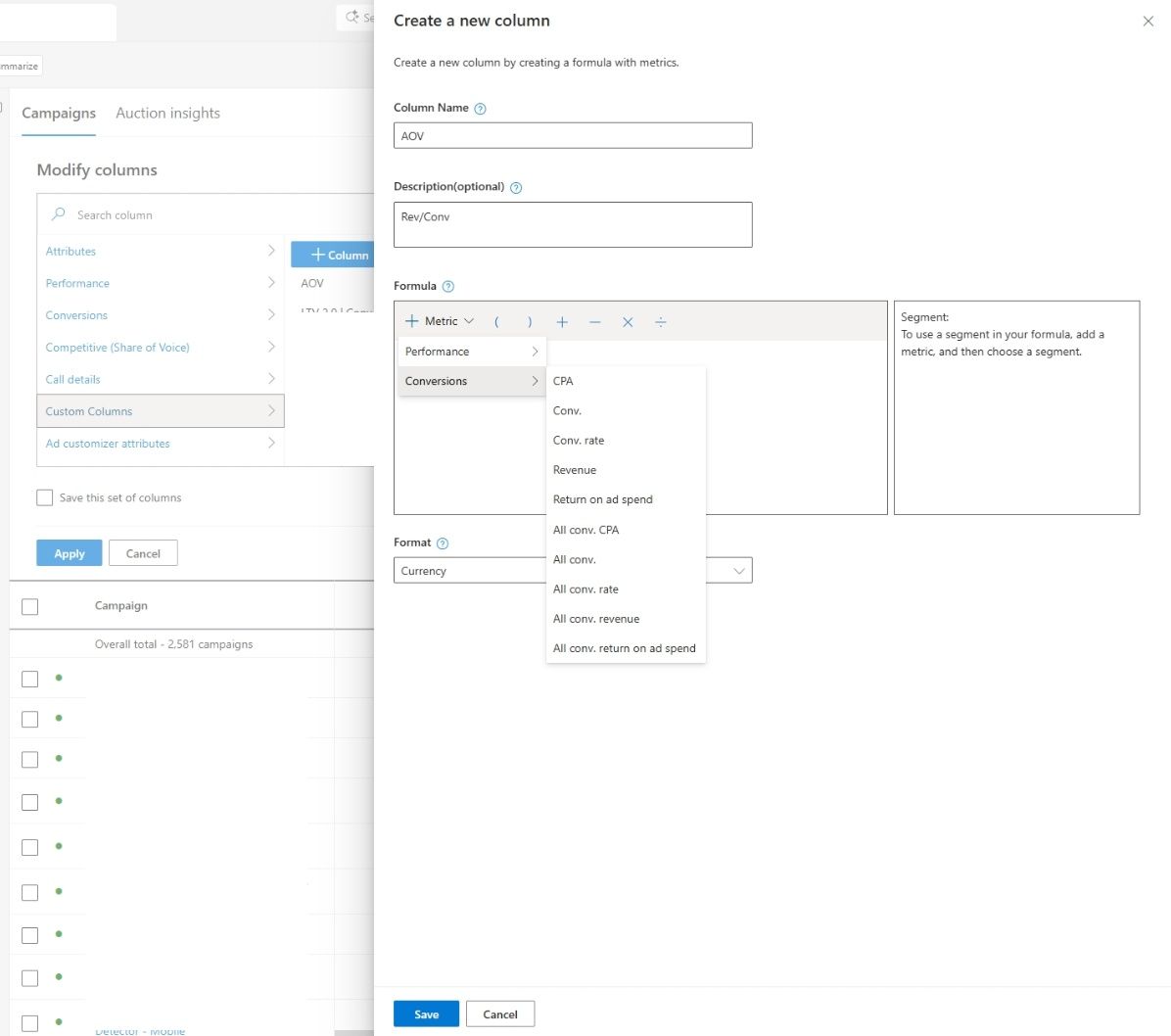
    Please note the new image showcasing Microsoft’s enhanced custom columns feature. It’s a visual reminder of how these updates can transform our analytical capabilities.

    Why am I excited about this? Because the standard reporting often doesn’t mirror how we truly measure success. By giving us the tools to expand custom columns, Microsoft allows us to define metrics that truly matter—be they lead quality, revenue, or a combination of conversion actions.

    This flexibility is crucial for managing a variety of conversion types or navigating complex marketing funnels. Now, I can create custom columns, using ratios and metric combinations such as cost per qualified lead or conversion rates focused on primary goals.

    Moreover, I appreciate that the revenue and ROAS calculations will now reflect the values that align with my conversion goals, providing more accurate insights directly linked to business outcomes.

    ```json
{
  "alt": "Screenshot of a campaign management interface showing options for creating a new column with metrics and performance criteria.",
  "caption": "Exploring campaign metrics has never been easier with this detailed interface for customizing columns and viewing performance data.",
  "description": "This image displays a campaign management interface used for customizing and modifying columns. It includes options to name a new column, add an optional description, and formulate its metrics. The interface allows users to select metrics such as CPA, conversion rates, and revenue, as well as specify the format, in this case, currency. A list of campaigns is visible on the left, indicating a total of 2,581 campaigns, with options to apply saving or cancelling at the bottom."
}
```

    What does this change imply for us in a broader sense? It represents a shift toward a more flexible and advertiser-defined measurement approach, instead of relying solely on standardized platform metrics.

    This update highlights the ongoing demand for improved reporting customization as campaigns become increasingly automated and intricate.

    So, what should we keep an eye on? I’ll be observing how advertisers like us utilize these custom metrics to guide optimization decisions, whether consistency in reporting improves across teams, and if similar flexibilities will roll out in other areas of the platform.

    Bottom line? With Microsoft giving us more control over how we measure success, custom columns are evolving into a vital asset for campaign analysis. Read more about this update here.


    Inspired by this post on Search Engine Land.


    crushpress.ai community screenshot
  • Google Ads AI Automation: A Practical Control Framework

    Google Ads AI Automation: A Practical Control Framework

    You are not choosing between manual Google Ads and a black box. You are deciding which decisions the system may make, what evidence it may use, and which mistakes it must never be allowed to make.

    If AI Max, journey-aware bidding, or demand-led budgeting is on your roadmap, build that control system before you enable more automation. The safest operating model is simple: let AI handle frequent, reversible decisions, while you keep firm boundaries around landing-page eligibility, business goals, spending, and measurement.

    Control has moved upstream of the individual decision

    Advertisers often judge control by counting settings: keywords, bids, URL rules, daily budgets, and exclusions. That worked when campaign management centered on direct instructions. AI-driven campaigns change the location of control. You increasingly govern the inputs and boundaries, while the system makes more of the execution decisions inside them.

    This is still control, but only when your inputs express the business clearly. A page feed full of loosely classified URLs is not a meaningful boundary. A conversion setup that treats every lead as equally valuable is not a meaningful objective. A flexible budget with no period-level ceiling is not a financial policy.

    Before automating a campaign decision, assign it to one of five layers:

    Control layerQuestion you must answerProper division of responsibility
    EligibilityWhich pages, products, locations, or offers may receive traffic?You define the allowed set; automation works only inside it.
    ObjectiveWhich measurable action represents progress, and which represents business value?You define and validate the signals; automation responds to them.
    EconomicsHow much may be spent, over what period, and for what return?You set the financial limits; automation allocates within them.
    ExecutionWhich eligible opportunity should receive the next unit of spend?Automation can make the high-frequency decision.
    EvidenceWhat would prove that automation improved the business outcome?You set the evaluation standard and decide whether to continue.

    The distinction matters because execution errors and policy errors have different consequences. A single imperfect bid may be recoverable. A campaign-wide permission to send traffic to the wrong section of a large site can waste money repeatedly. Keep direct controls where an error would be expensive, difficult to detect, or hard to reverse.

    Protect landing-page eligibility before activating AI Max

    Glowing traffic routes lead only to landing-page platforms enclosed by a transparent eligibility boundary, while other destinations remain behind closed gates.

    Landing-page control is the most immediate gap for teams moving from Dynamic Search Ads to AI Max. DSA could be arranged around categories, URL paths, and page rules that reflected a site’s architecture. AI Max does not reproduce every one of those targeting methods. In particular, the familiar “page contains” condition is not fully supported.

    That does not mean AI Max has no URL controls. It means you need to translate structural rules into explicit inventory inputs. Available mechanisms include URL rules and combinations, page feeds with custom labels, ad-group URL inclusions, and campaign-level exclusions.

    For a large or structured site, make that translation as a separate migration project:

    1. List the pages that are allowed to receive paid traffic. Do not begin with the whole index and remove bad pages later. Start with a deliberate eligible set. A mistaken exclusion can block useful demand, but an overly broad inclusion can repeatedly spend against irrelevant, unavailable, or low-value pages.
    2. Classify eligible pages with stable custom labels. Labels should describe business meaning such as product family, service line, region, margin group, lead type, or promotional eligibility. Avoid labels that merely repeat temporary campaign names; they become useless when the account structure changes.
    3. Use ad-group inclusions to create local relevance. An ad group should receive only the URL groups appropriate to its intent and offer. If every ad group can reach every eligible page, the page feed is an inventory list rather than a targeting control.
    4. Use campaign exclusions for non-negotiable boundaries. Apply them where a page class must not receive traffic from that campaign. Record the business reason for each exclusion so a future cleanup does not remove a safeguard that looks redundant.
    5. Check the resulting landing pages, not just the configuration. Review where real traffic lands and ask whether the page matches the user’s likely intent, presents the intended offer, and supports the conversion action used by bidding.

    Custom labels are the key design choice. A label such as “campaign-7” tells the system where a URL happened to be used. A label such as “enterprise-demo-eligible” states a policy. The second survives campaign reorganizations and gives you a reusable boundary for testing.

    Be especially cautious with migrated DSA rules. Unsupported rules may continue functioning as read-only legacy rules that cannot be edited. That makes them dependencies, not durable controls. Document what each one permits or blocks, then recreate the intended outcome with page feeds, labels, inclusions, or exclusions where possible. Do not build a new operating model around a setting you can no longer maintain.

    AI Max already applies an inventory-aware safeguard for out-of-stock items, but stock status is only one reason a page may be unsuitable. A page can be technically available while carrying the wrong offer, serving the wrong market, or producing poor downstream value. Keep your own eligibility model for those business distinctions.

    Google has also signalled future account-level exclusions based on page content and titles. Treat those as prospective capabilities until they are present and usable in your account. A planned control cannot protect current spend.

    Give automated bidding an optimization brief it can actually follow

    Automated bidding cannot infer the distinction between a convenient measurement event and a valuable business outcome. If your account reports both as equivalent conversions, the system receives permission to pursue whichever is easier to generate.

    That risk becomes more important as Google gives bidding a wider view of the customer journey. Journey-aware Bidding is a beta capability that can incorporate non-biddable conversions as additional journey context. More context can help only when the events are reliable and their roles are clear. An event should not be included merely because it is measurable.

    Write a conversion map before changing the bidding system. For each event, record:

    • What the user actually did.
    • Whether the event is a progress signal or the business outcome.
    • Whether it is recorded consistently across campaigns and devices.
    • Whether duplicates, spam, cancellations, or low-quality leads can inflate it.
    • Which team owns its definition and can explain a sudden change.
    • Whether the event’s value reflects the economics you want the campaign to pursue.

    Consider a campaign that records an inquiry form immediately but learns lead quality later. The form is useful journey evidence, but it is not automatically equivalent to a qualified opportunity or sale. If the system sees only form volume, it can improve the reported metric while sending the sales team more poor-fit leads. The automation is following the brief it received; the brief is the problem.

    Use three tests for every signal you expose to bidding:

    1. Interpretability: Can you describe the event in one sentence without vague terms such as “engagement” or “intent”?
    2. Stability: Would a tracking, form, or CRM change alter the event count without changing actual demand?
    3. Economic direction: If the system produced more of this event, would that usually move the business toward revenue, margin, retention, or another declared outcome?

    If an event fails one of those tests, repair or separate it before asking AI to use it. Adding an unreliable signal does not create a fuller customer journey. It creates a larger measurement surface for the bidding system to exploit unintentionally.

    Apply the same discipline to expansion features. Google reported that Smart Bidding Exploration produced 27% more unique converting users and has said the capability is expanding beyond Search into Performance Max and Shopping. Treat that figure as a vendor-reported result, not a profitability guarantee for your account. Unique converting users, conversion quality, revenue, and profit answer different questions.

    Your test should therefore have two scorecards. The platform scorecard can include conversion volume and unique converters. The business scorecard should use the downstream outcome that justifies the spend. Expansion earns a larger rollout only when both move in an acceptable direction.

    Automate budget pacing without outsourcing financial policy

    A transparent reservoir distributes golden tokens through automated valves while a separate master gate limits the total flow.

    Demand-led budgeting changes when money is spent, not why the money is available. It can increase spend when the system detects stronger opportunity and conserve it when demand is weaker. Total budgets can also shift management away from repeated daily changes toward a defined spending period.

    That can remove genuine operational work. Advertisers using total budgets saw a Google-reported 66% reduction in manual budget adjustments. But fewer adjustments measure workload, not commercial success. A campaign can require less maintenance and still spend against low-quality conversions or an unsuitable product mix.

    Before enabling demand-responsive pacing, write down four constraints outside the campaign interface:

    • The hard period ceiling: the maximum amount the campaign is authorized to spend over the relevant period.
    • The unit-economics condition: the business result that must remain acceptable as spend increases.
    • The capacity condition: the inventory, fulfillment, sales, or service limit beyond which additional demand loses value.
    • The intervention condition: the specific measurement or business change that requires a human review, pause, or budget reduction.

    This matters because the system can respond to demand visible in the advertising environment, but it does not automatically know every private constraint in your business. If cash timing, fulfillment capacity, or lead-handling capacity cannot tolerate a high-spend day, flexible pacing creates financial exposure unless you constrain the period and monitor the limiting resource.

    Do not pool campaigns under one flexible budget merely because they share a channel. Keep materially different economics separate. A campaign optimized for immediate purchases and one optimized for leads with delayed qualification should not inherit the same scaling decision unless you can compare their downstream value on a consistent basis.

    Budget automation should be the last layer you expand, not the first. First confirm that eligible traffic reaches appropriate pages. Then confirm that bidding responds to trustworthy outcomes. Only then give the system more freedom to alter spend timing. Otherwise, faster pacing amplifies an unresolved targeting or measurement problem.

    Roll out one delegated decision at a time

    Turning on new landing-page selection, bidding exploration, journey signals, and budget pacing together may produce a different result, but it will not tell you which change caused it. A controlled rollout preserves your ability to diagnose and reverse.

    1. Name the delegated decision. State whether the test concerns page selection, opportunity exploration, bid response, or budget pacing. Do not use “more AI” as the test definition.
    2. Define forbidden outcomes. Examples include traffic to an ineligible site section, spend beyond the authorized period total, or growth in leads without acceptable downstream quality.
    3. Prepare the input layer. Finish the URL classification, conversion audit, or financial constraints needed for that decision.
    4. Capture a comparable baseline. Use the same campaign scope and the same business definitions you will apply after the change.
    5. Change one control layer. Hold the others stable enough to make the result interpretable.
    6. Review platform and business outcomes separately. More conversions may be a useful platform result, but it does not settle whether the change produced better customers or better economics.
    7. Apply a prewritten rollback rule. Decide what failure means before spend is affected. If you wait until after the result, pressure to defend the test can move the standard.
    8. Scale only after the boundary holds. A good average result is not enough if the campaign repeatedly violates landing-page, quality, or spending constraints.

    The review cadence should match the business process, not the speed of the interface. A lead-generation campaign cannot be judged responsibly before the quality signal exists. An ecommerce campaign should not be scaled from order volume alone if cancellations or product mix materially change its value. Wait for the outcome needed to answer the commercial question, while keeping hard spend limits in place.

    Key takeaways

    • Keep firm human control over eligibility, objectives, economic limits, and the evidence required to continue.
    • Translate DSA URL logic into page feeds, meaningful custom labels, ad-group inclusions, and campaign exclusions before relying on AI Max.
    • Treat unsupported read-only DSA rules as temporary legacy dependencies, even when they still function.
    • Use journey signals only when you can explain their relationship to the business outcome and trust their measurement.
    • Do not treat a vendor-reported increase in conversions or reduction in manual work as proof of profitable growth.
    • Expand budget automation only after landing-page selection and conversion quality are under control.
    • Delegate one decision at a time and define rollback conditions before the test begins.

    Google Ads is moving the advertiser’s job from repeated intervention toward system design. Your next move is to choose one campaign and write a one-page policy covering eligible landing pages, optimization signals, spending authority, and rollback conditions. If the available controls cannot enforce that policy, do not automate that decision yet.

    References

  • AdSense Vignette Ads No Longer Trigger on Browser Back

    AdSense Vignette Ads No Longer Trigger on Browser Back

    Your AdSense implementation can be working correctly even when vignette impressions or revenue suddenly move. Google AdSense no longer uses the browser Back button as a vignette ad trigger, so a change in this format does not automatically point to broken code, a consent failure, or a traffic problem.

    The practical question is narrower: how much of your vignette inventory depended on that navigation action, and are the remaining ad opportunities behaving normally? Answer that before you change placements, edit templates, or disable the format.

    Key takeaways

    • The browser Back button no longer triggers an AdSense vignette ad. That does not mean the entire vignette format has been removed.
    • Treat an isolated decline in vignette impressions as a possible inventory change before treating it as an implementation failure.
    • Compare vignette impressions and revenue per session, not only revenue per pageview. A removed back-navigation opportunity may not correspond to a new pageview on your site.
    • Segment the change by browser, device, landing-page template, and traffic source. Sites with frequent land-and-return behavior may be more exposed.
    • Do not recreate the removed behavior by intercepting the browser Back button or trapping visitors. Improve useful internal navigation and evaluate the rest of your ad mix instead.

    The change applies to a specific navigation action

    Vignette ads are interstitial-style placements associated with navigation between pages. The important boundary here is the browser control itself: when a visitor presses Back in Chrome, Safari, Firefox, or another browser, that action is no longer a vignette trigger.

    Do not translate that into the broader claim that vignette ads have stopped working. The change removes one trigger, not the format as a whole. It also does not establish that every link labeled Back will behave the same way. An on-page “Back to results” link is a site link, while the browser Back button operates through the visitor’s navigation history. Test those paths separately rather than grouping them by their visible label.

    The behavior change alone is not evidence that you need to reinstall the AdSense tag, modify structured data, change a WordPress theme, or repair an SEO problem. Check those systems only if other evidence points to them. A decline across every ad format, for example, deserves a broader serving and traffic audit. A decline isolated to vignettes has a much narrower set of likely causes.

    Why the revenue effect will vary between publishers

    Three smartphones show different browsing paths, including frequent backtracking, mostly forward navigation, and a short exit route, with varying numbers of translucent ad panels.

    Removing a trigger reduces the number of moments at which a vignette could be considered. It does not tell you how large the effect will be. That depends on how visitors move through your site.

    A site can be more exposed when many visitors land on a page, consume what they need, and use the browser Back button to return to a search result, social feed, referring site, or previous page. A site with deeper internal journeys may rely less on that action. These are diagnostic hypotheses, not reasons to assume a loss before looking at your own data.

    Page RPM can be a misleading first metric in this case. A vignette associated with an exit through browser history may have created an ad impression without creating another publisher pageview. If that opportunity disappears, pageviews can remain stable while vignette impressions and revenue fall. Revenue per session and vignette impressions per session provide a cleaner view of that mechanism.

    Use these questions to determine whether the navigation change is a credible explanation:

    • Did vignette impressions per session fall while display and other ad formats stayed near their previous patterns?
    • Did the movement concentrate on landing pages that commonly end a visit?
    • Was it larger for search, social, or referral landings than for direct visitors who browse several internal pages?
    • Did one device or browser segment move more than the others?
    • Did sessions, pageviews, geography, consent rates, or the mix of page templates change at the same time?

    The first four patterns make the removed trigger more plausible. A simultaneous change in traffic, consent, templates, or all ad formats means you have competing explanations and should not attribute the result to vignette behavior alone.

    Audit the change without confusing correlation for cause

    An analyst compares separate navigation, advertising, consent, traffic, and timing indicators across a laptop and smartphone using a central magnifying glass.

    A useful audit separates format behavior from traffic behavior. You do not need a complicated attribution model, but you do need a comparison that preserves context.

    1. Record possible confounders. Note any changes to consent management, AdSense settings, theme files, navigation, ad experiments, traffic acquisition, or page templates. If several things changed together, do not assign the full effect to one of them.
    2. Find the first sustained movement in your own reporting. Compare equivalent periods on either side of that movement. Match the day-of-week mix and avoid using an unusually large campaign, outage, or seasonal spike as the baseline.
    3. Isolate vignettes where your reporting permits it. Review vignette impressions and revenue separately from total advertising revenue. If you cannot separate the format, state that limitation instead of treating a sitewide result as proof.
    4. Normalize for audience volume. Calculate vignette impressions per session and vignette revenue per session. Keep page RPM as supporting context, not the only decision metric.
    5. Segment the affected traffic. Start with browser, device, traffic source, landing-page type, and new versus returning visitors. Stop adding segments when sample sizes become too thin to show a stable pattern.
    6. Inspect navigation paths. Compare sessions that end on the landing page with sessions that continue through internal links. If available, examine flows from high-traffic landing pages to categories, related content, product pages, or site search.
    7. Change one thing at a time. If you decide to adjust navigation or another placement, keep consent, templates, and other ad settings stable during the evaluation. Otherwise, the next comparison will be as ambiguous as the first.

    A quick diagnosis matrix

    What you observeMost useful interpretationWhat to do next
    Vignette impressions per session decline while other ad formats remain stableThe removed trigger is a plausible causeMonitor the new baseline before changing the implementation
    All ad formats decline togetherA broader traffic, consent, serving, or implementation issue is more likelyAudit sitewide changes and ad delivery
    The decline is concentrated on high-exit landing pagesVisitor navigation patterns may explain the exposureReview those pages’ internal paths and format-level metrics
    Sessions or pageviews change materially at the same timeRaw revenue comparisons are confounded by audience volume or behaviorNormalize per session and compare stable traffic segments
    Revenue changes but format-level impressions are unavailableCausality remains uncertainAvoid implementation changes based on the sitewide total alone

    Respond by improving the journey, not recreating the trigger

    If the audit shows a modest, isolated vignette decline and everything else is stable, the most defensible response may be to accept the new baseline. Fewer interruptions during browser Back navigation can change the balance between monetization and visitor control. There is no technical virtue in forcing the old interaction back into the experience.

    If the effect is material, work on the parts of the journey you control:

    • Add a genuinely useful next step near the point where a reader has finished the current task, such as a related explanation, comparison, category page, or product detail.
    • Make internal links descriptive enough that visitors know what they will get before clicking.
    • Check whether intrusive elements, weak mobile navigation, slow pages, or dead-end templates are pushing visitors toward the browser Back button.
    • Evaluate other appropriate ad placements as part of the complete page experience, using both revenue per session and engagement signals.
    • Run controlled layout tests rather than changing navigation, ad density, consent behavior, and templates in the same release.

    Do not hijack browser history, open unnecessary pages, or manufacture clicks to replace a lost ad opportunity. Those tactics work against visitor intent and make analytics harder to trust. The sustainable lever is a better internal path that a reader chooses because the next page is useful.

    Set a new baseline before making an optimization decision

    Your next action is simple: chart vignette impressions per session, vignette revenue per session, sessions, and total pageviews across the same comparison window. Then split the result by landing-page type and traffic source. If only vignette efficiency moved while other formats and traffic stayed stable, document the trigger change and establish a new baseline. If the decline reaches multiple formats or coincides with a site change, continue the broader audit before touching your ad strategy.

    References

  • JavaScript SEO for Ecommerce: A Practical Build Standard

    JavaScript SEO for Ecommerce: A Practical Build Standard

    Your storefront can look complete in a browser while sending a nearly empty page to crawlers. The failure usually sits in the handoff: the server returns a shell, then JavaScript fetches the product content, navigation, filter state or structured data. If that second step is delayed or skipped, the page loses the information that makes it discoverable.

    You do not need to remove JavaScript or give up a fast, interactive storefront. You need a clear division of responsibility: the initial HTML should explain what the page is and where its important links lead; JavaScript should improve how shoppers interact with it.

    Define the minimum HTML contract for every template

    Start with an output standard, not a framework decision. For each page template, write down what must be present in the server’s initial HTML response before any client-side code runs.

    On a product page, that normally includes the product name, descriptive copy, current price, availability, review information intended for search, relevant Q&A content and breadcrumbs. A category page should identify the category and expose its primary product and subcategory destinations. These elements can be delivered in the initial HTML while comparison carousels and other engagement features wait for JavaScript.

    Key takeaways

    • Put the page’s identity, primary content and current commercial facts in the initial HTML.
    • Render important destinations as real anchor elements with href attributes.
    • Give every filter state intended for search a stable, readable URL that works when requested directly.
    • Include Product structured data in the same server response as the visible product information.
    • Keep recommendation widgets, comparison tools and nonessential third-party scripts out of the critical rendering path.

    Use View Source or an HTTP client when checking this contract. The Elements panel in browser developer tools shows the DOM after JavaScript has had a chance to repair or populate it. A complete rendered DOM does not prove that the server response was complete.

    Framework choice is not a substitute for this test. Next.js can combine server rendering and static generation, Astro can send content with no JavaScript by default and hydrate selected interactive islands, and Shopify Hydrogen can support deferred client-side behavior. The relevant question is not which label appears in your technology stack. It is what each template actually sends before hydration.

    Make the catalog discoverable before shoppers interact

    An isometric catalog of product rooms connected by illuminated corridors, with a small crawler robot following a direct route from the entrance to a product alcove.

    A crawler should not have to open a menu, trigger a click handler or run a search to discover your important categories and products. Render navigation links in the initial response, using anchor elements whose href values point to real destinations.

    This distinction matters in component-based storefronts. A button is appropriate for opening a drawer, changing a local view or adding an item to a cart. A link is appropriate when the shopper is moving to another URL. A styled div with an on-click event may look like a link, but it does not provide the same dependable discovery path. Ecommerce navigation built as ordinary anchors remains visible to crawlers even when JavaScript supplies the interactive behavior.

    Treat every filter state as a URL decision

    Faceted navigation needs two separate decisions: which states help shoppers, and which states deserve to become search landing pages. Do not make every possible combination indexable by default. That can produce a large collection of thin or repetitive URLs. Classify each facet and combination according to its intended role.

    • Search landing state: Give it a stable URL, meaningful page context and a server response containing the expected product set.
    • Discovery path: Use crawlable links when the state helps crawlers reach important inventory, but decide separately whether the resulting page should be indexed.
    • Shopper-only interaction: Keep purely presentational states, such as a view toggle, as interface controls rather than pretending they are distinct landing pages.

    Client-side grid updates are fine after the initial load. The URL still needs to represent any state you expect people or search systems to revisit. Prefer readable URLs over hash fragments or opaque, bracket-heavy parameters when a filtered page is meant to be shared, bookmarked, crawled and indexed.

    Test a filter URL by copying it into a fresh session and requesting it directly. The correct category context, selected state and core product results should be available without replaying the clicks that created the URL. If the server returns the unfiltered category and only browser memory restores the selection, the URL is not yet a dependable landing page.

    Send Product structured data with the visible facts

    Product structured data should arrive in the initial HTML, not appear only after a client-side component mounts. Place the JSON-LD script in the server response and generate it from the same current product data used for the visible page.

    This is particularly important for price and availability because those values can change frequently. When the visible page, the structured data and the underlying commerce record use separate rendering paths, they can drift apart. Server-delivered structured data removes one avoidable dependency and gives crawlers immediate access to Product data without waiting for rendering.

    • Confirm that the Product JSON-LD exists in the raw response, not only in the rendered DOM.
    • Match the product identity in the markup to the title and description shoppers can see.
    • Keep price and availability consistent with the visible offer at the time the page is served.
    • Keep breadcrumb markup and visible breadcrumb navigation aligned.
    • Do not use structured data as a replacement for missing product content. It describes the page; it does not make an empty page complete.

    Valid markup does not guarantee a search feature or enhanced result. It does, however, remove a preventable technical reason for the product information to be missed or misunderstood.

    Protect the first render from third-party scripts

    Third-party code accumulates quietly on ecommerce sites. Analytics, chat, reviews, recommendations, personalization and advertising tools can all compete with the product page for browser resources. If they delay the main content, they also increase the work required to render and understand the page.

    Keep essential product information outside third-party widgets wherever possible. A review widget can provide interaction, for example, while the review summary or indexable review content remains part of the server response. A comparison carousel can load later because it enhances the shopping session rather than defining the product.

    Use script-loading behavior deliberately. Async suits an independent script that can execute whenever it finishes downloading. Defer suits a script that should wait until HTML parsing is complete and preserve its order relative to other deferred scripts. Both approaches require testing because the script’s own loader may create additional requests or inject more code.

    Deferring nonessential scripts can protect Largest Contentful Paint and reduce the rendering burden. The practical priority order is straightforward: deliver the product and navigation first, make the buying controls usable next, then initialize supporting services.

    • Inventory every third-party script on product and category templates.
    • Record what breaks if each script is blocked. If the product disappears, the dependency is too deep.
    • Mark the scripts that are essential for the initial buying path.
    • Load engagement and measurement code without blocking the initial content whenever its behavior permits.
    • Remove tags that no longer have a current owner or business purpose.

    Use a release test that catches invisible storefronts

    A quality assurance workstation compares an initial product-page view with an enhanced interactive view while an automated device scans both displays.

    A JavaScript SEO audit is most useful when it becomes a release check. Run it on representative product, category and filtered pages whenever you change rendering, navigation, data fetching or third-party tooling.

    1. Request the raw HTML for each representative URL without executing JavaScript.
    2. Search that response for the page title, descriptive content, price, availability, breadcrumbs, primary links and Product JSON-LD.
    3. Disable JavaScript and follow the main catalog links. The experience can be less interactive, but the destinations and page meaning should remain present.
    4. Open indexable filter URLs directly in a fresh session. Confirm that each response represents the requested state without requiring a previous click sequence.
    5. Enable JavaScript and compare the rendered page with the raw response. JavaScript may add interaction and secondary content, but it should not replace the page’s essential identity.
    6. Review the loading order of third-party scripts and check whether they delay the primary content or Largest Contentful Paint.
    7. Repeat the checks against the deployed production response. Do not rely solely on what the application produced in a local development environment.

    The raw-response test also provides a useful baseline for AI visibility. Some AI systems do not handle JavaScript efficiently, so a page that communicates its product, offer and hierarchy in HTML is easier to process without relying on a browser-like rendering stage.

    What you findLikely dependencyFix first
    Product name or grid is absent from raw HTMLClient-side content renderingFetch and render the core content on the server
    Destinations appear only after a menu interactionClient-only navigationRender real anchors with href values in the initial response
    Product JSON-LD exists only in the rendered DOMClient-side schema injectionSerialize the markup into the server response
    A filter works only after a click sequenceInterface state is not represented by the URLCreate a stable URL and return the corresponding state directly
    Primary content waits behind vendor codeBlocking third-party scriptsDefer, load asynchronously or remove nonessential scripts

    Start with one important product template and one category template. Write the HTML contract, disable JavaScript and fix the first essential element that disappears. Once the server response carries the meaning of the catalog, you can keep adding interactivity without asking every crawler and AI system to reconstruct the store for you.

    References

  • How to Measure AI Search Visibility and Make It Actionable

    How to Measure AI Search Visibility and Make It Actionable

    You can have a healthy SEO dashboard and still be nearly invisible when a buyer asks an AI assistant what to choose. The difficult part isn’t collecting another visibility score. It’s knowing whether a change reflects stronger retrieval, a different mix of prompts, or noise in the answers you sampled.

    A useful measurement system starts with a repeatable prompt panel, distinguishes mentions from citations, checks whether your brand is represented accurately, and connects that evidence to business outcomes. Here is how to build one without turning a handful of AI responses into false precision.

    Measure what happens inside the answer, not just after the click

    Traditional search measurement follows a familiar sequence: query, ranking, impression, click, session, conversion. Generative search compresses much of that journey into an answer. A user can discover your brand, compare it with alternatives, absorb a claim about it, and make a decision without visiting your site.

    That makes traffic an incomplete visibility measure. Some studies cited in current GEO coverage put traditional-result clicks at only 8% when AI-generated summaries are present. Treat that figure as a warning about measurement gaps, not as a universal click-through benchmark for your site. The practical point is that an off-site answer can influence demand even when analytics records no session.

    Measure AI search visibility across four layers. Presence tells you whether the brand appears. Use tells you whether an owned page is retrieved or cited. Representation tells you whether the answer describes the brand accurately and in the right context. Impact tells you whether that exposure is associated with qualified visits, branded demand, leads, sales, or another business outcome.

    These layers prevent a common reporting error. A brand mention is not automatically an owned-content citation. A citation is not proof that the answer framed the brand correctly. Visibility is not proof of commercial influence. Each is useful, but each answers a different question.

    Key takeaways

    • Use a stable set of prompts so one reporting period can be compared with another.
    • Keep mentions, citations, observable retrieval, entity accuracy, sentiment, and conversions as separate measures.
    • Report results by platform, topic, intent, and prompt cohort before calculating an overall score.
    • Save the underlying answer and its citations. A percentage without evidence cannot be audited.
    • Use visibility metrics to choose an action, then judge that action by the specific metric it was intended to change.

    Build a prompt panel you can rerun without moving the goalposts

    A controlled grid of abstract prompt tiles feeds into parallel answer chambers, with one displaced tile showing a changed test condition.

    Your prompt panel is the measurement instrument. If the prompts change whenever a campaign changes, the resulting trend line cannot tell you whether visibility improved or the test simply became easier.

    Start with topics and decisions that matter

    List the topics your brand should credibly be associated with, then map the questions a real buyer asks while learning, solving, comparing, choosing, and validating. This creates a panel that covers informational discovery as well as decision-stage visibility.

    • Learn: What is the category, process, or concept?
    • Solve: How should someone handle a defined problem or constraint?
    • Compare: What are the meaningful differences between available approaches?
    • Choose: Which options fit a particular use case, audience, budget, or requirement?
    • Validate: Is a named brand suitable, credible, compatible, or known for the relevant capability?

    Include branded and unbranded prompts, but don’t blend their results. An unbranded prompt tests discovery and competitive consideration. A branded prompt tests entity recognition, factual accuracy, and reputation. A dashboard that combines them can look strong simply because the model answers direct questions about a brand that the user already named.

    Apply audience, industry, location, or product qualifiers only when they change the decision. Keep them in dedicated cohorts. Otherwise, an increasingly narrow prompt may manufacture visibility that does not exist for the broader market question.

    Create a prompt registry before collecting answers

    Give every prompt a permanent record. At minimum, store its ID, exact wording, topic, intent, audience qualifier, branded or unbranded status, platform and mode, relevant competitor set, target page, and the brand facts you expect an accurate answer to preserve.

    Freeze the wording used for your baseline. If you improve a prompt later, create a new version instead of overwriting the old one. Keep retired prompts in the registry so historical rates retain their original denominator. This is less convenient than editing a shared list in place, but it prevents an invisible change in the test from masquerading as an improvement in performance.

    Use a consistent collection protocol

    1. Run the exact registered prompt in the intended platform and mode, such as an answer with web search enabled rather than a model-only response.
    2. Record the platform, mode, timestamp, prompt version, full response, visible citations, cited URLs, and any named competitors.
    3. Score the answer with a written rubric. Preserve the raw response so another reviewer can check the decision.
    4. Repeat the panel on a fixed cadence. If resources permit, run prompts more than once so a single response is not mistaken for a stable pattern.
    5. Log failed captures, blocked responses, and unavailable features separately. Do not score a technical failure as brand absence.

    Keep platform results separate. Google AI Overviews, ChatGPT search, and other answer systems are different surfaces with different retrieval and citation behavior. You can create a portfolio view later, but first calculate each platform’s rate against its own eligible observations.

    If you do publish an aggregate, state its weighting. An unweighted average gives every prompt-platform pair the same influence. A business-weighted score gives priority cohorts more influence. Neither is inherently correct; an unexplained blend is the problem.

    Use a metric stack instead of one opaque visibility score

    A practical GEO measurement stack separates eight signals across presence, representation, retrieval, competition, and impact. The definitions below turn those ideas into auditable calculations. They are operational definitions, not universal standards, so document them and resist changing them midstream.

    MetricOperational definitionQuestion it answers
    Answer inclusion rateEligible answers containing a qualifying brand mention or traceable use of owned content, divided by all eligible answers in the cohort.Does the brand enter the answer at all?
    AI citation frequencyEligible answers containing a visible citation connected to the brand, divided by all eligible answers. Report any-brand citation and owned-domain citation separately.Is the answer visibly supported by material associated with the brand, and does it cite the brand’s own site?
    Share of model voiceThe brand’s unique inclusions divided by unique inclusions for the entire predefined competitor set. Count a brand once per answer so repetition does not inflate share.How much of the observable category conversation does the brand occupy?
    Entity recognition accuracyBrand-discussing answers that preserve the required facts divided by all answers that discuss the brand.Does the system understand who the brand is, what it offers, and how its entities relate?
    Sentiment and framingCounts of favorable, neutral, critical, or mixed descriptions, paired with issue codes and the exact claim being evaluated.How is the brand characterized before the user reaches its site?
    Prompt coveragePriority prompt cells with at least one qualifying inclusion divided by all eligible priority prompt cells.Across how much of the intended buyer journey is the brand visible?
    Observable retrieval successRuns in which a relevant owned page is visibly retrieved or cited, divided by runs where that page is an eligible answer source.Can the system access and use the content you expected it to use?
    Conversion influenceQualified visits, conversions, lead quality, revenue, branded demand, or other outcomes associated with AI referrals and visibility changes.Is AI visibility connected to business value?

    The denominator matters as much as the numerator. Show both on every metric card. A 50% inclusion rate based on two eligible answers carries very different weight from the same rate across a broad, repeated panel.

    Keep citation frequency and retrieval success distinct. A brand can be mentioned because a third-party page was retrieved. An owned page can be cited without the brand becoming a recommended option. A model may also name the brand without exposing any source. Consumer-facing outputs rarely reveal every internal retrieval step, so call the measure observable retrieval rather than claiming access to hidden model behavior.

    Share of model voice also needs a locked competitor set. Adding weak competitors lowers everyone’s apparent share; removing a dominant competitor raises it. Version the set just as you version prompts, and show absolute inclusion alongside share. If absolute visibility holds steady while share falls, competitors may be gaining rather than your brand disappearing.

    For entity accuracy, write the answer key before scoring responses. Include only facts the brand can substantiate, such as its official name, category, product relationships, supported markets, or current positioning. Record each error type separately. A single accuracy percentage will not tell your content team whether the problem is an outdated name, a category mismatch, a confused product relationship, or a claim that is too broad.

    Sentiment needs the same discipline. A neutral answer that omits the brand’s relevant capability is different from a critical answer containing a factual error. Save the exact sentence, its context, the issue code, and the affected prompt. Automated labels can help sort a large collection, but consequential or ambiguous cases still need human review.

    Read metric combinations as a diagnostic system

    No metric tells you what to change by itself. The useful signal comes from combinations. Start with the smallest cohort where the problem appears, then diagnose the layer most likely to be responsible.

    Low inclusion plus low observable retrieval

    Begin with access and extractability. Check whether the intended page can be crawled, whether the primary answer is available in parseable text, whether important information is current, and whether structured data accurately describes the visible content and entity relationships. Crawlability, schema use, freshness, and parsing quality all belong in a retrieval-success investigation.

    Do not add schema merely to produce more markup. Structured data can clarify supported facts; it cannot make a thin, contradictory, or inaccessible page authoritative. Validate the markup, align it with what users can see, and retest the affected prompt cohort after the page can be revisited.

    Inclusion without owned citations

    The system recognizes the category connection, but your site is not supplying the visible evidence. Inspect which domains are cited instead and what those pages make easy to extract. Then improve the relevant owned page with a direct answer, clear definitions, explicit comparison dimensions, supported claims, and enough surrounding context for a passage to stand on its own.

    Do not treat matching wording as proof that the model used your page. Unless the interface exposes a citation or retrieval record, hidden sourcing remains unknown. Score what you can observe and use citation gains as the validation target for this change.

    Strong visibility with weak entity accuracy

    This is a representation problem, not an awareness problem. Compare the wrong claim with the corresponding signals on your site, structured data, product pages, and corroborating profiles. Standardize names and relationships, remove obsolete descriptions, and make the canonical explanation explicit. Retest the prompts that produced the error rather than waiting for the global score to move.

    Informational coverage without decision-stage visibility

    The brand may be recognized as an educator but absent from the consideration set. Examine compare, choose, and validate prompts. If the cited pages answer selection questions that your pages avoid, create or improve content around fit, limitations, use cases, evaluation criteria, and meaningful alternatives. The goal is not to declare yourself the best. It is to supply the facts an answer system needs to explain when the offering is or is not a fit.

    Visibility gains without measurable business impact

    First check intent. More citations on broad educational prompts may be valuable without creating immediate demand. Next check whether the cited or visited page offers a sensible next step for that query. Then inspect referral classification, landing-page engagement, conversion quality, direct traffic, and branded search movement.

    Do not force a revenue claim from a coincident trend. Off-site AI interactions are often not connected to an identifiable user journey. Call the result influence unless you have instrumentation that supports stronger attribution.

    Change one measurement layer at a time

    Turn each diagnosis into a recorded experiment. State the affected cohort, observed gap, proposed change, page or entity being changed, metric expected to move, business guardrail, and next review point. If you rewrite the prompts, replace the target pages, and change the scoring rubric together, you will not know which change produced the new result.

    Keep a control cohort of unchanged prompts when practical. It gives you context when visibility moves across the platform rather than only on the pages you changed.

    Report evidence, decisions, and business influence in one workflow

    Abstract answer signals pass through a diagnostic prism and flow into content, source, customer-journey, and business-outcome elements.

    A dashboard should shorten the distance between an observed gap and the person who can address it. Clutch, for example, places Conductor-powered visibility analysis inside its AI Visibility Dashboard. The useful principle is workflow integration: a report creates more value when operators can move from the trend to the affected prompt, answer, citation, topic, and page.

    Give each audience the view it needs

    • Leadership view: priority-topic inclusion, share of model voice, entity accuracy, major reputation issues, qualified AI traffic, and conversion influence.
    • Operator view: platform, topic, intent, prompt, target page, cited domain, competitor, issue code, and experiment status.
    • Evidence view: exact prompt, full response, visible links, scoring decision, timestamp, reviewer, and prompt version.

    Every summary card should show the current value, comparison baseline, numerator, denominator, included cohort, and last collection date. Avoid a global visibility score that cannot be traced to those components. It may look tidy, but it cannot tell a content, technical SEO, brand, or analytics team what to do next.

    Keep the collection cadence and the decision cadence separate

    Collect on a consistent schedule that your team can sustain. Review urgent factual errors when they appear, but make strategic decisions only after you have enough comparable observations to distinguish a pattern from one answer. Annotate changes to prompts, pages, structured data, competitor sets, platform modes, and scoring rules directly on the timeline.

    When a platform introduces a materially different mode or answer experience, create a new cohort. Do not splice it into the old series as if the measurement environment stayed constant.

    Triangulate AI visibility with analytics and search data

    No single product captures the complete path. Combine controlled prompt testing with analytics, server or referral evidence where available, Search Console, traditional SEO tools, technical audits, and business data. This mixed approach reflects the reality that GEO measurement currently requires multiple tools and methods.

    In GA4, isolate known AI-platform referrals and compare their landing pages, engagement, conversion rate, conversion value, and lead quality with relevant baselines. Keep the referral rules documented because platforms and referrer behavior can change. Review direct and branded-search demand alongside those sessions, but present the relationship as supporting evidence rather than proof that every change came from AI exposure.

    Search Console still helps you see traditional query demand, page performance, and technical conditions around the topics in your prompt panel. It will not expose every AI interaction, but it can reveal whether a page has a broader indexing, relevance, or demand problem that also limits its usefulness to generative systems.

    Evaluate tools by the decisions they support

    Before buying an AI visibility platform, ask whether it supports the exact environments you need to measure and whether you can audit its results. A useful evaluation checklist includes:

    • Named platforms and modes rather than a generic claim of model coverage.
    • Exact prompt storage, prompt versioning, cohort management, and repeatable scheduling.
    • Preservation or export of full responses, citations, cited URLs, timestamps, and scoring evidence.
    • Transparent definitions and denominators for inclusion, citations, share of voice, sentiment, and coverage.
    • A configurable competitor set and the ability to retain historical versions of that set.
    • Segmentation by topic, intent, platform, geography where relevant, brand, competitor, and target page.
    • Human review, issue coding, annotations, ownership, and an audit trail for score changes.
    • Connections to analytics and business outcomes rather than visibility reporting alone.

    Do not compare vendor scores as though they were interchangeable. One may count every mention, another only cited mentions, and another may use a proprietary weighted index. Compare the underlying prompts, observations, scoring rules, and denominators before comparing the headline numbers.

    Start with one commercially important topic. Freeze its prompts, capture a baseline, and identify the largest localized gap: presence, citation, retrieval, accuracy, competitive share, or impact. Assign one change to that gap and name the metric that should respond. When the dashboard can tell your team what to inspect next, AI search visibility stops being a vanity score and becomes an operating system for better decisions.

    References

  • AI-Driven SEO Strategy: Build Visibility Beyond Your Site

    AI-Driven SEO Strategy: Build Visibility Beyond Your Site

    If your rankings look respectable but your brand rarely appears in AI-generated answers, publishing more keyword-targeted pages may not solve the problem. You may already have enough content. What you lack is a connected body of facts, answers, and independent evidence that an AI system can find and reconcile.

    An effective AI-driven SEO strategy connects five things: the questions your audience asks, the answers you want associated with your brand, the evidence supporting those answers, the places that evidence appears, and the business outcomes you measure. Here is how to build that system without abandoning the SEO work that still matters.

    Key takeaways

    • AI-driven SEO is not simply using AI to produce more content. It is designing your search presence for discovery, interpretation, and corroboration across multiple surfaces.
    • Your website remains the canonical home for your facts and expertise, but it cannot be the only place where your brand is represented.
    • Plan around audience questions and the proof needed to answer them, not isolated keywords or publishing quotas.
    • Keep important claims consistent across pages, structured data, official profiles, directories, contributed content, and earned mentions.
    • Measure whether AI answers include, describe, and support your brand accurately, then connect that visibility to qualified visits, leads, and revenue.

    Treat your website as the center, not the entire strategy

    Traditional SEO concentrates much of its effort on the website: improve crawlability, target relevant queries, earn links, and move pages up the results. Those jobs still matter. If your pages cannot be discovered, understood, or trusted, they are unlikely to become useful inputs for any search experience.

    The strategic boundary has expanded, however. AI search can form its understanding of a brand from multiple inputs, including articles, brand mentions, social activity, third-party profiles, directories, press material, and other published content. Your site is a critical input within that environment, not a substitute for it.

    This changes the unit you optimize. A page is still an SEO asset, but the larger unit is an evidence network: several discoverable representations that agree about who you are, what you do, who you serve, and why a particular claim should be believed.

    Audit three separate visibility layers

    • Discovery: Can a search system find a relevant page, profile, mention, or listing when it investigates the subject?
    • Understanding: Do those surfaces use clear language for your brand, category, offering, audience, people, and locations?
    • Corroboration: Does the available evidence support your important claims, or does everything lead back to an unsupported statement on your own site?

    Run the audit for a small set of commercially important questions. For each one, search your site, review your official profiles, inspect prominent third-party pages, and examine representative AI answers. Record whether the brand is absent, present but vaguely described, accurately represented, or supported with useful evidence. Those are different failures and require different fixes.

    An absent brand may need stronger topical coverage or distribution. A misdescribed brand needs clearer entity facts and correction of conflicting profiles. A correctly named brand that is never recommended may have an evidence problem rather than a content-volume problem.

    Build the plan from questions, claims, and proof

    Abstract audience questions, claim modules, source folders, document stacks, and verification tokens converge into one organized structure on a table.

    A keyword list tells you which phrases people type. It does not tell you what an AI answer must resolve before it can mention your brand responsibly. Add a prompt-to-proof map beside your keyword research so that each priority question has a defensible answer and a clear evidence requirement.

    Create a prompt-to-proof map

    Use one row for each question family and include these fields:

    • Audience situation: Who is asking, and what decision are they trying to make?
    • Question family: Group alternate phrasings that seek the same underlying answer.
    • Desired brand association: State the accurate role your brand should occupy, without promotional superlatives.
    • Answer requirements: List the facts, distinctions, caveats, and comparison criteria a useful response must cover.
    • Proof required: Identify the documentation, demonstrated expertise, verifiable credentials, product information, or independent recognition needed to support the answer.
    • Canonical asset: Choose the page that should contain the most complete and current explanation.
    • Corroborating surfaces: Record the profiles, directories, partner pages, publications, communities, or social channels where related evidence legitimately belongs.
    • Current failure: Label the gap as missing answer, weak proof, inconsistent facts, limited distribution, or poor technical access.
    • Next action and owner: Give the row a concrete change and a person responsible for maintaining it.

    Suppose a buyer asks which platform is appropriate for an international ecommerce team. A page that repeats the phrase “international ecommerce platform” is not a complete answer. The buyer may need to understand market support, language handling, operational constraints, integrations, and the situations in which the product is not a fit. Your map should expose which of those decision criteria you can answer and prove.

    This also prevents indiscriminate content generation. If several prompts require the same underlying evidence, strengthen one definitive resource and distribute its verified claims appropriately. If you have no proof for a desired claim, do not turn it into a larger publishing campaign. Change the claim, obtain the evidence, or deprioritize the question.

    Prioritize gaps, not content formats

    Choose work by business relevance, answer weakness, and available proof. A commercially important question with a weak existing answer and strong internal evidence is usually a better target than a high-volume topic where your brand has nothing distinctive or verifiable to contribute.

    The required fix may be a service page, comparison framework, technical explainer, expert biography, directory correction, original documentation, or stronger distribution. Starting with the gap keeps the team from prescribing a blog post before it understands the problem.

    Make important facts consistent and machine-readable

    AI visibility becomes fragile when every channel describes the same company differently. A rebrand appears on the homepage but not the executive profiles. A service is available in one market, while an old directory implies global availability. Structured data names one organization, while the visible page uses another variation without explaining the relationship.

    Consistency does not mean publishing identical sentences everywhere. It means maintaining agreement on the facts that determine identity, relevance, and qualification.

    Maintain a canonical fact and claim register

    • Official brand name, accepted name variations, and the relationship between parent brands, divisions, and products.
    • Plain-language descriptions of the categories and problems the organization addresses.
    • Current offerings, intended audiences, locations served, and material limitations.
    • Named people, roles, credentials, and areas of expertise that can be verified.
    • Important performance, leadership, or differentiation claims, each paired with its evidence and necessary qualifier.
    • The canonical URL for each fact or claim, plus the profiles and external pages where it also appears.
    • An owner and a review trigger, such as a product change, market launch, rebrand, leadership change, or expired credential.

    Use the register during content briefs, profile updates, public relations work, partnership reviews, and schema implementation. It gives every channel the same factual foundation while allowing each one to use language appropriate to its audience.

    Use JSON-LD as a translation layer, not as evidence

    Structured data should represent the facts a visitor can verify on the page and clarify the relationships among the entities discussed there. It should not introduce unsupported awards, ratings, credentials, prices, or organizational relationships. Markup can make a fact easier for a machine to interpret; it cannot make the fact credible by itself.

    For each priority page, compare the visible copy, metadata, internal links, and JSON-LD. Names, descriptions, identifiers, authorship, dates, availability, and entity relationships should not contradict one another. Validate the markup, but also perform a human fact check. Technically valid schema can still describe the wrong thing.

    Make the main answer easy to extract without stripping away the reasoning that makes it trustworthy. Use a descriptive heading, answer the central question directly, define important terms, state qualifications near the claim they limit, and place evidence beside the statement it supports. Then link to deeper documentation where a reader or retrieval system may need more context.

    Repeat the audit for every language-market pair

    For international SEO and AI visibility, do not assume a strong global page settles the question everywhere. Search language, market terminology, local offerings, recognized experts, relevant directories, and available proof can differ. Create a market-level version of the prompt-to-proof map, while keeping the underlying brand identity reconciled with the global register.

    Do not translate unsupported claims into additional languages. Confirm that the offering, evidence, and qualification apply in the target market first. If they do not, adapt the answer rather than forcing global copy into a local search context.

    Publish and distribute proof as one coordinated system

    Matching evidence travels from one source package to several digital platforms and is gathered by a translucent AI retrieval lens.

    A broader footprint does not mean opening every channel or syndicating the same paragraph across the web. Choose surfaces because they help a particular audience discover, understand, or verify something important about the brand.

    SurfacePrimary jobWhat to publish or correct
    Canonical website pageProvide the complete answerDefinitions, decision criteria, qualifications, evidence, ownership, and update context
    Official profilesConfirm identityCurrent name, category, description, location, people, offering, and canonical link
    Relevant directoriesSupport category or market discoveryAccurate classification, service details, credentials, location data, and current links
    Partner or association pagesVerify a real relationshipThe nature of the relationship, applicable expertise, and supporting resources
    Earned coverage and contributed expertiseAdd independent contextNewsworthy developments, attributable expertise, original explanations, and defensible claims
    Social and community channelsExpose timely expertise and audience languageUseful explanations, answers to recurring questions, and links to definitive resources when needed

    A fragmented channel strategy produces weaker signals when messaging and expertise do not align. Solve that operationally. Give SEO, content, social, public relations, partnerships, and brand teams access to the same question map and claim register. Plan campaigns around the evidence you need to establish, not separate channel quotas.

    A practical distribution sequence looks like this:

    1. Publish or update the canonical explanation on a page you control.
    2. Bring official profiles and structured data into factual agreement with that page.
    3. Update legitimate directories and partner records where the same facts are relevant.
    4. Develop earned or contributed material only when there is independent value: genuine news, attributable expertise, useful analysis, or a verifiable relationship.
    5. Use social and community content to answer narrower questions and lead interested readers to the deeper resource.
    6. Record every material claim and placement so later changes can be propagated without recreating the audit.

    Press releases and directory listings are not automatic authority. A release needs actual news, and a listing needs relevance and accurate information. Publishing either solely to create another mention can add noise without supplying meaningful corroboration.

    When you find a conflict, correct the canonical page, structured data, and official profiles first. Then update controlled listings and request corrections from third parties. Keep a record of pages you cannot change so the team understands why an outdated description may continue to surface.

    Measure whether AI can find, understand, and support you

    Rankings, organic sessions, and conversions remain necessary, but they do not reveal how a generative answer represents your brand. AI mention counts alone have the opposite weakness: they can show exposure without showing accuracy, influence, or business value. Use both diagnostic and outcome measures.

    Build a repeatable visibility record

    Keep a stable set of priority questions organized by journey stage, audience, language, and market. When you review an AI search surface, record:

    • The exact question and the context needed to interpret it.
    • The platform, search mode, language, market, and review date.
    • Whether your brand appears and what role it occupies in the response.
    • Whether the description is accurate, incomplete, outdated, or wrong.
    • Which pages or external references support the answer, when references are shown.
    • Which competitors appear and what claims or evidence distinguish them.
    • The specific gap exposed: missing content, weak evidence, entity confusion, poor distribution, or inaccessible information.
    • The action taken and the canonical asset expected to change.

    Do not treat a single generated response as a trend. Repeat the same controlled review over time and look for persistent patterns across the question family. Separate a one-off omission from a recurring inability to associate the brand with the subject.

    Connect visibility to business outcomes

    Pair the visibility record with qualified organic and referral visits, assisted conversions, leads, sales, and branded demand where your analytics can support those connections. The purpose is not to claim that every mention caused a conversion. It is to see whether stronger representation around high-value questions accompanies useful audience behavior.

    Review failures before celebrating totals. Being mentioned for an irrelevant use case, described with an outdated feature, or attached to an unsupported claim can create more work than being absent. Accuracy, relevance, and evidence quality belong beside visibility on the dashboard.

    Start with one question cluster tied to a real buying or evaluation decision. Build its prompt-to-proof map, repair the canonical facts, strengthen the best page, align the surrounding profiles, and establish a repeatable baseline. Once that workflow holds together, extend it to the next cluster. That is how AI-driven SEO becomes an operating system rather than another publishing campaign.

    References

  • Effortlessly Share Custom Dashboards with Public Links

    Effortlessly Share Custom Dashboards with Public Links

    I’ve always found the ability to share insights seamlessly to be crucial in our fast-paced digital world. One tool that I’ve come across is the generation of links to custom dashboards, which can be viewed by absolutely anyone.

    Imagine the convenience of sending a link to your team or stakeholders, enabling them to access the dashboard data in real-time. This not only promotes transparency but also enhances collaboration by ensuring everyone has access to the same data, whenever they need it.

    Through these easily shareable links, I’ve been able to bring a level of accessibility and efficiency to data sharing that seemed challenging before. It’s truly a game-changer, especially when managing multiple projects across different teams.


    Inspired by this post on Try Profound Blog.


    crushpress.ai community screenshot