Author: shivamcrushpressai

  • How to Diagnose Google Search and Discover Visibility Changes

    How to Diagnose Google Search and Discover Visibility Changes

    Your Google traffic dropped, but the aggregate line does not tell you what broke. Search and Discover can move for different reasons, and treating them as one channel can send you toward the wrong fix.

    Separate the surfaces first. Then inspect timing, geography, impressions, clicks, queries, and affected page groups. That sequence will tell you whether to investigate distribution, content-market fit, measurement, or a broader site problem.

    Start by separating Search from Discover

    Google Search begins with an expressed query. Discover recommends content around a user’s inferred interests. A page can therefore lose Discover distribution while retaining Search demand, rankings, and clicks. The reverse can also happen.

    The distinction became especially important during Google’s February 2026 Discover core update. Its rollout ran from February 5 through February 27 and applied, at completion, only to Discover for U.S. users viewing English content. It was the first confirmed update announced specifically for Discover. Search fluctuations during the same period were not confirmed as part of that update.

    SurfaceWhat starts the experienceWhat to inspect firstCommon diagnostic mistake
    Google SearchA query expressed by the userQueries, landing pages, countries, devices, impressions, and clicksAttributing a Search decline to a Discover-only update
    Google DiscoverA personalized recommendation based on interestsDiscover pages, countries, devices, impressions, and clicksTreating a feed-distribution change as a sitewide Search loss

    Use the February scope only when interpreting that rollout window. Google said it planned to expand the update to other countries and languages later, so the original U.S.-English boundary should not be assumed for subsequent periods without verification.

    Diagnose the change before editing content

    An analyst compares abstract traffic panels, a calendar grid, a world map, and groups of web pages at a diagnostic workspace.

    Do not start by rewriting pages. First establish exactly where visibility changed. Otherwise, a Discover decline can trigger unnecessary Search edits, while a measurement fault can be mistaken for an algorithmic loss.

    1. Verify the measurement. Compare your analytics platform with Search Console. If analytics traffic fell while Search Console impressions and clicks remained consistent, investigate consent, tagging, reporting, and attribution before changing content.
    2. Split Search and Discover. Review each performance surface independently. Record the start of the change rather than relying on the combined organic traffic line.
    3. Mark relevant rollout dates. If the movement began around February 5 through February 27, 2026, note that window. Timing creates a hypothesis; it does not prove a cause.
    4. Segment the exposed audience. Compare the United States with other countries. Because Search Console does not give you a simple content-language diagnosis, also isolate the page groups serving your English-language U.S. audience.
    5. Separate reach from response. Falling impressions indicate that the content was shown less often. If impressions are relatively stable but clicks fall, investigate placement, presentation, headline fit, and intent before concluding that visibility disappeared.
    6. Find the affected page cluster. Group pages by subject, format, geography, creator, and publishing pattern. A concentrated decline is more actionable than a sitewide average.

    If Search is stable and Discover falls, keep the investigation inside Discover until the evidence points elsewhere. Review which topics and geographic audiences lost impressions. Do not change title tags or Search-focused copy merely because the combined organic total declined.

    If Discover falls mainly for U.S.-facing English pages around the rollout window while other markets remain steadier, the update is a plausible contributor. It is still not proof. Check whether the loss is concentrated in sensational headlines, thin coverage, non-local material, or topics where your site has little sustained expertise.

    If Search declines but Discover remains stable, investigate Search demand, query visibility, landing pages, indexing, and technical conditions. The February Discover update is not an adequate explanation for that pattern.

    If both surfaces decline, widen the scope. Confirm tracking, crawling, indexing, templates, site changes, demand, and the affected directories. A simultaneous decline may be broad, but the shared timing alone does not identify the cause.

    Use long Search queries to expose conversational demand

    A person directs a detailed spoken question into a blank search field as connected topic symbols and content cards branch outward.

    Traditional keyword lists often miss the way people now phrase complex tasks, comparisons, and concerns. Search Console gives you a useful first-party proxy: the longer queries for which your pages already received impressions or clicks.

    You can filter for queries containing at least 10 whitespace-separated words with this process:

    1. Open Search Console and go to Performance > Search queries.
    2. Select Add filter > Query.
    3. Choose Custom regex.
    4. Enter ^(?:S+s+){9,}S+$.
    5. Apply the filter and export the resulting queries with their available performance data.

    The expression looks for at least 10 non-whitespace terms separated by whitespace. It is a practical threshold for finding prompt-like language, not a definition of an AI prompt.

    That caveat matters. Search Console can contain data connected with AI Mode, and unusually conversational searches may resemble prompts used in an assistant. But a long query does not reveal where or how it originated. The user may have typed it directly into Google. Treat the data as evidence of conversational demand, not proof of ChatGPT, AI Mode, or another platform.

    After export, cluster the queries by the behavior they reveal:

    • User job: planning, comparing, troubleshooting, learning, checking, or choosing.
    • Entity: your brand, a competitor, a product, a location, or a named problem.
    • Decision context: constraints, desired outcome, use case, audience, or risk.
    • Unresolved concern: reputation, an old incident, compatibility, trust, or a reason not to buy.
    • Current destination: the page that received the impression and whether it actually resolves the full request.

    A spreadsheet works for a small export. A language model can accelerate a larger clustering task, but preserve every original query so you can audit its grouping. A useful instruction is: Group these queries by user job, entity, decision context, and concern. Preserve each original query, name the likely content gap, and do not infer which platform generated the query.

    Treat query exports as potentially sensitive. Conversational strings can contain personal information. Remove or mask identifiable details before uploading the file to an external analysis tool, and follow your organization’s data-handling rules.

    The result should not be an enormous list of literal sentences to monitor. Build a smaller prompt-tracking set around recurring themes. Prioritize a theme when it repeats, has a meaningful commercial or reputational consequence, intersects with a page already receiving visibility, and can be answered with credible content.

    For example, several differently worded queries may all ask whether your company is a safe alternative to a better-known competitor. Track representative comparison and risk-objection prompts, then create or improve the page that should answer them. The theme is durable even when the exact wording changes.

    Build the topical signals Discover is trying to reward

    The February 2026 update was designed to surface more locally relevant material, less sensational content, and more original, timely, in-depth work from sites with subject-specific expertise. Those are editorial directions, not a checklist that guarantees feed placement.

    Build a recognizable topical footprint

    Discover’s expertise assessment can operate topic by topic. A broad publisher can establish a strong specialist section, while a site with one unrelated page offers much weaker evidence of sustained knowledge. You do not need to turn the whole domain into a single-topic publication, but the section you want recognized must be coherent.

    Audit that footprint directly:

    • Name the subject for which you want the site or section to be recognized.
    • Label existing URLs as core coverage, genuinely supporting coverage, or unrelated material.
    • Connect related pages through clear navigation and internal links so the section is understandable as a body of work.
    • Use long-query clusters to find missing questions that belong naturally inside the subject.
    • Resist publishing a one-off page merely because a neighboring topic is popular.

    The aim is not volume. It is continuity. Each new page should deepen the same audience’s understanding or help that audience complete the next related task.

    Make originality, depth, and timeliness visible

    Calling content original is not enough. The distinct contribution should be easy to identify. Before publishing, ask what the page adds that a competent reader could not get from a generic summary.

    • Originality: include your own reasoning, evidence, process, examples, or decision criteria rather than merely restating familiar advice.
    • Depth: answer the follow-up questions, constraints, tradeoffs, and failure cases implied by the main query.
    • Timeliness: explain what changed and why the change affects the reader. Do not refresh a date when the substance is unchanged.
    • Actionability: give the reader a next step, setting, filter, check, or decision they can actually use.

    The conversational-query export can guide this work. If users repeatedly add the same constraint to a broad query, that constraint belongs in the content. If they keep asking about an old reputational issue, silence does not make the concern disappear; a current, factual answer may be necessary.

    Treat local relevance as audience fit, not decoration

    The update placed more weight on locally relevant content from domestic websites. A non-U.S. publisher serving a U.S. audience could therefore have experienced reduced Discover traffic during the initial U.S. rollout.

    Segment that audience before reacting. If the decline is limited to U.S.-facing pages, examine whether the material genuinely reflects the market’s places, rules, products, terminology, and context. Do not disguise the site’s origin or add superficial location phrases. If your strongest expertise belongs to another market, preserve it and make the geographic scope explicit.

    Remove the gap between the headline and the page

    Discover’s move away from sensational content makes the headline-content relationship a practical audit point. The title should communicate the real value of the page without withholding the central fact or overstating the evidence.

    • Put the actual subject and consequence in the headline.
    • Remove unsupported superlatives, manufactured urgency, and curiosity gaps.
    • Deliver the promised answer near the beginning, then add context and depth.
    • Check that the headline still makes sense when separated from the image and surrounding feed.
    • If a restrained headline makes the content seem uninteresting, improve the substance instead of restoring the hype.

    Google also said its systems would continue personalizing Discover around favored creators and sources. You cannot force that preference, but consistent subject expertise and dependable promises give readers a coherent reason to recognize and return to your work.

    Key takeaways and your next move

    • Diagnose Search and Discover separately; a change in one surface does not establish a change in the other.
    • The February 2026 Discover core update ran from February 5 through February 27 and initially covered U.S. users viewing English content.
    • Use the 10-word Search Console regex to find conversational demand, but do not label every long query as an AI prompt.
    • Track recurring prompt themes rather than every literal query variation.
    • For Discover, strengthen sustained topic expertise, original depth, genuine timeliness, honest local relevance, and headline-content alignment.
    • Make changes only after you have identified the affected surface, audience, metric, and page cluster.

    Your next visibility review should end with one explicit hypothesis. Write down the surface, change window, country, affected pages, impression pattern, click pattern, proposed change, and metric that would support or weaken the hypothesis.

    Then change the smallest relevant layer. Fix measurement when the data disagrees, improve a page when conversational demand exposes an answer gap, or strengthen a coherent topic section when the Discover loss is concentrated there. Evaluate the result on the same surface and segment that led you to act.

    References

  • Boost Your B2B Visibility: Get Noticed by AI in Vendor Searches

    Boost Your B2B Visibility: Get Noticed by AI in Vendor Searches

    As a B2B company, I’ve noticed a significant shift in how buyers conduct vendor research, especially with the growing use of AI-driven platforms like ChatGPT. This trend presents a unique opportunity for us to increase our visibility and be recommended during the buying process.

    To capitalize on this, it’s essential to understand how AI search works and how we can optimize our presence to stand out. By leveraging AI visibility strategies, we can make sure our company appears at the top of vendor search results.

    One of the key tactics I’ve explored is incorporating AI-powered SEO tools to fine-tune our website and content. This approach not only enhances our searchability but also aligns with the evolving digital landscape where AI is becoming a primary decision-making tool.

    Moreover, staying informed about market trends and continuously adapting our strategies ensures that we remain competitive. Engaging with our audience through personalized content and targeted campaigns can build the brand authority needed to get recommended by AI systems.

    In conclusion, as AI continues to reshape the purchasing journey, positioning ourselves strategically in AI searches is vital. By embracing these changes, we can effectively increase our B2B visibility and ensure we’re on the radar of potential buyers.


    Inspired by this post on genmark.ai Blog.


    crushpress.ai community screenshot
  • Unlocking ChatGPT Ads: 2026 Industry Conversion Insights

    Unlocking ChatGPT Ads: 2026 Industry Conversion Insights

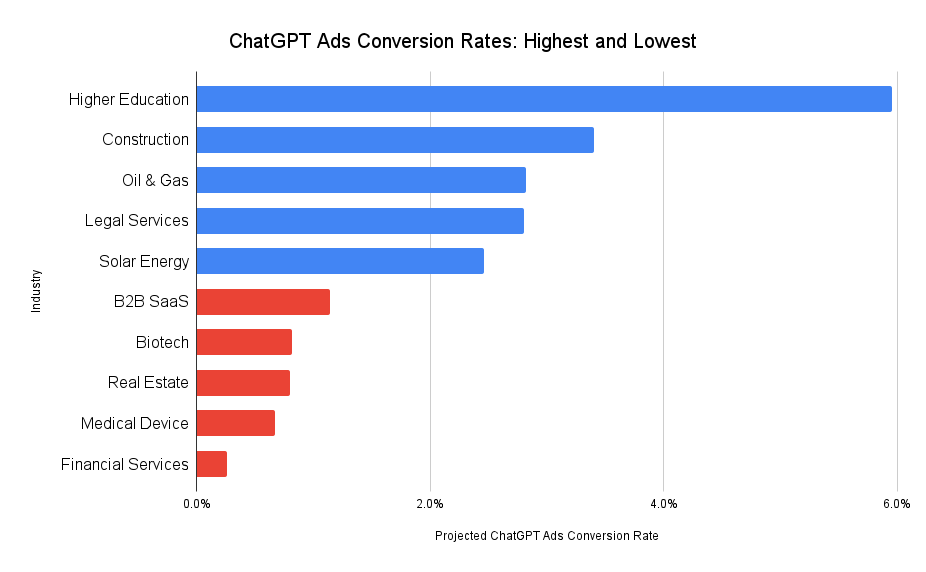
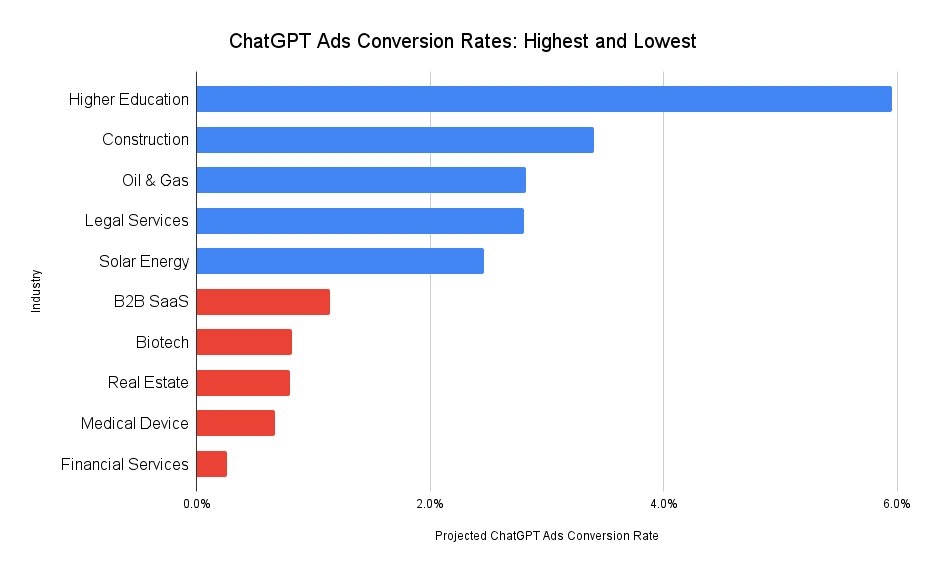
    As I delve into the world of ChatGPT Ads, I’ve noticed that OpenAI has started experimenting with these ads in the U.S. However, we’re still in the early stages and concrete data about advertiser outcomes is sparse. To bridge this gap, I’ve projected conversion rates for ChatGPT ads by analyzing existing differences in conversion rates between organic and paid channels. My insights draw from our detailed reports on PPC vs. SEO Conversion Rates and Organic ChatGPT Conversion Rates. Below, you’ll find a table presenting these projections.

    ChatGPT Ads Conversion Rates by Industry

    .table1 tr:nth-child(2n+2) td:nth-last-child(1) { background-color:#b6d7a8; } .table1 tr:nth-child(2n+3) td:nth-last-child(1) { background-color:#d9ead3; }
    IndustryAverage SEO Conversion RateAverage Google Ads Conversion RateChatGPT Organic Conversion RateProjected ChatGPT Ads Conversion Rate
    Addiction Treatment2.1%1.1%2.9%1.5%
    Biotech1.8%0.7%2.1%0.8%
    B2B SaaS2.1%1.0%2.4%1.1%
    Commercial Insurance1.7%0.9%3.1%1.6%
    Construction1.9%1.9%3.4%3.4%
    E-commerce / Retail1.6%1.3%3.0%2.4%
    Financial Services2.2%0.3%1.9%0.3%
    Higher Education & College1.4%1.7%4.9%6.0%
    HVAC Services3.3%1.8%3.9%2.1%
    Industrial IOT2.2%0.9%3.9%1.6%
    Legal Services4.4%2.2%5.6%2.8%
    Manufacturing & Distribution3.0%1.0%3.8%1.3%
    Medical Device3.1%0.9%2.3%0.7%
    Oil & Gas1.7%1.5%3.2%2.8%
    PCB Design & Manufacturing2.3%1.4%2.9%1.8%
    Pharmaceutical2.0%1.4%3.2%2.2%
    Real Estate2.8%0.8%2.8%0.8%
    Solar Energy2.7%1.9%3.5%2.5%
    Transportation & Logistics1.4%1.1%1.9%1.5%

    ChatGPT Ad Conversion Rates: Highest and Lowest

    Chatgpt Ads Conversion Rates Highest And Lowest

    ChatGPT Ad Conversion Rates: What to Expect

    Right now, ChatGPT Ads are visible only to adult users in the U.S. who are logged in and using either the Free or Go subscription tiers. As OpenAI expands its advertising reach, I anticipate several shifts in user behavior worth noting:

    • Power users of ChatGPT, those on Plus, Pro, Business, or Enterprise plans, might see these ads if OpenAI extends to paid tiers. However, I foresee lower conversion rates in these cases since such users often utilize ChatGPT for tasks like code generation, data analysis, or marketing copywriting rather than searching for products or services.
    • Initial advertising rates should be fairly low to capture a wide user base, fostering dependency. But, just like Google, Meta, and LinkedIn ads experienced, I expect costs to rise as more adopters join in.
    • With advancements in agentic AI, advertising could broaden to include sponsored alternatives or upsells. Imagine users planning travel on ChatGPT receiving suggestions for sponsored destinations as extras.

    Further Reading & Requesting a Copy of This Report

    If you’re a business owner or marketer aiming to better allocate your marketing budget in anticipation of broader ChatGPT advertising, explore these insightful articles:

    To request a PDF version of this report, feel free to reach out here.

    Source


    Inspired by this post on First Page Sage Blog.


    crushpress.ai community screenshot
  • Google Nano Banana 2: A Practical Workflow for Marketers

    Google Nano Banana 2: A Practical Workflow for Marketers

    You have a campaign brief, not an afternoon to spend rerolling images. The asset needs readable copy, stable people and products, multiple formats, and localized versions. Someone also needs to know exactly what changed between creative variants.

    Google Nano Banana 2 can carry more of that production workload, but only if you treat it as part of a controlled creative system. The useful shift is not simply better-looking output. It is the ability to move from a structured brief to a consistent family of assets with fewer compromises between speed, detail, text, and continuity.

    What Nano Banana 2 changes in an image workflow

    Nano Banana 2 is the informal name for Gemini 3.1 Flash Image. Google DeepMind has positioned it as a combination of Nano Banana Pro’s image intelligence and Gemini Flash’s faster generation. For a marketing team, that combination matters because image quality and iteration speed normally pull the workflow in opposite directions.

    The model’s improvements map to four practical jobs:

    • Knowledge-heavy visuals: Real-time web grounding can bring current context into infographics and data-oriented images. Treat that as assistance with generation, not proof that a visual is factually correct.
    • Images containing words: Improved text rendering and translation make social graphics, diagrams, promotional cards, and localized creative more viable. Every visible word still needs human proofreading.
    • Scenes that must remain recognizable: Stronger instruction adherence and subject consistency make it easier to preserve the same cast, objects, visual hierarchy, and art direction during revisions.
    • Assets for different placements: Supported output extends from 512px through 4K, so the same workflow can cover lightweight concepts and high-resolution deliverables.

    The documented consistency envelope reaches up to five characters and 14 objects in one workflow. Read that as an upper capability boundary, not a guarantee that a crowded scene will remain perfect. The closer your composition gets to the limit, the more deliberate your naming, placement, and review need to be.

    Key takeaways

    • Use Nano Banana 2 for repeatable asset families, not just isolated image generation.
    • Write prompts as production briefs with explicit priorities, subjects, composition, copy, and output requirements.
    • Approve one master image before generating formats, languages, or test variants.
    • Verify every word, number, label, and data point even when web grounding is involved.
    • Keep important page meaning in HTML and metadata rather than leaving it trapped inside an image.

    Turn the prompt into a production brief

    Visual reference tiles for a mug, customer, kitchen, colors, lighting, and image formats connect to a finished campaign image.

    Stronger instruction adherence is only useful when the instructions have a clear hierarchy. A loose collection of adjectives leaves the model to decide what matters. A production brief tells it what the asset must accomplish, what cannot change, and where it has room to interpret.

    1. Start with the asset’s job. Name the destination and the action the visual should support: a landing-page hero, an ad variant, a report cover, a diagram, or a localized social card. This gives the composition a reason to exist.
    2. Define the required subjects. List each person, product, interface, or meaningful object. Give recurring subjects short, stable labels so later instructions can refer to them without ambiguity.
    3. Specify spatial relationships. State what belongs in the foreground, where the main subject sits, which direction a person faces, and where clear space is required for external copy or controls.
    4. Describe the visual system. Set the palette, lighting, texture, level of realism, camera perspective, and overall mood. Use concrete visual properties rather than piling up subjective terms such as premium, bold, or modern.
    5. Supply text as exact copy. Separate the headline, labels, supporting text, and language. If a phrase must not be translated, say so. Do not bury critical wording inside a long paragraph of art direction.
    6. Name the output requirements. Include the intended aspect ratio, supported resolution, crop needs, and any areas that must remain uncluttered. Request 4K when the approved asset actually needs it, not by default for every concept.
    7. Declare the invariants. Say which identities, objects, colors, text, and layout relationships must remain unchanged across revisions.

    A reusable prompt pattern

    Goal: Create a 4K landscape hero image for a landing page promoting a search visibility report. Subjects: Show one analyst at a desk and one dashboard object displaying a clean line chart. Composition: Place the analyst and dashboard on the right, with the left third uncluttered for an HTML headline. Visual direction: Use deep navy, off-white, and restrained cyan accents, with soft directional lighting and realistic textures. Restrictions: Do not add logos, watermarks, interface labels, extra screens, or text inside the image. Continuity: Keep the analyst’s appearance, dashboard layout, palette, and lighting unchanged in later variants.

    This example deliberately reserves the headline for HTML. That is usually the cleaner choice for a web hero because the copy remains editable, selectable, responsive, and available to assistive technology. Use embedded text when the words are part of the artifact itself, such as a social card, diagram label, poster, or standalone ad creative.

    For an image that needs embedded copy, add a separate instruction such as On-image copy: Q3 Search Visibility Report. Then identify the exact location, hierarchy, and language. Keeping copy in its own instruction makes proofreading and localization easier.

    Follow-up prompts should be smaller than the original brief. Ask to change one controlled element while restating the invariants: replace the background environment, change the accent color, translate the approved copy, or adapt the crop while preserving the subjects. Rewriting the entire prompt for every revision invites unplanned changes.

    Build variants without losing control of the experiment

    Six campaign previews preserve the same coral running shoe and fictional athlete while changing backgrounds, lighting, props, and crops.

    Fast generation can create a false sense of progress. Twenty visually different outputs are not a useful test if the headline, palette, composition, subject, and offer all changed together. You will know which image performed better, but not why.

    Use a master-and-variant workflow instead:

    1. Generate a baseline. Produce the first complete interpretation of the brief before requesting alternatives.
    2. Review against the brief. Separate objective misses, such as incorrect text or a missing object, from subjective preferences, such as wanting warmer lighting.
    3. Correct the baseline. Do not build variants from an image that already violates the required composition, copy, or identity.
    4. Approve a master. Record the accepted prompt, output, invariants, language, and intended placement.
    5. Create one-variable variants. Change one meaningful family of attributes at a time, such as the background, focal framing, callout treatment, or color emphasis.
    6. Localize after visual approval. Preserve the master composition while changing the language-specific copy, then allow only the layout adjustments required by the translated text.

    Your review should use explicit gates rather than a general looks-good decision:

    • Brief compliance: Are all required subjects present, and are unwanted additions absent?
    • Continuity: Do recurring people, products, and objects remain recognizable across versions?
    • Copy: Does every character match the approved wording, including punctuation, capitalization, and product terms?
    • Factual content: Do chart labels, values, dates, maps, and explanatory elements match the information you intend to publish?
    • Visual integrity: Are faces, hands, object boundaries, reflections, lighting, and small details internally coherent?
    • Placement safety: Will important content survive the real crop, overlay, and responsive layout?
    • Delivery: Does the final file have the resolution and aspect ratio required by its actual destination?

    Web grounding does not remove the factual review gate. It can help the model reason about the requested subject, but it cannot approve a statistic, establish which date your campaign should use, or decide whether a generated chart supports your claim. Keep the underlying facts in a separate, human-reviewed content sheet and compare the rendered visual against it.

    The same discipline applies to translation. Generate the localized version, copy the visible wording out of the image, and compare it with approved language line by line. Check line breaks and hierarchy as well as meaning; a correct translation can still become unreadable when it is forced into the original layout.

    Nano Banana 2 is integrated into Google Ads as well as the broader Gemini ecosystem, which makes rapid campaign variation an obvious use case. Keep the creative test interpretable: hold the audience, offer, and measurement setup steady when the purpose is to learn whether a visual change affected performance.

    Finish the asset for SEO, AEO, and GEO

    A production-quality image is not automatically a search-ready asset. Image generation creates pixels. Your publishing workflow must connect those pixels to the page’s subject, the user’s task, and machine-readable context.

    Keep the meaning outside the pixels

    • Match the search intent. Use the image to clarify the answer, process, entity, comparison, or result the page is actually about. A polished but generic visual adds little retrieval value.
    • Write functional alt text. Describe the information or purpose the image contributes in its context. Do not paste the generation prompt or turn the attribute into a keyword list.
    • Use descriptive filenames. Name the finished asset for its actual subject and role rather than preserving a generator’s default filename.
    • Publish essential facts as HTML. If an infographic contains a process, statistic, or comparison that the reader needs, provide the same core information in nearby page text. Do not make people or search systems depend on reading pixels.
    • Add a useful caption when context is needed. A caption should explain why the visual matters, not merely repeat what it depicts.
    • Create delivery derivatives. Keep a high-resolution master, but serve a file sized and compressed for the placement. Sending a 4K image everywhere can add page weight without improving the reader’s experience.
    • Localize the surrounding context. When you translate text inside an image, update the filename, alt text, caption, nearby explanation, and linked destination for the same audience.

    Treat structured data as a record

    If your page’s structured data references the image, the markup should describe the asset that is visibly published at the live URL. Keep the image URL, dimensions, caption, creator information, and licensing information aligned with what you can substantiate. Do not manufacture metadata simply to fill properties.

    JSON-LD does not rescue a weak relationship between the visual and the page. The image, headline, body copy, captions, internal links, and structured data should all describe the same primary subject. That consistency gives search engines and answer systems a clearer entity-and-context relationship to interpret, although it cannot guarantee rankings, citations, or inclusion in an AI-generated response.

    This is also where subject consistency becomes strategically useful. Reusing a recognizable product, character, diagram language, or branded visual system across a related content cluster can make the collection feel coherent. Keep each asset specific to its page, however; duplicating one generic image across every URL does not explain what makes those pages different.

    Choose a pilot that exposes the model’s real value

    Do not judge Nano Banana 2 by asking it for a single decorative image. That tests whether it can produce an attractive picture, not whether it can improve your production system.

    Our rule of thumb is to choose a pilot that needs at least two of the model’s differentiating capabilities:

    • A recurring person, product, or object that must remain consistent.
    • Exact words or labels inside the visual.
    • Several controlled creative variants for a campaign.
    • Localization into more than one language.
    • A knowledge-heavy infographic or data visualization.
    • Outputs ranging from smaller concept images to a 4K master.

    A strong pilot might be a report launch that needs a hero image, a labeled social card, ad variants, and localized editions. One approved visual system can then be carried through each placement while the team measures generation time, correction cycles, consistency, proofreading effort, and final usability.

    Begin concepts at the smallest supported resolution that lets your team judge composition. Move to 4K after the direction is approved. This keeps reviewers focused on the idea before they spend time inspecting final-level detail.

    The model is available across Google Ads, the Gemini app, Search AI Mode, Lens, and other parts of Google’s ecosystem. That reach makes shared governance more important than platform-specific habits. Store the master brief, approved copy, invariants, final asset, localization decisions, and QA result together so the next person can reproduce the workflow.

    Pick one recurring campaign asset this week. Define its invariants, create one approved master, and generate a single controlled variant. If the model preserves the subject, copy, composition, and visual system through that cycle, you have evidence for expanding the workflow. If it does not, the QA record will show whether the problem came from the brief, the generation, or the review process.

    References


  • How to Use AI Response Patterns to Build Better Content

    How to Use AI Response Patterns to Build Better Content

    You ask an AI assistant which product, service, or method it recommends. Your brand appears. You run the same prompt again, and it disappears. If you build a content brief around either answer, you may be optimizing for an accident.

    The better unit of analysis is the pattern across many answers. Repeated structures, concepts, comparisons, and entity associations can show you what a model consistently treats as relevant. Once you separate those durable signals from one-off wording, AI responses become useful inputs for content planning rather than volatile rankings to chase.

    Key takeaways

    • Do not treat one AI answer, citation, or brand mention as a ranking result.
    • Test several phrasings of the same intent across at least two model families and repeated runs.
    • Keep web-search settings, model labels, context, and prompts documented so you know what changed.
    • Classify recurring signals as structural, conceptual, or entity patterns before editing content.
    • Use a working threshold to filter noise, then apply audience knowledge and factual review before acting.

    A single AI answer is not a position you can rank for

    Traditional rank tracking works because a search result has an ordered position that can be checked again. An AI response is generated probabilistically. Its wording, selections, order, and level of detail can change with the prompt, conversation context, model, retrieval method, and search setting.

    The variation can be substantial. Across one large prompt test, ChatGPT or Google AI had a less than 1% chance of returning the same brand list in two responses. That does not mean every topic will be equally unstable. It does mean that a single inclusion or omission is too fragile to support a content decision.

    Separate two questions that teams often mix together:

    • Visibility question: Did the model mention or cite your brand in this sample?
    • Pattern question: Which ideas, criteria, entities, and answer structures kept returning across the sample?

    The first question produces a volatile observation. The second can reveal a usable content opportunity. If renewal pricing appears in most answers about choosing a domain registrar, for example, you have evidence that the concept belongs in the decision journey. You still do not know that adding a renewal-pricing section will cause a citation. You do know that omitting the issue may leave the page incomplete for that cluster of questions.

    This distinction also changes how you report results. A sentence such as “we rank in ChatGPT” claims a stable position that may not exist. A defensible statement is narrower: your brand appeared in a stated share of a documented response sample, under specified test conditions. For content planning, the recurring concepts and associations in that sample are usually more actionable than the mention count alone.

    Build a response sample that can separate signal from noise

    Many abstract response tiles pass through a mesh filter, leaving repeated shapes grouped together while irregular fragments fade away.

    You do not need an expensive monitoring platform to begin. You do need a repeatable collection method. A spreadsheet is enough if every row records the conditions that could explain a different answer.

    1. Choose a small set of decision topics. Start with three commercially or editorially important topics. A topic should represent a decision or task your audience actually brings to an AI assistant, not just a keyword you want to rank for.
    2. Create three to five prompt variations per topic. Keep the underlying intent stable while changing the wording. A domain-registration cluster might include “How do I register a domain name?”, “How can I get a domain name?”, and “Where can I buy a domain?” Do not mix an introductory how-to prompt with a migration or troubleshooting prompt and call them one cluster.
    3. Define the test conditions. Select at least two model families. Decide whether web search will be enabled, disabled, or left to the model. If you test more than one search condition, analyze each as a separate segment. Use fresh or private sessions where possible so an earlier conversation does not silently alter the next response.
    4. Capture every response consistently. Record the prompt, displayed model or version, web-search status, date, full response, cited URLs, brand mentions, and any initial pattern labels. Preserve the complete answer; excerpts can hide section order and qualification.
    5. Repeat on a fixed cadence. Weekly collection is practical for many teams. Consistency matters more than running a large burst once and then changing the prompt set. Build toward 20 to 30 responses per prompt before drawing strong conclusions.

    Your tracking sheet can start with these columns:

    • Topic cluster
    • Exact prompt
    • Model and displayed version
    • Web search: enabled, disabled, or model-decided
    • Date
    • Full response
    • Citations or referenced URLs
    • Your brand mentioned: yes or no
    • Structural labels
    • Concept labels
    • Entity and association labels

    Do not pool unlike conditions without labeling them. A response produced with live web retrieval is not equivalent to one generated without it. A model update can also change the output even when your site and prompt remain untouched. Recording those conditions protects you from crediting your content for a change caused elsewhere.

    A useful working definition of a strong pattern is one that appears in at least 75% of the sampled outputs, across two models and multiple prompt variations. The threshold is a filter, not a law of AI behavior. It forces you to demand recurrence in more than one environment before calling an observation meaningful.

    Always retain the numerator and denominator. “Pricing transparency appeared in 9 of 12 responses” is auditable. “AI cares about transparent pricing” turns a bounded observation into an unsupported universal claim. If you work alone and cannot collect a full sample, you can flag patterns beginning around 60% as provisional, but keep them separate from patterns that clear the stronger threshold. A smaller workload should reduce your confidence, not disappear from the methodology.

    Read each response pattern at three different layers

    Three concentric transparent layers organize surface shapes, connected concepts, and generic objects around a central subject.

    Frequency alone does not tell you what to change. First classify what is recurring. Structural, conceptual, and entity patterns answer different editorial questions and lead to different actions.

    Pattern layerWhat you recordWhat it can changeCommon misreading
    StructuralSection order, lists, steps, comparisons, pros and cons, tables, and depthAnswer architecture and information sequenceCopying the model’s format as if it were a required template
    ConceptualRecurring criteria, risks, questions, features, and tradeoffsTopic coverage and explanation depthTreating every repeated phrase as a keyword to insert
    EntityBrands, products, tools, sources, categories, and feature associationsPositioning, evidence, comparisons, and partnership researchAssuming an omission proves a technical or reputation problem

    Structural patterns reveal the expected path through an answer

    Mark how each response is assembled. Does it begin with a definition, move into selection criteria, name tools, and end with implementation? Does it repeatedly use a comparison table? Does it frame the decision through advantages and disadvantages, or as a numbered procedure?

    If the sequence “definition > criteria > tools > implementation” persists across prompts and models, it is a clue that the topic is commonly synthesized as both an explanation and a decision process. Your page may need to support both. That does not require copying the sequence mechanically. A reader who already understands the category may need the criteria first, while a beginner may need a short definition before making sense of those criteria.

    Record the level of detail as well as the headings. A recurring step that receives several qualifications is more informative than a heading that appears but gets one sentence. The useful editorial question is not merely “Was this topic mentioned?” It is “What role did this topic play in helping the response reach a recommendation or action?”

    Conceptual patterns identify the criteria a page must handle

    Concepts are the recurring considerations inside the answer. For a domain-registrar decision, those may include initial and renewal pricing, customer support, privacy, email add-ons, security, bundles, and transfer procedures. A concept that returns across differently phrased prompts is more useful than an exact phrase repeated by one model.

    Turn each recurring concept into a question for the content, not an instruction to add a keyword. If renewal pricing is a strong pattern, ask:

    • Does the page distinguish the introductory price from the renewal price?
    • Can the reader locate that information without interpreting vague pricing language?
    • Does the comparison use equivalent billing periods and inclusions?
    • Are exceptions or conditions stated where they affect the decision?

    This approach improves usefulness even if the wording in future AI responses changes. It also prevents superficial optimization. Repeating “pricing transparency” does not make pricing transparent; showing the relevant terms clearly does.

    Entity patterns show how the category is being framed

    Entity analysis tracks more than which brands appear. Record which features, audiences, or use cases are attached to each entity, where the entity appears in the answer, and which pages are cited in support.

    Suppose a competitor repeatedly appears beside “simple transfers” while your brand appears beside “bundled services.” That pattern does not establish either claim as true. It does reveal the associations you should verify. Check whether your product documentation, comparison pages, and third-party coverage make the relevant capabilities explicit. If the association is inaccurate, the answer is not to imitate it. Clarify your actual positioning with evidence.

    An absent brand can have several explanations: model variability, an unfamiliar prompt, retrieval choices, weak category association, insufficient supporting content, or no factual fit for the recommendation. The response sample cannot diagnose the cause on its own. Use it to form a question, then inspect your content and real market position before choosing a remedy.

    Convert the pattern map into a content brief

    Once the sample is labeled, do not hand the raw answers to a writer and ask for an average version. That tends to reproduce generic phrasing and whatever biases already dominate the outputs. Convert the recurring signals into editorial requirements that leave room for expertise, original evidence, and a clear point of view.

    1. Name the reader’s decision. Write one sentence describing what the page must help the reader decide or complete. If your prompt variations contain different decisions, split the cluster before drafting.
    2. Write the direct answer first. State the useful answer in plain language before designing headings. This keeps a recurring AI structure from displacing the reader’s actual need.
    3. Select the structural pattern that supports that decision. Use a procedure for a task, a criteria-led structure for a purchase decision, or a comparison only when the underlying options are genuinely comparable.
    4. Translate strong concepts into coverage requirements. Record the observed frequency and the question each concept must answer. Specify required depth, such as a definition, caveat, example, or decision rule.
    5. Audit entity claims. List the brands, tools, features, and category relationships that require verification. Decide which claims need first-party documentation and which need credible independent support.
    6. Define what the page will not cover. Exclude concepts that belong to another intent or page. A recurring term is not permission to turn one focused answer into an unfocused topic warehouse.

    A practical response-pattern brief should contain these fields:

    • Reader and decision: who the page serves and what they must be able to do afterward.
    • Prompt cluster: the exact variations used to collect the sample.
    • Test conditions: models, versions, search settings, dates, and number of responses.
    • Direct answer: the page’s concise answer to the shared intent.
    • Strong structural patterns: recurring answer sequences and formats, with counts.
    • Strong conceptual patterns: required considerations, with counts and planned treatment.
    • Provisional patterns: useful leads that need more sampling or independent audience evidence.
    • Entity associations: repeated brand-feature or tool-use-case pairings that require verification.
    • Evidence plan: where facts, prices, limitations, and comparisons will be substantiated.
    • Exclusions: adjacent intents that belong on another page.

    Then run a simple editorial test on every proposed section. Can you trace it to a strong response pattern, direct audience evidence, necessary factual context, or the page’s stated decision? If not, remove it. For every strong concept, confirm that the draft answers the underlying question rather than merely using the model’s preferred vocabulary.

    The finished page should also add value that pattern analysis cannot supply. That may be a clearer decision rule, documented limitations, precise product information, a transparent comparison method, or an explanation of when the common recommendation does not apply. AI responses can expose the recurring frame. They should not set the ceiling for the content.

    Measure batches, not anecdotes, after you publish

    Preserve a baseline response batch before making a substantial update. After the revised page is available, repeat the same prompt set under comparable conditions. Keep the old and new batches separate, and document any model or search-mode change between them.

    Track a small group of interpretable measures:

    • Pattern persistence: which structural, conceptual, and entity patterns remain strong across later batches.
    • Concept coverage: whether the target page now answers each relevant strong concept accurately and at the required depth.
    • Brand mention rate: the number of sampled responses mentioning the brand divided by the total responses in that segment.
    • Association quality: whether the context around the brand is accurate, relevant, and aligned with its actual offer.
    • Citation behavior: whether the page is cited, what claim it supports, and whether the cited source is appropriate.
    • Page performance: whether conventional search visibility, qualified visits, engagement, and conversions move in a useful direction for the page’s purpose.

    Do not treat movement in a small AI sample as proof that your edit caused it. Models may draw from training data, live search, or a combination that is not obvious to the tester. Their behavior can also change after a new model release. A before-and-after batch gives you a better observation, not automatic causality.

    Use three decision rules to keep the program disciplined:

    • Act: A pattern clears your strong threshold across models and prompts, matches the reader’s decision, and can be addressed truthfully.
    • Investigate: A provisional pattern is strategically important but needs a larger sample, audience validation, or factual checking.
    • Ignore for now: A detail appears in isolated responses, depends on one model or wording, conflicts with reliable facts, or does not help the target reader.

    Watch for the feedback loop that makes every page look like an existing AI answer. Training-data bias, retrieval uncertainty, factual errors, and dominant category conventions can all recur. Repetition proves that a pattern exists in your sample; it does not prove that the pattern is correct, fair, current, or useful. Human review is the step that turns recurrence into an editorial decision.

    Choose one important prompt cluster for your next brief. Freeze the variations and test conditions, collect the first documented batch, and label the three pattern layers before changing the page. The question to carry into the edit is not “What did the AI say?” It is “What persisted, under which conditions, and what does our reader genuinely need from us?”

    References


  • How to Build a ChatGPT Advertising and Commerce Strategy

    How to Build a ChatGPT Advertising and Commerce Strategy

    If you sell online, the immediate question is not whether ChatGPT will replace Google. It is where your brand can enter a buying conversation, what the resulting visit is worth, and whether you can prove that value before moving budget.

    The practical approach is to treat ChatGPT as a connected set of commerce touchpoints: an earned recommendation, a possible paid placement, a direct referral, and an influence that may later surface as branded search or direct traffic. Build for all four, but measure them separately.

    Treat ChatGPT as a buying journey, not one traffic source

    A shopper moves through connected stages of product discovery, comparison, a product page visit, and purchase.

    A customer can interact with your brand through ChatGPT without following a neat, trackable path. The assistant might mention a product organically. A sponsored placement might appear during a commercial prompt. The customer might click immediately, or remember the recommendation and search for the brand later.

    • Earned recommendation: Your brand or product appears in the answer because it is considered relevant to the request.
    • Paid placement: An advertisement appears beside or within the commercial experience available to that user.
    • Direct referral: The user clicks from ChatGPT to a product, category, or comparison page.
    • Influenced conversion: ChatGPT shapes the decision, but the eventual visit arrives through branded search, direct traffic, or another channel.

    This distinction prevents two expensive mistakes. The first is treating every ChatGPT-influenced sale as referral traffic. The second is assuming that paid placement, organic recommendation, and AI visibility use the same selection system. Evidence from one lane does not prove how another lane works.

    Direct referrals nevertheless deserve attention. Across a 2025 Visibility Labs dataset covering 94 e-commerce brands, 135,000 ChatGPT referral sessions, and 9.46 million non-branded organic sessions, ChatGPT traffic converted at 1.81% versus 1.39% for non-branded organic traffic. The advantage appeared in 10 of the 12 months analyzed. That is a useful commercial signal, not a universal benchmark: it came from a defined group of established e-commerce businesses and excluded homepage and blog visits.

    Volume changes the decision. ChatGPT generated $474,000 against $32.1 million from non-branded organic traffic in that dataset. Its revenue share was 1.48% overall and reached 2.2% during the second half of 2025. Non-branded organic traffic was still 70 times larger overall, narrowing to 47 times larger in the fourth quarter.

    Do not divert a mature search program merely because the smaller channel has a better conversion rate. Give ChatGPT its own growth lane. Protect the channel that supplies scale while you develop recommendation visibility, referral conversion, paid testing, and attribution.

    Build pages for buyers who have already narrowed the choice

    A buyer compares shortlisted products on a detailed e-commerce page showing product imagery, feature icons, delivery, trust, and purchase elements.

    ChatGPT can compress part of the consideration journey. A customer may discuss needs, reject unsuitable options, refine preferences, and settle on a shortlist before clicking. The landing page is therefore receiving a visitor who may be closer to a decision than an ordinary category-level searcher.

    That changes what the page must do. A generic category introduction is weak when the visitor wants to verify one remaining condition. Your page should help the person confirm fit, notice a disqualifying constraint, and complete the next action without restarting the research process.

    <!– wp:list {
  • Google Ads in AI Search: Strategy, Controls and Guardrails

    Google Ads in AI Search: Strategy, Controls and Guardrails

    If your Google Ads clicks are getting scarcer while Google’s systems take on more bidding, targeting and copy generation, you don’t need a choice between manual control and unchecked automation. You need a strategy that tells the system what success is, where it may explore and what it must never compromise.

    The practical goal is to price the remaining click correctly. Separate intent before reallocating spend, treat forecasts as scenarios rather than promises, and give AI-generated campaigns written guardrails backed by accurate business data.

    Optimize for the value of the click, not the missing click

    AI Overviews can answer part of a query before a person reaches an ad. That changes who clicks as well as how many people click. A lower click-through rate can therefore signal lost opportunity, better prequalification or both. You can’t tell which from CTR alone.

    The scale of the change is large enough to invalidate old assumptions. Paid CTR on queries displaying AI Overviews fell 68%, from 19.7% to 6.34%, between June 2024 and September 2025. The decline was especially severe for non-branded informational searches, while branded and high-intent terms were more resilient.

    Scarcer clicks also put pressure on auction economics. In Q1 2025, Google Search spending grew 9% year over year while click growth reached only 4%. More spend chasing slower click growth is a warning that a campaign can maintain traffic only by accepting higher costs, improving efficiency elsewhere or changing the mix of demand it buys.

    That doesn’t make every lost click harmful. An analysis covering 16,446 campaigns found that conversion rates improved in 65% of industries even as click volume declined. This is an aggregate pattern, not a promise for your account. It does show why optimizing to traffic volume alone can lead you in the wrong direction: AI-generated answers may remove casual researchers while leaving a smaller group of more prepared prospects.

    Give your dashboard two distinct views so you can see that trade-off:

    • Delivery view: impressions, click-through rate, clicks, average cost per click and impression share.
    • Economic view: conversion rate, qualified conversions, conversion value, cost per acquisition or return on ad spend, and the later sales outcome when it is available.

    A qualified conversion is the action your business can actually use, not merely the easiest event for an ad platform to count. For a lead-generation campaign, a submitted form and a sales-accepted opportunity should not be treated as interchangeable. For ecommerce, an order and the value retained after cancellations or returns can tell different stories.

    The arithmetic is straightforward. Cost per acquisition depends on both CPC and conversion rate. If CPC rises but conversion rate improves enough, acquisition cost can remain acceptable. If CTR falls while profit per impression rises, the campaign may be healthier despite producing fewer visits. Set the business limit first, then let those economics decide whether a traffic decline is a problem.

    Separate intent before you move bids or budgets

    A stream of search signals separates into three intent pathways while adjustable gates distribute glowing budget tokens among them.

    A blended campaign average hides the exact place where AI Overviews are changing behavior. Brand demand, purchase-ready non-brand demand, informational research and feed-led product discovery do different jobs. They should not share one diagnosis simply because they sit in the same account.

    Intent segmentWhat the searcher is doingMain riskDecision to make
    BrandedLooking specifically for your company, product or offerStrong brand performance masks weak prospecting performanceReport it separately and judge how much genuinely incremental demand it captures
    High-intent non-brandComparing providers, products, prices or a near-term solutionHigher CPC consumes the value of a better-qualified clickBid against unit economics and conversion quality, not position or traffic alone
    Informational and comparisonLearning, defining a problem or building a shortlistAn AI answer satisfies the query without a clickKeep spend only where direct or assisted value can be demonstrated
    Feed-led shoppingEvaluating concrete product details such as price and availabilityIncomplete inputs make the campaign uncompetitive or misleadingRepair product data before asking automation to spend harder

    Start with the search terms and themes carrying meaningful spend. Assign each to an intent segment, then compare CPC, conversion rate, acquisition cost and qualified outcome within that segment. If you observe AI Overviews for important query groups, record that observation alongside performance data rather than assuming every impression encountered the same results page.

    Do not automatically pause every informational term. Some early-stage searches introduce buyers who convert through another campaign or channel. But don’t protect those terms with vague claims about awareness either. Require evidence: a profitable direct outcome, a measurable assisted contribution or a deliberate strategic role with an explicit spending ceiling. If none is present, the term is consuming budget that can be tested elsewhere.

    Audience data adds another layer that keywords cannot provide on their own. A previous customer, an active prospect and a completely new visitor may use the same query but carry different commercial value. First-party audience lists can help campaigns recognize those customer relationships. Use data that was collected lawfully and with the required consent, and keep keyword or search-intent reporting intact so audience signals do not turn the account into a black box.

    Use planners to challenge a budget, not bless it

    Performance Planner and Reach Planner are useful when they are treated as scenario-building tools. A forecast is not a budget recommendation, and it cannot know whether your next lead will be qualified, whether your product margin has changed or whether an AI Overview will alter the next auction.

    Build the decision around cases rather than one preferred prediction:

    • Constraint case: CPC becomes less favorable, response volume weakens or the conversion mix shifts toward lower-value actions.
    • Operating case: current economics continue closely enough for the existing target to remain credible.
    • Expansion case: additional spend reaches eligible demand without pushing marginal acquisition cost beyond your limit.

    For every case, write down the assumptions that create it: intent mix, expected CPC, conversion rate, conversion value, demand availability and the maximum CPA or minimum ROAS the business can tolerate. That assumption sheet matters more than a polished forecast. When actual performance diverges, it tells you whether demand changed, costs changed, conversion quality changed or the original model was simply too optimistic.

    Pay particular attention to marginal performance. Average CPA divides all cost by all conversions. Marginal CPA asks what the additional conversions cost when you add the next block of spend. A campaign can have an acceptable historical average while the next budget increase produces conversions that are too expensive. Approve expansion only when the marginal case still fits your economics.

    A practical planning sequence looks like this:

    1. Define the business question, such as whether more budget can be added without crossing the acquisition-cost limit.
    2. Lock the conversion definition and value model before changing the spend assumption.
    3. Model constraint, operating and expansion cases with their assumptions visible.
    4. Compare marginal outcomes, not just total predicted conversions or reach.
    5. After the change, replace forecast values with actual results and record which assumption failed or held.

    This keeps the planner in its proper role: a disciplined way to expose a decision before money is committed.

    Let AI generate inside a written control system

    An operator watches an AI engine assemble campaign components as they pass through filters, limits, approval controls, and compliance gates.

    Google has expanded AI Max text guidelines across Search and Performance Max campaigns, with broad language and vertical support. Advertisers can use natural-language instructions to steer generated copy and exclude specified terms or phrases. That gives you a practical control surface, but only if the instructions are concrete enough to review.

    Turn brand preferences into testable instructions

    Terms such as professional, engaging or on-brand are too subjective to audit. Write a short creative policy that another person could use to mark an ad acceptable or unacceptable without asking what you meant.

    • Identity: state what the business is and the audience it serves.
    • Positioning: name the verified differentiators the copy may emphasize.
    • Exclusions: list prohibited words, phrases, claims, competitor references and tones.
    • Accuracy limits: identify claims that require a qualifier, proof or legal approval before use.
    • Urgency: permit only deadlines, scarcity or savings that are real and supported on the landing page.
    • Calls to action: specify the actions the landing page actually allows a visitor to complete.

    A usable instruction might say: emphasize transparent pricing and suitability for small operations; do not claim to be the best, guaranteed or risk-free; do not create a discount or deadline unless the destination page contains the same offer. The bracketed business details will change, but the structure creates an output you can inspect.

    Keep a change record with the instruction, exclusions, approval owner, launch point and outcome. When performance or brand quality shifts, you need to know which rule changed. Without that record, automation can produce a result while leaving you unable to reproduce or correct it.

    Control the facts before controlling the prose

    Generated copy is downstream of your inputs. AI can summarize supplied product information, but it cannot repair missing facts such as price or inventory. If the feed, landing page or conversion signal is weak, better wording will not make the campaign strategically sound.

    For a product campaign, verify that each promoted item has a current price, accurate availability, a clear title and the attributes customers use to compare it. For a service campaign, make the offer, service area, eligibility conditions and next step explicit on the destination page. In both cases, the ad claim and landing-page proof should match.

    Your control stack should cover more than copy:

    • Measurement control: define the conversion and pass useful quality or value signals back into optimization.
    • Budget control: set limits that reflect business capacity and acceptable marginal cost.
    • Intent control: separate demand types so one strong segment cannot conceal another segment’s waste.
    • Data control: keep product feeds, offers, availability and landing pages accurate.
    • Message control: provide allowed positions, forbidden language and substantiation requirements.
    • Review control: inspect generated assets and campaign outcomes instead of treating a saved instruction as proof of compliance.

    The creative itself still has to answer two commercial questions: why should the buyer choose you, and why should the buyer act now? Distinctive, decision-relevant creative has become more important as AI Overviews compress research and comparison. If you do not have a truthful answer to the second question, omit manufactured urgency and strengthen the first.

    Four questions to settle before increasing automation

    Should you pause informational keywords when an AI Overview appears?

    No automatic rule is reliable. Segment those searches, then compare their direct and assisted value with their cost. Pause or cap the demand that cannot justify its role, but preserve profitable terms and deliberate discovery investments. The presence of an AI Overview is diagnostic context, not a standalone bidding instruction.

    Should you judge AI Max by click-through rate?

    Not by CTR alone. Review qualified conversion rate, acquisition cost, conversion value and the later business outcome alongside delivery metrics. An ad that attracts fewer but better prospects can outperform one that wins more low-intent clicks.

    Are text guidelines enough to protect the brand?

    No. Guidelines improve direction, but brand protection also depends on accurate inputs, explicit exclusions, substantiated claims, landing-page consistency and human review. Treat generated assets as outputs to verify, not approved statements merely because the system produced them.

    When is a higher budget justified?

    Increase spend when the marginal conversions or conversion value are expected to remain inside your economic limit and actual results continue to support that assumption. More predicted volume is not enough. If the next block of spend costs too much or degrades lead quality, the current average cannot rescue the expansion case.

    Before your next budget or automation change, create one control sheet containing the conversion definition, intent map, allowable economics, planning assumptions, AI copy rules and review owner. That single artifact gives the platform room to optimize while keeping the decisions that matter in your hands.

    References

  • How Google AI Overviews and Spam Updates Change Marketing

    How Google AI Overviews and Spam Updates Change Marketing

    If your Google traffic or paid-search return has softened, the worst response is to treat every decline as the same problem. An AI Overview can take a click without changing your ranking. A spam-related visibility loss can remove a page from contention. Higher ad costs can hide inside a stable account average.

    Your first job is to identify which mechanism changed. Only then should you move budget, rewrite content, adjust bids, or retire pages. Here is a practical way to diagnose the impact and build a marketing strategy that is less dependent on any single version of Google Search.

    Two Google changes can create the same traffic decline

    AI Overviews change the search results page before the click. They can answer part of the query, present comparisons, cite selected pages, and push traditional listings or ads farther down the screen. A spam update works differently: it can change whether Google considers a page worthy of visibility at all.

    Both can produce fewer sessions, leads, and sales, but they require different responses. If your ranking and impressions remain relatively stable while click-through rate falls, the results-page experience may be absorbing demand. If impressions and rankings disappear across a recognizable group of pages, investigate content quality, indexation, site patterns, and query eligibility before blaming the interface.

    The paid-search picture is equally easy to misread. Adthena tracked millions of ads across six major industries from late December 2025 through January 2026. Aggregate performance initially appeared stable, but query-, industry-, and device-level results exposed material differences in click-through rate and cost per click. This is vendor-supplied, observational evidence rather than a universal forecast, so use it as a diagnostic pattern, not a fixed benchmark for your account.

    Low-trust organic growth can be even more fragile. Three new domains targeting welding, plumbing, and electrical school queries used public data, programmatic AI-generated copy, aggressive internal linking, and thousands of bottom-funnel pages. Each domain reached roughly 200 in-market clicks within a couple of months before falling to zero around a December spam update. Because several weak signals were bundled together, the result does not prove that one tactic caused the loss. It does show how little remains when a site’s only defensible asset is temporary ranking visibility.

    When performance changes, ask three separate questions: Did Google change your eligibility to appear? Did the results page reduce the need to click? Did the economics of acquiring the remaining clicks deteriorate? Do not choose a remedy until you can answer them.

    Diagnose the failure before changing campaigns or content

    An analyst compares three evidence stations representing intercepted clicks, filtered web pages, and a more expensive advertising auction.

    Start with the smallest useful unit: a query group, its landing pages, and the devices on which it appears. Sitewide traffic and accountwide return on ad spend are outcome metrics. They rarely tell you why the outcome changed.

    Signal you observeLikely mechanism to investigateWhat to inspect nextDecision it supports
    Organic impressions fall across a page groupRanking, indexation, demand, or query-eligibility changeAffected queries, indexed URLs, page templates, publication patterns, and the timing of the declineRepair a technical issue, improve or consolidate weak pages, or accept a demand shift
    Organic impressions remain, but click-through rate fallsAI Overview or another results-page feature is satisfying or displacing the clickThe live results page for the query on desktop and mobile, including citations and competing result typesImprove how the page earns attention, target a later decision, or change the value assigned to that visit
    Paid click-through rate falls where an AI Overview appearsAd displacement or reduced need to visit an advertiserSearch terms, device, ad position, AI Overview presence, and conversion value after the clickChange bids, messaging, or budget for that query cluster
    Cost per click rises while margin contractsA higher price for the remaining visibilityQuery-level revenue, acquisition cost, conversion quality, and device splitCap exposure, improve post-click economics, or move spend to a stronger intent group
    Clicks fall but conversion rate remains stableAn acquisition problem rather than an obvious landing-page problemTraffic source, search feature exposure, query mix, and impression volumeRestore qualified reach before rebuilding a page that still converts

    Seasonality, tracking failures, changing demand, budget limits, and competitor activity can imitate some of these signals. Verify that measurement definitions and conversion tracking remained consistent before assigning the loss to a Google change. A coincident update is a clue, not proof.

    Build a query-level change log

    For every commercially important query cluster, record the landing page, intent, device, AI Overview presence, organic impressions, organic clicks, paid impressions, paid clicks, cost per click, conversions, and business value. Add the date you observed a meaningful change and the action taken in response.

    Keep desktop and mobile separate. AI Overviews appeared less frequently on mobile in the observed industries, but limited screen space allowed them to displace ads more aggressively when they did appear. Desktop showed heavier AI Overview exposure in areas such as Technology and Education, while still leaving more physical room for ads below the generated answer. A combined device average can conceal both conditions.

    Intent also changes the risk. Comparison content appeared frequently in AI Overviews for Telecom, Technology, and Retail queries. News and FAQ themes were more prominent in Healthcare and Financial Services, where an answer may filter out low-intent visitors before they consume paid budget. Problem-solving content appeared in only 0-2% of the observed AI Overview themes. Treat those patterns as hypotheses to test in your own market, not as permanent rules.

    Rebuild paid search around profitable unanswered intent

    AI Overviews do not make paid search uniformly ineffective. They change which questions still need a commercial click. Your objective is not to preserve the old click volume at any price. It is to buy the searches where your offer can advance a decision that the generated answer has not completed.

    • Separate comparison queries. If the AI Overview already summarizes product categories, features, or alternatives, generic ad copy adds little. Give the searcher a reason to continue: a relevant offer, concrete availability, a decision tool, a qualifying detail, or a landing page built for the next unresolved choice.
    • Protect problem-solving queries that remain productive. The low AI Overview presence observed for this theme makes it a useful place to look for resilient demand. Confirm the pattern in your own results pages before reallocating spend.
    • Keep brand intent distinct. Automotive searches showed more resilience where people continued past summaries for brand information. Brand behavior should not be blended with non-brand discovery because it can make a vulnerable campaign look healthier than it is.
    • Do not overpay for filtered curiosity. If an AI Overview answers a broad FAQ and the remaining clicks rarely convert, a lower click total may be beneficial. Judge the query by qualified outcomes and margin, not by traffic alone.

    Cost pressure also varies by market. Technology queries associated with AI Overviews consistently carried higher costs per click in the observed period. Automotive and Retail costs were more similar with and without AI Overviews, while even modest increases could matter in Financial Services because clicks were already expensive. The practical lesson is not that every advertiser should cut bids. It is that an account average cannot tell you where visibility became uneconomic.

    Overlay AI Overview presence on search-term performance, then evaluate click-through rate, cost per click, conversion quality, acquisition cost, and revenue together. A lower click-through rate can still be acceptable if poor-fit visitors were filtered out. A stable conversion rate can still produce a revenue problem if qualified click volume collapses. A higher cost per click can still work if the resulting customer value supports it.

    Use contained query clusters when testing bid or message changes. An accountwide adjustment can spend more money without revealing whether the cause was device displacement, query intent, creative relevance, or a changing results page. Preserve a comparison group, document the change, and judge the result on profit rather than recovered clicks.

    Replace scalable SEO output with content competitors cannot clone

    The old content-production question was often how many keyword variants a team could publish. The better question now is what would remain valuable if Google stopped sending traffic tomorrow.

    AI is not automatically the problem. Google draws the policy line around purpose: using automation or AI-generated content primarily to manipulate rankings can violate its spam policies. A useful AI-assisted page can still help a real reader. A thousand interchangeable pages assembled from public data remain interchangeable, no matter how polished their templates look.

    Before approving a page or template, ask:

    • Does it contain original information, analysis, or experience that is not available from the same public inputs?
    • Is a qualified person accountable for the claims, especially on a high-stakes topic?
    • Does the page solve a distinct user problem, or does it merely swap a location, profession, product, or adjective into an existing template?
    • Would someone save, cite, share, revisit, or use it if the page had no ranking position?
    • Can the content reach its intended audience through an owned channel, partnership, community, paid campaign, or direct referral?
    • Does internal linking help the visitor move to a related decision, or does it exist mainly to force crawl coverage?

    Strong content moats can take several forms: original benchmarks, a transparent assessment, an interactive decision tool, expert analysis, first-party observations, or a well-moderated body of user knowledge. A financial forecasting company, for example, could use expert conversations to identify current forecasting gaps, validate whether its product addresses them, and turn the result into an assessment supported by credible benchmarks. That asset can create discovery, sales conversations, and community discussion even if it never wins the highest-volume generic keyword.

    This model produces fewer pages and slower feedback, but it creates something harder to replace. Original research, expert insight, vertical user knowledge, partnerships, and distribution beyond search give a business more than temporary keyword coverage. They also give AI systems and human readers a clearer reason to cite or seek out the brand.

    Technical optimization still matters. Clear entities, accurate structured data, accessible page architecture, and consistent authorship information can help machines interpret what you publish. They cannot manufacture authority or originality. Schema makes a claim legible; it does not make the claim credible.

    Do not mass-delete pages simply because traffic fell after an update. Removal can destroy useful history, links, and demand that might recover through improvement. First group pages by purpose and quality. Keep and strengthen pages with distinct value. Consolidate overlapping variants into the strongest destination and map redirects before removal. For pages that exist only to capture a keyword permutation, consider a reversible exclusion while you verify that they serve no user or business need.

    Build a marketing system that can absorb the next change

    A strategy team operates a circular network of expert content, product demonstrations, community, email, paid search, and a website around a shifting search gateway.

    You cannot prevent Google from changing the interface, ranking systems, or advertising environment. You can prevent one change from becoming a companywide emergency.

    1. Maintain a search-exposure layer in reporting. Track AI Overview presence, device, query intent, organic visibility, ad placement, and economics alongside traffic and conversions.
    2. Set decisions at the query-cluster level. Define when a cluster should be protected, tested, reduced, or retired. Do not let a healthy brand campaign subsidize an unprofitable generic segment without making that choice explicit.
    3. Tie major content to a defensible asset. Require original evidence, accountable expertise, a useful tool, proprietary analysis, or community knowledge before committing to a large content build.
    4. Separate demand capture from demand creation. Search captures people already asking. Research, partnerships, communities, public relations, paid distribution, and owned audiences can create recognition before the search begins.
    5. Record channel dependency. Know which leads, revenue streams, and content programs would fail if non-brand Google traffic disappeared. That exposure should influence budget and content priorities before a decline occurs.

    Key takeaways

    • An AI Overview click loss and a spam-related ranking loss can look similar in a traffic dashboard, but they need different remedies.
    • Segment search performance by query intent and device because aggregate averages can hide both displacement and rising acquisition costs.
    • Optimize paid search for profitable unanswered intent, not for restoring every lost click.
    • Use AI to support genuinely useful content, not to multiply public information across interchangeable pages.
    • Build fewer, more defensible assets and distribute them through channels you can influence beyond Google.

    Start with the revenue-bearing query cluster showing the clearest change. Inspect the live results page, isolate the device and intent involved, and test a contained response. Once you know whether the problem is eligibility, displacement, or economics, you can scale the fix without dismantling the parts of your marketing system that still work.

    References

  • Google Ads Budget Pacing for Scheduled Campaigns in 2026

    Google Ads Budget Pacing for Scheduled Campaigns in 2026

    If you use ad scheduling to keep a Google Ads campaign from consuming a full month’s budget, check that assumption now. Starting March 1, 2026, Google changed budget pacing for notified campaigns that run on selected days or hours. Your ads still respect the schedule, but Google may concentrate substantially more spend inside the periods when they are eligible to run.

    Your immediate task isn’t to remove ad schedules. It is to separate two decisions that may have been hiding inside one setting: when the campaign should run and how much it may spend during the month. Once you calculate those controls separately, you can keep the schedule you need without leaving the monthly cost to an outdated assumption.

    Your schedule controls eligibility, not a fixed monthly spend

    Under the earlier pacing behavior, campaigns with limited schedules tended to spend less because Google paced their budgets around active days. A campaign scheduled only for weekends could therefore appear to have a predictable monthly cost even when its average daily budget was much higher than the monthly target would normally support.

    That relationship has changed for affected campaigns. Google now attempts to use more of the available monthly budget during the existing scheduled windows. The important boundaries remain the same: spend can reach twice the average daily budget on an active day, while the monthly billing limit remains 30.4 times the average daily budget.

    Those rules give each setting a different job:

    • Average daily budget: establishes the budget Google uses for pacing and the 30.4x monthly billing limit. It is not a promise that spend will equal that amount on every active day.
    • Ad schedule: determines the days and hours when the campaign is eligible to serve. The pacing change does not authorize delivery outside those periods.
    • Budget pacing: determines how aggressively Google can use the available budget inside the eligible periods.

    This is why a schedule that remains visually unchanged can produce a higher bill. The campaign has not gained more serving hours, and its displayed average daily budget has not increased. More of the permitted spend is simply being compressed into fewer active windows.

    If an ad schedule exists mainly as a cost-control device, it is no longer a dependable substitute for setting the right budget. Keep schedules that reflect real operating constraints, such as the hours when your team can handle inquiries, but make the budget itself reflect the amount you are prepared to spend.

    Calculate a schedule-aware spend ceiling

    Glowing calendar tiles send budget tokens upward to a transparent glass ceiling that limits their height.

    You can estimate the campaign’s maximum exposure from the two unchanged limits. This calculation is most useful for a full month in which the average daily budget stays constant.

    Use these variables:

    • D = the campaign’s average daily budget.
    • N = the number of calendar dates on which the campaign is scheduled to be active during the month.
    • M = the maximum monthly amount you are willing to expose to spend.

    Then calculate both constraints:

    • Monthly billing ceiling: 30.4 x D.
    • Schedule-side ceiling: 2 x N x D.
    • Schedule-aware planning ceiling: the lower of 30.4 x D and 2 x N x D.

    In compact form, the planning ceiling is min(30.4 x D, 2 x N x D). This is a ceiling based on the stated budget rules, not a spend forecast. Available traffic, auction conditions, bids, targeting and the length of each scheduled window can all leave actual spend below it.

    Count active dates, not schedule rows. If a campaign has a morning window and an afternoon window on the same date, that is still one active date for this calculation because the 2x rule applies to the day’s budget, not separately to each time block.

    The formula also exposes an important threshold. At least 16 active dates are necessary for the campaign to have enough daily capacity to reach the full 30.4x monthly limit: 15 active dates provide at most 30 x D, while 16 provide up to 32 x D. Sixteen active dates do not guarantee full delivery, but fewer than 16 cannot supply 30.4 daily-budget units under the 2x-per-day limit.

    If M is a hard monthly ceiling, a ceiling-first starting budget is:

    D = M / min(30.4, 2 x N)

    Use that equation for risk control, not as a guarantee that the campaign will spend M. If M is merely a desired spend target, you still need to judge whether the schedule contains enough demand and whether the resulting traffic meets your performance objective.

    The $100 weekend-only example

    Consider a simplified month with eight weekend dates and a $100 average daily budget. Under the earlier behavior, the campaign might have spent about $100 on each active date, producing an approximately $800 month. Under the new pacing approach, the unchanged daily rule allows as much as $200 on each of those eight dates.

    • Monthly billing ceiling: 30.4 x $100 = $3,040.
    • Schedule-side ceiling: 2 x 8 x $100 = $1,600.
    • Schedule-aware ceiling: $1,600, because it is lower than $3,040.

    The result is the practical risk behind the change: a weekend campaign that had been spending around $800 could move toward $1,600 without a change to its $100 budget or schedule. It still cannot reach the full $3,040 monthly limit in this eight-date example because the 2x daily constraint leaves insufficient active dates.

    If $800 is a hard ceiling rather than a loose target, divide it by the binding coefficient of 16. That produces a $50 average daily budget. With eight active dates, the campaign could then spend up to $100 per date and $800 across those dates. Its 30.4x monthly limit would be $1,520, but the tighter eight-date schedule-side ceiling would remain $800.

    Do not reuse the eight-date assumption for every month. Count the actual eligible dates in the month you are planning, recalculate N, and then reset D. A fixed $50 budget tied to an eight-date example will not preserve the same ceiling when the schedule contains a different number of active dates.

    Audit affected campaigns without making blanket budget cuts

    An analyst reviews highlighted campaign cards and blank calendar icons across two unbranded computer monitors.

    Google described this as a gradual rollout affecting advertisers that received a direct notification. That makes notification status part of the audit. A scheduled campaign should not be treated as affected solely because March 1, 2026 has passed, and an unrelated campaign should not have its budget cut merely because another campaign was notified.

    1. Confirm the notification’s scope. Locate the direct Google notice and record which account or campaigns it covers. If the scope is unclear, preserve the notice with your audit notes rather than assuming every scheduled campaign changed at once.
    2. Inventory scheduled campaigns. For each one, record its average daily budget, eligible days and hours, number of active dates in the month, intended monthly ceiling and current spend. Include paused campaigns that may be reactivated under an old budget.
    3. Identify the schedule’s real purpose. If it protects response times, staffing coverage or another operational limit, keep it. If it was primarily expected to reduce monthly spend, move that responsibility to the budget calculation.
    4. Calculate both ceilings. Compare 30.4 x D with 2 x N x D. Use the lower number as the schedule-aware exposure ceiling.
    5. Compare exposure with approval. If the calculated ceiling exceeds the amount the business is prepared to spend, lower the average daily budget before the next eligible window. Expanding or removing the schedule is a separate operating decision and should not be used merely to make a budget formula work.
    6. Record the intervention. Save the previous budget, new budget, effective date, active-date count and calculation. Without that record, a later spend change can be misread as a bidding, demand or performance issue.

    Monitor concentration as well as the monthly total

    A monthly total can hide the behavior that creates the risk. Review each eligible date after it runs and track:

    • Actual spend for the active date compared with D and the 2 x D daily ceiling.
    • Cumulative monthly spend compared with your internal maximum and the 30.4 x D billing limit.
    • Whether delivery remained inside the configured schedule.
    • Conversions or other business outcomes, so higher spend is not mistaken for better performance.

    If the budget and schedule stayed unchanged but spend moved closer to 2 x D on eligible dates after a direct notification, the pattern is consistent with more aggressive pacing. It does not prove that pacing is the only cause. Changes in demand, bids, targeting or auction conditions can also move spend. If ads appear outside the configured hours, however, that is not explained by this pacing change because scheduled hours are supposed to remain in force.

    Do not raise D automatically when a campaign falls short of a desired target. The ceiling formula shows what Google may be allowed to spend; it does not establish that suitable traffic exists or that additional spend will be productive. Resolve a hard overspend risk first, then evaluate delivery and performance as a separate decision.

    Key takeaways

    • For affected campaigns, ad scheduling still controls when ads can run, but it may no longer reduce monthly spend in the way your historical results implied.
    • The 2x active-day rule and the 30.4x monthly billing limit remain unchanged; the change is how Google paces budget within scheduled windows.
    • Use min(30.4 x D, 2 x N x D) to calculate a schedule-aware planning ceiling for a full month with a constant budget.
    • A $100 campaign with eight active dates has a $1,600 schedule-side ceiling, even if its earlier spend was around $800.
    • Only directly notified advertisers were identified as affected during the gradual rollout, so confirm scope before changing unrelated campaigns.
    • Treat a calculated ceiling as cost exposure, not a delivery promise. Monitor outcomes separately from spend.

    Open each notified scheduled campaign before its next active window. Count the month’s eligible dates, calculate both ceilings, and tie the average daily budget to the amount you are actually authorized to expose. That one calculation lets the schedule keep doing its operational job without quietly making your spending decision for you.

    References

  • ChatGPT Ad Rollout: A Practical Readiness Plan for Marketers

    ChatGPT Ad Rollout: A Practical Readiness Plan for Marketers

    If you are deciding whether to reserve budget for ChatGPT ads, do not start with a media plan. Start by separating the small amount that is known from the much larger set of assumptions now forming around the channel.

    The rollout is real, early, and deliberately iterative. Your advantage will not come from treating every unknown as an opportunity. It will come from being ready to evaluate access, economics, measurement, privacy, and organic AI visibility without confusing one with another.

    Start with the rollout’s actual boundary

    A small group of users stands inside an illuminated test zone around a generic chat interface, while a larger digital environment remains outside the boundary.

    OpenAI has begun implementing ads for U.S. users on ChatGPT’s free and Go tiers. That is a meaningful product change, but it is not the same as a global, all-tier advertising launch. Keep that distinction intact in forecasts, presentations, and client conversations.

    OpenAI has described the rollout as iterative, with user trust and privacy central to its approach. Treat that as the company’s stated direction, not proof that every eventual format, targeting method, or data practice will meet your requirements. Those details must be evaluated when actual campaign terms become available.

    The most important strategic distinction is between three different assets:

    • Paid exposure: inventory purchased under campaign terms, with delivery and billing controlled by the advertising system.
    • Earned AI visibility: mentions, citations, recommendations, or inclusion in an answer that you did not buy.
    • Owned conversion experience: the product page, landing page, form, checkout, or other destination where the user can act.

    ChatGPT advertising does not, by itself, establish that buying an ad changes what the model says in its answer. It also does not establish that strong organic visibility will produce paid access or preferential pricing. Until campaign documentation demonstrates an interaction, manage paid ChatGPT inventory and organic AI visibility as separate systems.

    That separation should appear in your language as well as your reporting. Use “ChatGPT ads” for paid placements. Use “ChatGPT visibility” for unpaid appearances in answers. Use “ChatGPT referral traffic” only for visits you can identify. A single label such as “AI performance” hides the very differences you will need to make budget decisions.

    Treat the early economics as an entry gate, not a benchmark

    Early reports put pricing at up to $60 CPM, with commitments beginning at about $200,000. CPM means cost per thousand impressions. These figures tell you that early participation may require a substantial test budget; they do not give you a universal rate card, expected return, available audience, or final buying model.

    If a $200,000 buy were billed entirely at exactly $60 CPM, the simple calculation would produce roughly 3.33 million billed impressions. That is a scenario, not a forecast. “Up to” and “about” are material qualifiers, and impressions alone do not reveal unique reach, frequency, attention, qualified visits, conversions, or incrementality.

    Do not turn those two reported numbers into a business case. Ask for the actual proposal and resolve what the commitment covers: media only or a larger package, guaranteed or estimated delivery, targeting controls, placement definitions, reporting access, cancellation rights, invalid-traffic treatment, and remedies for underdelivery. If those terms are unavailable, waiting is safer than committing money on the strength of a headline CPM.

    Access also appears selective. Shopify is enabling merchants to participate through Shop Campaigns, while Target and Adobe are among the early testers. If you use Shopify, verify access in your own account or through your account representative. Do not assume that being a Shopify merchant automatically makes you eligible, or that early commerce access describes the eventual program for every advertiser.

    Decision questionA pilot may be justified whenWait when
    AccessYour eligibility, inventory, geography, tier, and buying route are confirmed in writing.Your plan depends on press coverage or an assumed self-service launch.
    Learning valueThe test will answer a decision that affects your future media, search, or commerce strategy.The main rationale is simply to be early.
    MeasurementYou can isolate the destination, traffic, conversion event, and campaign cost.Paid visits will be blended with organic AI, direct, or other referral traffic.
    EconomicsThe full commitment fits an experimental budget even if the test does not produce an efficient return.The spend must deliver immediate efficiency to be financially acceptable.
    GovernancePrivacy, data use, ad disclosure, brand suitability, and contract terms have named reviewers.Those questions will be handled only after the campaign starts.

    An early pilot is most defensible when the learning itself has value and the possible loss is affordable. It is much harder to justify when the team needs a mature channel’s predictability from an iterative product.

    Build the measurement contract before the media contract

    Analysts connect a blank conversational ad panel to privacy, conversion, and reporting checkpoints while a separate organic discovery path leads toward the same outcome.

    A new advertising surface creates a familiar attribution problem: delivery is easy to count, while business impact is easy to overstate. Prevent that by agreeing internally on what evidence will count before anyone sees a favorable dashboard.

    1. Write one falsifiable hypothesis. Use the form: “Exposure through this placement will increase a named business event for a defined audience compared with our documented baseline.” Avoid goals such as awareness or learning unless you also define how they will be observed.
    2. Name the primary outcome. Choose the event closest to business value that the campaign can credibly influence, such as a qualified lead, completed purchase, activated account, or another verified conversion. Impressions are a delivery measure, not the final outcome.
    3. Isolate the destination. Use a dedicated landing path, campaign parameters, and separate campaign naming wherever the platform permits. Preserve the original referrer and campaign data through redirects, analytics, customer relationship management, and checkout systems.
    4. Capture the pre-campaign baseline. Record the same business metric before the pilot. Also preserve a controlled set of relevant ChatGPT prompts so you can see whether unpaid visibility changes independently of the advertising campaign.
    5. Set guardrails. Define the maximum acceptable acquisition cost, minimum data quality, prohibited adjacency, privacy requirements, and landing-page conditions before launch. A result that violates a guardrail is not a successful test because its headline metric looks good.
    6. Write a stop rule. Specify who can pause spend and what triggers that decision, such as unusable reporting, incorrect destinations, brand-suitability problems, privacy concerns, or spending that cannot be reconciled with delivery.

    Your vendor questions should be equally concrete:

    • What exactly counts as an impression, and how is viewability or equivalent exposure defined?
    • Where can an ad appear relative to the user’s prompt and the generated answer?
    • How is the paid placement disclosed to the user?
    • Which geography, account tier, device, language, and context controls are available?
    • What reporting can be exported, and at what level of aggregation?
    • Which conversion methods are supported, and what attribution window or model is used?
    • What user or conversation data is exposed to the advertiser, retained, or used for targeting?
    • How are invalid traffic, underdelivery, billing disputes, and makegoods handled?
    • Can creative, destination, or campaign settings be changed during the test without resetting measurement?

    A platform may not answer every question during an early rollout. That is useful information. Reduce the test’s scope, change the success criteria, or wait; do not silently fill reporting gaps with assumptions.

    Protect organic AI visibility from paid-channel attribution

    Marketers working on AEO, GEO, structured data, and AI search have a second job: keep the ad experiment from contaminating the organic program. A paid impression can create awareness and a later search. An organic answer can send a referral visit. A user can also see both. Your reporting should acknowledge those paths without assigning causality you cannot demonstrate.

    Maintain two scorecards. The paid scorecard can contain spend, billed impressions, clicks or visits when available, conversion events, acquisition cost, and evidence of incremental lift. The organic scorecard can track whether the brand appears in controlled prompts, what claims are made, which destinations or citations appear, whether the answer is accurate, and whether identifiable referral traffic follows.

    Use controlled, synthetic prompts for monitoring rather than collecting private customer conversations. For every observation, record the date, market, ChatGPT tier, exact prompt, whether an ad was present, how the placement was labeled, the advertiser and destination, and the separate contents of the unpaid answer. The tier and market matter because the known rollout is scoped to U.S. free and Go users.

    Before a campaign begins, save a baseline from the same controlled prompt set. During the campaign, preserve creative and landing-page versions alongside the observation log. Afterward, compare paid delivery and business outcomes with the organic record. Do not claim that advertising improved model mentions, citations, or recommendations unless a designed experiment supports that causal conclusion.

    Your organic work should continue on its own merits: publish accurate, directly answerable information; make brand and product entities unambiguous; keep commercial details current; show ownership and editorial responsibility; and use structured data that faithfully represents visible page content. Schema can help machines interpret a page, but it is not an ad-access switch and should not be altered merely to imitate an unconfirmed advertising requirement.

    Commerce teams should audit the owned destination before pursuing inventory. Verify that catalog information, price, availability, policy language, product claims, and checkout behavior agree. An ad can accelerate discovery, but it also accelerates the consequences of inconsistent merchant data.

    Key takeaways

    • The confirmed rollout is limited in scope: ads are being implemented for U.S. users on ChatGPT’s free and Go tiers.
    • OpenAI is treating the program as iterative, so early formats, access rules, and economics should not be mistaken for a finished market.
    • Paid ChatGPT exposure and organic ChatGPT visibility are different systems. Budget, track, and describe them separately.
    • Reported pricing of up to $60 CPM and commitments beginning around $200,000 are qualification signals, not performance benchmarks.
    • Shopify’s Shop Campaigns route and the participation of early testers show that access is developing, not that every advertiser has an open buying path.
    • The right preparation is a measurement and governance plan that can survive incomplete platform data.

    Your next move is a one-page readiness brief. Give it an eligibility owner, campaign hypothesis, audience, destination, baseline, primary business event, guardrails, stop rule, privacy reviewer, and list of unanswered vendor questions. If your team cannot complete those fields without guessing, do not reserve budget yet. If it can, you will be able to evaluate an invitation quickly without mistaking paid reach for earned AI authority.

    References