Month: April 2026

  • SEO Under Constraints: Rendering and Restricted Keywords

    SEO Under Constraints: Rendering and Restricted Keywords

    Your page can fail search visibility in two places at once. The content a crawler needs may not exist until JavaScript runs, while the phrase customers actually search may be prohibited by legal, trademark or brand rules.

    Treat those as separate failure modes. First, make the page understandable without waiting for client-side rendering. Then build relevance around the intent you are allowed to express. That order matters: stronger copy cannot rescue content a crawler never receives.

    Separate retrieval problems from relevance problems

    A rendering constraint affects retrieval. The server returns a thin document, and JavaScript later inserts the main copy, navigation, product details or internal links. A wording constraint affects relevance. The page is available, but the language that connects it to a valuable query is weak, indirect or deliberately absent.

    When both occur on the same page, teams often misread the symptoms. An editor adds more synonyms when the copy is missing from the initial response. A developer improves rendering while the approved vocabulary still fails to describe the searcher’s need. Neither change closes both gaps.

    QuestionWhat to inspectWhat the result means
    Can a crawler understand the page before JavaScript runs?The raw HTML response, including the title, main heading, essential copy and linksIf the page’s purpose is missing, you have a retrieval problem.
    Can a visitor understand the offer without the restricted phrase?Headings, body copy, definitions, attributes, use cases and related terminologyIf the offer remains vague, you have a relevance problem.
    Is the phrase legally prohibited or merely discouraged?The written rule for body copy, metadata, links, comparisons, questions and definitionsThe permitted tactics depend on the actual boundary, not an informal preference.
    Does the approved vocabulary match how people express the need?Query data grouped by intent rather than one isolated keywordA large demand gap may justify revisiting the policy or creating a stronger semantic route.

    Run these checks before changing templates or copy. They tell you whether the next ticket belongs with engineering, content, legal or all three. They also give each team a testable acceptance criterion instead of the vague instruction to improve SEO.

    Put the essential answer in the initial HTML

    Solid core page panels emerge first from a server while translucent secondary modules assemble behind them.

    Google can execute JavaScript, but execution is not the same as immediate, complete discovery. Pages can be queued until rendering resources are available, after which a headless browser processes the client-side code. That extra stage creates another opportunity for delayed or incomplete discovery.

    The dependency is even riskier outside Google. Many AI crawlers and other non-Google bots do not consistently execute JavaScript. If the useful answer exists only inside a client-rendered component, those systems may receive a shell rather than a document they can quote, classify or follow.

    You do not need to rebuild every interaction as a no-JavaScript application. You do need an HTML-first discovery path for anything that establishes what the page is, what it offers and where its important links lead.

    • Return a unique, meaningful page title and a clear main heading in the server response.
    • Include the primary explanation, answer, product description or service description before client-side code runs.
    • Expose essential facts that determine whether the result satisfies the visitor’s need. Do not hide the only useful details behind tabs, filters or event handlers.
    • Render primary navigation, breadcrumbs and contextual internal links as ordinary anchors with real destinations.
    • Deliver structured information needed to identify the page and its subject in the initial document where practical.
    • Add JavaScript for filtering, personalization, live calculations and other interactions after the discoverable foundation is present.

    Server-side rendering, static generation and pre-rendering can all provide that foundation. The right choice depends on how often the content changes and how much of the interface is truly dynamic. A stable service page may suit static generation. A frequently updated catalogue may need server-side rendering. A client-rendered application can selectively pre-render its public discovery pages while keeping authenticated workflows dynamic.

    A <noscript> block can be a safety net, but it should not become a second, neglected version of the page. If you use one, keep it concise and aligned with the visible experience. The safer architectural target is meaningful server-delivered HTML that JavaScript enhances rather than replaces.

    Test the response, not just the finished screen

    A browser screenshot with JavaScript enabled proves that a visitor can see the interface. It does not prove that a crawler received the content or that the links are discoverable. Use this sequence on every important template:

    1. Open the raw server response or page source. Find the title, main heading, first useful answer and primary links.
    2. Load the page with JavaScript disabled. Confirm that its subject and next step remain understandable.
    3. Inspect critical links. They should have crawlable destinations rather than relying only on click handlers.
    4. Compare the initial and enhanced versions. They can differ in presentation, but they should not contradict each other or describe different offers.
    5. Repeat the check while logged out and without stored browser state. Public discovery must not depend on a previous session.
    6. Test a sample from every shared template. Passing one editorial page says little about a product, location or category template built through a different rendering path.

    Prioritize pages by consequence. Start with the homepage, high-demand landing pages, major categories, locations and pages that supply internal links to deeper content. A missing decorative widget is inconvenient. A missing product description or category link changes what the crawler can understand and reach.

    Map the search intent before working around a restricted term

    Hands arrange groups of pictorial tokens along illuminated paths around a locked central tile.

    Do not treat every keyword restriction as the same instruction. A trademark concern, an absolute legal prohibition, a brand preference and a rule against making one phrase the primary focus create different boundaries. Get the rule in writing before anyone places the term in a heading, title, image description or link.

    The first question is not, “How can we hide this keyword?” It is, “What is the searcher trying to identify, compare or accomplish?” That change of frame gives you legitimate language to work with even when the familiar label is unavailable.

    Demand data can also reveal whether an internal naming preference carries a substantial visibility cost. In one senior-living comparison, “skilled nursing near me” showed 4,400 monthly searches while “nursing home near me” showed 27,100. Those figures do not create permission to use a prohibited phrase. They do show why legal, brand and search teams should make the decision with the same evidence in front of them.

    Build an intent map around the restricted query. Include:

    • The approved category: the clearest accurate name you are allowed to use.
    • The underlying job: what the person wants to buy, arrange, learn, compare or solve.
    • Defining attributes: materials, features, level of support, location, compatibility or other characteristics that make the offering identifiable.
    • Use contexts: the occasions, environments and situations in which the need appears.
    • Audience language: natural questions, synonyms, spelling variants and adjacent terms that people use for the same intent.
    • Necessary distinctions: what the offering is, what it is not and how nearby categories differ.

    For a beverage-insulation product, for example, the semantic field might include can cooler, insulated drink sleeve, beer, cold drinks, party favors and occasions such as a bachelorette party. No single substitute has to impersonate the restricted name. Together, accurate category, attribute and context language can make the page’s subject clear.

    Use the exact term only where permission is explicit

    Some policies allow a term in a factual definition, comparison, question or combined product label but prohibit presenting it as the brand’s preferred category. If legal or brand reviewers approve that boundary, a limited contextual mention can clarify the relationship between the common query and the approved offering.

    If the phrase is prohibited everywhere, do not smuggle it into metadata, alternative text or anchor text. Those fields are still published content. Search engines can process them, users may encounter them, and moving a term out of the visible body does not remove a trademark or compliance concern.

    Apply the same rule to each element:

    • Title and main heading: lead with the approved category and the page’s actual promise.
    • Introduction: answer the underlying need immediately. Do not force awkward synonyms into a sentence that becomes harder to understand.
    • Definitions: explain unfamiliar approved terminology and its boundaries. Use the restricted label only if that explanatory use has been cleared.
    • Internal links: choose descriptive anchor text that truthfully identifies the destination. An approved common term can be useful; an unapproved one remains unapproved.
    • Alternative text: describe the image and its purpose. It is not a storage area for keywords that copy reviewers rejected.
    • External links: do not build an artificial exact-match pattern. Use language that is accurate, natural and permitted in that context.

    You may still earn visibility without the exact phrase because relevance can be established through related concepts and intent. It is not a guarantee, especially when competitors can use the dominant wording directly. Set expectations accordingly: the goal is the strongest truthful signal set available under the constraint, not a loophole that makes the constraint disappear.

    Use one launch gate for code, copy and compliance

    A constrained page should not move through engineering, editorial and legal as three disconnected deliverables. Give it one acceptance checklist. That prevents a technically crawlable page from shipping with vague language, or approved copy from disappearing behind client-side rendering.

    1. Define the page’s job. Write one sentence stating who the page helps, what they need and what action the page should enable.
    2. Name the query family. Group the restricted term, approved synonyms, questions, category language, attributes and use cases by shared intent.
    3. Record the wording boundary. Specify whether the term is banned everywhere, allowed only in named contexts or merely excluded as the primary label. Cover headings, body copy, metadata, links and image descriptions separately.
    4. Draft the minimum complete answer. Before designing interactive elements, write the heading, concise explanation, essential facts and next-step links that must exist in the initial HTML.
    5. Place approved relevance signals. Use the approved category prominently, then add useful attributes, applications, distinctions and definitions. Each addition should improve understanding, not just keyword coverage.
    6. Render the foundation on the server. Choose static generation, server-side rendering or pre-rendering for the public content. Hydrate interactive features on top of it.
    7. Run two reviews. Technical QA verifies the raw response and crawlable links. Editorial and legal review verify that every published field follows the wording policy.
    8. Measure by query group and template. Watch whether the intended family of searches reaches the page and whether affected templates are discoverable. Do not judge the work from one exact keyword or one successfully rendered URL.

    Write the acceptance criteria so failure is obvious. “Improve crawlability” is not testable. “The service description and links to all primary locations appear in the initial HTML” is. “Use related keywords” is equally weak. “The title names the approved category, and the body explains its use, defining attributes and difference from adjacent categories” gives an editor something concrete to deliver.

    When a page still underperforms, return to the two failure modes. If the content is absent from the response, fix retrieval. If it is present but does not clearly resolve the intent, fix relevance. If the exact phrase would materially change the opportunity but remains prohibited, take the demand evidence back to the decision-maker rather than quietly violating the rule.

    Key takeaways

    • Rendering and keyword restrictions are independent constraints: one limits retrieval, while the other limits relevance signals.
    • Put the page’s heading, essential answer, core facts and important links in server-delivered HTML.
    • Use JavaScript to enhance the experience, not as the only delivery mechanism for content that must be discovered.
    • Clarify whether a restricted term is legally banned, contextually permitted or simply discouraged before placing it anywhere.
    • Build relevance through approved category language, intent, attributes, use cases, definitions and natural internal links.
    • Make raw-HTML validation and wording compliance part of the same launch gate.

    Start with one high-value template this week. Capture its raw HTML, mark the essential content that is missing, document the exact wording boundary and rebuild the smallest complete answer that satisfies both. Once that page passes, turn the checks into requirements for every template that follows.

    References


  • Effortless Google PMax Campaign Import with Microsoft Updates

    Effortless Google PMax Campaign Import with Microsoft Updates

    I’m thrilled to share that Microsoft is simplifying the process of expanding Google PMax campaigns into Microsoft, allowing us to enjoy greater visibility and control over our campaign performance.

    Microsoft Advertising is launching several updates to make managing, measuring, and migrating Performance Max campaigns more straightforward, especially for those of us already familiar with Google Ads.

    Driving the news. Microsoft now allows us to import Google PMax campaigns with new customer acquisition (NCA) goals, a feature that’s been part of Microsoft since earlier this year.

    The update is live for all advertisers now, enabling us to transfer campaigns focused on first-time buyers more seamlessly, without having to start from scratch.

    What’s new. Microsoft ensures that when we import Google PMax campaigns with NCA goals, they will be retained if they don’t already exist in our account. Our existing settings won’t be overwritten.

    Regarding audience lists:

    • Google website visitor segments transform into Microsoft remarketing lists.
    • Google’s “all visitors” and “all converters” lists map to similar lists on Microsoft.
    • For unsupported lists like Customer Match, we may need to use alternate options.

    I’ve also noticed that Microsoft takes a cautious approach with “unknown” customers, categorizing them as existing customers to avoid inflating new customer conversion counts.

    Why we care. This initiative could streamline cross-platform campaign expansion and reduce the hassle of rebuilding, making it simpler to test Microsoft’s PMax inventory. Plus, enhanced landing page reporting and search term insights offer a clearer picture of campaign performance, aiding our optimization and budget decisions.

    More visibility for PMax. Microsoft is integrating landing page (Final URL) reporting for PMax campaigns, allowing us to review spend, clicks, impressions, conversion value, and ROAS by landing page.

    We can also break this information down by campaign, asset group, and other dimensions.

    Additionally, Microsoft stated that search term reporting will become more apparent by default, with more transparency updates such as auction insights and publisher URL metrics rolling out soon.

    Other key updates:

    • Seasonality adjustments now support portfolio bid strategies, aiding short-term promotions.
    • Campaign name limits have increased, enabling up to 400 characters for easier management.
    • Autogenerated assets are improving ad relevance and performance by filling in underused Responsive Search Ads.
    • Merchant Center users can directly update store names and domains without needing support.

    The bottom line. These updates simplify scaling across platforms, save time on campaign setups, and enhance our visibility into campaign performance, giving us greater control over efficiency and outcomes.


    Inspired by this post on Search Engine Land.


    crushpress.ai community screenshot
  • Google Chrome AI Mode: What Changes for Search and SEO

    Google Chrome AI Mode: What Changes for Search and SEO

    If you work in SEO, a new Google AI interface can look like an urgent ranking update. That is not the right conclusion to draw from Chrome AI Mode. The immediate change is to the searcher’s workspace: an AI response, webpages, open tabs, images, and files can now become parts of the same research session.

    Your practical task is to separate two questions. First, can AI Mode discover your page without help? Second, when someone opens or supplies your page as context, does it make the answer easier to verify? Chrome’s new interface makes both questions important, but they measure different kinds of success.

    Chrome AI Mode turns a search into a working context

    Traditional web research creates friction as the searcher moves among a results page, multiple tabs, downloaded documents, and notes. Chrome AI Mode reduces that switching by keeping more of the research context attached to the query.

    Side-by-side search keeps the answer and webpage visible

    On desktop, clicking a result in AI Mode can open the linked webpage beside the AI experience. The searcher can inspect the page, compare details, visit other relevant sites, and ask follow-up questions without abandoning the original context.

    That layout changes the moment at which your page is evaluated. A visitor does not necessarily arrive after leaving the AI answer behind. Your title, answer, qualifications, and supporting evidence may be judged while the generated response remains visible next to them. If the two conflict, the mismatch is easier to notice. If your page supplies a missing condition or clearer explanation, that is easier to notice too.

    Recent tabs can become query context

    On desktop and mobile, the plus menu on the New Tab page or inside AI Mode can bring recent tabs into a search. AI Mode can use that selected context to customize its response and recommend additional sites.

    This creates an important measurement boundary. If you add your own website as a tab and AI Mode then discusses it accurately, you have tested contextual understanding. You have not shown that the website would have been discovered from a cold query. Run those tests separately or you will mistake supplied context for organic AI visibility.

    Images and files can join the same task

    The plus menu can also combine tabs, images, and files such as PDFs in the prompt context. Canvas and image-creation tools are available through that menu as well.

    For a content team, this means a webpage may be compared with material that never appeared in the written query: a specification PDF, a screenshot, a chart, or another open page. Make each important asset understandable on its own. Give PDFs descriptive titles, label charts plainly, explain what an image proves in the surrounding copy, and keep terminology consistent across formats. Those practices help a person verify the material even when the surrounding AI behavior is uncertain.

    Availability also needs a qualifier. These Chrome-specific capabilities initially launched for U.S. English users. Do not assume every teammate, market, device, or customer can reproduce the same workflow. Record language, market, device type, and feature availability with every test.

    The SEO impact is behavioral, not a confirmed ranking change

    Chrome AI Mode changes how people can gather and examine information. The announced capabilities do not establish a new ranking factor, crawler requirement, or structured-data type. There is no sound basis here for a Chrome-specific schema, a new metadata field, or an emergency rewrite of every page.

    The useful SEO interpretation is narrower. Chrome is making contextual search and page-level verification easier. That creates three distinct outcomes you should track:

    • Cold discovery: your brand or page appears when the query begins without your site, tabs, or files being supplied.
    • Contextual synthesis: AI Mode uses your page correctly after the searcher deliberately adds it as a tab or file.
    • Verification: the searcher opens your page beside the answer and can quickly confirm, qualify, or reject the generated claim.

    Only the first outcome directly tests whether your content was discovered from the query. The other two still matter: they show whether the content is usable and trustworthy once it enters the session. But reporting all three as “AI rankings” would conceal what actually happened.

    This distinction also explains why a single screenshot is weak evidence. A response may depend on the recent tabs, images, or files that were added before the prompt. Preserve the prompt and the supplied context when you document a result. If you cannot reconstruct the session, you cannot tell whether the page was retrieved, supplied, or merely opened for confirmation.

    Audit pages for side-by-side verification

    A split-screen monitor shows an abstract AI answer beside a structured webpage, with a magnifying glass positioned between them for comparison.

    A page opened next to an AI response has a demanding job. It must orient the visitor quickly, answer the relevant question, and expose enough support for the visitor to decide whether the answer is reliable. A long page can still do this well; the requirement is clarity, not brevity.

    1. Start with a decision query. Use the question a customer asks when choosing, comparing, troubleshooting, or validating something, not just a short keyword.
    2. Open the most relevant page beside AI Mode on desktop. Check whether its visible title and opening copy make the subject and scope unmistakable.
    3. Locate the direct answer. The reader should not have to infer it from a broad introduction. State the answer before expanding into background, exceptions, or examples.
    4. Trace the important claims. Make sure a person can find the definition, limitation, comparison basis, or supporting detail that justifies each conclusion.
    5. Check context independence. A visitor may land on a subsection from an AI-assisted journey, so headings such as “Benefits” or “Options” are often too vague. Name the product, task, or decision in the heading when ambiguity is possible.
    6. Compare formats. If the webpage, PDF, image labels, and structured data describe the same entity, use the same names, attributes, and qualifications across them.
    7. Repeat the query without adding your site as a tab. Record whether the page is discovered cold, used only after being supplied, or opened only as supporting evidence.

    The structured-data check deserves restraint. Keep existing markup aligned with what a visitor can see on the page, and correct contradictions between markup and copy. Do not add invented properties or relabel established schema because an AI interface changed. Nothing in this Chrome feature set demonstrates a special markup shortcut into AI Mode.

    Pay particular attention to scope language. A direct answer can still mislead if the applicable market, product version, audience, prerequisite, or exception appears much later. Put a necessary qualification beside the claim it limits. That makes the page more useful when someone is comparing it with an abbreviated AI response.

    Use AI Mode for content QA without fooling yourself

    A content specialist compares an abstract AI panel with a webpage and source documents while using a magnifying glass and check tokens.

    Chrome AI Mode can support a disciplined content review, provided you control the context. The purpose is not to manufacture a favorable response. It is to find where your content becomes ambiguous, incomplete, or hard to verify.

    1. Begin with a clean query and no company-owned tabs or files included. Save the exact wording and note whether your page appears.
    2. Open a relevant result beside AI Mode. Compare the generated answer with the page’s actual wording, scope, and qualifications.
    3. Add only the tabs or files needed for the decision. A smaller context makes it easier to identify which material influenced the response.
    4. Ask follow-up questions about conflicts, missing conditions, and comparison criteria. Use the answers to locate weaknesses in the underlying pages, not as proof that the model is always correct.
    5. Remove the supplied context and run the clean query again. Differences between the two sessions reveal what depended on your added material.
    6. Log the test environment: desktop or mobile, language and market, query, included tabs, included files, pages opened, and observed result.

    Use the findings to repair the content itself. If AI Mode overlooks a qualification that is buried near the bottom, move that qualification next to the claim. If two pages use different names for the same feature, choose a canonical term and explain any necessary synonym. If a PDF contains the decisive evidence but the webpage barely identifies it, add a descriptive link and explain why the file matters.

    Do not optimize merely for the generated wording you happened to receive. Because selected tabs and files can change the context, a context-bound answer is not a stable template for future responses. Optimize the underlying facts, relationships, labels, and evidence that should remain correct across many possible prompts.

    Key takeaways

    • Chrome AI Mode can keep a webpage beside the generated response on desktop, making comparison and verification part of the same view.
    • Recent tabs can be added on desktop and mobile, while images and files such as PDFs can supply further context.
    • A favorable response after adding your own page tests contextual usefulness, not cold discovery or ranking.
    • The feature set does not establish a new ranking signal or Chrome-specific schema requirement.
    • Audit content for direct answers, visible qualifications, consistent terminology, and evidence that is easy to locate beside an AI response.
    • Initial availability was limited to U.S. English users, so document the market, language, device, and context behind every test.

    Start with the decision query that matters most to your audience. Test it once without supplied context and once with the relevant page or document added. The gap between those sessions will tell you whether your next priority is discovery, clearer content, or better supporting evidence.

    References


  • How to Build Website Authority for AI Search Visibility

    How to Build Website Authority for AI Search Visibility

    If an AI answer gets your business wrong, leaves you out, or cites a competitor, publishing another broad article is rarely the cleanest fix. You need to make the right facts easy to crawl, easy to retrieve, difficult to misinterpret, and consistent everywhere they appear.

    That turns website authority from a vague reputation goal into a practical system. You can inspect each part, find the break, and fix the page or fact that is actually limiting your visibility.

    Treat authority as a chain from crawl to customer

    AI search visibility can fail at several different stages. A page may be accurate but inaccessible to a crawler. It may be crawlable but poorly matched to the question. It may be retrieved but not selected as supporting evidence. Your brand may even appear in an answer without earning the customer’s trust afterward.

    Separate the chain into these diagnostic layers:

    • Crawl access: Can relevant crawlers request the public URL and receive the page successfully?
    • Interpretation: Does the page identify the business, service, location, product, or person without ambiguity?
    • Retrieval: Does one section closely answer the user’s actual question?
    • Selection: Is the answer precise and well-supported enough to be used or cited?
    • Validation: Do your other pages and external profiles confirm the same facts?
    • Conversion: Can a person who follows the recommendation verify the offer and take the next step?

    This distinction matters because a citation is not the same as a recommendation, and a recommendation is not the same as a sale. A citation means your URL supported an answer. A mention means your name appeared. A recommendation places you among the options. Authority has to carry the user through all three and then survive their visit to your site.

    Retrieval is especially important. Across an AirOps analysis of 16,851 unique queries, the first retrieval result was cited 58.4% of the time, while the result in tenth position was cited 14.2% of the time. Pages with headings that strongly matched the query were cited 41% of the time. Those figures do not establish a universal ChatGPT ranking formula, but they show why a generally authoritative domain can still lose a particular answer: the wrong page or passage wins retrieval.

    When you diagnose a visibility problem, do not begin with, “How do we make the whole domain more authoritative?” Begin with a narrower question: “For this customer question, which URL should be retrieved, which passage should be selected, and which facts must another source be able to confirm?”

    Design pages to win retrieval, not merely cover topics

    An organized modular website feeds distinct fact objects into a central retrieval beam while cluttered pages sit outside it.

    A page earns retrieval by making its purpose obvious. The title, primary heading, opening answer, supporting details, and internal links should all point to the same intent. A page called “Our Solutions” forces a system to infer what it contains. A heading such as “Does the service include installation?” identifies both the question and the expected answer.

    Build each important answer in this order:

    1. Choose one real customer question. Pull it from sales emails, support conversations, reviews, search queries, and questions on business profiles.
    2. Decide what kind of answer the user needs: a fact, qualification, process, comparison, availability check, or next action.
    3. Place a query-shaped heading above the answer. Use the customer’s language where it remains accurate.
    4. Answer immediately in plain sentences. Do not make the reader cross an origin story, promotional introduction, or table of contents to reach the useful fact.
    5. Add the conditions that prevent a misleading extraction. State relevant locations, exclusions, eligibility rules, dependencies, or situations in which the answer changes.
    6. Support the answer with concrete business information, then point the reader to the appropriate verification or action page.

    A narrow page is not necessarily a short or shallow page. It is a page with one dominant job. A service page can explain scope, suitability, process, limitations, and next steps without becoming a general guide to the entire industry.

    Conversely, long content is not automatically authoritative. In the same query analysis, pages between 500 and 2,000 words performed best for citations, while pages over 5,000 words were cited less often than even the shortest pages. Content with 4 to 10 subheadings also performed notably well. Treat those as observations from that dataset, not mandatory publishing limits. The useful principle is precision: stop when the question has been answered, qualified, and supported.

    A practical site architecture usually needs both hubs and focused pages. Use a broad hub to organize a subject and help users navigate it. Use a focused page when a distinct question requires its own evidence, conditions, or conversion path. Do not create separate URLs for trivial wording changes; consolidate near-duplicate questions under the clearest heading so your own pages do not compete to be the answer.

    Before publishing, apply a simple extraction test. Read only the heading and the paragraph beneath it. If that fragment would be accurate when shown without the rest of the page, the answer is well-formed. If it would overpromise, omit a location, or confuse one service with another, add the missing qualifier beside the answer rather than burying it later.

    Make your website the canonical truth layer

    Your site cannot function as an authority if its own facts drift. A homepage may use one business name, a location page another, and a profile an old address or schedule. An AI system then has to resolve the conflict, and the version it chooses may not be yours.

    This is particularly important in local search, where services, locations, hours, reviews, and business profiles help establish whether a recommendation fits the query. AI recommendations can be checked against multiple online profiles, while customers commonly validate the choice by visiting the website and reading reviews. Your site therefore has two jobs: provide precise information for the recommendation and provide enough proof for the person evaluating it.

    Create a fact inventory with one row for every claim that can change or cause a customer to choose incorrectly. Useful fields include:

    • The fact itself, written in its approved form.
    • The canonical page where that fact is explained.
    • Every important internal page and external profile that repeats it.
    • The person responsible for verifying it.
    • The event that should trigger an update.
    • The date on which someone last confirmed it.

    Start with identity and decision facts: business name, locations, service areas, hours, contact details, offerings, eligibility, availability, policies, and important limitations. For a local business, compare those facts with its Google Business Profile and major directories. For a product or service company, compare landing pages with pricing, support, policy, and documentation pages. Resolve contradictions at the canonical page first, then update every surface that repeats the fact.

    Authority also depends on evidence placement. Put identity information on the homepage and about page. Put service scope and limitations on the service page. Put location-specific availability on the relevant location page. Put policy details on the policy page. Repeating a short fact for context is reasonable, but one page should remain the full, maintained explanation.

    Use JSON-LD to identify facts, not manufacture authority

    Structured data helps a machine identify entities and relationships, but it cannot make vague copy precise or reconcile conflicting claims. In the citation dataset, pages with JSON-LD had a 38.5% citation rate, compared with 32.0% for pages without it. That is a useful but modest association, not evidence that schema alone causes citations.

    Use JSON-LD as a faithful machine-readable version of the visible page:

    • Select the most specific schema type that truthfully describes the entity or content.
    • Mark up only facts that users can verify on the page or through an appropriate canonical page.
    • Use stable URLs and identifiers for the same entity across connected markup.
    • Keep names, addresses, service descriptions, dates, and other properties aligned with visible content.
    • Validate syntax after changes and include structured-data checks in the same workflow that updates the page.

    If you have to choose between adding more properties and correcting a contradiction, correct the contradiction. Clear content establishes the claim; structured data labels it.

    Run an audit that separates visibility from accuracy

    A digital workbench uses separate illuminated lanes to inspect website fact modules for discoverability and consistency.

    An occasional vanity prompt will not tell you whether authority is improving. Generative answers can vary, and one broad question mixes discovery, retrieval, recommendation, and citation into a single result. Use a fixed audit that preserves the wording, platform, run date, and evidence.

    1. Build a prompt set around real decisions. Include questions about fit, availability, location, process, limitations, alternatives, and the next step. Use neutral language rather than inserting your brand into every prompt.
    2. Run the same prompts on the AI systems your customers are likely to use. Repeat important prompts so a single variable response does not become your conclusion.
    3. Record whether your brand appears, how it is described, whether the description is correct, whether your site is cited, which URL is used, and which competing or third-party sources support the answer.
    4. Inspect the cited or likely landing page. Check whether its title and headings match the question, whether the answer appears near the relevant heading, and whether all necessary qualifiers sit beside it.
    5. Check crawler access. Confirm that important URLs can be requested, do not return error responses, and are not unintentionally restricted by access rules.
    6. Fix the earliest broken link in the chain. There is little value in rewriting an answer passage if the page cannot be crawled, or adding schema while external profiles still carry the wrong location.

    Server-log analysis can expose crawler activity that ordinary traffic reports do not make obvious. Logs can show the requested URL, time, declared user agent, and response status. They cannot prove that a model stored, trusted, retrieved, cited, or used the content. Treat them as crawl evidence, then use prompt audits and citation tracking to evaluate the later stages.

    Prioritize corrections by consequence. Fix inaccurate high-intent facts first, followed by access failures, conflicting profiles, missing direct answers, and stale supporting content. This order protects the customer decision while also improving the material available for retrieval.

    Freshness deserves a targeted approach. Pages published 30 to 89 days before collection had the strongest citation performance in the AirOps dataset, while content less than 30 days old performed slightly worse and content older than two years struggled. That pattern may reflect the time needed to accumulate retrieval signals, and it does not justify rewriting every page on a fixed schedule. Use it as a reason to review older pages that already serve valuable queries, especially when their facts, examples, policies, or answer structure have drifted.

    Measure the outcome at each stage

    Your reporting should make failures distinguishable. Track prompt coverage, accurate-answer rate, brand mention rate, citation rate, owned-site citation share, cited URLs, crawler access, corrected fact conflicts, and the customer actions that follow AI-assisted discovery. Keep the prompt set stable long enough to detect a direction, and log material page changes so you can connect movement to an intervention.

    Do not use organic clicks as the sole verdict. An Ahrefs analysis found that 99% of keywords triggering an AI Overview were informational, while navigational keywords accounted for 0.13%. In that dataset, AI Overviews were concentrated overwhelmingly in informational searches. A decline in clicks from quick-answer queries can therefore coexist with useful visibility, but only if your brand is represented accurately and decision-stage users can still reach a convincing destination.

    Report exposure and business impact separately. Exposure tells you whether the brand and site enter the answer. Accuracy tells you whether the answer helps or harms. Decision actions tell you whether the website completes the job. Combining them into one visibility score hides the part you need to fix.

    Frequently asked questions

    What does website authority mean in AI search?

    Website authority in AI search is the site’s ability to provide crawlable, unambiguous, retrievable, consistent, and verifiable information for a particular question. It is not just a domain-level reputation score. A strong domain can lose a citation when its relevant page is vague, stale, inaccessible, or poorly matched to the query.

    Should every customer question have its own URL?

    No. Give a question its own page when it has distinct evidence, conditions, search intent, or a separate next action. Put closely related questions on one focused page under descriptive headings. Creating near-duplicate URLs for every phrasing makes maintenance harder and leaves several pages competing to represent the same answer.

    Can an uncited AI mention still be valuable?

    Yes, but count it separately from a citation. First check whether the mention is accurate, relevant to the question, and likely to lead a user toward verification. Then inspect whether your website supports the description and offers a clear next step. An inaccurate mention is not positive visibility merely because the brand appeared.

    What should you fix first?

    Fix the error with the greatest decision consequence. An incorrect location, service condition, eligibility rule, or availability claim comes before a missing optional schema property. After factual accuracy, address crawl failures and retrieval structure, then improve supporting depth and presentation.

    Start with the questions closest to a real customer choice. Assign each one a canonical page, verify every changeable fact, correct conflicts across your profiles, and make the answer extractable beneath a precise heading. Then rerun the same prompt set and inspect the logs. That cycle gives you something more useful than a vague authority campaign: a clear record of what AI systems can access, what they say, and what you need to improve next.

    References


  • Revamp Your Google Ads Strategy for Better Results

    Revamp Your Google Ads Strategy for Better Results

    I’ve noticed that Google Ads tends to produce the same results repeatedly, no matter how much money I invest. This pattern stems from the system being trained by my consistent actions over time.

    Previously, achieving success in paid searches was all about optimizing. I would adjust bids, restructure campaigns, refine match types, and add negatives, directly impacting performance.

    While this method remains standard for many, during audits, these accounts often appear well-managed on paper—active management, matched targets, proper ROAS. Yet, their performance seems stuck.

    Google Ads now builds upon the signals I’ve reinforced. Hearing phrases like “That didn’t work” usually indicates that minor changes didn’t override the ingrained patterns.

    ```json
{
  "alt": "The CapmatchOne logo with a gradient circle and bold text.",
  "caption": "Discover innovation with the CapmatchOne logo, featuring sleek typography and a modern gradient circle.",
  "description": "The CapmatchOne logo features bold, modern typography coupled with a gradient circle, symbolizing connection and innovation. The sleek design conveys a sense of progress and creativity. This image can be used for branding or promotional purposes, appealing to audiences interested in innovative solutions and forward-thinking designs."
}
```

    What many advertisers call optimization is actually training, and if I’m not careful, I might teach it the wrong lessons.

    Why Isolated Optimizations Don’t Work Anymore

    The current environment features Smart Bidding, Performance Max, and modeled conversions. These systems learn cumulatively rather than resetting at each change.

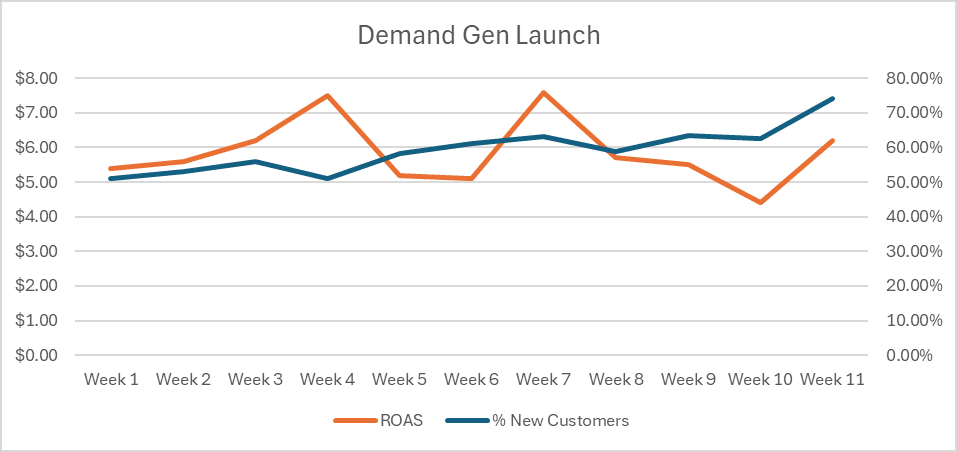
    If I change my ROAS target today, it won’t wipe away months of established patterns. Shutting down a new campaign prematurely can mark such volatility as something to avoid.

    ```json
{
  "alt": "Line graph showing ROAS and percentage of new customers over 11 weeks during a Demand Gen Launch.",
  "caption": "Tracking Success: This chart illustrates the correlation between ROAS and new customer acquisition over 11 weeks during a Demand Gen Launch.",
  "description": "This image is a line graph depicting the Return on Ad Spend (ROAS) and the percentage of new customers over an 11-week period titled 'Demand Gen Launch.' The orange line represents ROAS, while the blue line indicates the percentage of new customers. Both metrics showcase fluctuations, with ROAS peaking around week 5 and the percentage of new customers reaching its highest in week 11. This visualization aids in understanding the impact of marketing strategies on revenue and customer acquisition."
}
```

    It’s about optimizing for survival—behaviors that get funded, hit targets, and aren’t paused are what the platform focuses on.

    When accounts plateau, especially under strong management, it often indicates that the system has been trained to avoid unpredictability—while that’s precisely where growth occurs.

    What Training Looks Like in Google Ads

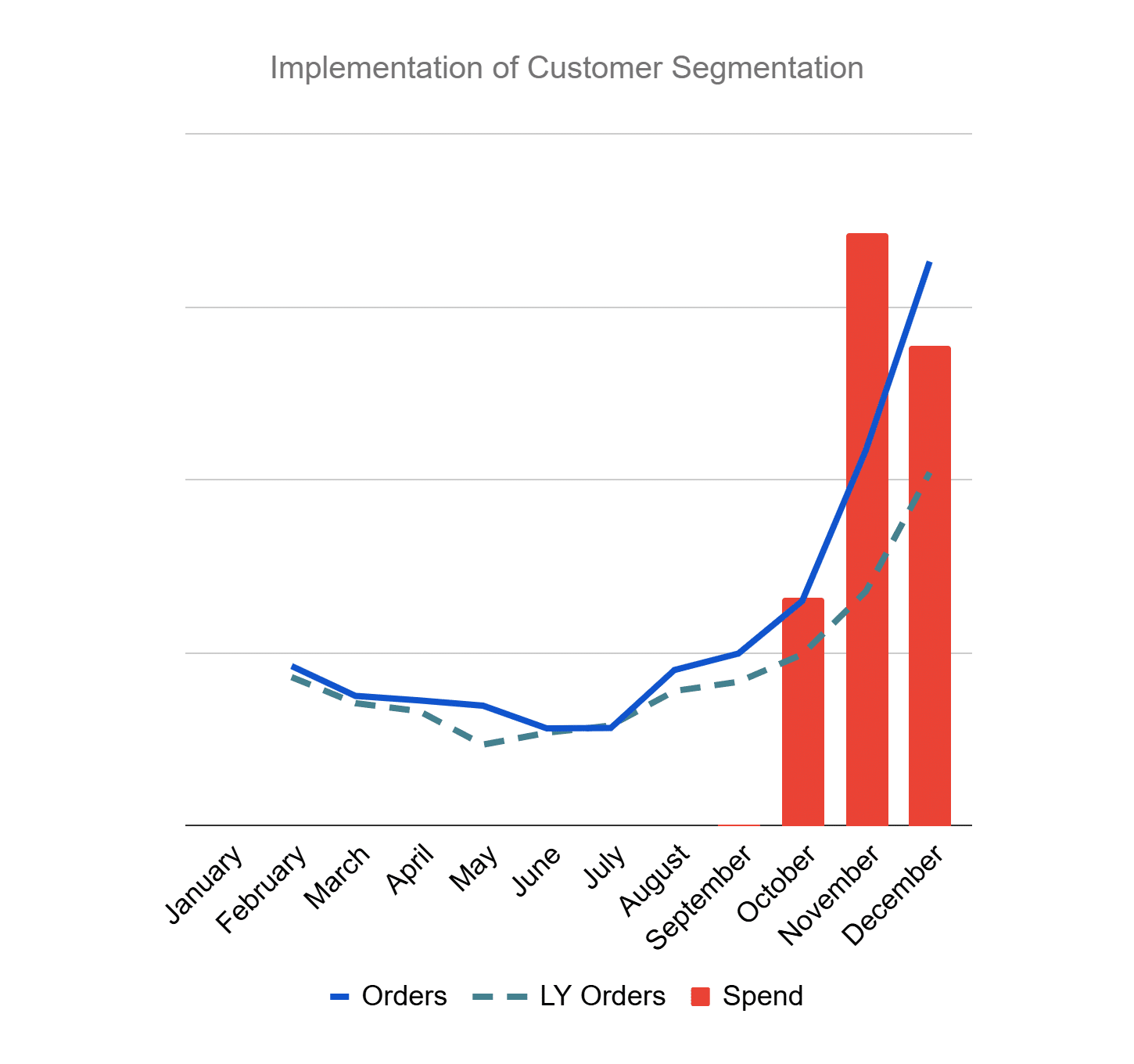
    On the backend, Google Ads consistently evaluates the concept of success based on factors like conversion inclusion, valuation, and how I handle volatility.

    ```json
{
  "alt": "Line and bar chart showing monthly orders, last year's orders, and spend from January to December.",
  "caption": "Dive into the data: A visual representation of customer segmentation through monthly orders, last year's trends, and spending patterns throughout the year.",
  "description": "This chart visually presents the implementation of customer segmentation over the year. It features a line graph depicting the monthly orders compared to last year's orders, complemented by a bar chart illustrating monthly spending. The x-axis shows each month from January to December, while the y-axis measures the data values. Notably, there's a significant rise in orders and spending towards the end of the year, highlighting seasonal trends and potential customer behavior insights. Keywords: customer segmentation, monthly trends, data visualization, sales analysis."
}
```

    Over time, these become the signals shaping its behavior, influencing queries, audience priorities, auction strategies, and demand exploration.

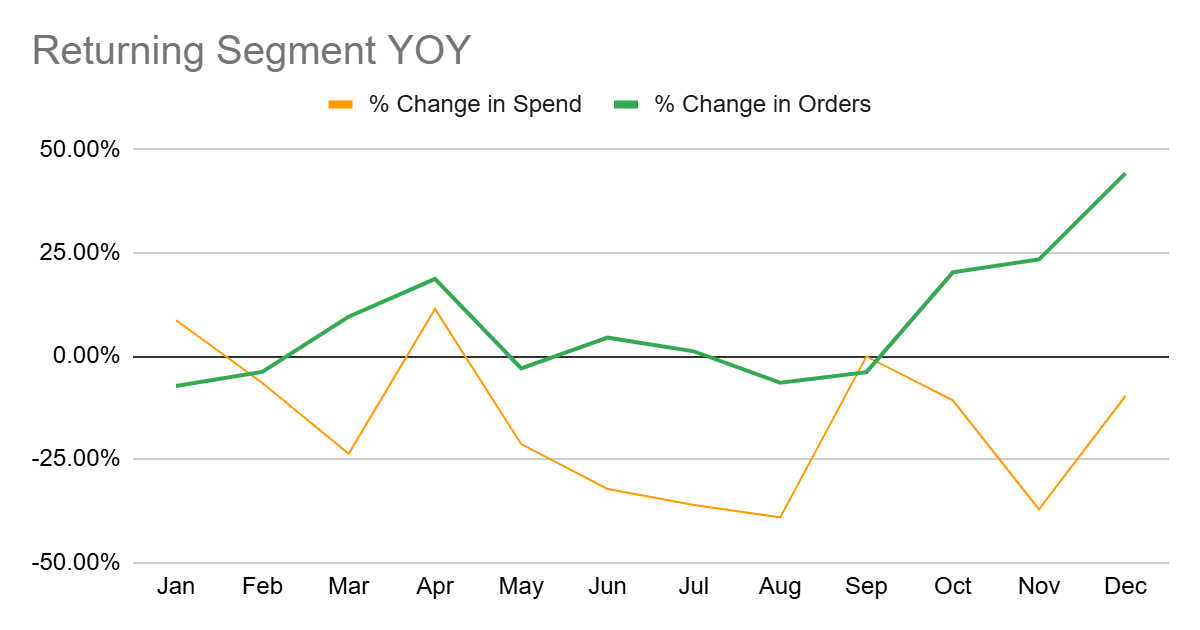
    For example, if repeat customers easily hit ROAS targets but prospecting fluctuates, the system learns to prioritize what’s safe over what’s incremental.

    Common Mistakes in Google Ads Training

    These errors often pass for good management, but recognizing them is crucial. Here are a few I’ve noticed:

    ```json
{
  "alt": "Line graph showing percentage change in spend and orders year-over-year from January to December.",
  "caption": "Year-over-Year Analysis: Explore the fluctuations in spend and order percentages from January to December.",
  "description": "This line graph illustrates the year-over-year percentage change in spend and orders for the returning segment from January to December. The orange line represents the change in spend, while the green line shows the change in orders. Notable peaks and troughs appear across different months, indicating significant variations in consumer behavior. The graph provides insights into trends and patterns, valuable for understanding market dynamics."
}
```

    Mistake 1: Leaning on Easiest Revenue

    Encouraging branded searches and repeat customers seems logical, but Google learns that predictable revenue is the ideal.

    Shouldering this strategy makes incremental demand suffer as the account conservatively emphasizes what works, causing stagnation.

    Mistake 2: Punishing Volatility

    Responding to short-term inefficiency quickly by tightening targets or pulling budgets can send a message that exploration isn’t allowed.

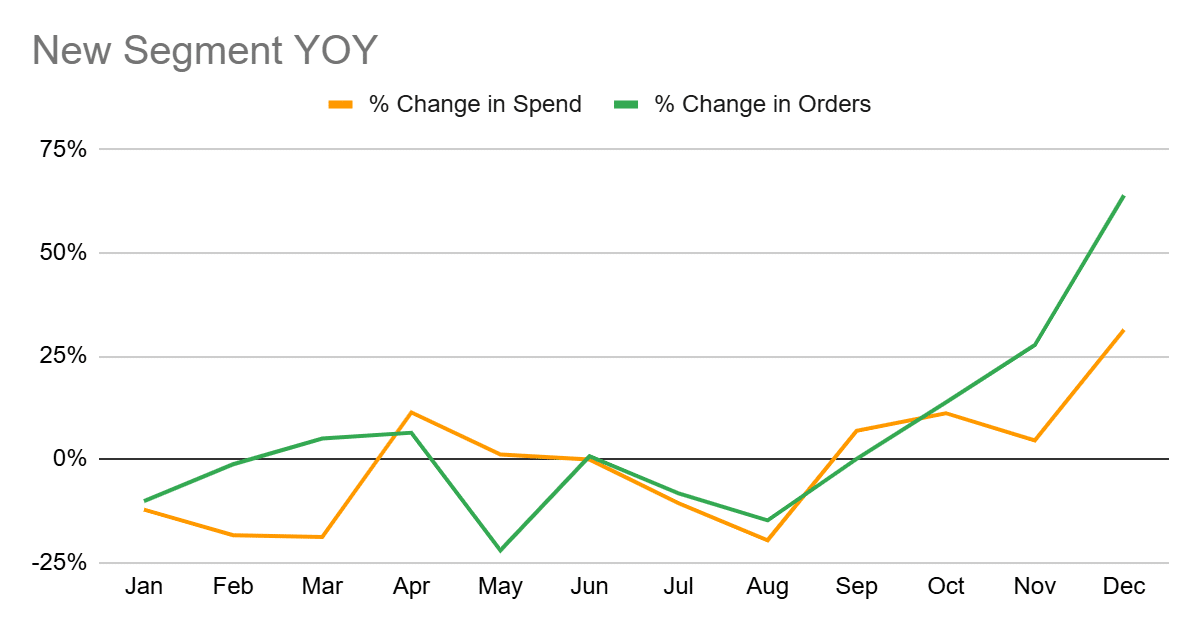
    ```json
{
  "alt": "Line graph comparing year-over-year percentage changes in spend and orders from January to December.",
  "caption": "See the monthly fluctuations in spend and order changes over the past year, highlighting significant growth towards the end!",
  "description": "This line graph illustrates the year-over-year percentage change in spend and orders for a new segment over 12 months. The orange line represents changes in spend, while the green line indicates changes in orders. Notable trends include fluctuations throughout the year with a marked increase in both metrics in the final quarter. Keywords: line graph, year-over-year, percentage change, spend, orders, monthly data."
}
```

    This results in prioritizing stability, which eventually limits expansion and innovation, as the account simply recycles existing demand.

    Mistake 3: Treating All Purchases the Same

    Not all purchases are equal. When everything sends the same signal, Google defaults to what’s easiest to replicate—typically repeat purchases.

    This can hinder new customer acquisition, a vital component of sustainable growth.

    ```json
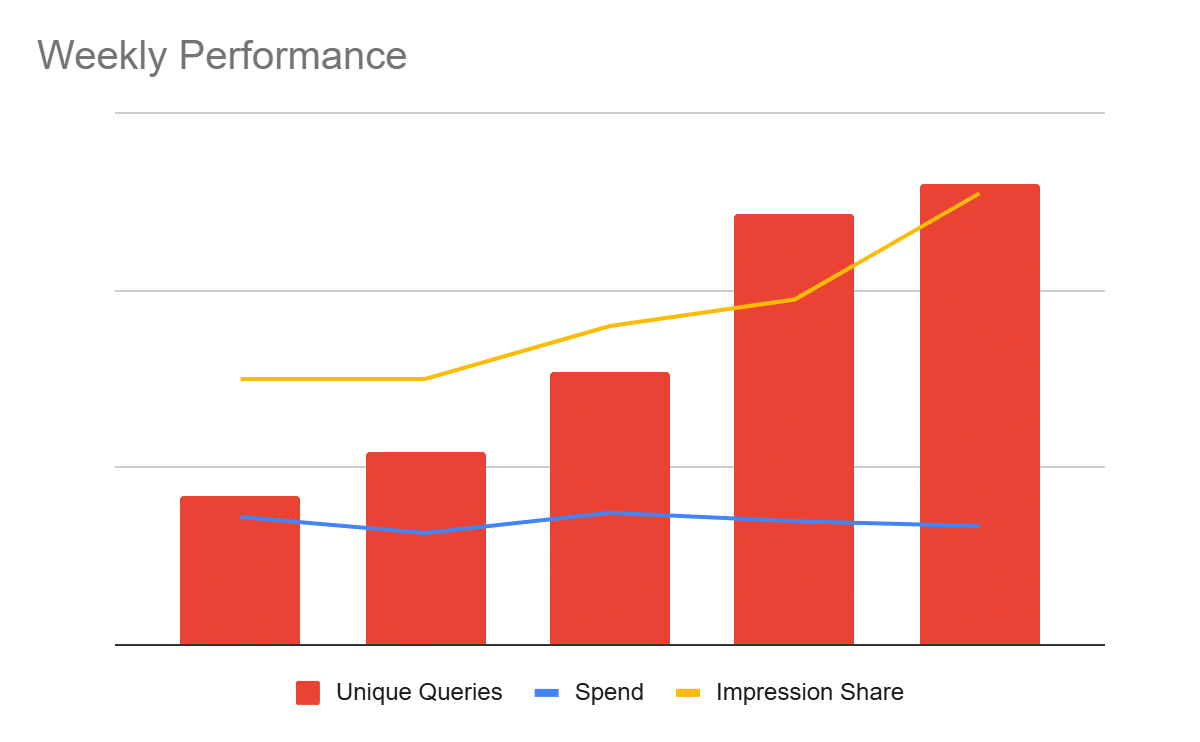
{
  "alt": "Bar and line graph showing weekly performance with unique queries, spend, and impression share.",
  "caption": "A dynamic graph illustrating a week's performance metrics, highlighting trends in queries, spend, and impression share.",
  "description": "This graph displays the weekly performance of three key metrics: unique queries, spend, and impression share. The red bars represent unique queries, showing significant growth over the period. The blue line indicates spend, which stays relatively stable throughout, while the yellow line illustrates a steady increase in impression share. The visual arrangement aids in quick data comparison and trend analysis."
}
```

    Intentional Training for Optimal Google Ads

    Aligning Google Ads with business goals rather than just ROAS is key. Here’s my approach to intentional training that I’ve found effective:

    Maintaining Efficiency Lanes

    These are my accounts’ baseline revenue protectors. They include brand campaigns and high-intent terms with stable performance. These are not my growth engines.

    Building Growth Lanes

    Growth campaigns have broader match types and looser targets, aimed at demand expansion and new customer acquisition.

    By separating growth lanes with realistic expectations, I allow them to learn even when fluctuations arise.

    Changing Signals Slowly

    Constantly adjusting ROAS targets can disrupt the system. I avoid weekly changes to let the data compound for broader query expansion and improved share.

    Overall, it’s about accepting gradual growth rather than seeking overnight success.

    Managing a Trained Google Ads System

    Reflect on your management approach. If you’ve answered “yes” to questions about tightening targets quickly or pausing exploratory campaigns, it indicates your system is merely following the training it’s received.

    The focus should shift from speed to thoughtful teaching, constantly evaluating what behaviors I’m reinforcing and how they align with my bigger picture goals.


    Inspired by this post on Search Engine Land.


    crushpress.ai community screenshot
  • SEO Priorities After Google’s March 2026 Core Update

    SEO Priorities After Google’s March 2026 Core Update

    If your rankings fell after Google’s March 2026 core update, the worst first move is a sitewide rewrite. This update produced unusually broad result churn, arrived immediately after a spam update, and changed which kinds of sources appeared most prominently. A blanket response can destroy the evidence you need to diagnose the loss.

    Your job is to separate market-wide movement from page-specific weakness, identify what the replacement results provide that you do not, and improve the shortest path between your brand, its evidence, and the searcher’s next step. That puts diagnosis, primary-source value, the homepage, and information architecture ahead of cosmetic content refreshes.

    Diagnose the loss before changing the site

    A digital investigator compares abstract page evidence while broad search movement is visually separated from one isolated page issue.

    The March update was volatile enough to make a ranking decline look more conclusive than it is. Across the observed results, 79.5% of top-three URLs changed position, 90.7% of top-10 URLs moved, and 24.1% of pages that had ranked in the top 10 disappeared from the top 100. Those figures show how much the result set changed; they do not prove that the same percentage of your pages became unhelpful.

    Attribution is also unusually difficult because the core update began one day after a significant spam update ended. Most of the observed disruption appeared to come from the core update, but the overlap makes a single-cause diagnosis unreliable. Do not use “penalty” as shorthand for every decline.

    Build the diagnosis at the query-page level, not from a sitewide visibility score:

    1. Compare equivalent periods. In Google Search Console, compare the same queries and landing pages before and after the disruption. Match weekdays where possible, and exclude periods distorted by migrations, tracking failures, promotions, or unusual demand.
    2. Separate ranking loss from click loss. If clicks fell while positions stayed broadly stable, rewriting the page may not address the cause. Inspect impressions, result composition, query demand, titles, and snippets. If impressions and positions fell together, a relevance or source-preference change is more plausible.
    3. Check indexation before judging content. A page that is excluded, canonicalized elsewhere, blocked, or no longer rendered correctly has a technical problem. A page that remains indexed but loses to a different source type has a competitive or content problem.
    4. Classify the replacements. Mark each new winner as an official or institutional site, a specialist source, an established brand, a dominant platform, an aggregator, a directory, or a comparison page. The pattern matters more than any one competitor.
    5. Group losses by template and purpose. Look for concentration in comparison pages, location directories, programmatic pages, definitions, product summaries, or informational articles. A shared template usually points to a shared weakness.
    6. Write a testable explanation. “Google dislikes us” cannot guide an edit. “Our location pages repeat third-party facts while the new winners own the locations and publish current operating details” can.

    Preserve the export, affected URLs, replacement results, and your annotations before making changes. Otherwise, you will not know whether a later movement came from your work, continued volatility, or a different query mix.

    Move each important page closer to the primary source

    The clearest pattern from the update was a movement toward official and institutional sites, specialist sources, established brands, and major platforms, while many aggregators, directories, and comparison sites lost visibility. This was not a blanket platform bonus: YouTube had the largest visibility decline in the dataset. Brand size alone did not guarantee a gain.

    A useful working hypothesis is that the update raised the cost of being an unnecessary intermediary. The more steps between a page and the entity that owns the fact, product, job, place, clinical expertise, or dataset, the more clearly that page must justify its existence.

    Ask four questions of every page that matters:

    • Which facts on this page does your organization own, produce, verify, or maintain?
    • What can the reader learn here that is not available from the original provider or from every competing summary?
    • Can the reader see where each consequential claim came from and when time-sensitive information was checked?
    • Does the page help the reader complete a decision, or does it merely restate information found elsewhere?

    The right upgrade depends on the page’s role. A software page can publish version-specific instructions, working configuration examples, limitations, and maintained documentation. A data page can expose definitions, methodology, dates, and the relationship between the figures and their originating institution. A comparison can explain inclusion criteria, show the evidence behind each distinction, disclose commercial relationships, and separate observed facts from editorial judgment. A directory can verify records, link to the responsible entity, remove duplicates, and make its coverage and maintenance process visible.

    Query type should influence the source you treat as authoritative. The update shifted job visibility toward employer-specific destinations, data-driven searches toward institutional sources, travel and real-estate results toward primary destinations, and health searches toward clinical and specialist material. If you operate in one of those areas, compare what the new winner directly owns with what your page merely describes. Then decide whether to add first-party value, cite the origin more clearly, narrow the page’s promise, or stop competing for an intent better served by the primary entity.

    Do not mass-delete every comparison, directory, or aggregator-style page. Those formats can still solve legitimate search tasks, and deletion can remove demand, links, and useful pathways. Preserve pages with demonstrated value, upgrade pages that can become meaningfully distinctive, consolidate genuine duplicates, and remove or noindex a page only after reviewing its traffic, links, conversions, replacement URL, and role in the site architecture.

    JSON-LD belongs after this content decision, not before it. Structured data can confirm visible facts and relationships; it cannot manufacture first-party authority. Keep names, canonical URLs, authorship, dates, products, organizations, and entity identifiers consistent with the page a person sees. Do not mark up credentials, reviews, services, or relationships that the visible page does not substantiate.

    Turn the homepage into a verification and routing page

    A central glass pavilion displays evidence objects and routes visitors along short paths to several destinations.

    AI assistants can handle part of a user’s exploratory research before that person visits a website. Once persuaded that a brand belongs on the shortlist, the user may perform a branded search and arrive directly on its homepage, carrying intent that conventional analytics cannot fully explain. That makes the homepage more important as the bridge between AI-assisted discovery and the next action.

    This does not mean turning the homepage into an index of every keyword. It means making the entity and its routes unmistakable. A useful homepage should let a new visitor answer these questions without interpreting internal company language:

    • What is this organization, and what does it provide?
    • Who is each main offering for?
    • Which route matches the visitor’s task: learn, compare, verify, buy, contact, or get support?
    • Where can the visitor inspect proof, documentation, methodology, expertise, policies, or case material?
    • What is the next meaningful action for each major audience?

    Use plain labels based on user tasks. “Solutions,” “Resources,” and “Insights” can be too broad when they hide several unrelated destinations. A prospective buyer should not have to guess whether implementation details live under Services, Platform, Learn, or Company.

    Information architecture carries that clarity beyond the homepage. Group related material under a parent hub, connect supporting pages to that hub, and use breadcrumbs and contextual internal links to show the relationship. Treat the ability to reach important information within three clicks as a practical audit metric, not as permission to place hundreds of links in the footer.

    Run the audit from a logged-out view of the site. For every commercially or editorially important page, record its parent hub, click depth from the homepage, navigation route, breadcrumb route, relevant contextual links, and orphan status. If a priority page is difficult to reach, add a semantically appropriate path from its hub or a closely related page. A link from an unrelated global block may reduce click depth without clarifying the page’s place in the site.

    Keep the entity consistent across the homepage, About page, service or product hubs, author or expert pages, contact details, and JSON-LD. Organization, WebSite, Person, and BreadcrumbList markup should describe the same names, URLs, roles, and hierarchy that the navigation and visible copy establish. When those layers disagree, adding more schema creates more ambiguity rather than more authority.

    Sequence recovery work by evidence and consequence

    The easiest tasks are rarely the most important ones. Changing dates, adding paragraphs, or installing another optimization tool can feel productive while leaving the actual weakness untouched. Use the observed pattern to choose the next action.

    Observed signalLikely workstreamFirst action
    Pages are excluded, canonicalized incorrectly, blocked, or not rendered as intendedTechnical SEOFix the affected template or directive and verify that the intended canonical page can be crawled, rendered, and indexed.
    Losses cluster in secondary summaries while official or specialist pages replace themContent and authorityIdentify the facts you can own or verify, add evidence and methodology, and consolidate pages that cannot justify a separate result.
    Positions remain broadly stable while clicks declineSearch-result and demand analysisInspect impressions, result features, titles, snippets, and query intent before rewriting the body content.
    Branded discovery reaches the homepage, but visitors do not find the relevant routeHomepage and conversion architectureClarify the entity, audience choices, proof paths, and next actions above the deeper content layer.
    One page falls while the rest of its topic cluster remains stablePage-level relevanceCompare that page with the current winners, then repair the specific intent, evidence, or duplication gap instead of changing the whole site.

    Measure each workstream with a matching indicator. Technical work should improve index eligibility and canonical consistency. Content work should restore impressions for the intended query-page pairs and reduce dependence on unverified secondary claims. Architecture work should reduce orphaning and meaningful click depth. Homepage work should improve selection of the correct audience route and the completion of its next action.

    A sitewide average can hide progress. Review affected clusters separately, retain annotations for every substantial change, and compare pages with the same role. A documentation hub, product page, directory entry, and editorial comparison should not be judged by one blended benchmark.

    Key takeaways

    • Do not interpret every March 2026 decline as a penalty. The result set experienced exceptional churn, and the core update followed immediately after a spam update.
    • Diagnose query-page pairs before changing templates or deleting content. Separate ranking loss, click loss, indexation problems, and changes in source preference.
    • Prioritize pages that own, produce, verify, or explain consequential information. An intermediary page needs a clear reason to exist.
    • Use the homepage to identify the entity, route major audiences, expose proof, and convert branded or AI-assisted discovery into a useful next step.
    • Organize important content into coherent hubs and keep it reachable through meaningful paths, ideally within three clicks.
    • Treat JSON-LD as a confirmation layer for visible, consistent facts. It cannot compensate for thin evidence or confused information architecture.

    Start with the page that lost the most qualified visibility and still matters to the business. Put the current winner beside it and write down what that source owns, proves, or routes better than you do. That comparison should tell you whether the next task is a technical repair, an evidence upgrade, a consolidation decision, or a clearer path through the site. Apply the same method cluster by cluster instead of launching an undirected sitewide refresh.

    References


  • Elevate PPC Responses with the PACT Framework

    Elevate PPC Responses with the PACT Framework

    n

    <img width=

    ```json
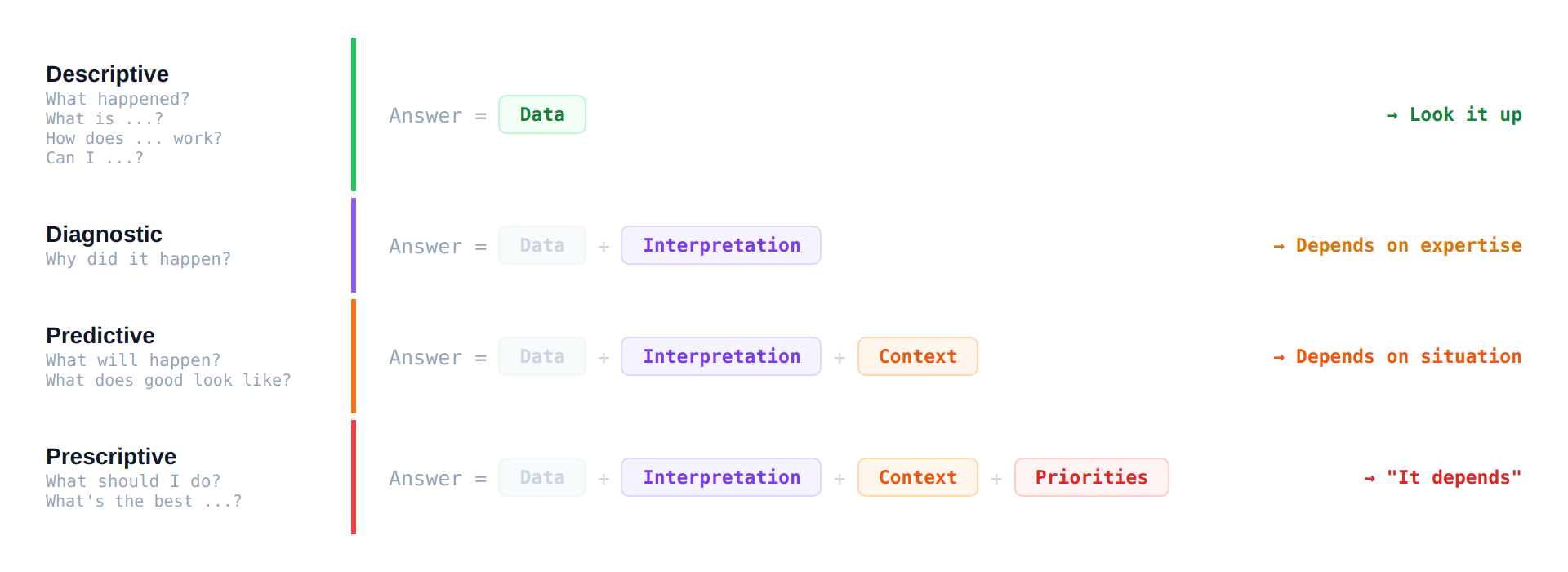
{
  "alt": "Four types of analytics: descriptive, diagnostic, predictive, and prescriptive, with their components and dependencies.",
  "caption": "Explore the four realms of analytics: Descriptive, Diagnostic, Predictive, and Prescriptive. Learn how data, interpretation, and context guide decision-making.",
  "description": "This image outlines four types of analytics: Descriptive, Diagnostic, Predictive, and Prescriptive. Each type includes a formula with components such as Data, Interpretation, Context, and Priorities. Descriptive analytics relies solely on data, Diagnostic combines data with interpretation, Predictive adds context, and Prescriptive includes priorities. Dependencies for each are noted, ranging from expertise to situation specifics."
}
```
    ```json
{
  "alt": "The CapmatchOne logo with a gradient circle and bold text.",
  "caption": "Discover innovation with the CapmatchOne logo, featuring sleek typography and a modern gradient circle.",
  "description": "The CapmatchOne logo features bold, modern typography coupled with a gradient circle, symbolizing connection and innovation. The sleek design conveys a sense of progress and creativity. This image can be used for branding or promotional purposes, appealing to audiences interested in innovative solutions and forward-thinking designs."
}
```
    ```json
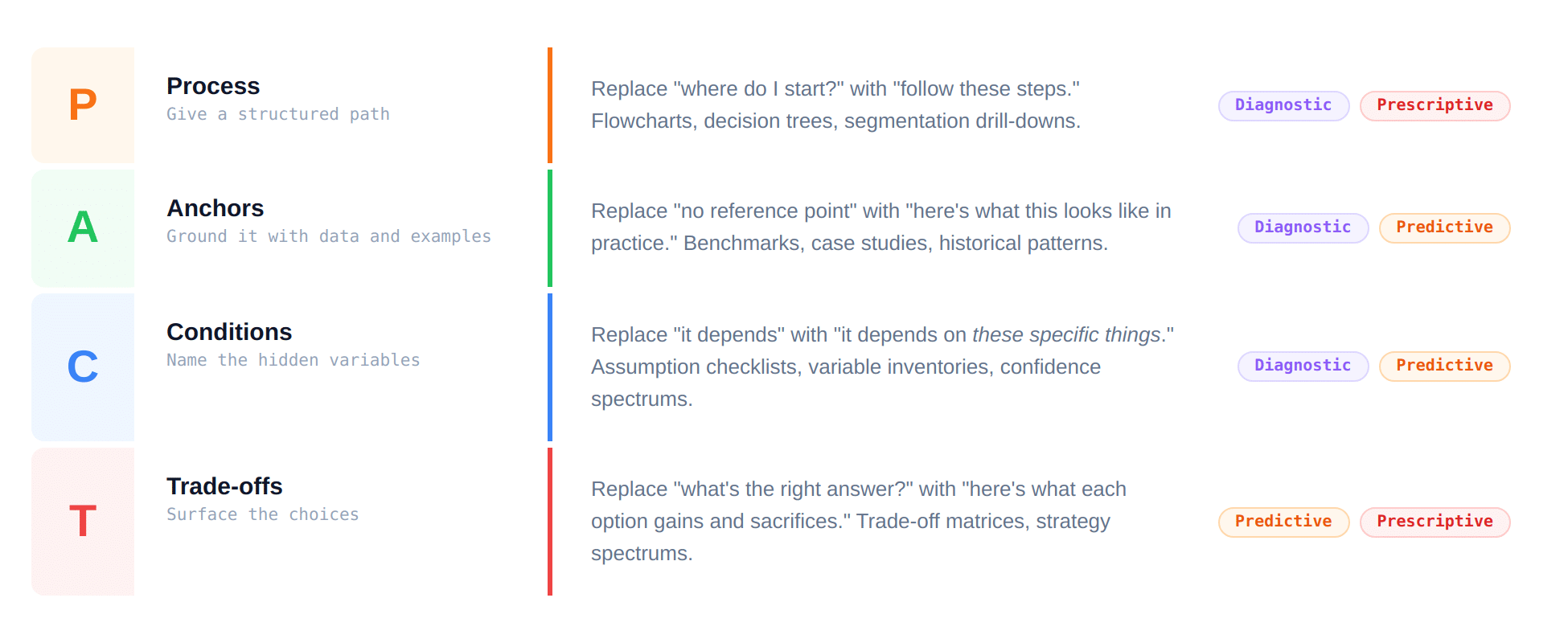
{
  "alt": "PAC framework diagram detailing process, anchors, conditions, and trade-offs with diagnostic and predictive tags.",
  "caption": "Explore the PAC framework: Process, Anchors, Conditions, and Trade-offs, guiding decision-making with diagnostic and predictive strategies.",
  "description": "This image illustrates the PAC framework, focusing on Process, Anchors, Conditions, and Trade-offs. It provides guidance with structured paths, data grounding, variable identification, and highlighting choices. The framework integrates diagnostic and predictive categories, aiming to replace ambiguities with actionable strategies using benchmarks, checklists, and trade-off matrices. Key terms: PAC framework, decision-making, diagnostic, predictive."
}
```
    ```json
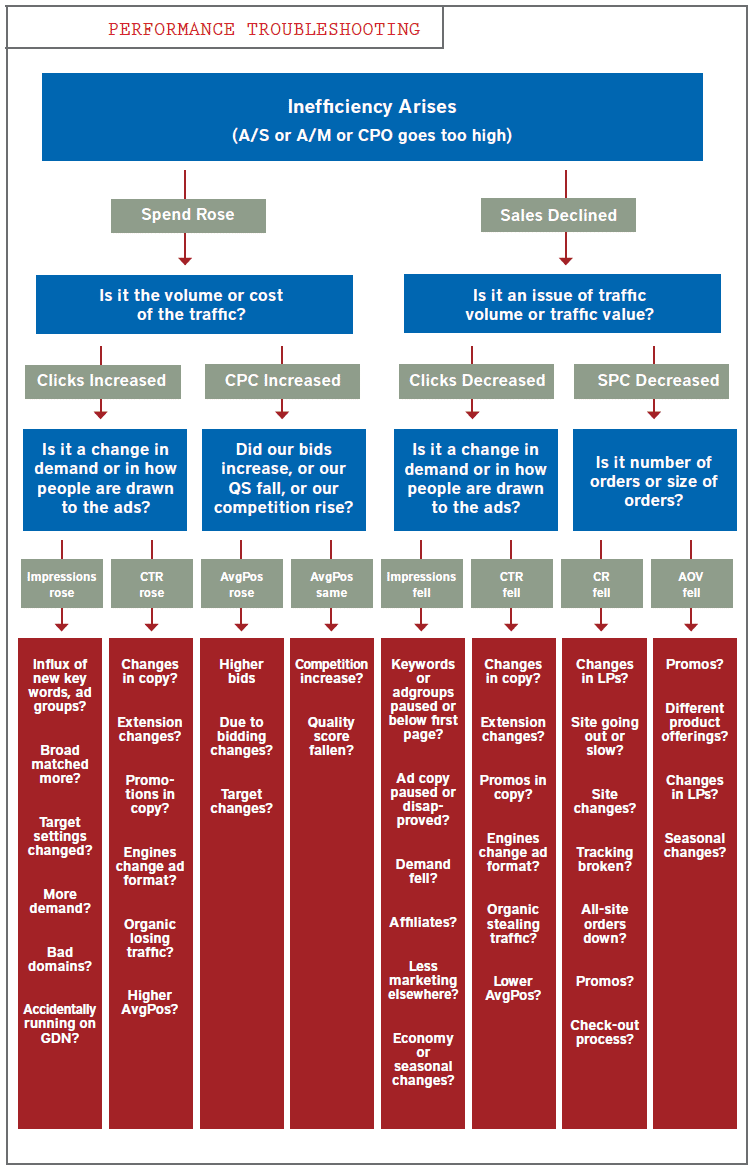
{
  "alt": "Flowchart for performance troubleshooting in marketing ads, detailing inefficiency causes and solutions.",
  "caption": "Explore a comprehensive flowchart for troubleshooting marketing performance inefficiencies. Understand key factors affecting ad spends and sales declines.",
  "description": "This flowchart provides a detailed guide to troubleshooting performance inefficiencies in marketing campaigns. It addresses rising spend and declining sales by exploring factors like click volume, CPC, and SPC. The chart breaks down potential issues into categories such as demand changes, bidding strategies, ad copy effectiveness, and competition influences. It offers suggestions for analyzing changes in impressions, CTR (click-through rate), conversion rates, and average order value, helping marketers pinpoint and resolve specific challenges effectively."
}
```
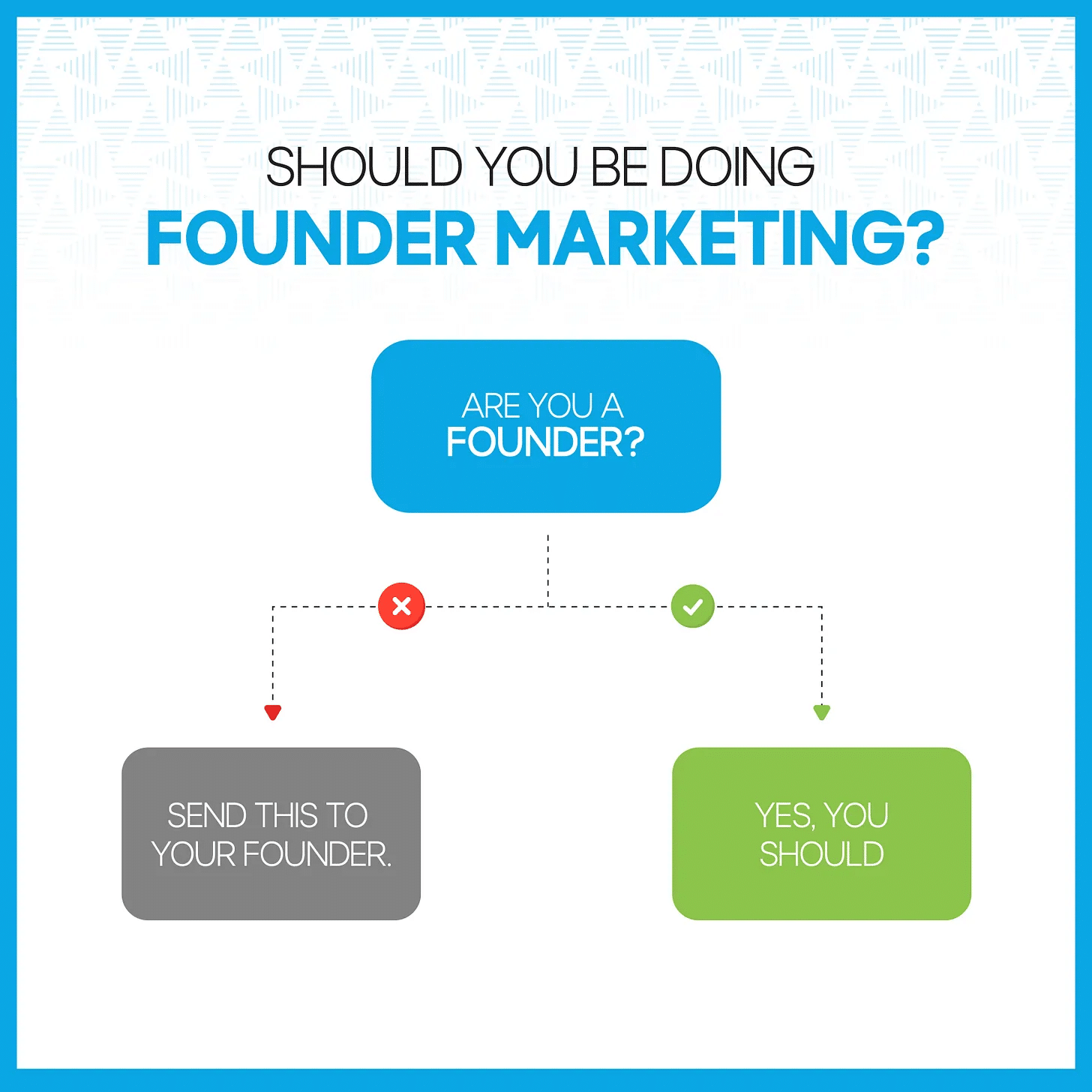
    ```json
{
  "alt": "Decision flowchart asking if you should be doing founder marketing, with paths for founders and non-founders.",
  "caption": "Explore if founder marketing is right for you with this simple flowchart. Founders get a green light, while others are guided differently.",
  "description": "This image is a decision flowchart titled 'Should You Be Doing Founder Marketing?' It poses the question 'Are you a founder?' with two pathways. A red 'X' leads to the message 'Send this to your founder,' and a green checkmark leads to 'Yes, you should.' The flowchart uses blue, green, and gray boxes against a white background, designed for businesses exploring marketing strategies. Keywords include founder, marketing, decision, flowchart."
}
```
    ```json
{
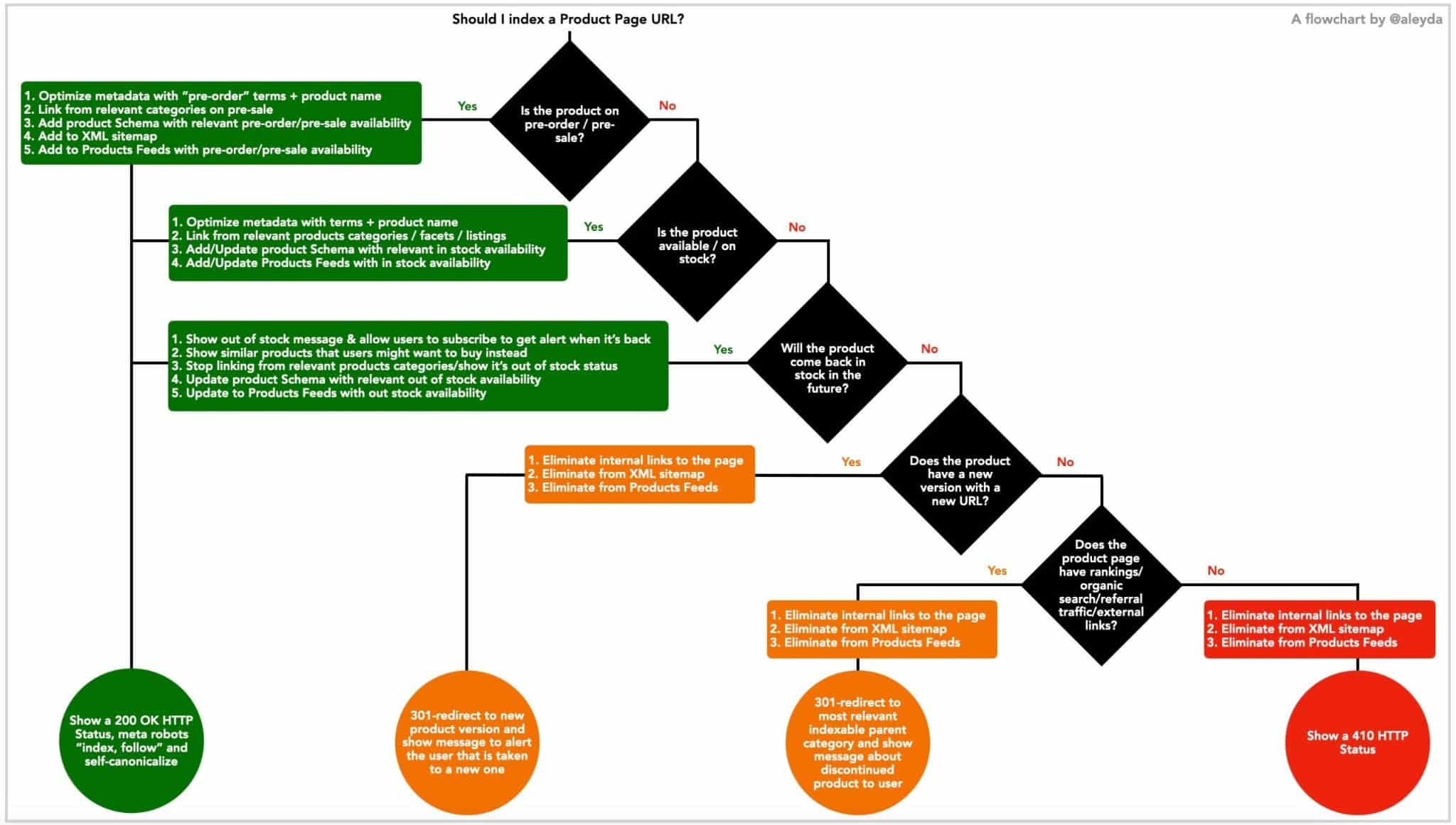
  "alt": "Flowchart for deciding whether to index a product page URL based on availability, pre-sale status, and traffic.",
  "caption": "Navigate the complexities of indexing product pages with this comprehensive flowchart that considers pre-sale status, availability, and organic traffic.",
  "description": "This flowchart helps determine whether to index a product page URL, focusing on product availability, pre-sale status, and potential organic traffic. It guides users through several decision points, including pre-order availability, stock status, and future availability. The chart provides specific actions like optimizing metadata, updating product schemas, and using 301 redirects, ensuring strategic handling of pages in varying conditions for optimal SEO performance."
}
```
    ```json
{
  "alt": "Chart showing question types: Diagnostic, Predictive, Prescriptive, and their preferred formats: Flowchart, Checklist, Decision tree, etc.",
  "caption": "Discover the ideal formats for Diagnostic, Predictive, and Prescriptive question types with this insightful chart. Enhance your analytical strategy effectively!",
  "description": "This chart presents how each question type—Diagnostic, Predictive, and Prescriptive—is associated with specific formats. Diagnostic questions are paired with Flowchart, Checklist, and Usual suspects. Predictive questions favor Benchmarks, Calculator, and Case study. Prescriptive questions align with Decision tree, If [x], then [y], and Trade-off explanation. This visualization aids in choosing the optimal format to address specific analytical challenges."
}
```

    Inspired by this post on Search Engine Land.


    crushpress.ai community screenshot