Month: March 2026

  • Google Ads AI Video: A Practical Workflow for Better Creative

    Google Ads AI Video: A Practical Workflow for Better Creative

    If your Google Ads account has plenty of product images but little usable video, Veo gives you a practical way to close that gap. You can turn existing visual assets into short YouTube ads without waiting for a conventional production cycle.

    The useful question isn’t whether AI can make a video. It can. The question is whether you can give it the right inputs, catch the wrong outputs, and measure the result without confusing generated creative with video your team produced. This workflow covers all three.

    What Veo changes inside Google Ads

    Veo reduces the smallest viable video project. Inside Google Ads Asset Studio, you can upload as many as three static images and generate a video of up to 10 seconds. The model adds motion, and customizable templates help turn the result into an ad suitable for YouTube.

    That is a meaningful capability, but it is a narrow one. Veo is well suited to a concise product demonstration, a visual benefit, or a single promotional idea. A 10-second output is not a substitute for a customer story, a detailed explanation, or a campaign concept that depends on dialogue and multiple narrative beats.

    Treat the tool as a creative multiplier, not a strategy generator. It can add movement to an idea you have already clarified. It cannot decide which customer problem matters, which claim is credible, or what the viewer should do next.

    The accompanying Nano Banana integration expands the editing layer. You can change backgrounds, adjust text, and tailor creative for different audience interests. That makes iteration faster, but each edit still needs the same brand, product, and claim review you would apply to work from a designer.

    Choose images that give the model a clear job

    An unbranded travel cup is photographed from multiple angles in a tabletop studio with a camera and soft lighting.

    The quality of the source images determines how much ambiguity the model must resolve. A clean product shot with an obvious foreground, stable proportions, and a plausible type of movement gives it a constrained problem. A dense collage with several focal points, embedded copy, and conflicting perspectives gives it several problems at once.

    Before uploading anything, score each candidate image against these criteria:

    • One unmistakable subject: A viewer should know what the ad is about without studying the frame.
    • Clear separation: The product, person, or focal object should be visually distinct from the background.
    • Plausible movement: You should be able to describe what could move in one sentence, such as a package rotating, fabric flowing, or a camera pushing toward a product.
    • Consistent product details: Packaging, colors, proportions, and visible features should agree across the images.
    • Minimal baked-in text: Important copy is easier to inspect and revise when it is handled as an ad element instead of being embedded in a busy image.
    • Enough visual space: Leave room for template copy, branding, or a call to action without covering the subject.
    • Accurate context: The setting must not imply a use, feature, size, or outcome the product cannot support.

    Do not upload three images merely because three are allowed. Every image should have a role. One might establish the product, another might show the relevant detail, and a third might place it in context. If two images contradict each other or compete for attention, use the stronger one and remove the ambiguity.

    Clean consumer-product imagery is a particularly sensible starting point. Early testing shared by Ameet Khabra indicated that brands with clean images and an obvious logic for movement may benefit most. That is an early practitioner observation, not a universal performance rule, so use it to select an initial test rather than to predict a result.

    Build a repeatable generation and review workflow

    Two creative team members compare generated product-video frames and inspect them for visual inconsistencies against a physical travel cup.

    Generating first and deciding what the ad means afterward produces a folder of clips, not a campaign. Write the creative brief before opening Asset Studio, even if the brief is only four lines.

    1. State the audience and problem. Name the person the ad is for and the single situation that makes the product relevant. Avoid a broad label such as “all shoppers.”
    2. Choose one promise. A short video rarely has room for a feature list. Select the one benefit the viewer should retain after the clip ends.
    3. Define the visible action. Describe what should move and why that movement helps communicate the promise. Motion should reveal, demonstrate, or focus attention; it should not exist only to make the image look active.
    4. Select up to three source images. Give each image a purpose, remove weak duplicates, and confirm that the product details agree across the set.
    5. Generate a restrained baseline. Start with the simplest version of the concept. A conservative baseline is easier to evaluate than an output containing simultaneous background, text, pacing, and visual-style changes.
    6. Create one deliberate variant. Change one meaningful element: the input image, the setting, the visual emphasis, or the template treatment. Do not change everything at once.
    7. Use Nano Banana for controlled edits. Swap a background or adjust the copy only after the core motion works. Treat each edit as a new creative that must pass review.
    8. Label the asset before launch. Put the concept, generation method, and variant in the name. A structure such as product, benefit, Veo, and variant number will be more useful later than a filename such as “final-video-3.”

    Inspect the output as an ad, not as a novelty

    Watch the generated clip several times with a different purpose on each pass. First judge the message. Then inspect the product. Finally, check every frame that contains copy, branding, or a transition.

    • Product identity: Does the same product remain recognizable from beginning to end?
    • Shape and scale: Do proportions stay stable as the camera or object moves?
    • Packaging and text: Are labels, logos, prices, and claims legible and accurate?
    • Physical behavior: Does the movement make sense for the material and setting?
    • Background integrity: Do shadows, reflections, edges, and contact points agree with the new environment?
    • Message hierarchy: Can a viewer understand the product, benefit, and next action without pausing?
    • Landing-page continuity: Will the person who clicks find the same product, offer, and promise on the destination page?

    If the product changes shape, the label mutates, or the setting creates a false impression, reject the output. A polished transition does not compensate for a misleading frame. When the defect affects the central subject, a new generation from a clearer image is usually a sounder decision than layering more edits onto the mistake.

    Separate creative testing from generation method

    AI-generated video creates two questions that are easy to collapse into one: did the creative idea work, and did the generation method help? You need to preserve the origin of each asset if you want to answer either question.

    Google Ads API v23.2 adds a VideoEnhancement resource that can distinguish Google-generated video from advertiser-provided video. If your team maintains a reporting pipeline, update the relevant client library and code before building analysis around that distinction. A dashboard cannot recover creative provenance later if the pipeline never captured it.

    Keep a corresponding field in the creative log used by marketers. Record the asset name, source images, generation method, concept, edited element, campaign, and launch status. The API classification tells you where a video came from; the creative log tells you what hypothesis it was meant to test.

    Run tests that lead to a decision

    Begin each test with a sentence that can be proved wrong. For example: “A product-in-use image will communicate the benefit more clearly than an isolated pack shot.” Then preserve everything you reasonably can except the element named in that sentence.

    • To test the generation method: Compare Google-generated and advertiser-provided videos with comparable messages, audiences, offers, and destinations.
    • To test an input image: Keep the template and message stable while changing the source visual.
    • To test a background: Keep the product, copy, and motion concept stable while changing only the setting.
    • To test a message: Keep the visual treatment stable while changing the benefit or call to action.
    • To test a template treatment: Use the same source images and promise, then vary the presentation rather than the underlying idea.

    Choose the campaign goal and evaluation metrics before launch. Do not declare a winner because one clip looks smoother or receives an early burst of delivery. Judge it against the action the campaign is intended to produce, and document the decision so the next generation builds on a finding rather than restarting the experiment.

    Google Ads AI video FAQ

    Can Veo replace a conventional video production?

    It can replace a narrow production task: turning up to three still images into a short, template-assisted video ad. It does not replace concept development, complex storytelling, accurate product demonstration, brand review, or footage that must document a real person, place, or event. Use it where the format matches the job.

    What should you test first?

    Start with a product that has clean photography, a single focal point, and an easily described motion concept. Generate one restrained baseline and one controlled variant. That pair will teach you more than a batch of unrelated outputs because you will know what changed.

    Do you need Google Ads API v23.2 to create Veo videos?

    No. Creation happens in Asset Studio. API v23.2 matters when you operate custom reporting and need programmatic visibility into whether a video was generated by Google or supplied by the advertiser. Teams that rely only on interface reporting can still adopt the same discipline by labeling assets and maintaining a creative log.

    Your next move should be small and auditable: choose one image-rich product, write one clear promise, generate a baseline plus one variant, and record the origin of both assets before they enter a campaign. That gives you a usable ad and a test you can learn from.

    References


  • Unleashing AI in B2B: Your Patient Path to Growth

    Unleashing AI in B2B: Your Patient Path to Growth

    B2B buyers start their journey long before they even search for us. I’ve learned that AI-powered Google Ads campaigns can ignite early demand and reward patience over time.

    If I’m relying solely on brand and non-brand keywords in Google Ads, my growth becomes limited. A decline in performance isn’t due to the platform but the strategy behind it.

    Discovering a brand doesn’t begin with a non-brand search. Buyers are researching on platforms like Reddit, ChatGPT, Facebook, LinkedIn, and YouTube. They watch demos, read testimonials, and become familiar long before actively searching for us.

    For complex sales processes with lengthy customer journeys, this transformation is crucial, demanding a strategic shift. Here’s how I can make it effective in B2B.

    AI-powered Campaigns: Your Growth Treasure

    Over the years, Google has innovated with multi-channel, multi-asset campaigns like Performance Max and Demand Gen. These campaigns place my brand front and center as audiences research and evaluate options.

    When my audience is ready to choose vendors, they’ve already built trust in my brand. They’ll search specifically for me because of the trust I’ve cultivated through consistent visibility.

    A well-rounded Performance Max campaign includes diverse ad types, like image and video ads displaying demos or testimonials on YouTube. These ads also engage audiences across the web via the Display Network and retarget them as they continue their research. This process naturally leads to branded searches that ultimately convert.

    Such campaigns are cost-effective, allowing me to leverage customer data alongside keywords as intelligent signals, not replacements. It’s about smarter keyword usage.

    Dig deeper: Why B2B brands are shifting from keywords to Performance Max

    Adapting to the Evolving Search Experience

    As AI Overviews and AI Mode transform Google’s search results pages, it’s time I reconsider my ad strategies to align with these changes.

    I’m fond of the 4S framework: search, scroll, stream, and shop.

    Adding “ask” captures how people now engage with AI tools. They consult ChatGPT or Gemini, search on Google, scroll through LinkedIn, stream videos on YouTube, and shop across numerous platforms. If my strategy focuses on only a couple of these behaviors, I’m missing the full growth opportunity.

    ```json
{
  "alt": "The CapmatchOne logo with a gradient circle and bold text.",
  "caption": "Discover innovation with the CapmatchOne logo, featuring sleek typography and a modern gradient circle.",
  "description": "The CapmatchOne logo features bold, modern typography coupled with a gradient circle, symbolizing connection and innovation. The sleek design conveys a sense of progress and creativity. This image can be used for branding or promotional purposes, appealing to audiences interested in innovative solutions and forward-thinking designs."
}
```

    Solely targeting keywords means missing the larger narrative. Brand keywords undoubtedly convert better, but how do people arrive at searching my brand? Consistent visibility ensures they notice my brand in their feeds.


    Embrace Testing and Learn with Patience

    This strategy requires time, especially in B2B settings with protracted sales cycles.

    For example, it took almost a year to appreciate how Performance Max contributed to one of my life science client’s success, whose deals typically take months to finalize. There was a moment where our account manager nearly paused the campaign because initial data wasn’t promising.

    Integrating sales data changed the perspective. As revenue figures rolled in, the campaign’s value became transparent.

    If I can sync beyond MQLs with data like Proposal Sent, it keeps Google well-informed and offers reassurance until the sales data solidifies our insights.

    Patience is key when providing the system quality data. I must remain steadfast and avoid quitting prematurely, accepting the complexity of B2B cycles.

    An event might draw 100 people, some catch a webinar email later, and months pass before they search for us and request a proposal, eventually becoming customers. With long sales cycles, phenomena like this unfold subtly.

    Dig deeper: How to optimize B2B PPC spend when budgets and confidence are low

    Start with Small Steps, Then Scale Success

    If testing funds are limited, I can designate 5% to 10% for AI-forward campaigns. Strategic testing without major commitments at peak times allows room to maneuver while the system adjusts.

    Investing time in this strategy ensures sustainable growth. Those who master it gain an enduring competitive edge, unlike those focused on diminishing demand.


    Inspired by this post on Search Engine Land.


    crushpress.ai community screenshot
  • Boost Local SEO: Fix Your Google Map Pin for Better Rankings

    Boost Local SEO: Fix Your Google Map Pin for Better Rankings

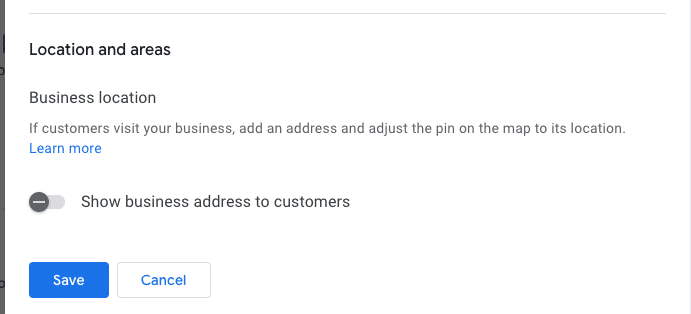
    Your local business rankings might be suffering, and surprisingly, it could all be due to your map pin. Google’s placement of your business on their map significantly impacts your visibility, and addressing hidden addresses and setup issues is crucial.

    I’ve often found myself engrossed in the ongoing debate within the local SEO community about the ‘hide address’ toggle for service area businesses (SABs). Many business owners consider this option a mere privacy setting, but it’s much more—a decision that affects how Google’s algorithm perceives your physical relevance.

    ```json
{
  "alt": "Settings interface for business location visibility with toggle option and save button.",
  "caption": "Easily manage the visibility of your business address with a simple toggle switch. Options to save or cancel changes make location management straightforward.",
  "description": "The image displays a digital settings interface focused on business location visibility. It features a toggle switch labeled 'Show business address to customers,' which is turned off. Below the toggle are 'Save' and 'Cancel' buttons for submitting changes. This screenshot is relevant for understanding business location management settings in online profiles or platforms. Keywords: business location, settings interface, visibility toggle, save button."
}
```

    Here are some questions to consider:

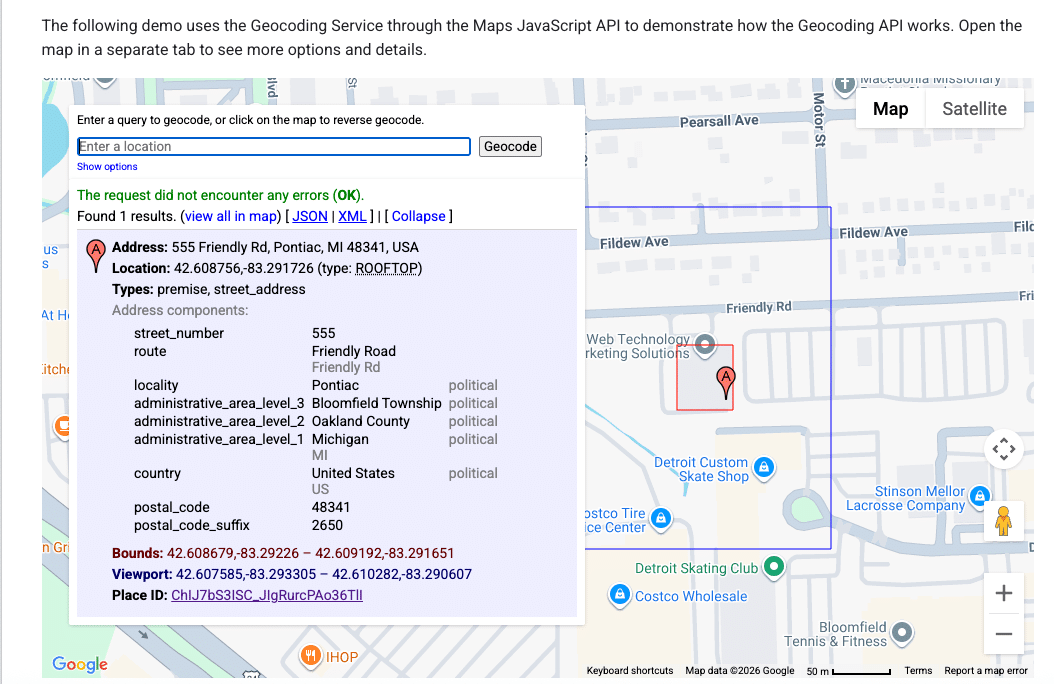
    ```json
{
  "alt": "Geocoding service demo using Maps JavaScript API with address details and location on map.",
  "caption": "Explore the Maps JavaScript API with this geocoding demo, showcasing address details for 555 Friendly Rd, Pontiac, MI.",
  "description": "This image displays a geocoding service demo using the Maps JavaScript API. It highlights the detailed address of 555 Friendly Rd, Pontiac, MI 48341, USA. The interface shows the address components, coordinates (42.608756, -83.291726), and a map section indicating the location. The demo explains how to use geocoding for retrieving precise address information and viewing it on a map with options for different data formats like JSON and XML."
}
```
    • Does your defined service area affect your ranking?
    • Does hiding your street address impact your visibility in the local pack?
    • Is Google erasing that data, or does your map pin become an invisible anchor?
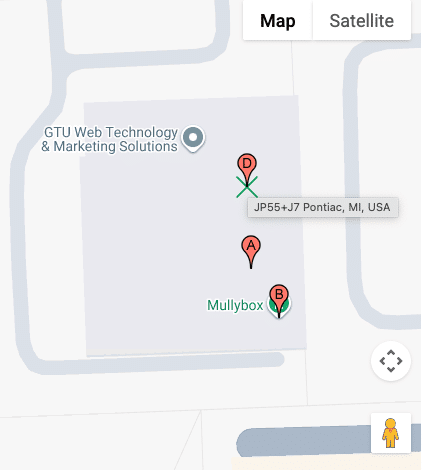
    ```json
{
  "alt": "Map showing GTU Web Technology & Marketing Solutions and Mullybox with pinpoints in Pontiac, MI.",
  "caption": "Discover the location of GTU Web Technology & Marketing Solutions and Mullybox in Pontiac, MI, with this detailed map view.",
  "description": "This image displays a map highlighting GTU Web Technology & Marketing Solutions and Mullybox in Pontiac, MI. The map features pinpoints indicating specific locations labeled A, B, and D. The area is shown in a standard map view with street outlines and an overlay for easy navigation. This visual guide can help users find exact locations and understand the surrounding layout in Pontiac. Keywords: map, GTU Web Technology & Marketing Solutions, Mullybox, Pontiac, MI, location."
}
```

    These are foundational questions in understanding how proximity works when you choose to ‘hide’ on the map.

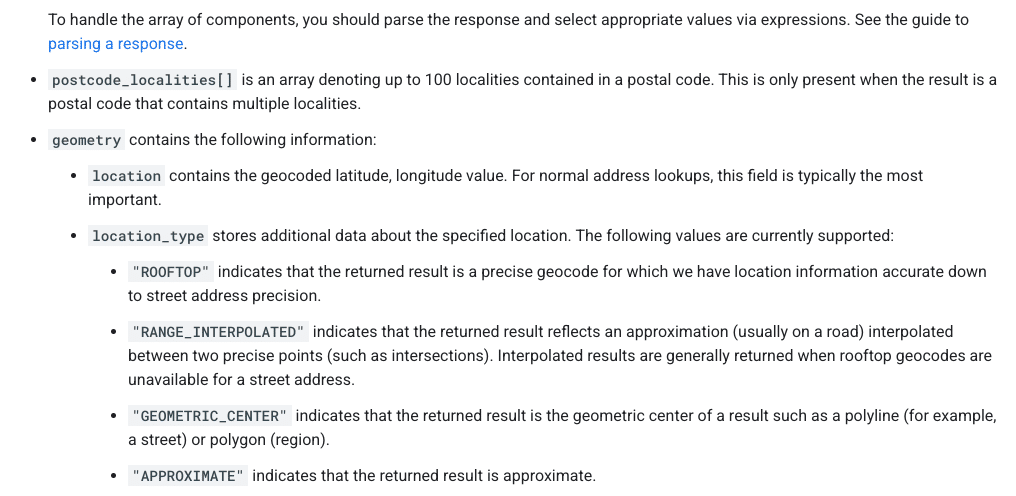
    ```json
{
  "alt": "Guide on parsing response components with types like ROOFTOP and APPROXIMATE.",
  "caption": "Understanding Geocode Location Types: Dive into the specifics of parsing response components from postal code localities to precise geocodes.",
  "description": "This image provides detailed guidance on parsing response components in geolocation data. It highlights how to interpret arrays like postcode_localities, and explains geometry details that include location types such as ROOFTOP, RANGE_INTERPOLATED, GEOMETRIC_CENTER, and APPROXIMATE. This is crucial for understanding accuracy and the precision of geocoding results, aiding in effective data handling and utilization."
}
```

    How Google Determines Your Map Pin

    ```json
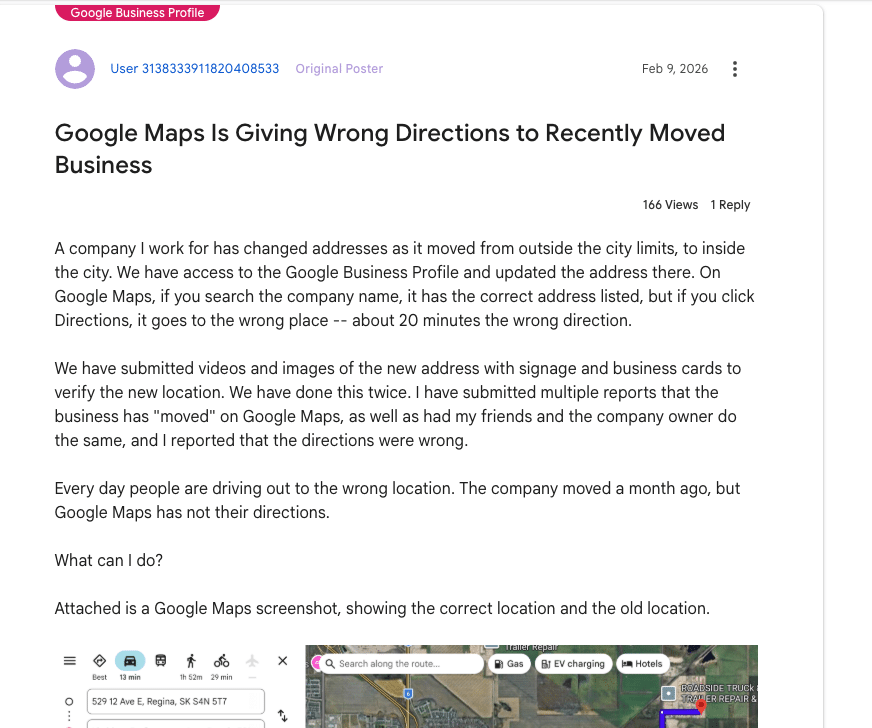
{
  "alt": "Forum post discussing Google Maps giving wrong directions after business address change.",
  "caption": "Frustration mounts as a business struggles with incorrect Google Maps directions following an address change, causing customers to get lost.",
  "description": "The image shows a forum post about issues with Google Maps providing incorrect directions to a business after its address change. Despite updating Google Business Profile, the directions lead 20 minutes off. Attached is a Google Maps screenshot indicating both old and new locations. The post has had 166 views and 1 reply, highlighting the frequent errors with directions and the efforts taken to rectify the situation."
}
```

    It’s essential to know that your address and map pin are not the same. Entering an address into your Google Business Profile doesn’t just place a pin; it’s processed through Google’s geocoding engine, comparing it against their database.

    ```json
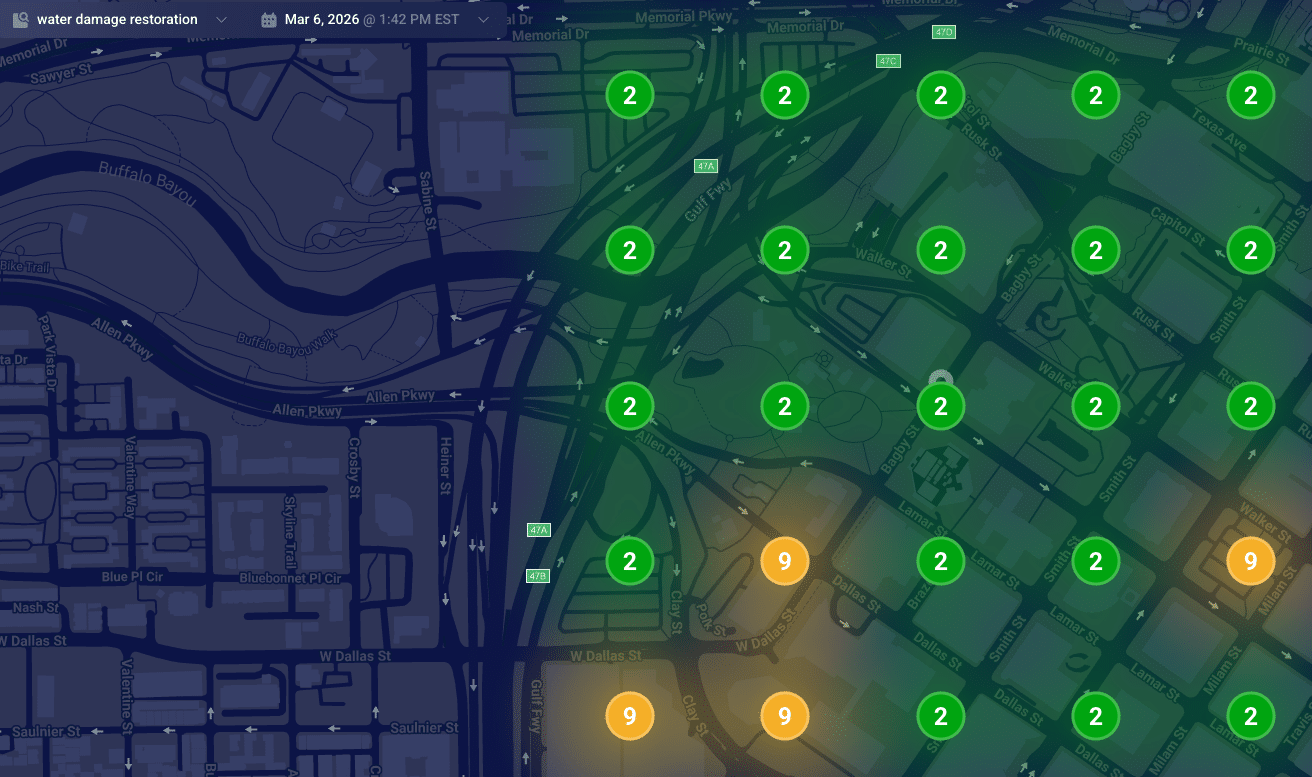
{
  "alt": "Heat map visualization of water damage restoration needs in an urban area, showing numbered zones with color coding.",
  "caption": "Explore this dynamic heat map illustrating water damage restoration priorities across a city with distinct color-coded zones.",
  "description": "This image represents a heat map of water damage restoration needs in an urban area on March 6, 2026, at 1:42 PM EST. The map features a darkened city street layout with numbered circular zones indicating priority levels. Green circles with the number '2' indicate low priority areas, while orange circles marked with '9' highlight higher urgency zones. This visualization aids in strategic planning for restoration services."
}
```

    Understanding Google’s data models is key to understanding why your pin might be misplaced:

    ```json
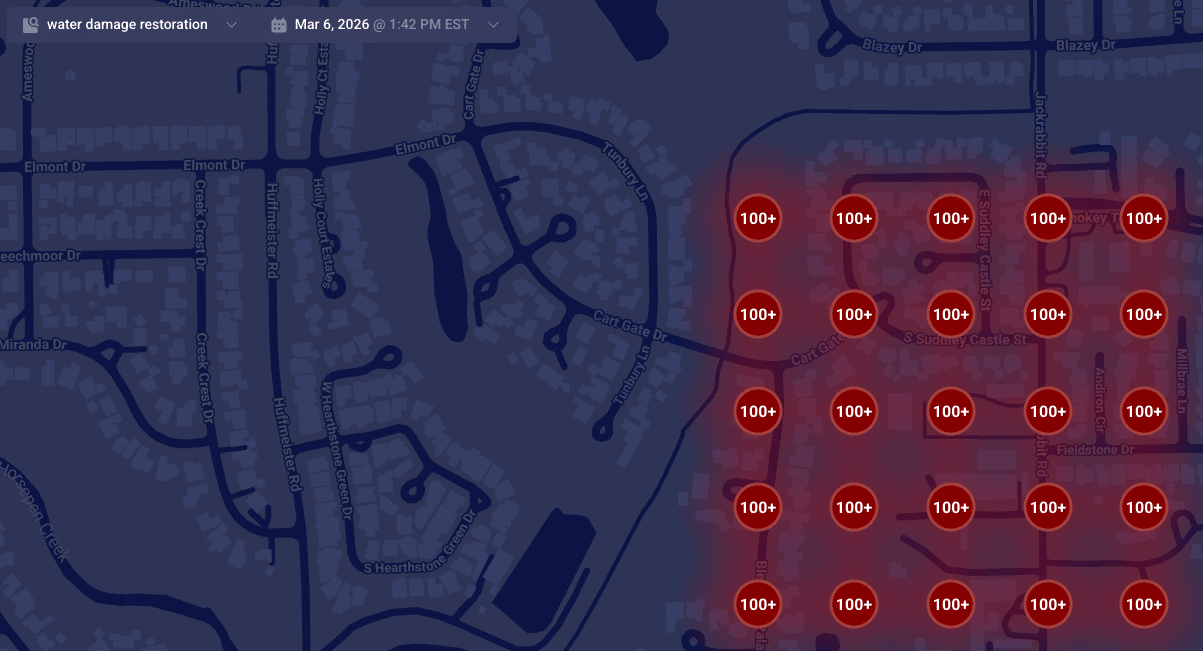
{
  "alt": "Map highlighting areas with over 100 instances of water damage restoration services.",
  "caption": "A map visualization displaying clusters of water damage restoration needs, with over 100 cases highlighted in red.",
  "description": "This map illustrates a dense concentration of water damage restoration demands in a residential area. Red circles marked with '100+' indicate regions with over 100 service instances. The map is set against a dark background, featuring roads and street names for context. This visualization aids in identifying service hotspots, essential for targeting restoration efforts efficiently."
}
```
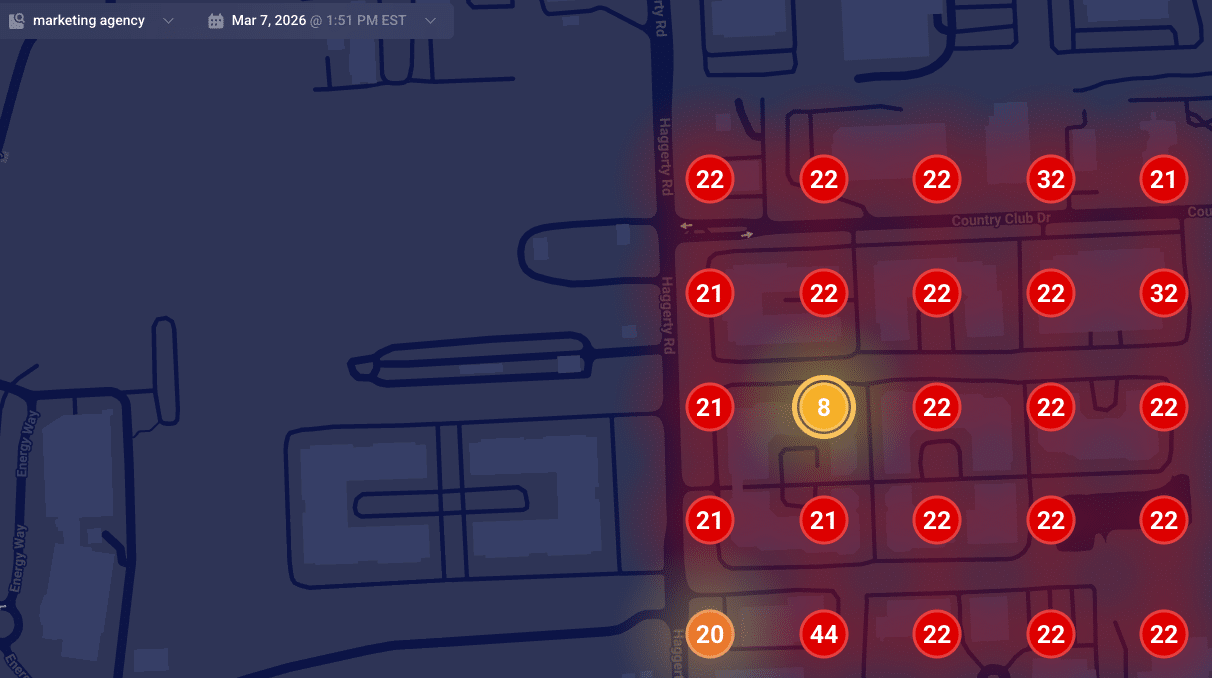
    ```json
{
  "alt": "Heatmap showing numerical data points on a dark map layout.",
  "caption": "A vibrant heatmap reveals numerical trends across a dark-themed map, spotlighting key data points for insightful analysis.",
  "description": "This image showcases a heatmap overlaid on a map, displaying various data points marked with numbers. The numbers, like 8, 22, and 44, are highlighted within colored circles ranging from yellow to red, indicating varying data intensities. Designed for data visualization, it suggests a real-time analysis function, useful for trend analysis or strategic planning. The heatmap context is set against a dark map background, enhancing the visibility of the highlighted data points."
}
```

    When Google finds a reliable match, they place your pin accurately at your building’s rooftop. Understanding how these data models work can help explain why SABs sometimes rank differently in local searches.

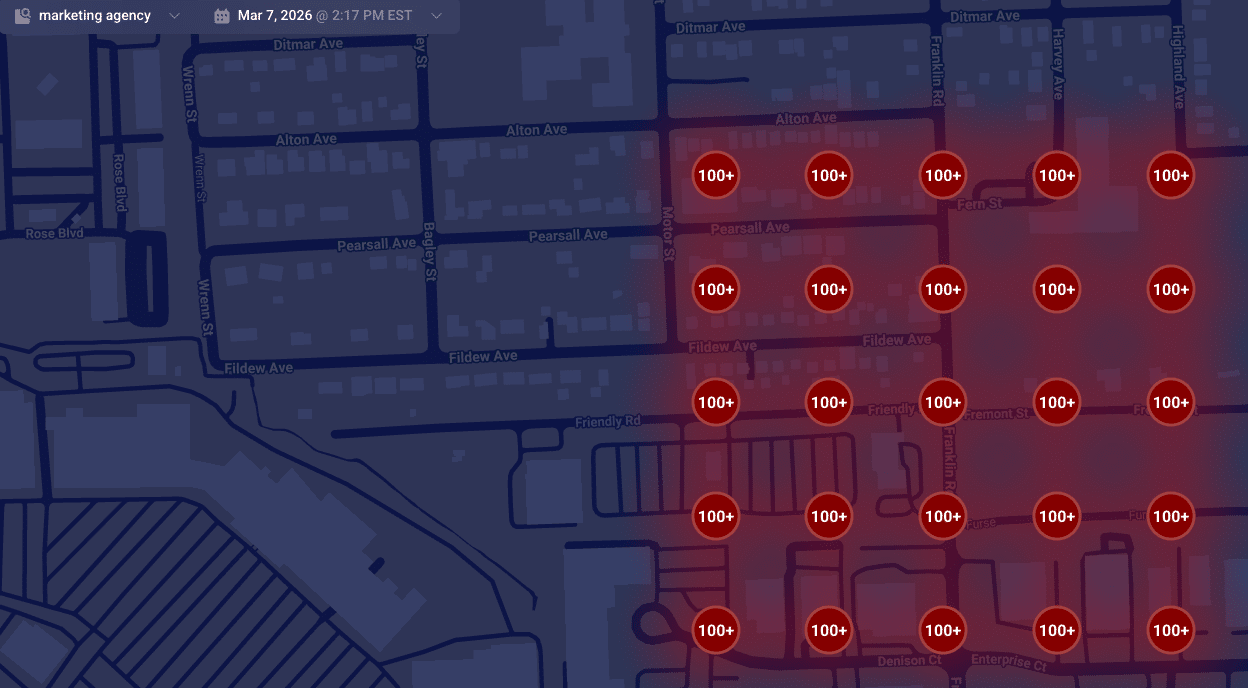
    ```json
{
  "alt": "Map displaying high-density markers with '100+' in a red shaded area across various streets.",
  "caption": "This heat map reveals a high concentration area, with red-marked zones indicating significant density across streets like Pearsall Ave and Fildew Ave.",
  "description": "The map illustrates a geographic area with a high concentration of points marked '100+', shaded in red to indicate density. Streets such as Pearsall Ave, Fildew Ave, and Motor St are visible, providing a visual representation of congestion or population density. The interface is dated March 7, 2026, at 2:17 PM EST, possibly generated by a marketing agency tool, useful for spatial analysis or resource planning."
}
```

    Is Your Map Pin Placement Accidental?

    Don’t be mistaken, it’s not a bug but a failure in converting text to precise map coordinates. When this fails, your business may end up with a map pin that’s misplaced, affecting your local ranking authority.

    When unable to secure a high-confidence match from your building, Google defaults to using the city’s center as your pin’s fallback location, often causing your business to rank from a less relevant area.

    Suite Number Issues

    I’ve warned clients countless times about the pitfalls of including suite numbers in Address line 1. These numbers aren’t street-level data; embedding them can lead to geocoding conflicts, making your map pin default to a broader location like a city center.

    Properly Anchoring Your Map Pin

    For accurate map pin placement, ensure your address in Google’s system is geocoding-friendly. Keep unnecessary details out of the first address line and verify how Google reads your address using their developer tools.

    When addressing geocoding problems, prepare for possible re-verification requests. Stay consistent in your corrections until Google verifies your business’s precise location.


    Inspired by this post on Search Engine Land.


    crushpress.ai community screenshot
  • Google Performance Max Seasonal Theming: A Practical Workflow

    Google Performance Max Seasonal Theming: A Practical Workflow

    Your strongest Performance Max asset group is already doing useful work. A seasonal push creates an awkward choice: change proven creative under pressure, or build another variation from scratch.

    Google’s seasonal theming offers a more controlled route. You can clone an existing asset group, apply a theme to the copy, and review generated image and text variations while the original remains intact. The speed is useful, but the output still needs human judgment. Treat the feature as a production shortcut, not an automatic campaign strategy.

    Know what Google changes – and what it leaves alone

    Seasonal theming starts with assets you already have. It does not redesign the offer, replace every format, or resolve inconsistencies between the ad and its destination. That boundary matters because the generated version can look finished before it is ready to run.

    • Images: Google can reuse existing images and create variations with themed backgrounds. The product, person, or main subject is still inherited from your starting material, so inspect edges, scale, contrast, and composition rather than judging the background alone.
    • Text: The tool can suggest seasonal headlines and descriptions, but the text refresh is limited. Read the resulting assets as a set. A new seasonal headline can still be paired with older language that changes its meaning or weakens the message.
    • Video: Existing videos are not replaced. A winter image set beside an unmistakably summer video is not a minor aesthetic issue; it makes the asset group feel assembled rather than intentional.
    • The original asset group: The unthemed version remains intact. That gives you a safer starting point for experimentation and a clean asset set to return to if the seasonal treatment does not fit.

    The available themes cover promotional treatments, seasons, and specific cultural moments:

    Theme familyAvailable optionsBest planning question
    PromotionalSale; Studio/EditorialIs the message about a real offer, or only a different visual treatment?
    SeasonalWinter; Spring; Summer; FallDoes the season match the market, product use, and destination experience?
    Cultural momentsChristmas; Black Friday/Cyber Monday; Halloween; Valentine’s Day; Easter; Mother’s Day; Father’s Day; Hanukkah; New Year; Lunar New Year; Back to SchoolIs this moment genuinely relevant to the audience and the offer?

    Choose the narrowest accurate theme. A popular holiday is not automatically the right creative frame. If the product, promotion, or audience has no meaningful connection to it, a generic season or editorial treatment will usually be easier to keep coherent.

    Decide whether seasonal theming fits the job

    The feature works best when the campaign strategy is already sound and only the presentation needs to change. Before opening the theme menu, separate a creative refresh from a campaign rebuild.

    Use the shortcut when the underlying message is stable

    • The existing asset group already promotes the right product, audience need, value proposition, and action.
    • The seasonal idea can be communicated through backgrounds and a limited set of text changes.
    • The current video remains suitable, or the concept can tolerate video that is less seasonally explicit.
    • You have someone available to review every generated asset before it can spend campaign budget.
    • You want a variation of a proven concept while preserving the original group.

    Build or edit more manually when the campaign itself changes

    • The seasonal promotion introduces a different product, price, bundle, eligibility rule, or call to action.
    • The concept depends on new video, product photography, illustration, or a sequence that a background treatment cannot create.
    • Your brand system requires precise art direction that generated background variations are unlikely to preserve without substantial correction.
    • The promotion has legal, geographic, inventory, or timing conditions that must be expressed exactly.
    • The cultural moment requires nuance beyond familiar seasonal symbols.

    Access is also a practical constraint. The option can appear within Asset Groups ahead of major holidays, or as Apply theme to existing asset group while you set up a new one. If it is not visible in your account, do not make the launch depend on assumed access. Move to the manual creative route while there is still time to review it properly.

    Move from a proven asset group to a reviewed seasonal version

    An abstract workflow shows a proven advertising asset group being duplicated, seasonally restyled, and sent for human review.

    A disciplined workflow keeps the convenience from becoming a source of accidental claims, mismatched formats, or unclear test results.

    1. Write a one-sentence seasonal brief. Name the customer moment, the exact offer or message, the featured product, and the intended action. If you cannot state those four elements cleanly, generated creative will not solve the underlying ambiguity.
    2. Select the asset group for message fit. A high-performing group is a useful starting point only when its product and proposition belong in the seasonal promotion. Do not clone a winner whose success came from a different category or customer need.
    3. Apply one theme to the cloned version. Keep the first variation interpretable. Combining a holiday treatment, a new offer, a different product emphasis, and a rewritten brand voice makes it hard to identify what helped or hurt.
    4. Inventory what actually changed. List the image variations, new or revised headlines, descriptions, and untouched video assets. This turns a visually impressive preview into an auditable set of changes.
    5. Correct the gaps manually. Rewrite vague text, remove unsupported promotional language, replace unsuitable source imagery, and address video continuity. Generated output is a draft even when individual assets look polished.
    6. Check the destination experience. The landing page should continue the same season, product, offer, and timing. If the ad promises a seasonal sale but the page makes visitors hunt for it, the creative has moved faster than the customer journey.
    7. Launch it as a controlled change. Record the theme, manual edits, offer, destination, and activation period. Where operationally possible, avoid bundling unrelated campaign changes into the same evaluation window.

    Naming discipline helps once several moments overlap. Use an internal label that identifies the base asset group, theme, offer, and version. The label does not improve delivery, but it prevents your team from reviewing or activating the wrong seasonal copy.

    Review the combinations, not just the individual assets

    A reviewer compares a grid of assembled ad variations while individual image and copy components appear in a separate asset tray.

    A generated image can be attractive and still be commercially wrong. The most consequential failure is usually not an obvious visual artifact. It is a polished asset that implies the wrong offer, date, product use, or cultural context.

    Review areaWhat can go wrongWhat to do before launch
    Image fidelityThemed backgrounds create awkward edges, unrealistic scale, low contrast, or a setting that changes how the product appears to be used.Open every variation at a useful size. Check the main subject, logo, text embedded in the image, shadows, edges, and background context.
    Text combinationsA seasonal headline is paired with an older description that contradicts it, dilutes the offer, or changes the intended tone.Read plausible headline-description pairings as complete ads. Rewrite any asset that works only when viewed alone.
    Video continuityUntouched video communicates a different season, setting, product, or promotion from the new images.Supply a suitable video through normal asset editing, or make the overall theme neutral enough that the current video remains credible.
    Offer accuracySale-oriented language implies a discount, scope, or urgency that the business cannot substantiate.Match every promotional phrase against the approved offer. Confirm products, locations, exclusions, availability, and timing before spending begins.
    Landing-page continuityThe ad introduces a seasonal promise that disappears after the click.Verify that the destination visibly supports the same product and offer, and that the next action is immediately clear.
    Cultural fitFamiliar symbols are used for an audience or market where they feel irrelevant, inaccurate, or reductive.Have someone familiar with the intended audience review the treatment. If the context is uncertain, choose a broader seasonal or editorial theme.
    Brand and complianceGenerated backgrounds, language, or urgency fall outside brand rules or required approval processes.Run the cloned group through the same brand, legal, and promotional review used for manually produced advertising.

    Do not approve the group from a single preview. The feature changes only part of the asset set, so quality depends on how old and new elements coexist. The review unit is the complete seasonal asset group.

    Measure the seasonal version without overstating the result

    Seasonal periods change customer demand as well as creative. Better results during Black Friday, Christmas, or Back to School do not prove that the generated theme caused the improvement. Start by defining what success means for this campaign, then interpret performance in that commercial context.

    • Choose the decision metric in advance. Use the outcome that already governs the campaign, such as conversion value, return on ad spend, cost per acquisition, or qualified lead volume. Do not select whichever metric looks most flattering afterward.
    • Document the demand context. Record the promotion, product availability, destination changes, and seasonal period. These factors can move performance independently of creative quality.
    • Keep the claim proportional to the setup. If the original and themed asset groups run concurrently without controlled exposure, treat the comparison as directional. Do not describe ordinary automated delivery as a clean A/B test.
    • Use the available asset-group and asset reporting. Aggregate campaign performance can hide a weak seasonal variation if other assets continue to carry results.
    • Make an explicit post-season decision. Retire event-specific claims when they cease to be true. Preserve notes on the theme, manual corrections, and performance so the next seasonal build starts with evidence rather than memory.

    The original asset group remaining intact is operationally valuable, but it does not make every comparison controlled. Preservation reduces creative risk; measurement quality still depends on what else changed and how delivery was allocated.

    Key takeaways

    • Seasonal theming is best for changing the context around an already-correct message, not rebuilding campaign strategy.
    • Google can generate themed image backgrounds and suggest some seasonal text while leaving the original asset group intact.
    • Video is not replaced, and the text refresh is limited, so old and new assets must be reviewed together.
    • The right theme is the most accurate one for the product, market, offer, and audience – not necessarily the most prominent holiday.
    • A themed clone is not automatically an A/B test. Seasonal demand and automated delivery can affect the comparison.
    • Generated creative should pass the same offer, landing-page, cultural, brand, and compliance checks as manually produced advertising.

    Start with the asset group whose message best fits the seasonal opportunity, write the brief before opening the theme menu, and build the review checklist before anything goes live. If the idea cannot survive the unchanged video or an exact offer check, give it the manual creative work it needs.

    References


  • Google March 2026 Core Update: Diagnosis and Recovery Plan

    Google March 2026 Core Update: Diagnosis and Recovery Plan

    Your organic traffic moved during March 2026, and the tempting response is to rewrite every page that lost clicks. Resist that impulse. Google’s first core update of 2026 arrived close to separate spam and Discover changes, so a simple month-over-month chart cannot tell you what happened.

    Your first job is attribution: isolate the affected search surface, query set, page group, and shared weakness. Then change only what the evidence supports. This protects strong pages from panic edits and gives you a credible way to judge whether the work helps.

    Key takeaways

    • Google said the March 2026 core update could take up to two weeks to roll out. Treat movement inside that window as provisional rather than a final verdict.
    • Do not attribute every March change to the core update. A March spam update, a February Discover update, your own site releases, tracking problems, and changing demand can produce different patterns.
    • Diagnose at the level of search surface, query cluster, page group, and template. A sitewide traffic total hides the pattern you need to fix.
    • Audit whether losing pages satisfy the searcher’s task more clearly and completely than competing results. Cosmetic rewrites and extra keywords are not a recovery strategy.
    • There is no universal or immediate repair. Improvements can appear gradually, including after later core updates, so preserve evidence and measure each coherent batch of changes.

    Treat March as an attribution problem, not a verdict

    A core update is a broad reassessment of how Google’s systems surface useful results across many sites and searches. Google characterized this release as a regular update focused on relevant and satisfying content. A ranking loss does not, by itself, prove that a page violated a rule, received a manual penalty, or needs to be deleted.

    The surrounding timing matters. The core update followed a March 2026 spam update and a February 2026 Discover update. Those events are not interchangeable. A change confined to Discover should not automatically become a core-update content project. A Web Search decline should not be blamed on Discover. A sitewide drop across every acquisition channel may point to measurement, demand, or a site release rather than Google rankings.

    Build a timeline before opening your content editor. Mark the core, spam, and Discover milestones; Google’s confirmed rollout completion; and every meaningful change your team shipped nearby. Include migrations, URL changes, template releases, internal-link changes, tracking updates, large content batches, and availability or pricing changes that could affect demand. The purpose is not to choose a convenient explanation. It is to keep plausible causes separate long enough to test them.

    Use comparable reporting periods on either side of the event. Match the length and weekday mix, and note seasonal or campaign-driven demand. If a comparison period overlaps the rollout, label the result provisional. For historical analysis, anchor the post-update period after Google’s confirmed completion marker rather than assuming the announcement date was the moment every ranking changed.

    Build a page-and-query evidence map

    Blank web page cards and search tokens are grouped and connected with colored threads on an evidence-mapping workspace.

    Start with Google Search Console and your analytics platform, but do not begin with total organic sessions. First separate Web Search from Discover and other channels. Within Web Search, compare impressions, clicks, click-through rate, and average position by query and page. Within Discover, examine the available page-level reporting on its own terms rather than forcing it into a Web Search query analysis.

    Group affected pages by the reason they exist: topic, search intent, content format, audience, template, authoring process, or business line. The useful unit is rarely one isolated URL. If a collection of similar pages declined together while the rest of the site held steady, the shared pattern is more informative than the site’s average.

    1. Save an untouched baseline export before editing anything. Preserve page, query, device, country, impressions, clicks, position, and conversion data where available.
    2. Separate losses in visibility from losses in response. Falling impressions or positions indicate a search-visibility problem. Stable impressions with fewer clicks point toward result presentation, changed result features, or user choice. Stable search clicks with weaker conversions point downstream to the landing experience, offer, tracking, or audience fit.
    3. Rank page groups by material impact, then look for repeated behavior. A cluster losing across many related queries deserves attention before a single volatile term.
    4. Record winners as well as losers. Unchanged and improving pages show which formats, topics, and approaches Google continued to surface on your own domain.
    5. Inspect the current results for the affected queries. Compare the task served, answer depth, format, specificity, freshness needs, and intended audience. Do not copy the winners; identify what searchers can accomplish there that they cannot accomplish on your page.
    Observed patternWorking interpretationNext check
    Web Search impressions fall across one topic clusterThe cluster may have lost relevance or competitiveness for those searchesCompare query intent, result types, answer depth, and the pages that replaced it
    Discover declines while Web Search remains stableThe evidence does not support a sitewide core-update diagnosisAnalyze Discover separately and account for the February 2026 Discover update
    One template declines across unrelated topicsA shared presentation, technical, or content-production pattern may be involvedCompare affected and unaffected templates, including rendering, indexing, internal links, and visible page structure
    Impressions remain stable but clicks declineVisibility may not be the primary problemReview titles, descriptions, competing result features, and whether the displayed promise matches the query
    Search clicks remain stable but conversions declineThe ranking update is not sufficient to explain the business lossCheck tracking, page behavior, offer changes, availability, and conversion flow
    All channels fall at the same timeA Google core update is unlikely to be the only causeCheck analytics integrity, site releases, outages, demand, and commercial changes

    These interpretations are starting hypotheses, not automatic diagnoses. Require the pattern to appear in the underlying page and query data before assigning work to it.

    Fix satisfaction gaps rather than chasing signals

    Google’s standing direction remains to create helpful content for people. That advice becomes useful only when you turn it into page-level questions. “Make it better” is not an action. “Move the procedure ahead of the company background because the dominant queries ask how to complete the task” is an action.

    Test the page against the searcher’s actual job

    Write the main task in one sentence before reviewing the page. Is the person trying to learn, compare, troubleshoot, verify, calculate, choose, or complete a process? Then locate the first point where the page materially serves that task. If the answer is buried beneath a generic introduction, brand narrative, or loosely related background, fix the order before adding more words.

    Check whether the title, opening, headings, body, examples, and call to action serve the same intent. A page often weakens when it promises one job in the search result, explains another in the body, and pushes a third in the call to action. Alignment matters more than repeating the target phrase.

    Find the missing decision support

    A page can be factually correct and still leave the reader unable to act. Look for absent prerequisites, constraints, tradeoffs, failure modes, definitions, examples, or next steps. Add only what closes a real decision gap. A longer page that delays the answer is not inherently more satisfying than a concise one.

    Ask a hard comparative question: what can someone decide or do after reading the results now ranking above you that they could not decide or do after reading your page? The answer should become a concrete edit. If you cannot identify a meaningful difference, do not manufacture one by expanding every section.

    Verify accuracy, ownership, and maintenance

    Check every consequential claim, named feature, date, process, and recommendation. Remove unsupported certainty. Replace stale instructions. Make authorship and editorial responsibility clear where the reader needs them to judge the advice. Cite the originating authority when a claim depends on a standard, policy, specification, or official announcement.

    Do not simulate freshness by changing a date while leaving old guidance intact. A meaningful update should have a reason you can record: a corrected fact, a changed process, a better explanation, a newly addressed intent, or clearer decision support.

    Keep schema aligned with the visible page

    JSON-LD can clarify the entities, properties, and relationships already represented on a page. It cannot turn thin, mismatched, or unsupported content into a satisfying result. Treat structured data as a consistency layer, not a core-update recovery switch.

    After a substantive edit, verify that the markup still matches the visible content. Remove properties the page no longer supports, keep entity names and relationships consistent, and avoid adding types merely because they appear SEO-friendly. The content, metadata, internal links, and schema should describe the same thing without contradiction.

    Make controlled changes and measure recovery honestly

    One generic web page panel is adjusted in a controlled testing lane while two unchanged panels remain covered for comparison.

    Prioritize shared weaknesses that affect a meaningful group of pages. An isolated decline with no repeatable pattern is a poor reason for a sitewide rewrite. A clear intent mismatch across an entire template or topic cluster is a stronger candidate because the diagnosis and expected effect can be stated in advance.

    1. Preserve the baseline data and a recoverable copy of every page before making material changes.
    2. Resolve measurement, indexing, rendering, redirect, or deployment problems before judging content quality. Content edits cannot repair missing data or a broken delivery path.
    3. Choose a coherent page group with one identifiable weakness. Define the intended change and the metric that should respond.
    4. Make the smallest batch large enough to test the shared diagnosis. Avoid mixing unrelated URL, template, copy, schema, and commercial changes when they can be separated.
    5. Annotate what changed, where, why, and when. Keep unaffected pages steady where practical so later comparisons retain context.
    6. Re-evaluate the same page and query groups after Google has processed the changes. Judge visibility and qualified outcomes together rather than celebrating a traffic increase that does not serve the audience or business.

    Choose the treatment page by page. Refresh a URL when its purpose remains valid but its answer is stale, incomplete, unclear, or poorly ordered. Consolidate pages when several weak URLs divide the same intent and none earns a distinct role. Leave a strong page alone when the evidence is inconclusive. Retire a page only when it no longer serves a user or business purpose; preserve the evidence first, and map a relevant redirect before removing a URL when a genuine replacement exists.

    Google has not supplied a special one-step repair for this update. Recovery may be gradual and may become visible around subsequent core updates. That does not mean you should wait passively, but it does mean you should reject guaranteed recovery dates and avoid claiming that one edit caused a later movement without supporting evidence.

    Your next action is straightforward: annotate the core, spam, and Discover context; preserve a clean baseline; map the largest losses by surface, query intent, page group, and template; and approve edits only where you can name the satisfaction gap. That turns a volatile month into a controlled recovery program instead of a trail of untraceable changes.

    References


  • Google’s Global Expansion: Experience AI-Driven Search Live

    Google’s Global Expansion: Experience AI-Driven Search Live

    I was thrilled to learn that Google has rolled out its Google Search Live globally, expanding its reach to over 200 countries and territories where AI Mode is available. You can check which languages and regions are supported.

    Google attributes this remarkable expansion to its cutting-edge audio and voice model, Gemini 3.1 Flash Live. This model offers more natural and intuitive conversations, and because it is bilingual, it allows individuals worldwide to engage with Search in their language of choice.

    How it works. To get started with Search Live, I simply open the Google app on my Android or iOS device and tap the Live icon beneath the Search bar. From there, I can speak my question out loud and receive a helpful audio response. It’s seamless to continue the conversation with follow-up questions or delve deeper using the provided web links. When I need visual context, like figuring out how to install a new shelving unit, I just enable my camera, and it complements Search Live’s suggestions with relevant information from the web.

    Moreover, if I’m already using Google Lens to capture an image, tapping on the Live option lets me have a real-time conversation about what I see, bringing what’s in front of me to life.

    More. Back in September, Google made Search Live with video available in the U.S., appealing to those who enjoyed its earlier iterations. Initially, it was an opt-in beta, and before that, it featured a talk and listen mode, minus the video component.

    Why we care. This development offers a fresh approach for users to interact with Google’s AI through conversation rather than text queries. While this might reduce traditional web traffic, since users get direct answers, the inclusion of citations and links might still benefit content creators and brands, even if users are less compelled to click through for more depth.


    Inspired by this post on Search Engine Land.


    crushpress.ai community screenshot
  • How to Measure AI Agent Traffic and Attribute Conversions

    How to Measure AI Agent Traffic and Attribute Conversions

    Your analytics dashboard may show a human arriving at checkout while missing the machine that found the product, compared the options, and initiated the journey. It may also show nothing at all when an agent completes an action without running your client-side analytics code.

    You can close that gap, but not with a new referral channel alone. Reliable AI agent attribution starts in server and CDN logs, continues through first-party action events, and ends with an attribution model that distinguishes direct execution from assistance and unlinked automation.

    Key takeaways

    • Measure AI agents at the HTTP request layer. A request that does not execute your analytics script cannot create a normal browser event.
    • Separate training crawlers, real-time retrieval systems, and task-performing agents. They represent different intent and should not share one conversion rate.
    • Do not trust a user-agent string by itself. Combine it with published network information, request behavior, authentication state, and your own event data.
    • Use distinct attribution states for agent-executed, agent-assisted, discovery-only, and unresolved activity. Do not force uncertain traffic into a conversion channel.
    • Instrument forms, account actions, carts, and orders on the server. Page requests show access; confirmed business events show outcomes.

    Classify traffic by the job the machine is doing

    An automated request is not automatically a prospective customer. A model-training crawler collecting material, an answer engine retrieving a current page, and an agent submitting a form can all request the same URL. Their commercial meaning is entirely different.

    This distinction matters because machine activity is growing faster than human activity. HUMAN Security measured more than a quadrillion interactions from 2022 through 2025. In that dataset, automated traffic increased 23.5% in 2025 while human traffic increased 3.1%. AI-driven traffic rose 187%, and activity associated with AI agents and agentic browsers rose by nearly 8,000%. Those figures come from aggregated, anonymized customer data, so treat them as a market signal rather than a forecast for your site.

    Traffic classLikely jobWhat to measureAttribution treatment
    Training crawlerCollect content for later model developmentPages fetched, bytes served, crawl frequency, response statusContent access, not a visit or conversion
    Real-time retriever or scraperFetch current information for an answer or comparisonLanding routes, freshness-sensitive pages, response success, repeat retrievalDiscovery activity unless a handoff can be observed
    Task-performing agentNavigate or take an action for a userWorkflow steps, authenticated state, form or cart events, confirmed outcomeDirect or assisted attribution when the evidence supports it
    Unverified automationUnknown, mislabeled, or potentially hostile activityBehavior pattern, network identity, rate, errors, security challengesKeep unattributed until verified

    Training crawlers still represented 67.5% of measured AI traffic, while real-time scrapers grew by nearly 600% in 2025. That mix explains why a large increase in AI-labelled requests does not necessarily produce leads or revenue. Start by assigning each request to a functional class; calculate commercial performance only for traffic capable of participating in a user journey.

    Task-performing agents deserve special attention because their behavior is moving deeper into sites. In 2025, 77% of observed agentic activity occurred on product and search pages, nearly 9% involved account-level interactions, and more than 2% reached checkout. If you monitor only editorial URLs, you will miss the requests closest to a business outcome.

    Create at least two classification fields in your data: agent_type for the machine’s apparent job and verification_status for the strength of the identification. Keep the values independent. A request can look transactional while its claimed identity remains unverified.

    Build an evidence chain from request to outcome

    A continuous glowing trail links an incoming machine request to a gateway, server records, an action event, and a completed purchase.

    Attribution becomes credible when you can follow an agent from an incoming request to a server-confirmed action. A dashboard label such as “AI traffic” is not enough. You need a chain of evidence that survives redirects, browser changes, authentication, and the absence of JavaScript events.

    Capture the request before classifying it

    Preserve the raw evidence in your CDN, load balancer, or application logs before a bot filter removes it. For each relevant request, capture:

    • A UTC timestamp and a unique request ID.
    • The HTTP method, normalized route, response status, and response size.
    • The full user-agent value as received, plus the parser’s normalized result.
    • The source network information needed for verification.
    • Referrer and origin headers when present, without treating their absence as proof of anything.
    • Whether a first-party session was present or created.
    • A pseudonymous account or customer identifier when the request was legitimately authenticated.
    • The resulting application event, such as search performed, form accepted, cart updated, or order confirmed.

    Do not log authorization headers, passwords, payment details, complete form bodies, or sensitive query-string values for the sake of attribution. Strip or tokenize sensitive fields before they reach the analytics store. The useful connection is between a request identifier and a confirmed event, not between a marketing report and a copy of the user’s private data.

    Instrument the business action on the server

    A page view tells you that an agent requested a page. It does not tell you that a form was accepted, an account changed, or a payment completed. Emit a first-party server-side event only after the application confirms the action.

    Give that event its own ID and record the initiating request ID, event time, action type, outcome, and any internal transaction or lead identifier. If the event represents money, use the same finalized value your order system recognizes. Failed submissions and abandoned workflows belong in diagnostic reporting, not completed-conversion totals.

    Make an agent-to-human handoff observable

    Many useful agent journeys will not end inside the agent. The machine may find a product or prepare a configuration, then send the user into a browser to review, authenticate, or pay. Standard last-click attribution can give the browser all the credit because the earlier agent request had no ordinary campaign parameter or client-side session.

    When you control the handoff, attach an opaque, first-party handoff token to the destination URL. The token should identify a journey record, not expose an email address, prompt, account number, or other personal data. Expire it, prevent it from granting access, and associate it with the eventual conversion only after your server validates it. If the user is already authenticated, an internal pseudonymous account key can provide the connection without placing identity in the URL.

    If you cannot observe a deterministic handoff, do not manufacture one from matching timestamps or similar page paths. You may analyze those patterns in aggregate, but label the result as discovery influence rather than an assisted conversion.

    Recognize Google-Agent without weakening security

    An abstract automated agent passes through layered identity checks at a secure gateway while unverified requests are blocked.

    Google-Agent creates a useful distinction between continuous crawling and a request made while an AI system performs a user-initiated task. Google introduced it for agents hosted on its infrastructure, including experimental systems such as Project Mariner, and provided network ranges for desktop and mobile agent activity.

    That identity gives you a better starting signal, not a substitute for authentication. User-agent strings are supplied by the requester and can be copied. Never allow an account action, bypass a challenge, or relax a security rule solely because a request calls itself Google-Agent.

    Use confidence-based verification

    Apply the same verification pattern to Google-Agent and any other named agent:

    1. Match and preserve the claimed user-agent identity.
    2. Compare the source with the provider’s published network information and keep that information current.
    3. Check whether the request pattern is consistent with the claimed function, including the routes, methods, timing, and workflow sequence.
    4. Record the result as verified, probable, or unverified rather than reducing all three states to a boolean bot flag.
    5. Apply normal authorization, rate limiting, abuse detection, and transaction controls regardless of the identity label.

    This approach is more defensible than a single allowlist. It also reflects how large-scale AI traffic was classified: user-agent strings were combined with infrastructure signals and activity characteristics because self-reported bot identities do not capture every AI-driven request reliably.

    Test the paths that matter

    Review your CDN and web application firewall logs for named agents before changing any rule. Then test product search, detail pages, forms, sign-in, account functions, cart operations, and checkout with non-production accounts and non-chargeable test transactions where your systems support them.

    Look for redirects that loop, challenges that cannot be completed, required state that disappears between requests, and successful browser screens backed by failed server actions. Keep intentional security denials in place. The goal is to remove accidental incompatibility, not to give automated clients a privileged route into sensitive workflows.

    Report agent contribution without false precision

    Your reporting should tell operators what happened and tell decision-makers how certain the attribution is. One blended “AI conversions” number cannot do both.

    Use four mutually exclusive outcome states:

    • Agent-executed: A verified or explicitly qualified agent request is linked to a server-confirmed conversion that the agent performed.
    • Agent-assisted: An observable first-party handoff or authenticated journey connects agent activity to a later human conversion.
    • Discovery-only: An agent retrieved relevant content, but no deterministic connection to an individual outcome exists.
    • Unresolved automation: Automation was detected, but its identity, purpose, or relationship to an outcome remains uncertain.

    Do not add agent-executed and agent-assisted credit if they describe two stages of the same conversion. Keep a deduplicated conversion ID, choose a primary status, and retain the touch sequence separately for analysis.

    Your operational dashboard should cover three layers. The access layer needs request volume by agent type, verification state, route group, response status, and security disposition. The workflow layer needs starts, successful steps, failures, and confirmed completions for each key action. The business layer needs deduplicated leads, orders, revenue where applicable, and the four attribution states above.

    Choose an assistance window that reflects your actual buying cycle and publish that rule beside the metric. There is no defensible universal window in the available evidence. A short handoff into checkout and a long enterprise evaluation should not inherit the same arbitrary assumption.

    Establish the baseline even if named-agent volume is initially small. A rise in training access may affect infrastructure cost and content-control decisions without changing revenue. A rise in verified product-search and account activity deserves workflow testing. Repeated checkout attempts with no confirmed outcomes point to a technical or security investigation, not automatically to weak demand.

    Start with one path that matters commercially: discovery, a product or service page, and its next meaningful action. Join the request logs to one server-confirmed outcome, preserve uncertainty as an explicit field, and make that narrow chain trustworthy before expanding it across the site. That gives you a measurement system you can extend as agents become more capable, without rewriting history around traffic you never truly identified.

    References


  • ChatGPT Shopping Referrals: A Practical Visibility Playbook

    ChatGPT Shopping Referrals: A Practical Visibility Playbook

    If ChatGPT has begun sending shoppers to your store, your immediate question is probably how to earn more of those referrals. The answer starts with measuring the opportunity correctly. A single recommendation, position, or shopping carousel cannot tell you whether your products are consistently visible.

    The shopping carousel can reshuffle from one request to the next. Treat each response as one observation from a changing recommendation system, then look for patterns across repeated prompts before you change your content, product data, or acquisition strategy.

    Stop treating the shopping carousel like a fixed ranking

    Traditional rank tracking encourages a simple question: which domain occupies the first position? ChatGPT shopping referrals require several questions. A retailer can appear frequently without leading the carousel, while another can win the first buy link in a narrower set of responses.

    That distinction is visible across an analysis of 22.5 million shopping offers. Walmart often led the rank-one buy links, while Target achieved stronger overall presence. Neither metric cancels the other. They describe different forms of visibility.

    • Appearance rate: How often your retailer, brand, or product appears across eligible prompt runs.
    • First-position rate: How often it appears first when it is included.
    • Buy-link rate: How often the response provides a purchasing path to your domain.
    • Product coverage: How many distinct products or product families earn visibility within a prompt cluster.
    • Volatility: How much the included retailers, products, and positions change when you repeat the same prompt.

    This prevents a common reporting error. If you track only first position, you can miss broad consideration. If you track only appearances, you can mistake occasional inclusion for commercial preference. Keep the metrics separate, and interpret them together.

    Build a repeatable ChatGPT referral visibility baseline

    Several tablets display the same generic products in different orders within a neatly organized testing workspace.

    Your audit should begin with the decisions customers are trying to make, not a list of keywords copied from a conventional rank tracker. Shopping prompts often contain a product need plus constraints such as intended use, features, budget, compatibility, delivery, or retailer preference. Those qualifiers can materially change which options make sense.

    1. Create prompt clusters around buyer jobs. Separate broad product discovery, constraint-heavy discovery, comparisons, replacement purchases, and branded requests. Include only prompt types that reflect a real path to your products.
    2. Write prompts as customers would ask them. Preserve natural context and decision criteria. A prompt designed merely to force your brand into the answer does not measure discovery.
    3. Repeat each prompt without rewriting it. The carousel can change between requests, so one run cannot establish a stable position. Repetition lets you distinguish a persistent pattern from a transient result.
    4. Record the entire response set. Capture the prompt, run, retailer, brand, product, displayed order, buy-link destination, and landing page. Do not save only the result that mentions you.
    5. Aggregate results by prompt cluster. Calculate appearance, first-position, and buy-link rates separately for each type of shopping decision.

    Keep the test conditions as consistent as practical. If an account, location, device, or other environment detail changes, record that fact rather than silently combining the runs. You may not know why two responses differ, but you can avoid confusing a test change with a visibility change.

    Your baseline is complete when it can answer more than whether you appeared. It should show where you appear repeatedly, where you lead, which products receive the exposure, where the purchase links go, and which prompt clusters produce unstable results.

    Diagnose the visibility pattern before changing your site

    Different metric combinations point to different investigations. They do not prove why ChatGPT selected an option; the exact recommendation logic is not exposed by a carousel response. Use the patterns as diagnostic hypotheses, then verify the underlying product and landing-page evidence.

    Observed patternWorking interpretationWhat to inspect next
    High appearance and high first-position ratesYour offer is broadly visible and often prioritized within the tested cluster.Protect accurate product information, examine where buy links land, and determine whether the visibility produces qualified sessions and sales.
    High appearance but low first-position rateYour products are regularly considered but seldom presented first.Compare the decision-critical details exposed on your pages: intended use, differentiators, price conditions, availability, variants, fulfilment, and returns.
    Low appearance but high first-position rate when presentYour offer may fit a narrow set of needs particularly well.Identify the prompt constraints associated with those wins. Decide whether that niche is commercially important before trying to broaden it.
    Frequent mentions but few buy linksYou have informational recognition without a consistent commerce handoff.Check whether the correct product page is indexable, current, clearly purchasable, and preferable to an informational or category URL.
    Large changes between identical prompt runsThe recommendation set is unstable for that decision.Rely on aggregate rates, inspect which competitors recur, and avoid declaring a winner from a screenshot.

    Prompt-level segmentation matters here. A strong aggregate can conceal a complete absence from an important use case, while one excellent response can make a weak aggregate look more promising than it is. Read the total first, then inspect the clusters that carry the most buying intent for your business.

    Reduce uncertainty in the product decision

    A product moves from obscured information to a clearly presented choice with images, material samples, measurements, delivery, returns, and review symbols.

    You cannot directly control the composition or order of a ChatGPT shopping carousel. You can control whether your product information gives a recommendation system clear, consistent evidence to work with. The goal is not to repeat marketing language more often. It is to remove ambiguity from the buying decision.

    Make each purchasable page self-sufficient

    A product page should make sense without requiring a system or shopper to reconstruct essential facts from several other URLs. Audit each commercially important page for the following:

    • A precise product name, category, model, and variant.
    • A plain-language explanation of who the product is for and which use cases it supports.
    • Decision-critical attributes written as text, not hidden only inside images or promotional graphics.
    • Clear differences among sizes, configurations, bundles, or generations.
    • Accurate purchase conditions, including price, currency, availability, fulfilment, and return information where applicable.
    • An unambiguous purchase action and a stable destination for the specific product.
    • Agreement among visible page copy, structured product data, and any commerce feed you maintain.

    Do not treat structured data as a guarantee of inclusion. Markup cannot repair a vague offer, a missing variant distinction, or contradictory on-page information. Its useful role is to express facts consistently. The visible page still needs to help a person decide whether the item fits.

    Build supporting pages around genuine decisions

    A category page should explain the criteria that separate its products. A comparison page should state material differences rather than giving every option the same generic praise. Compatibility, sizing, delivery, warranty, and return pages should be easy to reach when those details can change the purchase decision.

    Avoid creating a thin page for every possible wording of a shopping prompt. Consolidate overlapping questions into authoritative pages that cover the full decision. You want one dependable explanation of the product and its constraints, not a collection of near-duplicates that disagree after the next catalog update.

    Connect visibility, handoff, and outcome

    ChatGPT visibility is not the same as a referral, and a referral is not the same as a sale. Keep those stages separate in your reporting:

    • Visibility: Your appearance, first-position, product-coverage, and volatility measurements from repeated prompts.
    • Handoff: Whether a buy link is present, which domain receives it, and which landing page it uses.
    • Outcome: The sessions, product views, cart actions, leads, or purchases your analytics can actually observe.

    Do not force a precise attribution claim when the stages cannot be joined. Instead, make one meaningful change within a defined product or prompt cluster, keep your audit method stable, and compare the aggregate pattern before and after the change. That gives you a defensible learning loop without pretending that every carousel movement came from your edit.

    Key takeaways

    • There is no dependable single ChatGPT shopping rank when the carousel can reshuffle between requests.
    • Measure appearance, first position, buy links, product coverage, and volatility as separate signals.
    • Repeat unchanged prompts and aggregate the results before drawing a conclusion.
    • Use metric combinations to decide what to inspect; do not present them as proof of how ChatGPT selected a result.
    • Make product pages, supporting content, structured data, and commerce feeds consistent enough to support an unambiguous decision.
    • Report visibility, referral handoff, and business outcomes as distinct stages.

    Start with one commercially important prompt cluster and establish its baseline before editing anything. Once you know whether the problem is inconsistent inclusion, weak prioritization, a missing buy link, or a poor landing destination, you can make a focused change and learn from the next set of runs.

    References


  • Performance Max Campaign Controls: A Practical Playbook

    Performance Max Campaign Controls: A Practical Playbook

    You do not need complete control of Performance Max to keep it accountable. You need to know which reports merely describe what happened, which settings impose hard limits, and which inputs steer the automation without guaranteeing an outcome.

    The most reliable approach is to work in that order: verify what the campaign is optimizing for, remove clearly unwanted traffic, apply narrow constraints where the evidence is strong, and then improve the creative, feed, budget, and bidding inputs. That gives you more control without excluding useful demand just because a report looks uncomfortable.

    Key takeaways

    • Campaign-level negative keywords, placement exclusions, ad schedules, demographic exclusions, and device controls are the clearest direct controls available in Performance Max.
    • A report is not automatically a control. Search terms can lead directly to negatives, but placement impressions do not tell you how much a placement spent or whether it produced conversions.
    • Use exclusions for traffic that is demonstrably irrelevant, ineligible, unsafe for the brand, or operationally impossible to serve. Do not use them as a reflex whenever performance is uncertain.
    • Creative assets, product feeds, conversion goals, bids, and budgets steer where automation looks for results. They usually deserve attention before you start narrowing reach aggressively.
    • Record each material change and its reason. If you change negatives, schedules, devices, assets, and bidding together, the next report cannot tell you which decision helped.

    Remove obvious waste with search terms and placement controls

    Geometric traffic signals pass through two filters while unwanted signals are diverted into a separate channel.

    The safest exclusions begin with a simple question: could this traffic ever produce the outcome you want? If the answer is clearly no, blocking it protects the budget. If the answer is merely uncertain, investigate before turning an observation into a permanent rule.

    Turn search-term visibility into a disciplined negative list

    Campaign-level negative keywords can be added from the Performance Max search terms report. This removes much of the friction that once separated finding an irrelevant query from blocking it.

    That convenience makes restraint more important. A query with no recorded conversion is not automatically irrelevant. It may have appeared too infrequently to judge, sit earlier in the buying journey, or suffer from a landing-page or offer problem. Negatives should remove unwanted meaning, not conceal a broader performance issue.

    Use this review sequence:

    1. Group terms by intent rather than reacting to isolated wording. Repeated patterns reveal more than one unusual query.
    2. Separate clearly impossible or irrelevant intent from ambiguous intent. Exclude the first group; investigate the second.
    3. Check whether a candidate negative could also match valuable searches. Use the narrowest exclusion that removes the unwanted concept without cutting into legitimate demand.
    4. Add the negative from the search terms report and record why it was added. A short reason makes later reversals much easier.
    5. Review the effect in the next stable comparison period, allowing for the conversion lag that normally applies to your account.

    Common candidates include searches for a service you do not provide, a product category you do not sell, or an intent that cannot become a qualified customer. A merely expensive term belongs in a different bucket. Before excluding it, check the conversion goal, landing page, offer, and query context.

    Use placement data for suitability before profitability

    Performance Max placement visibility now sits in the campaign’s expanded reporting and exclusion workflow, including the ‘Where ads have shown’ area. The placement report is particularly useful for spotting large volumes of impressions in contexts that do not fit the campaign, such as unintended mobile apps or children’s programming.

    The limitation matters: impression-level placement data is not a placement-level profit-and-loss statement. A placement with many impressions has not necessarily consumed an equivalent share of spend, generated the same share of clicks, or caused the campaign’s overall inefficiency. Treating impressions as cost can lead you to exclude inventory for the wrong reason.

    Placement exclusions are strongest when the decision is about relevance or brand suitability. If a context is plainly inappropriate, an account-level negative placement may be justified. Because that scope can affect more than the campaign you are reviewing, check which other campaigns rely on the same inventory before applying it.

    If the concern is performance rather than suitability, look for corroborating evidence first. Review the campaign’s search intent, channel distribution, assets, conversion goals, and landing pages. The placement report may identify where to investigate, but it does not always identify what to remove.

    Apply time, demographic, and device limits without choking reach

    Schedules, demographic exclusions, and device settings are genuine constraints. They can improve efficiency when they reflect how the business actually operates. They can also starve the campaign when they are used to compensate for weak data, a broken experience, or impatience with normal variation.

    Build an ad schedule around opportunity and operating capacity

    The ‘When and where ads showed’ reporting area provides hour-by-hour information even when the campaign began without a restricted schedule. You can apply a schedule under ‘Campaigns > Audiences, keywords, and content > Ad schedule’.

    Scheduling is most useful when budget is limited and there is a repeatable mismatch between ad delivery and the business’s ability to convert demand. A lead-driven company may struggle to handle inquiries during certain hours. A campaign with a constrained daily budget may spend during weak periods and lose access to stronger periods later. In either case, the schedule should reflect a demonstrated operating constraint, not a single quiet hour in a report.

    Before removing an hour or day, ask three questions:

    • Does the pattern repeat across comparable periods, or is it driven by one unusual day?
    • Was there enough activity to make the absence of conversions meaningful?
    • Could conversion lag, offline follow-up, or the sales process make the hour look weaker than it really is?

    If those checks support the same conclusion, restrict the weakest period first rather than rebuilding the entire week at once. A narrow change preserves more eligible inventory and gives you a cleaner result to evaluate.

    Reserve demographic exclusions for durable mismatches

    Campaign-level demographic exclusions are available under ‘Other settings’. They are appropriate when a group cannot reasonably use or qualify for the offering, or when a consistent body of campaign evidence supports the restriction.

    A weak short-term result is not the same as a durable mismatch. Demographic segments may receive different volumes and enter at different points in the customer journey. If you exclude a segment after a small amount of activity, the campaign loses the chance to learn whether better creative, a different landing page, or more complete conversion data would change the result.

    Use demographic controls as eligibility rules first and optimization rules second. When the decision is performance-based, document the evidence and plan a later review. An exclusion should remain reversible when the underlying audience or offer could change.

    Diagnose the device experience before excluding the device

    Device controls in ‘Other settings’ let you review which devices contribute to campaign goals and decide which devices to include or exclude. This is valuable, but device performance often exposes a site or journey problem rather than an audience problem.

    Before excluding a device, complete the conversion path on that device. Check whether the page loads cleanly, forms are usable, calls work, product information remains legible, and the final action can be completed without friction. If the experience is broken, repair it. Excluding the device may reduce visible waste, but it also hides the defect and abandons otherwise valid demand.

    A device restriction is easier to justify when the offering genuinely cannot be delivered there or when the performance gap persists after the experience and measurement have been checked. Apply the smallest defensible restriction, then monitor whether volume shifts into more valuable inventory or simply disappears.

    Steer channel delivery through assets, feeds, goals, and bids

    Creative, product, goal, budget, and bidding modules feed a central routing system that distributes light across several advertising channels.

    Not every useful lever is an exclusion. In Performance Max, the material you supply tells the system what it can advertise, which formats it can assemble, which customers it should value, and what outcome bidding should pursue. These inputs influence delivery without offering an exact channel allocation switch.

    Creative quality matters because Performance Max can serve across visual inventory including Display, YouTube, and Discover. Generic assets may technically make a campaign eligible for more formats while doing little to communicate the offer. Organize each asset group around one coherent product set, service, audience need, or landing-page promise. When several unrelated propositions share the same creative bundle, weak results become much harder to diagnose.

    AI-generated images and videos can help fill missing formats and create variants, including assets derived from Shopping feed products. They still require human quality control. Before approving an AI asset, check:

    • Whether the product, packaging, proportions, and important visual details remain accurate.
    • Whether text is readable in the expected crop and does not introduce unsupported claims.
    • Whether video motion, transitions, and product rendering remain coherent from beginning to end.
    • Whether the message matches the destination page closely enough that the click does not create a new expectation.
    • Whether the asset is acceptable for every type of inventory in which the campaign may use it.

    The channel reporting view can show where delivery is occurring, but its actionable controls remain limited. If the campaign is appearing in a channel you would prefer to reduce, first inspect the inputs that made that inventory attractive: the asset mix, product feed, conversion goal, bid strategy, and budget. Changing these does not guarantee a particular distribution, but it addresses the logic the campaign is using.

    When the business specifically needs Shopping-focused delivery, a feed-only campaign structure can concentrate the campaign on the product feed rather than supplying a complete cross-channel creative set. That choice trades broader creative reach for tighter inventory focus. Make it deliberately; do not remove assets simply because one channel report looks unfamiliar.

    Conversion goals deserve the earliest inspection. If the campaign is rewarded for shallow actions that do not represent business value, exclusions will not solve the central problem. It will continue finding more of the outcome it was told to value. Make sure the selected goal represents a meaningful result and that different conversion actions are not being treated as equivalent when the business values them differently.

    Bids and budgets are also steering mechanisms. They affect which opportunities the campaign can pursue and how aggressively it can compete, but they cannot repair an irrelevant goal or misleading creative. Fix the instruction before increasing the resources given to follow it.

    Run the controls in a repeatable order

    A control is useful only if you can connect it to a decision. Use one review sequence consistently so that urgent-looking reports do not pull you into random edits.

    1. Record the current conversion goals, bid strategy, budget, schedule, exclusions, asset setup, and feed configuration. This is the baseline against which later changes will be judged.
    2. Confirm that the campaign is optimizing for an outcome the business actually values. Resolve incomplete or misleading measurement before interpreting audience and inventory reports.
    3. Review search terms. Add negatives only for clearly irrelevant or impossible intent, and record the reason for each important exclusion.
    4. Review ‘Where ads have shown’. Use placement exclusions for documented suitability or relevance problems, remembering that an account-level action can affect other campaigns.
    5. Inspect hour-by-hour delivery. Tighten the ad schedule only when the pattern is repeatable and consistent with the way the business handles demand.
    6. Review demographic and device performance. Test whether the apparent gap comes from eligibility, the on-site experience, or measurement before removing reach.
    7. Audit asset groups and feed inputs. Replace generic, inaccurate, mismatched, or low-utility material, and verify every AI-generated asset before it can represent the brand.
    8. Use channel reporting to decide what to investigate. If strict Shopping focus is required, evaluate a feed-only structure; otherwise steer distribution through the available inputs.
    9. Change one control layer at a time where practical. Annotate what changed, when it changed, and what outcome you expected.
    10. Evaluate the next comparable period only after accounting for normal conversion lag. Keep changes that solve the stated problem; reverse those that merely reduce reach.

    Start your next review with the search terms and placement reports, but do not stop at what looks wasteful. Trace each symptom back to the closest controllable cause. One well-supported negative, schedule adjustment, device fix, or asset correction is more useful than a dozen exclusions you cannot later explain.

    References


  • Unlock Unique Insights: Harness First-Party Data for Content Success

    Unlock Unique Insights: Harness First-Party Data for Content Success

    Have you ever wondered how to set your content apart in a competitive landscape? As a content marketer, I often face the challenge of using the same tools and data sources as everyone else, like Semrush, making it hard to create truly unique content.

    We are all casting our nets in the same pond, using identical resources to gather content ideas. The result? Overly similar content across the board. But there’s a smarter way.

    I realized that the wealth of data about my audience and customers is a goldmine, just waiting to be mined. These insights are invisible to my competitors, as they remain untouched and underutilized within my marketing team.

    I discovered how third-party tools often lead to an echo chamber of commoditized content. While essential, these tools don’t always align with what my specific audience is truly looking for, leading to a flood of generic content.

    Recognizing this challenge encouraged me to tap into my own data, creating content that appeals directly to people already interested in my services.

    First-party data is the information I need. It includes internal insights that only I have access to, such as site search queries, sales call transcripts, CRM data, support tickets, and email interactions.

    Let’s dive deeper into why this approach is effective. First-party data is proprietary. No matter how advanced a competitor’s tools might be, they can’t access my internal data, and this gives me a unique edge.

    This data reflects real buyer language, which helps me avoid assumptions based on my internal knowledge bias. I can tailor my content to match the language my audience uses.

    ```json
{
  "alt": "The CapmatchOne logo with a gradient circle and bold text.",
  "caption": "Discover innovation with the CapmatchOne logo, featuring sleek typography and a modern gradient circle.",
  "description": "The CapmatchOne logo features bold, modern typography coupled with a gradient circle, symbolizing connection and innovation. The sleek design conveys a sense of progress and creativity. This image can be used for branding or promotional purposes, appealing to audiences interested in innovative solutions and forward-thinking designs."
}
```

    By mapping this data to my entire marketing funnel, I fill gaps at every stage, driving not just traffic, but conversions and loyalty.

    How do I turn these insights into content ideas? I start with internal site searches. Examining how visitors use my site can reveal content gaps and opportunities for new offerings.

    Next, I analyze sales call transcripts and CRM data to uncover recurring themes and objections, crafting content that addresses potential buyers’ concerns directly.

    My support tickets provide another source of inspiration. By identifying common customer complaints, I create resources that help both my customers and support team.

    Lastly, I pay close attention to email replies and engagement metrics. Tracking which types of communication yield the greatest response helps me understand content preferences.

    Embracing first-party data helps my brand stand out. While competitors can mimic my content style, they can’t replicate these unique insights. Every week, I make it a point to explore a new data set and extract fresh content ideas.


    Inspired by this post on Search Engine Land.


    crushpress.ai community screenshot