Tag: structured data

  • What Google’s Indexing API Really Tells Job Boards

    What Google’s Indexing API Really Tells Job Boards

    Job listings have a timing problem: they can change or expire before ordinary crawling catches up. Google’s Indexing API appears to solve that problem by accepting notifications when eligible pages are created, updated, or removed.

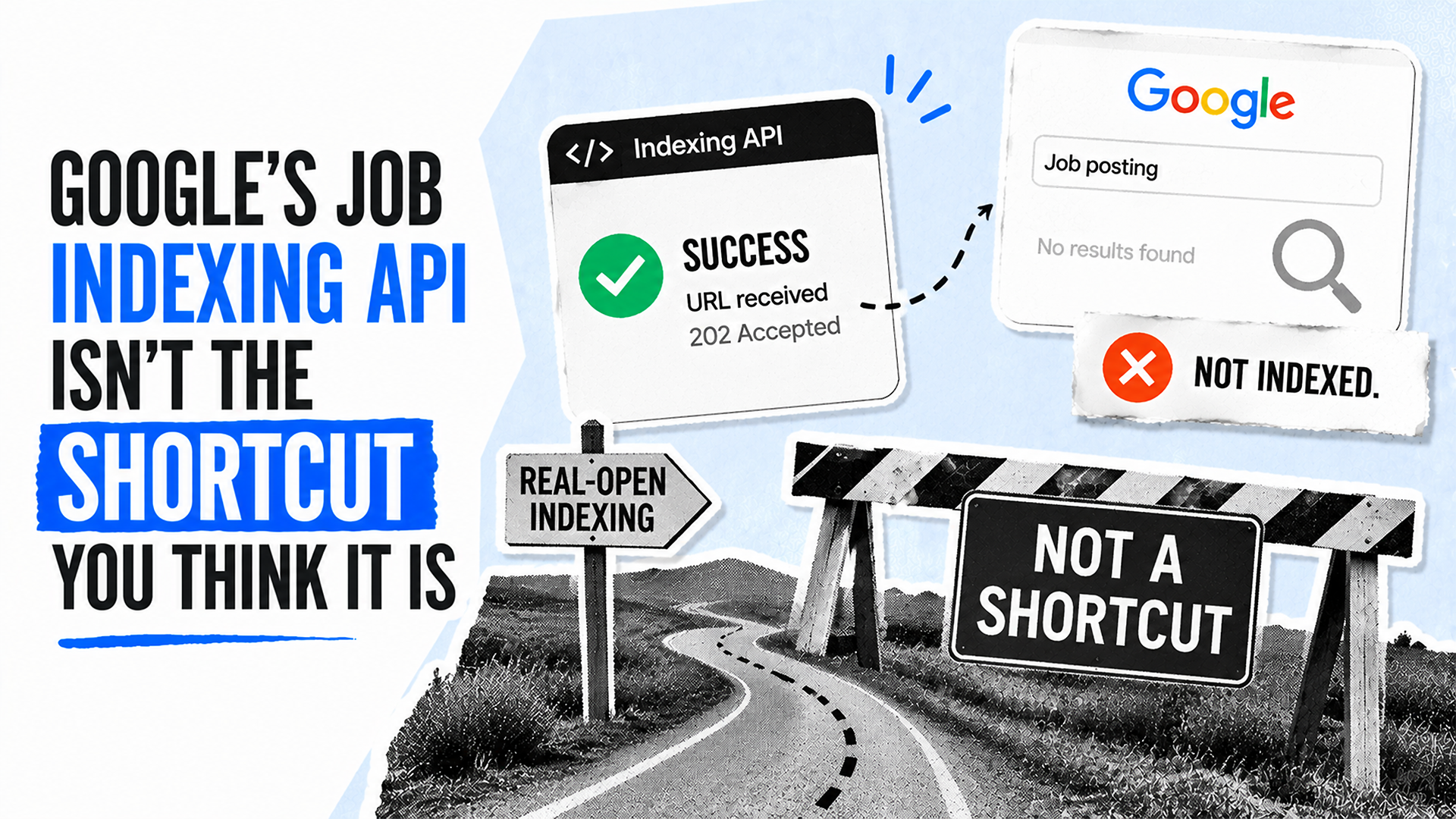
    The important limitation is that an accepted request confirms delivery of a notification, not the outcome a job board ultimately needs. Understanding that distinction helps teams measure the API accurately and avoid treating clean server responses as proof of search visibility.
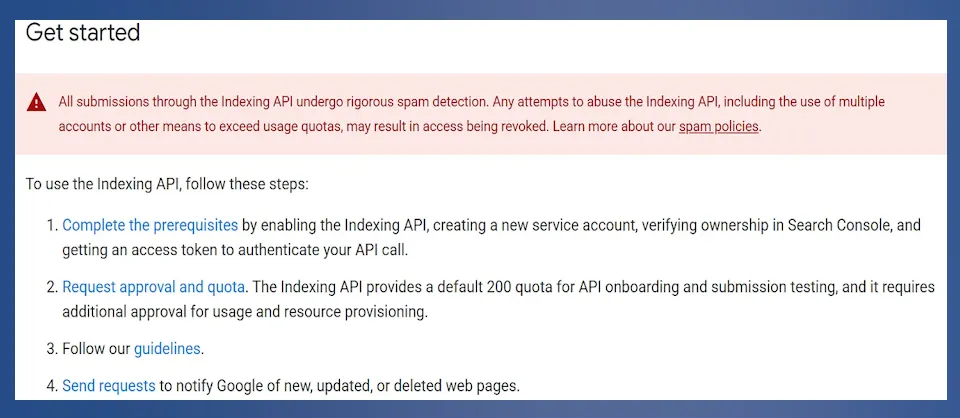
    Indexing API "Get started" page with a spam warning and four setup steps.
    A "Get started" panel warns that submissions undergo spam detection, then lists prerequisites, approval and quota requests, guidelines, and request submission.

    A notification is only the first event in the chain

    According to Search Engine Land, a successful API request means Google received the submission. It does not establish that Google crawled the page, added it to the index, displayed it in the Google Jobs experience, or generated traffic from it.

    Dark API metrics table showing requests, error rates, and median and 95th-percentile latency for three services.
    A filtered metrics table lists 204 Web Search Indexing API requests, 36 reCAPTCHA Enterprise API requests, and one Gemini for Google Cloud API request.

    Those are separate stages with separate evidence requirements:
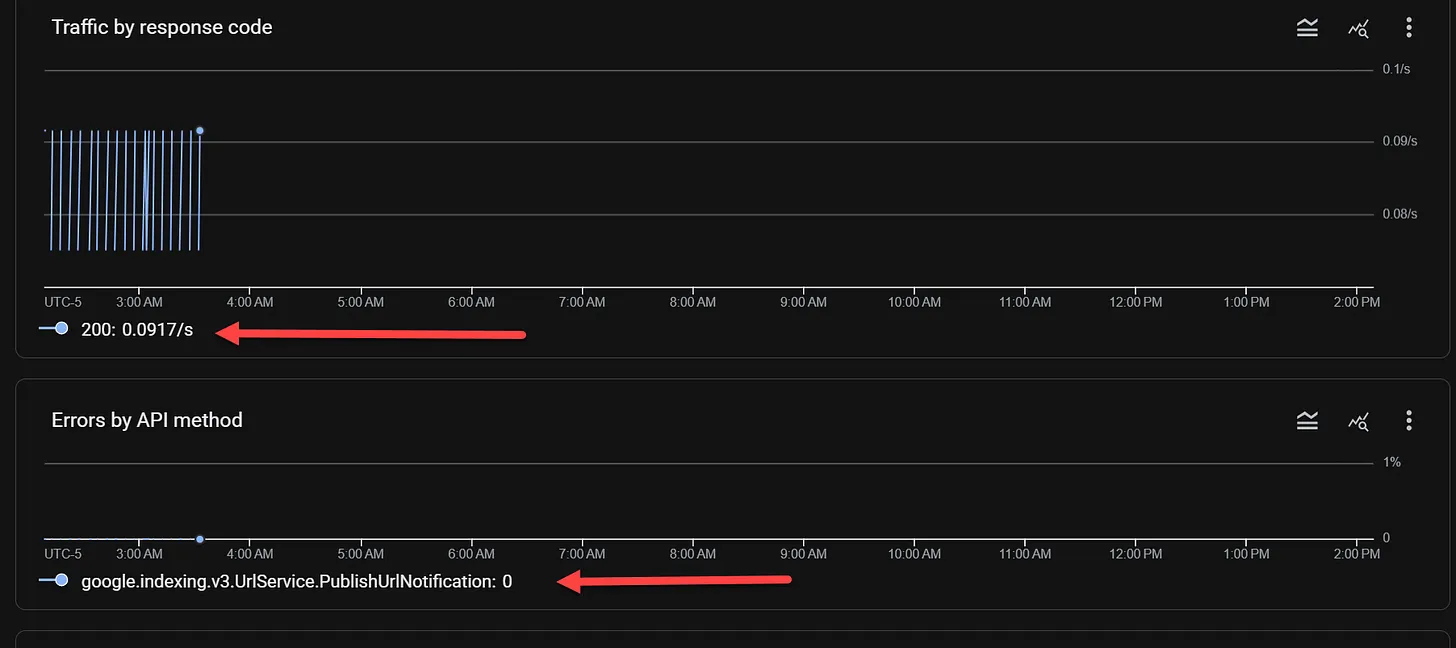
    Dark dashboard charts show HTTP 200 traffic at 0.0917/s and zero API errors, with red arrows pointing to the legends.
    Two dark monitoring charts display intermittent HTTP 200 traffic near 3:00 AM and zero errors for the listed PublishUrlNotification API method.
    • Submitted: The site’s system sent a notification.
    • Accepted: Google returned a successful response to that request.
    • Crawled: Google fetched the page.
    • Indexed: Google made the page eligible to appear in search.
    • Visible and productive: The listing earned impressions, clicks, or conversions.

    A reliable reporting setup should preserve these distinctions. Otherwise, an operational metric such as API acceptance can be mistaken for an SEO result.
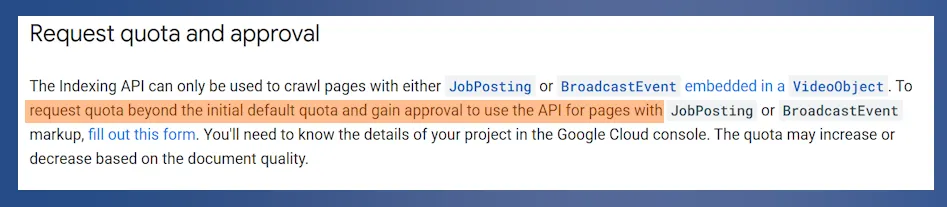
    Documentation excerpt titled "Request quota and approval" with a quota request sentence highlighted in orange.
    A documentation excerpt says the Indexing API is limited to JobPosting or BroadcastEvent pages and directs users to submit a form for more quota and approval.

    Key takeaways

    • The Indexing API is restricted to eligible job-posting and livestream pages; it is not a general acceleration tool for arbitrary URLs.
    • An HTTP 200 response confirms receipt, not crawling, indexing, removal, ranking, or traffic.
    • Notification metadata describes submissions rather than the current index status of a page.
    • Quota availability and successful test requests do not necessarily prove that an account has production access.
    • Job boards should validate structured data, API behavior, and search status as separate layers.

    The API has a narrow, defined scope

    Search Engine Land reports that Google permits the API for pages carrying JobPosting structured data and for livestream pages using BroadcastEvent within a VideoObject. Blog posts, product pages, category archives, service pages, and other ordinary URLs are outside that stated use.
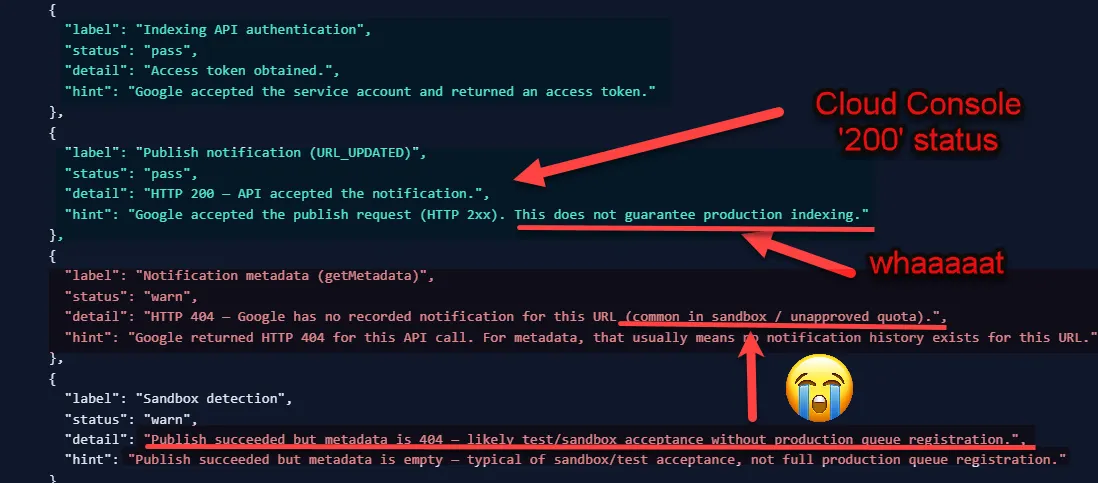
    Annotated API results show HTTP 200 publish success, a 404 metadata warning, red arrows, and a crying emoji.
    A dark code-style report contrasts a passed URL_UPDATED request and HTTP 200 response with a getMetadata HTTP 404 warning, highlighted by red arrows, "whaaaaaat," and a crying emoji.

    For an eligible job page, the two relevant notification types are straightforward. URL_UPDATED can be sent when a listing is published or meaningfully changed. URL_DELETED can be sent when the listing has been removed and should no longer remain indexed.
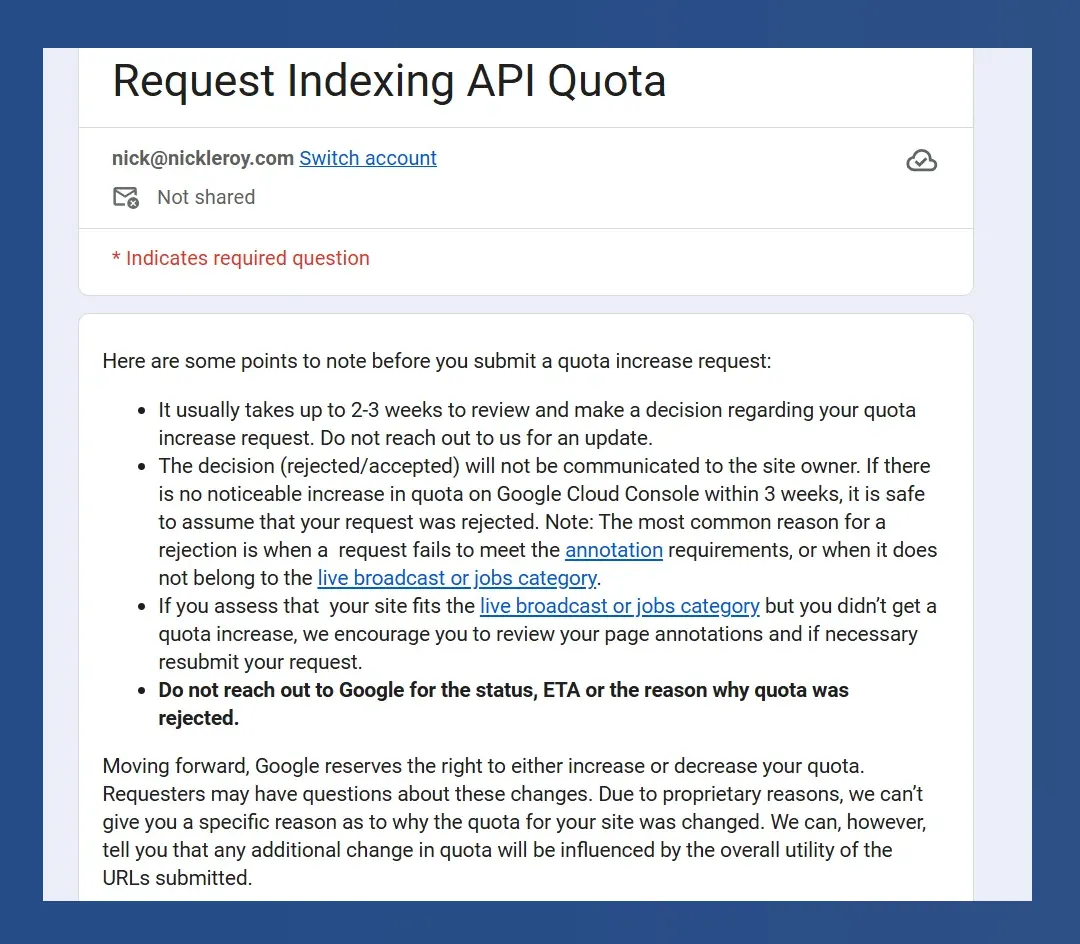
    Request Indexing API Quota form with notes on review times, eligibility, rejections, and quota changes.
    A Request Indexing API Quota form says reviews usually take two to three weeks and warns that annotation and eligible-content requirements must be met.

    Even here, the request is not a command. The source notes that Google’s documentation says the company may recrawl a URL after an accepted update request and may remove one after an accepted deletion request. That wording preserves Google’s control over what happens next.
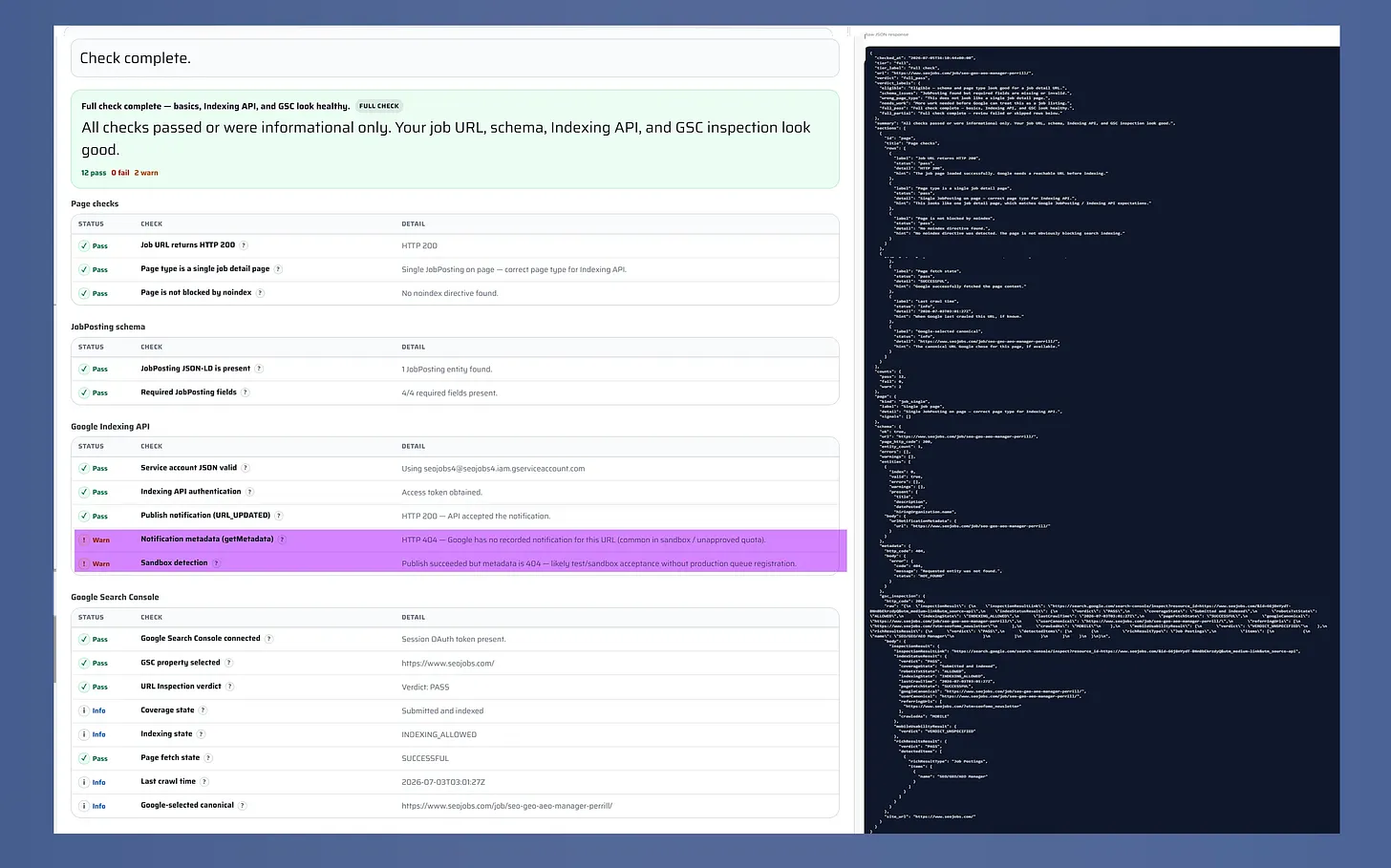
    Job indexing health check with passing results, two warnings, and a raw JSON response.
    A completed job indexing health check shows 12 passes, no failures, and two warnings beside a dark panel containing the full raw JSON response.

    Metadata, sandbox access, and quotas require careful reading

    The API’s getMetadata capability can help confirm the history of update and deletion notifications for a URL. It cannot answer the larger question of whether that URL is currently crawled, indexed, removed, or receiving exposure. Metadata is therefore useful for diagnosing the submission pipeline, but it is not an index-status report.

    ```json
{
  "alt": "SEO For Lunch newsletter promotion with Nick Leroy smiling in checkered shirt.",
  "caption": "Join Nick Leroy for a fresh take on SEO with the #SEOForLunch newsletter—bringing actionable insights straight to your inbox.",
  "description": "This image promotes the #SEOForLunch newsletter by Nick Leroy, featuring a smiling Nick in a checkered shirt against a blue graphic background. The design includes a plate graphic with 'Not Your Average Table Talk' and emphasizes SEO insights, inviting viewers to subscribe at seoforlunch.com. Keywords: SEO, Nick Leroy, newsletter, marketing, insights."
}
```

    Access also has an onboarding dimension. Search Engine Land says Google’s quickstart documentation describes a default quota of 200 requests for onboarding and submission testing, with further approval required for usage and resource provisioning. A visible quota or apparently successful test can therefore create confidence without demonstrating full production service.

    Futuristic web browser and analytics dashboard overlap amid neon data streams, illustrating the convergence of SEO, PPC and AI-driven search marketing.
    Organic visibility, paid media and artificial intelligence merge into one connected search ecosystem, where vivid data streams link a creative website with a powerful analytics dashboard.

    The source also reports approval delays, but the evidence should be treated as observational rather than definitive. The article’s author said two job-board requests had received no response after six months in 2026. Alexander Chukovski reportedly said none of the job boards he worked with over roughly 10 to 12 months received a response. These accounts suggest that approvals may have become harder to obtain, but they do not prove that Google has stopped processing every request.

    How job boards can validate the system responsibly

    A practical audit should test the implementation in layers rather than seeking one all-purpose success signal:

    1. Confirm that the URL represents a supported job posting and contains the required structured data.
    2. Verify that update and deletion requests use the appropriate notification type.
    3. Record response codes and notification metadata as evidence of API delivery only.
    4. Check crawling, indexing, and search performance through appropriate search diagnostics instead of inferring them from the API response.
    5. Track expired listings separately so removal can be verified rather than assumed.

    The source highlights a free Job Indexing Health Check on SEOJobs.com that can review job schema and, in its fuller mode, API and Google Search Console responses. Whether teams use that tool or their own diagnostics, the sound approach is the same: measure each stage according to what its evidence can actually prove.

    For job boards, the API can remain a useful notification channel. Its value becomes clearer, not weaker, once acceptance is treated as the beginning of verification rather than the finish line.


    Inspired by this post on Search Engine Land.


    crushpress.ai community screenshot
  • Ensure AI Sees Your Products: A 6-Point Optimization Guide

    Ensure AI Sees Your Products: A 6-Point Optimization Guide

    I’ve recently delved into the world of AI search engines like ChatGPT, Google AI Mode, and Perplexity, and how they’re transforming the way consumers find and buy products online. It’s clear to me that if my product pages aren’t optimized for these AI assistants, I’m likely missing out on significant traffic and revenue.

    What I’ve discovered is that AI assistants evaluate product pages differently than traditional search engines. They require a deep understanding of products to recommend them confidently to users with varied needs.

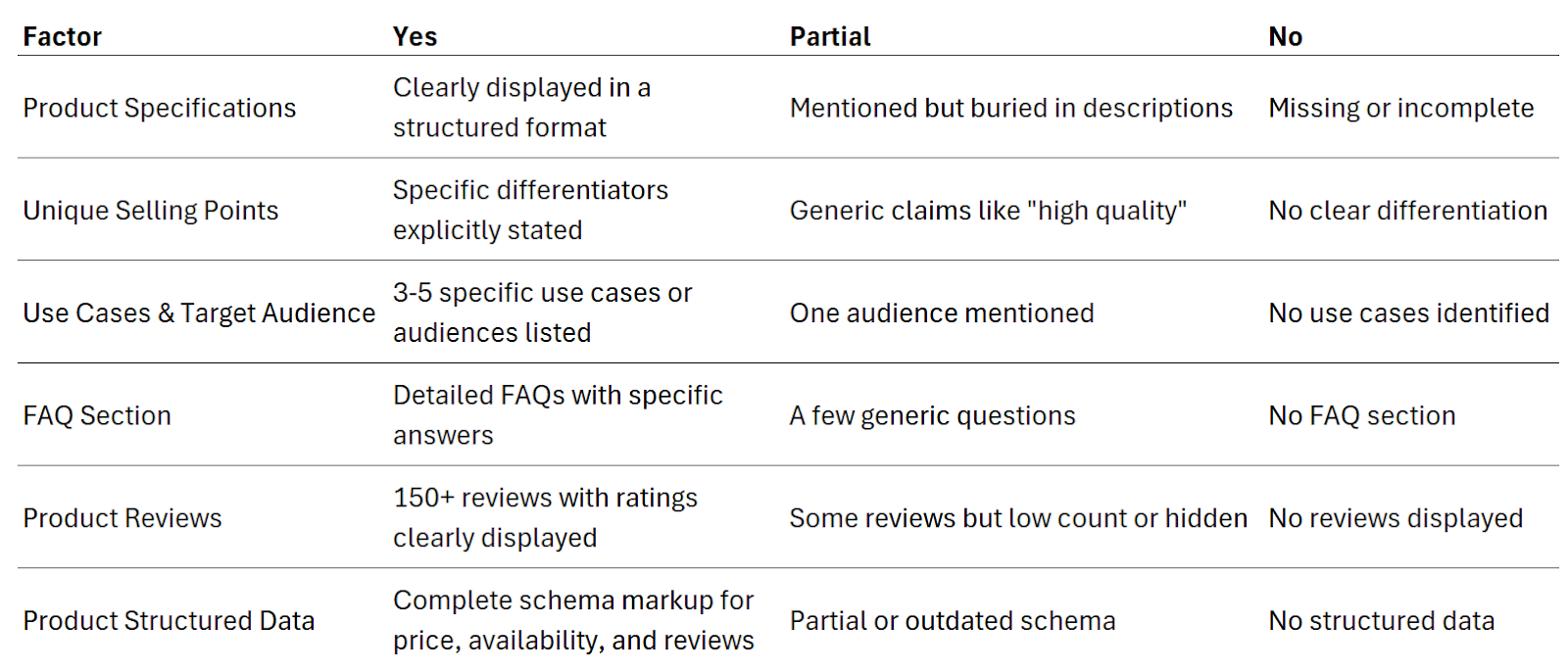
    To ensure my product pages are AI-ready, I’ve crafted a simple scorecard focusing on six key factors:

    1. Product specifications

    ```json
{
  "alt": "Amazon product details for Petmate Ultra Vari Kennel, large size, dog supplies.",
  "caption": "Explore the features of the Petmate Ultra Vari Kennel, ideal for large dogs. This dog crate is airline-approved and designed for secure travel.",
  "description": "This image shows an Amazon product details page for the Petmate Ultra Vari Kennel, designed for large dogs. The kennel is airline-approved with interior features like ventilation and a moat. It weighs 22 kilograms and measures 48"L x 32"W x 35"H. Made of plastic, it supports dogs weighing 90 to 125 lbs, perfect for air travel. This bestseller ranks #64,370 in pet supplies, with an average rating of 4.1 stars from over 700 reviews."
}
```

    Does the product page clearly display the product’s attributes and specifications?

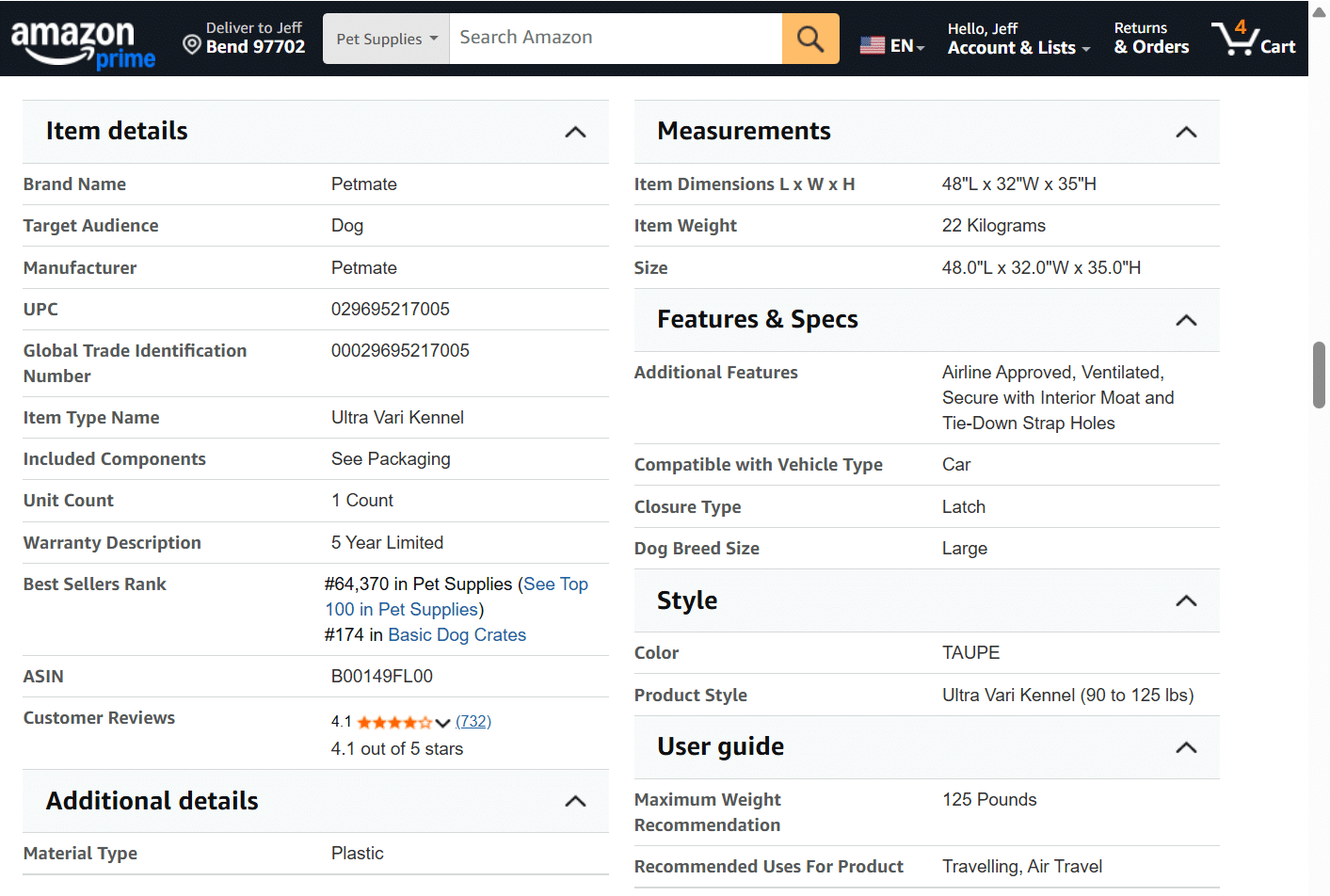
    AI assistants need explicit specifications to understand my products and match them with customer needs. For example, if someone asks for “an airline-friendly crate for a 115-pound dog,” the AI must see the weight limit clearly to recommend it.

    Amazon excels at this, as their product pages display detailed specifications that likely boost their AI search performance.

    ```json
{
  "alt": "The CapmatchOne logo with a gradient circle and bold text.",
  "caption": "Discover innovation with the CapmatchOne logo, featuring sleek typography and a modern gradient circle.",
  "description": "The CapmatchOne logo features bold, modern typography coupled with a gradient circle, symbolizing connection and innovation. The sleek design conveys a sense of progress and creativity. This image can be used for branding or promotional purposes, appealing to audiences interested in innovative solutions and forward-thinking designs."
}
```

    Action item: I ensure all specifications are clearly presented on my product pages, ideally in a structured table or a list, rather than burying them in the description or marketing copy.

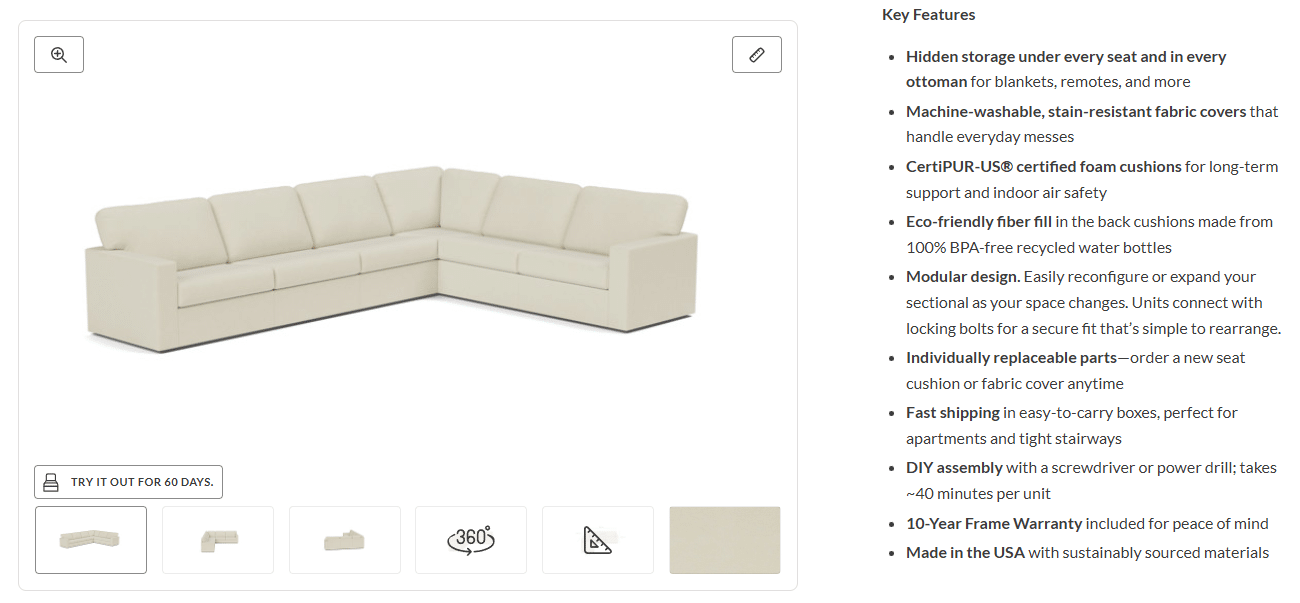
    2. Unique selling points

    Are the product’s unique benefits clearly described?

    ```json
{
  "alt": "Beige L-shaped sectional sofa with hidden storage, modular design, and eco-friendly materials.",
  "caption": "Discover comfort and versatility with this beige L-shaped sectional sofa, featuring hidden storage and eco-friendly materials, perfect for any modern living space.",
  "description": "This image shows a beige L-shaped sectional sofa with clean lines and contemporary style. It features hidden storage under every seat, machine-washable and stain-resistant covers, and CertiPUR-US certified foam cushions. The modular design allows for easy reconfiguration. This eco-friendly piece uses materials such as BPA-free recycled water bottles for cushion filling and offers fast shipping and easy DIY assembly. Perfect for urban apartments and it comes with a 10-year frame warranty."
}
```

    Highlighting what makes my products special gives AI a reason to recommend them over competitors. It’s crucial for AI to grasp these unique features to decide on recommendations.

    Action item: I emphasize key features that set my products apart, avoiding vague claims like “high-quality craftsmanship” and instead focusing on specific differentiators.

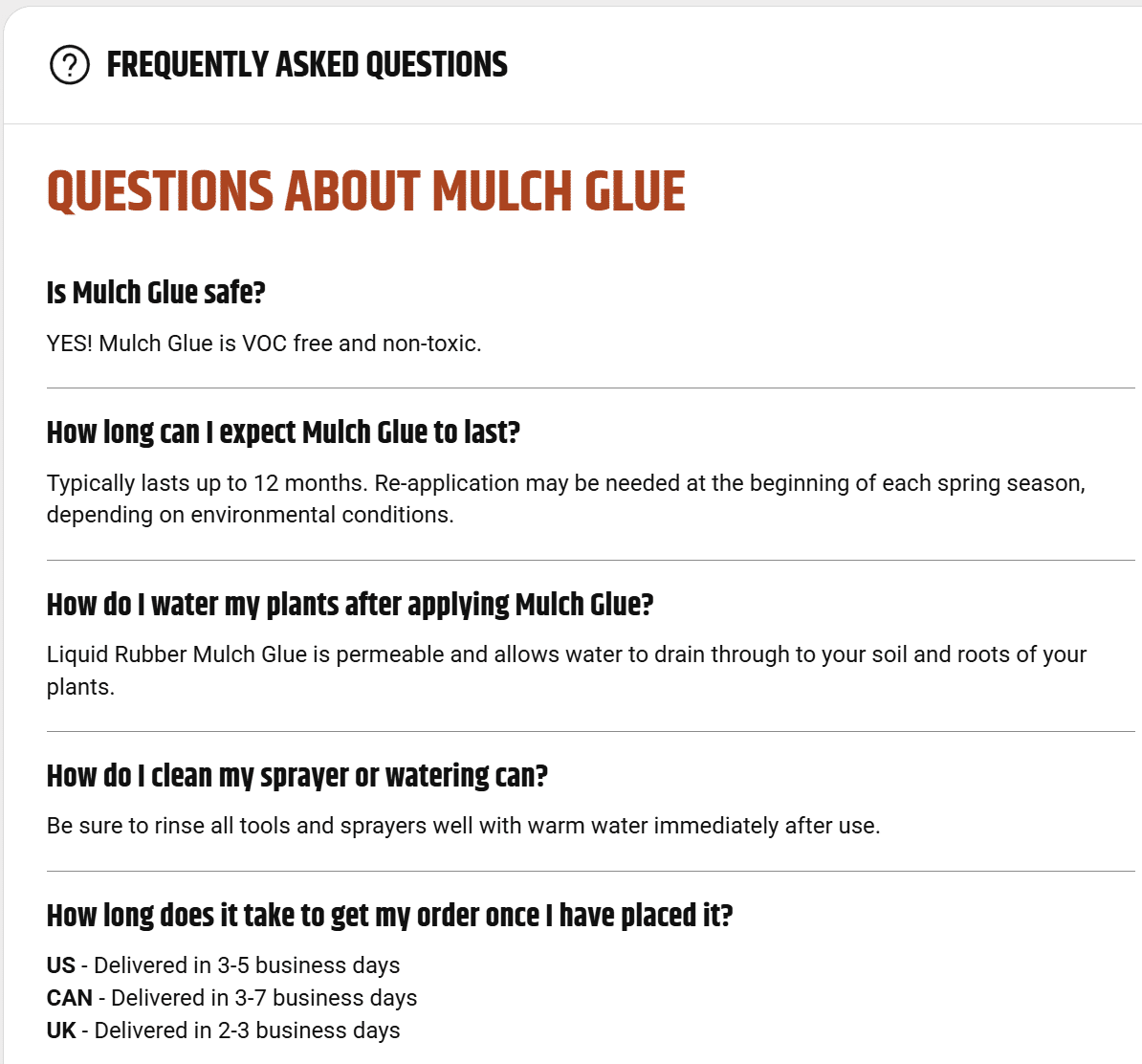
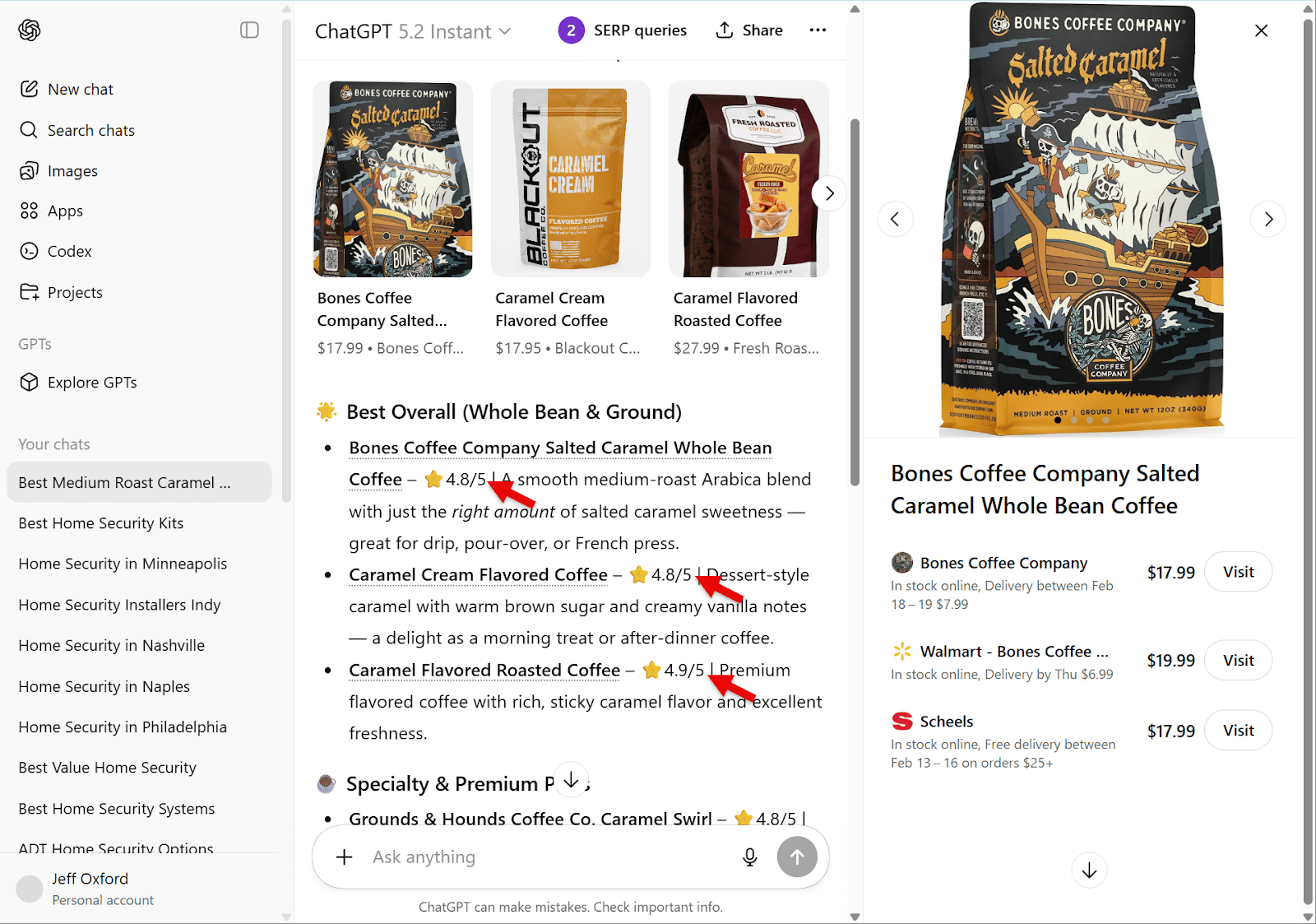
    3. Use cases and target audience

    FAQ section about mulch glue, covering safety, longevity, application, and delivery details.
    Discover everything you need to know about Mulch Glue, from safety and longevity to watering tips and delivery times.

    Are the product’s intended use cases and audience clear?

    AI matches products with people and their needs, not just keywords. Explicitly stating who the product is for and how it’s used makes it more likely to be recommended by AI.

    Action item: I list the top use cases and audience segments for each product, considering situations, pain points, and goals.

    ```json
{
  "alt": "Comparison of various caramel flavored coffees including Bones Coffee Company Salted Caramel with ratings and prices displayed.",
  "caption": "Discover the top-rated caramel flavored coffees with Bones Coffee Company's Salted Caramel leading the pack, offering a smooth blend perfect for any coffee lover.",
  "description": "The image showcases a comparison of caramel flavored coffees, highlighting Bones Coffee Company Salted Caramel Whole Bean Coffee as a top choice. This medium roast Arabica blend is noted for its perfect balance of salted caramel sweetness, earning a 4.8/5-star rating. Ideal for drip, pour-over, or French press brewing, it is competitively priced at $17.99 with delivery options. The image also shows offerings from other brands with varied flavors and ratings, providing a comprehensive look at customer favorites."
}
```

    4. FAQ section

    Does the product page include an FAQ section answering common questions about the product?

    FAQs can bolster AI’s confidence in recommending my products by showing they’re a good fit for specific queries. The more detailed the FAQ section, the more it helps in AI search contexts.

    ```json
{
  "alt": "Bones Coffee Company Salted Caramel 12oz bag on a rustic surface with caramel cubes and sea salt.",
  "caption": "Delight in the flavors of Bones Coffee Company's Salted Caramel blend. This 12oz medium roast promises a rich taste, adored by coffee lovers everywhere.",
  "description": "This image showcases a 12oz bag of Bones Coffee Company's Salted Caramel flavored coffee, featuring a distinctive pirate ship design. Surrounded by coffee beans, caramel cubes, and sea salt, this medium roast coffee is highly rated for its unique taste and aroma. Available for purchase at $17.99, this whole bean coffee is perfect for those seeking a sweet and salty coffee experience."
}
```

    Action item: I gather and answer the most common questions from customer inquiries, reviews, and even competitor analysis to include on product pages.

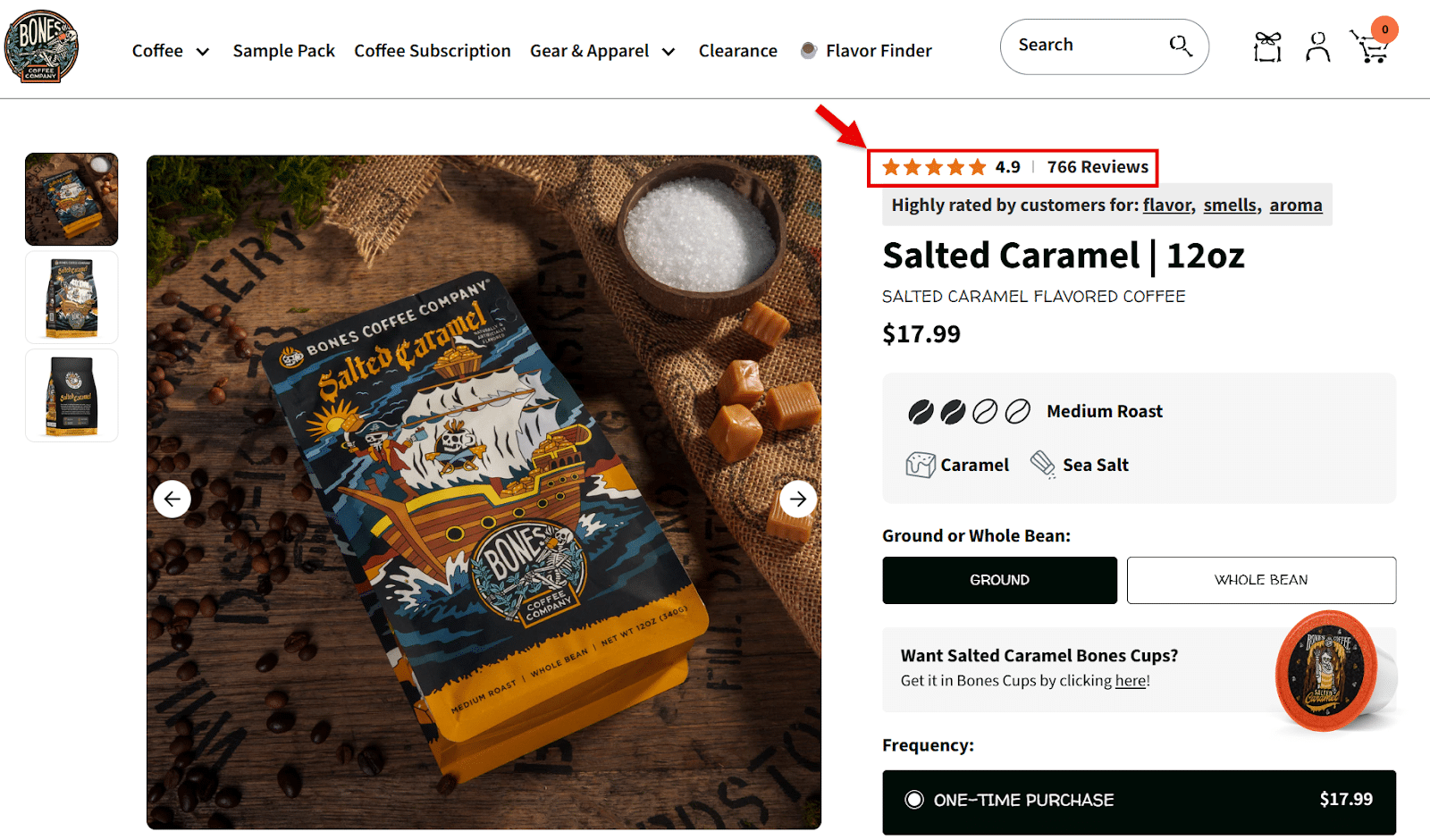
    5. Product reviews

    Does the product page display customer ratings and review counts?

    ```json
{
  "alt": "Screenshot of JSON-LD script for Bones Coffee Company's Salted Caramel coffee product details.",
  "caption": "Delve into the rich details of Bones Coffee Company's Salted Caramel coffee, from product specs to price offerings, in this JSON-LD snippet.",
  "description": "This image showcases a JSON-LD script detailing the product information for Bones Coffee Company's Salted Caramel coffee. It includes the product name, image URL, description, SKU, price offers, availability, and aggregate rating with a high score of 4.9 out of 5. Key attributes like the brand and pricing in USD are also highlighted, providing a comprehensive digital representation of the coffee product for online listings and SEO optimization."
}
```

    AI recommends products with proven reputations. Displaying a high rating and substantial number of reviews increases the chances of my products being recommended by AI.

    Action item: I ensure high visibility for product ratings and review counts on every product page, possibly using third-party platforms to solicit reviews.

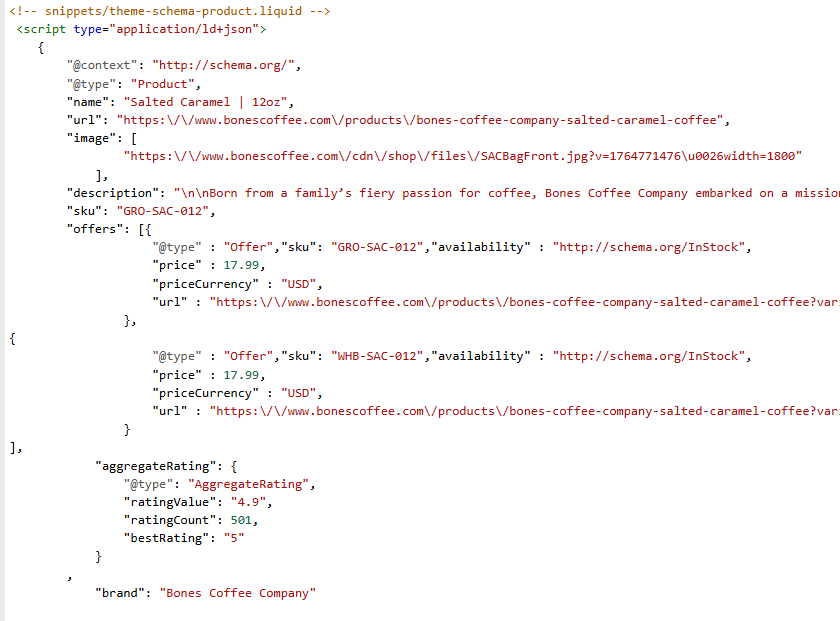
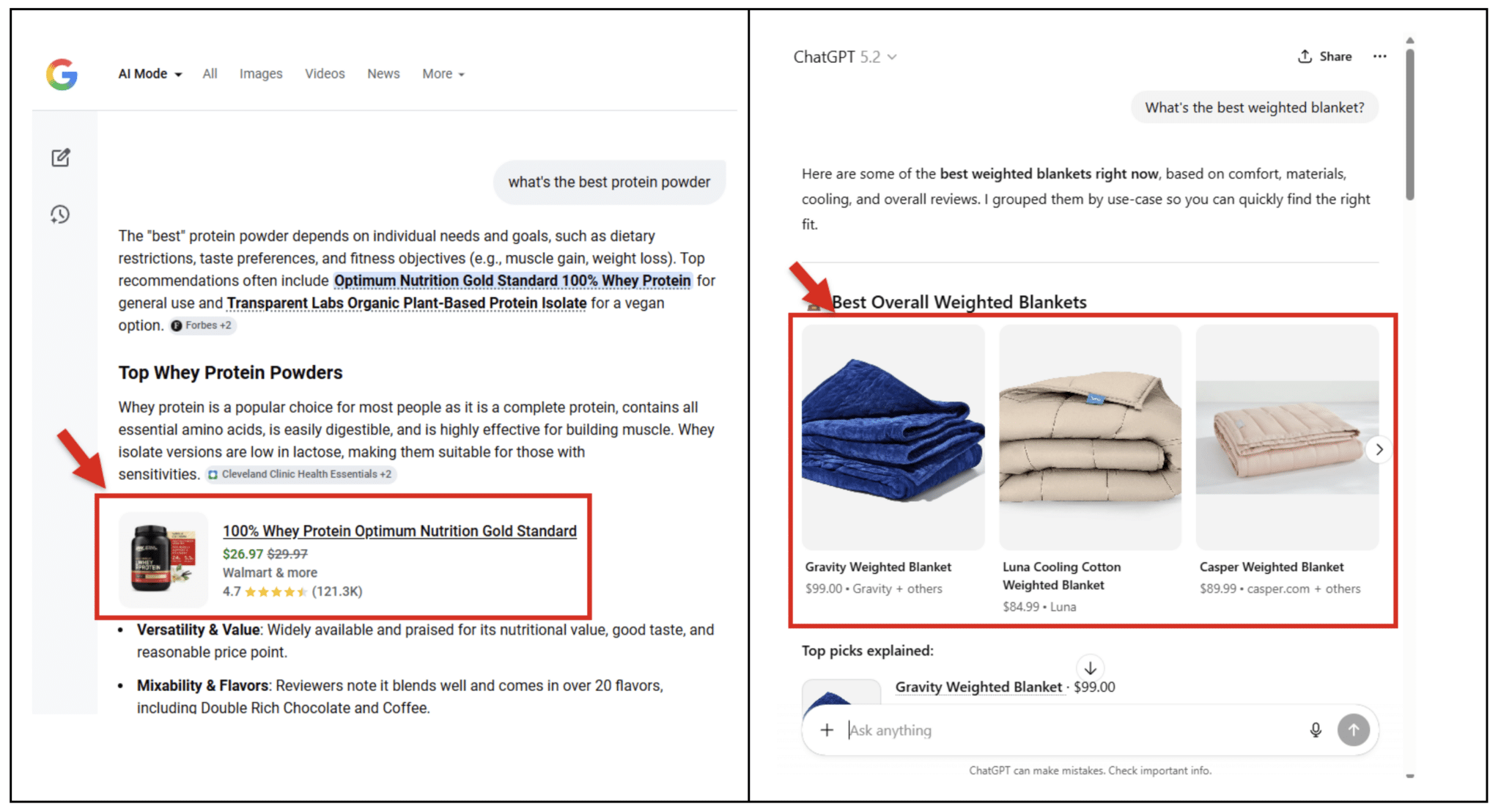
    6. Product structured data

    ```json
{
  "alt": "Comparison of whey protein and weighted blankets on a webpage.",
  "caption": "Discover the top recommendations for whey protein powders and weighted blankets on this informative webpage comparison.",
  "description": "The image displays a webpage comparison between top whey protein powders and the best overall weighted blankets. On the left, Google Search results highlight the '100% Whey Protein Optimum Nutrition Gold Standard,' marked with an arrow for emphasis, priced at $26.97, and rated 4.7 stars. On the right side, ChatGPT presents alternatives for the best weighted blankets, including Gravity and Casper, with prices and images shown. This comparison visually guides users to informed purchasing decisions based on product reviews and ratings."
}
```

    Does the product page include structured data for price, availability, reviews, and other key attributes?

    Structured data helps AI understand my product information effortlessly and even feeds into knowledge graphs that power AI recommendations.

    I understand that as AI agents engage more deeply in commerce, detailed product data becomes crucial for comparisons and purchasing.

    ```json
{
  "alt": "Comparison table showing product factors rated as Yes, Partial, or No.",
  "caption": "A comprehensive comparison table evaluating product factors like specifications, unique selling points, and reviews with clear Yes, Partial, or No ratings.",
  "description": "This image displays a comparison table assessing various product-related factors. Each factor is categorized under columns labeled Yes, Partial, or No. Factors include Product Specifications, Unique Selling Points, Use Cases & Target Audience, FAQ Section, Product Reviews, and Product Structured Data. This layout provides a clear and structured overview, aiding in identifying strengths and weaknesses of product listings for better visibility and decision-making."
}
```

    Putting the scorecard to work

    Here’s my concise strategy to audit and enhance my product pages for AI optimization, focusing on closing gaps where AI might overlook my products.

    Prioritizing these optimizations means I’m not only engaging effectively but also increasing my competitiveness in the AI-driven market landscape.


    Inspired by this post on Search Engine Land.


    crushpress.ai community screenshot
  • Enhance Forum Visibility: Google’s New Structured Data Update

    Enhance Forum Visibility: Google’s New Structured Data Update

    I recently discovered that Google has enhanced its structured data support for forum and Q&A pages. This update introduces new properties that allow us to better signal reply threads, quoted content, and identify whether content is generated by AI or humans.

    With these changes, which aim to boost Google’s accuracy in interpreting discussions and Q&A content, we can now ensure our content is represented more precisely.

    What’s New. Google has updated its QAPage documentation to include commentCount and digitalSourceType. Moreover, the DiscussionForumPosting documentation now supports sharedContent alongside these new properties.

    The Details. Using Q&A markup, I’m able to apply commentCount to questions, answers, and comments, showcasing the total number of comments even if they are not fully marked up. This total should align with answerCount + commentCount, representing all types of replies.

    How It Works. The digitalSourceType property allows me to indicate whether content is produced by a model or simple automation. I can use TrainedAlgorithmicMediaDigitalSource for advanced outputs and AlgorithmicMediaDigitalSource for basic bots. If this property is left out, Google assumes the content is human-generated.

    What’s New for Forums. The sharedContent property helps me to mark the primary item that’s being shared in a post. Google supports various content types like WebPage, ImageObject, and more, including quotes or reposts.

    Why This Matters. This update provides me with greater control over how Google interprets community content, which is particularly important for sites rich in forums, support communities, UGC platforms, and Q&A sections. Google can now distinguish between answers and comments more effectively, tally partial threads across multiple pages, and recognize when a post primarily shares specific media types.

    Documentation. The official documentation was updated on March 24, providing all the details I need to apply these new capabilities.


    Inspired by this post on Search Engine Land.

    crushpress.ai community screenshot
  • Revamp Your Vehicle Listings with Google’s ‘Build to Order’ Feature

    Revamp Your Vehicle Listings with Google’s ‘Build to Order’ Feature

    When I discovered Google’s latest update to the Merchant Center, I was thrilled. They’ve added a ‘build to order’ option for vehicle listings, offering sellers like me a streamlined way to display customizable models that customers can factory-order.

    I immediately saw how this attribute could revolutionize my listings. It’s designed for dealers who, like myself, don’t always have every model available on the lot. This addition allows us to tag vehicles that aren’t in stock but can be tailored and ordered. It’s a game-changer!

    What needs to change. I’m aware that updating my listings involves two critical steps. First, I need to adjust my structured data by setting availability to BuildToOrder. Secondly, I must align my Merchant Center feed with the same availability code. Ensuring consistency is key to avoid listing disapprovals.

    Instruction on when to use the availability [availability] attribute in GMC 

    Why we care. This update is a breath of fresh air for us sellers. Until now, conveying a vehicle’s unavailability for immediate pickup was challenging. Now, the ‘build to order’ option clearly mirrors the operations of modern automakers, especially those like Tesla and Rivian that offer direct-to-consumer customization. It helps set clear expectations for our customers and ensures our data is pristine for Google.

    ```json
{
  "alt": "Guidelines for product availability status including in stock, out of stock, preorder, backorder, and build to order.",
  "caption": "Explore the different product availability statuses: from in stock and out of stock to preorder, backorder, and even build to order for vehicle ads.",
  "description": "This image illustrates guidelines for product availability statuses required for all products. It lists supported values businesses can use: in stock, out of stock, preorder, backorder, and build to order, with detailed descriptions for each. These values ensure that product feed information matches the website details, facilitating smooth transactions. This guide aids businesses in managing inventory visibility effectively."
}
```

    The fine print. Remember, if a vehicle is categorized as ‘build to order,’ it must have the condition attribute set to ‘new.’ If it’s listed as ‘used,’ it will be disapproved. Google regards build-to-order vehicles as newly configured, not pre-owned.

    Bottom line. For anyone like me selling customizable or factory-order vehicles, this update is a more precise way to reflect vehicle availability. However, it only works if my feed, structured data, and condition fields are in synchronization.

    I first learned about this update from Google Shopping specialist Emmanuel Flossie, who kindly explained how to implement it on his blog.

    Dig deeper. For more insights, check out the “Availability [availability]” Google Merchant Centre help doc


    Inspired by this post on Search Engine Land.


    crushpress.ai community screenshot
  • Boost AI Search Visibility with Effective Schema Markup

    Boost AI Search Visibility with Effective Schema Markup

    As someone keen on improving AI search visibility, I’ve delved into the world of schema markup. Let me share what I’ve learned about essential schema types, practical implementation tips, and how structured data enhances the understanding of content by Large Language Models (LLMs).

    By incorporating schema markup, I’ve noticed significant improvements in how AI and search engines interpret my content. This not only boosts my content’s visibility but also ensures it reaches the right audience effectively.

    The right schema types serve as a bridge, enabling AI systems to decipher and present content accurately. In my experience, selecting the appropriate schema type is crucial for optimizing how LLMs process information.

    Moreover, implementing schema markup isn’t as daunting as it seems. With some practice, I’ve found that the structured data seamlessly fits into my workflow, enhancing the overall search optimization process.


    Inspired by this post on HiGoodie Blog.


    crushpress.ai community screenshot