Have you ever felt overwhelmed by the complexities of crafting a successful B2B content strategy? Let me introduce you to an ancient Japanese framework called SHU HA RI that has the potential to transform your approach.
SHU HA RI is more than just a methodology; it’s a journey of mastery that can adapt to your business needs, fostering growth in your digital strategy. Let’s delve into how it can revolutionize the way we think about content creation.
Embracing SHU HA RI allows us to cultivate a deeper understanding and mastery in stages, starting from the fundamentals and progressing to innovation. This can be especially transformative for B2B startups striving to stand out in the competitive digital space.
Have you ever felt overwhelmed by the sheer number of marketing tools available? I know I have, which is why I’m thrilled to introduce you to Genmark Flow—a transformative AI-powered service that shifts the focus to achieving real results instead of just relying on tools.
Through a unique Service as Software approach, Genmark Flow aims to deliver exceptional marketing outcomes by seamlessly integrating artificial intelligence into your strategies. This isn’t just about adding another tool to your arsenal; it’s about enhancing your existing processes with AI-driven insights that truly make a difference.
Join me on this journey to redefine how we perceive and utilize AI in marketing, prioritizing results that drive growth and enhance performance. With Genmark Flow, you’re not just using AI, you’re partnering with it to achieve success.
I’ve realized that building a business that thrives solely on advertising is risky. We can’t let our ventures be at the mercy of fluctuating ad performances.
Instead, let’s explore how to establish e-commerce growth engines. These strategies focus on compounding growth over time, emphasizing customer loyalty and enhancing brand strength.
By shifting our approach, we can generate sustainable revenue that doesn’t hinge solely on ad spend.
For years, I measured digital success through impressions, backlinks, and clicks. Ranking high in search results and getting those clicks meant I controlled the funnel. But, the landscape is rapidly shifting.
Large Language Models (LLMs) like ChatGPT, Claude, Gemini, and Perplexity are now often the first stop for decision-makers seeking answers. These systems don’t provide a list of links; instead, they offer synthesized responses. Whether my brand is part of those answers or overlooked greatly affects its relevance in the buyer’s journey.
This evolution requires a new playbook. It’s no longer just about Google rankings. It’s about being present in AI-generated responses, how those responses frame my brand, and what sources they credit. In this new paradigm, being mentioned is the new click.
The challenge I face is not just tracking these new AI KPIs. It’s about understanding the signals and turning them into actionable strategies. Let’s explore four core AI KPIs: mentions, sentiment, competitive share of voice, and sources, and see how each can shape my approach.
The first KPI, mentions, assesses how often my brand appears in LLM responses. An absence from queries such as “top SaaS tools for analytics” indicates my brand is missing from key conversations before they even start.
But mentions go beyond vanity metrics; they serve as diagnostic tools. Patterns in appearance can reveal which areas of my content strategy resonate and which need reinforcement.
If mentions are sparse in educational queries, I’m focused on developing thought-leadership content that establishes my voice in defining the category. If mentions are lacking in solution-oriented queries, I work on assets that clarify my unique differentiators. Mentions signal where my brand is either visible or invisible.
Now, let’s consider sentiment. Being mentioned is positive, but the accompanying descriptors—“fast,” “trusted,” “expensive”—impact deeply. These adjectives reflect the existing narrative in the data the model has processed.
By capturing the language used around my brand, I can track whether descriptors lean positive, neutral, or negative. Themes that consistently present my brand as “enterprise-grade” but “complex” suggest areas for messaging adjustments.
Negative sentiment shines a light on gaps that need addressing. If I’m perceived as costly, I create ROI calculators or case studies demonstrating value. For complex perceptions, content that simplifies onboarding can help. Positive sentiment means amplifying narratives that work, such as emphasizing “trust” in campaigns.
The competitive share is about more than mentions and sentiment. It’s about measuring my brand’s presence in LLM responses compared to my competitors.
Understanding not just how often I appear relative to them, but also the nature of these appearances, I can strategize accordingly. Insights from competitive share turn into actionable battle plans.
Finally, sources reveal who the AI trusts to tell the story. If a competitor’s whitepaper is cited over my content, it’s time to establish authority with comprehensive, structured, and credible content.
Crafting content recognized as authoritative helps shift my brand from being merely mentioned to being foundational to the answers generated by AIs.
The convergence of these KPIs forms a compass to guide my strategic efforts:
Marketers embracing AI KPIs now will not only forge ahead in this era but actively shape it as well.
It might seem early, with tools still in development and no universal dashboard available, but early adopters will reap the benefits.
Reflecting on the early 2000s and the birth of SEO, those who optimized early found themselves owning search visibility, a parallel moment for AI KPIs emerges now.
The effort required isn’t complex. Simply monitoring prompts, logging responses, and analyzing mentions, sentiment, share, and sources provides valuable insights that can shape strategies today.
The advent of LLMs redefines what visibility means. Increasingly, my brand’s story is communicated within AI-generated responses long before a prospect visits my website.
Thus, KPIs become crucial. Mentions are the new clicks in this evolving landscape. Embracing these insights allows me to fill visibility gaps, reshape perceptions, benchmark competitors, and secure authoritative positions.
At Brightspot, we’re guiding organizations in this shift, translating AI insights into actionable strategies that secure brands’ visibility and trust. Learn more at brightspot.com.
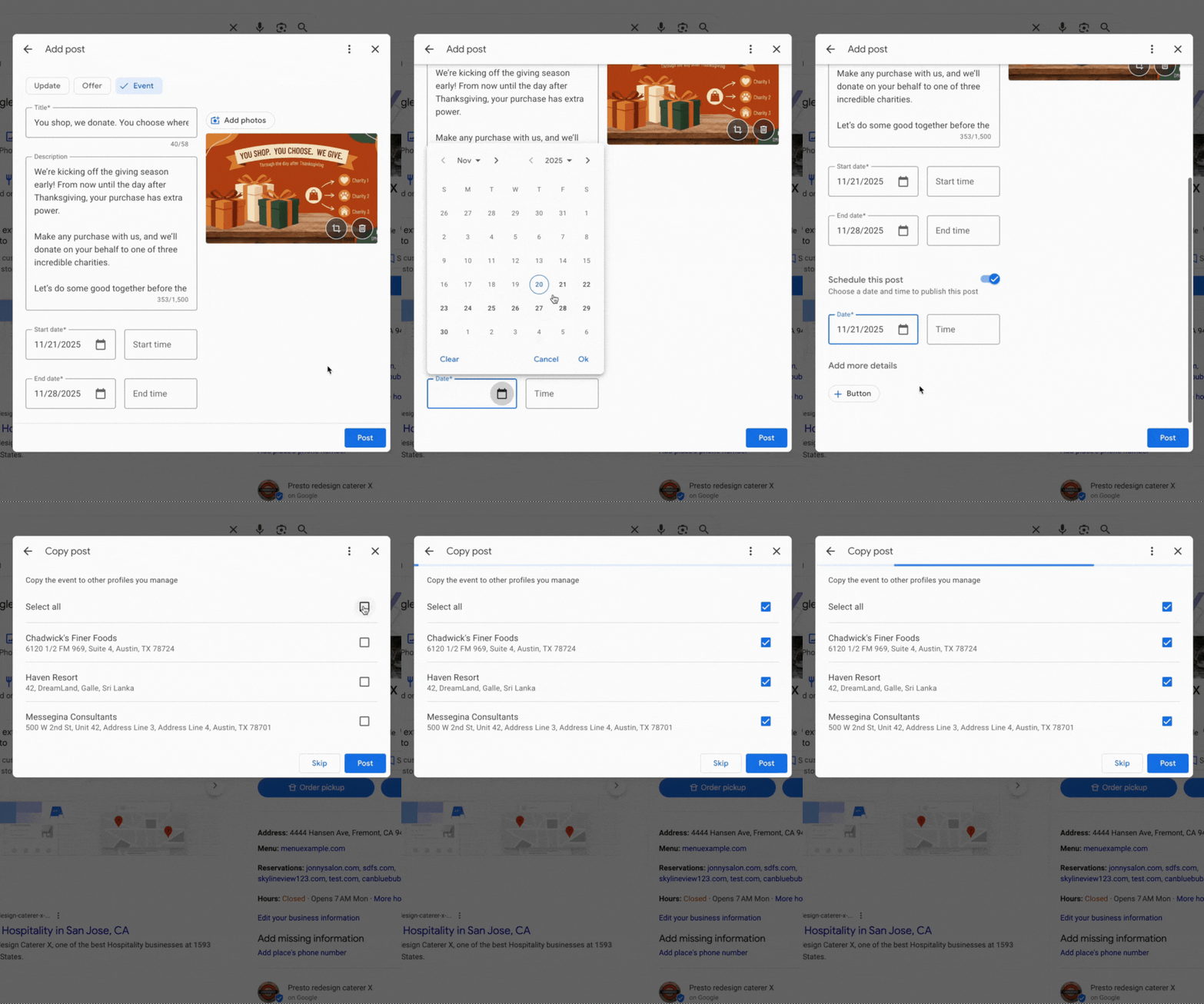
I’m thrilled to share that Google Posts now includes features that support scheduling and multi-location publishing within Google Business Profiles. These updates are designed to make it easier for us to manage our Google Posts, whether they are for our businesses or clients.
Scheduling. One exciting new feature when adding a Google Post within our Google Business Profiles is the option to “schedule this post.” We can now select the exact date and time when we want our posts to go live.
Lisa Landsman from Google shared on LinkedIn, “Plan your entire week or month in advance! You can now schedule your Google Posts to go live automatically at the perfect time.”
Multi-location publishing. If you, like me, manage several locations for a business, you’ll find the new multi-location feature incredibly convenient. It allows us to quickly copy Google Posts to some or all of our locations with just a click. Lisa Landsman explained, “Easily create a single post and apply it instantly to multiple business locations in one click.”
What it looks like. Here’s a GIF that shows this functionality in action:
Why we care. I care about these updates because I know how busy businesses can be. Often, we don’t have the time to pause everything just to create a timely Google Post about an upcoming event or important message. Now, we can schedule these posts in advance and copy them effortlessly across locations we manage.
As Lisa Landsman from Google pointed out, “We know the upcoming holiday season is a crucial, and hectic, time for your business. It’s also your biggest opportunity to get your events, offers, and updates in front of potential customers who are actively searching.”
I recently discovered a game-changing update from Google that’s bound to catch the attention of many advertisers. Google’s Performance Max now allows me to upload video files directly in the “Edit assets” panel, simplifying the campaign setup process significantly. What’s even better? I don’t need a YouTube channel or Shared Library for this.
Here’s the scoop. This handy feature pops up as an “Upload” tab in the Google Ads UI, making it super easy to add video assets during PMax campaign creation. Just a simple drag-and-drop, and I’m set to move on, especially helpful if I’m new to video advertising.
In the YouTube ad setup, I’ll find a clear, highlighted box prompting me to drop in my video file, smoothing out what used to be a more complicated process.
How does it work? These video files are stored in a Google-managed channel, not on my personal YouTube account. While they’re usable in ads, they don’t function like typical YouTube uploads, which might affect how I manage my content.
Why it matters to me. This update is a boon if I don’t have a YouTube presence or need a quick way to upload video assets. However, I should be mindful of the trade-offs: I’ll have no analytics, no remarketing capabilities, no metadata access, and crucially, I won’t own the assets long-term. It’s a convenient option for quick setups, but I must proceed with caution and ideally upload through a proper brand channel when possible.
Important limitations. Using this method imposes several restrictions:
No YouTube Analytics
No remarketing audiences
No metadata editing
No custom thumbnails
No ability to appeal rejections or restrictions
No brand-channel presence or asset ownership
How I found out. The first mention of this update came from Web Marketing Consultant Dario Zannoni, who shared it on LinkedIn. I appreciated his insights into how this could change my advertising approach.
The takeaway. This feature is a great shortcut if I’m in a hurry or don’t have a robust YouTube setup. Still, maintaining best practices by using my official brand channel ensures I preserve analytics, gather audience data, and retain creative control.
Recently, I’ve noticed Google has started automatically linking YouTube channels with Google Ads accounts. This innovation allows advertisers like me to quickly tap into valuable audience data, though it does require careful permission management.
When Google’s system detects a strong connection between a YouTube channel and a Google Ads account, it takes action by linking them. This gives us richer audience signals without us having to do a manual setup.
What’s happening now? Google will set up these links automatically if a strong relationship is identified, notifying us 30 days in advance. This email notification allows us to decide whether to opt out or connect sooner.
How does it work?
During the 30-day period, if no one opts out, the link will be completed automatically. If I manage both accounts, I can even connect them immediately. There’s flexibility here, too, as I can always adjust permissions or unlink later if needed.
Why this matters to us. This development simplifies how we, as advertisers, access YouTube audience data. It makes it straightforward to target viewers and construct data segments. However, it also introduces uncertainties about control over our assets and the permissions we’ve set.
Benefits for advertisers. Once linked, I can:
Use YouTube interactions to run more effective ads.
Leverage organic views and earned actions for performance insights.
Create data segments from how audiences engage with my channel.
Consider channel engagement as conversion activities, like subscriptions.
Limitations I’ve noticed
Channel owners gain no control over the actual Google Ads account.
Copy or edit capabilities for channel videos are not given to advertisers.
If personalized ads are disabled, audience data reports are also turned off.
Restrictions on Video Ads Certification (VAC) are still applicable; removal of these is specific to the linked Ads account.
Managing these links. If I, as an admin, choose to opt out, I can easily do so through the links provided in the notification emails from Google. If opted out, the link won’t be made. Meanwhile, manual linking can always be done via the traditional Google Ads settings menu.
Initial discovery. The new auto-linking feature was first highlighted by Hana Kobzová, founder of PPC News Feed. More on this can be read here.
Final thoughts. With Google’s new auto-linking, we as advertisers can enjoy less setup hassle and better YouTube performance insights. However, it’s crucial to monitor our notifications to ensure that data sharing aligns with our privacy preferences and company policies.
When people ask me how to assess the ROI of their marketing campaigns, I always suggest starting with the customer acquisition cost (CAC). CAC, alongside Customer Lifetime Value (LTV or CLV), is vital in navigating the realm of B2B marketing.
By examining your CAC, you can identify which marketing channels deserve more attention and which aspects of your marketing strategy could use improvement. Benchmarking your CAC against industry standards is key.
The aim of this article is to guide you in recognizing what qualifies as a good CAC in your industry and to encourage you to even explore how your CAC fares compared to related industries.
Calculating Your Customer Acquisition Cost
To calculate your CAC, simply divide your total marketing and sales expenditures by the number of new customers acquired, using the formula below:
Make sure to perform this calculation annually or on a rolling basis to accommodate seasonal customer behavior changes. If your B2B business enjoys consistent year-round sales, consider quarterly CAC analysis to gauge the impact of new initiatives.
Additionally, calculating CAC per channel allows you to compare different marketing strategies effectively.
This report emphasizes B2B CACs. For B2C data, see our B2C Edition.
After determining your CACs, you can measure them against the industry averages shared below.
Average Customer Acquisition Cost (CAC) By Industry
The table below presents average CACs across 29 B2B industries, gathered from client data spanning January 2022 to August 2025. Consider these dataset limitations:
Within each industry, we categorize CAC as Organic or Inorganic. Organic CAC includes mainly SEO and Organic Social, while Inorganic CAC covers PPC / SEM and Paid Social.
Email marketing, events, and other channels are excluded due to insufficient data.
Data from client analytics is anonymous. Organic data leans towards SEO and Inorganic towards PPC / SEM, given our B2B clientele and service focus.
Below are the analysis results:
[Insert table block here]
Average Customer Acquisition Cost (CAC) for SaaS Companies
Our team also reviewed average customer acquisition costs across 22 SaaS industries to determine each industry’s B2B CAC.
SaaS Industry
CAC
[Insert table rows here]
How Your CAC Relates to Customer Lifetime Value
While CAC reflects acquisition costs, Customer Lifetime Value (LTV) reveals the average profit per customer. Calculate LTV by dividing your profit over a chosen period by the number of unique customers, and multiply by their average purchase frequency. Aim for an LTV to CAC ratio of at least 3:1 for optimal financial health.
Keep in mind historical trends and competitor data. A 2:1 LTV to CAC ratio isn’t necessarily negative if you’re seeing improvement over time.
Particularly during new campaigns or long-term strategies, your ratios may fluctuate. For example, if you’ve launched an SEO campaign, results typically appear after 4-6 months.
How to Lower Your CACs
Organic CAC often triumphs over inorganic due to its longevity and skill-based approach. Investing in organic channels yields sustainable results without ongoing cash infusion.
If you’re curious about organic marketing to reduce your CAC, feel free to contact us. Our firm, with multiple U.S. locations, has helped various B2B sectors achieve superior ROI with SEO strategies.
Further Reading
For deeper insights into CAC and its relation to LTV, browse the following resources:
On episode 331 of PPC Live The Podcast, I had an enlightening conversation with Dale Olorenshaw, the Head of Paid Media and Search at StrategiQ. Dale shared a painful yet invaluable experience involving a high-budget test campaign and a critical oversight that taught him powerful lessons.
The costly tale centered around a test campaign with a £15,000 budget. While the campaign saw impressive clicks and engagement, it surprisingly yielded almost no conversions. A month later, the client pointed out that all traffic was directed to the wrong landing page, never reaching the newly built dedicated test page.
Several internal missteps led to this error. Dale bypassed the internal QA process by managing the campaign solo. He shrugged off instincts that flagged something was amiss and, due to seemingly normal top-line metrics, he overlooked a deeper dive into conversion discrepancies. The most humbling moment was realizing the client discovered the oversight first.
Although initial panic ensued, Dale refrained from sending a hasty, emotional response. Instead, he acknowledged the issue, paused to clear his mind, and waited to gather all the facts. The following morning, he approached his account director with full transparency and honesty, declaring, “I’ve messed up.”
StrategiQ stood firmly behind Dale, focusing on solutions rather than blame. They managed to recover part of the wasted budget, provided extra work at no additional cost, and offered discounted fees for the next project phase. Once relaunched correctly, the client relationship remained intact.
This experience profoundly impacted Dale’s professional approach. He now adheres strictly to QA processes, trusts his instincts when numbers seem off, and promotes team accountability with second opinions and checks, acknowledging that seniority doesn’t shield from human errors.
Dale also highlighted a common PPC issue he continues to observe: the overcrowding of Responsive Search Ads. Google’s push for numerous headlines and descriptions can saturate ads with small budgets, leading to insufficient data for meaningful insights. His advice is to streamline assets for clarity and quality.
For Dale, discussing mistakes openly is crucial. He argues that the PPC community needs to normalize these conversations since newcomers may only witness success stories online and equate mistakes with incompetence. Sharing real experiences shows that growth often springs from problem-solving.
In closing, Dale offers leadership advice on fostering a supportive culture. Encouraging honesty, removing blame, and focusing on collective problem-solving ensures that mistakes are seen as learning opportunities rather than failures.
If there’s one takeaway, let it be this: Don’t react impulsively, stay honest, and treat client funds with the utmost care as if they were your own.
I’m here to update you that Microsoft will be saying farewell to its Advertising mobile app in January 2026. This shift will affect how advertisers manage their campaigns on the go.
As someone who relies on the Microsoft Advertising app for quick interventions or checks, I understand the importance of staying informed. Now, I’ll need to adapt by using the web interface, which will become the sole channel for managing campaigns.
So, what’s the change? The app is no longer available in the Apple App Store or Google Play, and from January 2026, it will be completely retired. Microsoft’s web UI, rich with features, will be our go-to tool.
I first learned about this through marketing specialist Ive Predovan, who shared Microsoft’s email notice via PPC News Feed.
To wrap it up, if you’ve been managing Microsoft Ads from your phone, it’s time to prepare for change. The transition to the web interface is imminent, leaving us with no choice but to adapt.