Tag: Demand Gen

  • How I Measure Paid Social’s Real Impact on Paid Search

    How I Measure Paid Social’s Real Impact on Paid Search

    I’ve learned that generating demand is one of the hardest jobs in digital marketing. Measuring where that demand actually started can be even harder.

    For years, I’ve seen paid search and paid social treated like separate worlds. Paid search usually gets evaluated through clicks, conversions, and ROAS, while paid social is often judged by platform-reported metrics and attributed conversions.

    The challenge is that people don’t move through the buying journey in neat, channel-by-channel steps.

    Someone might first discover a brand through a Meta ad, ignore it, see another ad a few days later, and eventually search for the brand or product on Google before adding something to the cart and converting. In most reports, paid search gets the credit because it captured the last click. But I don’t think that tells the full story if search didn’t create the demand in the first place.

    As privacy rules, platform tracking, and attribution limits keep changing, I need better ways to understand how paid social influences search behavior. These are the practical signals and measurement methods I use to connect the two.

    Signs I Look For When Paid Social Influences Search

    Paid social’s impact on search is not always obvious inside attribution reports. I usually see it show up first in performance trends. These indicators help me understand whether social campaigns are building awareness that later turns into search activity and conversions.

    Branded Search Volume Starts Rising

    One of the clearest signs I watch for is an increase in branded search queries.

    When people see a relevant, compelling social ad on Meta, TikTok, LinkedIn, or another platform, they often do not click right away. Instead, they may come back later and search for the brand name, product name, founder, or another branded term.

    For example, after launching a new Meta Ads campaign, I might look for increases in searches like these:

    • Brand name.
    • Brand + product category.
    • Brand + reviews.
    • Brand + pricing.
    • Brand + competitor comparisons.

    I monitor these branded searches over time because they can reveal whether paid social is creating awareness that later becomes search behavior.

    To do that, I review data from Google Ads, Microsoft Advertising, Google Analytics, Google Search Console, Google Trends, and any third-party SEO tools available.

    I also compare trends before, during, and after major paid social launches or budget changes. If branded search volume keeps rising as paid social investment increases, I take that as a strong directional sign that social is helping generate demand.

    That does not mean every increase in branded search comes from paid social. My goal is not to prove perfect causation. My goal is to find a meaningful relationship I can use to make better decisions.

    Image

    I also account for other factors that can lift branded search volume, including:

    • Influencer partnerships.
    • Email campaigns.
    • Public relations coverage.
    • Seasonal demand.
    • Product launches.
    • Highly engaging organic social activity.

    Search CTR Improves

    Another signal I watch closely is click-through rate. If paid social is increasing brand familiarity, people may be more likely to click a search ad from that brand instead of choosing a competitor.

    For example, someone might see Instagram video ads for two weeks and later search for a related topic on Google. When several ads appear, they may be more inclined to click the brand they already recognize.

    I see the same concept reflected in brand recognition surveys that Meta and LinkedIn sometimes show in user feeds. I often find myself recognizing brands I have never purchased from simply because I have seen their ads repeatedly on social media.

    That basic familiarity can still matter. It can help lift CTR on branded search campaigns, improve CTR on non-branded campaigns, and potentially lower CPCs over time.

    Whenever I launch a new paid social campaign or make a significant adjustment, I compare paid search CTR before and after the change to see whether search engagement improves.

    Search Conversion Rates Improve

    Brand familiarity can also affect conversion rates. When people have already seen or engaged with a brand, they may arrive on the website with more trust and confidence than a completely cold visitor.

    Because of that, I look for improvements in search conversion rate, lead quality, search CPA, and revenue per visitor after periods of strong paid social activity. This effect can be especially noticeable for products or services with longer consideration cycles and multiple touchpoints before purchase.

    For me, conversion efficiency is one of the most useful signs that paid social is influencing downstream search behavior.

    How I Validate Paid Social’s Impact on Search

    The signals above give me directional insight. When I need stronger evidence, I use more structured measurement methods to evaluate whether paid social activity is actually influencing paid search performance.

    Pre- and Post-Campaign Analysis

    One of the simplest ways I evaluate the relationship is with a pre- and post-campaign analysis.

    Before a paid social campaign launches, I benchmark key paid search metrics. Then I compare those numbers with performance after the campaign goes live.

    Image

    The metrics I usually measure include:

    • Branded search impressions.
    • Branded search clicks.
    • Search CTR.
    • Search CVR.
    • CPA.
    • Total search conversions.

    This analysis will not prove causation on its own, but it can show whether increased social activity may be influencing search performance. When I run this type of analysis, I account for seasonality, compare similar time periods, and watch for changes in competitor activity.

    Geotargeted Holdout Testing

    When I need stronger evidence, I consider a geotargeted holdout test. In this setup, I run paid social in selected geographic markets while withholding it from comparable control markets. Then I compare paid search performance across both groups.

    For example, instead of running paid social everywhere, a nationwide advertiser could split markets into two groups:

    • Test market(s): Paid social campaigns are active.
    • Control market(s): Paid social campaigns are paused or excluded.

    I would run the test for several weeks and monitor the same core metrics in both groups:

    • Branded search volume.
    • Search CTR.
    • Search CVR.
    • Leads.
    • Revenue.

    If the test markets show meaningfully stronger search performance than the control markets, I have a better basis for isolating the impact of paid social.

    I like geotargeted tests because they reduce attribution bias. They let me evaluate business outcomes across similar populations instead of relying only on platform-reported conversions, which can be limited by privacy changes and tracking gaps.

    If I run a holdout test, I choose comparable markets, set aside enough budget, and give the test enough time to produce statistically meaningful results. This approach usually works best for larger advertisers running regional or national campaigns. For smaller brands, I would usually start with pre- and post-campaign analysis.

    Why I Measure Influence Across Channels

    The relationship between paid search and paid social is often stronger than reporting platforms make it appear. I try not to evaluate these channels in isolation because they often play different roles in the same customer journey. Search captures demand, while paid social can help create it.

    By digging into the data, I can find better ways to invest, build future demand, and drive conversions across platforms. Monitoring branded search, CTR, conversion rates, and structured test results gives me a clearer view of how paid social contributes to business growth.

    Attribution will never be perfect. But when I measure influence across channels, I can make smarter budget decisions and build a more accurate picture of what is actually driving performance.


    Inspired by this post on Search Engine Land.


    crushpress.ai community screenshot
  • Win Competitor Traffic With Demand Gen Conquesting

    Win Competitor Traffic With Demand Gen Conquesting

    I have seen traditional competitor campaigns turn into expensive click traps. When someone searches for a competitor’s brand, they are often already close to buying, which means my ad can become little more than a brief detour on their way to converting somewhere else.

    That does not mean I have to give up on competitor-aware audiences. Instead of relying only on competitor brand bidding, I can use Demand Gen campaigns and negative-intent keywords to reach those buyers more efficiently, often at a lower cost.

    Demand Gen: Reaching the right audience for less

    Before I focus on negative-intent keywords, I like to look at Demand Gen because it gives me another way to reach people who may not know my brand yet but are already showing signs of interest in my market.

    For Demand Gen to work well, I need two things: strong targeting and strong creative. Within that targeting, custom audience segments and lookalike audiences are essential.

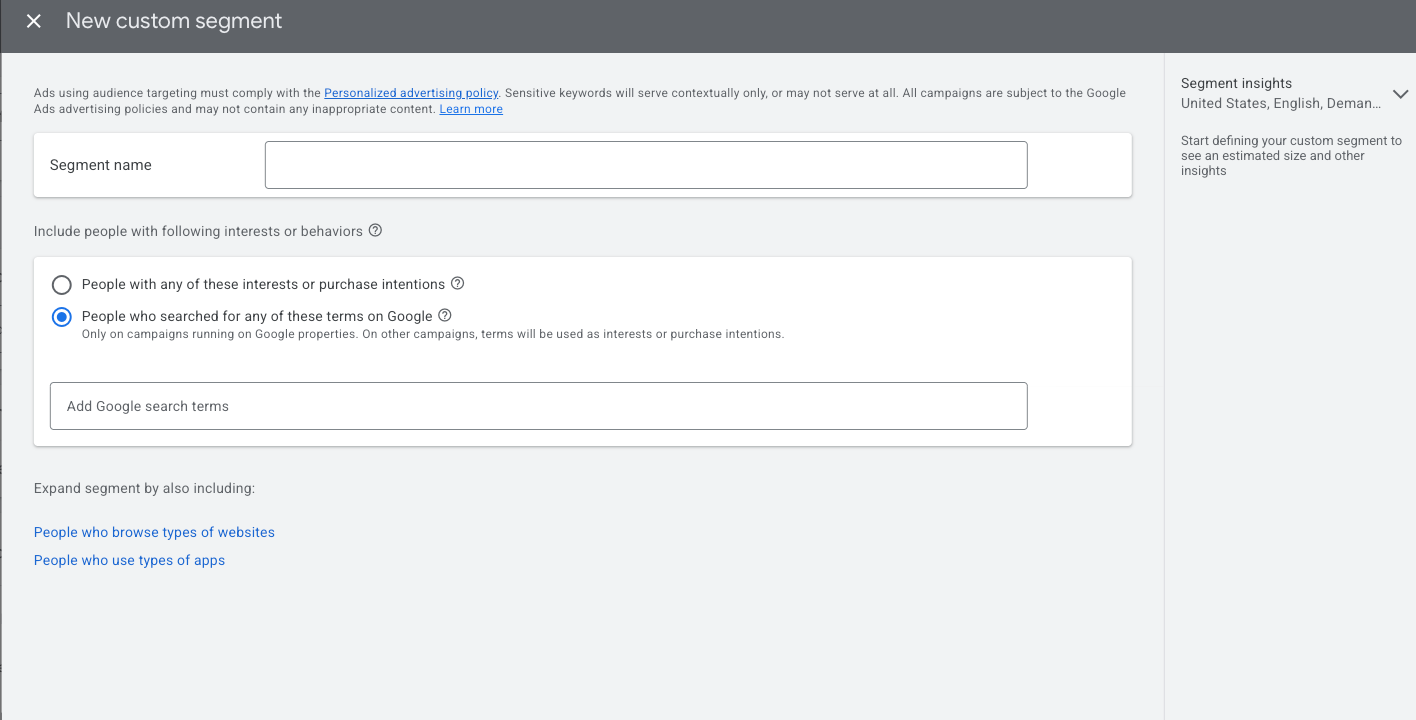
    Custom segment targeting lets me reach people who have searched for specific terms on Google or who show certain interests and purchase intentions. It is also one of the most practical ways I can get in front of users researching my competitors without paying the higher price of a search click.

    New custom segment

    When I create a new audience inside a Demand Gen campaign, custom segments are one of the first targeting options I see, right after the audience name.

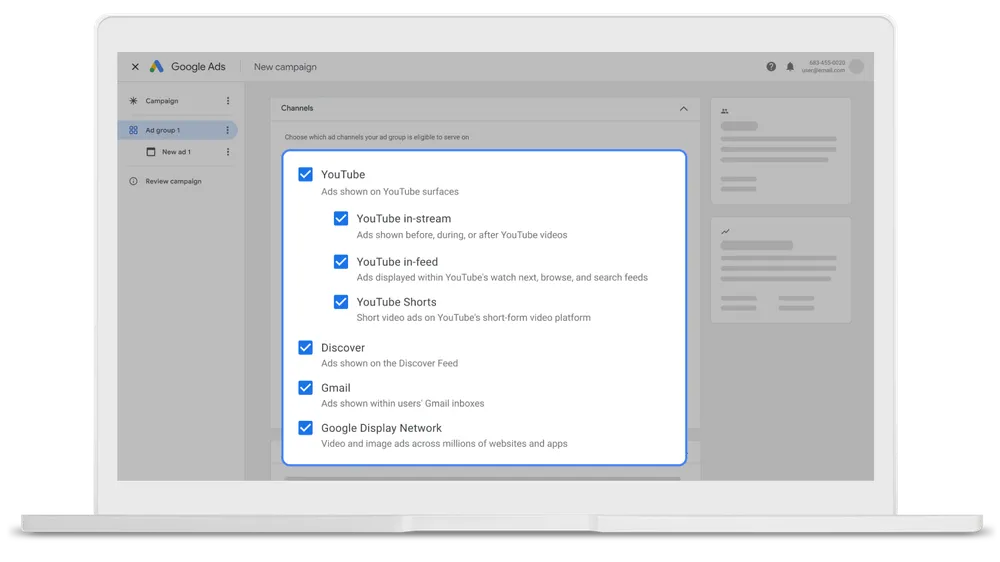
    From there, I choose the option for People who searched for any of these terms on Google and add as many relevant competitors as I can. This helps me reach a highly relevant audience across Google’s inventory at a lower cost than a traditional search network click.

    If I am not sure which competitors to include, I start by typing my main product or service into Google Ads and reviewing who appears. Those businesses are usually my primary competitors, and depending on the networks I opt into, my ads can appear across YouTube, Discover, and Gmail.

    Designing conquesting landing pages for Demand Gen

    When I use Demand Gen for conquesting, I need a landing page built specifically for that audience. I want to highlight my key differentiators, show social proof, and make it obvious why my product or service deserves consideration.

    The click is only the first step. Once someone lands on my page, the offer has to be clear, specific, and aligned with the ad they just clicked. I need to explain the value thoroughly and guide the visitor toward a call to action that matches the promise I made in the ad.


    Negative-intent conquesting: Targeting competitor weaknesses

    But Demand Gen is not always the right starting point. If I do not have strong image or video assets, I may be better off staying closer to the search network.

    Because high-quality creative tends to perform best across Demand Gen placements, search can make more sense when those assets are not available. That is where negative-intent conquesting becomes useful.

    Image

    Most advertisers understand traditional competitor search campaigns, but many overlook the people who are not simply searching for a competitor. They are searching for alternatives, comparisons, cheaper options, or signs that another company can solve the problem better.

    I often see this happen during the consideration phase. A user may search for terms like “companies like X,” “companies cheaper than X,” or, for branded products, “dupe for X.” Not every variation will have enough volume to bid on, but these searches reveal where serious comparison research is happening.

    Building campaigns around competitor pain points

    If I know a competitor has a reputation for poor customer service, I might test keywords such as “customer service complaints for [competitor].” I would keep this focused in a single ad group with closely related keyword variations.

    In the ad copy, I would focus on what makes my customer service stronger, faster, or more helpful. Because of trademark policies, I would avoid naming the competitor directly in the ad text and instead emphasize the benefit I can prove.

    Traditional competitor campaigns focus on bidding against a brand name. Negative-intent conquesting focuses on the weakness behind the search. The audience already knows the competitor, but they are actively looking for a better option.

    I can also pair this approach with a separate custom audience, which lets me reach people searching for these alternatives across Google’s networks.

    For this to work after the click, the landing page matters just as much as the keyword and ad. If my ad promises a better solution to poor service, high prices, or another competitor weakness, the landing page has to validate that claim and present a unique value proposition that directly addresses the concern.

    Target competitor audiences before the decision is made

    The biggest challenge with traditional competitor campaigns is not always the competitor. It is timing.

    When someone searches for a competitor’s brand name, they may have already narrowed their options and moved close to a decision. That is why competitor keyword campaigns can become expensive and hard to scale profitably.

    Demand Gen and negative-intent conquesting help me approach the same audience from different angles. Demand Gen lets me reach potential customers before they commit to a brand, while negative-intent conquesting reaches them when they are actively questioning their current options.

    My goal is simple: I want to reach potential customers when they are most open to considering a different choice. If I can do that with the right targeting, message, and landing page, competitor traffic becomes much easier to win without overspending on traditional brand bidding.


    Inspired by this post on Search Engine Land.


    crushpress.ai community screenshot
  • Google Demand Gen Gets Gemini Creative and Reporting Boost

    Google Demand Gen Gets Gemini Creative and Reporting Boost

    I’m seeing Google roll out a new set of Demand Gen updates designed to help advertisers improve creative performance, reach more potential customers across YouTube, and measure campaign results with more clarity.

    For me, the bigger story is that Demand Gen is becoming less about manually adapting assets and more about using AI-assisted tools to make creative work harder across Google’s most visual surfaces.

    Demand Gen campaigns are built to drive discovery and conversions across Google’s visual placements. With these latest updates, I see Google trying to reduce creative friction while giving advertisers better visibility into what is actually moving performance.

    Google says the enhancements arrive as YouTube continues to show value for customer acquisition. The company cited research from Measured showing that 72% of incremental conversions on YouTube come from new customers.

    What’s new. I’m watching Demand Gen add expanded video resizing capabilities, giving advertisers the ability to automatically transform creative into more aspect ratios, including vertical-to-square, vertical-to-landscape, and square-to-landscape formats.

    That matters because it should make it easier to adapt existing creative for different YouTube placements without having to produce every version manually from scratch.

    Why I care. Expanded video resizing can help existing assets fit more YouTube inventory, Gemini can provide AI-powered recommendations before launch, and new web-to-app measurement can give marketers a clearer view of how Demand Gen campaigns influence app installs and return on ad spend.

    Gemini joins the creative workflow. Google is also bringing Gemini-powered recommendations directly into the Demand Gen campaign creation process, which makes AI guidance part of the asset selection workflow instead of a separate optimization step.

    When advertisers choose image and video assets, Gemini will offer automated suggestions for optimizing creative for YouTube. I see this as a way for marketers to improve asset choices before campaigns go live, rather than waiting for performance data after launch.

    Better app measurement. Demand Gen now includes Web to App Acquisition Measurement, allowing advertisers to measure when web campaigns lead users to install an app.

    The new reporting gives me a more complete way to evaluate campaign performance because it attributes app installs generated through Demand Gen campaigns. That should help advertisers better understand the full impact of their media spend.

    The bottom line. I see Google’s latest Demand Gen updates as a practical combination of AI-powered creative guidance, more flexible video optimization, and broader measurement tools that can help advertisers improve performance while gaining clearer insight into customer acquisition.


    Inspired by this post on Search Engine Land.


    crushpress.ai community screenshot
  • Elevate Your Commerce Media with Demand Gen on Google Platforms

    Elevate Your Commerce Media with Demand Gen on Google Platforms

    I’ve discovered an exciting update that expands the possibilities for brands in commerce media, now allowing access beyond just retail sites.

    Brands can harness retailer first-party data to seamlessly run Demand Gen campaigns across platforms like YouTube, Discover, and Gmail through the Commerce Media Suite. It’s a remarkable expansion that takes retail media far beyond its traditional boundaries.

    What’s happening: Google has broadened its Commerce Media Suite to support Demand Gen inventory, paving the way for enhanced collaboration between brands and retailers through shared audience data.

    With this update, advertisers can activate retailer audiences across Google’s visual and discovery-driven channels, while still leveraging the insights that fuel powerful retail media campaigns.

    Why it matters: This development integrates retailer first-party data with the vast reach of YouTube, Discover, and Gmail, ensuring brands can connect with high-intent shoppers even beyond retailer websites, and link ad exposure directly to actual sales figures.

    How it works: Retailers provide their first-party audience data through the Commerce Media Suite, enabling brands to run Demand Gen campaigns across Google’s services.

    Google’s AI optimizes delivery to boost conversions and sales along the customer journey. It also enhances reporting, linking ad exposure to purchase outcomes, giving advertisers greater insight into campaign success and business impact.

    Key benefits:

    • Utilizes retailer first-party data to reach relevant customers on a large scale.
    • Harnesses Google AI to optimize for conversions and sales.
    • Simplifies campaign management with a shared data activation framework.
    • Improves reporting by tying digital engagement to final purchases.

    The bottom line: The integration of Demand Gen inventory signifies a significant advancement in commerce media. As retail media networks expand beyond their own channels, brands now have the opportunity to merge retailer audience insights with Google’s impressive reach across YouTube, Discover, and Gmail.


    Inspired by this post on Search Engine Land.

    crushpress.ai community screenshot
  • Unlock DV360 API’s New Demand Gen Features for Enhanced Campaigns

    Unlock DV360 API’s New Demand Gen Features for Enhanced Campaigns

    As a digital marketer, I’m thrilled about the new tools that will soon enhance the way I automate campaign management and targeting through existing DV360 workflows. The opportunities for advertisers and developers are about to expand significantly.

    Demand Gen campaigns are now more intricately woven into Google’s advertising stack. From June 10th, I’ll have the chance to manage Demand Gen resources directly via the Display & Video 360 API, aligning campaign automation and management workflows more closely with other DV360 inventory types.

    What’s happening. Google is set to roll out Demand Gen resource support to Display & Video 360 API partners beginning June 10, with the rollout expected to be fully available by June 24.

    The upgrade introduces support for Demand Gen line items, ad groups, and ad formats. This expansion allows developers and advertisers like me to retrieve, create, update, and delete Demand Gen resources through the API. Once enabled, Demand Gen resources will seamlessly appear alongside standard line item and ad group list responses with existing DV360 campaign objects.

    Between the lines. For those of us who depend on API integrations, a major immediate effect is that our existing list queries might start returning additional Demand Gen line items and ad groups. Google’s advice to developers is to update integrations before June 10 to ensure our systems can handle these new resource types.

    Why I care. This update simplifies automating Demand Gen campaign management within my current DV360 workflows, diminishing the necessity for separate tools or manual processes as I explore YouTube and other discovery-focused inventory.

    The bottom line. Demand Gen is transitioning from a beta feature to a standard component of the DV360 API, offering increased flexibility for advertisers and partners like me to programmatically manage campaigns at scale.


    Inspired by this post on Search Engine Land.


    crushpress.ai community screenshot
  • Discover How Google’s New YouTube Tools Transform Demand Gen

    Discover How Google’s New YouTube Tools Transform Demand Gen

    Today, I discovered some exciting news about Google’s expansion of Demand Gen with fresh YouTube creator tools. It’s all about enhancing performance advertising and was recently highlighted at Google Marketing Live 2026.

    Here’s the scoop. Google has unveiled new updates for Demand Gen with a focus on partnerships with creators, innovative product discovery methods, and improved cross-platform campaign optimization.

    As an advertiser, I soon will be able to:

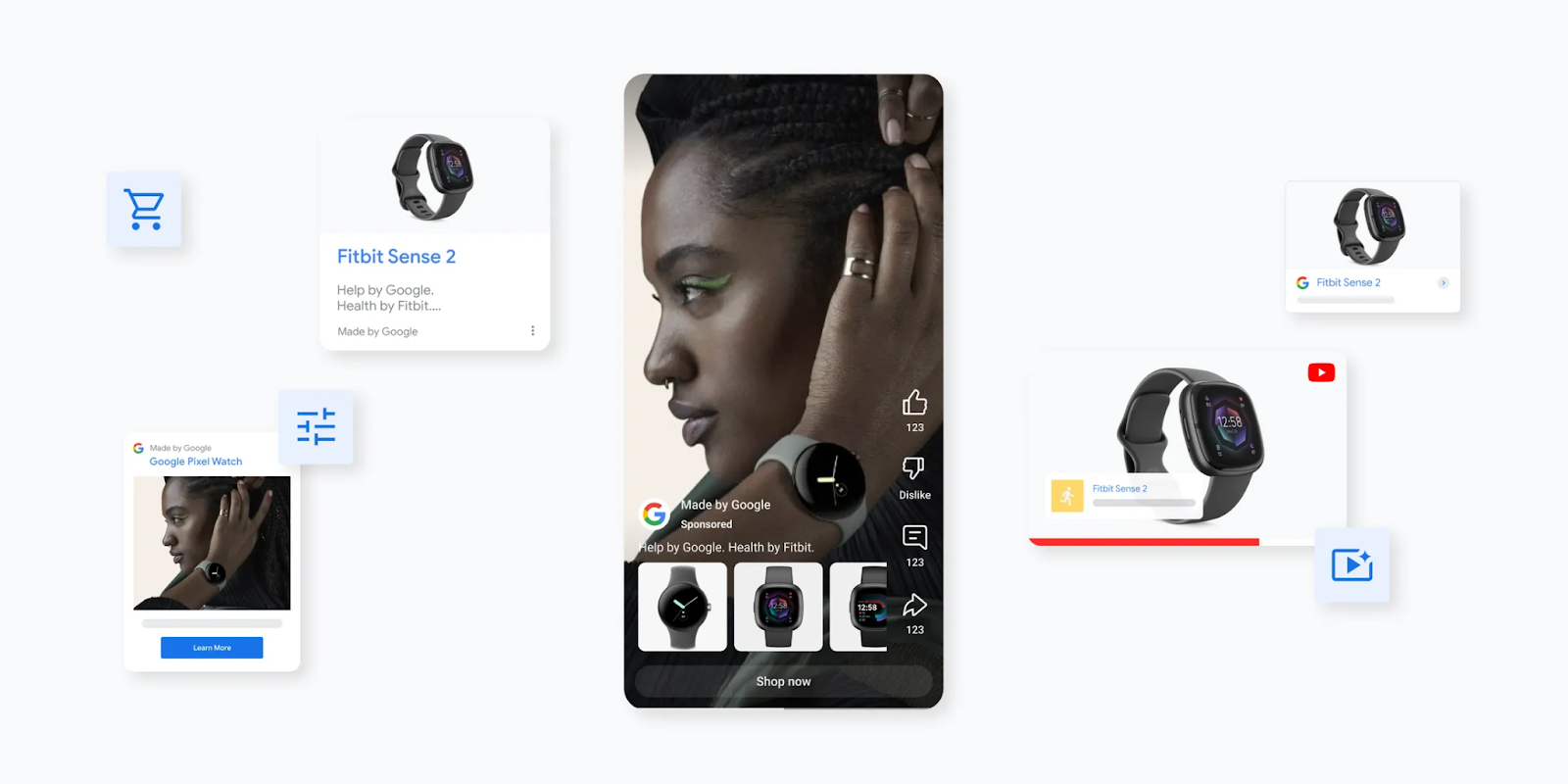
    • Create engaging videos using the multimodal capabilities of Asset Studio.
    • Seamlessly integrate creator partnership videos during campaign setup.
    • Dynamically share Merchant Center product videos directly from campaign structures.
    • Include Demand Gen campaigns in Google Maps for increased outreach.

    Google’s also pushing checkout links into more markets and expanding product feed support to new verticals, such as automotive. They mentioned that advertisers with vast product options tend to experience a 33% boost in conversions with product feeds.

    Additional improvements in measurement include:

    • Campaign Type Attribution to understand source impact.
    • Uplift Experiments for deeper insights.
    • Enhanced third-party integrations with partners like TransUnion.

    I also learned about Google introducing AI-assisted Demand Gen campaign creation, which uses existing campaign settings, like those from Performance Max, to simplify setup processes.

    Understanding the mechanism. Demand Gen harnesses AI signals across YouTube, Discover, Maps, and Shopping to smartly allocate creative and product feeds amidst Google’s platforms. Advertisers, like myself, can leverage creator videos and Merchant Center product assets for more tailored campaigns responsive to user interest and engagement techniques.

    ```json
{
  "alt": "Google Ads campaign setup screen showing prefilling options and campaign details.",
  "caption": "Get a head start on your Google Ads campaign with AI-powered prefilling options. Fine-tune your strategy to maximize conversions and performance.",
  "description": "The image captures a Google Ads setup interface for creating a new campaign. It features an option to prefill campaign settings using AI, displaying details like source campaign, recommended strategies, and potential performance projections. Key elements include a sidebar for ad group navigation, fields for campaign name, and toggles for product feeds. This tool aims to streamline ad creation and optimize for conversions, displaying insights and recommendations at the setup stage."
}
```

    The reason it’s noteworthy. Google’s tactic to pitch YouTube and Demand Gen as comprehensive performance channels shows a shift from just creating awareness. The merge of creator content, Maps inventory, and dynamic product experiences epitomizes the evolving intersection of discovery and commerce within Google’s ecosystem.

    For us, the advertisers, these updates are a golden opportunity to marry creator-driven content with tangible conversion metrics.

    What’s ahead. Google’s ongoing focus on creator tools and Demand Gen sets the stage for YouTube’s larger involvement in performance advertising plans. It’s essential to keep tabs on how Maps inventory and creator-led commerce campaigns may influence conversion performances.

    When can we expect it? Many of these Demand Gen updates are globally expanding in open beta.

    Want more insights? Check out more from Google Marketing Live 2026:


    Inspired by this post on Search Engine Land.

    crushpress.ai community screenshot
  • Resolving Delays in Google Ads Demand Gen Reviews

    Resolving Delays in Google Ads Demand Gen Reviews

    Google Local Services Ads vs. Search Ads- Which drives better local leads?

    I’ve recently experienced frustrations with Google Ads as there’s a known issue causing Demand Gen ads to face review delays of over a week. Google acknowledges this problem and assures us that they’re working on a solution.

    Some of us advertising on Google have noticed our ads are lingering in review, taking more than seven days—something that deviates from normal review timelines.

    What’s happening. Matthew Skelton, a senior PPC specialist I follow, has pointed out a trending issue: Demand Gen campaigns stuck in review for an unexpectedly long time. This delay is noticeable across various accounts and industries, seemingly without any policy breaches causing it.

    Interestingly, other campaign types, like Search and Performance Max, aren’t affected and continue processing as usual, which suggests the problem is isolated to Demand Gen ads.

    Why we care. For those of us using Demand Gen to test creatives and drive top-of-funnel results, speed is crucial. Long review times hinder our ability to iterate swiftly, delay launches, and make it challenging to respond to seasonal trends or time-sensitive opportunities.

    A delay lasting a week can disrupt our pacing and diminish the effectiveness of campaigns relying on rapid optimization.

    The response. Ginny Marvin, a Google Ads Liaison, acknowledged this issue specifically impacting Demand Gen image ads, admitting reviews are taking longer than anticipated. She assured us that Google’s team is actively seeking a solution, but no clear timeline has been provided yet.

    Bottom line. If you’re experiencing delays with your Demand Gen ads, know that it’s a widespread issue acknowledged by Google rather than something you can directly address.

    First seen. This situation was first reported by Matthew Skelton, who shared his insights on LinkedIn.


    Inspired by this post on Search Engine Land.


    crushpress.ai community screenshot
  • Boost YouTube Conversions with Google’s Enhanced Demand Gen Tools

    Boost YouTube Conversions with Google’s Enhanced Demand Gen Tools

    I’ve been following the latest updates from Google, and it’s exciting to see how they’re enhancing Demand Gen tools. These updates are designed to help advertisers like me convert quicker and reach more new customers on platforms like YouTube.

    What’s happening. Google has integrated Demand Gen into their Commerce Media Suite. This means I can now leverage retailers’ first-party catalog and conversion data to connect with high-intent shoppers across YouTube, Discover, and Gmail.

    The introduction of view-through conversion (VTC) optimization is another great addition. It allows my campaigns to focus on conversions that occur after an ad is viewed—speeding up performance significantly.

    Why we care. These updates enhance the effectiveness of Demand Gen by turning views into tangible conversions. By utilizing retailer data and optimizing for view-through activities, I’m able to engage high-intent users, even if they don’t immediately click. This results in faster outcomes and increased customer acquisition.

    Between the lines. Google is now focusing beyond clicks, using richer commerce data and view-based attribution to generate results in more passive, discovery-rich environments like YouTube.

    ```json
{
  "alt": "Digital marketing campaign setup interface showing components like campaign name, goals, and performance metrics.",
  "caption": "Navigate your digital marketing with ease using a comprehensive campaign setup interface. Track goals, performance metrics, and more for optimized results.",
  "description": "This image displays a digital marketing platform's campaign setup interface. It includes sections for inputting campaign name, selecting campaign goals like conversions and clicks, and monitoring performance metrics such as estimated impressions and conversions. The interface is designed for optimizing marketing strategies with clear visualizations and detailed breakdowns. Keywords: digital marketing, campaign setup, performance metrics, marketing strategy."
}
```

    What to watch. I expect more exciting announcements about Demand Gen at upcoming events like Google Marketing Live. As YouTube evolves, it’s becoming a comprehensive performance channel.

    Bottom line. With these updates, Google has transformed Demand Gen into a robust, data-driven machine for converting high-intent audiences—especially on YouTube.

    Dig deeper. Demand Gen Drop – April 2026


    Inspired by this post on Search Engine Land.


    crushpress.ai community screenshot
  • Unlock Demand Gen’s Potential: Test Creative Impact with Uplift

    Unlock Demand Gen’s Potential: Test Creative Impact with Uplift

    I often find that platform reporting can lead me astray when trying to gauge the real impact of Demand Gen creative. To get a clear picture, conducting controlled experiments can validate if my creative work genuinely boosts conversions.

    Demand Gen campaigns shine across YouTube, Discover, and Gmail, but they also bring a challenge—what I call the “attribution illusion.” It’s frequent for me to question whether reported conversions are truly incremental or if users would have converted through search regardless.

    Google introduced asset uplift experiments in November, allowing me to measure the impact of my Demand Gen creative using an A/B split test. This feature helps replace assumptions with clearer insights into what’s truly driving results.

    Relying heavily on creative instinct or standard reporting can misdirect efforts and waste valuable resources on underperforming assets. Google’s A/B testing capabilities empower me to isolate the impact of individual assets, preventing such outcomes.

    Why attribution doesn’t equal incrementality

    For example, if someone views a Demand Gen ad on YouTube but doesn’t click, only to search for my brand later and convert, Google might still credit the Demand Gen campaign. This attribution reflects correlation more than causation.

    To measure accurately, I need to understand the scenario without showing the creative. Withholding test assets from a portion of the target audience helps establish a baseline.

    The difference in conversion rates, or any key KPI between groups exposed to the ad and those not, reveals the actual incremental lift the creative drives.

    Dig deeper: Why incrementality is the only metric that proves marketing’s real impact

    What you need before testing creative uplift

    Launching experiments without enough data for statistical significance is a common misstep. Before testing, I ensure campaigns meet necessary prerequisites to avoid inconclusive or invalid results.

    Conversion volume

    Google suggests having at least 50 conversions across test groups during the experiment for accurate lift measurement. If primary conversions fall short, I consider optimizing the test around micro-conversions like “Add to Cart.”

    Budget minimums

    Experiments require continuous, uninterrupted spending. A limited budget stopping my campaign early skews data for the control group.

    The campaign budget must be sufficient to run for at least four weeks or until statistically significant results are achieved.

    Creative isolation

    ```json
{
  "alt": "The CapmatchOne logo with a gradient circle and bold text.",
  "caption": "Discover innovation with the CapmatchOne logo, featuring sleek typography and a modern gradient circle.",
  "description": "The CapmatchOne logo features bold, modern typography coupled with a gradient circle, symbolizing connection and innovation. The sleek design conveys a sense of progress and creativity. This image can be used for branding or promotional purposes, appealing to audiences interested in innovative solutions and forward-thinking designs."
}
```

    I test one new variable at a time to determine if a specific asset drives uplift, keeping all other campaign elements unchanged.

    Dig deeper: Why Demand Gen is the most underrated campaign type in Google Ads

    How to run an asset uplift test in Google Ads

    Running a creative uplift test in Google Ads is now more streamlined. Here’s how I set up a valid experiment.

    1. Define a clear hypothesis

    Each scientific test starts with a clear hypothesis. I avoid tests without defined objectives. For example:

    • Bad hypothesis: “Let’s see if our new video works.”
    • Good hypothesis: “Adding user-generated content (UGC) to our Demand Gen asset group will drive a 10% incremental lift in ‘purchase’ conversions compared to standard static image carousels.”

    Navigate to the Experiments interface

    In my Google Ads account, I navigate to Campaigns > Experiments. I create a new experiment, selecting Asset tests provided by you for a Demand Gen campaign.

    Configure a 50/50 split

    I define a 50/50 cookie-based split to ensure both groups have equal historical data and algorithm weighting, preventing users from being in both test arms.

    My existing campaign becomes the control, and the new asset campaign serves as the treatment.

    Lock your variables

    Once started, I practice extreme discipline by not altering audiences, targeting, or making drastic bid and budget changes.

    Any changes during the test can introduce noise, affecting the statistical significance of results.

    Set the duration

    ```json
{
  "alt": "Screenshot showing options to choose experiment type and variables to test in a digital advertising platform.",
  "caption": "Explore different experiment types and variables to optimize your digital advertising strategy with this intuitive interface.",
  "description": "This image is a screenshot of a digital advertising platform interface where users can choose experiment types such as 'Campaign features', 'Assets', 'Campaign types', and 'Custom'. Further options allow for selection of variables to test, like 'Final URL expansion', 'Assets provided by you', and 'Ad variations'. Users can select their campaign type from 'App', 'Demand Gen', 'Performance Max', or 'Video'. The interface is designed for optimizing ad performance and testing creative assets such as text, images, and videos."
}
```

    I run experiments for at least four weeks. Week 1 is a learning period, and Weeks 2 to 4 provide actionable data.

    Longer conversion cycles in B2B SaaS might require six to eight weeks.

    Dig deeper: What it takes to make demand gen work for B2B and ecommerce

    What your experiment results actually mean

    Upon completion, I review the Experiments dashboard for each arm’s performance and confidence intervals across metrics to validate my hypothesis.

    Outcome 1: Positive lift (statistically significant)

    A positive lift with 95% confidence means my creative asset adds real value. I calculate incremental cost per acquisition (iCPA) by dividing the treatment group’s ad spend by incremental conversions over the control.

    This iCPA becomes my benchmark for further scaling.

    Outcome 2: Negative lift

    Creatives may underperform, perhaps being too disruptive or skipped in ads. Pausing these assets is crucial to let data direct budget choices over personal preference.

    Outcome 3: Inconclusive result

    If results are negligible and don’t confidently attribute conversions after four weeks, I might extend the test for more data. If still inconclusive, trying a drastically different creative asset is my next step.

    Prove creative impact with incrementality testing

    Creative remains a powerful differentiator for performance. Creating high-quality video or UGC is one thing, but proving its impact with scientific rigor strengthens my creative decisions.

    Asset uplift experiments provide evidence of Demand Gen’s budget worthiness to stakeholders. When I start with a holdout test, establish a baseline, and let data guide my creative roadmap, the results speak for themselves.

    Dig deeper: The Google Ads Demand Gen playbook


    Inspired by this post on Search Engine Land.

    crushpress.ai community screenshot
  • Revamp Your Ads: Google’s Smart Asset Layout for Demand Gen

    Revamp Your Ads: Google’s Smart Asset Layout for Demand Gen

    Why Google Ads auctions now run on intent, not keywords

    I just discovered that Google Ads has given the Asset Optimization layout for Demand Gen a sleek makeover. The updated panel enables advertisers like me to easily streamline creative formatting and placement through a few toggles.

    Why we care. If you’re managing a large volume of creative, this central panel makes life much easier. It reduces manual labor by allowing us to enable or disable automation features quickly.

    What’s new. This layout refresh organizes three main automation features into a more user-friendly interface:

    Auto-generated shorter videos let AI trim existing videos for broader placements.

    Automatic video resizing ensures our videos fit multiple aspect ratios, optimizing for wider coverage.

    ```json
{
  "alt": "Google Ad asset optimization settings with new layout options for video and image.",
  "caption": "Explore the new asset optimization layout in Google Ads, offering improved ad coverage with video and image settings.",
  "description": "This image showcases the new layout for Google Ad asset optimization, featuring toggle options for video adjustments like shorter and resized videos, and image landing page previews. The interface aims to enhance ad coverage and drive conversions using AI. Key elements include option toggles set to 'Off' and a manage link for further customization. Ideal for advertisers looking to optimize their content."
}
```

    Landing page image pulls pull images directly from our landing pages, creating added creative variations effortlessly.

    How it works. The new panel displays simple toggles like Resized videos and Image assets, making it straightforward for us to activate or deactivate each feature without sifting through several submenus.

    Bottom line. If you’re running Demand Gen campaigns like me, it’s time to dive into the Asset Optimization panel and review which automations are turned on. Don’t miss out on features like video resizing and landing page image pulls as they can expand your reach effortlessly.

    And, ensure your landing pages are visually appealing; Google will draw directly from them. As more AI tools roll out, I’m shifting my workflow to focus on high-quality source assets and letting Google handle the optimization of formats and placements.


    Inspired by this post on Search Engine Land.

    crushpress.ai community screenshot
