Tag: Conversion Tracking

  • Why I Turn Off Google Search Partners in Google Ads

    Why I Turn Off Google Search Partners in Google Ads

    When I’m running Google Ads in 2026, one setting I always check carefully is “Search Partners.” It often appears in campaign settings as a simple way to extend reach beyond Google Search, and on the surface, that sounds useful.

    But more reach does not automatically mean better reach. In my experience, Search Partners can bring traffic, but the quality of that traffic is usually the problem.

    For most advertisers, I would not leave Search Partners enabled by default. I’d rather start with the main Google Search results page, prove the campaign can convert, and only then consider whether extra volume is worth testing.

    What are Google Search Partners?

    Google Search Partners are third-party sites that use Google-powered search results. When someone searches on those sites, your ad may be eligible to show there. This network can include YouTube, directories, other search experiences, and even parked domains.

    That sounds like a broader opportunity, but I usually see a familiar pattern: lots of impressions, plenty of clicks, and cheaper CPCs than Google Search. The issue is that cheaper clicks are not always useful clicks. Real conversions and meaningful business value from these placements are often limited.

    If I’m using conversion-focused Smart Bidding, I often see Search Partner spend fall naturally over time. The bidding system eventually learns that those placements are not producing the conversions it wants, so it stops pushing budget there.

    How Search Partners differ from the Google Display Network

    I see advertisers confuse Search Partners with the Google Display Network all the time. Some websites can be involved in both, but the intent and placement logic are different.

    The Google Display Network is made up of websites and apps that use AdSense, where ads can appear while people browse content. It can show up as a placement option in Demand Gen, Video campaigns where it is called “Video Partners,” and Performance Max campaigns.

    Search Partners are tied to search-based activity. That is why they apply to Search, Shopping, and Performance Max campaigns rather than standard Display placements.

    How I audit Search Partner performance

    I do not recommend taking anyone’s word for it, including mine. The better move is to check what Search Partners are actually doing inside your own Google Ads account.

    Futuristic data archive with glowing server-like filing cabinets, stacked documents, and network lights symbolizing AI marketing data infrastructure.
    Rows of illuminated data cabinets and paper files stretch into the distance, capturing the pressure on marketers to turn fragmented customer data into a smarter performance engine.

    For Search or Shopping campaigns

    In Google Ads, I go to the campaign view, select Segment, and choose Network (with search partners). This splits performance into separate rows for Google Search and Search Partners, which makes the difference much easier to see.

    What I usually find is a lot of Search Partner impressions and clicks, often at lower CPCs than Google Search. But when I look for true conversions, the results are usually weak unless the account is tracking something shallow or easy to manipulate, such as a page view or a low-friction form fill.

    For Performance Max campaigns

    Performance Max works differently. Search Partners are required for this campaign type, so I cannot simply opt out. What I can do is monitor the activity through the Channel Performance report.

    If I see heavy Search Partner spend in a Performance Max campaign, I treat it as a signal to review conversion tracking, bid strategy settings, and the quality of the conversion actions being used for optimization.

    Check the Content Suitability report

    For more transparency, I also check the Content Suitability report under Insights and reports. This report can show the actual websites or YouTube channels where ads appeared on the Search Partner network.

    That list is often enough to make the decision clear. Once I see where the ads have been running, I usually find many placements that look low quality, irrelevant, or simply not worth the spend.

    In Google Ads, many decisions really do depend on the account, the market, and the goal. This is one of the few areas where my starting recommendation is straightforward.

    If I’m building a new Search or Shopping campaign, I leave Search Partners unchecked. After the campaign is performing well and has strong conversion data, I may test Search Partners for added volume. Until then, I keep the budget focused on the main Google SERP.

    This article is part of the ongoing Search Engine Land series, Everything you need to know about Google Ads in less than 3 minutes. In each edition, Jyll highlights a different Google Ads feature and explains what advertisers need to know to get better results in a quick 3-minute read.


    Inspired by this post on Search Engine Land.


    crushpress.ai community screenshot
  • Get More From Microsoft Advertising With AI Signals

    Get More From Microsoft Advertising With AI Signals

    How to get more from Microsoft Advertising than a campaign import

    When I see Microsoft Advertising campaigns struggle to scale, the issue is often not the platform itself. It is usually that the account is being treated as a copy of a strategy built somewhere else.

    Importing campaigns can get me live quickly, but it is only the beginning. Real performance comes when I add human judgment, Microsoft-specific structure, clean measurement, business-specific controls, and enough creative assets to help AI understand what I am actually selling.

    The strongest accounts I see have a shared pattern: import is the starting point, visual creative opens more demand, and AI works best when I give it the right structure, signals, measurement, and guardrails.

    Here is how I approach Microsoft Advertising when I want more than a simple campaign import.

    Note: I’m a Microsoft employee, and I have written this as objectively as possible. I have also included community-sourced hidden gems where they help highlight useful features.

    1. I start with import, but I do not stop there

    Import is useful because it removes friction. It can bring over campaign structure, assets, and settings from Google, Meta, or Pinterest so I can launch faster. The mistake is assuming that a successful import means the Microsoft Advertising strategy is finished.

    Imported campaigns often preserve yesterday’s assumptions. I still need to make Microsoft-specific decisions about budget, bidding, audiences, creative, measurement, reporting, and AI-powered opportunities.

    Decide whether sync helps or holds the account back

    One of the first choices I review is whether future changes from the source platform should keep syncing into Microsoft Advertising. If I only want to mirror another platform, automatic sync can reduce maintenance. If I want to build a Microsoft-specific strategy, automatic sync can quietly overwrite the optimizations I make after launch.

    To see the full list of import settings, I go to Manual import > Advanced settings. From there, I review which settings should stay, which should change, and which Microsoft-specific opportunities were never part of the original structure.

    Review budgets, bids, currency, and Microsoft-only options

    Imported budgets may not match the opportunity or efficiency available in Microsoft Advertising, especially when I can consolidate campaigns and use ad-group-level controls instead.

    Imported bids can also carry assumptions from another platform. I want Microsoft Advertising to have room to optimize for its own auction dynamics, audiences, and conversion data.

    Screenshot of a LinkedIn post by Hana Kobzová praising LinkedIn Profile Targeting and Job Seniority for B2B Microsoft Advertising precision.
    A PPC expert highlights LinkedIn Profile Targeting as a Microsoft Advertising hidden gem, especially for B2B campaigns that need to reach senior decision influencers.

    Review Microsoft-specific settings after import

    Import cannot choose Microsoft-specific opportunities for me. After launch, I review the settings that can materially change performance.

    • LinkedIn profile targeting: I can bid up or down, observe performance, and use LinkedIn profile data as a Performance Max audience signal across Company, Industry, Job Function, and Seniority.
    • Ad-group-level scheduling and location targeting: I can override campaign-level schedules and location targets at the ad group level, including whether ads serve in the user’s time zone or the account’s time zone.
    • Impression-based remarketing: I can target, exclude, or adjust bids based on someone seeing my ad. It does not require an existing email list or pixel, and members can remain on the list for up to 30 days after a single impression.
    • Multimedia ads: These visual-heavy ads have their own auction, can appear on the same SERP as my text ad, and may also serve in Copilot.
    • Cross-account portfolio bidding: If I need to launch a new account for the same brand, I can let it benefit from conversion data in an existing account.
    • Microsoft Clarity: I can use this free behavioral analytics tool to understand how people and AI engage with my site, where landing pages create friction, and which grounding queries may connect AI systems to my content.
    • Creative and editorial considerations: Microsoft has stricter advertising policies than many platforms, but it also allows useful capabilities such as exclamation points in headlines and disclaimers of up to 500 characters that do not take up ad space. If I enable disclaimers, my ads will only serve when the disclaimers can appear alongside them.

    2. I build the signal foundation before optimizing

    Account-level settings can look overly technical, but I treat them as the foundation for AI performance. They determine whether automation learns from clean data or from messy, misleading signals. Settings such as business attributes also help me communicate why customers should choose the business.

    Verify conversion tracking and attribution before changing bids

    Even the best bidding strategy cannot make up for incomplete conversion data. Before I blame bids, keywords, audiences, or creative, I verify that conversion and attribution data are flowing correctly.

    • Microsoft Click ID (MSCLID): This helps connect ad clicks to conversion activity.
    • View-through conversions: These help me understand the role visual creative plays before a conversion happens.
    • Simplified conversion setup: This enables intelligent conversion action creation.

    Without verified tracking, it is easy to diagnose the wrong problem. What looks like a bidding issue may actually be incomplete or inconsistent conversion data.

    If the organization relies heavily on UTM parameters, I also validate how auto-tagging and manual tagging interact. My goal is clean reporting, not duplicated parameters or attribution confusion caused by mislabeling.

    Treat creative inputs as signals

    When enabled, Microsoft Advertising can use images from landing pages to create more relevant ad experiences. If the site has strong, brand-safe, well-maintained imagery, this can improve creative coverage without forcing me to manually build every variation for every campaign type.

    AI-optimized creative works best when the site already gives it good material. If the pages include images I would not want in ads, or if the imagery is sparse, text-heavy, or poorly matched to the offer, I upload the assets I want the system to use. Auto-retrieved images reduce friction, but they do not replace creative strategy.

    Use account-level negatives carefully

    Account-level negatives can eliminate unwanted traffic patterns across the account. Microsoft supports phrase and exact match negatives. If I need to remove a root problem, phrase match is often the better option. If I need to block a specific search term, exact match may work better. Neither negative match type accounts for close variants.

    I only use account-level negatives for terms I am confident should not serve anywhere in the account. More nuanced exclusions belong at the campaign or ad group level.

    3. I use structure and controls to help AI perform

    Microsoft Advertising gives me useful controls, but my goal is not to micromanage every lever. I want to give AI cleaner inputs, stronger guardrails, and fewer structural problems to solve.

    Purple Microsoft Advertising graphic stating Search Partner Network low-quality impressions delivered to advertisers fell 20% over the past year.
    Microsoft reports a 20% reduction in low-quality Search Partner Network impressions, crediting earlier invalid activity detection, stronger quality signals, and tougher enforcement.

    Concentrate signals instead of fragmenting them

    Ad-group-level location and ad schedule settings can reduce the need to create duplicate campaigns or split budgets across multiple accounts.

    I have seen advertisers create separate campaigns only to support different geographies or schedules. In many cases, I can manage those settings at the ad group level, simplify the structure, and concentrate conversion volume.

    That matters because automated bidding usually performs better with stronger, more consistent signals. When possible, I aim for at least 30 conversions in 30 days. That level of signal gives automated bidding a better chance to make stable decisions than a fragmented structure with thin conversion volume.

    Use scheduling, location, and disclaimers as guardrails

    I always review location targeting. Microsoft Advertising supports geographic targets, radius targeting, and exclusions, but city-, county-, metro-, or DMA-level strategies may be more practical than forcing ZIP codes.

    If Microsoft does not support a specific location target, it defaults to the next-highest level, such as ZIP code to city or city to DMA. If I need narrow targeting, I look closely at exclusions.

    Avoid unnecessary learning volatility

    Large bid or budget changes can create volatility while the system adjusts. As a general rule, I try to keep bid or budget changes below 15% over a 14-day period when I want to avoid unnecessary learning disruption. Larger changes may still be necessary, but I make them intentionally.

    Seasonality adjustments help when I expect a temporary conversion rate change because of a sale, event, promotion, or other short-term spike. Data exclusions help when conversion tracking breaks or reports misleading data that I do not want automated bidding to learn from. These tools are not bidding hacks. They protect automation from learning the wrong lesson.

    Use conversion value rules whenever possible

    The cleanest way I can communicate value to the bidding algorithm is through conversion value rules grounded in accurate conversion tracking. These rules let me create if/then logic for devices, audiences, and locations, then add a monetary amount or multiply conversion value.

    Microsoft supports bid adjustments across audiences, devices, demographics, locations, and time. Multiple adjustments can compound. If a user qualifies for several categories at once, the bid may become more aggressive than I intended.

    Before I add another layer, I ask whether I truly want to spend more to reach that audience, in that location, on that device, at that time. If I want the algorithm to understand value, meaningful conversion values and conversion value rules are usually stronger signals. If values are not reliable, CPA-oriented bidding with carefully chosen adjustments can still work.

    Microsoft Advertising graphic showing 45% higher indexed conversion rate and 1.5% lower indexed cost per conversion at network level.
    Microsoft Advertising reports network-level gains, with indexed conversion rates up 45% and indexed cost per conversion down 1.5%, tied to cleaner traffic quality.

    4. I use audiences, inventory, and creative to shape demand

    Microsoft’s differentiated audiences, inventory, and creative formats can help me generate and shape new demand instead of only capturing demand that already exists.

    Use LinkedIn profile targeting intentionally

    LinkedIn profile targeting is still one of the most distinctive audience capabilities in Microsoft Advertising. I can apply bid adjustments based on company, industry, job function, and seniority.

    Multiple targets within the same LinkedIn profile category act as “or” statements, while targeting across categories narrows the signal. A company target plus a seniority target is more restrictive than two company targets. That can be powerful when intentional and expensive when accidental because bid adjustments compound.

    For B2B advertisers, this can be especially useful, but it is not limited to enterprise brands. Any business selling to specific professional audiences can use these signals to prioritize valuable traffic.

    For example, if I am trying to reach someone traveling for work with local experiences or travel gear, I might bid up on a “Business development” job function in an industry with a conference happening in the next two to three weeks.

    Build audiences from exposure, not just site visits

    Traditional remarketing depends on someone visiting my website. Impression-based remarketing gives me another option: building audiences from people who have been exposed to my advertising.

    A prospect may not click the first time they see the brand, especially in formats such as Audience ads, Premium Streaming, or Multimedia ads. Impression-based remarketing lets me continue the conversation later instead of treating the first exposure as a failed interaction. An impression can become the starting point for an audience strategy.

    Reevaluate search partners and exclusions

    Many advertisers disable search partners because they assume the inventory behaves like display network expansion on other platforms. I do not start with that assumption. Search partner inventory is still search inventory, and Microsoft provides publisher visibility, so I can evaluate it directly.

    Recent Microsoft studies have shown a 45% improvement in conversion rates and a 20% reduction in low-quality impressions tied specifically to Search Partner inventory, independent of advertiser optimization.

    If specific publishers are not performing, I use the available controls. I can manage unlimited exclusion lists at the MCC account level, and each list can exclude up to 2,500 URLs. If I need to protect a campaign’s ability to target a placement, such as when Performance Max and Audience ads run together, I exclude domains surgically instead of cutting off useful inventory.

    LinkedIn comment from Dii Pooler about separating multimedia ads from branded search campaigns to gain more SERP real estate.
    A PPC strategist highlights a practical Microsoft Advertising tactic: run multimedia ads separately from branded search to expand visibility without self-competition.

    Use Multimedia ads to expand SERP presence

    Multimedia ads participate in their own auction and can appear in prominent visual placements on the search results page. A traditional search ad and a Multimedia ad can both appear for the same brand, increasing my presence on the SERP.

    I can enable Multimedia ads at the campaign level and then use ad-group-level decisions to direct budget toward or away from the format.

    They matter because they can amplify visual presence, serve as ads in Copilot, and qualify for impression-based remarketing. Their value is not limited to direct-click performance. They can connect search visibility, visual storytelling, and remarketing strategy.

    Use Audience ads to expand reach

    I use Audience ads, including display, native, and video, as a controlled way to expand reach, support full-funnel strategy, and build remarketing inputs that inform other parts of the account.

    Audience ads support audience strategies, placement preferences, content category controls, and creative preview before launch. For organizations that require legal, brand, product, or executive approval, preview capability can make review much easier.

    Use creative and editorial details to reduce friction

    Microsoft Advertising has editorial policies I need to understand instead of assuming every platform evaluates ads the same way. Claims such as “best,” “number one,” or other superiority language need clear landing page support.

    Microsoft Advertising also allows some emphasis I might not expect, such as one exclamation point in headlines, but that flexibility does not remove the need for substantiated claims and clean final URLs.

    Editorial issues are often misdiagnosed as platform friction. In many cases, the issue is one specific asset rather than the entire ad. Final URL problems are more fundamental and can prevent an ad from serving at all.

    Extensions and visual assets can help brands communicate more value before users reach the landing page, especially in competitive categories where plain text may not provide enough differentiation.

    5. I treat PMax, AI Max, and Copilot as AI opportunities with guardrails

    I find Microsoft’s approach to AI most useful when I view it as augmentation rather than replacement. Human-centered AI should help me scale thoughtfully while preserving consent, transparency, and trust.

    Screenshot of a LinkedIn post by Ben Luong praising Microsoft Clarity for summarizing mobile usability pain points and odd click behavior.
    A marketer highlights how Microsoft Clarity surfaces real user friction, from mobile testing gaps to visitors tapping images they mistake for links, offering useful context for ad and landing page optimization.

    Know what Performance Max is designed to enable

    Performance Max can be powerful, but it requires a different mindset from traditional campaign structures. Asset groups are not ad groups. There is no asset-group-level equivalent to ad-group negatives, and I cannot force one asset group to take priority over another.

    Performance Max is built for AI-driven allocation. If strict control is the priority, traditional Search, Shopping, and Audience campaigns may provide clearer governance. When I want to influence Performance Max, I focus on the inputs that matter most.

    • Strong audience signals: I include impression-based remarketing and LinkedIn profile targeting, which are unique to Microsoft.
    • Relevant creative: Copilot can pull creative from the landing page and adapt existing creative with tonal shifts, rewrites, or formatting improvements.
    • Thoughtful search themes: I avoid duplicating exact match keywords as search themes because exact match keywords take priority in the auction.
    • Meaningful conversion tracking: I make sure conversion tracking and conversion values are accurate because Performance Max needs conversions to perform effectively.
    • Clear landing pages: The landing page must communicate the offer clearly. If it does not, the algorithm may struggle to match the right queries, and people may struggle to do business with me.

    If I run the same search theme as an exact match keyword, there is a strong chance the exact match keyword will serve instead of the Performance Max campaign. I prefer to use search themes as testing grounds rather than duplicates.

    Performance Max website URL reporting gives me URL-level visibility into spend, clicks, impressions, and conversions. That gives me more to work with than impression-only reporting and can make automated campaign testing easier to justify.

    Separate campaigns when budget separation matters

    If budget separation matters, I create distinct campaigns instead of forcing multiple business objectives into one Performance Max campaign. Microsoft’s capacity of 300 Performance Max campaigns, compared with Google’s 100, can be useful when budget priorities genuinely need separation.

    For example, if I have two equally important products with drastically different tROAS goals, I would not want them to share budgets because I cannot specify which asset group or product should take priority. Separate campaigns with distinct budgets and tROAS goals are usually a cleaner fit.

    My rule is simple: if related assets and audiences can share a budget, I consolidate Performance Max campaigns to strengthen conversion volume. If budget separation matters, I build that control at the campaign level instead of trying to force it through asset groups.

    Evaluate AI Max and Copilot for new opportunities

    AI Max now addresses many of the use cases that once made Dynamic Search ads valuable. If my goal is to let Microsoft AI better match queries, creative, and landing pages, AI Max may be the better place to test.

    That does not mean I abandon existing high-performing campaigns. It means I stay intentional about whether I am investing in legacy dynamic functionality or AI-powered capabilities built on Microsoft’s latest technology.

    Ads can appear in relevant Copilot experiences when Microsoft determines there is clear commercial intent and the ad may help the user. Ads have served in Copilot since 2024. The goal is not to force ads into AI answers. It is to preserve a useful experience for the user.

    Neon Google search bar with microphone icon over a futuristic digital data background, representing search technology and SEO updates.
    A glowing Google search bar cuts through streams of digital data, capturing the fast-moving world of search, shopping visibility, and SEO innovation.

    Copilot is not a separate campaign type I manually opt into. Performance Max, AI Max, exact, phrase, and broad match search campaigns, Multimedia ads, and Shopping ads are all eligible to serve in Copilot. Performance Max and AI Max have the easiest time serving there because they can adapt to AI-driven experiences.

    Use generative AI as a creative workflow and diagnostic tool

    Copilot can help me brainstorm, rewrite, refine, and adapt creative across Performance Max, responsive search ads, Multimedia ads, Audience ads, and other campaign types. It does not replace the marketer. It reduces friction between strategy and iteration.

    Ad Studio can generate new creative assets and make adjustments such as background modifications, seasonal refinements, location-specific tailoring, and additional aspect ratios. I see its best use as accelerating iteration once the creative strategy is already clear.

    AI-generated assets can also help me diagnose how clearly the site communicates. If the outputs accurately represent the business, the site is probably sending clearer signals. If they repeatedly miss the mark, the landing pages, messaging, or content structure may be confusing both AI systems and people. The Performance Max campaign generator can be a useful diagnostic shortcut for the same reason.

    6. I use reporting and Clarity before blaming the auction

    No amount of AI, bidding nuance, or audience strategy can compensate for poor measurement. Microsoft Advertising provides strong reporting visibility, and I use it before making media-only decisions.

    Use transparent reporting to make better decisions

    Microsoft provides visibility into every search term that generates a click as part of its transparency approach. I use that visibility to understand what is really happening behind performance changes.

    • Genuinely wasteful: There may be no business case for targeting that search.
    • An AI-driven match: The query may look questionable until I examine the customer journey with behavioral analytics.
    • A landing page issue disguised as a traffic problem: Before I add a negative keyword, I evaluate post-click behavior to see whether the landing page or conversion tracking is the real issue.

    Use Microsoft Clarity before making campaign changes

    Microsoft Clarity answers one of the most important questions in campaign diagnostics: what happens after the click? It can show whether users engage with the page, get confused, abandon forms, run into technical issues, or complete actions that are not being tracked correctly.

    I want Clarity in the diagnostic process before I make major campaign changes.

    • If people arrive and get stuck, the issue may be the landing page experience.
    • If they complete the desired action but conversions do not appear in Microsoft Advertising, the issue may be tracking.
    • If they arrive and immediately disengage, the issue may be creative alignment, traffic quality, or the offer itself.

    Clarity can also help me understand how AI systems interact with my content, including the grounding queries that led AI systems to cite the domain and recommendations for improving citation opportunities.

    If AI systems cite the domain as relevant, that can validate the content strategy. If they do not, or if the queries reveal mismatches, that may point to gaps in how the content communicates value.

    I apply Microsoft-specific optimizations deliberately

    I can import existing campaign structures and assets while still taking advantage of Microsoft-specific capabilities. AI can play a central role, act as an occasional assist, or be used selectively, but scaling becomes harder without some level of AI adoption.

    Testing Microsoft Advertising does not require a massive investment. It does require getting the fundamentals right: conversion tracking, bid-to-budget ratios, and creative that reflects the channel’s visual nature.

    When I get those fundamentals right, Microsoft Advertising gives me search term transparency, GDPR-compliant impression-based audiences, and opportunities to reach people across the surfaces where they work, live, and play.


    Inspired by this post on Search Engine Land.


    crushpress.ai community screenshot
  • Why Google Ads Structure Can Make or Break Performance

    Why Google Ads Structure Can Make or Break Performance

    How campaign structure shapes Google Ads performance

    When I audit Google Ads accounts, it is easy to focus first on the obvious issues: keywords, bids, ad copy, and Quality Scores. But one of the biggest performance barriers I see is not buried inside a single campaign setting. It is the way the account was structured from the start.

    Campaign structure shapes how Google’s machine learning reads the account, how budget moves across goals, and whether useful data is collected in one place or scattered across too many campaigns. When the structure is wrong, I am not just leaving performance on the table. I am making the algorithms work harder with weaker signals.

    That is why I look closely at structure across standard Search campaigns, Performance Max, and Smart Bidding. The account architecture often determines whether optimization efforts can actually work.

    How campaign structure shapes Google’s learning

    I used to see advertisers treat campaign structure mainly as a cleanup exercise: tidy ad groups, logical naming, and campaigns separated by product line or geography. To Google’s systems, though, structure means something much more important.

    Every campaign is a data container. The way I segment campaigns determines which signals Google can pool together for bidding and targeting decisions. When the structure is scattered, the learning is scattered too, and optimization becomes slower and less accurate.

    Smart Bidding and automation usually perform better when more data is concentrated in fewer campaigns. Google’s algorithm needs meaningful volume, often around 30 to 50 conversions per campaign per month, to move beyond the learning phase and make reliable predictions. If I spread conversions across too many campaigns, each campaign can end up starved of the data it needs.

    A common example is an ecommerce account with 12 separate Search campaigns, one for each product category. Each campaign averages 8 to 12 conversions per month. Smart Bidding is active, but no campaign consistently exits the learning phase.

    In that situation, the fix is usually consolidation.

    Over-segmentation breaks Smart Bidding

    Smart Bidding strategies such as Target CPA, Target ROAS, Maximize Conversions, and Maximize Conversion Value depend on real-time signals like device, location, time of day, audience, search query, and more. Google weighs those signals together to predict which auctions are worth entering and how much to bid.

    When I see campaigns that are over-segmented, I usually see the same problems appear. First, conversion volume is too low, so each campaign operates below the level Google needs for confident bidding decisions. That often leads to unstable CPAs and CPCs.

    Second, learning phases last too long. Every budget change, bid strategy switch, or structural edit can trigger a new learning period. Over-segmented accounts can feel permanently stuck there, never reaching their full potential.

    Third, signal consolidation is missed. Bidding signals do not freely transfer across campaigns. A branded campaign cannot teach the algorithm inside a non-branded campaign, even when both campaigns share the same conversion goal.

    Finally, bid cannibalization becomes a real risk. When multiple campaigns compete in the same or overlapping auctions, I can end up driving up my own costs and creating avoidable inefficiency.

    The result is an account that looks optimized on the surface, with Smart Bidding enabled, audiences attached, and conversion tracking active, but still underperforms because the structure underneath is working against every optimization layered on top of it.

    The impact of Performance Max

    Performance Max adds another layer to campaign structure. Unlike Search campaigns, PMax runs across Google inventory, including Search, Display, YouTube, Gmail, Discover, and Maps. It uses asset groups and audience signals to guide automation, which makes setup more important and more complicated.

    Asset group segmentation

    I think of asset groups inside PMax as mini-campaigns. Google uses them to understand context, match creative to searches, and optimize delivery. When asset groups are too broad, mixing unrelated products, audiences, or themes, the algorithm has a harder time matching the right creative to the right situation.

    I prefer to segment asset groups by product category or service line, audience intent level such as prospecting versus retargeting, and creative theme or offer type.

    This gives Google clearer signals about what each group is meant to accomplish, which can improve both creative matching and bidding efficiency.

    PMax and Search campaign overlap

    One of the most damaging mistakes I see in accounts running both Search and Performance Max is failing to set clear boundaries between them. PMax can serve across all placements, including branded and non-branded searches, so it can compete with Search campaigns if I do not define where each campaign type should operate.

    Without proper segmentation, PMax can cannibalize high-intent branded search traffic and inflate costs on terms I might have won more cheaply through Search. Search campaigns can lose impression share they otherwise would have captured, and attribution becomes harder to interpret because it is less clear which campaign is truly driving performance.

    My preferred solution is to use campaign-level negative keywords, brand exclusions, and clear audience segmentation. PMax should complement Search campaigns, not compete with them.

    Budget allocation and automation conflict

    PMax runs as a single campaign with a single budget, but because it delivers across multiple channels, budget allocation happens dynamically. When PMax and Search campaigns are not organized around clear goals, Google may spend on the easiest placements rather than the best ones.

    Structural choices, such as whether I run one PMax campaign or split campaigns by product line, directly affect how budget is distributed and how well automation can support business goals.

    Match type strategy and its structural implications

    Match types are often treated as a keyword-level decision, but I see them as a structural decision too. Running broad match, phrase match, and exact match across separate campaigns, or even separate ad groups, without a coherent strategy can create overlap and wasted budget.

    Google Ads looks very different than it did a few years ago. Broad match now casts a much wider net, and Google increasingly pushes advertisers to pair it with Smart Bidding. That combination can work, but only when the campaign structure gives the algorithm enough support.

    Broad match with Smart Bidding works best when there is enough conversion data, a clear goal, and enough traffic for Google to learn from. In a fragmented account, broad match can make the problem worse. It brings in more searches, but the algorithm does not have enough clean data to make good use of them.

    The safer approach is to keep match types within fewer campaigns, use negative keywords to prevent campaigns from bidding against each other, and review search term reports regularly so I can tighten boundaries where needed.

    Keyword and ad group architecture: When granularity becomes an obstacle

    Single Keyword Ad Groups, or SKAGs, are mostly a thing of the past, but many accounts still carry their legacy: hundreds of tiny ad groups with one or two keywords and nearly identical ads. That level of detail made sense when advertisers managed bids manually. Today, it often works against Smart Bidding.

    Too many ad groups create the same data problem at a smaller scale. Responsive search ads perform better when they have more to learn from, including which headlines get clicked, which asset combinations work, and how auctions behave. That learning happens faster when ad groups are consolidated around broader themes.

    I usually aim for three to five tightly themed ad groups per campaign instead of dozens of micro-segmented groups. Each ad group should include enough keyword variation to generate useful data while staying focused enough to preserve message relevance.

    The goal is maximum signal quality. If structural granularity does not improve data consolidation, it is usually unnecessary complexity.

    Conversion goals and campaign alignment

    Structure also determines which conversion actions each campaign optimizes toward, and I consider goal misalignment one of the quietest performance killers in Google Ads.

    If multiple campaigns share a poorly defined conversion goal, or if different campaigns optimize toward different actions without a clear hierarchy, Smart Bidding receives conflicting instructions. It may optimize toward micro-conversions like page views or add-to-carts when the real objective is form fills or phone calls. It may also treat goals as equal when one is clearly more valuable than another.

    A structurally sound account connects campaign goals to business objectives, not just platform metrics. It separates primary conversions from secondary tracking actions, and it uses accurate conversion values when campaigns rely on value-based bidding.

    Performance Max is especially sensitive to conversion goal quality. Because PMax controls its own bidding and placement decisions, it will optimize aggressively toward whatever I tell it matters most. If that signal is wrong, the campaign may optimize efficiently toward the wrong outcome.

    Signs your structure is hurting performance

    Structural problems rarely announce themselves clearly. I usually see them show up as issues that are easy to blame on ads, bids, or audiences.

    Persistent learning phase warnings are one sign. Campaigns may be frequently flagged as limited by learning even when budgets are consistent. Unstable CPAs or ROAS are another warning, especially when performance swings do not settle over time.

    I also watch for high impression share lost to budget when total budgets seem adequate, disproportionate spend flowing into a small number of campaigns, limited visibility into PMax search terms, and declining Quality Scores as the account grows across too many ad groups.

    When two or more of these symptoms appear at the same time, I treat structure as a likely root cause. Bid adjustments and creative testing will not fix the problem until the foundation is corrected.

    A framework for structural audits and consolidation

    Restructuring an active account carries risk. Any major structural change can trigger learning phases and temporary performance disruption, so I consolidate carefully and use data as the guide.

    Step 1: Assess conversion volume by campaign

    I start by identifying which campaigns consistently generate 30 or more conversions per month and which fall below that threshold. Campaigns with low volume are usually candidates for consolidation.

    Step 2: Map audience and intent overlap

    Next, I look for campaigns that compete against each other for similar searches or audiences. Overlap creates waste, and structural waste is one of the most expensive forms of inefficiency.

    Step 3: Evaluate PMax and Search boundaries

    Then I audit how PMax and Search interact. I want to know whether brand terms are being captured by the right campaign type and whether negative keywords are in place to prevent cannibalization.

    Step 4: Simplify ad group architecture

    From there, I move away from SKAG-style granularity and toward theme-based groupings. Ad groups that serve overlapping intent should usually be consolidated into broader, cleaner themes.

    Step 5: Align conversion goals

    Finally, I audit conversion actions across all campaigns. Primary goals should match real business outcomes, and value-based bidding inputs should reflect actual revenue data whenever possible.

    Important: I would not restructure everything at once. I would start with the highest-spend campaigns, monitor performance through the learning phase, and validate results before moving to the next round of consolidation.

    Campaign structure comes first

    I see campaign structure as the foundation of Google Ads performance. When it is right, Smart Bidding, Performance Max, and audience targeting can work with stronger signals, clearer goals, and more efficient budget allocation.

    When it is wrong, no optimization layered above it can fully solve the problem. Bids cannot fix fragmented data. Creative cannot correct misaligned conversion goals. Performance Max cannot prioritize efficiently when its boundaries with Search are unclear.

    The biggest performance improvements in Google Ads often do not come from a new bid strategy or a sharper headline. They come from stepping back, auditing the account architecture, and rebuilding the foundation everything else depends on.

    Structure first. Optimization second.


    Inspired by this post on Search Engine Land.


    crushpress.ai community screenshot
  • Bad Conversion Data Is Quietly Wrecking Google Ads

    Bad Conversion Data Is Quietly Wrecking Google Ads

    I used to think bad data mainly meant bad reporting. Now, in Google Ads, I see it as something much more expensive: bad delivery. When conversion data is wrong, it does not just make a dashboard confusing. It can train campaigns to spend budget chasing the wrong people.

    As automation takes over more of the ad-buying process, from creative generation to bidding, data has become one of the few inputs I can still control. It may also be the most important one, because automation can only optimize toward the signals I give it.

    I keep coming back to one question: what is worse, a brilliant ad shown to the wrong audience or an average ad shown to the right one? The first burns budget on people I do not want. The second may not win every click, but when someone does engage, at least they are closer to the customer I actually need.

    That is why I have to ask myself a harder question before launching any automated campaign: did I spend more time verifying the data than writing the ad copy?

    The cost of bad data has changed

    A few years ago, bad tracking was mostly a reporting problem.

    If a tag fired twice, a conversion was mishandled, a value came through incorrectly, or offline conversions stopped working for a few weeks, the main result was a dashboard that did not add up. It was frustrating, but the damage was usually limited. Someone would eventually question the numbers in a monthly review, I would trace the issue, fix it, and the next report would look cleaner.

    That same data now feeds the algorithm buying paid media. Smart Bidding does not wait for me to interpret a report or sit through a monthly review. It reads conversion data and acts on it before I may even notice that something is broken.

    The same wrong number now creates a very different outcome. A bad number in a report requires an explanation in a meeting. A bad number in a conversion action used for bidding costs money immediately, because the algorithm does not know the signal is wrong.

    It simply optimizes toward that signal the moment it sees it, and it does so efficiently.

    Google does not understand my funnel or my business

    Google may let me label conversion actions as “lead,” “opportunity,” or something similar, but those labels are mainly for organization. The platform does not truly understand where each conversion event sits in my funnel.

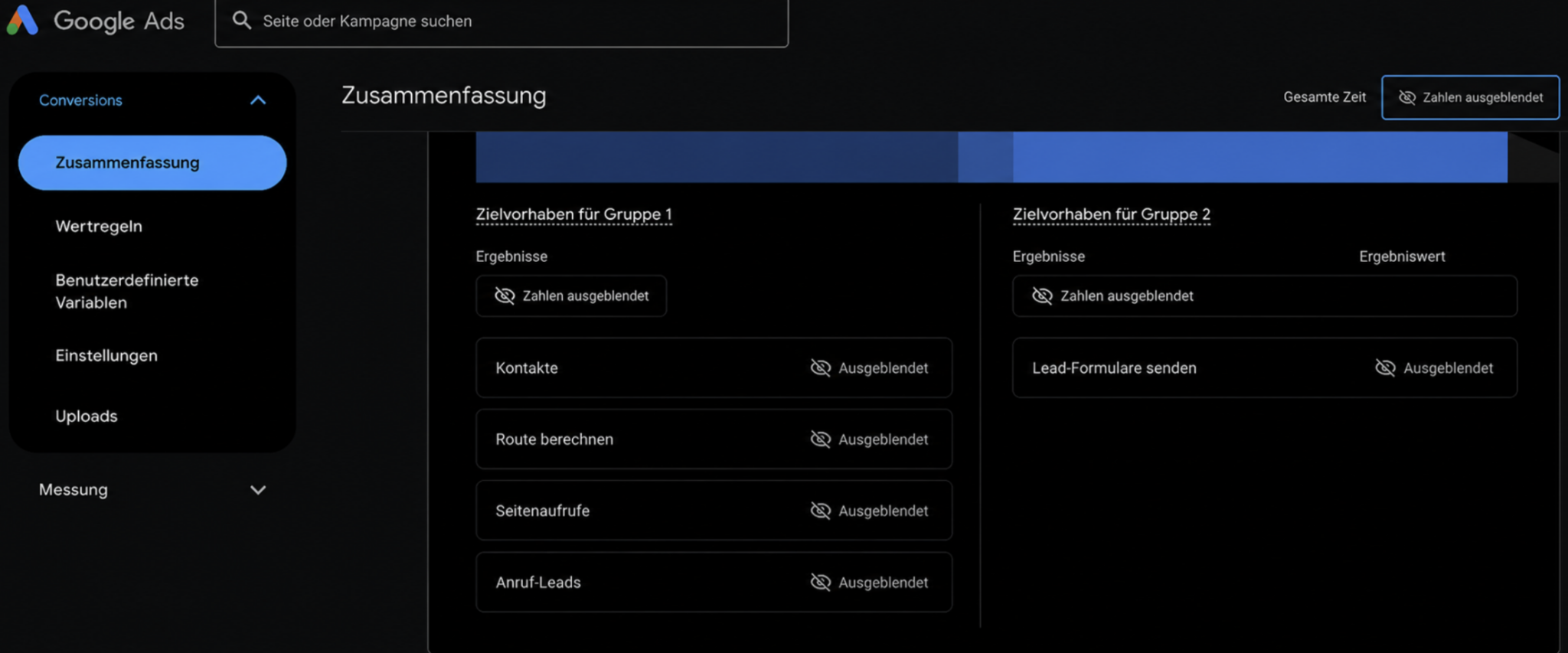
    What it sees is a conversion event with a numeric value attached to it, usually a currency value. It does not inherently know that a newsletter signup might be worth $2 in eventual value, a lead might be worth $60, and an opportunity might be worth $400. To Google, those are conversion events. Without better signals, it has no real context that one may be worth 200 times another.

    The algorithm is not optimizing for my business outcome by default. It is optimizing for the data I provide. If that data is wrong, the optimization will be wrong too.

    For example, if every form submission fires the same conversion with the same default value, I give the system no clean way to separate low-intent inquiries from high-value prospects. The algorithm treats them the same. And because low-quality leads are often cheaper to acquire, it can quickly flood the account with them.

    The cost per lead may drop from $40 to $25, and the dashboard may make performance look more than 35% better. But behind that cleaner metric, the pipeline can dry up as genuinely qualified inquiries quietly fall by half.

    Dig deeper: Why better signals drive paid search performance

    3 ways bad data quietly wrecks delivery

    Bad data can show up in different ways, but I see three issues that are especially likely to derail campaign delivery.

    1. Wrong event

    If I optimize for a top-of-funnel action like a page view while the real conversion events happen further down the funnel, the algorithm learns to buy more of those cheap events. The problem is that the lower-funnel activity may never follow.

    2. Wrong value

    If I count every conversion equally, or assign every conversion the same placeholder value, I hide the real differences in business value. When actual value can vary by 10 times or more, the algorithm will often chase the easier, lower-value conversions because they are cheaper to acquire.

    3. No data

    This problem does not get discussed enough. A complete break in conversion data can damage a campaign faster than almost anything else.

    On Day 1, the algorithm starts wondering where the conversions went. By Day 2, it begins assuming they may not be coming back. By Day 3, it can start making serious bidding changes. Within a week, many campaigns can throttle themselves down to almost nothing.

    How I pick the right signal for Google

    So how do I fix this? I start by choosing the signal that best represents business value, not just the easiest action to count.

    Take a typical lead generation business. Some leads will never convert, while others may be worth 10 times as much as the rest.

    If the form asks the right qualifying questions, I may already know which leads are which. But if I optimize for every submitted lead using a target CPA, I am telling Google that all leads are equally valuable.

    Imagine an account spending $20,000 a month at a $40 target CPA and generating about 500 leads. Only 150 qualify, and maybe just 50 are genuinely high value. A basic lead may be worth $60, a qualified lead may be worth $200, and a high-value lead may be worth $600. That is a 10 times spread in value.

    In that situation, I have several ways to improve the optimization signal.

    Optimize for a qualified lead: I can create a new conversion action, such as “qualified lead,” and fire it only when a lead has real value. Then I can move the target CPA strategy to that conversion action, knowing the campaign will ignore leads with no value. The advantage is that I train the campaign on a more meaningful signal. The downside is that every qualified lead is still treated equally.

    Assign conversion values and use target ROAS: I can add a currency value to the qualified lead based on the potential revenue it could generate if it becomes a sale. Then I can switch the campaign to target ROAS, allowing Google to optimize for return instead of simply counting leads. The tradeoff is that it may still buy larger numbers of lower-value leads if it can acquire them at the right price.

    Optimize for a high-value lead: I can create a “high-value lead” conversion event that fires only for top-tier leads, with or without a conversion value. Then I can optimize with either target CPA or target ROAS, depending on whether I care more about acquisition cost or return. The advantage is stronger lead quality. The downside is that, depending on spend and volume, the data may be too limited to support this approach until the account scales.

    These are only a few possible optimization signals, and they do not even go deeper into the funnel. I can apply the same thinking to lower-funnel milestones by creating separate conversion actions for events such as contacted lead, qualified contact, or high-value contact.

    Targeting and measurement can be different

    This sounds simple, but the conversion event I optimize for and the one I report on are not always the same. In many cases, they should not be the same. One trains the algorithm. The other tells me how that training is performing.

    In the example above, a client or internal stakeholder may still want to see cost per lead. That is a valid metric. But the campaign may be optimizing for the Qualified Lead conversion, not the original lead submission.

    I can keep the original lead conversion running purely as a reporting metric, so stakeholders still get their cost-per-lead view while the campaign bids on the qualified lead signal that actually reflects business value.

    Same campaign. Two conversions. Two very different jobs.

    That brings me back to the question I started with: did I spend more time verifying the data than writing the ad? In an automated account, data is no longer just measurement. Data is strategy.


    Inspired by this post on Search Engine Land.

    crushpress.ai community screenshot
  • Medical PPC Ads: My Guide to Safer, Stronger Results

    Medical PPC Ads: My Guide to Safer, Stronger Results

    PPC advertising for medical and mental health services comes with more restrictions than many other industries, but I still see it as one of the most effective ways to keep a steady flow of new patients and clients coming into a practice.

    Whether I am managing campaigns for a client, promoting my own practice, or building a campaign from scratch, I focus on the same fundamentals: the right keywords, compliant messaging, clear landing pages, and lead-quality tracking.

    Choosing keywords for medical and mental health advertising

    When I choose keywords for medical or mental health advertising, I start by thinking about how real patients search. In most cases, their searches fall into three main groups.

    First, some people search by symptoms or treatment options. They may not know which professional they need yet, so they search for phrases like “treatment options for depression” or “why does my ankle hurt when I run.” I do not ignore these searches, because they can still turn into new patients or clients.

    Second, people often search for what they think the service is called. They may use simplified or incorrect terms, such as “therapist to manage bipolar medications” or “foot pain doctor.” These searches still show intent, even if the language is not medically precise.

    Third, some searchers use the correct term because they already know what they need and are ready to contact a professional. They may search for “psychiatrist” or “endodontist near me.” Even then, I watch for confusion between similar roles, such as therapist, psychologist, and counselor.

    Most of my budget usually goes toward the second and third groups, where searchers are closer to taking action and starting treatment.

    If I have a larger budget, I may also test broader symptom-based or informational searches that could convert later. These can work, but I treat them carefully because informational searchers may or may not be ready to book.

    I also rely heavily on negative keywords. They help me block searches for services the practice does not provide, which protects the budget and improves lead quality.

    Dig deeper: A guide to Google Ads for regulated and sensitive categories

    Staying compliant with ad copy

    With medical and mental health ad copy, I have to be careful. I need the ad to make it clear that help is available, but I cannot write in a way that feels too direct, too personal, or too aggressive.

    I expect some trial and error. An ad rejection does not automatically mean an account is in trouble. It usually means the ad was not approved, so I adjust the wording or request a manual review when appropriate.

    Blunt language is often where problems happen. Instead of making strong claims, I test softer, more compliant language that still communicates the value of the service.

    To stand out from competitors, I focus on practical benefits such as accepted insurance, payment options, specialized treatments, or distinctions like being family-owned, local, award-winning, certified, or licensed.

    I avoid terms like “cure” and other language that implies guaranteed results. Google and Meta both have ad policies that restrict how medical, mental health, and wellness services can be promoted.

    When an ad gets rejected, I rewrite it so it still explains the value of the practice without crossing policy lines.

    For some psychiatrists, doctors, and other medical service providers, Google Ads may also require a LegitScript.com listing, especially for addiction treatment services.

    Google Ads support or its documentation will explain whether that requirement applies to a specific practice.

    Building effective landing pages

    When I build landing or service pages, I start with the information the front office already gives to patients. That is often the clearest and most useful material available.

    I pull details from pamphlets, office materials, and common intake conversations. Then I highlight key points such as accepted insurance, cash payment options, payment plans, financing, and specialized treatments.

    I also answer the questions patients regularly ask in person or over the phone. A strong landing page should keep improving as new questions come up.

    Those questions might include whether the practice works with children, accepts Medicare, offers phone or virtual sessions, or provides a specific treatment.

    I make the next step obvious. That may mean booking an appointment, scheduling an initial consultation, requesting a free phone consultation, filling out a form or questionnaire, submitting a contact request, or calling with questions.

    I avoid vague forms and generic phone numbers with no instructions. Instead, I explain the process clearly from pre-treatment to treatment to post-treatment.

    I also like to include a FAQ section that answers questions such as “what is the process?” and “how does treatment work?” The more uncertainty I remove, the easier it is for a patient or client to take action.

    Choosing the best campaign types

    For medical and mental health services, I usually build the strategy around Search campaigns.

    Automated or audience-based campaign types, including Performance Max and Demand Gen, can run into privacy and targeting limits. Depending on the service, the ads may not be approved.

    Remarketing is typically restricted for the same reason. Video campaigns may be possible, but targeting limits often make them better suited for local branding than direct response.

    Search campaigns work well because people are actively looking for answers, treatment, or a specific type of provider. They are typing in the exact services they need.

    Many providers also use directories like Psychology Today or ZocDoc for lead generation. I still like supplementing those channels with Google or Microsoft Search campaigns because they send traffic directly to the practice’s own site and give more control over patient or client flow.

    My usual approach is to target very specific terms for people who are ready to hire a professional, then test broader symptom or research-related terms when the budget allows.

    Meta Ads can also be useful, but privacy laws limit targeting. I also have to be careful with ad copy, images, and landing pages so the campaign stays compliant.

    I review Meta’s ad policies before launching campaigns to reduce avoidable disapprovals. Meta can support larger budgets, but for most medical and mental health marketing, Google Search remains the most reliable starting point.

    Dig deeper: How to prevent Meta Ads restrictions on health and wellness campaigns

    Tracking lead quality

    With any online advertising, and especially with medical and mental health services, I need to know more than how many leads came in. I need to know which leads became real patients or clients.

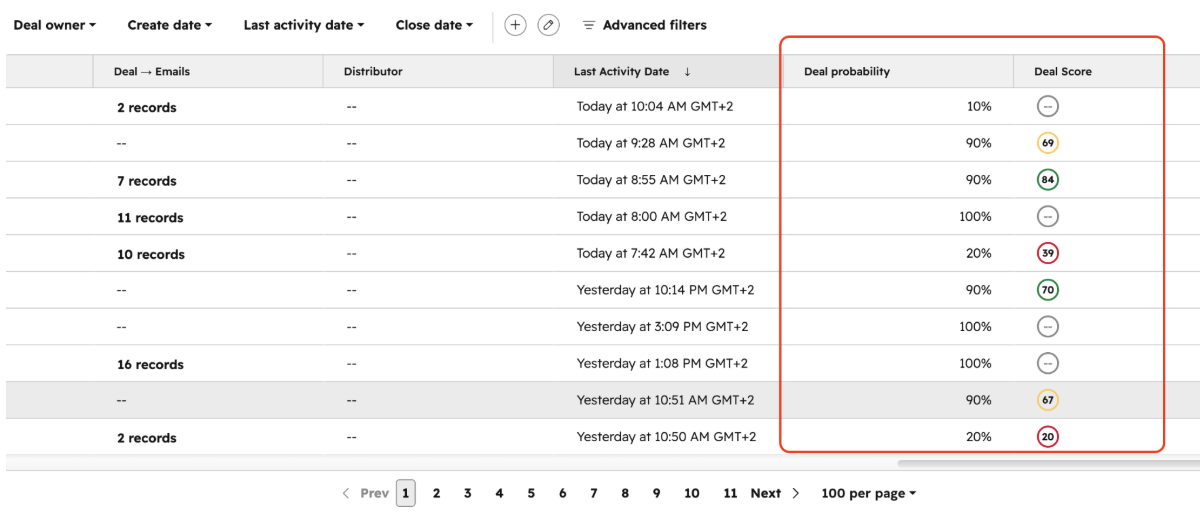
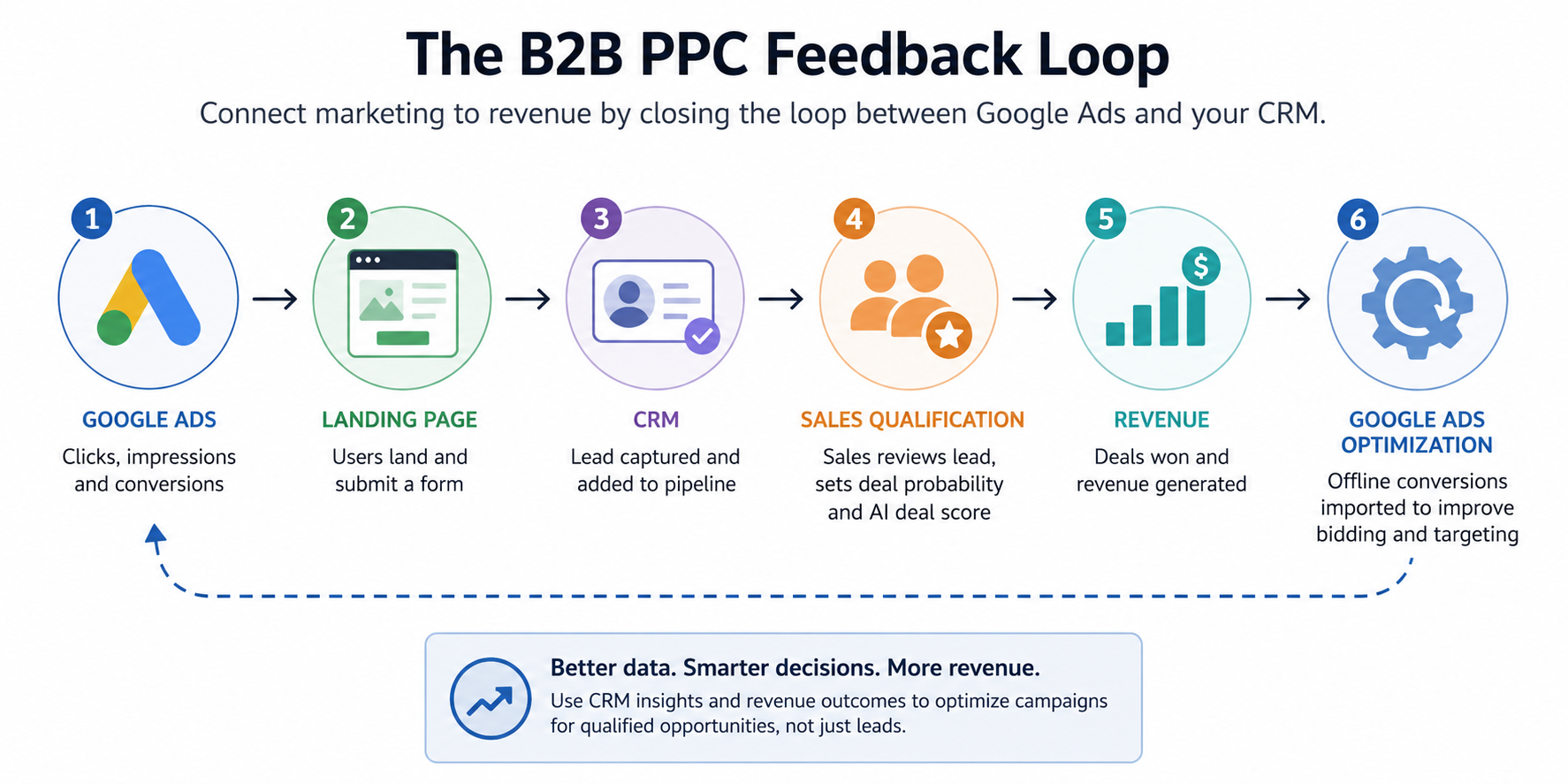
    A simple CRM, whether generic or built for the industry, can track incoming leads and show which ones converted.

    Google Ads, Microsoft Ads, and Meta Ads all offer built-in CRM connections. I can also use a tool like Zapier to connect systems without needing a programmer.

    Beyond website form submissions, I also track inbound calls generated by marketing campaigns. Phone calls often represent high-intent leads, so leaving them out can distort ROI.

    Call tracking tools such as CallTrackingMetrics, CallRail, and WhatConverts can integrate with CRMs and major ad platforms to measure lead quality.

    They also offer call recording and are HIPAA-compliant, which matters when tracking performance in healthcare-related campaigns.

    Keeping medical and mental health ads effective

    To keep medical and mental health ads effective, I focus on four things: targeting the right searches, writing compliant ads, improving landing pages, and tracking lead quality.

    When those pieces work together, I can build campaigns that attract the right patients and clients more consistently.

    A steady, well-structured approach is what helps a practice maintain or expand its patient flow without creating unnecessary compliance risk.


    Inspired by this post on Search Engine Land.

    crushpress.ai community screenshot
  • Unlock Enhanced Ad Performance with Google’s New Conversion Beta

    Unlock Enhanced Ad Performance with Google’s New Conversion Beta

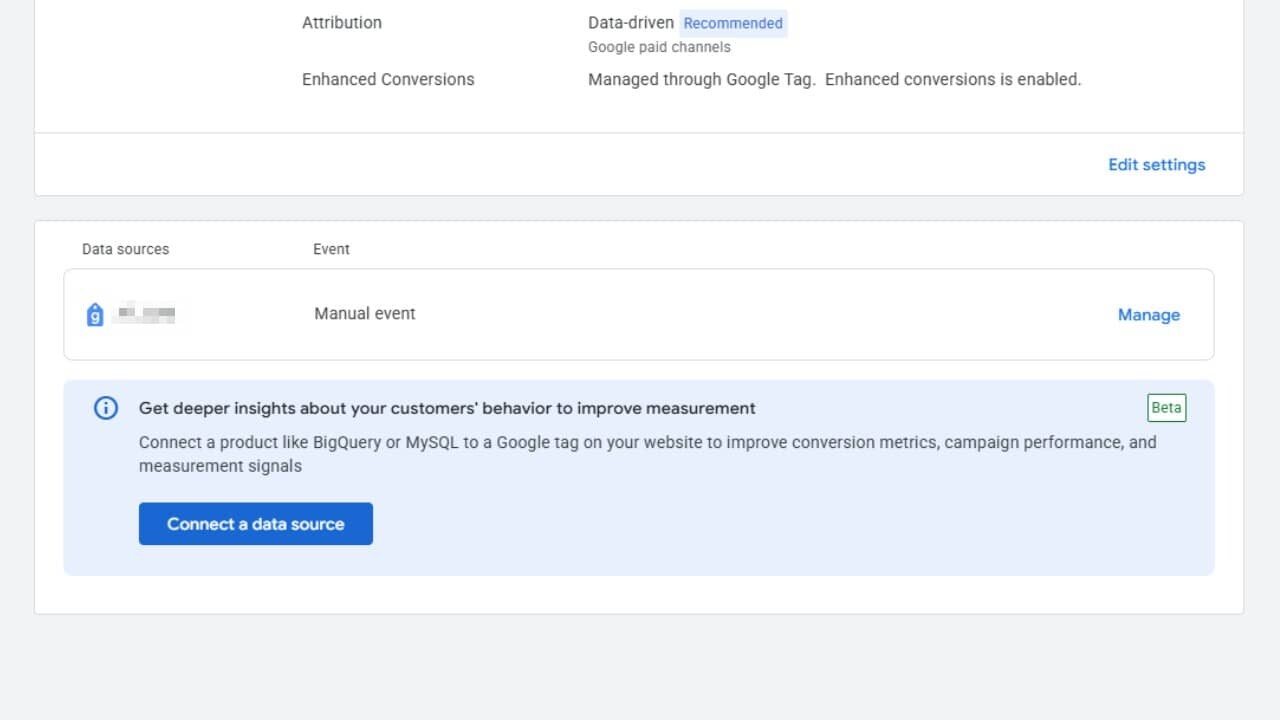
    In a significant move, Google Ads has launched a beta feature that allows advertisers like me to connect additional data sources directly to website conversion actions. This innovative step gives us a chance to enhance tag-based measurements using our backend conversion data.

    The new feature equips advertisers to merge conversion signals gathered through Google tags with transactional data from various platforms, such as CRMs, order databases, and e-commerce systems.

    What’s new. Now, I can append an additional data source to an existing website conversion action via Google Ads Data Manager or through the Data Manager API.

    Designed to enhance—not replace—website tagging, this beta allows us to send conversion data from backend systems into the same conversion action utilized for campaign measurement and optimization.

    Why we care. This beta is crucial for filling conversion measurement gaps by fusing Google tag data with our first-party data from backend structures like CRMs. It helps us capture conversions that might be overlooked due to browser limits, privacy settings, or ad blockers, providing a fuller view of campaign performance.

    Why Google launched it. Google indicates that combining tag-based measurement with backend conversion data allows advertisers to construct a more comprehensive picture of conversions, subsequently boosting campaign performance.

    Here’s what this feature helps achieve:

    • Recover conversions that may escape website tags.
    • Enhance measurement resilience.
    • Deliver more exhaustive data for automated bidding.
    • Simplify data integration through the Data Manager.

    How it works. The system combines website conversion data captured by Google tags with conversion records uploaded from an advertiser’s backend systems.

    To avoid duplicate reporting, Google utilizes transaction IDs to identify and de-duplicate conversions between the tag and the supplementary data source within the same conversion action.

    What advertisers need to know. The beta is currently restricted to website conversion actions that implement Google tags or Google Tag Manager.

    It’s not available for:

    • Google Analytics imported conversions.
    • URL-based conversion actions.

    Google advises attaching an additional data source to an existing conversion action rather than initiating a new one to eschew potential double-counting across campaign goals.

    Data requirements. Each upload must encompass:

    • Transaction ID.
    • Conversion date and time.

    Advertisers need to supply at least one attribution identifier, like hashed customer data or a Google click identifier.

    Google suggests that I upload conversion data as swiftly as possible and ensure the conversion values match the currency format utilized by website tags.

    Bottom line. This beta signifies Google’s ongoing effort to bolster conversion measurement by integrating backend transaction data directly into Google Ads. As we seek more comprehensive performance insights, this feature provides a streamlined means to enhance website measurement using first-party business data.


    Inspired by this post on Search Engine Land.

    crushpress.ai community screenshot
  • Unlocking Google’s Auto-Classification for Conversion Lists

    Unlocking Google’s Auto-Classification for Conversion Lists

    Starting in August 2026, Google will begin to automatically categorize customer types in conversion-based lists, removing some of the control we advertisers once had. I must now provide Google’s systems with clearer signals on where audiences are in their customer journey.

    As someone deeply involved in advertising, I know the importance of precise audience targeting. With these changes, I’m urged to review and update my classifications in the Google Audience Manager before they kick in.

    What’s Changing? From August 2026, Google Ads will automatically classify customer lists into categories like:

    • Existing customers
    • New customers
    • Other customer segments

    Why Google’s Making This Shift. It appears that Google aims to enhance audience consistency across its tools for customer acquisition and retention. This standardization allows for better optimization decisions in Google’s automated bidding and targeting systems by clearly defining prospecting from retention audiences.

    Why This Matters to Us. As an advertiser utilizing customer acquisition strategies, the precise classification of these lists is crucial. Any misclassification could impact Google’s optimization of users throughout their lifecycle, affecting campaign performance.

    What We Should Do. It’s vital for us to audit our Customer Match lists—based on conversion data—before August. Consider these questions:

    • Are my customer lists categorized correctly?
    • Do they represent existing customers versus acquisition targets?
    • Will Google’s automatic classification align with my internal definitions?

    Reviewing these settings now could prevent unexpected changes when Google enforces these classifications.

    The Bottom Line. Google is taking an active role in managing audiences, further streamlining the signals powering their automated advertising systems by assigning lifecycle labels to conversion-based lists.

    First Spotted. This update was noticed by Google Ads expert Bia Camargo, who shared the alert on LinkedIn.


    Inspired by this post on Search Engine Land.


    crushpress.ai community screenshot
  • Google Unveils Enhanced Data Manager API for Seamless Ad Integration

    Google Unveils Enhanced Data Manager API for Seamless Ad Integration

    I’ve recently discovered that Google is taking major strides in helping advertisers streamline their measurement workflows and enhance audience match rates throughout its advertising ecosystem. Exciting times lie ahead for us marketers!

    By incorporating new capabilities into the Data Manager API, Google enables us to send offline conversion data seamlessly across multiple Google Marketing Platform destinations. This can significantly boost Customer Match performance through IP-based matching.

    What’s happening. The enhanced Data Manager API now accepts offline conversion event uploads to platforms like Campaign Manager 360, Search Ads 360, and Display & Video 360. This represents an expanded role for the API as a central data ingestion layer in Google’s advertising universe.

    We can now rely on a single schema to distribute conversion data across several Google products, which is a game-changer compared to our previously disjointed workflows requiring individual integrations. Additionally, this API supports encrypted user identifiers, including email and phone numbers, enabling event routing to multiple destinations with just one request.

    Between the lines: Google is urging us who still use the Campaign Manager 360 API for conversions to transition to the Data Manager API. They assure us that the new framework not only simplifies implementation but also offers more flexibility in measurement and attribution capabilities.

    What’s new and fascinating is the introduction of IP ingestion support for Google Ads Customer Match through a new CompositeData field. This means alongside traditional identifiers like email and postal addresses, we can now upload IP addresses as well.

    Starting in Q3 2026, incorporating IP addresses with corresponding observation timestamps promises us enhanced Customer Match rates, potentially widening audience reach and elevating match precision.

    Why we care. These updates simplify the unification of conversion measurement across Google’s ad products and improve audience matching. For those of us managing large-scale data programs, the benefits could include better attribution and more effective audience targeting.

    The bottom line. With the Data Manager API being positioned as the ultimate hub for conversion and audience data, Google offers us a more cohesive system to manage measurement and improve Customer Match across its platforms. Check it out for yourself through Google’s official blog post.


    Inspired by this post on Search Engine Land.


    crushpress.ai community screenshot