Tag: Conversion Rate

  • How I Cut Google Ads Invalid Clicks by 50% With Audiences

    How I Cut Google Ads Invalid Clicks by 50% With Audiences

    A Google Ads targeting tactic that cut invalid clicks by 50%

    Advertisers are projected to lose $172 billion a year to ad fraud by 2028. I have seen how quickly that problem can move from an abstract industry statistic to a very real performance issue inside a Google Ads account.

    The risk is especially high in competitive industries where CPCs are expensive and every wasted click hurts. One client I worked with was in exactly that situation, and invalid click activity was dragging campaign performance below any profitable level.

    After testing the usual defenses, I adjusted Google Ads audience targeting in a way that reduced invalid-click activity by 50% and brought the campaigns back to profitable performance.

    Case study: How I cut invalid clicks by 50%

    The client sold book editing and ghostwriting services. The search terms triggering the ads were relevant and high intent, but the traffic was not converting anywhere close to the level needed for profitability.

    The warning signs appeared quickly. Google was reporting a 60% to 80% invalid click rate. Microsoft Clarity recordings showed bot-like behavior from Google Ads traffic. Many search terms had click-through rates above 80%, and some were even above 100%. GA4 and other analytics tools also showed far fewer sessions than the number of clicks reported in Google Ads.

    I tested third-party click fraud tools first, but they did not produce any measurable improvement in performance.

    Next, I filed an investigation with Google. Google agreed that suspicious activity existed, but said it had already caught all of it and had not charged the account for those clicks.

    Google Ads invalid click investigation response

    I was still confident that Google was not filtering out all of the invalid activity, so I decided to use the targeting controls inside the account more aggressively.

    I added 540 Google-defined audiences to the Google Search campaigns and set them to Targeting.

    The result was immediate. The invalid click rate dropped by 50%, and the conversion rate rose back to profitable levels.

    Image

    Here is why I tested this approach, why I believe it worked, and what advertisers should understand before trying it in their own accounts.

    What click fraud and invalid clicks actually are

    Google defines invalid clicks as clicks on ads that do not come from genuine user interest. That includes intentionally fraudulent activity, accidental clicks, and duplicate clicks.

    In practice, this can include actual fraud, such as competitors clicking ads, as well as less malicious behavior like accidental double-taps.

    Google does not charge advertisers for clicks it determines are invalid. If Google initially charges for a click and later classifies it as invalid, it credits the advertiser back for that activity.

    Why the usual defenses can fall short

    Google catches a lot of invalid click activity, but this account showed me that the system is not perfect.

    That gap is why so many third-party click fraud tools exist. Most of them try to identify suspicious IP addresses and block them before they can keep costing advertisers money.

    The challenge is that fraudsters understand how these tools work. They can cycle through IP addresses with VPNs and avoid being stopped by a system that only blocks previously identified addresses.

    If a tool blocks an IP address after suspicious activity occurs, that may help only if the same IP address is used again. When the source keeps changing, old IP exclusions lose much of their value.

    There is also a platform limit to consider: Google allows a maximum of 500 IP address exclusions per campaign.

    Image

    The tactic: Add audiences set to Targeting

    I started thinking about what might separate fraudulent traffic from legitimate traffic. Google’s predefined audiences stood out because Google builds hundreds of audience segments from demographics, search behavior, and browsing behavior.

    For example, someone researching private jet companies and Rolex watches might be classified by Google as a luxury shopper and added to that audience.

    My hypothesis was simple: fraudsters who constantly rotate IP addresses may not also be building normal-looking online behavior profiles that fit neatly into Google’s predefined audiences.

    So I added most of the available audiences to the Search campaigns. I was not trying to target only audiences that matched the ideal customer. I was using the audiences as a filter for users who carried enough Google audience signals to look more like real people.

    The key detail is that I chose Targeting, not Observation.

    When I use Targeting, Google limits ads to people who trigger the keywords and also belong to the selected audiences.

    When I use Observation, Google simply reports how people in those audiences engage with the ads compared with everyone else. The ads can still show to anyone who triggers the keywords.

    I would only test this tactic in accounts with unusually high invalid click rates. It can create real downside, including the risk of blocking legitimate searchers who do not fit inside Google’s predefined audience segments.

    How to test this in your own account

    In a Search campaign, go to Audiences > Edit audience segments > Targeting > Browse. Then select the audiences you want to add and click Save.

    Image
    Google Ads audience targeting setup

    Common questions about fighting click fraud

    Will Google refund clicks it identifies as invalid?

    If Google identifies a click as invalid when it happens, I am not charged for that click. If Google identifies the click as invalid later, the account receives a credit toward future advertising.

    How do I see how many invalid clicks I am getting?

    The Invalid activity credit report in Report Editor inside the Google Ads UI provides the most detailed reporting.

    I look at two key metrics there: Invalid clicks, which are clicks I was not charged for, and Credited clicks, which are clicks I was originally charged for but later credited back.

    Google Ads invalid activity credit report

    I can also add the Invalid clicks and Invalid click rate columns at the campaign level, though not at the ad group or keyword level.

    What is a normal invalid click rate?

    A February study found an 11.4% invalid click rate across 43,700 accounts.

    Industry makes a major difference. While the average invalid click rate for StubGroup clients is very close to that study’s finding, I have seen advertisers in competitive industries with invalid click rates above 40%.

    Should I file an investigation with Google?

    If I have reason to believe Google is charging for invalid clicks, I consider filing an investigation here.

    Why this approach worked best

    Using Google’s predefined audiences as a filter cut this account’s reported invalid click rate in half. More importantly, it blocked activity that Google had said it was already catching, which turned failing campaigns into profitable ones.


    Inspired by this post on Search Engine Land.


    crushpress.ai community screenshot
  • How I Measure Paid Social’s Real Impact on Paid Search

    How I Measure Paid Social’s Real Impact on Paid Search

    I’ve learned that generating demand is one of the hardest jobs in digital marketing. Measuring where that demand actually started can be even harder.

    For years, I’ve seen paid search and paid social treated like separate worlds. Paid search usually gets evaluated through clicks, conversions, and ROAS, while paid social is often judged by platform-reported metrics and attributed conversions.

    The challenge is that people don’t move through the buying journey in neat, channel-by-channel steps.

    Someone might first discover a brand through a Meta ad, ignore it, see another ad a few days later, and eventually search for the brand or product on Google before adding something to the cart and converting. In most reports, paid search gets the credit because it captured the last click. But I don’t think that tells the full story if search didn’t create the demand in the first place.

    As privacy rules, platform tracking, and attribution limits keep changing, I need better ways to understand how paid social influences search behavior. These are the practical signals and measurement methods I use to connect the two.

    Signs I Look For When Paid Social Influences Search

    Paid social’s impact on search is not always obvious inside attribution reports. I usually see it show up first in performance trends. These indicators help me understand whether social campaigns are building awareness that later turns into search activity and conversions.

    Branded Search Volume Starts Rising

    One of the clearest signs I watch for is an increase in branded search queries.

    When people see a relevant, compelling social ad on Meta, TikTok, LinkedIn, or another platform, they often do not click right away. Instead, they may come back later and search for the brand name, product name, founder, or another branded term.

    For example, after launching a new Meta Ads campaign, I might look for increases in searches like these:

    • Brand name.
    • Brand + product category.
    • Brand + reviews.
    • Brand + pricing.
    • Brand + competitor comparisons.

    I monitor these branded searches over time because they can reveal whether paid social is creating awareness that later becomes search behavior.

    To do that, I review data from Google Ads, Microsoft Advertising, Google Analytics, Google Search Console, Google Trends, and any third-party SEO tools available.

    I also compare trends before, during, and after major paid social launches or budget changes. If branded search volume keeps rising as paid social investment increases, I take that as a strong directional sign that social is helping generate demand.

    That does not mean every increase in branded search comes from paid social. My goal is not to prove perfect causation. My goal is to find a meaningful relationship I can use to make better decisions.

    Image

    I also account for other factors that can lift branded search volume, including:

    • Influencer partnerships.
    • Email campaigns.
    • Public relations coverage.
    • Seasonal demand.
    • Product launches.
    • Highly engaging organic social activity.

    Search CTR Improves

    Another signal I watch closely is click-through rate. If paid social is increasing brand familiarity, people may be more likely to click a search ad from that brand instead of choosing a competitor.

    For example, someone might see Instagram video ads for two weeks and later search for a related topic on Google. When several ads appear, they may be more inclined to click the brand they already recognize.

    I see the same concept reflected in brand recognition surveys that Meta and LinkedIn sometimes show in user feeds. I often find myself recognizing brands I have never purchased from simply because I have seen their ads repeatedly on social media.

    That basic familiarity can still matter. It can help lift CTR on branded search campaigns, improve CTR on non-branded campaigns, and potentially lower CPCs over time.

    Whenever I launch a new paid social campaign or make a significant adjustment, I compare paid search CTR before and after the change to see whether search engagement improves.

    Search Conversion Rates Improve

    Brand familiarity can also affect conversion rates. When people have already seen or engaged with a brand, they may arrive on the website with more trust and confidence than a completely cold visitor.

    Because of that, I look for improvements in search conversion rate, lead quality, search CPA, and revenue per visitor after periods of strong paid social activity. This effect can be especially noticeable for products or services with longer consideration cycles and multiple touchpoints before purchase.

    For me, conversion efficiency is one of the most useful signs that paid social is influencing downstream search behavior.

    How I Validate Paid Social’s Impact on Search

    The signals above give me directional insight. When I need stronger evidence, I use more structured measurement methods to evaluate whether paid social activity is actually influencing paid search performance.

    Pre- and Post-Campaign Analysis

    One of the simplest ways I evaluate the relationship is with a pre- and post-campaign analysis.

    Before a paid social campaign launches, I benchmark key paid search metrics. Then I compare those numbers with performance after the campaign goes live.

    Image

    The metrics I usually measure include:

    • Branded search impressions.
    • Branded search clicks.
    • Search CTR.
    • Search CVR.
    • CPA.
    • Total search conversions.

    This analysis will not prove causation on its own, but it can show whether increased social activity may be influencing search performance. When I run this type of analysis, I account for seasonality, compare similar time periods, and watch for changes in competitor activity.

    Geotargeted Holdout Testing

    When I need stronger evidence, I consider a geotargeted holdout test. In this setup, I run paid social in selected geographic markets while withholding it from comparable control markets. Then I compare paid search performance across both groups.

    For example, instead of running paid social everywhere, a nationwide advertiser could split markets into two groups:

    • Test market(s): Paid social campaigns are active.
    • Control market(s): Paid social campaigns are paused or excluded.

    I would run the test for several weeks and monitor the same core metrics in both groups:

    • Branded search volume.
    • Search CTR.
    • Search CVR.
    • Leads.
    • Revenue.

    If the test markets show meaningfully stronger search performance than the control markets, I have a better basis for isolating the impact of paid social.

    I like geotargeted tests because they reduce attribution bias. They let me evaluate business outcomes across similar populations instead of relying only on platform-reported conversions, which can be limited by privacy changes and tracking gaps.

    If I run a holdout test, I choose comparable markets, set aside enough budget, and give the test enough time to produce statistically meaningful results. This approach usually works best for larger advertisers running regional or national campaigns. For smaller brands, I would usually start with pre- and post-campaign analysis.

    Why I Measure Influence Across Channels

    The relationship between paid search and paid social is often stronger than reporting platforms make it appear. I try not to evaluate these channels in isolation because they often play different roles in the same customer journey. Search captures demand, while paid social can help create it.

    By digging into the data, I can find better ways to invest, build future demand, and drive conversions across platforms. Monitoring branded search, CTR, conversion rates, and structured test results gives me a clearer view of how paid social contributes to business growth.

    Attribution will never be perfect. But when I measure influence across channels, I can make smarter budget decisions and build a more accurate picture of what is actually driving performance.


    Inspired by this post on Search Engine Land.


    crushpress.ai community screenshot
  • Unlocking SaaS Success: 2026 Freemium Conversion Insights

    Last updated: June 12, 2026

    As I dive into the data we’ve amassed from over 80 SaaS clients between 2022 and 2026, this report paints a vivid picture of freemium model effectiveness. Together, we’ll explore industry averages, see how visitors transition to becoming free users, and how these free users convert to paid customers. I’ll also guide you through the nuances of various freemium offerings compared to free trial success rates.

    I’m excited to share our findings with you:

    Freemium Conversion Rates by SaaS Industry

    IndustryVisitor to FreemiumFreemium to Paid
    Advertising/AdTech14.1%3.8%
    Agriculture/AgTech12.0%4.6%
    Communications12.4%3.8%
    CRM13.1%3.7%
    Cybersecurity12.2%3.6%
    Education/EdTech13.9%2.6%
    Enterprise12.2%3.8%
    ERP14.0%5.2%
    Financial/Fintech13.9%4.1%
    Healthcare/MedTech15.2%3.9%
    HR12.8%3.3%
    IoT15.0%3.6%
    Legal/LegalTech14.2%6.1%
    Real Estate/PropTech11.7%2.9%
    RegTech13.7%5.3%
    .table2 tr:nth-child(8n) {background-color:#77A7C8;color:white;}.table2 tr:nth-child(7n+4),.table2 tr:nth-child(7n+5) {background-color:#F6F6F6;}.table2 tr {background-color:white;}.table2 td {border: 1px solid black;}

    SaaS Free Trial vs Freemium Conversion Rates

    Freemium ModelDescriptionTypeConversion Rate
    Traditional FreemiumFree-forever software that can function on its own, but has significantly limited features compared to the paid product.Visitor to Freemium13.7%
    Freemium to Paid3.7%
    Land & ExpandSoftware that is free for individuals to acquire, but which requires a paid plan to use at an organization level.Visitor to Freemium14.5%
    Freemium to Paid3.0%
    Freeware 2.0Free-forever, fully functional product with optional add-ons.Visitor to Freemium13.2%
    Freemium to Paid3.3%
    Free Trial TypeDescriptionTypeConversion Rate
    Opt-In Free TrialsOpt-in free trials have higher visitor to trial conversion rates, as they don’t require visitors to input payment information before downloading.Visitor to Free Trial7.8%
    Free Trial to Paid17.8%
    Opt-Out Free TrialsOpt-out free trials automatically convert users to paid subscriptions once the trial period ends.Visitor to Free Trial2.4%
    Free Trial to Paid49.9%

    Further Reading

    For more in-depth analysis, you can read our previous reports on SaaS metrics:

    If you’re interested in a PDF copy of this report, just reach out here.

    Source


    Inspired by this post on First Page Sage Blog.


    crushpress.ai community screenshot
  • Unlocking B2B Landing Page Success: Insights from 2026 Data

    Unlocking B2B Landing Page Success: Insights from 2026 Data

    Last updated: May 5, 2026

    In this report, I’m excited to share with you the average conversion rate data we gathered from B2B companies over the span of 2019 to 2026. We meticulously segmented this information by landing page type and industry. By analyzing data from 83 companies across 27 diverse industries, we provide a comprehensive insight into the world of B2B landing pages. Each of our clients in this study turned to us for an SEO campaign, and 38 of these organizations additionally took advantage of our content creation, email marketing, or LinkedIn marketing services.

    When I mention conversion, I refer to actions like filling out a contact form, signing up for a demo, downloading a gated white paper, subscribing to a newsletter, making a purchase, or any other action that aligns with the page’s call-to-action. The conversion rate of a page is the percentage of visitors who perform one or more of these actions in a given timeframe (commonly measured quarterly).

    Our analysis covered six different types of landing pages: Product Pages, Service Pages, Industry Pages, Location Pages, Customer Type Pages, and Application Pages. We intentionally excluded Home Pages, About Pages, and other general informational pages.

    The findings from our study are presented below:

    B2B Landing Page Conversion Rates by Page Type

    .table1 tr:nth-child(n+2) td:nth-last-child(1) { text-align: left; } .table1 td { border: 1px solid black; } .table2 td { border: 1px solid black; }
    Landing Page TypeExample PageConversion RateNotes
    Customer Type3.5%Customer-type pages are explicitly targeted to well-defined client profiles. Consequently, when this client lands on this page, the conversion rate is high compared to other landing pages.
    Application3.1%Similar to service pages, application pages should demonstrate your experience in solving a problem related to the reader’s issue.
    Product2.9%Product pages are typically direct and enjoy relatively high conversion rates since they target the most transactional search intents.
    Service2.7%Service pages are akin to product pages, enjoying high conversion rates due to the customer journey stage visitors are in when they reach a service page.
    Industry1.8%These pages serve a dual purpose: demonstrating your understanding and expertise in the industry.
    Location1.1%Location landing pages should make it clear that you’re familiar with the specific geographic area’s nuances necessary for delivering the service/product. Many location pages suffer from poor conversion rates due to duplicate content.

    B2B Landing Page Conversion Rates by Industry

    IndustryConversion Rate
    Aerospace & Defense1.8%
    Automotive1.2%
    Aviation1.0%
    B2B SaaS1.1%
    Biotech1.0%
    Business Consulting1.7%
    Commercial Insurance1.6%
    Construction1.9%
    Cybersecurity1.4%
    eCommerce1.6%
    Education2.7%
    Engineering1.2%
    Entertainment1.1%
    Environmental Services1.3%
    Financial Services1.8%
    HVAC Services3.1%
    IT & Managed Services1.5%
    Legal Services3.4%
    Manufacturing2.2%
    Medical Device1.6%
    Oil & Gas2.6%
    PCB Design & Manufacturing1.1%
    Pharmaceutical1.9%
    Real Estate2.8%
    Software Development1.2%
    Solar Energy1.8%
    Transportation & Logistics1.4%

    How to Improve B2B Landing Page Conversion Rates 

    The following landing page strategies have consistently improved conversion rates for our clients. Let me walk you through them:

    • Reduce Form Fields: For early-stage conversions, I recommend limiting fields to email, first name, and company (optional). For demo requests, include additional fields like job title or phone number.
    • Add Trust Signals: Ensure your landing page includes client logos, review scores, testimonials, and certification information if they’re not already there.
    • Include Product Features & Highlights: Present your product’s value clearly by addressing the reader’s pain points in a visually engaging manner.
    • Include Mid-Page Calls to Action: Anticipate that readers might not scroll to the bottom of the page. Provide opportunities for them to engage further with offers such as a free demo or newsletter signup.

    Further Reading and Requesting a Copy of This Report

    If you’re interested in learning more about conversion rates, I invite you to explore our other resources below:

    For a PDF copy of this report, or if you want to dive deeper into maximizing conversion rates, reach out to our agency here.

    Source


    Inspired by this post on First Page Sage Blog.


    crushpress.ai community screenshot
  • How AI Traffic is Changing the Retail Game in the U.S.

    How AI Traffic is Changing the Retail Game in the U.S.

    I recently came across some intriguing Adobe data that sheds light on how AI-driven traffic is making waves in U.S. retail. AI traffic isn’t just increasing; it’s actually outperforming traditional channels like paid search in terms of conversion rates!

    In the first quarter, AI-generated traffic surged by an impressive 393% compared to the previous year, with a 269% rise just in March alone. What’s even more exciting is that AI traffic is converting significantly better than it did last year.

    By the numbers, AI-driven visits converted 42% better than their non-AI counterparts in March. Just a year prior, these AI visits were actually 38% less likely to lead to a purchase, showcasing a remarkable turnaround.

    Consumers are truly engaging with AI-driven platforms, as indicated by a 12% increase in engagement, 48% more time spent on site, and a 13% uptick in pages viewed per visit. Adobe’s consumer survey further reveals that 39% have tried AI for shopping, and out of those, 85% felt it enhanced their experience. Additionally, 66% of users believe that AI tools deliver accurate results.

    What they’re saying, Vivek Pandya, the director of Adobe Digital Insights, emphasizes, “Notably, AI traffic continues to outperform non-AI traffic in conversions, which includes other channels like paid search and email marketing.”

    Yes, but, despite this upward trend in adoption and positive metrics, Adobe points out that many retail sites still haven’t optimized their platforms for AI visibility, particularly on product pages.

    Why we care: The debate around whether AI traffic is superior to organic search traffic has been continuous. However, this latest analysis suggests that AI’s capacity for conversion is growing, and much like generative AI, it’s expected to become an even more valuable channel.

    About the data: Adobe’s insights are derived from analyzing direct transaction data from over one trillion visits to U.S. retail websites, supplemented by a survey involving over 5,000 U.S. consumers to gauge their AI shopping behaviors.

    The report: For more details, check out the Adobe report on the AI-driven traffic surge and its impact on U.S. retail sites.

    Dig deeper: Explore related studies that discuss various aspects of AI traffic and conversions in retail.


    Inspired by this post on Search Engine Land.


    crushpress.ai community screenshot
  • Unveiling AI Chatbot Conversion Secrets: ChatGPT Dominates

    Unveiling AI Chatbot Conversion Secrets: ChatGPT Dominates

    In this report, I’m going to walk you through a comparison of conversion rates among the four leading AI chatbots: ChatGPT, Gemini, Claude, and Perplexity.

    From May 2025 through April 2026, my research team conducted an in-depth study on AI conversion rates across various industries. We used anonymized data from more than 150 client companies, honing in on the most popular generative AI chatbots. Building on our previous analysis of ChatGPT conversion rates, we noted that most companies in our dataset had invested in generative engine optimization. The fascinating results of our study are presented below.

    AI Conversion Rates by Industry

    IndustryChatGPTGeminiClaudePerplexity
    Addiction Treatment2.9%2.6%2.6%2.0%
    Apparel & Fashion2.8%1.4%3.4%2.0%
    B2B SaaS2.4%2.2%1.9%1.9%
    Biotech2.1%1.3%1.7%1.3%
    Commercial Insurance3.1%2.8%2.8%1.9%

    Key Findings

    While all chatbot traffic converts at higher rates than traditional SEO, my study shows that ChatGPT and Perplexity typically have higher conversion rates compared to Gemini and Claude. This might be due to the greater user trust vested in ChatGPT and Perplexity’s recommendations.

    Claude stands out in knowledge-driven and regulated industries. Its performance in Healthcare, Higher Education, and Industrial IoT indicates that professionals in these fields favor Claude for more detailed, analytical queries.

    Industries such as Engineering, Software Development, and Transportation & Logistics exhibit relatively low conversion rates overall. This might suggest less dependence on AI tools or more specialized workflows not captured within this dataset.

    B2B SaaS and Financial Services demonstrate moderate but closely clustered conversion rates across all models, likely reflecting significant but cautious AI adoption given potential compliance concerns and familiarity with AI limitations.

    If you want a PDF copy of this report or wish to know more about our GEO services, reach out here.

    Source


    Inspired by this post on First Page Sage Blog.


    crushpress.ai community screenshot
  • Why Walmart’s ChatGPT Checkout Fell Short: Key Insights

    Why Walmart’s ChatGPT Checkout Fell Short: Key Insights

    When I first heard about Walmart’s experiment with ChatGPT’s Instant Checkout, I was intrigued. But after testing 200,000 items, Walmart discovered that conversions through this method were three times lower compared to their website.

    Why This Matters: This experiment highlights an important point: traditional shopping environments still hold the crown when it comes to conversions. Even in a world dominated by AI, guiding users to owned environments proves more effective.

    The Experiment Details: Starting last November, Walmart introduced around 200,000 products available for purchase directly inside ChatGPT through OpenAI’s Instant Checkout. The goal was to let users buy items without ever leaving ChatGPT.

    Daniel Danker, Walmart’s EVP of Product and Design, revealed that these purchases had a conversion rate one-third lower than similar transactions on their website. He described the experience as “unsatisfying,” which prompted Walmart to reconsider their approach.

    Farewell to Instant Checkout: Originally, Instant Checkout aimed to complete transactions within ChatGPT. However, OpenAI recently confirmed plans to phase it out, leaning towards merchant-handled app checkouts.

    Changes on the Horizon: Walmart plans to integrate its own chatbot, Sparky, within ChatGPT. This will allow users to log into Walmart’s system, sync their carts across platforms, and finalize purchases seamlessly.

    A similar integration with Google Gemini is expected next month, broadening Walmart’s technological reach.

    The WIRED Report: For those interested in the comprehensive story, WIRED provides further insights into how Walmart and OpenAI are revolutionizing agentic shopping (subscription required).


    Inspired by this post on Search Engine Land.


    crushpress.ai community screenshot
  • Transform ‘What’s Wrong?’ Searches into Local Leads

    Transform ‘What’s Wrong?’ Searches into Local Leads

    I’ve discovered that local SEO struggles with visibility, not in the way most of us expect. It’s not about showing up for ‘near me’ queries or specific service keywords.

    The real issue emerges before those searches, when potential customers are diagnosing their problems and deciding on further action. This is where a significant amount of high-intent demand is overlooked.

    Despite our efforts, most local service websites rely on a standard hierarchy: a main page, then service pages, often accompanied by location-specific sections. While this setup benefits the business, reflecting its internal organization, it misses out on capturing actual search behaviors.

    Instead of searching for ‘drain cleaning in Brookline, MA,’ customers might be googling symptoms. They review what’s visibly wrong, perhaps thinking, ‘Why is my kitchen sink backing up?’ or ‘Why is the heater blowing cold air?’ That initial consideration often determines where they seek guidance.

    ```json
{
  "alt": "Comparison of service-first and problem-first search queries in a chart format.",
  "caption": "Explore the difference between service-first and problem-first queries with this insightful chart, highlighting how people search for solutions online.",
  "description": "This image presents a comparison between service-first and problem-first queries. The left column lists service-focused searches such as 'drain cleaning near me', while the right column features problem-specific searches like 'kitchen sink backing up and smells'. The chart aims to highlight different approaches people take when searching for home services. It includes a logo from Streetlight Local at the bottom right, emphasizing the brand's capability in understanding customer queries. Ideal for SEO and marketing strategy insights."
}
```

    By focusing only on service names, many websites fail to engage users earlier in their decision-making process. The ‘Jobs-to-be-done’ (JTBD) approach offers a practical solution to fill this gap.

    JTBD pages focus on real-life objectives searchers are attempting to achieve — clarity on their issues and guidance on whether they need professional assistance. Unlike traditional service pages meant for direct hires, JTBD pages are structured to inform and convert visitors by supporting informed decision-making.

    From my experience, JTBD pages follow a logical progression akin to how a customer thinks: starting with symptoms, identifying likely causes, exploring options, and providing cost context before nudging them towards professional intervention.

    ```json
{
  "alt": "Diagram outlining JTBD pages: Service Page, Jobs-To-Be-Done Page, and Blog Post.",
  "caption": "Explore the JTBD Pages: A strategic view on how Service Pages, Jobs-To-Be-Done Pages, and Blog Posts contribute to conversions in digital marketing.",
  "description": "This diagram breaks down JTBD Pages into three types: Service Page, Jobs-To-Be-Done Page, and Blog Post, each with distinct purposes, best use cases, primary metrics, and wireframe structures. Service Pages focus on conversion through CTAs, JTBD Pages assist decision-making before converting, and Blog Posts build traffic and engagement. The image visually guides digital marketers in optimizing content strategies using defined page purposes and conversion goals."
}
```

    This front-loaded approach — beginning with symptoms — resonates more because it mirrors users’ own experiences and signals you’ve anticipated their needs.

    When explaining causes, avoid over-simplification or exhaustive technicality. I’ve found that listing potential causes in order of complexity, while subtly guiding next steps, builds trust.

    Providing options, including safe checks and pro tips, eases visitor anxiety — offering a reassuring glimpse of what hiring a professional would entail, often leading to conversions where the intent is to find relief and certainty from professionals.

    ```json
{
  "alt": "The CapmatchOne logo with a gradient circle and bold text.",
  "caption": "Discover innovation with the CapmatchOne logo, featuring sleek typography and a modern gradient circle.",
  "description": "The CapmatchOne logo features bold, modern typography coupled with a gradient circle, symbolizing connection and innovation. The sleek design conveys a sense of progress and creativity. This image can be used for branding or promotional purposes, appealing to audiences interested in innovative solutions and forward-thinking designs."
}
```

    Offering cost insights without promising exact prices is crucial. Articulating price ranges cultivates trust, informing users about possible costs without the dreaded sticker shock.

    Explicitly marking important signals for professional help enhances conversion potential. An effective JTBD page doesn’t just imply; it outlines clear triggers to engage experts.

    Placement of these pages can significantly influence their perception. Ensure they’re nested among valuable resources, highlighting their role in service solutions rather than lost in blog archives.

    ```json
{
  "alt": "JTBD Decision Flow chart with stages from symptoms to when to call a pro.",
  "caption": "Navigate the JTBD Decision Flow: from recognizing symptoms to deciding when it's time to call a professional.",
  "description": "The JTBD Decision Flow chart visually guides users through a process starting with 'Symptoms', followed by 'Likely Causes', then 'Options', considering 'Cost Context', and finally deciding 'When to call a Pro'. Each stage is represented by a distinct colored box with directional arrows indicating the flow. The design is clear and organized, facilitating decision-making at each step. Keywords: JTBD, decision flow, symptoms, professional, cause, options."
}
```

    From your most frequent customer inquiries, construct these pages around relatable search terms by engaging with real customer language and needs—this element is the linchpin of effective keyword strategy.

    JTBD pages have the added benefit of aligning with AI-driven summary requirements, improving indexing accuracy and aiding AI engagement in search results.

    Ultimately, JTBD pages close the loophole between customer inquiries and actionable business engagement. They don’t just enhance search visibility but convert curiosity into booked services, transforming local SEO landscapes.


    Inspired by this post on Search Engine Land.


    crushpress.ai community screenshot
  • Top 4 CRO Strategies for Both Humans and AI Success

    Top 4 CRO Strategies for Both Humans and AI Success

    Before I dive into updating my Conversion Rate Optimization (CRO) strategies for AI, it’s crucial to focus on the basics first. Clear messaging, robust user experience, and technical precision are still the foundation of successful CRO efforts.

    Every marketer wonders how CRO and findability differ between AI systems and humans. Do different strategies cater to AI needs versus human needs, or is there common ground?

    As more marketers adopt AI-powered discovery tools, understanding how CRO functions for AI agents compared with humans is crucial. Despite various considerations, the main takeaway is straightforward: effectively serving people also enhances AI findability. Though technical aspects are important, drastically different strategies for AI compared to humans aren’t necessary.

    Understanding CRO Beyond the Website

    When customers interact with my business directly through AI or agents, my information needs to be clear and actionable. This means having clean, well-structured data that’s easily processed by downstream systems.

    ```json
{
  "alt": "The CapmatchOne logo with a gradient circle and bold text.",
  "caption": "Discover innovation with the CapmatchOne logo, featuring sleek typography and a modern gradient circle.",
  "description": "The CapmatchOne logo features bold, modern typography coupled with a gradient circle, symbolizing connection and innovation. The sleek design conveys a sense of progress and creativity. This image can be used for branding or promotional purposes, appealing to audiences interested in innovative solutions and forward-thinking designs."
}
```

    With more consumers using AI assistants, it’s important that my products and services seamlessly connect. Standards like Model Context Protocol (MCP) help agents effectively engage with shared information sources.

    Sometimes, humans still prefer to interact directly on a brand’s website. In these cases, my content and formatting must consistently enable users to take the actions they want, whether through paid media or organic avenues.

    Dig deeper: Are we ready for the agentic web?

    ```json
{
  "alt": "Calming boho bedroom with patterned wallpaper, cozy bed, and decorative elements.",
  "caption": "Transform your space with a calming boho vibe. This bedroom combines elegant patterns and cozy textures for a serene retreat.",
  "description": "This calming boho-themed bedroom features a swirling floral-patterned wallpaper that sets a stylish tone. The cozy bed is adorned with textured and patterned bedding, creating a comfortable atmosphere. Decorative elements like a potted plant, round mirror, and ambient lighting enhance the room's serene vibe. The space exemplifies a harmonious blend of classic boho patterns and modern chic, making it a perfect setup for relaxation. Keywords: boho bedroom, patterned wallpaper, cozy bed, bohemian decor."
}
```

    Optimization 1: Balancing Text Quantity

    In the past, SEO strategies suggested maximizing keywords and text blocks. That’s no longer the case.

    Both humans and AI favor well-structured, modular content. People find dense text blocks difficult to scan, which leads to misunderstandings. A clear layout with good spacing and a visual hierarchy helps users quickly grasp their objectives on the page.

    There’s no perfect text amount for every situation. I aim to provide just enough content to clearly describe my offering, its benefits, and what makes it unique.

    ```json
{
  "alt": "Webpage about Google Tag Manager server-side tagging tutorial with an ebook offer.",
  "caption": "Unlock the essentials of server-side Google Tag Manager with this beginner's guide, plus a free ebook to get you started with GA4!",
  "description": "This image displays a webpage from Analytics Mania updated on October 21st, 2025. It introduces a Google Tag Manager server-side tagging tutorial for beginners. The page highlights that server-side tagging can be complex and suggests this guide as a helpful introduction. There's also an offer for a free ebook titled 'Get Started with GA4' on the right side, encouraging visitors to subscribe for insights into Google Analytics 4. Keywords: Google Tag Manager, server-side tagging, tutorial, beginners, ebook, GA4, analytics."
}
```

    Visual elements, complete with effective alt text, can enhance user experience. Lead generation forms should be simple for humans to use and regularly tested to minimize spam or friction. Difficult content creates hurdles for both humans and automated systems.

    Dig deeper: Lead gen PPC: How to optimize for conversions and drive results

    Optimization 2: Clear Communication With Humans

    The best way to communicate effectively with systems is to communicate well with people. I focus on showcasing my expertise without using excessive jargon. Descriptions should be precise, honest, and reflect the brand.

    ```json
{
  "alt": "Three dog breeds featured: Bearded Collie, Bedlington Terrier, and English Foxhound Dogs, each with a suitability percentage.",
  "caption": "Explore your perfect canine match with the Bearded Collie, Bedlington Terrier, and English Foxhound Dogs. Dive into their unique traits and discover a new furry friend!",
  "description": "This image showcases three distinct dog breeds: Bearded Collie, Bedlington Terrier, and English Foxhound Dogs. Each breed is presented with a percentage indicating their match relevance, with the Bearded Collie at 73% and both the Bedlington Terrier and English Foxhound Dogs at 71%. The image invites users to learn more about each breed through interactive 'Read About Breed' buttons, offering an engaging way to discover canine companions."
}
```

    A simple test: If a 10-year-old can’t roughly understand what I offer, why it’s valuable, or how to engage, my messaging is overly complex. Even with sophisticated AI systems, clarity remains key to achieving human-focused outcomes.

    If clarity is an issue, I might ask an AI assistant to critique my position statements. The goal is to simplify and clarify without adding embellishments or unfounded claims.

    Visual aids like comparison tables can be useful if they genuinely clarify information. They can be detrimental if used as mere design gimmicks. Accessibility is paramount: adequate color contrast, readable fonts, and moderate font choices are necessary for everyone to access my site.

    ```json
{
  "alt": "Tarte Shape Tape Concealer product page showcasing concealer options and pricing at $32.",
  "caption": "Discover Tarte's Shape Tape Concealer—iconic for flawless coverage. Priced at $32, it's available in various shades for all skin tones.",
  "description": "This image features Tarte's Shape Tape Concealer product page. The concealer, priced at $32, is offered in a range of shades, perfect for medium skin with warm undertones like '35H medium honey.' The page highlights subscription savings, and showcases how it's the number one concealer brand. Ideal for flawless coverage, this product is a staple for beauty enthusiasts. Pair with the recommended concealer paw brush for enhanced results. Keywords: Tarte, Shape Tape Concealer, makeup, beauty, cosmetics, medium honey, skin tones."
}
```

    Images should be easily understood and relevant to their accompanying text, with alt text supporting users with assistive technologies and reinforcing content relations.

    Optimization 3: Effective Calls to Action

    People visit my site for a purpose, whether it’s shopping, requesting a quote, or contacting my team. They need to know what action to take.

    When the intended action lacks clarity, it confuses both users and automated systems.

    ```json
{
  "alt": "Graphic highlighting text presentation issues for AI: long text, hiding content in menus, using PDFs, and image-based information.",
  "caption": "Enhance AI understanding by avoiding long text blocks, hidden content, reliance on PDFs, and image-only information. Ensure clarity in digital communication.",
  "description": "This graphic addresses common issues in AI content processing: extended text blocks impede clarity, key info can be missed if hidden in expandable menus, PDFs lack structural markup, and image-only info is often misinterpreted. It advises using HTML for clarity and alt text for images to improve AI comprehension. Ideal for those looking to optimize digital information presentation for AI systems."
}
```

    Good shopping experiences align with shopping intentions, as assistants aim to fulfill tasks they’re set to do. If checkout processes are unclear, it obstructs human businesses with me and AI might fail to understand my site’s transactional nature.

    Lead generation also demands transparency. Include clickable phone numbers for calls, submit forms to lead systems, or initiate email clients. Avoid frustrating users with complex, multi-page forms.

    Dig deeper: 6 SEO tests to help improve traffic, engagement, and conversions

    ```json
{
  "alt": "Microsoft Bing Webmaster Tools dashboard showing AI performance metrics with graphs and citation data for contoso.com.",
  "caption": "Explore the power of data with Microsoft Bing Webmaster Tools, showcasing AI performance metrics for contoso.com through intuitive charts and insights.",
  "description": "This image displays the Microsoft Bing Webmaster Tools dashboard highlighting AI Performance metrics for contoso.com. It features total citations of 39.4 million and average cited pages of 20.1 thousand, with a graph tracking these metrics over time. The interface includes sections like Search Performance, URL Inspection, and Keyword Research, designed to provide comprehensive web analytics. The design is clean with a user-friendly layout, facilitating the monitoring of web metrics and optimization efforts."
}
```

    Optimization 4: Essential Technical Fixes

    Technical adjustments come last for a reason: the primary goal is to support my audience. Technical tweaks can help but aren’t game-changers on their own.

    Excessive imagery, low text-to-background contrast, or unstable layouts can create usability issues.

    Ensuring consistent and meaningful rendering is important for my site. Large layout shifts that occur after page load, measured as cumulative layout shift (CLS), frustrate users. Pages flooded with ads or pop-ups detract from their primary purpose, raising trust concerns.

    ```json
{
  "alt": "Dashboard displaying website analytics with insights from Copilot.",
  "caption": "Discover key insights into your website's performance with detailed analytics and Copilot's intelligent summaries.",
  "description": "This image showcases a website analytics dashboard, highlighting metrics like total sessions, pages per session, and scroll depth. It features insights from a tool called Copilot, providing a summary of unique visitors and interaction data. The dashboard includes charts, graphs, and detailed user data for comprehensive analysis. Keywords: analytics, dashboard, Copilot, website performance, user insights."
}
```

    Security is non-negotiable. Malware warnings, display issues, and incomplete page loads worry both users and automated systems.

    Using tools like IndexNow helps alert search engines about content updates faster. Microsoft Clarity is free and provides insights into user site behavior, identifying friction points that might go unnoticed without it. It’s particularly handy for improving chatbot experiences.

    What’s more, utilizing ad platforms and auto-generated creative tools, like Performance Max campaigns, can be enlightening. They offer glimpses into how platforms interpret my content. If the output aligns with my intentions, I’m properly serving both humans and systems. If not, it’s a sign to reevaluate clarity and user flow.

    ```json
{
  "alt": "Ad review page showing ad preview, image options, and URL input for HAAla Denim.",
  "caption": "Optimize your ad with HAAla Denim's customizable review page, offering image selection and preview features for perfect branding.",
  "description": "The image displays an ad review interface for HAAla Denim, showcasing options to input a final URL, refine asset recommendations, and add images. The right panel shows a preview of the ad as it might appear on MSN. Users can add up to 20 images and refine or remove assets, ensuring optimal ad performance. This setup aids in visualizing and optimizing ad content before placement. Keywords: ad review, HAAla Denim, asset recommendations, image preview."
}
```

    Dig deeper: CRO for PPC: Key areas to optimize beyond landing pages

    What Does CRO for AI and Humans Look Like?

    Whether for humans or AI, certain CRO fundamentals remain essential:

    • Information must be clear and truthful.
    • User tasks should be easy to complete.
    • The site should refrain from manipulative or deceptive design.
    • Trust should be reinforced, not undermined, by the experience.

    Remember these vital CRO principles:

    • Both humans and AI benefit from a clarity-first CRO approach.
    • Information should be precise, grounded, and easy to follow.
    • Actions need to be straightforward and easy to carry out.
    • Technical choices should bolster, rather than detract from, the experience.

    Focusing on these principles helps me support both human results and AI-fueled discovery.


    Inspired by this post on Search Engine Land.


    crushpress.ai community screenshot
  • Unlocking ChatGPT Ads: 2026 Industry Conversion Insights

    Unlocking ChatGPT Ads: 2026 Industry Conversion Insights

    As I delve into the world of ChatGPT Ads, I’ve noticed that OpenAI has started experimenting with these ads in the U.S. However, we’re still in the early stages and concrete data about advertiser outcomes is sparse. To bridge this gap, I’ve projected conversion rates for ChatGPT ads by analyzing existing differences in conversion rates between organic and paid channels. My insights draw from our detailed reports on PPC vs. SEO Conversion Rates and Organic ChatGPT Conversion Rates. Below, you’ll find a table presenting these projections.

    ChatGPT Ads Conversion Rates by Industry

    .table1 tr:nth-child(2n+2) td:nth-last-child(1) { background-color:#b6d7a8; } .table1 tr:nth-child(2n+3) td:nth-last-child(1) { background-color:#d9ead3; }
    IndustryAverage SEO Conversion RateAverage Google Ads Conversion RateChatGPT Organic Conversion RateProjected ChatGPT Ads Conversion Rate
    Addiction Treatment2.1%1.1%2.9%1.5%
    Biotech1.8%0.7%2.1%0.8%
    B2B SaaS2.1%1.0%2.4%1.1%
    Commercial Insurance1.7%0.9%3.1%1.6%
    Construction1.9%1.9%3.4%3.4%
    E-commerce / Retail1.6%1.3%3.0%2.4%
    Financial Services2.2%0.3%1.9%0.3%
    Higher Education & College1.4%1.7%4.9%6.0%
    HVAC Services3.3%1.8%3.9%2.1%
    Industrial IOT2.2%0.9%3.9%1.6%
    Legal Services4.4%2.2%5.6%2.8%
    Manufacturing & Distribution3.0%1.0%3.8%1.3%
    Medical Device3.1%0.9%2.3%0.7%
    Oil & Gas1.7%1.5%3.2%2.8%
    PCB Design & Manufacturing2.3%1.4%2.9%1.8%
    Pharmaceutical2.0%1.4%3.2%2.2%
    Real Estate2.8%0.8%2.8%0.8%
    Solar Energy2.7%1.9%3.5%2.5%
    Transportation & Logistics1.4%1.1%1.9%1.5%

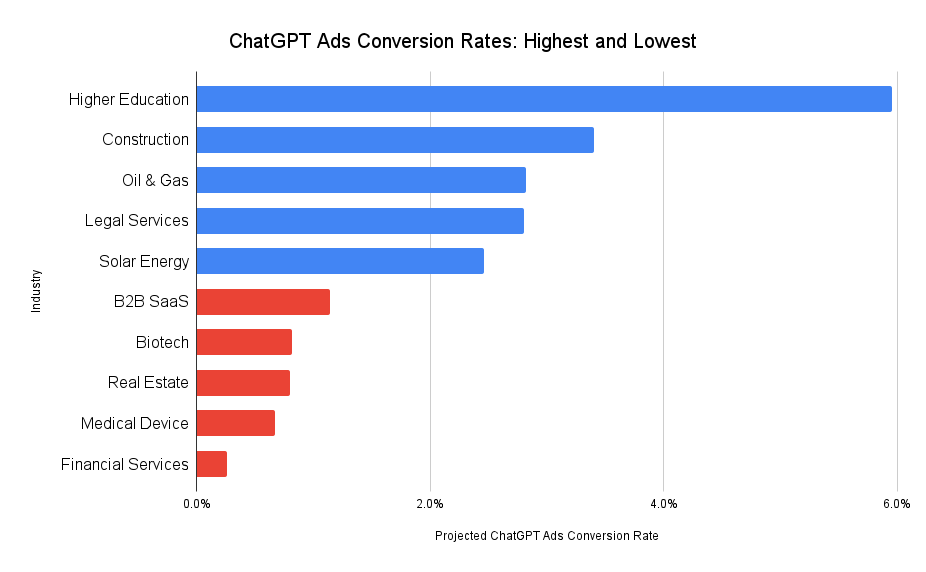
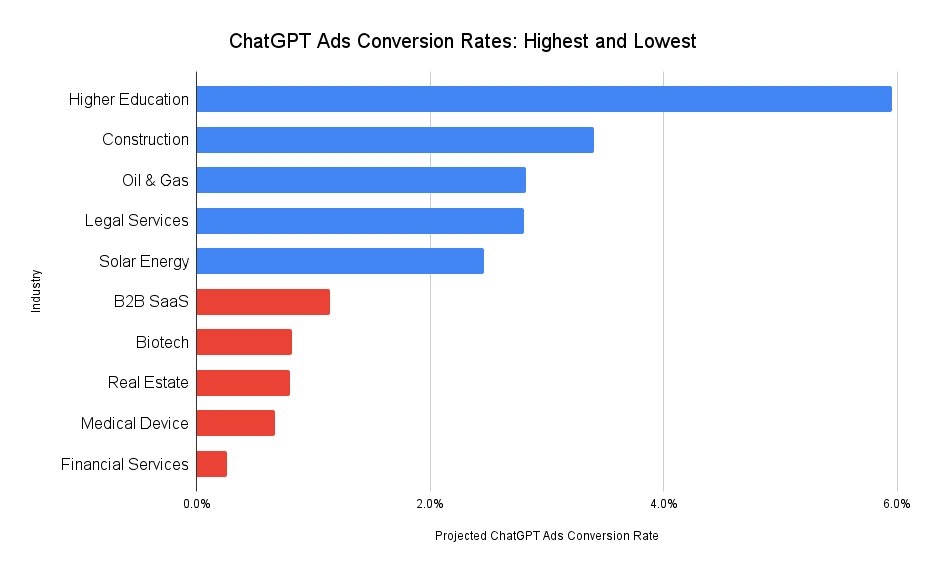
    ChatGPT Ad Conversion Rates: Highest and Lowest

    Chatgpt Ads Conversion Rates Highest And Lowest

    ChatGPT Ad Conversion Rates: What to Expect

    Right now, ChatGPT Ads are visible only to adult users in the U.S. who are logged in and using either the Free or Go subscription tiers. As OpenAI expands its advertising reach, I anticipate several shifts in user behavior worth noting:

    • Power users of ChatGPT, those on Plus, Pro, Business, or Enterprise plans, might see these ads if OpenAI extends to paid tiers. However, I foresee lower conversion rates in these cases since such users often utilize ChatGPT for tasks like code generation, data analysis, or marketing copywriting rather than searching for products or services.
    • Initial advertising rates should be fairly low to capture a wide user base, fostering dependency. But, just like Google, Meta, and LinkedIn ads experienced, I expect costs to rise as more adopters join in.
    • With advancements in agentic AI, advertising could broaden to include sponsored alternatives or upsells. Imagine users planning travel on ChatGPT receiving suggestions for sponsored destinations as extras.

    Further Reading & Requesting a Copy of This Report

    If you’re a business owner or marketer aiming to better allocate your marketing budget in anticipation of broader ChatGPT advertising, explore these insightful articles:

    To request a PDF version of this report, feel free to reach out here.

    Source


    Inspired by this post on First Page Sage Blog.


    crushpress.ai community screenshot